LineTrader

LINE TRADER is a universal semi-automatic Expert Advisor for trading on vertical and horizontal levels.

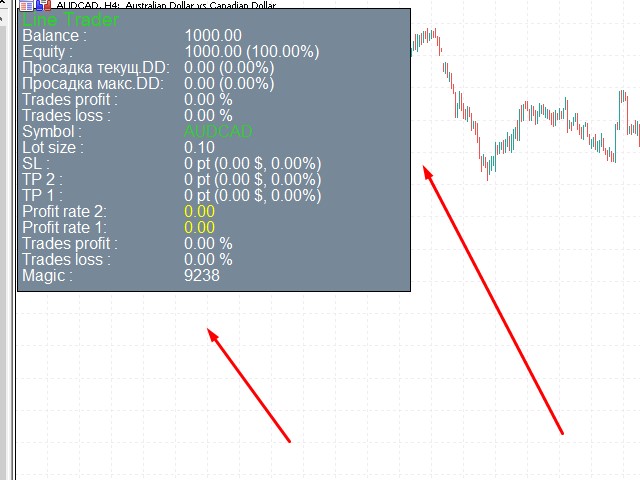
  The Expert Advisor actually consists of 4 buttons, with the help of which lines are drawn, and an information field, which displays information about trading on the account and separately for a currency pair.

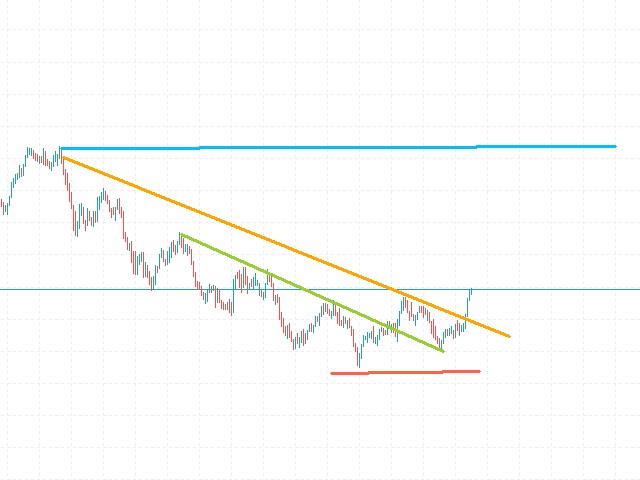
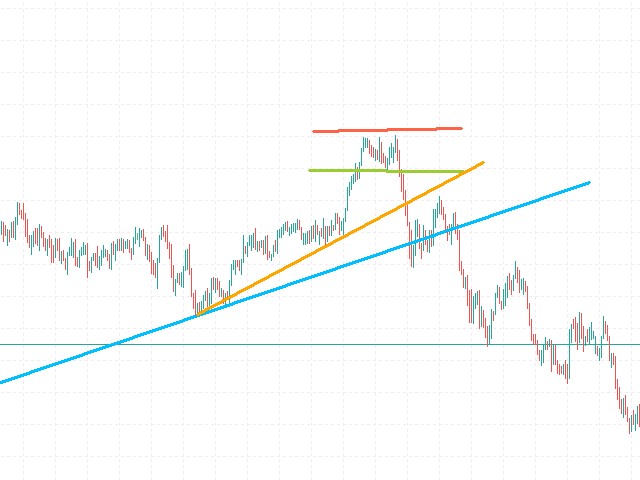
  The Expert Advisor automatically works on any lines selected by the trader. Lines can be drawn from any convenient angle. You just need to draw a line:

  - OPEN - open an order;

  - STOP - stop loss;

  - TAKE 2 - completely close the deal;

  - TAKE1 - partial saving / closing of the order;

           Lines are drawn in a standard way and therefore can be ray or segment (optional).

  This Expert Advisor is suitable for traders who use in their trading:

  - horizontal levels and methods of their trading (breakout, rollback, false breakout);

  - patterns (triangles, channels, etc.);

  - vertical (inclined, trend) levels;

  - trading with a trend, breakout or trend reversal (all types of levels);

  - nested lines;

  - any other types of trading that use a horizontal or oblique method of finding a trade entry point.

  Benefits

  The Expert Advisor is simple and straightforward;

Suitable for novice traders;

The Expert Advisor works with any financial instruments available in MetaTrader 5, including Forex, Crypto, CFD, Metalls;

Special types of lot and stop loss types (in the settings);

Features of the LINE TRADER advisor

  Can be used on any instrument and timeframe;

The ability to track open positions;

Advanced login statistics

Functions of notification by a message in the terminal (Push notifications);

basic settings

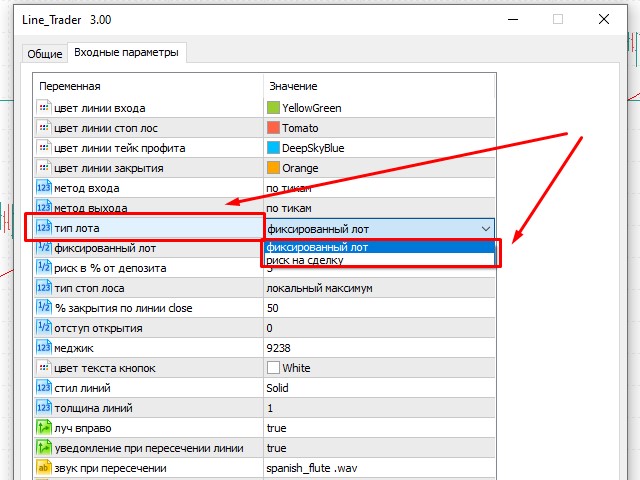
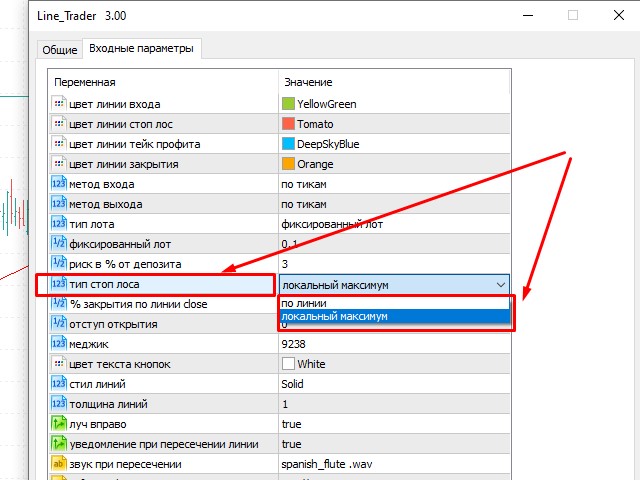
  Entry line color - by default it is green (YellowGreen);

Stop loss line color - by default it is red (Tomato);

Take profit line color - by default it is red (DeepSkyBlue);

Close line color - by default it is red (Orange);

Entry method - select the method of entering a trade by ticks or candle closing;

Exit method - select the exit method from a trade by ticks or by closing a candle;

Lot type - choose the volume "fixed" or "risk per trade"

           If "fixed" - then in the next column we select, for example, 0.1 lot;

             If there is “risk per trade”, then in the next column we select, for example, 3% of the deposit;

   Stop loss type - this parameter allows you to select the size of the stop based on 1 point, depending on the number of points to the immediate location of the STOP line from the OPEN line,

      this type of stop loss is “along the line”.

  Also, the STOP line can be placed above / below any local high / low and when it crosses the OPEN line, the stop size is automatically calculated from the difference of the high / low to the point

   crossovers with OPEN, type of stop loss "local high / low"

  % Close on the Take1 line - allows you to set the percentage of fixing a part of the profit, of the total size of the deal, when crossing the Take 2 line;

Opening indentation - setting the possible indentation in pips, by default it is set to 0;

Button text color - the ability to change the color of the main buttons by clicking on which you can draw lines) on the workspace (chart) to any other;

Line style - the default line style is Solid, but you can choose from several more options;

Line width - selection of the size of the line thickness (which we draw) by default 1;

Ray to the right - selection of the line type in the form of a ray, then the value is TRUE or a segment - then FALSE;

Notification when crossing the line - the ability to choose whether or not to notify using a pop-up window, or / and an audio message.

Information field settings:


Show - whether or not to display the information panel. True or False;

BackgroundColor - select the background color of the information panel fill;

TextColor - choice of text color, white by default;

Font - the font of the text;

Font size - the font size of the text

TitleColor - color that displays the name of the currency pair.

             Important notes

  This Expert Advisor is simply irreplaceable when trading levels in any configuration using most algorithms and strategies.

  The Expert Advisor is very well compatible with other indicators, therefore, in combination with them, you can get positive statistics and good profit.
Produtos recomendados
A professional tool for real-time monitoring of the account status and the work of Expert Advisors. Information about the account status can be sent to Telegram chats automatically at a specified interval or upon request. From the screenshots of the open charts of the terminal, you receive upon request from your Telegram bot. Account information includes: 13:02 Trade monitoring by Telegram v.1.0 (headline) Account : 6802ххх RoboForex-Pro (account information) Profit start: 2661 USD (profit earne
Compare Symbols Specifications is a utility indicator that is a summary interactive table of the analyzed parameters. Trading conditions in the market are constantly changing and tracking these changes is a time-consuming task. This tool allows you to compare the trading conditions of all symbols in a matter of seconds, and choose for trading those symbols that meet the requirements of the trading system. This tool will be useful to all traders and will help them to have up-to-date information
ReverseTune
Konstantin Chernov
A script for quick reversing positions and/or orders. If you need to reverse a position with the same volume, open an opposite position of a different volume or change the type of existing orders (for example, Buy Limit -> Sell Limit, Buy Stop -> Sell Limit, etc.) with the same or different take profit/stop loss, this script will make all the routine for you! Allow AutoTrading before running the script. Usage: Run the script on a chart. Input Parameters: Language of messages displayed (EN, RU, D
The informer provides information on the current state of open market positions. The visual presentation consists of two parts.  The left side contains the latest transactions executed on the account. Transactions are sorted by time. The right part shows the current state of the aggregate positions of the instruments. Sorting of positions is carried out in descending order of the margin load on the account. Updating and recalculating the status of positions is performed automatically and/or by
MarketMind AI
Perpetual Chinemerem Vincent
MarketMind AI Next-Generation Contextual Analysis for MetaTrader 5 Trade with the clarity of institutional-grade context. MarketMind AI is a professional decision-support system designed to bridge the gap between raw technical data and actionable market intelligence. Rather than generating signals or executing trades, MarketMind AI provides a structured, high-fidelity view of market conditions — enabling traders to make more informed discretionary decisions. USER GUIDE AND ANALYSIS PIPELINE AP
The utility places trailing stop, breakeven, stop loss and take profit.‌ It is necessary to allow automated trading in the terminal settings. In testing mode, the utility opens Buy or Sell positions on the first ticks, which allows you to visually observe the given logic, changing the utility parameters. In real mode, the utility does not open positions. Discuss the complexities of Forex trading here:  chat "Age of Expert Advisors" . Parameters magic   - magic number. If less than 0, positions w
Expert Advisor to change the Stop Loss and Take Profit levels. It is possible to set stop levels according to the specified profit/loss. You can set the price level directly. Эксперт для изменения уровней Stop Loss и Take Profit открытой позиции. Есть возможность задавать уровни стопов в соответствии с заданной прибылью/убытком. Можно задать непосредственно ценовой уровень ордеров Stop Loss и Take Profit.
The account manager has a set of functions necessary for trading, which take into account the results of the entire account in total, and not for each individual open position: Trailing stop loss. Take profit. Break-even on the amount of profit. Breakeven by time. Stop Loss Typically, each of these options can be applied to each individual trade. As a result, the total profit on the account may continue to increase, and individual positions will be closed. This does not allow you to get the maxi

EA Manage Emotion
Hua Nguyen Nguyen Tran
EA Emotion   is not a traditional Expert Advisor that places trades automatically – instead, it’s a psychological checkpoint that helps you manage   trading discipline and emotional control . Designed especially for discretionary traders, prop firm challengers, and anyone serious about improving consistency,   EA Emotion   asks a series of custom questions   right after you open a trade , such as: Did you follow your trading plan? Are you in the right mental state? Is this trade part of your set
OrderManager MT5
Lukas Roth
4.84 (25)
Apresentando o   OrderManager : Uma Ferramenta Revolucionária para MT5 Gerencie suas operações como um profissional com o novo utilitário Order Manager para MetaTrader 5. Projetado com simplicidade e facilidade de uso em mente, o Order Manager permite que você defina e visualize facilmente o risco associado a cada operação, possibilitando tomar decisões informadas e otimizar sua estratégia de trading. Para mais informações sobre o OrderManager, por favor, consulte o manual. [ Manual ] [ Versão M
Moderate EA MT5
AL MOOSAWI ABDULLAH JAFFER BAQER
Time frame: M1                                                 Leverage : Higher the better Spread: Lower the better Account type : All types (EA may enter hedge positions, if you want to disable this feature deactivate either Buy, or Sell from the setting) Please please do not take unnecessary risks. (Trading is risky, and there are no guarantees for winning)   We wish you successful trading. (Trading is risky, and there are no guarantees for winning)
ChartSync MT5
Alfiya Fazylova
5 (2)
Indicador Chart Sync - projetado para sincronizar objetos gráficos em janelas de terminal. Pode ser utilizado como complemento ao TradePanel . Antes de comprar, você pode testar a versão Demo em uma conta demo. Demonstração aqui . Para funcionar, instale o indicador no gráfico do qual deseja copiar os objetos. Os objetos gráficos criados neste gráfico serão copiados automaticamente pelo indicador para todos os gráficos com o mesmo símbolo. O indicador também copiará quaisquer alterações nos obje
Telegram Trade Notifier for MT5 is a professional notification system that sends instant messages to your Telegram group or channel every time a trade is opened or closed on your MT5 account. MAIN FEATURES Sends notifications for every trade open and close Compatible with Telegram Groups, Channels, and Topics (threads) ️ Customizable scan frequency and filters Persistent memory (no duplicate messages after restart) Ignores trade history — sends only new events ️ 100% safe: no DLLs
CloseByLossOrProfitTune Expert Advisor closes a part of position as the total profit or loss for specified symbols reaches a specific value. The profit or loss level is specified in the deposit currency. In addition, the Expert Advisor can delete pending orders. Allow AutoTrading before running the Expert Advisor. Usage: Run the Expert Advisor on a chart. Input Parameters: Language of messages displayed (EN, RU, DE, FR, ES) - language of the output messages (English, Russian, German, French, Spa
Just a panel for drawing levels. Minimal but very useful thing. This is a further development of the free version. This is the version that I use myself and it has many behavior adjustments. ---- 12 types of customized levels. Support for rectangle and line levels. If you need to prevent a level from extending, add "noext" to the end of the name level object. For any update idea please contact me here. ---- This is not an indicator, don't download the demo, it doesn't work For test see free ver
AutoBuy - is a script place pending buy stop orders with automatic calculation of the volume (number of shares) depending on the risk of money on the deal. Inputs: Risk - number in USD of money put on the trade. BuyHighStep - the number of USD, a step up from the rates High of the current candle (bar) stock up to buy. Minimum value is 0.01 StopLossStep - the number in USD, the step from the price of the buy stop order down to close the deal at a loss. The minimum value of 0.10  TakeProfitStep -
Assistente para gerenciamento de ordens. Recursos: -> Definição de TP e SL -> Trailing Stop -> Breakeven -> Realização Parcial, manual ou automática -> Operação através de atalhos do teclado -> 3 setups possíveis, com acionamento através de atalho do teclado, permitindo níveis diferentes de TP, SL e Trailing Stop -> Definição automática ou manual do Lote -> Gerenciamento de Risco personalizável -> Contador regressivo para final do candle -> Informações sobre Resultado (em pontos), tanto no candl
Informer
Sergey Sapozhnikov
Informer for VPS - report on the state of your account via e-mail. Useful for controlling your Expert Advisors that run on a VPS or a dedicated computer. Information about open positions and last deals for a day, week, month or year grouped by currency pairs.  Adjustable periodicity of reports and depth of deals included in the report. A possibility to add own comment to each report. You will receive reports on e-mail with specified periodicity: from 15 minutes to once a day. The reports are sen
UTrailingMiniMT5
Viktor Shpakovskiy
The utility for manual trading to manage open positions.The built-in trailing stop has three modes and seven instruments: by pips, by bar extremes, by fractals, by volumes, by MA, by Parabolic SAR and by ATR. With the help of the built-in trading simulator, you can check how the EA works in the strategy tester. Guide to UTrailingMiniMT5 can be found in the "Comments" section. Benefits 3 trailing stop modes: normal, total and mobile stop loss; 7 options: by points, by bar extremes, by fractals, b
Auranos Support EA
Hani Omar Ismail El Sheikh
A very usefull EA helps you control Trailing Stop and Break even point for single order  it works seperately for Buy side and Sell side the EA displays some information useful when you load to your chart  all you need to do is to change the name of the pair you want to control TP and BEP it works with all pairs and all types of accounts  if you have any questions you can always write to us at info@auranos.me
Key Features 1. Trading Modes Manual Mode (Recommended): Use the on-chart panel to execute Buy/Sell orders with full control Auto Mode: RSI-based strategy backtesting use 2. Martingale Risk Management Automatic lot size multiplication after stop loss hits Reverse trade execution (Buy→Sell, Sell→Buy) Configurable multiplier and maximum lot size Automatic reset to initial lot size after take profit 3. Professional UI Dashboard Real-time lot size display Live position status and profit/loss tracki
Chart Spot Binance
Ghavamipour Mohammadreza
show live chart spot All symbol binance If you want to get this product with a 99% discount, send a message to my Telegram admin and rent this product for 1 $ per month or 10 $ per year. Even if you do not like the way the chart is displayed, you can tell the admin in Telegram how to display it so that your own expert is ready. https://t.me/Bella_ciao1997 https://t.me/Binance_to_mql5
T Manager for Price action Traders
Haidar, Lionel Haj Ali
4.5 (10)
T Manager, the ultimate trade management solution designed by traders for traders. If you are searching for a simple and efficient trade panel, trade manager, or trade assistant, you are at the right place.   The market contains a diverse number of those tools , but this one is designed by traders for traders . I designed this tool, and I am using it daily. Take my advice and stop buying tools blended with un-useful features that you will never use,   T Manager provides you with the essential y
Good Mood Trading EA MT5
AL MOOSAWI ABDULLAH JAFFER BAQER
Time frame: M1                                                 Leverage : Higher the better Spread: Lower the better Account type : All types (EA may enter hedge positions, if you want to disable this feature deactivate either Buy, or Sell from the setting) Please please do not take unnecessary risks. (Trading is risky, and there are no guarantees for winning)   We wish you successful trading. (Trading is risky, and there are no guarantees for winning
Trade Panel MetaTrader 5 - feature-rich tool that adds the desired and highly-demanded functions to the terminal to enhance trading experience. Orders execution with one click You can open and close orders easily, using the panel. Buttons to open Market, Limit and Stop orders in both buy and sell directions are located on the Main tab, while there are multiple options to close already existing positions and cancel orders: Close/cancel all Close/cancel buy and sell positions/orders separately Clo
Virtual TP SL TS
Andrei Sviatlichny
Torne seus níveis Take Profit, Stop Loss e Trailing Stop invisíveis para o corretor! Opção principal: STEALTH MODE Virtual Trailing Stop Virtual Take Profit Ponto de equilíbrio virtual Virtual Stop Loss Vida útil dos pedidos virtuais AVISO: O Expert Advisor não faz pedidos sozinho. Você mesmo deve abrir os pedidos (inclusive por meio do painel de Especialistas) ou usar um Especialista terceirizado em outro gráfico do mesmo par de moedas. Especifique o número mágico "-1" nas configurações do Espe
Metrics Pro MT5 for Telegram is the ultimate reporting solution for serious Algo-Traders and Fund Managers. Stop checking your VPS every 10 minutes. Let the reports come to you. Developed by Eagle Forex Code , this utility monitors your account 24/7 and sends detailed professional reports directly to your mobile via Telegram. Unlike basic notifiers, Metrics Pro offers deep analytics including Profit Factor and Max Drawdown . Key Features Multi-Strategy Support (Unique Feature): Monitor up to
Exit Manager MT5
Victor Christiaanse
Enhance Your Trading with the Exit Manager Elevate your trading strategy with the Exit Manager, designed to ensure optimal closure of your trades at precisely the right moments. Once you've placed an order, our Exit Manager steps in and starts monitoring the order based on YOUR predetermined conditions, and can even trail your stop loss to mitigate risk. Key Features: Set & Forget Functionality With the Exit Manager, simply place your trade and let the tool do the rest. It continuously monitors
One Click Trader  is a tool designed for MetaTrader 4 platform, which enables you to take your trading to the next level. It enables you to open, manage and close your trades in simple an efficient way by just one click of your mouse button. "-"   ,  "+"  change OCT window size  Up arrow minimizes the OCT panel Down arrow maximizes the OCT panel Right arrow displays the next panel with additional features Left arrow hides the panel with additional features Red  SELL  button enables you to open s
The script allows to use the mouse for placing a grid of orders with fixed or variable step quickly and with as few mistakes as possible. Drag the script to the chart using the left mouse button and release. The grid will be plotted starting from that point. If the current price is lower than the grid start point, the grid will be placed "to the north" towards the buys, and if higher - towards the sells, "to the south". Setting take profit and stop loss is left to trader's discretion. Input Par
Os compradores deste produto também adquirem
Trade Assistant MT5
Evgeniy Kravchenko
4.41 (208)
Ajuda a calcular o risco por comércio, a fácil instalação de uma nova encomenda, gestão de encomendas com funções de fecho parcial, trailing stop de 7 tipos e outras funções úteis. Materiais e instruções adicionais Instruções de instalação   -   Instruções para a aplicação   -   Versão de teste da aplicação para uma conta de demonstração Função de linha Mostra no gráfico a linha de Abertura, Stop Loss, Take Profit. Com esta função é fácil definir uma nova ordem e ver as suas características ad
Bem-vindo ao Trade Manager EA—uma ferramenta de gestão de risco criada para tornar o trading mais intuitivo, preciso e eficiente. Não é apenas uma ferramenta para executar ordens, mas uma solução abrangente para planejamento de operações, gerenciamento de posições e controle de risco. Seja você um iniciante, trader avançado ou scalper que precisa de execução rápida, o Trade Manager EA adapta-se às suas necessidades, oferecendo flexibilidade em todos os mercados, desde forex e índices até commodi

TradePanel MT5
Alfiya Fazylova
4.86 (148)
O Trade Panel é um assistente comercial multifuncional. A aplicação contém mais de 50 funções de negociação para negociação manual e permite automatizar a maioria das operações de negociação. Atenção, a aplicação não funciona no testador de estratégia. Antes de comprar, pode testar a versão de demonstração numa conta de demonstração. Versão de demonstração aqui . Instruções completas aqui . Comércio. Permite realizar operações de negociação com um clique: Abra as ordens e posições pendentes com
Local Trade Copier EA MT5
Juvenille Emperor Limited
4.96 (124)
Experimente uma cópia de negociação excepcionalmente rápida com o Local Trade Copier EA MT5 . Com sua fácil configuração de 1 minuto, este copiador de negociações permite que você copie negociações entre vários terminais MetaTrader no mesmo computador Windows ou em um Windows VPS com velocidades de cópia ultra rápidas de menos de 0.5 segundos. Seja você um trader iniciante ou profissional, o   Local Trade Copier EA MT5   oferece uma ampla gama de opções para personalizá-lo de acordo com suas ne
Trade Dashboard MT5
Fatemeh Ameri
4.96 (111)
Tired of complex order placement and manual calculations? Trade Dashboard is your solution. With its user-friendly interface, placing orders becomes effortless, by a single click, you can open trades, set stop loss and take profit levels, manage trade lot size, and calculate risk to reward ratios, allowing you to only focus on your strategy. Say goodbye to manual calculations and streamline your trading experience with Trade Dashboard. Download  Demo Version  right now. You can find  Details of
Versão Beta O Telegram to MT5 Signal Trader está quase no lançamento oficial da versão alfa. Alguns recursos ainda estão em desenvolvimento e você pode encontrar pequenos erros. Se tiver problemas, por favor reporte, seu feedback ajuda a melhorar o software para todos. O preço aumentará após 20 vendas. Cópias restantes a $90: 2/20 . Telegram to MT5 Signal Trader é uma ferramenta poderosa que copia automaticamente sinais de trading de canais ou grupos do Telegram diretamente para sua conta Meta
Trade copier MT5
Alfiya Fazylova
4.61 (36)
Trade Copier é um utilitário profissional projetado para copiar e sincronizar negociações entre contas de negociação. A cópia ocorre da conta / terminal do fornecedor para a conta / terminal do destinatário, instalada no mesmo computador ou vps. Antes de comprar, você pode testar a versão demo em uma conta demo. Versão de demonstração aqui . Instruções completas aqui . Principais funcionalidades e benefícios: Suporta a cópia de MT5> MT5, MT4> MT5, MT5> MT4, incluindo contas "MT5 netting". Os mod
The product will copy all telegram signal to MT5 ( which you are member) , also it can work as remote copier.  Easy to set up, copy order instant, can work with almost signal formats, image signal,  s upport to translate other language to English Work with all type of channel or group, even channel have "Restrict Saving Content", work with  multi channel, multi MT5 Work as remote copier: with signal have ticket number, it will copy exactly via ticket number. Support to backtest signal. How to s
Exp COPYLOT CLIENT for MT5
Vladislav Andruschenko
3.82 (34)
Copiadora de comércio para MT5 é um  comércio   copiadora para a plataforma МetaТrader 5 . Ele copia negociações forex  entre   qualquer conta   MT5  - MT5, MT4  - MT5 para a versão COPYLOT MT5 (ou MT4  - MT4 MT5  - MT4 para a versão COPYLOT MT4) Copiadora confiável! Versão MT 4 Descrição completa +DEMO +PDF Como comprar Como instalar    Como obter arquivos de log    Como testar e otimizar    Todos os produtos da Expforex Você também pode copiar negociações no terminal МТ4 ( МТ4  - МТ4, МТ5  -
Copy Cat More Trade Copier MT5 (Gato Copiador MT5) é um copiador de negociações local e uma estrutura completa de gestão de riscos e execução projetada para os desafios comerciais de hoje. Desde desafios de prop firms até gestão de portfólio pessoal, ele se adapta a cada situação com uma combinação de execução robusta, proteção de capital, configuração flexível e manuseio avançado de negociações. O copiador funciona tanto no modo Master (remetente) quanto Slave (receptor), com sincronização em t
Ultimate Extractor
Clifton Creath
5 (9)
Ultimate Extractor - Professional Trading Analytics for MT5 *****this is the local HTML version of Ultimate Extractor. Check out Ultimate Extractor Cloud on mql5 for the Cloud version****** Ultimate Extractor transforms your MetaTrader 5 trading history into actionable insights with comprehensive analytics, interactive charts, and real-time performance tracking. What It Does Automatically analyzes your MT5 trading history across all Expert Advisors and generates detailed HTML reports with inte
HINN MagicEntry Extra
ALGOFLOW OÜ
4.67 (12)
HINN MAGIC ENTRY – the ultimate tool for entry and position management! Place orders by selecting a level directly on the chart! full description   ::  demo-version Key features: - Market, limit, and pending orders - Automatic lot size calculation - Automatic spread and commission accounting - Unlimited partitial take-profits  - Breakeven and trailing stop-loss and take-profit  functions - Invalidation leves - Intuitive, adaptive, and customizable interface - Works with any assets and account t
Farmed Hedge Yield Farming - Professional Pair Trading Dashboard (Manual - Hybrid - Semi/Automated EA) VERSION 3 - WILD HARVEST UPDATE Trading Approach: - Manual Trading: Primary focus - Auto Pilot: Optional supplementary feature - Full Automation: Not the main purpose Recommended Timeframe: H1-H4 DEMO VERSION Download the free demo to test functionality. Use Strategy Tester with Visual Mode to see how it works. VERIFIED TRADING RESULTS - Farmed Hedge Yield Axi Copy: https://www.mql5.com/en/si
Trade Manager DaneTrades
Levi Dane Benjamin
4.36 (28)
Trade Manager para ajudá-lo a entrar e sair rapidamente de negociações enquanto calcula automaticamente seu risco. Incluindo recursos para ajudar a evitar negociações excessivas, negociações de vingança e negociações emocionais. As negociações podem ser gerenciadas automaticamente e as métricas de desempenho da conta podem ser visualizadas em um gráfico. Esses recursos tornam este painel ideal para todos os traders manuais e ajudam a aprimorar a plataforma MetaTrader 5. Suporte multilíngue. Vers
Trade Manager DashPlus
Henry Lyubomir Wallace
5 (13)
DashPlus é uma ferramenta avançada de gerenciamento de operações projetada para melhorar a eficiência e a eficácia das suas transações na plataforma MetaTrader 5. Ela oferece um conjunto completo de funcionalidades, incluindo cálculo de risco, gestão de ordens, sistemas de grade avançados, ferramentas baseadas em gráficos e análise de desempenho. Principais Funcionalidades 1. Grade de Recuperação Implementa um sistema de grade flexível e de média para gerenciar operações em condições adversas de
MT5 to Telegram Signal Provider é uma utilidade fácil de usar e totalmente personalizável que permite o envio de sinais especificados para o chat, canal ou grupo do Telegram, tornando sua conta um fornecedor de sinais . Ao contrário da maioria dos produtos concorrentes, ele não usa importações de DLL. [ Demonstração ] [ Manual ] [ Versão MT4 ] [ Versão Discord ] [ Canal do Telegram ]  New: [ Telegram To MT5 ] Configuração Um guia do usuário passo a passo está disponível. Não é necessário conhec
Seconds Chart MT5
Boris Sedov
4.59 (17)
Seconds Chart — uma ferramenta exclusiva para criar gráficos de segundos no MetaTrader 5 . Com o Seconds Chart , você pode criar gráficos com períodos definidos em segundos, proporcionando flexibilidade e precisão ideais para análise, indisponíveis em gráficos padrão de minutos ou horas. Por exemplo, o período S15 indica um gráfico com velas de 15 segundos. Você pode usar qualquer indicador ou Expert Advisor com suporte a símbolos personalizados. Trabalhar com eles é tão conveniente quanto negoc
YuClusters
Yury Kulikov
4.93 (43)
Atenção: A versão demo para revisão e teste está aqui . YuClusters é um sistema profissional de análise de mercado. O trader tem oportunidades únicas para analisar o fluxo de pedidos, volumes de negociação, movimentos de preços usando vários gráficos, perfis, indicadores e objetos gráficos. O YuClusters opera com base em dados de Tempos e Negócios ou informações de ticks, dependendo do que está disponível nas cotações de um instrumento financeiro. O YuClusters permite que você crie gráficos com
Telegram to MT5 Coppy
Sergey Batudayev
5 (7)
Telegram para MT5:   A solução definitiva para cópia de sinais Simplifique suas negociações com o Telegram para MT5, a ferramenta moderna que copia sinais de negociação diretamente dos canais e chats do Telegram para a sua plataforma MetaTrader 5, sem a necessidade de DLLs. Esta solução poderosa garante execução precisa dos sinais, amplas opções de personalização, economiza tempo e aumenta sua eficiência. [ Instructions and DEMO ] Principais características Integração direta da API do Telegram A
Smart Stop Manager – Execução automática de stop-loss com precisão profissional Visão geral O Smart Stop Manager é a camada de execução da linha Smart Stop, desenvolvido para traders que precisam de uma gestão de stop-loss estruturada, fiável e totalmente automatizada em múltiplas posições abertas. Ele monitora continuamente todas as operações ativas, calcula o nível ideal de stop usando a lógica de estrutura de mercado do Smart Stop e atualiza os stops automaticamente com regras claras e tran
GRat Crypto
Ivan Titov
4.5 (2)
Trade on crypto exchanges in MT5! GRat_Crypto is a tool for manual and automated trading , including ANY available EA, ANY  cryptocurrency  on most popular crypto exchanges in the familiar MT5 environment 24/7. Features 1. ALL instruments of the 9 most popular crypto exchanges are available: Binance, BingX, Bybit, Coinbase, CoinEx, Kraken,   KuCoin, MEXC and OKX . 2. The ability to place ANY type of order available in MT5, both market and pending, to modify orders and positions, to delete order
Telegram To MT5 Receiver
Levi Dane Benjamin
4.53 (15)
Copie os sinais de qualquer canal do qual você seja membro (incluindo privados e restritos) diretamente para o seu MT5.  Esta ferramenta foi projetada com o usuário em mente, oferecendo muitos recursos que você precisa para gerenciar e monitorar as negociações. Este produto é apresentado em uma interface gráfica fácil de usar e visualmente atraente. Personalize suas configurações e comece a usar o produto em minutos! Guia do usuário + Demo  | Versão MT4 | Versão Discord Se deseja experimentar
Professional Footprint Chart EA - Complete Order Flow Trading Suite DEMO USERS - PLEASE SELECT EVERY TICK WHEN TESTING  See What Market Makers See! The most comprehensive order flow analysis tool for MetaTrader 5. Get institutional-grade volume analysis, real-time DOM, Time & Sales, and intelligent trade signals - all in one powerful EA. 6 Professional Panels - Complete order flow analysis suite Real-Time Tick Data - Live bid/ask volume at every price level Automatic Imbalance Detection - Spot
Risk Manager for MT5
Sergey Batudayev
4.35 (17)
O Expert Advisor Risk Manager para MT5 é um programa muito importante e, na minha opinião, necessário para todos os traders. Com este Expert Advisor você poderá controlar o risco em sua conta de negociação. O controle de risco e lucro pode ser realizado tanto em termos monetários quanto em termos percentuais. Para que o Expert Advisor funcione, basta anexá-lo ao gráfico de pares de moedas e definir os valores de risco aceitáveis ​​na moeda de depósito ou em % do saldo atual. [Instruction for
Entry In The Zone and SMC Multi Timeframe is a real-time market analysis tool developed based on Smart Money Concepts (SMC). It is designed to analyze market structure, price direction, reversal points, and key zones across multiple timeframes in a systematic way. The system displays Points of Interest (POI) and real-time No Repaint signals, with instant alerts when price reaches key zones or when signals occur within those zones. It functions as both an Indicator and a Signal System (2-in-1), c
Smart Stop Scanner – Sistema multiactivo de análise de stops baseado em estrutura de mercado Visão geral O Smart Stop Scanner oferece aos traders um monitoramento profissional de níveis de stop-loss em múltiplos mercados. O sistema identifica automaticamente as zonas de stop mais relevantes com base na estrutura real do mercado, rupturas significativas e lógica de price action — tudo apresentado em um painel unificado, claro e totalmente compatível com telas de alta resolução (DPI-aware). Func
Grid Manual MT5
Alfiya Fazylova
4.9 (20)
"Grid Manual" é um painel comercial para trabalhar com uma grade de ordens. O utilitário é universal, possui configurações flexíveis e uma interface intuitiva. Ele trabalha com uma grade de ordens não apenas na direção da média das perdas, mas também na direção do aumento dos lucros. O trader não precisa criar e manter uma grade de ordens, tudo será feito pelo ""Grid Manual". Basta abrir um orden e o "Grid manual" criará automaticamente uma grade de ordens para ele e trabalhará com ele até que s
Trade Assistant 38 in 1
Makarii Gubaydullin
4.91 (23)
Ferramenta Multifuncional: Calculadora de Lote, Ordens Grid, Proporção R/R, Gerenciador de Negociações, Zonas de Oferta e Demanda, Price Action e muito mais Versão Demo   |   Manual do Usuário O Assistente de Trading   não funciona no testador de estratégias : você pode baixar a   Versão Demo AQUI  para testar a utilidade . Entre em contato   para qualquer dúvida  / ideias de melhoria / caso encontre um erro Se precisar de uma versão MT4, ela está disponível aqui Simplifique, acelere e automati
Painel de negociação para negociação em 1 clique. Trabalhando com posições e pedidos! Negociar a partir do gráfico ou do teclado. Com nosso painel de negociação, você pode executar negociações com um único clique diretamente no gráfico e realizar operações de negociação 30 vezes mais rápido do que com o controle MetaTrader padrão. Cálculos automáticos de parâmetros e funções tornam a negociação mais rápida e conveniente para os traders. Dicas gráficas, rótulos informativos e informações completa
Take a Break MT5
Eric Emmrich
4.83 (23)
The most advanced news filter on MQL market - free demo available Take a Break has transformed from a basic news filter into a comprehensive account protection solution. It seamlessly pauses any other Expert Advisors during news events or based on your custom filters, all while safeguarding your EA settings - restoring them automatically when trading resumes for complete peace of mind. Typical use cases: A single news filter for all your EAs. Stop trading during news/high volatility (+ close all
Mais do autor
LINE TRADER é um Expert Advisor semiautomático universal para negociação vertical e horizontal horizontal. O Expert Advisor na verdade consiste em 4 botões com os quais as linhas são desenhadas. O Expert Advisor funciona automaticamente em qualquer linha escolhida pelo trader. As linhas podem ser desenhadas em qualquer ângulo. Você só precisa traçar uma linha: - ABRIR - para abrir um pedido; - STOP - stop loss; - TAKE - para fechar completamente o negócio e consertar todos os lucros; - CL
Filtro:
Sem comentários
Responder ao comentário