Multicurrency overview

Stay updated with Multicurrency Overview!!

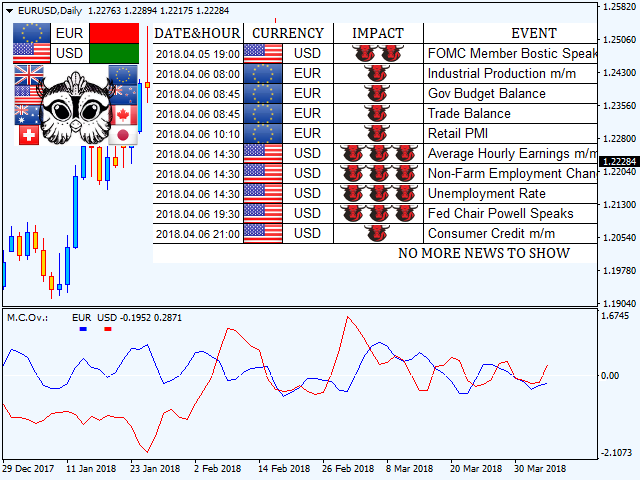
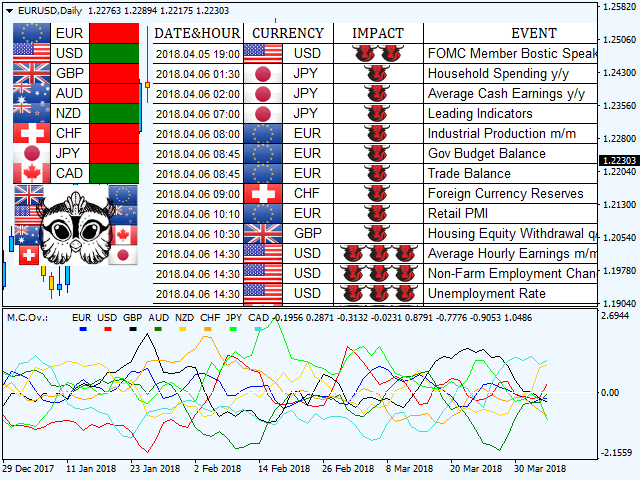
The algorithm of this EA releases an average of the movement percentage of all the Forex currencies linked to a single currency, isolating it, letting us to comprehend its real and specific trend.


Above on the left, a panel show us efficiently the trend of the currency, in the timeframe actually used. The second panel will keep you updated on macroeconomic news.


P.N.:The news time is based on your pc clock time, this way you won't have any problem regarding brokers time :


User manual:


Installing:


Multicurrency Overview is an EA, so you have to insert it in "MQL4/Experts" folder.

To stay updated on macro news, you got to allow WebRequest to https://minerva.management on Tools/Options/Expert Advisors (from your MT4 terminal).

You will have a button called "economic calendar". If pushed, the EA will show you macro news.

Input values:

PANEL SETTINGS:

Minimal impact: Here you can choose the minimal impact of the macro news you want to see, if you want to see just "three bulls" news (strong impact), you can set the value on "strong".

Background color: Here you can choose the panel background color.

Front color: You can choose the panel front color.

Buy color: You can choose the color of BUY signal.

Sell color: You can choose the color of SELL signal.


EA SETTINGS:

Enable alert: If set on"True", you'll receive an alert regarding the currencies directionality.

Send mail: If set on"True", you'll receive an e-mail on your phone or any other device, to have always at your disposal the currencies directionality.

Bars to calculate: Choose how may bars/candles trend the indicator will show on the lower window.

Average: Average you'd like to apply on the currencies trend.

Average method: Kind of average you'd like to apply on the currencies trend. (Simple, linear weighted, exponential, smoothed)

Show eur,usd ecc..: If set on"True",the indicator will do calculations on currency, if "False" will ignore it.

Eur,usd ecc.. color: Choose the color to see the movement of the currency on the lower window.


Last but not least, you'll find a list of the currencies on which the indicator will do its calculations.

In case you are using a broker with peculiar suffixes (ex:EURUSDp o EURUSD_), it will suffice to change currencies names and saving the template.
Produtos recomendados
ChartTrader is a professional trading tool that every trader needs in their toolbox. It has been developed to work with the MT4 Platform. ChartTrader offers a number of options to make placing orders in the Forex market quick and easy. The GUI sits on the chart window so there is no need to navigate to separate windows when placing orders. The program allows you to set pending and instant orders. It has a built in risk management system, so every trade can risk a percentage or a fixed amount in
Trade Assistant Pro 36 in 1
Makarii Gubaydullin
4.76 (21)
Ferramenta Multifuncional: Calculadora de Lotes, Ordens Grid, Proporção R/R, Gerenciador de Trades, Zonas de Oferta e Demanda, Price Action e muito mais Versão Demo   |   Manual do usuário O Assistente de Trading não funciona no testador de estratégias: você pode baixar a Versão Demo AQUI para testar a utilidade . Entre em contato para qualquer dúvida / ideias de melhoria / em caso de encontrar um bug Se você precisa de uma versão MT5, está disponível aqui Simplifique, acelere e automatize seu
Description: Please tick "Show object descriptions" in chart properties to enable hrays views That utility converts a trendline into a horizontal ray known as tool for drawing supply and demand zones. Simply create a trendline on a chart and once selected, it will get converted. Ray remains horizontal while dragging.  Quick ray plot: press "R" key to create horizontal ray. It will be snapped to the nearest OHLC value Further versions will be improved. For feature request please post new comm
Program Overview: This program is a trading tool designed to monitor and analyze the 7 major currency pairs. It is a variant of a similar program used for tracking stock indices, but this version focuses on the seven major currency pairs. The program helps in identifying and calculating significant price movements (gaps) between the high and low prices of these currency pairs over a specified time frame. It then provides insights through comments and alerts based on the calculated gaps. Major Cu
This tool will perform Trailing stop loss and Break even management for orders. Helps you limit or reduce the time spend watching orders on the screen, especially when you need to go to sleep. Just add this EA to 1 chart, you can manage all pairs. You can filter orders by comment, magic number, symbol, and order ticket number. When Breakeven it can add shift/offset pips (to cover the commission...). You can try in strategy tester before purchase. The EA will add Buy and Sell alternately, so yo
The indicator enables measurement and analysis of accumulated volume (tick), in any chosen swing. The user's task is to mark individual measuring sections with the help of a "crayon's". The indicator automatically sums the volumes of individual candles. Volume analysis is a basic element of the VSA (volume spread analysis) technique. A method of using an indicator is shown on the film. Parameters description Anchor_mode - If true, one end of the measuring line is always hooked on the current ca
The Best One Scalping Trade Panel functional manual trade panel with risk reward, auto SL by candle ( original solution), lot size calculation, one-click trading, scale in and out of trades (partial close),  Works with all symbols not just currency pairs, perfect works on DAX, NASDAQ, GOLD, ...... I earn every day during live stream on ZakopiecFX - join Me Risk by lot Risk by percent SL by points SL by Candle, Renko, RangeBar ( original solution) TP by point TP by Risk/Reward Auto Trailing by P
TSim
Sergey Kruglov
Утилита  TSim   позволяет симулировать ручную торговлю в Тестере Стратегий MetaTrader 4. В панеле можно устанавливать размеры лота, тейпрофита и стоплосса. Панель имеет кнопки Sell   и Buy для выставления рыночных ордеров, а также кнопки CloseSell, CloseBuy и CloseAll для быстрого закрытия ордеров. Под панелью отображается список открытых ордеров. Внимание. Панель работает только в Визуальном режиме Тестера Стратегий MetaTrader 4.
FREE
"Turbo Helper para scalping" é um sistema de negociação totalmente preparado. Mostra ao trader com uma seta no gráfico quando abrir uma ordem e em qual direção. Também indica ao trader com um símbolo quadrado quando fechar a negociação. Após isso, o indicador exibe no gráfico o número estimado de pontos para a negociação. Esse valor pode variar ligeiramente, pois o indicador não leva em consideração o tamanho real do spread e swap da sua corretora. No entanto, para calcular de forma mais precisa
NNFX Tool
Nguyen Thi Kieu Oanh
NNFX TOOL – The Essential Order Management Tool for the Modern Trader A "small but mighty" EA, designed to optimize your trading workflow: High Performance: Lightweight yet powerful operation, ensuring precise and efficient order execution. Versatile: Perfect for NNFX method followers, while being incredibly user-friendly for beginners and sophisticated enough for pro-traders. SPECIAL FEATURE - Mobile Trading Support: Automatically sets immediate Stop Loss (SL) and Take Profit (TP) for pending
FREE
SmartLot MT4
Nikita Chernyshov
Versão gratuita para contas demo   | Versão   MT5 SmartLot   MT4  é um painel interativo e simples para cálculo rápido de lote, colocação de ordens pendentes e de mercado diretamente do gráfico. Não funciona no Testador de Estratégias.   Para testar a utilidade, baixe a versão gratuita para contas demo. As instruções e o arquivo estão no cabeçalho da descrição. Funcionalidades: Interface Gráfica:   Linhas interativas de Entrada, SL, TP com zonas de lucro e perda codificadas por cores. Cálc
Smart Backtest
Mr Chaiyaporn Boonsamorn
For those who are still not confident in their system or are testing new techniques to make it easier without wasting time to change the charts one by one, we recommend EA Smart Backtest to help you backtest your system efficiently. -The EA is intended to Backtest your system.   -Able to open buy or sell in visual mode and can modify values ​​for LOT, SL, TP.   -The chart also shows the Balance Equity Profit status. -Can choose to close, Buy, Close, Sell
TradeTracker Pro
Ranguni Abdulsamir Abdulmajid
TradeTracker Pro – Smart Trade Tracking & Management Utility Take control of your trading with TradeTracker Pro – the ultimate utility for monitoring, analyzing, and managing your trades in real time . Whether you’re a scalper, day trader, or swing trader, this powerful tool helps you track performance, set smart take profits & stop losses, and visualize every deal directly on your chart . Key Features Real-Time Trade Tracking – Monitor all open and closed trades with full details on prof
MT4 to Telegram Pro/Copier é um poderoso Consultor Especialista para MetaTrader 4 projetado para melhorar sua experiência de trading ao enviar notificações de operações em tempo real e relatórios completos para o seu canal do Telegram. Ideal para provedores de sinais e instrutores, esta ferramenta copia negociações colocadas manualmente ou por outros EAs em sua conta, oferecendo alertas personalizáveis, gerenciamento avançado de operações e um painel de controle fácil de usar para insights de de
This panel is a part of the SupDem-Pro trading system and is used to search for the best opportunities for any available instruments. Which can be selected manually in the Market Watch (open it with CTRL + M). Using this trading panel in combination with ShvedSupDem-Pro_Zone allows to analyze multiple currency pairs with a single click. The panel allows to load any instruments from the Market Watch, from 6 major currency pairs up to all instruments (480). The indicator parameters Button Width -
noite brilhante   é um consultor totalmente automático para trabalhar no mercado Forex durante as horas de silêncio. Another 7 copies will be sold for $599. Next price 699$ Acompanhamento do trabalho do consultor:   https://www.mql5.com/en/users/bayburinmarat/seller Configuração GMT correta:   https://www.mql5.com/ru/blogs/post/743531 Como sabemos, ultimamente à noite o spread no mercado Forex tem aumentado, às vezes até limites irracionais. Às vezes, um spread pode matar uma negociação potencia
Blahtech Market Profile
Blahtech Limited
4.53 (15)
Was: $249  Now: $99   Market Profile defines a number of day types that can help the trader to determine market behaviour. A key feature is the Value Area, representing the range of price action where 70% of trading took place. Understanding the Value Area can give traders valuable insight into market direction and establish the higher odds trade. It is an excellent addition to any system you may be using. Blahtech Limited presents their Market Profile indicator for the MetaTrader community. Ins
Instruções de uso: https://www.mql5.com/zh/blogs/post/754946 Versão MT4: https://www.mql5.com/zh/market/product/88205 Versão MT5: https://www.mql5.com/zh/market/product/88204 -------------------------------------------------- 1. Copiar pedidos, de 12 contas master para 100 contas slave. O número de contas slave pode ser personalizado, de 12 a 100. 2. Suporte MT4 a MT4, MT4 a MT5, MT5 a MT4, MT5 a MT5. 3. Identifique os sufixos de variedades de negociação em diferentes plataformas, como EURUSD,
TMA AI Bands
Monique Ellen Miranda Dos Santos
O indicador TMA AI Bands é baseado na Média Móvel Triangular (TMA) com bandas superior e inferior dinâmicas e setas claras de compra/venda plotadas diretamente no gráfico. Ele possui IA integrada para otimização adaptativa e garante sem repintura, fornecendo sinais precisos de reversão quando o preço toca as bandas. * Pares: funciona com todos os pares de moedas * Timeframes recomendados: D1 / W1 / MN * Variáveis externas configuráveis:   * TimeFrame – período de cálculo   * HalfLength – s
Grid Maestro
Ruslan Brezovskiy
Grid Maestro – uma ferramenta que constrói automaticamente uma grade de ordens com base em parâmetros específicos: passo da grade, número de ordens e multiplicador de volume. A abertura da primeira operação ocorre ao pressionar um botão na tela. Também está prevista uma função de ajuste automático dos parâmetros, calculada com base na análise do drawdown máximo do instrumento. Características:   Funciona apenas com ordens abertas por meio da pressão de botões na tela. Ao usar o modo automático,
Reversal Monster Mini
Abdulfattah Yahya Mohammed Alhazmi
The Most advanced and comprehensive EA to trade Trend Reversals/Pullbacks It is a very profitable EA, to trade trends breakout, and manage trades, takeprofit, stoploss, move to breakeven, and trailing stop. The   “Reversal Monster EA”   trades Reversal/Pullbacks when the current price of the pair pullback to a predefined horizontal level or trendline on the currency chart. The opening of the position can be immediate after pullback to the drawn trendline or after closing the candle below/above
FREE
Now, you have your very own  PROP FIRM AUTO-CLOSER  program! Once your account target or drawdown hits, all open orders will close automatically. “One mistake and your prop account is gone.  Prop Firm Close All Orders for MT4  ensures that never happens.” All of your   OPEN ORDERS   will automatically close when: Your   ACCOUNT TARGET   is hit,  OR Your specified   ACCOUNT DRAWDOWN   is hit,  OR WEEKEND CLOSE   is set and current time is already past the specified time,  OR CLOSE ALL ORDERS   bu
Trade Manager MT4 DaneTrades
Levi Dane Benjamin
4.09 (11)
Trade Manager para ajudá-lo a entrar e sair rapidamente de negociações enquanto calcula automaticamente seu risco. Incluindo recursos para ajudar a evitar negociações excessivas, negociações de vingança e negociações emocionais. As negociações podem ser gerenciadas automaticamente e as métricas de desempenho da conta podem ser visualizadas em um gráfico. Esses recursos tornam este painel ideal para todos os traders manuais e ajudam a aprimorar a plataforma MetaTrader 4. Suporte multilíngue. Vers
Navigator FX
Chantal Sala
5 (1)
The Navigator is a next-generation panel very easy to use. Apply this indicator on the chart to navigate very quickly through all the symbol and timeframes listed in input. The arrows manage the zoom and time frames. You can customize both the graphic colors and the list of symbols to display. A quick and easy tool that it will help to analyse the charts. Input Values Show_TF_Panel (true/false) it permits to show/hide panel with TF and Arrows 32 symbols COLORS AND SIZE SETTINGS BUTTON_WIDTH But
Trade panel manual is a multifunctional trading assistant. It allows you to open market and pending orders in one click. Value is set via button menu edit or deleted by specific buttons pending orders and the value of take profit and stop loss in one click. Through the edit menu of the button, a value is set that can be easily changed by simply moving level_tp lines for take profit or stop loss levels and for pending orders. It is possible to select orders and determine for them and set the leve
Auto BE 2 Edition
Calvin Andile Mahlangu
Auto BE #2 Edition – Trade Exit and ADR Panel Utility (MT4) Overview Auto BE #2 Edition is a MetaTrader 4 utility that manages trade exits using automatic stop-loss placement, breakeven protection, and an optional partial-close mechanism. It also includes an ADR (Average Daily Range) panel that displays market range and volatility data directly on the chart. The tool helps traders maintain consistent, rules-based trade management whether trading manually or through Expert Advisors. Main Functio
FREE
AutoOrderModifyEAPro: A Vital Aid for Forex Traders, Both Manual and System-based Catering to the diverse needs of forex traders, whether engaged in manual or system-based trading, AutoOrderModifyEAPro emerges as a pivotal tool in this intricate landscape. The tool's efficacy is most evident in scenarios such as: Enhancing EA Strategies: Addressing the common dilemma of lacking Trailing and/or Break Even mechanisms in otherwise promising EAs. Streamlining Position Management: Overcoming the hass
It is so very disappointing when the price does not have enough points to achieve Take Profit and makes a reversal. This EA sets virtual levels near the TakeProfit levels. This EA sets virtual levels next to TakeProfit orders. If these levels are reached by price, breakeven or trailing stop is applied for an order. Features This EA does not set new orders. The aim of this EA is to manage stop losses of existing orders that are set by another EA or manually (magic number equals 0). For correct w
Scalping Day Trading Support Utility Scalping One for MT4 setting faile (for white Chart)    http://www.emkyuradias.shop/indexenglish.html One position is displayed with one button. View P & L, Lot, and Point in real time. It is possible to switch the display of positions of only chart currencies and all currency pairs.   Supports automatic identification in Japanese and English   Account currency notation corresponds to dollar, euro, pound, yen (automatic identification) Lot, take profit and
Níveis automáticos de ponto de equilíbrio Usando   esta   ferramenta ,   v ocê pode ativar o movimento automático do SL, quando a operação atingir um lucro desejado.  Especialmente   importante   para   traders   de   curto prazo   .   A opção de deslocamento também está disponível: algum lucro pode ser protegido. Ferramenta multifuncional : 66+ recursos, incluindo esta ferramenta  |   Contate-me  se tiver alguma dúvida  |   Versão MT5 Processo de ativação da função automática de ponto de equil
Os compradores deste produto também adquirem
Local Trade Copier EA MT4
Juvenille Emperor Limited
4.96 (105)
Experimente uma cópia de negociação excepcionalmente rápida com o Local Trade Copier EA MT4 . Com sua fácil configuração de 1 minuto, este copiador de negociações permite que você copie negociações entre vários terminais MetaTrader no mesmo computador Windows ou em um Windows VPS com velocidades de cópia ultra rápidas de menos de 0.5 segundos. Seja você um trader iniciante ou profissional, o Local Trade Copier EA MT4 oferece uma ampla gama de opções para personalizá-lo de acordo com suas necess
Bem-vindo ao Trade Manager EA—uma ferramenta de gestão de risco criada para tornar o trading mais intuitivo, preciso e eficiente. Não é apenas uma ferramenta para executar ordens, mas uma solução abrangente para planejamento de operações, gerenciamento de posições e controle de risco. Seja você um iniciante, trader avançado ou scalper que precisa de execução rápida, o Trade Manager EA adapta-se às suas necessidades, oferecendo flexibilidade em todos os mercados, desde forex e índices até commodi
Trade Assistant MT4
Evgeniy Kravchenko
4.42 (192)
Ajuda a calcular o risco por comércio, a fácil instalação de uma nova encomenda, gestão de encomendas com funções de fecho parcial, trailing stop de 7 tipos e outras funções úteis. Materiais e instruções adicionais Instruções de instalação - Instruções para a aplicação - Versão de teste da aplicação para uma conta de demonstração Função de linha Mostra no gráfico a linha de Abertura, Stop Loss, Take Profit. Com esta função é fácil definir uma nova ordem e ver as suas características adicionais
The product will copy all telegram signal to MT4   ( which you are member  ) , also it can work as remote copier.  Easy to set up, copy order instant, can work with almost signal formats, image signal, s upport to translate other language to English Work with all type of channel or group, even channel have "Restrict Saving Content", work with  multi channel, multi MT5 Work as remote copier: with signal have ticket number, it will copy exactly via ticket number. Support to backtest signal. How to
Trade copier MT4
Alfiya Fazylova
4.58 (33)
Trade Copier é um utilitário profissional projetado para copiar e sincronizar negociações entre contas de negociação. A cópia ocorre da conta / terminal do fornecedor para a conta / terminal do destinatário, instalada no mesmo computador ou vps. Antes de comprar, você pode testar a versão demo em uma conta demo. Versão de demonstração aqui . Instruções completas aqui . Principais funcionalidades e benefícios: Suporta a cópia de MT4> MT4, MT4> MT5, MT5> MT4, incluindo contas "MT5 netting". Os mod
Exp COPYLOT CLIENT for MT4
Vladislav Andruschenko
4.69 (65)
Copiadora comercial para MetaTrader 4. Ele copia negociações, posições e pedidos em forex de qualquer conta. É uma das melhores copiadoras comerciais  MT4 - MT4, MT5 - MT4 para a versão COPYLOT MT4  (ou MT4 - MT5 MT5 - MT5 para a versão COPYLOT MT5 ). Versão MT5 Descrição completa +DEMO +PDF Como comprar Como instalar    Como obter arquivos de log    Como testar e otimizar    Todos os produtos da Expforex Versão da copiadora para o terminal MetaTrader 5 ( МТ5 - МТ5, МТ4 - МТ5 ) -  Copylot Cli
Unlimited Trade Copier Pro is a tool to copy trade remotely to multiple MT4, MT5 and cTrader accounts at different computers/locations over internet. This is an ideal solution for you if you are a signal provider and want to copy your trades to other receivers globally on your own rules. One provider can copy trades to multiple receivers and one receiver can get trade from multiple providers as well. The provider can even set the subscription expiry for each receiver, so that receiver will not b
Strategy Builder offers an incredible amount of functionality. It combines a trade panel with configurable automation (covert indicators into an EA), real-time statistics (profit & draw down) plus automatic optimization of SL, TP/exit, trading hours, indicator inputs. Multiple indicators can be combined into an single alert/trade signal and can include custom indicators, even if just have ex4 file or purchased from Market. The system is easily configured via a CONFIG button and associated pop-up
Copy Cat More Trade Copier MT4 (Cópia Gato MT4) não é apenas um simples copiador local de operações; é uma estrutura completa de gestão de risco e execução, projetada para os desafios atuais do trading. Desde desafios de prop firms até a gestão de contas pessoais, adapta-se a cada situação com uma combinação de execução robusta, proteção de capital, configuração flexível e tratamento avançado das operações. O copiador funciona tanto no modo Master (emissor) quanto no modo Slave (receptor), sincr
TradePanel MT4
Alfiya Fazylova
4.84 (89)
O Trade Panel é um assistente comercial multifuncional. A aplicação contém mais de 50 funções de negociação para negociação manual e permite automatizar a maioria das operações de negociação. Atenção, a aplicação não funciona no testador de estratégia. Antes de comprar, pode testar a versão de demonstração numa conta de demonstração. Versão de demonstração aqui . Instruções completas aqui . Comércio. Permite realizar operações de negociação com um clique: Abra as ordens e posições pendentes com
Trade Dashboard MT4
Fatemeh Ameri
4.96 (53)
Tired of complex order placement and manual calculations? Trade Dashboard is your solution. With its user-friendly interface, placing orders becomes effortless, by a single click, you can open trades, set stop loss and take profit levels, manage trade lot size, and calculate risk to reward ratios, allowing you to only focus on your strategy. Say goodbye to manual calculations and streamline your trading experience with Trade Dashboard. Download  Demo Version  right now. You can find  Details of
O MT4 para Telegram Signal Provider é uma ferramenta fácil de usar e totalmente personalizável que permite o envio de sinais para o Telegram, transformando sua conta em um provedor de sinais. O formato das mensagens é totalmente personalizável! No entanto, para uso simples, você também pode optar por um modelo predefinido e habilitar ou desabilitar partes específicas da mensagem. [ Demonstração ]   [ Manual ] [ Versão MT5 ] [ Versão Discord ] [ Canal do Telegram ]  New: [ Telegram To MT5 ] Conf
News Filter EA: Advanced Algo Trading Assistant News Filter EA is an advanced algo trading assistant designed to enhance your trading experience. By using the   News Filter EA , you can integrate a Forex economic news filter into your existing expert advisor, even if you do not have access to its source code. In addition to the news filter, you can also specify   trading days   and   hours   for your expert. The News Filter EA also includes   risk management   and   equity protection   features
EchoTrade Telegram to MT4 Copier
Perpetual Chinemerem Vincent
5 (2)
EchoTrade Telegram to MT5 Copier Seamless, Instant, and Reliable Signal Copying - Direct from Telegram to MetaTrader 4! The product does not run in the strategy tester but you can get free trial version   here  for testing before purchase. Tired of manually executing trades from Telegram signals? EchoTrade automates the process, instantly copying trades from any Telegram channel or group directly into your MT5 account—accurately, efficiently, and without delay. Key Features: Universal Compatib
Grid Manual MT4
Alfiya Fazylova
4.71 (17)
"Grid Manual" é um painel comercial para trabalhar com uma grade de ordens. O utilitário é universal, possui configurações flexíveis e uma interface intuitiva. Ele trabalha com uma grade de ordens não apenas na direção da média das perdas, mas também na direção do aumento dos lucros. O trader não precisa criar e manter uma grade de ordens, tudo será feito pelo ""Grid Manual". Basta abrir um orden e o "Grid manual" criará automaticamente uma grade de ordens para ele e trabalhará com ele até que s
CloseIfProfitorLoss with Trailing
Vladislav Andruschenko
4.87 (31)
Fechar posições no MetaTrader 4 ao atingir o lucro/perda total com a função de trailing de lucro. Você pode habilitar as paradas virtuais (ordem separada) , Calcular e fechar as posições de COMPRA e VENDA separadamente (COMPRA e VENDA separadas) , Fechar e calcular todos os símbolos ou apenas o símbolo atual (todos os símbolos) , Ativar trailing de lucro (Trailing Profit) , Fechar ao atingir um total de lucros ou perdas em moeda de depósito, pontos ou % do saldo. O aplicativo foi projetado para
Ultimate Extractor - Professional Trading Analytics for MT4 Ultimate Extractor transforms your MetaTrader 4 trading history into actionable insights with comprehensive analytics, interactive charts, and real-time performance tracking. Ability to combine multiple accounts and MT4 and MT5 into a single dashboard. What It Does Automatically analyzes your MT4 trading history across all Expert Advisors and generates detailed HTML reports with interactive visualizations. Tracks live performance metric
Take a Break
Eric Emmrich
5 (31)
The most advanced news filter on MQL market - free demo available Take a Break has transformed from a basic news filter into a comprehensive account protection solution. It seamlessly pauses any other Expert Advisors during news events or based on your custom filters, all while safeguarding your EA settings - restoring them automatically when trading resumes for complete peace of mind. Typical use cases: A single news filter for all your EAs. Stop trading during news/high volatility (+ close all
Discord To MT4 Receiver
Levi Dane Benjamin
5 (1)
Copie sinais de qualquer canal do qual você seja membro (   sem a necessidade de um Token de Bot ou Permissões de Administrador  diretamente para o seu MT4. Foi projetado com o usuário em mente, oferecendo muitos recursos que você precisa Este produto é apresentado em uma interface gráfica fácil de usar e visualmente atraente. Personalize suas configurações e comece a usar o produto em minutos! Guia do Usuário + Demo  | Versão MT5 | Versão Telegram Se quiser experimentar uma demonstração, vá p
The News Filter
Leolouiski Gan
5 (25)
Este produto filtra todos os consultores especializados e gráficos manuais durante o horário das notícias, para que você não precise se preocupar com picos de preços repentinos que possam destruir suas configurações de negociação manuais ou negociações realizadas por outros consultores especializados. Este produto também vem com um sistema de gerenciamento de pedidos completo que pode lidar com suas posições abertas e ordens pendentes antes do lançamento de qualquer notícia. Depois de comprar o
This is a simple utility which will put Automatic Stop Loss and Take Profit. It also has Trailing Stop Loss and Break Even features. The input value of the Stop Loss and Take Profit is in Pips. Whenever you open a trade it will put stop loss and take profit in pips automatically. *If you need a more practical stop loss and take profit for your trades then you may like this ATR based stop loss utility,  Here! Inputs: 1. SL and Trailing SL - This is the Stop Loss value in Pips. Also used as Traili
Everything for chart Technical Analysis indicator MT4 in one tool Draw your supply demand zone with rectangle and support resistance with trendline and get alerts to mobile phone or email alert -  Risk reward indicator Video tutorials, manuals, DEMO download   here .  Find contacts on my   profile . 1.   Extended rectangles and trendlines Object will be extended to the right edge of the chart when price will draw new candles on chart. This is rectangle extender or trendline extender. 2. Price to
Copier4Fee Advanced
Vladimir Tkach
4.75 (16)
The utility copies trades from the signal provider accounts (master accounts, one or multiple providers) to unlimited number of receiver accounts (slave accounts).  Attention! Y ou need to use identifiers (Provider number) of the same length if you use several master copiers. For example. 1, 2, 3 or 11, 13, 22. The copying can be set in the opposite direction. The comments with all the recently performed actions are displayed on the screen to monitor the utility actions in slave mode. To avoid p
Automate your Trendsurfer trailing stop management - day and night With this Expert Advisor for Metatrader 4 you save time, avoid mistakes and trade more relaxed - specially developed for the Trendsurfer trading system. Always the right stop loss Fully automatic Simple to use Saves you time How it works 1. download the Expert Advisor and install it in Metatrader 4 (I will give you instructions on how to do this) 2. define your stop-loss rule 3. run your computer or VPS - the Expert Advisor
O indicador possui três ferramentas principais: Lupa (gráfico de zoom), Régua (escalas de tempo e preço) e Mira. Você pode mover tudo com o mouse e personalizar diferentes formatos de exibição, personalizar o tamanho e a cor de cada elemento. A Lupa   (gráfico de zoom) permite exibir velas de qualquer período de tempo e em diferentes escalas. Teclas de atalho padrão: 'Q' - período de tempo mais alto, 'A' - período de tempo mais baixo, 'W' - diminui o tamanho da vela, 'S' - aumenta o tamanho da
Copiadora->Interação de interface conveniente e rápida, os usuários podem usá-la imediatamente       ->>>> Recomendado para uso em computadores Windows ou VPS Windows Características: Configurações de negociação de cópias diversificadas e personalizadas: 1. Diferentes modos de lote podem ser definidos para diferentes fontes de sinal 2. Diferentes fontes de sinal podem ser definidas para negociação de cópias direta e reversa 3. Os sinais podem ser definidos com comentários 4. Se deve calibrar o
VirtualTradePad mt4 Extra
Vladislav Andruschenko
4.86 (59)
Painel de negociação para negociação em 1 clique.  Trabalhando com posições e pedidos!  Negociar a partir do gráfico ou do teclado. Usando nosso painel de negociação, você pode negociar com um clique no gráfico e realizar operações de negociação 30 vezes mais rápido do que o controle MetaTrader padrão. Cálculos automáticos de parâmetros e funções que tornam a vida mais fácil para um trader e ajudam-no a conduzir suas atividades de trading com muito mais rapidez e conveniência. Dicas gráficas e i
Custom Alerts AIO: Monitoramento inteligente de múltiplos mercados – pronto para uso, sem configuração Visão geral Custom Alerts AIO é uma ferramenta avançada de varredura de mercado que funciona imediatamente após a instalação — sem necessidade de configurar indicadores adicionais. Inclui internamente todos os principais indicadores da Stein Investments (FX Power, FX Volume, FX Dynamic, FX Levels e IX Power), permitindo que você monitore facilmente todas as principais classes de ativos: Forex
EasyTrade MT4
Alain Verleyen
5 (1)
Easy Trade – Gestão de Operações Inteligente, Simples e Poderosa Easy Trade é a solução completa de gestão de operações para usuários do MetaTrader que desejam manter o risco sob controle e uma execução ultra suave. Desenvolvido do zero com base no feedback de traders reais, o Easy Trade facilita a execução, o monitoramento e a gestão de operações em vários símbolos – sem complicar o seu fluxo de trabalho. Seja você um scalper manual ou esteja gerenciando uma pequena carteira de setups, o Easy
Shepherd Safety EA
AW Trading Software Limited
4.92 (13)
The work of the utility is directed at opening new market orders, maintaining them, transferring the unprofitable orders into profit using an internal loss handling algorithm, trend filtering and various types of trailing stop and take profit. Suitable for any instruments and timeframes. The algorithm works separately for buys and sells, which allows simultaneously working in both directions as well. For the event when the additional orders opened by the utility do not become profitable, a Stop
Mais do autor
With this indicator you'll have a general reading of the market's range using Gann's calculating modes. Gann's swing is used to have a quick reading to the market latest movements at first glance. The foundation of this swing calculation is in the count of candles in relation to the break-up and break-down of the price. When the price breaks-up the last maximum, the swing will get traced if a certain number of candles is exceeded from the last minimum. It can be used a "pure Gann" or not: If set
MM Deepness Arrows
Francesco Rubeo
5 (2)
Easily access to a deep knowledge of the market movement with "M.M. Deepness Arrows"!! This indicator will give you advices on buys and sells after having analized the deepness of the market. The entrance "trigger" will be given after studying each candles' max and min avoiding, this way, the misleading data released by the opening and closure prices (given by the brokers). Thanks to the use of these arrows you'll be able to easily understand if i'ts the right time to buy or sell. If you want th
Swing Reader
Francesco Rubeo
5 (1)
Read Elliott wave principle automatically. With the Swing Reader, you can easily read the Elliott Wave Principle through an automatic system. With swing, we mean a ZigZag market that is created by a breakout of its standard deviation. You can set the deviation manually, or you can let the indicator do it automatically (setting the deviation to zero). Advantages you get Never repaints. Points showing a horizontal line, in which statistically a long wave ends. Candles showing a vertical line in
Currencies Cleaner panel will give you an overview of all the most traded market's currencies in a single click. First of all the panel will refresh all your charts, opening them four times in all timeframes needed. 1 - CURRENCIES It uses a complex algorithm to study the movement of 17 different indicators. It means that the algorithm not only "reads" the actual value of an indicator, but also creates a probability of success using the position of this value on the indicator and the last moveme
This software will give you the possibility to do different things (both in live markets and in strategy tester) . You'll have at your disposal 5 operative panels, each one of these have buttons that let you interact easily at market: 1. Opened Orders Manager (screenshot 1): 6 buttons: Close all buy orders. Close all sell orders. Close all orders. Close all profitable buy orders. Close all profitable sell orders. Hedge orders. 2. Stop Orders Manager (screenshot 1): 2 informative sections: Numer
Louisiana
Francesco Rubeo
This software will give you the possibility to preset your management strategy (both in live markets and in strategy tester). You will have at your disposal 8 operative buttons. 4 for Buy positions (from left to right): Buy at market. Buy limit. Buy stop. Set buying time. 4 for Sell positions: Sell at market. Sell limit. Sell stop. Set selling time. After you have decided one of the 4 options you can easily preset: Lot size. Stop loss, both in points and average volatility (D1 timeframe). Take
AR Dashboard
Francesco Rubeo
Easily and rapidly access to the average range of all the markets with "A.R. Dashboard"!! This professional multi-timeframe indicator will show you the average range of all desired markets (till 50) with one click!!  Choose the number of bars to calculate the average range and this indicator will show you, automatically, this average range in points of the chosen markets for each timeframe. You'll have at your disposal two panels: AR Dashboard : Main panel. Notifications Settings : Here you can
Welcome all to the famous Gann's "Square Of 9"!! This method was used by one of the best traders in the history, a person who made his way among the top traders. An "Holy Grail" for whoever wants to learn trading. The "Square of 9" was used by this genius to find the market's future supports and future resistances. Nowadays is possible to find them with just a click, thanks to softwares. At the time Gann was using just his set of square and goniometer!! Gann describes, partially, the tecnique on
This indicator will allow you to evaluate single currency linear regression. WHAT IS LINEAR REGRESSION?(PIC.3) Linear regression is an attempt to model a straight-line equation between two variables considering a set of data values. The aim of the model is to find the best fit that can serve the two unknown values without putting the other at a disadvantage. In this case, the two variables are price and time, the two most basic factors in the Forex market. Linear regression works in such a way
Create your Dashboard with few clicks! With the  Custom Dashboard Wizard you'll be able to create your dashboard also without any programming knowledge. This indicator/panel will give you the possibility to add/remove the values of the Metatrader4 standard indicators in any time frame you like, with any value you like and in any market you like, just be careful about writing the market name exactly as it's written on the list of your Market Watch. The main panel will be composed of three columns
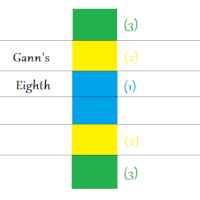
This indicator will let you have at disposal Gann's Eighth, with few clicks!! Gann's Eighth were used by this great Trader to obtain the maximum fluctuation price and the possible inversion points of it. Gann have always given importance to the number 8 in his studies, an it is the reason why we find the retracement points as 0.25(10/8=1.25). Other than the number 8, also the numer 3 had is own importance in Gann, number founded in the eighth division, infact we have three eighth describing the
Trade with Gann on your side!! MASTER CIRCLE 360 CIRCLE CHART, originally created by Gann admitted that this is “The Mother of all charts”. It is one of the last studies that this great trader left for us. The numeric tab le is apparently quite simple like all the tables and is based on square numbers, the SQUARE OF 12 and is by evolution, one of the most important square numbers. Here we can find CYCLE, PRICE AND TIME thanks to angles and grades, to show past and future support and resistance.
Read Elliott wave principle automatically. With the Swing Reader, you can easily read the Elliott Wave Principle through an automatic system. With swing, we mean a ZigZag market that is created by a breakout of its standard deviation. You can set the deviation manually, or you can let the indicator do it automatically (setting the deviation to zero). Advantages you get Never repaints. Points showing a horizontal line, in which statistically a long wave ends. Candles showing a vertical line in w
Filtro:
Sem comentários
Responder ao comentário