EAsy ClickTrade

  • Utilitários
  • Isaac Alvira
    Isaac Alvira
    Hello dear Traders!
    I am not a professional trader (as most of you!). My first hobby (and vocation) is aviation. I am an airline pilot and instructor with some background on Aerospace Engineering, that's where I learned how to program.
  • Versão: 1.0
  • Ativações: 5

EAsy ClickTrade is the easiest way in the Forex market to:

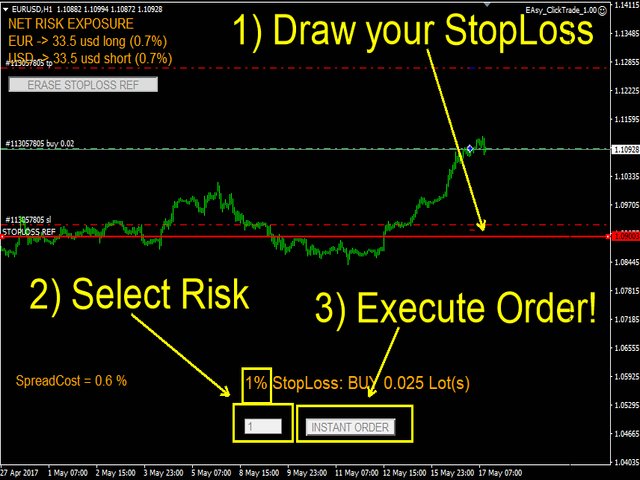
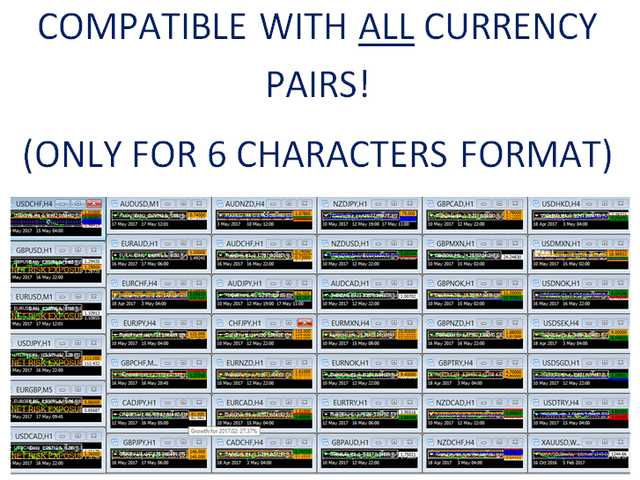
  1. Execute trades instantly as a function of selected Equity Risk and your desired StopLoss Level for ANY CURRENCY PAIR.
  2. Calculate the risk exposure to the market in terms of equity at risk per currency and direction.
  3. Calculate how attractive a potential trade is in terms of Risk and Spread Cost (excellent for scalpers and short-term traders).


Inputs

  • Select Risk for Lots Calculation [% Equity]. By default 1%. This is the initial value for the Lots calculator. This value can be modified in the chart itself. For new traders I suggest a low value (0.5-1%).
  • Labels Color. Orange by default.
  • Labels font size. Self-explanatory.
  • TakeProfit initial value [win vs loss ratio]. When an 'instant order' is open, the StopLoss is automatically set at the calibrated Risk. EAsy ClickTrade will also set a TakeProfit target based on the desired Win:Loss ratio. By default, 1.0 means TargetProfit=TargetLoss. The TakeProfit can be freely modified once the order is created. If TakeProfit is not desired, simply set 1.0
  • Select StopLoss line color. Self-explanatory.


Instructions

For easier instructions watch my video tutorial. Steps:

  1. Execute EAsy ClickTrade and make sure Allow live trading and AutoTrading are activated.
  2. Set inputs as required (see 'Inputs' above). If you are not familiar with them, leave default values as they can be modified during operation in the chart.
  3. If the currency trade is recognized, you should see the NET RISK EXPOSURE panel and the GENERATE STOPLOSS REF button. Click on it.
  4. A wide horizontal line will show up at the current Bid price. Now, you are free to move the line up or down to set your desired StopLoss Level. By default, EAsy Click Trade will recognize the intended trade as SELL if you place the line above and BUY if you place it below.
  5. You have now a text of the type: _% STOPLOSS: BUY/SELL __ LOTS. The default risk percentage can be modified anytime by typing the new Risk below and pressing ENTER. The new calculation will be displayed now. Now, you have two options, either you open the trade manually with the provided Lots info required or click on INSTANT TRADE and the order will be open fast and both StopLoss levels will be set for you.
    IMPORTANT: once you place the STOPLOSS REF LINE at the desired level, please wait at least for 1 price tick/movement for the calculation to be updated.
  6. Once the order is open, you can still use EAsy ClickTrade to open a new order or click on the button "ERASE STOPLOSS REF" to clean the screen. Anyway, I strongly recommend you to erase the STOPLOSS REF line first and click on GENERATE STOPLOSS REF again for a new trade.

EAsy ClickTrade will let you know If your currency pair is not detected. Please contact me and I will make an update as soon as possible.

Safe trades!
Produtos recomendados
Account Profit & Loss Killer Full Account-Level Intelligent Risk Management EA (MT4) ⸻ Product Introduction Account Profit & Loss Killer is a true "overall account control and risk management tool". It does not participate in any trading strategy; it focuses on only one thing: When the total floating profit or total floating loss of all positions in the account reaches your set amount, it immediately and within milliseconds forcibly closes all orders in the account. This is a true "
FREE
The Auto Percentage SL TP is not taking any trade! It was made especially for Proptrading Challenges like FTMO, Myforexfunds, Fundednext and many more. Most Propfirms ban your funded Live-Account if you do not set SL and TP soon after the trade. It is a tool to help setting automatically TP and SL based on given percentage in settings. You can add e.g. 1% risk for a trade and it sets the stop loss to 1% from your balance. Same with stop loss, which is default also 1%. But these values can be cha
Telegram Broadcast
Volodymyr Hrybachov
4.67 (3)
O utilitário TELEGRAM BROADCAST ajuda você a publicar instantaneamente sua negociação no canal do Telegram. Se há muito você deseja criar seu próprio canal de Telegram com sinais FOREX, então é disso que você precisa. TELEGRAM BROADCAST pode enviar mensagens: Abertura e fechamento de negócios; Colocação e exclusão de pedidos pendentes; Modificação de stop loss e take provision (último pedido); Stop loss e take prov acionados; Ativação e exclusão de um pedido pendente: Envio de relatórios de ne
Daily Pips Target
Makarii Gubaydullin
Informativo para acompanhar seus resultados diários de trading Confira meu  #1 Assistente de Trading : 66+ recursos, incluindo esta ferramenta  |   Contate-me  se tiver dúvidas Na parte superior do painel, você define a meta diária de lucro (em pips): Inserção manual de um valor; Uso dos botões + e - (o passo de alteração pode ser configurado nas definições); O painel agrupa as negociações em 2 categorias: Resultado flutuante atual; Soma de negociações encerradas; O resultado final é exibido na
Please contact me at telegram  https://t.me/smartforex7 After purchasing SmartForex Indicator then Use This Indicator...................... SMART EXIT PROFIT LINE Indicator is very Helpful with SmartForex Indicator ........................................ SMART EXIT PROFIT LINE Indicator Attach with SmartForex Indicator after then Red Line Show Exit buy Profit , Green Line show Exit Sell Profit................
FREE
Extra Martingale
Vladimir Pokora
5 (1)
Is your trade at a loss? Does not matter ! You can use this Extra martingale tool.  In the set loss of your trade or your EA's trade , this tool will open another trade at a better price. It can also open multiple trades at different distances and with different lot sizes. Each trade will be assigned a TakeProfit. This tool has a lot of settings. You can set variable lot sizes, variable trade distances, variable TakeProfit sizes, maximum total profit or loss in money. You can also close trades
Title: [BB Zone Pro] Smart Reversion Scalper – Profit from Market Exhaustion Catchphrase: "Stop getting stopped out by 'Band Walks.' Wait for the market to exhaust its momentum before you strike." While standard Bollinger Band indicators signal as soon as a price touches the band, BB Zone Pro uses a sophisticated "Time-at-Price" confirmation. It ensures you only enter a trade when the market is truly overextended, capturing the high-probability snap-back. Key Highlights: Time-Confirmed Entry:
FREE
The Trading Panel is designed for easy, convenient, and intuitive use. It is built for both scalping and day trading. The Trading Panel is designed to recognize every instrument it is applied to, without the need to calculate pips or points. The Trading Panel includes Breakeven and Trailing functions, as well as the ability to open and close multiple orders simultaneously. The Breakeven and Trailing functions can be activated either together or separately. The number of trades opened at the same
Various Trailing Manager EA Various Trailing Manager EA is a professional trader's tool that provides protection of floating profit on open trades. This EA Utility allows you to manage (with advanced filtering) unlimited open orders (manual or EA) with trailing stops based on 7 methods: percent, ATR, Moving Average, Candle, Parabolic, Fractal. The trailing stop can be either real or virtual, and you can exit fully or with a partial close percent on touch or bar close. Visualize all orders and t
Odie Trade Manager
Joaquin Nicolas Metayer
Odie Trade Manager EA is a simple semi-automatic (two in one) assistant for a manual trader, when having a losing trade the EA begins its work in the form of a martingale or hedging (recovery zone) to leave it in breakeven or positive, it depends on its configuration. For professional traders and gamblers . Adapt it to your strategy, MANAGE YOUR RISK CORRECTLY  and all your operations will be positive. TEST ON STRATEGY TESTER WITH YOU STRATEGY AND CREATE YOUR SET FILE AND...  GOODBYE LOSSES.
FREE
CloseIfProfitorLoss with Trailing
Vladislav Andruschenko
4.87 (31)
Close If Profit or Loss with Trailing para MetaTrader 4 — fechamento automático por lucro ou perda total Uma utilidade prática para MetaTrader 4 que fecha posições automaticamente quando o lucro total ou a perda total atinge o nível definido por você. O Expert Advisor monitora as operações abertas, calcula o resultado flutuante, pode aplicar Trailing Profit e ajuda a fechar posições mais rápido do que uma reação manual. O MetaTrader 4 ainda é muito usado por traders manuais, scalpers, usuários
Psychology
Tais Miranda Hoffmann
5 (4)
The most different product of the site: This tool is an auxiliary tool aimed at managing your trades and psychological discussions. As you probably know, more than 70% of the reason for the success of big traders is psychological issues. Only 30% is related to your strategy. So it is better to strengthen this big part with a tool. With a free tool, I allow you to become a better trader   This tool consists of several rules. In version 1.0, we have 7 rules. In later versions, we will add more ru
FREE
Mantenha seu patrimônio seguro com o Protetor de Patrimônio. Um EA desenvolvido propositalmente para aqueles que executam bots em seus Desafios de Contas Financiadas. Coloque este bot em um gráfico, insira seu alvo com total equidade e tenha conforto em saber que seus bots deixarão de negociar quando esse objetivo for alcançado. Dando-lhe a tranquilidade de saber que seu patrimônio está seguro, mesmo quando você dorme! Experimente o Equity Protector hoje!
Modify Order SL TP
Konstantin Kulikov
5 (1)
The utility places stop loss and take profit for opened orders. It is necessary to allow automated trading in the terminal settings. Discuss the complexities of Forex trading here:  chat "Age of Expert Advisors" . Parameters magic - magic number. If less than 0, orders with any magic number are processed. Select_Symbol  - selection of symbols. Positions with selected symbols will be accompanied by. Take_Profit - take profit (TP). If the value is less than 0, then TP does not change. If the value
FREE
QuantumGuard Pro - Intelligent Quantum Risk Management Trading System Core Features Five independent fund management groups for smart risk diversification Triple protection mechanism: profit target + drawdown protection + global risk control Professional trading panel for one-stop trade execution 24/7 real-time risk monitoring and protection Automatic display of average price lines for each group One-click close single group orders for precise control Order group highlighting for clear status o
Its best to have Money and Risk management strategy than not to have any. Those strategy helps to risk low amount in any trade and helps to manage money so that few loosing trade wont have significant impact in your trading balance. The best part is it does all the calculations and places order accordingly. Other things that it does are: Makes sure that only 2% of total balance is risked per trade. Manges money by investing high in low volatile pairs and invest less in high volatile pairs Places
Multi Strategy Dashboard EA
Kevin Beltran Keena
5 (4)
Multi instrument and multi time frame EA, with the best indicators.  The MSD EA can be used for automated and manual trading. Click on the '?' button on the dashboard to obtain information about the various elements of the MSD EA. Uses ATR Take Profits, ATR Stop Losses and ATR Trailing Stops. Comes with an FX Currency Strength meter and a Market Sessions indicator. Has the option to place Trade Lines (Buy, Sell, Close, Alarm). When the price reaches the trendline, the EA will perform the approp
ProfRoboTrading Dashboard MultiSymbol   is   Expert Advisor  a lightweight on-chart control panel that provides a clear overview of your trading account and open positions across multiple symbols. The dashboard displays key account metrics, summarizes open BUY/SELL orders and lots per symbol, calculates profit for Day/Week/Month, and offers quick manual close actions directly from the table. Key features Multi-symbol table   (symbols list configurable). Account metrics panel:   Balance, Equity,
Complete Pending Orders Grid System opens any combinations of Buy Stop, Sell Stop, Buy Limit and Sell Limit pending orders and closes all existing pending orders. You just need to drop this script on the chart of a desired currency pair. Before placing all pending orders, the input window is opened allowing you to modify all input parameters: DeleteAllPendings – if true , then all pending orders (for current currency) will be deleted. BuyStop – if true , BuyStop order is opened. SellStop – if tr
Online Accounts Manager MT4
Kyra Nickaline Watson-gordon
5 (1)
OneClick Online Account Manager is a powerful utility that helps you to manage all your accounts from a centralized panel. It is suitable for all single account traders and specially for multiple accounts traders. The utility help you to : Monitor status of all accounts on a private web page. Some information such as account connection status, account profit, DD, Balance, Equity, Margin Level, Number of positions and orders, Daily and Weekly profit/loss and also overall summation of all these p
Buy The Dip Util is an  halfautomatic  expert advisor (EA), to   buy on dips (days lows) and sell on spikes (days highs). A profit can exceed a loss trade up to 10 times , so the user can have several loss trades and still make profit. Orders are opened at the change of the hour , if a button in the chart is pressed. The  Buy The Dip as EA  does this automaticly. The order stoploss is automaticly set right below the low of the former hour (buy) or right over the high (sell). The position size
SMT Trade Planner e um calculador de risco profissional e painel de execucao de operacoes diretamente no grafico do MetaTrader. Calcula o tamanho do lote com base nas configuracoes de risco, exibe linhas visuais de entrada, Stop Loss e Take Profit arrastáveis no grafico, valida a operacao contra regras de risco configuraveis e permite execucao com um clique.   Como funciona Anexe o Trade Planner a qualquer grafico. O painel exibe informacoes da conta e botoes de selecao rapida de risco. Tres lin
Trade Dashboard MT4
Fatemeh Ameri
4.96 (53)
Trade Dashboard simplifies how you open, manage, and control your trades, with built-in lot size calculation. It allows you to execute trades, manage risk, and control positions directly on the chart, with tools such as partial close, breakeven, and trailing stop. Designed to reduce manual work and help you stay focused on your trading decisions. A demo version is available for testing. Detailed explanations of features are provided within the MQL5 platform. Installation instructions are include
Telegram Signal Sender
Biswarup Banerjee
5 (1)
Eleve sua capacidade de compartilhamento de sinais de forex com o Telegram Signal Sender MT4, uma poderosa utilidade desenhada para automatizar e simplificar o processo de envio de sinais de trading para o seu canal de Telegram, perfeita tanto para provedores de sinais iniciantes quanto estabelecidos. Amplamente elogiado em comunidades de trading como Forex Factory e Reddit’s r/Forex, e destacado em discussões no Investopedia e fóruns da MQL5 por sua eficiência na distribuição de sinais, essa fe
North Star EA is a trend EA, not  a Martin  EA,  non optimized EA.  just use fix lot size, auto get fix stop loss and take profit value, Max 3 open positions.EA has passed multiple platform tests.  Small capital withdrawal and no risk of exposure !        North Star EA is a complex algorithm that uses Artificial Intelligence in combination with traditional technical analysis to predict market movements. This Expert Advisor makes use of Combination of Vector calculus and trend indicators an
Overview This Expert Advisor (EA) is designed to identify and trade specific candlestick patterns based on user-defined settings. It uses multiple technical indicators to confirm trends, volume, and trade opportunities. The EA includes features such as customizable trading hours, stop loss, take profit, trailing stops, and lot sizing. This EA is a tool intended to assist traders in testing and developing their own strategies. It is not a standalone trading strategy. Designed with user-defined f
The EA uses scalping strategy at night, trading consists of three algorithms and each algorithm works in its own time interval. The EA uses many smart filters to adapt to almost any economic situation. Pending orders are used for the least slippage when trading scalping. The adviser is safe and does not require any settings from the user, just install it on the chart and you are ready. The EA sets a protective stop order, so the trader does not have to worry that the robot will allow significant
BuyLimit and SellLimit Buttons opens any combination of Buy Limit and Sell Limit pending orders and closes all existing pending orders. If boolSL = true, then the EA will add a Stop Loss value to all pending orders. If boolTP = true, then the EA will add a Take Profit value to all pending orders. Inputs Before placing all pending orders, the input window is opened allowing you to modify all input parameters: DeleteAllPendings:  if true , then all pending orders (for the current currency) can be
EA Morpheus
Ruslan Pishun
2.42 (12)
Breakout based strategy, generates market entry signals when the price crosses a border of a certain price range. To create the strategy, we have used the history data with 99,9% quality for the last 15 years. The best signals had been selected and the false signals have been filtered out. The Expert Advisor performs technical analysis and considers only the breakouts that show the best result. It uses a system of filtering false signals. The EA uses adaptive trailing stop. The EA uses a very
NitroFX
Paranchai Tensit
NitroFX is a fully automated Expert Advisor.  NitroFX is a systematic trading system that involves planning, trading strategies, conducting multiple back tests, and collecting statistics, which will help the system to be more accurate and increase profitability. NitroFX uses effective risk management tools, Trailing stop and Breakeven point . A trailing stop is a stop that automatically adjusts to market movement. This means it will follow your position when the market moves in your favor, and
Os compradores deste produto também adquirem
Bem-vindo ao Trade Manager EA—uma ferramenta de gestão de risco criada para tornar o trading mais intuitivo, preciso e eficiente. Não é apenas uma ferramenta para executar ordens, mas uma solução abrangente para planejamento de operações, gerenciamento de posições e controle de risco. Seja você um iniciante, trader avançado ou scalper que precisa de execução rápida, o Trade Manager EA adapta-se às suas necessidades, oferecendo flexibilidade em todos os mercados, desde forex e índices até commodi
Local Trade Copier EA MT4
Juvenille Emperor Limited
4.96 (110)
Experimente uma cópia de negociação excepcionalmente rápida com o Local Trade Copier EA MT4 . Com sua fácil configuração de 1 minuto, este copiador de negociações permite que você copie negociações entre vários terminais MetaTrader no mesmo computador Windows ou em um Windows VPS com velocidades de cópia ultra rápidas de menos de 0.5 segundos. Seja você um trader iniciante ou profissional, o Local Trade Copier EA MT4 oferece uma ampla gama de opções para personalizá-lo de acordo com suas necess
Trade Assistant MT4
Evgeniy Kravchenko
4.43 (196)
Ajuda a calcular o risco por comércio, a fácil instalação de uma nova encomenda, gestão de encomendas com funções de fecho parcial, trailing stop de 7 tipos e outras funções úteis. Materiais e instruções adicionais Instruções de instalação - Instruções para a aplicação - Versão de teste da aplicação para uma conta de demonstração Função de linha Mostra no gráfico a linha de Abertura, Stop Loss, Take Profit. Com esta função é fácil definir uma nova ordem e ver as suas características adicionais
Exp COPYLOT CLIENT for MT4
Vladislav Andruschenko
4.69 (65)
Copiador profissional de operações para MetaTrader 4 Copiador de operações rápido, profissional e confiável para MetaTrader 4 . COPYLOT permite copiar operações de Forex entre os terminais MetaTrader 4 e MetaTrader 5 , com sincronização flexível para diferentes tipos de conta e cenários de negociação. A versão COPYLOT MT4 oferece suporte para: MetaTrader 4 → MetaTrader 4 MetaTrader 5 Hedge → MetaTrader 4 MetaTrader 5 Netting → MetaTrader 4   Versão MT5 Descrição completa + DEMO + PDF Como compra
Copy Cat More Trade Copier MT4 (Cópia Gato MT4) não é apenas um simples copiador local de operações; é uma estrutura completa de gestão de risco e execução, projetada para os desafios atuais do trading. Desde desafios de prop firms até a gestão de contas pessoais, adapta-se a cada situação com uma combinação de execução robusta, proteção de capital, configuração flexível e tratamento avançado das operações. O copiador funciona tanto no modo Master (emissor) quanto no modo Slave (receptor), sincr
TradePanel MT4
Alfiya Fazylova
4.84 (95)
Trade Panel é um assistente de negociação multifuncional. O aplicativo contém mais de 50 funções de negociação para trading manual e permite automatizar a maioria das tarefas de negociação. Antes da compra, você pode testar a versão de demonstração em uma conta demo. Baixe a versão experimental do aplicativo para uma conta de demonstração: https://www.mql5.com/pt/blogs/post/762547 . Instruções completas aqui . Comércio. Permite realizar operações de negociação com um clique: Abrir ordens pendent
RS Trade Copier - o local trade copier ultrarrápido com uma interface gráfica verdadeira . Pare de digitar números de conta manualmente. Chega daquela lista enorme de 200+ parâmetros de entrada incompreensíveis. Uma ferramenta confiável e flexível para cópia de operações comerciais entre múltiplos terminais MT4 e MT5. Atende tanto traders experientes e serviços de sinais quanto investidores individuais. Permite sincronizar negociações de um ou múltiplos Provedores para um ou múltiplos Clientes c
Custom Alerts AIO: Monitoramento inteligente de múltiplos mercados – pronto para uso, sem configuração Visão geral Custom Alerts AIO é uma ferramenta avançada de varredura de mercado que funciona imediatamente após a instalação — sem necessidade de configurar indicadores adicionais. Inclui internamente todos os principais indicadores da Stein Investments (FX Power, FX Volume, FX Dynamic, FX Levels e IX Power), permitindo que você monitore facilmente todas as principais classes de ativos: Forex
Telegram to MT4 Coppy
Sergey Batudayev
4 (10)
Telegram para MT4:   A solução definitiva para cópia de sinais Otimize suas negociações com   o Telegram para MT4   , o utilitário de última geração desenvolvido para copiar sinais de negociação diretamente de canais e chats do Telegram para sua plataforma MetaTrader 4 — sem a necessidade de DLLs. Esta solução robusta garante a execução perfeita de sinais com precisão incomparável e opções de personalização, economizando seu tempo e aumentando sua eficiência. [ Instructions and DEMO ] Principais
Exp4 Duplicator
Vladislav Andruschenko
4.5 (22)
Duplicator para MetaTrader 4 — duplicador profissional de operações e ordens dentro de um único terminal Um Expert Advisor poderoso para traders que desejam duplicar automaticamente operações já abertas, ampliar volume, aplicar sua própria lógica de lote e gerenciar duplicatas com regras precisas. É uma ferramenta prática para trading manual, sistemas automatizados e gestão flexível de posições que já existem no terminal. O Duplicator não abre operações com uma estratégia própria. Sua função é
Telegram to MT4 Multi-Channel Copier copia automaticamente os sinais de trading dos seus canais do Telegram diretamente para o MetaTrader 4. Sem bots, sem extensões de navegador, sem copiar nada manualmente. Você recebe um sinal no Telegram e o EA abre a operação no seu terminal em poucos segundos. O produto inclui dois componentes: um aplicativo Windows que escuta seus canais do Telegram, e este Expert Advisor que executa os sinais no seu terminal MT4. Também está disponível a versão para MT5.
Unlimited Trade Copier Pro is a tool to copy trade remotely to multiple MT4, MT5 and cTrader accounts at different computers/locations over internet. This is an ideal solution for you if you are a signal provider and want to copy your trades to other receivers globally on your own rules. One provider can copy trades to multiple receivers and one receiver can get trade from multiple providers as well. The provider can even set the subscription expiry for each receiver, so that receiver will not b
The product will copy all telegram signal to MT4   ( which you are member  ) , also it can work as remote copier.  Easy to set up, copy order instant, can work with almost signal formats, image signal, s upport to translate other language to English Work with all type of channel or group, even channel have "Restrict Saving Content", work with  multi channel, multi MT5 Work as remote copier: with signal have ticket number, it will copy exactly via ticket number. Support to backtest signal. How to
O MT4 to Discord Signal Provider é uma ferramenta fácil de usar e totalmente personalizável, projetada para enviar sinais de negociação diretamente para o Discord. Esta ferramenta transforma sua conta de negociação em um provedor de sinais eficiente. Personalize os formatos de mensagens para se adequar ao seu estilo! Para facilitar o uso, selecione entre modelos pré-desenhados e escolha quais elementos da mensagem incluir ou excluir. [ Demo ] [ Manual ] [ Versão MT5 ] [ Versão Telegram ]  New: [
VirtualTradePad PRO SE MT4 — painel de trading avançado e ambiente de gráfico para MetaTrader 4 VirtualTradePad PRO SE é um painel de trading profissional e um ambiente de gerenciamento de operações para MetaTrader 4 . Ele ajuda traders a abrir, gerenciar, proteger, fechar e analisar operações com mais rapidez a partir de uma única interface baseada no gráfico. O produto foi criado para traders manuais ativos que precisam de mais do que um simples conjunto de botões. O PRO SE combina execução em
The News Filter
Leolouiski Gan
5 (25)
Este produto filtra todos os consultores especializados e gráficos manuais durante o horário das notícias, para que você não precise se preocupar com picos de preços repentinos que possam destruir suas configurações de negociação manuais ou negociações realizadas por outros consultores especializados. Este produto também vem com um sistema de gerenciamento de pedidos completo que pode lidar com suas posições abertas e ordens pendentes antes do lançamento de qualquer notícia. Depois de comprar o
Smart Channel M4
Vahidreza Heidar Gholami
The trend in the market can be predicted using trend lines but the problem is you don’t know where exactly the price is going to touch the trend line where you can put your pending orders on. Smart Channel Expert Advisor makes it possible to put an advanced channel around the price data, which can be configured to handle placing orders, opening and closing positions, managing risk per trade, spread, slippage, and trailing stop-loss and take-profit automatically. Features Money Management (Calcul
ManHedger MT4
Peter Mueller
5 (2)
THIS EA IS A SEMI-AUTO EA, IT NEEDS USER INPUT. Manual & Test Version Please TEST this product before   BUYING  and watch my video about it. Contact me for user support or bug reports, or if you want the MT5 version! MT5 Version I do not guarantee any profits or financial success using this EA. With this Expert Advisor, you can: Implement your own   Zone Recovery   strategy to capitalize on trending markets. Create   Grid   trading strategies, to profit from ranging markets. Place orders easil
Seconds Chart - uma ferramenta exclusiva para criar gráficos de segundos no MetaTrader 4 . Com o Seconds Chart , você pode criar gráficos com períodos definidos em segundos, proporcionando flexibilidade e precisão ideais para análise, indisponíveis em gráficos padrão de minutos ou horas. Por exemplo, o período S15 indica um gráfico com velas de 15 segundos. Você pode usar quaisquer indicadores, Expert Advisors e scripts com a mesma facilidade dos gráficos padrão. Diferente das ferramentas padrão
Trading History MT4
Siarhei Vashchylka
5 (9)
Trading History - A program for trading and money management on the history of quotes in stratagy tester. It can work with pending and immediate orders, and is equipped with trailing stop, breakeven and take profit functions. Very good for training and testing different strategies. Manual (Be sure to read before purchasing) Advantages 1. Allows you to test any trading strategy in the shortest possible time 2. An excellent simulator for trading training. You can gain months of trading experience
Coppy Master MT4
Sergey Batudayev
4 (3)
Coppy Master MT4       é uma ferramenta copiadora de negociações para terminais MetaTrader 4 e MetaTrader 5. Ela suporta cópia em ambas as direções: de MT4 para MT5, de MT5 para MT4, bem como entre contas do mesmo tipo de MT4 para MT4. Para funcionar corretamente, todos os terminais devem estar rodando no mesmo PC ou VPS. [ Instruction  and Demo ]  Para copiar para o MetaTrader 4, uma versão separada —       Coppy Master MT5       - é necessário. Principais características: Modos de cópia Supor
News Filter EA: Advanced Algo Trading Assistant News Filter EA is an advanced algo trading assistant designed to enhance your trading experience. By using the   News Filter EA , you can integrate a Forex economic news filter into your existing expert advisor, even if you do not have access to its source code. In addition to the news filter, you can also specify   trading days   and   hours   for your expert. The News Filter EA also includes   risk management   and   equity protection   features
O MT4 para Telegram Signal Provider é uma ferramenta fácil de usar e totalmente personalizável que permite o envio de sinais para o Telegram, transformando sua conta em um provedor de sinais. O formato das mensagens é totalmente personalizável! No entanto, para uso simples, você também pode optar por um modelo predefinido e habilitar ou desabilitar partes específicas da mensagem. [ Demonstração ]   [ Manual ] [ Versão MT5 ] [ Versão Discord ] [ Canal do Telegram ]  New: [ Telegram To MT5 ] Conf
MT4 To Telegram Signal Bridge (PT) Eleve seus sinais de trading com nosso avançado Telegram Bridge EA Experimente gratuitamente baixando a versão DEMO aqui - OBSERVAÇÃO: totalmente funcional, mas apenas com negociações em EURUSD. Investimos significativamente em recursos fáceis de usar que criam uma experiência única para clientes e fornecedores. Não tem certeza? Confira nosso folheto aqui . É hora de conquistar seu público com atualizações de trading em tempo real que sejam profissionais e visu
Exp SafetyLock PRO
Vladislav Andruschenko
4.57 (28)
SAFETYLOCK for MetaTrader 4 é um utilitário premium de proteção de trades, criado para defender posições abertas contra reversões bruscas do mercado, colocando automaticamente uma ordem de segurança oposta. Assim que um trader ou um Expert Advisor (EA) abre uma posição, o SAFETYLOCK for MT4 cria uma ordem pendente correspondente (Buy Stop ou Sell Stop) na direção oposta. Se o mercado se mover contra a operação original, a ordem pendente é ativada e forma um lock de proteção, ajudando o trader a
O Risk/Reward Tool é um Expert Advisor de nível profissional projetado para revolucionar a forma como você planeja, visualiza e executa operações no MetaTrader 4. Seja você um trader discricionário que valoriza a gestão precisa de risco ou um desenvolvedor de estratégias que precisa testar configurações de trading visualmente, esta ferramenta fornece tudo o que você precisa em uma interface elegante e intuitiva. Diferente das calculadoras de posição básicas, o Risk/Reward Tool combina planejamen
VirtualTradePad mt4 Extra
Vladislav Andruschenko
4.85 (61)
Painel de negociação para negociação em 1 clique.  Trabalhando com posições e pedidos!  Negociar a partir do gráfico ou do teclado. Usando nosso painel de negociação, você pode negociar com um clique no gráfico e realizar operações de negociação 30 vezes mais rápido do que o controle MetaTrader padrão. Cálculos automáticos de parâmetros e funções que tornam a vida mais fácil para um trader e ajudam-no a conduzir suas atividades de trading com muito mais rapidez e conveniência. Dicas gráficas e i
Trade Manager MT4 DaneTrades
Levi Dane Benjamin
4.09 (11)
Trade Manager para ajudá-lo a entrar e sair rapidamente de negociações enquanto calcula automaticamente seu risco. Incluindo recursos para ajudar a evitar negociações excessivas, negociações de vingança e negociações emocionais. As negociações podem ser gerenciadas automaticamente e as métricas de desempenho da conta podem ser visualizadas em um gráfico. Esses recursos tornam este painel ideal para todos os traders manuais e ajudam a aprimorar a plataforma MetaTrader 4. Suporte multilíngue. Vers
EasyTrade MT4
Alain Verleyen
5 (1)
Easy Trade – Gestão de Operações Inteligente, Simples e Poderosa Easy Trade é a solução completa de gestão de operações para usuários do MetaTrader que desejam manter o risco sob controle e uma execução ultra suave. Desenvolvido do zero com base no feedback de traders reais, o Easy Trade facilita a execução, o monitoramento e a gestão de operações em vários símbolos – sem complicar o seu fluxo de trabalho. Seja você um scalper manual ou esteja gerenciando uma pequena carteira de setups, o Easy
This is a simple utility which will put Automatic Stop Loss and Take Profit. It also has Trailing Stop Loss and Break Even features. The input value of the Stop Loss and Take Profit is in Pips. Whenever you open a trade it will put stop loss and take profit in pips automatically. *If you need a more practical stop loss and take profit for your trades then you may like this ATR based stop loss utility,  Here! Inputs: 1. SL and Trailing SL - This is the Stop Loss value in Pips. Also used as Traili

Filtro:
Sem comentários
Responder ao comentário