TradePanelPRO RiskCover

Удобная ручная торговля и расчёт позиции в MetaTrader 5


TradePanelPRO — панель для тех, кто хочет удобно работать с графиком, быстро рассчитывать позицию и управлять сделками из одного окна. Практичный набор для ежедневной торговли: подготовка входа, контроль расчётного риска и сопровождение позиции. Для трейдеров, которым нужны понятные рабочие инструменты и которые не хотят переплачивать за лишние функции.

Панель можно использовать на личных реальных и демо-счетах, а также для торговли через проп-компании, предоставляющие MetaTrader 5 и разрешающие использование торговых панелей и советников.

Задайте риск — объём позиции рассчитает панель

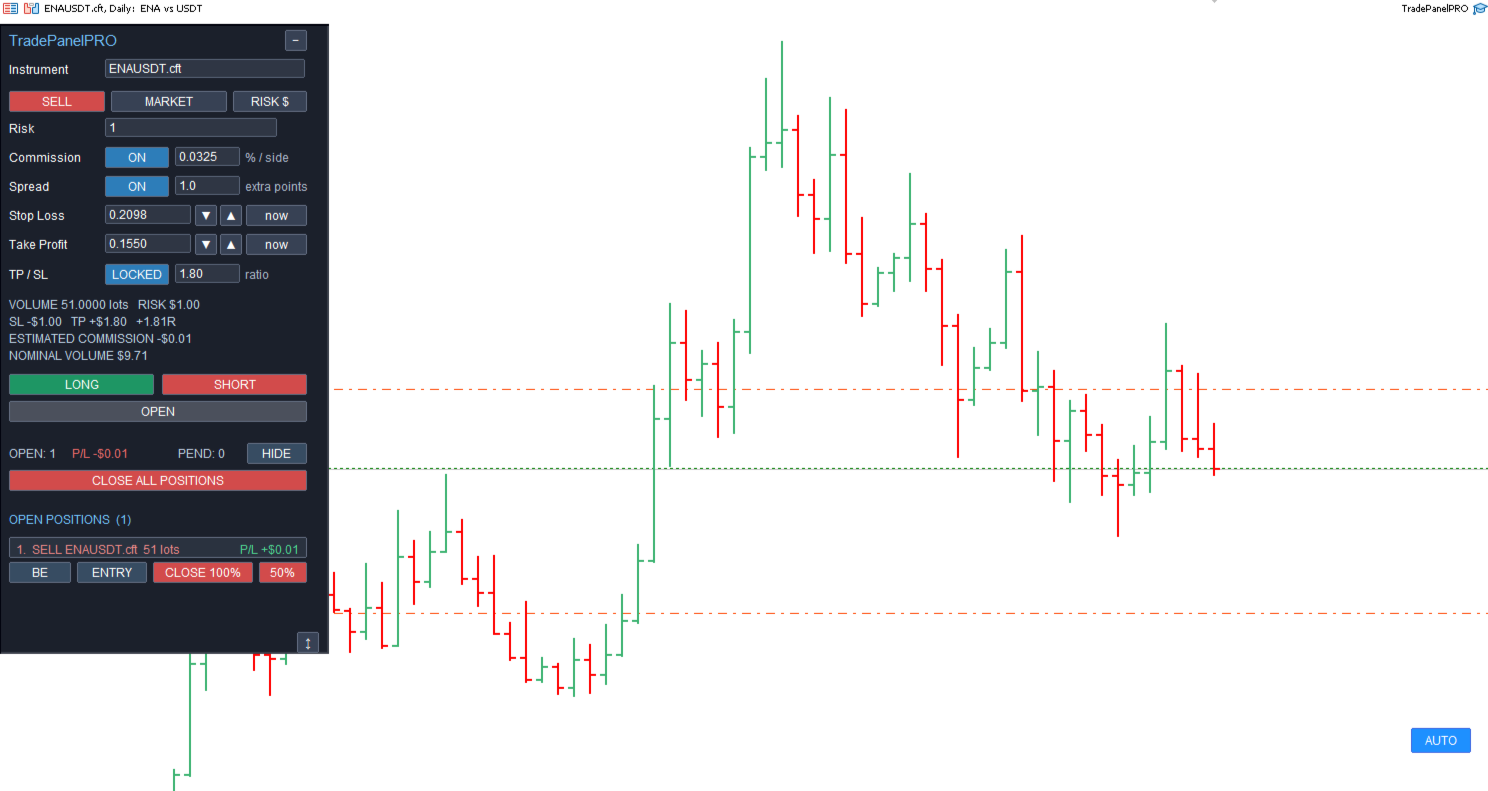
Укажите сумму риска и установите Stop Loss — TradePanelPRO автоматически рассчитает объём позиции. Учёт комиссии можно включить или выключить по вашему выбору.

Например, вы задаёте допустимый риск в валюте счёта и выбираете стоп на графике. Панель определяет лот по расстоянию от входа до Stop Loss и параметрам инструмента. Если комиссия включена, она участвует в расчёте; если выключена, объём рассчитывается без неё. При перемещении стопа лот автоматически пересчитывается под заданный риск.

Основной режим RISK $ задаёт риск фиксированной суммой в валюте счёта. Дополнительно доступны RISK % — риск от текущих средств счёта, Equity; LOTS — ручное задание лотов; FREE % — доля максимального объёма по текущей свободной марже. FREE % определяет загрузку маржи, а не процент допустимого убытка.

В режимах риска панель рассчитывает лот по выбранной цене входа и Stop Loss. Объём приводится к минимальному, максимальному значению и шагу лота инструмента. Перед отправкой заявки расчётный риск проверяется повторно.

Commission ON / OFF включает или исключает комиссию из расчёта. Ставка задаётся пользователем в процентах за одну сторону; при расчёте риска учитываются открытие и предполагаемое закрытие сделки. Панель отдельно показывает оценочную комиссию и номинальный объём позиции.

Spread ON / OFF управляет дополнительной поправкой для растяжки, созданной на графике: текущий спред выбранного инструмента плюс настраиваемый запас в пунктах. Значение extra points — именно запас сверх фактического спреда. Поправка влияет на расчёт риска и объёма, сохраняя выбранную на графике цену входа. При ручном вводе цен и использовании ценовых стрелок эта дополнительная поправка отключается. Для рыночного входа используется текущая Ask или Bid.

До отправки ордера видны объём в лотах, денежный риск, расчётная прибыль по Take Profit, отношение результата к риску в R, оценочная комиссия и номинал сделки.

Подготовка сделки прямо на графике

Выберите LONG или SHORT и укажите цену на графике. Панель создаст растяжку с Entry, Stop Loss и Take Profit. Для быстрого выбора цены также доступно меню по Shift + правому клику.

Цветные области показывают риск и цель. Уровни входа, SL и TP можно регулировать мышью, а цветную область — перемещать целиком. Боковые края меняют ширину растяжки по времени. Поля цен доступны для ручного ввода; кнопки повышения и понижения изменяют значение на один торговый тик инструмента.

Панель сохраняет выбранное направление при переносе входа и переключает Limit / Stop в зависимости от положения входа относительно рынка. Изменение направления через защитные уровни выполняется при их намеренном переносе через вход. Рыночный вход использует текущую цену инструмента.

Связь TP / SL позволяет задать требуемое отношение расчётной чистой цели к чистому риску. В режиме LOCKED изменение стопа пересчитывает цель; FREE позволяет настраивать уровни независимо. При включённой комиссии она учитывается в этом отношении.

Доступны Market, Limit, Stop и Stop Limit, если соответствующий тип заявки разрешён брокером для инструмента. Для Stop Limit отдельно задаются цена срабатывания и лимитная цена. Черновик можно проверить и скорректировать перед подтверждением отправки. В быстром меню при режиме LOTS кнопки BUY / SELL отправляют заявку с заданным объёмом; кнопки LONG / SHORT создают редактируемый черновик.

Открытые позиции и отложенные ордера

Главный экран показывает количество открытых позиций, суммарный текущий P/L и число отложенных заявок. В списках доступны позиции и заявки разных инструментов счёта. Для каждой позиции показаны направление, символ, объём и результат; отдельный экран открывает управление выбранной сделкой.

Из панели можно изменить SL / TP, полностью закрыть позицию, быстро закрыть 50% объёма или перейти к другим способам сопровождения. Кнопка CLOSE ALL POSITIONS с подтверждением отправляет закрытие всех открытых позиций счёта. Отложенные заявки отменяются отдельно.

Для pending-ордера доступны редактирование цены входа, Stop Loss и Take Profit, а для Stop Limit — также цены срабатывания и исполнения. При изменении входа или SL панель пересчитывает объём для сохранения исходного денежного риска. Если требуется изменить лот, новая заявка выставляется до удаления прежней, поскольку объём существующего pending-ордера в MT5 напрямую не меняется.

Отмена редактирования оставляет действующую заявку у брокера. Для удаления используется отдельная кнопка CANCEL ORDER.

Частичное закрытие и несколько целей

PARTIAL CLOSE позволяет выбрать 25%, 50% или 75% текущей позиции либо настроить долю бегунком. До подтверждения виден фактический объём к закрытию с учётом шага лота. Закрытие выполняется по рынку.

MULTIPLE TAKE PROFITS задаёт до трёх уровней частичной фиксации. Для каждой строки можно указать цену, процент закрытия и включить или отключить уровень. Поле MOVE % рассчитывает цену цели по процентному движению от фактического среднего входа. Предварительные линии помогают оценить план на графике; активные уровни можно корректировать перетаскиванием. При достижении включённой цели советник отправляет рыночное закрытие соответствующей части позиции.

Break Even — безубыток в прибыльной и убыточной позиции

BE (Break Even) означает «безубыток». В интерфейсе также используется обозначение B/E с тем же значением. Кнопки BE / EXIT и BE / RETURN EXIT открывают инструменты безубытка и возвратного выхода. Функцией можно пользоваться как в положительной, так и в отрицательной зоне позиции: способ выхода зависит от текущей ситуации.

Если позиция находится в положительной зоне

Когда движение цены уже позволяет покрыть расчётные расходы, Stop Loss можно перенести на уровень безубытка. При возврате цены позиция закроется по этому защитному уровню, а при продолжении движения останется открытой до дальнейшего решения трейдера или достижения цели. Take Profit при переносе стопа в безубыток остаётся без изменений.

Перенос можно выполнить сразу либо настроить автоматически: указать движение цены в прибыль, после которого правило сработает, и дополнительный отступ от безубыточного уровня. Панель не переносит уже установленный более защищающий Stop Loss назад. Возможность установки уровня зависит от текущей цены и минимальных дистанций брокера.

Если позиция находится в отрицательной зоне

Если пользователь хочет выйти из позиции при возврате инструмента к цене входа или к уровню покрытия расходов, можно заранее задать такой выход из панели. Выберите нужный вариант — система установит серверный Take Profit для закрытия выбранной позиции при достижении рассчитанной цены:

  • EXIT AT ENTRY (NO FEES) — выход по фактической средней цене входа. Комиссия и своп не компенсируются, поэтому общий результат с этими расходами может остаться отрицательным.
  • EXIT AT B/E + COSTS — выход на уровне Break Even, то есть расчётного безубытка с учётом доступной комиссии входа, оценки комиссии выхода и текущего свопа.

Первоначальный Stop Loss остаётся без изменений. Если до возврата цены движение продолжится против позиции, она сохранит установленный защитный стоп. Для возвратного выхода используется TP самой позиции: прежняя цель заменяется выбранной ценой выхода. Отдельный встречный ордер не создаётся. Если выбранная цена уже достигнута, панель может отправить закрытие по рынку.

Risk Cover — частичная фиксация с сохранением первоначального стопа

Перенос Stop Loss к цене входа подходит не каждому торговому сценарию. Инструмент может вернуться к входу, закрыть позицию по безубытку, а затем продолжить движение в ожидаемую сторону. Если трейдер хочет сохранить первоначальный стоп и оставить позиции пространство для такого возврата, можно использовать другой подход: зафиксировать часть прибыли, которой будет достаточно для покрытия риска оставшегося объёма.

Для автоматизации этого действия создана функция Risk Cover. Пользователь выбирает, какую часть позиции закрыть, а панель рассчитывает цену частичной фиксации, сохраняя первоначальный Stop Loss.

Выберите 10%, 25%, 50% текущего объёма или введите нужный объём вручную. Панель использует фактическую среднюю цену входа, текущий объём и установленный Stop Loss, чтобы определить уровень, на котором расчётная прибыль закрываемой части покроет возможный убыток оставшейся позиции до этого стопа. Учёт комиссии зависит от настройки пользователя.

Рассчитанная цена и линия срабатывания отображаются до активации. Проверьте их и нажмите ACTIVATE RISK COVER. При достижении уровня советник отправит закрытие выбранной части позиции по рынку. Остаток продолжит участвовать в движении с первоначальным Stop Loss.

Если после успешной частичной фиксации цена развернётся и остаток закроется по исходному стопу, ранее зафиксированная прибыль должна покрыть его расчётный убыток. Таким образом, задача Risk Cover — получить расчётный общий результат без убытка, сохранив первоначальный стоп вместо его переноса к входу.

Например, без учёта расходов: первоначальный риск позиции равен 100 единицам валюты счёта. Фиксация половины позиции на рассчитанном уровне даёт 50 единиц прибыли, а риск оставшейся половины до прежнего SL составляет 50. Если остаток затем закроется по этому стопу, общий результат составит 50 − 50 = 0. Если инструмент продолжит движение в нужную сторону, оставшаяся часть позиции сможет принести дополнительную прибыль.

Этот расчёт предполагает успешное исполнение частичного закрытия. До его срабатывания исходный риск сохраняется. Проскальзывание, гэпы и отличие фактических расходов от расчётных могут изменить итог, поэтому точный нулевой результат не гарантируется. Сценарий можно отменить до срабатывания.

Trailing Stop

Для сопровождения позиции задаются три параметра в пунктах: Start — движение в прибыль до начала сопровождения, Distance — расстояние стопа от текущей цены, Step — шаг очередного изменения.

Для BUY Stop Loss продвигается вверх, для SELL — вниз. До достижения Start текущий стоп сохраняется. Take Profit не меняется. Активный трейлинг можно отключить, оставив уже установленный SL.

Рабочее пространство и условия использования

Панель можно перемещать по графику, сворачивать и регулировать по высоте. Списки позиций и ордеров скрываются отдельно. Интерфейс — на английском языке. Денежные расчёты выполняются для выбранного инструмента с учётом его спецификации и доступных данных терминала.

Для автоматического безубытка, Trailing Stop, Risk Cover и Multiple Take Profits необходимы работающий MT5, активный советник, разрешённая алгоритмическая торговля и соединение с брокером. Установленные у брокера SL / TP и принятые отложенные ордера исполняются на сервере; дополнительные сценарии сопровождения выполняет панель.

TradePanelPRO подходит для ручной работы на проп-счетах при соблюдении правил конкретной компании. Панель помогает задавать риск отдельной сделки; автоматический контроль дневной или общей просадки проп-счёта в этой версии не предусмотрен.

Все значения риска, прибыли, безубытка и Risk Cover являются расчётными. Итог зависит от исполнения, проскальзывания, гэпов, фактических расходов и ограничений брокера. Сначала проверьте работу панели на демо-счёте своего брокера.


Галерея продукта

1. Главная панель

Главная панель без активных открытых позиций и отложенных ордеров: выбор направления и типа заявки, расчёт объёма по риску, настройка комиссии и спреда.

https://c.mql5.com/31/2520/tradepanelpro-riskcover-screen-3390.png 

Main panel without active open or pending orders.

2. Растяжка риска и прибыли

Регулировка входа, Stop Loss и Take Profit на графике с отображением объёма, результата и R.

https://c.mql5.com/31/2520/tradepanelpro-riskcover-screen-7786.png

Adjust Entry, SL and TP on the chart; review volume, risk and reward before confirmation.

3. Отложенные ордера

Просмотр действующей заявки и быстрый доступ к редактированию или отмене.

https://c.mql5.com/31/2520/tradepanelpro-riskcover-screen-9588.png

Review pending orders and access edit or cancel actions.

4. Редактирование заявки

Настройка цены входа, SL и TP с отображением расчётного риска и объёма.

https://c.mql5.com/31/2520/tradepanelpro-riskcover-screen-4431.png

Edit pending-order prices and review the calculated risk and volume.

5. Открытые позиции

Текущий результат и быстрые действия: BE / ENTRY (Break Even — перенос Stop Loss к точке входа), CLOSE 50% и CLOSE.

https://c.mql5.com/31/2520/tradepanelpro-riskcover-screen-2139.png

Open positions, current P/L, Break Even (move Stop Loss to entry) and quick close actions.

6. Управление позицией

Редактирование уровней, частичное закрытие, безубыток, Risk Cover, трейлинг и несколько целей.

https://c.mql5.com/31/2520/tradepanelpro-riskcover-screen-3720.png

Position management: SL/TP, partial close, break even, Risk Cover, trailing and multiple targets.


7. Multiple Take Profits

До трёх уровней фиксации с отдельными ценами, долями закрытия и переключателями ON / OFF.

https://c.mql5.com/31/2520/tradepanelpro-riskcover-screen-2537.png


Configure up to three partial-close targets with individual prices and volume percentages.

https://c.mql5.com/31/2520/tradepanelpro-riskcover-screen-4861.png

8. Risk Cover

Выберите часть позиции: панель рассчитает цену её фиксации для покрытия риска остатка с сохранением первоначального Stop Loss.

https://c.mql5.com/31/2520/tradepanelpro-riskcover-screen-4861.png

Choose the partial-close volume; calculate a trigger to cover the remaining position's estimated risk while keeping the original Stop Loss.


9. Изменение позиции

Экран Modify position с изменением параметров позиции: редактирование Stop Loss и Take Profit, а также быстрый доступ к другим функциям сопровождения.

https://c.mql5.com/31/2520/tradepanelpro-riskcover-screen-5419.png

Modify position screen focused on editing Stop Loss and Take Profit values.


10. Trailing Stop

Настройка порога запуска, дистанции и шага сопровождения Stop Loss.

https://c.mql5.com/31/2520/tradepanelpro-riskcover-screen-7940.png


Set the trailing start, distance and step in points.


11. Break Even — безубыток и возвратный выход

Для убыточной позиции — TP на цене входа или расчётного безубытка с расходами; первоначальный Stop Loss сохраняется.

https://c.mql5.com/31/2520/tradepanelpro-riskcover-screen-6156.png


For a losing position, set a return-exit TP at entry or estimated Break Even including costs, while keeping the original Stop Loss.


12. Изменение SL / TP

Редактирование защитных уровней позиции вручную или кнопками повышения и понижения цены.


https://c.mql5.com/31/2520/tradepanelpro-riskcover-screen-2192.png


Edit position SL/TP manually or with one-tick price controls.

Produtos recomendados
Inverted_Chart_EA Utility Expert Advisor Inverted_Chart_EA creates and maintains a mirror-inverted chart of any symbol and timeframe. It automatically generates a custom instrument (e.g. US30_INV ) and keeps its price history updated in real time, with bars mirrored around a chosen pivot. This utility gives traders a new way to analyze the market from a different perspective by flipping the chart upside down. Why use an inverted chart? Highlight hidden patterns – price formations that look ordin
Open Risk Budget Cap enforces a total open stop-loss risk budget across your account. It does not choose direction and does not open discretionary trades on a live chart. Attach it to one chart; the symbol and timeframe do not matter. What it measures Every open position and every pending order is priced to its stop-loss in account currency using OrderCalcProfit. Positions or orders without a stop-loss are counted and shown on the panel as "without stop-loss". They are excluded from the budget
Expert TP SL v04 - Professional Trading Assistant with AI Motivation System Advanced manual trading tool with automatic risk management, overtrading protection, and intelligent psychological support for disciplined trading. PRODUCT OVERVIEW Expert TP SL v04 is a comprehensive trading assistant designed for manual traders who want to maintain emotional discipline while automating risk calculations. This isn't just another order placement tool - it's a complete trading psychology system that pr
DDKiller Pro
Njaratahiry Michael Randrianiaina
Stop Blowing Your Account. Once and For All. DDKiller Pro is the MT5 risk guardian that runs silently on your chart and shuts down trading the moment you hit a limit — whether you're grinding a prop firm challenge or managing your own CFD account. The problem every trader knows: You set your rules. You break them anyway. One revenge trade. One overleveraged position. One session that erases a month of gains. DDKiller Pro removes that decision from your hands entirely. What it does: The second yo
Trading Utility for Forex Currency Pairs Only not for Gold  Functions Auto Lot Calculation based on Risk Auto stoploss  Auto TakeProfit Breakeven Auto Close Half % Close in percentage with respect to the PIPs Pending Orders BuyLimit Sell Limit with distances BuyStop Sell Stop    with distances Trading Informations Risk in percentage For Multiple trades Combine Takeprofit and Combine Stoplosses
TradePilotmt5
Hossein Khalil Alishir
TradePilot Expert Advisor (EA) for MetaTrader 5 TradePilot is a professional and user-friendly Expert Advisor (EA) for MetaTrader 5 (MT5) . It simplifies automated trading , risk management , and trade execution with a smart trading panel . Perfect for beginners and experienced traders looking for a reliable trade manager EA with automated lot size calculation and smart position management. Key Advantages User-Friendly Trading Panel: Customizable panel with buttons and hotkeys for fast ex
Fabii Half Trend Baseline
Fabien Georges Andre Guillemaud
Pare de operar contra a tendência do timeframe superior. Duas baselines, um gráfico. Sem repaint. Qualquer par, qualquer timeframe. No seu gráfico em 2 minutos. Demo gratuita no Strategy Tester. Get more indicators here Baselines, volatility filters and oscillators. No repaint. Por que você precisa Você entra em uma operação porque uma linha ficou verde no seu gráfico. Depois abre um timeframe superior e vê que a tendência maior aponta para o outro lado. O sinal era real. A tendência ao redor
Easy Trade Executor é uma ferramenta para cálculo rápido do tamanho da posição, execução de operações e gerenciamento de trades no MT5. Posicione os níveis de Open Price, Stop Loss e Take Profit diretamente no gráfico, obtenha cálculos automáticos do tamanho da posição e abra operações com risco controlado em apenas alguns cliques. Por que escolher o Easy Trade Executor? O Easy Trade Executor foi desenvolvido para traders que desejam mais do que apenas calcular riscos — eles querem gerenciar op
Bneu Execution Scaling System
Marvinson Salavia Caballero
Bneu Execution and Scaling System — Professional Trading Command Center Premium on-chart command center with 5 dashboard tabs. 28-pair opportunity radar scans every 8 seconds. Dual-gate qualification: indicator engine + AI confidence scoring. One-click execution with auto SL/TP and smart lot sizing. Full autopilot mode with 6 built-in safeguards. Multi-account trade copier (publisher or receiver in one EA). Adaptive Money Management protects every position automatically. WHAT IT DOES Attach
EMA256 Fourier Cycle Trader EMA256 Fourier Cycle Trader is an advanced MetaTrader 5 Expert Advisor combining a long-term EMA or TEMA trend model, causal Fourier cycle analysis, configurable averaging and a unified basket take-profit system. The Expert Advisor is designed primarily for CENT accounts and for traders who understand basket recovery strategies, geometric lot progression and the risks associated with trading without a mandatory Stop Loss. RECOMMENDED STARTING CONFIGURATION Recommended
Bastion is a monitor-and-close-only risk manager for prop-firm traders. It watches your account against your firm's daily-loss and maximum-drawdown limits in real time and force-closes your open positions BEFORE you cross a line. It never opens a trade of its own, so it stays fully within the tools allowed by FTMO, FundedNext, The5ers, FTUK and FXIFY. Why traders fail challenges A large share of failed evaluations end on a single daily-loss breach: a moment of inattention, a news spike, one tra
Trade Master — um painel de negociação profissional para MetaTrader 5, projetado para negociação manual ultrarrápida e precisa. Visualização de negociações e ordens, cálculo de risco e lucro, abertura, fechamento e modificação de posições, breakeven, trailing stop, stop-loss e take-profit parciais, fechamento baseado em tempo, stop-loss e take-profit sobre o patrimônio — tudo isso está disponível em um ou vários cliques, via teclas de atalho ou através do simples arrastar de níveis diretamente n
CosmiCLab SMC FIBO CosmiCLab SMC FIBO is a professional trading indicator designed for traders who use Smart Money Concepts (SMC), market structure analysis and Fibonacci retracement levels. The indicator automatically detects market swings and builds Fibonacci levels based on the latest impulse movement. It also identifies market structure changes such as BOS (Break of Structure) and CHOCH (Change of Character), helping traders understand the current market direction. CosmiCLab SMC FIBO also pr

Auto SLTP Maker MT5  is an assistant for all those who forget to set StopLoss and/or TakeProfit in deal parameters, or trade on a very fast market and fail to place them in time. This tool automatically tracks trades without StopLoss and/or TakeProfit and checks what level should be set in accordance with the settings. The tool works both with market and pending orders. The type of orders to work with can be set in the parameters. It can track either trades for the instrument it runs on, or all
Breakevan Utility
Jose Luis Thenier Villa
BreakEvan Utility  Is a simple tool in a panel with this utilities: This utility will draw a Golden Line in the chart applied showing the breakeven price, considering all the positions opened for that specific symbol. Also the information panel shows: Balance Breakeven Price for that chart Force Breakeven (for that symbol) as ON/OFF Force Breakeven Global (takes into account all trades opened) as ON/OFF Total Lots opened for Symbol Total Lots opened Global And two buttons: Force Breakeven: Whe
CoPilot dashboard MT5
Frederic Jacques Collomb
CoPilot — Painel de trading diário Conheça os seus números. Opere com clareza. Versão MT4 O que é o CoPilot? O CoPilot é um assistente de trading de nível profissional que exibe em tempo real todas as estatísticas de desempenho diário diretamente no gráfico — com uma curva de equidade ao vivo que se atualiza operação por operação. Desenvolvido para traders ativos que precisam de visibilidade instantânea da sua sessão sem sair do gráfico, o CoPilot agrega cada operação fechada do dia em todos os
TradeVista Pro — Professional Trade & Risk Management Panel TradeVista Pro is a professional all-in-one trade execution and position management panel for MetaTrader 5 , designed for traders who want faster order management, precise risk control, and a cleaner way to manage open positions directly from the chart. Instead of constantly switching between the MT5 Trade tab, order windows, and chart controls, TradeVista Pro brings essential trading-management functions together in one intuitive inter
The Ultimate All-In-One Trade Manager & Prop Firm Guardian for MT5. Nexus Pro Trade Manager is the most advanced, all-in-one trading assistant designed for both manual traders and Prop Firm challengers. Featuring a stunning, lag-free UI (Dark/Light mode), it completely transforms your MT5 into a professional trading terminal. Whether you are trading a personal account or trying to pass evaluations for FTMO, FundedNext, or other prop firms, Nexus Pro protects your capital, automates your risk cal
TradeManager Control Suite Manual trading with structured planning and controlled risk TradeManager Control Suite is a comprehensive trading panel for MetaTrader 5. It helps you prepare trades directly on the chart, calculate position size, place orders and manage open positions according to a plan defined in advance. You remain responsible for every entry. The application does not trade independently and does not use an automated trading strategy. It performs the calculations, sends the orde
Grid Builder 5
Oleg Remizov
5 (1)
The   Grid Builder MT5   utility is designed for placing a grid of pending orders of any complexity and will be an excellent tool in the hands of a trader who trades grid trading strategies. The tool has numerous settings that allow you to quickly and easily build a grid of orders with the specified parameters. All types of pending orders are supported: Buy Stop; Buy Limit; Sell Stop; Sell Limit. The script also allows you to delete a previously placed grid of orders in one click. If the "Delete
Margin Call Shield – Defend Your Margin on Your Terms Margin Call Shield is a tool for MetaTrader 5 traders who want to decide for themselves which open positions are closed during margin call situations before the platform does so automatically based on its internal rules. By default, the broker or platform decides which positions to close, often using undisclosed algorithms. Margin Call Shield lets you set this order according to your own strategy. Why Was Margin Call Shield Created? In a mar
Fixação automática de lucro ao atingir o lucro alvo EquityTargetCloser   — é um consultor especialista utilitário para MetaTrader 5 que fecha automaticamente todas as posições de mercado e exclui as ordens pendentes assim que   o patrimônio (Equity) exceder o saldo atual no valor de lucro especificado . Após fechar todas as posições, o alvo aumenta automaticamente: o novo limite = novo saldo + lucro especificado. O EA não abre negociações, apenas gerencia as posições existentes, ajudando a fixar
HedgeSafe Trade Assistant Painel de negociação manual para MetaTrader 5 com foco no controle de risco. O HedgeSafe ajuda a preparar, validar e gerenciar uma operação diretamente no gráfico antes de clicar em BUY ou SELL. O HedgeSafe não é um serviço de sinais, previsor de mercado, robô de IA ou estratégia automática. Ele não escolhe a direção da operação nem promete lucro. Todas as decisões permanecem sob responsabilidade do trader. Principais recursos Cálculo do lote por percentual do saldo ou
QuantEdge Prop Firm Guardian
Adrien Silvio Felipe Dimino
A maioria dos desafios não é perdida por operar mal, mas por quebrar uma regra uma única vez. O QuantEdge Prop Firm Guardian vigia sua conta em tempo real e age antes do limite: - Perda diária e perda máxima (estática ou móvel), com uma margem de segurança para spread e slippage: fecha todas as operações e bloqueia o trading - Meta de lucro atingida: operações fechadas para garantir a aprovação, bloqueio opcional do ganho diário - Notícias de alto impacto (calendário econômico do MT5): bloqueia
Tool Auto Modify SLTP – Protect Your Trades, Optimize Your Strategy In trading, risk is always present. Just one forgotten SL/TP can turn a promising trade into a loss. Even experienced traders occasionally make mistakes. That’s why Tool Auto Modify SLTP was created – to keep you protected and let you focus on your strategy. Key Features: Manage Orders for All Symbols: Monitor and adjust SL/TP for all your trading pairs. Three Flexible Risk Modes: Point-Based: Set fixed SL/TP distances. Account
Headline ShikaaTraders Gold Grid Pro is a high-performance trade management utility designed specifically for XAUUSD (Gold) and high-volatility pairs. It allows traders to execute complex grid-layering strategies with a single click, ensuring you never miss an entry during fast market moves. Why Choose Gold Grid Pro? Manual trading on Gold requires speed. Manually calculating distances and opening multiple positions takes too much time. This utility automates the "Scaling-In" process, allowing y
DR Trade and Risk Manager: The Foundational Algorithmic Risk Console for MT5 For the discretionary trader, the greatest adversary is not the market; it is the undisciplined self. You have a solid strategy, but in moments of high pressure, do you follow your rules with perfect consistency? Do you cut losses without hesitation? Do you let winners run without cutting them short out of fear? For most, the answer is no. This gap between strategy and execution is where profits are lost. DR Trade and R
Bober Real MT5
Arnold Bobrinskii
4.88 (16)
Bober Real MT5 is a fully automatic Forex trading Expert Advisor. This robot was made in 2014 year and did a lot of profitbale trades during this period. So far over 7000% growth on my personal account. There was many updates but 2019 update is the best one. The robot can run on any instrument, but the results are better with EURGBP, GBPUSD, on the M5 timeframe. Robot doesn't show good results in tester or live account if you run incorrect sets. Set files for Live accounts availible only for cu
Demo version T Position Size Calculator   doesn't work in the strategy tester. The Strategy Tester does not support the processing of ChartEvent. It does not support most of the panel's functionality. Contact me for any questions or ideas for improvement or in case of a bug found. Control and manage your trading like a professional trader with T Position Size Calculator. T Position Size Calculator – an MT5 Expert Adviser, is a user-friendly custom tools (Dialog Panel and Three Lines, Order Line
Quantum Order Manager is a professional trading utility built for traders who demand precision, efficiency, and strict risk control. It offers an intuitive interface for managing trades, calculating position sizes, and automating essential trading functions, without relying on manual calculations or external scripts. Suitable for scalpers, day traders, and swing traders, it helps streamline trading workflows while maintaining full control over strategy and execution. Key Advantages: 1. Efficie
Os compradores deste produto também adquirem
Trade Assistant MT5
Evgeniy Kravchenko
4.43 (216)
Ajuda a calcular o risco por comércio, a fácil instalação de uma nova encomenda, gestão de encomendas com funções de fecho parcial, trailing stop de 7 tipos e outras funções úteis. Materiais e instruções adicionais Instruções de instalação   -   Instruções para a aplicação   Função de linha Mostra no gráfico a linha de Abertura, Stop Loss, Take Profit. Com esta função é fácil definir uma nova ordem e ver as suas características adicionais antes da abertura.   Gestão de risco A função de cálcul
Bem-vindo ao Trade Manager EA—uma ferramenta de gestão de risco criada para tornar o trading mais intuitivo, preciso e eficiente. Não é apenas uma ferramenta para executar ordens, mas uma solução abrangente para planejamento de operações, gerenciamento de posições e controle de risco. Seja você um iniciante, trader avançado ou scalper que precisa de execução rápida, o Trade Manager EA adapta-se às suas necessidades, oferecendo flexibilidade em todos os mercados, desde forex e índices até commodi
O Telegram to MT5 Multi-Channel Copier copia automaticamente os sinais de trading dos seus canais de Telegram e Discord diretamente para o MetaTrader 5. Sem bots, sem extensões de navegador, sem copiar à mão. O sinal chega ao Telegram ou ao Discord e o EA abre a operação no seu terminal em poucos segundos. E antes de copiar um canal, o backtester integrado mostra o que esse canal teria feito na sua conta. O produto inclui dois componentes: um aplicativo de Windows que escuta os seus canais de Te
News Trade EA MT5
Konstantin Kulikov
4.55 (11)
Apresento um robô útil que eu mesmo uso há vários anos. Pode ser usado nos modos semiautomático e totalmente automático. >>> Chat <<< O programa contém configurações flexíveis para negociação nas notícias do calendário econômico. Não pode ser verificado no testador de estratégia. Somente trabalho real. Nas configurações do terminal, você precisa adicionar o site de notícias à lista de URLs permitidos. Clique em Serviço > Opções > Conselheiros. Marque com V a caixa "Permitir WebRequest para os
TradePanel MT5
Alfiya Fazylova
4.88 (170)
Trade Panel é um assistente de negociação multifuncional. O aplicativo contém mais de 50 funções de negociação para trading manual e permite automatizar a maioria das tarefas de negociação. Instruções para o aplicativo: https://www.mql5.com/pt/blogs/post/762435 Versão de teste do aplicativo para conta demo: https://www.mql5.com/pt/blogs/post/762547 Como instalar o aplicativo: https://www.mql5.com/pt/blogs/post/762548 Como testar o aplicativo no modo visual: https://www.mql5.com/pt/blogs/post/770
Copie sinais do Telegram com suas próprias regras de negociação Telegram to MT5 Signal Trader copia automaticamente sinais de negociação em texto de canais e grupos públicos e privados do Telegram para o MetaTrader 5. Gerencie vários provedores e contas MT5 em um único aplicativo para desktop, com configurações individuais de risco e de negociação para cada provedor . Você não precisa de um bot do Telegram nem configurar uma API para copiar sinais. Basta entrar com sua própria conta do Telegram
Farmed Hedge Yield Farming | All Markets (Manual - Hybrid - Semi/Automated EA) VERIFIED TRADING RESULTS - Farmed Hedge Yield Axi Copy:  https://www.mql5.com/en/signals/2356376 - Farmed Hedge Yield Exn Copy:   https://www.mql5.com/en/signals/2356404 - Farmed Hedge Yield V Copy:  https://www.mql5.com/en/signals/2357156 IMPORTANT NOTICE: FarmedHedge is a MANUAL-FOCUSED TRADING UTILITY ,not a fully automated EA. Results shown on this Signal include manual trades and overall strategic management.
================================================================================ POC BREAKOUT - V20.72. Full Professional Grade Toolkit ================================================================================ POC Breakout is a full MetaTrader 5 trading dashboard for discretionary traders who want breakout signals, Point of Control (POC) context, volume profiles, order flow, market structure, news, alerts, and advanced trade planning in one professional workspace. Attached directly to you
Dealer's Panel No signal decides anything here — a hand does. One click, and the panel calculates what's underneath: lot size from risk, target from a 30-step balance ladder that remembers exactly how far an account has climbed. Toggle between market and pending without touching an input field. Set a stop, and the take-profit can write itself — a fixed share of the balance, translated into price with no arithmetic left for the trader to get wrong. One trade live at a time; it won't let a seco
Próxima Atualização — Versão 2.52 em Breve! [NOVO] Prepare-se para 4 Grandes Novos Recursos Projetados para Aprimorar sua Análise de Mercado e seu Fluxo de Trabalho de Trading Estamos levando a análise de mercado a um novo nível com 4 novos recursos desenvolvidos para atender às suas necessidades de trading. Apresentamos: 1. TRADE OVERVIEW DASHBOARD 2. CONFLUENCE AT ZONE 3. STRONG & WEAK HIGH/LOW 4. OTE 1. TRADE OVERVIEW DASHBOARD Um painel que ajuda você a compreender mais facilmente o panoram
The product will copy all telegram signal to MT5 ( which you are member) , also it can work as remote copier.  Easy to set up, copy order instant, can work with almost signal formats, image signal,  s upport to translate other language to English Work with all type of channel or group, even channel have "Restrict Saving Content", work with  multi channel, multi MT5 Work as remote copier: with signal have ticket number, it will copy exactly via ticket number. Support to backtest signal. How to s
RETAILBERG FOOTPRINT CHART PRO — Order-Flow Workspace for MetaTrader 5 Version 7.00  |  Professional System  |  31 tools  |  One chart A full 150-page illustrated User Manual is included. Please read the full manual to understand this feature packed footprint chart elements and ui. https://www.mql5.com/en/blogs/post/777982 DEMO / STRATEGY TESTER — PLEASE READ FIRST
Grid Manual MT5
Alfiya Fazylova
4.73 (22)
"Grid Manual" é um painel comercial para trabalhar com uma grade de ordens. O utilitário é universal, possui configurações flexíveis e uma interface intuitiva. Ele trabalha com uma grade de ordens não apenas na direção da média das perdas, mas também na direção do aumento dos lucros. O trader não precisa criar e manter uma grade de ordens, tudo será feito pelo ""Grid Manual". Basta abrir um orden e o "Grid manual" criará automaticamente uma grade de ordens para ele e trabalhará com ele até que s
MT5 to Telegram Signal Provider é uma utilidade fácil de usar e totalmente personalizável que permite o envio de sinais especificados para o chat, canal ou grupo do Telegram, tornando sua conta um fornecedor de sinais . Ao contrário da maioria dos produtos concorrentes, ele não usa importações de DLL. [ Demonstração ] [ Manual ] [ Versão MT4 ] [ Versão Discord ] [ Canal do Telegram ]  New: [ Telegram To MT5 ] Configuração Um guia do usuário passo a passo está disponível. Não é necessário conhec
The Patch
Mian Rameez Ali
The Patch It never opens a trade. It walks behind the ones that did. Every open position, every pending order — checked twice a second for the one thing that's easy to forget: a stop, a target. Found bare, it doesn't ask. It writes the missing number in, measured in points from wherever the position began, and moves on to the next. No strategy, no opinion on direction. Just the quiet assumption that nothing should ever sit on the market unprotected — not because someone decided it shouldn't,
Signal TradingView to MT5 Pro Automator Execução profissional instantânea entre TradingView e MetaTrader 5 Automatize a sua estratégia de trading com a ponte de comunicação mais robusta entre os alertas do TradingView e a execução real no MT5. Concebido para traders que exigem velocidade, flexibilidade e uma gestão de risco impecável, este Expert Advisor transforma qualquer mensagem de alerta numa ordem de mercado ou de limite precisa. PONTOS FORTES E VANTAGENS Motor de Parsing Universal (Propri
Power Candles Strategy Scanner - Localizador de configurações multissímbolo com auto-otimização O Power Candles Strategy Scanner utiliza o mesmo motor de auto-otimização que alimenta o indicador Power Candles — em todos os símbolos da sua lista de observação, lado a lado. Um painel indica-lhe quais os símbolos que são estatisticamente negociáveis neste momento, qual a estratégia vencedora para cada um, o par ideal de Stop Loss / Take Profit, e avisa-o assim que um novo sinal é emitido. Esta ferr
Anchor Trade Manager
Kalinskie Gilliam
5 (9)
Your EAs cannot see each other, but Anchor can. Anchor gives you one place to coordinate your EAs, manage risk, and decide when trading is allowed. It works alongside the trading bots you already use without any changes to them. The Problem One EA opens a trade. Then another starts trading. The next thing you know, you wake up to multiple grids built across your account. Each EA may be doing exactly what it was designed to do, but together they can place far more risk on your account than you in
VirtualTradePad PRO SE MT5 — centro profissional de controle de trading para MetaTrader 5 VirtualTradePad PRO SE é um painel de trading premium baseado no gráfico e um ambiente de gerenciamento de operações para MetaTrader 5 . Ele foi desenvolvido para traders que desejam execução mais rápida, controle de posições mais claro, gerenciamento de trades estruturado, planejamento visual de níveis e um fluxo de trabalho profissional diretamente no gráfico. Não é apenas um painel de COMPRA / VENDA. O P
Prop Guardian Risk Manager MT5 – Drawdown, Risk & Hedge Protection for Prop Firm and Managed Accounts Prop Guardian Risk Manager is a professional risk-control utility for MetaTrader 5, designed for prop firm traders, money managers and anyone who wants strict account-level risk protection. It does not generate trading signals, strategy entries or trading decisions. Instead, it runs in the background, monitors your account risk and can automatically block new exposure, close managed positions or
The News Filter MT5
Leolouiski Gan
4.79 (24)
Este produto filtra todos os consultores especializados e gráficos manuais durante o horário das notícias, para que você não precise se preocupar com picos de preços repentinos que possam destruir suas configurações de negociação manuais ou negociações realizadas por outros consultores especializados. Este produto também vem com um sistema de gerenciamento de pedidos completo que pode lidar com suas posições abertas e ordens pendentes antes do lançamento de qualquer notícia. Depois de comprar o
Floor Watch
Syed Tauqeer Hussain Shah
Floor Watch One number, watched every thirty seconds: how far equity has fallen since the day began — or since its highest point, if it's told to trail the peak instead of the open. Cross the line and it doesn't argue. Every open position closes, every pending order vanishes, and anything that slips through afterward gets shut the moment it appears. Not asked. Removed. The floor holds until the clock turns 5 AM Pakistan time — then, and only then, does the day start over. One rule. No except
EA Auditor
Stephen J Martret
5 (6)
EA Auditor is an independent analysis tool for traders evaluating Expert Advisors and trading signals on MetaTrader 5. It audits backtest reports, reviews posted developer signals, and cross-verifies the two against each other to help traders assess strategies before committing capital. The MQL5 market offers a wide range of Expert Advisors from many developers, with varying approaches, quality, and transparency. EA Auditor provides a consistent, data-driven framework for reviewing them, answer
Trade Manager DashPlus
Henry Lyubomir Wallace
4.85 (13)
DashPlus é uma ferramenta avançada de gerenciamento de operações projetada para melhorar a eficiência e a eficácia das suas transações na plataforma MetaTrader 5. Ela oferece um conjunto completo de funcionalidades, incluindo cálculo de risco, gestão de ordens, sistemas de grade avançados, ferramentas baseadas em gráficos e análise de desempenho. Principais Funcionalidades 1. Grade de Recuperação Implementa um sistema de grade flexível e de média para gerenciar operações em condições adversas de
YuClusters
Yury Kulikov
4.93 (43)
Atenção: A versão demo para revisão e teste está aqui . YuClusters é um sistema profissional de análise de mercado. O trader tem oportunidades únicas para analisar o fluxo de pedidos, volumes de negociação, movimentos de preços usando vários gráficos, perfis, indicadores e objetos gráficos. O YuClusters opera com base em dados de Tempos e Negócios ou informações de ticks, dependendo do que está disponível nas cotações de um instrumento financeiro. O YuClusters permite que você crie gráficos com
Trade Copier Ultimate
Janitha Sandaruwan Amaradasa Wickramasingha Arachchilage
5 (5)
Trade Copier Ultimate - Telegram to MT5 Signal Copier Trade Copier Ultimate automatically copies Telegram trading signals into MetaTrader 5. The EA can read signal messages, detect the symbol, order type, entry price, Stop Loss, Take Profit levels and selected update commands, then execute or manage the trade in MT5 using your lot and risk settings. It is more than a basic Telegram to MT5 copier. TCU also supports Bot API and user-account Bridge workflows, Discord signal routing, local MT5 to MT
Uma única compra. Todos os meus indicadores para MT4 e MT5, atuais e futuros, sem custo adicional. Após a compra, entre em contato comigo para saber como recebê-los. Está previsto aumentar o preço em 50$ a cada 10 compras, até 999$. Vale o preço do Market no momento do pagamento. Mantenha o indicador em que você confia. Automatize o trabalho ao redor dele. Seu sinal. Suas regras. Sua execução. Você já tem um indicador MT5 em que confia, mas ainda precisa acompanhar o gráfico, esperar sinais, ca
Trader Evolution
Siarhei Vashchylka
5 (7)
" Trader Evolution " - A utility designed for traders who use wave and technical analysis in their work. One tab of the utility is capable of money management and opening orders, and the other can help in making Elliott wave and technical analysis. Manual (Be sure to read before purchasing) | Version for MT4 Advantages 1. Trading in a few clicks. Immediate and pending orders are available in the panel 2. Money management. The program automatically selects the appropriate lot size 3. Simplifies
Master Your Trading Discipline   Stop losing your hard-earned gains to overtrading and emotional decisions. The Discipline Tool is your ultimate trading assistant, ensuring strict risk management in real-time. Key Protection Features: Advanced Drawdown Defense : Automatically halts trading if your daily drawdown exceeds a preset threshold (percentage or dollar amount). Real-Time Equity Lock : Safeguard profits by referencing peak equity, ensuring drawdown stays within control. Hard Profit Target
Os sinais dos seus canais do Telegram, copiados para o MetaTrader 4 e o MetaTrader 5 em poucos segundos. O TradingMind Signal Bridge lê os canais e grupos que você escolhe, reconhece cada sinal com regras rápidas embutidas, repassa os mais bagunçados a um modelo de IA, incluindo sinais publicados como capturas de tela, e entrega a ordem a um expert advisor no seu terminal. Um filtro de notícias, a proteção de contas de mesa proprietária e um bot do Telegram para controle remoto garantem que a de
Filtro:
Sem comentários
Responder ao comentário