Hyperactivity Protector MT5
- Utilitários
- Versão: 1.0
- Ativações: 10

Hyperactivity Protector MT5 – stop your EAs before they break the daily server-message limit.
Prop firms and brokers limit how many messages an account may send to the trading server per day – typically 2,000 (MetaQuotes guideline). Busy EAs that constantly place, modify and delete pending orders, two EAs fighting over the same orders, or an EA that keeps retrying when trading is blocked can exceed that limit and cost you a funded account.
Hyperactivity Protector watches the activity of every EA on the account, warns you as the limit approaches and switches your EAs off BEFORE the limit is reached. It works with any EA, including EAs you have no source code for.
WHAT IT DOES
- Counts every order request on the account (all EAs, all symbols): new orders, modifications, deletions, SL/TP changes and closes.
- Also counts requests rejected by the server (trading disabled, no money, requotes, off quotes), whichever EA sent them.
- Converts requests to estimated server messages with a per-firm multiplier.
- Warning at a chosen percentage of the limit (push notification / alert).
- Action at a chosen percentage: each target EA chart is saved as a template and closed, then pending orders are deleted. Open positions are never touched – their SL/TP stay active on the server.
- Trading-disabled fuse: if the server disables trading for longer than a set time, your EAs are switched off so they cannot flood the server with rejected requests.
- Restore with one click, or automatically when the next trading day starts – also after a terminal restart.
- Choose EAs by name: switch off all EAs except your trade managers, or only the EAs you list.
- Day reset at server midnight, 00:00 CE(S)T or 00:00 UTC – match your firm.
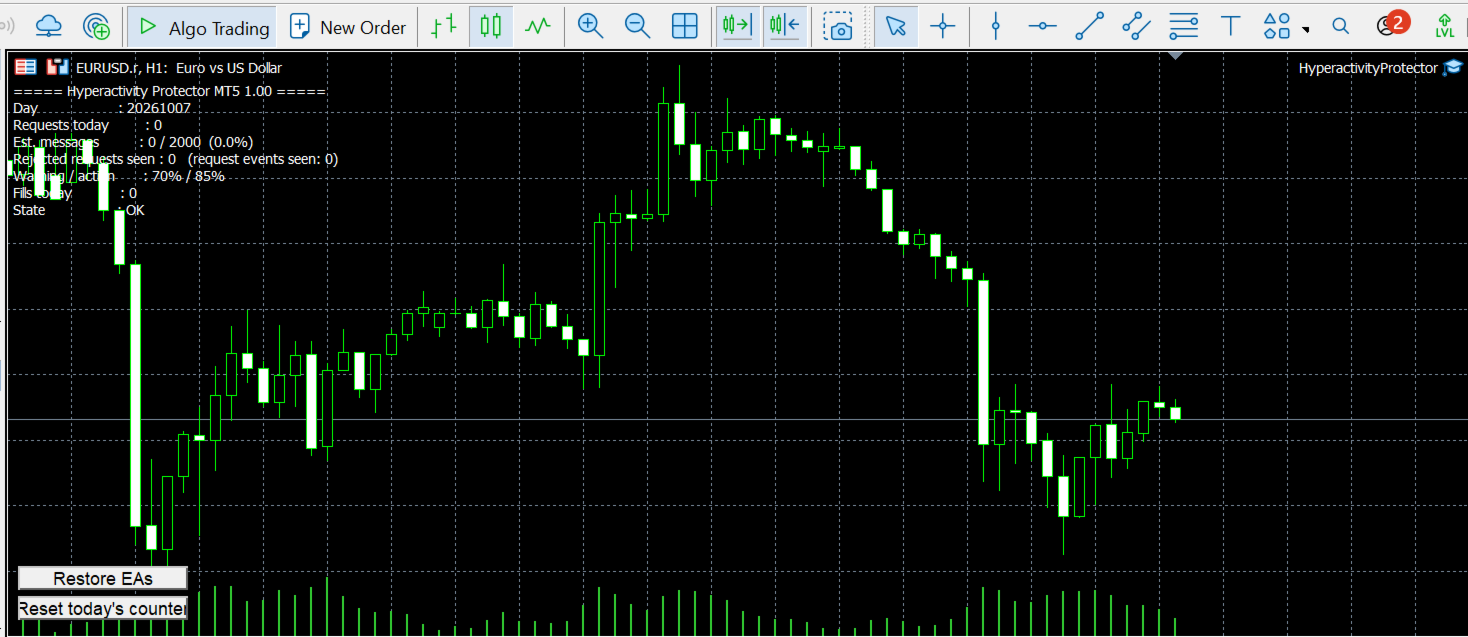
- On-chart status panel with "Reset today's counter" and "Restore EAs" buttons.
WHAT IT PROTECTS AGAINST – PLEASE READ BEFORE BUYING
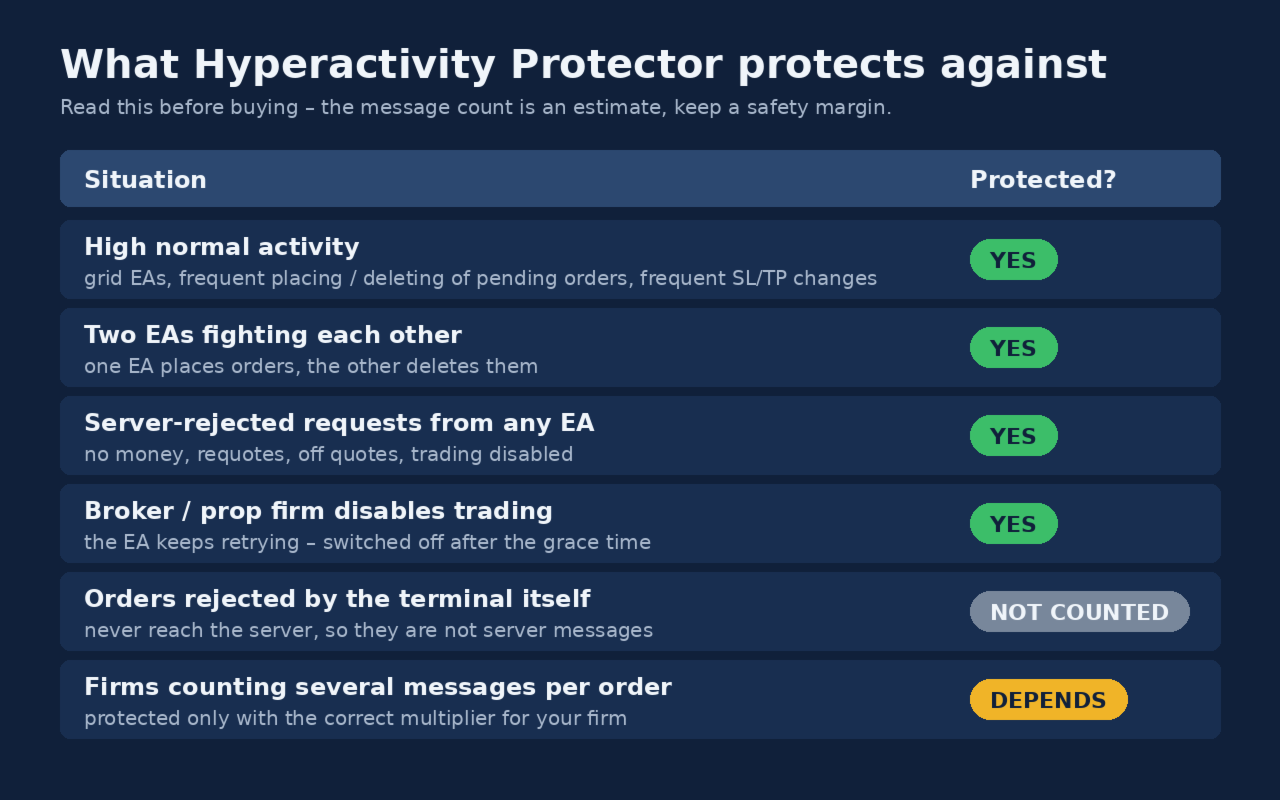
[YES] High normal activity (grid EAs, frequent placing/deleting of pending orders, frequent SL/TP changes).
[YES] Two EAs fighting each other (one places orders, the other deletes them).
[YES] An EA retrying orders that the server rejects (no money, requotes, off quotes, trading disabled).
[YES] Broker or prop firm disables trading while your EA keeps retrying.
[NOT COUNTED] Orders rejected by the terminal itself before sending (e.g. obviously invalid price or stops) – they never reach the server, so they are not server messages.
[DEPENDS] Firms that count several server messages per order – set the correct multiplier for your firm (see Calibration).
The message count is an estimate: the protector cannot read your firm's own counter. Keep a safety margin – the default action level is 85% of the limit.
SETUP
1. Attach the protector to its own chart (any symbol, any timeframe). Enable Algo Trading.
2. Choose which EAs to switch off: all other EAs (optionally list EAs to keep running in EANames), only the EAs listed in EANames, or EAs on charts matching a symbol and timeframe. Names are matched by part of the name, comma-separated. The startup log lists the EAs that will be switched off.
3. Set your firm's daily limit, the multiplier and the day reset time.
4. For push notifications: Tools > Options > Notifications – enter the MetaQuotes ID from the MetaTrader mobile app.
CALIBRATION (MESSAGES PER REQUEST)
Firms count server messages, not order requests, and one request may produce several messages. Ask your firm how many server messages your account sent on a given day, and divide it by "requests=" from the protector's end-of-day log line for the same day. Use an average of several days if possible. Until you have a calibration, keep the conservative default of 4.4.
I also offer:
FREE PERSONAL CALIBRATION (included with every purchase)
Every prop firm and broker counts server messages differently, so the same trading activity can produce very different numbers depending on where you trade. Hyperactivity Protector works out of the box with a conservative default, but for the most accurate protection I'll calibrate it for your specific firm or broker, free of charge.
How it works:
- Run Hyperactivity Protector for one full trading day with your normal setup.
- Ask your prop firm or broker how many server messages your account generated on that same day.
- Send me via MQL5 private message:
- the Experts log from your terminal for that day (it contains the Protector's daily request count),
- the message count your firm or broker gave you,
- the name of the firm or broker and the server you trade on.
- I'll calculate the ratio for your firm and send you a personalised .set file with the thresholds tuned to your account.
The first calibration is included in the price. If your activity changes significantly later (new EAs, more strategies), you can send a second day's data and I'll refine it.
Note: the calibration is based on the data you provide. It improves the Protector's estimate, but it is not your firm's official counter.
TEST IT ON A DEMO ACCOUNT
1. Set a low limit (DailyMessageLimit = 20, MessagesPerRequest = 1, ActionPercent = 80).
2. Place and delete a few pending orders or let your EA trade – at 16 requests the EA chart closes and pending orders are deleted.
3. Press "Restore EAs" – the chart reopens with your EA.
4. Log in with your investor (read-only) password – after the grace time your EAs are switched off.
If you have any questions regarding the testing, don't hesitate to contact me here.
NOTES
- After the trading-disabled fuse fires, EAs are not restored automatically: check your account first, then press "Restore EAs" and "Reset today's counter".
- After a manual restore, protection is paused for the rest of the day until you press "Reset today's counter".
- The protector itself sends no requests to the server during normal operation.
- This tool helps you stay within your firm's activity rules; it cannot guarantee that your firm will not flag your account for other reasons.
IF YOU HAVE ANY QUESTIONS REGARDING THE PRODUCT, DO NOT HESITATE TO CONTACT ME BEFORE OR AFTER PURCHASE. HAPPY AND SAFE TRADING !
DISCLAIMER
Hyperactivity Protector is a risk-management utility. It does not open trades, does not generate profits and does not guarantee any trading result.
The message count is an estimate based on the activity visible in the terminal; it is not your broker's or prop firm's official counter. The protector cannot guarantee that your account will not be warned, restricted or closed for hyperactivity or any other reason.
Switching EAs off and deleting pending orders may affect your trading, e.g. missed entries or open positions left without EA management (their SL/TP stay active on the server).
You are responsible for setting the limit, multiplier and day reset according to your broker's or firm's current rules, which may change at any time. This product is not affiliated with, endorsed by or approved by any broker or prop firm.
Test the protector on a demo account before using it on a live or funded account. Use at your own risk.