PFX Executor
- Utilitários
-
Daniel Freeman
 I'm Dan, a UK trader, a disabled veteran, and the builder behind PrecisionFX.
My mission is simple: help people get started in trading without paying a penny. - Versão: 6.1
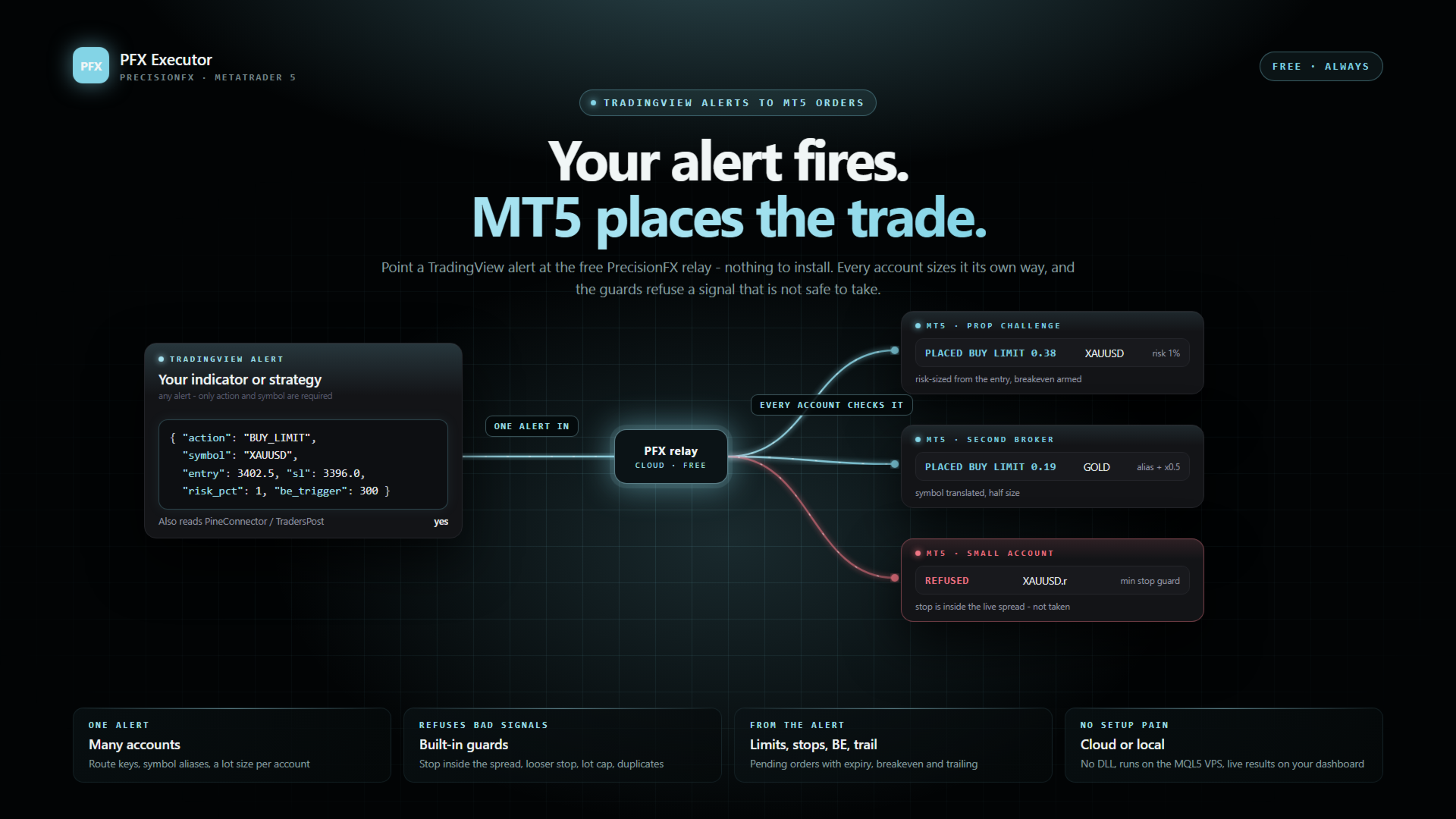
Your TradingView alerts, executed in MetaTrader 5. Free - no DLL, no subscription.
HOW SIGNALS REACH IT
This EA does not generate signals. It takes alerts TradingView has already sent and turns them into orders.
Point your TradingView alert at the PrecisionFX relay and this EA collects from it. Nothing to install beyond the EA itself, nothing to keep running on your PC, and the webhook address never changes. About five minutes to set up.
If the relay is briefly unavailable your signals are not lost - they are stored when TradingView sends them, and your terminal collects them from where it left off. The same applies when your terminal is closed: nothing is missed while it is shut.
The relay is free, like everything else here. It is not a paid tier and there is no paid tier.
TWO THINGS TO KNOW BEFORE YOU BUY
It cannot backtest your alerts. It reacts to delivered signals, not to bars. In the Strategy Tester it only runs a tiny demo cycle - the smallest position, opened once a day and closed an hour later - so the order path can be checked. That is expected, not a fault.
If you use the cloud relay you must allow it through MT5's own firewall: Tools > Options > Expert Advisors > "Allow WebRequest for listed URL", and add the relay address shown in the EA's RelayHost setting. It is one tick box, but it is the single most common reason a working setup does nothing - so the EA checks at startup and tells you, with the menu path, rather than failing silently.
WHAT IT DOES
It is the delivery step between a signal and a filled order. It has no strategy and no opinion about your entries - it takes what your alert sent, checks it is sane, and places it.
Only two fields are required in an alert: the action and the symbol. Everything else is passed through untouched, which is why alerts from indicators other than mine work here too.
ROUTING - THE PART THAT MATTERS IF YOU RUN MORE THAN ONE ACCOUNT
- Route key - each instance answers to one exact name. One TradingView alert can feed four terminals, with each one taking only its own trades.
- Indicator filter - separate one strategy from another.
- Symbol aliases - brokers do not agree on names. Translate NAS100 to US100.cash, XAUUSD to GOLD, whatever yours calls it. This is the single most common reason a signal arrives and no trade appears.
- Lot multiplier - one signal, accounts of different sizes. Halve it here, double it there.
A full-close signal deliberately ignores the route key and is honoured by every instance that sees it. That is a safety decision: if a route key were ever mistyped, a strict gate would leave an open position that no alert could reach. Open risk must always be removable.
GUARDS - SIGNALS IT WILL REFUSE
Most of this EA is the checking, not the ordering. An alert that arrives is not automatically an alert worth taking.
- A stop-loss move that INCREASES risk is refused. This exists because a TradingView replay once sent exactly that.
- An entry whose stop is tighter than the live spread is refused - a stop inside the spread is not a stop.
- A risk-sized entry that works out to a zero-distance stop is refused, rather than implying an unbounded position.
- A size that cannot be computed correctly is refused. It is never guessed.
- MAX LOT SIZE is a hard ceiling - the last thing standing between a malformed alert and an account-sized position.
- Duplicate instances refuse to load rather than fighting the original over the same trades.
- On the cloud path, every signal carries an ID and the EA records what it has already acted on - so a dropped connection or a restart mid-signal cannot place the same order twice.
WHEN IT WILL NOT WORK, IT SAYS WHY
The startup banner states in one sentence why trading is not possible, if it is not - no relay key, no WebRequest permission, no signals folder, whichever applies. Symbols are checked for whether they are actually tradable rather than merely present - the two are not the same, and the difference used to look like a random failure. Turn on verbose logging and every skipped signal explains itself.
It also records the gap between TradingView's price and your broker's on every entry, so you can see how far apart the feeds run before deciding whether it matters. Optionally it can refuse entries where that gap has grown too large relative to your stop.
SETUP - THE CLOUD PATH
- Sign in free on the PrecisionFX website and create a strategy under Automation - it gives you a webhook URL.
- Paste that URL into your TradingView alert. The alert message itself does not change.
- Add an account under Automation > MT5 accounts and copy the key it shows you (shown once).
- Attach this EA to a chart of the symbol you trade (any timeframe) - one Executor per symbol. Set Signal source to PrecisionFX Cloud and paste the key in.
- Allow the relay address (the RelayHost setting) under Tools > Options > Expert Advisors, then re-attach.
- Set the route key to match your alert's instance field, give it a unique magic number, and set your maximum lot size deliberately.
Test on demo first. Every part of this chain is new until you have watched it work.
WHAT IS IN THIS VERSION
- Pending orders from the alert - buy/sell limit and stop at a price, with an optional expiry. Every entry check (routing, news, minimum stop, risk sizing, lot caps) is measured from the entry price.
- Cancel pending orders, and move stops to breakeven, with one alert.
- Breakeven and trailing stops carried by the entry alert, run by the EA itself. They only ever tighten a stop.
- On the cloud: one alert can reach many accounts, each with its own size and symbol names, and your dashboard shows what each terminal actually did - filled, placed or refused, and why.
- Already have alerts written for another TradingView bridge? The relay reads the two most common alert formats as they are.
- Runs on an MQL5 VPS too - no DLL, nothing else to install.
FREE
Free, and staying free - the EA and the relay both. If it earns you something and you would like to say thanks, there is a donation link on the PrecisionFX website. There is no paid tier and nothing is held back.