Flowmancer
- Indicadores
-
Alex Amuyunzu Raymond
 I’m an experienced MQL5 developer and software engineer specializing in building robust, high-performance algorithmic trading systems for MetaTrader 5. My work goes beyond standard EA development — I design intelligent, scalable solutions that combine market logic, automation, and external
 - Versão: 2.0
- Ativações: 5
Flowmancer: See the Pressure Behind the Price Before the Move Shows Itself
Price tells you where the market has been. Flowmancer shows you who has been pushing it there, and when that push is starting to fail or quietly rebuilding.
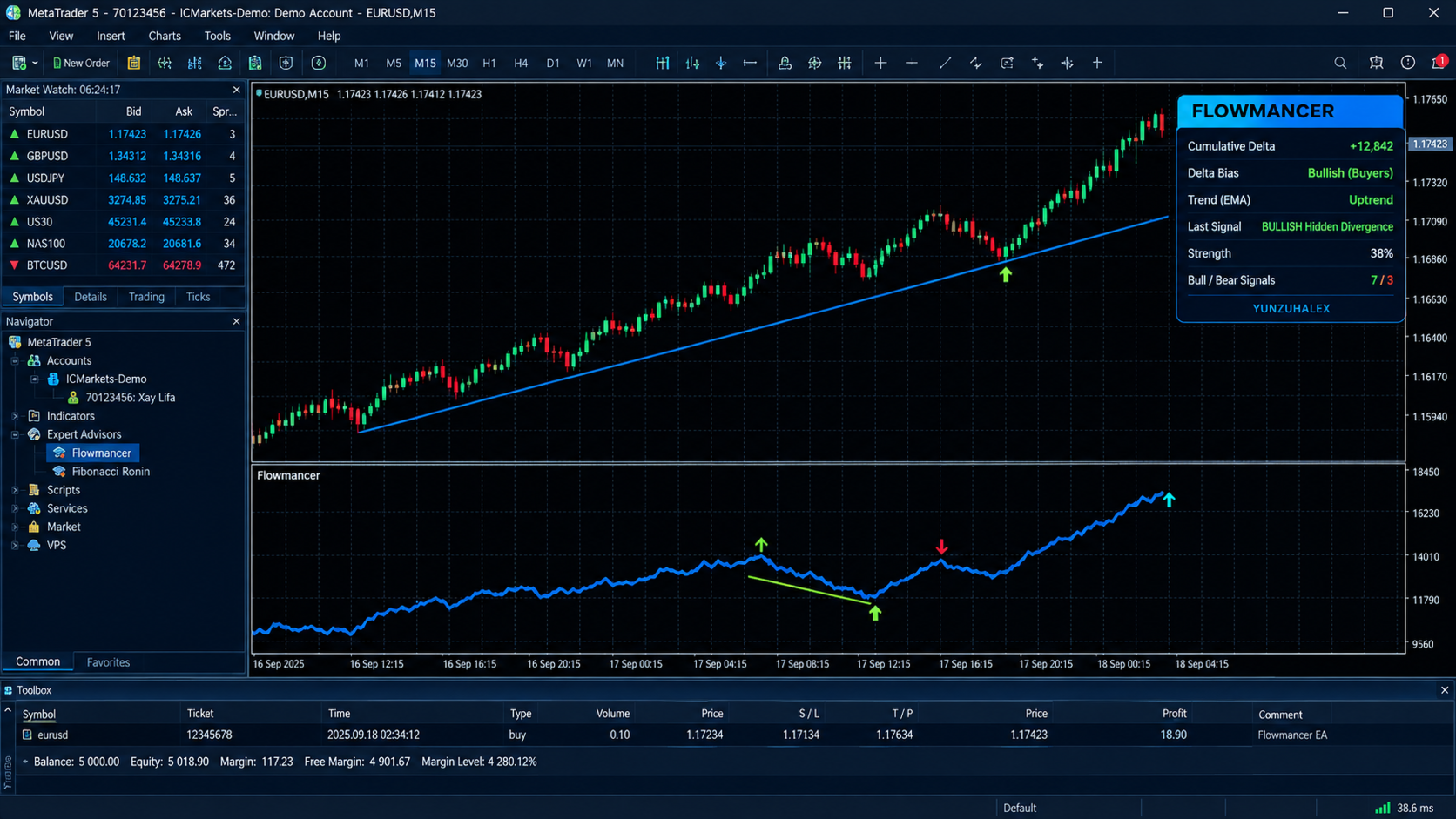
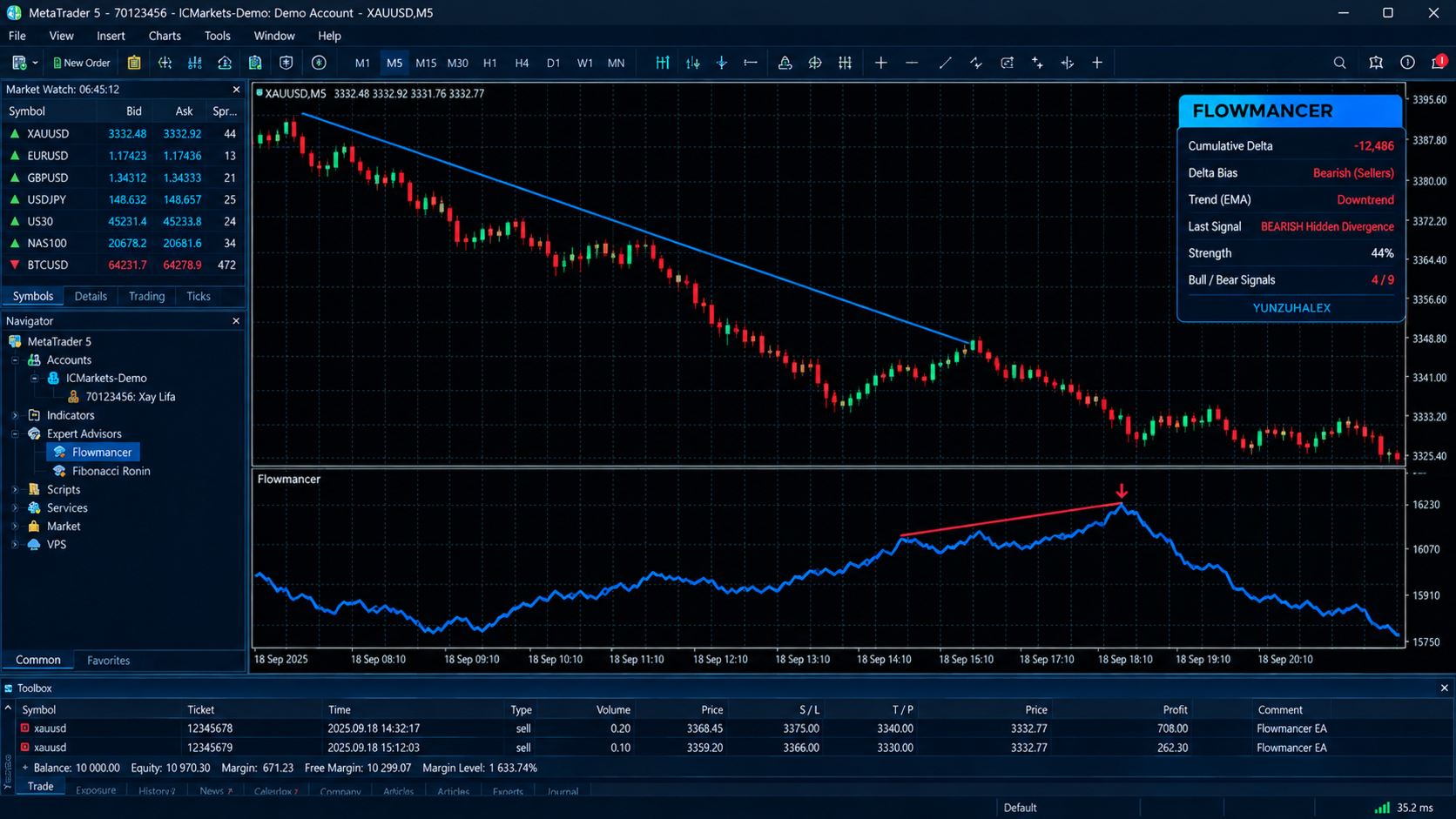
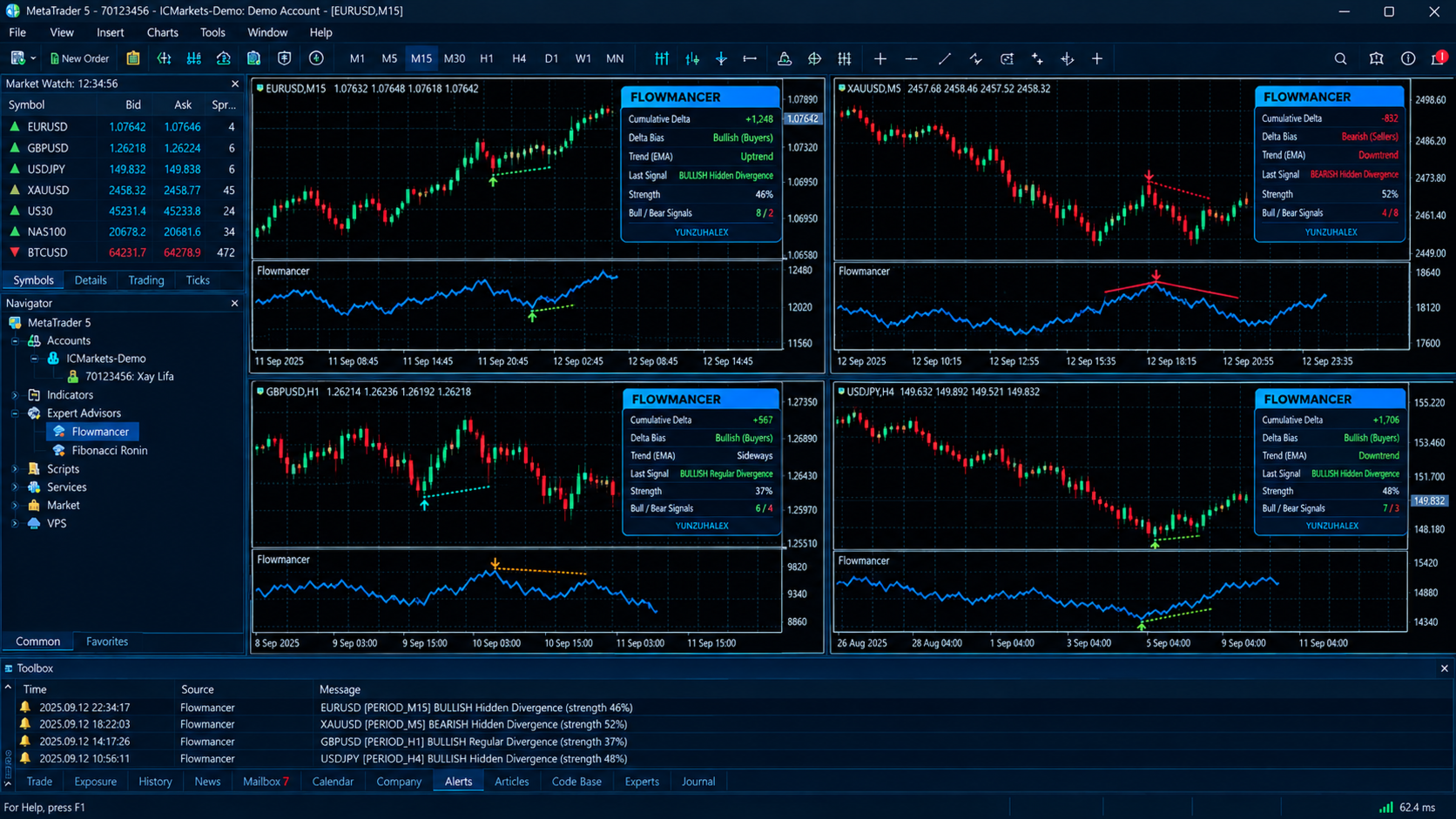
Flowmancer is a cumulative volume delta divergence scanner for MetaTrader 5. It builds a running delta line in its own sub-window, finds the swing points in both price and delta, and marks the moments where they disagree. It draws the divergence line between the two swings, ranks the signal by strength, and alerts you on the bar that confirms it. Everything is summarised on a clean on-chart dashboard.
What Flowmancer does
Most traders watch price alone. Flowmancer adds a second layer, the cumulative balance between buying and selling volume, and looks for the classic warnings that come when the two layers stop agreeing:
- Hidden divergence: the trend is still intact, but the pressure behind the pullback is fading, which often points to continuation.
- Regular divergence: price pushes to a new extreme while the delta refuses to follow, which often points to exhaustion.
How the delta is calculated
For every bar, Flowmancer takes the bar's tick volume and splits it into estimated buying and selling volume, based on where the bar closed within its own high-low range. A bar that closes near its high assigns most of its volume to buyers, and one that closes near its low assigns most to sellers. The difference is added to a running total, which is the Cumulative Delta line.
This is a tick-volume estimate. MetaTrader 5 does not give retail accounts true exchange-level bid/ask volume on most instruments, and Flowmancer says so rather than pretending otherwise. The advantage is that it works on any symbol and any timeframe your broker provides, including Forex, metals, indices, crypto and CFDs, with no special data feed.
Swing detection
Flowmancer identifies swing highs and swing lows in price and in the delta line using a configurable number of bars on each side. A swing is only accepted when every neighbouring bar in the lookback window confirms it. That filters out small noise and keeps only structural turning points. The previous swing is then searched within a set range of bars, and the two are compared.
The four signals
Bullish Hidden Divergence (lime arrow): price makes a higher low while delta makes a lower low. Sellers pushed the delta down, but price refused to follow. This suggests the pullback is running out of force and the uptrend may resume.
Bearish Hidden Divergence (red arrow): price makes a lower high while delta makes a higher high. Buyers lifted the delta, but price could not go with them. This suggests the rally is weak and the downtrend may resume.
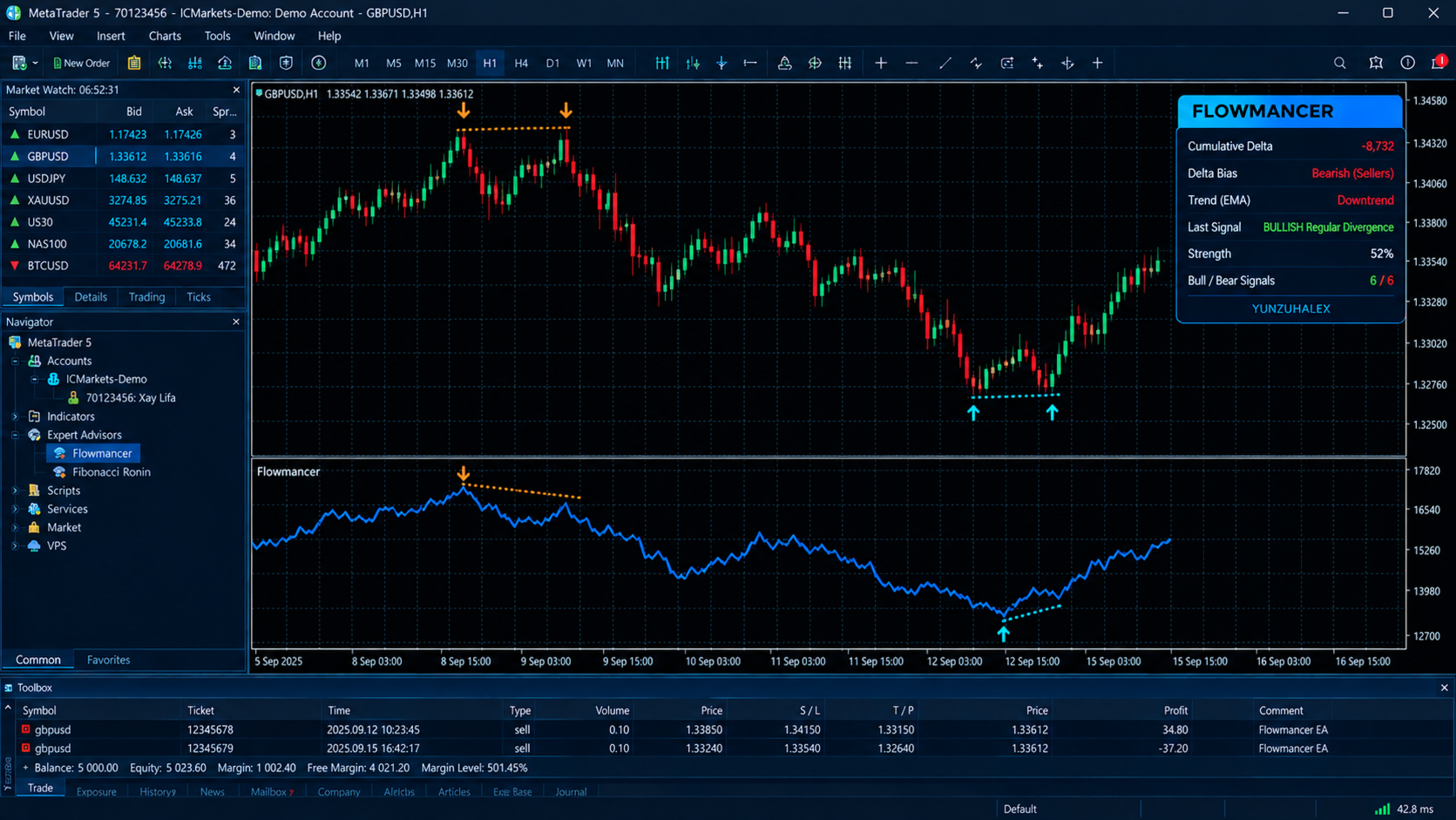
Bullish Regular Divergence (aqua arrow): price makes a lower low while delta makes a higher low. Selling pressure is exhausting into the low, which is a potential reversal warning.
Bearish Regular Divergence (orange arrow): price makes a higher high while delta makes a lower high. Buying pressure is fading into the high, which is a potential reversal warning.
Each signal appears as an arrow on the delta line, with a divergence line joining the two swing points, so you can see exactly what the scanner compared.
Signal strength
Every signal carries a strength score, shown in alerts and on the dashboard. It measures how far the delta moved between the two swings compared with its overall size at those points. Set the minimum sensitivity to be strict and see only pronounced divergences, or lower it to see more.
Trend filter
Hidden divergence is a continuation idea, so it should only be taken with the trend. Flowmancer includes an optional EMA trend filter with a configurable period. Bullish hidden signals are only shown when price is above the EMA at confirmation, and bearish hidden signals only when it is below. Regular divergence is not filtered, because it is a reversal idea by nature.
Daily delta reset
Many traders prefer to start the delta from zero each trading day. Flowmancer can reset the cumulative delta at each new day. When this is on, divergences are never compared across a reset boundary, so you don't get false signals from comparing two different sessions.
Non-repainting logic
Flowmancer only evaluates closed bars. A swing is confirmed only after the required number of bars has closed on its right side, so a signal that appears does not vanish or move afterwards. The trade-off is honest and simple: signals arrive a few bars after the swing itself, which is the cost of a swing that has actually been confirmed.
Alerts
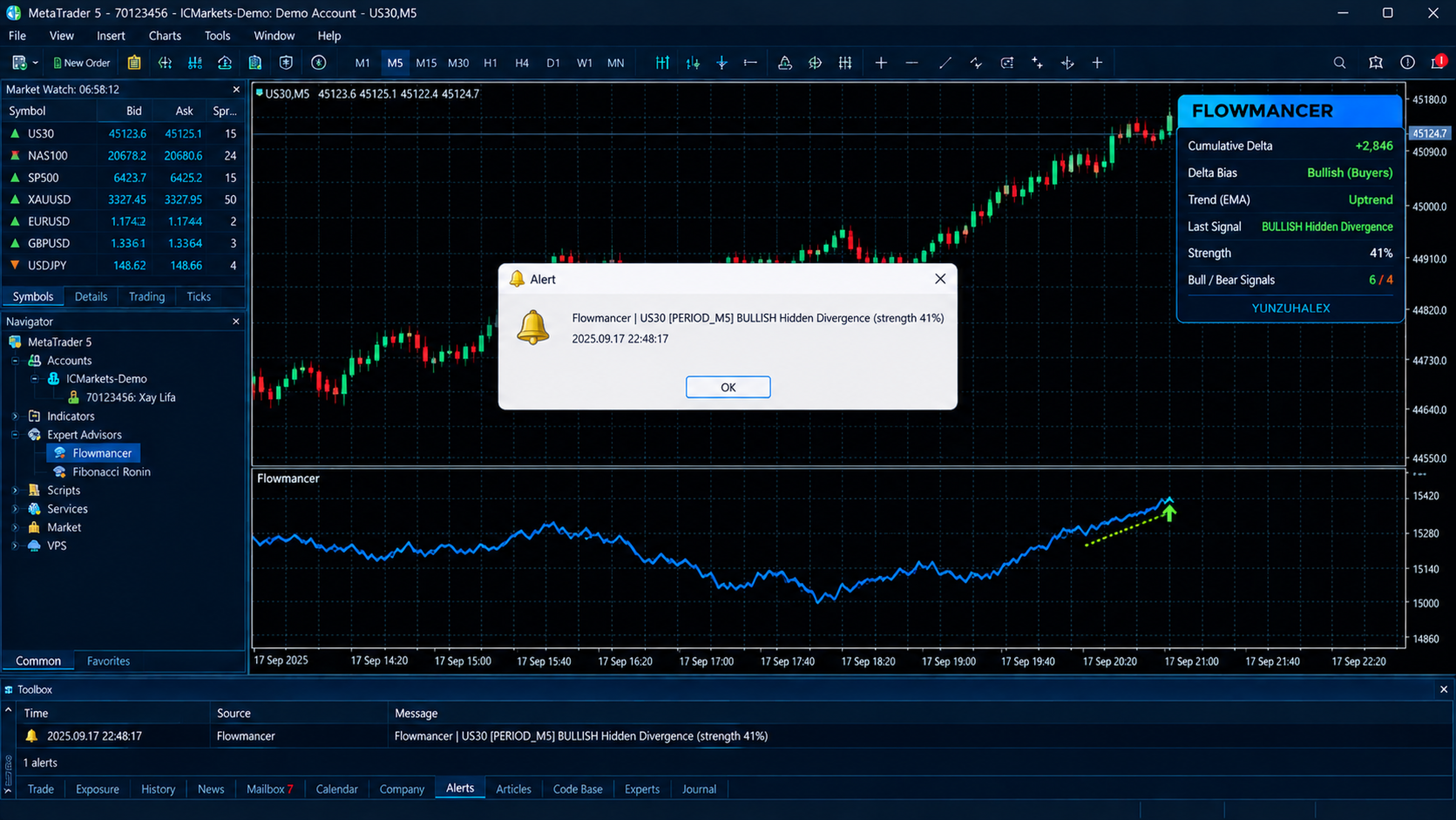
When a new signal is confirmed on the live chart, Flowmancer can notify you through:
- Popup alert
- Push notification to the MetaTrader mobile app
- Sound, with a selectable file
Each alert names the symbol, the timeframe, the signal type and the strength. Each signal alerts only once, and history loaded on startup does not trigger alerts.
On-chart dashboard
A compact panel on the chart shows, in real time:
- Current cumulative delta, colour-coded by direction
- Delta bias over the last 20 bars
- Trend direction relative to the EMA
- Last signal type
- Signal strength
- Count of bullish and bearish signals
The dashboard can be placed in any of the four chart corners, and it can be switched off. It is designed to sit on the chart without hiding price.
Inputs at a glance
- Swing lookback: bars on each side required to confirm a swing.
- Divergence range: how far back to look for the previous swing.
- Sensitivity: minimum normalised delta change to accept a signal.
- Hidden and regular detection: switch each family on or off.
- Require delta swing: demand a matching delta turning point, or use the relaxed mode for more signals.
- History bars: how much history to scan when the indicator loads.
- Trend filter and EMA period.
- Daily delta reset.
- Divergence lines, with separate bullish and bearish colours.
- Dashboard corner, colours and visibility.
- Alert channels and sound file.
How to use it
- Attach Flowmancer to any chart and timeframe.
- Use the trend filter to focus on hidden divergence in the direction of the trend, and read regular divergence as a warning at extremes.
- Combine signals with your own structure, support and resistance, session context and risk rules. A divergence is a piece of evidence, not an instruction.
- Use a higher sensitivity for cleaner, rarer signals, and a lower one to study more of the market.
Who it is for
- Discretionary traders who want a second confirmation layer beyond price action.
- Traders who already use divergence on oscillators and want to apply the idea to volume pressure.
- Traders who want alerts on divergence without watching charts all day.
- Anyone who wants a transparent tool where the swings being compared are drawn on the chart.
Important notes
- Flowmancer is an indicator. It does not open, modify or close trades.
- Delta is estimated from tick volume and is not exchange-reported order flow.
- Signals are confirmed after a few closed bars and are not predictions.
- No indicator can guarantee profit. Past signals do not guarantee future results. Test it in the Strategy Tester and on a demo account, and manage your risk.