TradeDeskEA

TradeDesk EA — Semi-Automatic Trading and Account Discipline Panel for MT5

English Description

Faster execution with rules that remain in force

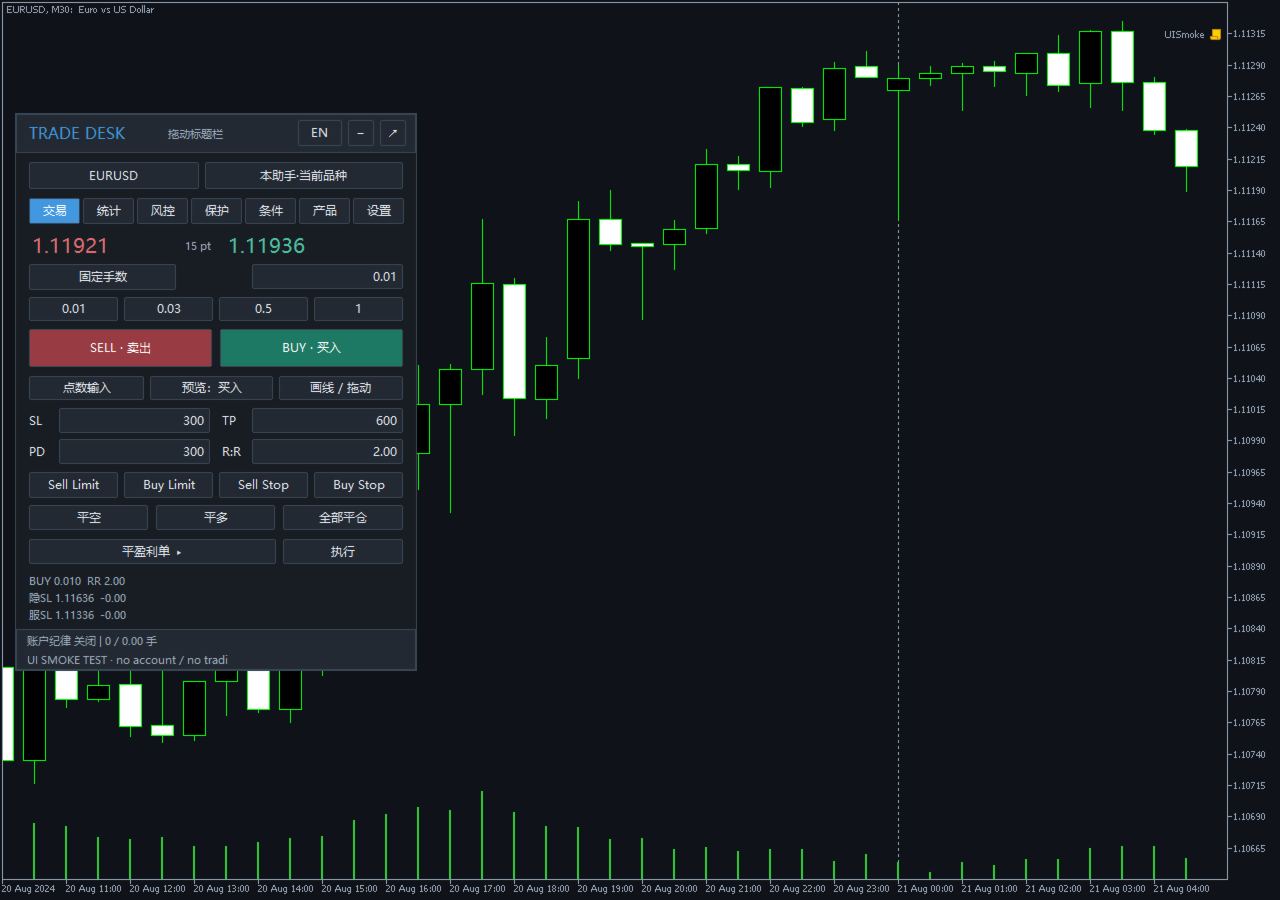
TradeDesk EA is a bilingual semi-automatic trading assistant for MetaTrader 5. It combines order execution, position sizing, trade management, conditional tasks, account statistics, and optional discipline controls in one compact panel. It can be used with Forex, metals, indices, energy products, stocks, and other CFD instruments made available by the connected broker.

TradeDesk EA does not generate trading signals or choose the market direction for you. It turns your own trading plan into clear operating rules: calculate exposure before entry, manage positions after execution, and stop additional account risk when a predefined discipline limit is reached.

Main Features

Fast Execution and Order Management

One-click market Buy and Sell execution.
Buy Limit, Sell Limit, Buy Stop, and Sell Stop orders.
Fixed lot, fixed cash risk, and equity percentage risk sizing.
Entry, Stop Loss, and Take Profit by price, point distance, or draggable chart lines.
Real-time estimates for volume, potential loss, target profit, risk/reward, and margin requirement.
Quick actions for closing Buy, Sell, all, profitable, losing, latest, or partial positions, plus reverse and double reverse operations.
Custom Magic ID, order comment, and four configurable quick-lot buttons.

Position Protection and Automated Management

Break-even management triggered by points or R-multiple, with an optional offset.
Fixed-distance, ATR-based, and closed-candle trailing stops.
TP1, TP2, and TP3 targets with independent partial-close percentages.
Hidden Stop Loss and Take Profit with an optional wider server-side backup stop.
Quick removal of position or pending-order protection levels.
Cash-profit targets, price-line alerts, line-based entries, and scheduled open, close, or cancel tasks.
Breakout and pullback OCO workflows; when one side is filled, the opposite side is cancelled.

Account, Position, and Trading Statistics

Balance, equity, floating P/L, used and free margin, margin level, and account leverage.
Position volume, weighted average price, and floating result grouped by symbol and direction.
Today, week, month, and custom server-date history with CSV export.
Automatic access to all instruments supplied by the connected broker, searchable by symbol, description, or category.
Contract size, minimum/maximum/step volume, trade status, margin data, long and short swaps, triple-swap day, and trading sessions. Data not supplied by the broker is clearly marked as unavailable.
Four management scopes: this assistant on the current symbol, all trades on the current symbol, a selected Magic ID across symbols, or the entire account.

Core Feature: Account Discipline Control — A Practical Brake on Overtrading

Many trading losses are caused by behavior rather than analysis: revenge trading after a loss, increasing size under pressure, entering too frequently, splitting a large order into smaller ones to bypass a rule, or changing limits during an emotional session.

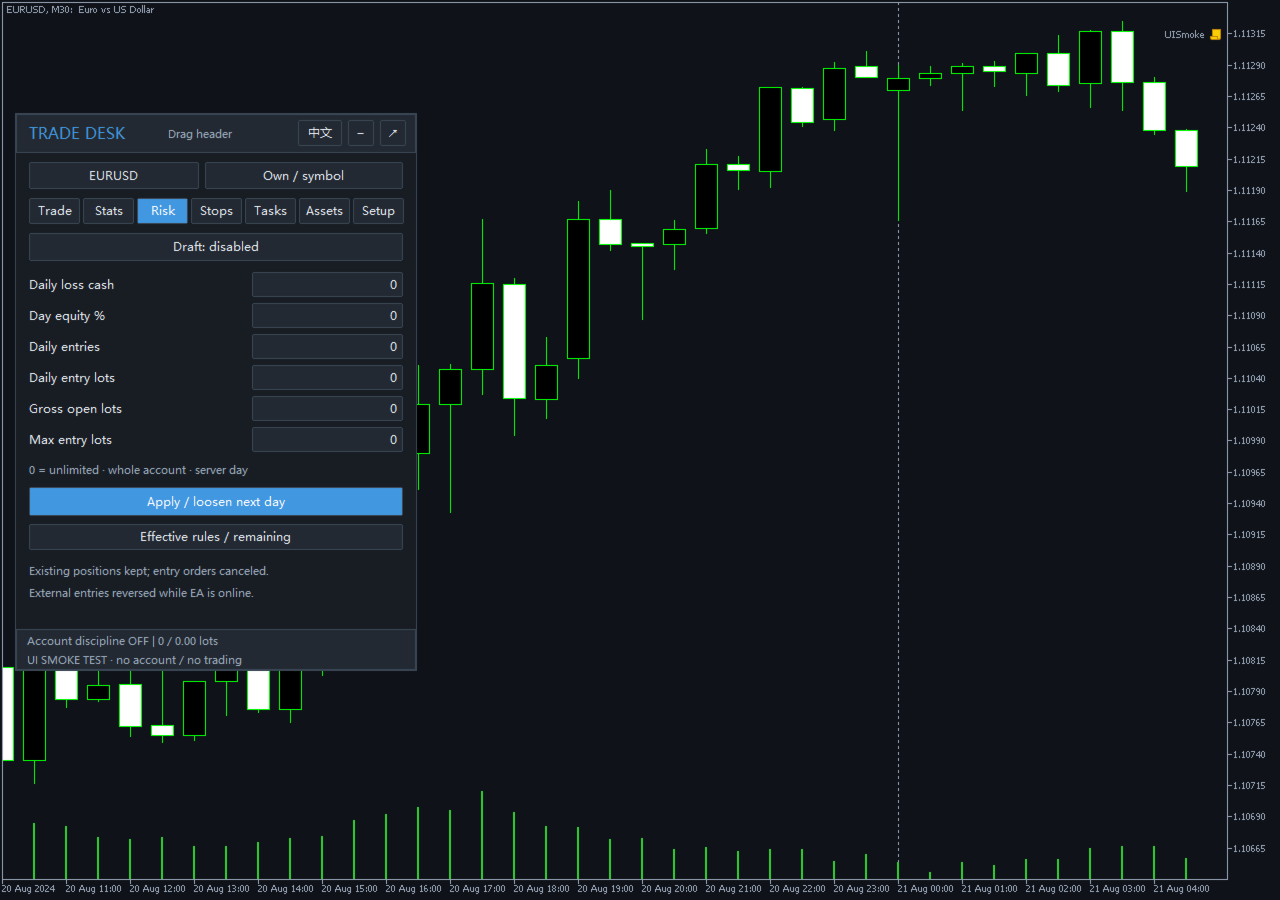
TradeDesk EA includes an optional discipline system that is disabled by default and activated by the trader. Once enabled, it monitors the entire account across all symbols using the broker's server time. The following limits can be configured independently:

Maximum daily equity loss in cash** — blocks additional risk after the daily loss reaches the selected amount.
Maximum daily equity loss in percent** — uses start-of-day equity as the reference for the daily percentage limit.
Maximum daily entry count** — limits the number of successful new entries and helps reduce impulsive re-entry.
Maximum cumulative daily entry volume** — adds all entry volume for the day, so splitting one large trade into several smaller orders does not bypass the rule.
Maximum current gross account volume** — adds long and short volume by absolute lots to limit total account exposure.
Maximum volume per entry** — prevents an oversized individual order or a sudden increase in size after a loss.

Pending orders reserve entry-count and volume capacity in advance. If any enabled limit is reached, or an entry is attempted in violation of a limit, the account enters a discipline lock until 00:00 on the next broker-server day.

While locked:

New entries and position increases from the panel are blocked.
Account-wide entry pending orders are cancelled.
If a manual trade, another chart, or another EA adds exposure, TradeDesk attempts to close only the newly added volume as soon as it is detected.
Existing positions are not force-closed. Their existing Stop Loss, Take Profit, break-even, trailing-stop, and partial-profit rules continue to operate.
Closing and reducing positions remain available, allowing risk to be lowered at any time.

To prevent emotional rule changes, tighter limits take effect immediately, while relaxed limits or disabling the discipline system take effect on the next server day. A lock is not cleared early by an equity recovery, a position reduction, or an MT5 restart.

Software cannot remove emotion, but it can enforce a boundary chosen while the trader is calm: stop after the planned loss, stop after the permitted number of entries, and stop when account exposure reaches its limit. This creates a mandatory cooling-off period and helps reduce revenge trading, overtrading, and uncontrolled position sizing.

Designed for Different Trading Styles

TradeDesk EA is suitable for manual and semi-automatic traders, including day traders, swing traders, breakout traders, and multi-instrument CFD traders. Its compact panel sits in the upper-left chart area while leaving space for MT5 controls. The interface supports English and Chinese, can be moved, scaled, or collapsed, and uses coordinated dark or light colors based on the chart background.

Important Information

TradeDesk EA is an execution and discipline tool, not an automated profit system, and it does not guarantee results. A daily loss limit is a trigger that stops additional risk; existing positions can continue to gain or lose. An external entry must be filled before the terminal can detect it and attempt to close the added volume, so spreads, commissions, slippage, and temporary market exposure may occur.

Hidden protection, trailing stops, OCO logic, line tasks, and account discipline controls require the MT5 terminal to remain running and connected, algorithmic trading permission to be enabled, and the broker to accept trade requests. Test the EA on a demo account first to confirm the broker's symbol suffixes, execution rules, minimum stop distance, netting or hedging mode, and cost calculations.
Produits recommandés
Global Stop Loss and Take Profit Manager Drag Lines Auto Apply Already using my free Global Stop Loss and Take Profit Setter? This is the always on version. Instead of setting levels once, you drag two lines on the chart and every manual position on that symbol — plus every new one you open — instantly inherits the Stop Loss and Take Profit. No clicking into each order. No forgetting a stop. Global Stop Loss and Target Manager is a drag-and-drop risk tool for manual traders on MetaTrader 5. Pu
Grid Manager — Manual Multi-Basket Grid Assistant for MT5 Grid Manager is a hands-on control panel for building and managing grid "baskets" directly on your chart. You decide the direction and the moment; the tool opens the grid, manages every leg, and protects the position with money-based risk controls, on-chart breakeven/SL/TP lines, and one-click actions. It is an execution and management assistant — fast, visual, and fully under your control. What it is — and what it is not Grid Manager is
Arrêtez de laisser les courtiers chasser votre Stop Loss ! Êtes-vous fatigué de voir le prix toucher votre Stop Loss exactement au point mort, pour ensuite s'inverser immédiatement en votre faveur ? C'est souvent causé par le bruit du marché ou ce qu'on appelle la "chasse aux stops" (Stop Hunting). TrailGuardian est un gestionnaire de transactions professionnel "Stealth" (invisible) conçu pour protéger vos profits sans révéler vos niveaux de sortie au marché. Il crée une ligne de stop-loss vi
BulkOp Trade Manager
Ahmed Jumaa Saif Ali Almheiri
BulkOp Trade Manager Trade faster. Manage smarter. Close with confidence. BulkOp Trade Manager is a powerful MT5 utility EA built for traders who need speed, control, and clean execution directly from the chart. It is designed for active manual traders, scalpers, gold traders, and anyone who wants to manage multiple positions with less delay and fewer clicks. Why BulkOp? Ultra-fast Buy and Sell execution One-click Bulk Close Profit One-click Bulk Close Loss Keyboard trading control Bulk order e
Cet outil peut vous aider à clôturer toutes les commandes ouvertes en un seul clic, cliquez simplement sur « Tout fermer ». Si vous souhaitez uniquement clôturer les ordres rentables, cliquez sur le bouton « Fermer les ordres rentables ». Après avoir cliqué, tous les ordres flottants seront fermés ; Si vous souhaitez uniquement clôturer les ordres avec des pertes flottantes, cliquez sur le bouton « Fermer les ordres perdants ». Après avoir cliqué, tous les ordres avec des pertes flottantes seron
This utility sends notification to trader’s MT5 (for MT4 version, checkout this link ) mobile app, to remind traders about their open positions. Super useful for part time traders to keep track and not forget any positions. To turn on notification, please visit   this link   (https://www.metatrader4.com/en/trading-platform/help/setup/settings_notifications) Features Keep track on open orders (pending orders, running orders) Customize time to send notification Customize notification interval (se
Every panel tells you how much you're risking. This one tells you how much you have left. You didn't lose the challenge because your strategy failed. You lost it because one more trade pushed you past the daily limit while you were chasing the target. PropDesk is the desk that helps stop that from happening. 1. Size against your ROOM, not your equity. Every order shows "risk $X = Y% of your daily room left". You always know if the next trade fits inside what the firm allows today - before you
Guardian Magic GT
Carlos Eduardo Rivas Istacuy
Guardian Magic GT - Risk Management Expert Advisor for MetaTrader 5 PROTECT YOUR TRADING CAPITAL WITH INTELLIGENT RISK MANAGEMENT Guardian Magic GT is a professional-grade Expert Advisor designed to safeguard your trading operations by implementing sophisticated risk control mechanisms. Whether you run a single bot or manage multiple automated trading systems simultaneously, Guardian Magic GT provides real-time monitoring and automatic position management to ensure your account stays within your
Cet EA est principalement utilisé pour le scalping du XAUUSD. Objectif   Élimine l’émotion dans la gestion des trades — protège automatiquement les positions et prend des profits afin que vous n’ayez pas à prendre de décisions difficiles sous pression. Ce qu’il fait   ️ Stop Loss automatique   Définit le SL sur la base des récents hauts/bas + buffer   Fini le stress de la pose manuelle   Prises de profits partielles automatiques   Deux modes :   Mouvement fixe : ferme 50 % après un mouve
Position Prime
Mariana Cordeiro Neves Fernandes
Téléchargez dès maintenant la version de démonstration gratuite et testez toutes les fonctionnalités de gestion des risques de votre outil de test de stratégie avant d'acheter ! Position Prime est un assistant d'exécution visuelle et un gestionnaire de risques de niveau institutionnel pour MetaTrader 5. Conçu pour les traders qui exigent vitesse et précision, il élimine le besoin de calculs manuels de lots et transforme votre graphique en une véritable station de trading. Planifiez, exécutez et
EA Hedger MT5
Sergej Chukhista
3 (2)
Have you bought a trading advisor, subscribed to a signal, or are you trading manually ?! Don't forget about risk management. EA Hedger   is a professional trading utility with many settings that allows you to manage risks using hedging. Hedging is a trading technique that involves opening opposite positions to those already open positions. With the help of hedging, the position can be completely or partially blocked (locked). For example, you have three open positions on your account: EURUSD b

AW Metatrader to Telegram MT5
AW Trading Software Limited
5 (1)
Un système automatisé d'envoi de notifications afin qu'aucun de vos abonnés ne rate vos événements de trading depuis votre terminal de trading. Un utilitaire qui envoie des notifications au messager Telegram sur toutes les opérations de trading sur votre compte. Instructions pas à pas pour connecter l'utilitaire à une chaîne dans Telegram -> ICI / MT4 -> ICI Avantages : Installation facile et instructions détaillées, Possibilité d'envoyer des captures d'écran ajustables, Texte de notification pe
Hisoka Trade Panel — v6.91 Description: Hisoka Trade Panel is a comprehensive on-chart trade management Expert Advisor for MetaTrader 5. It places a draggable, collapsible panel directly on your chart and lets you manage open positions — break-even locks, trailing stops, partial closes, and SL/TP modification — with one click. All risk math is dollar-based, so the same "BE 5$" button locks $5 of profit consistently across XAUUSD, BTCUSD, EURUSD or any other instrument, regardless of contract siz
Auto Stop Loss MT5
Nabil Oukhouma
5 (1)
Le Gestionnaire de Risque "Set & Forget" pour le Trading Multi-Actifs ️ Ne laissez jamais un trade sans protection. Auto Stop Loss (MT5 Manager) est l'utilitaire d'arrière-plan ultime pour les traders qui privilégient la sécurité. Contrairement aux panneaux standard, cet outil travaille sans relâche en coulisse pour sécuriser instantanément chaque trade que vous placez. Que vous ouvriez des trades manuellement ou via un autre EA, ce gestionnaire s'assure que chaque position dispose immédiateme
Instructions for Using Reverse Copier EA Attach EA to Charts Open MetaTrader and attach the EA to any chart on both accounts (master & slave). Make sure AutoTrading is enabled. Master Account (Signal Sender) Set Mode = Master in EA settings. This account will send trade signals. Slave Account (Signal Receiver) Set Mode = Slave in EA settings. This account will receive trades in reverse (opposite direction). Lot Multiplier In Slave EA settings, set Multiplier to control lot size. Example: 1.0
RealCost Auditor MT5 is an execution-cost monitor for MetaTrader 5. It does not open, close, or modify trades. It watches the chart symbol, samples live spread, records executed deals, estimates signed slippage when the terminal exposes the requested price, and saves a local CSV audit file. Many backtests use spread, slippage, commission, and swap assumptions that are cleaner than real trading conditions. This utility gives you broker and account data from your own terminal before you trust a s
MQT AutoClose Expert MT5
Josue Fernando Servellon Fuentes
MQT AutoClose Expert closes your orders automatically once they reach the profit target you set — in real pips (with a separate target for gold) or in account money. Open your trades as you always do; the EA watches every position on every symbol and locks the profit in for you. It never opens trades. How it works (logic summary): Every tick and every 500 ms it scans all open market orders. Pending orders are never touched. Pips mode: profit distance is computed from prices — Bid for buys, Ask f
Superior MT5 To Telegram Signals Notifier OVERVIEW Superior MT5 To Telegram Signals Notifier is a smart bridge tool for MetaTrader 5 that instantly sends your trading activity directly to your Telegram phone app, channels, or group chats. It tracks your account in real time and broadcasts trade openings, closures, modifications, pending orders, and clear chart screenshots automatically using a simple Telegram Bot. Whether you run a VIP signal channel and want to share trades automatically wit
Telegram Services
Ramesh Maharjan
5 (1)
Le service Telegram est une application de trading qui assure la communication entre ce conseiller expert (EA) et votre chaîne Telegram. Cette application génère des rapports, vous alerte lors de l'ouverture, la fermeture et la modification de positions, ouvre de nouvelles positions, ferme les positions ouvertes, modifie les positions existantes, affiche l'historique des transactions, récupère des captures d'écran des graphiques, et récupère les valeurs de stop loss et de take profit. Elle affi
T Manager for Price action Traders
Haidar Lionel Haj Ali
4.5 (10)
Maximisez votre succès en trading avec T Manager, la solution ultime de gestion du commerce conçue par des traders pour les traders. Avec son interface conviviale et ses fonctionnalités avancées, vous pouvez planifier, exécuter et gérer rapidement et facilement vos opérations de trading. Expérimentez un contrôle sans égal en ayant la possibilité de définir vos opérations de prix, vos stop loss et vos bénéfices avec facilité. Gérez votre risque avec précision et calculez la valeur monétaire de vo
SC Copier Starter
Nino Rosano Calabro'
SC-Copier Starter est le composant opérationnel du système SC-Copier : il reçoit les opérations du Master et les réplique sur le compte Slave. Il s’installe sur un second client MetaTrader 5 actif sur le même ordinateur ou VPS que le compte Master. La communication s’effectue localement entre les deux terminaux, sans services web, DLL ni infrastructure externe. Le Receiver gère les ouvertures, les fermetures complètes ou partielles ainsi que les modifications du Stop Loss et du Take Profit. Chaq
AutoCloseTimer allows you to close positions and delete pending orders at a specified time. Usage Download and drag and drop AutoCloseTimer onto the chart. Check Allow AutoTrading in Common tab. Set parameters in Inputs tab. Notice: The close time must be later than the current market time. Input Parameters CloseSymbol - there are 2 options SymBol Of Chart - just close the symbol of the current chart All Symbols - close all symbols CloseTimerDay - specify a day for AutoCloseTimer. The default
BerelzBridge
Barend Willem Van Den Berg
BerelzBridge Pro Pont de données MT5 vers JSON pour toutes les périodes avec informations sur le compte. Aperçu BerelzBridge Pro est un indicateur MT5 qui exporte les données de marché en direct vers un fichier JSON sur le disque. Il écrit les prix d'achat et de vente, le spread, le volume tick, les statistiques quotidiennes, les informations du compte et les barres OHLCV pour les 9 périodes. Le fichier est mis à jour à un intervalle configurable avec une valeur par défaut de 2 secondes. L'indi
One Click Trader  is a tool designed for MetaTrader 4 platform, which enables you to take your trading to the next level. It enables you to open, manage and close your trades in simple an efficient way by just one click of your mouse button. "-"   ,  "+"  change OCT window size  Up arrow minimizes the OCT panel Down arrow maximizes the OCT panel Right arrow displays the next panel with additional features Left arrow hides the panel with additional features Red  SELL  button enables you to open s
MA Flow No.2 See the Flow of Bulls & Bears at a Glance, and Keep the Rhythm of the Market in Your Hands Tired of staring at dozens of moving averages until your eyes blur? Unsure when to enter, or where to place your stop? MA Flow No.2 upgrades the humble moving average into a complete trend-trading system. No more scattered lines on your chart — instead, a living "river of bulls and bears". Up to 100 moving averages roll together in real time. On every single bar, you can see at a glance w
Black Volume By ZeeAM Khan a Multi-Engine EA Professional Multi-Timeframe Volume & Breakout Trading System Black Volume Multi-Engine EA is an advanced automated trading system that combines volume analysis, spread analysis, liquidity sweeps, support/resistance breakouts, and multi-basket trade management into one powerful Expert Advisor. The EA continuously scans higher-timeframe candles to identify significant market activity, automatically draws key support and resistance zones, and executes
FREE
VegaXLR Manual Backtest Helper
Anderson Luiz Toledo Dos Santos
VegaXLR Manual Backtest Helper pour MetaTrader 5 est un assistant visuel de backtesting conçu pour les traders qui souhaitent tester, revoir et organiser des stratégies discrétionnaires directement sur le graphique MT5. Au lieu d’utiliser des feuilles de calcul ou de noter les résultats manuellement, vous pouvez dessiner des opérations sur l’historique des prix, simuler des entrées et sorties, calculer des métriques de performance et inspecter chaque opération dans un panneau clair directement s
StopLoss and TakeProfit Utility MT5 for automatic setting of stop loss and take profit levels. Created by a professional trader for traders.   The utility   works with any market orders opened by a trader manually or using advisors. Can filter trades by magic number. The utility can work with any number of orders simultaneously. WHAT THE UTILITY CAN DO: Set virtual stop loss and take profit from 1 pip Real   stop loss and take profit W ork with each order separately (   stop loss and take prof
EA Risk Inspector is a professional MetaTrader 5 dashboard for reviewing the live risk created by Expert Advisors and open positions. It groups exposure by Magic Number and strategy context, highlights missing protection and presents account-level concentration in a transparent operational view. MAIN FEATURES • Position and EA grouping by Magic Number • Stop Loss validity and uncovered-exposure checks • Strategy-level risk and position summaries • Symbol and directional concentration analysis •
Product Title AP Manager – Auto SL, TP, Break Even & Trailing Stop for MT5 Product Description Take full control of your risk management with AP Manager , a powerful and flexible tool designed to automatically manage Stop Loss, Take Profit, Break Even, and Trailing Stop for all your trades. This utility is perfect for traders who want to protect profits, minimize losses, and trade with discipline — without constantly monitoring the charts. Key Features Automatic Stop Loss & Take Pr
Les acheteurs de ce produit ont également acheté
Trade Assistant MT5
Evgeniy Kravchenko
4.43 (216)
It helps to calculate the risk per trade, the easy installation of a new order, order management with partial closing functions, trailing stop of 7 types and other useful functions. Additional materials and instructions Installation instructions - Application instructions - Trial version of the application for a demo account Line function -   shows on the chart the Opening line, Stop Loss, Take Profit. With this function it is easy to set a new order and see its additional characteristics bef
Bienvenue sur Trade Manager EA, l’outil ultime de gestion des risques conçu pour rendre le trading plus intuitif, précis et efficace. Ce n’est pas seulement un outil d’exécution d’ordres ; c’est une solution complète pour la planification des trades, la gestion des positions et le contrôle des risques. Que vous soyez débutant, trader expérimenté ou scalpeur ayant besoin d’une exécution rapide, Trade Manager EA s’adapte à vos besoins, offrant une flexibilité sur tous les marchés, des devises et i
================================================================================ POC BREAKOUT - V20.72. Full Professional Grade Toolkit ================================================================================ POC Breakout is a full MetaTrader 5 trading dashboard for discretionary traders who want breakout signals, Point of Control (POC) context, volume profiles, order flow, market structure, news, alerts, and advanced trade planning in one professional workspace. Attached directly to you
Local Trade Copier EA MT5
Juvenille Emperor Limited
4.94 (149)
Local Trade Copier EA MT5 est un copieur de trades rapide et flexible permettant de copier et de gérer des trades entre plusieurs comptes MetaTrader 5 sur le même ordinateur Windows ou Windows VPS. Il combine la synchronisation locale des trades avec des contrôles côté Receiver pour la taille des lots, la gestion du risque, le filtrage des trades, le mappage des symboles, la gestion des trades et la protection du compte. Configurez vos terminaux Transmitter et Receiver en environ 1 minute et co
TradePanel MT5
Alfiya Fazylova
4.88 (168)
Trade Panel est un assistant commercial multifonction. L'application contient plus de 50 fonctions de trading pour le trading manuel et permet d'automatiser la plupart des tâches commerciales. Instructions d'utilisation + tutoriel vidéo : https://www.mql5.com/fr/blogs/post/772371 Version d'essai de l'application pour un compte démo : https://www.mql5.com/fr/blogs/post/762644 Comment installer l'application : https://www.mql5.com/fr/blogs/post/762645 Comment tester l'application en mode visuel :
Copiez les signaux Telegram avec vos propres règles de trading Telegram to MT5 Signal Trader copie automatiquement les signaux de trading au format texte provenant de canaux et de groupes Telegram publics et privés vers MetaTrader 5. Gérez plusieurs fournisseurs et comptes MT5 depuis une seule application de bureau, avec des paramètres de risque et de trading propres à chaque fournisseur . Aucun bot Telegram ni configuration d'API n'est nécessaire pour copier les signaux. Connectez-vous simpleme
Farmed Hedge Yield Farming | All Markets (Manual - Hybrid - Semi/Automated EA) VERIFIED TRADING RESULTS - Farmed Hedge Yield Axi Copy:  https://www.mql5.com/en/signals/2356376 - Farmed Hedge Yield Exn Copy:   https://www.mql5.com/en/signals/2356404 - Farmed Hedge Yield V Copy:  https://www.mql5.com/en/signals/2357156 IMPORTANT NOTICE: FarmedHedge is a MANUAL-FOCUSED TRADING UTILITY ,not a fully automated EA. Results shown on this Signal include manual trades and overall strategic management.
Telegram to MT5 Multi-Channel Copier   copie automatiquement les signaux de trading de vos canaux Telegram directement vers MetaTrader 5. Pas de bots, pas d'extensions de navigateur, pas de copie manuelle. Un signal arrive sur Telegram et l'EA ouvre le trade dans votre terminal en quelques secondes. Et avant de copier un canal, le backtester intégré vous montre ce que ce canal aurait fait sur votre compte. Le produit comprend deux composants : une application Windows qui écoute vos canaux Telegr
Strategy Ledger Pro
Abdullah Uygar Tuna
5 (2)
Strategy Ledger Pro est un panneau d'analyse de compte en lecture seule pour MetaTrader 5. Il sépare les résultats du compte par Expert Advisor, stratégie, symbole et numéro magique. Manuel  détaillé avec chaque fonction expliquée. MetaTrader affiche un seul solde pour l'ensemble du compte. Quand plusieurs Expert Advisors tradent ensemble, ce solde ne montre pas ce que chacun a apporté. Strategy Ledger Pro lit l'historique du compte, reconstruit les positions clôturées, les attribue à des stra
Telegram To MT5 Ultra
Mirel Daniel Gheonu
5 (5)
Telegram To MT5 — Copieur de signaux Transformez les appels de trading de vos canaux Telegram en véritables ordres MT5 — automatiquement, sur autant de comptes que vous le souhaitez, avec le risque et les règles entièrement sous votre contrôle. Telegram To MT5 relie les canaux VIP / de signaux que vous suivez déjà sur Telegram à votre terminal MetaTrader 5. Une application de bureau compagnon gratuite lit les messages (même des canaux qui bloquent les bots), et cet Expert Advisor les exécute sur
Premium Trade Manager - Le panneau de trading avec un coach intégré Premium Trade Manager intègre un coach de trading directement dans votre graphique, avec un moteur d'exécution complet en dessous. Configurez le trade comme vous le faites toujours, puis laissez Max, votre coach de trading IA, analyser ce setup exact par rapport à votre compte en direct et vous donner un verdict clair avant de vous engager : le stop est-il discipliné, le risque est-il raisonnable, une publication à fort impact e
EA Overfitter
Stephen J Martret
5 (1)
That backtest looks great. But will it still be making money tomorrow, next week, next month? EA Overfitter re-runs your EA on 100 price histories it has never seen. One score tells you if the edge is real. A backtest tells you what an EA did on one price history — the one that happened to occur. What you cannot tell from it is how much of that result was the strategy and how much was the particular path. EA Overfitter answers that. It builds up to 100 synthetic price histories your EA has n
Trade Copier Ultimate
Janitha Sandaruwan Amaradasa Wickramasingha Arachchilage
5 (5)
Trade Copier Ultimate - Telegram to MT5 Signal Copier Trade Copier Ultimate automatically copies Telegram trading signals into MetaTrader 5. The EA can read signal messages, detect the symbol, order type, entry price, Stop Loss, Take Profit levels and selected update commands, then execute or manage the trade in MT5 using your lot and risk settings. It is more than a basic Telegram to MT5 copier. TCU also supports Bot API and user-account Bridge workflows, Discord signal routing, local MT5 to MT
Astro Trade MT5
Indra Maulana
5 (7)
25% discount on the release of the tool: only for the next 3 buyers Send a message to receive a demo version. AstroTrade Trading Assistant AstroTrade is a comprehensive multi-functional trading utility developed for the MetaTrader 5 platform. It integrates essential tools for trade execution, risk management, and technical monitoring into a single unified interface. The application is designed to assist traders in managing their daily operations through a visual and structured environment. Vi
Exp COPYLOT CLIENT for MT5
Vladislav Andruschenko
3.97 (35)
Copieur professionnel de trades pour MetaTrader 5 Un copieur de trades rapide, professionnel et fiable pour MetaTrader . COPYLOT permet de copier des trades Forex entre les terminaux MT4 et MT5 avec prise en charge des comptes Hedge et Netting . La version MT5 de COPYLOT prend en charge : - MT5 Hedge → MT5 Hedge - MT5 Hedge → MT5 Netting - MT5 Netting → MT5 Hedge - MT5 Netting → MT5 Netting - MT4 → MT5 Hedge - MT4 → MT5 Netting Version MT4 Description complète + DEMO + PDF Comment acheter Comme
Trade Manager DashPlus
Henry Lyubomir Wallace
4.85 (13)
DashPlus est un outil de gestion de trading avancé conçu pour améliorer l'efficacité et la performance de vos transactions sur la plateforme MetaTrader 5. Il offre un ensemble complet de fonctionnalités, incluant le calcul des risques, la gestion des ordres, des systèmes de grilles avancés, des outils basés sur les graphiques et des analyses de performance. Fonctionnalités principales 1. Grille de récupération Implémente un système de grille flexible et de moyenne pour gérer les transactions dan
HINN MagicEntry Extra
ALGOFLOW OÜ
4.74 (19)
HINN MAGIC ENTRY – the ultimate tool for entry and position management! SIMPLE. FASTEST. INTUITIVE. MAX AUTOMATED. Place orders by selecting a level directly on the chart! full description   ::  demo-version  :: 60-sec-video-description Key features: - Market, limit, and pending orders - Automatic lot size calculation - Automatic spread and commission accounting - Unlimited partitial take-profits  - Breakeven and trailing stop-loss and take-profit  functions - Invalidation leves - Intuitive, a
FUTURES ORDERFLOW FOOTPRINT CHART Professional OrderFlow EA for MetaTrader 5 Version 1.01| Professional tool for real traders | Institutional-Grade Visualization STRATEGY TESTER USERS - PLEASE SELECT EVERY REAL TICK WHEN TESTING AND YOU HAVE DOWNLOADED HISTORICAL DATA. IF YOU SEE A WAITING SCREEN AND IT IS NOT DOWNLOADING, IT MEANS YOU HAVE LOW HISTORICAL DATA. TRY 1 MIN AND 5 MIN FIRST ON 1 DAY DATA. ONE DAY DATA SHOULD BE THE NEWEST AND MOST CURRENT DATE. PLEASE WAIT UNTIL THE MARKET HAS ROL
The product will copy all telegram signal to MT5 ( which you are member) , also it can work as remote copier.  Easy to set up, copy order instant, can work with almost signal formats, image signal,  s upport to translate other language to English Work with all type of channel or group, even channel have "Restrict Saving Content", work with  multi channel, multi MT5 Work as remote copier: with signal have ticket number, it will copy exactly via ticket number. Support to backtest signal. How to s
Timeless Charts
Samuel Manoel De Souza
5 (8)
Timeless Charts est un utilitaire de trading tout-en-un destiné aux traders professionnels. Il combine des types de graphiques personnalisés tels que les graphiques en secondes et Renko avec une analyse avancée du flux d’ordre s utilisant Footprints , Clusters , Profils de Volume , études VWAP et outils d’analyse ancrés pour une compréhension plus approfondie du marché. Le trading et la gestion des positions sont effectués directement depuis le graphique via un panneau intégré de gestion des ord
Trade Dashboard MT5
Fatemeh Ameri
4.94 (133)
Trade Dashboard simplifies how you open, manage, and control your trades, with built-in lot size calculation. It allows you to execute trades, manage risk, and control positions directly on the chart, with tools such as partial close, breakeven, and trailing stop. Designed to reduce manual work and help you stay focused on your trading decisions. A demo version is available for testing. Detailed explanations of features are provided within the MQL5 platform. Installation instructions are include
Trade copier MT5
Alfiya Fazylova
4.6 (55)
Trade Copier est un utilitaire professionnel conçu pour copier et synchroniser les commandesentre les comptes de trading. Les commandes sont copiées du compte/terminal du fournisseur vers le compte/terminal du destinataire, qui sont installés sur le même ordinateur ou vps. PROMOTION - Si vous avez déjà acquis le "Trade copier MT5", vous pouvez obtenir le "Trade copier MT4" gratuitement (pour la copie MT4 > MT5 et MT4 < MT5). Pour obtenir des informations plus détaillées sur les conditions, veuil
Footprint Chart Pro — Professional OrderFlow EA for MetaTrader 5 Version 6.34 | Professional tool for real traders | Institutional-Grade Visualization DEMO USERS - PLEASE SELECT EVERY TICK / REAL TICK WHEN TESTING AND YOU HAVE DOWNLOADED HISTORICAL DATA. IF YOU SEE A WAITING SCREEN AND IT IS NOT DOWNLOADING, IT MEANS YOU HAVE LOW HISTORICAL DATA. TRY 1 MIN AND 5 MIN FIRST ON 1 DAY DATA. ONE DAY DATA SHOULD BE THE NEWEST AND MOST CURRENT DATE. PLEASE WAIT UNTIL THE MARKET HAS ROLLED OVER PERIOD.
Welcome to ENTRY IN THE ZONE WITH SMC MULTI TIMEFRAME Entry In The Zone and SMC Multi Timeframe is a real-time market analysis tool based on Smart Money Concepts (SMC), designed to analyze market structure, price direction, and key trading zones. It supports both Single-Timeframe Analysis and Multi-Timeframe Analysis, providing a clearer view of the overall market structure across multiple timeframes, with real-time BUY / SELL signals that do not repaint. It is designed to help filter trading op
Grid Manual MT5
Alfiya Fazylova
4.73 (22)
Grid Manual est un panneau de trading permettant de travailler avec une grille d'ordres. L'utilitaire est universel, possède des paramètres flexibles et une interface intuitive. Il fonctionne avec une grille d'ordres non seulement dans le sens des pertes, mais aussi dans le sens de l'augmentation des profits. Le commerçant n'a pas besoin de créer et de maintenir une grille d'ordres, l'utilitaire le fera. Il suffit d'ouvrir une ordre et "Grid Manual" créera automatiquement une grille de ordres po
Trade Indicator Assistant   is a powerful MT5 utility designed to turn indicators into automated trading systems. Its main feature is the ability to automatically detect an indicator’s   BUY and SELL signal buffers , without requiring you to know the buffer numbers, search through indicator settings, or modify the indicator source code. Bonus Indicator:   After purchasing Trade Indicator Assistant, contact me to receive   Trade Signal Pro   completely free as a bonus indicator. [Download Demo V
Anchor Trade Manager
Kalinskie Gilliam
5 (9)
Your EAs cannot see each other, but Anchor can. Anchor gives you one place to coordinate your EAs, manage risk, and decide when trading is allowed. It works alongside the trading bots you already use without any changes to them. The Problem One EA opens a trade. Then another starts trading. The next thing you know, you wake up to multiple grids built across your account. Each EA may be doing exactly what it was designed to do, but together they can place far more risk on your account than you in
Signal Trading View to MT5 Pro
Mirel Daniel Gheonu
4.5 (2)
Signal TradingView to MT5 Pro Automator Exécution professionnelle instantanée entre TradingView et MetaTrader 5 Automatisez votre stratégie de trading avec le pont de communication le plus robuste entre les alertes TradingView et l'exécution réelle sur MT5. Conçu pour les traders qui exigent vitesse, flexibilité et une gestion des risques impeccable, cet Expert Advisor transforme tout message d'alerte en un ordre au marché ou à cours limité précis. POINTS FORTS ET AVANTAGES Moteur d'analyse univ
Seconds Chart MT5
Boris Sedov
4.61 (18)
Seconds Chart - un outil unique pour créer des graphiques en secondes dans MetaTrader 5 . Grâce à Seconds Chart , vous pouvez créer un graphique avec une période définie en secondes, offrant une flexibilité et une précision idéales pour l'analyse, indisponibles sur les graphiques standards en minutes ou en heures. Par exemple, la période S15 indique un graphique avec des bougies d'une durée de 15 secondes. Vous pouvez utiliser n'importe quels indicateurs et experts advisors compatibles avec les
Power Candles Strategy Scanner - Outil de recherche de configurations multi-symboles à optimisation automatique Le Power Candles Strategy Scanner utilise le même moteur d'auto-optimisation que celui qui alimente l'indicateur Power Candles, pour chaque symbole de votre Market Watch, en parallèle. Un panneau vous indique quels symboles sont statistiquement négociables à l'instant, quelle stratégie est la plus performante pour chacun, la paire Stop Loss / Take Profit optimale, et vous alerte dès qu
Filtrer:
Aucun avis
Répondre à l'avis