Market Session Boxes
- Utilitários
-
AL MOOSAWI ABDULLAH JAFFER BAQER
 To trade successfully we need to go through the proven path that others had gone and reached!
Here are 17 quotes from such successful investors:
1- Limit your size in any position so that fear does not become the prevailing instinct guiding your judgment.
Joe Vidich - Versão: 1.0
- Ativações: 5
Asian, London & New York Trading Session Ranges
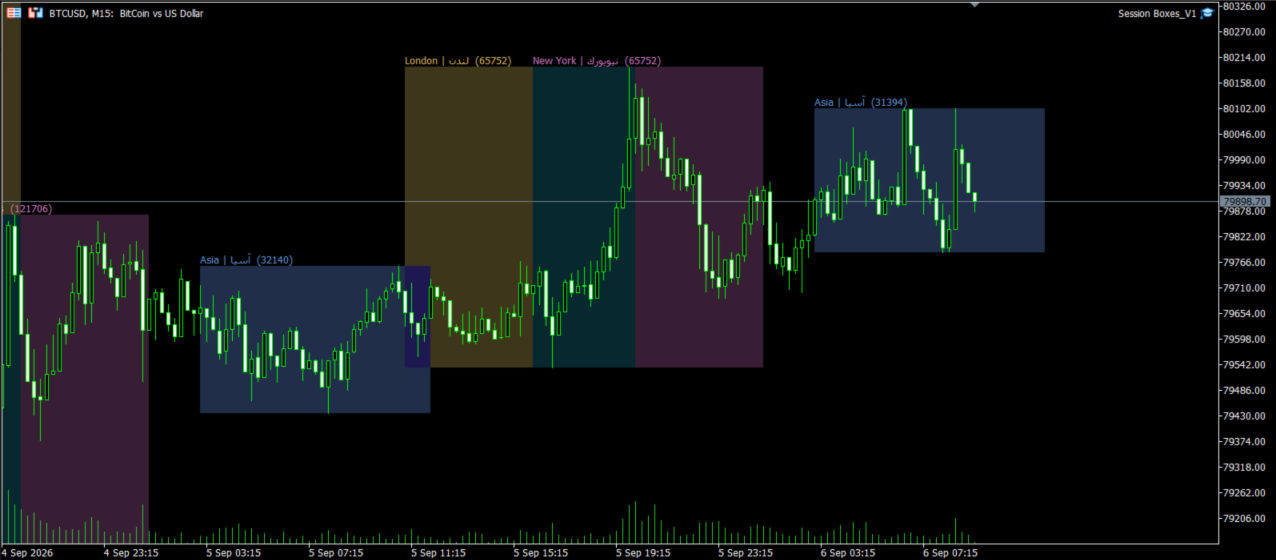
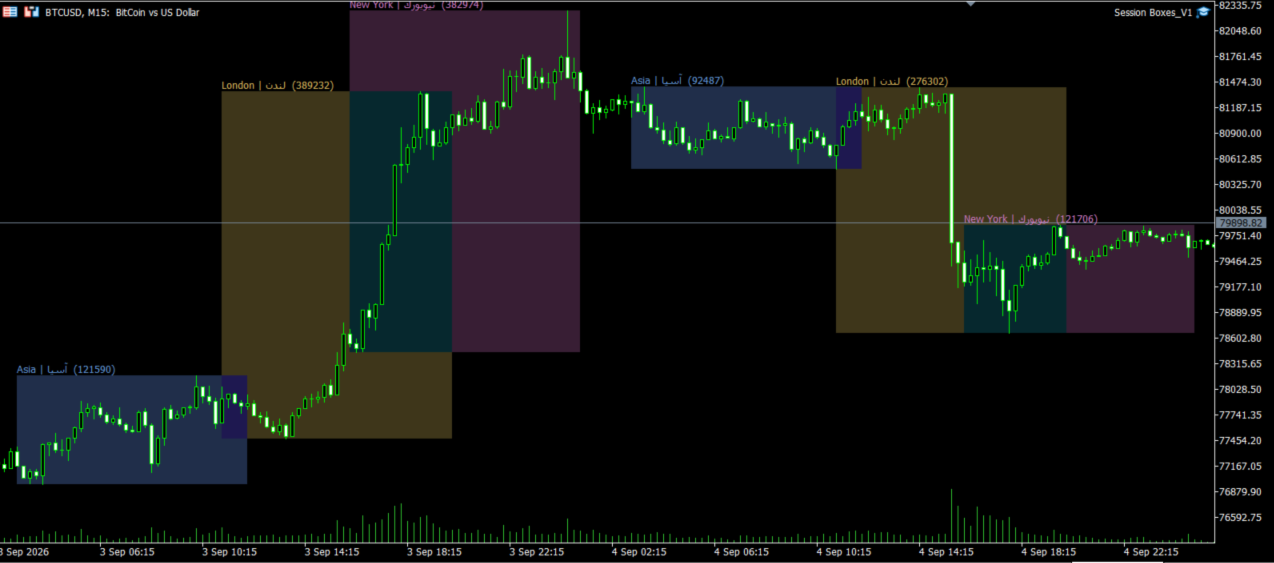
Session Boxes is a clean and lightweight MetaTrader 5 indicator designed to help traders visually identify and analyze the trading ranges of the Asian, London, and New York sessions directly on the chart.
The indicator automatically draws a box covering the High and Low of each trading session, making it easier to see how price behaved during each major market session and how the range developed throughout the trading day.
Today's active session is updated automatically as new price data becomes available.
No trading signals, no automatic orders, and no unnecessary panels. Just a clear visual representation of the major market-session ranges directly on your chart.
What Does Session Boxes Do?The indicator divides the trading day into three major market sessions:
-
Asian Session
-
London Session
-
New York Session
For each enabled session, Session Boxes identifies the session's High and Low and displays them as a colored box on the chart.
The result is a simple visual structure that allows you to immediately recognize:
-
Where the session opened and closed
-
The session's High
-
The session's Low
-
The total session range
-
How price moved relative to previous sessions
-
Whether the current session is expanding beyond its earlier range
Each session can be enabled or disabled independently according to your trading strategy.
Main Features1. Asian Session Range
Automatically calculates and displays the Asian session's High-to-Low range.
This can be useful for traders who monitor how the London session reacts to the Asian range.
2. London Session Range
Displays the complete London trading range.
The London session is particularly important for many Forex traders because of its increased market activity and overlap with other major markets.
3. New York Session Range
Automatically draws the New York session range and updates it while the session is still active.
This allows you to monitor how the New York session develops relative to earlier Asian and London ranges.
4. Live Updating
Today's session box is not static.
While a trading session is active, the indicator continuously updates the box as new Highs and Lows are formed.
This means the current session range grows naturally with market movement.
5. Historical Session Boxes
You can display session ranges for previous trading days.
The number of days can be configured from the indicator settings, allowing you to compare today's market structure with previous sessions.
6. Range Size in Points
Each session can display its total range in points.
For example:
London | لندن (185)
The number represents the calculated High-to-Low distance of that session in points.
This provides an immediate way to evaluate how large or small a particular session has been.
7. Custom Session Times
Session opening and closing times are fully configurable.
Default GMT schedules are:
Asian: 00:00 – 09:00 GMT
London: 08:00 – 17:00 GMT
New York: 13:00 – 22:00 GMT
You can modify these values according to your preferred market-session definition or trading methodology.
8. Broker GMT Offset
Because different brokers use different server times, Session Boxes includes a configurable Broker GMT Offset.
Simply set the offset according to your broker's server time so that the session boxes are aligned correctly with your intended GMT session times.
9. English + Arabic Labels
Session names are displayed in both English and Arabic.
This makes the indicator convenient for traders who prefer bilingual chart information.
10. Clean Chart Overlay
Session Boxes is designed to stay out of your way.
There is no separate indicator panel, dashboard, or complicated interface.
The information is displayed directly on the main price chart using lightweight session boxes.
11. Read-Only Indicator
Session Boxes does not place trades or modify your orders.
It is designed purely as a visual market-analysis tool.
There are:
-
No Expert Advisor trading functions
-
No automatic order execution
-
No stop-loss management
-
No take-profit management
-
No trading signals
The indicator simply helps you visualize session ranges.
How Can Traders Use Session Boxes?Session Boxes can be useful for a variety of trading approaches.
Asian Range Breakout
A trader may use the Asian session box as a reference area and observe whether price breaks above or below the Asian High/Low during the London or New York session.
Session-to-Session Analysis
Compare the London range with the Asian range and observe how volatility changes as market participation increases.
Previous Session Highs and Lows
Historical boxes provide visual reference points that can help traders identify areas where price previously traded during major market sessions.
Volatility Analysis
The displayed range in points provides a quick measurement of how much price moved during each session.
This can help traders compare session volatility across different days.
Market Structure
The boxes can provide additional visual context when analyzing:
-
Breakouts
-
Range expansions
-
Consolidation
-
Session overlaps
-
High/Low liquidity areas
-
Intraday price behavior
Session Boxes does not dictate how these levels should be traded. Instead, it provides a clear visual framework that traders can incorporate into their own strategies.
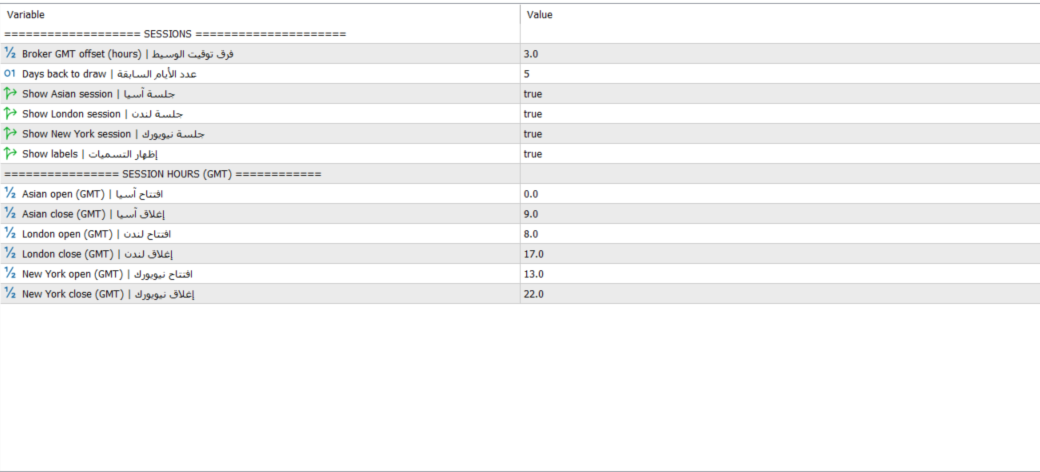
SettingsThe indicator provides simple configuration options.
Sessions
Broker GMT Offset
Adjusts the session calculation to your broker's server time.
Days Back
Controls how many previous days of session boxes are displayed.
Show Asian Session
Enable or disable the Asian session.
Show London Session
Enable or disable the London session.
Show New York Session
Enable or disable the New York session.
Show Labels
Enable or disable the session names and range values.
Session Hours
You can customize the opening and closing time of:
-
Asian Session
-
London Session
-
New York Session
All session times are defined in GMT and then adjusted according to the Broker GMT Offset.
Recommended UseSession Boxes can be used on Forex and other instruments where session-based market analysis is relevant.
For the most useful results, make sure your Broker GMT Offset and session times are configured correctly for your broker and preferred session definitions.
Always verify the displayed session boundaries after installation, especially when your broker changes server time due to seasonal time adjustments.
Why Session Boxes?Many traders mark session Highs and Lows manually every day.
Session Boxes automates this visual task and keeps the information organized directly on the chart.
Instead of manually drawing rectangles and calculating ranges, the indicator automatically:
-
Identifies the selected trading session.
-
Finds the session High and Low.
-
Draws the corresponding range box.
-
Calculates the range in points.
-
Displays the session label.
-
Updates the current session while it is developing.
-
Maintains historical session ranges for comparison.
This keeps your chart analysis faster, cleaner, and more consistent.
Important InformationSession Boxes is a visual analysis indicator.
It does not provide guaranteed trading signals or predictions about future price movement.
The indicator does not execute trades and should be used as an analytical tool alongside your own trading strategy, risk management, and market analysis.
Correct configuration of the broker GMT offset and session times is important for accurate session boundaries.
Product SummarySession Boxes gives you a simple and effective way to visualize the three major trading sessions directly on your MetaTrader 5 chart.
Track the:
Asian Range
London Range
New York Range
View historical ranges, monitor the current session in real time, measure session volatility in points, and customize the session schedule to match your trading environment.
If your trading strategy relies on session Highs, Lows, breakouts, range analysis, or intraday market structure, Session Boxes provides a clean visual foundation for your analysis.
Simple. Lightweight. Automatic. Built for Session-Based Market Analysis.