Remote Copy Trading
- Utilitários
-
Zhang Yi
 I'm have 12 years experience in foreign exchange trading and 12 years EA programming
 - Versão: 1.10
- Atualizado: 24 agosto 2026
- Ativações: 20
------------------------------------------------------------------------
QUICK OPERATION GUIDE
------------------------------------------------------------------------
Scenario A: This terminal is the MASTER (Sender)
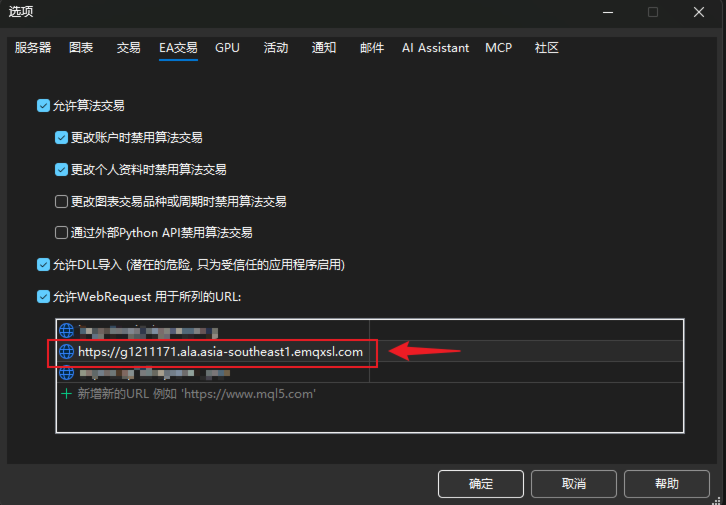
1) Attach the EA, enable Algo Trading, configure the whitelist;
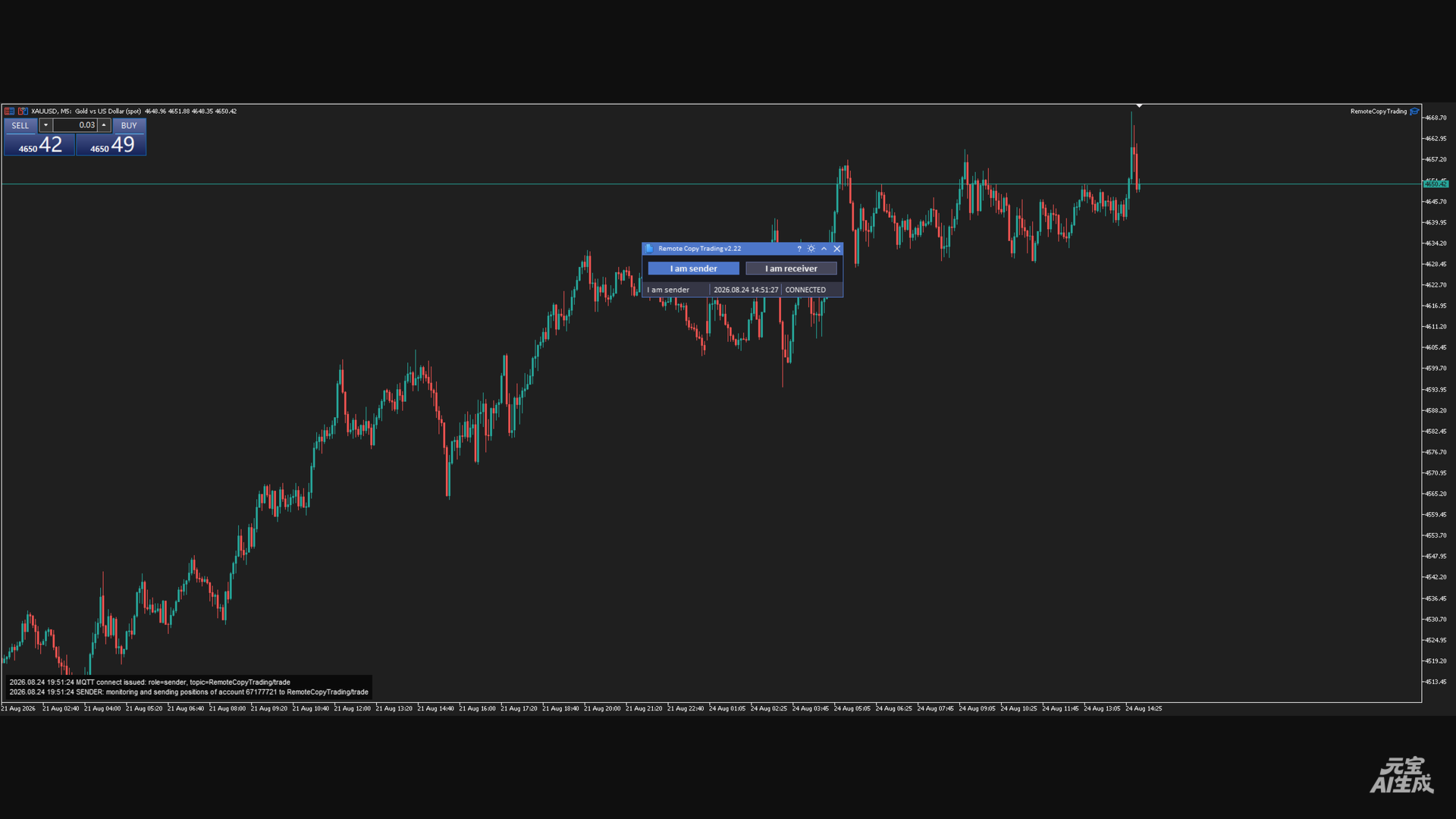
2) Click [I am sender] (button highlights);
3) The status bar changes to "I am sender"; the log shows that the
account's position changes are being monitored and published;
4) Trade normally on the master account (manually or with another EA)
- position changes are published automatically;
5) Click the button again = pause (disconnect, button resets).
Scenario B: This terminal is the SLAVE (Receiver)
1) Attach the EA, enable Algo Trading, configure the whitelist;
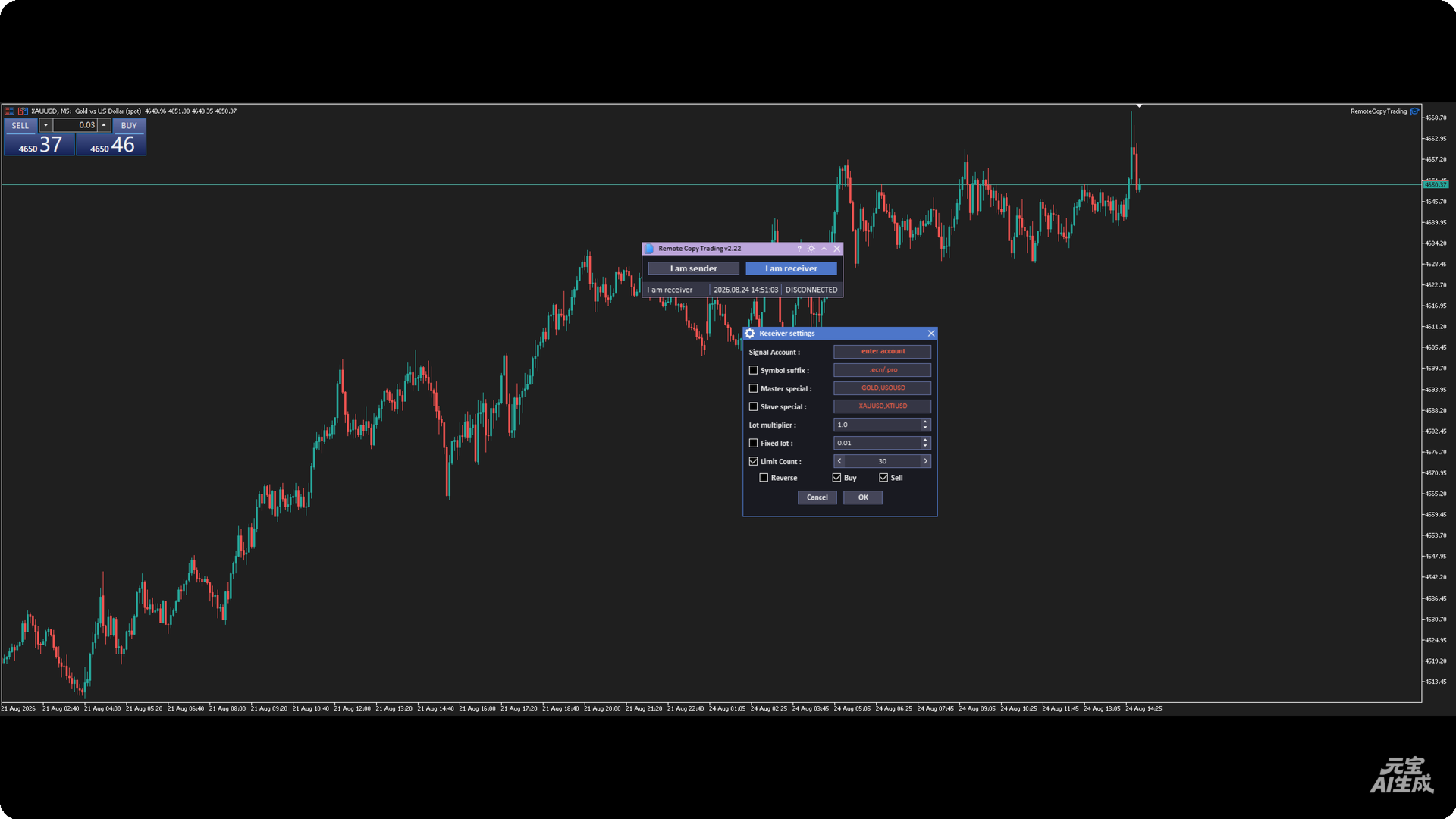
2) Click [I am receiver];
3) In the Receiver settings dialog:
- enter the master account number (required);
- optionally enable suffix / special mapping / fixed lot / limit /
reverse / direction filter;
- click OK;
4) The status bar shows "I am receiver"; the log shows the master
account that will be followed;
5) When the master opens / closes / modifies positions, the local
account follows automatically;
6) Click the button again = stop following (disconnect).
Scenario C: Master and slave run on two different terminals (recommended)
Attach this EA on both terminals: machine A clicks Sender; machine B
clicks Receiver and enters machine A's account number.
Note: both sides must use the same MQTT broker and topic, and each
account must have the appropriate MQTT credentials (Sender/Receiver
user names are different).
------------------------------------------------------------------------
TROUBLESHOOTING (FAQ)
------------------------------------------------------------------------
Q1: Clicking a mode button shows "MQTT Connection Failed"
Cause: WebRequest whitelist is not configured (error 4014).
Fix: add the host address to the whitelist as in 3.4, then click the
button again.
Q2: The status bar stays at CONNECTING... or DISCONNECTED
- Check that the machine can reach the broker address over the
network (firewall?);
- Check that the broker is online and the credentials are correct
(passwords are in App.mqh);
- Check MQTT-related errors in the log panel;
- On a credential error, CONNACK returns an error code (see logs).
Q3: Signals are received but no local position opens
Inspect the log panel item by item:
- "Ignored signal (acct=...)" -> the master account entered in the
dialog does not match;
- "no local symbol" -> symbol translation failed (check suffix /
special mapping);
- "already followed, skip duplicate" -> the same src was received
again;
- "reached limit" -> the position limit (Limit Count) was reached;
- "BUY/SELL signal ignored" -> the corresponding direction filter is
unchecked;
- "open failed! error=..." -> order rejected; check the error code
(insufficient margin, symbol not tradable, frozen, etc.).
Q4: Local follow positions do not match the master
- After a reconnect the system only does delete-only reconciliation;
the local count may be less than the master's due to market
conditions / disconnects - this is by design;
- Check whether local positions were manually altered (comment /
Magic modified would make them unrecognizable).
Q5: Changes to the MQTT address / credentials do not take effect
These are plain global variables; you must edit App.mqh, recompile
and re-attach the EA (see Section 5).
Q6: The log panel shows nothing / does not display
Canvas is unavailable in non-visual tester mode (the code skips it
deliberately); the panel may also look misplaced at extreme chart
zoom levels - drag the chart or resize the window.
------------------------------------------------------------------------
9. NOTES & RISK WARNINGS
------------------------------------------------------------------------
1) Copy latency: MQTT relaying + local execution creates network delay;
during fast markets the entry/exit prices may differ from the master;
2) Reverse-mode risk: Reverse flips the direction AND swaps SL/TP; make
sure you fully understand this behavior before enabling it;
3) Lot-amplification risk: in multiplier mode, if the master lot is
large, the local account may reject orders due to insufficient margin;
test in advance and consider fixed lots / the limit option;
4) Delete-only reconciliation: after a reconnect the system does not
re-open positions the master holds but the local account is missing;
sync manually if needed;
5) Position limit: the sender monitors at most 50 positions; positions
beyond that are not broadcast;
6) The EA needs "Algo Trading" enabled to execute copy-trade fills;
7) Always test on a demo account first and confirm the behavior before
using it on a live account;
8) Credentials are stored in plain text in the source: the broker
account/password are visible in the code, so do not distribute source
files that contain real secrets.