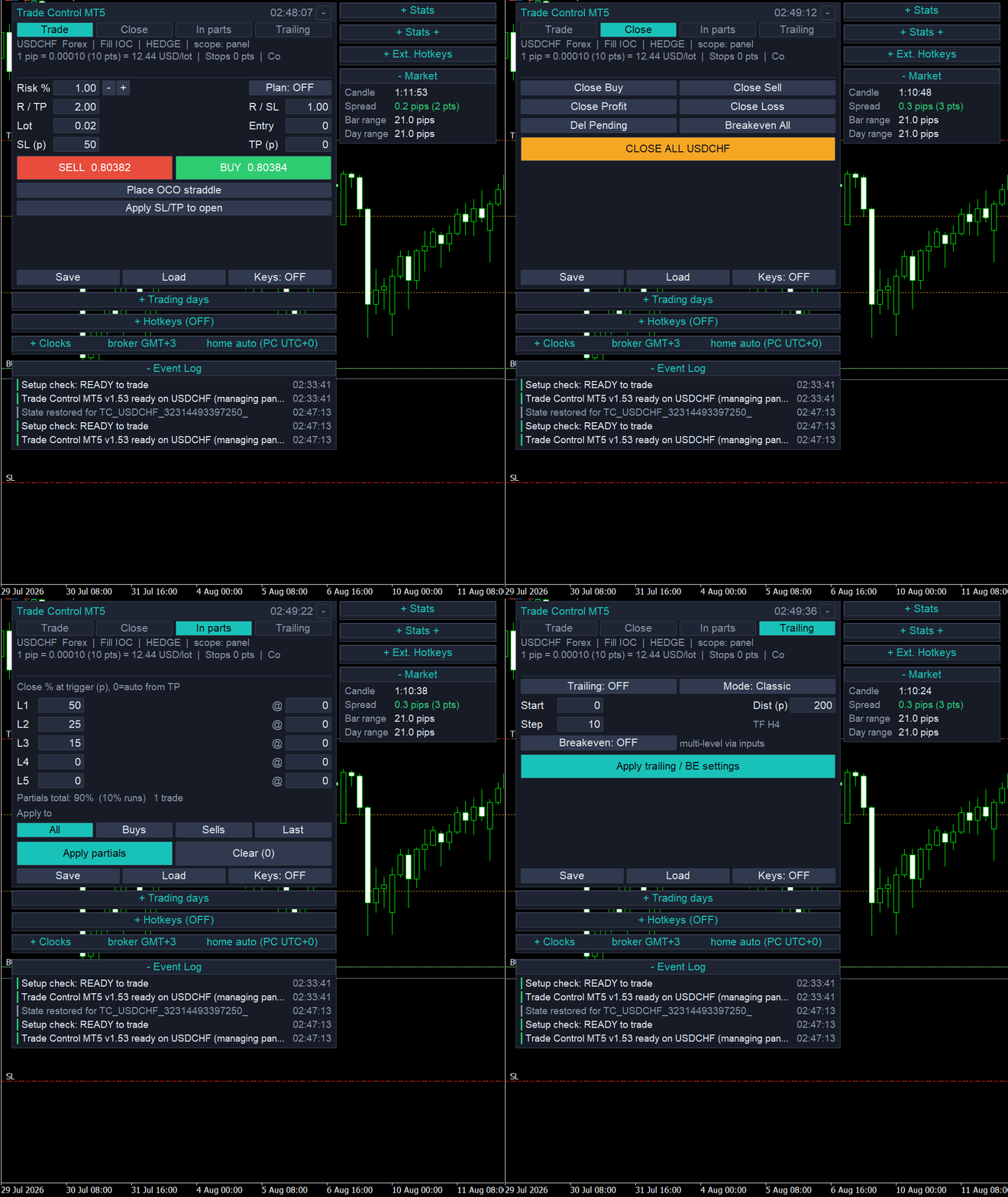
Trade Control MT5
- Utilitários
- Versão: 1.53
- Ativações: 20

"$50 Introductory price for the first 10 copies, then $125."
The manual trader's cockpit.
You pick the trade. Trade Control does everything else: the position sizing, the stop management, the scaling out, and the discipline that keeps one bad session from undoing a good month.
This is a manual tool. It does not predict, it does not signal, and it does not trade on its own. What it removes is the mechanical, error-prone work that sits between your decision and your exit.
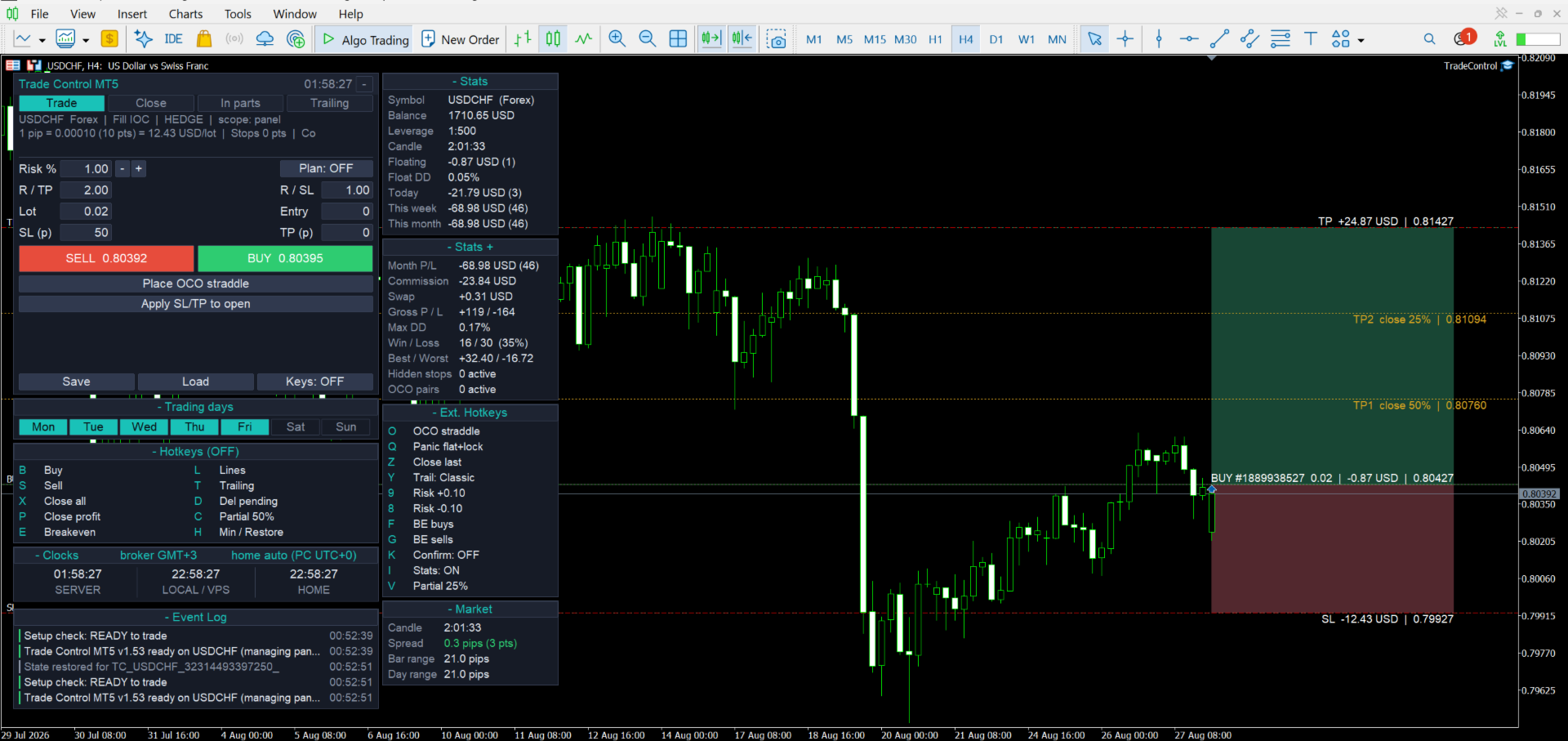
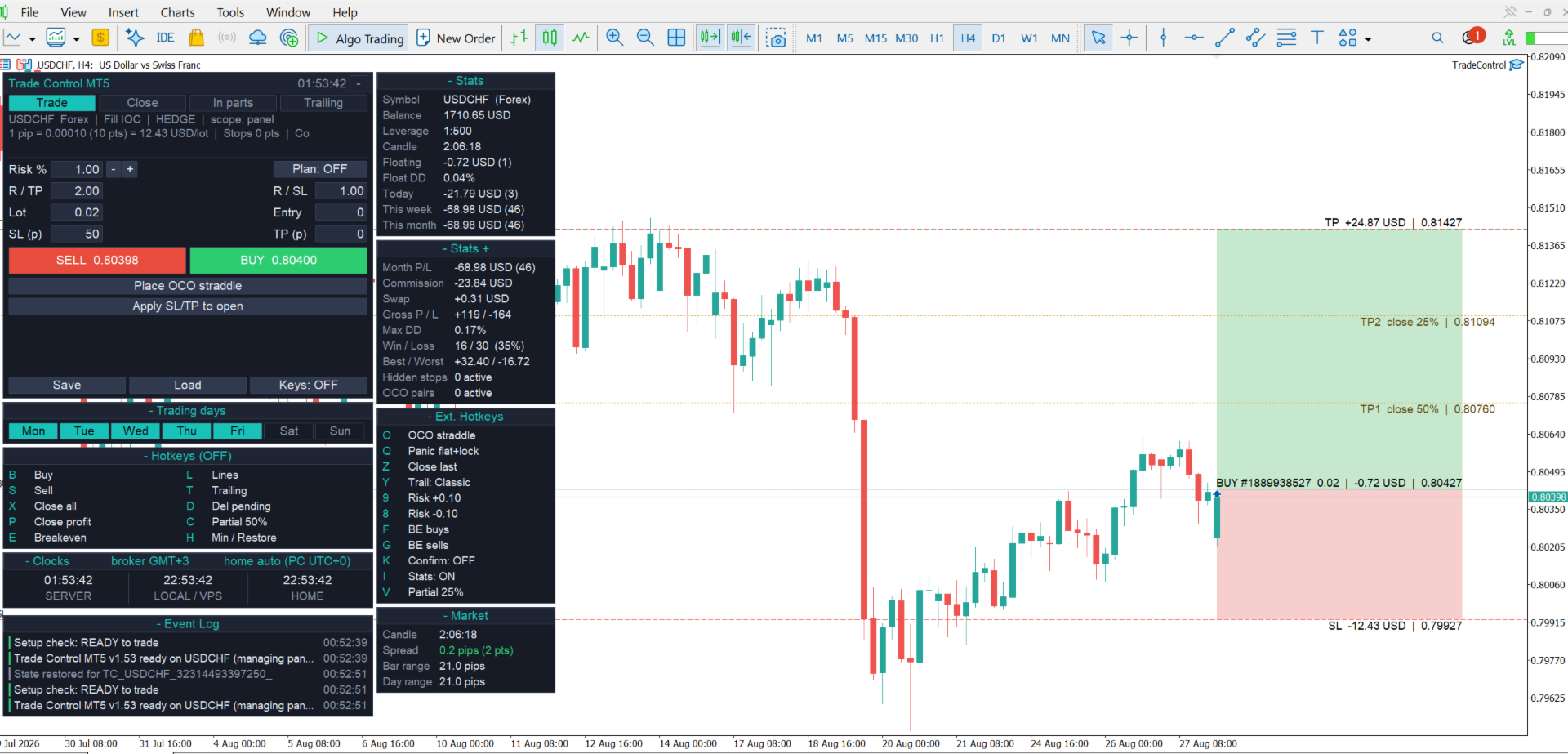
Size every trade by risk rather than by guesswork
Type the risk you are willing to take and the distance to your stop. Trade Control solves for the exact lot that puts precisely that much at stake, and recalculates the moment you move the stop.
Eleven sizing modes: fixed lot, money amount, percentage of balance, percentage of equity, percentage of free margin, percentage of a custom base, percentage of balance at day, week or month open, percentage of the symbol's maximum lot, and R multiples.
Spread and commission can be folded into the calculation, so the number on screen is what the trade actually costs you rather than an idealized figure. Commission is learned from your own trade history, or set by hand.
Manage the exit without watching it
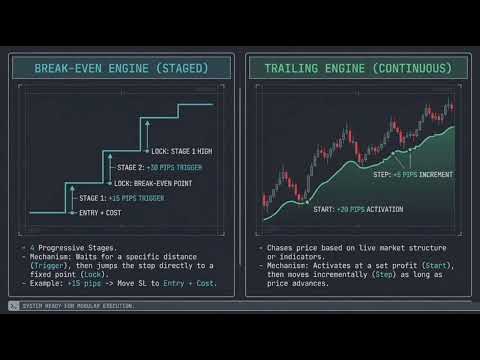
Seven trailing engines: fixed distance, Fractals, Moving Average, Parabolic SAR, ATR, trail on partial close, and previous bar high or low.
Four-stage break-even. Each stage carries its own trigger and its own lock, so a trade protects itself progressively as it runs. Stage one can sit just beyond spread and commission, so that if price returns to your entry you exit at zero rather than at a small loss.
Five-level partial close. Set the percentage and the trigger for each level, or let the tool space them automatically between entry and target.
One further point, on something that quietly breaks other panels. Stop levels drawn from indicators — a SAR flip, a fractal, a previous bar extreme — can land on the wrong side of the market, or inside your broker's minimum stop distance. When that happens the modification is refused and trailing silently stops advancing. Trade Control pulls every candidate to the nearest valid level instead, so the stop keeps moving.
The Account Guardian
Most accounts are not lost to poor analysis. They are lost to one session that got away.
The Guardian watches your account against limits that you set, and acts the moment one of them is breached, either by closing positions, by blocking new entries, or by doing both:
- Daily profit target, in money or as a percentage, so that you can lock in a good day and stop.
- Daily loss limit, in money or as a percentage.
- Daily drawdown percentage, measured from balance or equity at the start of the day.
- Trailing drawdown percentage, measured from the account's equity peak.
- Maximum total open risk, as a percentage.
- Maximum total open lots.
Daily counters reset at server midnight, at 17:00 New York, or at a custom GMT hour, so the Guardian can be set to match your prop firm's rulebook rather than your broker's clock. The broker's GMT offset is detected automatically.
Set the limits slightly inside your firm's hard rules and the Guardian stops you before a rule is broken, not after.
Built to keep working
Panels break in ways that have nothing to do with trading logic. Three of the most common are handled directly.
- Renderer changes. MetaTrader's chart text rendering has changed under the bonnet in recent builds. Every string that Trade Control draws is plain ASCII, which avoids the unusual glyphs that have caused invisible labels and stalled redraws elsewhere.
- VPS and remote desktop. Reconnect a remote desktop session at a different resolution and most pixel-anchored panels end up off screen. Trade Control tracks chart size and screen DPI, then re-anchors itself inside the visible chart.
- Missing fonts. A fresh VPS image often lacks anything beyond the standard fonts. The panel checks that its font genuinely renders, and falls back to a system face if it does not.
There are no DLLs, no internet access, and no external files. Everything runs inside MetaTrader 5, which makes the product straightforward both to trust and to validate.
Six themes, one of which solves a real problem
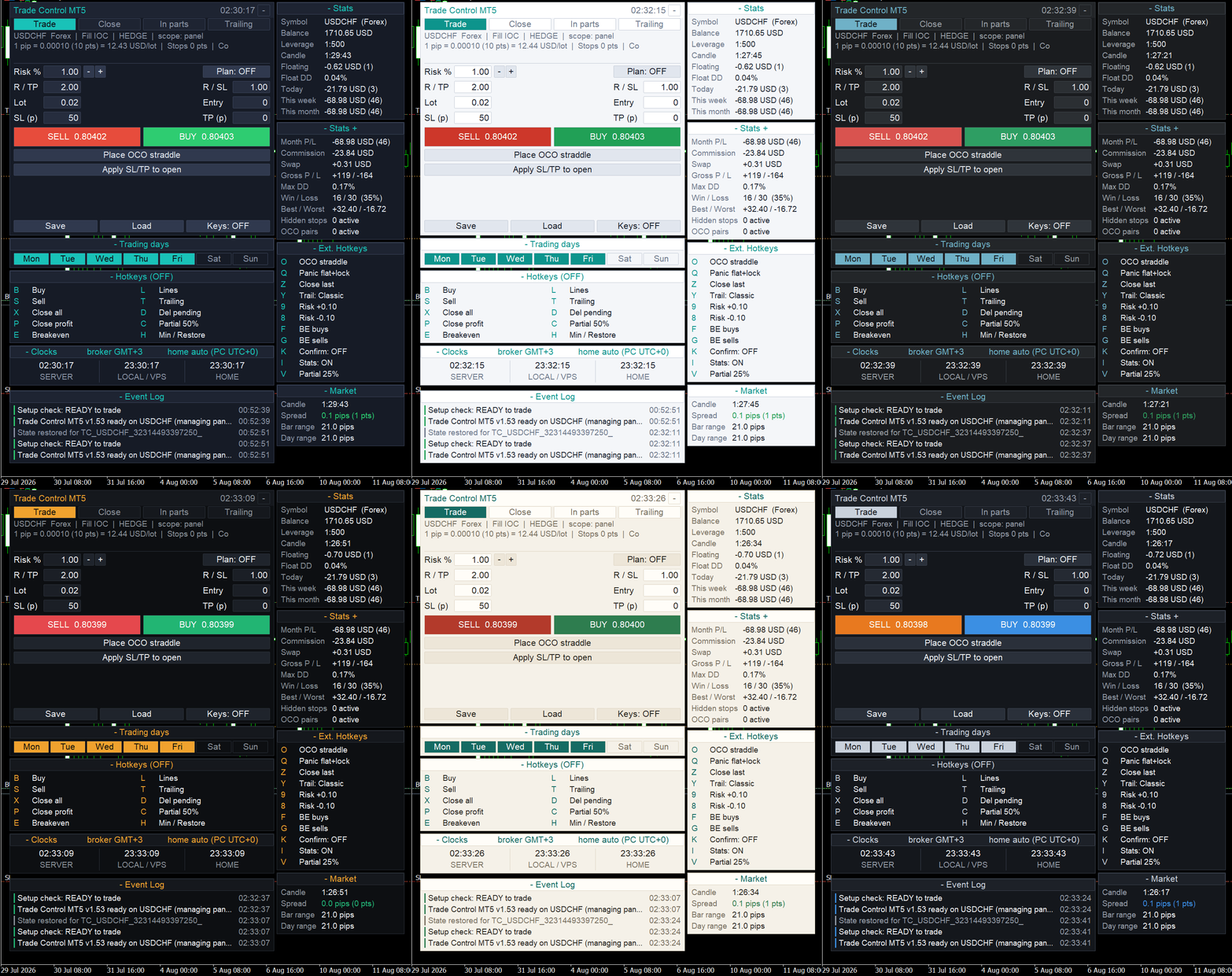
Dark Slate, Light, Graphite Pro, Terminal Amber, Ivory, and Contrast Safe.
Around one man in twelve has some form of red-green colour vision deficiency, which makes a green BUY button and a red SELL button genuinely difficult to separate at a glance. That is the single distinction you least want to get wrong.
Contrast Safe moves direction onto the blue and orange axis instead. Blue is buy, orange is sell. That pairing stays clearly distinguishable under the common forms of colour blindness, and it reads more cleanly for everyone else as well.
Speed when you need it
Twenty-five hotkey actions in total: twenty-four bindable single-keypress commands plus a master on/off toggle. Buy, sell, close all, close profitable, break-even on everything, quick partials at two preset percentages, cycle the trailing mode, nudge risk up or down, delete pending orders, and place an OCO straddle. Q is panic: it closes everything and blocks new entries until you say otherwise.
On-chart information panels
There are eight dockable HUDs, all themed to match, and all optional.
- Stats: daily, weekly and monthly result, floating drawdown, open trades, and equity.
- Stats+: win rate, best and worst trade, averages, and profit factor.
- Market box: live spread reading, coloured green, amber or red against your own thresholds.
- Trading Days: at a glance, which days you are set to trade this week.
- Clocks: broker server time, your local time, and a configurable home time zone.
- Hotkeys: shows at a glance whether the master hotkey toggle is on or off.
- Extended Hotkeys: a live legend showing which protections are currently armed.
- Event Log: every action, time-stamped and colour-coded, so that a refused order tells you exactly why it was refused.
Also included
- Market and pending orders, with optional confirmation showing the lot, the levels, and the money at risk.
- OCO straddle, which brackets price in both directions so that one fill cancels the other.
- Virtual (hidden) stops, held inside the EA rather than on the broker's server.
- Basket stop and basket target, which close everything at a floating money figure.
- Trading time windows and a day-of-the-week filter.
- Presets, saved and loaded per strategy — save through MetaTrader's own dialog, load from an on-chart list, so you are never digging through file pickers to find the one you want.
- Stop-loss and take-profit re-anchored to your real fill price after slippage.
- Support for any symbol, including forex, metals, indices and crypto, on both hedging and netting accounts.
A manual that you will actually use
Trade Control ships with a 69-page illustrated user guide, covering a quick start, every feature in turn, a full settings reference for all 169 inputs with their defaults, a troubleshooting table, and an FAQ. It is a proper document rather than a wiki link or a forum post.
Before you buy
Download the free demo and run it in the Strategy Tester in visual mode. Place a few trades, set a risk percentage, watch the lot size change as you move the stop, then arm the Guardian and watch it act. Decide afterwards.
Support
If you have questions, before or after purchase, message me through my MQL5 profile. I answer.
Trade Control MT5 is an order management utility. It does not generate trading signals and it does not predict market direction. Trading leveraged products carries a substantial risk of loss. Please test on a demo account before trading live.