Simple Trade Copier Master MT4

EA Master Version

any Follow Copy Account  (Acc. Number)  need a open MT Terminal, download multiple times

Step1: Open Master MT5 Terminal    =  install master- Version   (on any Symbol just one Time)

Step2: Open Follower MT5 Terminal = install follower- Version  (on any Symbol just one Time)

Step3: all Trades from any Symbol or any Robot are copy now to follow- Terminal immediately

for simple copy set on Chart and Start no optimization.

This Robot is a Trade Copier for MT5

that automatic  transfers Signals from

   a MasterAccount to a FollowerAccount.

Setup:

The Robot  launched on the Follower Account.

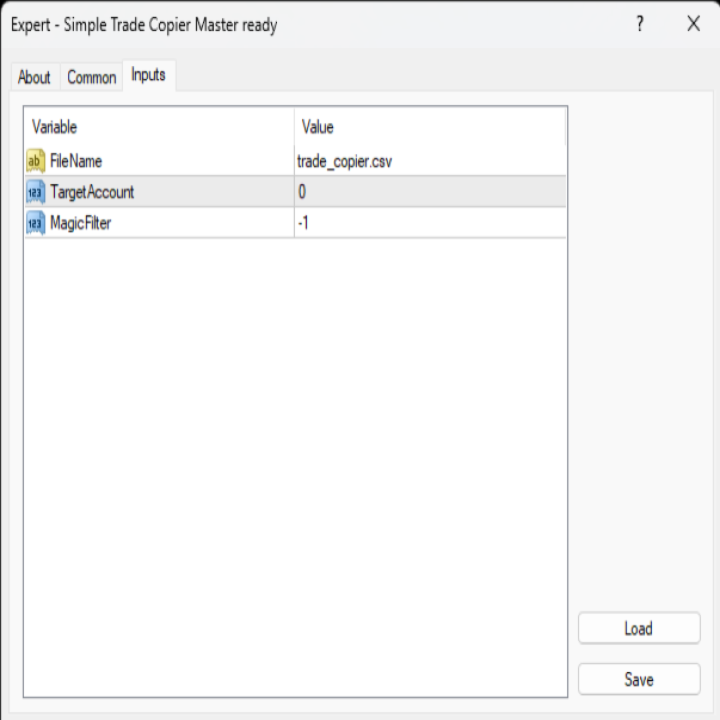
There, you select the desired File and configure

the Lot size, SL/TP, Trailing-Stop, and the Account-

number to be copied. If the Account Number  set to 0

trading occurs across all open Terminals without requiring

a specific Account Number entry. Set: 0 mean OFF, 1 mean ON

Function Disclosure:

Market orders are opened immediately; pending- Orders

they will not be transferred as limit or stop- Orders.

Instead, pending- Orders are successfully

transferred as direct- Trades,

while they may not

be visible as

pending

Orders

at

the follower- Terminal.

SL, TP, and trailing- Stop Settings can be automatically applied alongside the Trades.


Produtos recomendados
EA Follower Version any Follow Copy Account  (Acc. Number)  need a open MT Terminal, download multiple times Step1:   Open Master MT5 Terminal    =  install master- Version   (on any Symbol just one Time) Step2:   Open Follower MT5 Terminal = install follower- Version  (on any Symbol just one Time) Step3:   all Trades from any Symbol or any Robot are copy now to follow- Terminal immediately for simple copy set on Chart and   Start   no optimization. This Robot is a Trade Copier for MT5 that auto
FREE
Automated Timeframe cycling with Symbols centered.  Force every timeframe onto one clock window, so the story you see on Daily is the same story you are slicing on H4, H1, and M1.  Traders usually flip timeframes and lose the span. A Daily chart shows a few weeks, then M15 shows a few hours, and the eye treats them as different markets. TASSERACT locks the window to N bars of the highest enabled timeframe — default 10 Daily — and maps every lower timeframe to that same stretch. You stay inside o
FREE
Signalator Lot Size Evaluator MT4 is a free local MetaTrader 4 utility for manual traders. It helps calculate an estimated lot size before opening a trade manually. The calculation is based on account size, trade direction, entry price, stop loss, risk percentage or fixed money risk, and broker symbol settings. The main purpose is simple: Enter your setup → define your risk → get the suggested lot size. The panel also shows useful pre-trade information such as spread, risk amount, SL/TP distance
FREE
Real-time spread tracking and monitoring software Displays spread values in form of histograms on current timeframe of chart Convenient for analyzing spread changes, as well as for comparing trading conditions of different brokers By placing on desired chart, the spread changes at different trading times are displayed Additionally Fully customizable Works on any instrument Works with any broker
FREE
SL and TP Setter
Giacomo Barone
4 (1)
You can manually open a trade (one click), and this EA will take care of setting the SL and TP. SL and TP are set based on the number of pips you specify in the input screen. You can also choose monetary SL and TP. SL and TP are determined based on the weighted average price (WAP), so if you open a new trade, SL and TP will be updated according to the new WAP. The WAP is not unique but differentiated between buy and sell trades (this is useful only if you open opposite trades on the same chart)
FREE
The Saz_Timer indicator belongs to the Saz_Forex suite of professional indicators designed by Traders, for Traders. This indicator will show minutes and seconds of real time on the chart window. The indicator uses the OnTimer() event so it can update even while no ticks received on the chart. The text is shown toward the bottom right of the chart, encircled red in the screenshot. Inputs: Text Colour, allows selection of the colour for the text.
FREE
Free automatic Fibonacci is an indicator that automatically plots a Fibonacci retracement based on the number of bars you select on the BarsToScan setting in the indicator. The Fibonacci is automatically updated in real time as new highest and lowest values appears amongst the selected bars. You can select which level values to be displayed in the indicator settings. You can also select the color of the levels thus enabling the trader to be able to attach the indicator several times with differe
FREE
DF Fib Trader Pro O DF Fib Trader Pro é um sistema de negociação automatizado desenvolvido para o MetaTrader 4. Utiliza níveis de preços baseados em Fibonacci combinados com análise de tendências e estrutura para definir pontos de entrada e saída. O EA suporta posições longas e curtas e inclui parâmetros de gestão de risco integrados. Principais Recursos: • Utiliza a lógica de retração e extensão de Fibonacci para traçar pontos de entrada, SL e TP. • Tamanho de lote e níveis de stop loss/take
FREE
Grid Assistant Pro
Alessandro De Cristofaro
Grid Assistant Pro – Utility for Managing Grid Strategies on MetaTrader 4 Grid Assistant Pro is a professional utility that helps traders manage and monitor unidirectional grid strategies directly from the MT4 chart. It provides a visual dashboard , clear controls, and automated risk protection features for precise and efficient grid operation. Key Features Visual Dashboard Real-time metrics: Balance, Equity, Floating P/L, Drawdown %, Free Margin Grid status: active and pending or
FREE
NAS100 Auto Sl And TP
Moustapha Boulouz
5 (2)
Apresentando o NAS100 Auto SL e TP Maker para MT4: Nunca mais perca a definição de StopLoss e TakeProfit com o nosso NAS100 Auto SL e TP Maker, um assistente indispensável para os traders que navegam no mercado Nasdaq 100 no MetaTrader 4. Esta ferramenta foi concebida para aqueles que procuram uma solução perfeita para automatizar a gestão dos níveis de StopLoss e TakeProfit. Caraterísticas principais: Automação sem esforço: Monitoriza automaticamente as transacções Nasdaq 100 sem StopLoss e/ou
FREE
FREE UNTIL FEBRUARY 14, 2023 SPEND MORE TIME WITH YOUR FAMILY. ENJOY LIFE… DO NOTHING. This version is only auto set of Takeprofit and StopLoss Main Version  of  TropangFX:   MT4 Version  |  MT5 Version Recommended timeframe:   H1 Supported currency pairs:  GBPUSD, EURUSD, EURCHF ,   USDCAD, USDCHF ,  AUDCAD, EURCAD, EURAUD and many more... Requirements The EA requires good brokerage conditions:   low spread   and   slippage   during the rollover time. I advise using a really   good ECN brok
FREE
Indicator Test Report MT4
Narayanan Mohanan Mohanan Krishnan
Indicator Test Report para MetaTrader 4 — um verificador de repintura e testador de indicadores MT4 que mostra como qualquer indicador realmente se comporta Você não pode ver o interior de um indicador compilado. O Relatório de Teste de Indicadores carrega qualquer indicador — comprado, escrito ou incorporado no MetaTrader — e responde à pergunta que uma descrição não pode: ele é redesenhado, de quanto histórico ele precisa e o que ele realmente publica? Ele relata comportamento. Não dá nota. Ca
FREE
FxTT News Feed O FxTT News Feed é um Expert Advisor complementar gratuito para o ChartDeck PRO. Ele não tem lógica de negociação, não abre ordens, não gerencia posições e não lê preços de mercado. Ele busca os dados do calendário econômico em um temporizador e os grava em um arquivo local, porque os indicadores do MetaTrader 4 não podem fazer requisições de rede. Anexe-o uma única vez a qualquer gráfico do terminal. Uma instância atende a todos os gráficos do ChartDeck PRO nesse terminal. Este é
FREE
Buffer Finder Tool
Afsal Meerankutty
4.75 (4)
CyberZingFx Buffer Finder Tool Developed for Finding Buffers of Indicator to use in Universal Indicator EA . This is Not an Indicator or EA CyberZingFx Buffer Finder Tool is utility tool designed specifically for MetaTrader 4 (MT4) users. It is a standalone application that helps you easily find the buffers of any MT4 indicator, allowing you to use them in your Universal Indicator EA. With the Buffer Finder Tool, you no longer have to search through the data window to find the buffers you need.
FREE
Update:ver1.53 (2023/08/16) ・概要と必要環境 手動発注もしくは他ツール等からの発注に対し、指値発注予約の複製を生成します。こちらは「発注操作の簡易化」に特化したものになります。発注判断となる分析は、資料を漁る、経験則を導く、他の分析ツールやEAを併用する等、利用者ご自身で頑張ってください。なお、ver1.28より、「決済後、自動で再発注する」機能が実装されました。(有償版でのみ有効化できます) ・導入と導入後の操作 導入そのものは簡単です。「自動売買可能なEA」として、適当なチャートにて動作させるだけです。(チャートの対象相場は問いません。このEAは、チャートを見ていません)。あとは、「このEAでのローカルコピー以外の発注」があれば、それに応じて「損失が出た場合に備えての追加取引の予約」という形で、指値発注が自動生成されます。 導入操作上の注意として、「本EAを、複数のチャートで動作」はできません。EAがチャート自体を見ておらず、注文状況だけを見ているため、複数のチャートで動かす意味もありません。また、ターミナルとEAの設定として「自動売買」を許可しない
FREE
Simple RSI Forex Trading Strategy
Victor Manuel Valderrama Zamora
2.5 (2)
Diversify the risk in your trading account by combining our Expert Advisors. Build your own custom trading system here:   Simple Forex Trading Strategies The expert advisor opens trades when RSI indicator enter in oversold or overbought areas. The Stop Loss, Take Profit, and Trailing Stop are calculated based on the ATR indicator. The recommended currency pair is EURGBP and the recommended timeframe to operate and to do backtests is H4. This Expert Advisor can be profitable in any TimeFrame an
FREE
Position Selective Close MT4
Francisco Manuel Vicente Berardo
The Position Selective Close is a multi-symbol multi-timeframe script used to close simultaneously various positions.  General Description   The Position Selective Close   possesses   three operation modes (Intersection,   Union   and All) that control the way   as   four position features (symbol, magic number,   type   and profit) are used. The modes, available through the Selection Mode input parameter, relate to the features, available through the “Select by Feature” and “Feature” input pa
FREE
High Low Open Close MT4
Alexandre Borela
4.81 (21)
Se você gosta deste projeto, deixe uma revisão de 5 estrelas. Este indicador desenha os preços abertos, altos, baixos e finais para o especificado período e pode ser ajustado para um fuso horário específico. Estes são níveis importantes olhados por muitos institucional e profissional comerciantes e pode ser útil para você saber os lugares onde eles podem ser mais activa. Os períodos disponíveis são: Dia anterior. Semana anterior. Mês anterior. Quarto anterior. Ano anterior. Ou: Dia atual. Seman
FREE
HMA Trend
Pavel Zamoshnikov
4.56 (72)
A trend indicator based on the Hull Moving Average (HMA) with two periods. The Hull Moving Average is an improved variant of the moving average, which shows the moment of trend reversal quite accurately. It is often used as a signal filter. Combination of two types of Hull Moving Averages makes a better use of these advantages: HMA with a slow period identifies the trend, while HMA with a fast period determines the short-term movements and signals in the trend direction. Features The movement d
FREE
Double HMA lines MTF
Pavel Zamoshnikov
5 (2)
This is a multi-timeframe version of the popular Hull Moving Average (HMA). The Double HMA MTF Light indicator combines two timeframes on a single chart. The HMA of the higher timeframe defines the trend, and the HMA of the current timeframe defines short-term price movements. The indicator is freely distributed and hasn't audio signals or messages. Its main function is the visualization of price movements. If you need advanced functionality of the HMA multi-timeframe indicator (information ab
FREE
Market Profile 3
Hussien Abdeltwab Hussien Ryad
3 (2)
Market Profile 3 MetaTrader 4 indicator  — is a classic Market Profile implementation that can show the price density over time, outlining the most important price levels, value area, and control value of a given trading session. This indicator can be attached to timeframes between M1 and D1 and will show the Market Profile for daily, weekly, monthly, or even intraday sessions. Lower timeframes offer higher precision. Higher timeframes are recommended for better visibility. It is also possible t
FREE
Email Drawdown Alert
Roman Starostin
5 (12)
Free informative Indicator-helper. It'll be usefull for traders who trade many symbols or using grid systems (Averaging or Martingale). Indicator counts drawdown as percent and currency separate. It has a number of settings: Count deposite drawdown according equity value and send e-mail or notifications to user if DD more than set; Sending e-mail when max open orders reached; Shows price and remaining pips amount before MarginCall on current chart and Account generally; Display summary trade lot
FREE
Rainbow MT4
Jamal El Alama
Rainbow MT4 is a technical indicator based on Moving average with period 34 and very easy to use. When price crosses above MA and MA changes color to green, it’s a signal to buy. When price crosses below MA and MA changes color to red, it’s a signal to sell. The Expert advisor ( Rainbow EA MT4) based on Rainbow MT4 indicator, as you can see in the short video below is now available here .
FREE
This panel is a part of the SupDem-Pro trading system and is used to search for the best opportunities for any available instruments. Which can be selected manually in the Market Watch (open it with CTRL + M). Using this trading panel in combination with ShvedSupDem-Pro_Zone allows to analyze multiple currency pairs with a single click. The panel allows to load any instruments from the Market Watch, from 6 major currency pairs up to all instruments (480). The indicator parameters Button Width -
FREE
Period Change Button
Rainer Albrecht
3 (1)
Fastest way to change the period. Suitable for traders who use many charts and timeframes. Size, shape and color can be customized. Inputs Parameters Corner — Choose corner placement Standart is "Right lower chart corner" Color — Background color of the button ColorText — Text color of the button ColorOn — Background color of the button for the current period ColorOnText — Text color of the button for the current period Font — Arial, Verdana... FontSize — Size of the font in pixels DistanceX —
FREE
This indicator help to mark the high and low of the session Asian,London,Newyork , with custom hour setting This indicator is set to count from minute candle so it will move with the current market and stop at the designated hour and create a accurate line for the day. below is the customization that you can adjust : Input Descriptions EnableAsian Enables or disables the display of Asian session high and low levels. EnableLondon Enables or disables the display of London session high and
FREE
Smart Trade Monitor — Real-Time Position Tracking, P&L Analysis & Alert System   Real-Time Monitoring : Auto-tracks open/closed positions, displays yesterday’s & previous day’s P&L—no manual calculations!   Smart Alerts (Premium Only) : Instant push notifications + sound alerts for position changes—never miss a trading opportunity!   User-Friendly : One-click setup, key data displayed directly on charts for faster decisions.   Cross-Platform : Supports both MT4 & MT5, compatible with
FREE
Program Overview: This program is a trading tool designed to monitor and analyze the 7 major currency pairs. It is a variant of a similar program used for tracking stock indices, but this version focuses on the seven major currency pairs. The program helps in identifying and calculating significant price movements (gaps) between the high and low prices of these currency pairs over a specified time frame. It then provides insights through comments and alerts based on the calculated gaps. Major Cu
ClearEdge Daily Candle MT4 New York-close daily candle on any timeframe, with candle countdown, live spread and volatility information. Overview  ClearEdge Daily Candle draws the current day's candle next to the live price on any chart timeframe. On the 1-minute, 5-minute, 15-minute, 1-hour or higher charts, you can see where the trading day opened, how far price has moved in both directions, and whether the day is currently bullish or bearish, without switching to the daily (D1) chart. Why
SX Theme Setter MT4
Mojtaba Sarikhani
5 (1)
SX Theme Setter is intended for changing chart appearance in 2 modes: - Gradient background mode: In this mode, the indicator creates a gradient background for your chart. Colors, steps and gradient type can be selected by user. - Color theme: Color theme mode provides more than 50 built-in different color themes which can be selected from a list. Most of these themes are converted from official color themes of real trading platforms of the past and present. Try them out and see if they suit
FREE
Os compradores deste produto também adquirem
Local Trade Copier EA MT4
Juvenille Emperor Limited
4.96 (111)
Local Trade Copier EA MT4 é um copiador de operações rápido e flexível para copiar e gerenciar operações entre várias contas MetaTrader 4 no mesmo computador Windows ou Windows VPS. Ele combina a sincronização local de operações com controles no lado do Receiver para tamanho de lote, gerenciamento de risco, filtragem de operações, mapeamento de símbolos, gerenciamento de operações e proteção da conta. Configure seus terminais Transmitter e Receiver em aproximadamente 1 minuto e copie operações
Bem-vindo ao Trade Manager EA—uma ferramenta de gestão de risco criada para tornar o trading mais intuitivo, preciso e eficiente. Não é apenas uma ferramenta para executar ordens, mas uma solução abrangente para planejamento de operações, gerenciamento de posições e controle de risco. Seja você um iniciante, trader avançado ou scalper que precisa de execução rápida, o Trade Manager EA adapta-se às suas necessidades, oferecendo flexibilidade em todos os mercados, desde forex e índices até commodi
Trade Assistant MT4
Evgeniy Kravchenko
4.43 (197)
Ajuda a calcular o risco por comércio, a fácil instalação de uma nova encomenda, gestão de encomendas com funções de fecho parcial, trailing stop de 7 tipos e outras funções úteis. Materiais e instruções adicionais Instruções de instalação - Instruções para a aplicação - Versão de teste da aplicação para uma conta de demonstração Função de linha Mostra no gráfico a linha de Abertura, Stop Loss, Take Profit. Com esta função é fácil definir uma nova ordem e ver as suas características adicionais
Trade Indicator Assistant is a powerful MT4 utility designed to turn indicators into automated trading systems. Its main feature is the ability to automatically detect an indicator’s   BUY and SELL signal buffers , without requiring you to know the buffer numbers, search through indicator settings, or modify the indicator source code. Bonus Indicator: After purchasing Trade Indicator Assistant, contact me to receive Trade Signal Pro completely free as a bonus indicator. [Download Demo Version]
Exp COPYLOT CLIENT for MT4
Vladislav Andruschenko
4.69 (65)
Copiador profissional de operações para MetaTrader 4 Copiador de operações rápido, profissional e confiável para MetaTrader 4 . COPYLOT permite copiar operações de Forex entre os terminais MetaTrader 4 e MetaTrader 5 , com sincronização flexível para diferentes tipos de conta e cenários de negociação. A versão COPYLOT MT4 oferece suporte para: MetaTrader 4 → MetaTrader 4 MetaTrader 5 Hedge → MetaTrader 4 MetaTrader 5 Netting → MetaTrader 4   Versão MT5 Descrição completa + DEMO + PDF Como compra
Trade copier MT4
Alfiya Fazylova
4.61 (36)
Trade Copier é um utilitário profissional projetado para copiar e sincronizar negociações entre contas de negociação. A cópia ocorre da conta / terminal do fornecedor para a conta / terminal do destinatário, instalada no mesmo computador ou vps. Antes de comprar, você pode testar a versão demo em uma conta demo. Versão de demonstração aqui . Instruções completas aqui . Principais funcionalidades e benefícios: Suporta a cópia de MT4> MT4, MT4> MT5, MT5> MT4, incluindo contas "MT5 netting". Os mod
TradePanel MT4
Alfiya Fazylova
4.84 (95)
Trade Panel é um assistente de negociação multifuncional. O aplicativo contém mais de 50 funções de negociação para trading manual e permite automatizar a maioria das tarefas de negociação. Instruções para o aplicativo: https://www.mql5.com/pt/blogs/post/762435 Versão de teste do aplicativo para conta demo: https://www.mql5.com/pt/blogs/post/762547 Como instalar o aplicativo: https://www.mql5.com/pt/blogs/post/762548 Como testar o aplicativo no modo visual: https://www.mql5.com/pt/blogs/post/770
Take a Break
Eric Emmrich
5 (31)
Take a Break pauses your Expert Advisors when trading is a bad idea: before news, after a daily loss, outside your trading hours, or when a rule you wrote yourself says so. When the pause is over, your EAs simply continue. Account protection for all your EAs in one tool: news filter, drawdown and equity protection, time filter and custom rules. One EA on one chart protects the whole account, the free indicator gives every chart its own rules on top. Free demo | What is new in 26.09 | Support Ass
Trade Manager MT4 DaneTrades
Levi Dane Benjamin
4.09 (11)
Trade Manager para ajudá-lo a entrar e sair rapidamente de negociações enquanto calcula automaticamente seu risco. Incluindo recursos para ajudar a evitar negociações excessivas, negociações de vingança e negociações emocionais. As negociações podem ser gerenciadas automaticamente e as métricas de desempenho da conta podem ser visualizadas em um gráfico. Esses recursos tornam este painel ideal para todos os traders manuais e ajudam a aprimorar a plataforma MetaTrader 4. Suporte multilíngue. Vers
O Telegram to MT4 Multi-Channel Copier copia automaticamente os sinais de trading dos seus canais de Telegram diretamente para o MetaTrader 4. Sem bots, sem extensões de navegador, sem copiar à mão. O sinal chega ao Telegram e o EA abre a operação no seu terminal em poucos segundos. E antes de copiar um canal, o backtester integrado mostra o que esse canal teria feito na sua conta. O produto inclui dois componentes: um aplicativo de Windows que escuta os seus canais de Telegram, e este Expert Ad
FCK CurrencyStrength Pro
Patel Hitendrakumar Mahendrabhai
Hi Friends, " FCK Currency Strength Pro " is a auto & semi auto trading expert with direction of pair. Buy-Sell separate or multi currency in one click. The strategy of  FCK Currency Strength Pro  is a combination of custom indicator, Trendlines, Support & Resistance levels ( Price Action ) and most important secretive trading algorithm mentioned above. Download News Ex4 and csv file You need the following SDSnews.ex4 in MQL4/Libraries and the daylightsavings.csv in MQL4/Files. Only 4 of 5 copi
The product will copy all telegram signal to MT4   ( which you are member  ) , also it can work as remote copier.  Easy to set up, copy order instant, can work with almost signal formats, image signal, s upport to translate other language to English Work with all type of channel or group, even channel have "Restrict Saving Content", work with  multi channel, multi MT5 Work as remote copier: with signal have ticket number, it will copy exactly via ticket number. Support to backtest signal. How to
KT Equity Protector MT4
KEENBASE SOFTWARE SOLUTIONS
3.75 (4)
O único EA que todo trader de MetaTrader deveria estar usando, mas muitos ainda não usam. A maioria das contas não quebra porque a estratégia estava errada. Elas quebram porque, em um momento ruim, o trader deixou uma perda correr, aumentou a exposição, manteve operações abertas no fim de semana, devolveu uma semana lucrativa ao mercado ou esqueceu o limite diário da prop firm por causa de um único clique errado. KT Equity Protector é o guardião automático que não deixa isso acontecer. Instale e
Um copiador de negociações local entre terminais MetaTrader num PC ou VPS. A cópia funciona em qualquer direção entre MT5 e MT4. O volume de uma cópia é calculado em percentagem do património, na moeda da conta ou espelhando a participação no risco da conta principal; as negociações são selecionadas por filtros de símbolo, número mágico, comentário e tamanho. O painel gere o tempo de vida de uma cópia aberta: Stop Loss/Take Profit virtuais, ponto de equilíbrio, trailing stop, fecho do cesto e f
RS Trade Copier - o local trade copier ultrarrápido com uma interface gráfica verdadeira . Pare de digitar números de conta manualmente. Chega daquela lista enorme de 200+ parâmetros de entrada incompreensíveis. Uma ferramenta confiável e flexível para cópia de operações comerciais entre múltiplos terminais MT4 e MT5. Atende tanto traders experientes e serviços de sinais quanto investidores individuais. Permite sincronizar negociações de um ou múltiplos Provedores para um ou múltiplos Clientes c
O MT4 para Telegram Signal Provider é uma ferramenta fácil de usar e totalmente personalizável que permite o envio de sinais para o Telegram, transformando sua conta em um provedor de sinais. O formato das mensagens é totalmente personalizável! No entanto, para uso simples, você também pode optar por um modelo predefinido e habilitar ou desabilitar partes específicas da mensagem. [ Demonstração ]   [ Manual ] [ Versão MT5 ] [ Versão Discord ] [ Canal do Telegram ]  New: [ Telegram To MT5 ] Conf
Telegram to MT4 Coppy
Sergey Batudayev
4.09 (11)
Telegram para MT4:   A solução definitiva para cópia de sinais Otimize suas negociações com   o Telegram para MT4   , o utilitário de última geração desenvolvido para copiar sinais de negociação diretamente de canais e chats do Telegram para sua plataforma MetaTrader 4 — sem a necessidade de DLLs. Esta solução robusta garante a execução perfeita de sinais com precisão incomparável e opções de personalização, economizando seu tempo e aumentando sua eficiência. [ Instructions and DEMO ] Principais
Trade Copier Global
Laszlo Tormasi
5 (15)
Trade Copier Global: The name speaks for itself. This copier allows you to copy orders between MT4 terminals even if they are not installed on the same computer. Features Copying trades between MT4 terminals around the world with a short delay. Automatically recognizes symbol prefixes. Can connect many Slaves to the same Master. Supports pending and market orders. Supports partial order close (with limitations, see below) Can send messages and notifications to the Slaves from the Master Several
Universal copier of deals from MetaTrader 4 to MetaTrader 4 ( MT5<->MT5 version is available ; with both versions, you can copy MetaTrader 5<->MetaTrader 4, MetaTrader 4<->MetaTrader 5, MetaTrader 5<->MetaTrader 5, MetaTrader 4<->MetaTrader 4). Spread filter. Select the best price (start copying positions with a profit or loss). Configure the lot size, fixed or ratio-based (provider signals can be copied with an increased lot). Configure order copying (include pending orders or copy only open po
Partial Closure EA MT4
Juvenille Emperor Limited
5 (3)
O Partial Closure EA MT4 permite fechar parcialmente qualquer operação na sua conta, manualmente por uma porcentagem escolhida do tamanho do lote e/ou por número de ticket, ou automaticamente em porcentagens específicas dos níveis de TP/SL, fechando uma porcentagem do lote inicial em até 10 níveis de take profit e 10 de stop loss. Ele pode gerenciar todas ou algumas das operações na sua conta, especificando ou excluindo determinados números mágicos, comentários ou símbolos. Sugerencia: descarg
VirtualTradePad mt4 Extra
Vladislav Andruschenko
4.85 (61)
Painel de negociação para negociação em 1 clique.  Trabalhando com posições e pedidos!  Negociar a partir do gráfico ou do teclado. Usando nosso painel de negociação, você pode negociar com um clique no gráfico e realizar operações de negociação 30 vezes mais rápido do que o controle MetaTrader padrão. Cálculos automáticos de parâmetros e funções que tornam a vida mais fácil para um trader e ajudam-no a conduzir suas atividades de trading com muito mais rapidez e conveniência. Dicas gráficas e i
Baixar versão de teste funcional Copy Cat More (Gato Copião) — Copiador de Trades (Trade Copier) MT4 não é apenas um simples copiador local de trades; é um completo framework de gerenciamento de risco e execução (risk management and execution framework) projetado para os desafios de trading de hoje. De desafios de prop firm ao gerenciamento de portfólio pessoal, ele se adapta a cada situação com sua combinação de execução robusta, proteção de capital, configuração flexível e manuseio avançado
King Trade Copier MT4
Mohammed Maher Al-sayed Mohammed Ahmed Saleh
5 (1)
O King Trade Copier conecta terminais MetaTrader que funcionam no mesmo computador ou VPS. As operações abertas numa conta aparecem nas outras. O arquivo traz as duas funções, de modo que o mesmo download se torna o emissor ou um receptor, dependendo do valor que você definir em Mode. Em cada gráfico, o painel informa se este terminal está enviando ou recebendo, indica o nome da conta do outro lado, conta os receptores que responderam e mostra a idade do último sinal. Uma ordem que não foi copi
Indicador de força das moedas para MetaTrader 4 Este indicador de força das moedas analisa até 28 pares principais e produz um valor por moeda, para as 8 principais: USD, EUR, GBP, JPY, CHF, CAD, AUD e NZD. Em vez de abrir gráfico após gráfico para saber quem lidera, você lê um único painel no seu gráfico MetaTrader 4 e sabe qual moeda está a ser comprada e qual está a ser vendida. O que o painel mostra Uma barra de força ordenada para cada uma das 8 moedas, com a sua percentagem Uma matriz mult
CloseIfProfitorLoss with Trailing
Vladislav Andruschenko
4.88 (32)
Close If Profit or Loss with Trailing para MetaTrader 4 — fechamento automático por lucro ou perda total Uma utilidade prática para MetaTrader 4 que fecha posições automaticamente quando o lucro total ou a perda total atinge o nível definido por você. O Expert Advisor monitora as operações abertas, calcula o resultado flutuante, pode aplicar Trailing Profit e ajuda a fechar posições mais rápido do que uma reação manual. O MetaTrader 4 ainda é muito usado por traders manuais, scalpers, usuários
Trade Dashboard MT4
Fatemeh Ameri
4.96 (55)
Trade Dashboard simplifies how you open, manage, and control your trades, with built-in lot size calculation. It allows you to execute trades, manage risk, and control positions directly on the chart, with tools such as partial close, breakeven, and trailing stop. Designed to reduce manual work and help you stay focused on your trading decisions. A demo version is available for testing. Detailed explanations of features are provided within the MQL5 platform. Installation instructions are include
Second and Custom Timeframe Charts See the market between standard timeframes. Second and Custom Timeframe Charts is a professional chart utility for MetaTrader 4 that creates synthetic candles for non-standard timeframes directly from market data. It is designed for traders who need more flexibility than the default MT4 timeframe set can provide. Standard charts show only fixed periods. But the market does not always move in standard blocks. Sometimes the most important structure is visible on
Shepherd Safety EA
AW Trading Software Limited
4.92 (13)
AW Shepherd Safety EA é um Expert Advisor para gerenciar posições abertas. A primeira ordem é aberta pelo trader no painel, e a partir daí o EA conduz a cesta sozinho: adiciona ordens de recuperação com filtro de tendência, fecha o lado por TakeProfit, trailing ou stop e mostra os níveis de fechamento no gráfico. Compras e vendas são geridas separadamente, e os dois lados podem ficar abertos ao mesmo tempo. A ordem de recuperação não é aberta apenas pelo passo de preço, mas depois de uma reversã
Smart Copy Local MT4
Kyra Nickaline Watson-gordon
5 (7)
Smart Copy is an Easy-to-Use EA that supports Multi Copying Metatrader4 and Metatrader5 and Local/Remote Copying. (Remote Version is coming soon) Free version is available on Smart Copy Local Free MT4 Specifications :     Real Time, Multi Terminal - Multi Account - MT4/MT5 trade copying     Copy from netting to hedge and hedge to netting is supported.     Fast and instant copy     All settings are input visually.     Easy modifying symbol names, prefix, suffix     Enable/Disable copying s
Want automatically to put the pending order, take profit and stop loss? This EA will do it on your behalf! The Fibo Heart EA strategy will place limit order after the ‘check point’ breakout. The position will be triggered when the price make a successful retest. If not, the pending order will automatically deleted after price hit certain level. You also have option to enable market order (instant execution) and custom take profit in the inputs setting. This EA must be attached with Fibo Heart In
Mais do autor
HFT slow EA MT5
Niklas Templin
4.43 (7)
HFT EA -Set in Pictures -DE40, US30, US500, USTEC -recommend Prop Firm Broker -EA can Trade with every Broker  only DE40 with this Standart Settings (Change the Compare Count to 3 or higher 10 for better Results) for other Indizes or Pairs Set the Stop Loss x10 to actuall Spread or higher, and Set Take Profit x40 from Spread, PriceOffset x4 from Spread or higher Recomment  M5, M15, M30, H1, D1 minimum 1000$/€ ...Lot 1 in first 3 Weeks Expert have auto Lot Settings, to delete auto Lot...Set Volu
FREE
Tipp : Change Robot Worktime to 10:01 - 10:10 few Min. Worktime high WIN  floating Term. Set EA Chart Start no Settings optimization.  DE40 , US30, Tec100, US500and much more.  Multifunctional  Expert Advisor can trade with every Indize without any Changes. Tipp: Swipe manuell next Robot open Trade Stop Loss immediately opening Level. Close your the Profit and shut down the Robot when your Profit Target is reached.Recomment M1 EA can Trade with every Broker. M1 high,M30 medium,H1 low Risk,  DE4
FREE
Lot/Margin Stair automatic Times3 SMA escape universal RoboForex procent Acc fxsimple INSTRUCTION iForex use Forex /true SL_Pips_Index    10000 TP_Pips_Index    10000 Forex, NQ100, DE40, US30,  IC Market, Robo Forex, FTMO... EA Robot Trade with every Broker. use the Strategy: small wins no Stops Settings:  Set1> onlyBuy to: (true) only Buy                 Set> onlySell to: (true) for only Sell universal Robot Forex and Index trade Lot automatic Write a Message for any Question or Modification
FREE
Algo Edge
Niklas Templin
3 (2)
Algo Edge EA  -DE40/ Tec100 EA working with high and low from last Candle. Self learning EA just set the EA on the Chart and Start no Settings optimization.  AUD/USD, EUR/USD, DE40, US30, Tec100 and much more.  Multifunctional Expert Advisor can trade with every Forex Pair or Indize. EA can Trade with every Broker. M1 high, M30 medium, H1 low Risk. Functions: For other Indize example US30: Change the Robot Worktime in Europe to 16:30-21:30 -inp1_ =Robot Worktime inp_2 and inp_4 VolumePercent =
FREE
First Hour Market EA
Niklas Templin
1 (1)
DE40, US30, Tec100 EA work on Pending Order  Robot makes just 2 Trades a Day. The Power in the EA is in High Impact Candels Open a Order over and under the Market Opening CandleID (1). Change Robot Worktime: to your Timezone Market Opening. FTMO recomment Broker. Change than RoTimeStamp: to one Minute before Market Opening.  EA have no Problem with High Impact News Candel. M1 is a good Timeframe to Trade. 10.000$/€ FTMO Challenge conform with the right Lot Settings. By Change from Settings fill
FREE
EA Follower Version any Follow Copy Account  (Acc. Number)  need a open MT Terminal, download multiple times Step1:   Open Master MT5 Terminal    =  install master- Version   (on any Symbol just one Time) Step2:   Open Follower MT5 Terminal = install follower- Version  (on any Symbol just one Time) Step3:   all Trades from any Symbol or any Robot are copy now to follow- Terminal immediately for simple copy set on Chart and   Start   no optimization. This Robot is a Trade Copier for MT5 that auto
FREE
First Hour Stretch EA Information: DE40, US100, US30 Timeframe to trade M1. Rate FTMO or Topstep Broker. Work with 2-4 Trades a Day. Fixed SL and TP Funktion. Fixed Lot is auto Standard added.  Automatic add London and US Session. Robot Entry Signals:Strategy Buy and Sell. Robot enter Trade with 2 Candle in Direction. EA makes more Trades when Working-Time higher. Strong Code for error Warning, Calculation and more. Write me a Message of Questions when you are undecided.
FREE
Algo Edge EA  This EA only SELL download the second EA for BUY and Run it both. -DE40/ Tec100 Self learning EA just set the EA on the Chart and Start no Settings optimization.  AUD/USD, EUR/USD, DE40, US30, Tec100 and much more.  Multifunctional Expert Advisor can trade with every Forex Pair or Indize. EA can Trade with every Broker. M1 high, M30 medium, H1 low Risk. Functions: For other Indize example US30: Change the Robot Worktime in Europe to 16:30-21:30. -inp1_ =Robot Worktime inp_2 and in
FREE
First Order  Robot Strategy =over OR under  Last Minute open Set1: TP 2K / SL1K Set2: TP 1K / SL 1 K Rate Prop FTMO Broker.  Or Real Account with 200$. Only Pair DE40, US100, US30. Automatic added London Session. This Version works fixed Lot buy/ sell. Write me privat Message of Questions, when undecided. Ex4 Code by Request. inp1_TimeStart= Robot Worktime Start inp1_TimeEnd  = Robot Worktime Ende inp8_TimeStart= Time to Robot Reboot inp8_TimeEnd  = Time to Robot Reboot
FREE
EA Master Version any Follow Copy Account  (Acc. Number)  need a open MT Terminal, download multiple times Step1:   Open Master MT5 Terminal    =  install master- Version   (on any Symbol just one Time) Step2:   Open Follower MT5 Terminal = install follower- Version  (on any Symbol just one Time) Step3:   all Trades from any Symbol or any Robot are copy now to follow- Terminal immediately for simple copy set on Chart and   Start   no optimization. This Robot is a Trade Copier for MT5 that automa
FREE
First Minute Balance  Rate Prop FTMO Broker. Only for DE40, US100, US30. This Version works with fixed Lot. Automatic add London and US Session. One Trade a Day when SL and TP on 10k pip. Robot Strategy: Trade open = First Tick in Direction. TP and SL can be 10k pips for a different Balance Strategy. Write me a Message of a few Questions when you are undecided. Ex4 Code by Request.
FREE
no Trade operation, Robot Set auto SL to every manually Trade from a Phone Automatic Phone TradeManager Need just Set on 1 Symbol Auto BE Trigger is added that immediately sets a stop-loss for every () But does NOT calculate position size based on risk, allows the fixed  SL to   adjusted dynamically drag on Chart or Menu. It protects capital around the clock, reduces emotional mistakes, and ensures consistent risk management.
FREE
Algo Edge Boost Buy MT5
Niklas Templin
1 (2)
Algo Edge EA  This EA only BUY download the second EA for SELL and Run it both. -DE40/ Tec100 Self learning EA just set the EA on the Chart and Start no Settings optimization.  AUD/USD, EUR/USD, DE40, US30, Tec100 and much more.  Multifunctional Expert Advisor can trade with every Forex Pair or Indize. EA can Trade with every Broker. M1 high, M30 medium, H1 low Risk. Functions: For other Indize example US30: Change the Robot Worktime in Europe to 16:30-21:30. -inp1_ =Robot Worktime inp_2 and in
FREE
THE>>>>>>___IIIREX_CLAW_vs_CLUSTER_EAIII___<<<<<< Set1: Price Offset 100, Stopp Loss 100-1000, Take Profit 2000  Set2: Price Offset 200, Stopp Loss 100-1000, Take Profit 2000 Set3: Price Offset 100, Stopp Loss 100-1000, Take Profit 1000 Set4: Price Offset 200-500, Stopp Loss 100-1000,  TakeProfit 1000 Set5: PriceOffset 100-1000 (Recomment 200) higher is lower Risk,   Stopp Loss  500  Take Profit  1000, 2000,  3000 it is the same Target Set it to your Moneymanagement  Indize: DE40  “IC Market” R
FREE
Saved your Account Margin for multiple Trades Trading Robot Closing all second open Trades automatic Closing Trades that reached max. Lot Trading Robot built to avoid: -Stop multiple Trades -Save overtrading  -Hold Strategy -max.  Lot -Prop conform -long Account holding -Prop Firm Account holder  - Robot allow one Trade per Symbol -Stop loosing by click multiple Times Trade Button -Robot needs to be Set on every Symbol that will be saved - no Settings configure OneRule OneFunktion Set on Chart
FREE
HFTslow EA
Niklas Templin
3.4 (5)
HFT EA -Set in Pictures -DE40, US30, US500, USTEC -IC Market Recomment Broker -EA can Trade with every Broker  only DE40 with this Standart Settings (Change the Compare Count to 3 or higher 10 for better Results) for other Indizes or Pairs Set the Stop Loss x10 to actuall Spread or higher, and Set Take Profit x40 from Spread, PriceOffset x4 from Spread or higher Recomment  M5, M15, M30, H1, D1 minimum 1000$/€ ...Lot 1 in first 3 Weeks Expert have auto Lot Settings, to delete auto Lot...Set Volu
FREE
Phone Notification Send Information from VPS direct to Phone No TradingOperation only MessageNotification Send Information to your selected Time-Window Configure Time when want to receive the Message  What will be send:-Bull/Bear Candle Bull: 0 Bear: 0 Level that get Touched by Price most Level: 00000.00 any Question or modification ex5 Code write me a Message 
FREE
Algo Edge MT4
Niklas Templin
3.57 (7)
Algo Edge EA  normal stable EA Function just set the EA on  Chart and Start no Settings optimization.  EA work with high and low from Last Candle. AUD/USD, EUR/USD, DE40, US30, Tec100 and much more.  Multifunctional Expert Advisor can trade with every Forex Pair or Indize. EA can Trade with every Broker. M1 high, M30 medium, H1 low Risk. Functions: For other Indize example US30: Change the Robot Worktime in Europe to 16:30-21:30. -inp1_ =Robot Worktime inp_2 and inp_4 VolumePercent = The Robot
FREE
RexIIIClaw vs ClusterIIIEA
Niklas Templin
4.75 (4)
THE_____ IIIREX_CLAW_vs_CLUSTER_EAIII______ Set1: Price Offset 100, Stopp Loss 100-1000, Take Profit 2000  Set2: Price Offset 200, Stopp Loss 100-1000, Take Profit 2000 Set3: Price Offset 100, Stopp Loss 100-1000, Take Profit 1000 Set4: Price Offset 200, Stopp Loss 100-1000,  Take Profit 1000 Set5: PriceOffset 100-1000 (Recomment 200) higher is lower Risk, Stopp Loss  500  Take Profit  1000, 2000, or 3000 it is the same Target Set it to your Moneymanagement  Indize: DE40  “IC Market” Recomment
FREE
Level Green EA
Niklas Templin
High Impact Level EA DE40, US30,  FTMO Recomment Broker. EA can Trade with every Broker that have Volume 0.01 by Indizes. Dont let the Robot Work alone. Important  must  be Change in Settings for DE40 or US30 inp1_VolumeSize: 0.1 inp1_VolumePercent: 0.00001 inp1_GridStartOffset: 1000.0 inp1_GridStartRoundNumbers:  1000.0 inp1_GridSize:  1000.0 inp2_VolumeSize: 0.1 inp2_VolumePercent: 0.00001 inp2_GridStartOffset:  1000.0 inp2_GridStartRoundNumbers:  1000.0 inp2_GridSize:  1000.0 inp1_GridSizeTP:
FREE
THE_____ IIIDinoIIIIIPendelIII EA______ Set1: Price Offset: 100, Stop Loss 60, Take   Profit 2000,  "Object Chart Sub Window" 18:01- 18:03 Set2: Price Offset: 200, Stop Loss 60, Take Profit 2000,  .". Set1: Price Offset: 100, Stop Loss 60, Take Profit 2000,   Set2: Price Offset: 200, Stop Loss 60, Take Profit 2000,   Set3: Price Offset: 100, Stop Loss 60, Take Profit 1000,   Set4: Price Offset: 200, Stop Loss 60, Take Profit 1000,   Indize: DE40  “FTMO" "E8" Recomment Broker THIS EA „IIIDINOI
FREE
Saved your Account Margin for multiple Trades Trading Robot Closing all second open Trades automatic Closing Trades that reached max. Lot Trading Robot built to avoid: -Stop multiple Trades -Save overtrading  -Hold Strategy -max.  Lot -Prop conform -long Account holding -Prop Firm Account holder  - Robot allow one Trade per Symbol -Stop loosing by click multiple Times Trade Button -Robot needs to be Set on every Symbol that will be saved - no Settings configure OneRule OneFunktion Set on Chart
FREE
EA Follower Version any Follow Copy Account  (Acc. Number)  need a open MT Terminal, download multiple times Step1:   Open Master MT5 Terminal    =  install master- Version   (on any Symbol just one Time) Step2:   Open Follower MT5 Terminal = install follower- Version  (on any Symbol just one Time) Step3:   all Trades from any Symbol or any Robot are copy now to follow- Terminal immediately for simple copy set on Chart and   Start   no optimization. This Robot is a Trade Copier for MT5 that auto
FREE
THE PLATE EA IC Market or FTMO Recomment Broker. This EA „PLATE“ BUY and SELL in one.  Only DE40 with this Standart Settings (You can Change the Take Profit to 500 for other Endpoints or the Stopp Loss to 60 or higher) M1, M5, M15, M30, H1. Minumum 1000$/€ ...Lot 1 in first Week. The EA work with a small Stop Loss and a good Take Profit Risk Ratio. When you a undecided or have any Question write me a Message.
FREE
Three Sixty Dollar EA  Version BUY M1 Buy  Strategy: over/under  actual Price inp_1:Worktime inp_4/9:Lot Settings Real Account with 200$. Only Pair DE40, US100, US30. Automatic added London Session. This Version works with fixed Lot buy. Write me privat Message of Questions when undecided. Gratis ex5 Code by Request. Mq5 Source Code for 30$ for Payment of a EA on my Page.
FREE
Three Sixty Dollar EA Version SELL M1 Sell Strategy: over/under  actual Price inp_1:Worktime inp_4/9:Lot Settings Real Account with 200$. Only Pair DE40, US100, US30. Automatic added London Session. This Version works with fixed Lot sell. Write me privat Message of Questions when undecided. Gratis ex5 Code by Request. Mq5 Source Code for 30$ for Payment of a EA on my Page.
FREE
Lucky EA Random Output
Niklas Templin
2 (1)
Lucky EA Random Outputs Test the EA first in a Demo Account. This EA RUN on a Random Strategie and open Trades per coincidence Strategie. Recommend Broker "IC Market, FTMO”. 1000$/€ 1-5 Lot in first Week, Timeframe M1. DE40 with this Settings only for other Indizes or Pairs please change the Settings appropriately to the actual Spread. You musst for DE40 nothing Change Set the EA to your MT4 Desktop and START. Worktime is from 09:01-18:00 Servertime. Unlimited Default Settings you can Change the
FREE
EWELDE PRICE LOP MT4 Test the EA first in a Demo Account. Unlimited default Settings to Change for other Indizes or Pairs.Recomment Broker "IC Market, FTMO”. This Settings only Indize DE40 and 1000$/€ Startcapital, 1-5 Lot in first Week Timeframe M1 or M5.This EA BUY and SELL in one EA, 09:00-18:00 Clock Robo- Worktime. The EA Buy and Sell over and under the 50 Level. For DE40 you must nothing Change, set the EA on your MT4 Desktop and Start.
FREE
THE LiveExpertVisitor Please make this Change than the Robot Work.  Stop Loss to 60 or higher and Take Profit to 2000 or 1000. Indize: DE40, US30 “IC Market or FTMO” Recomment Broker. This EA „LiveExpertVisitor“ BUY and SELL in one. Only DE40 with this Standart Settings Stopp Loss 50 Take Profit 2000 or 1000. For other Indizes or Pairs Set the Stopp Loss to actuall Spread and maximal the Take Profit x40 to Spread Points. -Recomment  M5 -minimum 1000$/€ ...Lot 1 in first Week Strong Code for Err
FREE
Long Term Buy  Set1: TP/SL20kpip. Set2: TP/SL10kpip. Set3: TP/SL 5k pip. Set4: TP/SL 2k pip. Set5: TP/SL 500pip. Rate Prop FTMO Broker.  Only Pair DE40, US100, US30. Automatic added EU London Session. This Version works only with fixed Lot and buy. Robot Strategy: Trade open = First "Round Price-Number Entry". Write me a Message of Questions when undecided. I send ex4 Code by Request.
Filtro:
Sem comentários
Responder ao comentário