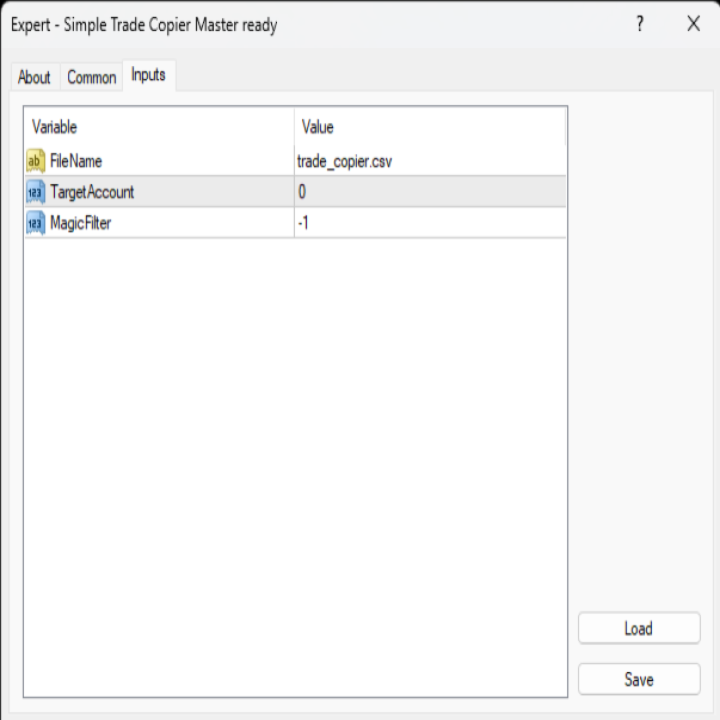
Simple Trade Copier Master MT4

EA Master Version

any Follow Copy Account  (Acc. Number)  need a open MT Terminal, download multiple times

Step1: Open Master MT5 Terminal    =  install master- Version   (on any Symbol just one Time)

Step2: Open Follower MT5 Terminal = install follower- Version  (on any Symbol just one Time)

Step3: all Trades from any Symbol or any Robot are copy now to follow- Terminal immediately

for simple copy set on Chart and Start no optimization.

This Robot is a Trade Copier for MT5

that automatic  transfers Signals from

   a MasterAccount to a FollowerAccount.

Setup:

The Robot  launched on the Follower Account.

There, you select the desired File and configure

the Lot size, SL/TP, Trailing-Stop, and the Account-

number to be copied. If the Account Number  set to 0

trading occurs across all open Terminals without requiring

a specific Account Number entry. Set: 0 mean OFF, 1 mean ON

Function Disclosure:

Market orders are opened immediately; pending- Orders

they will not be transferred as limit or stop- Orders.

Instead, pending- Orders are successfully

transferred as direct- Trades,

while they may not

be visible as

pending

Orders

at

the follower- Terminal.

SL, TP, and trailing- Stop Settings can be automatically applied alongside the Trades.


추천 제품
This tool will perform Trailing stop loss and Break even management for orders. Helps you limit or reduce the time spend watching orders on the screen, especially when you need to go to sleep. Just add this EA to 1 chart, you can manage all pairs. You can filter orders by comment, magic number, symbol, and order ticket number. When Breakeven it can add shift/offset pips (to cover the commission...). You can try in strategy tester before purchase. The EA will add Buy and Sell alternately, so yo
Trade Manager MT4 DaneTrades
Levi Dane Benjamin
4.09 (11)
거래 관리자는 위험을 자동으로 계산하는 동시에 거래를 빠르게 시작하고 종료하는 데 도움을 줍니다. 과잉 거래, 복수 거래 및 감정 거래를 방지하는 데 도움이 되는 기능이 포함되어 있습니다. 거래를 자동으로 관리할 수 있으며 계정 성과 지표를 그래프로 시각화할 수 있습니다. 이러한 기능은 이 패널을 모든 수동 거래자에게 이상적으로 만들고 MetaTrader 4 플랫폼을 향상시키는 데 도움이 됩니다. 다중 언어 지원. MT5 버전  |  사용자 가이드 + 데모 트레이드 매니저는 전략 테스터에서 작동하지 않습니다. 데모를 보려면 사용자 가이드로 이동하세요. 위기 관리 % 또는 $를 기준으로 위험 자동 조정 고정 로트 크기 또는 거래량과 핍을 기반으로 한 자동 로트 크기 계산을 사용하는 옵션 RR, Pips 또는 Price를 사용한 손익분기점 손실 설정 추적 중지 손실 설정 목표 달성 시 모든 거래를 자동으로 마감하는 최대 일일 손실률(%)입니다. 과도한 손실로부터 계정을 보호하고 과도한
BreakEven Grid Utility for MT4 BreakEven Grid is a powerful utility for manual trade management on the MetaTrader 4 platform. It provides a convenient on-screen panel with buttons to help you manage your open positions with a single click.  Features: Set BE+Profit: Automatically sets Take Profit to breakeven + desired profit in pips or money. Close BUY/SELL: Instantly close all Buy or Sell orders for the current symbol. Close +$/-$/Old/New: Close only profitable, losing, oldest or newest tra
It is so very disappointing when the price does not have enough points to achieve Take Profit and makes a reversal. This EA sets virtual levels near the TakeProfit levels. This EA sets virtual levels next to TakeProfit orders. If these levels are reached by price, breakeven or trailing stop is applied for an order. Features This EA does not set new orders. The aim of this EA is to manage stop losses of existing orders that are set by another EA or manually (magic number equals 0). For correct w
Trade panel manual is a multifunctional trading assistant. It allows you to open market and pending orders in one click. Value is set via button menu edit or deleted by specific buttons pending orders and the value of take profit and stop loss in one click. Through the edit menu of the button, a value is set that can be easily changed by simply moving level_tp lines for take profit or stop loss levels and for pending orders. It is possible to select orders and determine for them and set the leve
TesterPro
Miguel Angel Barahona Ochoa
TesterPro 는 MT4 *Strategy Tester* 용으로 설계된 패널입니다. 매수 및 매도 주문을 시뮬레이션하고, 로트 크기, *take profit*, *stop loss* 를 설정할 수 있습니다. 열린 주문을 언제든지 수정하거나 부분 청산할 수 있습니다. 또한 마우스로 해당 라인을 드래그하여 *take profit* 및 *stop loss* 수준을 쉽게 조정할 수 있습니다. 백테스트 중에 ** TesterPro ** 는 실시간으로 상세한 성과 보고서를 제공하며, 이에는 승리한 거래, 손실 거래, 총 이익 및 미실현 이익이 포함됩니다. 패널은 클릭 한 번으로 쉽게 숨기거나 표시할 수 있습니다. ** TesterPro ** 는 효율적이고 현실적인 전략 백테스트를 수행하도록 돕기 위해 만들어진 시뮬레이터입니다. 직관적인 패널을 통해 간단하게 거래를 실행하고, 모든 심볼과 시간 프레임에서 전략을 테스트하며, 결과를 분석하고 거래 기술을 향상시킬 수 있습니다. 모든 것은
Grid Trading
Waseem Raza
5 (3)
Grid Trading EA is a semi-automated one-click trading EA for both Normal Trading and Grid/Martingale Trading . Normal Trading Simply click Buy or Sell directly from the chart. The EA will automatically manage trades by: Setting Stop Loss and Take Profit Managing Trailing Stop Grid / Martingale Trading When Grid Trading mode is enabled, the EA will automatically open additional grid orders at specified distances while increasing the lot size based on your settings. Inputs & Settings Lots — Initia
如果产品有任何问题或者您需要在此产品上添加功能,请联系我 Contact/message me if you encounter any issue using the product or need extra feature to add on the base version. There is Demo version of this panel Dashboard Extreme TMA System Demo in my product list, please try it out to get familiar with all functionalities free, LINK . This system basically utilizes 4 TMA (Triangular Moving Average) slope indicators on 4 time-frame and TMA Band as the core indicators to generate trading signal mainly on time-frame M15. The sig
GGP Trade Copier MT4
Mohammadmahmood Pirayeh
GGP Trade Copier  EA is an automatic trading bot that can help traders automatically replicate the trading strategies and operations from one trading terminal to others by experiencing exceptionally fast trade copying system. Its easy-to-use setup allows you to copy trades between multiple MetaTrader terminals on the same Windows computer or Windows VPS with lightning-fast copying speeds of under 0.5 seconds. The software supports multiple trading varieties, including Forex, commodities, stocks,
Virtual Collider Manual   is a trading assistant with a built-in panel for manual trading. It automatically moves a position opened by a trader in profit using innovative adaptive grid algorithm of averaging and adaptive pyramiding Know-how of the grid algorithm of averaging and pyramiding of the   Virtual Collider Manual   trading robot is based on fully automatic adaptation of all characteristics of dynamically build order grid and pyramid with actual price movement with no need for adjusting
차트를 전문 거래 데스크로 바꾸고, 시장에서 가장 강력하고 직관적이며 기능이 풍부한 거래 패널 중 하나를 사용하세요 — 지금 한정 기간 할인 가격으로 제공됩니다. 구매 후 메시지를 보내면 사은품을 드립니다 주요 기능: 차트 시각 거래 차트에서 직접 Entry, Stop Loss 및 Take Profit 을 드래그하세요. 위험, 수익, R:R 비율, 로트 크기 및 포인트가 실시간으로 업데이트 되는 것을 확인하세요. 다중 Take Profit / SL (최대 4단계) 전문가처럼 부분 청산하세요. • 최대 4단계 Take Profit / Stop Loss • 자동 로트 분할 • 한 번의 진입, 여러 번의 청산 스텔스 모드 브로커에게 TP와 SL 을 숨기세요. 레벨은 시스템 내부에서 관리됩니다. 빠른 모드 즉시 실행. • 원클릭 Buy / Sell • 자동 SL 및 TP 설정 실시간 거래 편집 차트에서 직접 거래를 수정하세요. TP/SL 레벨을 드래그하고 변경 사항을 즉시 적용 하세
Expert Advisor for MT4 Useful utility MUST have for all traders.  With 1 click button, you're able to close all your open positions. Its come with a warning pop up notification when you click to close all your trades, to avoid an accident press the button. Just press 'Yes' to confirm or 'No' to cancel it. The expert will close all your open positions no matter what pairs you currently open or directions. Just attach the expert on 1 of your chart, and you're good to go.
수동 매매를 위한 전문가용 트레이딩 패널로, 정밀한 진입부터 계좌 보호까지 매매의 전 과정을 차트 위 하나의 창에 담았습니다. 정해진 리스크에 정확히 맞춰 모든 포지션의 거래량을 산정하고, RR Tool로 차트에 직접 라인을 그려 거래를 설계하며, Market 주문과 예약 주문은 물론 Grid와 OCO까지 사용할 수 있습니다. 포지션 관리는 패널이 대신 처리합니다. 최대 다섯 단계 부분 청산, 여섯 가지 트레일링 스탑, 브레이크이븐, Virtual SL/TP를 지원합니다. 일간·주간·월간 한도가 예치금을 지키며, 기준을 넘기는 즉시 자동으로 발동됩니다. 가이드와 무료 Live 데모 무료 Live 데모 버전은 여기에서 이용할 수 있습니다 ( Free Live Demo ). 제품 사용 가이드는 여기에서 확인할 수 있습니다 ( User Manual ). NT Trade Manager는 트레이더의 모든 작업 흐름을 차트 위 작고 간결한 패널 하나에 모아, 터미널 창을 오갈 필요도, 진입할
URGENCY “Limited launch pricing” “Price increases after version 2.0” FX Momentum Matrix Pro (current price is introductory) Advanced Multi-Timeframe ROC Dashboard & Smart Signals for Forex & Gold Overview FX Momentum Matrix Pro is a professional forex dashboard and currency strength meter designed for traders who need a powerful forex heatmap, trading panel, and smart forex signals for MT5, including gold trading (XAUUSD) using advanced momentum and ROC (Rate of Change) analysis . This
Trade Manager 4 Lite is trading panel developed with a goal to make manual trading in some (routine) task easier. Trade Manager 4 Lite also works in Strategy Tester. Version for Meta Trader 5 is here: Trade Manager 5 Lite Main features of Trade Manager 4 Lite Trading for Forex and CFDs Support for 4 and 5 digit brokers 65 combinations to set order Set Take Profit, Stop Loss and entry level for Pending Order with lines positioned on the chart Break Even Trailing Stop Loss Multiple Orders at one
Easy Trade Executor는 MT4에서 빠른 포지션 크기 계산, 주문 실행 및 트레이드 관리를 위한 도구입니다. 차트에 Entry Price, Stop Loss, Take Profit 레벨을 직접 배치하고, 포지션 크기를 자동으로 계산한 후 몇 번의 클릭만으로 리스크가 관리된 트레이드를 실행할 수 있습니다. 왜 Easy Trade Executor를 선택해야 할까요? Easy Trade Executor는 단순한 리스크 계산 이상의 기능을 원하는 트레이더를 위해 설계되었습니다. 트레이더는 차트에서 직접 빠르고 효율적으로 트레이드를 관리하고 싶어 합니다. 이 도구는 포지션 크기 계산, 주문 실행 및 트레이드 관리를 하나의 워크플로우로 통합하여 수동 계산이나 여러 터미널 창 간 전환 대신 트레이딩에 집중할 수 있도록 해줍니다. Easy Trade Executor의 주요 기능: 리스크 기반 자동 포지션 크기 계산; 차트에서 직접 Market Order 및 Pending Order
Scalping Day Trading Support Utility Scalping One for MT4 setting faile (for white Chart)    http://www.emkyuradias.shop/indexenglish.html One position is displayed with one button. View P & L, Lot, and Point in real time. It is possible to switch the display of positions of only chart currencies and all currency pairs.   Supports automatic identification in Japanese and English   Account currency notation corresponds to dollar, euro, pound, yen (automatic identification) Lot, take profit and
SL InfoPanel is an information panel that displays operational trading information on the current instrument. The panel contains the following information: The first column: The fixed profit for the specified period of time and the percentage of this profit to the current deposit (the time period is configured in the "Account History"). The value is colored blue if there is a profit and red if there is a loss. Open Long orders (number of lots/number of orders). Open Short orders (number of l
Risk Commander
Adisorn Soodkanueng
Product Name: Risk Commander: Trade Assistant & Strategy Simulator Risk Commander is more than just a trade panel—it is a complete Manual Trading Ecosystem . It serves two powerful purposes: Live Assistant: Helps you execute trades with speed, precision, and perfect risk management in real-time markets. Training Simulator: Fully compatible with the Strategy Tester (Visual Mode) , allowing you to practice manual trading on historical data without risking a cent. NEW! Built-in Simulator Mode Stop
Smart Key Trade Manager
Stephen Sanjeeve Sahayam
대부분의 소매 거래자는 위험을 관리하고 과도한 위험을 감수하거나 과도한 거래로 계정을 날릴 수 없습니다. 이 도구는 드로다운 및 위험 관리를 완전히 자동화하여 트레이더가 항목에만 집중할 수 있도록 합니다. 가격이 거래에 반대할 때 부분 포지션을 자동으로 청산하는 Aggressive Risk Control 기능과 함께 가격 조치를 사용하는 최초이자 유일한 거래 관리자입니다. 이렇게 하면 손실이 항상 승리보다 작게 유지됩니다. 모든 입력 방법 및 거래 스타일과 함께 사용할 수 있습니다. 스캘핑, 일중 또는 스윙 거래. 특징: 모든 주문 유형에 사용하십시오. 시장가 주문, 중지 주문 및 지정가 주문. 경고가 있는 Aggressive Risk Control(ARC) - 가격이 거래에 반하는 경우 손실을 줄입니다. 당신이 취하는 거래의 수를 제한합니다 - 과잉 거래를 줄입니다. 자동 로트 크기 계산. 자동 또는 수동으로 손절매 및 여러 이익실현 수준을 설정합니다. 자동 또는 수동으로
STRATEGY - We use risk and reward ratio of 1:5 to maximize the profit - We use trailing stop to lock profit and minimize loss ALERT User will get notified with alert with the following condition: - Max  Spread - Max  Orders UPDATE - Free Update and Support COMPATIBILITY - MT4 and MT5 - M1 Timeframe - All Currency Pair WHAT YOU GET 1) Free Online Forex Training (Normal Price: USD 299) 2) Free Expert Advisor (EA) (Normal Price: USD 288) 3) Free Copy Trading (CT) (Normal Service Fee: 20%) *Aft
Overview Money management is an all-important aspect of trading that many traders often overlook. It is very possible that even with a winning strategy, bad money management can often result in huge loses. Verdure Forex Calculators aims to help traders minimize risk and exposure in the Forex market. Verdure Forex Calculators implements 4 calculators in one single indicator. It is the first of it's kind on MT4 platform. Calculators implemented are: Lot (Trade or Contract Size) Calculator. Margin
CoPilot dashboard MT4
Frederic Jacques Collomb
CoPilot — 일일 트레이딩 대시보드 숫자를 파악하세요. 명확하게 트레이딩하세요. MT5 버전 CoPilot이란? CoPilot은 전문가 수준의 트레이딩 어시스턴트로, 모든 일일 성과 통계를 실시간으로 차트에 직접 표시합니다 — 라이브 에퀴티 커브 는 거래마다 업데이트됩니다. 차트를 벗어나지 않고 세션을 즉시 파악해야 하는 활발한 트레이더를 위해 설계되었으며, CoPilot은 모든 심볼의 당일 모든 청산된 거래 를 집계하여 깔끔하고 색상 코딩된 인터랙티브 패널로 표시합니다. 터미널 히스토리 탭으로 전환할 필요가 없습니다. 수동 계산도 필요 없습니다. CoPilot은 당신의 부조종사 로서 — 항상 주시하고, 항상 계산하며, 항상 눈앞에 있습니다. 실시간 통계 패널 CoPilot은 세 섹션으로 구성된 완전한 일일 성과 지표를 표시합니다: 활동 — 오늘의 총 거래 수, 청산된 거래, 오픈 포지션, 수익/손실 횟수, 승률 (%) 및 손익분기 거래. 승률 색상은 동적으로 변경: 50% 초
The Simple Lot Size Calculator can help you with risk management. Just type risk percentage, stop loss points and click calculate to get required lot size. The Simple Lot Size Calculator calculates a current chart's instrument. It's lightweight. Just load it to your chart then The Simple Lot Size Calculator will apper in the left upper corner of your chart.
GoldenShield MT4
Aleksandr Bezverkhikh
Golden Shield – Account Protection Utility Golden Shield   is a professional risk management utility that automatically closes   ALL open positions   when your account equity falls below a critical level. It works as a "circuit breaker" for your trading account.   Key Features Feature Description Equity Protection Closes all positions when Equity ≤ STOP level Instant Monitoring Checks equity every 50 milliseconds – immediate reaction Interactive Panel Gainsboro panel with Teal ON / Red O
Trade Assistant Pro 36 in 1
Makarii Gubaydullin
4.76 (21)
다기능 거래 도구: 로트 계산기, 그리드 주문, 위험/보상 비율, 거래 관리자, 수급 구역, 가격 행동 분석 등 데모 버전   |   사용자 설명서 트레이딩 어시스턴트 는 전략 테스터에서 작동하지 않습니다: 이 유틸리티 를 테스트하려면 데모 버전을 여기서 다운로드하세요. 질문 /개선 아이디어/버그 발견 시 저에게 연락 하세요 MT5 버전이 필요하시면, 여기서 사용 가능합니다 거래 프로세스 를 단순화, 가속화, 자동화하세요. 이 대시보드 로 표준 터미널 기능을 확장합니다. 트레이딩 패널 은 모든 거래 상품에서 작동합니다: 외환, 주식, 지수, 암호화폐 등. 1. 새로운 거래 열기 : 로트/위험/위험보상비 계산: 수동 거래의 위험 관리 로트 계산기 (위험 크기 기반 거래량 계산) 위험 계산기 (로트 크기 기반 위험 금액) 위험 보상 비율 그리드 주문: + 동적 거리 옵션 및 분할 로트 옵션 주문 활성화 트리거, + Buy StopLimit/Sell StopLimit: Mt4에서도 가능
FREE UNTIL FEBRUARY 14, 2023 SPEND MORE TIME WITH YOUR FAMILY. ENJOY LIFE… DO NOTHING. This version is only auto set of Takeprofit and StopLoss Main Version  of  TropangFX:   MT4 Version  |  MT5 Version Recommended timeframe:   H1 Supported currency pairs:  GBPUSD, EURUSD, EURCHF ,   USDCAD, USDCHF ,  AUDCAD, EURCAD, EURAUD and many more... Requirements The EA requires good brokerage conditions:   low spread   and   slippage   during the rollover time. I advise using a really   good ECN brok
FREE
Utility, which draws buy or sell trendlines, which can also become support or resistances able to close any position on the screen Algorithm that calculates the gain of the position, at the touch closure of the line.   The benefits you get: Works on forex and CFD, timeframe from M1 to Weekly. Easy to use screen control panel. Audible warning messages at the touch of the line. Easy to use.
Equity Master Stop v2
Frank William Jr Colbert
Trading tool combining a sophisticated equity stop-loss, dynamic take-profit management (Breakeven & Trailing), and symbol-group-based closing logic. It is a complete risk management and trade supervision tool. Features: All features of `Equity Master Stop v1` (floating profit/loss limits, exit protection, skip hours). Take-Profit Override: Can force a TP on any order to lock in a `MAX_FLOATING_PROFIT`. Step Breakeven: Locks in increasing amounts of profit as a trade moves favorably (e.g., aft
Smartility
Syed Oarasul Islam
This utility is designed to help you with your Manual Trading. It allows different ways of closing trades. It can display total number of BUY and SELL orders individually and also their individual profits. It can enter trades without stopl loss and take profits. However upon selecting UseStopLossTakeProfit from the settings it can use best possible stop loss and take profits based on the market conditions. Upon selecting the CloseOppositeTrades  from the settings it can close opposite trades. Fo

이 제품의 구매자들이 또한 구매함
Trade Manager EA에 오신 것을 환영합니다. 이 도구는 거래를 보다 직관적이고 정확하며 효율적으로 만들기 위해 설계된 궁극적인 리스크 관리 도구 입니다. 단순한 주문 실행 도구가 아닌, 원활한 거래 계획, 포지션 관리 및 리스크 제어를 위한 종합 솔루션입니다. 초보자부터 고급 트레이더, 빠른 실행이 필요한 스캘퍼에 이르기까지 Trade Manager EA는 외환, 지수, 상품, 암호화폐 등 다양한 시장에서 유연성을 제공합니다. Trade Manager EA를 사용하면 복잡한 계산은 이제 과거의 일이 됩니다. 시장을 분석하고 진입, 손절 및 익절 수준을 차트의 수평선으로 표시한 후 리스크를 설정하면, Trade Manager가 이상적인 포지션 크기를 즉시 계산하고 SL 및 TP 값을 실시간으로 표시합니다. 모든 거래가 간편하게 관리됩니다. 주요 기능: 포지션 크기 계산기 : 정의된 리스크에 따라 거래 크기를 즉시 결정합니다. 간단한 거래 계획 : 진입, 손절, 익절을 위한
Local Trade Copier EA MT4
Juvenille Emperor Limited
4.96 (110)
Local Trade Copier EA MT4 를 사용하여 매우 빠른 거래 복사 경험을 해보세요. 1분 안에 간편하게 설정할 수 있으며, 이 거래 복사기를 사용하면 Windows 컴퓨터 또는 Windows VPS에서 여러 개의 MetaTrader 터미널 간에 거래를 0.5초 미만의 초고속 복사 속도로 복사할 수 있습니다. 초보자든 전문가든 Local Trade Copier EA MT4 는 다양한 옵션을 제공하여 사용자의 특정 요구에 맞게 맞춤 설정할 수 있습니다. 이는 수익 잠재력을 높이려는 모든 사람을 위한 최고의 솔루션입니다. 지금 사용해보시고 이것이 왜 시장에서 가장 빠르고 쉬운 무역용 복사기인지 알아보세요! 팁: 여기 에서 데모 계정에서 Local Trade Copier EA MT4 데모 버전을 다운로드하여 사용해 볼 수 있습니다. 다운로드한 무료 데모 파일을 MT4 >> File >> Open Data Folder >> MQL4 >> Experts 폴더에 붙여넣고 터미널
Trade Assistant MT4
Evgeniy Kravchenko
4.43 (197)
거래당 위험 계산, 라인을 사용한 손쉬운 신규 주문, 부분 청산 기능을 통한 주문 관리, 7가지 유형의 트레일링 스탑 및 기타 유용한 기능을 제공합니다. 추가 자료 및 지침 설치 지침 - 애플리케이션 지침 - 데모 계정용 애플리케이션 평가판 라인 기능       - 차트에 개시선, 손절매, 차익실현을 표시합니다. 이 기능을 사용하면 새로운 주문을 쉽게 하고 개봉 전에 추가 특성을 볼 수 있습니다. 위기 관리       -       위험 계산 기능은 설정된 위험과 손절매 주문의 크기를 고려하여 새 주문의 볼륨을 계산합니다. 이를 통해 손절매 크기를 설정하고 동시에 설정된 위험을 존중할 수 있습니다. 로트 계산 버튼 - 위험 계산을 활성화/비활성화합니다. 필요한 위험 값은 위험 필드에 0에서 100 사이의 백분율 또는 예금 통화로 설정됩니다. 설정 탭에서 위험 계산 옵션을 선택합니다. $ 통화, % 잔액, % 지분, % 자유 마진, % 사용자 정의, % AB 이전 일, % AB
Exp COPYLOT CLIENT for MT4
Vladislav Andruschenko
4.69 (65)
MetaTrader 4용 전문 트레이드 복사기 MetaTrader 4 용 빠르고 안정적이며 전문적인 트레이드 복사기입니다. COPYLOT 은 MetaTrader 4 와 MetaTrader 5 터미널 간에 Forex 거래를 복사할 수 있으며, 다양한 계좌 유형과 운용 방식에 맞춰 유연한 동기화 환경을 제공합니다. COPYLOT MT4 버전 지원 방식: MetaTrader 4 → MetaTrader 4 MetaTrader 5 Hedge → MetaTrader 4 MetaTrader 5 Netting → MetaTrader 4   MT5 버전 상세 설명 + DEMO + PDF 구매 방법 설치 방법 로그 파일 확인 방법 테스트 및 최적화 방법 Expforex의 모든 제품 MetaTrader 5 버전 을 사용하면 MetaTrader 5 → MetaTrader 5 및 MetaTrader 4 → MetaTrader 5 복사도 지원됩니다: COPYLOT CLIENT for MT5 COPYLOT 은
RS Trade Copier - 진짜 그래픽 인터페이스를 갖춘 초고속 로컬 트레이드 카피어입니다. 계좌번호를 일일이 입력하지 마세요. 200개가 넘는 복잡한 입력 파라미터 목록은 이제 끝입니다. 여러 MT4와 MT5 터미널 간 거래 작업을 복사하기 위한 안정적이고 유연한 도구입니다. 이 도구는 경험 많은 트레이더, 신호 서비스, 개인 투자자 모두에게 적합합니다. 하나 또는 여러 시그널 소스(Provider)에서 하나 또는 여러 리시버(Client)로 트레이딩을 동기화 하여 높은 정밀도와 최소 지연 시간을 제공합니다. 간단한 자동 설정부터 고급 수동 구성까지 지원합니다. 수동 또는 다른 EA로 열린 주문에 간섭하지 않습니다. 모든 작업이 MT4 내부에서 로컬로 처리 되며 외부 서버 의존성 없이 실행됩니다. RS Trade Copier와 다른 솔루션 비교 RS Trade Copier 다른 솔루션 설정 시각적 단계별 마법사. 설정에 약 1분 소요. 200개 이상의 불분명한 입력 매개변수.
일별 및 주별 마감 거래 내역, 현재 진행 중인 거래, 외환 노출을 한 차트에서 즉시 확인하세요! 히트맵을 사용하여 수익성 있는 거래와 거래 포트폴리오 내에서 현재 하락이 있는 위치를 파악하세요. 빠른 마감 버튼 빠른 마감 버튼을 사용하여 단일 심볼에 대한 모든 거래를 마감하거나, 개별 거래를 전체적으로 마감하거나, 버튼을 클릭하여 일부 수익 또는 손실을 실현하세요. 더 이상 목록에서 거래를 찾아 거래의 일부를 마감하는 방법을 알아낼 필요가 없습니다. 대시보드는 외환 쌍을 거래하는 동안 각 통화 심볼에 대한 현재 노출도 표시하므로 주요 뉴스 이벤트에 앞서 과도하게 노출될 수 있는 영역을 파악하는 데 도움이 됩니다. 버튼을 사용하여 뉴스가 나오기 전에 노출을 즉시 빠르게 줄이거나, 이미 뉴스가 발생하여 수익을 창출한 경우 클릭 한 번으로 빠르게 수익을 확보할 수 있습니다! 진행 중인 거래 히트맵 거래 히트맵은 달러 비용 평균화를 사용하여 거래의 확장 및 축소를 수행하는 포지션 거
TradePanel MT4
Alfiya Fazylova
4.84 (95)
Trade Panel은 다기능 거래 도우미입니다. 이 애플리케이션에는 50개 이상의 수동 거래 기능이 포함되어 있으며 대부분의 거래 작업을 자동화할 수 있습니다. 구매하기 전에 데모 계정에서 데모 버전을 테스트할 수 있습니다. 데모 계정용 애플리케이션 체험판 다운로드: https://www.mql5.com/en/blogs/post/750865 . 전체 지침 여기 . 거래. 한 번의 클릭으로 거래를 수행할 수 있습니다: 리스크 자동 계산과 함께 예약 주문 및 포지션 열기. 한 번의 클릭으로 여러 주문 및 포지션 열기. 주문 그리드 열기. 예약 주문 및 포지션을 그룹별로 닫기. 포지션 방향 전환 (Buy 닫기 > Sell 열기, Sell 닫기 > Buy 열기). 포지션 잠금 (부족한 포지션을 열어 Buy와 Sell 포지션의 수량을 동일하게 만들기). 모든 포지션 한 번의 클릭으로 부분적으로 닫기. 모든 포지션의 테이크 프로핏과 스톱로스를 같은 가격 수준에 설정. 모든 포지션의 스톱로스를
작동 체험판 다운로드 Copy Cat More (카피캣) MT4 트레이드 카피어 (Trade Copier) 는 단순한 로컬 트레이드 카피어가 아닙니다. 오늘날의 트레이딩 과제를 위해 설계된 완전한 리스크 관리 및 실행 프레임워크 (risk management and execution framework) 입니다. 프롭 펌 (prop firm) 챌린지부터 개인 포트폴리오 관리까지, 견고한 실행, 자본 보호, 유연한 설정, 고급 트레이드 처리의 조합으로 모든 상황에 적응합니다. 이 카피어는   마스터 (Master, 송신측) 와 슬레이브 (Slave, 수신측)   두 모드 모두에서 작동하며, 시장가 주문과 대기 주문, 트레이드 수정, 부분 청산, 상호 청산 (Close By) 작업을 실시간으로 동기화합니다. 데모 및 실거래 계좌, 트레이딩 또는 인베스터 로그인 모두와 호환되며, EA·터미널·VPS가 재시작되더라도 영구 트레이드 메모리 (Persistent Trade Memory) 시
Close by percentage MT4
Konstantin Kulikov
5 (1)
Hello friends. I wrote this utility specifically for use in my profile with a large number of Expert Advisors and sets ("Joint_profiles_from_grid_sets" https://www.mql5.com/en/blogs/post/747929 ). Now, in order to limit losses on the account, there is no need to change the "Close_positions_at_percentage_of_loss" parameter on each chart. Just open one additional chart, attach this utility and set the desired percentage for closing all trades on the account. The utility has the following function
Drawdown Protector MT4
Konstantinos Kalaitzidis
5 (2)
하락 보호 장치는 원하는 최대 일일 하락폭을 관리하는 데 사용됩니다. 이는 거래자, 특히 소품 회사 거래자에게 매우 귀중한 도구이므로 하락 한도에 주의해야 합니다.    이는 자산 손실 관리 목적으로 사용하기 쉬운 효과적인 EA입니다. 이는 새로운 거래를 차단하고 기존 거래를 종료하는 방식으로 작동하며, 유동 자산(잔액 아님)이 귀하가 설정한 일일 손실 한도를 초과하는 경우. 또한 단일 거래에 대해 최대 손실 한도를 설정할 수 있습니다. 이 한도를 초과하면 다음 날까지 거래가 차단됩니다. 사용자는 3개의 매개변수 값을 삽입합니다. $ 단위의 일일 손실 한도:   명목 통화 단위의 최대 손실률(예제 목적으로 "$"를 사용함)   계정 잔액   에 대해 명목 가치로 허용되는 최대 감소액입니다   . 초과하는 경우 EA는 다음 날까지 거래를 차단합니다. $로 표시된 거래당 손실 한도:    명목 통화로 표시된 최대 손실(단지 예시 목적으로 "$"를 사용했습니다). 이는   단일 거래
Telegram to MT4 Coppy
Sergey Batudayev
4 (10)
Telegram에서 MT4로:   최고의 신호 복사 솔루션 최첨단 유틸리티인   Telegram to MT4를   사용하여 거래를 간소화하세요. DLL 없이도 Telegram 채널과 채팅에서 MetaTrader 4 플랫폼으로 거래 신호를 직접 복사할 수 있습니다. 이 강력한 솔루션은 탁월한 정밀도와 맞춤 설정 옵션을 통해 원활한 신호 실행을 보장하여 시간을 절약하고 효율성을 높여줍니다. [ Instructions and DEMO ] 주요 특징 직접 Telegram API 통합 전화번호와 보안 코드를 통해 인증하세요. 사용자 친화적인 EXE 브리지를 사용하여 채팅 ID를 손쉽게 가져오고 관리하세요. 여러 채널/채팅을 추가, 삭제, 새로 고침하여 동시에 신호를 복사합니다. 고급 필터를 사용한 신호 파싱 사용자 정의 예외 단어(예: "보고서", "요약")가 포함된 원치 않는 신호를 건너뜁니다. 유연한 SL 및 TP 형식을 지원합니다: 가격, 핍 또는 포인트. 신호가 가격 대신 지점을 지정
X2 Copy MT4
Liubov' Shkandrii
빠르게. 정확하게. 혁신적으로. 기술 기반. 혁신적인 X2 Copy MT4로 즉각적인 거래 복사를 경험해 보세요. 단 10초의 간단한 설정만으로 단일 컴퓨터 또는 Windows VPS에서 MetaTrader 터미널 간의 거래를 전례 없는 속도로 동기화하는 강력한 도구를 얻을 수 있습니다. 여러 계정을 관리하든, 신호를 따라 거래하든, 전략을 확장하든, X2 Copy MT4는 비교할 수 없는 정밀도와 제어력으로 작업 흐름에 적응합니다. 가장 기술 중심적인 거래 복사 솔루션으로 더 빠르고 안정적으로 작업하세요. 무료 평가판을 사용해 보고 시스템에서 속도를 확인해 보십시오. *중요: MT5 터미널 작업에는 별도의 X2 Copy MT5 버전이 필요합니다 X2 Copy MT4/5 설정 및 기능 설명 | X2 Copy 체험판 설치 방법 주요 기능 고속 복사 — 0.1초 이내 거래 전송 모든 복사 유형에 대한 범용 지원: MT4>MT4, MT4>MT5, MT5>MT4, MT5>MT5 직관적인 인
VirtualTradePad mt4 Extra
Vladislav Andruschenko
4.85 (61)
한 번의 클릭으로 거래할 수 있는 거래 패널.   위치 및 주문 작업!   차트 또는 키보드에서 거래. 거래 패널을 사용하면 차트에서 클릭 한 번으로 거래하고 표준 MetaTrader 컨트롤보다 30배 빠르게 거래 작업을 수행할 수 있습니다. 거래자의 삶을 더 쉽게 만들고 거래자가 훨씬 빠르고 편리하게 거래 활동을 수행할 수 있도록 도와주는 매개변수 및 기능의 자동 계산. 차트의 무역 거래에 대한 그래픽 팁 및 전체 정보. 새로운 프리미엄 버전 출시:   VirtualTradePad PRO SE 로 트레이딩 워크플로를 업그레이드하세요.   MetaTrader 5   및   MetaTrader 4 를 위한 차세대 전문 트레이딩 패널입니다. MT5 버전 전체 설명   +DEMO +PDF 구입 방법 설치하는 방법     로그 파일을 얻는 방법     테스트 및 최적화 방법     Expforex의 모든 제품 열기 및 닫기, 반전 및 잠금, 부분 닫기/오토로트. 가상/실제 손절매/이익
MT4 to Telegram Signal Provider 는 사용하기 쉽고 완전히 사용자 정의가 가능한 도구로, 텔레그램으로 신호를 보내어 계정을 신호 제공자로 변환할 수 있습니다. 메시지 형식은 완전히 사용자 정의가 가능합니다! 그러나 간단한 사용을 위해 미리 정의된 템플릿을 선택하고 메시지의 특정 부분을 활성화하거나 비활성화할 수도 있습니다. [ 데모 ]  [ 매뉴얼 ] [ MT5 버전 ] [ 디스코드 버전 ] [ 텔레그램 채널 ]  New: [ Telegram To MT5 ] 설정 단계별 사용자 가이드 가 제공됩니다. 텔레그램 API에 대한 지식이 필요 없으며, 개발자가 필요한 모든 것을 제공합니다. 주요 기능 구독자에게 보낸 주문 세부 정보를 사용자 정의할 수 있는 기능 예를 들어 브론즈, 실버, 골드와 같은 계층 구독 모델을 만들 수 있습니다. 골드 구독은 모든 신호 등을 받게 됩니다. ID, 심볼 또는 코멘트별 주문 필터링 주문이 실행된 차트의 스크린샷을 포함 보낸
Trendline PRO MT4 Trendline PRO MT4는 사용자가 만든 추세선과 차트 레벨을 기반으로 거래를 실행하고 주문을 관리하거나 알림을 보내는 MetaTrader 4용 반자동 Expert Advisor입니다. 이 Expert Advisor는 거래 신호를 생성하지 않으며 내장 거래 전략을 포함하지 않습니다. 모든 진입, 청산, 리스크 설정, 관리 규칙은 사용자가 차트에서 정의합니다. 이 제품은 자체 분석에서 추세선, 돌파 레벨, 지지와 저항, 채널 또는 계획된 가격 구역을 이미 사용하는 트레이더를 위해 설계되었습니다. 기존 Trendline EA MT4와 비교해 PRO 버전은 시각적 차트 패널, 인터랙티브 TP 및 SL 구역, OCO 진입 쌍, 라인별 로트 크기, 자동 breakeven, trailing stop, 차트 저장 유지, 개선된 MT4 주문 기반 거래 관리를 추가합니다. 추가 자료 사용자 가이드 및 문서 기능 개요 시각적 거래 계획 차트 패널에서 진입, 돌파
Candlestick Pattern Scanner is a multi-timeframe and multi-symbol dashboard and alert system that checks all timeframes and currency pairs for different candlestick patterns that are formed in them. Scanner is integrated with support and resistance zones so you can check the candlestick patterns in the most important areas of the chart to find breakout and reversal patterns in the price chart. Download demo version   (works on M30,D1,W1 timeframes and 20 symbols of Market Watch window) Read the
The product will copy all telegram signal to MT4   ( which you are member  ) , also it can work as remote copier.  Easy to set up, copy order instant, can work with almost signal formats, image signal, s upport to translate other language to English Work with all type of channel or group, even channel have "Restrict Saving Content", work with  multi channel, multi MT5 Work as remote copier: with signal have ticket number, it will copy exactly via ticket number. Support to backtest signal. How to
Firstly , the script estimates how many Mx bars of the chart (on which this script is applied) the future trend will most likely continue and what is its quality. Secondly (and most importantly), the script is an auxiliary tool for the extremely mathematically advanced and extremely effective ScientificTrade indicator in trading. The script calculates the optimal averaging period, which is also equal to Mx, of the ScientificTrade indicator, which gives the maximum profit according to the strate
Drawdown Manager MT4는 MetaTrader 4를 사용하는 트레이더에게 필수적인 유틸리티로, 거래 자본을 보호하고 손실을 관리하여 투자 안전을 보장하도록 설계되었습니다. 개인 트레이더와 프로프라이어터리 트레이딩 회사 모두에게 이상적인 이 도구는 거래 전략의 무결성과 자본 보안을 유지하기 위한 강력한 솔루션을 제공합니다. 실시간 알림 및 사용자 정의 가능한 위험 매개변수와 같은 고급 기능을 갖춘 Drawdown Manager MT4는 거래 활동을 효과적으로 모니터링하고 제어할 수 있도록 보장합니다. 손실 거래를 종료하거나 즉각적인 알림을 받기를 원하든, 이 유틸리티는 거래 성과를 향상하고 잠재적 손실을 최소화하도록 맞춤화되었습니다. MQL 제품 설치 가이드 | MT4/MT5에서 구매한 MQL 제품 업데이트 | 일반 문제 해결 가이드 | 지표 설정 / 가이드 주요 기능 팝업 알림: 신호 이벤트에서 MetaTrader 알림 팝업을 발생시켜 거래 설정을 놓치지 않도록 합니다.
Trade copier MT4
Alfiya Fazylova
4.58 (33)
Trade Copier는 거래 계정 간의 거래를 복사하고 동기화하도록 설계된 전문 유틸리티입니다. 복사는 공급자의 계정/단말기에서 동일한 컴퓨터 또는 vps에 설치된 수신자의 계정/단말기로 발생합니다. 프로모션 - 이미 "Trade copier MT5"를 구매하셨다면, "Trade copier MT4"를 무료로 받으실 수 있습니다 (MT4 → MT5 및 MT4 ← MT5 복사용). 조건에 대한 자세한 정보를 원하시면, 개인 메시지를 통해 저희에게 문의해 주시기 바랍니다! 구매하기 전에 데모 계정에서 데모 버전을 테스트할 수 있습니다. 데모 버전 여기 . 전체 지침 여기 . 주요 기능 및 이점: 복사기는 "МТ4> МТ4", "МТ4> МТ5", "МТ5> МТ4" 복사를 지원합니다. 복사기는 데모 계정 > 실 계정, 실 계정 > 데모 계정, 데모 계정 > 데모 계정 및 실제 계정 > 실 계정 복사를 지원합니다. 복사기는 읽기 전용 암호가 적용된 투자자 계정에서 복사를 지원합니다. 하
Shepherd Safety EA
AW Trading Software Limited
4.92 (13)
The work of the utility is directed at opening new market orders, maintaining them, transferring the unprofitable orders into profit using an internal loss handling algorithm, trend filtering and various types of trailing stop and take profit. Suitable for any instruments and timeframes. The algorithm works separately for buys and sells, which allows simultaneously working in both directions as well. For the event when the additional orders opened by the utility do not become profitable, a StopO
PZ Trade Pad Pro MT4
PZ TRADING SLU
3.67 (3)
Effortlessly calculate lot sizes and manage trades to save time and avoid costly errors The Trade Pad Pro EA is a tool for the Metatrader Platform that aims to help traders manage their trades more efficiently and effectively. It has a user-friendly visual interface that allows users to easily place and manage an unlimited number of trades, helping to avoid human errors and enhance their trading activity. [ Installation Guide | Update Guide | Troubleshooting | FAQ | All Products ] One of the k
News Filter EA: Advanced Algo Trading Assistant News Filter EA is an advanced algo trading assistant designed to enhance your trading experience. By using the   News Filter EA , you can integrate a Forex economic news filter into your existing expert advisor, even if you do not have access to its source code. In addition to the news filter, you can also specify   trading days   and   hours   for your expert. The News Filter EA also includes   risk management   and   equity protection   features
TrailingStop 4
Andrej Nikitin
4.83 (6)
The Expert Advisor modifies the Stop Loss order position opened for the instrument of the current chart based on indicator values. Uses indicators Parabolic SAR ,  NRTR (Nick Rypock Trailing Reverse) ,  Moving Average  or linear regression channel. Switchable modes: Trailing stop only when in profit; Trailing stop only following the price; On every teak or on formed bars; Trailing for each order separately or for a total position. Has an option of "hidden stop", also you can exclude individual

In the current version this filter will only work with my   night scalpers and the EA Profitection Filter  or with other EAs that utilize the global variables set by this EA.  An MT5 version is availalble   here .  Many scalpers these days have a "normal" news filter, which filters calendar news such as interest rate decisions or CPI releases.  However, this breaking news filter is able to filter non-standard breaking news. It will check every minute for news and if it finds a news event, it w
DLT Display Local Time
Theresia Yovitha Herwanda
DLT (Display Local Time) is an INDICATOR which displays local time using GMT timezone that can be easily switched. Support non standard timezones eg. -3:30, +4:45 Useful when you trade in your local market hours, or to evaluate candles in different time zone. This is for MT4 version. For   MT5   version click here:  https://www.mql5.com/en/market/product/71656 There is very useful info for candle: Range, Upperwick, Body, Lowerwick. You can get this when custom crosshair is enabled. Sessions will
Trade Dashboard MT4
Fatemeh Ameri
4.96 (54)
Trade Dashboard simplifies how you open, manage, and control your trades, with built-in lot size calculation. It allows you to execute trades, manage risk, and control positions directly on the chart, with tools such as partial close, breakeven, and trailing stop. Designed to reduce manual work and help you stay focused on your trading decisions. A demo version is available for testing. Detailed explanations of features are provided within the MQL5 platform. Installation instructions are include
Coppy Master MT4
Sergey Batudayev
4 (3)
카피 마스터 MT4       MetaTrader 4 및 MetaTrader 5 터미널용 트레이딩 복사 도구입니다. 양방향 복사를 지원합니다. MT4에서 MT5로, MT5에서 MT4로, 그리고 동일 유형의 계정 간 MT4에서 MT4로. 올바르게 작동하려면 모든 터미널이 동일한 PC나 VPS에서 실행되어야 합니다. [ Instruction  and Demo ]  MetaTrader 4에 복사하려면 별도 버전이 필요합니다.       카피마스터 MT5       — 필수입니다. 주요 특징: 복사 모드 마스터 및 리시버 역할을 모두 지원합니다. 거래 송수신을 위한 유연한 설정이 가능합니다. 주문 관리 시장가 및 보류 주문을 복사합니다. 동기화 및 부분 마감, 매매 반전, 손절매/실현가 수정을 지원합니다. 심볼 처리 접두사와 접미사를 지원합니다. 특정 기호를 제외하거나 포함하고, 자산에 사용자 지정 이름을 지정할 수 있습니다. 위험 관리 및 한도 일일 거래 한도, 최대 손실 한도,
Exp4 Duplicator
Vladislav Andruschenko
4.5 (22)
Duplicator for MetaTrader 4 — 하나의 터미널 안에서 동작하는 전문 거래 및 주문 복제 시스템 이미 열려 있는 거래를 자동으로 복제하고, 로트를 확장하며, 자체적인 수량 규칙을 적용하고, 복제 포지션을 정교한 로직으로 관리하고 싶은 트레이더를 위한 강력한 Expert Advisor입니다. 수동 매매, 자동매매 시스템, 그리고 이미 존재하는 포지션을 더 유연하게 관리하려는 사용자에게 매우 실용적인 도구입니다. Duplicator는 자체 매매 전략으로 새로운 거래를 열지 않습니다. 이 제품의 역할은 MetaTrader 4 안에 이미 존재하는 포지션과 주문을 감시하고, 사용자가 지정한 규칙에 따라 정확한 복제본을 만드는 것입니다. 복제 개수, 로트 크기, Stop Loss, Take Profit, 필터, 추가 관리 조건까지 세밀하게 설정할 수 있습니다. 서로 다른 터미널 사이에서 거래를 복사하는 도구가 아니라, 같은 터미널 내부에서 스마트하게 거래와 주문을 복제하고
CloseIfProfitorLoss with Trailing
Vladislav Andruschenko
4.87 (31)
이익 추적 기능으로 총 이익/손실에 도달하면 MetaTrader 4에서 포지션을 청산합니다. 가상 정지 (별도 주문) 을 활성화할 수 있습니다. BUY 및 SELL 포지션을 별도로 계산하고 마감합니다 (BUY SELL 별도). 모든 심볼 또는 현재 심볼 만 닫고 계산합니다 (모든 심볼). 이익을 위해 후행 추적 을 활성화합니다 (후행 이익). 예금 통화, 포인트, 잔액의 %에 대한 총 손익을 마감합니다. 이 애플리케이션은 다른 EA와 함께 또는 수동 거래와 함께 모든 계정에서 사용하도록 설계되었습니다. MT5 버전 전체 설명 + DEMO + PDF 구입 방법 설치하는 방법 로그 파일을 얻는 방법 테스트 및 최적화 방법 Expforex의 모든 제품 일부 쌍 또는 모든 쌍의 총 거래 잔액이 설정에서 지정된 값보다 크거나 같으면 모든 포지션이 닫히고 주문이 삭제됩니다. 이 버전은 지정된 이익 수준에서 포지션을 마감할 수 있을 뿐만 아니라 더 나은 결과를 위해 이익을 추적할 수도 있습니다
제작자의 제품 더 보기
HFT slow EA MT5
Niklas Templin
4.43 (7)
HFT EA -Set in Pictures -DE40, US30, US500, USTEC -recommend Prop Firm Broker -EA can Trade with every Broker  only DE40 with this Standart Settings (Change the Compare Count to 3 or higher 10 for better Results) for other Indizes or Pairs Set the Stop Loss x10 to actuall Spread or higher, and Set Take Profit x40 from Spread, PriceOffset x4 from Spread or higher Recomment  M5, M15, M30, H1, D1 minimum 1000$/€ ...Lot 1 in first 3 Weeks Expert have auto Lot Settings, to delete auto Lot...Set Volu
FREE
Algo Edge
Niklas Templin
3 (2)
Algo Edge EA  -DE40/ Tec100 EA working with high and low from last Candle. Self learning EA just set the EA on the Chart and Start no Settings optimization.  AUD/USD, EUR/USD, DE40, US30, Tec100 and much more.  Multifunctional Expert Advisor can trade with every Forex Pair or Indize. EA can Trade with every Broker. M1 high, M30 medium, H1 low Risk. Functions: For other Indize example US30: Change the Robot Worktime in Europe to 16:30-21:30 -inp1_ =Robot Worktime inp_2 and inp_4 VolumePercent =
FREE
First Minute Balance  Rate Prop FTMO Broker. Only for DE40, US100, US30. This Version works with fixed Lot. Automatic add London and US Session. One Trade a Day when SL and TP on 10k pip. Robot Strategy: Trade open = First Tick in Direction. TP and SL can be 10k pips for a different Balance Strategy. Write me a Message of a few Questions when you are undecided. Ex4 Code by Request.
FREE
Algo Edge EA  This EA only SELL download the second EA for BUY and Run it both. -DE40/ Tec100 Self learning EA just set the EA on the Chart and Start no Settings optimization.  AUD/USD, EUR/USD, DE40, US30, Tec100 and much more.  Multifunctional Expert Advisor can trade with every Forex Pair or Indize. EA can Trade with every Broker. M1 high, M30 medium, H1 low Risk. Functions: For other Indize example US30: Change the Robot Worktime in Europe to 16:30-21:30. -inp1_ =Robot Worktime inp_2 and in
FREE
First Hour Market EA
Niklas Templin
1 (1)
DE40, US30, Tec100 EA work on Pending Order  Robot makes just 2 Trades a Day. The Power in the EA is in High Impact Candels Open a Order over and under the Market Opening CandleID (1). Change Robot Worktime: to your Timezone Market Opening. FTMO recomment Broker. Change than RoTimeStamp: to one Minute before Market Opening.  EA have no Problem with High Impact News Candel. M1 is a good Timeframe to Trade. 10.000$/€ FTMO Challenge conform with the right Lot Settings. By Change from Settings fill
FREE
no Trade operation, Robot Set auto SL to every manually Trade from a Phone Automatic Phone TradeManager Need just Set on 1 Symbol Auto BE Trigger is added that immediately sets a stop-loss for every () But does NOT calculate position size based on risk, allows the fixed  SL to   adjusted dynamically drag on Chart or Menu. It protects capital around the clock, reduces emotional mistakes, and ensures consistent risk management.
FREE
First Hour Stretch EA Information: DE40, US100, US30 Timeframe to trade M1. Rate FTMO or Topstep Broker. Work with 2-4 Trades a Day. Fixed SL and TP Funktion. Fixed Lot is auto Standard added.  Automatic add London and US Session. Robot Entry Signals:Strategy Buy and Sell. Robot enter Trade with 2 Candle in Direction. EA makes more Trades when Working-Time higher. Strong Code for error Warning, Calculation and more. Write me a Message of Questions when you are undecided.
FREE
First Order  Robot Strategy =over OR under  Last Minute open Set1: TP 2K / SL1K Set2: TP 1K / SL 1 K Rate Prop FTMO Broker.  Or Real Account with 200$. Only Pair DE40, US100, US30. Automatic added London Session. This Version works fixed Lot buy/ sell. Write me privat Message of Questions, when undecided. Ex4 Code by Request. inp1_TimeStart= Robot Worktime Start inp1_TimeEnd  = Robot Worktime Ende inp8_TimeStart= Time to Robot Reboot inp8_TimeEnd  = Time to Robot Reboot
FREE
HFTslow EA
Niklas Templin
3.4 (5)
HFT EA -Set in Pictures -DE40, US30, US500, USTEC -IC Market Recomment Broker -EA can Trade with every Broker  only DE40 with this Standart Settings (Change the Compare Count to 3 or higher 10 for better Results) for other Indizes or Pairs Set the Stop Loss x10 to actuall Spread or higher, and Set Take Profit x40 from Spread, PriceOffset x4 from Spread or higher Recomment  M5, M15, M30, H1, D1 minimum 1000$/€ ...Lot 1 in first 3 Weeks Expert have auto Lot Settings, to delete auto Lot...Set Volu
FREE
RexIIIClaw vs ClusterIIIEA
Niklas Templin
4.75 (4)
THE_____ IIIREX_CLAW_vs_CLUSTER_EAIII______ Set1: Price Offset 100, Stopp Loss 100-1000, Take Profit 2000  Set2: Price Offset 200, Stopp Loss 100-1000, Take Profit 2000 Set3: Price Offset 100, Stopp Loss 100-1000, Take Profit 1000 Set4: Price Offset 200, Stopp Loss 100-1000,  Take Profit 1000 Set5: PriceOffset 100-1000 (Recomment 200) higher is lower Risk, Stopp Loss  500  Take Profit  1000, 2000, or 3000 it is the same Target Set it to your Moneymanagement  Indize: DE40  “IC Market” Recomment
FREE
Algo Edge Boost Buy MT5
Niklas Templin
1 (2)
Algo Edge EA  This EA only BUY download the second EA for SELL and Run it both. -DE40/ Tec100 Self learning EA just set the EA on the Chart and Start no Settings optimization.  AUD/USD, EUR/USD, DE40, US30, Tec100 and much more.  Multifunctional Expert Advisor can trade with every Forex Pair or Indize. EA can Trade with every Broker. M1 high, M30 medium, H1 low Risk. Functions: For other Indize example US30: Change the Robot Worktime in Europe to 16:30-21:30. -inp1_ =Robot Worktime inp_2 and in
FREE
Saved your Account Margin for multiple Trades Trading Robot Closing all second open Trades automatic Closing Trades that reached max. Lot Trading Robot built to avoid: -Stop multiple Trades -Save overtrading  -Hold Strategy -max.  Lot -Prop conform -long Account holding -Prop Firm Account holder  - Robot allow one Trade per Symbol -Stop loosing by click multiple Times Trade Button -Robot needs to be Set on every Symbol that will be saved - no Settings configure OneRule OneFunktion Set on Chart
FREE
THE>>>>>>___IIIREX_CLAW_vs_CLUSTER_EAIII___<<<<<< Set1: Price Offset 100, Stopp Loss 100-1000, Take Profit 2000  Set2: Price Offset 200, Stopp Loss 100-1000, Take Profit 2000 Set3: Price Offset 100, Stopp Loss 100-1000, Take Profit 1000 Set4: Price Offset 200-500, Stopp Loss 100-1000,  TakeProfit 1000 Set5: PriceOffset 100-1000 (Recomment 200) higher is lower Risk,   Stopp Loss  500  Take Profit  1000, 2000,  3000 it is the same Target Set it to your Moneymanagement  Indize: DE40  “IC Market” R
FREE
THE_____ IIIDinoIIIIIPendelIII EA______ Set1: Price Offset: 100, Stop Loss 60, Take   Profit 2000,  "Object Chart Sub Window" 18:01- 18:03 Set2: Price Offset: 200, Stop Loss 60, Take Profit 2000,  .". Set1: Price Offset: 100, Stop Loss 60, Take Profit 2000,   Set2: Price Offset: 200, Stop Loss 60, Take Profit 2000,   Set3: Price Offset: 100, Stop Loss 60, Take Profit 1000,   Set4: Price Offset: 200, Stop Loss 60, Take Profit 1000,   Indize: DE40  “FTMO" "E8" Recomment Broker THIS EA „IIIDINOI
FREE
Level Green EA
Niklas Templin
High Impact Level EA DE40, US30,  FTMO Recomment Broker. EA can Trade with every Broker that have Volume 0.01 by Indizes. Dont let the Robot Work alone. Important  must  be Change in Settings for DE40 or US30 inp1_VolumeSize: 0.1 inp1_VolumePercent: 0.00001 inp1_GridStartOffset: 1000.0 inp1_GridStartRoundNumbers:  1000.0 inp1_GridSize:  1000.0 inp2_VolumeSize: 0.1 inp2_VolumePercent: 0.00001 inp2_GridStartOffset:  1000.0 inp2_GridStartRoundNumbers:  1000.0 inp2_GridSize:  1000.0 inp1_GridSizeTP:
FREE
Algo Edge MT4
Niklas Templin
3.57 (7)
Algo Edge EA  Self learning EA just set the EA on the Chart and Start no Settings optimization.  EA work with high and low from Last Candle. AUD/USD, EUR/USD, DE40, US30, Tec100 and much more.  Multifunctional Expert Advisor can trade with every Forex Pair or Indize. EA can Trade with every Broker. M1 high, M30 medium, H1 low Risk. Functions: For other Indize example US30: Change the Robot Worktime in Europe to 16:30-21:30. -inp1_ =Robot Worktime inp_2 and inp_4 VolumePercent = The Robot will i
FREE
EA Master Version any Follow Copy Account  (Acc. Number)  need a open MT Terminal, download multiple times Step1:   Open Master MT5 Terminal    =  install master- Version   (on any Symbol just one Time) Step2:   Open Follower MT5 Terminal = install follower- Version  (on any Symbol just one Time) Step3:   all Trades from any Symbol or any Robot are copy now to follow- Terminal immediately for simple copy set on Chart and   Start   no optimization. This Robot is a Trade Copier for MT5 that automa
FREE
Saved your Account Margin for multiple Trades Trading Robot Closing all second open Trades automatic Closing Trades that reached max. Lot Trading Robot built to avoid: -Stop multiple Trades -Save overtrading  -Hold Strategy -max.  Lot -Prop conform -long Account holding -Prop Firm Account holder  - Robot allow one Trade per Symbol -Stop loosing by click multiple Times Trade Button -Robot needs to be Set on every Symbol that will be saved - no Settings configure OneRule OneFunktion Set on Chart
FREE
Three Sixty Dollar EA Version SELL IC Market Recomment Broker -THIS EA ONLY SELL The Performance is the same als the Gratis Version on DE40 you have only more Settings to Change for other Indizes or Pairs. (See on Pictures) only DE40 -minimum 3000$/€ ...Lot 1-5 -M1 -maximal 30min per Day Robot Worktime Version 1 SELL only -this EA only SELL you have to buy my second version to get trades to buy. -Trade only on the DE40 indices - Don't close trades the robot will close everything automatically
FREE
Three Sixty Dollar EA   IC Market Recomment Broker -THIS EA ONLY BUY -only DE40 -minimum 3000$/€ ...Lot 1-5 -M1 -maximal 30min per Day Robot Worktime Version 1 BUY only -this EA only BUY Trade only on the DE40 indices - Don't close trades the robot will close everything automatically on point. -The maximum working time of the robot is 30 minutes since the broker has a maximum of trading messages per day Test the trading news per day with your broker first with a demo account or read about it i
FREE
THE LiveExpertVisitor Please make this Change than the Robot Work.  Stop Loss to 60 or higher and Take Profit to 2000 or 1000. Indize: DE40, US30 “IC Market or FTMO” Recomment Broker. This EA „LiveExpertVisitor“ BUY and SELL in one. Only DE40 with this Standart Settings Stopp Loss 50 Take Profit 2000 or 1000. For other Indizes or Pairs Set the Stopp Loss to actuall Spread and maximal the Take Profit x40 to Spread Points. -Recomment  M5 -minimum 1000$/€ ...Lot 1 in first Week Strong Code for Err
FREE
Lucky EA Random Output
Niklas Templin
2 (1)
Lucky EA Random Outputs Test the EA first in a Demo Account. This EA RUN on a Random Strategie and open Trades per coincidence Strategie. Recommend Broker "IC Market, FTMO”. 1000$/€ 1-5 Lot in first Week, Timeframe M1. DE40 with this Settings only for other Indizes or Pairs please change the Settings appropriately to the actual Spread. You musst for DE40 nothing Change Set the EA to your MT4 Desktop and START. Worktime is from 09:01-18:00 Servertime. Unlimited Default Settings you can Change the
FREE
THE PLATE EA IC Market or FTMO Recomment Broker. This EA „PLATE“ BUY and SELL in one.  Only DE40 with this Standart Settings (You can Change the Take Profit to 500 for other Endpoints or the Stopp Loss to 60 or higher) M1, M5, M15, M30, H1. Minumum 1000$/€ ...Lot 1 in first Week. The EA work with a small Stop Loss and a good Take Profit Risk Ratio. When you a undecided or have any Question write me a Message.
FREE
EWELDE PRICE LOP MT4 Test the EA first in a Demo Account. Unlimited default Settings to Change for other Indizes or Pairs.Recomment Broker "IC Market, FTMO”. This Settings only Indize DE40 and 1000$/€ Startcapital, 1-5 Lot in first Week Timeframe M1 or M5.This EA BUY and SELL in one EA, 09:00-18:00 Clock Robo- Worktime. The EA Buy and Sell over and under the 50 Level. For DE40 you must nothing Change, set the EA on your MT4 Desktop and Start.
FREE
EA Follower Version any Follow Copy Account  (Acc. Number)  need a open MT Terminal, download multiple times Step1:   Open Master MT5 Terminal    =  install master- Version   (on any Symbol just one Time) Step2:   Open Follower MT5 Terminal = install follower- Version  (on any Symbol just one Time) Step3:   all Trades from any Symbol or any Robot are copy now to follow- Terminal immediately for simple copy set on Chart and   Start   no optimization. This Robot is a Trade Copier for MT5 that auto
Algo Edge EA  DE40 / Tec100 Tipp:Change Robot Worktime to10:01-10:10 few Min. Worktime high WIN  floating Term. Set EA Chart Start no Settings optimization.  DE40 , US30, Tec100, US500and much more.  Multifunctional  Expert Advisor can trade with every Indize without any Changes. Tipp: Swipe manuell next Robot open Trade Stop Loss immediately opening Level.  Close your the Profit and shut down the Robot when your Profit Target is reached. Recomment M1 EA can Trade with every Broker. M1 high,M30
Long Term Buy  Set1: TP/SL20kpip. Set2: TP/SL10kpip. Set3: TP/SL 5k pip. Set4: TP/SL 2k pip. Set5: TP/SL 500pip. Rate Prop FTMO Broker.  Only Pair DE40, US100, US30. Automatic added EU London Session. This Version works only with fixed Lot and buy. Robot Strategy: Trade open = First "Round Price-Number Entry". Write me a Message of Questions when undecided. I send ex4 Code by Request.
One thousand Pip  Set1:TP/SL 20kpip. Set2:TP/SL 10kpip. Set3: TP/SL 5k pip. Set4:  TP/SL 2k pip. Set5:  TP/SL 500 pip. Rate Prop FTMO Broker.  Only Pair DE40, US100, US30. Automatic added EU London Session. This Version works with fixed Lot and buy/sell. Robot Strategy: Trade open = First "Round Price-Number Entry". Write me a Message of Questions when undecided. I send ex4 Code by Request.
Three Sixty Dollar EA M1 Broker  Strategy: over/under  actual Price inp_1:Worktime inp_4/9:Lot Settings Real Account with 200$. Only Pair DE40, US100, US30. Automatic added London Session. This Version works with fixed Lot buy/ sell. Write me privat Message of Questions when undecided. Gratis ex5 Code by Request. Mq5 Source Code for 30$ for Payment of a EA on my Page.
EA Follower Version any Follow Copy Account  (Acc. Number)  need a open MT Terminal, download multiple times Step1:   Open Master MT5 Terminal    =  install master- Version   (on any Symbol just one Time) Step2:   Open Follower MT5 Terminal = install follower- Version  (on any Symbol just one Time) Step3:   all Trades from any Symbol or any Robot are copy now to follow- Terminal immediately for simple copy set on Chart and   Start   no optimization. This Robot is a Trade Copier for MT5 that auto
필터:
리뷰 없음
리뷰 답변