
Straddle AI MT5
- Experts
-
Jestoni Santiago
 🔹 Trader & Developer | 12+ Years in Forex & AI EAs
I build fully customizable trading systems and AI-powered EAs that work for real traders of all levels, from beginners to advanced. Every tool I release is designed to give you control, flexibility, and results you can trust.
📊 What I Offer: - Versão: 2.17
- Atualizado: 3 agosto 2026
- Ativações: 11
FLASH SALE at 90% OFF!
Straddle AI is a fully automated, AI-driven Trading Robot built for Forex, Indices, and Commodities, with primary optimization for XAUUSD (Gold) — engineered around a simple but rarely-executed idea: you don't need to predict the move. You need to already be there when it happens.
While other systems wait for a signal, an indicator to cross, a candle to close, Straddle AI has already quietly positioned itself around the current price, on both sides, before the move even starts. When the market finally commits — and it always eventually does — the trade is already live. No hesitation. No missed entry. No second-guessing.
And it doesn't stop at getting in first. Out of the box, its AI Adaptive Engine is reading volatility, momentum, and the underlying character of every move, tick by tick — deciding in real time how the trade should be built, how far it should run, and when it's time to protect what's been won. No configuration. No manual tuning. Attach it, and the intelligence is already awake.
The market doesn't announce its next move. Straddle AI doesn't need it to. Okay. Please give me a favor to read the full description of this EA. Thank you.
Straddle AI runs in two modes:
- AI Adaptive Engine (the default) — a real-time decision layer that reads the market's conditions continuously and adjusts everything accordingly. Calm markets get patience. Strong moves get room to breathe.
- Basic Mode — for traders who want the raw mechanism, stripped down: fixed, unchanging behavior every single time, or a clean baseline to measure the AI Adaptive Engine against.
One switch decides which one runs.
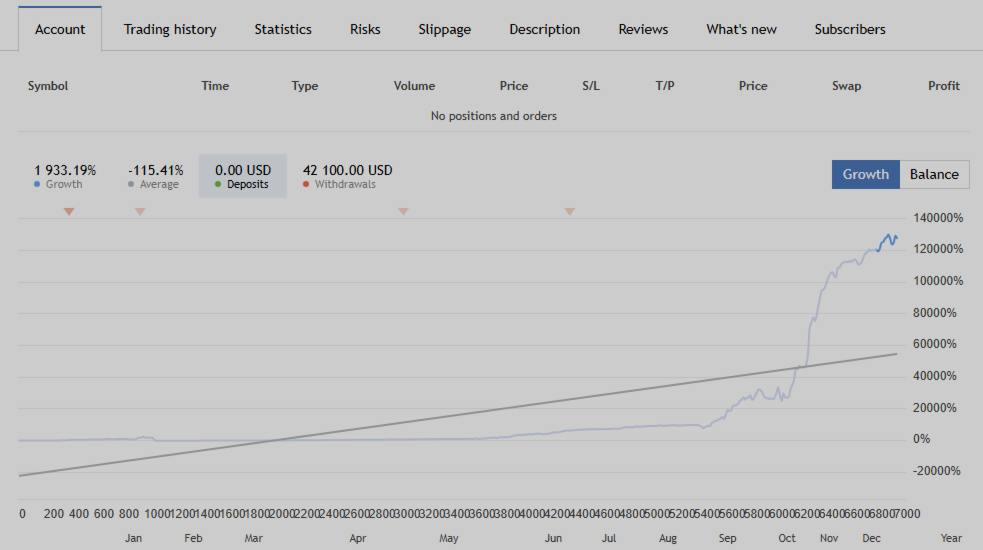
Monitoring Account — Multi Asset with Aggressive Risk for XAUUSD, NAS100, UK100 (Testing), BTCUSD (Testing), JPN225 (Testing)
| Platform | MT5 |
| Broker Server | TradeMaxGlobal-Demo |
| Account Number | 60102236 |
| Password | Straddle101! |
WHY TRADERS ARE SWITCHING TO STRADDLE AI ?
1. It Doesn't Guess Direction — It Doesn't Have To Most strategies live or die on being right about where price goes next. Straddle AI simply refuses to play that game. It positions itself so that whichever way the market breaks, it's already in position to catch it. No bias. No prediction. No being wrong about direction, because it never commits to one in advance.
2. An Engine That Reads the Market's Intent, Not Just Its Price Every tick, the AI Adaptive Engine is quietly asking: is this a real move, or noise? Is this calm, or is something building? It answers those questions continuously, and adjusts how it trades before you'd ever notice conditions had changed. This isn't a fixed rulebook running the same way forever — it's a decision layer that behaves differently depending on what the market is actually doing right now.
3. It Can Tell the Difference Between a Spike and a Trend A sharp explosive breakout and a slow, grinding move in one direction are not the same thing — and Straddle AI knows it. It gives a clean grind patience and room, while handling a violent spike with a tighter, quicker hand. When it senses a genuine sustained trend building, it can even lean into that direction rather than treating both sides as equally likely — extracting an edge from exactly the kind of move a rigid system would trade blind to.
4. It Protects Gains Like It's Guarding Something Valuable Once a trade is live, the AI Adaptive Engine doesn't just sit there — it's reading momentum tick by tick, deciding whether to give a winning trade room to keep running, or tighten immediately the moment something feels off. Break-even and multi-stage protection are built in and fully automatic. You never have to watch the screen to know it's being handled.
5. A Built-In Guardian Against Your Own Risk Straddle AI watches your lot size against your balance continuously. If risk creeps into dangerous territory, it warns you — and if it becomes genuinely unsafe, it stops itself and steps back, only resuming once things are corrected. No external tool, no separate app. It's watching, always.
6. It Already Knows What It's Trading Drop it on Gold. Drop it on an index. Drop it on Crypto. It reads the symbol and configures itself accordingly — no manual setup, no per-instrument guesswork, even when you're running wildly different price scales like XAUUSD, NAS100, and BTCUSD side by side.
7. It Doesn't Get Blindsided by News High-impact news events have ended more trades than bad strategy ever has. Straddle AI sees them coming — reads the volatility building beforehand, and adjusts its stance ahead of time, tighter when it's calm, wider when the market's already moving, so it's positioned to catch the spike instead of getting caught by it.
8. It Never Forgets a Trade Exists Remove it. Update it. Restart your terminal. Reattach it hours later. It finds whatever trade is still open and picks up exactly where it left off, full management restored automatically. Nothing is ever left unattended, even by accident.
SPECIFICATIONS
- Supported Instruments: XAUUSD, XAGUSD, NAS100, SPX500, US30, DE40, UK100, JPN225, BTCUSD, ETHUSD, All Major Forex Pairs
- Best Performance: XAUUSD using default settings. PLEASE DO NOT TRY TO RUN THE EA 24 HOURS IN A LIVE ACCOUNT. YOU WILL LIKELY GET INCONSISTENT RESULTS IF YOU DO THIS. JUST USE THE DEFAULT SETTINGS PLEASE. LONDON/NY OVERLAP IS THE OPTIMAL MARKET CONDITION EVERYDAY.
- Timeframe: Any timeframe ( Just 5minute for better viewing) — the chart you attach the EA to has no effect on trading behavior; entries, sizing, and management run independently of it. M5 is a good practical default for watching trades unfold without excessive clutter, though M5 or any higher timeframe works identically and comes down to personal preference. For traders using the AI Adaptive Engine, the resolution it reads for volatility, momentum, and ATR-based sizing is separately configurable in Advanced Settings — this is what actually adjusts entry/target/trail distances to match your preferred pace, not the chart timeframe itself.
- Minimum Deposit: $1000 or more, 0.01 lot size or 1% risk percent of balance.
- Execution Type: RAW Spread / ECN accounts
- Platform: MetaTrader 5
- VPS: Recommended for stable operation.
RECOMMENDED BROKERS
Fusion Markets | Vantage Markets | IC Markets | Valetax | TMGM | FP Markets
These brokers offer RAW/ECN accounts with low spread and fast execution — exactly what this EA needs to perform at its best.
IMPORTANT NOTES — PLEASE READ BEFORE STARTING ( DO NOT SKIP )
- Reach out after purchase. Send a message with the broker you plan to use so I can confirm it is compatible and help with any setup if needed. Once activated, the manual will be sent to you directly.
- Tight or Low / RAW Spread / ECN Account is Recommended. Standard or fixed spread accounts will affect performance significantly. Always use a RAW or ECN account for best results. You can use the standard account in IC Markets, which offers very tight spread, no commissions, and is closer to the Raw account.
- The AI Adaptive Engine runs live by default — this is what you'll see the moment you attach the EA. The Strategy Tester always runs the fixed baseline regardless of that setting, so backtest results reflect that stable reference point, not live AI Adaptive Engine behavior. If you specifically want the fixed mode live too, flip the one switch at the top of Advanced Settings.
- Start small. Begin at 0.01 lot per $300 of account balance. Do not increase lot size until you are comfortable with how the EA behaves on your broker.
- Losses are part of trading. Every strategy has losing trades. What matters is performance over time, not a single trade. Stay patient, trust the process, and avoid changing settings after a loss.
- Trade at the right time. The London/New York overlap session gives the most consistent conditions for this strategy. The AI Adaptive Engine ships with its session filter set to this window by default; the fixed mode has its own equivalent setting.
- Set a daily target and respect it. Decide how much you want to make or protect each day. Once that level is hit, stop the EA for the session. Discipline compounds over time.
- Always test on demo first. Run the EA on a demo account for at least a few days before going live. Every broker behaves slightly differently — demo testing on your actual broker is the best preparation.
- No complex setup required. If you are a beginner, attach it to XAUUSD or NAS100 (Optional) with default settings, and the intelligence is already reading the market and managing trades for you. The only thing you need to set is your lot size relative to your balance. Everything else is handled. Want the simpler, fixed mode instead? One switch, fully optional.
- Full Transparency — Nothing is Hidden. Every single input parameter is fully exposed in the settings tab, organized into a Basic Settings block and an Advanced Settings block. You can see exactly what the EA is working with, adjust anything you want, or leave it all on default and let it run. Whether you're a beginner who just wants to attach and go, or an experienced trader who wants full control — both are supported.
- PLEASE DO NOT TRY TO RUN THE EA 24 HOURS IN A LIVE ACCOUNT. YOU WILL LIKELY GET INCONSISTENT RESULTS IF YOU DO THIS. JUST USE THE DEFAULT SETTINGS PLEASE. LONDON/NY OVERLAP IS THE OPTIMAL MARKET CONDITION EVERYDAY. YOU WILL ONLY END UP GIVING A BAD REVIEW IF YOU DON'T FOLLOW THE RULES OF PROPERLY USING THIS EA!
QUICK START
How to backtest?
- Download the EA — a Free Demo version is available to test first
- Open Strategy Tester and set the symbol to XAUUSD or NAS100
- Set your preferred date range. Set timeframe to M5.
- Disable Visual Mode for faster results.
- Set starting balance to at least $1000.
- Click Start — this runs the fixed baseline, regardless of live settings.
How to run on a live or demo account?
- Drag and drop the EA onto a XAUUSD or NAS100 chart with M5 Timeframe.
- Enable Live Trading.
- Done — the intelligence is already reading the market and trading.
COMMON QUESTIONS
1. What's the difference between the AI Adaptive Engine and the fixed mode?
The AI Adaptive Engine is the default: a real-time decision layer that runs on every tick, reading current market conditions — volatility, momentum, spread, and the underlying character of the move itself — and adjusting entries, targets, and trade management accordingly, without you making a single decision. This is what runs live and on demo unless you switch it off.
The fixed mode is a predictable execution engine — the same behavior every time, on every instrument, with no external dependency. It's what the Strategy Tester always runs regardless of your live setting, which is why it exists as a clean, stable baseline to test and compare against.
2. Are updates and support free?
Yes — lifetime free updates and technical support are included with every purchase. If you need hands-on help, remote support is available via AnyDesk or UltraViewer. Just reach out and we will sort it out together.
Past results do not guarantee future results. Always trade within your means and never risk more than you can afford to lose.





































非常期待有更好的表现。我已经开始测试了