GoodVibe
- Utilitários
-
Rudi Rupian
 I started my trading journey in 2008 — not chasing quick profits, but building the discipline to understand how markets truly work. Over the years, I have developed a calm, long-term approach to trading: focused, systematic, and always probability-driven.
 - Versão: 1.0
====================================================
ENGLISH DESCRIPTION - MQL5 MARKET COMPLIANT
====================================================
GoodVibe EA is a trade management utility designed to assist traders in managing open positions automatically. It does not open trades on its own. All entry decisions remain with the trader.
The EA runs in the background and applies the configured management rules to positions that are already open — either on the current chart symbol or across all open positions simultaneously.
---
CORE FUNCTIONS
1. AUTOMATIC STOP LOSS AND TAKE PROFIT
When a position is opened without SL or TP, the EA assigns them automatically based on the configured values. Two placement modes are available:
Server Mode : SL and TP are placed directly on the broker server as standard order levels.
Client Mode : SL and TP are managed internally by the EA. The position is closed by the EA when the target is reached, without placing visible levels on the server.
2. TRAILING STOP
The EA supports four trailing stop methods:
No Trailing Stop : Trailing is disabled.
Classic : SL follows price at a fixed distance.
Step Keep Distance : SL moves in steps while maintaining a set distance from price.
Step By Step : SL moves forward by a fixed step each time the condition is met.
Trailing activates only after price has moved in profit by the configured trailing stop distance.
3. LOCK PROFIT
When a position reaches a defined profit target (in points), the EA moves SL to a position that locks in a minimum profit level. After the lock is activated, trailing stop takes over for further management.
4. AUTO CLOSE BY TOTAL PROFIT
The EA monitors the combined floating profit of all BUY positions and all SELL positions separately. When the total profit of all BUY positions reaches the configured threshold, all BUY positions are closed simultaneously. The same applies independently for SELL positions. This allows the trader to set a group profit target without manually monitoring each position.
5. SYMBOL SCOPE
The trader can choose whether the EA manages positions on the current chart symbol only, or all open positions across all symbols.
---
GRAPHICAL PANEL
The EA displays a real-time information panel on the chart, including:
- Broker name and account name
- Account number
- Balance, Equity, and Free Margin
- Floating BUY positions: total lot and floating profit or loss
- Floating SELL positions: total lot and floating profit or loss
- Auto close target values for BUY and SELL
- Configured SL, TP, and Trailing Stop values
The panel updates every second via an internal timer.
---
INPUT PARAMETERS
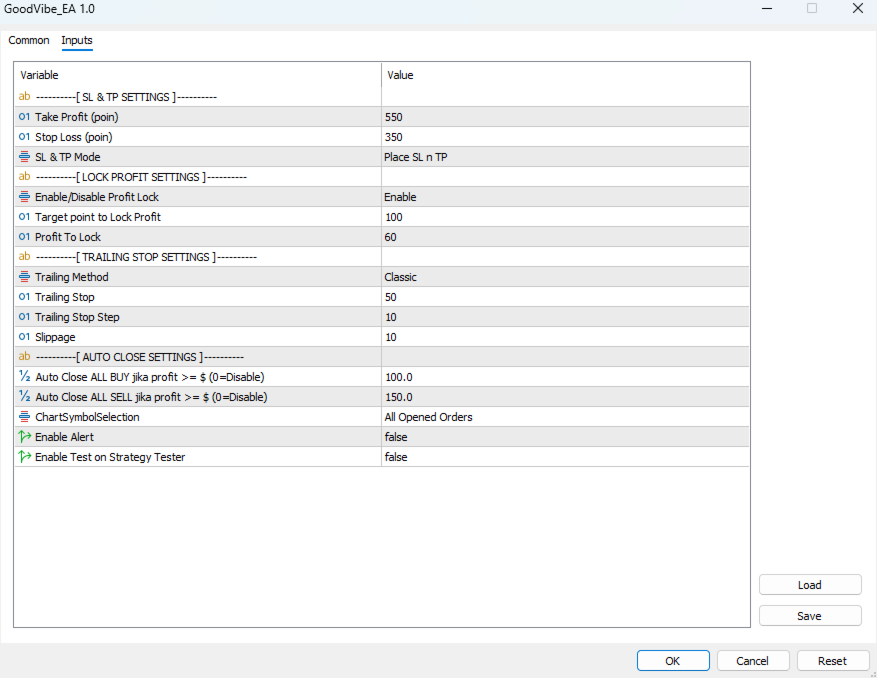
SL & TP Settings:
TakeProfit : Take profit distance in points (default: 550)
StopLoss : Stop loss distance in points (default: 350)
SLnTPMode : Server (visible on broker) or Client (hidden, managed by EA)
Lock Profit Settings:
LockProfitEnable : Enable or disable the profit lock function
LockProfitAfter : Profit in points required before lock is activated (default: 100)
ProfitLock : Points of profit to lock when target is reached (default: 60)
Trailing Stop Settings:
TrailingStopMethod : Select trailing method (None, Classic, Step Distance, Step By Step)
TrailingStop : Trailing distance in points (default: 50)
TrailingStep : Step size for step-based trailing methods (default: 10)
Slippage : Maximum slippage in points for order execution (default: 10)
Auto Close Settings:
AutoCloseBuyProfit : Close all BUY positions when combined profit reaches this value in USD (0 = disabled)
AutoCloseSellProfit : Close all SELL positions when combined profit reaches this value in USD (0 = disabled)
General:
ChartSymbolSelection : Current Chart Only or All Opened Orders
EnableAlert : Enable or disable alert notifications
EnableTest : Enable test order in Strategy Tester
---
NOTES
- This EA does not open positions. It is a management tool only.
- Compatible with any trading strategy or manual trading approach.
- Designed for use on MetaTrader 5.
- All management functions work independently and can be combined.
---
RECOMMENDED USE
Attach this EA to any chart. If managing all symbols, one instance is sufficient. If managing a specific symbol only, attach to the relevant chart with ChartSymbolSelection set to Current Chart Only.
---
DEVELOPER
Rudi Rupian
WhatsApp : +62 852-3806-6699
Contact via MQL5 profile for support inquiries.
---
RISK NOTICE
This EA assists with trade management based on the settings provided. The trader is responsible for all position entries, risk sizing, and overall account management. Use appropriate risk management at all times.
====================================================
BAHASA INDONESIA (Opsional)
====================================================
GoodVibe EA adalah utilitas manajemen trading yang membantu trader mengelola posisi yang sudah terbuka secara otomatis. EA ini tidak membuka posisi sendiri. Semua keputusan entry tetap berada di tangan trader.
Fungsi utama yang tersedia:
1. SL dan TP Otomatis
Ketika posisi dibuka tanpa SL atau TP, EA akan memasangnya secara otomatis sesuai nilai yang dikonfigurasi. Tersedia dua mode: Server (dipasang di broker) dan Client (dikelola internal oleh EA tanpa terlihat di server).
2. Trailing Stop
Empat metode tersedia: tanpa trailing, Classic, Step Keep Distance, dan Step By Step. Trailing aktif setelah harga bergerak profit sesuai jarak yang ditentukan.
3. Lock Profit
Ketika posisi mencapai target profit tertentu, SL dipindahkan untuk mengunci minimal profit yang sudah ditentukan. Setelah itu, trailing stop mengambil alih pengelolaan posisi.
4. Auto Close Berdasarkan Total Profit
EA memantau total profit floating semua posisi BUY dan SELL secara terpisah. Ketika total profit BUY mencapai target, semua posisi BUY ditutup sekaligus. Berlaku sama untuk posisi SELL.
5. Panel Informasi Real-Time
Menampilkan data akun, balance, equity, free margin, serta total lot dan floating profit/loss untuk BUY dan SELL secara langsung di layar.
Hubungi developer:
WhatsApp : +62 852-3806-6699