PrecisionEdge
- Experts
-
Rudi Rupian
 I started my trading journey in 2008 — not chasing quick profits, but building the discipline to understand how markets truly work. Over the years, I have developed a calm, long-term approach to trading: focused, systematic, and always probability-driven.
 - Versão: 1.0
- Ativações: 9
PrecisionEdge EA — RSI and Stochastic Confluence System for MT5
PrecisionEdge EA is an automated Expert Advisor for MetaTrader 5. It uses two technical indicators — the Relative Strength Index (RSI) and the Stochastic Oscillator — to determine entry conditions. A trade is placed only when both indicators generate a signal at the same time on a new bar close.
Entry Logic
A buy order is placed when the RSI crosses upward out of the oversold level and the Stochastic %K line crosses above the %D line within the oversold zone. A sell order is placed when the RSI crosses downward out of the overbought level and the Stochastic %K line crosses below the %D line within the overbought zone. Only one position per symbol is allowed at any time.
Features
- Entry requires confirmation from both RSI and Stochastic at the same bar close
- Take profit is set directly on the order in pips
- A global stop loss in USD closes all positions when total floating loss reaches the defined threshold
- Free margin is checked before each entry using the CheckMoneyForTrade function
- Lot size is validated and normalized against broker volume rules before order placement
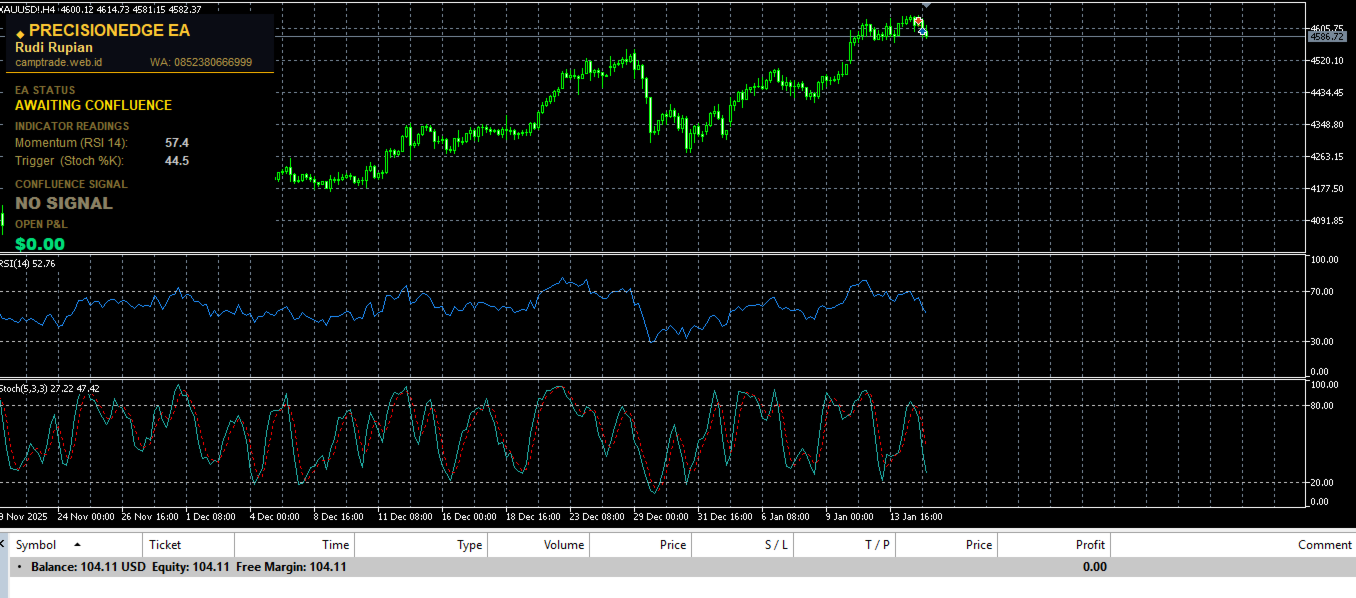
- An information panel on the chart displays current RSI value, Stochastic value, EA status, open profit or loss, take profit setting, and stop loss setting
- The EA detects pip size automatically and is compatible with both 4-digit and 5-digit brokers
Input Parameters
- Starting Lot Size — trade volume per order, normalized to broker specifications automatically
- Take Profit (Pips) — distance in pips for the take profit level placed on each order
- Global Stop Loss (USD) — total floating loss in USD at which all open positions are closed
- RSI Period — number of bars used in RSI calculation (default: 14)
- RSI Overbought Threshold — RSI level considered overbought (default: 70)
- RSI Oversold Threshold — RSI level considered oversold (default: 30)
- Stochastic %K Period — fast line period for the Stochastic Oscillator (default: 5)
- Stochastic %D Period — slow line period for the Stochastic Oscillator (default: 3)
- Stochastic Slowing — smoothing value for the Stochastic Oscillator (default: 3)
- Stochastic Overbought Threshold — Stochastic level considered overbought (default: 80)
- Stochastic Oversold Threshold — Stochastic level considered oversold (default: 20)
- Magic Number — unique identifier assigned to orders placed by this EA
- Max Slippage — maximum permitted slippage in points
- Show Dashboard — enables or disables the on-chart information panel
- Panel Corner — selects which corner of the chart the panel appears in
- Panel X and Y Offset — adjusts the panel position on the chart
Recommended Use
- Symbols: EURUSD, GBPUSD, USDJPY, XAUUSD
- Timeframes: H1, H4