GoodVibe

====================================================
 ENGLISH DESCRIPTION - MQL5 MARKET COMPLIANT
====================================================

GoodVibe EA is a trade management utility designed to assist traders in managing open positions automatically. It does not open trades on its own. All entry decisions remain with the trader.

The EA runs in the background and applies the configured management rules to positions that are already open — either on the current chart symbol or across all open positions simultaneously.

---

CORE FUNCTIONS

1. AUTOMATIC STOP LOSS AND TAKE PROFIT
   When a position is opened without SL or TP, the EA assigns them automatically based on the configured values. Two placement modes are available:

   Server Mode : SL and TP are placed directly on the broker server as standard order levels.
   Client Mode : SL and TP are managed internally by the EA. The position is closed by the EA when the target is reached, without placing visible levels on the server.

2. TRAILING STOP
   The EA supports four trailing stop methods:

   No Trailing Stop    : Trailing is disabled.
   Classic             : SL follows price at a fixed distance.
   Step Keep Distance  : SL moves in steps while maintaining a set distance from price.
   Step By Step        : SL moves forward by a fixed step each time the condition is met.

   Trailing activates only after price has moved in profit by the configured trailing stop distance.

3. LOCK PROFIT
   When a position reaches a defined profit target (in points), the EA moves SL to a position that locks in a minimum profit level. After the lock is activated, trailing stop takes over for further management.

4. AUTO CLOSE BY TOTAL PROFIT
   The EA monitors the combined floating profit of all BUY positions and all SELL positions separately. When the total profit of all BUY positions reaches the configured threshold, all BUY positions are closed simultaneously. The same applies independently for SELL positions. This allows the trader to set a group profit target without manually monitoring each position.

5. SYMBOL SCOPE
   The trader can choose whether the EA manages positions on the current chart symbol only, or all open positions across all symbols.

---

GRAPHICAL PANEL

The EA displays a real-time information panel on the chart, including:
- Broker name and account name
- Account number
- Balance, Equity, and Free Margin
- Floating BUY positions: total lot and floating profit or loss
- Floating SELL positions: total lot and floating profit or loss
- Auto close target values for BUY and SELL
- Configured SL, TP, and Trailing Stop values

The panel updates every second via an internal timer.

---

INPUT PARAMETERS

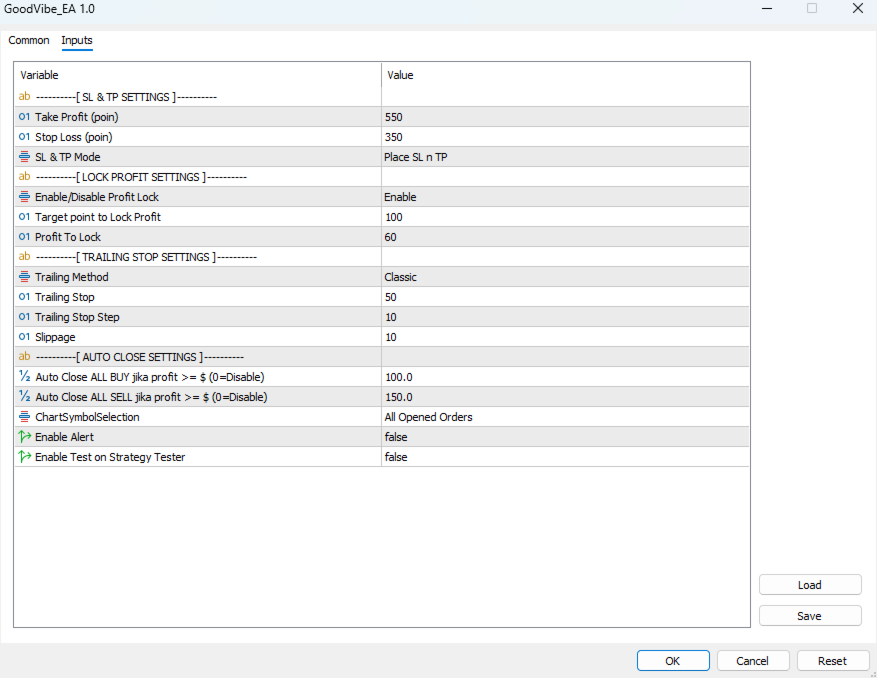
SL & TP Settings:
TakeProfit    : Take profit distance in points (default: 550)
StopLoss      : Stop loss distance in points (default: 350)
SLnTPMode     : Server (visible on broker) or Client (hidden, managed by EA)

Lock Profit Settings:
LockProfitEnable : Enable or disable the profit lock function
LockProfitAfter  : Profit in points required before lock is activated (default: 100)
ProfitLock       : Points of profit to lock when target is reached (default: 60)

Trailing Stop Settings:
TrailingStopMethod : Select trailing method (None, Classic, Step Distance, Step By Step)
TrailingStop       : Trailing distance in points (default: 50)
TrailingStep       : Step size for step-based trailing methods (default: 10)
Slippage           : Maximum slippage in points for order execution (default: 10)

Auto Close Settings:
AutoCloseBuyProfit  : Close all BUY positions when combined profit reaches this value in USD (0 = disabled)
AutoCloseSellProfit : Close all SELL positions when combined profit reaches this value in USD (0 = disabled)

General:
ChartSymbolSelection : Current Chart Only or All Opened Orders
EnableAlert          : Enable or disable alert notifications
EnableTest           : Enable test order in Strategy Tester

---

NOTES

- This EA does not open positions. It is a management tool only.
- Compatible with any trading strategy or manual trading approach.
- Designed for use on MetaTrader 5.
- All management functions work independently and can be combined.

---

RECOMMENDED USE

Attach this EA to any chart. If managing all symbols, one instance is sufficient. If managing a specific symbol only, attach to the relevant chart with ChartSymbolSelection set to Current Chart Only.

---

DEVELOPER

Rudi Rupian
WhatsApp : +62 852-3806-6699
Contact via MQL5 profile for support inquiries.

---

RISK NOTICE

This EA assists with trade management based on the settings provided. The trader is responsible for all position entries, risk sizing, and overall account management. Use appropriate risk management at all times.


====================================================
 BAHASA INDONESIA (Opsional)
====================================================

GoodVibe EA adalah utilitas manajemen trading yang membantu trader mengelola posisi yang sudah terbuka secara otomatis. EA ini tidak membuka posisi sendiri. Semua keputusan entry tetap berada di tangan trader.

Fungsi utama yang tersedia:

1. SL dan TP Otomatis
   Ketika posisi dibuka tanpa SL atau TP, EA akan memasangnya secara otomatis sesuai nilai yang dikonfigurasi. Tersedia dua mode: Server (dipasang di broker) dan Client (dikelola internal oleh EA tanpa terlihat di server).

2. Trailing Stop
   Empat metode tersedia: tanpa trailing, Classic, Step Keep Distance, dan Step By Step. Trailing aktif setelah harga bergerak profit sesuai jarak yang ditentukan.

3. Lock Profit
   Ketika posisi mencapai target profit tertentu, SL dipindahkan untuk mengunci minimal profit yang sudah ditentukan. Setelah itu, trailing stop mengambil alih pengelolaan posisi.

4. Auto Close Berdasarkan Total Profit
   EA memantau total profit floating semua posisi BUY dan SELL secara terpisah. Ketika total profit BUY mencapai target, semua posisi BUY ditutup sekaligus. Berlaku sama untuk posisi SELL.

5. Panel Informasi Real-Time
   Menampilkan data akun, balance, equity, free margin, serta total lot dan floating profit/loss untuk BUY dan SELL secara langsung di layar.

Hubungi developer:
WhatsApp : +62 852-3806-6699
추천 제품
Trade assistant pro v8
Ahmed Mohammed Bakr Bakr
2 (1)
FREE FREE FREE Trade Assistant MT5 – Professional Trading & Risk Management Panel Trade Assistant MT5 is an advanced trading panel designed to help traders execute orders faster, safer, and more professionally . It simplifies manual trading by combining smart order management , precise risk control , and one-click execution , making it ideal for both beginners and advanced traders. This tool does not trade automatically . Instead, it empowers you with full control while applying professional-gra
FREE
Pump Liquidity Refueling
Konstantin Meshcheriakov
KO.   PUMP V3_0 Liquidity Refueling — 잔고 리필(유동성 주입) 시스템"유동성 주입(Liquidity Refueling)"이란 무엇인가요? 외환 시장을 고속도로라고 생각하고, 유동성을 연료라고 생각해보세요.  거대 자본이 시장에 "쏟아부어질" 때, 가격은 강력한 충격(임펄스)과 함께 급등락합니다.  이것을 '펌핑'이라고 합니다.  PUMP V3_0 어드바이저는 스마트한 주유소 역할을 합니다. 시장의 에너지가 가득 차는 순간을 포착하여, 그 움직임을 여러분의 거래 잔고로 직접 "펌프질"해 넣습니다.   테스터 리포트 성과 지표:잔고에 "주입된" 순이익: 테스트 기간 동안 +81.9%에서 최대 +673.4% 달성.   Profitability (수익성 지수): 최대 42.59 기록 (EURUSD 기준).   Win Rate (승률): 75%에서 놀라운 93.5%까지 안정적으로 유지.   주요 기술적 특징:스마트 손익분기(Break-Even): 수익이 목표
FREE
Monday Flow EA
Daisuke Arimizu
기간 한정 무료 제공 (정가 39 USD) Monday Flow EA는 현재 기간 한정으로 무료 제공됩니다. 더 많은 트레이더가 자신의 브로커 환경에서 EA의 실제 동작을 직접 확인할 수 있도록 하기 위한 캠페인입니다. 기능이 제한된 버전이 아니라, 유료로 판매하던 것과 동일한 EA이며 무제한 사용 라이선스가 포함됩니다. 캠페인은 예고 없이 종료될 수 있으며, 정가 39 USD로 되돌아갈 수 있습니다. 관심이 있으시면 이 기간에 다운로드해 주세요. 무료라고 해서 위험이 없는 것은 아닙니다. 자동매매에는 손실 가능성이 있습니다. 반드시 데모 계좌에서 동작을 확인한 뒤, 여유 자금과 소량의 랏으로 시작하십시오. 30초로 보는 Monday Flow EA 플랫폼 : MetaTrader 5 전용 (MT4 버전 없음) 통화쌍 : USDJPY / EURJPY / GBPJPY 시간대 : H1 작동 시점 : 매주 월요일 GMT 01:00 진입, GMT 02:00 시간 청산 거래 빈도 : 주
FREE
ForceBB Expert
Nikolaos Pantzos
ForceBB_Expert   is structured based on two specifics technical analysis indicators ( Bollinger Bands and  Force Index ). It has many parameters so that each user can find the appropriate settings that suit their investment profile. It can work on 28 different pairs. The default parameter settings are indicative, I recommend that each user experiment to find their own settings.
FREE
FiT Panel Pro
Thonglak Janyakorn
Overview FiT Panel Pro is a professional-grade trade management panel designed for MetaTrader 5 traders who demand speed, precision, and full control over their trades. Built with a modern dark-theme UI, it combines one-click execution with advanced risk management, visual SL/TP drag lines, automatic Fibonacci-based levels, and comprehensive order management — all in a single, compact panel. Whether you are a scalper, day trader, or swing trader, FiT Panel Pro gives you the edge you need to exec
FREE
MultiTrend Commander
Джованни Орсани
MultiTrend Commander - Automated Trading System What is it? An automated trading software that: Intelligently identifies market trends Makes decisions based on multiple timeframes Automatically manages risk What does it do? Identify Trends Analyze the market in real time Combine signals from different time frames (15 min, 1 hr, 4 hr) Confirm the trend direction before entering Protect Your Capital Automatically calculates stop losses Adjusts trade size to your risk Stops trading if
FREE
Take a Break FREE is the free version of Take a Break , the account protection and risk management tool for all your Expert Advisors. It pauses your EAs before news, after a daily loss or when your own rules say so, and lets them continue when the pause is over. What the free version does Daily loss brake: a fixed limit of -5% per day is always active (reset at 00:00 server time). When it triggers, one chart pauses. News filter for one chart symbol: pause before and after scheduled releases, cur
FREE
Basket Take-Profit Utility Lite   is a free on-chart trade management tool for MetaTrader 5 that lets you close groups of trades the moment their   combined profit target   is reached — something MetaTrader cannot do natively. All settings are controlled directly from the interactive panel on your chart. No need to detach and re-attach the EA to change your target. Features: Group trades   by: All open positions · Specific symbol · Magic number Three target types   selectable from the panel: - F
FREE
Gap Catcher
Mikita Kurnevich
5 (5)
Read more about my products Gap Cather - is a fully automated trading algorithm based on the GAP (price gap) trading strategy. This phenomenon does not occur often, but on some currency pairs, such as AUDNZD, it happens more often than others. The strategy is based on the GAP pullback pattern. Recommendations:  AUDNZD  TF M1  leverage 1:100 or higher  minimum deposit 10 USD Parameters:  MinDistancePoints - minimum height of GAP  PercentProfit - percentage of profit relative to GAP level
FREE
Golden Square X
Huynh Tan Linh N
4.18 (11)
This is my latest Free version for Gold. With optimized parameters and user-friendly features, this version is likely very easy to use and highly effective. You can customize TP and SL parameters as you wish, but the default settings should work well for you without the need for further adjustments.  This version is designed for the M5. This version does not require a large capital investment; only $100-$200 is sufficient for Golden Square X to run and generate profits for you. Based on backtest
FREE
Very often there are situations when you need to quickly close all open positions or close only under a certain condition... The Positions Close script closes open positions according to the selected settings. You can choose to close All positions , only Buy, only Sell You can also choose by which symbols to close positions: by all symbols or only by the current one, on the chart of which the script was thrown There is a filter for closing profitable or unprofitable positions, as well as bo
FREE
Trade Panel Manager — Master all trades in one dashboard Stop calculating volume manually, stop worrying about forgetting to set SL/TP. TTrade Panel Manager transforms MetaTrader 5 into a professional trading command center — drag and drop a few lines on the chart, the EA automatically calculates lot sizes according to your desired risk level, displaying SL/TP in pips and currency in real time, right before you press the button. Why download now? Accurate lot size calculation based on risk pe
FREE
Bybit BTC Scalper
STANTON ROUX
3.9 (10)
BTC Scalper - Automated RSI Breakout Strategy for BTCUSD Unlock the power of automated trading with BTC Scalper! This expert advisor is a fully autonomous trading strategy, designed to capitalize on fast-moving BTCUSD markets. It leverages a potent combination of RSI Breakouts and two Exponential Moving Averages (EMA) to find high-probability trade entries, ensuring optimal confluence for success. Key Features: Fully Automated Trading : Set it, forget it, and let BTC Scalper handle your trades 2
FREE
Morning Range Breakout (Free Version) Morning Range Breakout (Free Version) is a straightforward trading advisor that implements a breakout strategy based on the morning range. It identifies the high and low within a specified time interval (e.g., 08:00–10:00 UTC) and opens a trade on a breakout upward or downward. The free version includes core functionality without restrictions. All parameters and messages are in English, per MQL5 Market requirements. Key Features Detects morning range based
FREE
EA16 Taka Grid
Nhat Tien Duong
TAKA Grid EA (EA16): The Sideway King & Prop Firm Shield Are you tired of EAs that get destroyed by choppy, ranging markets? Meet TAKA Grid EA , the ultimate mean-reversion system designed specifically for the AUDNZD cross pair on the M15 timeframe. It doesn't rely on explosive breakouts; it dominates the sideways chop with mathematical precision.   ENTER YOUR KEY HERE:   [  EA16_99999D_TANINCODER_595559587987 ] -- MANDATORY: ALLOW WEBREQUEST TO ACTIVATE THE BOT To verify your License
FREE
Range Breakout EA PRO
Kabelo Frans Mampa
Test Before Use... In the forex market, a range refers to a period of time during which the price of a currency pair remains relatively stable, fluctuating within a narrow band. This can be contrasted with a trend, which refers to a sustained movement in the price of a currency pair in a particular direction. During a range, the price of the currency pair may move up and down within a defined range, but it is not trending strongly in any particular direction. This can be a good time for the rang
FREE
MA EMA Cross Risk EA 는 명확하고 논리적이며 시각적으로 이해하기 쉬운 이동평균선 교차 전략으로 거래하고자 하는 사용자를 위해 제작된 MetaTrader 5용 자동매매 프로그램입니다. 이 EA는 기술적 분석에서 가장 잘 알려진 개념 중 하나인 빠른 MA/EMA와 느린 MA/EMA의 교차를 기반으로 합니다. 시장의 방향이 바뀔 때 이동평균선은 불필요한 노이즈와 감정적 판단, 수동 신호 검색 없이 이러한 변화를 파악하는 데 도움을 줍니다. EA는 Moving Average 또는 Exponential Moving Average의 교차를 자동으로 감지하고 설정된 규칙에 따라 거래를 시작합니다. 사용자는 이동평균선의 종류, 기간, Stop Loss, Take Profit 및 거래당 위험 비율을 직접 설정할 수 있습니다. 따라서 안정적인 시스템 거래뿐만 아니라 다양한 시장 환경에서의 적극적인 테스트에도 활용할 수 있습니다. MA EMA Cross Risk EA 의 핵심 개념은 거
FREE
BB Strategy V5.01 Advanced Bollinger Bands Grid Expert Advisor BB Strategy V5.01 is a fully automated Expert Advisor for MetaTrader 5 that combines Bollinger Bands mean-reversion trading, percentage-based grid management, advanced entry filtering, and intelligent risk control. The EA is designed to identify temporary market overextensions and capture high-probability reversal opportunities while filtering out low-quality entries that often occur during strong trending conditions. Unlike traditio
FREE
批量止損止盈同步管理器 這是一款專為 MT5 多持倉交易者 設計的持倉管理工具。 當同一個商品、同一個方向同時有多張持倉時,只需要手動修改其中一張持倉的 Stop Loss(SL)或 Take Profit(TP) ,工具就會自動把該持倉目前完整的 SL / TP,同步到其他相同商品、相同方向的持倉。 例如: XAUUSD BUY #1 XAUUSD BUY #2 XAUUSD BUY #3 如果將 #1 修改為: SL = 3300 TP = 3500 其他 XAUUSD BUY 持倉會自動同步成相同設定。 主要功能 批量同步 Stop Loss 批量同步 Take Profit 可同時同步 SL + TP 支援將 SL 或 TP 設為 0,批量移除 BUY 與 SELL 分開管理 不同商品分開管理 新開持倉不會立即觸發整批同步 啟動時只記錄現有持倉,不會自動修改 平倉後自動移除內部紀錄 一個圖表即可管理帳戶中的多個商品 分組方式 工具以: 商品 + 交易方向 作為同步群組。 例如: XAUUSD BUY XAUUSD SELL EURUSD BUY EURUSD SELL 全部視
FREE
Go Long Advanced
Phantom Trading Inc.
4.78 (9)
Go Long EA는 다중 기술적 확인을 통한 체계적인 일일 거래 원칙을 기반으로 한 고급 장중 거래 전략을 구현합니다. 많은 트레이더들이 복잡한 알고리즘을 찾는 반면, 이 EA는 단순하지만 효과적인 개념과 정교한 위험 관리 및 다중 기술적 필터를 결합합니다. EA는 매일 특정 시간에 포지션을 열지만, 시장 조건이 여러 기술적 지표와 일치할 때만 실행됩니다. 이러한 체계적인 접근 방식은 수익을 잠식할 수 있는 야간 보유 비용을 피하면서 장중 움직임을 포착하는 데 도움이 됩니다. EA는 사전 설정된 시간에 자동으로 포지션을 종료하므로, 야간 노출을 피하고자 하는 트레이더에게 완벽합니다. 이 EA를 특별하게 만드는 것은 적응형 위험 관리 시스템입니다. 포지션 크기는 여러 요인을 기반으로 자동 조정됩니다: - 기본 자금 및 위험 비율 설정 - 기술적 지표 조건 (이동평균선, RSI, MACD 등) - 조건이 특히 유리할 때 포지션 크기를 증가시키는 특별 승수 EA는 활성화/비활성화
FREE
MT5용 NAS100 Auto SL 및 TP 메이커를 소개합니다: 메타트레이더 5에서 나스닥 100 시장을 탐색하는 트레이더에게 없어서는 안될 보조 도구인 NAS100 Auto SL 및 TP 메이커로 손절 및 테이크프로핏 설정을 다시는 놓치지 마세요. 이 도구는 손절 및 테이크프로핏 레벨을 자동으로 관리할 수 있는 원활한 솔루션을 찾는 분들을 위해 설계되었습니다. 주요 특징: 손쉬운 자동화: 스톱로스 및/또는 테이크프로핏 없이 나스닥 100 거래를 자동으로 모니터링합니다. 사용자가 구성한 설정에 따라 레벨을 동적으로 조정합니다. 다양한 주문 유형: 나스닥 100의 시장가 및 지정가 주문 모두와 호환됩니다. 메타트레이더 5에서 사용할 수 있는 다양한 주문 유형을 지원합니다. 맞춤형 구성: 사용자 친화적인 매개변수 설정으로 추적 기본 설정 및 손절/익절 수준을 사용자 지정할 수 있습니다. 유연한 범위: 실행되는 특정 NAS100 상품 또는 거래되는 모든 상품에 대해 손절 및 테이크프
FREE
Use this expert advisor whose strategy is essentially based on the Relative Strength Index (RSI) indicator as well as a personal touch. Other free expert advisors are available in my personal space as well as signals, do not hesitate to visit and leave a comment, it will make me happy and will make me want to offer content. Expert advisors currently available: LVL Creator LVL Creator Pro LVL Bollinger Bands   Trading is not a magic solution, so before using this expert on a live account, carry
FREE
DynamicTrader 1
Markus Christer Ekengren
Smart Trade Manager EA – Simple, Visual, and Risk-Based Trading Take control of your trades with ease! This free Expert Advisor is designed for traders who want a fast, intuitive, and risk-based way to manage entries directly from the chart. Risk-Based Position Sizing – Just set your preferred % risk in the EA settings, and lot size is calculated automatically. One-Click Trading – Place trades instantly with two simple buttons: BUY or SELL . Interactive SL & TP Lines – Drag and drop stop-
FREE
SimpleTrade by Gioeste
Giovanni Scelzi
4 (3)
Discover the power of automated trading with **SimpleTradeGioeste**, an Expert Advisor (EA) designed to optimize your trading operations in the Forex market. This innovative EA combines advanced trading strategies with proven technical indicators, offering an unparalleled trading experience. video backtest :  https://youtu.be/OPqqIbu8d3k?si=xkMX6vwOdfmfsE-A ****Strengths**** - **Multi-Indicator Strategy**: SimpleTradeGioeste employs an integrated approach that combines four main technical ind
FREE
Trade Assistant JJC Academy
Jhonathan Alexis Jaramillo Cortez
JJC Academy Trade Assistant — 리스크 계산 및 포지션 관리 패널 더 이상 로트 사이즈를 수동으로 계산하지 마세요. 계산 실수로 드로다운을 초과하는 일도 이제 끝입니다. JJC Academy Trade Assistant는 제가 직접 개발하여 펀디드 계좌(funded accounts) 포트폴리오를 관리하는 데 실제로 사용하고 있는 트레이딩 패널입니다. 어떤 종목을 거래하든, 어떤 브로커를 사용하든, 어떤 프랍펌(prop firm)과 계약했든, 매 진입마다 설정한 리스크를 정확히 지킬 수 있도록 설계되었습니다. 실시간 리스크 계산기 **리스크 %**와 **손익비(R:R)**를 설정하면, 버튼을 누르기도 전에 로트 사이즈가 즉시 자동으로 계산됩니다. 리스크 계산 기준을 선택할 수 있습니다: 잔고(Balance) , 순자산(Equity) , 또는 계좌의 초기 잔고(Initial Balance) — 챌린지 계좌나 펀디드 계좌에 이상적입니다. 잔고는 변동하지만 드로다
FREE
Brent Trend Bot
Maksim Kononenko
4.5 (16)
The Brent Trend Bot special feature is simple basic tools and logic of operation. There are no many strategies and dozens of settings, like other EAs, it works according to one algorithm. The operating principle is a trend-following strategy with an attempt to get the maximum profitability adjusted for risk. Therefore, it can be recommended for beginners. Its strong point is the principle of closing transactions. Its goal is not to chase profits, but to minimize the number of unprofitable trans
FREE
Account Protector Pro is a lightweight Expert Advisor that monitors open positions and closes them when they exceed your configured profit or loss thresholds. It includes a daily loss limit that halts trading when triggered. Features Overview The EA provides multiple ways to manage risk at both the trade level and account level. You can use any combination of these features: Per-trade profit and loss thresholds Lot-scaled loss limit that adjusts with position size Daily loss limit that resets ea
FREE
AI Advisor – AI가 당신의 실제 트레이딩 세계를 보게 만드는 도구 AI Advisor는 당신의 실제 계좌 정보를 바탕으로 고품질 프롬프트를 자동 생성해, 어떤 AI 채팅창이든 바로 붙여넣어 쓸 수 있게 해줍니다. 계좌 현황을 빠르게 정리하고, 현재 종목 구조를 이해하며, 위험 지점을 파악하고, 잠재적인 수익 기회를 탐색할 수 있도록 도와줍니다. 즉, AI가 아무 근거 없이 추측하는 것이 아니라, 당신의 실제 트레이딩 상황 을 기반으로 생각하도록 만드는 도구입니다. 빠른 링크 Download:      AI Advisor v1.02.ex4      AI Advisor   v1.02.ex5 Installation guide AI Advisor  Version Overview FAQ & troubleshooting 사용 방법 – 3단계면 충분합니다 분석하고 싶은 종목 차트에서 AI Advisor를 실행합니다. 오른쪽 목록에서 현재 질문에 맞는 “AI Advisor 모드”(AI
FREE
Alligator Joe
Alexandre Vincent Traber
Overview Alligator Joe는 클래식 Alligator 지표(Jaw, Teeth, Lips)를 기반으로 한 추세 정렬형 Expert Advisor입니다. 이미 오랫동안 진행된 정렬이 아니라 세 라인의 새로운 정렬을 기다린 후 해당 추세 방향으로 진입합니다. 포지션은 단일 고정 청산 대신 가격이 각 라인을 차례로 되돌릴 때마다 세 단계에 걸쳐 점진적으로 청산됩니다. How it works EA는 마지막으로 마감된 캔들을 확인합니다: Lips, Teeth, Jaw가 완전히 정렬되어 있는가(상승 또는 하락)? 이 정렬이 새로운 것인지 확인합니다 — 몇 개의 봉 전에는 존재하지 않았음 — 이미 크게 진행된 움직임에 깊숙이 진입하는 것을 방지합니다. 가격이 추세 방향으로 Lips를 넘어 마감되면 진입이 확정됩니다. Jaw 너머에 최후의 안전망으로 넓은 손절매를 설정합니다. 추세가 약해짐에 따라 세 단계로 청산됩니다: 가격이 Lips를 다시 돌파해 마감하면 포지션의 3분의 1을
FREE
Gold Adaptive EA MT5 is an automated Expert Advisor for MetaTrader 5 designed for trading Gold (XAUUSD). The EA uses several internal trading models and market filters to adapt to different phases of Gold price movement. Instead of relying on one fixed entry pattern, Gold Adaptive EA MT5 analyzes market behavior and selects suitable logic for trend continuation, impulse moves, pullbacks and selected recovery conditions. The main goal of the Expert Advisor is to provide a structured Gold tradi
FREE
이 제품의 구매자들이 또한 구매함
Trade Assistant MT5
Evgeniy Kravchenko
4.43 (216)
거래당 위험 계산, 라인을 사용한 손쉬운 신규 주문, 부분 청산 기능을 통한 주문 관리, 7가지 유형의 트레일링 스탑 및 기타 유용한 기능을 제공합니다. 추가 자료 및 지침 설치 지침   -   애플리케이션 지침   -   데모 계정용 애플리케이션 평가판 라인 기능       - 차트에 개시선, 손절매, 차익실현을 표시합니다. 이 기능을 사용하면 새로운 주문을 쉽게 하고 개봉 전에 추가 특성을 볼 수 있습니다. 위기 관리       -       위험 계산 기능은 설정된 위험과 손절매 주문의 크기를 고려하여 새 주문의 볼륨을 계산합니다. 이를 통해 손절매 크기를 설정하고 동시에 설정된 위험을 존중할 수 있습니다. 로트 계산 버튼 - 위험 계산을 활성화/비활성화합니다. 필요한 위험 값은 위험 필드에 0에서 100 사이의 백분율 또는 예금 통화로 설정됩니다. 설정 탭에서 위험 계산 옵션을 선택합니다. $ 통화, % 잔액, % 지분, % 자유 마진, % 사용자 정의, % AB 이전
Trade Manager EA에 오신 것을 환영합니다. 이 도구는 거래를 보다 직관적이고 정확하며 효율적으로 만들기 위해 설계된 궁극적인 리스크 관리 도구 입니다. 단순한 주문 실행 도구가 아닌, 원활한 거래 계획, 포지션 관리 및 리스크 제어를 위한 종합 솔루션입니다. 초보자부터 고급 트레이더, 빠른 실행이 필요한 스캘퍼에 이르기까지 Trade Manager EA는 외환, 지수, 상품, 암호화폐 등 다양한 시장에서 유연성을 제공합니다. Trade Manager EA를 사용하면 복잡한 계산은 이제 과거의 일이 됩니다. 시장을 분석하고 진입, 손절 및 익절 수준을 차트의 수평선으로 표시한 후 리스크를 설정하면, Trade Manager가 이상적인 포지션 크기를 즉시 계산하고 SL 및 TP 값을 실시간으로 표시합니다. 모든 거래가 간편하게 관리됩니다. 주요 기능: 포지션 크기 계산기 : 정의된 리스크에 따라 거래 크기를 즉시 결정합니다. 간단한 거래 계획 : 진입, 손절, 익절을 위한
Local Trade Copier EA MT5
Juvenille Emperor Limited
4.94 (149)
Local Trade Copier EA MT5는 동일한 Windows 컴퓨터 또는 Windows VPS에서 여러 MetaTrader 5 계정 간에 거래를 복사하고 관리할 수 있는 빠르고 유연한 거래 복사기입니다. 로컬 거래 동기화 기능과 함께 Receiver 측에서 로트 크기, 리스크 관리, 거래 필터링, 심볼 매핑, 거래 관리 및 계정 보호를 독립적으로 설정할 수 있습니다. Transmitter와 Receiver 터미널을 약 1분 안에 설정하고, 동일한 브로커 또는 서로 다른 브로커의 계정 간에 수동 거래 또는 EA 거래를 복사할 수 있습니다. 적절한 조건에서는 로컬 MetaTrader 터미널 간의 거래 정보가 0.5초 이내 에 동기화될 수 있습니다. 실제 체결 속도는 브로커 지연 시간, 네트워크 상태, 컴퓨터/VPS 성능 및 터미널 부하에 따라 달라집니다. 구매 전에 무료 데모를 사용해 보세요 MT5 데모 계정에서 Local Trade Copier EA MT5의 모든 기능을
Telegram to MT5 Multi-Channel Copier   는 Telegram 채널의 트레이딩 시그널을 MetaTrader 5로 자동 복사합니다. 봇도, 브라우저 확장도, 수동 복사도 필요 없습니다. Telegram에 시그널이 도착하면 EA가 몇 초 안에 터미널에서 주문을 실행합니다. 그리고 채널을 복사하기 전에, 내장 백테스터가 그 채널이 내 계좌에서 어떤 결과를 냈을지 보여줍니다. 제품은 두 가지 구성 요소로 이루어집니다: Telegram 채널을 수신하는 Windows 애플리케이션과, MT5 터미널에서 시그널을 실행하는 본 EA입니다. MT4 버전도 제공됩니다   여기 . 설정 가이드와 앱 다운로드:   https://www.mql5.com/en/blogs/post/768988 텔레그램 시그널 채널을 백테스트하는 방법 을 확인하세요. 현재 가격은 향후 인상될 예정입니다. 작동 방식 앱은 여러분 자신의 Telegram 계정으로 연결되므로, 팔로우하는 모든 채널, 그룹,
Strategy Ledger Pro
Abdullah Uygar Tuna
5 (7)
이제 한국어로 이용할 수 있습니다. Strategy Ledger Pro 는 MetaTrader 5용 읽기 전용 계좌 분석 패널입니다. 계좌 성과를 전문가 어드바이저(EA), 전략, 심볼, 매직 넘버별로 나누어 각각이 실제로 얼마나 기여하는지 보여줍니다. 패널은 11개 언어를 지원합니다: English, Français, Deutsch, Español, Italiano, Português, Русский, Türkçe, 中文, 日本語, 한국어. 데모를 다운로드하기 전에. Market은 모든 유료 제품의 데모를 전략 테스터에서만 실행합니다. 이 패널은 사용자 자신의 계좌 거래를 분석하는데, 전략 테스터에는 읽을 계좌 기록이 없으므로 데모는 빈 패널로 열리고 그 사실을 표시합니다. 이는 데모 방식에 따른 것이며 제품의 제약이 아닙니다. 이 설명의 동영상에서 실계좌에서 작동하는 패널을 확인할 수 있습니다. 모든 기능을 설명한 자세한 매뉴얼 (영문)과 토론 및 공지를 위한 AureusAI
================================================================================ POC BREAKOUT - V20.72. Full Professional Grade Toolkit ================================================================================ POC Breakout is a full MetaTrader 5 trading dashboard for discretionary traders who want breakout signals, Point of Control (POC) context, volume profiles, order flow, market structure, news, alerts, and advanced trade planning in one professional workspace. Attached directly to you
TradePanel MT5
Alfiya Fazylova
4.88 (170)
Trade Panel은 다기능 거래 도우미입니다. 이 애플리케이션에는 50개 이상의 수동 거래 기능이 포함되어 있으며 대부분의 거래 작업을 자동화할 수 있습니다. 앱 사용 설명서: https://www.mql5.com/en/blogs/post/756482 데모 계정용 앱 체험판: https://www.mql5.com/en/blogs/post/750865 앱 설치 방법: https://www.mql5.com/en/blogs/post/756239 시각 모드에서 앱 테스트 방법: https://www.mql5.com/en/blogs/post/770277 VPS MetaTrader에 앱 설치 방법: https://www.mql5.com/en/blogs/post/770190 거래. 한 번의 클릭으로 거래를 수행할 수 있습니다: 리스크 자동 계산과 함께 예약 주문 및 포지션 열기. 한 번의 클릭으로 여러 주문 및 포지션 열기. 주문 그리드 열기. 예약 주문 및 포지션을 그룹별로 닫기. 포지션
내 거래 규칙에 맞춰 Telegram 신호 복사 Telegram to MT5 Signal Trader 는 공개 및 비공개 Telegram 채널과 그룹의 텍스트 기반 거래 신호를 MetaTrader 5로 자동 복사합니다. 하나의 데스크톱 앱에서 여러 신호 제공자와 MT5 계좌를 관리하고, 제공자마다 위험 관리 및 거래 설정을 개별적으로 지정 할 수 있습니다. 신호 복사에는 Telegram 봇이나 API 설정이 필요하지 않습니다. 전화번호 또는 QR 코드로 본인의 Telegram 계정에 로그인한 후, 이미 가입한 채널이나 그룹을 선택하면 됩니다. 봇을 만들거나 Telegram API 토큰, API ID 또는 API 해시를 입력할 필요가 없습니다. 포지션 크기를 선택하고, 여러 익절 목표에 청산 물량을 배분하며, 손익분기점 이동과 트레일링 스톱을 자동화하세요. 제공자의 신호를 따르면서도 실제 거래 방식은 직접 설정할 수 있습니다. 이 제품은 MT5 Expert Advisor와 필수 Win
Farmed Hedge Yield Farming | All Markets (Manual - Hybrid - Semi/Automated EA) VERIFIED TRADING RESULTS - Farmed Hedge Yield Axi Copy:  https://www.mql5.com/en/signals/2356376 - Farmed Hedge Yield Exn Copy:   https://www.mql5.com/en/signals/2356404 - Farmed Hedge Yield V Copy:  https://www.mql5.com/en/signals/2357156 IMPORTANT NOTICE: FarmedHedge is a MANUAL-FOCUSED TRADING UTILITY ,not a fully automated EA. Results shown on this Signal include manual trades and overall strategic management.
Exp COPYLOT CLIENT for MT5
Vladislav Andruschenko
3.97 (35)
MetaTrader 5용 전문 트레이드 복사기 MetaTrader 용 빠르고 전문적이며 신뢰할 수 있는 트레이드 복사기 입니다. COPYLOT 은 MT4와 MT5 터미널 간의 Forex 거래 복사를 지원하며, Hedge 및 Netting 계좌를 모두 지원합니다. COPYLOT MT5 버전 지원 구성: - MT5 Hedge → MT5 Hedge - MT5 Hedge → MT5 Netting - MT5 Netting → MT5 Hedge - MT5 Netting → MT5 Netting - MT4 → MT5 Hedge - MT4 → MT5 Netting MT4 버전 전체 설명 + DEMO + PDF 구매 방법 설치 방법 로그 파일 확인 방법 테스트 및 최적화 방법 Expforex의 모든 제품 MT4 터미널로도 거래를 복사할 수 있습니다(MT4 → MT4, MT5 → MT4): COPYLOT CLIENT for MT4 COPYLOT은 2개, 3개, 심지어 10개의 터미널과 동시에 작동할
Footprint Chart Pro — Professional OrderFlow EA for MetaTrader 5 Version 6.34 | Professional tool for real traders | Institutional-Grade Visualization DEMO USERS - PLEASE SELECT EVERY TICK / REAL TICK WHEN TESTING AND YOU HAVE DOWNLOADED HISTORICAL DATA. IF YOU SEE A WAITING SCREEN AND IT IS NOT DOWNLOADING, IT MEANS YOU HAVE LOW HISTORICAL DATA. TRY 1 MIN AND 5 MIN FIRST ON 1 DAY DATA. ONE DAY DATA SHOULD BE THE NEWEST AND MOST CURRENT DATE. PLEASE WAIT UNTIL THE MARKET HAS ROLLED OVER PERIOD.
Trade copier MT5
Alfiya Fazylova
4.61 (56)
Trade Copier는 거래 계정 간의 거래를 복사하고 동기화하도록 설계된 전문 유틸리티입니다. 복사는 공급자의 계정/단말기에서 동일한 컴퓨터 또는 vps에 설치된 수신자의 계정/단말기로 발생합니다. 구매하기 전에 데모 계정에서 데모 버전을 테스트할 수 있습니다. 데모 버전 여기 . 전체 지침 여기 . 주요 기능 및 이점: 복사기는 "МТ5> МТ5", "МТ4> МТ5", "МТ5> МТ4" 복사를 지원합니다. 복사기는 데모 계정 > 실 계정, 실 계정 > 데모 계정, 데모 계정 > 데모 계정 및 실제 계정 > 실 계정 복사를 지원합니다. 복사기는 읽기 전용 암호가 적용된 투자자 계정에서 복사를 지원합니다. 하나의 공급자 터미널은 여러 수신 터미널로 트랜잭션을 보낼 수 있고 하나의 수신 터미널은 여러 공급자 터미널에서 트랜잭션을 수신할 수 있습니다. 복사기는 귀하 또는 귀하의 고문이 거래하는 동일한 터미널에서 작동할 수 있습니다. 높은 복사 속도(0.5초 미만). 복사기에는 간편
파워 캔들 전략 스캐너 - 자체 최적화 다중 종목 설정 찾기 도구 파워 캔들 전략 스캐너는 마켓 워치에 등록된 모든 종목에 대해 파워 캔들 지표와 동일한 자체 최적화 엔진을 동시에 실행합니다. 하나의 패널에서 현재 통계적으로 거래 가능한 종목, 각 종목별 최적의 전략, 최적의 손절매/익절 조합을 알려주며, 새로운 신호가 발생하면 즉시 알림을 전송합니다. 이 도구는 Stein Investments 에코시스템의 일부입니다. 18개 이상의 도구와 함께 당신의 1대1 AI 트레이딩 멘토 Max.  항상 대기 중, 모든 인디케이터를 깊이 있게 이해, 무언가를 차근차근 생각해보고 싶은 순간에 도움을 줍니다.  https://stein.investments 에서 만나보세요 완벽한 시장 모니터링. 종목당 3,000건 이상의 자동 최적화. 2가지 알림 유형. 한 번의 클릭으로 차트를 전환하고 바로 거래하세요. 이 도구가 필요한 이유 대부분의 다중 종목 스캐너는 가격 변동만 보여줍니다. 티커별
Grid Manual MT5
Alfiya Fazylova
4.73 (22)
"Grid Manual"은 주문 그리드 작업을 위한 거래 패널입니다. 이 유틸리티는 보편적이며 유연한 설정과 직관적인 인터페이스를 제공합니다. 그것은 손실을 평균화하는 방향뿐만 아니라 이익을 증가시키는 방향으로 주문 그리드와 함께 작동합니다. 거래자는 주문 그리드를 만들고 유지할 필요가 없으며 유틸리티에서 수행합니다. 거래자가 주문을 시작하는 것으로 충분하며 "Grid Manual"는 자동으로 그를 위한 주문 그리드를 생성하고 거래가 마감될 때까지 그와 동행할 것입니다. 전체 설명 및 데모 버전 여기 . 유틸리티의 주요 기능: 모바일 터미널을 포함하여 어떤 방식으로든 열린 주문과 함께 작동합니다. "제한" 및 "중지"의 두 가지 유형의 그리드와 함께 작동합니다. 고정 및 동적(ATR 표시기 기반)의 두 가지 유형의 그리드 간격 계산과 함께 작동합니다. 오픈 오더 그리드의 설정을 변경할 수 있습니다. 차트에서 각 주문 그리드의 손익분기점 수준을 표시합니다. 각 주문 그리드에 대한 이익
HINN MagicEntry Extra
ALGOFLOW OÜ
4.74 (19)
HINN MAGIC ENTRY – the ultimate tool for entry and position management! SIMPLE. FASTEST. INTUITIVE. MAX AUTOMATED. Place orders by selecting a level directly on the chart! full description   ::  demo-version  :: 60-sec-video-description Key features: - Market, limit, and pending orders - Automatic lot size calculation - Automatic spread and commission accounting - Unlimited partitial take-profits  - Breakeven and trailing stop-loss and take-profit  functions - Invalidation leves - Intuitive, a
Signal TradingView to MT5 Pro Automator TradingView와 MetaTrader 5 간의 즉각적인 전문 실행 TradingView 알림과 MT5의 실제 실행을 연결하는 가장 강력한 커뮤니케이션 브리지로 거래 전략을 자동화하세요. 속도, 유연성 및 완벽한 위험 관리를 요구하는 트레이더를 위해 설계된 이 Expert Advisor는 모든 알림 메시지를 정확한 시장가 또는 지정가 주문으로 변환합니다. 강점 및 이점 범용 파싱 엔진(독점 기술): 모든 알림 형식에서 데이터를 자동으로 인식하고 추출할 수 있는 고급 기술입니다. 단일하고 엄격한 형식에 얽매일 필요가 없습니다. 시스템은 심볼, 액션, 가격, SL 및 TP를 자동으로 이해합니다. 실시간 실행: 지연 시간을 최소화하도록 최적화된 1초 미만의 초고속 폴링 기술. 신호 수신 후 몇 밀리초 내에 주문 실행이 이루어집니다. 기관 수준의 위험 관리: 다음 기준에 따른 자동적이고 정확한 로트(Lot) 크기 계
The News Filter MT5
Leolouiski Gan
4.78 (23)
이 제품은 뉴스 시간 동안 모든 전문가 어드바이저 및 수동 차트를 필터링하여 수동 거래 설정이나 다른 전문가 어드바이저가 입력한 거래가 파괴될 수 있는 급격한 가격 상승으로부터 걱정하지 않아도 됩니다. 이 제품은 또한 뉴스 발표 전에 열린 포지션과 대기 주문을 처리할 수 있는 완전한 주문 관리 시스템이 함께 제공됩니다.   The News Filter  를 구매하면 더 이상 내장 뉴스 필터에 의존할 필요가 없으며 이제부터 모든 전문가 어드바이저를 여기서 필터링할 수 있습니다. 뉴스 선택 뉴스 소스는 Forex Factory의 경제 캘린더에서 얻어집니다. USD, EUR, GBP, JPY, AUD, CAD, CHF, NZD 및 CNY와 같은 어떤 통화 기준으로 선택할 수 있습니다. Non-Farm (NFP), FOMC, CPI 등과 같은 키워드 식별을 기준으로 선택할 수도 있습니다. 저, 중, 고 영향을 가지는 뉴스를 필터링할 수 있도록 선택할 수 있습니다. 차트와 관련된 뉴스만 선
Copy your MT5 trades to Interactive Brokers You keep using MT5. Every order you open or close is sent to your IB account. In real time. No coding. No changes to your strategy or EA. Try it first Rent 1 month: $30. Test on a live or paper account. What it does Real-time copying: same direction, reverse, or one side only. Map any MT5 symbol to any IB symbol. Set a lot ratio for each. Forex, Futures, Stocks, CFDs, Metals and Crypto. Position sync: both accounts checked, any difference fixed. Optio
Welcome to ENTRY IN THE ZONE AND SMC MULTI TIMEFRAME  SPECIAL BENEFIT FOR OUR MQL5 CUSTOMERS  FREE ACCESS TO THE NEW TOOL —COMING SOON —   Learn More on Our Official Website : https://www.fableedge.net Entry In The Zone and SMC Multi Timeframe is a real-time market analysis tool based on Smart Money Concepts (SMC), designed to analyze market structure, price direction, and key trading zones. It supports both Single-Timeframe Analysis and Multi-Timeframe Analysis, providing a clearer view of the
Premium Trade Manager - 코치가 내장된 트레이딩 패널 Premium Trade Manager 는 차트 안에 트레이딩 코치를 심어놓은 도구입니다. 주문을 확정하기 전에, AI 트레이딩 코치 Max가 설정된 거래를 직접 읽고 명확한 판단을 내려줍니다. 스톱이 규율 있는 접근 방식에 맞는지, 리스크 크기가 합리적인지, 고영향 뉴스 이벤트가 몇 분 후에 있는지, 프롭 펌 한도에 근접했는지. 그 아래에는 완전한 실행 엔진이 있습니다. 원클릭 리스크 기반 진입, 차트에서 드래그로 세우고 거래가 진행되는 동안에도 계속 움직일 수 있는 플랜, 최대 4단계 분할 익절, 7가지 트레일링 방식, 실시간 프롭 펌 컴플라이언스, 뉴스 가드, 그리고 자체 비용을 평가하는 스프레드까지. 결정은 당신이 내립니다. Max가 두 번째 시선으로 확인합니다. 패널이 그 이후의 모든 것을 처리합니다. 구매 전에 직접 체험해 보세요. 브라우저에서 라이브 패널을 직접 클릭해볼 수 있습니다. 구매 전에 실제
Anchor Trade Manager
Kalinskie Gilliam
5 (9)
Your EAs cannot see each other, but Anchor can. Anchor gives you one place to coordinate your EAs, manage risk, and decide when trading is allowed. It works alongside the trading bots you already use without any changes to them. The Problem One EA opens a trade. Then another starts trading. The next thing you know, you wake up to multiple grids built across your account. Each EA may be doing exactly what it was designed to do, but together they can place far more risk on your account than you in
Trade Indicator Assistant   is a powerful MT5 utility designed to turn indicators into automated trading systems. Its main feature is the ability to automatically detect an indicator’s   BUY and SELL signal buffers , without requiring you to know the buffer numbers, search through indicator settings, or modify the indicator source code. Bonus Indicator:   After purchasing Trade Indicator Assistant, contact me to receive   Trade Signal Pro   completely free as a bonus indicator. [Download Demo V
Telegram To MT5 Ultra
Mirel Daniel Gheonu
5 (5)
Telegram To MT5 — 시그널 카피어 텔레그램 채널의 트레이딩 콜을 실제 MT5 주문으로 바꿔 드립니다 — 자동으로, 원하는 만큼의 계좌에서, 리스크와 규칙을 완전히 당신의 통제 아래 둡니다. Telegram To MT5는 이미 텔레그램에서 팔로우하고 있는 VIP / 시그널 채널을 당신의 MetaTrader 5 터미널에 연결합니다. 무료 동반 데스크톱 앱이 메시지를 읽고(봇을 차단하는 채널에서도 가능), 이 EA가 당신의 계좌에서 이를 실행합니다 — 당신만의 리스크 설정, 심볼 매핑, 익절(TP) 처리, 세션 및 뉴스 필터를 적용합니다. 이것은 블랙박스 전략이 아니라 시그널 카피어입니다. 어떤 채널을 신뢰할지, 각 거래의 수량과 관리 방식을 당신이 결정합니다. 단계별 설정 및 동반 앱 설치 가이드 작동 방식 [당신의 텔레그램 채널] -> [동반 데스크톱 앱] -> [MT5 + 이 EA] -> 주문 동반 데스크톱 앱(무료, 포함)은 당신의 텔레그램 계정으로 로그인하여 선택한
Trade Manager Panel Pro MT5
VividMind Digital Solutions
5 (6)
구매 후 저에게 메시지를 보내주시면 전체 매뉴얼 키트 + AI 기능을 테스트할 수 있는 3일간의 OpenAI API 체험 + 추가 보너스 선물을 제공해 드립니다 현재 가격은 8월 재출시 업데이트를 위한 기간 한정 할인 가격입니다 — 가격이 인상되기 전에 지금 에디션을 확보하세요. 다음 가격: $340 이것은 시장에서 지금까지 사용해 보았거나 본 어떤 트레이딩 패널과도 완전히 다릅니다. 현재 리테일 시장에서 이용할 수 있는 가장 혁신적인 AI 기반 트레이딩 패널 중 하나입니다. AI를 차트에 직접 연결한다고 상상해 보세요   — AI 추천, 계좌 감사, AI 트레이딩 신호 수신 및 클릭 한 번으로 실행. Telegram을 통해 스마트폰에서   전체 트레이딩 계좌를 관리한다고 상상해 보세요   — AI와 채팅하고, 즉각적인 알림을 받고, 거래를 관리하며 어디서든 계좌를 보호할 수 있습니다. 여러   EA를 실행하면서   각 EA의 성과를 개별적으로 모니터링하고, 거래를 관리하거나 특정
Quant Panel
Kevin Craig E Gittins
QUANT PANEL Independent per-algo analytics, protected MT5 history and professional PDF reporting Quant Panel is built for traders who run several Expert Advisors or strategies on one MT5 account and need to know how each algo is actually performing. Instead of treating the terminal as one combined portfolio, Quant Panel groups closed positions by EA comment or magic number and calculates every strategy independently. It gives you one clear dashboard for comparing algos, finding weak systems and
MT5 to Telegram Signal Provider 는 사용하기 쉽고 완전히 커스터마이즈 가능한 유틸리티로, 특정 신호를 Telegram의 채팅, 채널 또는 그룹으로 전송하고, 귀하의 계정을 신호 제공자 로 만듭니다. 경쟁 제품과 달리 DLL 임포트를 사용하지 않습니다. [ 데모 ] [ 매뉴얼 ] [ MT4 버전 ] [ 디스코드 버전 ] [ 텔레그램 채널 ]  New: [ Telegram To MT5 ] 설정 단계별 사용자 가이드 가 제공됩니다. 텔레그램 API에 대한 지식은 필요하지 않습니다; 개발자가 제공하는 모든 것이 필요합니다. 주요 특징 구독자에게 보낸 주문 상세 정보를 커스터마이즈할 수 있습니다. 예를 들어, 브론즈, 실버, 골드와 같은 계층 구독 모델을 만들 수 있습니다. 골드 구독에서는 모든 신호를 받습니다. id, 심볼, 또는 코멘트로 주문을 필터링할 수 있습니다. 주문이 실행된 차트의 스크린샷이 포함됩니다 보낸 스크린샷에 닫힌 주문을 그려 추가 검증을 합니다
Telegram to MT5 Coppy
Sergey Batudayev
5 (10)
Telegram에서 MT5로:   최고의 신호 복사 솔루션 DLL 없이도 Telegram 채널과 채팅에서 MetaTrader 5 플랫폼으로 거래 신호를 직접 복사하는 최신 도구인 Telegram to MT5를 사용하여 거래를 간소화하세요. 이 강력한 솔루션은 정밀한 신호 실행, 광범위한 사용자 정의 옵션을 제공하고 시간을 절약하며 효율성을 높여줍니다. [ Instructions and DEMO ] 주요 특징 직접 Telegram API 통합 전화번호와 보안 코드를 통해 인증하세요. 사용자 친화적인 EXE 브리지를 통해 채팅 ID를 쉽게 관리하세요. 여러 채널/채팅을 추가, 삭제, 새로 고침하여 동시에 신호를 복사합니다. 고급 필터를 사용한 신호 파싱 예외 단어(예: "보고서", "결과")가 포함된 원치 않는 신호를 건너뜁니다. 유연한 SL 및 TP 형식을 지원합니다: 가격, 핍 또는 포인트. 가격 대신 포인트를 지정하는 신호에 대한 진입 포인트를 자동으로 계산합니다. 주문 맞춤화 및
YuClusters
Yury Kulikov
4.93 (43)
Attention: You can view the program operation in the free version  YuClusters DEMO .  YuClusters is a professional market analysis system. The trader has unique opportunities to analyze the flow of orders, trade volumes, price movements using various charts, profiles, indicators, and graphical objects. YuClusters operates on data based on Time&Sales or ticks information, depending on what is available in the quotes of a financial instrument. YuClusters allows you to build graphs by combining da
DrawDown Limiter
Haidar Lionel Haj Ali
5 (23)
DrawDown Limiter v5.0 — 고급 계좌 보호 컨트롤러 DrawDown Limiter v5.0은 거래 계좌를 모니터링하고 설정된 리스크, 수익, 뉴스, 일정, 롤오버 또는 포지션 수 제한에 도달했을 때 자동으로 대응하도록 설계된 클라이언트 측 계좌 보호 컨트롤러입니다. 하나의 전용 차트에서 수동 거래, 자동화 전략, 여러 Expert Advisor, 대기 주문 및 오픈 포지션 을 모니터링할 수 있습니다. 전체 계좌를 보호하거나 Magic Number를 사용하여 특정 EA 또는 여러 EA 그룹만 모니터링하도록 설정할 수도 있습니다. DrawDown Limiter의 목적은 단순히 드로다운을 표시하는 것이 아닙니다. 설정한 거래 규칙을 적극적으로 적용 하고 보호 조건이 활성화되어 있는 동안 해당 규칙을 계속 시행하는 것이 목적입니다. DrawDown Limiter v5.0은 단순히 얼마나 손실이 발생하고 있는지만 모니터링하는 것이 아니라, 전략이 언제 계속 거래할 수 있는지,
MetaTrader 5용 트레이딩 패널 — 차트와 키보드에서 실행하는 프로페셔널 원클릭 트레이딩 활동적인 트레이더를 위해 설계된 고급 Trading Panel로, MetaTrader 기본 인터페이스보다 훨씬 빠르고 직관적으로 포지션과 주문을 열고, 관리하고, 종료할 수 있습니다. 이 패널은 포지션 관리, 대기 주문 제어, 총수익 관리, 체결 속도를 하나의 전문적인 작업 공간에 통합하고 싶은 트레이더를 위한 솔루션입니다. 이것은 단순한 보조 유틸리티가 아닙니다. MetaTrader 5를 위한 진정한 trading cockpit입니다. 차트에서 직접 거래하고, 키보드로 빠르게 명령을 실행하며, 자동 계산과 시각적 가이드를 통해 수동 트레이딩을 더 빠르고, 더 명확하고, 더 편리하게 만들어 줍니다.  이 패널을 사용하면 차트에서 단 한 번의 클릭으로 거래를 실행할 수 있으며, 표준 MetaTrader 컨트롤보다 최대 30배 빠르게 거래 작업을 수행할 수 있습니다. 새로운 프리미엄 버전
제작자의 제품 더 보기
ENGLISH DESCRIPTION CampTrader Tools is a trade management utility designed for MetaTrader 5. The tool helps traders manage existing positions by applying configurable trade management features such as stop loss, take profit, trailing stop, and position averaging. It is intended to assist with trade management and does not provide trading signals or guarantee trading results. FEATURES — AUTOMATIC SL & TP — The tool can automatically apply stop loss and take profit levels to positions that do no
FREE
Gajah Mada
Rudi Rupian
====================================================  ENGLISH DESCRIPTION (Paste ke kolom English) ==================================================== Have you ever watched a trade go against you — and felt helpless, unable to do anything but wait? That frustration is exactly why GajahMada EA was built. Named after the legendary Mahapatih Gajah Mada of the Majapahit Empire — a commander who never retreated, never surrendered, and united the Nusantara archipelago through strategy and patienc
PrecisionEdge EA — RSI and Stochastic Confluence System for MT5 PrecisionEdge EA is an automated Expert Advisor for MetaTrader 5. It uses two technical indicators — the Relative Strength Index (RSI) and the Stochastic Oscillator — to determine entry conditions. A trade is placed only when both indicators generate a signal at the same time on a new bar close. Entry Logic A buy order is placed when the RSI crosses upward out of the oversold level and the Stochastic %K line crosses above the %D lin
TrendHarvest EA — Stochastic and ATR Averaging System for MT5 TrendHarvest EA is an automated Expert Advisor for MetaTrader 5. It uses two technical indicators — the Stochastic Oscillator as the entry trigger and the Average True Range (ATR) as a volatility filter — to determine trade entry conditions. When a valid signal is confirmed, the EA opens an initial position and continues to add orders on each subsequent candle close using a fixed lot multiplier of 1.5, until the maximum averaging limi
BandRider
Rudi Rupian
BandRider EA BandRider EA is an automated Expert Advisor for MetaTrader 5 based on Bollinger Bands and an ATR volatility filter. The EA is designed to identify potential price reversal opportunities while incorporating configurable position management and risk control features. Overview The Expert Advisor monitors price interaction with the Bollinger Bands and evaluates market volatility using the Average True Range (ATR) indicator. Trading decisions are executed automatically according to the
==================================================== ENGLISH DESCRIPTION  ====================================================   KenArok EA is an automated trading system for MetaTrader 5, named after Ken Arok, founder of the Singasari Kingdom in East Java, Indonesia (1222 AD). The EA applies a structured averaging strategy using two indicators that must confirm simultaneously before any position is opened or averaged.   — ICHIMOKU KINKO HYO — Used as the primary trend filter. The Cloud (Senkou
ENGLISH DESCRIPTION — MQL5 MARKET COMPLIANT IchiBand Pro | Rudi Rupian | camptrader.web.id ====================================================   IchiBand Pro is an automated Expert Advisor for MetaTrader 5 that combines two widely respected technical analysis tools — Ichimoku Kinko Hyo and Bollinger Bands — into a single structured trading system. The EA manages positions using a systematic averaging approach with configurable cycle control, margin protection, and real-time chart panel.   — WH
This EA reads RSI and candle direction together. A buy entry requires consecutive candle closes below the oversold level. A sell entry requires consecutive candle closes above the overbought level. The candle close filter is the main accuracy control. A confirmed close — not just a wick or intrabar move — means the market has genuinely committed to that direction. Noise and false spikes are naturally filtered out. For best results, use this on larger timeframes where each candle carries real pri
Note EA
Rudi Rupian
====================================================   Note EA is an automated trading system for MetaTrader 5 that combines CCI and RSI as a dual-confirmation entry filter, paired with a structured recovery system designed to manage the outcome of losing trades.   — ENTRY LOGIC: CCI + RSI —   The CCI (Commodity Channel Index) measures the deviation of price from its statistical average. When CCI moves into extreme oversold territory below -100, it indicates that price has moved unusually far b
CampTrader Dashboard is an all-in-one visual indicator for MetaTrader 5 that combines three powerful technical indicators into a single clean panel — with an automatic weekly win rate tracker built in. What's Inside the Panel Bollinger Bands Section Upper, Middle, and Lower band values Price position: Above / Inside / Below the band Bandwidth % (band width relative to mid) BB Signal: BUY / SELL / Neutral Ichimoku Cloud Section Tenkan, Kijun, Span A, and Span B values Cloud status: Bullish or
Mabuk Samudra V3 is a fully automated Expert Advisor for MetaTrader 5 that operates on a continuous tick-driven cycle. Every incoming tick triggers the following sequence in strict order. 1. Initialization & Safety Checks On startup, the EA loads symbol parameters, sets the magic number, configures trade deviation and order filling mode, and initialises RSI and CCI indicator handles. Persistent state — including maximum drawdown — is restored from global variables. A license and account lock che
ATR Rider
Rudi Rupian
ATR Rider is an automated Expert Advisor (EA) for MetaTrader 5, designed for trading XAUUSD (Gold) and other volatile instruments. It uses ATR (Average True Range) Volatility Breakout signals to detect high-momentum market moves, entering trades only after a candle fully closes — ensuring confirmation before execution. The EA features a smart averaging system that adds positions when the market moves against the initial entry, using ATR-based distance rather than fixed pips — making it adaptive
GetFund
Rudi Rupian
Combining RSI and Stochastic: A Powerful Momentum Fusion The combination of the Relative Strength Index (RSI) and the Stochastic Oscillator represents one of the most popular and effective pairings in technical analysis. Both indicators measure momentum and operate within bounded ranges, yet they do so through fundamentally different calculations — making their confluence particularly meaningful when signals align. The RSI, developed by J. Welles Wilder in 1978, measures the magnitude of recent
GetString
Rudi Rupian
Combining CCI and Stochastic: A Synergistic Approach The real power of these two indicators emerges when they are used together. Because the CCI is an unbounded oscillator with no fixed extremes and the Stochastic is bounded between 0 and 100, they measure momentum from different mathematical perspectives. When both indicators align, the resulting signal carries substantially higher confidence. A high-probability long setup occurs when the Stochastic drops below 20 (oversold) and simultaneously
BackDoor
Rudi Rupian
Use EA time frame h4 or h1 parameter setup like screan shot Introduction The H4 Moving Average (MA) Trading Method is one of the most widely used trend-following strategies in the financial markets, particularly among Forex traders. This approach utilizes Moving Averages on the 4-hour (H4) timeframe to identify market trends, determine entry and exit opportunities, and filter out short-term market noise. Unlike lower timeframes that can generate numerous false signals due to market volatility, t
Royal Sterling Intel – Expert Advisor Overview Royal Sterling Intel (RSI) is an automated trading system designed around the Relative Strength Index (RSI), one of the most widely recognized momentum indicators in technical analysis. The strategy is primarily configured to operate on the H4 (4-hour) timeframe by default, allowing it to analyze broader market movements while reducing exposure to short-term price fluctuations commonly found on lower timeframes. The core objective of the system is t
OVERVIEW SmartToolsAssisten is a trading assistant EA for MetaTrader 5. It does not open trades automatically. It provides risk management tools, H1-based support and resistance zones, RSI/CCI-based trade signals, position averaging, and an on-chart dashboard. Intended for manual traders who manage their own entries and exits. SmartToolsAssisten — торговый ассистент для MetaTrader 5. Не открывает сделки автоматически. Предоставляет инструменты управления рисками, зоны поддержки и сопротивления н
CrazyRich EA est instrumentum professionalis administrationis negotiationum pro MetaTrader 5, auxilians negotiatoribus manualibus in gubernatione positionum apertarum automatice. Positiones proprias non aperit — solum positiones quas tu manualiter aperis administrat. Proprietates Principales: TP Individuale — profectum singularem pro quaque positione nova ex pretio apertionis suae constituit. SL Collectivum — unum pretium communis Stoplossi (ex prima positione calculum) omnibus positionibus eius
DualGrider EA DualGrider EA is an automated trading system designed to follow market direction using the Relative Strength Index (RSI) as its primary trade confirmation. The strategy opens Buy or Sell positions only when RSI conditions align with the prevailing market trend, helping to reduce entries against momentum. The EA applies a trend-following averaging method, meaning additional positions are added only in the direction of the existing trend. It does not intentionally average against the
필터:
리뷰 없음
리뷰 답변