
Pro Session Box Premium
- Indicadores
-
Sayed Javad Razavi Ebrahimi
 🔧 Software engineer & data analyst — professional-grade MQL5 EAs and indicators.
 - Versão: 3.10
- Atualizado: 5 maio 2026
ProSessionBox Premium V3.1 — Daily Box + Sessions + Bollinger Bands + Trade Tracker
Transform your chart into a complete trading workspace. ProSessionBox Premium V3.1
combines session visualization, range context, Bollinger Bands, and live position
tracking — all in one clean indicator.
--- KEY FEATURES ---
DAILY BOX
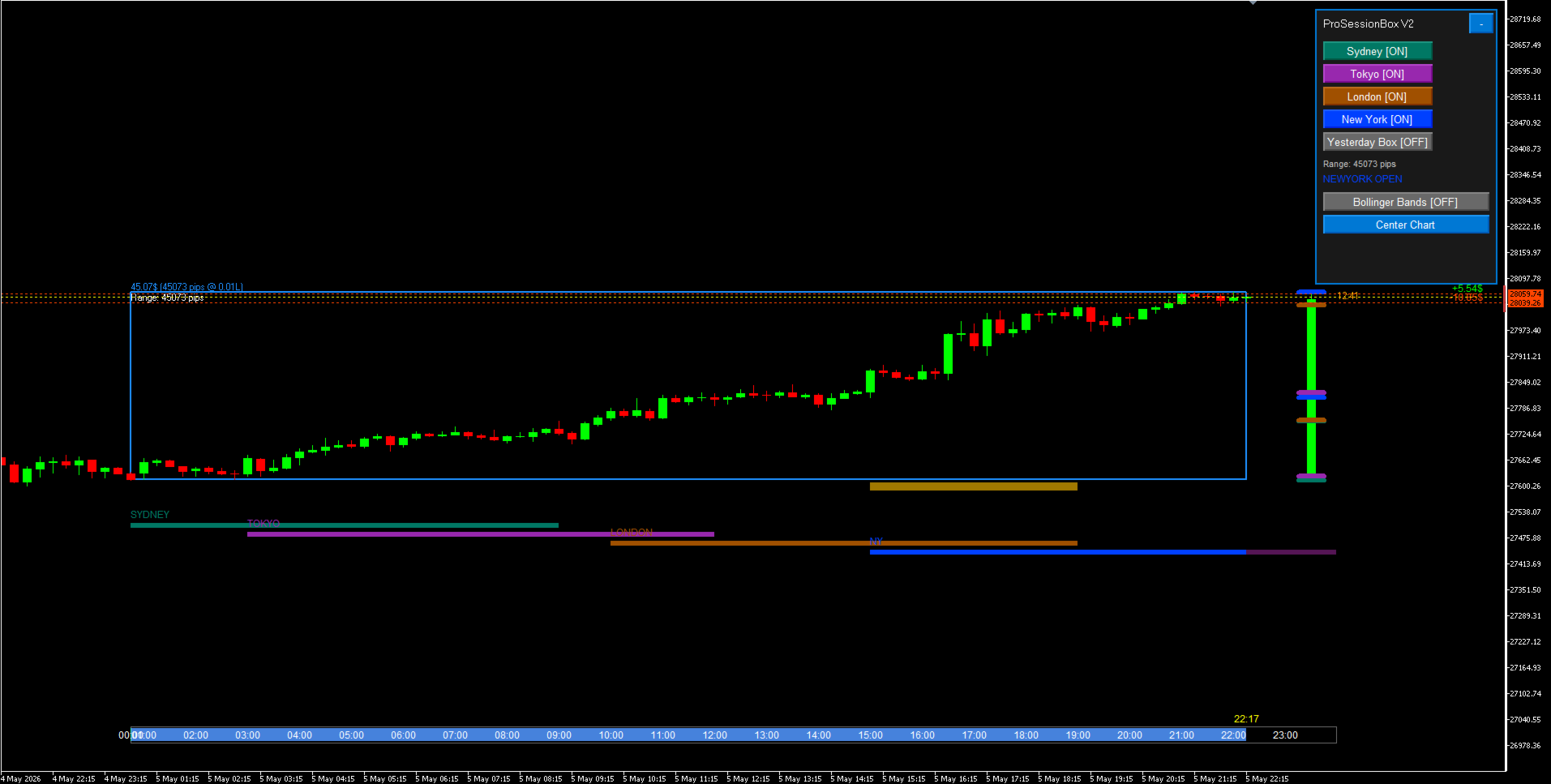
• Daily High/Low as a real Bullish/Bearish/Neutral candle
• Optional Yesterday box for range comparison
• Range label: "Range: 87 pips"
• Profit label: "$0.87 (0.01L)" with configurable lot size
• Manual center chart button in panel (no unwanted auto-recentering)
4 MAJOR SESSIONS — BELOW THE BOX (no chart clutter)
• Sydney — Dark Teal — UTC+10/+11
• Tokyo — Purple — UTC+9
• London — Dark Amber — UTC+0/+1
• New York — Blue — UTC-5/-4
• Full DST support (Daylight Saving Time handled automatically)
• Session H/L level lines flanking the daily candle position
BOLLINGER BANDS OVERLAY (NEW IN V3.1)
• Native MT5 Bollinger Bands rendered on the main chart
• Toggle ON/OFF from the control panel
• Configurable: Period, Deviation, Upper/Middle/Lower colors
• Zero CPU cost — uses MT5's built-in indicator engine
LIVE TRADE POSITION TRACKER (NEW IN V3.1)
• Dotted entry line (green = buy, red = sell) across the full chart
• Live P&L label pinned to the right edge — never hidden by price action
• One-click close button (x) per position — close trades without switching panel
• Requires "Allow trading" permission on the indicator
LONDON / NEW YORK OVERLAP HIGHLIGHT
• Automatic highlight during the 13:00–17:00 UTC overlap window
• The highest volatility period made instantly visible
SMART TIME BAR
• Pixel-fixed progress bar — readable at any zoom level
• Click any session bar to reveal it for 30 seconds
INTERACTIVE CONTROL PANEL (IMPROVED IN V3.1)
• Toggle each session ON/OFF
• Toggle Yesterday box
• Toggle Bollinger Bands ON/OFF
• Center Chart button (manual vertical centering)
• All buttons with real click-release visual feedback
• Minimize for compact view — state saved across reloads
ALERTS
• Optional popup + sound alert on each session open
PERFORMANCE
• Objects created once — no delete/recreate per tick
• 1-second timer for clock and trade P&L update
• Bar scan throttled — runs only when needed
• CPU usage: < 1%
--- WHAT'S NEW IN V3.1 ---
• Bollinger Bands: native overlay, panel toggle
• Trade lines: entry HLINE + right-edge P&L + close button
• Auto-center: manual only (panel button) — no scroll/candle triggers
• Button release effect on all panel buttons
• Box vertical margins reduced (tighter, more readable)
• Datetime type conversion warnings fixed
• MQL5 Market compliance: NON_LATIN clean, Article 2555 stress guards
--- INPUT PARAMETERS ---
Daily Box:
ShowOnlyBoxFrame — Box border only (no fill)
ShowYesterdayBox — Show yesterday box
BoxFrameColor — Border color
BoxCandleShift — Candle position (bars from bar 0)
ShowBoxLabels — Range/profit labels
DisplayLotSize — Lot for profit calculation (default 0.01)
Sessions:
ShowSydney / ShowTokyo / ShowLondon / ShowNewYork
ShowOverlapHighlight — London/NY overlap bar
SessionLineHeight — Bar height in pixels
ShowLevelLines — Session H/L tick marks on candle
Bollinger Bands:
ShowBollingerBands — Enable on load
BBPeriod — Period (default 20)
BBDeviation — Deviation (default 2.0)
BBUpperColor / BBMiddleColor / BBLowerColor
Trade Lines:
ShowTradeLines — Show entry lines and P&L
Alerts:
AlertOnSessionOpen — Popup on session open
SoundOnSessionOpen — Sound on session open
Control Panel:
ShowControlPanel / PanelXOffset / PanelYOffset
--- TECHNICAL SPECS ---
• Platform : MetaTrader 5 (build 3450+)
• Symbols : All (Forex, Indices, Metals, Crypto)
• Timeframes: All (best on M5–H4)
• Strategy Tester: Compatible
• Multi-chart: Fully supported
--- HOW TO USE ---
1. Drag indicator onto any chart (M5 or H4 recommended)
2. Chart auto-centers — Daily Box appears vertically in the middle
3. Sessions appear as colored bars below the box
4. Use the Control Panel (top-left) to toggle sessions on/off
5. Watch the Time Bar for session progress
6. Enable Overlap Highlight to spot the highest-volatility window
--- SUPPORT ---
• Email: S.javad_rz@yahoo.com
• Response within 48h
• Bug fixes within 24h
• Free lifetime updates
--- LICENSE ---
Single user, unlimited accounts and charts.
Free lifetime updates included.
No redistribution or resale.
=============================================================
TAGS:
sessions, daily box, trading sessions, forex, scalping, day trading,
swing trading, session indicator, daily high low, profit calculator,
control panel, multi session, asia, europe, america, london, new york,
tokyo, sydney, professional indicator, DST support, auto center
CATEGORY: Technical Indicators
SUBCATEGORY: Overlay / Support and Resistance
=============================================================
Transform your chart into a complete trading workspace. ProSessionBox Premium V3.1
combines session visualization, range context, Bollinger Bands, and live position
tracking — all in one clean indicator.
--- KEY FEATURES ---
DAILY BOX
• Daily High/Low as a real Bullish/Bearish/Neutral candle
• Optional Yesterday box for range comparison
• Range label: "Range: 87 pips"
• Profit label: "$0.87 (0.01L)" with configurable lot size
• Manual center chart button in panel (no unwanted auto-recentering)
4 MAJOR SESSIONS — BELOW THE BOX (no chart clutter)
• Sydney — Dark Teal — UTC+10/+11
• Tokyo — Purple — UTC+9
• London — Dark Amber — UTC+0/+1
• New York — Blue — UTC-5/-4
• Full DST support (Daylight Saving Time handled automatically)
• Session H/L level lines flanking the daily candle position
BOLLINGER BANDS OVERLAY (NEW IN V3.1)
• Native MT5 Bollinger Bands rendered on the main chart
• Toggle ON/OFF from the control panel
• Configurable: Period, Deviation, Upper/Middle/Lower colors
• Zero CPU cost — uses MT5's built-in indicator engine
LIVE TRADE POSITION TRACKER (NEW IN V3.1)
• Dotted entry line (green = buy, red = sell) across the full chart
• Live P&L label pinned to the right edge — never hidden by price action
• One-click close button (x) per position — close trades without switching panel
• Requires "Allow trading" permission on the indicator
LONDON / NEW YORK OVERLAP HIGHLIGHT
• Automatic highlight during the 13:00–17:00 UTC overlap window
• The highest volatility period made instantly visible
SMART TIME BAR
• Pixel-fixed progress bar — readable at any zoom level
• Click any session bar to reveal it for 30 seconds
INTERACTIVE CONTROL PANEL (IMPROVED IN V3.1)
• Toggle each session ON/OFF
• Toggle Yesterday box
• Toggle Bollinger Bands ON/OFF
• Center Chart button (manual vertical centering)
• All buttons with real click-release visual feedback
• Minimize for compact view — state saved across reloads
ALERTS
• Optional popup + sound alert on each session open
PERFORMANCE
• Objects created once — no delete/recreate per tick
• 1-second timer for clock and trade P&L update
• Bar scan throttled — runs only when needed
• CPU usage: < 1%
--- WHAT'S NEW IN V3.1 ---
• Bollinger Bands: native overlay, panel toggle
• Trade lines: entry HLINE + right-edge P&L + close button
• Auto-center: manual only (panel button) — no scroll/candle triggers
• Button release effect on all panel buttons
• Box vertical margins reduced (tighter, more readable)
• Datetime type conversion warnings fixed
• MQL5 Market compliance: NON_LATIN clean, Article 2555 stress guards
--- INPUT PARAMETERS ---
Daily Box:
ShowOnlyBoxFrame — Box border only (no fill)
ShowYesterdayBox — Show yesterday box
BoxFrameColor — Border color
BoxCandleShift — Candle position (bars from bar 0)
ShowBoxLabels — Range/profit labels
DisplayLotSize — Lot for profit calculation (default 0.01)
Sessions:
ShowSydney / ShowTokyo / ShowLondon / ShowNewYork
ShowOverlapHighlight — London/NY overlap bar
SessionLineHeight — Bar height in pixels
ShowLevelLines — Session H/L tick marks on candle
Bollinger Bands:
ShowBollingerBands — Enable on load
BBPeriod — Period (default 20)
BBDeviation — Deviation (default 2.0)
BBUpperColor / BBMiddleColor / BBLowerColor
Trade Lines:
ShowTradeLines — Show entry lines and P&L
Alerts:
AlertOnSessionOpen — Popup on session open
SoundOnSessionOpen — Sound on session open
Control Panel:
ShowControlPanel / PanelXOffset / PanelYOffset
--- TECHNICAL SPECS ---
• Platform : MetaTrader 5 (build 3450+)
• Symbols : All (Forex, Indices, Metals, Crypto)
• Timeframes: All (best on M5–H4)
• Strategy Tester: Compatible
• Multi-chart: Fully supported
--- HOW TO USE ---
1. Drag indicator onto any chart (M5 or H4 recommended)
2. Chart auto-centers — Daily Box appears vertically in the middle
3. Sessions appear as colored bars below the box
4. Use the Control Panel (top-left) to toggle sessions on/off
5. Watch the Time Bar for session progress
6. Enable Overlap Highlight to spot the highest-volatility window
--- SUPPORT ---
• Email: S.javad_rz@yahoo.com
• Response within 48h
• Bug fixes within 24h
• Free lifetime updates
--- LICENSE ---
Single user, unlimited accounts and charts.
Free lifetime updates included.
No redistribution or resale.
=============================================================
TAGS:
sessions, daily box, trading sessions, forex, scalping, day trading,
swing trading, session indicator, daily high low, profit calculator,
control panel, multi session, asia, europe, america, london, new york,
tokyo, sydney, professional indicator, DST support, auto center
CATEGORY: Technical Indicators
SUBCATEGORY: Overlay / Support and Resistance
=============================================================




























O usuário não deixou nenhum comentário para sua avaliação