WONNFX iSTATS
- Indicadores
-
Sergei Tsirat
 WONNFX ONLINE
Expert Advisor & Trading Systems & CopyTradingFX
[no martingale, grid trading, averaging, or other dangerous methods]
Tools for MetaTrader 5 & 4
[Indicators / Advisors / Utilities] - Versão: 3.9
- Atualizado: 24 agosto 2026
WONNFX iSTATS - Account Statistics Indicator [MT4]
Indicator Description:
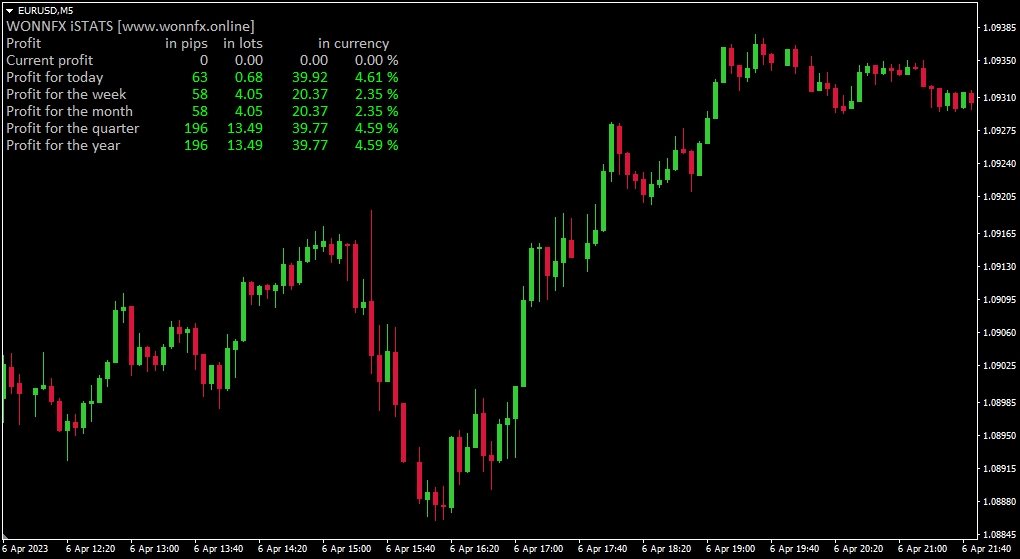
is a informational indicator that displays detailed account statistics directly on your chart. The indicator shows profit/loss across different timeframes (day, week, month, quarter, year), in various units of measurement (pips, lots, deposit currency, percentages), as well as advanced risk metrics.
Unlike the terminal's built-in tools, iSTATS provides a complete picture of your trading performance in real-time and over selected periods.
1. Multi-Level Profit Statistics:
- Current profit from open positions
- Today's profit (closed trades)
- Current week's profit
- Current month's profit
- Current quarter's profit
- Current year's profit
- Pips — for traders who think in pips
- Lots — total volume of open positions
- Currency — profit in deposit currency
- Percent — profit as a percentage of balance
- Max Drawdown — maximum historical drawdown (in currency and percent)
- Profit Factor — ratio of gross profit to gross loss
- Recovery Factor — ratio of total profit to maximum drawdown
- Display profit and volume for specific magic numbers
- Evaluate the performance of individual EAs or strategies