Phone Trade Manager

Smart Lot-Size Calculator And Trade Assistant for Mobile Trading

Overview:

This is the tool every trader in the market must have no matter if you are scalper, swing traders, day trader, or long term trader. This On-The-Go trading tool will help you stay disciplined and also stay free from daily trade management chores, Most traders face common problems like 

 1. Calculation of proper lot-size of a position to take controlled risk

 2. Managing every trade and trailing stop-loss if trades goes in your favor to protect profits

 3.Getting updated if trader is in position or his/her stop or limit orders got triggered

 4.To know if trader hit take-profit or stop-loss

   The problem is the all this things needs a trader to sit on computer ALL DAY LONG! And most of trade manager and lot-size calculators works only with windows or mac version of MT4.Our MQL4 Expert Advisor (EA)/ Utility/Assistant  seamlessly solves these problems. Now every trader can trade from their phone easily with proper lot-size and risk calculation, in addition this smart utility comes with trailing stop loss and to stay updated about your trading activity you can get notifications directly on your phone's MT4 trading applications in real time!  

Key Features:

  1. Simplified Lot Size Determination: The EA identifies two default lot sizes: 0.01 and 0.02. These represent a risk of 1% and 2% per trade, respectively. While these can be adjusted and user can change risk percentage in settings, they provide a clear, quick benchmark for traders to evaluate and control their risk.

  2. Versatile Order Handling: Whether you're executing market orders or setting buy/sell limits and stops, the EA is proficient. For preset lot sizes indicating your entry and exit prices, the EA automates order adjustments. It replaces initial orders with new ones, ensuring appropriate lot size based on your risk parameters and the point difference between entry and stop-loss.

  3. Trailing Stop-Loss: To bolster potential profits and mitigate losses, the EA's dynamic trailing stop-loss mechanism adjusts with favorable market movements, securing your position's gains.

  4. Real-time Notifications: Stay abreast of your trades. The EA's integrated notification system ensures you receive prompt updates about pivotal trading activities on your phone.

  5. Optimized for Mobile: With mobile traders as the primary focus, this tool melds an intuitive interface with top-tier functionality, even on compact screens.

  6. Works With Multiple Symbols: This Smart Utility comes with multiple inputs for symbols. Means user can load EA/utility on single chart still it will works with up to other 14 symbols .(total 15 symbol inputs)

How It Works:

  1. Place Your Order: Be it market orders, buy/sell limit orders, or buy/sell stop orders; initiate your desired order type and if setting limits or stops, define your entry and exit prices with the lot sizes of 0.01 or 0.02.

  2. For Real Time Market Orders : To take real time spot market order directly place limit order without limit's stop-loss with lot-size 0.01 or 0.02 at level which you want your spot trade's stop-loss. EA/Utility will identify order and will smartly replace that limit order with proper lot-size , be it buy order or sell order( To understand this more clearly go to our YouTube channel) 

  3. For Limit Or Stop Orders : To place buy/sell limit or stop orders with proper lotsize just place limit or stop order with take-profit , entry price, and stoploss levels with 0.01 or 0.02 lotsize, EA/utility will smartly replace that order with proper lotsize and same input parameters 

  4. EA’s Intelligent Adaptation: Upon recognizing your parameters, the EA evaluates and replaces your initial order with an optimized one. This new order mirrors the ideal lot size in alignment with your risk preference and the calculated point difference.

  5. Trailing Stop-Loss Activation: As market conditions evolve in your favor, the EA's trailing stop-loss feature fine-tunes the stop level, locking in accumulated gains. Stop trailing works with every type of order replaced by this EA/Utility

  6. Stay Informed: Through its integrated notification mechanism, the EA promptly relays essential trading actions or alerts, ensuring you're always in the loop.(To turn on the notification user have to activate notifications from MT4 terminal in VPS or PC first)

Conclusion:

This Utility/EA is needed for every trader who wants to reduce efforts and maximize good results in their trading . For First time users it might be confusing and overwhelming but if user get used to it this is the best thing to get disciplined in trading. For any confusion or to see tutorials go to my website or YouTube channel. https://krutikparekh.in/


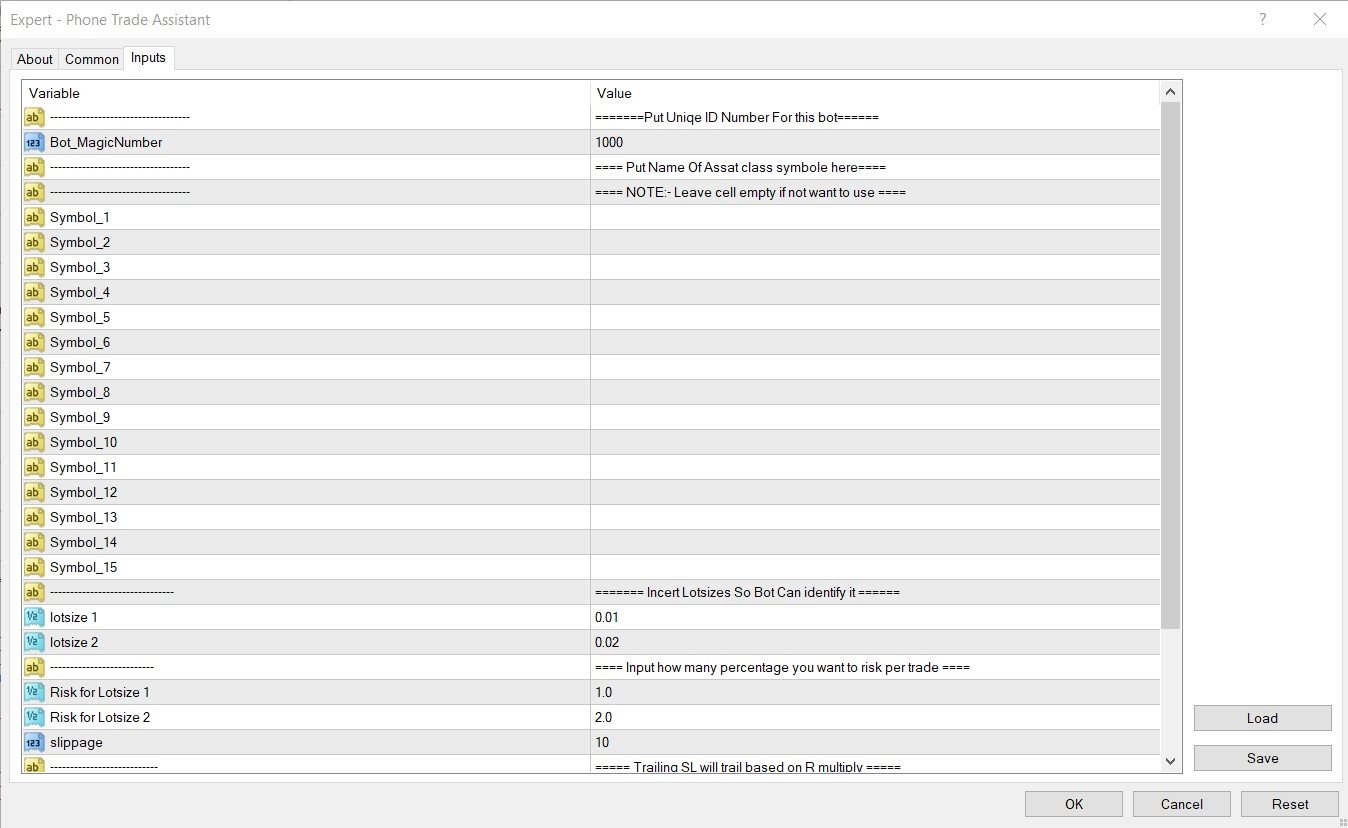
INPUT PERAMETERS :

1. Magic number : Although EA/Utility can work on given symbol inputs and up to 15 symbols , if user wants to load it to another chart then use different magic number 

2. Symbols : There are 15 inputs for symbol for trade. From symbol_1 to symbol_15 . User has to manually type symbol name in each bracket and leave unused bracket empty as it is.

(Note: Sometimes even after writing name of symbol bot will not identify the name and it won't be able to trade , so in this situation kindly load EA/Utility on desired chart and for symbol_1 simply type NULL or null or symbol so it will work on current chart, also you can fill other symbol inputs from symbol_2)

3. lotsize 1 and lotsize 2 : This inputs are for EA/Utility to understand how much risk user wants to take on trade . Default inputs are

0.01 and 0.02. User can change this parameters for their convenient use.

4.Risk for Lotsize 1 and Risk for Lotsize 1: This inputs associate lotsize 1 and lotsize 2 inputs with % risk for  trade for example if lotsize 1 = 0.01 and  Risk_pertrade_for_LOTSIZE_1 = 1% that means when ever user will put on trade with 0.01 lotsize ,EA/Utility will identify it and replace that trade with proper lotsize to match 1% risk.

5. Slippage : To set Slippage in Utility/bot.

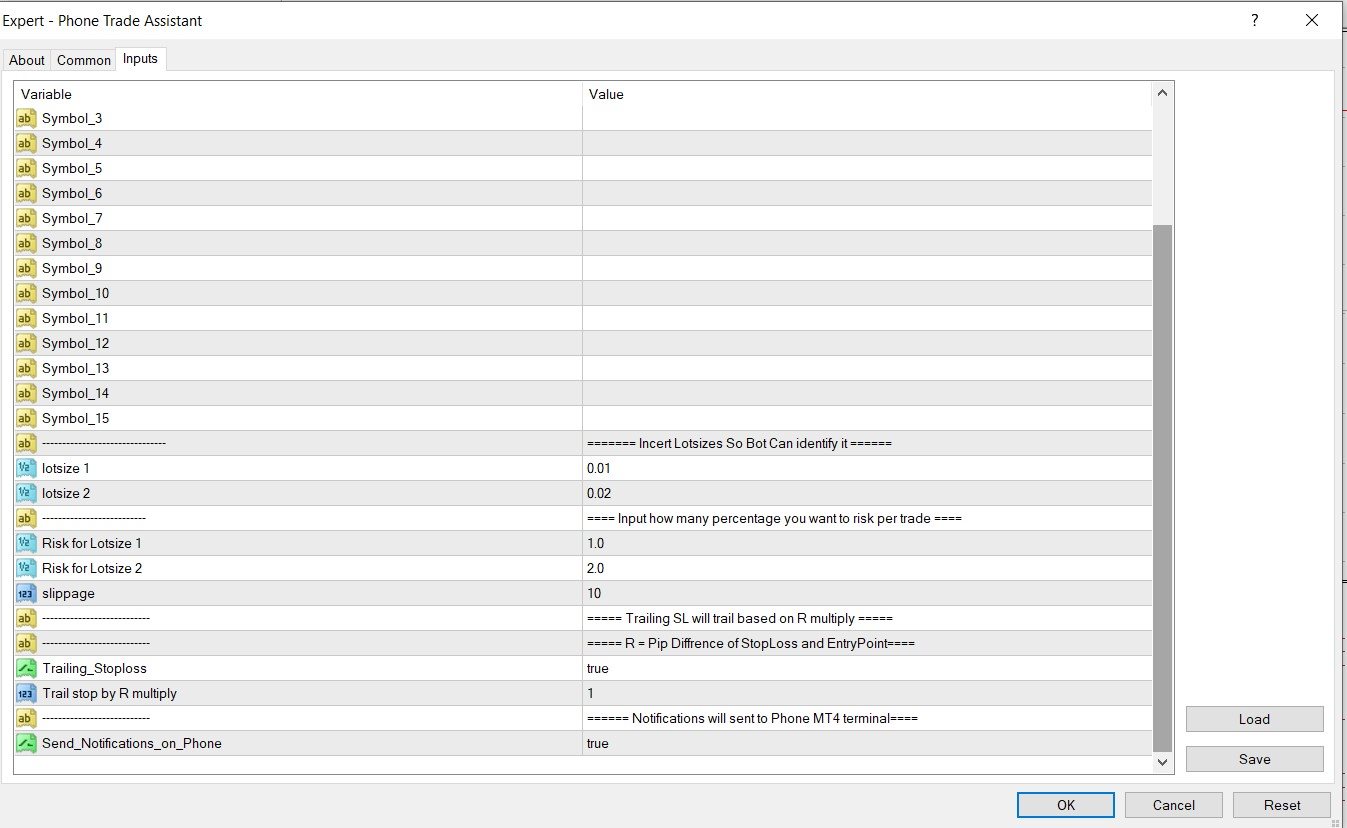
6. Trailing stoploss : if user want stoploss to trail along with profit and wants to protect profit gains this option should be set as "TRUE".

7. Trail stop by R multiply: R represents risk in points , for example if distance between Entry price and Stoploss is 100 points then

    R = 100 points , so if R is set to 2  then trailing will start at 200 points in profit(100 points x 2R), And stoploss will be trailed at every          200 points. 

8.Notifications : If user want notification on his or her phone this option is set to "TRUE". This option is very good for someone who is very busy with life. Notifications will allow user to stay updated about their trading activity and positions.

Produtos recomendados
Server Clock
Flavio Javier Jarabeck
5 (5)
Many friends asked me for a simple, non-obtrusive, resource-friendly clock to track the time during their trades. It seems pretty obvious, but it is a must-have for those trading the market manually, waiting for the Market News, or just to visually know what time it is... Trading is an absorbing endeavor! So, here it is... Totally configurable, including Font Type, Font Size and Chart Location: Upper Left/Center/Right OR Lower Left/Center/Right, with a little twist of adjusting the Offset, just
FREE
TradeInfo MT5
Manuraj Dhanda
4.31 (13)
TradeInfo is a utility indicator which displays the most important information of the current account and position. Displayed information: Information about the current account (Balance, Equity, Free Margin). Current spread, current drawdown (DD), planned profit, expected losses, etc. Number of open position(s), volume (LOT), profit. Today’s and yesterday’s range. Remaining time to the next candle. Last day profit information. MagicNumber filter. Comment filter. Indicator parameters: ShowPro
FREE
Esse indicador exibe o tempo restante da vela no gráfico e/ou no cando da janela. Também exibe notificações (popup e push) quando uma nova vela é formada (opcional). Você configura o timer nas velas e no cando da janela. Não preciso explicar as funções do indicador por que são muito simples. Versão para MT4:  https://www.mql5.com/en/market/product/38677 Qualquer dúvida ou sugestão por favor nos contate! Faça bom uso! Este é um indicador gratuito, porém levou horas para desenvolvê-lo. Se desejar
FREE
LT Watermark MT5
Thiago Duarte
4.78 (23)
Este indicador desenha uma marca d'água no gráfico, com o tempo gráfico e nome do ativo. Você pode mudar tudo, inclusive adicionar uma marca d'água adicional. Funções: Symbol watermark: Size -  tamanho do texto. Font -  fonte do texto. Color -  cor do texto. Background text -  marca d'água como plano frontal ou de fundo (atrás ou a frente do gráfico). Horizontal correction -  Correção x em pixels. Vertical correction -  correção y em pixels. Separator period X symbol - o que separará o tempo grá
FREE
Versão paga com 38 indicadores: https://www.mql5.com/en/market/product/58056 Eu acredito que o desenvolvimento em PYTHON seja muito mais fácil na criação de Expert Advisor ou qualquer outra ferramenta que facilite a automação de tomada de decisão no mercado financeiro. Sendo assim eu criei uma biblioteca em Python que possa ser utilizada para criar robôs de forma mais simples e rápida, pode ser encontrada aqui: https://github.com/Joaopeuko/Mql5-Python-Integration Este MQL5 Service utiliza
FREE
It mesures the lot size based on the points measured by clicking with the MIDDLE MOUSE BUTTON then CLICK and DRAG , previous that configure the indicator based on the risk you accept; The risk can be % based on fixed account, actual account size, and fix capital risk; If the INDICATOR DOESN'T WORK propperly try after configuring it CHANGE the TIMEFRAME and GET BACK to the PREVIOUS timeframe, SOMETIMES  this FIX IT
FREE
The Rayol Code Hour Interval Lines indicator was  designed to assist your trading experience.  It  draws the range of hours chosen by the user directly on the chart, so that it enables traders to visualize price movements during their preferred trading hours, providing  traders a more comprehensive view of price movements and market dynamics. This indicator allows the user to choose not only the Broker's time, but also the Local time. This way, the user no longer needs to calculate local time in
FREE
Know the Candle Close Time
Benbyaanda Silvere Henri Sedric Kabore
This indicator allows to know the remaining time before the closing of the candle. It works on every timeframe. It is very usefull when your trading strategy depend of the close or the open of a specific candle. So use it like you want. Don't forget to leave a comment or a request for a EA or an indicator. Also spread it to your friends and don't hesitate to visit my profile to see others tools.
FREE
A Renko Tick chart based on continuously adjusting percentage. Live Renko bricks formed by tick data Adjustable brick width expert for indicator attached Scalp with a Renko, get weird. The settings can and will break the script if you turn them up too high. Turning off outline mode will not look as nice, but can potentially allow for a larger number of bricks.
FREE
Core function Intelligent transaction management one-click opening and closing operation, which supports user-defined lots to set multiple closing modes: all closing, closing by direction and closing by profit and loss status. Professional risk control, real-time risk monitoring and spread control to avoid high-cost trading environment. Visual control panel has an intuitive graphical interface, and all functions can be operated with one button to display position information, profit and loss sta
FREE
EmaRsi robot
Deepak Saini
https://youtu.be/KHhg88fXWTk?si=ZoVtpc-wpfTVImSL 5-Minute Trading Strategy | Quick & Effective for Beginners Welcome to our trading channel- the deepak trading In this video, we'll be exploring a simple 5-minute trading strategy that can help you capture quick market movements and make profitable trades. Whether you're a beginner or an experienced trader, this strategy is designed to give you clear entry and exit points using technical indicators like EMA, RSI, and Stochastic Oscillator.
FREE
Format Charts
Vital H B Engenharia Ltda
5 (1)
If you use several charts open at the same time, you know how boring it is to apply formats to each chart individually. This script can change all open charts using a single command. Parameters: 1 - Choose symbol to put on charts: apply the selected symbol to all charts. If "current", it does not change the symbol; 2 - Choose timeframe or leave empty: apply the selected timeframe to all charts. If "CURRENT", it does not change the timeframe; 3 - Apply template to the charts: If true, apply the t
FREE
Position Size Tool – Smart Risk Management & Trade Execution Panel The Position Size Tool is a powerful and intuitive MT5 panel that simplifies your trading by combining position sizing , risk calculation , risk/reward visualization , and order placement —all in one place. ️ Clean & Functional Interface The tool features a compact, real-time panel with the following: Balance & Equity display Live Price tracking Customizable Risk % input Auto-calculated Lot Size based on SL and Risk Input for S
FREE
The utility draws pivot levels based on a selection from day week month The previous candlestick of the selected timeframe is taken and the values for the levels are calculated using the following formulas: Pivot = (high + close + low) / 3 R1 = ( 2 * Pivot) - low S1 = ( 2 * Pivot) - high R2 = Pivot + (R1 -S1) R3 = high + ( 2 * (Pivot - low)) S2 = Pivot - (R1 - S1) S3 = low - ( 2 * (high - Pivot)); The style and thickness for all lines are adjusted. The colors for the R, Pivot and S lines ar
FREE
Risk Calculator EA – Utility for Precise Trade Sizing If you find this tool useful consider to  Buy me a coffee!   The Ultimate Risk Calculator is a lightweight in-chart Expert Advisor (EA) designed to help you easily and quickly calculate position size and set stop-loss / take-profit levels with full control over risk management directly on the chart. What it does? It turns manual risk decisions into fast, visual, and accurate calculations. You draw or adjust the Entry, Stop-Loss and Take-P
FREE
LT Spread MT5
Thiago Duarte
4.5 (2)
Este é um simples indicador que mostra o spread em pontos. Ele é útil para os que operam scalper, além de ser personalizável. Funções: Color - cor do exto. Font type - tipo de fonte. Font size - tamanho da fonte. First text - texto à frente do número do spread. Second text - texto adicional após o número do spread. Corner - determina o canto em que será escrito o spread. Horizontal distance - distância horizontal da borda. Vertical distance - distância vertical da borda. Confira nossos outros
FREE
True Support Resistance Indicator: Your Ultimate Tool for Precise Trading Decisions​ Quick Overview ​ It's a simple indicator that elevates your trading strategy.  True Support Resistance Indicator​ ​ is a powerful tool designed to identify key support/resistance levels in real-time. Experience clean visuals, instant alerts on breakouts, and dynamic updates that keep you ahead of market movements. Why Choose True Support Resistance Indicator? 1. Simplicity Meets Precision -  Two clearly colored
FREE
O Matrix Arrow Indicator Multi Timeframe Panel MT5 é um complemento gratuito e um grande trunfo para o seu Matrix Arrow Indicator MT5 . Ele mostra o sinal atual do Matrix Arrow Indicator MT5 para 5 intervalos de tempo personalizados pelo usuário e para 16 símbolos / instrumentos modificáveis ​​no total. O usuário tem a opção de habilitar / desabilitar qualquer um dos 10 indicadores padrão, que compõem o Indicador de Seta de Matriz MT5 . Todos os atributos dos 10 indicadores padrão também são aj
FREE
Rainbow MT5
Jamal El Alama
4 (1)
Description : Rainbow MT5 is a technical indicator based on Moving Average with period 34 and very easy to use. When price crosses above MA and MA changes color to green, then this is a signal to buy. When price crosses below MA and MA changes color to red, then this is a signal to sell. The Expert advisor ( Rainbow EA MT5 ) based on Rainbow MT5 indicator is now available here . MT4 version is available here .
FREE
Prior Cote
Ricardo Rodrigues Lucca
Prior Cote - Saliente pontos interessantes do dia anterior Coloca linhas automaticas em pontos que voce decidir do dia anterior: máxima, mínima, fechamento, aberto, ponto medio. Além disso, é possivel decidir um distânciamento em percentual da referência que voce escolheu e um valor máximo em percentual. Dessa maneira, ele faz a linha do zero em uma cor que voce escolheu e vai se distanciando para ambos os lados ate atingir o valor máximo que o usuario escolheu. As linhas para cima (ou positivas
FREE
Você está cansado de ficar apagando os objetos do gráfico e depois ter que colocá-los de novo? E se você tivesse uma ferramenta que te possibilite ocultar e exibir todos os objetos quando você quiser? Legal, né? Por isso desenvolvi essa ferramenta em forma de indicador. Com ela você oculta todos os objetos utilizando um botão de atalho no gráfico ou pelo teclado (configurável). Se tiver alguma sugestão ou encontrar algum erro, por favor, nos contate. Faça bom uso!
FREE
Total Closed Trades – MT5 Indicator The Total Closed Trades indicator for MetaTrader 5 provides a quick, visual overview of your trading performance by displaying a simple and intuitive 3-value breakdown : Total Trades – The total number of closed trades. Winning Trades – Number of profitable trades. Losing Trades – Number of losing trades. Instead of digging through reports, traders can instantly monitor their historical performance with a compact and elegant pie chart-style widget. Key
FREE
Account Info EA It is a tool that presents on the graph all the positions of the account, and specific information concerning the positions, but also the account. It enables the user to have an image of his account at a glance. Use like any expert advisor. You can't attach it in the same chart with other expert advisor. It does not have the ability to open or manage positions. You can attach it on any chart and any timeframe.
FREE
Esta pequena ferramenta ajuda você a definir seu gerenciamento de riscos com um simples arrastar de linha no gráfico. Ele mostra o tamanho real do lote calculado na% da conta ou no valor fixo em dinheiro diretamente na linha. Tudo o que você precisa fazer é ativar a linha pressionando a tecla “t” do teclado e arrastar a linha até o ponto de stop loss. É isso. Nas configurações você pode definir a cor e a largura da linha e do texto, também o espaço do texto a linha e à direita e pode definir o
FREE
Este EA utilitario fecha qualquer ordem de compra ou venda quando atingir o valor de lucro desejado, ou quando o stop gain for ativado. Fecha ordens abertas manualmente ou por outros robôs.  Muito eficaz para proteger ou garantir ganhos em rapidos movimentos de preço. Funciona em qualquer período  e qualquer ativo disponível no MT5. Trailing Start: Exemplo, se o preço se mover 70 pips a favor, ele ativa o stop gain.  Traling Stop: ou Traling Step: Se o preço se mover na quantidade que for def
FREE
Symbol Watermark
Flavio Javier Jarabeck
4.57 (14)
Another request from my brotherhood was putting the name of the Symbol being seen - a little bigger - on the Chart, just to get sure that they are seeing the correct one... Mistakes pay a high price on the market... It is a very effective, and almost resource-null-consuming indicator that displays the current Symbol Name and Timeframe in almost any position of your Chart, with any color, and any Font Size... And also you can change the divisor character that is presented between the Symbol Name
FREE
MTF MADashboard Pro
Wojciech Jerzy Magda
5 (1)
MTF MA Dashboard Pro v1.04 - Português MTF MA Dashboard Pro v1.04 - Analisador Profissional de Médias Móveis Multi-Timeframe Indicador técnico avançado para MT5 que fornece análise abrangente de médias móveis multi-timeframe com detecção inteligente de Cruz Dourada/Cruz da Morte e painel visual totalmente personalizável. Pare de alternar entre timeframes! Analise até 4 timeframes simultaneamente e identifique alinhamentos de tendência instantaneamente. RECURSOS PRINCIPAIS ANÁLISE MULTI
FREE
Ao executara ordem, seja ela pela boleta do metatrader no computador ou pelo metatrader no celular, seja ordem manual ou pendente, o Easy Trade irá posicionar os níveis de take profit e stop loss, bem como uma ordem limit e seus respectivos take profit e stop loss de forma automática. Seguindo a estratégia de negociação para abertura de Bolsa (us30, us100,us500) porém, pode ser ultilizada em quaisquer ativo do mercado.
FREE
Position Selective Close MT5
Francisco Manuel Vicente Berardo
The Position Selective Close is a multi-symbol multi-timeframe script used to close simultaneously various positions.  General Description   The Position Selective Close   possesses   three operation modes (Intersection,   Union   and All) that control the way   as   four position features (symbol, magic number,   type   and profit) are used. The modes, available through the Selection Mode input parameter, relate to the features, available through the “Select by Feature” and “Feature” input pa
FREE
Click Trading
Jawad Tauheed
5 (2)
One Click Trading – Auto TP SL Developer TraderLinkz Version 1.00 Category Utility What it does Adds missing TP and SL to your manual trades and pending orders Sets them once per ticket Lets you move TP and SL afterward Works on hedging and netting accounts Scans on every tick and reacts on trade events Why you want it You place faster entries You get consistent risk and exit targets You reduce fat finger errors You keep full manual control Quick start Attach the EA to any chart Keep TP and SL e
FREE
Os compradores deste produto também adquirem
Trade Assistant MT5
Evgeniy Kravchenko
4.42 (208)
Ajuda a calcular o risco por comércio, a fácil instalação de uma nova encomenda, gestão de encomendas com funções de fecho parcial, trailing stop de 7 tipos e outras funções úteis. Materiais e instruções adicionais Instruções de instalação   -   Instruções para a aplicação   -   Versão de teste da aplicação para uma conta de demonstração Função de linha Mostra no gráfico a linha de Abertura, Stop Loss, Take Profit. Com esta função é fácil definir uma nova ordem e ver as suas características ad
Bem-vindo ao Trade Manager EA—uma ferramenta de gestão de risco criada para tornar o trading mais intuitivo, preciso e eficiente. Não é apenas uma ferramenta para executar ordens, mas uma solução abrangente para planejamento de operações, gerenciamento de posições e controle de risco. Seja você um iniciante, trader avançado ou scalper que precisa de execução rápida, o Trade Manager EA adapta-se às suas necessidades, oferecendo flexibilidade em todos os mercados, desde forex e índices até commodi
Local Trade Copier EA MT5
Juvenille Emperor Limited
4.96 (129)
Experimente uma cópia de negociação excepcionalmente rápida com o Local Trade Copier EA MT5 . Com sua fácil configuração de 1 minuto, este copiador de negociações permite que você copie negociações entre vários terminais MetaTrader no mesmo computador Windows ou em um Windows VPS com velocidades de cópia ultra rápidas de menos de 0.5 segundos. Seja você um trader iniciante ou profissional, o   Local Trade Copier EA MT5   oferece uma ampla gama de opções para personalizá-lo de acordo com suas ne
TradePanel MT5
Alfiya Fazylova
4.86 (148)
O Trade Panel é um assistente comercial multifuncional. A aplicação contém mais de 50 funções de negociação para negociação manual e permite automatizar a maioria das operações de negociação. Atenção, a aplicação não funciona no testador de estratégia. Antes de comprar, pode testar a versão de demonstração numa conta de demonstração. Versão de demonstração aqui . Instruções completas aqui . Comércio. Permite realizar operações de negociação com um clique: Abra as ordens e posições pendentes com
Versão Beta O Telegram to MT5 Signal Trader está quase no lançamento oficial da versão alfa. Alguns recursos ainda estão em desenvolvimento e você pode encontrar pequenos erros. Se tiver problemas, por favor reporte, seu feedback ajuda a melhorar o software para todos. Telegram to MT5 Signal Trader é uma ferramenta poderosa que copia automaticamente sinais de trading de canais ou grupos do Telegram diretamente para sua conta MetaTrader 5 . Suporta canais públicos e privados do Telegram, e você
Trade Dashboard MT5
Fatemeh Ameri
4.97 (117)
Tired of complex order placement and manual calculations? Trade Dashboard is your solution. With its user-friendly interface, placing orders becomes effortless, by a single click, you can open trades, set stop loss and take profit levels, manage trade lot size, and calculate risk to reward ratios, allowing you to only focus on your strategy. Say goodbye to manual calculations and streamline your trading experience with Trade Dashboard. Download  Demo Version  right now. You can find  Details of
Farmed Hedge Yield Farming - Professional Pair Trading Dashboard (Manual - Hybrid - Semi/Automated EA) VERSION 3 - WILD HARVEST UPDATE Trading Approach: - Manual Trading: Primary focus - Auto Pilot: Optional supplementary feature - Full Automation: Not the main purpose Recommended Timeframe: H1-H4 DEMO VERSION Download the free demo to test functionality. Use Strategy Tester with Visual Mode to see how it works. VERSION 3 - NEW FEATURES Summary Dashboard (SRA Panel) - Quick pair selection w
Copy Cat More Trade Copier MT5 (Gato Copiador MT5) é um copiador de negociações local e uma estrutura completa de gestão de riscos e execução projetada para os desafios comerciais de hoje. Desde desafios de prop firms até gestão de portfólio pessoal, ele se adapta a cada situação com uma combinação de execução robusta, proteção de capital, configuração flexível e manuseio avançado de negociações. O copiador funciona tanto no modo Master (remetente) quanto Slave (receptor), com sincronização em t
Exp COPYLOT CLIENT for MT5
Vladislav Andruschenko
3.82 (34)
Copiadora de comércio para MT5 é um  comércio   copiadora para a plataforma МetaТrader 5 . Ele copia negociações forex  entre   qualquer conta   MT5  - MT5, MT4  - MT5 para a versão COPYLOT MT5 (ou MT4  - MT4 MT5  - MT4 para a versão COPYLOT MT4) Copiadora confiável! Versão MT 4 Descrição completa +DEMO +PDF Como comprar Como instalar    Como obter arquivos de log    Como testar e otimizar    Todos os produtos da Expforex Você também pode copiar negociações no terminal МТ4 ( МТ4  - МТ4, МТ5  -
HINN MagicEntry Extra
ALGOFLOW OÜ
4.69 (13)
HINN MAGIC ENTRY – the ultimate tool for entry and position management! Place orders by selecting a level directly on the chart! full description   ::  demo-version  :: 60-sec-video-description Key features: - Market, limit, and pending orders - Automatic lot size calculation - Automatic spread and commission accounting - Unlimited partitial take-profits  - Breakeven and trailing stop-loss and take-profit  functions - Invalidation leves - Intuitive, adaptive, and customizable interface - Works
Ultimate Extractor
Clifton Creath
5 (9)
Ultimate Extractor - Professional Trading Analytics for MT5 *****this is the local HTML version of Ultimate Extractor. Check out Ultimate Extractor Cloud on mql5 for the Cloud version****** Ultimate Extractor transforms your MetaTrader 5 trading history into actionable insights with comprehensive analytics, interactive charts, and real-time performance tracking. What It Does Automatically analyzes your MT5 trading history across all Expert Advisors and generates detailed HTML reports with inte
Trade Manager DaneTrades
Levi Dane Benjamin
4.36 (28)
Trade Manager para ajudá-lo a entrar e sair rapidamente de negociações enquanto calcula automaticamente seu risco. Incluindo recursos para ajudar a evitar negociações excessivas, negociações de vingança e negociações emocionais. As negociações podem ser gerenciadas automaticamente e as métricas de desempenho da conta podem ser visualizadas em um gráfico. Esses recursos tornam este painel ideal para todos os traders manuais e ajudam a aprimorar a plataforma MetaTrader 5. Suporte multilíngue. Vers
MT5 to Telegram Signal Provider é uma utilidade fácil de usar e totalmente personalizável que permite o envio de sinais especificados para o chat, canal ou grupo do Telegram, tornando sua conta um fornecedor de sinais . Ao contrário da maioria dos produtos concorrentes, ele não usa importações de DLL. [ Demonstração ] [ Manual ] [ Versão MT4 ] [ Versão Discord ] [ Canal do Telegram ]  New: [ Telegram To MT5 ] Configuração Um guia do usuário passo a passo está disponível. Não é necessário conhec
Trade copier MT5
Alfiya Fazylova
4.63 (38)
Trade Copier é um utilitário profissional projetado para copiar e sincronizar negociações entre contas de negociação. A cópia ocorre da conta / terminal do fornecedor para a conta / terminal do destinatário, instalada no mesmo computador ou vps. Antes de comprar, você pode testar a versão demo em uma conta demo. Versão de demonstração aqui . Instruções completas aqui . Principais funcionalidades e benefícios: Suporta a cópia de MT5> MT5, MT4> MT5, MT5> MT4, incluindo contas "MT5 netting". Os mod
Smart Stop Manager – Execução automática de stop-loss com precisão profissional Visão geral O Smart Stop Manager é a camada de execução da linha Smart Stop, desenvolvido para traders que precisam de uma gestão de stop-loss estruturada, fiável e totalmente automatizada em múltiplas posições abertas. Ele monitora continuamente todas as operações ativas, calcula o nível ideal de stop usando a lógica de estrutura de mercado do Smart Stop e atualiza os stops automaticamente com regras claras e tran
Smart Stop Scanner – Sistema multiactivo de análise de stops baseado em estrutura de mercado Visão geral O Smart Stop Scanner oferece aos traders um monitoramento profissional de níveis de stop-loss em múltiplos mercados. O sistema identifica automaticamente as zonas de stop mais relevantes com base na estrutura real do mercado, rupturas significativas e lógica de price action — tudo apresentado em um painel unificado, claro e totalmente compatível com telas de alta resolução (DPI-aware). Func
Advanced Dashboard Ultra
Mirel Daniel Gheonu
5 (1)
Stats Dashboard & Journal ULTRA para MT5 O Centro de Comando de Trading Completo: Analytics, Automação e Inteligência de Notícias. O Stats Dashboard ULTRA é a evolução definitiva da ferramenta de análise Pro. Ele transforma o MetaTrader 5 em uma estação de trading profissional, combinando análise de desempenho de nível institucional com proteção automatizada contra notícias e métricas psicológicas avançadas. Projetado para traders manuais e gestores de portfólio de EAs (robôs) que exigem control
Equity Protect Pro: Seu Especialista em Proteção de Contas Abrangente para Negociação Tranquila Se você está procurando recursos como proteção de conta, proteção de patrimônio, proteção de portfólio, proteção de múltiplas estratégias, proteção de lucro, coleta de lucro, segurança de negociação, programas de controle de risco, controle automático de risco, liquidação automática, liquidação condicional, liquidação programada, liquidação dinâmica, trailing stop loss, fechamento com um clique, liqu
Pulsar Terminal é um produto da Pulsar Technologies, uma marca registrada da Astralys LLC . Pulsar Terminal é um complemento utilitário para MetaTrader 5. É uma interface visual combinada com ferramentas de execução em um aplicativo complementar conectado à sua conta MetaTrader 5 através de um Expert Advisor . Utilizamos um aplicativo complementar para maximizar as capacidades da ferramenta e fornecer uma interface visual e um fluxo de trabalho mais avançados do que os painéis padrão do MT5. Pu
Trade Manager DashPlus
Henry Lyubomir Wallace
5 (13)
DashPlus é uma ferramenta avançada de gerenciamento de operações projetada para melhorar a eficiência e a eficácia das suas transações na plataforma MetaTrader 5. Ela oferece um conjunto completo de funcionalidades, incluindo cálculo de risco, gestão de ordens, sistemas de grade avançados, ferramentas baseadas em gráficos e análise de desempenho. Principais Funcionalidades 1. Grade de Recuperação Implementa um sistema de grade flexível e de média para gerenciar operações em condições adversas de
The product will copy all telegram signal to MT5 ( which you are member) , also it can work as remote copier.  Easy to set up, copy order instant, can work with almost signal formats, image signal,  s upport to translate other language to English Work with all type of channel or group, even channel have "Restrict Saving Content", work with  multi channel, multi MT5 Work as remote copier: with signal have ticket number, it will copy exactly via ticket number. Support to backtest signal. How to s
Telegram to MT5 Coppy
Sergey Batudayev
5 (8)
Telegram para MT5:   A solução definitiva para cópia de sinais Simplifique suas negociações com o Telegram para MT5, a ferramenta moderna que copia sinais de negociação diretamente dos canais e chats do Telegram para a sua plataforma MetaTrader 5, sem a necessidade de DLLs. Esta solução poderosa garante execução precisa dos sinais, amplas opções de personalização, economiza tempo e aumenta sua eficiência. [ Instructions and DEMO ] Principais características Integração direta da API do Telegram A
Guia de instalação:    Clique aqui! Analise vários consultores especialistas em conjunto. Comparar resultados de EA por número mágico Acompanhe a rentabilidade e os períodos de retração. Filtrar resultados por intervalo de datas Curva de Equidade Visual e Métricas Detalhadas Pronto para usar em menos de um minuto Analisador de Portfólio EA O EA Portfolio Analyzer é uma   ferramenta de análise profissional   projetada para monitorar o   desempenho em tempo real de múltiplos Expert Advisors   de
Custom Alerts AIO: Monitoramento inteligente de múltiplos mercados – pronto para uso, sem configuração Visão geral Custom Alerts AIO é uma ferramenta avançada de varredura de mercado que funciona imediatamente após a instalação — sem necessidade de configurar indicadores adicionais. Inclui internamente todos os principais indicadores da Stein Investments (FX Power, FX Volume, FX Dynamic, FX Levels e IX Power), permitindo que você monitore facilmente todas as principais classes de ativos: Forex
Anchor: The EA Manager A coordination system for traders running multiple EAs. Anchor ensures only one EA can trade at a time, preventing conflicting positions and keeping your portfolio safer. Attach Anchor to any chart. Configure your EAs and their magic numbers. Anchor handles the rest. Built for portfolios. Built for discipline. Built for prop firms. The Problem Running multiple EAs on the same account creates risk. Two gold EAs can open opposite positions on the same candle. Three EA
Seconds Chart MT5
Boris Sedov
4.59 (17)
Seconds Chart — uma ferramenta exclusiva para criar gráficos de segundos no MetaTrader 5 . Com o Seconds Chart , você pode criar gráficos com períodos definidos em segundos, proporcionando flexibilidade e precisão ideais para análise, indisponíveis em gráficos padrão de minutos ou horas. Por exemplo, o período S15 indica um gráfico com velas de 15 segundos. Você pode usar qualquer indicador ou Expert Advisor com suporte a símbolos personalizados. Trabalhar com eles é tão conveniente quanto negoc
Timeless Charts
Samuel Manoel De Souza
5 (3)
Timeless Charts é uma solução avançada de gráficos desenvolvida para traders profissionais que buscam controle total sobre a construção e visualização de gráficos, além das limitações do sistema de gráficos nativo do MetaTrader 5. Diferente dos gráficos offline tradicionais ou indicadores personalizados simplistas, esta solução constrói barras totalmente personalizadas com precisão real de carimbo de tempo , até milissegundos, proporcionando uma experiência de trading poderosa e precisa. Este a
YuClusters
Yury Kulikov
4.93 (43)
Atenção: A versão demo para revisão e teste está aqui . YuClusters é um sistema profissional de análise de mercado. O trader tem oportunidades únicas para analisar o fluxo de pedidos, volumes de negociação, movimentos de preços usando vários gráficos, perfis, indicadores e objetos gráficos. O YuClusters opera com base em dados de Tempos e Negócios ou informações de ticks, dependendo do que está disponível nas cotações de um instrumento financeiro. O YuClusters permite que você crie gráficos com
Take a Break MT5
Eric Emmrich
4.75 (24)
One tool to protect all your EAs — news filter, equity protection, time filter and more — free demo available Take a Break has evolved from a basic news filter into a comprehensive account protection solution. It pauses your other Expert Advisors during news events or based on custom filters. When trading resumes, it automatically restores your entire chart setup , including all EA settings. Typical use cases: One news filter for all your EAs. Pause trading during news or high volatility — and c
The News Filter MT5
Leolouiski Gan
4.74 (19)
Este produto filtra todos os consultores especializados e gráficos manuais durante o horário das notícias, para que você não precise se preocupar com picos de preços repentinos que possam destruir suas configurações de negociação manuais ou negociações realizadas por outros consultores especializados. Este produto também vem com um sistema de gerenciamento de pedidos completo que pode lidar com suas posições abertas e ordens pendentes antes do lançamento de qualquer notícia. Depois de comprar o
Mais do autor
Phone Trade Assistant
Krutik Piyushkumar Parekh
Smart Lot-Size Calculator And Trade Assistant for Mobile Trading Overview: This is the tool every trader in the market must have no matter if you are scalper, swing traders, day trader, or long term trader. This On-The-Go trading tool will help you stay disciplined and also stay free from daily trade management chores, Most traders face common problems like   1. Calculation of proper lot-size of a position to take controlled risk  2. Managing every trade and trailing stop-loss if trades goes in
FREE
Filtro:
Sem comentários
Responder ao comentário