DepoControl

DepoControl – Full Control Over the Deposit

Closers Expert Advisor controls the overall account status and closes ALL market orders on the account when certain conditions occur.

The trading robot closes ALL orders on the account in the following cases (by profit):

  • Close ALL orders by a total profit on the account in monetary terms. For example, suppose that the settings specify that positions should be closed when profit of 100 is reached. In this case, the Expert Advisor closes all market orders when the overall profit on the account reaches 100 currency units. Of course, deposits can be of different currencies  US dollars, euros, rubles, yen, etc.
  • Close ALL orders by a total profit on the account in a percentage of the deposit. For example, suppose that a user having 10 000 on the deposit has set the EA's parameters to close ALL orders when 2% of profit is reached. Thus, when the account equity reaches 10 200 (while the balance is 10 000), ALL orders on the account are closed.
  • Close ALL orders by a total profit on the account in points. For example, suppose that the EA's settings specify that all positions should be closed when the profit of 30 points is reached (5-digit quote flow). It means that on 5-digit quotes, the Expert Advisor closes ALL positions when 300 "5-digit" pips are reached. On 4-digit quotes, positions are closed when 30 points of profit are reached.

Loss limitation. Apart from the profit, the trading robot can also manage the losses:

  • Close ALL orders in case of a loss in monetary terms.
  • Close ALL orders in case of a loss in a percentage of the balance.
  • Close ALL orders in case of a loss in points.

All EA parameters are configured by a user.

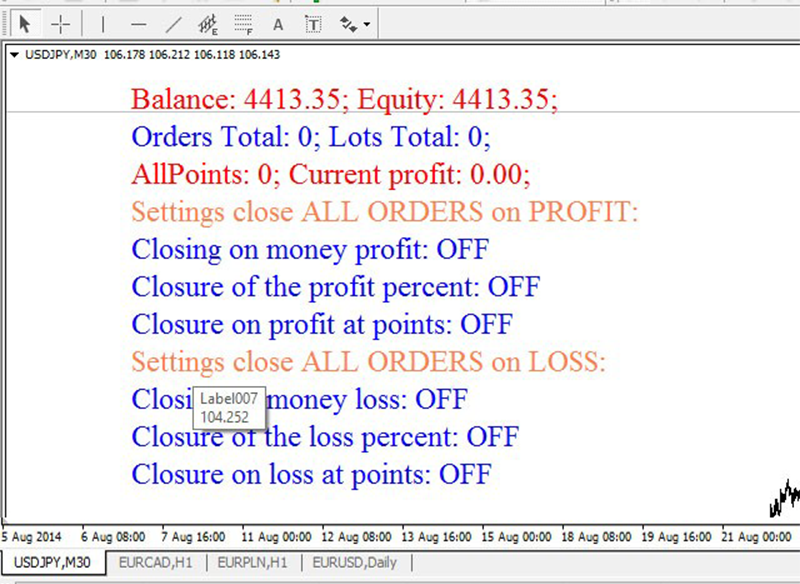
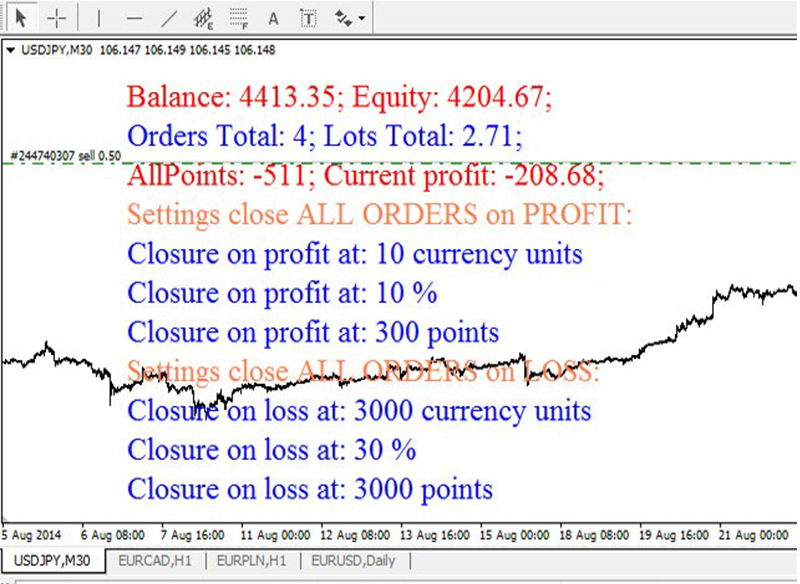
The Expert Advisor shows an info panel containing the data on:

    • The account status and equity.
    • The total number of open orders on the account and the total volume of lots.
    • Number of points on the market, current profit/loss.
    • Closing profit by monetary terms ON/OFF.
    • Closing profit by percentage ON/OFF.
    • Closing profit by points ON/OFF.
    • Closing loss by monetary terms ON/OFF.
    • Closing loss by percentage ON/OFF.
    • Closing loss by points ON/OFF.

    The info panel supports 5 languages: English, Russian, Chinese (hieroglyphs should be enabled in the operating system), Spanish and Portuguese.


    Settings

    • Name = "Closers"  EA name. This setting affects nothing.
    • Lang_of_Info_Panel = "1-Eng; 2-Rus; 3-Zho/Chi; 4-Spa; 5-Por."
    • Language = 1  select the info panel language.
    • EnableMoney = false  enable closing profit by monetary terms.
    • money = 5  how much profit should be closed in currency.
    • EnablePercent = false  enable closing profit by percentage.
    • Percent = 1  how much percentage should be closed.
    • EnablePoints = false  enable closing profit by points.
    • Points = 30  how many points should be closed.
    • EnableMoneyLoss = false  enable closing loss by monetary terms.
    • moneyLoss = 30  when the specified loss level (in monetary terms) is reached, positions are closed.
    • EnablePercentLoss = false  enable closing loss by percentage of the deposit.
    • PercentLoss = 30  loss percentage, at which the orders are closed.
    • EnablePointsLoss = false  enable closing by points.
    • PointsLoss = 30  the orders are closed when the specified loss level in points is reached ("old points" should be set; the EA adjusts to "new" ones on its own).
    • X = 100  X coordinate for the top right part of the info panel.
    • Y = 30  Y coordinate for the top right part of the info panel.
    • FontSize = 18  font size for the info panel.


    Produtos recomendados
    One Click Trader is a tool designed for MetaTrader 4 platform, which enables you to take your trading to the next level. It enables you to open, manage and close your trades in simple an efficient way by just one click of your mouse button. Up arrow minimizes the OCT panel Down arrow maximizes the OCT panel Right arrow displays the next panel with additional features Left arrow hides the panel with additional features Red SELL button enables you to open short market orders Red SELL STOP button e
    RiskManager
    Roman Zhitnik
    5 (4)
    The Expert Advisor is a risk manager helping users to control their trading. In the settings, it is possible to specify the parameters at which the risk manager force closes the opened trades and closes the terminal as well, if it is needed to prevent opening trades on emotions, which do not correspond to the trading strategy. Risk Manager settings Check limit to close - check the equity limit Limit to close (account currency)   - equity limit that is checked when  Check limit to close is activ
    Crosshair é uma ferramenta fantástica que simplifica a nossa análise gráfica trazendo as velas de preço perfeitamente de acordo com os valores indicadores nas subjanelas. Pode activá-lo e desactivá-lo através de uma única pressão no "C" do seu teclado, e fornece um modo de régua para medições precisas que podem ser activadas e desactivadas através da tecla "R" do seu teclado. Por favor, veja o nosso pequeno vídeo tutorial incorporado abaixo para ver como funciona.
    This tool monitors your current Expert Advisors and manages stop losses and take profits. You can customize which EAs and/or which currencies to monitor. It is primarily meant for EAs that you feel manage stop losses and/or take profits poorly. If you want this tool to be able to monitor manual trades, please use '0' (zero) as the magic number. Supports hidden stoploss and take profit Supports ATR-calculated dynamic stoploss Supports Breakeven for individual trades Supports Trailing stop Lower r
    MultiStopOrder
    Agus Wahyu Pratomo
    MultiStopOrder Tis Script will help us to put multiple stop order with single one click. This is a script not an EA Will place BUYSTOP and SELLSTOP with single click Main Feature 1. Put Multiple Stop Order 2. Specify how much stop orders will make 3. Set distance from current price 4. Set distance for each stop order 5. Set Take Profit dan Stop Loss  6. Use it on MT4 7. Set lot size with minmum 0.01 lots 8. Use with single one clicks
    Introducing RabihFx Trade Manager New vesrion 2022 Update at 15/11/2022 and 100 activations now Rabihfx Trade Manager V2 is here with added Features click here Rabihfx Trade Manager is a trading utility tool (EA) allow you to place 3 orders with 3 take profit levels with custom  lot size for each trade with a stop loss  If your signal provider give you 3 take profit levels and a stop loss you will place these levels in  rabihfx trade manager with custom lot size for each level  and you choose
    MT4 Local Trade Copier A file-based trade copying system for MetaTrader 4 that synchronizes trades between Master and Client terminals on the same computer or network. Key Features Master/Client Architecture : One Master terminal broadcasts trades, multiple Client terminals can receive and replicate them File-Based Communication : Uses shared folder system for reliable inter-terminal communication Flexible Lot Management : Copy exact lot sizes or use fixed lot sizes on client accounts Customizab
    This EA helps to Close all Positions opened. It saves you the time of closing multiple positions manually. Parameters: Buy:  Close Buy Positions Only Sell:  Close Sell Positions Only Buy & Sell: Close Buy & Sell Positions Pending: Close Pending Orders More Advanced MT4 version available at:   https://www.mql5.com/en/market/product/93468?source=Unknown%3Ahttps%3A%2F%2Fwww.mql5.com%2Fen%2Fmarket%2Fmy More Advanced MT5 version available at:  https://www.mql5.com/en/market/product/93301?source=Unk
    Send periodic (Health Check) notification from your MT4 terminal to your mobile phone to be sure that your MT4 terminal is still running. When you did not receive the notification, it means that your terminal is unavailable. Optional information like Account Equity and Trading Pairs are also available. Notification Period - 1 Hour, 2 Hours, 4 Hours, 8 Hours, 12 Hours, 24 Hours Attach EA to any H1 chart
    Utility TimeLs Close Positions é uma ferramenta para gerenciar e automatizar o fechamento de posições no MetaTrader 5. Ela permite controle flexível sobre quando e como as posições abertas são encerradas, com base em horário, símbolo, direção, número mágico e comentário. Você pode desativar as negociações em dias específicos da semana Você pode definir um horário específico para fechar todas as posições abertas Você pode filtrar os fechamentos por símbolo, direção (compra/venda), número mágico o
    FastMove
    Adrian Ferreyra
    FastMove is a panel with 5 buttons, a notification area and a text entry. Its goal is to enable quick and simple execution. Buttons: MOVE - Move the interface BUY - Start of buy process SELL - Start of sell process L - Select quantity of lots % - Select quantity of percent of balance Keyboard inputs ' ESC ' - Cancels the operation or return to the previous stage. ' F ' - Lock or unlock interface to prevent accidental executions. M - Move the interface. P - Exchange between pending orders or mark
    AW Metatrader to Telegram
    AW Trading Software Limited
    Um sistema automatizado para enviar notificações para que nenhum de seus assinantes perca seus eventos de negociação do seu terminal de negociação. Um utilitário que envia notificações ao mensageiro do Telegram sobre quaisquer operações de negociação em sua conta. Instruções passo a passo para conectar o utilitário a um canal no Telegram ->   AQUI   / MT5 ->   AQUI Vantagens: Fácil configuração e instruções detalhadas, Possibilidade de enviar screenshots ajustáveis, Texto de notificação persona
    TickChart
    Boris Sedov
    5 (1)
    Tick Chart — full-featured chart for MetaTrader 4. A utility for creating and working with a tick chart in the MetaTrader 4 terminal. You can create a tick chart that works exactly the same as a regular chart. You can apply indicators, Expert Advisors and scripts to the tick chart. You get a fully functional tick chart on which you can work just as well as on a regular chart. You can enable the output of the Ask price data. The data are generated in the form of the upper shadow of a tick bar. Fr
    Hedge 120
    Hassane Zibara
    HEDGE   120   is an EA that opens an order if the market moves an adverse will make a safe zone . Hedging with Forex is a strategy used to protect one's position in a currency pair from an adverse move. It is typically a form of short-term protection when a trader is concerned about news or an event triggering volatility in currency markets. The main reason that you want to use hedging on your trades is to limit risk. Hedging can be a bigger part of your trading plan if done carefully. I
    Overview The script displays information about the trade account and the current financial instrument. Information about the trade account: Account - account number and type (Real or Demo); Name - name of the account owner; Company - name of a company that provide the access to trading; Server - trade server name; Connection State - connection state; Trade Allowed - shows whether trading is allowed on the account at the moment; Balance - account balance; Equity - account equity; Credit - amount
    Indicator Values Panel
    AL MOOSAWI ABDULLAH JAFFER BAQER
    Indicator Values Panel – Your Ultimate Indicator Monitoring Solution! Are you tired of constantly switching between indicators to check values? Want a simple, elegant, and real-time solution that puts all key indicator readings in one place? Indicator Values Panel is the ultimate utility for traders who want a clear and concise display of important indicator values – directly on their chart! What is Indicator Values Panel? Indicator Values Panel is a sleek, easy-to-use utility that provides rea
    Smart EA Summary   is an advanced and intelligent tool for managing and analyzing profits in   MetaTrader 4 , specifically designed to display a clear and dynamic summary of all Expert Advisors (EAs) and   manual trades   directly on the chart. Click Here for MT5 Version * Introductory Offer : the current price is only   59 USD   After the first 10 purchases, the price will increase to   75 USD , and gradually up to  99  USD   with upcoming versions. - Get it now at the discounted price and be
    Hedge Trader
    Mohamed Amine Talbi
    Hedge Trader is a panel that helps traders who use the hedging strategy in their trading. The panel style in simple and intuitive, and have the necessary shortcuts a fast trader would need for fast order execution. Features: - Auto double the lot after executing an order. The user only specifies the initial order, then the panel will automatically double the lot after an order execution. - Using basket for auto closing all orders on a predefined floating profit (with the possibility to turn it
    Smart Keys Sniper Entry
    Stephen Sanjeeve Sahayam
    Este gerenciador de negociação 2 em 1 é ideal para negociar breakouts de velas. Pode custar a média de uma negociação colocando ordens de limite adicionais em pullbacks. Isso garante que você obtenha o melhor preço em todas as suas posições e um RR mais alto em suas vitórias. O risco é calculado pela altura da vela fechada mais recentemente. Os botões do assistente comercial ajudam a gerenciar todos os pedidos feitos manualmente. Use-o com qualquer método de entrada; ação de preço ou indicador
    Partial Close MT4
    Ahmed Alaoui Chrifi
    This is a very simple, and easy-to-use Trade Manager with features like   Auto Partial Close, Auto Stop-loss, Breakeven. EA  closes a profitable position in partial closes when the price moves first in the direction of profits, and then comes back. EA monitors the position. If the price moves in the direction of profits, then ea establish the first level of rollback price at a distance. If the price continues to move in the direction of profits, this level of profit continues modifying this lev
    Market Monitor
    Rodrigo Rethka Goncalves
    Market Monitor – Smart Asset Performance Dashboard for MT4 Turn your MetaTrader 4 into a professional trading intelligence center! Market Monitor is a powerful monitoring tool that displays, in real time, the most relevant performance metrics of each symbol being traded — helping you make faster, smarter, and more strategic decisions. What Does This Indicator Do? Market Monitor scans all open and historical orders, consolidates the data by symbol, and displays everything in visual pa
    Introducing the OrderManager: A Revolutionary Utility for MT4 Manage your trades like a pro with the all-new Order Manager utility for MetaTrader 4. Designed with simplicity and ease-of-use in mind, the Order Manager allows you to effortlessly define and visualize the risk associated with each trade, enabling you to make informed decisions and optimize your trading strategy.  Key Features: Risk Management: Define the risk of your trades quickly and easily, allowing you to make better decisio
    Order Multiplier
    Benjamin Zaufall
    3.5 (2)
    This experts helps you with increasing your signal volume. Everytime the signal opens a trade, the experts creats a specific amount of copies of this trade. Evertime the signal closes a trade, the expert closes all the copies of the singal trade. Input parameters: - amount_of_copies: The amount of copies the expert should create - interval_in_seconds: How often the expert should look for new orders to copy or closed orders, to close copies - lot_size_of_copies: The lot size of the new copies
    Program for automatic placement of stop loss and take profit orders. Values are calculated as points distance from open price. BreakEven option is also included. all options could be applied to BUY, SELL separately or together. Enter values ​​in points in the fields on the right side of the menu and press dedicated button to aplly your settings. If in doubt, The instruction is displayed in the tooltip.
    FREE
    Risk Manager for MT4
    Sergey Batudayev
    4.6 (10)
    O Expert Advisor Risk Manager para MT4 é um programa muito importante e, na minha opinião, necessário para todos os traders. Com este Expert Advisor você poderá controlar o risco em sua conta de negociação. O controle de risco e lucro pode ser realizado tanto em termos monetários quanto em termos percentuais. Para que o Expert Advisor funcione, basta anexá-lo ao gráfico de pares de moedas e definir os valores de risco aceitáveis ​​na moeda de depósito ou em % do saldo atual. Funções do consu
    This tool can help you close all open orders with one click, just click "Close all". If you only want to close the profitable orders, click the "Close profitable" button. After clicking, all the floating orders will be closed. All orders will be liquidated; if you only want to close the orders with floating losses, click the "Close losable" button. After clicking, all orders with floating losses will be liquidated.
    What Trades Manager can do for your trades . Collect all order positions into one chart (pict. 1). All orders will be grouped by pair symbol , sum of order positions, lots, running pips, and profit/losses. All orders will be summarized and displayed at the bottom of the panel. You can set target profit, stop loss and placing stop-profit automatically to each order (pict. 4). From one chart, it will be easier to monitor and manage all orders without moving to another chart. The green color is sur
    BasketCloser
    Carlos Mendez Sanchez
    BasketCloser — Intelligent basket close by profit or loss Take control of outcomes: set a money target to close all positions when the basket reaches that profit, and a global loss cap to stop bad streaks early. Works per symbol or across the whole account, with an option to include pending orders. A clean on-chart panel shows orders, total lots, and aggregated P/L in real time. Does not open trades. It only manages exits: fast and consistent. Why choose it Consistent results: clo
    The professional utilities "Ichimoku Waves Meter" to analyse graphs using the correct interpretation of Ichimoku kinkōhyō! Is a graphic program that allows traders to quickly and easily measure the proportions between the indicated points on the price graph. This time and price indicator is a basic tool for analysing the chart according to the Ichimoku strategy on the MT4 platform. Using this tool allows an insightful and complete analysis of time waves as well as price waves in a very short ti
    automatically sets a pre set take profit and stop loss on all orders that lack the selected stop(orders without sl/tp or both). This enables quicker opening of orders especially if you use a common take profit, stop loss or both for all orders of a current pair. You only need to open orders without having to calculate your stops and no matter how many orders you have opened the EA will set stops for you as long as you have attached the EA on the currency pairs chart. For pending orders the EA
    Os compradores deste produto também adquirem
    Local Trade Copier EA MT4
    Juvenille Emperor Limited
    4.96 (108)
    Experimente uma cópia de negociação excepcionalmente rápida com o Local Trade Copier EA MT4 . Com sua fácil configuração de 1 minuto, este copiador de negociações permite que você copie negociações entre vários terminais MetaTrader no mesmo computador Windows ou em um Windows VPS com velocidades de cópia ultra rápidas de menos de 0.5 segundos. Seja você um trader iniciante ou profissional, o Local Trade Copier EA MT4 oferece uma ampla gama de opções para personalizá-lo de acordo com suas necess
    Trade Assistant MT4
    Evgeniy Kravchenko
    4.42 (193)
    Ajuda a calcular o risco por comércio, a fácil instalação de uma nova encomenda, gestão de encomendas com funções de fecho parcial, trailing stop de 7 tipos e outras funções úteis. Materiais e instruções adicionais Instruções de instalação - Instruções para a aplicação - Versão de teste da aplicação para uma conta de demonstração Função de linha Mostra no gráfico a linha de Abertura, Stop Loss, Take Profit. Com esta função é fácil definir uma nova ordem e ver as suas características adicionais
    Bem-vindo ao Trade Manager EA—uma ferramenta de gestão de risco criada para tornar o trading mais intuitivo, preciso e eficiente. Não é apenas uma ferramenta para executar ordens, mas uma solução abrangente para planejamento de operações, gerenciamento de posições e controle de risco. Seja você um iniciante, trader avançado ou scalper que precisa de execução rápida, o Trade Manager EA adapta-se às suas necessidades, oferecendo flexibilidade em todos os mercados, desde forex e índices até commodi
    The product will copy all telegram signal to MT4   ( which you are member  ) , also it can work as remote copier.  Easy to set up, copy order instant, can work with almost signal formats, image signal, s upport to translate other language to English Work with all type of channel or group, even channel have "Restrict Saving Content", work with  multi channel, multi MT5 Work as remote copier: with signal have ticket number, it will copy exactly via ticket number. Support to backtest signal. How to
    Copy Cat More Trade Copier MT4 (Cópia Gato MT4) não é apenas um simples copiador local de operações; é uma estrutura completa de gestão de risco e execução, projetada para os desafios atuais do trading. Desde desafios de prop firms até a gestão de contas pessoais, adapta-se a cada situação com uma combinação de execução robusta, proteção de capital, configuração flexível e tratamento avançado das operações. O copiador funciona tanto no modo Master (emissor) quanto no modo Slave (receptor), sincr
    Crystal Trade Manager PRO – Sistema Avançado de Gestão de Risco e Controle de Operações para MT4 Versão Gratuita: https://www.mql5.com/en/market/product/150632 Visão Geral Crystal Trade Manager PRO (CTM) é uma ferramenta profissional de execução de ordens e gestão de risco desenvolvida para MetaTrader 4. Foi projetada para traders que necessitam de disciplina, forte proteção de capital e automação inteligente dentro do MT4. O sistema controla o risco, protege o patrimônio da conta, aplica limite
    Exp COPYLOT CLIENT for MT4
    Vladislav Andruschenko
    4.65 (66)
    Copiadora comercial para MetaTrader 4. Ele copia negociações, posições e pedidos em forex de qualquer conta. É uma das melhores copiadoras comerciais  MT4 - MT4, MT5 - MT4 para a versão COPYLOT MT4  (ou MT4 - MT5 MT5 - MT5 para a versão COPYLOT MT5 ). Versão MT5 Descrição completa +DEMO +PDF Como comprar Como instalar    Como obter arquivos de log    Como testar e otimizar    Todos os produtos da Expforex Versão da copiadora para o terminal MetaTrader 5 ( МТ5 - МТ5, МТ4 - МТ5 ) -  Copylot Cli
    Trade Dashboard MT4
    Fatemeh Ameri
    4.96 (53)
    Tired of complex order placement and manual calculations? Trade Dashboard is your solution. With its user-friendly interface, placing orders becomes effortless, by a single click, you can open trades, set stop loss and take profit levels, manage trade lot size, and calculate risk to reward ratios, allowing you to only focus on your strategy. Say goodbye to manual calculations and streamline your trading experience with Trade Dashboard. Download  Demo Version  right now. You can find  Details of
    Trade copier MT4
    Alfiya Fazylova
    4.58 (33)
    Trade Copier é um utilitário profissional projetado para copiar e sincronizar negociações entre contas de negociação. A cópia ocorre da conta / terminal do fornecedor para a conta / terminal do destinatário, instalada no mesmo computador ou vps. Antes de comprar, você pode testar a versão demo em uma conta demo. Versão de demonstração aqui . Instruções completas aqui . Principais funcionalidades e benefícios: Suporta a cópia de MT4> MT4, MT4> MT5, MT5> MT4, incluindo contas "MT5 netting". Os mod
    Take a Break
    Eric Emmrich
    5 (31)
    One tool to protect all your EAs — news filter, equity protection, time filter and more — free demo available Take a Break has evolved from a basic news filter into a comprehensive account protection solution. It pauses your other Expert Advisors during news events or based on custom filters. When trading resumes, it automatically restores your entire chart setup , including all EA settings. Typical use cases: One news filter for all your EAs. Pause trading during news or high volatility — and c
    TradePanel MT4
    Alfiya Fazylova
    4.85 (92)
    Trade Panel é um assistente de negociação multifuncional. O aplicativo contém mais de 50 funções de negociação para trading manual e permite automatizar a maioria das tarefas de negociação. Links úteis: Versão de teste do aplicativo para conta de demonstração Instruções para a aplicação Comércio. Permite realizar operações de negociação com um clique: Abrir ordens pendentes e posições com cálculo automático de risco. Abrir várias ordens e posições com um clique. Abrir uma grade de ordens. Fechar
    Veja instantaneamente o seu histórico de negociações fechadas por dia e semana, as suas negociações abertas atuais e a exposição forex num gráfico! Utilize o mapa de calor para identificar operações lucrativas e onde está o seu drawdown atual dentro do seu portfólio de negociação. Botões de fecho rápido Utilize os botões de fecho rápido para fechar todas as operações num único símbolo, fechar operações individuais por completo ou obter lucros ou perdas parciais com o clique de um botão. Chega
    News Filter EA: Advanced Algo Trading Assistant News Filter EA is an advanced algo trading assistant designed to enhance your trading experience. By using the   News Filter EA , you can integrate a Forex economic news filter into your existing expert advisor, even if you do not have access to its source code. In addition to the news filter, you can also specify   trading days   and   hours   for your expert. The News Filter EA also includes   risk management   and   equity protection   features
    O MT4 para Telegram Signal Provider é uma ferramenta fácil de usar e totalmente personalizável que permite o envio de sinais para o Telegram, transformando sua conta em um provedor de sinais. O formato das mensagens é totalmente personalizável! No entanto, para uso simples, você também pode optar por um modelo predefinido e habilitar ou desabilitar partes específicas da mensagem. [ Demonstração ]   [ Manual ] [ Versão MT5 ] [ Versão Discord ] [ Canal do Telegram ]  New: [ Telegram To MT5 ] Conf
    Ultimate MT4 to Telegram (UMT) sends controlled trades (via symbol, magic, comment) to your telegram channel. It sends open and closed trades, including pending orders and TP/SL modifications, along with chart screenshots, to any telegram channel. Additionally, you can send trade reports of open trades and summary profit/pip reports for day, week, or month. You can customize the design of the trade actions or reports with variables and emoticons.  A beautiful panel allows you to visualize all t
    O Risk/Reward Tool é um Expert Advisor de nível profissional projetado para revolucionar a forma como você planeja, visualiza e executa operações no MetaTrader 4. Seja você um trader discricionário que valoriza a gestão precisa de risco ou um desenvolvedor de estratégias que precisa testar configurações de trading visualmente, esta ferramenta fornece tudo o que você precisa em uma interface elegante e intuitiva. Diferente das calculadoras de posição básicas, o Risk/Reward Tool combina planejamen
    Telegram Signal pro
    Sara Sabaghi
    4.86 (7)
    What is it? Think about it, you can send all the orders/positions info to your telegram channel or group to create your community or VIP signals on telegram. Position info means this EA forward all of your new positions open details (Open price, Open time, Position Type, position Symbol and volume), positions changes ( SL or TP modifying or pending price changes) and position close (Close price, profit or loss, position duration time) and also EA Send NEWS alert (Economic calendar event) on you
    Rocket FX Trading Manager PRO Note: Once you download the manager, message me for the background files The Ultimate All-in-One Trade Management Solution for MetaTrader 4 Version:   4.5 |   Platform:   MetaTrader 4 |   Category:   Utility / Trade Manager   Overview Rocket Fx Trading Manager v4.5 is a comprehensive, all-in-one trade management system designed to transform your trading experience. This powerful utility combines   intelligent position sizing ,   multi-target order placement
    This EA is fully automated , it is built based on  the method of catching the pop-up Alert event and forwarding them to Telegram Channel/Group. Parameters of the EA: -------- <EA Settings> -------- Magic Number:   The identifying (magic) number of the currently selected order. Bot name:   Name of the Expert Advisor. Allow forward Alert: Enable/ Disable Forward Alert. Do not send messages after the current time (seconds) . Number of rows to read from list (>= 4...| affect processing speed). --
    VirtualTradePad mt4 Extra
    Vladislav Andruschenko
    4.86 (59)
    Painel de negociação para negociação em 1 clique.  Trabalhando com posições e pedidos!  Negociar a partir do gráfico ou do teclado. Usando nosso painel de negociação, você pode negociar com um clique no gráfico e realizar operações de negociação 30 vezes mais rápido do que o controle MetaTrader padrão. Cálculos automáticos de parâmetros e funções que tornam a vida mais fácil para um trader e ajudam-no a conduzir suas atividades de trading com muito mais rapidez e conveniência. Dicas gráficas e i
    DrawDown Limiter MT4
    Haidar Lionel Haj Ali
    5 (8)
    Drawdown Limiter EA You are in the right place if you were searching for Drawdown control, Drawdown limiter, Balance protection, Equity Protection or Daily Drawdown Limit related to Prop Firm, FTMO, or Funded account trading, or if you want to protect your trading account. Have you suffered from controlling your drawdown when trading funded accounts? This EA is meant for you. Prop firms usually set a rule called “Trader Daily Drawdown”, and if it is not respected, you are disqualified.  I am an
    Copier4Fee Advanced
    Vladimir Tkach
    4.75 (16)
    The utility copies trades from the signal provider accounts (master accounts, one or multiple providers) to unlimited number of receiver accounts (slave accounts).  Attention! Y ou need to use identifiers (Provider number) of the same length if you use several master copiers. For example. 1, 2, 3 or 11, 13, 22. The copying can be set in the opposite direction. The comments with all the recently performed actions are displayed on the screen to monitor the utility actions in slave mode. To avoid p
    AW Grids Maker
    AW Trading Software Limited
    4.33 (3)
    O "AW_Grids_Maker" é usado para construir grades a partir de ordens pendentes. O utilitário é universal, possui configurações flexíveis e uma interface de painel intuitiva. O programa constrói redes a partir de ordens STOP e LIMIT com o passo necessário, utilizando o multiplicador de volume de posição. Versão MT5 -> AQUI / Solução de problemas -> AQUI Vantagens: Utiliza pedidos pendentes de todos os tipos. Configuração simples e flexível. Um painel de utilidades multifuncional e com design ele
    Comprehensive on chart trade panel with the unique ability to be controllable from mobile as well. Plus has a library of downloadable configuration, e.g. exit rules, extra panel buttons, pending order setup and more. Please see our product video. Works with all symbols not just currency pairs. Features On chart panel plus controllable from free app for Windows, iPhone and Android Built-in script engine with library of downloadable configuration, e.g. add 'Close All Trades in Profit' button, exit
    Exp4 Duplicator
    Vladislav Andruschenko
    4.5 (22)
    O Expert Advisor   repete   negociações e posições um número predefinido de vezes em sua conta   MetaTrader 4   . Ele copia todas as negociações abertas manualmente ou por outro Expert Advisor. Copia sinais e aumenta muito a partir de sinais   ! Aumenta o lote de outros EAs. As seguintes funções são suportadas: lote personalizado para negociações copiadas, Stop Loss de cópia, Take Profit, uso de stop móvel. Versão MT5 Descrição completa +DEMO +PDF Como comprar Como instalar     Como obter ar
    Custom Alerts: Monitore vários mercados e não perca nenhuma oportunidade importante Visão geral Custom Alerts é uma solução dinâmica para traders que desejam monitorar configurações potenciais em vários instrumentos a partir de um único local. Integrando dados de nossas ferramentas principais — como FX Power, FX Volume, FX Dynamic, FX Levels e IX Power — o Custom Alerts notifica automaticamente sobre movimentos importantes do mercado, sem a necessidade de alternar entre diversos gráficos ou pe
    Oferta Especial para Traders – 40% de desconto Advanced Trade Manager – A solução completa para um trading manual mais rápido, inteligente e seguro. Transforme o seu trading manual com o NextGen Trade Manager AI – o painel profissional no gráfico que combina a execução instantânea, o planeamento visual das operações e a gestão robusta de riscos numa ferramenta intuitiva. Execute ordens, gerencie riscos e proteja os lucros mais rapidamente do que nunca, tudo sem sair do seu gráfico. Perfeito p
    Copiadora->Interação de interface conveniente e rápida, os usuários podem usá-la imediatamente       ->>>> Recomendado para uso em computadores Windows ou VPS Windows Características: Configurações de negociação de cópias diversificadas e personalizadas: 1. Diferentes modos de lote podem ser definidos para diferentes fontes de sinal 2. Diferentes fontes de sinal podem ser definidas para negociação de cópias direta e reversa 3. Os sinais podem ser definidos com comentários 4. Se deve calibrar o
    Este é um painel de negociação visual que ajuda você a realizar e gerenciar operações facilmente, evitando erros humanos e aprimorando sua atividade comercial. Ele combina uma interface visual fácil de usar com uma abordagem sólida de gerenciamento de riscos e posições. [ Guia de instalação | Guia de atualização | Solução de problemas | FAQ | Todos os produtos ] Surpreendentemente fácil de usar Negocie facilmente a partir do gráfico Negocie com gerenciamento preciso de riscos, sem complicações
    Telegram to MT4 Coppy
    Sergey Batudayev
    3.75 (8)
    Telegram para MT4:   A solução definitiva para cópia de sinais Otimize suas negociações com   o Telegram para MT4   , o utilitário de última geração desenvolvido para copiar sinais de negociação diretamente de canais e chats do Telegram para sua plataforma MetaTrader 4 — sem a necessidade de DLLs. Esta solução robusta garante a execução perfeita de sinais com precisão incomparável e opções de personalização, economizando seu tempo e aumentando sua eficiência. [ Instructions and DEMO ] Principais
    Mais do autor
    Dual View HTF Patterns Pro é uma ferramenta analítica de alto nível desenvolvida para traders manuais que operam com base em Price Action e análise multitemporal. Ele resolve de forma eficaz o problema da "visão de túnel", permitindo monitorar a estrutura de mercado e os padrões de velas de tempos gráficos superiores (HTF) diretamente no seu gráfico de execução habitual. MT4-version:   https://www.mql5.com/en/market/product/166824 Por que você precisa deste indicador? Operar em tempos gráficos m
    TickCounter MT5
    Evgeniy Zhdan
    5 (1)
    O indicador TickCounter conta os ticks para cima e para baixo em cada nova barra. O cálculo começa a partir do momento em que o indicador é colocado no gráfico. As barras do histograma representam: Barras amarelas - número total de ticks; Barras azuis - marcam PARA CIMA; Barras vermelhas - marca para BAIXO. Se a barra azul não estiver visível, há mais marcas para baixo e a barra vermelha é exibida em cima da azul (a camada vermelha está acima da azul). MT4 version:  https://www.mql5.com/en/ma
    Divergence indicator 10 different indicators. Finding and displaying classic and hidden divergences. Indicators in which divergences are searched: MACD MACD Histogram; RSI; Stochastic; CCI; momentum; OBV; VWmacd; Chaikin Money Flow; Money Flow Index. This is a replica of the indicator from the   tradingview   resource, adapted for the MT5 terminal. MT4 version available here:  https://www.mql5.com/en/market/product/87846 Settings: Bars in history for analysis - number of bars for analysis; D
    Indicador para determinar o plano e a tendência. Se o preço estiver abaixo de qualquer um dos dois histogramas e duas linhas (vermelha e azul), esta é uma zona de venda. Ao adquirir esta versão do indicador, versão MT4 para uma conta real e uma demo - como um presente (para receber, escreva-me uma mensagem privada)! Se o preço estiver acima de qualquer um dos dois histogramas e duas linhas (vermelha e azul), esta é uma zona de compra. Versão MT4: https://www.mql5.com/en/market/product/3793 Se
    Buy and sell zones
    Evgeniy Zhdan
    5 (2)
    Indicador para determinar o plano e a tendência. Se o preço estiver abaixo de qualquer um dos dois histogramas e duas linhas (vermelha e azul), esta é uma zona de venda. Ao adquirir esta versão do indicador, versão MT4 para uma conta real e uma demo - como um presente (para receber, escreva-me uma mensagem privada)! Se o preço estiver acima de qualquer um dos dois histogramas e duas linhas (vermelha e azul), esta é uma zona de compra. Versão MT4:   https://www.mql5.com/en/market/product/3793 S
    SuperTrend
    Evgeniy Zhdan
    2.5 (2)
    The Supertrend Expert Advisor The Supertrend Expert Advisor with averaging elements. It has been developed during three months until I finally got good results. It is not a scalper. The minimum balance to start trading - 100 $. Is automatically adjusted to the 4 and 5-digit prices. Has an efficient risk management system. The lot and limit on the maximum lot is automatically calculated based on the settings specified in the EA. As a result, you have a complete automated trading system. Download
    Stardust
    Evgeniy Zhdan
    StarDust searches for divergences in the values of several indicators considering them as signs of flat and enters the market if a relatively steady trend is detected. The Expert Advisor trades "basic" symbols with a low spread. The best results are achieved on М15. The EA automatically adjusts to 4 and 5-digit quote flows. Settings Comment_to_orders – comment to a placed order. The field can be left blank if no comment is required. MM – enable money management with automatic setting of a worki
    Top Floor
    Evgeniy Zhdan
    The EA catches the price when it moves against the trend in an effort to open an order in an opposite direction (direction of the main trend). Screenshots illustrate examples of entries and the strategy gist. The EA uses stop losses depending on values of ATR. Settings: Lot_ - if Risk_ = 0, the EA will trade this lot; Risk_ - risk per one trade. Stop loss is taken into account; koeff_ATR - coefficient multiplied by the ATR value to calculate stop loss (the bigger the value, the bigger stop loss
    FastBoom
    Evgeniy Zhdan
    The FastBoom EA finds the most probable points of price pullback/reverse and places an order. It places averaging orders if the price moves further against take profit. Settings of the EA: Lots - initial lot; LotExponent - multiplier for following orders (Martingale). 1 - no multiplier. TakeProfit - take profit in points; Stochastic Settings InpKPeriod - K Period of Stochastic InpDPeriod - D Period of Stochastic InpSlowing - Stochastic Slowing LevHigh - level for sell positions of Stochastic L
    The Expert Advisor calculates the double/triple divergence of volumes, and starts trading. It uses a unique formula of lot calculation, which greatly improves stability of trading. Recommended TF - 1h. Currency pair - EURUSD , but the EA can be used on any trading instruments which are not subject to high volatility. Settings mode - trading direction can be set manually; close - order close level (details on the screenshot); Step between orders - step between orders in points; Maximum orders -
    OrderOnLine
    Evgeniy Zhdan
    The Expert Advisor opens orders from the horizontal line, the a trader can set on any level by dragging using the mouse or by changing the line properties. For example, when a horizontal line is above the current price, the EA will open a Buy order once the horizontal line is reached. And vice versa: If the line is below the current price, the EA will open a sell order once the line is crossed. A buy crossover of the line is: opening of the current candlestick below the horizontal line; the curr
    SellerATR
    Evgeniy Zhdan
    5 (1)
    The Expert Advisor only sells. Recommended currency pairs : EURUSD; GBPUSD; USDCHF; USDJPY; USDCAD; AUDUSD; EURGBP; EURAUD; EURCHF; EURJPY; GBPCHF; CADJPY; GBPJPY; AUDNZD; AUDCAD; AUDCHF; AUDJPY; CHFJPY; EURNZD; EURCAD; CADCHF; NZDJPY; NZDUSD. Timeframe: H1. Percent% manages closing both loss-making and profitable deals based on the account overall status. Using the EA on 23 symbols mentioned above allows the robot to cope with the drawdown in case of a long trend. While positions on some pairs
    Illusion
    Evgeniy Zhdan
    3 (2)
    The Illusion EA uses the probability theory - after a series of consecutive virtual losses - i.e. right during a flat the EA already starts trading in the trend. In addition, the EA considers the ratio of bullish/bearish candles on the higher timeframes to determine the greatest probability of the price movement direction. Only 1 order can be opened at a time. In case of a loss the following order will be placed with an increased lot (the multiplication coefficient is set in the parameters). The
    O indicador calcula as áreas de parada / reversão de tendência mais prováveis, áreas de movimento de tendência confiantes. O cálculo considera: a taxa de variação de preço; o ângulo de desvio relativo do gráfico; a amplitude média dos movimentos de preços; o preço saindo de sua "zona de conforto"; os valores do indicador ATR. O indicador pode gerar um Alerta quando o preço entrar em uma área de parada / reversão. Definições Desenhe todo o comprimento? - desenhar as áreas até o final do gráf
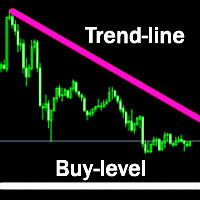
    The indicator plots a trend line and determines the levels for opening trades, in case the price goes "too far" away from the trend level. More detailed information is available in the screenshots. Settings Away from the trend line - distance from the trend line to the trades level; Arrow Signal for deals - enable displaying an arrow when the price reaches the trades level; Size of Arrow - size of the arrow; Alert Signal for deals - enable generating alerts when the price reaches the trades lev
    Turbina
    Evgeniy Zhdan
    5 (4)
    The axiom of the Forex market is that any trend will be broken. The Expert Advisor determines trend direction (the pink line), and calculates levels for opening opposite orders depending on the settings. The value of Away from the trend line for Deal will be different for each pair and timeframe, depending on the volatility of the trading instrument. Next orders can be opened with an increased lot (a static lot is used by default). See the screenshots to understand the idea of the Expert Advisor
    Odysseus
    Evgeniy Zhdan
    The Expert Advisor determines the moments of strong movements and opens a position in the direction of the most probable price movement. The strategy always uses stop loss and take profit. Several independent orders can be in the market (the maximum number is set in parameters). The goal of the EA's underlying trading system is the quantitative excess of the number of profitable deals over the number of losing ones. Recommended: EURUSD 5m; GBPUSD 5m; USDJPY 5m. The Expert Advisor is able to work
    Vise
    Evgeniy Zhdan
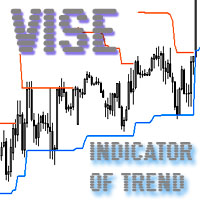
    Vise is a trend indicator. The upper and lower lines follow the price showing the prevailing price direction. Frequent breakthroughs of the upper line indicate a bullish trend, while frequent breakthroughs of the lower line indicate a bearish one. Parameters Points for UpLine - initial number of points for the upper line; Points for DownLine - initial number of points for the lower line. During the breakthrough of the upper level (line), this level shifts upwards by Points for UpLine. If the up
    Twinkle
    Evgeniy Zhdan
    Twinkle is a trend-based scalper using stop loss and take profit invisible to the broker. The EA does not look for trend reversals. The EA catches strong market movements and opens orders in the direction of the trend. Your broker will not see the order closing levels. The EA closes orders independently when reaching the take profit or stop loss levels specified in the settings. Recommended trading symbols: EURUSD M5, GBPUSD M5. ECN accounts with 5 digits quotes are recommended. Expert Advisor
    Shine
    Evgeniy Zhdan
    4.75 (4)
    This Expert Advisor implements elements of the Martingale system. Orders are opened at a specified distance from the moving average. The Parabolic SAR indicator and certain technical details are used to ensure the most accurate entries. The EA is highly customizable. It is recommended for simultaneous use on 4 currency pairs: EURUSD M15; GBPUSD M15; USDJPY M15; USDCAD M15. Despite good stability, it is advisable to disable the EA operation during the days rich in news releases. Configurations P
    LuckyCase
    Evgeniy Zhdan
    LuckyCase is an Expert Advisor with martingale elements. The EA strategy is based on a significant "deviation" of the price from SAR inadicator and the Bands levels breakthrough point. The money management system is an essential part of the EA. It starts working after a trade is opened. Trades are closed after accumulating specified points of market orders, by deposit % or after an opposite side of the channel is broken through. The default EA settings are meant for: EURUSD M15; USDJPY M15. The
    Elize
    Evgeniy Zhdan
    The Elize Expert Advisor has been designed to work with the EURCHF currency pair. It considers the peculiarities of this trading instrument, its behavior and dependence on the behavior of other currencies. In particular, when the currencies of the European countries (EURUSD, GBPUSD, EURNOK, EURCHF) move in the same direction, the EA starts its operation and opens a deal in the trend direction of the European currencies. In the event of price rollbacks, the EA uses a unique method for making the
    AllTrendLines
    Evgeniy Zhdan
    4 (1)
    Brief Description of the All Trend Lines Indicator The indicator analyzes the wave structure of the market. What it displays on the chart: First. Wave pivots (semaphores) • Red markers – wave highs • Yellow markers – wave lows • Yellow-green markers – additional local extremes Second. Trend lines • Purple/blue lines – trends based on highs (resistance/support) • Beige/green lines – trends based on lows • Lines are built automatically by connecting wave pivots of the same type Third. Main trend
    FastTraffic
    Evgeniy Zhdan
    The Expert Advisor has been specifically developed for trading gold (Spot Gold). The strategy is based on Fibo levels calculated from the previous (first) candle High/Low and the width of the current and lower timeframes channel. If important Fibo levels of different orders are located in a single price channel (within a spread), the EA defines this channel as the target for price movement and starts operation. Martingale and averaging are not used. Each order is independent and is accompanied b
    Jazz
    Evgeniy Zhdan
    The algorithm of this Expert Advisor determines the significant price levels, where the trend often turns into a flat or reverses. Stochastic Oscillator serves as an additional filter of overbought/oversold zones. The EA sets stop loss and take profit after opening an order. The underlying trailing strategy applies a trailing stop. The EA is recommended for simultaneously use on three trading instruments: EURUSD M5, GBPUSD M5, EURCHF M5. Settings: Comment to order - comment to orders. MaxRisk -
    Panther
    Evgeniy Zhdan
    The Expert Advisor looks for technical analysis patterns formed on the higher (hourly) timeframe to start working on the 5-minute chart. Technical analysis patterns used: double top/double bottom, head/shoulders, flag, expanding/narrowing triangles. The Relative Vigor Index technical indicator is used as the filter for opening deals. It is based on the idea that on the bull market the closing price is, as a rule, higher, than the opening price. It is the other way round on the bear market. This
    Spook
    Evgeniy Zhdan
    The Expert Advisor calculates the divergence on the current and higher timeframes. In case the divergences coincide, the EA starts its operation. Deals have strict take profit and stop loss levels. Each deal is managed by trailing stop. The strategy involves the use of a tight stop-loss. Therefore, losing deals and/or series of losing deals are not uncommon. This EA is not suitable for those who have difficulties coping with losing deals. The EA is recommended for simultaneous use on the followi
    Grand
    Evgeniy Zhdan
    The Expert Advisor has been developed specifically for the features of the CHFJPY currency pair. The EA's algorithm determines the direction of the current trend and starts operation. In case of a price reversal within the current trend, the EA adds additional orders. If trend changes, the EA starts to work in the direction contrary to the initial grid of orders. If there were no conditions for closing orders and the trend direction changed again, the EA continues to work with the "first" grid o
    Intensive
    Evgeniy Zhdan
    The Expert Advisor algorithm determines on daily charts those candlestick patterns, which set the intraday trading direction. The trading EA determines how long the price is moving in overbought/oversold zones and starts working in the direction of the expected trend movement. Each position is accompanied with a tight stop loss and take profit. Only one active position can be open in the market. The EA was developed and tested using 99% quality quotes. The Expert Advisor has a built-in news filt
    Slender
    Evgeniy Zhdan
    The strategy of this Expert Advisor is based on a hedging system, which implies placing opposite orders. The EA algorithm determines trend beginning and opens a position in the trend direction. In case of a wrong entry, the EA tries to neutralize the drawdown through opposite (hedging) orders at a preset interval (Coefficient of counter orders). Orders are closed when one of the two values ​​is reached - profit in percent or profit in points. The EA does not use lot increase. The EA wast tested
    Filtro:
    Sem comentários
    Responder ao comentário