One Click Trader Real

One Click Trader is a tool designed for MetaTrader 4 platform, which enables you to take your trading to the next level. It enables you to open, manage and close your trades in simple an efficient way by just one click of your mouse button.

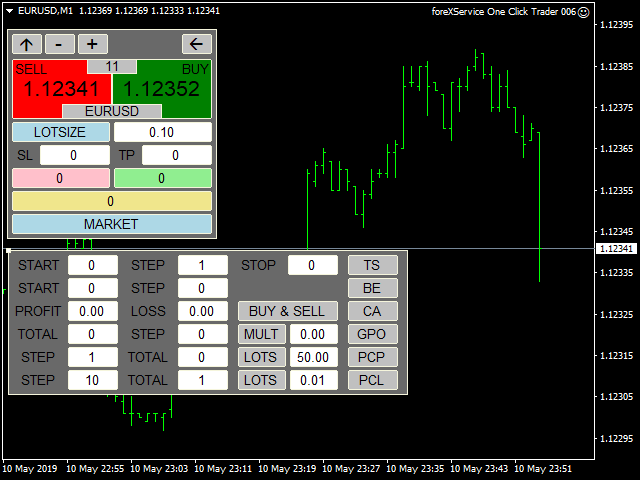
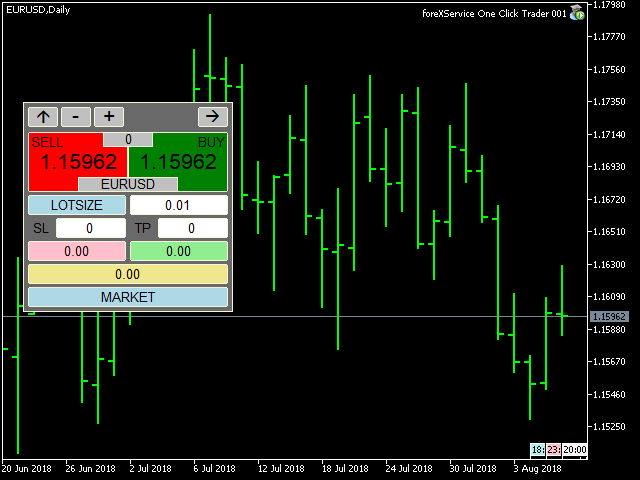
  • Up arrow minimizes the OCT panel
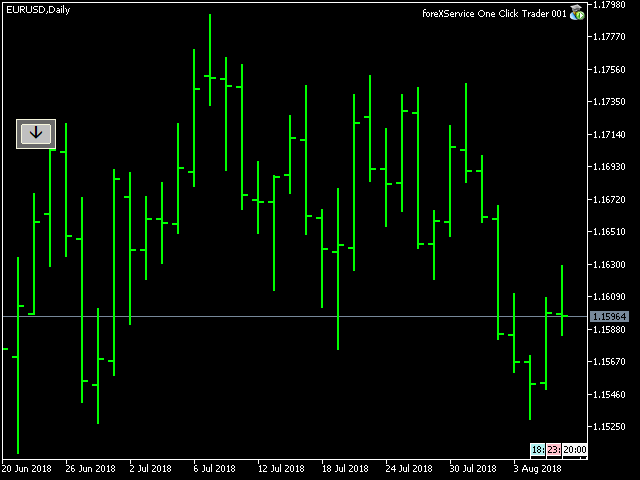
  • Down arrow maximizes the OCT panel
  • Right arrow displays the next panel with additional features
  • Left arrow hides the panel with additional features
  • Red SELL button enables you to open short market orders
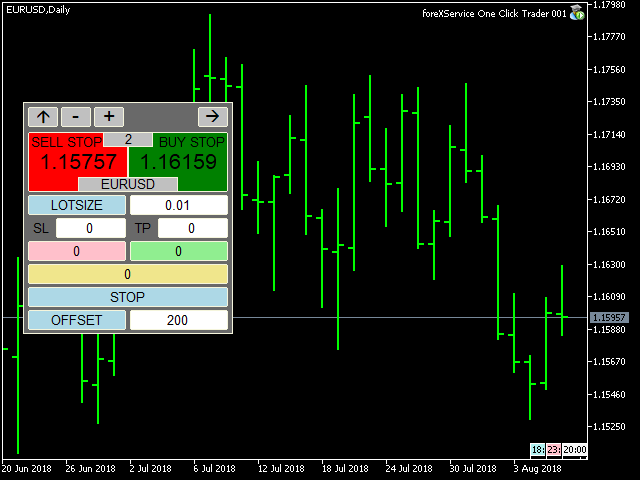
  • Red SELL STOP button enables you to open short STOP pending orders
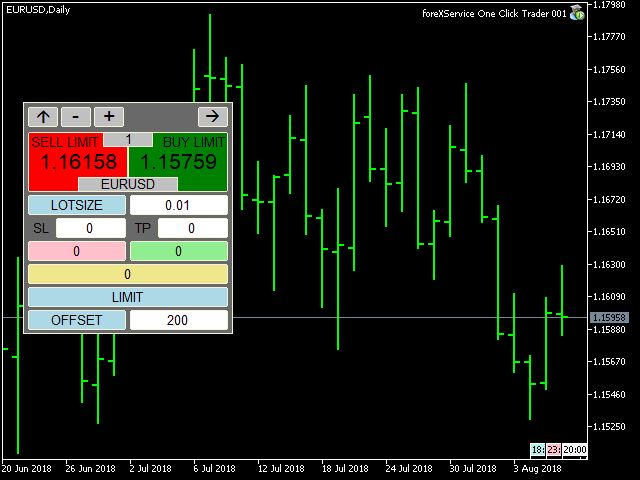
  • Red SELL LIMIT button enables you to open short LIMIT pending orders
  • Green BUY button enables you to open buy market orders
  • Green BUY STOP button enables you to open buy STOP pending orders
  • Green BUY LIMIT button enables you to open buy LIMIT pending orders
  • Light blue button PERCENT / LOTSIZE allows you to switch money management style:
  1. LOTSIZE allows you to trade with fixed lot
  2. PERCENT will adjust size of your trade to your current balance
  • SL – stop loss in PIPS, expected loss
  • TP – take profit in PIPS, expected profit
  • Pink button shows you current floating profit/loss for all opened sell trades or number of sell stop and sell limit pending orders. You can also use it to close all SELL STOP or SELL LIMIT trades.
  • Light green button shows you current floating profit/loss for all opened buy trades or number of buy stop and buy limit pending orders. You can also use it to close all BUY STOP and BUY LIMIT trades.
  • Khaki button shows current floating profit/loss on all trades or amount of all pending orders. You can also use it to close all trades.
  • Light blue button MARKET / STOP / LIMIT allows you to change order type:
  1. MARKET allows you to open trades at current market price
  2. STOP allows you to open BUY and SELL STOP with exact price or with OFFSET value, which allows you to place stop pending orders X points away from current market price.
  3. LIMIT allows you to open BUY and SELL LIMIT with exact price or with OFFSET value, which allows you to place limit pending orders X points away from current market price.
  • Light blue button PRICE / OFFSET:
  1. PRICE tells you, at which price STOP and LIMIT orders will be placed
  2. OFFSET allows you to place pending orders X points away from current market price.

Additional features panel:

  • TS button – turns trailing stop on and off (green – on, gray – off)
  1. START – level where TS is activated (in points)
  2. STEP – level, where Stop Loss price is modified (in points)
  3. STOP – level, where Stop Loss is stopped (in points)

Editing START, STEP and STOP is only possible when TS if off

  • BE button – turns break even on and off (green – on, gray – off)
  1. START – level where BE is activated (in points)
  2. STEP – level, where Stop Loss price is placed (in points)

Editing START, STEP and STOP is only possible when BE if off

  • CA (CloseAll) button – turns on and off the functions of automatic closing position on loss or profit (green color active, gray function inactive)
  1. PROFIT - profit on which all positions are closed; 0 closing for profit is not active; value in points or in amount depending on what option was selected in the showProfit variable
  2. LOSS - loss on which all positions are closed; 0 closing for loss is not active; value in points or in amount depending on what option was selected in the showProfit variable

Editing PROFIT or LOSS is not possible while CA is turned on.

  1. BUY & SELL button calculates profit / loss for all trades, both buy and sell, and if the CA function is enabled, it closes all trades in both directions.
  2. BUY | SELL button calculates the profit / loss separately for the buy trades separately for the sell trades and if the CA function is enabled, it closes trades in only one direction.


Additional settings are:

  • xPosition and yPosition, which allow you to change where OCT window is placed.
  • ShowProfit:
  1. CURRENCY – floating profit/loss in the account currency (swaps and commission included).
  2. PIPS – floating profit/loss in pips (swaps and commission included).
  • magicNumber – unique number that allows OCT to recognize its trades. Entering 0 will allow you to manage all trades, even existing ones.


One Click Trader can also be used in Strategy Tester in Visual Mode, which allows you to test every manual strategy even during the weekend.

If you are interested and would like to add some custom features, please message me at: https://www.mql5.com/en/users/fsap
Produtos recomendados
DepoControl – Full Control Over the Deposit Closers   Expert Advisor controls the overall account status and closes ALL market orders on the account when certain conditions occur. The trading robot closes ALL orders on the account in the following cases (by profit): Close ALL orders by a total profit on the account   in monetary terms . For example, suppose that the settings specify that   positions should be closed when profit of 100 is reached. In this case, the Expert Advisor closes all mark
RiskManager
Roman Zhitnik
5 (4)
The Expert Advisor is a risk manager helping users to control their trading. In the settings, it is possible to specify the parameters at which the risk manager force closes the opened trades and closes the terminal as well, if it is needed to prevent opening trades on emotions, which do not correspond to the trading strategy. Risk Manager settings Check limit to close - check the equity limit Limit to close (account currency)   - equity limit that is checked when  Check limit to close is activ
Send periodic (Health Check) notification from your MT4 terminal to your mobile phone to be sure that your MT4 terminal is still running. When you did not receive the notification, it means that your terminal is unavailable. Optional information like Account Equity and Trading Pairs are also available. Notification Period - 1 Hour, 2 Hours, 4 Hours, 8 Hours, 12 Hours, 24 Hours Attach EA to any H1 chart
AW Metatrader to Telegram
AW Trading Software Limited
Um sistema automatizado para enviar notificações para que nenhum de seus assinantes perca seus eventos de negociação do seu terminal de negociação. Um utilitário que envia notificações ao mensageiro do Telegram sobre quaisquer operações de negociação em sua conta. Instruções passo a passo para conectar o utilitário a um canal no Telegram ->   AQUI   / MT5 ->   AQUI Vantagens: Fácil configuração e instruções detalhadas, Possibilidade de enviar screenshots ajustáveis, Texto de notificação persona
This tool monitors your current Expert Advisors and manages stop losses and take profits. You can customize which EAs and/or which currencies to monitor. It is primarily meant for EAs that you feel manage stop losses and/or take profits poorly. If you want this tool to be able to monitor manual trades, please use '0' (zero) as the magic number. Supports hidden stoploss and take profit Supports ATR-calculated dynamic stoploss Supports Breakeven for individual trades Supports Trailing stop Lower r
FastMove
Adrian Ferreyra
FastMove is a panel with 5 buttons, a notification area and a text entry. Its goal is to enable quick and simple execution. Buttons: MOVE - Move the interface BUY - Start of buy process SELL - Start of sell process L - Select quantity of lots % - Select quantity of percent of balance Keyboard inputs ' ESC ' - Cancels the operation or return to the previous stage. ' F ' - Lock or unlock interface to prevent accidental executions. M - Move the interface. P - Exchange between pending orders or mark
HotKeys MT4
Alexey Valeev
3 (1)
This utility provides the ability to use hot keys in manual trading instantly responding to the current market situation. You can assign hot keys to open/close positions by their type, close all positions on the current chart and remove all orders on the current chart. You can also assign hot keys for five predefined trade volumes and switch between them if necessary with no need to change the volume manually from time to time. It is also possible to set the auto calculation of a trade volume in
This tool working You can buy or sell from the button of this tool, the lot size can be filled manually, as for the close all buy button to end all buy positions, close all sell button to end all sell positions, Close All profit button to end  All  profit position, Close All Loss button to end all loss position, Delete Pending button to delete all Pending order, close all orders to end all orders. The variable, you can use close all percent for close all orders when profit in percent, if close
BreakEven ProSync EA – Trade Management & Risk Control Tool Overview BreakEven ProSync EA is an expert advisor for   MetaTrader 4  that helps traders manage open positions efficiently by   automating stop-loss adjustments   and ensuring position synchronization. This tool is designed for traders who want to standardize their stop-loss and take-profit levels across multiple trades while integrating a break-even function. The EA works by calculating the  average price   of all open positions and
Telegram ChartSnap is an utility tool to bridge your MetaTrader 4 activities to your Telegram chat/group/channel. It will screen shot your MetaTrader 4 chart and send it to your dedicated Telegram chat/group/channel through a Telegram bot. The whole process will keep repeating based on a time cycle that predetermined by the user. It is a convenient tool for those who like to get access to their favorite system/dashboard that only available at MetaTrader Desktop. Beside that, trader can easily s

Crosshair é uma ferramenta fantástica que simplifica a nossa análise gráfica trazendo as velas de preço perfeitamente de acordo com os valores indicadores nas subjanelas. Pode activá-lo e desactivá-lo através de uma única pressão no "C" do seu teclado, e fornece um modo de régua para medições precisas que podem ser activadas e desactivadas através da tecla "R" do seu teclado. Por favor, veja o nosso pequeno vídeo tutorial incorporado abaixo para ver como funciona.
Fast Manager (MT4 Manager)   is a high-speed utility designed for traders who need rapid execution and automated trade management. Built to streamline manual trading, this EA provides on-chart buttons for instant Buy/Sell execution and "Close All" functions, while automatically handling risk management behind the scenes. MT5 Version: https://www.mql5.com/en/market/product/132502?source=Site+Profile+Seller Key Features: One-Click Trading Panel:   execute trades instantly using the on-chart Buy,
Excellent   Multiplatform   Copier of deals. I use it regularly on VPS (copy from Mt5 to Mt4). Multiplatform : copying from MetaTrader 4 to MetaTrader 4; copying from   MetaTrader 4 to MetaTrader 5; copying from   MetaTrader 5 to MetaTrader 4; copying from   MetaTrader 5 to MetaTrader 5. Modes: master   - the current terminal is   source   of trades (deals are copied from it); slave   - the current terminal is the   receiver   of trades (trades are copied to it). from myself  - mode "deals mu
Account tracker for a personal use. Collect account balance, equity, margin, initial margin, p/l and push to a webserver. Lifetime license. Settings: Allow dll import Allow webrequest for certain urls drag and drop expert advisor on a new chart, minimize the chart and leave on the backgroud. Statistics will be update every 3 second and push it to the server.
Utility TimeLs Close Positions é uma ferramenta para gerenciar e automatizar o fechamento de posições no MetaTrader 5. Ela permite controle flexível sobre quando e como as posições abertas são encerradas, com base em horário, símbolo, direção, número mágico e comentário. Você pode desativar as negociações em dias específicos da semana Você pode definir um horário específico para fechar todas as posições abertas Você pode filtrar os fechamentos por símbolo, direção (compra/venda), número mágico o
MultiStopOrder
Agus Wahyu Pratomo
MultiStopOrder Tis Script will help us to put multiple stop order with single one click. This is a script not an EA Will place BUYSTOP and SELLSTOP with single click Main Feature 1. Put Multiple Stop Order 2. Specify how much stop orders will make 3. Set distance from current price 4. Set distance for each stop order 5. Set Take Profit dan Stop Loss  6. Use it on MT4 7. Set lot size with minmum 0.01 lots 8. Use with single one clicks
Order Multiplier
Benjamin Zaufall
3.5 (2)
This experts helps you with increasing your signal volume. Everytime the signal opens a trade, the experts creats a specific amount of copies of this trade. Evertime the signal closes a trade, the expert closes all the copies of the singal trade. Input parameters: - amount_of_copies: The amount of copies the expert should create - interval_in_seconds: How often the expert should look for new orders to copy or closed orders, to close copies - lot_size_of_copies: The lot size of the new copies
Partial Close MT4
Ahmed Alaoui Chrifi
This is a very simple, and easy-to-use Trade Manager with features like   Auto Partial Close, Auto Stop-loss, Breakeven. EA  closes a profitable position in partial closes when the price moves first in the direction of profits, and then comes back. EA monitors the position. If the price moves in the direction of profits, then ea establish the first level of rollback price at a distance. If the price continues to move in the direction of profits, this level of profit continues modifying this lev
Guard channel
Alexandr Gershkevich
This is a semi-automatic Expert Advisor. A user draws a support or a resistance line in the form of a horizontal line or a trendline on a chart. A command in the format of UP|DN_xxxx:yyyy is specified in the line name; the Expert Advisor understands it as a signal to buy or sell setting a stop loss and a take profit. EA settings include a parameter with a lot size and a value for moving stop loss to breakeven. If stop loss = 0, the EA does not use breakeven. If this parameter is greater than zer
automatically sets a pre set take profit and stop loss on all orders that lack the selected stop(orders without sl/tp or both). This enables quicker opening of orders especially if you use a common take profit, stop loss or both for all orders of a current pair. You only need to open orders without having to calculate your stops and no matter how many orders you have opened the EA will set stops for you as long as you have attached the EA on the currency pairs chart. For pending orders the EA
"Binary Lab Simulator" é uma ferramenta projetada para praticar e verificar estratégias de negociação. Esta ferramenta opera 24 horas por dia, incluindo fins de semana e horários não comerciais, e suporta vários períodos de expiração, como 30 segundos, 1 minuto e 3 minutos, criando um ambiente semelhante ao de negociação real. É compatível com ferramentas externas para analisar os resultados das entradas. Vários modelos podem ser salvos facilmente, permitindo testes contínuos do ambiente online
Ultimate MT4 to Telegram (UMT) sends controlled trades (via symbol, magic, comment) to your telegram channel. It sends open and closed trades, including pending orders and TP/SL modifications, along with chart screenshots, to any telegram channel. Additionally, you can send trade reports of open trades and summary profit/pip reports for day, week, or month. You can customize the design of the trade actions or reports with variables and emoticons.  A beautiful panel allows you to visualize all t
Smart Keys Sniper Entry
Stephen Sanjeeve Sahayam
Este gerenciador de negociação 2 em 1 é ideal para negociar breakouts de velas. Pode custar a média de uma negociação colocando ordens de limite adicionais em pullbacks. Isso garante que você obtenha o melhor preço em todas as suas posições e um RR mais alto em suas vitórias. O risco é calculado pela altura da vela fechada mais recentemente. Os botões do assistente comercial ajudam a gerenciar todos os pedidos feitos manualmente. Use-o com qualquer método de entrada; ação de preço ou indicador
Overview The script displays information about the trade account and the current financial instrument. Information about the trade account: Account - account number and type (Real or Demo); Name - name of the account owner; Company - name of a company that provide the access to trading; Server - trade server name; Connection State - connection state; Trade Allowed - shows whether trading is allowed on the account at the moment; Balance - account balance; Equity - account equity; Credit - amount
1. Brief Description of Gina Panel Code Functionality for End User The "Gina Panel" is a customizable trading dashboard Expert Advisor (EA) for MetaTrader 4 (MT4). It provides a graphical user interface (GUI) overlay on your chart to simplify trading and account management. Key functionalities include: Account Monitoring : Displays real-time balance, equity, profit/loss, margin levels, and net positions in a compact panel. Trade Execution : Quick buttons for buying/selling at market, setting lot
Grid Trading Manager EA
Ibrahim Mohamed Ibrahim Mohamed Elsahafy
Professional grid management EA with 3-tab GUI, progressive placement, 5 take profit levels (TP1-TP5), basket breakeven protection, and advanced trailing stop. Automatically manages manual trades with intelligent limit order distribution. --- ### KEY FEATURES **3-Tab Interactive GUI** - STATUS: Real-time monitoring, profit tracking, trailing targets - SETTINGS: Runtime configuration without EA restart - TAKE PROFIT: Configure 5 sequential TP levels **Progressive Order Placement** - Wave-
FREE
This tool can help you close all open orders with one click, just click "Close all". If you only want to close the profitable orders, click the "Close profitable" button. After clicking, all the floating orders will be closed. All orders will be liquidated; if you only want to close the orders with floating losses, click the "Close losable" button. After clicking, all orders with floating losses will be liquidated.
News Calculator and Trading Panel is a high-tech exclusive calendar indicator, which shows news for many currencies. At the same time, it is a versatile trading panel. The News Calculator indicator shows the news on the chart in a detailed form and draws vertical lines: for low, medium and high-impact news. The indicator contains multiple features. Many buttons are displayed on the chart, each button is responsible for a certain action. When a news event occurs, the indicator generates notificat
Introducing RabihFx Trade Manager New vesrion 2022 Update at 15/11/2022 and 100 activations now Rabihfx Trade Manager V2 is here with added Features click here Rabihfx Trade Manager is a trading utility tool (EA) allow you to place 3 orders with 3 take profit levels with custom  lot size for each trade with a stop loss  If your signal provider give you 3 take profit levels and a stop loss you will place these levels in  rabihfx trade manager with custom lot size for each level  and you choose
Program for automatic placement of stop loss and take profit orders. Values are calculated as points distance from open price. BreakEven option is also included. all options could be applied to BUY, SELL separately or together. Enter values ​​in points in the fields on the right side of the menu and press dedicated button to aplly your settings. If in doubt, The instruction is displayed in the tooltip.
FREE
Os compradores deste produto também adquirem
Bem-vindo ao Trade Manager EA—uma ferramenta de gestão de risco criada para tornar o trading mais intuitivo, preciso e eficiente. Não é apenas uma ferramenta para executar ordens, mas uma solução abrangente para planejamento de operações, gerenciamento de posições e controle de risco. Seja você um iniciante, trader avançado ou scalper que precisa de execução rápida, o Trade Manager EA adapta-se às suas necessidades, oferecendo flexibilidade em todos os mercados, desde forex e índices até commodi
The product will copy all telegram signal to MT4   ( which you are member  ) , also it can work as remote copier.  Easy to set up, copy order instant, can work with almost signal formats, image signal, s upport to translate other language to English Work with all type of channel or group, even channel have "Restrict Saving Content", work with  multi channel, multi MT5 Work as remote copier: with signal have ticket number, it will copy exactly via ticket number. Support to backtest signal. How to
Ultimate Extractor - Professional Trading Analytics for MT4 Ultimate Extractor transforms your MetaTrader 4 trading history into actionable insights with comprehensive analytics, interactive charts, and real-time performance tracking. Ability to combine multiple accounts and MT4 and MT5 into a single dashboard. What It Does Automatically analyzes your MT4 trading history across all Expert Advisors and generates detailed HTML reports with interactive visualizations. Tracks live performance metric
TradePanel MT4
Alfiya Fazylova
4.84 (89)
O Trade Panel é um assistente comercial multifuncional. A aplicação contém mais de 50 funções de negociação para negociação manual e permite automatizar a maioria das operações de negociação. Atenção, a aplicação não funciona no testador de estratégia. Antes de comprar, pode testar a versão de demonstração numa conta de demonstração. Versão de demonstração aqui . Instruções completas aqui . Comércio. Permite realizar operações de negociação com um clique: Abra as ordens e posições pendentes com
Copiadora->Interação de interface conveniente e rápida, os usuários podem usá-la imediatamente       ->>>> Recomendado para uso em computadores Windows ou VPS Windows Características: Configurações de negociação de cópias diversificadas e personalizadas: 1. Diferentes modos de lote podem ser definidos para diferentes fontes de sinal 2. Diferentes fontes de sinal podem ser definidas para negociação de cópias direta e reversa 3. Os sinais podem ser definidos com comentários 4. Se deve calibrar o
O MT4 para Telegram Signal Provider é uma ferramenta fácil de usar e totalmente personalizável que permite o envio de sinais para o Telegram, transformando sua conta em um provedor de sinais. O formato das mensagens é totalmente personalizável! No entanto, para uso simples, você também pode optar por um modelo predefinido e habilitar ou desabilitar partes específicas da mensagem. [ Demonstração ]   [ Manual ] [ Versão MT5 ] [ Versão Discord ] [ Canal do Telegram ]  New: [ Telegram To MT5 ] Conf
Custom Alerts AIO: Monitoramento inteligente de múltiplos mercados – pronto para uso, sem configuração Visão geral Custom Alerts AIO é uma ferramenta avançada de varredura de mercado que funciona imediatamente após a instalação — sem necessidade de configurar indicadores adicionais. Inclui internamente todos os principais indicadores da Stein Investments (FX Power, FX Volume, FX Dynamic, FX Levels e IX Power), permitindo que você monitore facilmente todas as principais classes de ativos: Forex
Copy Cat More Trade Copier MT4 (Cópia Gato MT4) não é apenas um simples copiador local de operações; é uma estrutura completa de gestão de risco e execução, projetada para os desafios atuais do trading. Desde desafios de prop firms até a gestão de contas pessoais, adapta-se a cada situação com uma combinação de execução robusta, proteção de capital, configuração flexível e tratamento avançado das operações. O copiador funciona tanto no modo Master (emissor) quanto no modo Slave (receptor), sincr
News Filter EA: Advanced Algo Trading Assistant News Filter EA is an advanced algo trading assistant designed to enhance your trading experience. By using the   News Filter EA , you can integrate a Forex economic news filter into your existing expert advisor, even if you do not have access to its source code. In addition to the news filter, you can also specify   trading days   and   hours   for your expert. The News Filter EA also includes   risk management   and   equity protection   features
O Draw Agent foi projetado como uma maneira bonita e inovadora de criar e gerenciar todas as suas análises de gráficos, rabiscos, anotações e muito mais. Esta ferramenta fornece um método de desenho à mão livre, para tratar o espaço do gráfico como um quadro-negro e desenhar à mão. Esta ferramenta de desenho à mão livre permite desenhar em gráficos MT4/MT5 para marcar ou destacar eventos no gráfico. É uma ferramenta útil se você gosta   de desenhar ondas de Elliott à mão, desenhar linhas no grá
DFGX Dashboard
Tsvetan Tsvetanov
5 (2)
Take your trading to the next level with DFGX - our second generation Dynamic Fibonacci Grid. This new, powerful and easy to use application is specially designed and optimized for contrarian intraday trading, scalping and news trading on the Forex market. This system is the ideal solution for active professional traders and scalpers who are looking for innovative ways to optimize their strategy. The system also provides excellent opportunity for new traders who want to learn to trade in a syste
Take a Break
Eric Emmrich
5 (31)
The most advanced news filter on MQL market - free demo available Take a Break has transformed from a basic news filter into a comprehensive account protection solution. It seamlessly pauses any other Expert Advisors during news events or based on your custom filters, all while safeguarding your EA settings - restoring them automatically when trading resumes for complete peace of mind. Typical use cases: A single news filter for all your EAs. Stop trading during news/high volatility (+ close all
News Dashboard MT4
Taras Slobodyanik
4.5 (8)
Este painel exibe notícias atuais de três fontes: do site ForexFactory.com (calendário FFC), do site Investing.com e do Calendário Econômico de mql5.com. Você pode classificar as notícias por impacto e por país e exibi-las no gráfico com um clique. Ao manter pressionada a tecla 'Ctrl', você pode selecionar várias 'moedas' ou 'impactos' diferentes para classificar. Além disso, este utilitário mostra não apenas a previsão, mas também os valores reais após aparecerem no site. Você pode definir uma
Averaging Helper
Sergey Batudayev
5 (2)
Auxiliar de Média - Este tipo de instrumento auxiliar de negociação ajudará você a calcular a média de suas posições anteriormente não lucrativas usando duas técnicas: média padrão hedge com posterior abertura de posições conforme a tendência O utilitário tem a capacidade   de classificar várias posições abertas em diferentes direções ao mesmo tempo, tanto para compra quanto para venda. Por exemplo, você abriu uma posição para venda e a segunda para compra, e ambas não são lucrativas, ou uma est
With this Expert Advisor, you can seamlessly integrate various channel, arrow, and reversal indicators. It offers the flexibility to use all popular channel trading strategies, while also providing powerful tools to customize your trading conditions and risk management system.   The Expert Advisor opens orders when the price crosses the channel boundaries. Multiple crossing conditions are available for customization: Price touches boundary on re-entry into the channel Price touches boundary on
Veja instantaneamente o seu histórico de negociações fechadas por dia e semana, as suas negociações abertas atuais e a exposição forex num gráfico! Utilize o mapa de calor para identificar operações lucrativas e onde está o seu drawdown atual dentro do seu portfólio de negociação. Botões de fecho rápido Utilize os botões de fecho rápido para fechar todas as operações num único símbolo, fechar operações individuais por completo ou obter lucros ou perdas parciais com o clique de um botão. Chega
Negocie o suporte e a resistência ou as zonas de oferta e procura automaticamente depois de identificar as áreas-chave nas quais pretende negociar. Este EA permite-lhe desenhar zonas de compra e venda com um único clique e, em seguida, colocá-las exatamente onde espera que o preço mude. O EA monitoriza então estas zonas e realizará automaticamente negociações com base na ação de preço que especificar para as zonas. Assim que a negociação inicial for realizada, o EA obterá lucro na zona oposta q
Trade Manager MT4 DaneTrades
Levi Dane Benjamin
4.09 (11)
Trade Manager para ajudá-lo a entrar e sair rapidamente de negociações enquanto calcula automaticamente seu risco. Incluindo recursos para ajudar a evitar negociações excessivas, negociações de vingança e negociações emocionais. As negociações podem ser gerenciadas automaticamente e as métricas de desempenho da conta podem ser visualizadas em um gráfico. Esses recursos tornam este painel ideal para todos os traders manuais e ajudam a aprimorar a plataforma MetaTrader 4. Suporte multilíngue. Vers
Remote Trade Copier   is an advanced tool designed for efficiently copying trades between accounts in both   local   and   remote   modes. It allows for lightning-fast order replication from a master account to a slave account. In local mode, trades are copied instantly, while in remote mode, the copying process takes a second.  In new version, in remote mode , the copy operation can be performed with a delay of milliseconds or zero . After purchase, ask how to activate it MT4 Version (Only Loc
Trade Copier Pro
Vu Trung Kien
4.57 (14)
Trade Copier Pro é uma ferramenta poderosa para copiar remotamente comércio entre multi-contas em diferentes locais mais internet. Esta é uma solução ideal para provedor de sinais, que querem compartilhar seu comércio com os outros no mundo todo em suas próprias regras. Um provedor pode copiar comércios de multi-receptores e um receptor pode obter comércio de multi-fornecedores também. Provedor e receptor pode gerenciar sua lista de parceiros com potência sistema de gestão de banco de dados buil
The News Filter
Leolouiski Gan
5 (25)
Este produto filtra todos os consultores especializados e gráficos manuais durante o horário das notícias, para que você não precise se preocupar com picos de preços repentinos que possam destruir suas configurações de negociação manuais ou negociações realizadas por outros consultores especializados. Este produto também vem com um sistema de gerenciamento de pedidos completo que pode lidar com suas posições abertas e ordens pendentes antes do lançamento de qualquer notícia. Depois de comprar o
EasyTrade MT4
Alain Verleyen
5 (1)
Easy Trade – Gestão de Operações Inteligente, Simples e Poderosa Easy Trade é a solução completa de gestão de operações para usuários do MetaTrader que desejam manter o risco sob controle e uma execução ultra suave. Desenvolvido do zero com base no feedback de traders reais, o Easy Trade facilita a execução, o monitoramento e a gestão de operações em vários símbolos – sem complicar o seu fluxo de trabalho. Seja você um scalper manual ou esteja gerenciando uma pequena carteira de setups, o Easy
Risk Manager for MT4
Sergey Batudayev
4.6 (10)
O Expert Advisor Risk Manager para MT4 é um programa muito importante e, na minha opinião, necessário para todos os traders. Com este Expert Advisor você poderá controlar o risco em sua conta de negociação. O controle de risco e lucro pode ser realizado tanto em termos monetários quanto em termos percentuais. Para que o Expert Advisor funcione, basta anexá-lo ao gráfico de pares de moedas e definir os valores de risco aceitáveis ​​na moeda de depósito ou em % do saldo atual. Funções do consu
Telegram To MT4 Receiver
Levi Dane Benjamin
3.67 (6)
Copie sinais de qualquer canal do qual seja membro (incluindo privados e restritos) diretamente para o seu MT4.  Esta ferramenta foi projetada com o usuário em mente, oferecendo muitos recursos que você precisa para gerenciar e monitorar as negociações. Este produto é apresentado em uma interface gráfica fácil de usar e visualmente atraente. Personalize suas configurações e comece a usar o produto em minutos! Guia do Usuário + Demonstração  | Versão MT5 | Versão Discord Se você quiser experime
If you need an advisor on any arrow indicator signals - this utility will definitely help you.  You will be able, with the help of this utility to form an unlimited number of EAs on YOUR signals , with your set of settings, with your copyright and complete source code . You will be able to use the resulting EAs unlimitedly , including adding them to the Market and other resources. Free simple version of the generation script to help you understand how it works - here What does the utility do? 
Gann Model Forecast
Kirill Borovskii
5 (1)
I present to your attention a powerful utility for predicting the future movement of an asset based on W.D. Ganna’s law of vibration. This utility analyzes the selected market model and provides codes for future possible market movement patterns. If you enter the selected code into the appropriate box, you will receive a forecast of the potential market movement. The utility has the ability to display several potential forecast models. The forecast is not yet tied to time and price and gives th
ManHedger MT4
Peter Mueller
5 (1)
THIS EA IS A SEMI-AUTO EA, IT NEEDS USER INPUT. Manual & Test Version Please   DON'T BUY   this product before   TESTING  and watching my video about it. Contact me for user support or bug reports, or if you want the MT5 version! MT5 Version I do not guarantee any profits or financial success using this EA. With this Expert Advisor, you can: Implement your own   Zone Recovery   strategy to capitalize on trending markets. Create   Grid   trading strategies, to profit from ranging markets. Place
The Expert Advisor will help you forward all pop-up alert with screenshot from  MetaTrader 4 to Telegram channel/ group, also forward all notifications to Telegram. Parameters  -  Telegram Bot Token - create bot on Telegram and get token.  -  Telegram Chat ID  - input your Telegram user ID,  group / channel ID  -  Forward Alert - default true, to forward alert.  -  Send message as caption of Screenshot - default false, set true to send message below Screenshot  How to setup and guide  - Telegram
The Ultimate Drawdown Recovery & Trade Protection EA for MT4! Your Trades Deserve a Second Chance. Give Them This Soldier. Struggling with floating losses or sudden drawdowns that threaten your account? Stop watching your trades drown in red and let the Ultimate Drawdown Recovery EA (UDR) recover, protect, and empower your trading strategy automatically. What Is UDR? UDR is an ultra-smart, lightning-fast MT4 Expert Advisor designed to recover drawdowns, secure break-even exits, manage trades wi
EasyInsight AIO MT4
Alain Verleyen
4 (2)
EASY Insight AIO – A solução tudo-em-um para trading inteligente e sem esforço Visão geral Imagine analisar todo o mercado — Forex, Ouro, Cripto, Índices e até Ações — em segundos, sem precisar examinar gráficos manualmente, instalar indicadores ou lidar com configurações complicadas. EASY Insight AIO é sua ferramenta definitiva de exportação para trading com IA, pronta para usar. Ela oferece um panorama completo do mercado em um único arquivo CSV limpo — pronto para análise imediata no ChatGP
Mais do autor
Important! Demo version will work only on EURGBP. One Click Trader  is a tool designed for MetaTrader 4 platform, which enables you to take your trading to the next level. It enables you to open, manage and close your trades in simple an efficient way by just one click of your mouse button. "-"   ,  "+"  change OCT window size  Up arrow minimizes the OCT panel Down arrow maximizes the OCT panel Right arrow displays the next panel with additional features Left arrow hides the panel with additiona
FREE
One Click Trader  is a tool designed for MetaTrader 4 platform, which enables you to take your trading to the next level. It enables you to open, manage and close your trades in simple an efficient way by just one click of your mouse button. "-"   ,  "+"  change OCT window size  Up arrow minimizes the OCT panel Down arrow maximizes the OCT panel Right arrow displays the next panel with additional features Left arrow hides the panel with additional features Red  SELL  button enables you to open s
Important! Demo version will work only on EURGBP. One Click Trader is a tool designed for MetaTrader 4 platform, which enables you to take your trading to the next level. It enables you to open, manage and close your trades in simple an efficient way by just one click of your mouse button. Up arrow minimizes the OCT panel Down arrow maximizes the OCT panel Right arrow displays the next panel with additional features Left arrow hides the panel with additional features Red SELL button enables you
FREE
This is standard ZigZag indicator with some cool additional features - colored range, amount of pips between highs and lows and also amount of candles between indicator range. Default ZigZag indicator variables depthZigZag deviationZigZag backstepZigZag Bullish market variables lineUpColor - line color lineUpStyle - line style lineUpWidth - line thickness textUpColor - color of text with amount of pips and candles textUpFont - font of text with amount of pips and candles textUpSize - size of t
Filtro:
Sem comentários
Responder ao comentário