 MetaTrader 5
 Experts
 Indicadores
 Bibliotecas
 Utilitários
 Widgets
 Regras
Conheça o Mercado MQL5 no YouTube, assista aos vídeos tutoriais
Como comprar um robô de negociação ou indicador?
Execute seu EA na
hospedagem virtual
hospedagem virtual
Teste indicadores/robôs de negociação antes de comprá-los
Quer ganhar dinheiro no Mercado?
Como apresentar um produto para o consumidor final?
Ferramentas de negociação gratuitas para MetaTrader 4 - 4
 Abaixo estão os programas de negociação que simplificam o trading no MetaTrader 4. Passe o mouse sobre um produto para ler uma descrição mostrando seu propósito.
You can manually open a trade (one click), and this EA will take care of setting the SL and TP. SL and TP are set based on the number of pips you specify in the input screen. You can also choose monetary SL and TP. SL and TP are determined based on the weighted average price (WAP), so if you open a new trade, SL and TP will be updated according to the new WAP. The WAP is not unique but differentiated between buy and sell trades (this is useful only if you open opposite trades on the same chart)
FREE

Free TrendLine EA opens trades whenever the price on the chart interacts with or crosses your trend line. You simply draw the trend line manually then let the EA do the trading automatically according to the rules you give it. The settings available in the EA are explained below: Lots : The lot size for trading. RiskPercentage : Set a value other than zero to activate lot sizing by use of percentage of margin. TrendLineName: The name of the line to track. You can either * rename the trend line t
FREE

Panel Display is a free utilities indicator, to display basic account information, in a beautiful way. This indicator is a plug and play, where the is no input required except for display corners. User can quickly engage how much profit/loss for current day / week! This Week's Performance - This week closed order for all pairs. Today's Performance - Today's closed order for all pairs. Current Floating Profit / Loss - Current Floating Profit/Loss (all pairs) in the account
FREE

E nvia automaticamente notificações em tempo real sobre abertura, fechamento, fechamento parcial e modificação de operações do MT4 para o Telegram. O utilitário suporta 16 idiomas : English, French, German, Indian (Hindi), Indonesian, Italian, Kazakh, Korean, Dutch, Polish, Portuguese, Russian, Spanish, Turkish, Ukrainian e Vietnamese. Também é possível usar qualquer outro idioma personalizando o texto das notificações. O produto é destinado a traders que precisam receber notificações no Telegra
FREE

Por favor, avalie com 5 estrelas se gostou desta ferramenta gratuita! Muito obrigado :) A Coleção de Expert Advisors "Assistente de Gestão de Risco" é um conjunto abrangente de ferramentas concebidas para melhorar as estratégias de negociação, gerindo o risco de forma eficaz em diversas condições de mercado. Esta coleção é composta por três componentes principais: Expert Advisors de média, troca e cobertura, cada um oferecendo vantagens distintas, adaptadas a diferentes cenários de negociação.
FREE

BackTester FX — симулятор ручной торговли MetaTrader 4 .
Позволяет моделировать рыночные условия на исторических данных в тестере стратегий, вручную открывать и закрывать сделки, анализировать торговые стратегии без рисков потерять. Ключевые возможности Эмуляция ручной торговли в визуальном тестере стратегий Совместимость с любыми инструментами и таймфреймами Быстрое управление ордерами (открытие/закрытие) Настройки объема сделки, Stop Loss, Take Profit Работает как в тестере стратегий так и на
FREE

FORBEX Candle Count Down Timer Every Candle Counts Know exactly how much time remains until the current candle closes. FORBEX Candle Count Down Timer is a simple yet highly practical utility that displays the remaining time of the active candle directly on the chart, helping traders make better timing decisions and avoid entering or exiting positions blindly during candle formation. Whether you trade using Price Action, Volume, Market Profile, Murrey Math, or any other methodology, knowing how
FREE

VR Color Levels é uma ferramenta útil para quem aplica análises técnicas usando elementos como linha de tendência, retângulo e texto. É possível adicionar texto diretamente ao gráfico e fazer capturas de tela. Configurações, arquivos de configuração, versões demo, instruções, solução de problemas podem ser obtidos em [blog]
Você pode ler ou escrever comentários em [ссылке]
Versão para [MetaTrader 5] O trabalho com o indicador é realizado com um clique . Para fazer isso, clique no botão com a l
FREE

ste indicador desenha uma marca d'água no gráfico, com o tempo gráfico e nome do ativo. Você pode mudar tudo, inclusive adicionar uma marca d'água adicional. Funções: Symbol watermark: Size - tamanho do texto. Font - fonte do texto. Color - cor do texto. Background text - marca d'água como plano frontal ou de fundo (atrás ou a frente do gráfico). Horizontal correction - Correção x em pixels. Vertical correction - correção y em pixels. Separator period X symbol - o que separará o tempo grá
FREE

This indicator copies graphical objects (vertical lines, horizontal lines, text labels, fibo and etc.) from master chart to other charts.
For example, you can copy lines from the chart GBPUSD with period H1 to chart GBPUSD with period M15. It's makes technical analyses more simple. Show label - show label on the Master chart, where you draw graphical objects to copy; Font size - font size of label; Type of synchronisation - type of synchronisation Copy text - on/off copy of text objects
Copy la
FREE

Smart Data Export Indicator MT4 grava dados de mercado limpos do MetaTrader 4 em CSV ou JSON Lines - com exatamente as colunas que você escolher e uma ficha de dados (data card) que explica cada coluna. Os dados ficam prontos para Python, Excel ou um assistente de IA como o ChatGPT ou o Claude. Ele substitui o meu SmartDataExportEa gratuito para MetaTrader 4 e foi reconstruído como indicador: roda no mesmo gráfico do seu Expert Advisor (EA) e nunca opera. Sem DLL, sem requisições web. Uma versão
FREE

Great dashboard for market analytics. Help you to analyze the values of the Moving Average indicator and prices.
Using this dashboard you can: find signals from the Moving Average from all timeframes; find signals from the Moving Average from all symbols; check - how far the Moving Average is from the price; check - the Moving Average value has changed; 2 types of signal.
Modes of operation (switched by a button on the graph): current value of Moving Average; the difference between the
FREE
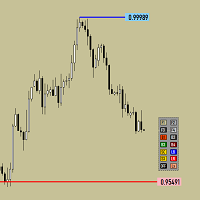
Утилита предназначена для изменения фона графика ,одним нажатием кнопки. Помимо изменения фона ,утилита также может менять цвет баров и свечей на графике.Из дополнительных опций ,это изменение размера графика а также линии с ценовой меткой.Панель можно включить и выключить,что дает возможность не захламлять график.Кнопка B2 помимо изменения цвета баров ,снимает выделение со всех объектов на графике.
FREE

Planeje o risco antes da entrada e analise operações encerradas diretamente no gráfico. O Edgemory Trader OS é uma calculadora de risco, planejador de tamanho de posição, diário de trading e exportador CSV/JSON gratuito e offline para MetaTrader 4. Funciona imediatamente, sem cadastro, token, DLL, WebRequest ou servidor externo.
O planejador determinístico usa saldo da conta, percentual de risco, entrada, stop loss, take profit, tamanho e valor do tick e os limites de lote da corretora. Ele mos
FREE
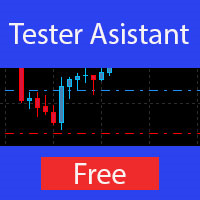
The Manual Strategy Tester Assistant Expert Advisor is a powerful tool designed to assist traders in testing their strategies manually using the Strategy Tester in MetaTrader 4. This expert advisor provides a user-friendly panel with intuitive controls to set orders, calculate lot size, manage risk, and monitor account balance and equity directly on the chart. Key Features: User-friendly panel with 5 buttons for easy navigation and control. Risk management functionality: Set the desired risk am
FREE

Displays a digital clock in the chart in realtime.
Benefits: Current time always in sight for market open/close, economic data, etc. Displays accurate time (server/broker time) Clearly visible (set color, size, font, position) Always runs/refreshes even without new price tick Hint: To display the most accurate time, use the server (broker) clock setting combined with the time (hour) offset for your time zone.
FREE

Daily Trading Dashboard – MT4 Indicator A compact and efficient tool that displays your daily trading statistics directly on the chart. Designed for traders who need a clear overview of their performance without switching screens. Key Features Real-time calculation of today’s profit/loss (with green/red color coding) Display of trade count and total trading volume Lightweight 280×160 px panel with clean blue design Automatic updates every few seconds Optional filtering by Magic Number or Comment
FREE

This is a very simple indicator that mixes the Sunday session with the Monday one. This is useful because the Sunday session is a partial session mostly with only Australian and Asian sessions included, so the analysis of the Monday's daily session if mixed with Sunday tends to be more comprehensive. This indicator plots a candle with the following values: Open - the Friday's Close or Sunday's Open (depending on your choice). High - the highest High of Sunday and Monday. Low - the lowest Low of
FREE
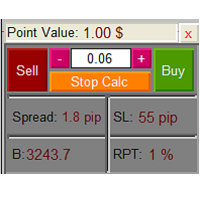
The Lot Calculation FJD is an expert for risk management for Meta Trader 4. This expert calculates the value of lot size for every position based on Trader’s given balance, Risk, and Stop loss. This expert is really user friendly, and calculates lot size with just a few clicks which helps traders specially the scalpers to open a position as quick as possible with respect to the Risk management.
The following inputs can be changed by the user: 1. Percentage of Risk per Trade (RPT %) 2. Balance
FREE

Esta é uma versão reduzida, tipo demonstração da publicação Elliott Wave Tool 7Pasos . As limitações para esta ferramenta Elliott Wave Tool 7Pasos são as seguintes: Apenas uma conta possível, a ferramenta original tem 1 conta principal e 4 alternativas. Apenas um grau (primário) está disponível, no instrumento original são 12 graus diferentes (6 no micro) a sua disposição. Como apenas um grau está disponível, as funções para atualizar e fazer atualização do grau da onda selecionada estão desativ
FREE
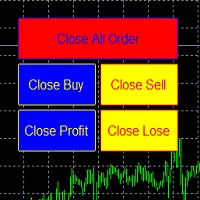
metatrader 4 ea simple closeall
you can get free ea by registering FBS broker through my link https://fbs.partners?ibl=621087&ibp=24536958
install ea in any pair and run it.. Congratulations on using the ea close assistant
Button Function : Close All Order = function to close all open orders and pending orders Close Sell = function to close all open sell orders Close Buy = function to close all open buy orders Close Profit = fu
FREE

Chameleon TA — Visual Basket Trade Assistant Trade smarter, not harder. One panel. Total control. Chameleon TA is a professional-grade visual trade assistant that puts a complete trading cockpit directly on your chart. Whether you're a manual scalper, news trader, or basket strategy enthusiast, Chameleon TA gives you instant one-click execution, live basket-level SL/TP management, and intelligent trailing — all wrapped in a clean, modern interface inspired by TradingView's dark theme aesthetic.
FREE

Auto Stop Trail And Profit is an expert advisor that monitors orders, when it detects that one has been placed, on the same chart that has been activated or on all assets, depending on its configuration, it will place its respective stop loss, take profit and perform trail stop loss (in a classic way, keeping a distance or "step by step").
You can see more of my products here: www.mql5.com/en/users/joaquinmetayer/seller
FREE

Auto Trailing Stop and Breakeven - Free
- Free Trailing Stop and Break Even Manager - Trailing Stop EA Free - Auto Breakeven
Free automatic trailing stop and breakeven manager for MT4. Moves your stop loss to break even and trails it for you - on every trade, hands-free. The free edition of Trail Architect.
Stop letting winning trades turn into losers. This free automatic Trailing Stop and Breakeven manager watches your open positions and moves the stop loss for you - first to break even, then
FREE

A simple button to completely close all existing open trades (both Buy and Sell) on the current chart .
Warning : Once the button is pressed, all open trades on the current chart will be deleted immediately without any more questions or dialogue.
Use this utility very carefully. We recommend that you do a trial of removing open trades on a demo account first, before trying to use this utility on a real account.
FREE

UltraFast Trade Manager V2.60 - The Ultimate "True Break-Even" Utility The UltraFast Trade Manager is not an auto-trading robot that opens trades. It is a professional Trade Manager . Whether you use a Grid/Martingale EA, or trade manually, this tool manages your open trades, calculates your real profits, hides your targets from the broker, and closes your trades with one click. Version 2.60 is completely dummy-proof. It calculates everything for you, so you never have to guess your profit again
FREE

The utility places a grid of pending orders. You can select the number of orders in the grid, the step between orders, multiplier for the order size, SL and TP levels and the magic number. If you use a profit bucket , please note that it applies to all orders on the current currency pair with the current magic. If you want to use several grids with independent profit buckets at the same time, run several copies of the utility and specify different magics in the settings.
MT5 version of the ut
FREE
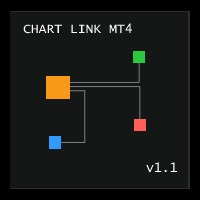
Chart Link MT4 allows you to control multiple charts from one chart or multiple charts from multiple charts. Features 1. Synchronised Scrolling : Scrolling the master chart also scrolls all linked sub charts to the same position. Sub charts inherit offset and auto-scroll settings from the master chart. 2. Synchronised Timeframe : Switching the master chart timeframe also switches all linked sub charts. 3. Synchronised Symbol : Switching the master chart symbo
FREE

FXCompute Trade Copier Bridge for MetaTrader 4 - description FXCompute Trade Copier Bridge is a lightweight, ultra-low latency execution engine that connects your MetaTrader 4 terminal directly to your FXCompute cloud trade copying network with zero third-party software required. Overview FXCompute Trade Copier replicates trades across your accounts in real time. Operating alongside dedicated 24/7 cloud infrastructure, it handles position opens, modifications (Stop Loss and Take Profit), partial
FREE

This utility allows to record the spread value to the file, which is equal to or greater than the value specified in the settings, at the specified time. The utility also displays useful information on the symbol's chart: current spread value in points, name of account holder, name of trading server, leverage, the size of the swap for buy orders, the size of the swap for sell orders, day of the week for accruing triple swap, the size of a point in the quote currency, the minimum allowed level of
FREE

This is an ON CHART trade management panel. In other words, ON CHART Lot Size, Buy, Sell, Stop Loss, Take Profit, Close Buy, Close Sell and Close All buttons! *IMPORTANT NOTE: Input settings are NOT usable. You can change or insert Stop Loss and Take Profit values only on the chart panel. (See the below video!) This one is MT4 version!
BUTTONS List: 1. Lot Size - (0.01) is default click on it and insert the lot size with which you want to open a trade. 2. Stop Loss - (0.0) is default click on i
FREE

download it and test it yourself. because of size minimums, i will repeat here what i said about the paid version::: I will not flood the system with marketing hype. This EA trades 'only' gold in forex. No parameters. You can see the results of one tester, others are similar or better. I will provide a free copy of the EA in the free market for you to download and test yourself to make sure it will suit you (Onlygoldtest.ex4). You need a good sized account, reasonable spread, high frequency. Fo
FREE

Trade simplifier is a trade panel that simplifies trade opening. It is simple and easy to understand, with key features to ease trading. Features include:
Order type selection Fixed lot entry from the chart user interface Easy Take profit entry field on the chart user interface Visual take profit selection and adjustment via the line that appears when you click the Take Profit button Easy Stop loss entry field in points on the chart user interface Visual Stop Loss selection and adjustment via
FREE

xCalper Economic Calendar MT4 brings economic calendar information to your Terminal chart and Experts from online sources. Just add it to your chart to see detailed news without losing attention or automate reading of calendar information to improve trading decisions.
Main Features Support data sources: Forex Factory Filtering by day, impact or currency of news. Visual alert of upcoming news. Platform notification of upcoming news.
Parameters Filters Impact expected - Show/Hide by impact: Low,
FREE

A small trading panel makes it easier for a trader to visually place pending orders, market, as well as trailing and unloading the grid of orders.
It is installed as a regular adviser. Parameters and description:
Lot Volume: 100 - in this field you can set, change the order volume at any time
Line UP - visual horizontal level for pending BuyStop and SellLimit orders
Line DN - visual horizontal level for BuyLimit and SellStop pending orders
Delete Lines - delete all lines from t
FREE

Real Time Account Overview MT4 — Account & Magic Number P&L Monitor Real-time account overview and per-strategy P&L tracking, all in one clean panel. Overview Dashboard MT5 is a lightweight Expert Advisor that overlays a live information panel directly on your MetaTrader 4 chart. It gives you an instant snapshot of your account health and the performance of each trading strategy — identified by magic number — without ever leaving the platform. Whether you run a single EA or a dozen simultaneous
FREE

================================================================================ The utility is useful when you have to load history data for many symbols and timeframes. It loads the symbol used in the market watch. One symbol is scanned for all timeframes. Then the charts will be closed and the next symbol is scanned. You cannot abort the operation. Wait till it is done. ================================================================================
FREE

Trailing Stop Manager with Break Even is a MetaTrader 4 utility that moves your stop loss automatically to protect profit as price advances. Unlike the platform's single-mode trailing stop, it offers four professional methods plus break-even handling, and it manages all matching positions on any symbol. Features Four trailing modes for different conditions: Fixed Pips, ATR-based, Step, and Break-even plus Trail (two-phase). Fixed Pips: classic trail that starts after a set profit and follows at
FREE

Basket Stage Profit EA ΜΤ4 é a maneira mais avançada de lidar com um monte de pedidos em aberto em 3 diferentes estágios (períodos de tempo) de cesto de lucro e, finalmente, fechá-los todos com qualquer lucro ou perda no horário de término desejado.
Instalação do Produto | Basket Stage Profit EA MT4 Configurações/Guia de Entradas | Atualização de um Produto Adquirido
Recursos Martingale, Grid, Averaging ou outras técnicas perigosas não são usadas Basket Take Profit na moeda
FREE

iCUSTOM INDICATOR TESTER é uma ferramenta para CODERS, mas não só. É um programa projetado para testar e verificar indicadores personalizados, mesmo se ou especialmente se você não tiver código-fonte como arquivo .mq4, mas apenas um arquivo .ex4 compilado.
OS OPERADORES podem testar um indicador e ver se sua ideia se conecta com os dados do indicador - se a ideia é realmente calculada e se é possível criar um EA com base neste indicador específico. Isso pode economizar o tempo de ambos - dese
FREE

O Account Info AS é um poderoso script de informações para MetaTrader 4 que exibe informações completas sobre sua conta de negociação diretamente no gráfico. O script fornece todos os dados necessários para análise da conta, gerenciamento de risco e tomada de decisões de negociação.
Principais Funcionalidades Informações Financeiras Completas Tipo de Conta (Demo/Real/Concurso)
Saldo, Patrimônio Líquido e Margem
Margem Livre em Dinheiro e Percentual
Nível de Margem
Lucro/Prejuízo Atual
Ges
FREE

Overview No Nonsense ATR is a tool designed to help the No Nonsense Forex Traders backtest strategies and trading in real time.
The indicator calculates the value of the Stop Loss and the Take Profit (SL/TP) based on the ATR (Average True Range) allowing to verify the historical data in a simple and practical way, showing not only the SL/TP values but also the place where they would be and if it was a gain or loss. The No Nonsense ATR also calculates the trading volume required for each trade a
FREE

Alerts utility issues notifications when orders are opened, closed and removed, as well as when the price touches the selected graphical objects on the chart. The utility supports all graphical objects used in graphical analysis and features a simple graphical interface. Once launched, the indicator works in the background, does not take up space on the chart and does not consume system resources. Tracking order status.
If tracking order status is enabled, the utility automatically checks order
FREE

Easy Backtest 2 Pro
Easy Backtest 2 Pro is a great FREE alternative testing software!.
You can test your new strategy in Strategy Tester in your MT4 , using all available historical data. Beyond the basic functions such as: BUY, SELL PENDING ORDERS STOP LOSE, TAKE PROFIT AUTO RISK MANAGMANT AUTO LOT SIZE You can modify each of them at any time, exactly like in live trading. Advanced features PRO such as: PREVIOUS DAY'S HIGH/LOW PIVOT POINTS FIBONACCI AUTO TRAILLING STOP AUTO BRE
FREE
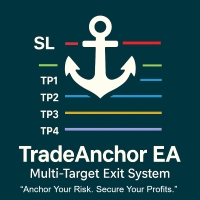
MultiTP Trade Manager EA — Advanced Trade Management Made Effortless (MT4)
Limited Offer – First 100 Downloads FREE!
Be among the first 100 traders to download Trade Anchor Manager (MT4/MT5) completely free of charge. Hurry – once the limit is reached, the offer closes instantly! After trying it out, we’d love if you could leave a review and share your thoughts – your feedback helps us improve and lets other traders know what to expect.
Need this Trade Anchor Manager for MT5? http
FREE

This is a simplified version of Advanced Trade Simulator for trying it out. You can trade NZDCHF. With the full version, you can trade anything and no time limit. You can find it here: https://www.mql5.com/en/market/product/61670 Description... It is an indicator you can attach to any chart and then buy and sell the given symbol virtually. No actual trading takes place. You can attach it to multiple charts. Then you can buy/sell multiple symbols. Features:
- buy and sell immediately on the give
FREE

Predetermination is an exit manager for trades you open yourself. It does not open positions and it does not send signals. After a manual buy or sell, it gives that trade a stop and up to six exit stages based on volatility. Three stages come from Average True Range, each with its own timeframe. Three come from completed range: daily (ADR), weekly (AWR), and monthly (AMR). Each stage can be switched on or off. Enabled stages are sorted by distance. Nearer stages trail the stop. The
FREE

Notificações instantâneas do Slack. Defina níveis de preço diretamente no gráfico e receba uma mensagem quando o preço os cruzar. Adicionar um nível leva apenas um clique. Você pode arrastar a linha com o mouse para definir com precisão o nível de preço desejado. Painel de controle conveniente:
todas as alertas ativas são exibidas em uma lista os níveis podem ser editados arrastando a linha alertas desnecessárias podem ser excluídas com um clique ou todas de uma vez usando "Clear All Alerts" al
FREE

A "simple design" trading panel, which is characterized by small byte size, low CPU usage, simple steps, and quick operation, 1 to 2 clicks to complete a functional operation,
saving time and increasing efficiency . The panel is easy to use, and it is not complicated to set parameters, which is in line with traders' habits. At the same time, its compact-
design, clear at a glance, and comprehensive functions are a powerful tool for manual trading! Key features of the panel:
Click "Bid Price"
FREE

Gold Confluence by Bongkah is a manual trading assistant for Gold (XAUUSD) on MetaTrader 4. The product provides a dashboard that combines several technical market conditions into a single visual interface. It is designed to support traders who use their own trading methods, such as Price Action, Support and Resistance, Supply and Demand, trendlines, breakouts, or other technical approaches. The product does not execute trades automatically. Trade entries, exits, Stop Loss, Take Profit, positio
FREE

TRADING PANEL - CHART OVERLAY with: PARTIAL TAKE PROFIT ("virtual TP") % RISK LOT SIZE TRAILING STOP LOSS Fast and simple control of your trades this is DEM0 VERISON (for DEM0 acc.) of TRADING OVERLAY with PARTIAL take profit ("virtual TP") and % risk lot size
--- full version available on my 'seller page' as well as version for MT5
Easy lot size calculation with easy SL/TP setting. Your trading will be much more comfortable with this tool !
Works like any EA, add it
FREE

VTB High Watermark Drawdown INFO Indicator for MT4 Advanced Account Monitoring & Drawdown Information Dashboard VTB High Watermark Drawdown INFO is a professional account monitoring indicator designed to display drawdown statistics, account performance, and risk management information directly on the chart. This indicator does not interfere with trading activity. It does not open or close positions, modify orders, or block trading. Its sole purpose is to provide a clear and comprehensive account
FREE
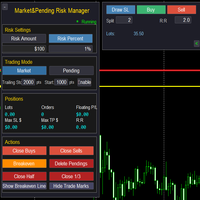
Market & Pending Risk Manager EA Operation Manual Market & Pending Risk Manager is a professional MT5 trading panel EA that integrates multiple functions such as market order trading, pending order trading, risk management, and trailing stop loss, providing traders with a comprehensive trading solution. Core Advantages Intelligent Dual-Mode Trading Market Order Mode: One-click buy/sell for fast execution Pending Order Mode: Precise entry to wait for the optimal timing Seamless Switching:
FREE

功能 勾选需要显示的内容,(当前版本包括当前K线倒计时,市场信息)并显示到图表右下角。
显示格式参数 fontsize 字体大小
c 颜色 font 字体类型
自定义显示的内容 参数 Symbol candle time left SPREAD DIGITS STOPLEVEL LOTSIZE LOTSIZE TICKSIZE SWAPLONG SWAPSHORT STARTING EXPIRATION TRADEALLOWED MINLOT LOTSTEP MAXLOT SWAPTYPE PROFITCALCMODE MARGINCALCMODE MARGININIT MARGINMAINTENANCE MARGINHEDGED MARGINREQUIRED FREEZELEVEL CLOSEBY_ALLOWED
FREE

Close at time is a very useful EA to close specific positions at specific time. It also provides additional condition to setup. Close specific positions at time. Close specific positions which currently profits. Close specific long positions only. Close specific short positions only. Close specific pending orders. It is useful to support your trading strategies.
Parameters description magic : Target magic number to close. close_time_hr: Hour to close. (MetaTrader 4 terminal time) close_time_min
FREE

Investment Castle Panel — Your Trades, At a Glance
The Panel puts the numbers that matter right on your chart: floating profit and loss, drawdown and more — for manual trades and for any Expert Advisor. A clean, movable dashboard so you always know exactly where you stand.
What it does for you Live P/L on the chart: floating profit/loss for the current symbol, for both buy and sell orders, in your base currency and in pips. Max drawdown at a glance: keep an eye on risk without digging through
FREE

Trading Panel - Smart Stop Management
A free professional trading panel for MT4, built to make manual execution faster, cleaner, and smarter.
Trading Panel - Smart Stop Management helps you place Market, Limit, and Stop orders directly from the chart, manage position size, calculate TP/SL from volatility, and protect your execution from temporary spread widening during news, rollovers, or thin market conditions.
The panel uses local smart stop logic based on the middle price, helping reduce
FREE
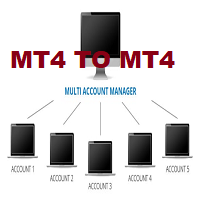
This tool allows you to automatically copy your orders between two or more METATRADER 4 platforms in same computer.
Settle the issuer of orders in Principal and the receiver of orders in Copieur To use it, add the script on both platforms, activate the auto trading button for the order copier. Principal=main Copieur=copy
it is very simple and does not need to add dll or csv . GOOD LUCK
FREE

The Buffer Reader will help you to check and export the custom indicators buffers data for your current chart and timeframe. You can select the number of buffer and historical bars to read/export. The data can be exported in a CSV format and the files will be stored in the folder: \MQL4\Files .
How it works Put the number of buffers to read in the Buffers_Total input parameter. Put the number of rows to display in the Rows_Total. Choose the CSV separator in the parameter. Copy the correct name
FREE

Auto risk manager easy demo version of the utility for order control. Regardless of whether orders are opened manually or by advisors, when the specified percentage of profit or loss is reached, the advisor will close all positions, delete (if necessary) pending orders and independently close the chart windows (will not allow advisors to open new transactions). The utility will be especially useful for traders who trade using advisors or manually on several currency pairs at the same time. The
FREE
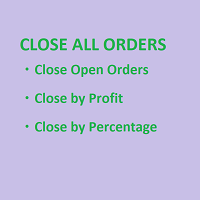
SmartClose(Close All Orders) helps you close all your trades. You can use it on any symbol. You can also set a warm value to manage the risk. With these functions: Close Open Orders : Close all open trades in the trading account. You don't need to set a value for the "value" parameter. Close by Profit : Close trades when profit reaches a specific predefined level. You need to set a value for the "value" parameter. Close by Percentage : Close trades based on a certain percentage of the balance.
FREE

Tracking positions using trailing on the Parabolic SAR indicator. It is necessary to allow automated trading in the terminal settings. In testing mode, the utility opens Buy or Sell positions on the first ticks, which allows you to visually observe the given logic, changing the utility parameters. In real mode, the utility does not open positions. Discuss the complexities of Forex trading here: chat "Age of Expert Advisors" . Parameters Select_Magic - selection of magic numbers. Positions with
FREE

Copy Dog AI Trades Copier MT4 Copy Dog AI Trades Copier copies trades between MetaTrader accounts and lets you set the copying rules by talking in your language, or by typing your copying commands and account management on the chart panel in MT4 or MT5. Write or say what you want in plain words, for example: "Copy only gold from now on, half the sender's lot size, and trail each copy 200 points behind the price." Google Gemini turns your words into rules, explains them back to you in plain words
FREE
Pending Orders EA BOT MT4 – Seu Companheiro de Trading Definitivo O Mais Poderoso EA de Grade (Grid) de Ordens Pendentes em Um Clique para MetaTrader 4 (Otimizado para XAUUSD, NAS100, GER40, BTCUSD, Volatility 75 e todos os principais pares) Coloque 100–1000+ ordens Buy Limit/Buy Stop ou Sell Limit/Sell Stop perfeitamente estratificadas em segundos com dimensionamento de lote progressivo, trailing stop inteligente de 3 modos e controle total no gráfico. Sem menus complicados – apenas botões gra
FREE

Server Time On Chart is a simple indicator that shows the time of the broker's server with hours, minutes and seconds in the lower left corner of the chart's. Within the inputs you can only change the size of the font and the color you want depending on your taste. You can see more of my publications here: https://www.mql5.com/en/users/joaquinmetayer/seller
FREE
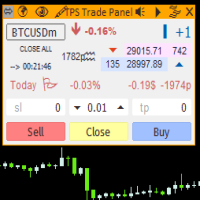
"TPS Trade Panel: Your Gateway to Effortless Trading
Introducing the TPS Trade Panel – the ultimate tool to streamline and enhance your trading experience across financial markets. Whether you're a novice or a seasoned trader, this feature-rich panel empowers you to execute trades swiftly and make informed decisions with ease.
Efficient Order Execution: Execute trades across multiple financial instruments without the need to navigate through complex menus. With a few clicks, you can open, clo
FREE

Having more expert advisors running on the same account , eventually leads us to the question , which one of them are winners , or which are dragging down the account ? With this in mind I created this simple utility for displaying profits or losses taken by each expert advisor over time . This utility can be run as an expert advisor and can display up to 10 magic number results . If the inputs are left to zero , the results displayed are from the manually placed orders . It also displays depos
FREE
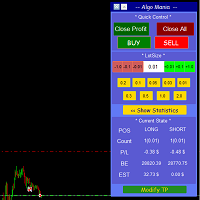
This is a trade manager specially for traders using martingale strategy and multiple trades at the same chart.
features: - easy and fast to set the lot size with mouse clicks. - Close all trades and close profit trades with a single click. - Show details on the running symbol: - number of trades (long - short) and total lots of each direction. - total profit/loss on this symbol separately and for both directions. - Break even point for both long and short. - Estimated profit if all the trades
FREE

The FX Indicators Alert is a Scanner Tool that allow you to set up alerts for any Indicator, and display or send notifications to your email box and/or mobile device. It will monitor your rules in the selected TimeFrames and Symbols. The tool can manage the standard indicators and the Custom one (7 buffers for the custom indicators). You can create your alerts by combining different indicators.
Please note that this tool is not supported in the strategy tester due to multi Symbols, TimeFrames,
FREE

MT-Radar — monitoramento gratuito de terminais MetaTrader pelo celular
Quer saber se o seu Expert Advisor está funcionando e o terminal está conectado, sem precisar acessar o VPS por RDP toda vez?
O MT-Radar mostra o status de todos os seus terminais MT4/MT5 em um único painel web seguro. Abra no celular, tablet ou em qualquer computador e confirme em segundos que tudo funciona como deveria.
O que o MT-Radar mostra: Conta e terminal — informações da conta e dados gerais do terminal Diários —
FREE
O Mercado MetaTrader oferece um local conveniente e seguro para comprar aplicativos para a plataforma MetaTrader. Faça download de versões de demonstração gratuitas de Expert Advisors e indicadores a partir do seu terminal para testes no Testador de Estratégia.
Teste os aplicativos em diferentes modos para monitoramento do desempenho e assim fazer um pagamento para o produto que você deseja, usando o sistema de pagamento MQL5.community.

Você está perdendo oportunidades de negociação:
- Aplicativos de negociação gratuitos
- 8 000+ sinais para cópia
- Notícias econômicas para análise dos mercados financeiros
Registro
Login
Você concorda com a política do site e com os termos de uso
Se você não tem uma conta, por favor registre-se