 MetaTrader 5
 Experts
 Indicadores
 Bibliotecas
 Utilitários
 Widgets
 Regras
Conheça o Mercado MQL5 no YouTube, assista aos vídeos tutoriais
Como comprar um robô de negociação ou indicador?
Execute seu EA na
hospedagem virtual
hospedagem virtual
Teste indicadores/robôs de negociação antes de comprá-los
Quer ganhar dinheiro no Mercado?
Como apresentar um produto para o consumidor final?
Ferramentas de negociação gratuitas para MetaTrader 4 - 10
 Abaixo estão os programas de negociação que simplificam o trading no MetaTrader 4. Passe o mouse sobre um produto para ler uma descrição mostrando seu propósito.
MSMO Lot Pilot MT4 é uma calculadora de tamanho de lote e um painel informativo pré-trade para MetaTrader 4.
Antes de abrir uma operação manual, ela ajuda a responder a uma pergunta prática:
Qual tamanho de lote corresponde ao nível de risco que você escolheu?
Defina o Risk Percent, a distância planejada do Stop Loss em pontos do símbolo e selecione o Account Base. O MSMO Lot Pilot MT4 calcula o tamanho do lote usando as especificações do símbolo fornecidas pela sua corretora e exibe o Actua
FREE

Trading Simulator for Backtesting This Robot was designed as a trading simulator for backtesting , allowing you to open and close trades directly in the testing environment. With this EA, you can: Manage trades with Take Profit and Stop Loss based on chart lines that act as closing prices. Assess your strategy's profitability and improve your trading skills. It’s a simple yet powerful tool to help you see how profitable you can be in trading. Coming Soon! We will release a more a
FREE

当然,下面这版是适合直接放到市场页面里的 英文版本 : Product Overview QuantHubCommaner Dashboard for MT4 is a trading statistics and analysis tool designed specifically for MetaTrader 4.
It does not open, modify, or close trades, and it does not interfere with any trading strategy. Its purpose is to display account status and historical trading performance in a clear, visual, and easy-to-read dashboard. With this panel, users can quickly review trading results across different time periods and filter data by Symbol, Mag
FREE

ForexInsured — Gestão de Risco, “Seguro contra Perdas” e Análise de Desempenho Opere com inteligência · Gerencie o risco · Proteja seu capital ForexInsured é uma solução completa de gestão de riscos e análise de desempenho de trading, desenvolvida para funcionar com MetaTrader 4 (MT4) e MetaTrader 5 (MT5) . O ForexInsured baseia-se em uma ideia simples, mas fundamental: A principal responsabilidade de um trader não é apenas buscar lucros, mas também proteger seu capital de negociação. O ForexIns
FREE

Rhino PDF Trade Report — exporte o seu histórico de operações do MT4 para PDF
Transforme o histórico da sua conta MetaTrader 4 num relatório de operações em PDF limpo e pronto a imprimir, com um único clique. Execute o script, escolha um intervalo de datas ou um número de operações e obtenha um documento que pode enviar a um investidor, anexar a uma candidatura a uma prop firm, entregar ao seu contabilista ou guardar como diário de trading.
O que recebe
Página 1 — visão geral do desempenho
FREE

This is a technical indicator that put on strategy tester the buttons of the expert adviser "Control adora". Usually when applied the controladora to the strategy tester, the buttons do not appear and therefore its functions (like directly buy, sell, close orders or place stop loss indicator) can't be used. But now you can if have the Manual Backtest indicator. If you don't have Control adora, you can get it from here . This indicator get on the chart the buttons that can be of use in strategy t
FREE

This is a technical indicator that works as a plug-in for "Control adora" - the Expert Advisor that helps you to calculate, place and control positions on the chart. When run on a chart with Control adora EA, this plug-in allows setting entry levels that send orders at contact, while you have StopCloseOnly (OCO in Comments) = 1 settled in Control adora (meaning that without this, the indicator will send the order only when the price Close crosses the arrow level). This indicator only works if yo
FREE

Supports manual bi-directional orders. Once in floating profit, the system automatically executes partial take-profit based on set parameters, moves the stop-loss to the entry price (breakeven), and continues to hold the remaining position. Fully compatible with Teacher Zhang's trading system. Ideal for those with slower reaction times, seniors, beginners, and students in retraining. The full version features fully adjustable parameters.
FREE

Ferramenta conveniente para medir o numero de pontos entre os precos diretamente no grafico. Exibe em a medicao entre os pontos em porcentagem, pontos (financeiro) e tempo (Barras). Compativel com todos os modos de exibicao grafica. Quando fixada no grafico e exibida em todas as periodicidades. Aperte Ctrl, clique no primeiro ponto, mova o mouse e ja ira exibir a medicao, Clique novamente e fixe a medicao. Ferramenta muito rapida e que nao ocupa muito espaco. Trabalha com Ativos Forex e B3. Para
FREE

EAsynRightNow - Professional Trading Expert Advisor for manual trading with advanced functionality
EAsyRightNow is a multifunctional trading Expert Advisor for MetaTrader 4, featuring a Trading Panel with a user-friendly interface and extensive trading position management capabilities. Perfect for scalping, it works on all timeframes.
Key Features
1. Trading Modes
- Single Orders: Management of one trading position
- Multiple Orders: Ability to open multiple orders in the same direction
- M
FREE

This is a RISK MANAGER utility for MetaTrader. To activate it, after downloading it, you must enable all autotrading controls on MetaTrader, as with EXPERT ADVISORS. The user must enter control settings as indicated in the indicator properties, which initially have default data. RISK MANAGER will perform checks and display pop-up alerts when certain behaviors exceed the user-entered settings. It's free; use it, try it, develop it, or contribute ideas. It's just a utility; the programmer assumes
FREE

The scripts adds order tracing icons in the chart window. Trace orders are similar to the standard terminal tracing. Icons are added for both closed orders and current (market) orders. The Days of history to check parameter means the depth of the order history to be traced (number of days). If the parameter value = 0, all orders in the available history will be traced.
FREE

This EA will make all the history trades appear on the chart,,
will make it easy to track each trade in history separately , it will show each trade open price + time and closing price + time
simply download the EA to your MT4 platform, then apply it on any chart that belongs to any trades in mt4 history,
for example, if you have traded on GBPUSD in the history, open GBPUSD chart and apply the EA on it, it will automatically print all info on the chart about the trades ,,
EA works per
FREE
-It deletes all graphical objects on a chart. You choose the chart , then you execute the script on the chart. After the execution, all objects will disappear. Objects can be lines: trend lines, horizontal lines, vertical lines. They can be buttons, texts, labels , rectangles, edit boxes... parts of a panel. It executes fast within a second. You can use as many times as you want.
FREE

This indicator provides essential information in a simple table about market range and identify whether the market has touched important pivot levels and breakout previous high/low. This version is still in the testing phase and is being offered for free and can only be used for a period of 3 months. We value your feedback to help us improve this application.
FREE

Swift Symbol Switch MT4 adds a clean, convenient symbol-switching panel directly to your chart, allowing you to move between Forex pairs, cryptocurrencies, commodities, metals, and other broker-supported instruments with a single click. There is no need to type symbol names, search through Market Watch, or repeatedly open MetaTrader menus. Simply select a symbol from the on-chart panel and the current chart updates instantly. The utility is designed for traders who monitor multiple markets and w
FREE

The AllClosedMT4 utility in the form of an expert. The utility is designed for closing all open positions simultaneously based on the total profit (in the deposit currency) of all open positions. The utility can be attached to any chart with any trading instrument.
Parameters Profit - the total positive profit in the deposit currency, at which all open positions are closed (profit). Stop - the total negative profit in the deposit currency, at which all open positions are closed (loss). The valu
FREE
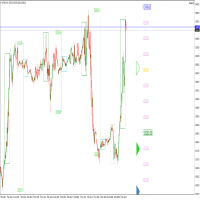
Perspect EA
This version of the EA focusses on indicating points of interest on the chart, features include : Sessions (Asia/Gap/London/Gap/NewYork/Gap) Previous Daily/Weekly/Monthly highs and lows Previous Daily/Weekly/Monthly open and close price
Round numbers (Ruler) Opening range Initial balance Multi time frame (Yearly view, monthly opening range) Customizable chart templates for low light users The indicator will assist in advanced technical analysis, providing the user with desired
FREE

ManageEquity - A Powerful Trading Utility for Risk Management ManageEquity is a simple yet powerful trading utility designed to enhance risk management strategies. By attaching this utility to a single chart and specifying the maximum dollar amount for both profit and loss, traders can effectively manage their open orders. With ManageEquity, traders can easily set their desired profit target and maximum acceptable loss for all open trades. Once the profit target is reached or the maximum loss th
FREE
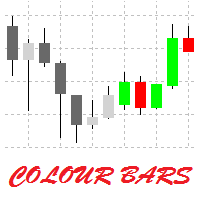
This is a simple utility for visual market analysis. Users can select trading day and time. Bullish candles located within the necessary time interval are shown in green, while bearish ones - in red. Candles outside of the trading time interval are shown in gray and dark gray.
Parameters Trade_Time = "00:00-00:00" - enter trading time. TradeSunday - trade on Sunday. TradeMonday - trade on Monday. TradeTuesday - trade on Tuesday. TradeWednesday - trade on Wednesday. TradeThursday - trade on
FREE

This is a free plug-in for Control-adora Expert adviser. It's main function is to create a Buy Stop arrow on the chart or a Sell Stop arrow when the price crosses above or below a trend line, which will allow Control-adora expert open a new trade when the desired lines will be crossed by the price.
Settings Prefix: Write here the prefix used to identify which trend lines are subject to be watched, value "Trendline" is set by default. Always use On Close Only: When set to true (by default) the c
FREE

The main purpose of this expert advisor is to protect your hardly gained profits. Once the market goes in your favor, with amount of specified pips [configured via EA inputs], the EA will do the following: Move the Stop-loss of the profitable positions to Breakeven. Lock in some profits, i.e put the SL above/below your entry with specified pips Will close part of position, % of lots, once the EA was triggered. By default, the "Move to Breakeven EA" will modify all opened positions on the termi
FREE

Plain — Semi-Automatic Trading, Your Direction
Plain keeps you in control: you choose the direction, and the EA handles the execution automatically. A clean, semi-automatic Expert Advisor for traders who want to call the bias and let automation do the rest.
What it does for you You set the direction: the EA opens and manages trades the way you decide. Hands-off execution: automation handles the mechanics once you've chosen the bias. Simple and transparent: no black box — you stay in charge. Fu
FREE

The VR Object Delete All script solves the problem of garbage on the chart. it is often necessary to completely clear the chart of everything that is put on it, comments, lines, objects. The script completely deletes everything, even those objects that are not visible. When working, VR Object Delete All writes everything it does in the terminal log, as well as the names of objects to delete. Displays the number of deleted objects as a separate line. in case of any errors, it will display an erro
FREE

Stop and Reverse Martingale EA is an expert advisor that integrates the following inputs within it: Start lot size Lot multiplier Take profit distance in points Take profit distance in points *this input is a stop loss, is misspelled within the code of the EA Magic number A and B Start cycle with round number The distance of round number Daily maximum orders per cycle and close all Daily loss (maximum orders per cycle when this last order hit the stop loss the EA close all orders in the same m
FREE
The world of prop firm trading is one filled with tension and excitement in equal measure, and FTMO is definitely the most reputable firm out there. On one hand is the prospect of making huge sums of money and on the other, losing all the money you have invested. The easiest way of the latter scenario occurring is drawdown , and more often than not daily drawdown . It's what keeps us constantly checking our phones, the pain of every traders existence.
What if there was a way of making
FREE

This script paces itself to zoom into the deepest setting of ZOOM +
You may be in tune to know a few keyboard easter eggs. Pressing the minus <-> button has the capability to Zoom the Chart Outward! Interesting to see the price reevaluate itself in perspective. This we could see is quite contagiously useful if we wanted to be quick with analyzing, examining through your tools, in your plans and such.
So, if you ever wanted to zoom IN and OUT, here is Your play around with the chart poin
FREE

This is an **MT4 Indicator called “Elsna Dashboard”**, designed as a **monitoring dashboard**. Its main functions are:
**1. Dashboard Display**
* Shows key account info:
* Balance & Equity * Floating Profit/Loss * Floating Pips * Number of open trades * Spread * Total lot size * Duration of the oldest trade * Automatically positions and color-codes these values.
**2. Trade Alerts**
* Plays a sound when a trade opens or closes.
**3. History Recording**
* Records balance an
FREE

Expert Info: Pin = 0 --> Manual Trade" TralingStop = 0 --> Traling Stop Off " Sell & buy --> Open Order " C-All --> Close All Order" C-Buy --> Close Buy Order" C-Sell --> Close Sell Order Input Parameter: input Name_ = " ----- Gooinsta Army Simple ----- "; input Pin = 0.0; input Resiko = _Medium; input min_Lot = 0.01; input max_Lots = 1.0; input Slipage = 3; input double Target = 1050; input maxorders = 100; input TralingStop = 10; input End = " ----- Salam Profit Konsisten ----- ";
FREE

Советник Time Line Auto Close (TLAC) позволит вам создавать вертикальные линии (Time Lines, линии времени), которые будут автоматически закрывать все или некоторые из ваших открытых ордеров. Вы можете создавать и управлять несколькими линиями, настроить для каждой из них закрываемые ордера и оповещения. Ордера можно фильтровать по валюте, магическому номеру, номеру ордера и типу ордера. Также можно настроить отправку уведомлений перед активацией линий.
Как она работает? С помощью TLAC вы сможет
FREE

Basket Recovery System : is useful for trading multiple pair on a single account, single chart.
Functions Of this Ea
with a simple click on a button in any Symbol row, this Utilities will,
Open new Order, Set Lot, Close Order, Reverse Order, Add new Symbol, Delete Symbol, with a simple click on a Navigation Button, this Utilities will,
Select all Symbol Available on Broker, ReSet Symbol Lots, Close all Order, Set Low Risk for all Symbol, Remove all Pair with spread above 2two.
FREE

MULTI TRADER TOOL - SUPPORT / RESISTANCE, ONE CLICK CLOSE / OPEN, AUTO CLOSE, GRID ORDERS, ALERTS.
You should use this Panel on FULL SCREEN MODE (F11).
HotKeys: B - Open Market Buy Order with OneClickOpen Settings. S - Open Market Sell Order with OneClickOpen Settings. G - Open Grid Orders with Grid Panel Settings. R - Add Support/Resistance Settings to selected trend and horizontal lines. If you have any questions, ask in a private message or in the comments section.
FREE

FREE UNTIL FEBRUARY 14, 2023
SPEND MORE TIME WITH YOUR FAMILY. ENJOY LIFE… DO NOTHING. This version is only auto set of Takeprofit and StopLoss
Main Version of TropangFX: MT4 Version | MT5 Version Recommended timeframe: H1 Supported currency pairs: GBPUSD, EURUSD, EURCHF , USDCAD, USDCHF , AUDCAD, EURCAD, EURAUD and many more...
Requirements
The EA requires good brokerage conditions: low spread and slippage during the rollover time. I advise using a really good ECN brok
FREE

Saved your Account Margin for multiple Trades Trading Robot Closing all second open Trades automatic Closing Trades that reached max. Lot Trading Robot built to avoid:
-Stop multiple Trades -Save overtrading -Hold Strategy -max. Lot -Prop conform
-long Account holding -Prop Firm Account holder - Robot allow one Trade per Symbol -Stop loosing by click multiple Times Trade Button -Robot needs to be Set on every Symbol that will be saved - no Settings configure OneRule OneFunktion Set on Chart
FREE

For more details, join with www.telegramtradecopier.com
TelegramTradeCopier is the world's first lifetime licensed telegram trade copier software for forex, crypto and commodity trading. Any signal format can be converted to a trading action by TTC. The system has two components Desktop app EA file You need to install and login to the desktop app with your telegram details. Then it will listen to channels configured by you and decode all messages into trading actions with proper validat
FREE

Panoramica Pending Order Assistant è progettato per automatizzare la creazione di ordini pendenti Buy Stop e Sell Stop su coppie di valute specifiche ( EURUSD, GBPUSD, AUDUSD ). Questo EA consente ai trader di impostare facilmente livelli di entrata strategici senza dover posizionare manualmente gli ordini.
Funzionalità Principali Creazione Automatica di Ordini Pendenti L'EA genera automaticamente 4 ordini Buy Stop e 4 ordini Sell Stop appena viene attivato sul grafico. Gli ordini sono distanzi
FREE

EA REMOTE COPIER Copy Your Trades Across Different VPS — Fast, Secure & Reliable EA Remote Copier is a professional Expert Advisor designed to automatically copy trading activity between different VPS, trading accounts, and locations through the Internet . It is suitable for traders, money managers, signal providers, and anyone who needs to synchronize trades across multiple accounts efficiently.
Please download Slave EA here = https://www.mql5.com/en/market/product/190920
User Manual :
FREE

Trade Receiver Free is a free tool to copy trades/signals from multiple MT4/MT5 accounts. The provider account must use copier EA to send the signal. This version can be used on MT4 accounts only. For MT5 accounts, you must use Trade Receiver Free for MT5 . Reference: - For MT4 receiver, please download Trade Receiver Free .
- For MT5 receiver, please download Trade Receiver Free MT5 .
- For cTrader receiver, please download Trade Receiver Free cTrader .
- If you only need copy from MT4 acco
FREE

Close_All_Trades_with_TP_SL is a reliable and efficient MQL4 Expert Advisor designed to simplify and automate trade management for all open positions on your MT4 account. This EA is especially useful for traders who open multiple trades quickly or use high-frequency strategies where manual TP/SL placement becomes difficult and time-consuming. The primary purpose of the EA is to ensure that every open trade—whether Buy or Sell—always has a predefined Take Profit (TP) and Stop Loss (SL) applied. M
FREE

This EA (TRIAL VERSION) is designed for automatic placing of pending orders (sell limit, buy limit, sell stop, buy stop) including Stop Loss & Take Profit levels (editable) with only one button click. This EA can make order multi pending level / pending orders grid. So, with this EA placing pending orders will be faster, more accurate and more efficient.
Main Purposes Automation Pending orders grid style trading. Automation of the process of placing the Pending Orders: fast accurate efficient A
FREE

Descripción del Asesor Experto "Mr. Beast Analyze" Nombre del Robot: Mr. Beast Analyze Descripción General: El Asesor Experto (EA) Mr. Beast Analyze está diseñado para proporcionar una visión completa y detallada del mercado a través de la visualización de información clave en la pantalla de MetaTrader 4 (MT4). Aunque el EA no realiza operaciones automáticamente, ofrece una amplia gama de datos útiles y gráficos que pueden ayudar a los operadores a tomar decisiones informadas. El EA se enfoca en
FREE

The Tickerly TV Connector allows seamless integration between TV strategies and your MT4 terminal.
With this tool, you can automate trade execution by linking TradingView’s powerful scripting environment to your MetaTrader Terminal. Features include fast trade execution via Tickerly’s engine and easy setup using webhooks.
This EA is perfect for traders who want to deploy custom TV strategies on MT4, keeping their terminals in sync with real-time market conditions. Requires minimal configurati
FREE

The script analyzes the history of quotes and gives recommendations on the minimum deposit. The calculations take into account the variability of prices and the standard deviation. Margin requirements for the instrument are also taken into account. The result of the script is the minimum recommended deposit for trading the given currency pair.
FREE

The panel for the MT4 terminal is designed to help the trader quickly set pending orders for a breakout of the previous bar.
The utility calculates the order lot itself at the specified stop loss price and maximum loss percentage.
The panel also has a button for converting to breakeven. When you click, the stop loss of an open position is converted to the order opening price.
FREE
O nosso EA é projetado para monitorar a conta do usuário e fornecer informações úteis sobre o saldo, saldo líquido e o drawdown atual do dia e do mês. Além disso, ele fornece informações detalhadas sobre o desempenho do dia, do dia anterior, da semana, do mês e do ano, o que ajuda o usuário a avaliar a eficácia da sua estratégia de negociação. Uma das características únicas do nosso EA é que ele desenha no gráfico o lucro ao final de cada operação, permitindo ao usuário visualizar facilmente a r
FREE

4 buttons for managing your trades.
Close All : will close all open positions on the current chart Delete All : will delete any pending orders on the current chart SL + 1 : will move the stop loss 1 pip closer to the breakeven point on all open trades on the current chart Delete SL : will remove the stop loss for all open positions on the current chart
Useful for everyone who opens multiple positions on the same asset, where fast execution is essential.
FREE
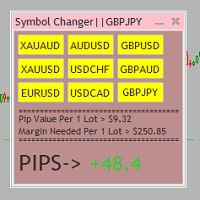
Tired of opening a new chart and applying a template for each Currency pair? So am I. That's why I created an indicator which gives you the option to switch between charts for the first 9 currencies in the Market Watch. In addition to changing between top 9 currencies, the value per 1 lot, the margin required and the amount of pips for any trade you have open for that currency pair are also displayed. Best of all, the colors can be changed!!!
FREE

Dear Friends, Practise master is a Utility program design to work in Live and Strategy Tester. But Main purpose is to work in Strategy Tester. With the help of this program you can take a good practise in strategy Tester. Please rate this application for the better
Benefits. 1. Save lot of time when using this program in Live or Strategy Tester. 2. Very useful to beginners. Demo account will not work in Sat & Sun Days(Market closed days). But for many users have office leave in Sat & Sun(h
FREE

Simple Strategy Checklist Panel, as its name suggests, is a panel that works as a checklist, and can place up to twenty lines of text. This was created for traders who want to have their trading plan or to-do list at hand, a simple but useful product for many.
I will write this pointless paragraph since Metatrader asks me to put a minimum of 6300 characters, so I also explain that the list can also be used to make purchases from the supermarket! Example bread, milk, flour and much more... Enjo
FREE

Pips Keeper is a sophisticated Forex trade manager expert advisor designed to enhance trading efficiency and optimize profit-taking strategies. With its intuitive functionality, this EA empowers traders to automate the process of closing profitable positions at predefined profit thresholds, thereby maximizing returns and minimizing risks.
Key Features:
1. Threshold-based Profit Closure: Pips Keeper enables traders to set customizable profit thresholds, allowing for the automatic closure of pr
FREE

EA Follower Version any Follow Copy Account (Acc. Number) need a open MT Terminal, download multiple times Step1: Open Master MT5 Terminal = install master- Version (on any Symbol just one Time) Step2: Open Follower MT5 Terminal = install follower- Version (on any Symbol just one Time) Step3: all Trades from any Symbol or any Robot are copy now to follow- Terminal immediately for simple copy set on Chart and Start no optimization. This Robot is a Trade Copier for MT5 that auto
FREE

The Expert Advisor allows to move the stop loss following the price, which gives you the ability to protect the floating profit from sudden price reversals. It is possible to use a simple trailing stop which moves the stop loss at the specified distance from the price, as well as based others based on various indicators.
Parameters Magic - unique magic number for identifying positions, if 0 - no number; Trailing - select the type of trailing stop: Simple, Fractals, ParabolicSar, ZigZag; Trailin
FREE

The Master utility is free, and you can buy/rent the client side utility from : https://www.mql5.com/en/market/product/41923
Now you can trade on multiple MetaTrader 4 accounts simultaneously, mirror the trades of any trading bot to your friends and family accounts (even if it is locked to your MT4 account number), create investment portfolios of many MT4 accounts, remove risk of unregulated Forex brokers, turn losing trading strategy into a winner and become an independent account manager imm
FREE

This script is a part of the Sounder_TopBottomLevels product which is intended to alarm the trader by sound when a Symbol's price goes above or below certain level(s). One of the product's features is a handy operation. You manage the levels by dragging lines on the chart with the mouse. Another feature is an optional Windows application which shows the chart that currently alarms the trader. And the sounds are customizable which may be useful for office with a number of the terminals running
FREE

An EA to export trading history for FXer - Journaling and Analytics. fxer.net Register Create an API token Put EA on any chart (any TF is fine) Fill in the API token Follow analytics for better trading At FXer, our mission is clear: to empower traders like you with the tools needed to excel in the ever-changing world of trading. We are committed to providing top-tier, data-driven market analysis and trading intelligence, ensuring you can make well-informed decisions, manage risks effectively, an
FREE
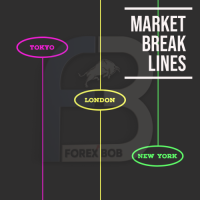
Market Break Lines is an utility tool to create a partition line at market openings/closings of Tokyo/London/NewYork sessions. This will help you to compare the market movements, volatility variations between the different markets.
Inputs: Inputs are simple to feed the time of Tokyo/London/NewYork sessions as per your broker server time Change Color and width of partition lines You can enable or disable any line (Hide/Show).
Please don't forget to support by giving handsome reviews/rating MT5
FREE

This free MT4 indicator allows you to easily compare as many symbols as you want! Make sure that the input symbol matches the name displayed in the Market Watch ***Please comment, rate and share it to your friends if you like it*** ------------------------------------------------------------------------------ Comparing trading pairs is useful for several reasons, including: Identifying relative strength: Comparing trading pairs can help traders identify which currency or asset is relatively stro
FREE

Trade History Export: The EA retrieves all historical orders using the OrdersHistoryTotal() and OrderSelect() functions. For each order, the following details are exported: Index: Sequential number of the trade. Order Ticket: Unique identifier of the order. Symbol: Trading instrument (e.g., EURUSD). Lot Size: Volume of the trade. Open Time: Time when the trade was opened. Trade Type: Buy or Sell. Open Price: Price at which the trade was opened. Close Time: Time when the trade was closed. Clos
FREE

Fastest way to change the period. Suitable for traders who use many charts and timeframes. Size, shape and color can be customized.
Inputs Parameters Corner — Choose corner placement Standart is "Right lower chart corner" Color — Background color of the button ColorText — Text color of the button ColorOn — Background color of the button for the current period ColorOnText — Text color of the button for the current period Font — Arial, Verdana... FontSize — Size of the font in pixels DistanceX —
FREE

Description: Automatic Equity Manager EA manages the whole account equity. You need to set it up on its own chart. -----------------------------------------------------------------------------------------------------------------------------------------
Parameters: EquityGainPercent = 3 (This automatically closes all trades when your equity shows a gain of X percent.) ---------------------------------------------------------------------------------------------------------------------------------
FREE

This expert is a tool to check broker execution and spread. Attach expert in any chart and wait to finish check. Expert sends a pending order (Buy Stop) away from the current price (100 pips) and then modifies it. When expert is removed from chart, pending orders expire and are deleted after 15 minutes.
You can to get source code from here .
Parameters OrdersID - Magic number for orders. ManualLotSize - Lot size for orders. TypeOfOrderUse - Type of order to place (pending or market). TimesModi
FREE

Welcome. This indicator is for alarming the trader by sound when Symbol's price goes above or below certain level(s). It doesn't do any trading. Setting the levels is very handy, you just drag them with the mouse on the chart. You can customize the sounds the Indicator alarms you by (may be useful for office with a number of the terminals running). Also, this product includes an auxiliary Windows application that makes the usage even more handy. This product includes 4 parts: Sounder_TopBottomLe
FREE

The Environment State Info Print is a script to display the constants that describe the current runtime environment of a MQL4 program. General Description
The constants are divided into four groups in the Environment State section of the MQL4 documentation and each group is divided into enumerations/subgroups (with designations “ Market Info”, “Integer”, “Double” or “String”). The script displays constants in two ways: a single constant or all group constants. The constants are obtained by
FREE

'BrokerInfo' is an indicator to show some information of account on the chart. You can to see on chart information about: GMT time. Broker time. Maximum simultaneously open orders. Leverage. Maximum lot size. Minimum lot size. Lot step. Stop level in pips. Symbol spread in pips.
You can to get source code from here .
Parameters SizeBackground – background size. PositionUpDn – position to show info on the chart.
FREE
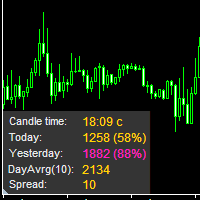
The information panel displays important trading information on the chart. Visual display of the information will help you to make a prompt and precise trading decision. Screenshots depict information which I use in my trading system. But you can add any other desired information. To do this contact me via MQL5 web-site. Displayed information: Time till the end of the current candle and formation of a new one. Time set format: hh:mm, if there is at least one full hour, or mm:ss, if you have les
FREE

Quick Close Pro by one click: * Close Buy positions * Close Sell positions * Close Win positions * Close All positions * Close All pending orders To close all positions by one click from your Telegram, please refer Master Close . Thank you! Join my channel here for more useful EAs: - Tele Notify, Price Alert, Equity Alert, Remote Algo OnOff - Auto SLTP, Close Timer
FREE

Equity Aler t can help you send notifications to your personal Telegram when your account equity reaches/ drops below a preset value. Additionally, you can check your MT4/5 account info anytime from your Telegram by simple command: /check . Get more free useful EAs here !
HOW TO SET UP? * Get inputs for EA: - Telegram Bot Token: Create a Telegram bot by @BotFather , and save your Bot Token. Find your bot by username & press "start". - Telegram User ID: Use your User ID by chatti
FREE

Heartbeat Agent is a comprehensive monitoring system for MetaTrader 4 terminals, designed to detect critical issues before they impact your trading. Compatible with both Windows and Linux, it continuously monitors your terminal's health and alerts you immediately when problems arise. Key Features: Trading Permissions Monitoring: Detects when AutoTrading is disabled, preventing your Expert Advisors from executing trades. Alerts if your account is in Investor Mode (read-only) or if your broker has
FREE

Essa ferramenta automaticamente expõe parar a perda e тейкпрофиты ao abrir ordens.
Иформация é exibido no canto inferior direito do terminal exibe o tamanho do lote, níveis de stop loss e takeprofit, bem como o lucro/prejuízo em pontos para cada aberto de limite.
Há a possibilidade de fechar pedidos. para isso, é necessário destacar o duplo clique no canto inferior direito, o mandado e simplesmente transferi-lo para a esquerda.
Também é apresentada uma recomendação de instrumento atual na fo
FREE

This EA is designed to monitor the slippage of opening and closing orders, and save the records in files. It is useful to record the slippage and evaluate brokers. The record files are saved in the folder MT4_Data_Folder\MQL4\Files. Go to "File " --> "Open Data Folder" . Warning : Do NOT open the files directly, otherwise it will affect the exectution of EA, just copy them to another folder and open them.
Usage: Open a chart and load the EA on it, just need only one EA to run, it monitors al
FREE
O Mercado MetaTrader contém robôs de negociação e indicadores técnicos para traders, disponíveis diretamente no terminal.
O sistema de pagamento MQL5.community está disponível para todos os usuários registrados do site do MQL5.com para transações em todos os Serviços MetaTrader. Você pode depositar e sacar dinheiro usando WebMoney, PayPal ou um cartão de banco.

Você está perdendo oportunidades de negociação:
- Aplicativos de negociação gratuitos
- 8 000+ sinais para cópia
- Notícias econômicas para análise dos mercados financeiros
Registro
Login
Você concorda com a política do site e com os termos de uso
Se você não tem uma conta, por favor registre-se