

| First, download the EA: market/126504 |
|---|
The parameters of the Long & Short Expert Advisor (EA) for Forex include essential settings to customize the trading strategy, such as the assets to be traded, the settings of the indicators used to identify trading opportunities, as well as details on risk management, such as stop loss and take profit. These parameters are adjusted according to the investor's preferences, allowing for an automated and efficient operation of the EA.
########### LONG & SHORT TRADING PARAMETERS #############

- Unique ID of the robot (Magic)
- Asset 1
- Asset 2
- Arbitrage Capital(Divides the total volume for each asset)
- Order fill type (Order fill type)
- Enable MT5 app notification (true/false) (Enables notification in the MT5 app for New Position, Close Position, and Errors)
Item 6: "Enable MT5 app notification" requires enabling push notifications in the robot's terminal. Go to Tools > Options > Notifications > Check the first "Enable Push notifications", then enter the MetaQuotes ID from the app. For more details, visit this link: https://www.metatrader5.com/pt/mobile-trading/iphone/help/push
########### INDICATOR CONFIGURATION #############
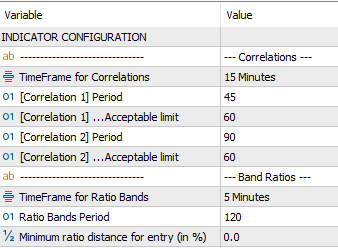
--- Correlations ---
- TimeFrame for the Correlations
- [Correl 1] 1st Correlation Period
- [Correl 1] ...Accepted Limit (Percentage limit to trigger operation)
- [Correl 2] 2nd Correlation Period
- [Correl 2] ...Accepted Limit (Percentage limit to trigger operation)
--- Ratio Bands ---
- TimeFrame for Ratio Bands
- Period of Ratio Bands
- Minimum Ratio Distance for Entry (Prevents short entries when deviation is small - disabled = 0)
########### POSITION OPENING PARAMETERS #############

- Number of entries (Divides entries into up to 3)
- [Entry 1] Ratio Band (Number of deviations for the first entry)
- [Entry 1] ...Lot Percentage
- [Entry 2] Ratio Band (Number of deviations for the second entry)
- [Entry 2] ...Lot Percentage
- [Entry 3] Ratio Band (Number of deviations for the third entry)
- [Entry 3] ...Lot Percentage
- The sum of the percentages must equal 100. For example, if there are two entries: the first 50% and the second 50%, totaling 100!
########### EXIT PARAMETERS #############
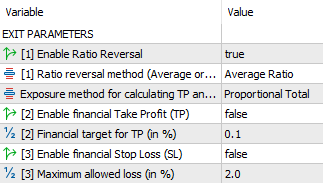
- [1] Enable Ratio Return (Closes the position if the Ratio price returns from the band extreme to the Ratio average or to the opposite band)
- [1] Ratio return method (Average or Opposite Band) (exit type: when reaching the average or the opposite band)
- Exposure type for calculating TP and SL (only the first entry's financial exposure or total financial exposure; if total, it increases TP and SL proportionally as more entries are made)
- [2] Enable Take Profit (TP) financial (true/false)
- [2] Financial target for TP (in %)
- [3] Enable Stop Loss (SL) financial (true/false)
- [3] Maximum allowed loss (in %)
########### BACKTESTING PARAMETERS (Real Recovery Factor) #############
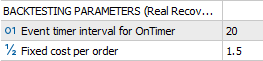
These parameters only affect backtesting (when using the Strategy Tester). In the "User Maximum Criteria" backtesting mode, the EA calculates the real recovery factor (taking into account account fees, i.e., the more the trades rotate, the higher the cost, penalizing short trades). Remember that the Recovery Factor is simply the Total Profit divided by the Worst Drawdown (the highest risk during the period).
- Time of the OnTimer event (The EA uses the OnTimer event to monitor tick changes. In a real account, it will always be 500 milliseconds, but for backtesting, a longer time can be used without greatly affecting the backtest result. The smaller the time, the longer the test).
- Fixed cost per order
Preferably use a hedging account in hedging mode.
| Panel Overview |
|---|
The control panel of the Long & Short Forex MT5 Expert Advisor (EA) plays a key role in providing detailed feedback on the EA's activities in real-time. It allows investors to track the current status of operations, identify potential errors or issues, and monitor the overall performance of the EA. With information on the status of operations, correlations between assets, financial results, and details on the implemented strategies, the panel offers a comprehensive view of the EA’s functioning. This ability to obtain instant insights enables investors to make informed decisions and adjust settings as necessary, ensuring effective control over automated trading activities.
There are two panels: one for real-time trading and another for backtesting. Both display the same information, but the backtesting panel is optimized for running tests more quickly and efficiently.
Real-time Trading Panel:

Backtesting Panel:

Backtesting Panel Colors:
- Dark Gray: ON (Monitoring, looking to open a trade)
- Green: ON (In Operation)
- Red: OFF
Understanding the Trading Panel:

| Status | State | Details |
|---|---|---|
| OFF | ERROR | Check the Experts tab for details |
| ON | Waiting for Valid Tick Data | Awaiting valid tick data for operation |
| OFF | Market Closed | One of the assets is outside of trading hours |
| OFF | Low Correlation | Not enough correlation to open a position |
| ON | Monitoring | Waiting for conditions to open a position |
| ON | Active Operation | Position is open and waiting to close |
Note: All errors and operations are notified to the MetaTrader 5 app.
Correlations:
- Correlation 1 and Limit 1
- Correlation 2 and Limit 2
- Nearest Entry
- UPB (Upper Band)
- LWB (Lower Band)
Ratios:
- Avg: Average of the Ratios
- Upper: Entry Ratio Upper Band
- Lower: Entry Ratio Lower Band
- Current: Current Ratio between Symbol1/Symbol2
Ratio Percent Distance:
- Entry Distance %: Percent distance from average ratio to position opening ratio
- Current Distance: Percent distance from average ratio to current ratio; once this distance is surpassed, the trade will be opened
Results:
- Dly: Daily result
- Wkly: Weekly accumulated result
- Mthly: Monthly accumulated result
Exit Monitoring:
- Fin: Current financial status
- TP: Take Profit financial target
- SL: Stop Loss financial limit
- Max: Best financial result achieved so far
- Min: Worst financial result achieved so far
Legal Disclaimer:
The Long & Short Forex MT5 Expert Advisor (EA) is an automated tool designed to assist investors in their trading operations. However, it is important to note that past performance does not guarantee future results. The use of this EA involves financial risks, and investors should be aware of the possibility of losses. It is recommended that investors fully understand the EA's strategy, adjust the parameters according to their preferences and risk tolerance, and regularly monitor their operations. Additionally, it is advisable to seek professional financial guidance before using the EA in their trading activities. The EA developer is not responsible for any losses or damages resulting from the use of this software.