KT XMaster Formula MT4
- 지표
-
KEENBASE SOFTWARE SOLUTIONS
 Keenbase Trading은 트레이더가 더욱 정확하고 신뢰할 수 있는 거래 결정을 내릴 수 있도록 MetaTrader 4 및 MetaTrader 5용 전문 지표와 Expert Advisor(EA)를 개발합니다.
당사의 제품은 실전에서 활용할 수 있는 거래 로직과 직관적인 사용자 경험을 결합하여 안정성, 사용 편의성, 그리고 체계적인 리스크 관리에 중점을 두고 설계되었습니다. 모든 도구는 철저한 테스트를 거쳐 실제 시장 환경에서도 일관되고 안정적인 성능을 제공할 수 있도록 개발됩니다. - 버전: 1.0
- 활성화: 10
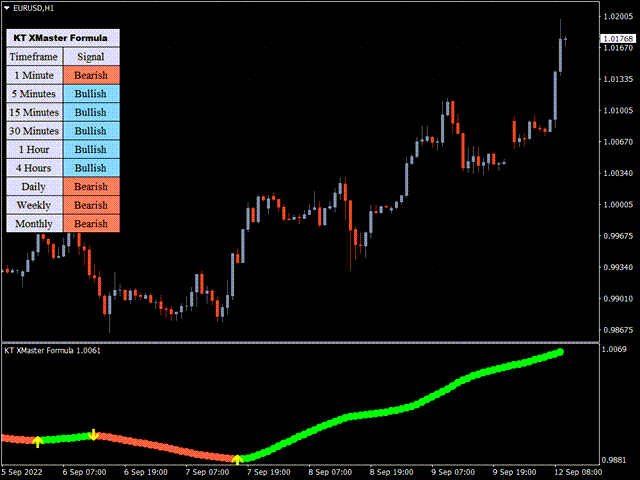
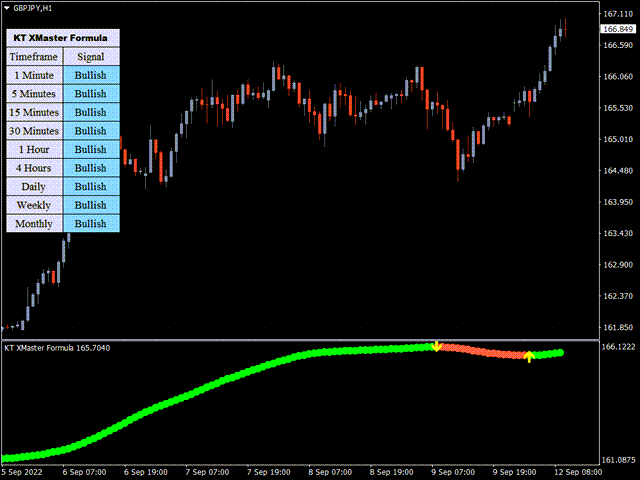
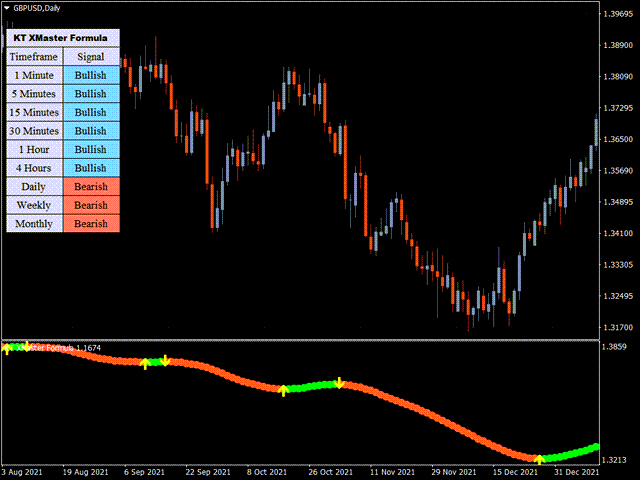
시장이 방향을 바꿀 때 가격 움직임만으로는 그 변화를 바로 알아보기 어려울 수 있습니다. KT XMaster Formula는 추세와 모멘텀 계산을 깔끔한 점선, 방향 전환을 표시하는 노란색 화살표, 멀티 타임프레임 대시보드로 보여 줍니다. 현재 방향과 마지막 전환 지점을 확인하고, 그 신호가 차트의 가격 구조와 어울리는지 비교할 수 있습니다.
계산에는 이동평균 평활화와 RSI 및 MACD 기반 정보가 함께 사용됩니다. 여러 지표를 겹쳐 놓는 대신, 스캘핑이나 눌림목 진입, 추세 추종 방식에 곁들일 수 있는 하나의 시각적 기준을 제공합니다.
하나의 선으로 보는 세 가지 신호
- 녹색 점선: 지표가 상승 방향으로 판단하고 있습니다.
- 빨간색 점선: 지표가 하락 방향으로 판단하고 있습니다.
- 노란색 화살표: 판단이 한 방향에서 반대 방향으로 전환되었습니다.
대시보드는 M1부터 MN1까지 상승 또는 하락 방향을 표시합니다. 새 차트 신호가 더 빠른 시간대와 더 느린 시간대에 함께 정렬되어 있는지, 아니면 아직 시간대별 방향이 엇갈리는 구간에서 나온 것인지 빠르게 확인할 수 있습니다.
신호를 자신의 매매 계획에 활용하는 방법
매수 기회를 볼 때는 선이 빨간색에서 녹색으로 바뀌며 나타나는 노란색 위쪽 화살표를 확인합니다. 매도 기회를 볼 때는 선이 녹색에서 빨간색으로 바뀌며 나타나는 노란색 아래쪽 화살표를 확인합니다. 그런 다음 자신의 진입 규칙, 가격 구조, 주로 거래하는 세션에 맞춰 신호를 판단할 수 있습니다.
일부 트레이더는 최근 스윙 저점이나 고점을 위험 배치의 기준으로 삼고, 다음 반대 신호를 청산 판단의 한 가지 참고로 사용합니다. 최종 진입, 스톱, 청산 결정은 트레이더에게 남아 있으므로 하나의 고정 방식에 얽매이지 않고 다양한 매매 스타일에 적용할 수 있습니다.
실용적인 설정과 알림
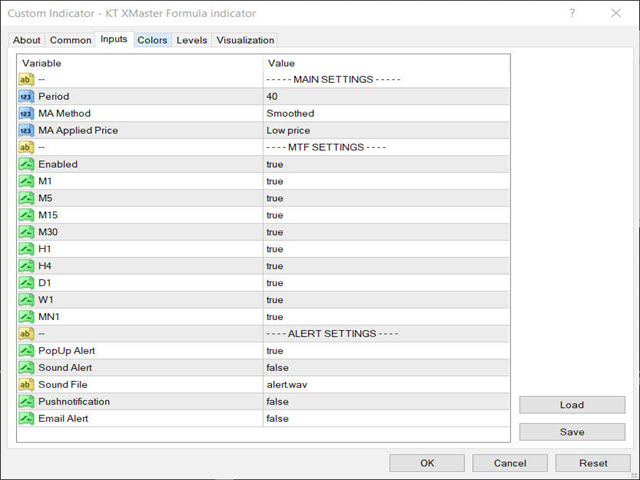
계산 기간, 평활화 방식, 적용 가격을 조정할 수 있습니다. 대시보드의 각 시간대는 개별적으로 활성화할 수 있어 자신의 매매 과정에 필요한 시장 정보만 남길 수 있습니다. 팝업, 소리, 푸시 알림, 이메일 알림을 지원하므로 방향 전환을 기다리며 차트를 계속 지켜볼 필요가 없습니다.