KT London Breakout
- Experts
-
KEENBASE SOFTWARE SOLUTIONS
 Keenbase Trading은 트레이더가 더욱 정확하고 신뢰할 수 있는 거래 결정을 내릴 수 있도록 MetaTrader 4 및 MetaTrader 5용 전문 지표와 Expert Advisor(EA)를 개발합니다.
당사의 제품은 실전에서 활용할 수 있는 거래 로직과 직관적인 사용자 경험을 결합하여 안정성, 사용 편의성, 그리고 체계적인 리스크 관리에 중점을 두고 설계되었습니다. 모든 도구는 철저한 테스트를 거쳐 실제 시장 환경에서도 일관되고 안정적인 성능을 제공할 수 있도록 개발됩니다. - 버전: 1.0
- 활성화: 5
First thirty minutes are essential for a trading session. The early reaction of traders and market players sets a path for the rest of the day.
KT London Breakout EA takes advantage of this phenomenon, and after analyzing the first thirty minutes of London session, it places two bidirectional pending orders. One of pending order is eventually canceled after realizing the market direction with certainty.
It has been strictly tested and developed for EUR/JPY using 30-Min Time Frame. You can experiment with other pairs, but it is not advisable to use a different time frame.
Backtesting
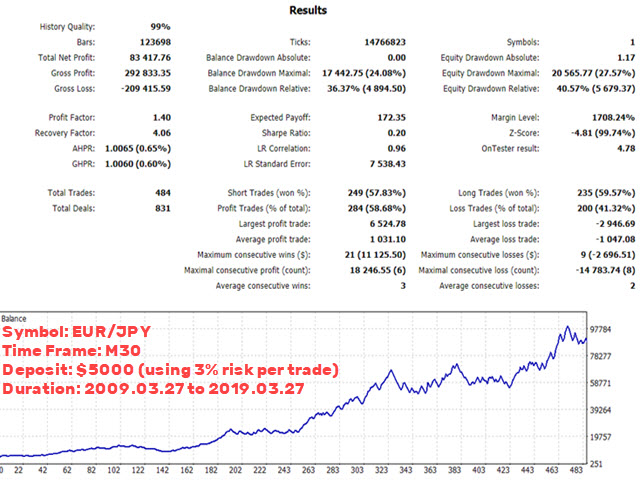
This EA has provided impressive results in a series of backtesting performed using Ten years of historical data starting from 2009.03.27 to 2019.03.27. You can use the following set files to achieve a similar backtest.
Don't be afraid to try testing with different input parameters. Better results can be achieved by experimenting with various input settings.
Input Parameters
- ----- Inputs that affects the trading strategy -----
- GMT Offset: Insert a GMT offset based on your broker's server time.
- Draw Price Tags: If true, EA will draw the price tags on the chart to facilitate the strategy speculation.
- Price Tag Color: Choose the color for price tags.
- ----- Configure Trade Settings -----
- Lot Size Method: Use a fixed lot size or automated lot size based on the risk percentage per trade.
- Risk Per Trade: Choose a risk percentage per trade.
- ----- Exit Settings -----
- Use Stop loss: true|false
- Stop loss Method: Based on your selection, EA will set the stop loss using pips, volatility or high/low of the last closed bar.
- Use Take Profit: true|false
- Take Profit Method: Based on your selection, EA will set the take profit using pips, volatility or price range of the last closed bar.
- Use SL Trailing: true|false
- SL Trailing Method: Based on your selection, EA will set the trailing sl using pips, volatility or high/low of the last closed bar.
- ----- Set the Filters -----
- Trend Filter: If true, EA will not execute the trades against the market trend.
- Volatility Filter: Based on the value of volatility coefficient, EA will not execute trades during extremely high or extremely low volatility.
- Vortex Filter: If true, trades will be executed only if they are in accordance with the bullish or bearish bias.
- MMI Filter: The Market Meanness Index measures randomness in the market. If true, EA will not execute trades if the market is moving a random way.
- ----- Miscellaneous Settings -----
- Max Loss Protection: If true, EA will stop trading after a fixed drawdown has occurred (say 30%).
- Logging: If true, EA will log all its operation under the journal and expert tab.