
ACB Trade Filter MT4
- 지표
-
KEENBASE SOFTWARE SOLUTIONS
 Keenbase Trading은 트레이더가 더욱 정확하고 신뢰할 수 있는 거래 결정을 내릴 수 있도록 MetaTrader 4 및 MetaTrader 5용 전문 지표와 Expert Advisor(EA)를 개발합니다.
당사의 제품은 실전에서 활용할 수 있는 거래 로직과 직관적인 사용자 경험을 결합하여 안정성, 사용 편의성, 그리고 체계적인 리스크 관리에 중점을 두고 설계되었습니다. 모든 도구는 철저한 테스트를 거쳐 실제 시장 환경에서도 일관되고 안정적인 성능을 제공할 수 있도록 개발됩니다. - 버전: 2.1
- 업데이트됨: 31 10월 2018
- 활성화: 10
주문을 넣기 전에 ACB Trade Filter는 한 가지 실용적인 질문에 답하도록 도와줍니다. 시장이 이 거래를 지지하고 있는지, 아니면 엇갈린 조건에서 신호를 억지로 받아들이고 있는지를 확인하는 것입니다.
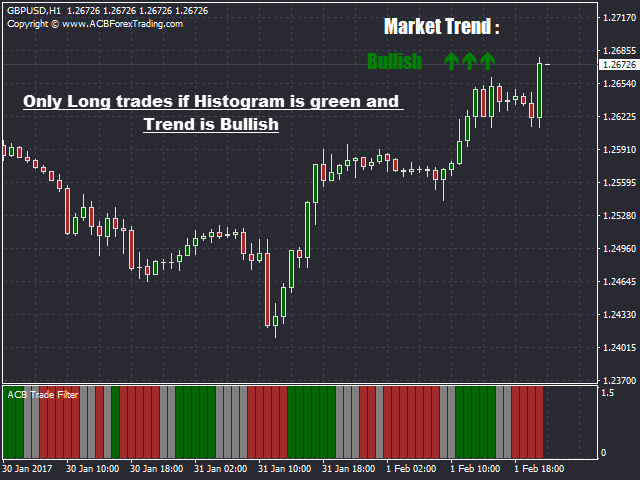
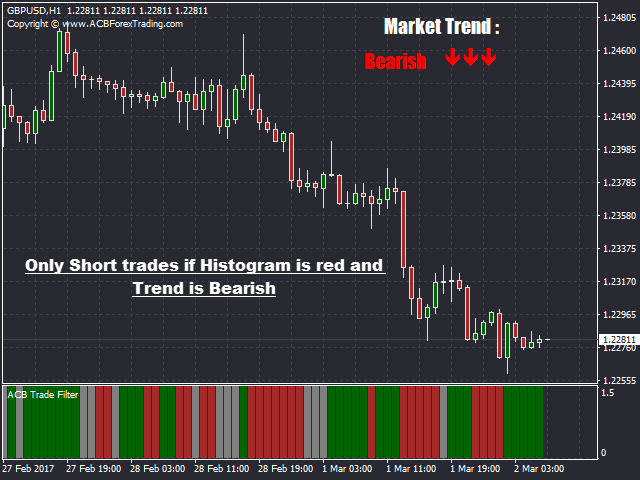
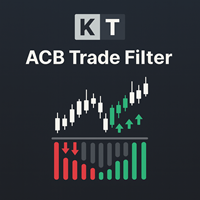
이 지표는 시장 심리와 추세를 분석한 뒤 색상 히스토그램과 추세 방향으로 결과를 보여줍니다. 기존 진입 신호가 나온 후 확인용으로 사용하고, 진입 시스템을 대신하는 용도로 사용하지 마세요.
세 가지 시장 상태를 한눈에 확인
- 녹색 히스토그램과 상승 추세: 자신의 전략에 따라 매수 설정을 찾을 수 있는 조건입니다.
- 빨간색 히스토그램과 하락 추세: 자신의 전략에 따라 매도 설정을 찾을 수 있는 조건입니다.
- 회색 히스토그램 또는 횡보 추세: 방향이 불분명하므로 해당 설정을 건너뛰는 편이 나을 수 있습니다.
전략 안에서 활용하는 방법
진입 지표가 신호를 만들면 실행하기 전에 ACB Trade Filter를 확인합니다. 히스토그램과 추세가 거래 방향과 일치하면 기존 분석을 계속합니다. 서로 충돌하면 모든 신호를 받아들이지 않고 잠시 멈출 수 있는 명확한 이유가 됩니다.
ACB Breakout Arrows와 자연스럽게 조합되지만 하나의 보조 지표에만 제한되지 않습니다. 모멘텀 설정, 눌림목 진입, 돌파 방식 또는 시장 방향을 다른 관점에서 확인하려는 수동 전략에도 사용할 수 있습니다.
목적은 더 많은 거래를 만드는 것이 아닙니다. 품질이 낮은 판단을 줄이고 전체 방향에 반하는 진입을 피하며 불안정한 시장에서 더 신중하게 선택하도록 돕는 것입니다.
원하는 선별 강도 선택
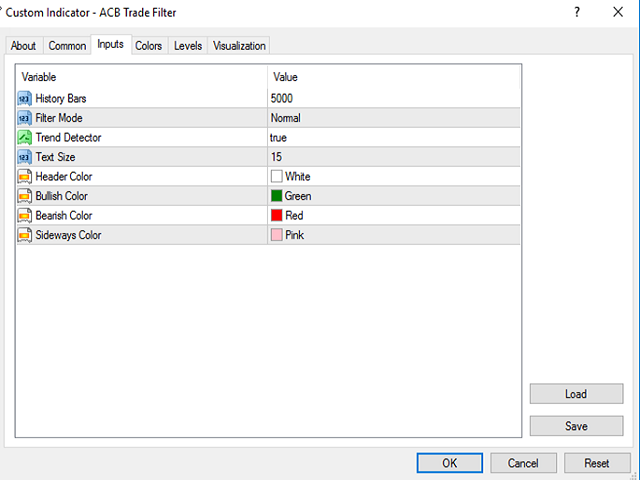
Normal 모드는 더 많은 기회를 원하는 트레이더에게 균형 잡힌 필터링을 제공합니다. Hard 모드는 더 적지만 엄격한 확인을 원할 때 보다 까다로운 조건을 적용합니다. 추세 방향은 표시하거나 숨길 수 있으며 과거 데이터 설정으로 계산 범위를 조절할 수 있습니다.
차트 확인부터 자동화까지
수동 거래에서는 복잡한 패널을 추가하지 않고도 히스토그램과 추세 방향을 빠르게 확인할 수 있습니다. 자동화 전략에서는 Expert Advisor가 지표 데이터를 직접 읽을 수 있습니다.
과정은 단순합니다. 자신의 전략이 기회를 찾고, ACB Trade Filter가 시장 심리와 추세의 지지를 확인하며, 최종 거래 결정은 직접 내립니다.


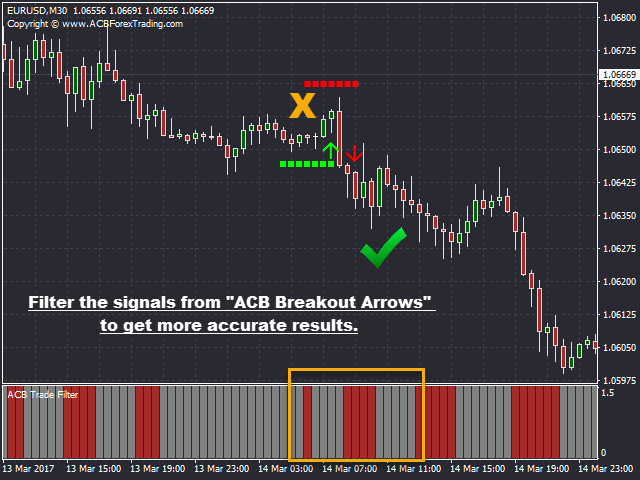













































































A must have indicator to filter out bad signals from any entry indicator specially the ACB Breakout Arrows.