Info Trader MT5
- 유틸리티
-
Kalinka Capital OU
 환영합니다!
성공적인 외환 거래를 위한 신뢰할 수 있는 솔루션을 찾고 있다면 제대로 찾아 오셨습니다. 알고리즘 트레이딩 시스템 개발 및 구현 분야의 전문가인 Kalinka Capital OU는 금융 시장에서 높은 성과를 달성하기 위해 고급 외환 로봇과 신호를 제공합니다.
수년 동안 우리는 브렉시트 및 미국 대통령 선거와 같은 가장 어려운 거래 이벤트를 성공적으로 탐색하여 고객의 안정성과 수익성을 유지했습니다. 다른 외환 어드바이저가 예치금을 잃을 때 우리 로봇은 계속 수익을 냈습니다. - 버전: 1.28
- 활성화: 5
We are happy to present you the "Info Trader" information indicator.
As we are traders ourselves, we create software that we primarily use in our own trading practices. During intraday multicurrency trading we were constantly in need of a "ready to use" info panel.
You have probably noticed that it is necessary to make a decision on taking profit on the account with consideration of profit on multiple instruments. To do this, you need to see the whole picture of each trade in detail.
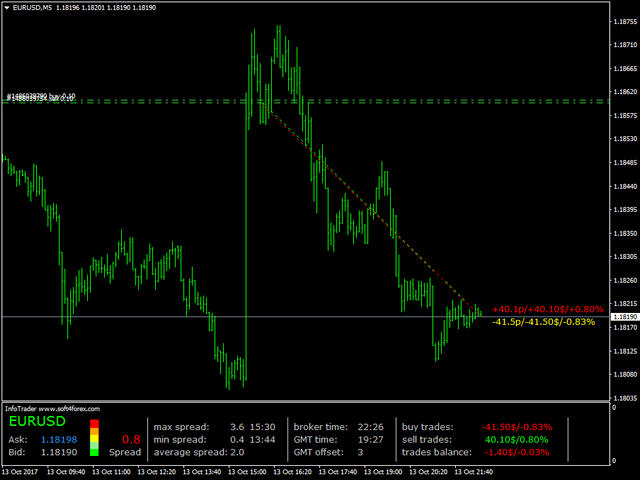
“Info Trader” will inform you about:
- Current spread
- Bid and Ask prices, with the price color changing relative to previous price. Falling prices are shown in red, rising prices in blue.
- The history of the maximum and minimum spread with indication of the event time within the trading day. And also the average spread value for the current trading day.
- Broker time and GMT 0 time. And also the broker's time zone relative to GMT. This clock will help you adjust your trading systems that use the time functions.
- Balance status informer for buy and sell orders, and total result of all trades opened on the instrument the indicator is running on.
All data displayed by the indicator is updated each tick/change in the instrument price.
Settings
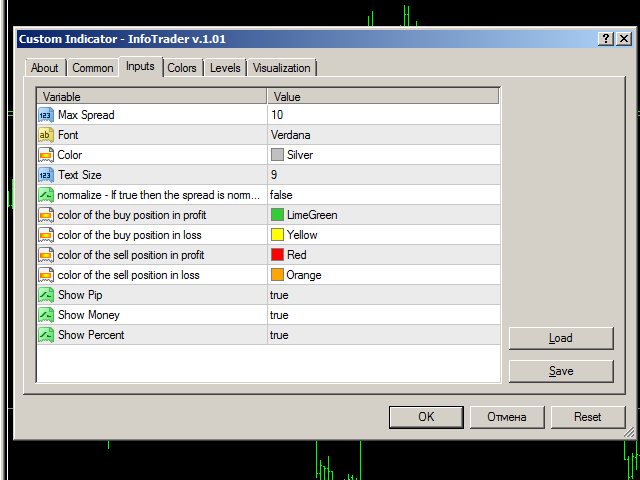
- Max Spread - the maximum spread. Set at the discretion of the user. Set the maximum spread you consider necessary. The indicator will display the current spread value from 0 to the specified value in color.
- Font - used font type. Verdana by default.
- Color - color of the main indicator font.
- Text Size - indicator font size. Available values are 7, 9, 12.
- normalize - If true then the spread is normalized to traditional pip - true = the values in points are displayed in standard points with decimal places (100 standard points as 100.0). False = 100 standard points are displayed as 1000 points in five-digit quotes.
- color of the buy position in profit - text color of profitable buy positions.
- color of the buy position in loss - text color of unprofitable buy positions.
- color of the sell position in profit - text color of profitable sell positions.
- color of the sell position in loss - text color of unprofitable sell positions.
- Show Pip - true = show the position profit in points on the chart. False = hide.
- Show Money - true = show the position profit in the deposit currency on the chart. False = hide.
- Show Percent - true = show the position profit in percent on the chart. False = hide.
We wish you successful trading and favorable trend!