StrategyDeck Manual Scalping Cockpit
- 유틸리티
-
Sayed Javad Razavi Ebrahimi
 🔧 Software engineer & data analyst — professional-grade MQL5 EAs and indicators.
 - 버전: 3.51
- 업데이트됨: 15 9월 2026
- 활성화: 20
StrategyDeck — a cockpit for manual, discretionary trading.
StrategyDeck draws and measures. It does not decide, and it never sends an order on its own.
What it draws on the chart
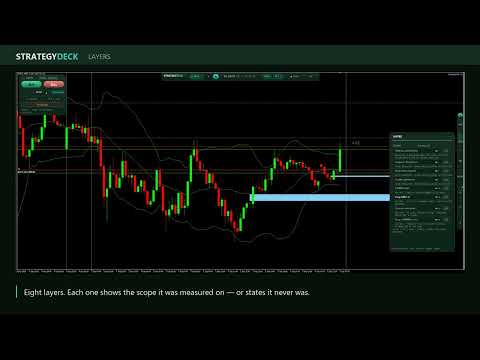
Opening range boxes for the Asia, Europe and US sessions, a linear regression channel, previous-day
high and low with the day's open, and key candlestick patterns. Each drawing layer can be turned
off, set to drawing only, or set to signal — and the signal position exists only where a measured
scope is available.
What it measures, and shows as numbers
- The round-trip cost of a trade on the current symbol, read from the symbol itself: the
typical toll for this hour, plus p99 and the maximum, because the tail is what breaks a plan.
- The overnight carry, in the unit your broker actually uses, and the day the swap is tripled.
- The hit rate a target needs once that cost is counted. A 10R target does not need 9.1%; it
needs more, and the gap between the two rows is the toll's tax on the plan.
- The total drawdown against the limit you set, and the loss of the day since the day opened.
- The position size the account can hold, computed from the drawdown you have actually observed
rather than from an assumption. When both required measurements are missing, it answers
"not measured" instead of a number, and when the result falls under the minimum lot it answers
"too big for this account".
Four display-only modules
EWMAC 64/4, a Grey GM(1,1) forecast, a deseasoned squeeze and a Grey to EWMAC crossover. Each one
displays the instrument and timeframe it was measured on. None of them is presented as an edge, and
none of them can open a position.
Execution
Manual only. Every order comes from your click on the trade panel, with a stop attached to the order unless you switch the automatic stop off on the panel, which then shows it in a warning colour. Lot size is either fixed or computed from your risk rule at click time. On a live account
trading starts LOCKED at every launch until you arm it, so the tool never resumes on its own after a
restart. On a demo account it starts unlocked, so you can try it straight away. In ASSIST mode the
deck manages what is already open — automatic stop, breakeven, scale-out levels, closing before the
session ends.
A risk gate on the same path as your click
New entries are refused past the total drawdown limit you set (0 = none, for a personal account), past the cumulative margin cap, and inside
the news window when your terminal provides the economic calendar. Some brokers do not
ship one: in that case the news block cannot be enforced, and the panel says so on screen, in a
warning colour, rather than leaving you to assume you are covered. The gate never closes an open position: blocking an entry cannot worsen a position
already running, while closing by force could exit at the worst moment. When the broker itself
rejects an order, the panel says so, with the reason the server returned.
An AI co-pilot, kept away from execution
A local model through Ollama, free and offline, or an OpenAI-compatible endpoint with your own key.
It comments on the context shown on screen. It is not connected to execution in any way, and it
never returns a signal.
Built-in help
Every element of the interface is described in a help panel organised by topic, with a six-step
usage guide. Hovering any control explains what it does.
Honest limits, stated on the screen itself
The drawing patterns are decision aids, not proven edges. This tool makes no claim about
profitability, and nothing in it is a trading signal. Interface in English or French, switchable
with one click.
StrategyDeck draws and measures. It does not decide, and it never sends an order on its own.
What it draws on the chart
Opening range boxes for the Asia, Europe and US sessions, a linear regression channel, previous-day
high and low with the day's open, and key candlestick patterns. Each drawing layer can be turned
off, set to drawing only, or set to signal — and the signal position exists only where a measured
scope is available.
What it measures, and shows as numbers
- The round-trip cost of a trade on the current symbol, read from the symbol itself: the
typical toll for this hour, plus p99 and the maximum, because the tail is what breaks a plan.
- The overnight carry, in the unit your broker actually uses, and the day the swap is tripled.
- The hit rate a target needs once that cost is counted. A 10R target does not need 9.1%; it
needs more, and the gap between the two rows is the toll's tax on the plan.
- The total drawdown against the limit you set, and the loss of the day since the day opened.
- The position size the account can hold, computed from the drawdown you have actually observed
rather than from an assumption. When both required measurements are missing, it answers
"not measured" instead of a number, and when the result falls under the minimum lot it answers
"too big for this account".
Four display-only modules
EWMAC 64/4, a Grey GM(1,1) forecast, a deseasoned squeeze and a Grey to EWMAC crossover. Each one
displays the instrument and timeframe it was measured on. None of them is presented as an edge, and
none of them can open a position.
Execution
Manual only. Every order comes from your click on the trade panel, with a stop attached to the order unless you switch the automatic stop off on the panel, which then shows it in a warning colour. Lot size is either fixed or computed from your risk rule at click time. On a live account
trading starts LOCKED at every launch until you arm it, so the tool never resumes on its own after a
restart. On a demo account it starts unlocked, so you can try it straight away. In ASSIST mode the
deck manages what is already open — automatic stop, breakeven, scale-out levels, closing before the
session ends.
A risk gate on the same path as your click
New entries are refused past the total drawdown limit you set (0 = none, for a personal account), past the cumulative margin cap, and inside
the news window when your terminal provides the economic calendar. Some brokers do not
ship one: in that case the news block cannot be enforced, and the panel says so on screen, in a
warning colour, rather than leaving you to assume you are covered. The gate never closes an open position: blocking an entry cannot worsen a position
already running, while closing by force could exit at the worst moment. When the broker itself
rejects an order, the panel says so, with the reason the server returned.
An AI co-pilot, kept away from execution
A local model through Ollama, free and offline, or an OpenAI-compatible endpoint with your own key.
It comments on the context shown on screen. It is not connected to execution in any way, and it
never returns a signal.
Built-in help
Every element of the interface is described in a help panel organised by topic, with a six-step
usage guide. Hovering any control explains what it does.
Honest limits, stated on the screen itself
The drawing patterns are decision aids, not proven edges. This tool makes no claim about
profitability, and nothing in it is a trading signal. Interface in English or French, switchable
with one click.