Current Position Info Board 4

5
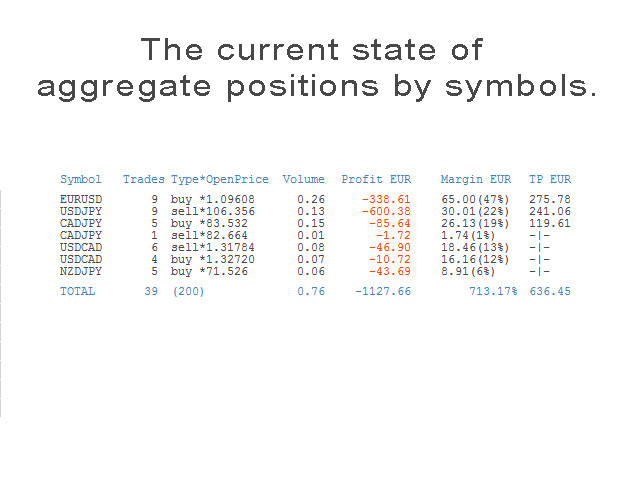
The informer provides information on the current state of open market positions.
The visual presentation consists of two parts. 
The left side contains the latest transactions executed on the account. Transactions are sorted by time.
The right part shows the current state of the aggregate positions of the instruments.
Sorting of positions is carried out in descending order of the margin load on the account.
Updating and recalculating the status of positions is performed automatically and/or by mouse click.
Management Options:
  1. Accepted transaction history depth(minutes) - Sets the time of the earliest displayed transaction.
  2. Display time of new trade (minutes) - Determines how long to show the last completed trade.
  3. On/OFF Alert - Enable/Disable Alert.
  4. On/OFF File writing - Enable/Disable the recording of recent transactions in a file.
Examples of using the informer on video signal broadcasting.
리뷰 2
Zack van Zyl
591
Zack van Zyl 2020.10.18 03:56 
 

Fantastic! Love it!

추천 제품
Drawdown Partial Closure
Jerome Thierry Francois Delobel
Drawdown Partial Closure Expert Advisor Description: The Drawdown Partial Closure Expert Advisor is a tool designed for MetaTrader 4 that assists traders in managing their positions during drawdown periods. It monitors the drawdown of the trading account in real-time and automatically closes a portion of losing positions when the drawdown exceeds a specified threshold. This helps traders to mitigate losses during adverse market conditions while allowing profitable positions to remain open. Featu
Easy mt4 to telegram
Medilane Bernard Philippe Couratier
Jarfac Mt4ToTelegram Introduction Jarfac Mt4ToTelegram   is an MT4 system designed to facilitate real-time communication between the MetaTrader 4 platform and Telegram.   This script allows traders to receive customizable instant notifications based on different trade types, ensuring optimal responsiveness without having to constantly monitor the trading platform. main Features Real-time notifications   : Receive notifications directly on Telegram as soon as an action occurs on MT4. Emoji suppor
Coral History
D Armond Lee Speers
Coral History displays information about your trading account and a summary of your history for the day, week, month and all time in a convenient, lightweight window. NEW : You can now set daily / weekly / monthly goals.   Coral History can notify you when reaching a goal.  If set the goal will be displayed in the History section row header; and if you've reached the goal the row will be highlighted in green. Account Information Balance Equity Free Margin (amount, percent or drawdown) Marin Leve
The utility is designed to send signals from MT4 to Telegram. It has several unique features, allowing not only the sending of trade signals but also the following functionalities: Send messages directly from the terminal to Telegram Send emojis along with custom text Send text and images from Telegram All of these features enable users to manage a signal channel while focusing on trading and finding quality signals. Customizable Signal Messages You can fully customize the signal message: Specif
차트 동기화 표시기 - 터미널 창의 그래픽 개체를 동기화하도록 설계되었습니다. TradePanel 에 추가로 사용할 수 있습니다. 구매하기 전에 데모 계정에서 데모 버전을 테스트할 수 있습니다. 데모는 여기 에서 확인하세요. 객체를 다른 차트로 복사하려는 차트에 표시기를 설치하세요. 이 차트에 생성된 그래픽 개체는 표시기에 의해 동일한 기호가 있는 모든 차트에 자동으로 복사됩니다. 표시기는 그래픽 개체의 변경 사항도 복사합니다. 입력 매개변수: Exception - 복사할 필요가 없는 그래픽 개체 이름의 접두사입니다. 여러 접두사를 ';'으로 구분하여 입력하여 지정할 수 있습니다. Custom symbols - 그래픽 개체를 복사(동기화)할 추가 기호입니다. 세미콜론(;)으로 구분하여 여러 기호를 지정할 수 있습니다. SyncVLINE - 수직선을 동기화합니다. SyncHLINE - 수평선. SyncTREND - 추세선. SyncTRENDBYANGLE - 각도별 추세선 SyncCYC
PRODUCT description: Market Data Logger   PRO  is a utility tool specially created for the sole purpose of logging your Broker's market data to a text file. With this tool, you will be able to record and export metrics from your MT4 Broker such as the "MT4 Market Watch Time", "Bid Price", "Ask Price", "High Price", "Low Price" and various measures of "Spread". This tool may be of interest to traders, data scientists wanting to capture and analyze market data, entrepreneurs, archival purposes,
Hello This EA for send Orders Signals when you open or close order and send statics to your channel in Telegram with sum of profit or Loss Pips you can share your orders with your clients in your telegram please watch our video  to see how it is fast. https://www.youtube.com/watch?v=u_7twtYZhyI you must have Telegram channel then make bot and give it Permission and get token (watch this video to know how do it) https://www.youtube.com/watch?v=x1bKWFOjSBE and you must download this files https
Trailing and SL TP
Konstantin Kulikov
5 (1)
The utility places trailing stop, breakeven, stop loss and take profit.‌ It is necessary to allow automated trading in the terminal settings. In testing mode, the utility opens Buy or Sell positions on the first ticks, which allows you to visually observe the given logic, changing the utility parameters. In real mode, the utility does not open positions. Discuss the complexities of Forex trading here:  chat "Age of Expert Advisors" . Parameters magic  - magic number. If less than 0, positions wi
SFG Telegram Trade Notifier for MT4 is a professional notification system that sends instant messages to your Telegram group or channel every time a trade is opened or closed on your MT4 account. MAIN FEATURES Sends notifications for every trade open and close Compatible with Telegram Groups, Channels, and Topics (threads) ️ Customizable scan frequency and filters Persistent memory (no duplicate messages after restart) Ignores trade history — sends only new events ️ 100% safe: no
The script opens a separate window and displays information about the current open positions in it. The informer will be useful to those who operate with a large number of positions open on different instruments in different directions. It allows you to quickly decompose the loading of the deposit by instruments, visually identify the most tense places in the aggregate position. For the exposed stop orders, it calculates the total risks and goals.
Pending provider
Andrey Frolov
5 (1)
The script greatly simplifies trader's work with pending stop orders (BuyStop, SellStop). The script places any number of pending orders at a user-defined distance (in points). Order expiration time in seconds can also be specified. It is also possible to place only Buy Stop or only Sell Stop orders. All stop orders are accompanied by user-defined take profit and stop loss levels. Volume is customizable as well. Parameters Open BuyStop - place a pending Buy order Open SellStop - place a pending
Trade Dashboard MT4
Fatemeh Ameri
4.96 (53)
Tired of complex order placement and manual calculations? Trade Dashboard is your solution. With its user-friendly interface, placing orders becomes effortless, by a single click, you can open trades, set stop loss and take profit levels, manage trade lot size, and calculate risk to reward ratios, allowing you to only focus on your strategy. Say goodbye to manual calculations and streamline your trading experience with Trade Dashboard. Download  Demo Version  right now. You can find  Details of
LMBF Executor
Graeme Dakers
5 (1)
**IMPORTANT** THIS TOOL REQUIRES YOU TO FIRST PURCHASE "Graphical Trade Planner" https://www.mql5.com/en/market/product/56702. Without it, this tool will do nothing of any use. -------------------------- Use "Graphical Trade Planner"  to plan your trades directly on your charts and get instant feedback on account risk, trade risk to reward and  required position size. Plus, purchase LMBF Executor separately to easily convert planned trades into orders and manage them from your charts. Features i
One Click Trader is a tool designed for MetaTrader 4 platform, which enables you to take your trading to the next level. It enables you to open, manage and close your trades in simple an efficient way by just one click of your mouse button. Up arrow minimizes the OCT panel Down arrow maximizes the OCT panel Right arrow displays the next panel with additional features Left arrow hides the panel with additional features Red SELL button enables you to open short market orders Red SELL STOP button e
Order Management EA (OME). The software will manage your trades based on 2 options: Magic Number or Order Comment. Both the Trades from the other EA or from Manual Trading. Drawing Stop Loss/Take Profit, Close All the positions, manages Multiple Orders, determining grid range and entry signals automatically.  Sending Martingale Orders, if necessary, that can be turn off/on. Including 2 options lot calculation: Multiplication or Addition.  You install OME in your account, you place order, and it

Main features: I nforming via telegram buttons content and closing orders for one of the pairs or all necessary orders.  Alert and information buttons to the telegram window when the specified percentage of profit is reached for each pair, or for two at once. The telegrams "sleep" while no profit we need, when a profit is reached, a menu of 5 buttons appears, in each button the profit will be displayed both in currency and in %%. When you click on the button, the direction of orders for this pa
Shortcuts MT4 Hotkeys Scalping
Pablo Filipe Soares De Almeida
다음은 요청하신 MT4 Hotkeys – 주문 및 포지션 관리 도구 의 한국어 번역 전체 버전 입니다. 원문에 있는 모든 항목(설명, 키 명령, 리스크 관리 옵션, 기능)을 빠짐없이 한국어로 옮겼습니다. MT4 Hotkeys – 주문 및 포지션 관리 도구 이 도구는 사용자가 MetaTrader 4 플랫폼에서 키보드 단축키를 사용하여 주문과 포지션을 관리할 수 있도록 설계되었습니다. 주문 실행, 포지션 종료, 트레일링 스탑 조정 및 사용자 정의 가능한 설정을 통한 리스크 관리 기능을 지원합니다. 핵심 명령어 "B" : 매수 주문을 실행합니다. "S" : 매도 주문을 실행합니다. "C" : 모든 오픈 포지션을 일괄 종료합니다. "X" : 특정 포지션을 종료합니다(설정에 따라 가장 오래된 포지션 또는 가장 최근 포지션). "T" : 트레일링 스탑을 활성화합니다(매수의 경우 이전 봉의 저점, 매도의 경우 이전 봉의 고점에 맞춰 조정). "P" : 오픈 포지션의 설정 가능한 비율을 청산합니다
Всем привет. Данный индикатор прост, как божий день. Кстати, я , Вадим Сергеевич Лепехо, трейдер(частный) опыт 20 лет. Предлагаю приобрести мой индикатор. Построен он на базе индикатора arrrows_template. Индикатор рисует стрелки на графике  при пересечении скользящих. Все просто. Видим стрелку вниз - ходим вниз отложенным ордером(pending) SELL STOP, откладываем от Low 10pips(пипсов). Фиксируем профит в целях 5, 10,15 пунктов. Видим стрелку вверх - ходим вверх отложенным ордером(pending) BUY STOP
DrawDownControl
Andrey Shvecov
This Expert Advisor is designed to control drawdown by the symbol it is set to. The Expert Advisor does not carry out trading operations on opening positions, only closing open positions on the symbol on which it is set under certain conditions! There are three drawdown levels implemented in the Expert Advisor. The drawdown size for each level is set in the input parameters and the profit size is assigned (it can be either positive or negative), upon reaching which the ADVISER will close all po
This script searches for all positions for the current currency pair and calculates the sum of all lots for those positions with negative profit and offers to open a hedge (opposite) position with a lot size equal to the calculated sum of lots multiplied by LotCoeff. You just need to drop this script on the chart with a desired currency pair. Before placing opposite orders, the input window is opened allowing you to modify all the input parameters: LotCoeff = 1.5; BuySearch = true; SellSearch =
이 도구는 전략 테스터에서 작동하지 않습니다. Test version: https://www.mql5.com/en/blogs/post/753244 이 도구를 사용하면 계정 잔액을 기반으로 주요 측정항목을 표시하여 계정 실적을 시각화할 수 있습니다. 라인을 선택하고 드래그 앤 드롭하여 다양한 가격대의 주요 측정항목을 즉시 확인할 수 있습니다. 선을 이동한 후 원래 위치로 돌아가려면 두 번 클릭하면 됩니다. 그러면 선이 원래 매개변수로 돌아갑니다. 이 도구는 현재 가격이 지정된 라인에 도달하면 알려줄 수 있습니다. 주요 특징들:  손익분기점 표시  지정된 백분율 또는 금액으로 라인 표시  계정 잔액을 기준으로 백분율을 계산하고 표시합니다.  백분율을 금액으로 변환하고 표시합니다.  지정된 금액을 기준으로 백분율을 계산하고 표시합니다.  라인을 선택하고 드래그하여 백분율, 금액, 핍/포인트를 확인하세요.  이동한 선을 두 번 클릭하여 원래 위치로 되돌립니다.  PIPS에서 설정 및
MT4 To Notion
Levi Dane Benjamin
5 (2)
이 프로그램을 사용하면 매우 친숙한 사용자 인터페이스를 사용하여 MetaTrader 계정에서 모든 거래를 직접 Notion으로 내보낼 수 있습니다.  MT5 버전  |  사용자 가이드 + 데모 시작하려면 사용자 가이드를 사용하고 Notion 템플릿을 다운로드하십시오. 데모를 원하는 경우 사용자 가이드로 이동하십시오. 전략 테스터에서 작동하지 않습니다! 주요 기능 거래 계정의 모든 거래를 Notion으로 내보내기 최근 일부터 거래 내보내기 최근 주부터 거래 내보내기 최근 달부터 거래 내보내기 사용자 정의 시간 범위에서 거래 내보내기 모든 새로운 종료된 거래를 자동으로 Notion으로 보내기 주문 유형, 거래량, 개시 시간, 종료 시간 등을 포함하여 내보내기에 포함할 필드 선택 시작하는 방법 위의 사용자 가이드로 이동하거나 EA를 시작하고 '연결 도움말 받기'를 클릭하십시오. 연결된 후에는 '시작: 모두 내보내기'를 클릭하여 현재 트레이드를 모두 내역에서 Notion으로 보내십시오.
Telegram Forwarder can forward all activities related to trades and position taking as a signal to Telegram messenger. It can also forward indicators' alert to Telegram if you modify indicator code (I can do it for you too) to hand over alerts to Telegram Forwarder. This EA is intended for business and professional usage. You can introduce your own Telegram bot and customize water mark in screenshots. Telegram forwarder is able to forward signals for "new order", "modification of order", "Pendin
ChartChanger는 터미널에 열려 있는 차트 수를 줄이는 훌륭한 유틸리티 도구입니다. 여기에는 기호, 시간 프레임 및 템플릿의 세 가지 섹션이 있습니다. 차트를 하나만 열면 여러 차트로 스크롤할 수 있습니다. 기호: 버튼을 누르면 한 기호에서 다른 기호로 변경할 수 있으며 적용된 지표는 다음 차트에 유지됩니다. 기호에는 자동 감지 모드가 있거나 원하는 기호를 수동으로 입력할 수 있습니다. 28개를 모두 사용하거나 그 이하의 숫자를 사용할 수 있습니다. 통화 쌍, 에너지, 지수, 상품 등 MetaTrader에 있는 모든 기호를 사용할 수 있습니다. 시간 프레임: 패널 중앙에 시간 프레임 변경 기능이 추가되었습니다. 버튼을 누르면 1분부터 월간 차트까지 원하는 기간으로 변경할 수 있습니다. 템플릿: 이 패널의 세 번째 기능은 템플릿 변경자입니다. 9개의 내장 템플릿이 있으며 모두 사용하거나 사용하지 않습니다. 모든 버튼은 자유 부동 패널 내부에 있습니다. 패널 상단에 커서를 놓고
HotKeys MT4
Alexey Valeev
3 (1)
This utility provides the ability to use hot keys in manual trading instantly responding to the current market situation. You can assign hot keys to open/close positions by their type, close all positions on the current chart and remove all orders on the current chart. You can also assign hot keys for five predefined trade volumes and switch between them if necessary with no need to change the volume manually from time to time. It is also possible to set the auto calculation of a trade volume in
Pending Orders Grid Complete System opens any combination of Buy Stop, Sell Stop, Buy Limit and Sell Limit pending orders and closes all existing pending orders. You will be able to Drag-and-Drop the Script on the chart and it will pick up the start price for the first position in the grid from the "Drop" point. Usually it should be in the area of Support/Resistance lines. Input Parameters Before placing all pending orders, the input window is opened allowing you to modify all input parameters:
The script clears the chart window from labels of order tracing. It removes labels of only closed orders. It clears charts in all windows opened in the terminal. Parameters: Symbol: clear charts of the specified symbol. If not said, clear charts in all windows. Last Data : orders with a date of closure which goes after the specified one will not be deleted. If not said, tracing of all closed orders will be deleted. Confirmation : True - confirmation of chart clearance for each window, False - n
Waddah Attar Easy Positions Risk Management This EA gives you a full ability to close one position or close all positions . Close buy or sell trades in any position . Close profit or loss position . by clicking on a command button on the chart with confirmation message . Show you  a full information about your positions like : count - lots - average price - points - profit -  profit % - used margin for this position and the risk percent . and also the scrolled table of trades that position has
One more Copier MT4
Oleksii Chepurnyi
5 (1)
Yet another signal copier. Nothing special. Demo version can be downloaded here . Key Features The utility copies trades between terminals: by market, pending orders (optional), as well as their stop loss and take profit levels (optional as well). You can copy from one Master account to several Slave accounts, as well as from several Master accounts to one Slave account. Volume calculation At the moment, there are two options for calculating the volume: The trade volume is taken 1 to 1 from th
AW Metatrader to Telegram
AW Trading Software Limited
귀하의 구독자가 귀하의 거래 터미널에서 귀하의 거래 이벤트를 놓치지 않도록 알림을 보내는 자동화된 시스템. 계정의 모든 거래 작업에 대해 Telegram 메신저에 알림을 보내는 유틸리티입니다. Telegram ->   HERE   / MT5 ->   HERE   의 채널에 유틸리티를 연결하는 단계별 지침 장점: 쉬운 설정과 자세한 설명, 조정 가능한 스크린샷을 보낼 수 있습니다. 이모티콘을 사용하여 사용자 정의 가능한 알림 텍스트, 오픈, 전체 또는 부분 마감에 대한 알림 조정 및 주문 수정, 기본적으로 알림을 보낼 때 텍스트 파일이 자동으로 다운로드되며, 대기 중인 주문의 배치 또는 삭제에 대한 알림 조정, 기호 및 매직 넘버로 편리한 필터링. 입력 변수: TELEGRAM BOT AND CHAT SETTINGS Telegram bot token - Enter the token number received after registering the bot in "BotFather" T
이 제품의 구매자들이 또한 구매함
Local Trade Copier EA MT4
Juvenille Emperor Limited
4.96 (104)
Local Trade Copier EA MT4 를 사용하여 매우 빠른 거래 복사 경험을 해보세요. 1분 안에 간편하게 설정할 수 있으며, 이 거래 복사기를 사용하면 Windows 컴퓨터 또는 Windows VPS에서 여러 개의 MetaTrader 터미널 간에 거래를 0.5초 미만의 초고속 복사 속도로 복사할 수 있습니다. 초보자든 전문가든 Local Trade Copier EA MT4 는 다양한 옵션을 제공하여 사용자의 특정 요구에 맞게 맞춤 설정할 수 있습니다. 이는 수익 잠재력을 높이려는 모든 사람을 위한 최고의 솔루션입니다. 지금 사용해보시고 이것이 왜 시장에서 가장 빠르고 쉬운 무역용 복사기인지 알아보세요! 팁: 여기 에서 데모 계정에서 Local Trade Copier EA MT4 데모 버전을 다운로드하여 사용해 볼 수 있습니다. 다운로드한 무료 데모 파일을 MT4 >> File >> Open Data Folder >> MQL4 >> Experts 폴더에 붙여넣고 터미널
Trade Assistant MT4
Evgeniy Kravchenko
4.42 (192)
거래당 위험 계산, 라인을 사용한 손쉬운 신규 주문, 부분 청산 기능을 통한 주문 관리, 7가지 유형의 트레일링 스탑 및 기타 유용한 기능을 제공합니다. 추가 자료 및 지침 설치 지침 - 애플리케이션 지침 - 데모 계정용 애플리케이션 평가판 라인 기능       - 차트에 개시선, 손절매, 차익실현을 표시합니다. 이 기능을 사용하면 새로운 주문을 쉽게 하고 개봉 전에 추가 특성을 볼 수 있습니다. 위기 관리       -       위험 계산 기능은 설정된 위험과 손절매 주문의 크기를 고려하여 새 주문의 볼륨을 계산합니다. 이를 통해 손절매 크기를 설정하고 동시에 설정된 위험을 존중할 수 있습니다. 로트 계산 버튼 - 위험 계산을 활성화/비활성화합니다. 필요한 위험 값은 위험 필드에 0에서 100 사이의 백분율 또는 예금 통화로 설정됩니다. 설정 탭에서 위험 계산 옵션을 선택합니다. $ 통화, % 잔액, % 지분, % 자유 마진, % 사용자 정의, % AB 이전 일, % AB
Trade Manager EA에 오신 것을 환영합니다. 이 도구는 거래를 보다 직관적이고 정확하며 효율적으로 만들기 위해 설계된 궁극적인 리스크 관리 도구 입니다. 단순한 주문 실행 도구가 아닌, 원활한 거래 계획, 포지션 관리 및 리스크 제어를 위한 종합 솔루션입니다. 초보자부터 고급 트레이더, 빠른 실행이 필요한 스캘퍼에 이르기까지 Trade Manager EA는 외환, 지수, 상품, 암호화폐 등 다양한 시장에서 유연성을 제공합니다. Trade Manager EA를 사용하면 복잡한 계산은 이제 과거의 일이 됩니다. 시장을 분석하고 진입, 손절 및 익절 수준을 차트의 수평선으로 표시한 후 리스크를 설정하면, Trade Manager가 이상적인 포지션 크기를 즉시 계산하고 SL 및 TP 값을 실시간으로 표시합니다. 모든 거래가 간편하게 관리됩니다. 주요 기능: 포지션 크기 계산기 : 정의된 리스크에 따라 거래 크기를 즉시 결정합니다. 간단한 거래 계획 : 진입, 손절, 익절을 위한
TradePanel MT4
Alfiya Fazylova
4.84 (89)
Trade Panel은 다기능 거래 보조원입니다. 이 애플리케이션에는 수동 거래를 위한 50개 이상의 거래 기능이 포함되어 있으며 대부분의 거래 작업을 자동화할 수 있습니다. 전략 테스터에서는 애플리케이션이 작동하지 않습니다. 구매하기 전에 데모 계정에서 데모 버전을 테스트할 수 있습니다. 데모 버전 여기 . 전체 지침 여기 . 거래. 한 번의 클릭으로 거래 작업을 수행할 수 있습니다: 자동 위험 계산을 통해 지정가 주문 및 포지션을 엽니다. 한 번의 클릭으로 여러 주문과 포지션을 열 수 있습니다. 주문 그리드를 엽니다. 그룹별 대기 주문 및 포지션을 마감합니다. 포지션 반전(매수 청산 후 매도 개시 또는 매도 청산 후 매수 개시). 포지션 고정(매수 포지션과 매도 포지션의 양을 동일하게 하는 추가 포지션 개설). 한 번의 클릭으로 모든 포지션을 부분 청산합니다. 모든 포지션의 이익실현과 손절매를 동일한 가격 수준으로 설정합니다. 모든 포지션에 대한 손절매를 해당 포지션의 손익 분기
The product will copy all telegram signal to MT4   ( which you are member  ) , also it can work as remote copier.  Easy to set up, copy order instant, can work with almost signal formats, image signal, s upport to translate other language to English Work with all type of channel or group, even channel have "Restrict Saving Content", work with  multi channel, multi MT5 Work as remote copier: with signal have ticket number, it will copy exactly via ticket number. Support to backtest signal. How to
Ultimate Extractor - Professional Trading Analytics for MT4 Ultimate Extractor transforms your MetaTrader 4 trading history into actionable insights with comprehensive analytics, interactive charts, and real-time performance tracking. Ability to combine multiple accounts and MT4 and MT5 into a single dashboard. What It Does Automatically analyzes your MT4 trading history across all Expert Advisors and generates detailed HTML reports with interactive visualizations. Tracks live performance metric

복사기->편리하고 빠른 인터페이스 상호작용으로 사용자가 바로 사용 가능       ->>>> Windows 컴퓨터 또는 VPS Windows에서 사용하는 것이 좋습니다. 특징: 다양하고 개인화된 복사 거래 설정: 1. 다양한 신호 소스에 대해 다양한 로트 모드를 설정할 수 있습니다. 2. 다양한 신호 소스를 포워드 및 리버스 복사 거래에 대해 설정할 수 있습니다. 3. 신호는 주석으로 설정할 수 있습니다. 4. 계약 로트에 따라 로트를 교정할지 여부 다양하고 개인화된 복사 주문 설정 2: 1. 다양한 품종에 대해 다양한 로트 모드를 설정할 수 있습니다. 2. 정방향 및 역방향 복사 주문에 대해 다양한 품종을 설정할 수 있습니다. 3. 주석으로 신호를 설정할 수 있습니다. 4. 계약 로트에 따라 로트를 교정할지 여부 댓글 필터링, MAGIC 필터링, 시그널 로트 필터링, 로컬 제품 필터링 근무시간 설정 역동기화 SLAVE 닫힘 주문 바인딩 기능: 모든 주문은 설정된 신호 소스 주문
MT4 to Telegram Signal Provider 는 사용하기 쉽고 완전히 사용자 정의가 가능한 도구로, 텔레그램으로 신호를 보내어 계정을 신호 제공자로 변환할 수 있습니다. 메시지 형식은 완전히 사용자 정의가 가능합니다! 그러나 간단한 사용을 위해 미리 정의된 템플릿을 선택하고 메시지의 특정 부분을 활성화하거나 비활성화할 수도 있습니다. [ 데모 ]  [ 매뉴얼 ] [ MT5 버전 ] [ 디스코드 버전 ] [ 텔레그램 채널 ]  New: [ Telegram To MT5 ] 설정 단계별 사용자 가이드 가 제공됩니다. 텔레그램 API에 대한 지식이 필요 없으며, 개발자가 필요한 모든 것을 제공합니다. 주요 기능 구독자에게 보낸 주문 세부 정보를 사용자 정의할 수 있는 기능 예를 들어 브론즈, 실버, 골드와 같은 계층 구독 모델을 만들 수 있습니다. 골드 구독은 모든 신호 등을 받게 됩니다. ID, 심볼 또는 코멘트별 주문 필터링 주문이 실행된 차트의 스크린샷을 포함 보낸
Copy Cat More Trade Copier MT4 (복사 고양이 MT4) 는 단순한 로컬 트레이드 카피어가 아니라, 오늘날의 거래 환경을 위해 설계된 완전한 리스크 관리 및 실행 프레임워크입니다. Prop Firm 챌린지부터 개인 계좌 관리까지, 강력한 실행력, 자본 보호, 유연한 설정, 고급 거래 처리 기능을 통해 모든 상황에 적응합니다. 이 카피어는 Master(송신자) 와 Slave(수신자) 모드 모두에서 작동하며, 실시간으로 시장가/지정가 주문, 거래 수정, 부분 청산, Close By 작업을 동기화합니다. 데모 및 실계좌 모두 호환되며, 거래용 비밀번호 또는 투자자 비밀번호로도 사용할 수 있습니다. Persistent Trade Memory 기술을 통해 EA, 터미널, VPS가 재시작되더라도 거래가 복원됩니다. 여러 Master와 Slave를 동시에 관리할 수 있으며, 브로커 간 차이는 접두사/접미사 자동 감지 또는 심볼 매핑으로 처리됩니다. 매뉴얼/설정: Copy C
News Filter EA: Advanced Algo Trading Assistant News Filter EA is an advanced algo trading assistant designed to enhance your trading experience. By using the   News Filter EA , you can integrate a Forex economic news filter into your existing expert advisor, even if you do not have access to its source code. In addition to the news filter, you can also specify   trading days   and   hours   for your expert. The News Filter EA also includes   risk management   and   equity protection   features
Exp COPYLOT CLIENT for MT4
Vladislav Andruschenko
4.69 (65)
MetaTrader 4용 트레이드 복사기.       모든 계정의 외환 거래, 포지션, 주문을 복사합니다. 그것은 최고의 무역 복사기 중 하나입니다       MT4 - MT4, MT5 - MT4       위해       카피롯 MT4       버전(또는       MT4 -  MT5   MT5 - MT5       위해       카피롯 MT5       버전). MT5 버전 전체 설명   +DEMO +PDF 구입 방법 설치하는 방법     로그 파일을 얻는 방법     테스트 및 최적화 방법     Expforex의 모든 제품 복사기   버전         MetaTrader 5   터미널 (   МТ5 - МТ5, МТ4 - МТ5   ) -   Copylot Client MT5 고유한 복사 알고리즘은 마스터 계정에서 고객 계정으로 모든 거래를 정확하게 복사합니다. 이 제품은 또한 높은 작동 속도에서 높은 오류 처리로 유명합니다. 강력한 기능 세트. 프로그램은 여러 터
Risk/Reward Tool은 MetaTrader 4에서 거래를 계획, 시각화 및 실행하는 방식을 혁신하도록 설계된 전문가급 Expert Advisor입니다. 정밀한 리스크 관리를 중시하는 재량 트레이더이든, 거래 설정을 시각적으로 테스트해야 하는 전략 개발자이든, 이 도구는 우아하고 직관적인 인터페이스에서 필요한 모든 것을 제공합니다. 기본적인 포지션 계산기와 달리, Risk/Reward Tool은 시각적 거래 계획을 즉각적인 실행 기능, 실시간 손익 모니터링 및 포괄적인 거래 관리 기능과 결합합니다. 이 도구는 MT4 전략 테스터와 완전히 호환되어 실제 자본을 위험에 빠뜨리지 않고 거래 전략을 연습하고 접근 방식을 개선할 수 있습니다. 도구의 전체 매뉴얼은 여기에서 확인할 수 있습니다: https://www.mql5.com/en/blogs/post/766244 MT5 version:  https://www.mql5.com/en/market/product/158601 주요 기능
Draw Agent는 모든 차트 분석, 낙서, 메모 등을 만들고 관리할 수 있는 아름답고 혁신적인 방법으로 설계되었습니다. 이 도구는 차트 공간을 칠판으로 취급하고 손으로 그리는 자유 그리기 방법을 제공합니다. 이 자유형 그리기 도구를 사용하면 차트에서 이벤트를 표시하거나 강조 표시하기 위해 MT4/MT5 차트에 그릴 수 있습니다. Elliott 파동을 손으로 작성하거나, 차트에 선을 긋거나, 차트에 아이디어를 설명하려는 경우   유용한 도구입니다. 클라이언트를 위한 라이브 웨비나를 실행하거나 사람들에게 스크린샷 또는 차트 파일을 배포하는 경우 특히 유용합니다. 또한. Draw Agent 설치 및 입력 가이드 EA 추가 URL(   http://autofxhub.com   ) MT4/MT5 터미널(스크린샷 참조)   에 대한 알림을 받으려면   . MT4 버전   https://www.mql5.com/en/market/product/14929 MT5 버전   https://www.
TPSpro Trade PRO
Roman Podpora
4.67 (6)
주어진 손절매 수준에 따라 포지션 규모 또는 위험을 즉시 계산할 수 있는 도구는 전문 트레이더와 초보 트레이더 모두에게 필수적입니다. TRADE PRO 거래 유틸리티는 빠르고 정확한 계산을 제공하여 시간적 제약이 있고 변동성이 큰 시장 상황에서 의사 결정을 내리는 데 도움을 줍니다. MT5 버전        /   추가 설치 자재 주요 기능: 독창적이고, 간결하며, 효과적입니다. 메인 거래 패널을 여는 독특하고 편리한 방법: 차트 오른쪽에 마우스 커서를 올려놓고 원하는 방향을 클릭하여 선물 주문을 하세요. 시장가 주문을 빠르게 설정할 수 있습니다. TRADE PRO를 사용하여 잔액 또는 자본 대비 백분율로 위험 수준을 설정하거나 특정 위험 금액을 지정할 수 있습니다. 차트에서 손절매 수준을 시각적으로 정의하면 도구가 각 통화 쌍에 대한 최적의 포지션 크기를 자동으로 계산합니다. 또한 지정된 위험-보상 비율을 기반으로 목표 수익(익절)을 자동으로 설정할 수 있습니다. 총 위험을 분
Fast Trade MT4
Alexey Valeev
4.8 (5)
This trading panel has been developed for fast and comfortable operation of the financial markets. It is equipped with the necessary functions for manual and semi-automated trading. Due to the presence of the order trailing feature, trailing stop and automatic closure by equity, profit, time. You can use it to automate your trading system. All you have to do is open a position and set the parameters for maintenance, everything else will be handled by the EA. If you want to limit your losses, set
DFGX Dashboard
Tsvetan Tsvetanov
5 (2)
Take your trading to the next level with DFGX - our second generation Dynamic Fibonacci Grid. This new, powerful and easy to use application is specially designed and optimized for contrarian intraday trading, scalping and news trading on the Forex market. This system is the ideal solution for active professional traders and scalpers who are looking for innovative ways to optimize their strategy. The system also provides excellent opportunity for new traders who want to learn to trade in a syste
Trade Manager MT4 DaneTrades
Levi Dane Benjamin
4.09 (11)
거래 관리자는 위험을 자동으로 계산하는 동시에 거래를 빠르게 시작하고 종료하는 데 도움을 줍니다. 과잉 거래, 복수 거래 및 감정 거래를 방지하는 데 도움이 되는 기능이 포함되어 있습니다. 거래를 자동으로 관리할 수 있으며 계정 성과 지표를 그래프로 시각화할 수 있습니다. 이러한 기능은 이 패널을 모든 수동 거래자에게 이상적으로 만들고 MetaTrader 4 플랫폼을 향상시키는 데 도움이 됩니다. 다중 언어 지원. MT5 버전  |  사용자 가이드 + 데모 트레이드 매니저는 전략 테스터에서 작동하지 않습니다. 데모를 보려면 사용자 가이드로 이동하세요. 위기 관리 % 또는 $를 기준으로 위험 자동 조정 고정 로트 크기 또는 거래량과 핍을 기반으로 한 자동 로트 크기 계산을 사용하는 옵션 RR, Pips 또는 Price를 사용한 손익분기점 손실 설정 추적 중지 손실 설정 목표 달성 시 모든 거래를 자동으로 마감하는 최대 일일 손실률(%)입니다. 과도한 손실로부터 계정을 보호하고 과도한
Take a Break
Eric Emmrich
5 (31)
The most advanced news filter on MQL market - free demo available Take a Break has transformed from a basic news filter into a comprehensive account protection solution. It seamlessly pauses any other Expert Advisors during news events or based on your custom filters, all while safeguarding your EA settings - restoring them automatically when trading resumes for complete peace of mind. Typical use cases: A single news filter for all your EAs. Stop trading during news/high volatility (+ close all
Multi Copy
Kaijun Wang
5 (1)
복사기->편리하고 빠른 인터페이스 상호작용으로 사용자가 바로 사용 가능       ->>>> Windows 컴퓨터 또는 VPS Windows에서 사용하는 것이 좋습니다. 기본 기능: 복사 거래의 일반적인 상호작용 속도는 0.5초 미만입니다. 신호 소스를 자동으로 감지하고 신호 소스 계정 목록을 표시합니다. 심볼 자동 매칭, 다양한 플랫폼에서 일반적으로 사용되는 거래 심볼의 95%(다른 접미사와 같은 특수한 경우)가 자동으로 매칭되며, 기본적으로 수동 설정이 필요하지 않으며 심볼 매핑 테이블을 두 번 클릭하여 해당 심볼을 변경할 수 있습니다. (매핑 테이블에는 빠른 심볼 검색 기능이 있습니다) 4가지 lot 계산 모드(1. 승수 2. 고정 lot 3. 적응형 위험 4. 신호   적응형 위험   ) 특수 로트 모드: 로트 크기는 손절매 자본 위험에 따라 계산될 수 있습니다.(손절매가 너무 작을 수 있고 계산된 로트 크기가 너무 클 수 있으므로 주의해서 사용하세요) 다중 플랫폼, 다중 신
News Dashboard MT4
Taras Slobodyanik
4.5 (8)
This dashboard displaying current news from ForexFactory.com (calendar FFC) and from the Investing.com website . You can sort news by impact and by country, and display them on the chart with one click. By holding down the 'Ctrl' key, you can select several different 'currencies' or 'impacts' to sort. Also, this utility shows not only the forecast, but also the actual values ​​after they appear on the site. You can set a separate notification for each news. You can read the news using your EA
Trading History MT4
Siarhei Vashchylka
5 (9)
Trading History - A program for trading and money management on the history of quotes in stratagy tester. It can work with pending and immediate orders, and is equipped with trailing stop, breakeven and take profit functions. Very good for training and testing different strategies. Manual (Be sure to read before purchasing) Advantages 1. Allows you to test any trading strategy in the shortest possible time 2. An excellent simulator for trading training. You can gain months of trading experience
수동 거래를 개선하세요: 빠르고 정확한 자동화된 위험 관리를 위한 Trade Manager Assistant 제공된 무료 데모 버전을 사용하여 전체 설정 지침을 받고 Trade Manager Assistant의 기능을 살펴보세요. 자세한 내용은   https://www.mql5.com/blogs/post/758625를   참조하세요.       . 수동 거래에는 신중한 분석과 빠른 결정이 필요하지만, 거래 매개변수와 관련된 실행 오류, 불일치 및 혼란의 위험으로 인해 수익이 감소하고 불필요한 스트레스가 발생할 수 있습니다. 트레이딩 관리자 어시스턴트를 소개합니다. 이 필수 어시스턴트는 수동 트레이딩 프로세스를 간소화하고 차트에 정밀성, 통제력, 자동화된 효율성을 제공합니다. 느린 실행이나 잘못된 계산으로 인한 거래 손실과 작별하세요. 귀하의 보조 사업 관리자는 전문적인 속도와 정확성으로 귀하의 업무를 완료할 수 있도록 도와드리므로, 중요한 행정 업무를 우리가 처리하는 동안 귀하는
Averaging Helper
Sergey Batudayev
5 (2)
평균화 도우미 - 이러한 종류의 거래 도우미 도구는 두 가지 기술을 사용하여 이전에는 수익성이 없었던 포지션의 평균을 맞추는 데 도움이 됩니다. 표준 평균화 추세에 따라 포지션을 이후 오픈하여 헤지 이 유틸리티는 매수 및 매도 포지션 모두 여러 방향의 여러 미결제 포지션을 한 번에 정리할 수 있습니다   . 예를 들어, 하나는 매도 포지션이고 다른 하나는 매수 포지션인데, 두 포지션 모두 수익이 없거나, 하나는 수익이 없고 하나는 수익이지만 수익이 충분하지 않은 경우, 두 포지션의 평균을 계산하여 더 높은 수익률로 거래를 마감하려는 경우, 이 유틸리티는 평균화 도우미(Averaging Helper)를 사용하는 데 도움이 될 것입니다. 평균화 도우미 유틸리티를 사용하면 다음 포지션의 크기, 주문 가격, 포지션을 평균화하고 지정한 이익 실현 크기에 맞춰 포지션을 마감하는 방향을 자동으로 계산할 수 있습니다. 이 유틸리티는 매수 및 매도 버튼을 사용하여 포지션을 오픈할 수 있도록 지원합니
With this Expert Advisor, you can seamlessly integrate various channel, arrow, and reversal indicators. It offers the flexibility to use all popular channel trading strategies, while also providing powerful tools to customize your trading conditions and risk management system.   The Expert Advisor opens orders when the price crosses the channel boundaries. Multiple crossing conditions are available for customization: Price touches boundary on re-entry into the channel Price touches boundary on
Basket EA MT4
Juvenille Emperor Limited
5 (5)
Basket EA MT4 는 강력한 수익 실현 도구이자 종합적인 계좌 보호 시스템을 하나의 간편하고 사용하기 쉬운 솔루션으로 결합한 제품입니다. 이 EA의 핵심 목적은 계좌 내 모든 개별 포지션을 묶음(Basket) 단위로 관리하여, 계좌 전체의 손익을 완전히 통제할 수 있도록 하는 것입니다. Take Profit, Stop Loss, Break Even(손익분기점), Trailing Stop과 같은 묶음(purpose) 수준의 기능을 제공하며, 이를 계좌 잔고의 퍼센트, 고정 통화 금액 또는 해당 거래들의 평균 포인트로 설정할 수 있습니다. 이러한 유연성은 트레이더가 자신만의 리스크 및 수익 전략을 맞춤 설정할 수 있도록 해줍니다. 또한 Basket EA MT4 는 Magic Number, 심볼, 또는 댓글 등을 기반으로 특정 거래를 관리 대상에서 제외하거나 포함시키는 지능형 거래 필터링을 지원합니다. 이를 통해 원하는 거래만 EA의 관리 대상이 되도록 보장할 수 있습니다. 추가
VirtualTradePad mt4 Extra
Vladislav Andruschenko
4.86 (58)
한 번의 클릭으로 거래할 수 있는 거래 패널.   위치 및 주문 작업!   차트 또는 키보드에서 거래. 거래 패널을 사용하면 차트에서 클릭 한 번으로 거래하고 표준 MetaTrader 컨트롤보다 30배 빠르게 거래 작업을 수행할 수 있습니다. 거래자의 삶을 더 쉽게 만들고 거래자가 훨씬 빠르고 편리하게 거래 활동을 수행할 수 있도록 도와주는 매개변수 및 기능의 자동 계산. 차트의 무역 거래에 대한 그래픽 팁 및 전체 정보. MT5 버전 전체 설명   +DEMO +PDF 구입 방법 설치하는 방법     로그 파일을 얻는 방법     테스트 및 최적화 방법     Expforex의 모든 제품 열기 및 닫기, 반전 및 잠금, 부분 닫기/오토로트. 가상/실제 손절매/이익 실현/후행 정지/손익분기점, 주문 그리드 .... MetaТrader 4   의 주요 요청 거래 제어판   : 구매, 판매, 구매 중지, 구매 제한, 판매 중지, 판매 제한, 닫기, 삭제, 수정, 후행 중지, 손절매,
Custom Alerts AIO: 다중 시장을 동시에 모니터링 – 설정 없이 즉시 사용 가능 개요 Custom Alerts AIO 는 복잡한 설정 없이 즉시 사용할 수 있는 통합 시장 모니터링 도구입니다. FX Power, FX Volume, FX Dynamic, FX Levels, IX Power 등 필요한 모든 지표가 내장되어 있어 별도의 설치나 구성 없이 알림 기능을 바로 사용할 수 있습니다. 차트 그래픽 없이 작동하며, Forex, 금속, 지수, 암호화폐 등 주요 자산군을 모두 지원합니다. 주식(Symbols)은 별도로 입력하여 추가할 수 있으나, MetaTrader에서는 일반적으로 제한적으로만 사용됩니다. 1. 왜 Custom Alerts AIO를 선택해야 하나요? 추가 라이선스가 필요 없습니다 • 모든 Stein Investments 지표가 내장되어 있어 별도 구매가 필요 없습니다. • 즉시 알림 기능을 시작할 수 있어 빠르고 간편합니다. 모든 시장을 하나의 도구로
일별 및 주별 마감 거래 내역, 현재 진행 중인 거래, 외환 노출을 한 차트에서 즉시 확인하세요! 히트맵을 사용하여 수익성 있는 거래와 거래 포트폴리오 내에서 현재 하락이 있는 위치를 파악하세요. 빠른 마감 버튼 빠른 마감 버튼을 사용하여 단일 심볼에 대한 모든 거래를 마감하거나, 개별 거래를 전체적으로 마감하거나, 버튼을 클릭하여 일부 수익 또는 손실을 실현하세요. 더 이상 목록에서 거래를 찾아 거래의 일부를 마감하는 방법을 알아낼 필요가 없습니다. 대시보드는 외환 쌍을 거래하는 동안 각 통화 심볼에 대한 현재 노출도 표시하므로 주요 뉴스 이벤트에 앞서 과도하게 노출될 수 있는 영역을 파악하는 데 도움이 됩니다. 버튼을 사용하여 뉴스가 나오기 전에 노출을 즉시 빠르게 줄이거나, 이미 뉴스가 발생하여 수익을 창출한 경우 클릭 한 번으로 빠르게 수익을 확보할 수 있습니다! 진행 중인 거래 히트맵 거래 히트맵은 달러 비용 평균화를 사용하여 거래의 확장 및 축소를 수행하는 포지션 거
거래하고자 하는 주요 영역을 파악한 후 자동으로 거래 지원 및 저항 또는 공급 및 수요 구역을 설정합니다. 이 EA를 사용하면 한 번의 클릭으로 매수 및 매도 구역을 그린 다음 가격이 바뀔 것으로 예상되는 정확한 위치에 배치할 수 있습니다. 그런 다음 EA는 해당 구역을 모니터링하고 구역에 대해 지정한 가격 액션에 따라 자동으로 거래를 수행합니다. 초기 거래가 수행되면 EA는 대상 구역이 되는 반대 구역에서 이익을 얻습니다. 그런 다음 거래를 종료하고 진입할 새 구역을 그리거나 이익을 얻고 즉시 반대 방향으로 거래를 역전하여 "항상 시장" 스타일 전략을 만드는 두 가지 선택이 있습니다. 입력 및 전략이 포함된 전체 매뉴얼은 여기에 있습니다: https://www.mql5.com/en/blogs/post/760256 이 EA는 시장에서 고정 또는 하드 스톱 로스를 사용하지 않는 포지션 트레이더 또는 달러 비용 평균 거래 전략을 위해 설계되었습니다. 대신, 다음에 가능한 지지 또는
Remote Trade Copier   is an advanced tool designed for efficiently copying trades between accounts in both   local   and   remote   modes. It allows for lightning-fast order replication from a master account to a slave account. In local mode, trades are copied instantly, while in remote mode, the copying process takes a second.  In new version, in remote mode , the copy operation can be performed with a delay of milliseconds or zero . After purchase, ask how to activate it MT4 Version (Only Loc
제작자의 제품 더 보기
Ticks Bars
Andrej Nikitin
4 (2)
This tick indicator draws synthetic bars/candlesticks that contain a definite number of ticks. Parameters: option prices - price option. It can be Bid, Ask or (Ask+Bid)/2. the number of ticks to identify Bar - number of ticks that form OHLC. price levels count - number of displayed price levels (no levels are displayed if set to 0 or a lower value). calculated bar  - number of bars on the chart. Buffer indexes: 0 - OPEN, 1 - HIGH, 2 - LOW, 3 - CLOSE.
FREE
TrailingStop MA
Andrej Nikitin
3.5 (2)
The indicator draws two simple moving averages using High and Low prices. The MA_High line is displayed when the moving average is directed downwards. It can be used for setting a stop order for a sell position. The MA_Low line is displayed when the moving average is directed upwards. It can be used for setting a stop order for a buy position. The indicator is used in the TrailingStop Expert Advisor. Parameters Period - period of calculation of the moving average. Deviation - rate of convergence
FREE
Ticks Bands
Andrej Nikitin
The Bollinger Bands indicator drawn using a tick chart. After launching it, wait for enough ticks to come. Parameters: Period - period of averaging. Deviation - deviation from the main line. Price levels count - number of displayed price levels (no levels are displayed if set to 0). Bar under calculation - number of bars on the chart for the indicator calculation. Buffer indexes: 0 - BASE_LINE, 1 - UPPER_BAND, 2 - LOWER_BAND, 3 - BID, 4 - ASK.
Tick
Andrej Nikitin
4.5 (2)
A simple tick indicator of Bid and Ask prices. The period separator (1 minute) is displayed as a histogram. Parameters Price_levels_count - number of price levels to be displayed. Bar_under_calculation - number of bars of the indicator to be displayed on the chart.
FREE
Ticks
Andrej Nikitin
3 (1)
A simple tick indicator of Bid and Ask prices. The period separator (1 minute) is displayed as a histogram. Parameters Show Bid Line - show/hide the Bid line; Show Ask Line - show/hide the Ask line; Show Labels - show/hide the last price values.
FREE
TrailingStop MA 4
Andrej Nikitin
4 (1)
The indicator draws two simple moving averages using High and Low prices. The MA_High line is displayed when the moving average is directed downwards. It can be used for setting a stop order for a sell position. The MA_Low line is displayed when the moving average is directed upwards. It can be used for setting a stop order for a buy position. The indicator is used in the TrailingStop Expert Advisor. Parameters Period - period of calculation of the moving average. Deviation - rate of convergence
FREE
Ticks RSI 4
Andrej Nikitin
The Relative Strength Index indicator drawn using a tick chart. After launching it, wait for enough ticks to come. Parameters: RSI Period - period of averaging. overbuying level - overbought level. overselling level - oversold level. calculated bar - number of bars on the chart for the indicator calculation. The following parameters are intended for adjusting the weight of RSI signals (from 0 to 100). You can find their description in the Signals of the Oscillator Relative Strength Index section
The Envelopes indicator drawn using a tick chart. After launching it, wait for enough ticks to come. Parameters: Averaging period - period of averaging. Smoothing type - type of smoothing. Can have any values of the enumeration ENUM_MA_METHOD . Option prices - price to be used. Can be Ask, Bid or (Ask+Bid)/2. Deviation of boundaries from the midline (in percents) - deviation from the main line in percentage terms. Price levels count - number of displayed price levels (no levels are displayed if
The Stochastic Oscillator indicator is drawn on the tick price chart. After launching it, wait for enough ticks to come. Parameters: K period - number of single periods used for calculation of the stochastic oscillator; D period - number of single periods used for calculation of the %K Moving Average line; Slowing - period of slowing %K; Calculated bar - number of bars in the chart for calculation of the indicator. The following parameters are intended for adjusting the weight of signals of the
Ticks MACD 4
Andrej Nikitin
The Moving Average Convergence/Divergence(MACD) indicator drawn using a tick chart. After launching it, wait for enough ticks to come. Parameters: Fast EMA period - indicator drawn using a tick chart. Slow EMA period - slow period of averaging. Signal SMA period - period of averaging of the signal line. calculated bar - number of bars on the chart for the indicator calculation. The following parameters are intended for adjusting the weight of MACD signals (from 0 to 100). You can find their desc
Ticks Bands 4
Andrej Nikitin
The Bollinger Bands indicator drawn using a tick chart. After launching it, wait for enough ticks to come. Parameters: Period - period of averaging. Deviation - deviation from the main line. Price levels count - number of displayed price levels (no levels are displayed if set to 0). Bar under calculation - number of bars on the chart for the indicator calculation. Buffer indexes: 0 - BASE_LINE, 1 - UPPER_BAND, 2 - LOWER_BAND, 3 - BID, 4 - ASK.
Ticks OsMA 4
Andrej Nikitin
The Moving Average of Oscillator(OsMA) indicator drawn using a tick chart. After launching it, wait for enough ticks to come. Parameters: Fast EMA period - fast period of averaging. Slow EMA period - slow period of averaging. Signal SMA period - period of averaging of the signal line. calculated bar - number of bars for the indicator calculation.
Ticks CCI 4
Andrej Nikitin
The Commodity Channel Index(CCI) indicator drawn using a tick chart. After launching it, wait for enough ticks to come. Parameters: period - number of single periods used for the indicator calculation. calculated bar - number of bars for the indicator calculation. The following parameters are intended for adjusting the weight of CCI signals (from 0 to 100). You can find their description in the Signals of the Commodity Channel Index section of MQL5 Reference. The oscillator has required directio
Ticks ADX 4
Andrej Nikitin
The Average Directional Movement Index indicator drawn using a tick chart. After launching it, wait for enough ticks to come. Parameters: Period - period of averaging. Сalculated bar - number of bars on the chart for the indicator calculation. Buffer indexes: 0 - MAIN_LINE, 1 - PLUSDI_LINE, 2 - MINUSDI_LINE.
Tick StdDev 4
Andrej Nikitin
The Standard Deviation (StdDev) indicator drawn using a tick chart. After launching it, wait for enough ticks to come. Parameters: Period - period of averaging. Method - method of averaging. calculated bar - number of bars for the indicator calculation.
Ticks Momentum 4
Andrej Nikitin
The Momentum indicator drawn using a tick chart. After launching it, wait for enough ticks to come. Parameters: period - period of the indicator calculation. levels count - number of displayed levels (no levels are displayed if set to 0) calculated bar - number of bars for the indicator calculation.
Ticks Bulls 4
Andrej Nikitin
The Bulls Power indicator drawn using a tick chart. After launching it, wait for enough ticks to come. Parameters: Period - period of averaging. The number of ticks to identify high/low - number of single ticks for determining high/low. Calculated bar - number of bars for the indicator calculation. The following parameters are intended for adjusting the weight of Bulls Power signals (from 0 to 100). You can find their description in the Signals of the Bulls Power oscillator section of MQL5 Refer
Ticks Bears 4
Andrej Nikitin
The  Bears Power indicator drawn using a tick chart. After launching it, wait for enough ticks to come. Parameters: Period - period of averaging. The number of ticks to identify high/low - number of single ticks for determining high/low. Calculated bar - number of bars for the indicator calculation. The following parameters are intended for adjusting the weight of Bears Power signals (from 0 to 100). You can find their description in the Signals of the Bears Power oscillator section of MQL5 Refe
Tiks ATR 4
Andrej Nikitin
The  Average True Range (ATR)  indicator drawn using a tick chart. After launching it, wait for enough ticks to come. Parameters: ATR Period  - number of single periods used for the indicator calculation. The number of ticks to identify Bar  - number of single ticks that form OHLC. Price levels count  - number of displayed price levels (no levels are displayed if set to 0 or a lower value). price mode  - choice of prices under calculation (can be bid, ask or average). Сalculated bar  - number of
Tiks WPR 4
Andrej Nikitin
The  Williams' Percent Range (%R)  indicator drawn using a tick chart. After launching it, wait for enough ticks to come. Parameters: WPR Period  - period of the indicator. Overbuying level  - overbought level. Overselling level  - oversold level. price mode  - choice of prices under calculation (can be bid, ask or average). Сalculated bar  - number of bars for the indicator calculation. The following parameters are intended for adjusting the weight of WPR signals (from 0 to 100). You can find t
The  Price Channel  indicator drawn using a tick chart. After launching it, wait for enough ticks to come. Parameters: Period  - period for determining the channel boundaries. Price levels count  - number of displayed price levels (no levels are displayed if set to 0). price mode  - choice of prices under calculation (can be bid, ask or average). Bar under calculation  - number of bars on the chart for the indicator calculation. Buffer indexes: 0 - Channel upper, 1 - Channel lower, 2 - Channel m
Abigail 4
Andrej Nikitin
Description: Abigail is a medium-term trading system making profit during the price rollback. The Expert Advisor has been optimized for working on EURUSD. However, it can successfully work with other currency pairs as well. You can examine the Expert Advisor's trading statistics for different brokers and symbols at MetaTrader 4 and MetaTrader 5 Trading Signals sections. Parameters: Risk management: enter volume - market entry volume. If the value is greater than 0 - number of lots, if less than
TimeFilter indicator allows you to visually select bit masks (GoodHourOfDay, BadHoursOfDay, GoodDayOfWeek, BadDaysOfWeek) for the  Intraday Time Filter  module of trading signals of the Standard Library. The use of time filters allows you to take into account the particulars of each trading session in performing trading operations.
TimeFilter simple 4
Andrej Nikitin
1 (1)
The indicator is an inter-week hourly filter. When executing trading operations, the indicator allows considering time features of each trading session. Permissive and restrictive filter intervals are set in string form. The used format is [first day]-[last day]:[first hour]-[last hour]. See the screenshots for examples. Parameters: Good Time for trade - intervals when trading is allowed. Bad Time for trade - intervals when trading is forbidden. time filter shift (hours) - hourly shift. percenta
TrailingStop 4
Andrej Nikitin
4.83 (6)
The Expert Advisor modifies the Stop Loss order position opened for the instrument of the current chart based on indicator values. Uses indicators Parabolic SAR ,  NRTR (Nick Rypock Trailing Reverse) ,  Moving Average  or linear regression channel. Switchable modes: Trailing stop only when in profit; Trailing stop only following the price; On every teak or on formed bars; Trailing for each order separately or for a total position. Has an option of "hidden stop", also you can exclude individual
The script creates account summary report in a separate window. The report can be created for all deals and for deals on selected financial instruments. It is possible to specify a time interval of calculation and save report to an htm file. Script inputs report starting date - initial report generation date. symbols selection for report - select a method of choosing tools for a report generation. allSymbol - report is generated for deals performed on all symbols. onlyCurrentSymbol - report is
The EA performs trade operations of closing position groups. Positions are grouped by type. It is possible to select orders by the profit (loss) value. It is possible to form the closure groups manually. You can set a value for automatic closure of a positions group after reaching a certain profit/loss level or price level. The additional functions of the EA are called using the hot keys: SHIFT+A - show/hide Auto exit options. SHIFT+S - show/hide Settings panel. SHIFT+V - sound ON/OFF. SHIFT+I -
The Expert Advisor for increasing (or opening) market positions. Allows specifying the desired risk, target and searching for the best open price and trade volume. Configurable Parameters: lots - directly the volume of the position increase. % equity - the amount of growth as a percentage of the amount of funds. stop loss - directly the level of the stop loss order. loss - the level of the stop loss order depending on the allowable loss. take profit - directly the take profit level of the o
The Expert Advisor notifies that a price has crossed a line on the chart. It handles two types of lines - horizontal line and a trendline. The number of lines is unlimited. Parameters: prefix of signal line - prefix of object (line) names processed by the indicator. If the parameter is empty, it handles all object types: horizontal lines and trendlines. price Mode - price type (bid or ask). timeout - crossing alert timeout. number of repeats - the limit of crossing alert repeats. number of comme
Tick Advisor
Andrej Nikitin
Tick Advisor is an intraday trading system that tries to profit during the price rollback. Martingale can be enabled, but you should be extremely careful (take profit often and at a proper time!). You can examine the Expert Advisor's trading statistics for different brokers and symbols in the MetaTrader 4 Trading Signals sections. Parameters Risk management: enter volume - a volume for entry If the value is greater than 0 - number of lots, if less than 0 - percentage of available funds, if equa
필터:
Zack van Zyl
591
Zack van Zyl 2020.10.18 03:56 
 

Fantastic! Love it!

Erdinç Yıldız
539
Erdinç Yıldız 2020.03.09 11:30 
 

사용자가 평가에 대한 코멘트를 남기지 않았습니다

리뷰 답변