Easy mt4 to telegram

Jarfac Mt4ToTelegram

Introduction

Jarfac Mt4ToTelegram  is an MT4 system designed to facilitate real-time communication between the MetaTrader 4 platform and Telegram.  This script allows traders to receive customizable instant notifications based on different trade types, ensuring optimal responsiveness without having to constantly monitor the trading platform.

main Features

  • Real-time notifications  : Receive notifications directly on Telegram as soon as an action occurs on MT4.
  • Emoji support  : Notifications can include emoji for better viewing.
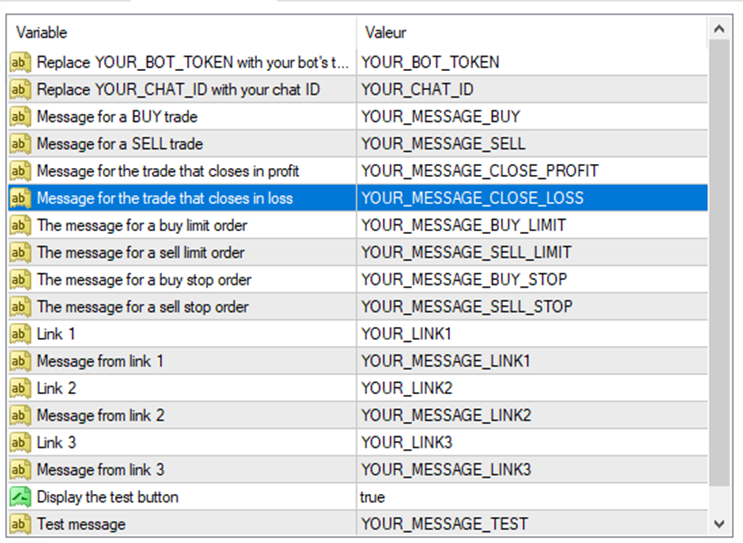
  • Configuration settings  : Customize your Telegram messages based on various trading actions (buy, sell, close in profit/loss, etc.).
  • HTML messages and links  : Embed links directly into your notifications.
  • Test button  : A button is provided to test the functionality of the script directly from MT4.
  • Automatic calculation of pips  : The script is able to calculate the difference in pips depending on the currency pair and the type of order.
  • Support for multiple currencies  : The script supports a wide variety of currencies and displays the corresponding flag for each pair.
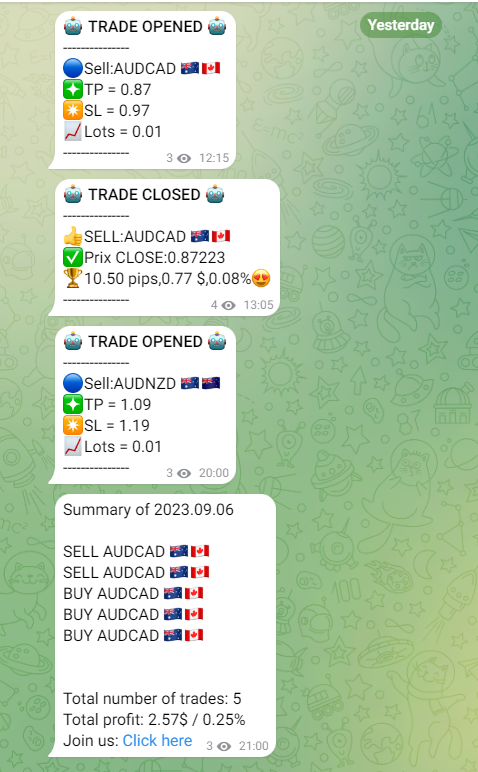
  • Daily report message : It is possible to customize it and add trade details with {TRADES_DETAILS}, {TRADESD}{PROFITMONEYD},  {PROFIT%D} and manage the sending time.

Instructions d'installation

  1. Make sure you have a Telegram bot and know the token and chatId. 
  2. You must authorize WebRequest and add the URL  https://api.telegram.org  in "Tools" → "Options" → "Expert Consultant".
  3. Configure external parameters with your own values, such as your bot's token, chatId, custom messages, etc.
  4. Run the script and verify that you receive the notifications on Telegram.

Tutorial Creating a bot with BotFather:

Step 1: Start BotFather
  • Open the Telegram app.
  • Search "BotFather" in the Telegram search bar.
  • Click on the chat with BotFather to start it.
Step 2: Create a new bot
  • In the BotFather chat, type or click /newbot .
  • BotFather will ask you to name your bot.  Enter the desired name.
  • Next, you will be asked to create a username for the bot.  It must end with "_bot" (for example, "mychatbot_bot").
Step 3: Collect your TOKEN
  • Once you have created the bot, BotFather will provide you with a TOKEN.  Keep it secret and don't share it!  You will need it to interact with the Telegram API.

2. Find the ChatId

To get the ChatId, follow these steps:

Step 1: Start your bot
  • In Telegram, search for your bot's username (eg "@mychatbot_bot") and start a conversation with it by clicking "Start".
Step 2: Use Telegram API
  • Open your web browser.
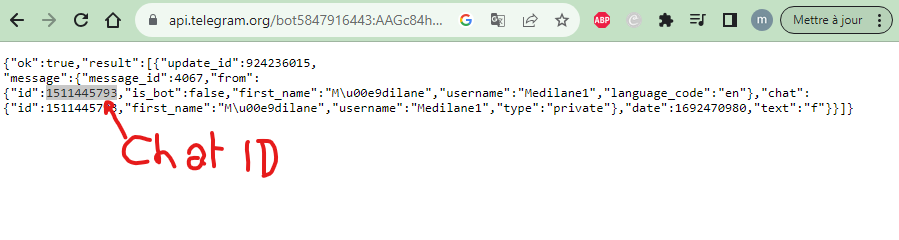
  • Type  https://api.telegram.org/bot  [YOUR_TOKEN]/getUpdates replacing [YOUR_TOKEN] with the TOKEN that BotFather gave you.
  • You will see a JSON return of the messages your bot received.  Locate an entry that looks like "chat":{"id":123456789,"first_name":"YourName",... .
  • The numeric ID (for example, 123456789 ) is your ChatId.

Note  : If you don't see your ChatId immediately, try sending a few messages to your bot via Telegram and then refreshing the API page.

And There you go !  You have now created a bot with BotFather and obtained the ChatId to communicate with your bot.


Manual

  1. Once the script is installed and configured, notifications will automatically be sent to Telegram based on trading actions.
  2. Use the test button to verify that everything is working properly.

FormatMessage User Guide

The formatMessage function allows customizing messages sent to Telegram based on transaction details.  Each message can contain variables that will be replaced with real values ​​at runtime.

Possible variables to use in your message:

  1. {SYMBOL}  : The currency pair traded (eg: EUR/USD) accompanied by their respective flags (eg: 🇪🇺🇺🇸).
  2. {TICKET}  : The transaction ticket number.
  3. {TIMEFRAME}  : The time period of the transaction (for example: M5, H1).
  4. {BUYSELL}  : The type of transaction (for example: BUY, SELL).
  5. {ORDERLOTS}  : The number of lots traded.
  6. {OPENPRICE}  : The open price of the trade.
  7. {TAKEPROFIT}  : The price from which the profit will be made.
  8. {PROFIT%}  : Percentage of profit made in relation to the total account balance.
  9. {PROFITPIPS}  : Profit or loss in pips.
  10. {PROFITMONEY}  : Profit or loss in monetary terms (for example: $50).
  11. {STOPLOSS}  : The price from which the loss will be realized.
  12. {CLOSINGPRICE}  : The closing price of the transaction.
  13. {ORDERCOMMENT}  : Comments or remarks associated with the transaction.
  14. {TRADES_DETAILS}  : Specific details of the transaction or trades made.
  15. {TRADESD} : Number of trades for the day.
  16. {PROFITMONEYD} : Total profits in $ for the day.
  17. {PROFIT%D} : Total profit in % for the day.
  18. {MONTH}  : The current month.
  19. {LINK1}  ,  {LINK2}  ,  {LINK3}  : Customizable links to direct the user to external resources.
  20. {BR}  : To create a new line in the message.
  21. {B}  and  {/B}  : To put the text between these tags in bold.
  22. {U}  and  {/U}  : To underline the text between these tags.
  23. {I}  and  {/I}  : To put the text between these tags in italics.

Example of use :

Suppose you want to create a message with the following format:

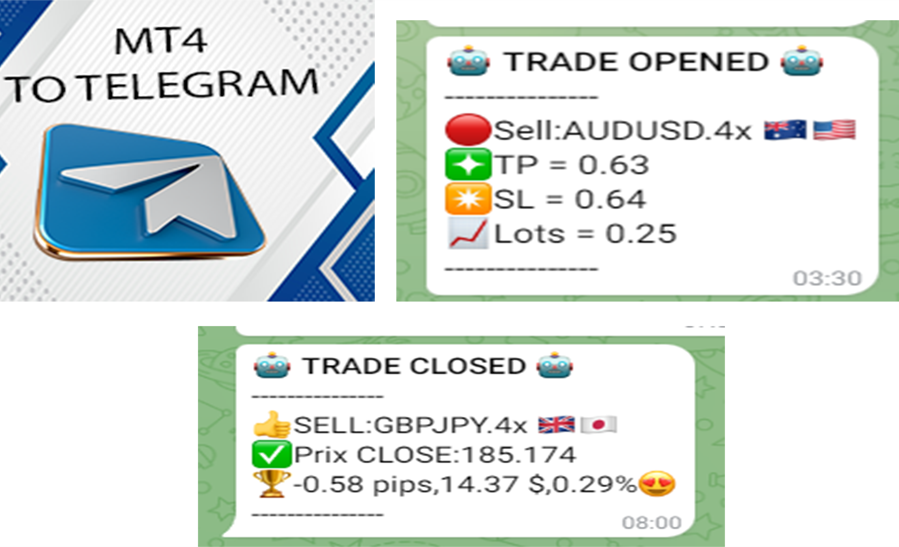
{U+1F916} {B}TRADE CLOSED{/B} {U+1F916}{BR}---------------{BR}{U+1F44D}{BuySell}:{Symbol}{BR}{U+2705}Prix CLOSE:{ClosingPrice}{BR}{U+1F3C6}{ProfitPips},{ProfitMoney},{Profit%}{U+1F60D}{BR}---------------

At runtime, if a new trade for  GBPJPY  was closed at a closing price of  185.174  , the resulting message would be:


🤖   TRADE CLOSED  🤖 
---------------
👍 SELL:GBPJPY.4x
 Prix CLOSE:185.174
🏆 0.58 pips,14.37 $,0.29% 😍
---------------

Explanation of Emojis substitutions:

  • {U+1F600} will be replaced by 😀 (Grinning Face).
  • {U+1F602} will be replaced by 😂 (Face with Tears of Joy).
  • {U+1F604} will be replaced by 😄 (Grinning Face with Smiling Eyes).
  • {U+1F606} will be replaced by 😆 (Grinning Squinting Face).
  • {U+1F609} will be replaced by 😉 (Winking Face).
  • {U+1F60E} will be replaced by 😎 (Smiling Face with Sunglasses).
  • {U+1F60D} will be replaced by 😍 (Smiling Face with Heart-Eyes).
  • {U+1F618} will be replaced by 😘 (Face Blowing a Kiss).
  • {U+1F61C} will be replaced by 😜 (Winking Face with Tongue).
  • {U+1F622} will be replaced by 😢 (Crying Face).
  • {U+1F44D} will be replaced by 👍 (Thumbs Up).
  • {U+1F44E} will be replaced by 👎 (Thumbs Down).
  • {U+274C} will be replaced by ❌ (Cross Mark).
  • {U+2705} will be replaced by ✅ (Check Mark Button).
  • {U+1F3C6} will be replaced by 🏆 (Trophy).
  • {U+1F947} will be replaced by 🥇 (1st Place Medal).
  • {U+1F948} will be replaced by 🥈 (2nd Place Medal).
  • {U+1F949} will be replaced by 🥉 (3rd Place Medal).
  • {U+1F916} will be replaced by 🤖 (Robot).
  • {U+1F535} will be replaced by 🔵 (Blue Circle).
  • {U+1F534} will be replaced by 🔴 (Red Circle).
  • {U+2734} will be replaced by ✴️ (Eight-Pointed Star).
  • {U+2747} will be replaced by ❇️ (Sparkle).
  • {U+1F4C8} will be replaced by 📈 (Chart Increasing).

Note  : Always be sure to test your custom messages to ensure they are formatted correctly before using them live.


FAQ

  • Can I personalize the messages sent?
    Yes, you can define your own messages for each type of transaction in the script's external parameters.

  • Does the script support emojis?
    Yes, you can add emojis in your messages using the "{U+Code}" format.  For example, "{U+1F600}" will be replaced by the emoji 😀.

Feedback et support

If you have any suggestions, comments, or encounter any issues with the script, please don't hesitate to contact us.

Disclaimer / Disclaimer

Trading involves risk.  Although this script aims to improve your trading experience, it is essential to use it wisely and fully understand the implications of each trading action.  We are not responsible for any loss or damage that may arise from the use of this script.

Good luck with  Jarfac Mt4ToTelegram  and your trading on MT4!

추천 제품
BreakEven ProSync EA – Trade Management & Risk Control Tool Overview BreakEven ProSync EA is an expert advisor for   MetaTrader 4  that helps traders manage open positions efficiently by   automating stop-loss adjustments   and ensuring position synchronization. This tool is designed for traders who want to standardize their stop-loss and take-profit levels across multiple trades while integrating a break-even function. The EA works by calculating the  average price   of all open positions and
Trade Dashboard MT4
Fatemeh Ameri
4.96 (53)
Tired of complex order placement and manual calculations? Trade Dashboard is your solution. With its user-friendly interface, placing orders becomes effortless, by a single click, you can open trades, set stop loss and take profit levels, manage trade lot size, and calculate risk to reward ratios, allowing you to only focus on your strategy. Say goodbye to manual calculations and streamline your trading experience with Trade Dashboard. Download  Demo Version  right now. You can find  Details of
Pending Orders Grid Complete System opens any combination of Buy Stop, Sell Stop, Buy Limit and Sell Limit pending orders and closes all existing pending orders. You will be able to Drag-and-Drop the Script on the chart and it will pick up the start price for the first position in the grid from the "Drop" point. Usually it should be in the area of Support/Resistance lines. Input Parameters Before placing all pending orders, the input window is opened allowing you to modify all input parameters:
The utility is designed to send signals from MT4 to Telegram. It has several unique features, allowing not only the sending of trade signals but also the following functionalities: Send messages directly from the terminal to Telegram Send emojis along with custom text Send text and images from Telegram All of these features enable users to manage a signal channel while focusing on trading and finding quality signals. Customizable Signal Messages You can fully customize the signal message: Specif
Pending provider
Andrey Frolov
5 (1)
The script greatly simplifies trader's work with pending stop orders (BuyStop, SellStop). The script places any number of pending orders at a user-defined distance (in points). Order expiration time in seconds can also be specified. It is also possible to place only Buy Stop or only Sell Stop orders. All stop orders are accompanied by user-defined take profit and stop loss levels. Volume is customizable as well. Parameters Open BuyStop - place a pending Buy order Open SellStop - place a pending
Drawdown Partial Closure
Jerome Thierry Francois Delobel
Drawdown Partial Closure Expert Advisor Description: The Drawdown Partial Closure Expert Advisor is a tool designed for MetaTrader 4 that assists traders in managing their positions during drawdown periods. It monitors the drawdown of the trading account in real-time and automatically closes a portion of losing positions when the drawdown exceeds a specified threshold. This helps traders to mitigate losses during adverse market conditions while allowing profitable positions to remain open. Featu
MT4 To Notion
Levi Dane Benjamin
5 (2)
이 프로그램을 사용하면 매우 친숙한 사용자 인터페이스를 사용하여 MetaTrader 계정에서 모든 거래를 직접 Notion으로 내보낼 수 있습니다.  MT5 버전  |  사용자 가이드 + 데모 시작하려면 사용자 가이드를 사용하고 Notion 템플릿을 다운로드하십시오. 데모를 원하는 경우 사용자 가이드로 이동하십시오. 전략 테스터에서 작동하지 않습니다! 주요 기능 거래 계정의 모든 거래를 Notion으로 내보내기 최근 일부터 거래 내보내기 최근 주부터 거래 내보내기 최근 달부터 거래 내보내기 사용자 정의 시간 범위에서 거래 내보내기 모든 새로운 종료된 거래를 자동으로 Notion으로 보내기 주문 유형, 거래량, 개시 시간, 종료 시간 등을 포함하여 내보내기에 포함할 필드 선택 시작하는 방법 위의 사용자 가이드로 이동하거나 EA를 시작하고 '연결 도움말 받기'를 클릭하십시오. 연결된 후에는 '시작: 모두 내보내기'를 클릭하여 현재 트레이드를 모두 내역에서 Notion으로 보내십시오.
PRODUCT description: Market Data Logger   PRO  is a utility tool specially created for the sole purpose of logging your Broker's market data to a text file. With this tool, you will be able to record and export metrics from your MT4 Broker such as the "MT4 Market Watch Time", "Bid Price", "Ask Price", "High Price", "Low Price" and various measures of "Spread". This tool may be of interest to traders, data scientists wanting to capture and analyze market data, entrepreneurs, archival purposes,
Trailing and SL TP
Konstantin Kulikov
5 (1)
The utility places trailing stop, breakeven, stop loss and take profit.‌ It is necessary to allow automated trading in the terminal settings. In testing mode, the utility opens Buy or Sell positions on the first ticks, which allows you to visually observe the given logic, changing the utility parameters. In real mode, the utility does not open positions. Discuss the complexities of Forex trading here:  chat "Age of Expert Advisors" . Parameters magic  - magic number. If less than 0, positions wi
HotKeys MT4
Alexey Valeev
3 (1)
This utility provides the ability to use hot keys in manual trading instantly responding to the current market situation. You can assign hot keys to open/close positions by their type, close all positions on the current chart and remove all orders on the current chart. You can also assign hot keys for five predefined trade volumes and switch between them if necessary with no need to change the volume manually from time to time. It is also possible to set the auto calculation of a trade volume in
LMBF Executor
Graeme Dakers
5 (1)
**IMPORTANT** THIS TOOL REQUIRES YOU TO FIRST PURCHASE "Graphical Trade Planner" https://www.mql5.com/en/market/product/56702. Without it, this tool will do nothing of any use. -------------------------- Use "Graphical Trade Planner"  to plan your trades directly on your charts and get instant feedback on account risk, trade risk to reward and  required position size. Plus, purchase LMBF Executor separately to easily convert planned trades into orders and manage them from your charts. Features i
ChartChanger는 터미널에 열려 있는 차트 수를 줄이는 훌륭한 유틸리티 도구입니다. 여기에는 기호, 시간 프레임 및 템플릿의 세 가지 섹션이 있습니다. 차트를 하나만 열면 여러 차트로 스크롤할 수 있습니다. 기호: 버튼을 누르면 한 기호에서 다른 기호로 변경할 수 있으며 적용된 지표는 다음 차트에 유지됩니다. 기호에는 자동 감지 모드가 있거나 원하는 기호를 수동으로 입력할 수 있습니다. 28개를 모두 사용하거나 그 이하의 숫자를 사용할 수 있습니다. 통화 쌍, 에너지, 지수, 상품 등 MetaTrader에 있는 모든 기호를 사용할 수 있습니다. 시간 프레임: 패널 중앙에 시간 프레임 변경 기능이 추가되었습니다. 버튼을 누르면 1분부터 월간 차트까지 원하는 기간으로 변경할 수 있습니다. 템플릿: 이 패널의 세 번째 기능은 템플릿 변경자입니다. 9개의 내장 템플릿이 있으며 모두 사용하거나 사용하지 않습니다. 모든 버튼은 자유 부동 패널 내부에 있습니다. 패널 상단에 커서를 놓고
One Click Trader is a tool designed for MetaTrader 4 platform, which enables you to take your trading to the next level. It enables you to open, manage and close your trades in simple an efficient way by just one click of your mouse button. Up arrow minimizes the OCT panel Down arrow maximizes the OCT panel Right arrow displays the next panel with additional features Left arrow hides the panel with additional features Red SELL button enables you to open short market orders Red SELL STOP button e
The informer provides information on the current state of open market positions. The visual presentation consists of two parts.  The left side contains the latest transactions executed on the account. Transactions are sorted by time. The right part shows the current state of the aggregate positions of the instruments. Sorting of positions is carried out in descending order of the margin load on the account. Updating and recalculating the status of positions is performed automatically and/or by
차트 동기화 표시기 - 터미널 창의 그래픽 개체를 동기화하도록 설계되었습니다. TradePanel 에 추가로 사용할 수 있습니다. 구매하기 전에 데모 계정에서 데모 버전을 테스트할 수 있습니다. 데모는 여기 에서 확인하세요. 객체를 다른 차트로 복사하려는 차트에 표시기를 설치하세요. 이 차트에 생성된 그래픽 개체는 표시기에 의해 동일한 기호가 있는 모든 차트에 자동으로 복사됩니다. 표시기는 그래픽 개체의 변경 사항도 복사합니다. 입력 매개변수: Exception - 복사할 필요가 없는 그래픽 개체 이름의 접두사입니다. 여러 접두사를 ';'으로 구분하여 입력하여 지정할 수 있습니다. Custom symbols - 그래픽 개체를 복사(동기화)할 추가 기호입니다. 세미콜론(;)으로 구분하여 여러 기호를 지정할 수 있습니다. SyncVLINE - 수직선을 동기화합니다. SyncHLINE - 수평선. SyncTREND - 추세선. SyncTRENDBYANGLE - 각도별 추세선 SyncCYC
One more Copier MT4
Oleksii Chepurnyi
5 (1)
Yet another signal copier. Nothing special. Demo version can be downloaded here . Key Features The utility copies trades between terminals: by market, pending orders (optional), as well as their stop loss and take profit levels (optional as well). You can copy from one Master account to several Slave accounts, as well as from several Master accounts to one Slave account. Volume calculation At the moment, there are two options for calculating the volume: The trade volume is taken 1 to 1 from th
AW Metatrader to Telegram
AW Trading Software Limited
귀하의 구독자가 귀하의 거래 터미널에서 귀하의 거래 이벤트를 놓치지 않도록 알림을 보내는 자동화된 시스템. 계정의 모든 거래 작업에 대해 Telegram 메신저에 알림을 보내는 유틸리티입니다. Telegram ->   HERE   / MT5 ->   HERE   의 채널에 유틸리티를 연결하는 단계별 지침 장점: 쉬운 설정과 자세한 설명, 조정 가능한 스크린샷을 보낼 수 있습니다. 이모티콘을 사용하여 사용자 정의 가능한 알림 텍스트, 오픈, 전체 또는 부분 마감에 대한 알림 조정 및 주문 수정, 기본적으로 알림을 보낼 때 텍스트 파일이 자동으로 다운로드되며, 대기 중인 주문의 배치 또는 삭제에 대한 알림 조정, 기호 및 매직 넘버로 편리한 필터링. 입력 변수: TELEGRAM BOT AND CHAT SETTINGS Telegram bot token - Enter the token number received after registering the bot in "BotFather" T
BuyLimit_SellLimit_Grid script opens BuyLimit and SellLimit pending orders. You just need to drop this script on the chart with a desired currency pair.  Before placing all pending orders, the input window is opened allowing you to modify all input parameters: LongPos - if TRUE, BuyLimit order is opened. ShortPos - if TRUE, SellLimit order is opened. InitLot - initial lot. LotCoeff - if 1, all pending orders will have the same lot size. InitStep - difference between two consecutive orders in poi
SFG Telegram Trade Notifier for MT4 is a professional notification system that sends instant messages to your Telegram group or channel every time a trade is opened or closed on your MT4 account. MAIN FEATURES Sends notifications for every trade open and close Compatible with Telegram Groups, Channels, and Topics (threads) ️ Customizable scan frequency and filters Persistent memory (no duplicate messages after restart) Ignores trade history — sends only new events ️ 100% safe: no
Chart Button
Chantal Sala
3 (1)
Chart Button is a very useful indicator that allows you to navigate all charts with a simple click. This tool has been designed to work both vertically and horizontally. The particularity of this navigator is that you can change more charts simultaneously setting the input value. This tool will give you the ability to optimize your navigation and speed up all your analyzes. Input Values Direction (the direction of symbols buttons) Horizontal Vertical 32 SYMBOLS Forex_Suffix_Symbols (add Forex S
Shortcuts MT4 Hotkeys Scalping
Pablo Filipe Soares De Almeida
다음은 요청하신 MT4 Hotkeys – 주문 및 포지션 관리 도구 의 한국어 번역 전체 버전 입니다. 원문에 있는 모든 항목(설명, 키 명령, 리스크 관리 옵션, 기능)을 빠짐없이 한국어로 옮겼습니다. MT4 Hotkeys – 주문 및 포지션 관리 도구 이 도구는 사용자가 MetaTrader 4 플랫폼에서 키보드 단축키를 사용하여 주문과 포지션을 관리할 수 있도록 설계되었습니다. 주문 실행, 포지션 종료, 트레일링 스탑 조정 및 사용자 정의 가능한 설정을 통한 리스크 관리 기능을 지원합니다. 핵심 명령어 "B" : 매수 주문을 실행합니다. "S" : 매도 주문을 실행합니다. "C" : 모든 오픈 포지션을 일괄 종료합니다. "X" : 특정 포지션을 종료합니다(설정에 따라 가장 오래된 포지션 또는 가장 최근 포지션). "T" : 트레일링 스탑을 활성화합니다(매수의 경우 이전 봉의 저점, 매도의 경우 이전 봉의 고점에 맞춰 조정). "P" : 오픈 포지션의 설정 가능한 비율을 청산합니다
The  Silver Volatility Trend Line for MT4 is an EA that helps you trade using the trendlines, drawn on your chart. It basically allows you to send and manage orders using trend lines. It automatically calculates the True Range of your asset to allow you to send orders well calibrated with the market volatility. Take Profit and Stop Loss are calculated in number of True Range. You can do that for two different orders at the same time , so that you can trade two different kind of risk / profit rat
Watermark Symbol
Makarii Gubaydullin
차트에 워터 마크:기호+기간/또는 자신의 텍스트 내#1 유틸리티 :66+기능을 포함| 당신은 질문이있는 경우 저에게 연락 표시기의 설정에서 구성 할 수 있습니다: 글자크기; 텍스트 색상; 글꼴 이름; 위치: 1=왼쪽 상단; 2=오른쪽 상단; 3=왼쪽 하단; 4=오른쪽 하단; 5=센터; 현재 시간 프레임 표시:켜기/끄기; 제거 할 기호의 접두사는 다음과 같습니다.; 제거 할 기호의 접미사(미화 치사한 사람 프로-->미화 치사한 사람); 사용자 정의 텍스트 표시:활성화하면 아래에 지정된 자신의 텍스트가 표시됩니다: 나만의 워터마크; 내#1 유틸리티 :66+기능을 포함| 당신은 질문이있는 경우 저에게 연락 ..................................
패널은 모든 초보자가 다룰 수 있는 가장 직관적인 인터페이스를 가지고 있습니다. SLp 열에서 - SL 크기를 핍 단위로 지정해야 합니다. 값이 회색으로 바뀌고 동시에 베이/매도 버튼도 비활성화되면 브로커가 설정하기 전에 허용된 것보다 작은 SL 값을 지정한 것입니다. TP % 열에서 - 계정 잔액의 %에서 TP를 나타냅니다. 설정에서 이 지표가 계산될 항목을 기준으로 자기자본, 잔액 또는 자유 마진을 선택할 수 있습니다. R% 열에서 거래에 대한 위험 값을 설정할 수 있습니다. 단추 Ins . - 설정 값으로 즉시 주문을 열 수 있습니다. 비활성화된 경우 차트에서 직접 거래 매개변수를 사전 설정할 수 있습니다. 상단에서 왼쪽 상단의 빼기 기호를 클릭하여 차트의 패널을 최소화할 수 있습니다. 또한 패널 이름 아래에 있는 + 및 - 버튼을 조정하여 패널 자체의 크기를 늘리거나 줄일 수도 있습니다. 또한 보류 중인 주문을 열고 BU, 후행 중지, 주문 시작을 위한 다양한
Risk Controller Expert Advisor는 귀하의 계정에 있는 거래 고문의 전체 위험을 제어할 수 있는 프로그램입니다. 이 프로그램을 사용하면 모든 고문의 계정에 허용되는 최대 위험을 제어할 수 있습니다. 예를 들어, 최대 손실액의 30% 위험을 설정했습니다. 즉, 주식 거래 로봇이 30% 위험을 초과하면 위험 관리자가 고문의 모든 위치를 닫고 열려 있는 모든 차트를 닫을 수 있으므로 방지할 수 있습니다. 고문은 더 이상 일하지 않습니다. 전문가 고문은 평균적인 로봇을 마틴게일과 교환하고 불가항력 또는 기타 예상치 못한 상황에서 로봇의 최대 손실을 제한하려는 경우 "편안한 수면"에 필요합니다. 시장 반전. Советник Risk Controller, очень важная и по моему мнению необходимая программа для каждого трейдера который торгует роботами. 제어는 계정의 최대 손실에 해당하는 제한
Pointer synchronization is an indicator with which the pointer can be synchronized in all the visible charts of the terminal. It shows a crossed cursor in all the visible charts of the terminal, in position relative to the cursor of the active chart. To activate the indicator, simply press the button that appears in one of the corners of the chart once the indicator is added to the chart. To deactivate the indicator, simply press the button again. Once the indicator has been deactivated, the cr
This utility copies trades between multiple MT4 on one computer. Parameters ID - is not required. If you want to use multiple MASTERs on one PC or on one MT4, each MASTER must have a different ID (alphanumeric). Then SLAVE must have the same ID as the MASTER. Mode MASTER - for a provider account; in this mode, the tool transmits trades from the master account. SLAVE - for a recipient account; in this mode, the tool receives the data transmitted from the master account. ***** MASTER Settings ****
Hello This EA for send Orders Signals when you open or close order and send statics to your channel in Telegram with sum of profit or Loss Pips you can share your orders with your clients in your telegram please watch our video  to see how it is fast. https://www.youtube.com/watch?v=u_7twtYZhyI you must have Telegram channel then make bot and give it Permission and get token (watch this video to know how do it) https://www.youtube.com/watch?v=x1bKWFOjSBE and you must download this files https
Pending Orders Grid Complete System opens any combination of Buy Stop, Sell Stop, Buy Limit and Sell Limit pending orders and closes all existing pending orders. You will have a possibility to put a legitimate Open Price for the first position in the grid. Usually it should in the area of Support/Resistance lines. You just need to drop this script on the chart of a desired currency pair. Input Parameters Before placing all pending orders, the input window is opened allowing you to modify all in
This trade panel is able to greatly simplify the work for news traders. The utility allows to place market or pending orders with a single mouse click. The trade panel is a good assistant for scalping, news trading and for opening a multitude deals. The orders are placed manually, the lines indicate distance for placing the orders. The trailing stop and breakeven features will take care of the deal, in case it is unable to reach the take profit level. The trade panel can work with both limit and
이 제품의 구매자들이 또한 구매함
Local Trade Copier EA MT4
Juvenille Emperor Limited
4.96 (108)
Local Trade Copier EA MT4 를 사용하여 매우 빠른 거래 복사 경험을 해보세요. 1분 안에 간편하게 설정할 수 있으며, 이 거래 복사기를 사용하면 Windows 컴퓨터 또는 Windows VPS에서 여러 개의 MetaTrader 터미널 간에 거래를 0.5초 미만의 초고속 복사 속도로 복사할 수 있습니다. 초보자든 전문가든 Local Trade Copier EA MT4 는 다양한 옵션을 제공하여 사용자의 특정 요구에 맞게 맞춤 설정할 수 있습니다. 이는 수익 잠재력을 높이려는 모든 사람을 위한 최고의 솔루션입니다. 지금 사용해보시고 이것이 왜 시장에서 가장 빠르고 쉬운 무역용 복사기인지 알아보세요! 팁: 여기 에서 데모 계정에서 Local Trade Copier EA MT4 데모 버전을 다운로드하여 사용해 볼 수 있습니다. 다운로드한 무료 데모 파일을 MT4 >> File >> Open Data Folder >> MQL4 >> Experts 폴더에 붙여넣고 터미널
Trade Assistant MT4
Evgeniy Kravchenko
4.42 (193)
거래당 위험 계산, 라인을 사용한 손쉬운 신규 주문, 부분 청산 기능을 통한 주문 관리, 7가지 유형의 트레일링 스탑 및 기타 유용한 기능을 제공합니다. 추가 자료 및 지침 설치 지침 - 애플리케이션 지침 - 데모 계정용 애플리케이션 평가판 라인 기능       - 차트에 개시선, 손절매, 차익실현을 표시합니다. 이 기능을 사용하면 새로운 주문을 쉽게 하고 개봉 전에 추가 특성을 볼 수 있습니다. 위기 관리       -       위험 계산 기능은 설정된 위험과 손절매 주문의 크기를 고려하여 새 주문의 볼륨을 계산합니다. 이를 통해 손절매 크기를 설정하고 동시에 설정된 위험을 존중할 수 있습니다. 로트 계산 버튼 - 위험 계산을 활성화/비활성화합니다. 필요한 위험 값은 위험 필드에 0에서 100 사이의 백분율 또는 예금 통화로 설정됩니다. 설정 탭에서 위험 계산 옵션을 선택합니다. $ 통화, % 잔액, % 지분, % 자유 마진, % 사용자 정의, % AB 이전 일, % AB
Trade Manager EA에 오신 것을 환영합니다. 이 도구는 거래를 보다 직관적이고 정확하며 효율적으로 만들기 위해 설계된 궁극적인 리스크 관리 도구 입니다. 단순한 주문 실행 도구가 아닌, 원활한 거래 계획, 포지션 관리 및 리스크 제어를 위한 종합 솔루션입니다. 초보자부터 고급 트레이더, 빠른 실행이 필요한 스캘퍼에 이르기까지 Trade Manager EA는 외환, 지수, 상품, 암호화폐 등 다양한 시장에서 유연성을 제공합니다. Trade Manager EA를 사용하면 복잡한 계산은 이제 과거의 일이 됩니다. 시장을 분석하고 진입, 손절 및 익절 수준을 차트의 수평선으로 표시한 후 리스크를 설정하면, Trade Manager가 이상적인 포지션 크기를 즉시 계산하고 SL 및 TP 값을 실시간으로 표시합니다. 모든 거래가 간편하게 관리됩니다. 주요 기능: 포지션 크기 계산기 : 정의된 리스크에 따라 거래 크기를 즉시 결정합니다. 간단한 거래 계획 : 진입, 손절, 익절을 위한
Copy Cat More Trade Copier MT4 (복사 고양이 MT4) 는 단순한 로컬 트레이드 카피어가 아니라, 오늘날의 거래 환경을 위해 설계된 완전한 리스크 관리 및 실행 프레임워크입니다. Prop Firm 챌린지부터 개인 계좌 관리까지, 강력한 실행력, 자본 보호, 유연한 설정, 고급 거래 처리 기능을 통해 모든 상황에 적응합니다. 이 카피어는 Master(송신자) 와 Slave(수신자) 모드 모두에서 작동하며, 실시간으로 시장가/지정가 주문, 거래 수정, 부분 청산, Close By 작업을 동기화합니다. 데모 및 실계좌 모두 호환되며, 거래용 비밀번호 또는 투자자 비밀번호로도 사용할 수 있습니다. Persistent Trade Memory 기술을 통해 EA, 터미널, VPS가 재시작되더라도 거래가 복원됩니다. 여러 Master와 Slave를 동시에 관리할 수 있으며, 브로커 간 차이는 접두사/접미사 자동 감지 또는 심볼 매핑으로 처리됩니다. 매뉴얼/설정: Copy C
Exp COPYLOT CLIENT for MT4
Vladislav Andruschenko
4.65 (66)
MetaTrader 4용 트레이드 복사기.       모든 계정의 외환 거래, 포지션, 주문을 복사합니다. 그것은 최고의 무역 복사기 중 하나입니다       MT4 - MT4, MT5 - MT4       위해       카피롯 MT4       버전(또는       MT4 -  MT5   MT5 - MT5       위해       카피롯 MT5       버전). MT5 버전 전체 설명   +DEMO +PDF 구입 방법 설치하는 방법     로그 파일을 얻는 방법     테스트 및 최적화 방법     Expforex의 모든 제품 복사기   버전         MetaTrader 5   터미널 (   МТ5 - МТ5, МТ4 - МТ5   ) -   Copylot Client MT5 고유한 복사 알고리즘은 마스터 계정에서 고객 계정으로 모든 거래를 정확하게 복사합니다. 이 제품은 또한 높은 작동 속도에서 높은 오류 처리로 유명합니다. 강력한 기능 세트. 프로그램은 여러 터
Trade copier MT4
Alfiya Fazylova
4.58 (33)
Trade Copier는 거래 계정 간의 거래를 복사하고 동기화하도록 설계된 전문 유틸리티입니다. 복사는 공급자의 계정/단말기에서 동일한 컴퓨터 또는 vps에 설치된 수신자의 계정/단말기로 발생합니다. 구매하기 전에 데모 계정에서 데모 버전을 테스트할 수 있습니다. 데모 버전 여기 . 전체 지침 여기 . 주요 기능 및 이점: 복사기는 "МТ4> МТ4", "МТ4> МТ5", "МТ5> МТ4" 복사를 지원합니다. 복사기는 데모 계정 > 실 계정, 실 계정 > 데모 계정, 데모 계정 > 데모 계정 및 실제 계정 > 실 계정 복사를 지원합니다. 복사기는 읽기 전용 암호가 적용된 투자자 계정에서 복사를 지원합니다. 하나의 공급자 터미널은 여러 수신 터미널로 트랜잭션을 보낼 수 있고 하나의 수신 터미널은 여러 공급자 터미널에서 트랜잭션을 수신할 수 있습니다. 복사기는 귀하 또는 귀하의 고문이 거래하는 동일한 터미널에서 작동할 수 있습니다. 높은 복사 속도(0.5초 미만). 복사기에는 간편
The product will copy all telegram signal to MT4   ( which you are member  ) , also it can work as remote copier.  Easy to set up, copy order instant, can work with almost signal formats, image signal, s upport to translate other language to English Work with all type of channel or group, even channel have "Restrict Saving Content", work with  multi channel, multi MT5 Work as remote copier: with signal have ticket number, it will copy exactly via ticket number. Support to backtest signal. How to
TradePanel MT4
Alfiya Fazylova
4.85 (92)
Trade Panel은 다기능 거래 보조원입니다. 이 애플리케이션에는 수동 거래를 위한 50개 이상의 거래 기능이 포함되어 있으며 대부분의 거래 작업을 자동화할 수 있습니다. 유용한 링크 데모 계정에서만 작동하는 앱의 체험판: https://www.mql5.com/en/blogs/post/750865 애플리케이션 사용 안내: https://www.mql5.com/en/blogs/post/756482 거래. 한 번의 클릭으로 거래 작업을 수행할 수 있습니다: 자동 위험 계산을 통해 지정가 주문 및 포지션을 엽니다. 한 번의 클릭으로 여러 주문과 포지션을 열 수 있습니다. 주문 그리드를 엽니다. 그룹별 대기 주문 및 포지션을 마감합니다. 포지션 반전(매수 청산 후 매도 개시 또는 매도 청산 후 매수 개시). 포지션 고정(매수 포지션과 매도 포지션의 양을 동일하게 하는 추가 포지션 개설). 한 번의 클릭으로 모든 포지션을 부분 청산합니다. 모든 포지션의 이익실현과 손절매를 동일한 가격
특별 할인 – 40% 할인 고급 거래 관리자 – 더 빠르고, 더 스마트하고, 더 안전한 수동 거래를 위한 최고의 올인원 솔루션 차트엔드 거래 관리자 AI로 수동 거래를 혁신하세요. 즉각적인 주문 실행, 시각적인 거래 계획, 강력한 위험 관리 기능을 하나의 직관적인 도구에 통합한 전문가급 차트 패널입니다. 차트를 벗어나지 않고도 그 어느 때보다 빠르게 주문을 실행하고, 위험을 관리하고, 수익을 보호할 수 있습니다. 정확성과 효율성을 높이고자 하는 모든 트레이더에게 적합합니다. MT4 전략 테스터에서 위험 부담 없이 테스트해 보세요 데모 버전을 다운로드하여 모의 거래 기능을 사용해 보세요. 실제 거래에 들어가기 전에 안전한 시뮬레이션 환경에서 주문 실행 연습, 위험 관리 규칙 테스트, 전략 개선을 할 수 있습니다. 자세한 사용자 설명서 및 단계별 가이드는 다음 링크를 참조하세요. https://www.mql5.com/en/blogs/post/764217 주요 장점: 빠른 거래
DrawDown Limiter MT4
Haidar Lionel Haj Ali
5 (8)
Drawdown Limiter EA You are in the right place if you were searching for Drawdown control, Drawdown limiter, Balance protection, Equity Protection or Daily Drawdown Limit related to Prop Firm, FTMO, or Funded account trading, or if you want to protect your trading account. Have you suffered from controlling your drawdown when trading funded accounts? This EA is meant for you. Prop firms usually set a rule called “Trader Daily Drawdown”, and if it is not respected, you are disqualified.  I am an
MT4 to Telegram Signal Provider 는 사용하기 쉽고 완전히 사용자 정의가 가능한 도구로, 텔레그램으로 신호를 보내어 계정을 신호 제공자로 변환할 수 있습니다. 메시지 형식은 완전히 사용자 정의가 가능합니다! 그러나 간단한 사용을 위해 미리 정의된 템플릿을 선택하고 메시지의 특정 부분을 활성화하거나 비활성화할 수도 있습니다. [ 데모 ]  [ 매뉴얼 ] [ MT5 버전 ] [ 디스코드 버전 ] [ 텔레그램 채널 ]  New: [ Telegram To MT5 ] 설정 단계별 사용자 가이드 가 제공됩니다. 텔레그램 API에 대한 지식이 필요 없으며, 개발자가 필요한 모든 것을 제공합니다. 주요 기능 구독자에게 보낸 주문 세부 정보를 사용자 정의할 수 있는 기능 예를 들어 브론즈, 실버, 골드와 같은 계층 구독 모델을 만들 수 있습니다. 골드 구독은 모든 신호 등을 받게 됩니다. ID, 심볼 또는 코멘트별 주문 필터링 주문이 실행된 차트의 스크린샷을 포함 보낸
Copy Master mt4
Evgenii Aksenov
5 (5)
이 유틸리티를 사용하면 마스터 설정이있는 한 터미널에서 슬레이브 설정이있는 다른 터미널로 모든 트랜잭션을 복사 할 수 있습니다 동시에 복사 할 쌍을 선택하고 여러 매개 변수에 따라 복사 된 순서의 크기를 설정할 수 있습니다. 드로우 다운 손실 한도를 설정하거나 수익성있는 거래 만 복사하십시오 Mt4 또는 mt5 에서 다른 브로커의 mt4 또는 MT5 로 거래를 복사 할 수 있습니다 이제 mt4 에서 일하는 전문가의 신호를 MT5 터미널 또는 뒤로 복사하는 것이 어렵지 않을 것입니다 복사 마스터를 사용하여 다른 신호,전문가 고문,수동 거래에서 거래를 복사하십시오.  를 사용하여 설정을 변경할 수 있습니다 많은 크기,무역 방향으로만 복사 수익을 거래하고 설정 값을 저장하는 금고  복사 마스터는 하나의 계정에 서로 다른 가입 신호의 여러 전략을 결합 할 수 있습니다 익을 MT4,당신은 필요합 복사본을 마스터 MT5 버전:  https://www.mql5.com/ko/mar
Auto Grid trades
Makarii Gubaydullin
Auto Grid:  기존 거래를 기반으로 한 자동 그리드 주문 생성. 복잡한 트레이딩 전략 자동화   새 포지션을 감지하고 최적화된 주문 배열을 자동으로 생성하는 정교한 그리드 시스템. 다기능 유틸리티 : 66+ 기능, Auto Grid 도구 포함  |   문의사항은 연락주세요   |   MT5 버전 A. 지능형 거래 감지 및 모니터링: 특정 심볼 또는 포괄적인 포트폴리오 스캐닝 정확한 분류를 통한 고급 주문 유형 감지 전략적 모니터링 시작: 즉시, 지연 또는 조건 기반 알고리즘 전략 호환성을 위한 매직넘버 통합 B. 정교한 그리드 구성: 전략적 주문 배치:   다양한 포지셔닝 방법론 지능형 방향 로직:   동일, 반대 또는 시장 기반 주문 생성 정밀 주문 수량:   사용자 정의 가능한 그리드 밀도 및 구조 고급 오프셋 시스템:   고정 간격 또는 동적 백분율 진행 포괄적 수준 관리:   크기 또는 가격 일관성을 갖는 SL/TP 상속 정교한 로트 사이징:   고정, 점진적 증가
Trade Assistant Pro 36 in 1
Makarii Gubaydullin
4.76 (21)
다기능 거래 도구: 로트 계산기, 그리드 주문, 위험/보상 비율, 거래 관리자, 수급 구역, 가격 행동 분석 등 데모 버전   |   사용자 설명서 트레이딩 어시스턴트 는 전략 테스터에서 작동하지 않습니다: 이 유틸리티 를 테스트하려면 데모 버전을 여기서 다운로드하세요. 질문 /개선 아이디어/버그 발견 시 저에게 연락 하세요 MT5 버전이 필요하시면, 여기서 사용 가능합니다 거래 프로세스 를 단순화, 가속화, 자동화하세요. 이 대시보드 로 표준 터미널 기능을 확장합니다. 트레이딩 패널 은 모든 거래 상품에서 작동합니다: 외환, 주식, 지수, 암호화폐 등. 1. 새로운 거래 열기 : 로트/위험/위험보상비 계산: 수동 거래의 위험 관리 로트 계산기 (위험 크기 기반 거래량 계산) 위험 계산기 (로트 크기 기반 위험 금액) 위험 보상 비율 그리드 주문: + 동적 거리 옵션 및 분할 로트 옵션 주문 활성화 트리거, + Buy StopLimit/Sell StopLimit: Mt4에서도 가능
RSI Divergence Scanner is a multi-timeframe and multi-symbol dashboard and alert that checks all timeframes and symbols to find divergences between price chart and RSI indicator. This divergence scanner is integrated with support and resistance zones so you can check the RSI divergences in the most important areas of the chart to find trend reversals in the price chart. Download demo version   (works on M 1,M5,M30,W1 timeframes) Full description of scanner parameters ->   click here . How to get
Crystal Trade Manager PRO – MT4 고급 리스크 및 트레이드 관리 시스템 무료 버전: https://www.mql5.com/en/market/product/150632 개요 Crystal Trade Manager PRO(CTM)는 MetaTrader 4를 위한 전문급 거래 실행 및 리스크 관리 유틸리티입니다. 엄격한 실행, 견고한 자본 보호, 그리고 똑똑한 자동화를 필요로 하는 트레이더를 위해 설계되었습니다. 본 시스템은 계좌 리스크를 관리하고, 자본(EQ)을 보호하며, 일일 제한을 적용하고, SL/TP를 자동으로 설정하며, 전문급 기능을 갖춘 초고속 원클릭 트레이딩 패널을 제공합니다. Prop Firm 챌린지, 데이트레이딩, 스캘핑, 포트폴리오 매니저에게 최적화되어 있습니다. MT5 버전도 제공됩니다. 주요 기능 1. 고급 리스크 및 드로우다운 보호 기능 하루 드로우다운을 1%~70% 범위에서 설정 가능 설정한 한도를 초과할 경우 모든 포지션 즉시 종료 조건
Take a Break
Eric Emmrich
5 (31)
One tool to protect all your EAs — news filter, equity protection, time filter and more — free demo available Take a Break has evolved from a basic news filter into a comprehensive account protection solution. It pauses your other Expert Advisors during news events or based on custom filters. When trading resumes, it automatically restores your entire chart setup , including all EA settings. Typical use cases: One news filter for all your EAs. Pause trading during news or high volatility — and c
Exp4 Duplicator
Vladislav Andruschenko
4.5 (22)
Expert Advisor   는   귀하의 계정 MetaTrader 4   에서 사전 설정된 횟수만큼 거래 및 포지션을 반복하거나 신호를 보냅니다. 수동으로 또는 다른 Expert Advisor에 의해 열린 모든 거래를 복사합니다. 신호를 복사하고 신호에서 로트를 늘립니다   ! 다른 EA의 수를 늘립니다. 다음 기능이 지원됩니다: 복사된 거래에 대한 사용자 지정 로트, 손절매 복사, 이익 실현, 후행 정지 사용. MT5 버전 전체 설명 +DEMO +PDF 구입 방법 설치하는 방법     로그 파일을 얻는 방법     테스트 및 최적화 방법     Expforex의 모든 제품 연결 MetaTrader용 무역 복사기는 여기에서 사용할 수 있습니다:   COPYLOT 주목 참고: 터미널 간 거래를 위한 복사기가 아닙니다. 전략 테스터에서 Expert Advisor를 테스트하고 비주얼 모드에서 EAPADPRO 도구 모음과 거래할 수 있습니다! 1개의 통화 쌍에 EA를 설치하는 것
News Filter EA: Advanced Algo Trading Assistant News Filter EA is an advanced algo trading assistant designed to enhance your trading experience. By using the   News Filter EA , you can integrate a Forex economic news filter into your existing expert advisor, even if you do not have access to its source code. In addition to the news filter, you can also specify   trading days   and   hours   for your expert. The News Filter EA also includes   risk management   and   equity protection   features
Rocket FX Trading Manager PRO Note: Once you download the manager, message me for the background files The Ultimate All-in-One Trade Management Solution for MetaTrader 4 Version:   4.5 |   Platform:   MetaTrader 4 |   Category:   Utility / Trade Manager   Overview Rocket Fx Trading Manager v4.5 is a comprehensive, all-in-one trade management system designed to transform your trading experience. This powerful utility combines   intelligent position sizing ,   multi-target order placement
Risk/Reward Tool은 MetaTrader 4에서 거래를 계획, 시각화 및 실행하는 방식을 혁신하도록 설계된 전문가급 Expert Advisor입니다. 정밀한 리스크 관리를 중시하는 재량 트레이더이든, 거래 설정을 시각적으로 테스트해야 하는 전략 개발자이든, 이 도구는 우아하고 직관적인 인터페이스에서 필요한 모든 것을 제공합니다. 기본적인 포지션 계산기와 달리, Risk/Reward Tool은 시각적 거래 계획을 즉각적인 실행 기능, 실시간 손익 모니터링 및 포괄적인 거래 관리 기능과 결합합니다. 이 도구는 MT4 전략 테스터와 완전히 호환되어 실제 자본을 위험에 빠뜨리지 않고 거래 전략을 연습하고 접근 방식을 개선할 수 있습니다. 도구의 전체 매뉴얼은 여기에서 확인할 수 있습니다: https://www.mql5.com/en/blogs/post/766244 MT5 version:  https://www.mql5.com/en/market/product/158601 주요 기능
복사기->편리하고 빠른 인터페이스 상호작용으로 사용자가 바로 사용 가능       ->>>> Windows 컴퓨터 또는 VPS Windows에서 사용하는 것이 좋습니다. 특징: 다양하고 개인화된 복사 거래 설정: 1. 다양한 신호 소스에 대해 다양한 로트 모드를 설정할 수 있습니다. 2. 다양한 신호 소스를 포워드 및 리버스 복사 거래에 대해 설정할 수 있습니다. 3. 신호는 주석으로 설정할 수 있습니다. 4. 계약 로트에 따라 로트를 교정할지 여부 다양하고 개인화된 복사 주문 설정 2: 1. 다양한 품종에 대해 다양한 로트 모드를 설정할 수 있습니다. 2. 정방향 및 역방향 복사 주문에 대해 다양한 품종을 설정할 수 있습니다. 3. 주석으로 신호를 설정할 수 있습니다. 4. 계약 로트에 따라 로트를 교정할지 여부 댓글 필터링, MAGIC 필터링, 시그널 로트 필터링, 로컬 제품 필터링 근무시간 설정 역동기화 SLAVE 닫힘 주문 바인딩 기능: 모든 주문은 설정된 신호 소스 주문
VirtualTradePad mt4 Extra
Vladislav Andruschenko
4.86 (59)
한 번의 클릭으로 거래할 수 있는 거래 패널.   위치 및 주문 작업!   차트 또는 키보드에서 거래. 거래 패널을 사용하면 차트에서 클릭 한 번으로 거래하고 표준 MetaTrader 컨트롤보다 30배 빠르게 거래 작업을 수행할 수 있습니다. 거래자의 삶을 더 쉽게 만들고 거래자가 훨씬 빠르고 편리하게 거래 활동을 수행할 수 있도록 도와주는 매개변수 및 기능의 자동 계산. 차트의 무역 거래에 대한 그래픽 팁 및 전체 정보. MT5 버전 전체 설명   +DEMO +PDF 구입 방법 설치하는 방법     로그 파일을 얻는 방법     테스트 및 최적화 방법     Expforex의 모든 제품 열기 및 닫기, 반전 및 잠금, 부분 닫기/오토로트. 가상/실제 손절매/이익 실현/후행 정지/손익분기점, 주문 그리드 .... MetaТrader 4   의 주요 요청 거래 제어판   : 구매, 판매, 구매 중지, 구매 제한, 판매 중지, 판매 제한, 닫기, 삭제, 수정, 후행 중지, 손절매,
The product will copy all  Discord  signal   to MT4   ( which you are member  ) , also it can work as remote copier.  Easy to set up. Work with almost signal formats, support to translate other language to English Work with multi channel, multi MT4. Work with Image signal. Copy order instant, auto detect symbol. Work as remote copier: with signal have ticket number, it will copy exactly via ticket number. How to setup and guide: Let read all details about setup and download Discord To MetaTrader
Effortlessly calculate lot sizes and manage trades to save time and avoid costly errors The Trade Pad Pro EA is a tool for the Metatrader Platform that aims to help traders manage their trades more efficiently and effectively. It has a user-friendly visual interface that allows users to easily place and manage an unlimited number of trades, helping to avoid human errors and enhance their trading activity. One of the key features of the Trade Pad Pro EA is its focus on risk and position manageme
Trade Manager MT4 DaneTrades
Levi Dane Benjamin
4.09 (11)
거래 관리자는 위험을 자동으로 계산하는 동시에 거래를 빠르게 시작하고 종료하는 데 도움을 줍니다. 과잉 거래, 복수 거래 및 감정 거래를 방지하는 데 도움이 되는 기능이 포함되어 있습니다. 거래를 자동으로 관리할 수 있으며 계정 성과 지표를 그래프로 시각화할 수 있습니다. 이러한 기능은 이 패널을 모든 수동 거래자에게 이상적으로 만들고 MetaTrader 4 플랫폼을 향상시키는 데 도움이 됩니다. 다중 언어 지원. MT5 버전  |  사용자 가이드 + 데모 트레이드 매니저는 전략 테스터에서 작동하지 않습니다. 데모를 보려면 사용자 가이드로 이동하세요. 위기 관리 % 또는 $를 기준으로 위험 자동 조정 고정 로트 크기 또는 거래량과 핍을 기반으로 한 자동 로트 크기 계산을 사용하는 옵션 RR, Pips 또는 Price를 사용한 손익분기점 손실 설정 추적 중지 손실 설정 목표 달성 시 모든 거래를 자동으로 마감하는 최대 일일 손실률(%)입니다. 과도한 손실로부터 계정을 보호하고 과도한
MT4 to Discord Signal Provider 는 Discord로 직접 거래 신호를 보내는 데에 설계된 사용자 친화적이고 완전히 맞춤화할 수 있는 유틸리티입니다. 이 도구는 귀하의 거래 계좌를 효율적인 신호 제공자로 변환합니다. 귀하의 스타일에 맞게 메시지 형식을 사용자 정의하세요! 사용 편의성을 위해 사전에 디자인된 템플릿을 선택하고 포함하거나 제외할 메시지 요소를 선택할 수 있습니다. [ 데모 ] [ 매뉴얼 ] [ MT5 버전 ] [ Telegram 버전 ]  New: [ Telegram To MT5 ] 설정 간편한 설정을 위해 저희의 상세한 사용자 가이드 를 따르세요. Discord API에 대한 사전 지식이 필요 없습니다; 필요한 모든 도구를 제공합니다. 주요 기능 구독자 업데이트를 위한 주문 세부 정보를 사용자 정의합니다. 각 계층이 다른 수준의 신호 접근을 제공하는 브론즈, 실버, 골드와 같은 계층적 구독 모델을 구현합니다. 주문이 실행된 차트의 스크린샷을 첨
일별 및 주별 마감 거래 내역, 현재 진행 중인 거래, 외환 노출을 한 차트에서 즉시 확인하세요! 히트맵을 사용하여 수익성 있는 거래와 거래 포트폴리오 내에서 현재 하락이 있는 위치를 파악하세요. 빠른 마감 버튼 빠른 마감 버튼을 사용하여 단일 심볼에 대한 모든 거래를 마감하거나, 개별 거래를 전체적으로 마감하거나, 버튼을 클릭하여 일부 수익 또는 손실을 실현하세요. 더 이상 목록에서 거래를 찾아 거래의 일부를 마감하는 방법을 알아낼 필요가 없습니다. 대시보드는 외환 쌍을 거래하는 동안 각 통화 심볼에 대한 현재 노출도 표시하므로 주요 뉴스 이벤트에 앞서 과도하게 노출될 수 있는 영역을 파악하는 데 도움이 됩니다. 버튼을 사용하여 뉴스가 나오기 전에 노출을 즉시 빠르게 줄이거나, 이미 뉴스가 발생하여 수익을 창출한 경우 클릭 한 번으로 빠르게 수익을 확보할 수 있습니다! 진행 중인 거래 히트맵 거래 히트맵은 달러 비용 평균화를 사용하여 거래의 확장 및 축소를 수행하는 포지션 거
Smart Channel M4
Vahidreza Heidar Gholami
The trend in the market can be predicted using trend lines but the problem is you don’t know where exactly the price is going to touch the trend line where you can put your pending orders on. Smart Channel Expert Advisor makes it possible to put an advanced channel around the price data, which can be configured to handle placing orders, opening and closing positions, managing risk per trade, spread, slippage, and trailing stop-loss and take-profit automatically. Features Money Management (Calcul
Ultimate No Nonsense FX Backtester - You can Run Forward Test Simulation with this tool! Do Not Download the Demo Here, Please Read Below! Step by Step Manual Guide PDF for this backtester PDF List of Commands(Shortcuts) for this backtester Ultimate NNFX Backtester is a powerful utility tool that significantly reduces the length of backtesting process for NNFX followers.  As well as for Forex traders that operates their entries and exits at the close of a candle and manage the risk using ATR.
제작자의 제품 더 보기
Trades Extractor
Medilane Bernard Philippe Couratier
Jarfac Trades Extractor Description: Le "Jarfac Trades Extractor" est un script MQL4 conçu pour les traders qui souhaitent exporter et analyser leurs trades historiques. En un seul clic, le script génère un fichier CSV contenant des informations détaillées sur chaque trade exécuté pendant une période spécifiée. Caractéristiques principales : Filtrage par Période : Définissez une période personnalisée pour l'extraction. Possibilité de désactiver le filtrage par période. Filtrage par Commentaire :
FREE
필터:
리뷰 없음
리뷰 답변