EdgeMeter

Edge Meter — Professional Trading Edge Analyzer for MetaTrader 5

Measure Your Performance. Challenge Your Results. Discover What the Data Really Says.

Edge Meter is a professional trading performance analysis utility for MetaTrader 5, designed to help traders evaluate whether their historical trading results are meaningfully different from those of comparable random market entries.

A profitable backtest does not necessarily mean a strategy has a measurable advantage.

A rising market can reward almost any long-only strategy, while a favorable market period can make ordinary trading results appear exceptional.

Edge Meter helps put those results into perspective.

By combining detailed trading statistics with a matched random-entry comparison, Edge Meter provides an evidence-based evaluation of your historical trading performance.

No trading signals. No predictions. No live trade execution. Just measurable historical evidence.

KEY FEATURES

1. Professional Trading Performance Analysis

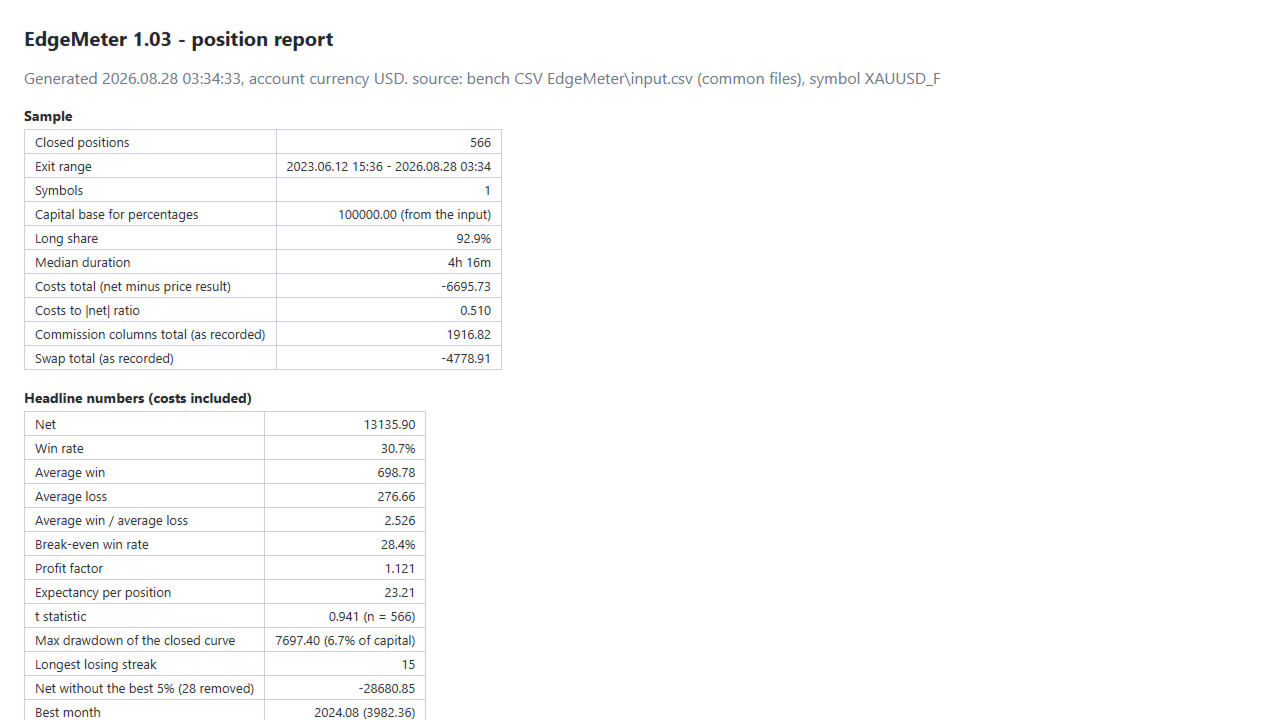
Edge Meter analyzes your closed trading positions and generates a comprehensive statistical evaluation.

Import your trading history directly from your MetaTrader 5 account or analyze an external CSV file.

Available performance metrics include:

  • Total net trading result.

  • Win rate.

  • Average winning trade.

  • Average losing trade.

  • Payoff ratio.

  • Profit factor.

  • Trade expectancy.

  • Statistical t-value.

  • Maximum closed-equity drawdown.

  • Longest consecutive losing streak.

  • Performance excluding the best trades.

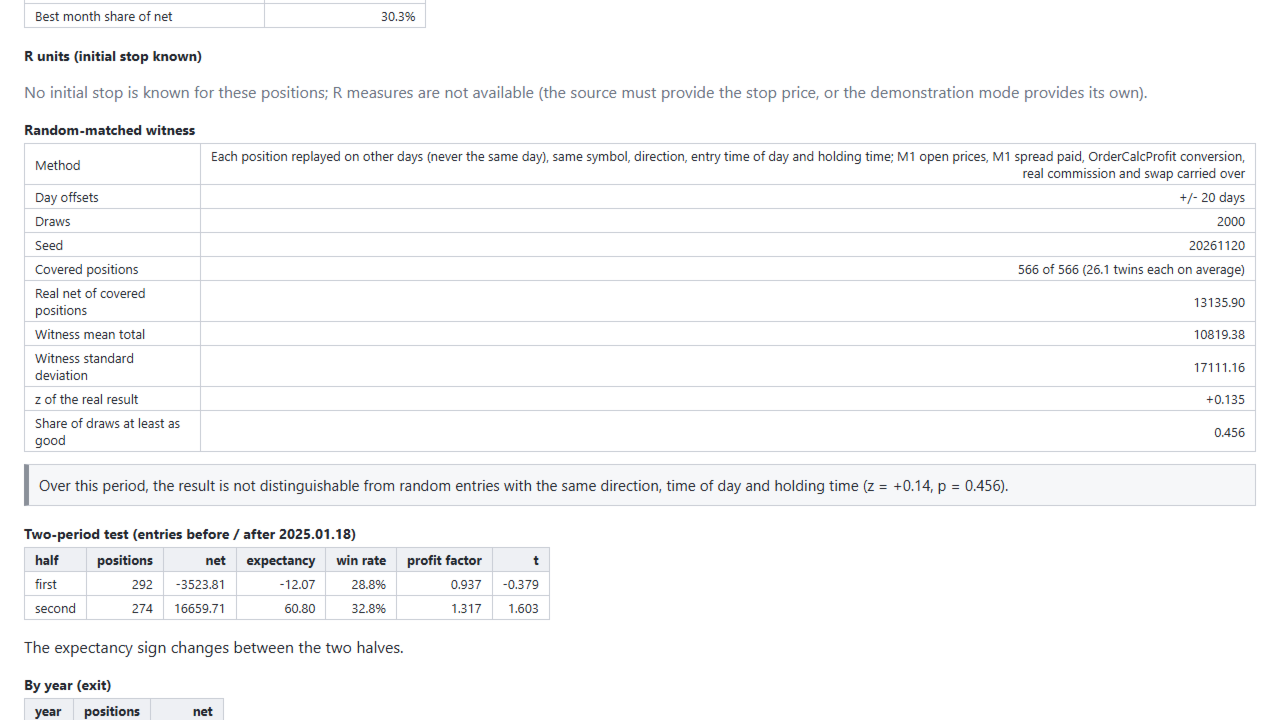
  • Best performing month.

  • Trading cost analysis.

  • Historical performance consistency.

Drawdown is calculated in monetary terms and can also be expressed as a percentage when starting capital is available.

This provides a structured overview of trading results beyond basic profitability.

2. Matched Random-Entry Comparison

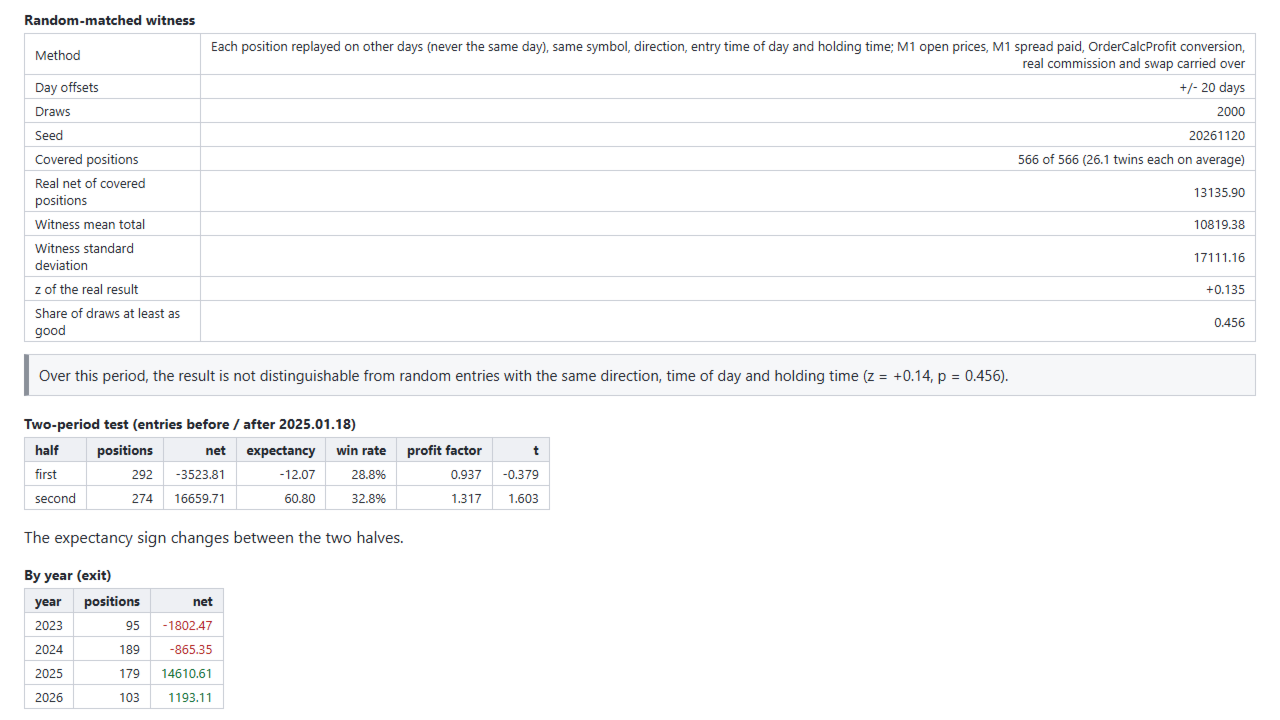
The central feature of Edge Meter is its matched random-entry benchmark.

Instead of evaluating trading performance in isolation, Edge Meter compares historical trades with simulated random entries under comparable conditions.

The benchmark preserves important characteristics of the original positions:

  • Same trading instrument.

  • Same trade direction.

  • Same entry time of day.

  • Same holding duration.

  • Historical one-minute market prices.

  • Historical spread information.

  • Recorded trading costs.

Alternative entries are selected from other trading days within a configurable historical window.

The original entry day is excluded.

Thousands of randomized comparisons are generated to construct a reference distribution.

Your actual trading results are then evaluated against that distribution.

The objective is simple: determine whether your measured historical results stand apart from comparable random entries.

This comparison helps distinguish favorable market conditions from performance potentially associated with trade selection.

It does not prove that a strategy possesses a persistent trading advantage.

3. Clear Statistical Verdicts

Edge Meter translates its statistical comparison into an understandable conclusion.

Depending on the measured results, the system can report:

BETTER THAN RANDOM

The measured trading results exceed the matched random benchmark according to the tool's evaluation.

NOT DISTINGUISHABLE FROM RANDOM

The observed results do not demonstrate a sufficiently clear difference from comparable random entries.

WORSE THAN RANDOM

The measured results fall below the matched random benchmark according to the tool's evaluation.

Each verdict is supported by quantitative measurements, including:

  • Random benchmark average.

  • Random benchmark standard deviation.

  • Z-score.

  • Share of randomized outcomes achieving at least the observed result.

  • Historical data coverage.

  • Number of evaluated positions.

Important: These verdicts describe the measured historical sample only. They do not predict future profitability or guarantee the existence of a sustainable trading edge.

4. Detailed Historical Performance Breakdown

Understand how your trading results developed across different periods.

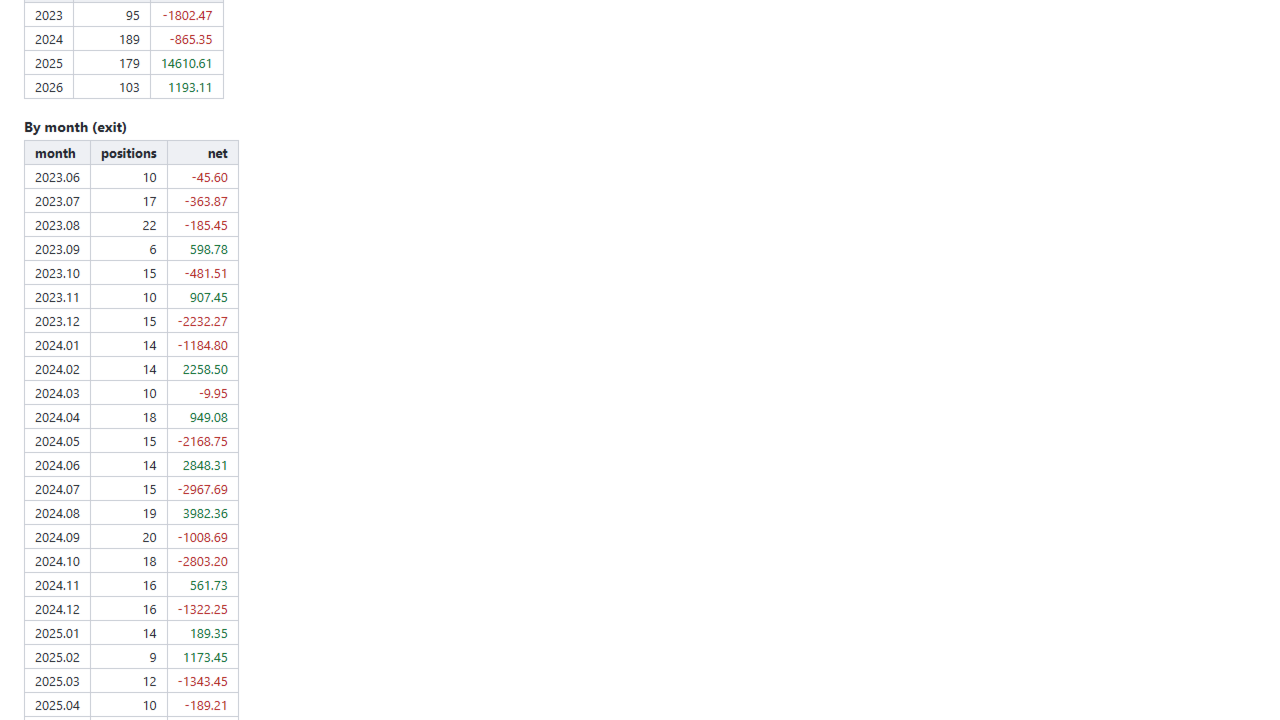
Edge Meter organizes performance statistics by:

  • Year.

  • Month.

  • Weekday.

  • Entry hour.

  • Before-and-after sample periods.

This makes it possible to examine whether results were concentrated in particular market periods.

Additional consistency checks include:

  • Performance of the first and second portions of the sample.

  • Contribution of the strongest trading month.

  • Effect of removing the best-performing trades.

  • Impact of commissions, swaps and other recorded costs.

  • Maximum drawdown of the closed-position results.

  • Consecutive trading losses.

These measurements can help reveal whether a historical result depends heavily on a small number of exceptional trades.

5. R-Multiple Analysis

When sufficient initial-risk information is available, Edge Meter can evaluate trade outcomes in R-multiples.

An R-multiple expresses a position's realized result relative to its initial planned risk.

For example:

  • +2R means a gain equivalent to twice the initial risk.

  • +1R means a gain equivalent to the initial risk.

  • −1R means a loss equivalent to the initial risk.

R-based analysis requires initial stop-loss information from the source data.

If the required information is unavailable, Edge Meter does not invent missing risk values.

6. Import Trading History or CSV Files

Edge Meter supports two primary analysis sources.

MetaTrader 5 Account History

Read closed positions directly from account history using configurable filters.

Custom CSV Files

Analyze external trading records through a flexible CSV import system.

Available options include:

  • Custom column layouts.

  • Predefined column configurations.

  • Custom field separators.

  • Optional CSV headers.

  • Multiple date formats.

  • Configurable BUY/SELL terminology.

  • Symbol mapping.

  • Date-range filtering.

  • Magic-number filtering.

  • Comment filtering.

This makes Edge Meter suitable for evaluating manual trading records, Expert Advisor activity and exported trading datasets.

7. Professional HTML Reports

Edge Meter generates a detailed HTML report that can be opened in a web browser.

The report includes:

  • Trading sample information.

  • Headline performance statistics.

  • Historical performance breakdowns.

  • Drawdown analysis.

  • Trading cost measurements.

  • Matched random benchmark statistics.

  • Statistical comparison results.

  • Data coverage information.

  • Final evaluation verdict.

A machine-readable CSV file containing the measurements is also generated.

This allows results to be reviewed independently or incorporated into other analytical workflows.

8. Integrated Information Panel

An on-chart information panel displays important measurement results directly inside MetaTrader 5.

The panel summarizes:

  • Number of evaluated positions.

  • Trading performance statistics.

  • Random benchmark results.

  • Historical data coverage.

  • Final statistical verdict.

The interface is designed to make essential information accessible without requiring users to inspect every exported report.

Edge Meter is a sample-analysis utility, not a continuous real-time performance monitoring dashboard.

9. Reproducible Statistical Results

Edge Meter includes a configurable random seed.

Using identical:

  • Trading records.

  • Historical one-minute data.

  • Measurement settings.

  • Random seed.

produces the same randomized benchmark results.

Default random comparison: 2,000 draws.

This supports repeatable historical evaluations and allows traders to compare measurements without unrelated random variation between runs.

10. Built-In Strategy Tester Demonstration

Edge Meter includes a dedicated demonstration mode available exclusively inside the MetaTrader 5 Strategy Tester.

This mode opens small demonstration positions at predefined times, using configurable stop-loss and take-profit distances.

The demonstration uses fixed trading hours without a selective entry strategy.

Its purpose is to exercise the measurement system and provide a control sample.

The expected result is that the demonstration entries are not distinguishable from comparable random entries.

On live accounts, Edge Meter never sends trading orders or manages positions.

TECHNICAL SPECIFICATIONS

Feature Specification
Platform MetaTrader 5
Category Utilities
Program Type Expert Advisor
Version 1.03
Primary Function Historical Performance Analysis
Account History Analysis Supported
CSV Import Supported
Matched Random Benchmark Included
Default Random Draws 2,000
Default Historical Offset 20 Days
Minimum Sample 10 Positions
Statistical Z-Score Included
Benchmark Comparison Included
R-Multiple Analysis When Data Available
Maximum Drawdown Included
Performance Breakdown Year, Month, Day, Hour
Consistency Evaluation Included
HTML Reports Included
CSV Reports Included
On-Chart Panel Included
Reproducible Random Seed Supported
Strategy Tester Demo Included
Live Trading Execution None

DEFAULT CONFIGURATION

Edge Meter includes a tested default configuration.

Position Source

  • MetaTrader 5 account history.

  • Optional external CSV.

  • Customizable historical period.

  • Symbol, magic-number and comment filters.

Statistical Measurement

  • Minimum positions for a verdict: 10.

  • Sample consistency split: Midpoint.

  • Best trades removed: 5%.

  • Starting capital: Automatic when available.

Matched Random Benchmark

  • Random comparison: Enabled.

  • Historical offset: 20 days.

  • Random draws: 2,000.

  • Random seed: Fixed and configurable.

Strategy Tester Demonstration

  • Demonstration mode: Enabled in tester only.

  • Entry times: 09:00 and 15:00.

  • ATR period: 14.

  • Stop-loss: 1.5 × ATR.

  • Take-profit: 2.0 × ATR.

  • Alternating BUY/SELL positions: Enabled.

Interface

  • Information panel: Enabled.

  • Panel positioning: Configurable.

  • HTML and CSV reports: Generated automatically.

No external preset file is required.

WHO IS EDGE METER FOR?

Expert Advisor Developers

Evaluate whether the historical results of an automated strategy stand apart from comparable randomized entries.

EA Buyers

Examine trading results before deciding how much confidence to place in a system's historical performance.

Manual Traders

Analyze completed trades and investigate whether historical outcomes differ from comparable market exposure.

Trading Researchers

Use reproducible statistical measurements to investigate strategy behavior, trading costs and historical consistency.

Signal Followers

Evaluate historical signal results using matched random comparisons rather than relying exclusively on win rates or total profit.

Edge Meter is not intended to generate trading signals, make investment recommendations or automatically execute trading strategies.

INSTALLATION & GETTING STARTED

Step 1 — Install

Install Edge Meter on MetaTrader 5 and attach it to a chart of the instrument being evaluated.

Step 2 — Select Your Data Source

Choose account history or an external CSV file.

Step 3 — Configure the Sample

Select the desired historical period and apply optional symbol, magic-number or comment filters.

Step 4 — Prepare Market Data

Ensure that sufficient one-minute historical data is available for the matched random comparison.

Step 5 — Run the Analysis

Edge Meter processes the selected closed positions, calculates performance statistics and generates the randomized reference distribution.

Step 6 — Review the Verdict

Examine the on-chart panel and open the generated HTML report for additional statistical details.

Step 7 — Verify Your Findings

Repeat the analysis with the same data and random seed to reproduce the reported measurements.

For CSV inputs, enter the starting capital when percentage-based drawdown calculations are required.

TESTING & VALIDATION

Edge Meter was evaluated using a reference dataset containing 566 closed trading positions.

Reported validation procedures included:

  • Independent calculation of key performance statistics.

  • Comparison of historical drawdown measurements.

  • Verification of the random benchmark average.

  • Verification of benchmark standard deviation.

  • Z-score comparison.

  • Final verdict verification.

  • Reproducibility checks using a fixed random seed.

  • A fixed-hour demonstration control.

The reported measurements matched the independent reference calculations.

The fixed-hour control produced the expected result: not distinguishable from random entries.

These checks evaluate the measurement system's behavior. They do not establish the profitability of any trading strategy.

IMPORTANT LIMITATIONS

Historical Measurements Only

Edge Meter analyzes completed historical trading samples.

Its verdicts do not forecast future returns or guarantee that observed performance will continue.

One-Minute Data Requirement

The matched random benchmark requires sufficient M1 historical market data.

Positions without adequate comparable historical coverage cannot be included in that benchmark.

The report identifies missing coverage rather than generating unsupported estimates.

Statistical Interpretation

A result classified as better than random is not proof that a strategy has a persistent or exploitable edge.

The comparison is limited to the selected benchmark design, available data and measured period.

Trading Costs

The tool uses recorded trading costs where available.

Differences in source accounting, commission structures or swap recording may influence the calculated results.

Sample Size

A minimum of 10 closed positions is required for a verdict under the default settings.

Larger samples generally provide more information, but sample size alone does not eliminate statistical uncertainty.

No Live Trading

Edge Meter does not open or manage trades on live accounts.

Demonstration trading takes place only inside the Strategy Tester.

Financial Risk

Past trading results, even when statistically distinguishable from a randomized benchmark, do not guarantee future profitability.

FREQUENTLY ASKED QUESTIONS

Does Edge Meter trade automatically?

No. It is a historical measurement utility. Automated demonstration entries are limited to the Strategy Tester.

What makes Edge Meter different from a standard trading journal?

In addition to conventional trading statistics, Edge Meter compares historical outcomes against randomized entries with matched trading characteristics.

Can it analyze another Expert Advisor's trades?

Yes. You can isolate historical positions using the relevant magic number and other filters.

Can I import my own CSV trading history?

Yes. Configurable column layouts, separators, date formats and trade-direction labels are supported.

Does a better-than-random verdict guarantee a profitable strategy?

No. It describes a historical statistical comparison, not a prediction or guarantee of future results.

Why does the tool need M1 historical data?

The random benchmark uses historical one-minute prices and spreads to evaluate alternative entry dates with comparable trading characteristics.

What happens if historical data is missing?

The report displays the available coverage. If the required comparison cannot be constructed, no unsupported verdict is generated.

Can I reproduce the same results?

Yes. Identical position data, one-minute history, settings and random seed produce identical results.

Does it calculate maximum drawdown?

Yes. Closed-position drawdown is measured in money and also as a percentage when starting capital is available.

What does the Z-score represent?

It measures the observed result's distance from the random benchmark average in units of the benchmark's standard deviation.

Can I use it with a demo account?

Yes. A demo account with sufficient closed trading history can be used to evaluate the measurement and reporting features.

Does it work with any trading instrument?

It can analyze supported trading records across instruments for which the necessary historical data is available.

Measure Results Before Trusting Them

A profitable trading history is only the beginning of a meaningful evaluation.

Edge Meter combines detailed performance analytics, historical consistency measurements, and randomized benchmark comparisons to provide additional context for completed trading results.

Designed for traders who want to examine evidence rather than rely on attractive backtest numbers alone.

Edge Meter — Measure the Results. Compare Against Random. Understand the Evidence.

Statistical measurements describe historical observations only. They do not constitute trading advice or guarantees of future performance.
추천 제품
Click Trading
Jawad Tauheed
5 (3)
One Click Trading – Auto TP SL Developer TraderLinkz Version 1.00 Category Utility What it does Adds missing TP and SL to your manual trades and pending orders Sets them once per ticket Lets you move TP and SL afterward Works on hedging and netting accounts Scans on every tick and reacts on trade events Why you want it You place faster entries You get consistent risk and exit targets You reduce fat finger errors You keep full manual control Quick start Attach the EA to any chart Keep TP and SL e
FREE
Prop Edge Heartbeat
Nuno Madeira Amaro Pire Costa
EA to prevent inactivity violations on prop firms. This EA will scout for your most recent trade and if it is older than the number of days defined, will enter a micro lot position size 0.01 on the pair defined. It is recommended to use a tight spread pair like EURUSD. This EA will not act as long as you have at least one trade in the last X days (defined on config). This EA will not place other trades or modify existing position.
FREE
This MQL4 code is a   custom indicator   that draws multiple colored rectangles on a chart, spaced apart by a defined pip distance, and projected into the future. Here's a brief breakdown: Purpose: Draws several horizontal rectangles (zones) starting from a specified price. Rectangles are spaced apart vertically by a pip distance. Colors alternate between FirstColor and SecondColor . Rectangles can be drawn behind candles and optionally filled. Each rectangle extends into the future for a specif
FREE
Risk Sized Trade Panel — Professional Manual Trading & Risk Management for MT5 Trade manually. Size precisely. Manage risk consistently. Risk Sized Trade Panel is a professional manual trading and risk management utility for MetaTrader 5, designed to simplify order execution, automate position management, and help traders maintain consistent risk controls. You decide when to enter the market. The panel handles position sizing, stop-loss and take-profit placement, trade management, and predefined
FREE
Every manual order one click away, on one animated panel. Trade Pad puts buy, sell, the lot and four ways to manage open positions on a single panel. Every button answers the mouse with light and movement, and every action is confirmed in plain words. Free, and part of the Eudora Instruments series. The buttons BUY / SELL : a market order at the lot shown, with the live ask and bid on the buttons and the spread between them. Lot : minus and plus move the lot by one step of the symbol. Under it,
FREE
수동으로 포지션을 관리하다 보면 늦은 청산, 감정적인 망설임, 그리고 손절가(SL) 누락으로 인한 불필요한 손실이 발생하기 쉽습니다. Trade Manager Lite 는 MetaTrader 5에서 열려 있는 모든 포지션의 손절매(Stop Loss), 익절매(Take Profit), 본전 이동(Break-Even), 트레일링 스탑(Trailing Stop), 분할 청산(Partial Close)을 전자동으로 제어해 주는 필수 포지션 관리 유틸리티입니다. PC에서 직접 주문하거나 MT5 모바일 앱으로 진입하든, 혹은 외부 지표나 신호로 진입하든 관계없이 Trade Manager Lite는 보호 설정이 없는 포지션을 즉시 감지하여 사전 설정된 리스크 보호 기준을 자동으로 적용합니다. 핵심 주요 기능 (무료 버전) 자동 SL & TP 세팅: 손절매나 익절매가 걸려있지 않은 포지션을 실시간으로 감지하여 설정된 포인트 거리로 자동 입력합니다. 스마트 본전 이동 (Break-Even): 수익이
FREE
MT5용 NAS100 Auto SL 및 TP 메이커를 소개합니다: 메타트레이더 5에서 나스닥 100 시장을 탐색하는 트레이더에게 없어서는 안될 보조 도구인 NAS100 Auto SL 및 TP 메이커로 손절 및 테이크프로핏 설정을 다시는 놓치지 마세요. 이 도구는 손절 및 테이크프로핏 레벨을 자동으로 관리할 수 있는 원활한 솔루션을 찾는 분들을 위해 설계되었습니다. 주요 특징: 손쉬운 자동화: 스톱로스 및/또는 테이크프로핏 없이 나스닥 100 거래를 자동으로 모니터링합니다. 사용자가 구성한 설정에 따라 레벨을 동적으로 조정합니다. 다양한 주문 유형: 나스닥 100의 시장가 및 지정가 주문 모두와 호환됩니다. 메타트레이더 5에서 사용할 수 있는 다양한 주문 유형을 지원합니다. 맞춤형 구성: 사용자 친화적인 매개변수 설정으로 추적 기본 설정 및 손절/익절 수준을 사용자 지정할 수 있습니다. 유연한 범위: 실행되는 특정 NAS100 상품 또는 거래되는 모든 상품에 대해 손절 및 테이크프
FREE
Risk Manager – Account Protection Tool Risk Manager is an Expert Advisor for MetaTrader 5 designed to protect your trading account by applying automatic risk management rules. This tool does not open trades . It continuously monitors your account and enforces predefined limits to help prevent excessive losses and maintain disciplined trading. Risk Manager works in the background and can manage positions opened by manual trading or other Expert Advisors. It is particularly useful for: • Manual tr
FREE
Imagine flying a real aircraft without ever stepping into a flight simulator. That's what trading is like. You have to simulate your strategy before you can take it to a live market. It is good if you can simulate things speedily before even stepping into any live market, or before coming up with an automated system.  People don't have all day to stare at a higher timeframe chart until the entry signal finally arrives. That's why I built this so that you can simulate your strategy with speed. Th
FREE
Chart Pro Classic Dark v1.00 Chart Pro Classic Dark is a professional MT5 chart styling and customization tool designed to give your charts a clean, modern, and professional dark appearance. Key Features Dark Black Background — Applies a clean black background to the chart. ️ Candlestick Chart — Automatically configures the chart to use candlesticks. Bullish Candles — Green/Lime bullish candles. Bearish Candles — White bearish candles. Grid Removal — Hides the chart grid for a clean

FREE
NS Financas Automatic Clear All Chart Indicators Script Automatically remove all indicators from your chart offered for free by NS Financas! Don't waste any more time deleting the indicators one by one. With this script it is possible in one click to remove all indicators from the screen to adjust your new strategy while still using the settings of your graph, in addition to the possibility of configuring keyboard shortcuts for quick access to the script. Take the opportunity to visit our cha
FREE
Core function Intelligent transaction management one-click opening and closing operation, which supports user-defined lots to set multiple closing modes: all closing, closing by direction and closing by profit and loss status. Professional risk control, real-time risk monitoring and spread control to avoid high-cost trading environment. Visual control panel has an intuitive graphical interface, and all functions can be operated with one button to display position information, profit and loss sta
FREE
Lot Size Ruler
Joshua Akinetos Malik
SI Ruler A clean, one-click price ruler that shows points and exact dollar cost between any two levels on your chart. Every trader needs to quickly measure the distance between two price levels and know what it costs in real money. Most platforms make this harder than it should be. SI Ruler puts a single icon in the corner of your chart — click it, click your entry level, and drag to your stop or target. The label tells you instantly how many points that distance is and exactly what it costs in
FREE
IMPORTANT NOTE: This is a professional Trade Management Utility and on-chart assistant. It is NOT an automated trading robot. It does not open trades on its own. The UltraFast Trade Manager MT5 is the ultimate execution and risk-management suite designed to give you absolute control over your manual and algorithmic trades. When managing multiple positions, calculating complex net break-even points, or constantly monitoring the economic calendar, hesitation can lead to costly mistakes. This utili
FREE
Binary Profit Gainer
Myo Min Aung
5 (2)
This indicator is especially for the binary trading. Time frame is 1 minutes and exp time 5 or 3 minutes only. You must be use martingale 3 step. So you must put lots size is 10 % at most. You should use Mt2 trading platform to connect with my indicator to get more signal without human working. This indicator wining rate is over 80% but you may get 100% of profit by using martingale 3 step. You should use MT2 Trading Platform to connect meta trader platform and binary platform . You can get mt2
FREE
FiT Panel Pro
Thonglak Janyakorn
Overview FiT Panel Pro is a professional-grade trade management panel designed for MetaTrader 5 traders who demand speed, precision, and full control over their trades. Built with a modern dark-theme UI, it combines one-click execution with advanced risk management, visual SL/TP drag lines, automatic Fibonacci-based levels, and comprehensive order management — all in a single, compact panel. Whether you are a scalper, day trader, or swing trader, FiT Panel Pro gives you the edge you need to exec
FREE
ConsistencyGuard
Vanessa Cristina Ribeiro Dos Anjos
버전 7.04 데이 트레이딩 규율과 계좌 보호를 더욱 강화하기 위한 주요 업데이트입니다. • 0분에서 60분까지 설정할 수 있는 Post-Session Review 모드. • 허용된 거래 횟수를 모두 완료한 후에도 MetaTrader 5를 열어 두고 차트를 검토하거나 스크린샷을 저장하고 트레이딩 저널을 작성할 수 있습니다. • 일일 거래 한도에 도달한 후 새로운 거래를 시도하면 Emergency Close 보호 기능이 활성화됩니다. • Emergency Close는 거래 세션을 잠그고 MetaTrader 5를 종료하기 전에 열린 포지션을 청산하고 대기 주문을 취소합니다. • 지속적인 일일 잠금 기능은 심각한 규칙 위반 이후 MetaTrader 5를 다시 실행하여 거래를 계속하는 것을 방지합니다. • 최대 허용 랏 크기 보호 기능. • 최대 랏 크기 증가는 7일 동안 잠깁니다. 더 작은 랏 크기를 사용하는 것은 계속 허용됩니다. • 거래 횟수 계산 기능 개선. • 포지션의 부분 청산은
FREE
Renko Maker
Aleksandr Slavskii
5 (1)
Это DEMO версия Renko Maker PRO  к сожалению правила маркета не позволили указать это в названии. Почему то проверка маркета запрещает в названии слово DEMO. Демо версия строит ренко бары только на основе EURUSD из 1000 последних минутных баров. Revolution Renko Maker PRO — Инновационный Конструктор Ренко Графиков для MetaTrader 5   Создавайте идеальные ренко-бары с сохранением тиковых данных и реальных объемов — теперь с полной поддержкой индикаторов, советников и тестера стратегий!  
FREE
Trade assistant pro v8
Ahmed Mohammed Bakr Bakr
2 (1)
FREE FREE FREE Trade Assistant MT5 – Professional Trading & Risk Management Panel Trade Assistant MT5 is an advanced trading panel designed to help traders execute orders faster, safer, and more professionally . It simplifies manual trading by combining smart order management , precise risk control , and one-click execution , making it ideal for both beginners and advanced traders. This tool does not trade automatically . Instead, it empowers you with full control while applying professional-gra
FREE
Auto SL TP Maker
Mohammad Atowar Hossain
Auto_StopLoss_TakeProfit MT5 is a highly useful and time-saving free utility Expert Advisor designed for traders. Often, during fast-paced manual trading or when opening pending orders, traders forget to set a Stop Loss (SL) or Take Profit (TP), which can lead to massive account drawdowns. This tool automatically attaches Stop Loss and Take Profit to your open positions and pending orders based on your predefined point settings. Key Features: Automatic SL & TP: Instantly adds Stop Loss and Take
FREE
Account Turbo Flip: The Ultimate Manual Trading & Management Assistant Trading successfully isn't just about finding the perfect entry—it is about how you manage the trade once you are in the market. Account Turbo Flip  is a streamlined utility Expert Advisor designed to take the emotion and hesitation out of trade management. Built for traders who prefer to maintain control over their own entries, it acts as your dedicated tactical assistant. You pull the trigger based on your own analysis, an
FREE
Automatic Trade Protection EA For MT5 Overview Trade Equity Guardian is a lightweight, always-on Expert Advisor that continuously monitors all open positions on your account and automatically closes any trade that breaches your predefined risk thresholds. It acts as a safety net — protecting your account from oversized positions, runaway losses, or locking in profits when targets are hit. Attach it to any chart and let it run in the background. It works alongside your other EAs and manual trades
FREE
SMART Gold Pulse 5M
Naseepah Yatmanee
SMART GOLD PULSE 5M Automated Gold Trading with Built-In Risk Control Gold Focused XAUUSD M5 Controlled Entries EMA + Fibonacci + Candle Reversal Filter Risk Management Max DD + Emergency Equity Stop + Daily Order Control Stay Connected Telegram alerts directly to your mobile SMART GOLD PULSE 5M (SCALPING) Introducing SMART GOLD PULSE 5M , an automated Expert Advisor designed specifically for trading XAUUSD (Gold) on the 5-minute timeframe (M5) . The EA monitors the market and automatical
FREE
This MQL5 indicator creates a customizable grid of horizontal lines on your trading chart. Here's what it does: **Main Functions:** - Draws equally spaced horizontal lines across the visible price range - Supports two line types: horizontal lines or trend lines with forward projection - Automatically adjusts to price scale changes **Key Features:** 1. **Customizable Spacing**: Set grid distance in pips (20 pips by default) 2. **Flexible Starting Point**: Auto-calculates starting price or lets
FREE
Signalator Lot Size Evaluator MT5 는 수동 트레이더가 주문을 실행하기 전에 예상 포지션 크기를 계산할 수 있도록 설계된 무료 로컬 MetaTrader 5 유틸리티입니다. 선택한 심볼, BUY 또는 SELL 방향, 예정 진입 가격, Stop Loss, 선택적 Take Profit 및 리스크 비율을 사용하여 거래를 계획할 수 있습니다. 계산기는 현재 계좌 정보와 브로커가 제공하는 심볼 사양을 함께 사용하여 권장 랏 크기와 주요 리스크 값을 계산합니다. 사용 절차는 간단합니다: 거래 설정 정의 → 계좌 리스크 수준 선택 → 권장 랏 크기와 브로커 조건 확인 → 설정이 적절한 경우 수동으로 거래를 실행합니다. Signalator Lot Size Evaluator MT5 는 Signalator Trading and Analysis Ecosystem 의 일부입니다. 이는 거래 준비, 심볼 및 브로커 분석, 계좌 모니터링, 포지션 관리 및 일상적인 트레이딩 작업 흐름
FREE
Main Features: Trading Panel: Quick on-chart buttons for Buy, Sell, Close Profit, and Close All. Risk Management: Built-in Auto Lot calculation based on your specified risk percentage. Visual Tools: Automatically draws Supply/Demand zones and Fibonacci levels on the current chart. Market Data: Displays real-time ATR (Volatility) and RSI values directly on the panel. Optional Auto Mode: A basic automated trading function using EMA crossover and ATR volatility filter. Parameters to Note: RiskPerce
FREE
Trading Panel is an on-chart control panel for MetaTrader 5. You attach it to a chart and get a compact dark-themed window for placing market orders and closing groups of trades in one click. Features Instant Buy and Sell: Two large buttons show the live Ask and Bid prices and place a market order immediately. Order size control: It starts at your broker’s minimum lot automatically, or you can set your own size. Whatever you type is corrected to fit the broker’s minimum, maximum and step, so ord
FREE
Dynamic Candle Timer
Channaphat Yamuangmorn
Overview The Dynamic Candle Timer is a lightweight and efficient utility designed for MetaTrader 5. Unlike traditional candle timers that remain static in the corner of the chart, this indicator dynamically attaches to the current Bid price line. This allows traders to monitor the remaining candle time directly at the point of action, enhancing focus during fast-paced market movements. It is highly suitable for day traders and scalpers operating on XAUUSD, Forex, Crypto, or Indices. Key Feature
FREE
VolumeMonitorUtility A service utility for the MetaTrader 5 terminal that displays key volume analysis metrics directly on the chart as a compact information panel. The utility is built on the open-source VolumeAnalysis library and is designed for traders who make decisions based on volume. Capabilities Monitoring panel: a compact informer in the chart corner displays the average volume over a specified period, current bar volume, volume delta, and market status in real time. Anomaly detector: t
FREE
SpreadMonitor An indicator for MetaTrader 5 that visualizes the spread level and displays a compact interactive panel on the chart with the current value, statistics, and live history. It helps you see the real cost of entering the market at any given moment. Indicator Features Candle coloring by spread level: Blue — normal spread. Orange — elevated spread. Gray — high spread (not recommended for trading). The monitoring panel displays: Current spread value in points. Statistics: average, maximu
FREE
이 제품의 구매자들이 또한 구매함
Trade Assistant MT5
Evgeniy Kravchenko
4.43 (216)
거래당 위험 계산, 라인을 사용한 손쉬운 신규 주문, 부분 청산 기능을 통한 주문 관리, 7가지 유형의 트레일링 스탑 및 기타 유용한 기능을 제공합니다. 추가 자료 및 지침 설치 지침   -   애플리케이션 지침   라인 기능       - 차트에 개시선, 손절매, 차익실현을 표시합니다. 이 기능을 사용하면 새로운 주문을 쉽게 하고 개봉 전에 추가 특성을 볼 수 있습니다. 위기 관리       -       위험 계산 기능은 설정된 위험과 손절매 주문의 크기를 고려하여 새 주문의 볼륨을 계산합니다. 이를 통해 손절매 크기를 설정하고 동시에 설정된 위험을 존중할 수 있습니다. 로트 계산 버튼 - 위험 계산을 활성화/비활성화합니다. 필요한 위험 값은 위험 필드에 0에서 100 사이의 백분율 또는 예금 통화로 설정됩니다. 설정 탭에서 위험 계산 옵션을 선택합니다. $ 통화, % 잔액, % 지분, % 자유 마진, % 사용자 정의, % AB 이전 일, % AB 이전 주, % AB 이전
Trade Manager EA에 오신 것을 환영합니다. 이 도구는 거래를 보다 직관적이고 정확하며 효율적으로 만들기 위해 설계된 궁극적인 리스크 관리 도구 입니다. 단순한 주문 실행 도구가 아닌, 원활한 거래 계획, 포지션 관리 및 리스크 제어를 위한 종합 솔루션입니다. 초보자부터 고급 트레이더, 빠른 실행이 필요한 스캘퍼에 이르기까지 Trade Manager EA는 외환, 지수, 상품, 암호화폐 등 다양한 시장에서 유연성을 제공합니다. Trade Manager EA를 사용하면 복잡한 계산은 이제 과거의 일이 됩니다. 시장을 분석하고 진입, 손절 및 익절 수준을 차트의 수평선으로 표시한 후 리스크를 설정하면, Trade Manager가 이상적인 포지션 크기를 즉시 계산하고 SL 및 TP 값을 실시간으로 표시합니다. 모든 거래가 간편하게 관리됩니다. 주요 기능: 포지션 크기 계산기 : 정의된 리스크에 따라 거래 크기를 즉시 결정합니다. 간단한 거래 계획 : 진입, 손절, 익절을 위한
Farmed Hedge Yield Farming | All Markets (Manual - Hybrid - Semi/Automated EA) VERIFIED TRADING RESULTS - Farmed Hedge Yield Axi Copy:  https://www.mql5.com/en/signals/2356376 - Farmed Hedge Yield Exn Copy:   https://www.mql5.com/en/signals/2356404 - Farmed Hedge Yield V Copy:  https://www.mql5.com/en/signals/2357156 IMPORTANT NOTICE: FarmedHedge is a MANUAL-FOCUSED TRADING UTILITY ,not a fully automated EA. Results shown on this Signal include manual trades and overall strategic management.
Telegram to MT5 Multi-Channel Copier   는 Telegram 및 Discord 채널의 트레이딩 시그널을 MetaTrader 5로 자동 복사합니다. 봇도, 브라우저 확장도, 수동 복사도 필요 없습니다. Telegram이나 Discord에 시그널이 도착하면 EA가 몇 초 안에 터미널에서 주문을 실행합니다. 그리고 채널을 복사하기 전에, 내장 백테스터가 그 채널이 내 계좌에서 어떤 결과를 냈을지 보여줍니다. 제품은 두 가지 구성 요소로 이루어집니다: Telegram 채널을 수신하는 Windows 애플리케이션과, MT5 터미널에서 시그널을 실행하는 본 EA입니다. MT4 버전도 제공됩니다   여기 . 구매 전에 사용해 보세요:   애플리케이션은 무료로 다운로드할 수 있습니다. 본인의 채널을 연결하고 각 시그널이 어떻게 읽히는지 확인하세요. Backtest 탭과 실제 거래에는 구매하거나 임대한 EA가 필요합니다. 이 페이지의 무료 데모는 전략 테스터에서만 실행되며
Local Trade Copier EA MT5
Juvenille Emperor Limited
4.94 (150)
Local Trade Copier EA MT5는 동일한 Windows 컴퓨터 또는 Windows VPS에서 여러 MetaTrader 5 계정 간에 거래를 복사하고 관리할 수 있는 빠르고 유연한 거래 복사기입니다. 로컬 거래 동기화 기능과 함께 Receiver 측에서 로트 크기, 리스크 관리, 거래 필터링, 심볼 매핑, 거래 관리 및 계정 보호를 독립적으로 설정할 수 있습니다. Transmitter와 Receiver 터미널을 약 1분 안에 설정하고, 동일한 브로커 또는 서로 다른 브로커의 계정 간에 수동 거래 또는 EA 거래를 복사할 수 있습니다. 적절한 조건에서는 로컬 MetaTrader 터미널 간의 거래 정보가 0.5초 이내 에 동기화될 수 있습니다. 실제 체결 속도는 브로커 지연 시간, 네트워크 상태, 컴퓨터/VPS 성능 및 터미널 부하에 따라 달라집니다. 구매 전에 무료 데모를 사용해 보세요 MT5 데모 계정에서 Local Trade Copier EA MT5의 모든 기능을
EA Overfitter
Stephen J Martret
5 (4)
That backtest looks great. But will it still be making money tomorrow, next week, next month? EA Overfitter re-runs your EA on 100 price histories it has never seen. One score tells you if the edge is real. A backtest tells you what an EA did on one price history — the one that happened to occur. What you cannot tell from it is how much of that result was the strategy and how much was the particular path. EA Overfitter answers that. It builds up to 100 synthetic price histories your EA has n
TradePanel MT5
Alfiya Fazylova
4.89 (174)
Trade Panel은 다기능 거래 도우미입니다. 이 애플리케이션에는 50개 이상의 수동 거래 기능이 포함되어 있으며 대부분의 거래 작업을 자동화할 수 있습니다. 앱 사용 설명서: https://www.mql5.com/en/blogs/post/756482 데모 계정용 앱 체험판: https://www.mql5.com/en/blogs/post/750865 앱 설치 방법: https://www.mql5.com/en/blogs/post/756239 시각 모드에서 앱 테스트 방법: https://www.mql5.com/en/blogs/post/770277 VPS MetaTrader에 앱 설치 방법: https://www.mql5.com/en/blogs/post/770190 거래. 한 번의 클릭으로 거래를 수행할 수 있습니다: 리스크 자동 계산과 함께 예약 주문 및 포지션 열기. 한 번의 클릭으로 여러 주문 및 포지션 열기. 주문 그리드 열기. 예약 주문 및 포지션을 그룹별로 닫기. 포지션
내 거래 규칙에 맞춰 Telegram 신호 복사 Telegram to MT5 Signal Trader 는 공개 및 비공개 Telegram 채널과 그룹의 텍스트 기반 거래 신호를 MetaTrader 5로 자동 복사합니다. 하나의 데스크톱 앱에서 여러 신호 제공자와 MT5 계좌를 관리하고, 제공자마다 위험 관리 및 거래 설정을 개별적으로 지정 할 수 있습니다. 신호 복사에는 Telegram 봇이나 API 설정이 필요하지 않습니다. 전화번호 또는 QR 코드로 본인의 Telegram 계정에 로그인한 후, 이미 가입한 채널이나 그룹을 선택하면 됩니다. 봇을 만들거나 Telegram API 토큰, API ID 또는 API 해시를 입력할 필요가 없습니다. 포지션 크기를 선택하고, 여러 익절 목표에 청산 물량을 배분하며, 손익분기점 이동과 트레일링 스톱을 자동화하세요. 제공자의 신호를 따르면서도 실제 거래 방식은 직접 설정할 수 있습니다. 이 제품은 MT5 Expert Advisor와 필수 Win
Strategy Ledger Pro
Abdullah Uygar Tuna
5 (17)
이제 한국어로 이용할 수 있습니다. Strategy Ledger Pro 는 MetaTrader 5용 읽기 전용 계좌 분석 패널입니다. 계좌 성과를 전문가 어드바이저(EA), 전략, 심볼, 매직 넘버별로 나누어 각각이 실제로 얼마나 기여하는지 보여줍니다. 패널은 11개 언어를 지원합니다: English, Français, Deutsch, Español, Italiano, Português, Русский, Türkçe, 中文, 日本語, 한국어. 데모를 다운로드하기 전에. Market은 모든 유료 제품의 데모를 전략 테스터에서만 실행합니다. 이 패널은 사용자 자신의 계좌 거래를 분석하는데, 전략 테스터에는 읽을 계좌 기록이 없으므로 데모는 빈 패널로 열리고 그 사실을 표시합니다. 이는 데모 방식에 따른 것이며 제품의 제약이 아닙니다. 이 설명의 동영상에서 실계좌에서 작동하는 패널을 확인할 수 있습니다. 모든 기능을 설명한 자세한 매뉴얼 (영문)과 토론 및 공지를 위한 AureusAI
Exp COPYLOT CLIENT for MT5
Vladislav Andruschenko
3.97 (35)
MetaTrader 5용 전문 트레이드 복사기 MetaTrader 용 빠르고 전문적이며 신뢰할 수 있는 트레이드 복사기 입니다. COPYLOT 은 MT4와 MT5 터미널 간의 Forex 거래 복사를 지원하며, Hedge 및 Netting 계좌를 모두 지원합니다. COPYLOT MT5 버전 지원 구성: - MT5 Hedge → MT5 Hedge - MT5 Hedge → MT5 Netting - MT5 Netting → MT5 Hedge - MT5 Netting → MT5 Netting - MT4 → MT5 Hedge - MT4 → MT5 Netting MT4 버전 전체 설명 + DEMO + PDF 구매 방법 설치 방법 로그 파일 확인 방법 테스트 및 최적화 방법 Expforex의 모든 제품 MT4 터미널로도 거래를 복사할 수 있습니다(MT4 → MT4, MT5 → MT4): COPYLOT CLIENT for MT4 COPYLOT은 2개, 3개, 심지어 10개의 터미널과 동시에 작동할
News Trade EA MT5
Konstantin Kulikov
4.55 (11)
제가 몇 년 동안 사용하고 있는 유용한 로봇을 소개드립니다. 반자동뿐만 아니라 자동 모드로도 사용할 수 있습니다. >>> Chat <<< 본 프로그램에는 경제 캘린더의 뉴스별로 유연한 거래 설정이 포함되어 있습니다. 전략 테스터에서 확인할 수 없습니다. 진짜 작업뿐입니다. 최신 설정 아카이브 다운로드: https://www.mql5.com/en/blogs/post/747929 신호 모니터링: https://www.mql5.com/en/signals/author/test-standart 이 전문가를 위해 고유 설정 세트를 만들 때 블로그의 모든 매개변수에 대한 설명을 참조하십시오: https://www.mql5.com/en/blogs/post/748545 . 기본 설정 설명 작업은 한 차트에서 GBP(GBPUSD, EURGBP, GBPJPY, GBPCAD, GBPAUD, GBPCHF)와 쌍으로 이루어집니다. GBP는 가장 변동성이 큰 통화로서 거래 수행 시 거래를 성공적으로
Power Candles Strategy Scanner: 스스로 최적화하는 멀티 심볼 셋업 파인더 작은 움직임마다 울리는 스캐너는 결국 무시하게 됩니다. 분주한 캔들 마감 한 번에 알림이 연달아 쏟아지고, 정작 실제로 거래하는 단 하나의 셋업은 소음에 묻혀 버립니다. Power Candles Strategy Scanner 는 스스로 최적화하는 Power Candles 엔진을 Market Watch의 모든 심볼에서 실행하고, 당신이 직접 정한 필터를 통과한 것만 알려줍니다. 기준은 마지막 확정 캔들의 강도, 셋업의 손익비, 실시간 스프레드, 그리고 당신이 거래하는 자산군입니다. 심볼이 리스트에 들어오면 스캐너가 당신을 부릅니다. 필터로 걸러낸 것은 모두 조용히 남아 있고, 같은 캔들 마감에서 나온 모든 신호는 하나의 메시지로 도착합니다. 구매 전에 패널과 모든 필터를 확인하세요. 스크린샷, 전체 기능 투어, Power Candles와 함께 쓰는 워크플로: stein.investment
================================================================================ POC BREAKOUT - V20.72. Full Professional Grade Toolkit ================================================================================ POC Breakout is a full MetaTrader 5 trading dashboard for discretionary traders who want breakout signals, Point of Control (POC) context, volume profiles, order flow, market structure, news, alerts, and advanced trade planning in one professional workspace. Attached directly to you

The product will copy all telegram signal to MT5 ( which you are member) , also it can work as remote copier.  Easy to set up, copy order instant, can work with almost signal formats, image signal,  s upport to translate other language to English Work with all type of channel or group, even channel have "Restrict Saving Content", work with  multi channel, multi MT5 Work as remote copier: with signal have ticket number, it will copy exactly via ticket number. Support to backtest signal. How to s
Unlimited Trade Copier Pro MT5 is a tool to copy trade remotely to multiple MT4, MT5 and cTrader accounts at different computers/locations over internet. This is an ideal solution for you if you are a signal provider and want to copy your trades to other receivers globally on your own rules. One provider can copy trades to multiple receivers and one receiver can get trade from multiple providers as well. The provider can even set the subscription expiry for each receiver, so that receiver will n
MetaTrader 5용 order block, BOS, ChoCH 전문가 어드바이저, Telegram 알림 포함 SMC Trade Pilot MT5는 차트의 시장 구조를 읽고 신호를 Telegram으로 전송합니다. 구조 돌파(BOS)와 성격 변화(ChoCH)를 표시하고, 강도 점수가 있는 order block 을 그리며, fair value gap(FVG)과 liquidity sweep을 추적하고, point of control, value area high, value area low가 포함된 volume profile을 표시하며, 멀티 타임프레임 패널, 컨플루언스 점수, kill zone 세션을 갖춘 간결한 대시보드에 모두 요약합니다. 종가에 표시하고, 그다음 확정 돌파는 캔들 종가 즉시 PENDING 으로 표시되며, 어떤 확인보다 먼저 나타납니다. 새로운 고점 또는 저점이 확인하면 확정으로 바뀌고, 설정한 캔들 수가 지나면 스스로 만료되며, 가격이 무효화하면 사라집니다. 하나
VirtualTradePad PRO SE MT5 — MetaTrader 5용 전문 트레이딩 컨트롤 센터 VirtualTradePad PRO SE 는 MetaTrader 5 용 프리미엄 차트 기반 트레이딩 패널이자 거래 관리 워크스페이스입니다. 더 빠른 주문 실행, 더 명확한 포지션 관리, 구조화된 거래 관리, 시각적인 레벨 계획, 그리고 차트에서 직접 작업하는 전문적인 워크플로를 원하는 트레이더를 위해 설계되었습니다. 이 제품은 단순한 BUY / SELL 패널이 아닙니다. PRO SE는 수동 트레이딩, 예약 주문, 포지션 관리, 부분 청산, 바스켓 손익 관리, 평균가 레벨, ATM 규칙, 신호 모니터링, 실시간 시장 정보, 전략 테스터 (Strategy Tester) 워크플로, VPS 중심 운용을 하나의 연결된 인터페이스로 통합합니다. MT4 버전 | 전체 설명 및 스크린샷 | 구입 방법 | 설치 방법 | 로그 파일을 얻는 방법 | 테스트 및 최적화 방법 | Expforex의 모든
Timeless Charts
Samuel Manoel De Souza
5 (9)
Timeless Charts is an all-in-one trading utility for professional traders. It combines custom chart types such as Seconds Charts and Renko with advanced order flow analysis using Footprints , Clusters , Volume Profiles , VWAP studies, and anchored analysis tools for deeper market insight. Trading and position management are handled directly from the chart through an integrated trade management panel , while Market Replay and Virtual Accounts provide environments for practicing trading skills and
Equity Protect Pro: 안심 거래를 위한 종합 계좌 보호 전문가 계좌 보호, 자산 보호, 포트폴리오 보호, 다중 전략 보호, 수익 보호, 수익 확보, 거래 보안, 위험 관리 프로그램, 자동 위험 관리, 자동 청산, 조건부 청산, 예약 청산, 동적 청산, 추적 손절매, 원클릭 종료, 원클릭 청산, 원클릭 복원 등의 기능을 찾고 있다면 Equity Protect Pro가 바로 필요한 프로그램입니다. 설정이 간편하고 사전 설정된 조건이 충족되면 모든 차트를 닫을 수 있으며 신호 구독 취소도 지원합니다(이는 모든 거래 프로그램도 중지됨을 의미합니다). 이 시점에서 새로운 주문이 생성되지 않으며 최종적으로 모든 주문이 종료되어 예상치 못한 손실을 효과적으로 방지하고 안심하고 거래할 수 있습니다. Equity Protect Pro (Technical Manual) Equity Protect Pro Demo Version for yo u to test   Equity Protect
HINN MagicEntry Extra
ALGOFLOW OÜ
4.74 (19)
HINN MAGIC ENTRY – the ultimate tool for entry and position management! SIMPLE. FASTEST. INTUITIVE. MAX AUTOMATED. Place orders by selecting a level directly on the chart! full description   ::  demo-version  :: 60-sec-video-description Key features: - Market, limit, and pending orders - Automatic lot size calculation - Automatic spread and commission accounting - Unlimited partitial take-profits  - Breakeven and trailing stop-loss and take-profit  functions - Invalidation leves - Intuitive, a
Strategy Builder offers an incredible amount of functionality. It combines a trade panel with configurable automation (covert indicators into an EA), real-time statistics (profit & draw down) plus automatic optimization of SL, TP/exit, trading hours, indicator inputs. Multiple indicators can be combined into an single alert/trade signal and can include custom indicators, even if just have ex4 file or purchased from Market. The system is easily configured via a CONFIG button and associated pop-u
News Filter EA
Rashed Samir
5 (2)
News Filter EA: Advanced Algo Trading Assistant News Filter EA is an advanced algo trading assistant designed to enhance your trading experience. By using the News Filter EA , you can integrate a Forex economic news filter into your existing expert advisor, even if you do not have access to its source code. In addition to the news filter, you can also specify trading days and hours for your expert. The News Filter EA also includes risk management  and equity protection features. MT4 Version Ma
Trade copier MT5
Alfiya Fazylova
4.61 (57)
Trade Copier는 거래 계정 간의 거래를 복사하고 동기화하도록 설계된 전문 유틸리티입니다. 복사는 공급자의 계정/단말기에서 동일한 컴퓨터 또는 vps에 설치된 수신자의 계정/단말기로 발생합니다. 구매하기 전에 데모 계정에서 데모 버전을 테스트할 수 있습니다. 데모 버전 여기 . 전체 지침 여기 . 주요 기능 및 이점: 복사기는 "МТ5> МТ5", "МТ4> МТ5", "МТ5> МТ4" 복사를 지원합니다. 복사기는 데모 계정 > 실 계정, 실 계정 > 데모 계정, 데모 계정 > 데모 계정 및 실제 계정 > 실 계정 복사를 지원합니다. 복사기는 읽기 전용 암호가 적용된 투자자 계정에서 복사를 지원합니다. 하나의 공급자 터미널은 여러 수신 터미널로 트랜잭션을 보낼 수 있고 하나의 수신 터미널은 여러 공급자 터미널에서 트랜잭션을 수신할 수 있습니다. 복사기는 귀하 또는 귀하의 고문이 거래하는 동일한 터미널에서 작동할 수 있습니다. 높은 복사 속도(0.5초 미만). 복사기에는 간편
MetaTrader 5용 트레이딩 패널 — 차트와 키보드에서 실행하는 프로페셔널 원클릭 트레이딩 활동적인 트레이더를 위해 설계된 고급 Trading Panel로, MetaTrader 기본 인터페이스보다 훨씬 빠르고 직관적으로 포지션과 주문을 열고, 관리하고, 종료할 수 있습니다. 이 패널은 포지션 관리, 대기 주문 제어, 총수익 관리, 체결 속도를 하나의 전문적인 작업 공간에 통합하고 싶은 트레이더를 위한 솔루션입니다. 이것은 단순한 보조 유틸리티가 아닙니다. MetaTrader 5를 위한 진정한 trading cockpit입니다. 차트에서 직접 거래하고, 키보드로 빠르게 명령을 실행하며, 자동 계산과 시각적 가이드를 통해 수동 트레이딩을 더 빠르고, 더 명확하고, 더 편리하게 만들어 줍니다.  이 패널을 사용하면 차트에서 단 한 번의 클릭으로 거래를 실행할 수 있으며, 표준 MetaTrader 컨트롤보다 최대 30배 빠르게 거래 작업을 수행할 수 있습니다. 새로운 프리미엄 버전
Trade Dashboard MT5
Fatemeh Ameri
4.94 (135)
Trade Dashboard simplifies how you open, manage, and control your trades, with built-in lot size calculation. It allows you to execute trades, manage risk, and control positions directly on the chart, with tools such as partial close, breakeven, and trailing stop. Designed to reduce manual work and help you stay focused on your trading decisions. A demo version is available for testing. Detailed explanations of features are provided within the MQL5 platform. Installation instructions are include
Telegram To MT5 Ultra
Mirel Daniel Gheonu
5 (5)
Telegram To MT5 — 시그널 카피어 텔레그램 채널의 트레이딩 콜을 실제 MT5 주문으로 바꿔 드립니다 — 자동으로, 원하는 만큼의 계좌에서, 리스크와 규칙을 완전히 당신의 통제 아래 둡니다. Telegram To MT5는 이미 텔레그램에서 팔로우하고 있는 VIP / 시그널 채널을 당신의 MetaTrader 5 터미널에 연결합니다. 무료 동반 데스크톱 앱이 메시지를 읽고(봇을 차단하는 채널에서도 가능), 이 EA가 당신의 계좌에서 이를 실행합니다 — 당신만의 리스크 설정, 심볼 매핑, 익절(TP) 처리, 세션 및 뉴스 필터를 적용합니다. 이것은 블랙박스 전략이 아니라 시그널 카피어입니다. 어떤 채널을 신뢰할지, 각 거래의 수량과 관리 방식을 당신이 결정합니다. 단계별 설정 및 동반 앱 설치 가이드 작동 방식 [당신의 텔레그램 채널] -> [동반 데스크톱 앱] -> [MT5 + 이 EA] -> 주문 동반 데스크톱 앱(무료, 포함)은 당신의 텔레그램 계정으로 로그인하여 선택한
Trade Manager DashPlus
Henry Lyubomir Wallace
4.85 (13)
DashPlus 는 MetaTrader 5 플랫폼에서 거래 효율성과 효과를 향상시키기 위해 설계된 고급 거래 관리 도구입니다. 리스크 계산, 주문 관리, 고급 그리드 시스템, 차트 기반 도구 및 성과 분석 등 포괄적인 기능을 제공합니다. 주요 기능 1. 리커버리 그리드 불리한 시장 상황에서 거래를 관리하기 위한 평균화 및 유연한 그리드 시스템을 구현합니다. 거래 회복을 최적화할 수 있도록 전략적인 진입 및 종료 포인트를 제공합니다. 2. 스택 그리드 강한 시장 움직임 동안 포지션을 추가하여 유리한 거래에서 잠재적 수익을 극대화하도록 설계되었습니다. 유리한 시장 트렌드에서 승률을 높이며 거래를 확장할 수 있도록 합니다. 3. 손익(P&L) 라인 차트에서 잠재적인 수익 및 손실 시나리오를 시각적으로 표현합니다. 설정을 조정하고 P&L 라인을 드래그하여 실행 전에 다양한 거래 결과를 평가할 수 있습니다. 4. 바스켓 모드 동일한 심볼에 여러 포지션을 단일 집계 포지션으로 결합하여 관리합니
훌륭한 신호를 찾았지만 공급자의 로트가 너무 작습니까? 더 큰 위치 볼륨이 필요하지만 터미널 설정이 너무 좋지 않습니까? Signal Lot Manager는 필요한 볼륨의 중복 주문을 통해 공급자의 포지션 볼륨을 증가시킵니다. 주문을 복사하기 위한 로트 크기와 신호 이름을 설정하기만 하면 됩니다. Signal Lot Manager는 터미널에서 주문을 복제하기 위한 로트 승수 유틸리티입니다. 소스는 고문, 수동 거래, 별도의 거래 신호를 선택할 수 있습니다. 간단한 설정으로 다양한 기능을 제공할 뿐만 아니라 빠른 속도와 안정성을 제공합니다. Signal Lot Manager 설치 및 입력 가이드 EA에 대한 알림을 받으려면 MT4/MT5 터미널에 URL을 추가하십시오(스크린샷 참조). MT4 버전       https://www.mql5.com/en/market/product/34864 MT5 버전       https://www.mql5.com/en/market/product/416
Boleta Scalper Ultra
Nelson Lopes De Paula Neto
ScalperBoleta Ultra — MetaTrader 5 트레이딩 패널 ScalperBoleta Ultra 는 MetaTrader 5용으로 개발된 수동 거래 패널로, 스캘핑 및 데이 트레이딩에 중점을 두고 있습니다. 주문 실행, 포지션 관리 및 위험 관리 기능을 차트에 통합하여 거래의 편의성과 운영 효율성을 높입니다. 주요 기능: 매수 및 매도: 화면 버튼 또는 키보드 단축키를 이용한 주문 실행. 포지션 관리: 보유 포지션의 전체 청산 또는 부분 청산. 거래 수량 관리: 패널에서 직접 거래 랏 크기 조정. Stop Loss 및 Take Profit: 손실 제한 수준과 수익 목표 설정. Break Even: 설정 가능한 오프셋을 적용하여 손절매 가격을 진입 가격으로 이동. Trailing Stop: 설정된 매개변수에 따라 가격 움직임에 맞춰 손절매 수준을 자동으로 조정. 일일 손실 한도: 설정된 일일 손실 한도에 도달하면 거래를 차단하는 기능. 캔들 타이머: 현재 캔들의 남은 시
Trade Manager DaneTrades
Levi Dane Benjamin
4.13 (31)
거래 관리자는 위험을 자동으로 계산하는 동시에 거래를 빠르게 시작하고 종료하는 데 도움을 줍니다. 과잉 거래, 복수 거래 및 감정 거래를 방지하는 데 도움이 되는 기능이 포함되어 있습니다. 거래를 자동으로 관리할 수 있으며 계정 성과 지표를 그래프로 시각화할 수 있습니다. 이러한 기능은 이 패널을 모든 수동 거래자에게 이상적으로 만들고 MetaTrader 5 플랫폼을 향상시키는 데 도움이 됩니다. 다중 언어 지원. MT4 버전  |  사용자 가이드 + 데모 트레이드 매니저는 전략 테스터에서 작동하지 않습니다. 데모를 보려면 사용자 가이드로 이동하세요. 위기 관리 % 또는 $를 기준으로 위험 자동 조정 고정 로트 크기 또는 거래량과 핍을 기반으로 한 자동 로트 크기 계산을 사용하는 옵션 RR, Pips 또는 Price를 사용한 손익분기점 손실 설정 추적 중지 손실 설정 목표 달성 시 모든 거래를 자동으로 마감하는 최대 일일 손실률(%)입니다. 과도한 손실로부터 계정을 보호하고 과도한
제작자의 제품 더 보기
Risk Sized Trade Panel — Professional Manual Trading & Risk Management for MT5 Trade manually. Size precisely. Manage risk consistently. Risk Sized Trade Panel is a professional manual trading and risk management utility for MetaTrader 5, designed to simplify order execution, automate position management, and help traders maintain consistent risk controls. You decide when to enter the market. The panel handles position sizing, stop-loss and take-profit placement, trade management, and predefined
FREE
Trading Log Exporter — Professional MT5 Trade Journal & CSV Export Utility Version 1.02 | MetaTrader 5 | Expert Advisor — Utilities Turn Your Trading History Into Structured, Actionable Data Trading Log Exporter is a professional trade-recording utility for MetaTrader 5, designed to automatically transform your closed trading positions into organized CSV files. Whether you trade manually, use Expert Advisors, or manage multiple strategies, Trading Log Exporter helps you maintain a detailed, cons
FREE
SimpleTradeCopier — Flexible MT5 Trade Copying & Account Synchronization One Trading Account. Multiple Execution Destinations. SimpleTradeCopier is a trade replication utility for MetaTrader 5, designed to synchronize trading activity between a master account and one or more receiving accounts. Built for traders managing multiple MT5 terminals, the software provides configurable trade copying, position sizing and execution management through an accessible interface. Key Features Master and Rece
ForexHunterEA
Christian Muzungu
ForexHunter EA — Advanced Multi-Asset Automated Trading System One Trading System. Multiple Markets. Intelligent Automation. ForexHunter EA is a professional multi-asset Expert Advisor for MetaTrader 5, designed to automate trading across selected Forex instruments and Gold through an integrated market analysis and risk management framework. Rather than depending on a single market or trading approach, ForexHunter combines several analytical methodologies within a unified automated trading envir
AutoSLTP Assistant — Professional Automated Trade Management for MT5 Your Trading Strategy. Your Rules. Automated Position Management. AutoSLTP Assistant is a professional trade management utility for MetaTrader 5, designed to automate the management of existing trading positions. Whether you trade manually, use trading signals or operate Expert Advisors, AutoSLTP Assistant helps apply consistent position management rules without modifying your original entry strategy. Key Features Automatic Sto
NewsTrader Pro
Christian Muzungu
NewsTrader Pro — Automated Economic News Trading for MT5 Turn Economic Events into a Structured Trading Process. NewsTrader Pro is an automated Expert Advisor designed for traders who want to participate in financial markets around scheduled economic announcements. Built for MetaTrader 5, the system combines integrated economic calendar monitoring, configurable execution methods and automated risk management. Key Features Integrated Economic Calendar Access scheduled economic events directly th
XAUUSD Correlation Assistant — Professional Intermarket Analysis for MetaTrader 5 Understand the markets behind gold. Trade with greater market awareness. XAUUSD Correlation Assistant is a professional multi-asset market analysis indicator designed for MetaTrader 5. It provides gold traders with a comprehensive overview of intermarket relationships, trend alignment, market volatility and changing market conditions through an advanced, customizable dashboard. Instead of switching between multiple
XAUQuantSignal
Christian Muzungu
XAU Quant Trend EA — Multi-Timeframe Trend Trading System Overview XAU Quant Trend EA is an automated trading system developed for XAUUSD on MetaTrader 5. Built around a proprietary multi-timeframe trend analysis engine, the Expert Advisor evaluates market direction, trend strength, price structure, momentum, volatility and execution conditions to identify potential trading opportunities. Rather than relying on a single indicator, the system combines multiple analytical components into a unified
GoldProH4Edge
Christian Muzungu
GoldPro H4 Edge — Professional Gold Trend Trading EA Overview GoldPro H4 Edge is an automated trading system specifically developed for XAUUSD on the H4 timeframe. The Expert Advisor combines proprietary trend analysis, momentum evaluation, market structure recognition and volatility filtering to identify potential trading opportunities in the gold market. Unlike systems that rely on aggressive position accumulation, GoldPro H4 Edge follows a structured, rules-based trading methodology with clea
Prop Challenge Manager — Professional Prop Firm Risk Management EA Overview Prop Challenge Manager is an advanced risk management and account protection Expert Advisor developed for MetaTrader 5. Designed for prop firm challenges and funded trading accounts, the system provides automated monitoring, configurable risk restrictions and intelligent account protection. Prop trading requires more than profitable trading strategies. Traders must also respect strict account rules, manage drawdown expos
Trade Assistant — Professional Trading & Risk Management Panel for MT5 Overview Trade Assistant is a professional manual trading and automated position management solution developed for MetaTrader 5. Designed for traders who prefer to make their own trading decisions, Trade Assistant combines streamlined order execution, intelligent position management, configurable risk controls and advanced account monitoring within a single interactive trading dashboard. Instead of manually calculating positi
ZKFSqueeze
Christian Muzungu
XAUUSD Volatility Squeeze — Advanced Momentum Breakout EA Overview XAUUSD Volatility Squeeze is an automated trading system developed for MetaTrader 5, specializing in volatility-based breakout opportunities in the gold market. The Expert Advisor combines proprietary volatility analysis, multi-timeframe market evaluation, momentum confirmation and systematic trade management to identify potential directional price expansions. Financial markets regularly alternate between periods of consolidation
SwingGoldTrendCore
Christian Muzungu
Swing Gold Trend Core – Professional Gold Swing Trading EA Trade Gold Trends with Structure, Discipline and Intelligent Risk Management. Swing Gold Trend Core is an automated trading system developed for MetaTrader 5, specializing in swing trading on Gold (XAUUSD). The Expert Advisor is designed to identify established market trends and participate in favorable price movements using a proprietary multi-layer confirmation system. Unlike aggressive trading robots, Swing Gold Trend Core focuses on
VADBSqueezeDonchian
Christian Muzungu
Volatility-Adjusted Breakout EA Professional Breakout Trading | Volatility Analysis | Dynamic Risk Management Volatility-Adjusted Breakout EA is an automated trading system designed to identify potential market opportunities following periods of volatility compression. The Expert Advisor combines proprietary breakout confirmation, market-state analysis and adaptive volatility filtering to identify favorable trading conditions. Its objective is to participate in significant market movements while
GoldSqueezeTrader
Christian Muzungu
Gold Squeeze Trader — Automated Gold Trend Following EA for MT5 Trade the Trend. Control Your Risk. Let the Market Decide When to Exit. Gold Squeeze Trader is a fully automated Expert Advisor developed specifically for Gold (XAUUSD), designed to identify long-side trading opportunities within established bullish market conditions. Operating on the H1 timeframe, the system combines proprietary entry conditions, volatility-based risk management, and systematic position exits. Unlike high-frequency
GoldLevelTrader
Christian Muzungu
Gold Level Trader — Professional Gold Breakout EA for MetaTrader 5 Trade the Breakout. Control the Risk. Follow the Rules. Gold Level Trader is a fully automated Expert Advisor developed for MetaTrader 5, specializing in selective breakout trading on Gold (XAUUSD). Designed around an H1 trading engine, Gold Level Trader identifies potential breakout opportunities during predefined active market hours, evaluates their quality, and executes trades only when its internal conditions are satisfied. U
Crypto Breakout Trader — Professional Cryptocurrency Breakout EA for MetaTrader 5 Two Trading Engines. One Expert Advisor. Automated Breakout Trading. Crypto Breakout Trader is a fully automated Expert Advisor for MetaTrader 5, designed to identify and trade cryptocurrency breakouts while maintaining structured risk management and controlled market exposure. Developed and tested primarily for Bitcoin (BTCUSD) on the H4 timeframe , the system combines two independent trading engines within a sing
Account Sync Copier — Professional MT5 Trade Copier Synchronize multiple MetaTrader 5 accounts with precision, flexibility, and complete control. Account Sync Copier is a professional trade-copying utility designed for traders who manage multiple MetaTrader 5 accounts on the same Windows computer. Whether you operate personal trading accounts, manage different brokerage accounts, or need a streamlined multi-account trading workflow, Account Sync Copier helps you replicate trading activity from o
FREE
R29londonBreak
Christian Muzungu
R29 LondonBreak Professional XAUUSD Session Breakout Expert Advisor for MetaTrader 5 Overview R29 LondonBreak is an automated trading Expert Advisor developed specifically for Gold (XAUUSD) on MetaTrader 5. Designed around structured intraday trading, the system focuses on identifying selective opportunities during predefined market sessions through an internal breakout qualification framework. The Expert Advisor combines systematic market analysis, volatility-aware trade management and discipl
FREE
필터:
리뷰 없음
리뷰 답변