Day Close Hunter

Day Close Hunter

이것이 중요한 이유

모든 트레이더가 이 상황을 알고 있습니다. 금요일 저녁, 시장이 곧 마감되려 하는데 주말 전에 포지션을 청산하는 것을 잊어버렸습니다. 월요일, 시장은 갭으로 열리고 피할 수 있었던 손실이 당신의 예치금에 발생합니다.

많은 자동 매매 시스템에는 금요일 청산 기능이 내장되어 있지 않습니다. 주말 내내 포지션을 유지하여 시장 갭에 취약해집니다.

Day Close Hunter는 이 문제를 완벽하게 해결합니다. 청산 시간과 요일을 설정하기만 하면 전문가 어드바이저가 당신이 잊더라도 포지션을 관리해 드립니다.

목적

Day Close Hunter는 MetaTrader 5용 범용 전문가 어드바이저로, 선택한 요일과 지정된 시간에 모든 포지션과 대기 주문을 자동으로 청산합니다. 주말 갭으로부터 보호할 뿐만 아니라 시장 마감 전 일일 계좌 정리에도 완벽합니다.

주요 기능

  • 선택 가능한 요일 — 체크박스를 통한 유연한 설정. 원하는 요일에 포지션을 청산할 수 있습니다. 금요일만, 매일, 또는 원하는 조합(예: 수요일 + 금요일)도 가능합니다.

  • 정확한 활성화 시간 — 전문가 어드바이저가 청산을 시작할 시간을 설정합니다.

  • 지속적인 모니터링 — 활성화 후 전문가 어드바이저는 설정된 간격(기본 5초)으로 포지션과 주문을 확인합니다. 새로운 포지션이나 주문이 나타나면 시장이 마감될 때까지 청산됩니다.

  • 세 가지 청산 모드:

    • 전체(포지션 + 대기 주문) — 모든 포지션을 청산하고 모든 대기 주문을 삭제합니다.

    • 포지션만 — 오픈 포지션만 청산합니다. 대기 주문은 유지됩니다. 모니터링 중에 주문이 체결되면 새 포지션은 즉시 청산됩니다. 주문이 다음 날까지 남아 있으면 정상적으로 계속 작동합니다.

    • 주문만 — 대기 주문만 삭제합니다. 오픈 포지션은 그대로 유지됩니다.

  • 유연한 예외 설정:

    • 심볼별 제외 — 모든 상품을 제외할 수 있습니다. 이 심볼들의 포지션과 주문은 청산되지 않으며, 새로운 거래도 허용됩니다. 예: EURUSD, XAUUSD.

    • 매직 넘버별 제외 — 특정 전문가 어드바이저의 주문과 포지션을 제외할 수 있습니다. 예: 12345, 20261205.

  • 디버그 모드 — 진단 및 테스트용.

갭 보호

이 전문가 어드바이저의 주요 목적은 주말 이후 자주 발생하는 시장 갭으로부터 보호하는 것입니다. 금요일 밤에 포지션을 청산함으로써 월요일의 급격한 시장 개장으로 인한 통제 불능의 손실을 피할 수 있습니다.

이런 분들에게 적합합니다

  • 금요일 청산 기능이 내장되지 않은 전문가 어드바이저를 사용하는 트레이더

  • 일일 포지션 청산을 자동화하려는 분

  • 리스크 관리와 자본 보호가 필요한 분

  • 다른 심볼에서 다른 전문가 어드바이저가 거래하는 멀티 시스템 전략을 사용하는 분

설정 매개변수

매개변수 설명 기본값
Close on Sunday...Saturday 청산할 요일 선택 금요일만
Close mode 청산 모드 (전체/포지션/주문) 전체
Activation time 활성화 시간 (HH:MM) 23:45
Magic exceptions 제외할 매직 넘버 (쉼표로 구분) 0 (없음)
Symbol exceptions 제외할 심볼 (쉼표로 구분) 0 (없음)
Check interval 확인 간격 (초) 5
Debug mode 디버그 모드 (상세 로깅) 끄기

사용 예시

  1. 주말 청산 — 금요일만 활성화, 시간을 23:45로 설정.

  2. 일일 청산 — 월요일부터 금요일까지 모든 요일 활성화.

  3. 매직 넘버로 제외 — 포지션과 주문을 청산하지 않을 전문가 어드바이저를 매직 넘버로 하나 이상 제외. 예: 12345, 20261205.

  4. 심볼로 제외 — 포지션과 주문을 청산하지 않을 통화쌍을 하나 이상 제외. 예: EURUSD, XAUUSD.

로깅

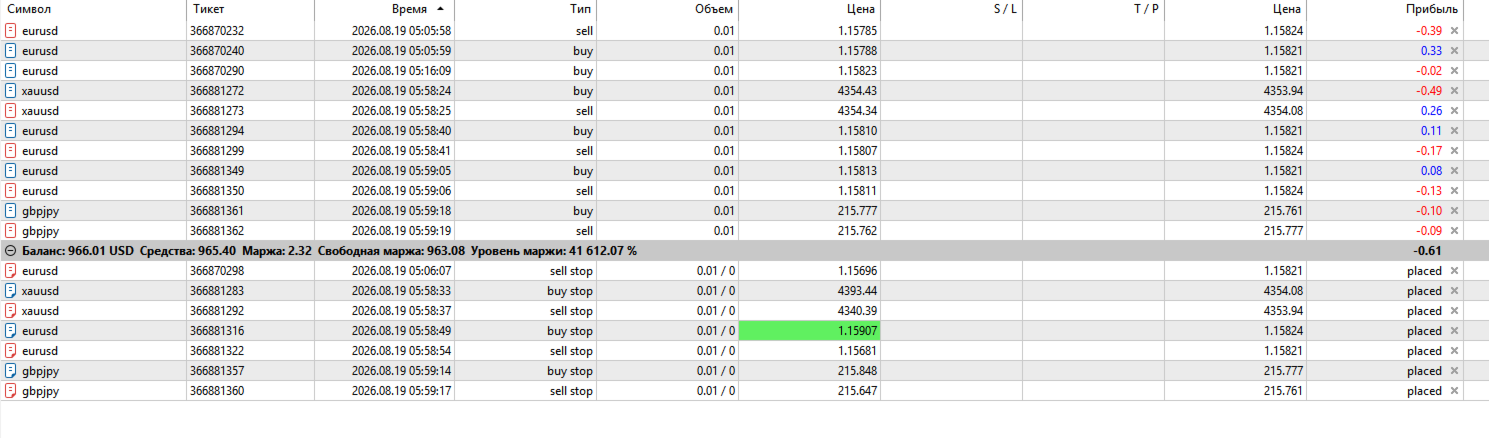
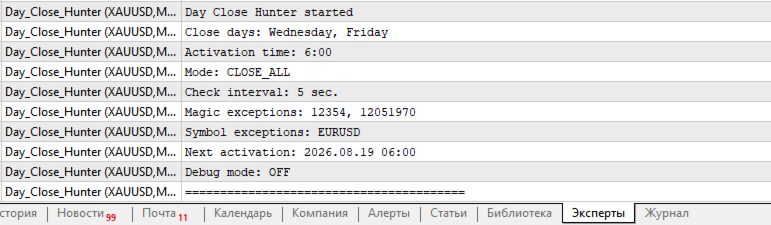
전문가 어드바이저는 모든 작업을 터미널 저널에 상세히 기록합니다:

  • 각 포지션과 주문의 청산 시간

  • 청산된 포지션의 손익

  • 건너뛴(제외된) 포지션 정보

  • 각 청산 주기의 요약 통계

요구 사항

  • MetaTrader 5

  • 자동 매매 활성화

  • 데모 계정 또는 실계정

설치 방법

  1. 전문가 어드바이저를 임의의 차트와 임의의 시간대에 연결하세요 — 모든 차트, 모든 심볼을 모니터링합니다.

  2. 필요에 따라 매개변수를 설정하세요.

중요 참고 사항

  • 전문가 어드바이저는 브로커의 서버 시간을 사용합니다.

  • 터미널 설정에서 자동 매매가 활성화되어 있는지 확인하세요.

Day Close Hunter — 당신의 신뢰할 수 있는 리스크 관리 어시스턴트.

추천 제품
Service for broadcasting quotes of selected cryptocurrencies to MT5. Charts with cryptocurrencies are created in the Market Watch window. Most standard and custom indicators are applicable to the charts. Settings : setting description What kind of graphs to broadcast Futures - futures charts c USDT Spot - spot charts of cryptocurrencies Coins SPOT 1-6 List of cryptocurrencies for creating SPOT charts. Enter with a space, for example: BTC ETH BNB Coins FUTURES 1-6 List of cryptocurrencies to crea
FREE
LT Mini Charts
Thiago Duarte
4.88 (8)
This is a utility indicator that creates mini charts on left side of the chart you are looking at. It is very useful to watch many timeframes simultaneously, without having to change between multiple charts. Its configuration is very simple. You can have up to 4 mini charts opened. They automatically load the template of the "parent" chart. If you have any doubt please contact me. Enjoy! This is a free indicator, but it took hours to develop. If you want to pay me a coffee, I appreciate a lot  
FREE
Title:   Smart Position Manager PRO - Advanced Risk & Position Manager Description: Smart Position Manager PRO is an all-in-one visual trade management and risk calculation tool designed for serious traders who prioritize iron discipline and strict risk management. Whether you are executing precise SMC or ICT setups on personal capital or managing large funded accounts on strict prop firms, this tool ensures you focus on counting percentages rather than emotional money swings. With a highly int
FREE
LIMITED TIME — FREE FOR 1 DAY  ️ ZAMOLXE GOLD — Agent Edition Self-Learning Multi-Agent EA for XAUUSD ZAMOLXE GOLD is a next-generation Expert Advisor built on 12 independent AI agents , each learning from every trade it takes. The longer it runs, the smarter and more selective it becomes. This is not a static strategy — it is an adaptive, self-learning system engineered for consistency, capit
FREE
Algorex Trade Pilot은 제 자신을 위해 만들었습니다. 충동적인 매매와 복수 매매로 여러 번 크게 데였습니다. 계획 없는 성급한 진입, 손실, 그리고 만회하려고 들어가는 다음 매매. 처음보다 더 크고, 결과는 더 나쁩니다. Trade Pilot은 충동과 클릭 사이에 짧고 정직한 점검을 넣고, 제가 매매할 상태가 아닐 때는 주문 버튼을 빼앗습니다. 스스로 거래를 여는 일은 절대 없습니다. 모든 주문에는 사용자의 클릭이 필요합니다. 리스크, 랏과 라인 거래당 리스크를 잔고 대비 퍼센트로 입력 차트의 빨간 스톱 라인을 드래그: 가격 아래면 BUY, 위면 SELL 랏 크기와 리스크 금액을 실시간으로 계산 리스크의 배수(R)로 설정하는 선택적 초록 목표 라인 호박색 진입 라인을 가격에서 떼어 놓으면 시장가 대신 지정가 또는 스톱 주문이 됩니다. 가격으로 되돌리면 시장가로 돌아갑니다 Pre-Flight 체크리스트 내 매매 규칙에 맞는 셋업 논리적인 위치에 스톱 설정 랏과 리스크 확
FREE
High Tide Health Monitor Free dashboard that splits your account P/L by EA using magic numbers. See what each system has made, what it is down from its own best, and get told before a quiet drawdown becomes a loud one. Four EAs on one account. Which one is actually making money? Most people cannot answer that without exporting their history to a spreadsheet and sorting by magic number, which is why most people never do it, and why an EA that has quietly stopped working can run for months before
FREE
Trade Assistant JJC Academy
Jhonathan Alexis Jaramillo Cortez
JJC Academy Trade Assistant — 리스크 계산 및 포지션 관리 패널 더 이상 로트 사이즈를 수동으로 계산하지 마세요. 계산 실수로 드로다운을 초과하는 일도 이제 끝입니다. JJC Academy Trade Assistant는 제가 직접 개발하여 펀디드 계좌(funded accounts) 포트폴리오를 관리하는 데 실제로 사용하고 있는 트레이딩 패널입니다. 어떤 종목을 거래하든, 어떤 브로커를 사용하든, 어떤 프랍펌(prop firm)과 계약했든, 매 진입마다 설정한 리스크를 정확히 지킬 수 있도록 설계되었습니다. 실시간 리스크 계산기 **리스크 %**와 **손익비(R:R)**를 설정하면, 버튼을 누르기도 전에 로트 사이즈가 즉시 자동으로 계산됩니다. 리스크 계산 기준을 선택할 수 있습니다: 잔고(Balance) , 순자산(Equity) , 또는 계좌의 초기 잔고(Initial Balance) — 챌린지 계좌나 펀디드 계좌에 이상적입니다. 잔고는 변동하지만 드로다
FREE
Trading panel for manual trading. Has a fairly wide functionality. Allows you to automatically calculate the order size, open both market and pending orders. It has a wide range of options for closing orders, it is possible to partially close orders, close orders after reaching a certain profit or loss, separately close profitable and unprofitable, buy and sell, as well as pending orders. The panel also contains a simple implementation of a grid of pending orders, reverse and lock functions, tr
FREE
Gold Adaptive EA MT5 is an automated Expert Advisor for MetaTrader 5 designed for trading Gold (XAUUSD). The EA uses several internal trading models and market filters to adapt to different phases of Gold price movement. Instead of relying on one fixed entry pattern, Gold Adaptive EA MT5 analyzes market behavior and selects suitable logic for trend continuation, impulse moves, pullbacks and selected recovery conditions. The main goal of the Expert Advisor is to provide a structured Gold tradi
FREE
MyGridBasket
Ahmad Aan Isnain Shofwan
Read-only basket analytics library for grid and averaging EAs. Real breakeven, what-if, stress test and stop-out distance. Sends no orders. What it is A library that reads your open positions and tells you the real state of a grid or averaging basket. It does not trade. It sends no orders. It has no entry logic. You call it from your own EA. What it tells you - Breakeven of the basket, with swap and commission counted - The price where the basket nets a money amount you choose - Where the ave
FREE
Custom Symbol Creator Overview Custom Symbol Creator is a utility for MetaTrader designed to create custom symbols based on historical market data. The utility prepares symbols that can be used for chart replay, manual backtesting, and market behavior analysis. This tool does not analyze price data, does not generate trading signals, and does not execute or manage trades. Purpose The purpose of this utility is to manage chart data by generating custom symbols that allow controlled historical pl
FREE
RBM Flow Structure PRO
Renato Brendim Medici
RBM Flow Structure PRO Advanced Capital Flow and Market Structure Analysis for MetaTrader 5 Five integrated modules. One tool. A more complete market view. RBM Flow Structure PRO is a multifunctional indicator designed for traders who want to gain a deeper understanding of market behavior. It combines capital flow analysis, price structure, supply and demand zones, and key trading levels on a single chart. With five independent and configurable modules, the indicator helps organize your analysis
FREE
Titan Prop-Firm Shield & Lot HUD is a 100% FREE institutional risk-management and position-sizing cockpit designed specifically for Prop-Firm traders (FTMO, FundedNext, The5ers, etc.) and disciplined retail traders on MetaTrader 5. Over 90% of prop-firm challenges fail due to accidental Daily Drawdown breaches or miscalculated lot sizes during high volatility. Titan Prop-Firm Shield eliminates human error by tracking your real-time Daily Drawdown, Overall Drawdown, Remaining Loss Buffer ($), a
FREE
Trade Panel Manager — Master all trades in one dashboard Stop calculating volume manually, stop worrying about forgetting to set SL/TP. TTrade Panel Manager transforms MetaTrader 5 into a professional trading command center — drag and drop a few lines on the chart, the EA automatically calculates lot sizes according to your desired risk level, displaying SL/TP in pips and currency in real time, right before you press the button. Why download now? Accurate lot size calculation based on risk pe
FREE
DynamicTrader 1
Markus Christer Ekengren
Smart Trade Manager EA – Simple, Visual, and Risk-Based Trading Take control of your trades with ease! This free Expert Advisor is designed for traders who want a fast, intuitive, and risk-based way to manage entries directly from the chart. Risk-Based Position Sizing – Just set your preferred % risk in the EA settings, and lot size is calculated automatically. One-Click Trading – Place trades instantly with two simple buttons: BUY or SELL . Interactive SL & TP Lines – Drag and drop stop-
FREE
POSITION EXIT MANAGER DEMO is the free demo of the Position Exit Manager, and it is the real thing with one difference. It is a trailing stop, a break-even stop, a take profit and a stop loss manager for MetaTrader 5: a panel over every open position where you can set a trailing stop, move every stop to break-even, set a take profit and stop loss on all of them at once, and close every position, the losers or the winners together. It shows the risk per trade and the R multiple of each position w
FREE
PZ Goldfinch Scalper EA MT5
PZ TRADING SLU
3.33 (57)
This is the latest iteration of my famous scalper, Goldfinch EA, published for the first time almost a decade ago. It scalps the market on sudden volatility expansions that take place in short periods of time: it assumes and tries to capitalize of inertia in price movement after a sudden price acceleration. This new version has been simplified to allow the trader use the optimization feature of the tester easily to find the best trading parameters. [ Installation Guide | Update Guide | Troublesh
FREE
The RSI Engine
Md Abdul Manann
The RSI Engine은 MetaTrader 5용 무료 EA(Expert Advisor)로, 프롭 펌(Prop Firm) 챌린지에 적합하도록 설계되었습니다. RSI 다이버전스와 RSI 반전 신호로 거래하며, 일일 드로다운 보호, 최대 드로다운 보호, 뉴스 필터가 내장되어 있습니다. 마틴게일 없음, 그리드 없음, 물타기 없음 – 모든 거래에 손절(스탑로스)이 설정됩니다. 프롭 펌 챌린지와 펀디드 계좌(Funded Account)를 거래하는 트레이더를 위해 만들어졌습니다. The RSI Engine은 일일 손실 규칙과 최대 손실 규칙을 자동으로 지킬 수 있도록 도와, 하루의 실수로 계좌를 잃지 않도록 합니다. (사용 중인 프롭 펌 규칙에 맞춘 설정이 필요하신가요? 댓글에 계좌 규칙을 알려주시면 설정을 도와드리겠습니다.) THE RSI ENGINE이 프롭 펌에 적합한 이유 - 일일 드로다운 한도: 일일 손실 한도에 도달하기 전에 당일 거래를 자동으로 중지 - 최대 드로다운 한
FREE
Grid Sense Pro
Rio Gunawan Putra
Free for 1000 first users! Meet   Grid Sense Pro   — the Expert Advisor designed for traders who want the market working for them   24/7 without waiting for signals . Unlike many EAs that depend on rare entry conditions,   GridSense Pro actively searches for opportunities on its own . Using a smart comparison system based on   RSI behavior , the EA continuously analyzes the market and   detects its own trading signals automatically . No signal hunting. No complicated timing. Just attach the EA
FREE
UsdJpy RangeBot Pro
Kwaku Appenteng Wiredu
UsdJpy RangeBot Pro – Expert Advisor for Breakout Trading UsdJpy RangeBot Pro is a breakout-based Expert Advisor developed for the USDJPY pair. It identifies trading opportunities during the early hours of the London session by analyzing a defined range and executing pending orders above or below it. The EA applies fixed logic, clear visual elements, and built-in risk controls. This tool is designed for disciplined breakout trading without the use of breakeven, martingale, or grid systems.
FREE
What is SMC Market Structure Pro? SMC Market Structure Pro is an automated trading Expert Advisor for MetaTrader 5, developed based on Smart Money Concept (SMC) and market structure analysis. The EA is designed to help traders follow the natural flow of the market, focusing on price structure instead of indicators or lagging signals.  How Does the EA Work? The EA analyzes market structure changes using pure price action: Detects higher highs & higher lows for bullish structure Detects lower hig
FREE
One Click Close Lite 是一款專為 MT5 手動交易者與多持倉使用者設計的簡易平倉工具。 當帳戶中同時存在多張交易持倉時,不需要再逐張點擊關閉,只需要透過圖表上的按鈕,即可快速執行批量平倉。 工具提供三個主要功能: CLOSE ALL 一鍵關閉帳戶目前所有持倉。 例如帳戶中同時存在: XAUUSD BUY EURUSD BUY GBPUSD SELL USDJPY BUY 按下: CLOSE ALL 工具會依序嘗試關閉目前帳戶中的全部持倉。 --- CLOSE BUY 只關閉帳戶目前所有 BUY 持倉。 例如: XAUUSD BUY EURUSD BUY GBPUSD SELL USDJPY BUY 按下: CLOSE BUY 則會關閉: XAUUSD BUY EURUSD BUY USDJPY BUY 而: GBPUSD SELL 會保持不變。 CLOSE SELL 只關閉帳戶目前所有 SELL 持倉。 BUY 持倉不會受到影響。 --- 即時持倉資訊 工具面板會顯示目前帳戶的基本持倉資訊,包括: * 總持倉
FREE
Inverse Liquidity Grab Ultimate EA
Stephen Muriithi Muraguri
5 (1)
This EA finds Fair Value Liquidity (FVL) on the chart, tracks when they get mitigated , and then looks for an inversion signal (price “fails” through the zone). When that inversion happens, it places a trade in the opposite direction of the original Liquidity gap (an Inverse FVG approach). It also lets you control when it trades using market sessions , and it can auto-close positions at New York open (all positions or profitable-only). Key advantages Clear, rule-based entries (no guessing): trad
FREE
================================================================ MATRIX CONDITION MONITOR Live Trade Condition Panel for MetaTrader 5 Fully Automatic -- Works with ALL Matrix EAs ================================================================ NEVER MISS A TRADE SETUP AGAIN Matrix Condition Monitor is a free utility that attaches to any chart and automatically checks all 10 trade conditions in real time -- showing you exactly why a trade will or will not open, and alerting you the moment ever
FREE
Trailing Stop Manager Basic — 무료 트레일링 스톱 EA (MT5) Trailing Stop Manager Basic 는 Trailing Stop Manager PRO 의 무료 버전입니다. 이 MetaTrader 5 Expert Advisor 는 계정의 모든 오픈 포지션에 대한 고정 핍 트레일링 스톱, 브레이크이븐, 1 단계 부분 청산을 자동화합니다. 수동 주문과 다른 모든 EA 가 생성한 주문에 작동합니다. 도구는 PRO 버전과 동일한 전문 시각적 대시보드를 포함합니다 — 일일 통계, 실시간 P&L, 포지션 상태, 인터랙티브 컨트롤. 무료 PDF 사용자 가이드는 요청 시 제공됩니다 : 다운로드 후 MQL5 를 통해 개인 메시지를 보내주시면 받으실 수 있습니다. 가이드는 전체 구성, 상품별 모범 사례, 권장 매개변수를 다룹니다. 포함된 기능 (무료) 고정 핍 트레일링 스톱 , 거리와 스텝 설정 가능. 자동 브레이크이븐 , 안전 마진 설정 가능. 1 단계 부분 청
FREE
MATrader AI MT5
MARC ALBRECHT SCHMID
4.27 (26)
MATrader AI - XAUUSD용 고급 AI 골드 트레이딩 MATrader AI는 Marc Albrecht Trading의 대표 XAUUSD Expert Advisor로, 10년이 넘는 자동매매 시스템 개발 및 실전 경험을 바탕으로 만들어졌습니다. MQL5에 공개하기 전까지 10년 이상 전략을 테스트하고 개발하며 계속 다듬었습니다. 현재 MATrader는 AI로 보정한 MAT Trend / Momentum 엔진, 자체 MAT 알고리즘, 상위 타임프레임 추세 분석, dynamic cycle trading, 고급 recovery 로직, 설정 가능한 grid 관리, 다양한 수익·리스크 보호 기능을 하나의 EA에 통합합니다. 최적화 심볼: XAUUSD 기본 타임프레임: M1 권장 기준 환경: RoboForex ProCent + KXTL 실시간 MAT 트레이딩 결과 MQL5 Signal에서 MAT 실시간 트레이딩 결과를 확인할 수 있습니다: https://www.mql5.com/en/
FREE
First Hour Market EA
Niklas Templin
1 (1)
DE40, US30, Tec100 EA work on Pending Order  Robot makes just 2 Trades a Day. The Power in the EA is in High Impact Candels Open a Order over and under the Market Opening CandleID (1). Change Robot Worktime: to your Timezone Market Opening. FTMO recomment Broker. Change than RoTimeStamp: to one Minute before Market Opening.  EA have no Problem with High Impact News Candel. M1 is a good Timeframe to Trade. 10.000$/€ FTMO Challenge conform with the right Lot Settings. By Change from Settings fill
FREE
Consolidator Detector
Adedayo David Gbadebo
The Consolidation Detector is a precision-engineered Expert Advisor designed to identify periods of low-volatility market activity. By scanning a user-defined lookback period, this tool automatically detects price consolidation and highlights structural zones on your chart. It is an essential asset for traders utilizing Smart Money Concepts (SMC) who need to visually identify potential breakout or liquidity zones with accuracy.
FREE
CommunityPower MT5
Andrey Khatimlianskii
4.69 (90)
CommunityPower EA   — is the Expert Advisor for MetaTrader 4/5, created by community and for community. It is free, versatile and very powerful, and allows to trade a wide range of strategies. The idea is simple Your suggestions + my code = a win-win for everyone! Is it a ready-to-use money-making machine? No, it is definitely not. It is a tool, which allows you to create and run your own trading strategy, and it is up to you to find profitable settings and take the responsibility for your tra
FREE
How it works –   Base-departure detection — algorithmically finds consolidation bases (overlapping range with compressed volatility) followed by displacement departures. Patterns: Drop-Base-Rally, Rally-Base-Drop, Rally-Base-Rally, Drop-Base-Drop — detected structurally, not by candle names. –   Strength score (0–100) — from departure velocity, time-at-base, freshness (each revisit decays the score), higher-timeframe confluence and origin volume. –   Lifecycle — Fresh, Tested (decaying), Broken
FREE
이 제품의 구매자들이 또한 구매함
Trade Assistant MT5
Evgeniy Kravchenko
4.43 (216)
거래당 위험 계산, 라인을 사용한 손쉬운 신규 주문, 부분 청산 기능을 통한 주문 관리, 7가지 유형의 트레일링 스탑 및 기타 유용한 기능을 제공합니다. 추가 자료 및 지침 설치 지침   -   애플리케이션 지침   라인 기능       - 차트에 개시선, 손절매, 차익실현을 표시합니다. 이 기능을 사용하면 새로운 주문을 쉽게 하고 개봉 전에 추가 특성을 볼 수 있습니다. 위기 관리       -       위험 계산 기능은 설정된 위험과 손절매 주문의 크기를 고려하여 새 주문의 볼륨을 계산합니다. 이를 통해 손절매 크기를 설정하고 동시에 설정된 위험을 존중할 수 있습니다. 로트 계산 버튼 - 위험 계산을 활성화/비활성화합니다. 필요한 위험 값은 위험 필드에 0에서 100 사이의 백분율 또는 예금 통화로 설정됩니다. 설정 탭에서 위험 계산 옵션을 선택합니다. $ 통화, % 잔액, % 지분, % 자유 마진, % 사용자 정의, % AB 이전 일, % AB 이전 주, % AB 이전
Trade Manager EA에 오신 것을 환영합니다. 이 도구는 거래를 보다 직관적이고 정확하며 효율적으로 만들기 위해 설계된 궁극적인 리스크 관리 도구 입니다. 단순한 주문 실행 도구가 아닌, 원활한 거래 계획, 포지션 관리 및 리스크 제어를 위한 종합 솔루션입니다. 초보자부터 고급 트레이더, 빠른 실행이 필요한 스캘퍼에 이르기까지 Trade Manager EA는 외환, 지수, 상품, 암호화폐 등 다양한 시장에서 유연성을 제공합니다. Trade Manager EA를 사용하면 복잡한 계산은 이제 과거의 일이 됩니다. 시장을 분석하고 진입, 손절 및 익절 수준을 차트의 수평선으로 표시한 후 리스크를 설정하면, Trade Manager가 이상적인 포지션 크기를 즉시 계산하고 SL 및 TP 값을 실시간으로 표시합니다. 모든 거래가 간편하게 관리됩니다. 주요 기능: 포지션 크기 계산기 : 정의된 리스크에 따라 거래 크기를 즉시 결정합니다. 간단한 거래 계획 : 진입, 손절, 익절을 위한
Farmed Hedge Yield Farming | All Markets (Manual - Hybrid - Semi/Automated EA) VERIFIED TRADING RESULTS - Farmed Hedge Yield Axi Copy:  https://www.mql5.com/en/signals/2356376 - Farmed Hedge Yield Exn Copy:   https://www.mql5.com/en/signals/2356404 - Farmed Hedge Yield V Copy:  https://www.mql5.com/en/signals/2357156 IMPORTANT NOTICE: FarmedHedge is a MANUAL-FOCUSED TRADING UTILITY ,not a fully automated EA. Results shown on this Signal include manual trades and overall strategic management.
Telegram to MT5 Multi-Channel Copier   는 Telegram 및 Discord 채널의 트레이딩 시그널을 MetaTrader 5로 자동 복사합니다. 봇도, 브라우저 확장도, 수동 복사도 필요 없습니다. Telegram이나 Discord에 시그널이 도착하면 EA가 몇 초 안에 터미널에서 주문을 실행합니다. 그리고 채널을 복사하기 전에, 내장 백테스터가 그 채널이 내 계좌에서 어떤 결과를 냈을지 보여줍니다. 제품은 두 가지 구성 요소로 이루어집니다: Telegram 채널을 수신하는 Windows 애플리케이션과, MT5 터미널에서 시그널을 실행하는 본 EA입니다. MT4 버전도 제공됩니다   여기 . 구매 전에 사용해 보세요:   애플리케이션은 무료로 다운로드할 수 있습니다. 본인의 채널을 연결하고 각 시그널이 어떻게 읽히는지 확인하세요. Backtest 탭과 실제 거래에는 구매하거나 임대한 EA가 필요합니다. 이 페이지의 무료 데모는 전략 테스터에서만 실행되며
Local Trade Copier EA MT5
Juvenille Emperor Limited
4.94 (150)
Local Trade Copier EA MT5는 동일한 Windows 컴퓨터 또는 Windows VPS에서 여러 MetaTrader 5 계정 간에 거래를 복사하고 관리할 수 있는 빠르고 유연한 거래 복사기입니다. 로컬 거래 동기화 기능과 함께 Receiver 측에서 로트 크기, 리스크 관리, 거래 필터링, 심볼 매핑, 거래 관리 및 계정 보호를 독립적으로 설정할 수 있습니다. Transmitter와 Receiver 터미널을 약 1분 안에 설정하고, 동일한 브로커 또는 서로 다른 브로커의 계정 간에 수동 거래 또는 EA 거래를 복사할 수 있습니다. 적절한 조건에서는 로컬 MetaTrader 터미널 간의 거래 정보가 0.5초 이내 에 동기화될 수 있습니다. 실제 체결 속도는 브로커 지연 시간, 네트워크 상태, 컴퓨터/VPS 성능 및 터미널 부하에 따라 달라집니다. 구매 전에 무료 데모를 사용해 보세요 MT5 데모 계정에서 Local Trade Copier EA MT5의 모든 기능을
EA Overfitter
Stephen J Martret
5 (4)
That backtest looks great. But will it still be making money tomorrow, next week, next month? EA Overfitter re-runs your EA on 100 price histories it has never seen. One score tells you if the edge is real. A backtest tells you what an EA did on one price history — the one that happened to occur. What you cannot tell from it is how much of that result was the strategy and how much was the particular path. EA Overfitter answers that. It builds up to 100 synthetic price histories your EA has n
TradePanel MT5
Alfiya Fazylova
4.89 (174)
Trade Panel은 다기능 거래 도우미입니다. 이 애플리케이션에는 50개 이상의 수동 거래 기능이 포함되어 있으며 대부분의 거래 작업을 자동화할 수 있습니다. 앱 사용 설명서: https://www.mql5.com/en/blogs/post/756482 데모 계정용 앱 체험판: https://www.mql5.com/en/blogs/post/750865 앱 설치 방법: https://www.mql5.com/en/blogs/post/756239 시각 모드에서 앱 테스트 방법: https://www.mql5.com/en/blogs/post/770277 VPS MetaTrader에 앱 설치 방법: https://www.mql5.com/en/blogs/post/770190 거래. 한 번의 클릭으로 거래를 수행할 수 있습니다: 리스크 자동 계산과 함께 예약 주문 및 포지션 열기. 한 번의 클릭으로 여러 주문 및 포지션 열기. 주문 그리드 열기. 예약 주문 및 포지션을 그룹별로 닫기. 포지션
내 거래 규칙에 맞춰 Telegram 신호 복사 Telegram to MT5 Signal Trader 는 공개 및 비공개 Telegram 채널과 그룹의 텍스트 기반 거래 신호를 MetaTrader 5로 자동 복사합니다. 하나의 데스크톱 앱에서 여러 신호 제공자와 MT5 계좌를 관리하고, 제공자마다 위험 관리 및 거래 설정을 개별적으로 지정 할 수 있습니다. 신호 복사에는 Telegram 봇이나 API 설정이 필요하지 않습니다. 전화번호 또는 QR 코드로 본인의 Telegram 계정에 로그인한 후, 이미 가입한 채널이나 그룹을 선택하면 됩니다. 봇을 만들거나 Telegram API 토큰, API ID 또는 API 해시를 입력할 필요가 없습니다. 포지션 크기를 선택하고, 여러 익절 목표에 청산 물량을 배분하며, 손익분기점 이동과 트레일링 스톱을 자동화하세요. 제공자의 신호를 따르면서도 실제 거래 방식은 직접 설정할 수 있습니다. 이 제품은 MT5 Expert Advisor와 필수 Win
Strategy Ledger Pro
Abdullah Uygar Tuna
5 (17)
이제 한국어로 이용할 수 있습니다. Strategy Ledger Pro 는 MetaTrader 5용 읽기 전용 계좌 분석 패널입니다. 계좌 성과를 전문가 어드바이저(EA), 전략, 심볼, 매직 넘버별로 나누어 각각이 실제로 얼마나 기여하는지 보여줍니다. 패널은 11개 언어를 지원합니다: English, Français, Deutsch, Español, Italiano, Português, Русский, Türkçe, 中文, 日本語, 한국어. 데모를 다운로드하기 전에. Market은 모든 유료 제품의 데모를 전략 테스터에서만 실행합니다. 이 패널은 사용자 자신의 계좌 거래를 분석하는데, 전략 테스터에는 읽을 계좌 기록이 없으므로 데모는 빈 패널로 열리고 그 사실을 표시합니다. 이는 데모 방식에 따른 것이며 제품의 제약이 아닙니다. 이 설명의 동영상에서 실계좌에서 작동하는 패널을 확인할 수 있습니다. 모든 기능을 설명한 자세한 매뉴얼 (영문)과 토론 및 공지를 위한 AureusAI
Exp COPYLOT CLIENT for MT5
Vladislav Andruschenko
3.97 (35)
MetaTrader 5용 전문 트레이드 복사기 MetaTrader 용 빠르고 전문적이며 신뢰할 수 있는 트레이드 복사기 입니다. COPYLOT 은 MT4와 MT5 터미널 간의 Forex 거래 복사를 지원하며, Hedge 및 Netting 계좌를 모두 지원합니다. COPYLOT MT5 버전 지원 구성: - MT5 Hedge → MT5 Hedge - MT5 Hedge → MT5 Netting - MT5 Netting → MT5 Hedge - MT5 Netting → MT5 Netting - MT4 → MT5 Hedge - MT4 → MT5 Netting MT4 버전 전체 설명 + DEMO + PDF 구매 방법 설치 방법 로그 파일 확인 방법 테스트 및 최적화 방법 Expforex의 모든 제품 MT4 터미널로도 거래를 복사할 수 있습니다(MT4 → MT4, MT5 → MT4): COPYLOT CLIENT for MT4 COPYLOT은 2개, 3개, 심지어 10개의 터미널과 동시에 작동할
News Trade EA MT5
Konstantin Kulikov
4.55 (11)
제가 몇 년 동안 사용하고 있는 유용한 로봇을 소개드립니다. 반자동뿐만 아니라 자동 모드로도 사용할 수 있습니다. >>> Chat <<< 본 프로그램에는 경제 캘린더의 뉴스별로 유연한 거래 설정이 포함되어 있습니다. 전략 테스터에서 확인할 수 없습니다. 진짜 작업뿐입니다. 최신 설정 아카이브 다운로드: https://www.mql5.com/en/blogs/post/747929 신호 모니터링: https://www.mql5.com/en/signals/author/test-standart 이 전문가를 위해 고유 설정 세트를 만들 때 블로그의 모든 매개변수에 대한 설명을 참조하십시오: https://www.mql5.com/en/blogs/post/748545 . 기본 설정 설명 작업은 한 차트에서 GBP(GBPUSD, EURGBP, GBPJPY, GBPCAD, GBPAUD, GBPCHF)와 쌍으로 이루어집니다. GBP는 가장 변동성이 큰 통화로서 거래 수행 시 거래를 성공적으로
Power Candles Strategy Scanner: 스스로 최적화하는 멀티 심볼 셋업 파인더 작은 움직임마다 울리는 스캐너는 결국 무시하게 됩니다. 분주한 캔들 마감 한 번에 알림이 연달아 쏟아지고, 정작 실제로 거래하는 단 하나의 셋업은 소음에 묻혀 버립니다. Power Candles Strategy Scanner 는 스스로 최적화하는 Power Candles 엔진을 Market Watch의 모든 심볼에서 실행하고, 당신이 직접 정한 필터를 통과한 것만 알려줍니다. 기준은 마지막 확정 캔들의 강도, 셋업의 손익비, 실시간 스프레드, 그리고 당신이 거래하는 자산군입니다. 심볼이 리스트에 들어오면 스캐너가 당신을 부릅니다. 필터로 걸러낸 것은 모두 조용히 남아 있고, 같은 캔들 마감에서 나온 모든 신호는 하나의 메시지로 도착합니다. 구매 전에 패널과 모든 필터를 확인하세요. 스크린샷, 전체 기능 투어, Power Candles와 함께 쓰는 워크플로: stein.investment
================================================================================ POC BREAKOUT - V20.72. Full Professional Grade Toolkit ================================================================================ POC Breakout is a full MetaTrader 5 trading dashboard for discretionary traders who want breakout signals, Point of Control (POC) context, volume profiles, order flow, market structure, news, alerts, and advanced trade planning in one professional workspace. Attached directly to you
The product will copy all telegram signal to MT5 ( which you are member) , also it can work as remote copier.  Easy to set up, copy order instant, can work with almost signal formats, image signal,  s upport to translate other language to English Work with all type of channel or group, even channel have "Restrict Saving Content", work with  multi channel, multi MT5 Work as remote copier: with signal have ticket number, it will copy exactly via ticket number. Support to backtest signal. How to s
Unlimited Trade Copier Pro MT5 is a tool to copy trade remotely to multiple MT4, MT5 and cTrader accounts at different computers/locations over internet. This is an ideal solution for you if you are a signal provider and want to copy your trades to other receivers globally on your own rules. One provider can copy trades to multiple receivers and one receiver can get trade from multiple providers as well. The provider can even set the subscription expiry for each receiver, so that receiver will n
MetaTrader 5용 order block, BOS, ChoCH 전문가 어드바이저, Telegram 알림 포함 SMC Trade Pilot MT5는 차트의 시장 구조를 읽고 신호를 Telegram으로 전송합니다. 구조 돌파(BOS)와 성격 변화(ChoCH)를 표시하고, 강도 점수가 있는 order block 을 그리며, fair value gap(FVG)과 liquidity sweep을 추적하고, point of control, value area high, value area low가 포함된 volume profile을 표시하며, 멀티 타임프레임 패널, 컨플루언스 점수, kill zone 세션을 갖춘 간결한 대시보드에 모두 요약합니다. 종가에 표시하고, 그다음 확정 돌파는 캔들 종가 즉시 PENDING 으로 표시되며, 어떤 확인보다 먼저 나타납니다. 새로운 고점 또는 저점이 확인하면 확정으로 바뀌고, 설정한 캔들 수가 지나면 스스로 만료되며, 가격이 무효화하면 사라집니다. 하나
VirtualTradePad PRO SE MT5 — MetaTrader 5용 전문 트레이딩 컨트롤 센터 VirtualTradePad PRO SE 는 MetaTrader 5 용 프리미엄 차트 기반 트레이딩 패널이자 거래 관리 워크스페이스입니다. 더 빠른 주문 실행, 더 명확한 포지션 관리, 구조화된 거래 관리, 시각적인 레벨 계획, 그리고 차트에서 직접 작업하는 전문적인 워크플로를 원하는 트레이더를 위해 설계되었습니다. 이 제품은 단순한 BUY / SELL 패널이 아닙니다. PRO SE는 수동 트레이딩, 예약 주문, 포지션 관리, 부분 청산, 바스켓 손익 관리, 평균가 레벨, ATM 규칙, 신호 모니터링, 실시간 시장 정보, 전략 테스터 (Strategy Tester) 워크플로, VPS 중심 운용을 하나의 연결된 인터페이스로 통합합니다. MT4 버전 | 전체 설명 및 스크린샷 | 구입 방법 | 설치 방법 | 로그 파일을 얻는 방법 | 테스트 및 최적화 방법 | Expforex의 모든
Timeless Charts
Samuel Manoel De Souza
5 (9)
Timeless Charts is an all-in-one trading utility for professional traders. It combines custom chart types such as Seconds Charts and Renko with advanced order flow analysis using Footprints , Clusters , Volume Profiles , VWAP studies, and anchored analysis tools for deeper market insight. Trading and position management are handled directly from the chart through an integrated trade management panel , while Market Replay and Virtual Accounts provide environments for practicing trading skills and
Equity Protect Pro: 안심 거래를 위한 종합 계좌 보호 전문가 계좌 보호, 자산 보호, 포트폴리오 보호, 다중 전략 보호, 수익 보호, 수익 확보, 거래 보안, 위험 관리 프로그램, 자동 위험 관리, 자동 청산, 조건부 청산, 예약 청산, 동적 청산, 추적 손절매, 원클릭 종료, 원클릭 청산, 원클릭 복원 등의 기능을 찾고 있다면 Equity Protect Pro가 바로 필요한 프로그램입니다. 설정이 간편하고 사전 설정된 조건이 충족되면 모든 차트를 닫을 수 있으며 신호 구독 취소도 지원합니다(이는 모든 거래 프로그램도 중지됨을 의미합니다). 이 시점에서 새로운 주문이 생성되지 않으며 최종적으로 모든 주문이 종료되어 예상치 못한 손실을 효과적으로 방지하고 안심하고 거래할 수 있습니다. Equity Protect Pro (Technical Manual) Equity Protect Pro Demo Version for yo u to test   Equity Protect
HINN MagicEntry Extra
ALGOFLOW OÜ
4.74 (19)
HINN MAGIC ENTRY – the ultimate tool for entry and position management! SIMPLE. FASTEST. INTUITIVE. MAX AUTOMATED. Place orders by selecting a level directly on the chart! full description   ::  demo-version  :: 60-sec-video-description Key features: - Market, limit, and pending orders - Automatic lot size calculation - Automatic spread and commission accounting - Unlimited partitial take-profits  - Breakeven and trailing stop-loss and take-profit  functions - Invalidation leves - Intuitive, a
Strategy Builder offers an incredible amount of functionality. It combines a trade panel with configurable automation (covert indicators into an EA), real-time statistics (profit & draw down) plus automatic optimization of SL, TP/exit, trading hours, indicator inputs. Multiple indicators can be combined into an single alert/trade signal and can include custom indicators, even if just have ex4 file or purchased from Market. The system is easily configured via a CONFIG button and associated pop-u
News Filter EA
Rashed Samir
5 (2)
News Filter EA: Advanced Algo Trading Assistant News Filter EA is an advanced algo trading assistant designed to enhance your trading experience. By using the News Filter EA , you can integrate a Forex economic news filter into your existing expert advisor, even if you do not have access to its source code. In addition to the news filter, you can also specify trading days and hours for your expert. The News Filter EA also includes risk management  and equity protection features. MT4 Version Ma
Trade copier MT5
Alfiya Fazylova
4.61 (57)
Trade Copier는 거래 계정 간의 거래를 복사하고 동기화하도록 설계된 전문 유틸리티입니다. 복사는 공급자의 계정/단말기에서 동일한 컴퓨터 또는 vps에 설치된 수신자의 계정/단말기로 발생합니다. 구매하기 전에 데모 계정에서 데모 버전을 테스트할 수 있습니다. 데모 버전 여기 . 전체 지침 여기 . 주요 기능 및 이점: 복사기는 "МТ5> МТ5", "МТ4> МТ5", "МТ5> МТ4" 복사를 지원합니다. 복사기는 데모 계정 > 실 계정, 실 계정 > 데모 계정, 데모 계정 > 데모 계정 및 실제 계정 > 실 계정 복사를 지원합니다. 복사기는 읽기 전용 암호가 적용된 투자자 계정에서 복사를 지원합니다. 하나의 공급자 터미널은 여러 수신 터미널로 트랜잭션을 보낼 수 있고 하나의 수신 터미널은 여러 공급자 터미널에서 트랜잭션을 수신할 수 있습니다. 복사기는 귀하 또는 귀하의 고문이 거래하는 동일한 터미널에서 작동할 수 있습니다. 높은 복사 속도(0.5초 미만). 복사기에는 간편
MetaTrader 5용 트레이딩 패널 — 차트와 키보드에서 실행하는 프로페셔널 원클릭 트레이딩 활동적인 트레이더를 위해 설계된 고급 Trading Panel로, MetaTrader 기본 인터페이스보다 훨씬 빠르고 직관적으로 포지션과 주문을 열고, 관리하고, 종료할 수 있습니다. 이 패널은 포지션 관리, 대기 주문 제어, 총수익 관리, 체결 속도를 하나의 전문적인 작업 공간에 통합하고 싶은 트레이더를 위한 솔루션입니다. 이것은 단순한 보조 유틸리티가 아닙니다. MetaTrader 5를 위한 진정한 trading cockpit입니다. 차트에서 직접 거래하고, 키보드로 빠르게 명령을 실행하며, 자동 계산과 시각적 가이드를 통해 수동 트레이딩을 더 빠르고, 더 명확하고, 더 편리하게 만들어 줍니다.  이 패널을 사용하면 차트에서 단 한 번의 클릭으로 거래를 실행할 수 있으며, 표준 MetaTrader 컨트롤보다 최대 30배 빠르게 거래 작업을 수행할 수 있습니다. 새로운 프리미엄 버전
Trade Dashboard MT5
Fatemeh Ameri
4.94 (135)
Trade Dashboard simplifies how you open, manage, and control your trades, with built-in lot size calculation. It allows you to execute trades, manage risk, and control positions directly on the chart, with tools such as partial close, breakeven, and trailing stop. Designed to reduce manual work and help you stay focused on your trading decisions. A demo version is available for testing. Detailed explanations of features are provided within the MQL5 platform. Installation instructions are include
Telegram To MT5 Ultra
Mirel Daniel Gheonu
5 (5)
Telegram To MT5 — 시그널 카피어 텔레그램 채널의 트레이딩 콜을 실제 MT5 주문으로 바꿔 드립니다 — 자동으로, 원하는 만큼의 계좌에서, 리스크와 규칙을 완전히 당신의 통제 아래 둡니다. Telegram To MT5는 이미 텔레그램에서 팔로우하고 있는 VIP / 시그널 채널을 당신의 MetaTrader 5 터미널에 연결합니다. 무료 동반 데스크톱 앱이 메시지를 읽고(봇을 차단하는 채널에서도 가능), 이 EA가 당신의 계좌에서 이를 실행합니다 — 당신만의 리스크 설정, 심볼 매핑, 익절(TP) 처리, 세션 및 뉴스 필터를 적용합니다. 이것은 블랙박스 전략이 아니라 시그널 카피어입니다. 어떤 채널을 신뢰할지, 각 거래의 수량과 관리 방식을 당신이 결정합니다. 단계별 설정 및 동반 앱 설치 가이드 작동 방식 [당신의 텔레그램 채널] -> [동반 데스크톱 앱] -> [MT5 + 이 EA] -> 주문 동반 데스크톱 앱(무료, 포함)은 당신의 텔레그램 계정으로 로그인하여 선택한
Trade Manager DashPlus
Henry Lyubomir Wallace
4.85 (13)
DashPlus 는 MetaTrader 5 플랫폼에서 거래 효율성과 효과를 향상시키기 위해 설계된 고급 거래 관리 도구입니다. 리스크 계산, 주문 관리, 고급 그리드 시스템, 차트 기반 도구 및 성과 분석 등 포괄적인 기능을 제공합니다. 주요 기능 1. 리커버리 그리드 불리한 시장 상황에서 거래를 관리하기 위한 평균화 및 유연한 그리드 시스템을 구현합니다. 거래 회복을 최적화할 수 있도록 전략적인 진입 및 종료 포인트를 제공합니다. 2. 스택 그리드 강한 시장 움직임 동안 포지션을 추가하여 유리한 거래에서 잠재적 수익을 극대화하도록 설계되었습니다. 유리한 시장 트렌드에서 승률을 높이며 거래를 확장할 수 있도록 합니다. 3. 손익(P&L) 라인 차트에서 잠재적인 수익 및 손실 시나리오를 시각적으로 표현합니다. 설정을 조정하고 P&L 라인을 드래그하여 실행 전에 다양한 거래 결과를 평가할 수 있습니다. 4. 바스켓 모드 동일한 심볼에 여러 포지션을 단일 집계 포지션으로 결합하여 관리합니
훌륭한 신호를 찾았지만 공급자의 로트가 너무 작습니까? 더 큰 위치 볼륨이 필요하지만 터미널 설정이 너무 좋지 않습니까? Signal Lot Manager는 필요한 볼륨의 중복 주문을 통해 공급자의 포지션 볼륨을 증가시킵니다. 주문을 복사하기 위한 로트 크기와 신호 이름을 설정하기만 하면 됩니다. Signal Lot Manager는 터미널에서 주문을 복제하기 위한 로트 승수 유틸리티입니다. 소스는 고문, 수동 거래, 별도의 거래 신호를 선택할 수 있습니다. 간단한 설정으로 다양한 기능을 제공할 뿐만 아니라 빠른 속도와 안정성을 제공합니다. Signal Lot Manager 설치 및 입력 가이드 EA에 대한 알림을 받으려면 MT4/MT5 터미널에 URL을 추가하십시오(스크린샷 참조). MT4 버전       https://www.mql5.com/en/market/product/34864 MT5 버전       https://www.mql5.com/en/market/product/416
Boleta Scalper Ultra
Nelson Lopes De Paula Neto
ScalperBoleta Ultra — MetaTrader 5 트레이딩 패널 ScalperBoleta Ultra 는 MetaTrader 5용으로 개발된 수동 거래 패널로, 스캘핑 및 데이 트레이딩에 중점을 두고 있습니다. 주문 실행, 포지션 관리 및 위험 관리 기능을 차트에 통합하여 거래의 편의성과 운영 효율성을 높입니다. 주요 기능: 매수 및 매도: 화면 버튼 또는 키보드 단축키를 이용한 주문 실행. 포지션 관리: 보유 포지션의 전체 청산 또는 부분 청산. 거래 수량 관리: 패널에서 직접 거래 랏 크기 조정. Stop Loss 및 Take Profit: 손실 제한 수준과 수익 목표 설정. Break Even: 설정 가능한 오프셋을 적용하여 손절매 가격을 진입 가격으로 이동. Trailing Stop: 설정된 매개변수에 따라 가격 움직임에 맞춰 손절매 수준을 자동으로 조정. 일일 손실 한도: 설정된 일일 손실 한도에 도달하면 거래를 차단하는 기능. 캔들 타이머: 현재 캔들의 남은 시
Trade Manager DaneTrades
Levi Dane Benjamin
4.13 (31)
거래 관리자는 위험을 자동으로 계산하는 동시에 거래를 빠르게 시작하고 종료하는 데 도움을 줍니다. 과잉 거래, 복수 거래 및 감정 거래를 방지하는 데 도움이 되는 기능이 포함되어 있습니다. 거래를 자동으로 관리할 수 있으며 계정 성과 지표를 그래프로 시각화할 수 있습니다. 이러한 기능은 이 패널을 모든 수동 거래자에게 이상적으로 만들고 MetaTrader 5 플랫폼을 향상시키는 데 도움이 됩니다. 다중 언어 지원. MT4 버전  |  사용자 가이드 + 데모 트레이드 매니저는 전략 테스터에서 작동하지 않습니다. 데모를 보려면 사용자 가이드로 이동하세요. 위기 관리 % 또는 $를 기준으로 위험 자동 조정 고정 로트 크기 또는 거래량과 핍을 기반으로 한 자동 로트 크기 계산을 사용하는 옵션 RR, Pips 또는 Price를 사용한 손익분기점 손실 설정 추적 중지 손실 설정 목표 달성 시 모든 거래를 자동으로 마감하는 최대 일일 손실률(%)입니다. 과도한 손실로부터 계정을 보호하고 과도한
제작자의 제품 더 보기
LevelsHunter MT5
Dmitrii Kovalevskii
LevelsHunter MT5 – 거래량 프로파일 및 주요 레벨 인디케이터 목적 이 인디케이터는 지정된 수의 최근 바에 걸쳐 틱 거래량이 가격 수준별로 분포된 것을 표시합니다. 거래량 축적 영역을 분석하고 중요한 지지 및 저항 수준을 식별하도록 설계되었습니다. 진입점을 보여주는   다른 인디케이터와 결합하여   특히 효과적입니다. POC, VAH, VAL 레벨은 객관적인 필터 역할을 합니다: 신호가 거래량 축적 영역과 일치하면 확인하고, 신호가 "빈" 영역에서 발생하면 거래를 자제할 수 있게 합니다. 핵심 기능   – 시간을 되돌려 과거의 어떤 바에서 어떤 POC, VAH, VAL 레벨이 유효했는지 확인할 수 있습니다. 이것은 인디케이터를 완전한 거래 분석기로 바꿔줍니다. 주요 요소 POC(통제점)   – 분석 기간 동안 가장 많은 수의 거래가 발생한, 거래량이 가장 큰 레벨. VAH(가치 영역 고가)   – 총 거래량의 지정된 비율을 포함하는 가격 영역의 상한. VAL(가치 영역
FREE
BuffersHunter
Dmitrii Kovalevskii
BuffersHunter — 범용 인디케이터 버퍼 리더 BuffersHunter 는 모든 MetaTrader 5 인디케이터의 버퍼를 읽고 분석하는 스크립트입니다. 어떤 버퍼에 매수 신호가 들어있는지, 레벨이 어디에 있는지, 어떤 버퍼에 인디케이터 라인이 들어있는지 더 이상 추측할 필요가 없습니다. 스크립트를 실행하면 — 1초 만에 모든 버퍼의 완전한 구조와 자동 유형 감지를 얻을 수 있습니다. 이 스크립트는 누구를 위한 것인가? EA 개발자용.   흥미로운 인디케이터를 찾았고 그 신호를 로봇에서 사용하고 싶지만 버퍼 번호나 그 내용을 모르는 경우. BuffersHunter는 한 번의 실행으로 모든 것을 보여줍니다. 트레이더-연구자용.   새로운 인디케이터를 연구 중이며 어떤 데이터를 전송하는지 이해하고 싶은 경우. 차트에서 보이지 않는 유용한 정보가 담긴 숨겨진 버퍼가 있을 수 있습니다. 마켓에서 인디케이터를 구매하는 분들께.   모든 개발자가 버퍼 구조를 문서화하는 것은 아닙니다.
FREE
Spread Hunter MT5
Dmitrii Kovalevskii
Spread Hunter MT5 – 현재 및 과거 스프레드 인디케이터 목적 이 인디케이터는 현재 스프레드 값을 포인트 단위로 차트의 오른쪽 상단 모서리에 있는 컴팩트한 패널로 표시합니다. 커서를 임의의 캔들 위에 올리면 해당 바의 과거 스프레드를 표시합니다. 이 도구는 스프레드 크기에 민감한 전략(스캘핑, 뉴스 트레이딩, 고변동성 상품 거래)을 사용하는 트레이더에게 필수적입니다. 주요 기능 현재 스프레드 오른쪽 상단 모서리에 지속적으로 표시됩니다. 실시간으로 업데이트됩니다(매초 1회). 과거 스프레드 마우스를 임의의 캔들 위에 올리면 다음 정보를 포함하는 툴팁이 나타납니다: 바 시간 포인트 단위의 스프레드 값 바 기간의 최소 스프레드가 표시된다는 설명 (브로커의 과거 데이터 저장 특성) 색상 표시 녹색 – 스프레드가 정상 범위 내(≤ 설정된 임계값) 빨간색 – 스프레드가 높음(> 임계값) 임계값은 사용자가 구성할 수 있습니다(기본값은 20포인트). 해석 낮은 스프레드(녹색)  
FREE
LevelsHunter Pro
Dmitrii Kovalevskii
LevelsHunter Pro – 전문가용 거래량 프로필 및 과거 분석 무엇인가요? LevelsHunter Pro는 현재 POC, VAH, VAL 레벨을 표시할 뿐만 아니라   과거로 돌아가   과거 거래 순간에 이 레벨들이 어디에 있었는지 볼 수 있는 거래량 프로필 지표입니다. 차트에서 추측하는 도구가 아닙니다. 이미 일어난 일을   냉정하게 분석 하기 위한 도구입니다. 트레이더에게 필요한 이유 문제점:   대부분의 지표는 '지금 여기'만 보여줍니다. 거래를 마감하고 실수를 분석하려고 하면 이미 레벨이 이동해 있습니다. POC가 진입가 위에 있었는지 아래에 있었는지 알 수 없습니다. 가격이 왜 반등했는지 또는 레벨을 돌파했는지 알 수 없습니다. 해결책:   LevelsHunter Pro는 모든 봉의 레벨을 기록합니다. 과거의 어떤 캔들이든 클릭하면 그 순간의 거래량 프로필을 정확히 볼 수 있습니다. 거래에서 어떻게 사용하나요? 1. 실시간 진입 개선 매수 신호가 보입니다. 가격이
필터:
리뷰 없음
리뷰 답변