MyGridBasket

Read-only basket analytics library for grid and averaging EAs. Real breakeven, what-if, stress test and stop-out distance. Sends no orders.

What it is
A library that reads your open positions and tells you the real state of a grid or averaging basket.
It does not trade. It sends no orders. It has no entry logic.
You call it from your own EA.

What it tells you
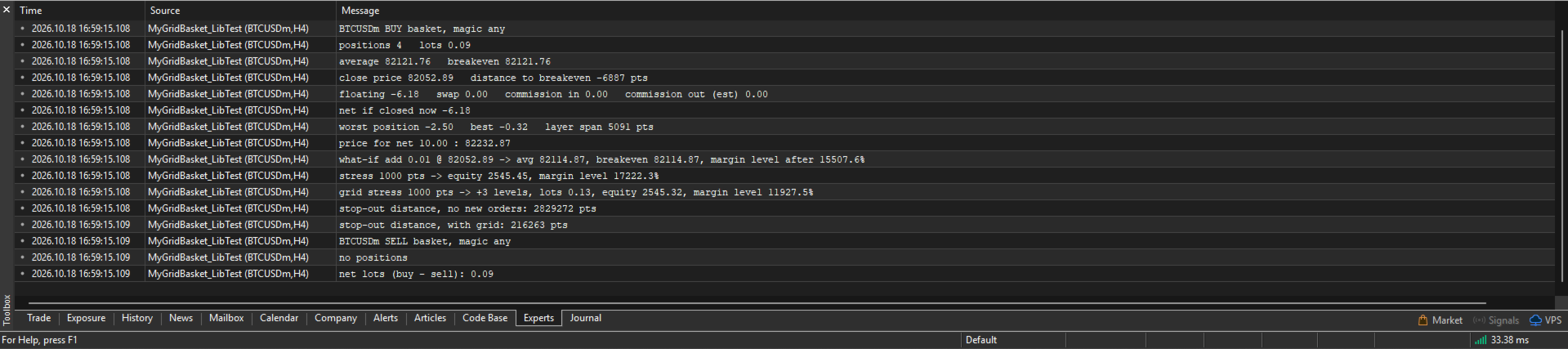
- Breakeven of the basket, with swap and commission counted
- The price where the basket nets a money amount you choose
- Where the average and the breakeven move if you add one more level
- How many lots bring the average to a price you choose
- Equity and margin level if price moves against the basket
- The same, with a grid that keeps adding levels
- How many points are left until stop-out

How to use
1. Put MyGridBasket.ex5 in MQL5/Libraries.
2. Add the import block below to your EA.
3. Create a basket handle, refresh it, read the numbers.
4. Destroy the handle in OnDeinit.

Example

int hBuy=-1;

int OnInit()
  {
   hBuy=MyGB_Create(_Symbol,MagicNumber,MYGB_BUY);   // magic -1 = every magic
   return (hBuy>=0) ? INIT_SUCCEEDED : INIT_FAILED;
  }

void OnDeinit(const int reason)
  {
   MyGB_Destroy(hBuy);
  }

void OnTick()
  {
   MyGB_Refresh(hBuy);
   double be = MyGB_Breakeven(hBuy);
   double tp = MyGB_TargetPrice(hBuy,50.0);     // net +50 in account currency
   double so = MyGB_StopOutDistance(hBuy);      // points to stop-out
  }

Conventions
Invalid handle or failed calculation: double returns EMPTY_VALUE, int returns -2, bool returns false.
Margin level is in percent. -1 means no margin is used.
Stop-out distance is in points. -1 means not reached in range, -2 means unknown.

Import block

#define MYGB_BUY  0
#define MYGB_SELL 1

#import "MyGridBasket.ex5"
int MyGB_Create(string symbol,long magic,int side);
void MyGB_Destroy(int h);
bool MyGB_Refresh(int h);
string MyGB_Version();
bool MyGB_IsHedging(int h);
string MyGB_Warning(int h);
string MyGB_Summary(int h);
int MyGB_Positions(int h);
double MyGB_Lots(int h);
double MyGB_AvgPrice(int h);
double MyGB_Breakeven(int h);
double MyGB_ClosePrice(int h);
double MyGB_DistToBreakevenPoints(int h);
double MyGB_Floating(int h);
double MyGB_Swap(int h);
double MyGB_EntryCommission(int h);
double MyGB_ExitCommission(int h);
bool MyGB_ExitCommissionKnown(int h);
double MyGB_NetResult(int h);
double MyGB_WorstPositionProfit(int h);
double MyGB_BestPositionProfit(int h);
double MyGB_LayerSpanPoints(int h);
void MyGB_SetExitCommissionPerLot(int h,double rate_per_lot);
void MyGB_ClearExitCommissionOverride(int h);
double MyGB_TargetPrice(int h,double target_money);
double MyGB_MoneyAtPrice(int h,double price);
double MyGB_LotsForTargetAverage(int h,double price,double target_avg);
double MyGB_WhatIfNewAverage(int h,double lot,double price);
double MyGB_WhatIfNewBreakeven(int h,double lot,double price);
double MyGB_WhatIfMarginLevel(int h,double lot,double price);
double MyGB_StressEquity(int h,double adverse_points);
double MyGB_StressMarginLevel(int h,double adverse_points);
int MyGB_StressStopOut(int h,double adverse_points);
double MyGB_GridStressEquity(int h,double adverse_points,double step_points,double first_lot,double lot_mult,double step_mult,int max_levels);
double MyGB_GridStressMarginLevel(int h,double adverse_points,double step_points,double first_lot,double lot_mult,double step_mult,int max_levels);
double MyGB_GridStressLots(int h,double adverse_points,double step_points,double first_lot,double lot_mult,double step_mult,int max_levels);
int MyGB_GridStressLevels(int h,double adverse_points,double step_points,double first_lot,double lot_mult,double step_mult,int max_levels);
int MyGB_GridStressStopOut(int h,double adverse_points,double step_points,double first_lot,double lot_mult,double step_mult,int max_levels);
double MyGB_StopOutDistance(int h);
double MyGB_StopOutDistanceGrid(int h,double step_points,double first_lot,double lot_mult,double step_mult,int max_levels);
double MyGB_NetLots(string symbol,long magic);
#import

Know the limits
- Made for hedging accounts. On netting accounts there is one position per symbol, so the basket is that position. A warning is set.
- Stop-out is evaluated only when your broker uses stop-out in percent. In money mode the result is unknown.
- Margin of simulated levels does not credit hedge offset between opposite positions. This errs on the safe side.
- Simulated levels fill exactly at their price. Spread, slippage and execution delay are not modelled.
- Exit commission is estimated from your own past closing deals on the symbol. If there are none it is counted as 0 and the library tells you.
- Other positions on the account are assumed unchanged during a stress test.
- A stress test is arithmetic. It is not a forecast. Real fills in a fast market are worse.
- Test it on a demo account with your broker's symbols before you rely on it.

Free. No account or symbol restrictions. No warranty.
Version 1.00 is the first release.
제작자의 제품 더 보기
My Grid Scalper
Ahmad Aan Isnain Shofwan
3 (2)
마이그리드 스캘퍼 당신이 주도권을 잡거나, 아니면 그것이 당신을 이끌거나 둘 중 하나입니다. 저는 2022년 이후 3만 회 이상 다운로드된 MT4 버전을 기반으로 MT5 버전을 홍보나 할인 없이 출시합니다. 이 EA는 무료이며 영원히 무료로 유지될 것입니다. 이 EA가 제공하는 선과 혜택에서 오는 영적인 보상을 저세상에 계신 어머니께 바칩니다 . 이해하는 사람들의 손에서 일관된 실행력만 발휘하면 됩니다. 기본 정보 기호: 모든 기호 (기본 최적화 기호: XAUUSD) 기간: 모든 기간 (기본 최적화: M5) 유형: 소프트 마틴게일(기본값 1.5)을 사용하는 그리드 기반 진화 분석(EA) 로트 관리: 고정 로트의 경우 승수를 1.0으로 설정하십시오. 계좌 유형: ECN 권장 (필수 아님) 중개업체: 모든 중개업체 가능, 스프레드가 낮은 업체 선호 실시간 및 데모 준비 완료: 백테스팅, 포워드 테스팅 및 최적화 완료 이제는 편안한 틀에서 벗어나셨나요? 무료 도구는 평온함을 약속하지만
FREE
MyVolume Profile Scalper FV
Ahmad Aan Isnain Shofwan
4 (7)
MyVolume Profile Scalper EA 무료 버전 https://www.mql5.com/en/market/product/113661 권장 통화쌍: ETHUSD 골드/XAUUSD AUDCAD AUDCHF AUDJPY AUDNZD AUDUSD CADCHF CADJPY CHFJPY EURAUD EURCAD EURCHF EURGBP EURJPY EURNZD EURUSD GBPAUD GBPCAD GBPCHF GBPJPY GBPNZD GBPUSD NZDCAD NZDCHF NZDJPY NZDUSD USDCAD USDCHF USDJPY ETHUSD BTCUSD US30 현금 기간: 모든 기간에 걸쳐 작동 ------------------------------------- --------------------------- --> 거래를 계획하고 계획을 거래하세요. 시장이 다르게 반응한다면, 새로운 계획을 세우고
FREE
My Support and Resistance Zone
Ahmad Aan Isnain Shofwan
MT5의 지지 및 저항 영역 - 공급 및 수요 영역 대부분의 수급 지표는 차트를 복잡하게 만들고는 그걸 "분석"이라고 칭합니다. 하지만 이 지표는 그렇지 않습니다. My Support and Resistance Zone은 공급과 수요 영역을 자동으로 매핑한 다음, 사각형의 모양이 얼마나 보기 좋은지가 아니라 실제 시장 움직임을 기준으로 순위를 매깁니다. 당신이 얻게 될 것 약점 새로운 구역 (미검증) 확인된 구역 검증된 지역 배신자 / 파괴된 지역 (선택 사항) 각 구역은 명확하게 표시되어 있습니다. 매도 확정 영역, 재테스트=2 새로운 매수 영역, 약세 매도 영역 추측할 필요도 없고, 퍼즐처럼 색깔을 해독할 필요도 없습니다. 그것은 어떻게 생각하는가 영역은 프랙탈 구조와 ATR 확장을 기반으로 구축됩니다. 겹치는 영역은 병합됩니다. 약한 노이즈는 숨겨질 수 있습니다. 강한 레벨은 유지됩니다. 해당 부위가 자라면서 색깔이 변합니다. 새로운 → 확인된 → 입증된 친환경 가족을
FREE
My Btcusd Grid
Ahmad Aan Isnain Shofwan
4.25 (16)
MyBTCUSD GRID EA는 BTCUSD GRID EA의 무료 버전입니다 https://www.mql5.com/en/market/product/99513 MyBTCUSD GRID EA는 그리드 거래 전략을 사용하도록 설계된 자동화 프로그램입니다. MyBTCUSD GRID EA는 초보자와 숙련된 트레이더 모두에게 매우 유용합니다. 사용할 수 있는 다른 유형의 거래 봇이 있지만 그리드 거래 전략의 논리적 특성으로 인해 암호화 그리드 거래 봇이 문제 없이 자동 거래를 쉽게 수행할 수 있습니다. MyBTCUSD GRID EA는 그리드 거래 봇을 시도하려는 경우 사용할 수 있는 전반적으로 최고의 플랫폼입니다. MyBTCUSD GRID EA는 통화가 변동하는 경우에도 이상적인 가격대에서 자동 거래를 수행할 수 있기 때문에 암호화폐 산업에 매우 효과적입니다.   이 자동 거래 전략의 주요 목적은 EA 내에서 사전 설정된 가격 움직임으로 수많은 매수 및 매도 주문을 하는 것입니다. 이
FREE
MyGrid Scalper
Ahmad Aan Isnain Shofwan
3.94 (52)
마이그리드 스캘퍼 당신이 그것을 이끌거나, 그것이 당신을 이끌거나. 2022년 이후 30,000회 이상 다운로드 - 과대광고, 잡음, 할인 없이, 오직 이해심 깊은 사람들의 손에서 꾸준한 실행만이 가능합니다 . 기본 정보 기호:   모든 기호(기본 최적화: XAUUSD) 시간 프레임:   임의 (기본 최적화:   M5   ) 유형:   소프트 마팅게일을 사용한 그리드 기반 EA(기본값 1.5) 로트 제어:   고정 로트의 경우 승수를 1.0으로 설정합니다. 계좌 유형:   ECN 권장(필수는 아님) 브로커:   모든 브로커, 낮은 스프레드가 선호됨 라이브 및 데모 준비 완료:   백테스트, 포워드 테스트 및 최적화 완료 아직 편안한 대본은 필요 없을 만큼 자랐나요? 무료 도구는 평온함을 약속합니다. 진정한 도구는 통제력을 제공합니다. MyGrid Scalper는 친절함을 가장하지 않습니다. 그저 성능을 발휘할 뿐입니다. 가이드도 아니고, 안전망도 아닙니다 이 시스템은 당신의 기
FREE
Velora MT5
Ahmad Aan Isnain Shofwan
The Intelligent Grid EA — A Team of Smart Modules Following the 5-star success of its MT4 predecessor, Velora has been completely rebuilt for MT5 with a fundamental shift in design. Most grid EAs are one engine doing many jobs. Velora is different. Inside Velora, there is a team. Four smart modules, each with one specialty, working together so the system stays adaptive at every stage of a trade — from the moment of entry, to scaling decisions, to the exit. Meet the team: VSE — Velora Smart Entr
AanIsnaini Signal Matrix MT5
Ahmad Aan Isnain Shofwan
5 (1)
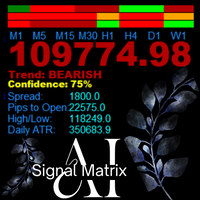
AanIsnaini Signal Matrix MT5 Multi-Timeframe Confidence Signal Dashboard The Free Version of AanIsnaini Signal Matrix MT5 Pro AanIsnaini Signal Matrix  MT5 is a powerful all-in-one indicator that analyzes market direction and confidence levels across multiple timeframes — allowing traders to see the overall bias of the market at a single glance. It combines signals from Price Action , Support–Resistance , and several proven technical tools (MACD, ADX, RSI, MA slope, ATR, and Volume Ratio), then
FREE
My Risk Management MT5
Ahmad Aan Isnain Shofwan
5 (1)
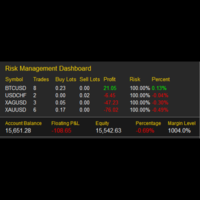
My Risk Management The Risk Management Dashboard is a visual tool designed to help traders monitor risk exposure in real time. With a clear and compact layout, it provides an instant overview of trading activity, enabling more disciplined and informed decision-making. Key Features Active Symbol Summary Displays all traded symbols with the number of trades, total buy/sell lots, and current profit/loss. Per-Symbol Risk Analysis Calculates and shows the risk percentage of each symbol relative to
FREE
Velora Equity Monitor
Ahmad Aan Isnain Shofwan
5 (1)
Velora Equity Monitor Free — No strings attached. Except one. I built this for myself. After running multiple EAs simultaneously on the same terminal, I kept asking the same question: which one is actually making money? The default MT5 account history mixes everything together. You get a number. You don't get clarity. So I built Velora Equity Monitor. Attached it. Left it running. Forgot it was there — until I needed it. That's the best compliment I can give my own tool. What it does Velora Equi
FREE
MyCandleTime MT5
Ahmad Aan Isnain Shofwan
My CandleTime This indicator displays the remaining time until the current candle closes directly on the chart. It is designed to help traders keep track of candle formation without constantly checking the platform’s status bar. Main Features Shows countdown timer for the active candle. Works on any symbol and timeframe. Lightweight, does not overload the terminal. Adjustable font size and name. How to Use Simply attach the indicator to a chart. You can customize font size, color, and font to
FREE
My Fibonacci MT5
Ahmad Aan Isnain Shofwan
My Fibonacci MT5 An automated Fibonacci indicator for MetaTrader 5 that combines ZigZag swing detection with comprehensive Expert Advisor integration through a 20-buffer system. More details about data specification and EA integration: https://www.mql5.com/en/blogs/post/764114 Core Features Automated Fibonacci Detection The indicator identifies swing points using configurable ZigZag parameters and draws Fibonacci retracements and extensions automatically. It updates levels as new swing formatio
FREE
My Risk Management
Ahmad Aan Isnain Shofwan
5 (1)
My Risk Management The Risk Management Dashboard is a visual tool designed to help traders monitor risk exposure in real time. With a clear and compact layout, it provides an instant overview of trading activity, enabling more disciplined and informed decision-making. Key Features Active Symbol Summary Displays all traded symbols with the number of trades, total buy/sell lots, and current profit/loss. Per-Symbol Risk Analysis Calculates and shows the risk percentage of each symbol relative to
FREE
AanIsnaini Signal Matrix
Ahmad Aan Isnain Shofwan
AanIsnaini Signal Matrix Multi-Timeframe Confidence Signal Dashboard AanIsnaini Signal Matrix  is a powerful all-in-one indicator that analyzes market direction and confidence levels across multiple timeframes — allowing traders to see the overall bias of the market at a single glance. It combines signals from   Price Action ,   Support–Resistance , and several proven technical tools (MACD, ADX, RSI, MA slope, ATR, and Volume Ratio), then calculates a   confidence score   showing how strongly th
FREE
My Fibonacci
Ahmad Aan Isnain Shofwan
My Fibonacci An automated Fibonacci indicator that combines ZigZag swing detection with comprehensive Expert Advisor integration through a 20-buffer system. More details about data specification and EA integration: https://www.mql5.com/en/blogs/post/764109 Core Features Automated Fibonacci Detection The indicator identifies swing points using configurable ZigZag parameters and draws Fibonacci retracements and extensions automatically. It updates levels as new swing formations develop. Market Ad
FREE
TAwES
Ahmad Aan Isnain Shofwan
Trading Assistant with Equity Security (TAwES) This EA for helping manual trading (the EA will be activated when manual trade opened - Semi Auto) - This EA will be triggered by manual trading/first OPEN TRADE - If some manual trades have been opened and EA activated then all manual trades will be take over by EA separately. - This EA feature can be a martingale with multiplier, max order, and the distance can be adjusted - This EA will secure your Equity by max/loss Equity Setup.
FREE
Buas
Ahmad Aan Isnain Shofwan
BUAS EA is a hybrid grid breakout system engineered for traders who prefer execution logic over prediction. It deploys pending Buy Stop and Sell Stop orders as a symmetrical trap and follows whichever side is triggered first. The latest version introduces Adaptive Asymmetric Grid (AAG) logic and Dual Adaptive Trailing (equity-based + ATR-based), delivering both dynamic protection and refined risk adaptation. Designed for professional and advanced traders who demand full automation with on-chart
MyGrid Scalper Ultimate
Ahmad Aan Isnain Shofwan
MyGrid Scalper Ultimate는 외환, 상품, 암호화폐 및 지수 거래를 위한 강력하고 흥미로운 거래 로봇입니다. 특징: 다양한 Lot 모드: 고정 Lot, 피보나치 Lot, 달랑베르 Lot, 라부셰르 Lot, 마팅게일 Lot, 시퀀스 Lot, 베트 1326 시스템 Lot 자동 로트 크기. 자동차 랏 크기와 관련된 잔액 위험 수동 TP 또는 이익 실현 및 그리드 크기(동적/자동)를 위한 ATR 사용 EMA 설정 인출 설정. 돈이나 백분율로 인출을 모니터링하고 제어합니다. 마진 확인 및 필터링. 거래 세션 필터 수동 거래/작업을 위한 화면의 일부 버튼: 거래 시작, 보류 주문(한도 및 중지), 거래 삭제, 거래 종료, 모든 TP/SL 열린 거래 삭제, SL= BE, SL +1 화면의 버튼을 눌러 개설된 거래는 EA가 처리하고 관리합니다. 포맷된 차트. 파란색 캔들스틱이 있으면 Doji 캔들스틱을 인쇄하세요.  설치 방법 EA는 모든 시간 프레임 차트, 모든 쌍에 첨부될
Black Bird
Ahmad Aan Isnain Shofwan
마틴게일(Martingale Lover)의 캐릭터를 아시는 분만. 이 EA는 REBATE 생성기에 대해 걱정하는 사람들에게 매우 좋습니다. Black Bird EA는 Hedging Strategy를 기반으로 고급 알고리즘을 진행합니다. Black Bird EA는 스마트 알고리즘을 사용하여 가장 빠르게 시장에 진입하는 고급 Scalp 거래 시스템입니다. 진입 시점의 시장 상태를 기반으로 고정/동적 이익 실현을 사용하며 다양한 종료 모드가 있습니다. EA는 고급 시장 분석 알고리즘, 이익 실현 시스템, 보안 위험 관리, 손실 관리를 기반으로 거래를 관리합니다. 추천: 로트 0,01의 최소 잔액은 $10,000입니다. 쌍: 모든 쌍 시간 프레임: 모든 시간 프레임 이 EA를 사용하려면 "적절한" 자본이 있어야 합니다. 일별/주별/월별 이익 목표가 달성되었을 때 중지/휴식 및 다시 시작 없이 Martingale EA를 연중무휴 운영하지 마십시오. 그렇지 않으면 자본이 날아갈
Btcusd Grid
Ahmad Aan Isnain Shofwan
1 (1)
BTCUSD GRID EA는 그리드 거래 전략을 사용하도록 설계된 자동화된 프로그램입니다. BTCUSD GRID EA는 초보자와 숙련된 거래자 모두에게 매우 유용합니다.   사용할 수 있는 다른 유형의 거래 봇이 있지만 그리드 거래 전략의 논리적 특성으로 인해 암호화폐 그리드 거래 봇이 문제 없이 자동화된 거래를 쉽게 수행할 수 있습니다.   BTCUSD GRID EA는 그리드 거래 봇을 시험해 보고자 하는 경우 사용할 수 있는 최고의 플랫폼입니다. BTCUSD GRID EA는 통화 변동성이 큰 경우에도 이상적인 가격 지점에서 자동 거래를 수행할 수 있기 때문에 암호화폐 산업에 매우 효과적입니다.   이 자동 거래 전략의 주요 목적은 EA 내에서 미리 설정된 가격 변동에 따라 수많은 매수 및 매도 주문을 하는 것입니다.   이 특별한 전략은 자동화하기 쉬우므로 일반적으로 암호화폐 거래에 사용됩니다.   그리드 트레이딩 전략을 올바르게 사용하면 자산 가격이 변할 때 돈을 벌 수 있
Three Little Birds
Ahmad Aan Isnain Shofwan
세 마리 작은 새들 EA 상실에서 단련되고, 고통으로 완성되었으며, 목적을 가지고 세상에 나왔습니다. 구매 또는 렌트하기 전에 제 블로그 게시글에서 3LB의 비용과 직접 테스트하는 방법에 대한 설명을 읽어보세요. 팁: 테스트 중에 EA의 작동 방식을 자세히 이해하려면 입력 설정에서 "디버그" 매개변수를 찾아보세요. 기본값은 False입니다. 백테스트 또는 실시간 테스트 실행 중 전문가 탭에서 자세한 메시지를 보려면 이 값을 True로 설정하세요. 자동 시간 프레임: H4. 기본 설정은 다음과 같습니다. 금속: XAUUSD(금), XAGUSD(은) 암호화폐: BTCUSD (비트코인) 에너지: 석유 (원유) 달러 지수: DXY (미국 달러 지수) 지수: US30(다우존스), US100(나스닥), US500(S&P 500) 주식: TSLA(테슬라), GOOGL(구글/알파벳) 다른 통화쌍도 실행되지만, 먼저 테스트해 보세요. 브로커마다 심볼 이름이 다르므로 EA가 사용하는 심볼을 제대
MyVolume Profile Scalper
Ahmad Aan Isnain Shofwan
구매하기 전에 데모 계정 MyVolume Profile FV(무료 버전)를  사용하여 몇 달 동안 사전 테스트를 통해 테스트해 보세요 . 그것을 배우고 당신에게 가장 적합한 설정을 찾으십시오. MyVolume 프로필 Scalper EA는 지정된 기간 동안 특정 가격 수준에서 거래된 총 거래량을 가져와 전체 거래량을 증가된 거래량(가격을 올린 거래)으로 나누는 볼륨 프로필을 사용하도록 설계된 고급   자동화   프로그램   입니다   .     ) 또는 거래량 감소(가격을 낮추는 거래)를 개시하거나 중단   합니다   . 이 EA의 핵심 엔진은 인디케이터 볼륨(Indicator Volume), 하이켄 아시(Heiken Ashi), ADX를 사용하고 있습니다. 이동 평균 표시기가 제공하는 추세를 확인하고 따르기 위해 사용자 정의 가능한 이동 평균을 사용하는 추가 필터입니다.   이 필터는 선택 사항이며 기본적으로 TRUE입니다(이 필터 사용). MyVolume Profile Scalp
Miliarto Ultimate
Ahmad Aan Isnain Shofwan
an EA that use 3 Moving Average or Bollinger Bands indicators. You can choose one and setup the indicator selected as you wish.  Moving averages and Bollinger bands is one of powerful indicator. The recommendation to uses the main trend to enter the market, H1 or H4 timeframe for identifying the trend. and you can uses a short timeframe to enter the market and setup how the EA allowed trade direction  (Buy only, Sell only, or both) within short time frame. The EA have : - Take Profit and Stop Lo
Velora
Ahmad Aan Isnain Shofwan
5 (4)
Velora EA – 그리드 및 적응형 트레일링 브레이크아웃 시스템 Velora는 적응형 그리드 엔진, 동적 트레일링 로직, 부분 마감 메커니즘, 자동화된 변동성 기반 항목을 갖춘 Instant Volatility Breakout(IVB)의 핵심에서 설계된 고품질 전문가 자문 서비스입니다. 공격성, 안전성, 적응성을 모두 갖춘 상품을 찾는 트레이더를 위해 만들어진 Velora는 단순히 반응성이 뛰어난 것이 아니라 반응성이 뛰어납니다. 핵심 강점 IVB 브레이크아웃 엔진:   정교한 변동성 및 모멘텀 필터(ROC, ATR, Keltner, Volume)를 사용하여 영향력이 큰 모멘텀 폭발을 감지합니다. 적응형 그리드 시스템: 고정 또는 적응형(ATR 기반) 그리드 간격 사용자 정의 가능한 배수를 통한 점진적인 로트 크기 조정 헤징 및 비헤징 지원 안전성과 일관성을 위한 무결성 검사 그리드 로직 자동 추적 시스템: ATR 기반 정지 조정 동적 이익실현 추적 구성 가능한 이익 수준에서 부
MurreyGannQuantum
Ahmad Aan Isnain Shofwan
MurreyGannQuantum - Professional Trading Indicator Advanced Murrey Math & Gann Angle Technical Analysis with Complete EA Integration Professional technical indicator combining Murrey Math level analysis with Gann angle calculations. Features comprehensive visual analysis, multi-timeframe adaptation, and complete EA integration capabilities for automated trading systems. The blog: https://www.mql5.com/en/blogs/post/763757 CORE FEATURES Technical Implementation: Murrey Math Levels: 9 dynamic su
MurreyGannQuantum MT5
Ahmad Aan Isnain Shofwan
MurreyGannQuantum - Professional Trading Indicator Advanced Murrey Math & Gann Angle Technical Analysis with Complete EA Integration Professional technical indicator combining Murrey Math level analysis with Gann angle calculations. Features comprehensive visual analysis, multi-timeframe adaptation, and complete EA integration capabilities for automated trading systems. The Non-Repainting Guarantee: Why It Matters What Does Non-Repainting Really Mean? A non-repainting indicator maintains its h
AanIsnaini TrueChart
Ahmad Aan Isnain Shofwan
Proprietary Signal Amplification Technology Unlike conventional indicators that merely display data, TrueChart employs advanced signal amplification that emphasizes only high-probability trading opportunities. The system automatically filters out market noise and amplifies genuine signals through multiple confirmation layers, ensuring you only see what truly matters. Revolutionary Multi-Dimensional Confirmation System Most indicators operate in a single dimension. Our technology simultaneously
AanIsnaini Signal Matrix MT5 PRO - Bayesian Multi-Timeframe Dashboard "Advanced multi-timeframe dashboard with Bayesian Learning, real-time Signal Strength, and persistent memory. The older it runs, the smarter it becomes." The free version (v1.3) gave you visibility. The PRO Version gives you the edge . AanIsnaini Signal Matrix MT5 PRO is a sophisticated multi-timeframe analysis system that combines classical technical indicators with adaptive probabilistic reasoning. Designed for serious tra
My Volume Profile Scalper
Ahmad Aan Isnain Shofwan
마이 볼륨 프로필 스캘퍼(MVPS) 그리드 EA. 첫 번째 티켓은 볼륨 프로필에서 나옵니다(또는 사용자가 직접 방향을 지정할 수 있습니다). 나머지는 거리 + 승수 계산 방식이며, 매 주기마다 동일한 계산이 적용됩니다. 만능 해결책도 아니고, "인공지능"도 아닙니다. 그저 거래를 시작하고, 매매 구도를 만들고, 바스켓을 관리하는 도구일 뿐입니다. 마틴게일 전략을 이해하지 못한다면 사용하지 마세요. 아니면 고정 로트 사이즈를 사용하려면 로트 사이즈 배율을 1로 설정하세요. 실제로 하는 일은 무엇일까요? 첫 번째 항목: 월-일 거래량 프로필, 매수 전용/매도 전용/매수 및 매도. 다음 항목: 마지막 가격 × GridMulti 에서 그리드 . 마지막 손실 티켓을 따라가는 로트 × MartMulti . 마감: 바스켓 규칙을 직접 설정합니다. 목표 수익/손절매 금액, 트레일링 딜레이, 손익분기점 이상에서의 트레일링 손절매 등을 설정할 수 있습니다. 복잡한 마감 규칙은 없습니다. 차트당 하
Three Little Birds MT5
Ahmad Aan Isnain Shofwan
세 마리 작은 새들 EA 상실에서 단련되고, 고통으로 완성되었으며, 목적을 가지고 세상에 나왔습니다. 구매 또는 렌트하기 전에 제 블로그 게시글에서 3LB의 비용과 직접 테스트하는 방법에 대한 설명을 읽어보세요. 팁: 테스트 중에 EA의 작동 방식을 자세히 이해하려면 입력 설정에서 "디버그" 매개변수를 찾아보세요. 기본값은 False입니다. 백테스트 또는 실시간 테스트 실행 중 전문가 탭에서 자세한 메시지를 보려면 이 값을 True로 설정하세요. 자동 시간 프레임: H4. 기본 설정은 다음과 같습니다. 금속: XAUUSD(금), XAGUSD(은) 암호화폐: BTCUSD (비트코인) 에너지: 석유 (원유) 달러 지수: DXY (미국 달러 지수) 지수: US30(다우존스), US100(나스닥), US500(S&P 500) 주식: TSLA(테슬라), GOOGL(구글/알파벳) 다른 통화쌍도 실행되지만, 먼저 테스트해 보세요. 브로커마다 심볼 이름이 다르므로 EA가 사용하는 심볼을 제대
필터:
리뷰 없음
리뷰 답변