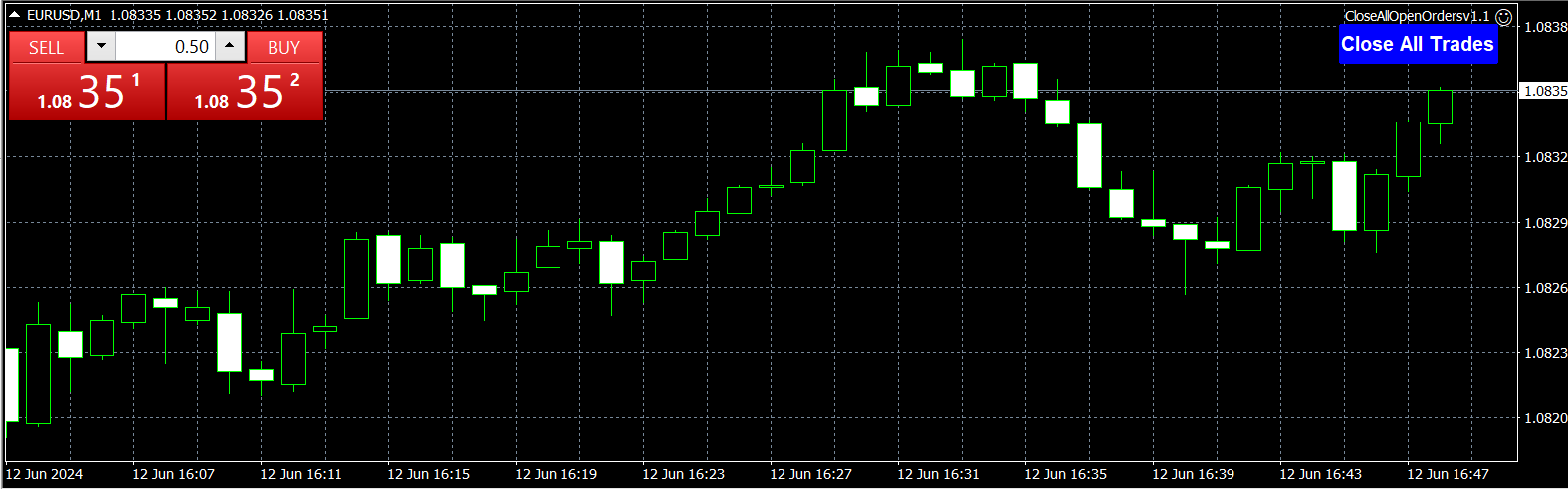
Agora Close All Orders

This utility adds a customizable button to your MetaTrader 4 chart, allowing you to close all open orders with a single click. The button's position automatically adjusts based on the chart size, ensuring it remains visible and accessible. Customize the button's appearance, text, and tooltip to suit your preferences. Simplify your trading workflow and manage your open positions more efficiently with this convenient tool.

The UPDATES Would be based on your feedback!

Features:

  • Single-click button to close all open orders.
  • Dynamic positioning adapts to chart size changes.
  • Customizable appearance, text, and tooltip.
  • Enhances trading efficiency by streamlining order management.

Compatible with MetaTrader 4.


Don't forget to do this:
Tools --> Options --> Expert Advisors --> Allow automated trading
So the tool can close the orders
추천 제품
This is a script for quick and easy placement of orders (Buy Stop, Sell Stop, Buy Limit, Sell Limit) to the user's choice. Simply drop the script on a chart part where you want to place the selected order. You can also set the automatic calculation of the lot size for the position, depending on the risk as a percentage. Also, you can use the script as a supplement to your trading strategy, since it is possible to specify a magic number. Features Fast placing of a required order (Buy Stop, Sell S
FREE
Demo version of the paid product - Copy MT4 copier , limited to lot size of 0.01 Universal copier of deals from MetaTrader 4 to MetaTrader 4 ( MT5<->MT5 version is available ; with both versions, you can copy MetaTrader 5<->MetaTrader 4, MetaTrader 4<->MetaTrader 5, MetaTrader 5<->MetaTrader 5, MetaTrader 4<->MetaTrader 4). Spread filter. Select the best price (start copying positions with a profit or loss). Configure the lot size, fixed or ratio-based (provider signals can be copied with an inc
FREE
Account Info AS는 MetaTrader 4용 강력한 정보 스크립트로, 거래 계좌에 대한 모든 정보를 차트에 직접 표시해 줍니다. 이 스크립트는 계좌 분석, 위험 관리 및 거래 의사 결정에 필요한 모든 데이터를 제공합니다. 주요 기능 완전한 재무 정보 계좌 유형 (데모/실계좌/경연 대회) 잔액, 자산 및 마진 현금 및 비율로 표시되는 사용 가능 마진 마진 레벨 현재 손익 위험 관리 마진콜 및 손절매 레벨 현재 심볼 1랏에 대한 마진 계산 인기 거래 상품 마진 거래 정보 미체결 포지션 (수량, 방향, 총 수익) 유형별 대기 주문 현재 심볼 정보: 랏 크기 (최소/최대/단계) 핍 단위 스프레드 스왑 크기 기술 데이터 현재 서버 시간 회사 및 서버 이름 계좌 번호 및 고객 정보 설정 스크립트는 세 가지 간단한 매개변수를 사용합니다. Line_spacing - 가독성 향상을 위해 데이터 사이에 빈 줄 추가 ShowAllSymbolsInfo -
FREE
의미가 없는 상관 관계가 있는 기호를 거래하십시오. 그렇다면 어떤 기호가 서로 연관되어 있지 않고 현재 추세에서 반대인지 확인할 수 있다면 어떨까요? 이 간단하고 빠른 분석을 위해 이 유틸리티를 사용할 수 있습니다. 간단히 실행하고 서로 반대되는 기호 쌍 목록을 확인하십시오. 분석 결과는 전략 로그에 인쇄됩니다. 이중성 A -> B == B -> A는 표시되지 않습니다. 추세를 계산할 기간(일별, 시간별, 월별)을 지정할 수 있으며 시간 관리 및 투자 전략에 따라 선택이 달라지며 기본 ID는 하루입니다. 현재 가격과 이전 단계 사이의 최소 차이(백분율), 기본값은 2%입니다. 최소 차이 계산에 사용할 단계 수입니다. 의미가 없는 상관 관계가 있는 기호를 거래하십시오. 그렇다면 어떤 기호가 서로 연관되어 있지 않고 현재 추세에서 반대인지 확인할 수 있다면 어떨까요? 이 간단하고 빠른 분석을 위해 이 유틸리티를 사용할 수 있습니다. 간단히 실행하고 서로 반대되는 기호
FREE
You can check out comment #1 how does it work This is a very useful tool, enter the currency charts you need to open, use the symbol "/" to distinguish them, and select the periodicity /TF of the chart, press the button and they will open the charts for you in batches without you having to manually open them each! Because some EA use multiple currency pairs strategy, but do not support one chart to support all currency pairs, so I developed this tool, hope you like it, if you are satisfied with
FREE
IceFX ProfitInfo
Norbert Mereg
4.6 (10)
The goal of this indicator is to give you a quick & comprehensive view of your current profit. IceFX’s ProfitInfo is a utility indicator which displays the profit which is calculated from the actual trades on the chart(s). The indicator displays on a daily / weekly / monthly and yearly breakdown and shows the profit in pips / currency and percentage. Main features: You can easily adjust IceFX’s ProfitInfo to display profit on the current open chart / current trade or even the profit of the enti
FREE
Lucky Forex Stats Lucky Forex Stats Allow users to See all Account data on their Chart, you can choose any time period and it'll show you full account details with ratio, and each pair has individual details! Advantages You can choose any time period and it'll display all detail. You can see your whole accounts details, the profit and loss with exact $figure and ratio as well. Each pair shows the profit they've earned or lose, The winning and losing trades Winning VS losing % and many more P
FREE
#property copyright "小天" #property link      " https://www.mql5.com " #property version   "2.01" #property strict #property description "test" input int hlength=85; input int vlength=25; input int DX=-340; input int DY=-80; input string InpDirectoryName="Data"; // directory name input double lots_default=1; input int    pc_times_default=2; input double deposit_minimal=1; input double floating_loss_percent=0.1; input double margin_occupied=0.2;   input int    tradingnumber=1;//控制买卖交易数量  input
FREE
TraderTool
Nikolaos Pantzos
TraderTool is a tool/panel that will help any trader to perform trades quickly and easily. The product has been developed with user friendliness and ease of use in mind. It has the ability to manage multiple types of orders, either placed by an Expert Advisor, or manually. It also allows you to place orders in a single click. You can add stop loss and take profit, initiate a trailing stop or start break even operation, and all these with the simple panel. With the advanced panel (you can call it
FREE
The "InfoBox" utility is designed to display the presence of open orders, the number of lots, current profit and much more in one window. The version for the MT5 platform   is here . You've probably encountered a situation where you have an advisor that works on a currency pair, but information about its operation: - orders and their number, the size of the spread for the instrument, the volume of lots on the market, drawdown and much more - are scattered in different places of the terminal and

FREE
If you need an advisor on any arrow indicator signals - this utility will definitely help you.  What does the utility do?  It creates a EA file with your indicator signals in a few easy steps: install the indicator with the needed settings on the chart; Select a signal for buy;  Select a signal for sell;  get the clicker file ! Then you install the file of the EA in the folder Experts and update the terminal.  Attention! Set the indicator settings as you need and the same settings will be tak
FREE
Scalping Day Trading Support Utility Scalping One MT4 free One position is displayed with one button. View P & L, Lot, and Point in real time. It is possible to switch the display of positions of only chart currencies and all currency pairs.  (The free version has only 3 positions) Supports automatic identification in Japanese and English   Account currency notation corresponds to dollar, euro, pound, yen (automatic identification) The timeline drawing function can be linked with the clock disp
FREE
Slippage Monitor
Ziheng Zhuang
4.8 (5)
This EA is designed to monitor the slippage of opening and closing orders, and save the records in files. It is useful to record the slippage and evaluate brokers. The record files are saved in the folder  MT4_Data_Folder\MQL4\Files.  Go to "File " --> "Open Data Folder" . Warning : Do NOT open the files directly, otherwise it will affect the exectution of EA, just copy them to another folder and open them. Usage: Open a chart and load the EA on it, just need only one EA to run, it monitors al
FREE
Script to calculate equity and balance at a specific date and time.  This script makes up for a lack of MetaTrader account history, that does not show how the balance and equity changes in time. Balance calculation includes closed orders only. Equity calculation includes orders closed before and orders that are still open at the specified time. Example: date and time set to 2020/07/06 00:00. If I had a Buy 1 lot EURUSD position opened at price 1.12470 on the 2020/07/02, the program would ca


FREE
EA Close All Set TPSL All  Panel MT4 EA Close All Set TPSL All MT4 is a professional utility tool for MetaTrader 4 that helps traders manage orders quickly and efficiently. With a clean on-chart control panel, you can close trades or set Take Profit / Stop Loss levels for all orders with just one click.       [MT5 Version --->  click . ] Key Features On-Chart Control Panel – Light gray background with simple and intuitive design. Close All Orders – Instantly close all active Buy, Sell, and Pe

FREE
This EA creates two buttons in a panel that you can drag to any part of the chart (simply click on the panel and drag with the mouse to the part of the chart you want) with which you can close all the open operations in the account with a simple click, or close only the trades that are currently in profit. Check out my new trade dashboard assistant :  Simple and Easy MT4 Trade Panel Tell me if you like the product and how it could be improved, Thanks :) 
FREE
This simple but useful script calculates the lot in % of the deposit. It is indispensable for risk management. There is only one customizable parameter: MaxRisk - risk in % for lot calculation. The product works as a standard script. Launch it once on an appropriate chart and start trading using the calculated lot value. Genious is simplicity! Happy trading!
FREE
Copy MT4 simply
VLADIMIR SHEVCHENKO
4 (1)
A free program for copying orders between terminals on the same computer. Any orders are copied in any direction, between any accounts. The principle of operation: On the terminal from which you want to copy, the "Server" parameter is set. On the terminal or terminals where the copied positions need to be opened, the "Client" parameter is set. It is also necessary to enter the account number of the "Server" terminal on the client. In the future, it is planned to increase the functionality
FREE
Risk Panel Pro v1
Saeed Hatam Mahmoudi
Risk Panel Pro (MT4) Risk Panel Pro is a Tool for MetaTrader 4 that automates placing Stop Loss and Take Profit based on a percentage of the account balance. It is a trade management utility; it does not provide trading signals and does not guarantee any profit. Main functions Auto-apply SL/TP on new orders using balance-based risk (default: SL 2%, TP 4%). Switch Automatic mode off to manage SL/TP manually. One-click buttons to apply SL or TP to existing positions at any time. Close Chart : clo
FREE
Tipu Trader
Kaleem Haider
3 (2)
Tipu Trader is a part of Tipu Panel ecosystem that was developed out of need for quick and simple trading. Tipu Trader is an easy to use trade panel for commonly used trade functions. Create you own signals with Tipu Panel and trade along with Tipu Trader, a simple and easy to use trade panel. Features An easy to use trade panel for most commonly used trade functions. Create your own personal trade signals with Tipu Panel , and trade with Tipu Trader. Customizable Panel. The panel can be moved
FREE
Script to configure "TweetHelper for MT4" environment settings for "Twitter API v2 OAuth 2.0 with PKCE". Client ID   : ${CLIENT_ID} Auth Basic base64   : β string(Base64) Response Code   :   auth_code   to be obtained in step 2 of "Connection Procedure Using OAuth2.0" Callback URI   : the value set in User authentication settings "Callback URI / Redirect URL" TweetHelper trial for MT4  https://www.mql5.com/ja/market/product/54507 TweetHelper for MT4  https://www.mql5.com/ja/market/product/54
FREE
Account Cash Status
Boguslaw Nejmanowski
Account Cash Status This indicator shows actual account balance and equity. Can be placed in any position on chart even in subwindow. Account Balance is displayed in gray color. When there is no opened position the account equity is displayed in dark gray color. When there is opened position and equity value is lower than balance value the color is changed for red. When there is opened position and equity value outperforms balance value the color is changed for lime. Colors may be set freely by
FREE
FREE
Revolutionize Your MT4 Monitoring with Telegram Alerts! Installation Instructions   |    Alert Types & Examples   |    Panel & Troubleshooting Never Miss a Critical Trading Moment Again! Are you tired of constantly checking your MT4 terminal? Worried about sudden equity drops, margin calls, or connection issues?   Telegram Dashboard Monitor Pro EA   is your 24/7 automated trading assistant that keeps you informed about every critical account event – directly to your Telegram!   FREE LITE VERS
FREE
Save Template
Dominik Kaczorowski
A very fast way to save your chart template. Set the keyboard shortcut to further speed up the operation. The script allows you to save a template with a specific prefix, with the current date or with the chart timeframe. The symbol is saved automatically. Script parameters: Prefix - prefix for the template name. Can be empty. With date - true = template name will containt current date With timeframe - true = template name will containt timeframe of the current chart
FREE
Full Info Pro
Aleksei Semenko
4.67 (3)
Informational indicator to aid in trading English and Russian version Balance Equity Drawdown Margin level Opened orders Spread Total profit Profit for today Profit for yesterday Profit for the week Profit for a month Detailed statistics for 5 pairs Detailed statistics on the current pair ATR MarginCall quote and distance to it Breakeven quote and distance to it Minimum margin level Maximum drawdown Maximum possible lot to open Displaying the breakeven line Displaying MarginCall and Stopout lin
FREE
Session Shade
Shunsuke Kanaya
Session Shade (MT4) – Non-Trading Hours Background Shading Overview Session Shade is a lightweight MT4 chart utility indicator that visually highlights non-trading hours by shading the chart background. It is designed to help you confirm your daily time-filter window at a glance. This is a visualization tool only. It does not generate trading signals and it does not place, modify, or close any orders. Key features Shades non-trading hours (NG) on the chart background Keeps trading hours (OK) cl
FREE
Ultimate Dashboard Demo
Siwakon Poonsawat
4 (2)
Tools designed for multi-currency trading. You can customize which currency you want to trade, analyze up to 10 currencies by yourself. Note: This is demo version that you can test for free (Maximum Lot Size = 0.01) Full version can be found here:  https://www.mql5.com/en/market/product/17793 Analysis method. (Refer to screenshot 1) Ultimate dashboard analyzes trend strength from six major time frames: M5, M15, M30, H1, H4, D1 Show the result in graphic format. You can identify which currencies
FREE
EA Scalping Expert
Gerard Valldosera Gomez
3 (1)
This is a fully automated scalping Expert Advisor that can be run successfully using EURUSD currency pair at H1 timeframe. This EA can't run in the same account. If you want an Expert Advisor that trades daily this is not because it requires patience to wait for a few days or weeks on the right opportunity for it to trade. It takes advantage of the volatility of the price movement.
FREE
Free version. Only works on EURUSD. Would you like to have statistics about your trades displayed while you operate? Have you a solid understanding of the symbol you are trading? Do you really know everything you need to about your trading account? Do you need to keep an eye on the local times around the world? Advanced Info Displayer answers to all that. It is the ultimate tool to know all sort of useful information and hidden or hard to find data. It is important if you are serious about tradi
FREE
이 제품의 구매자들이 또한 구매함
Local Trade Copier EA MT4
Juvenille Emperor Limited
4.96 (108)
Local Trade Copier EA MT4 를 사용하여 매우 빠른 거래 복사 경험을 해보세요. 1분 안에 간편하게 설정할 수 있으며, 이 거래 복사기를 사용하면 Windows 컴퓨터 또는 Windows VPS에서 여러 개의 MetaTrader 터미널 간에 거래를 0.5초 미만의 초고속 복사 속도로 복사할 수 있습니다. 초보자든 전문가든 Local Trade Copier EA MT4 는 다양한 옵션을 제공하여 사용자의 특정 요구에 맞게 맞춤 설정할 수 있습니다. 이는 수익 잠재력을 높이려는 모든 사람을 위한 최고의 솔루션입니다. 지금 사용해보시고 이것이 왜 시장에서 가장 빠르고 쉬운 무역용 복사기인지 알아보세요! 팁: 여기 에서 데모 계정에서 Local Trade Copier EA MT4 데모 버전을 다운로드하여 사용해 볼 수 있습니다. 다운로드한 무료 데모 파일을 MT4 >> File >> Open Data Folder >> MQL4 >> Experts 폴더에 붙여넣고 터미널
Trade Assistant MT4
Evgeniy Kravchenko
4.42 (193)
거래당 위험 계산, 라인을 사용한 손쉬운 신규 주문, 부분 청산 기능을 통한 주문 관리, 7가지 유형의 트레일링 스탑 및 기타 유용한 기능을 제공합니다. 추가 자료 및 지침 설치 지침 - 애플리케이션 지침 - 데모 계정용 애플리케이션 평가판 라인 기능       - 차트에 개시선, 손절매, 차익실현을 표시합니다. 이 기능을 사용하면 새로운 주문을 쉽게 하고 개봉 전에 추가 특성을 볼 수 있습니다. 위기 관리       -       위험 계산 기능은 설정된 위험과 손절매 주문의 크기를 고려하여 새 주문의 볼륨을 계산합니다. 이를 통해 손절매 크기를 설정하고 동시에 설정된 위험을 존중할 수 있습니다. 로트 계산 버튼 - 위험 계산을 활성화/비활성화합니다. 필요한 위험 값은 위험 필드에 0에서 100 사이의 백분율 또는 예금 통화로 설정됩니다. 설정 탭에서 위험 계산 옵션을 선택합니다. $ 통화, % 잔액, % 지분, % 자유 마진, % 사용자 정의, % AB 이전 일, % AB
Trade Manager EA에 오신 것을 환영합니다. 이 도구는 거래를 보다 직관적이고 정확하며 효율적으로 만들기 위해 설계된 궁극적인 리스크 관리 도구 입니다. 단순한 주문 실행 도구가 아닌, 원활한 거래 계획, 포지션 관리 및 리스크 제어를 위한 종합 솔루션입니다. 초보자부터 고급 트레이더, 빠른 실행이 필요한 스캘퍼에 이르기까지 Trade Manager EA는 외환, 지수, 상품, 암호화폐 등 다양한 시장에서 유연성을 제공합니다. Trade Manager EA를 사용하면 복잡한 계산은 이제 과거의 일이 됩니다. 시장을 분석하고 진입, 손절 및 익절 수준을 차트의 수평선으로 표시한 후 리스크를 설정하면, Trade Manager가 이상적인 포지션 크기를 즉시 계산하고 SL 및 TP 값을 실시간으로 표시합니다. 모든 거래가 간편하게 관리됩니다. 주요 기능: 포지션 크기 계산기 : 정의된 리스크에 따라 거래 크기를 즉시 결정합니다. 간단한 거래 계획 : 진입, 손절, 익절을 위한
Copy Cat More Trade Copier MT4 (복사 고양이 MT4) 는 단순한 로컬 트레이드 카피어가 아니라, 오늘날의 거래 환경을 위해 설계된 완전한 리스크 관리 및 실행 프레임워크입니다. Prop Firm 챌린지부터 개인 계좌 관리까지, 강력한 실행력, 자본 보호, 유연한 설정, 고급 거래 처리 기능을 통해 모든 상황에 적응합니다. 이 카피어는 Master(송신자) 와 Slave(수신자) 모드 모두에서 작동하며, 실시간으로 시장가/지정가 주문, 거래 수정, 부분 청산, Close By 작업을 동기화합니다. 데모 및 실계좌 모두 호환되며, 거래용 비밀번호 또는 투자자 비밀번호로도 사용할 수 있습니다. Persistent Trade Memory 기술을 통해 EA, 터미널, VPS가 재시작되더라도 거래가 복원됩니다. 여러 Master와 Slave를 동시에 관리할 수 있으며, 브로커 간 차이는 접두사/접미사 자동 감지 또는 심볼 매핑으로 처리됩니다. 매뉴얼/설정: Copy C
Exp COPYLOT CLIENT for MT4
Vladislav Andruschenko
4.65 (66)
MetaTrader 4용 트레이드 복사기.       모든 계정의 외환 거래, 포지션, 주문을 복사합니다. 그것은 최고의 무역 복사기 중 하나입니다       MT4 - MT4, MT5 - MT4       위해       카피롯 MT4       버전(또는       MT4 -  MT5   MT5 - MT5       위해       카피롯 MT5       버전). MT5 버전 전체 설명   +DEMO +PDF 구입 방법 설치하는 방법     로그 파일을 얻는 방법     테스트 및 최적화 방법     Expforex의 모든 제품 복사기   버전         MetaTrader 5   터미널 (   МТ5 - МТ5, МТ4 - МТ5   ) -   Copylot Client MT5 고유한 복사 알고리즘은 마스터 계정에서 고객 계정으로 모든 거래를 정확하게 복사합니다. 이 제품은 또한 높은 작동 속도에서 높은 오류 처리로 유명합니다. 강력한 기능 세트. 프로그램은 여러 터
Trade copier MT4
Alfiya Fazylova
4.58 (33)
Trade Copier는 거래 계정 간의 거래를 복사하고 동기화하도록 설계된 전문 유틸리티입니다. 복사는 공급자의 계정/단말기에서 동일한 컴퓨터 또는 vps에 설치된 수신자의 계정/단말기로 발생합니다. 구매하기 전에 데모 계정에서 데모 버전을 테스트할 수 있습니다. 데모 버전 여기 . 전체 지침 여기 . 주요 기능 및 이점: 복사기는 "МТ4> МТ4", "МТ4> МТ5", "МТ5> МТ4" 복사를 지원합니다. 복사기는 데모 계정 > 실 계정, 실 계정 > 데모 계정, 데모 계정 > 데모 계정 및 실제 계정 > 실 계정 복사를 지원합니다. 복사기는 읽기 전용 암호가 적용된 투자자 계정에서 복사를 지원합니다. 하나의 공급자 터미널은 여러 수신 터미널로 트랜잭션을 보낼 수 있고 하나의 수신 터미널은 여러 공급자 터미널에서 트랜잭션을 수신할 수 있습니다. 복사기는 귀하 또는 귀하의 고문이 거래하는 동일한 터미널에서 작동할 수 있습니다. 높은 복사 속도(0.5초 미만). 복사기에는 간편
TradePanel MT4
Alfiya Fazylova
4.85 (92)
Trade Panel은 다기능 거래 보조원입니다. 이 애플리케이션에는 수동 거래를 위한 50개 이상의 거래 기능이 포함되어 있으며 대부분의 거래 작업을 자동화할 수 있습니다. 데모 계정에서만 작동하는 앱의 체험판: https://www.mql5.com/en/blogs/post/750865 애플리케이션 사용 안내: https://www.mql5.com/en/blogs/post/756482 거래. 한 번의 클릭으로 거래 작업을 수행할 수 있습니다: 자동 위험 계산을 통해 지정가 주문 및 포지션을 엽니다. 한 번의 클릭으로 여러 주문과 포지션을 열 수 있습니다. 주문 그리드를 엽니다. 그룹별 대기 주문 및 포지션을 마감합니다. 포지션 반전(매수 청산 후 매도 개시 또는 매도 청산 후 매수 개시). 포지션 고정(매수 포지션과 매도 포지션의 양을 동일하게 하는 추가 포지션 개설). 한 번의 클릭으로 모든 포지션을 부분 청산합니다. 모든 포지션의 이익실현과 손절매를 동일한 가격 수준으로 설정
특별 할인 – 40% 할인 고급 거래 관리자 – 더 빠르고, 더 스마트하고, 더 안전한 수동 거래를 위한 최고의 올인원 솔루션 차트엔드 거래 관리자 AI로 수동 거래를 혁신하세요. 즉각적인 주문 실행, 시각적인 거래 계획, 강력한 위험 관리 기능을 하나의 직관적인 도구에 통합한 전문가급 차트 패널입니다. 차트를 벗어나지 않고도 그 어느 때보다 빠르게 주문을 실행하고, 위험을 관리하고, 수익을 보호할 수 있습니다. 정확성과 효율성을 높이고자 하는 모든 트레이더에게 적합합니다. MT4 전략 테스터에서 위험 부담 없이 테스트해 보세요 데모 버전을 다운로드하여 모의 거래 기능을 사용해 보세요. 실제 거래에 들어가기 전에 안전한 시뮬레이션 환경에서 주문 실행 연습, 위험 관리 규칙 테스트, 전략 개선을 할 수 있습니다. 자세한 사용자 설명서 및 단계별 가이드는 다음 링크를 참조하세요. https://www.mql5.com/en/blogs/post/764217 주요 장점: 빠른 거래
The product will copy all telegram signal to MT4   ( which you are member  ) , also it can work as remote copier.  Easy to set up, copy order instant, can work with almost signal formats, image signal, s upport to translate other language to English Work with all type of channel or group, even channel have "Restrict Saving Content", work with  multi channel, multi MT5 Work as remote copier: with signal have ticket number, it will copy exactly via ticket number. Support to backtest signal. How to
Trade Dashboard MT4
Fatemeh Ameri
4.96 (53)
Tired of complex order placement and manual calculations? Trade Dashboard is your solution. With its user-friendly interface, placing orders becomes effortless, by a single click, you can open trades, set stop loss and take profit levels, manage trade lot size, and calculate risk to reward ratios, allowing you to only focus on your strategy. Say goodbye to manual calculations and streamline your trading experience with Trade Dashboard. Download  Demo Version  right now. You can find  Details of
DrawDown Limiter MT4
Haidar Lionel Haj Ali
5 (8)
Drawdown Limiter EA You are in the right place if you were searching for Drawdown control, Drawdown limiter, Balance protection, Equity Protection or Daily Drawdown Limit related to Prop Firm, FTMO, or Funded account trading, or if you want to protect your trading account. Have you suffered from controlling your drawdown when trading funded accounts? This EA is meant for you. Prop firms usually set a rule called “Trader Daily Drawdown”, and if it is not respected, you are disqualified.  I am an
Equity Protect Pro: 안심 거래를 위한 종합 계좌 보호 전문가 계좌 보호, 자산 보호, 포트폴리오 보호, 다중 전략 보호, 수익 보호, 수익 확보, 거래 보안, 위험 관리 프로그램, 자동 위험 관리, 자동 청산, 조건부 청산, 예약 청산, 동적 청산, 추적 손절매, 원클릭 종료, 원클릭 청산, 원클릭 복원 등의 기능을 찾고 있다면 Equity Protect Pro가 바로 필요한 프로그램입니다. 설정이 간편하고 사전 설정된 조건이 충족되면 모든 차트를 닫을 수 있으며 신호 구독 취소도 지원합니다(이는 모든 거래 프로그램도 중지됨을 의미합니다). 이 시점에서 새로운 주문이 생성되지 않으며 최종적으로 모든 주문이 종료되어 예상치 못한 손실을 효과적으로 방지하고 안심하고 거래할 수 있습니다. Equity Protect Pro Demo Version for yo u to test   Equity Protect Pro MT4 Demo.ex4 Equity Protect Pro M
Seconds Chart — MetaTrader 4에서 초 단위 차트를 생성하는 독특한 도구입니다. Seconds Chart 를 사용하면 초 단위로 설정된 타임프레임으로 차트를 작성할 수 있어, 표준 분 또는 시간 단위 차트에서는 불가능한 유연성과 정밀한 분석이 가능합니다. 예를 들어, S15 타임프레임은 15초 동안의 캔들로 구성된 차트를 의미합니다. 모든 인디케이터, 전문가 자문(EA), 스크립트를 사용할 수 있으며, 표준 차트와 동일한 편리함으로 작업할 수 있습니다. 표준 도구와 달리, Seconds Chart 는 초고속 타임프레임에서도 높은 정확도와 지연 없이 작업할 수 있도록 지원합니다. Seconds Chart의 장점 1초부터 900초까지 의 타임프레임 지원. 즉시 로딩 MT5 터미널의 틱 데이터베이스 가져오기로 역사적 데이터를 빠르게 불러옵니다. MT5 터미널에서 Tick Database 유틸리티를 먼저 실행해야 틱 데이터베이스를 가져올 수 있습니다. 실시간 데이터 업데
MT4 to Telegram Signal Provider 는 사용하기 쉽고 완전히 사용자 정의가 가능한 도구로, 텔레그램으로 신호를 보내어 계정을 신호 제공자로 변환할 수 있습니다. 메시지 형식은 완전히 사용자 정의가 가능합니다! 그러나 간단한 사용을 위해 미리 정의된 템플릿을 선택하고 메시지의 특정 부분을 활성화하거나 비활성화할 수도 있습니다. [ 데모 ]  [ 매뉴얼 ] [ MT5 버전 ] [ 디스코드 버전 ] [ 텔레그램 채널 ]  New: [ Telegram To MT5 ] 설정 단계별 사용자 가이드 가 제공됩니다. 텔레그램 API에 대한 지식이 필요 없으며, 개발자가 필요한 모든 것을 제공합니다. 주요 기능 구독자에게 보낸 주문 세부 정보를 사용자 정의할 수 있는 기능 예를 들어 브론즈, 실버, 골드와 같은 계층 구독 모델을 만들 수 있습니다. 골드 구독은 모든 신호 등을 받게 됩니다. ID, 심볼 또는 코멘트별 주문 필터링 주문이 실행된 차트의 스크린샷을 포함 보낸
Auto Grid trades
Makarii Gubaydullin
Auto Grid:  기존 거래를 기반으로 한 자동 그리드 주문 생성. 복잡한 트레이딩 전략 자동화   새 포지션을 감지하고 최적화된 주문 배열을 자동으로 생성하는 정교한 그리드 시스템. 다기능 유틸리티 : 66+ 기능, Auto Grid 도구 포함  |   문의사항은 연락주세요   |   MT5 버전 A. 지능형 거래 감지 및 모니터링: 특정 심볼 또는 포괄적인 포트폴리오 스캐닝 정확한 분류를 통한 고급 주문 유형 감지 전략적 모니터링 시작: 즉시, 지연 또는 조건 기반 알고리즘 전략 호환성을 위한 매직넘버 통합 B. 정교한 그리드 구성: 전략적 주문 배치:   다양한 포지셔닝 방법론 지능형 방향 로직:   동일, 반대 또는 시장 기반 주문 생성 정밀 주문 수량:   사용자 정의 가능한 그리드 밀도 및 구조 고급 오프셋 시스템:   고정 간격 또는 동적 백분율 진행 포괄적 수준 관리:   크기 또는 가격 일관성을 갖는 SL/TP 상속 정교한 로트 사이징:   고정, 점진적 증가
Trade Assistant Pro 36 in 1
Makarii Gubaydullin
4.76 (21)
다기능 거래 도구: 로트 계산기, 그리드 주문, 위험/보상 비율, 거래 관리자, 수급 구역, 가격 행동 분석 등 데모 버전   |   사용자 설명서 트레이딩 어시스턴트 는 전략 테스터에서 작동하지 않습니다: 이 유틸리티 를 테스트하려면 데모 버전을 여기서 다운로드하세요. 질문 /개선 아이디어/버그 발견 시 저에게 연락 하세요 MT5 버전이 필요하시면, 여기서 사용 가능합니다 거래 프로세스 를 단순화, 가속화, 자동화하세요. 이 대시보드 로 표준 터미널 기능을 확장합니다. 트레이딩 패널 은 모든 거래 상품에서 작동합니다: 외환, 주식, 지수, 암호화폐 등. 1. 새로운 거래 열기 : 로트/위험/위험보상비 계산: 수동 거래의 위험 관리 로트 계산기 (위험 크기 기반 거래량 계산) 위험 계산기 (로트 크기 기반 위험 금액) 위험 보상 비율 그리드 주문: + 동적 거리 옵션 및 분할 로트 옵션 주문 활성화 트리거, + Buy StopLimit/Sell StopLimit: Mt4에서도 가능
Copy Master mt4
Evgenii Aksenov
5 (5)
이 유틸리티를 사용하면 마스터 설정이있는 한 터미널에서 슬레이브 설정이있는 다른 터미널로 모든 트랜잭션을 복사 할 수 있습니다 동시에 복사 할 쌍을 선택하고 여러 매개 변수에 따라 복사 된 순서의 크기를 설정할 수 있습니다. 드로우 다운 손실 한도를 설정하거나 수익성있는 거래 만 복사하십시오 Mt4 또는 mt5 에서 다른 브로커의 mt4 또는 MT5 로 거래를 복사 할 수 있습니다 이제 mt4 에서 일하는 전문가의 신호를 MT5 터미널 또는 뒤로 복사하는 것이 어렵지 않을 것입니다 복사 마스터를 사용하여 다른 신호,전문가 고문,수동 거래에서 거래를 복사하십시오.  를 사용하여 설정을 변경할 수 있습니다 많은 크기,무역 방향으로만 복사 수익을 거래하고 설정 값을 저장하는 금고  복사 마스터는 하나의 계정에 서로 다른 가입 신호의 여러 전략을 결합 할 수 있습니다 익을 MT4,당신은 필요합 복사본을 마스터 MT5 버전:  https://www.mql5.com/ko/mar
RSI Divergence Scanner is a multi-timeframe and multi-symbol dashboard and alert that checks all timeframes and symbols to find divergences between price chart and RSI indicator. This divergence scanner is integrated with support and resistance zones so you can check the RSI divergences in the most important areas of the chart to find trend reversals in the price chart. Download demo version   (works on M 1,M5,M30,W1 timeframes) Full description of scanner parameters ->   click here . How to get
Crystal Trade Manager PRO – MT4 고급 리스크 및 트레이드 관리 시스템 무료 버전: https://www.mql5.com/en/market/product/150632 개요 Crystal Trade Manager PRO(CTM)는 MetaTrader 4를 위한 전문급 거래 실행 및 리스크 관리 유틸리티입니다. 엄격한 실행, 견고한 자본 보호, 그리고 똑똑한 자동화를 필요로 하는 트레이더를 위해 설계되었습니다. 본 시스템은 계좌 리스크를 관리하고, 자본(EQ)을 보호하며, 일일 제한을 적용하고, SL/TP를 자동으로 설정하며, 전문급 기능을 갖춘 초고속 원클릭 트레이딩 패널을 제공합니다. Prop Firm 챌린지, 데이트레이딩, 스캘핑, 포트폴리오 매니저에게 최적화되어 있습니다. MT5 버전도 제공됩니다. 주요 기능 1. 고급 리스크 및 드로우다운 보호 기능 하루 드로우다운을 1%~70% 범위에서 설정 가능 설정한 한도를 초과할 경우 모든 포지션 즉시 종료 조건
Trend Line Optimizer
Evgenii Aksenov
4.11 (19)
이 추세선 프로 표시기에 대한 자동 매개 변수 최적화 프로그램입니다 쉽고 빠르게 당신은 당신의 마음에 드는 추세선 프로 표시기에 대한 최적의 매개 변수를 선택합니다. 최적화에는 몇 초 밖에 걸리지 않습니다. 최적화할 수 있는 최고의 매개변수에 대한 각 쌍고기간:진폭,TP1-TP3,stoploss 에뿐만 아니라,값은 시간을 필터 및 카테고에 필터가 역사를 선택 섹션(일) 다른 시간대를 최적화하려면 다른 범위의 히스토리가 필요합니다: M5-M15 계산 범위 매개 변수 설정(일)=60(3 개월) M30-H1 계산 범위 매개 변수 설정(일)=120(6 개월) H4 매개 변수 계산 범위 설정(일)=240(1 년) D1-W1 매개 변수 계산 범위 설정(일)=720(3 년) Mn1 매개 변수 계산 범위 설정(일)=1200(5 년) 최적화 후 매개 변수는 폴더의 기성품 세트 파일에 자동으로 저장됩니다.MQL4>Files>trendlineoptimizedsettings 최적화 유틸리티 사용
Take a Break
Eric Emmrich
5 (31)
One tool to protect all your EAs — news filter, equity protection, time filter and more — free demo available Take a Break has evolved from a basic news filter into a comprehensive account protection solution. It pauses your other Expert Advisors during news events or based on custom filters. When trading resumes, it automatically restores your entire chart setup , including all EA settings. Typical use cases: One news filter for all your EAs. Pause trading during news or high volatility — and c
OrderManager MT4
Lukas Roth
4.73 (26)
OrderManager 소개: MT4용 혁신적인 유틸리티 MetaTrader 4용 새로운 Order Manager 유틸리티를 통해 전문가처럼 거래를 관리하세요. 단순성과 사용 편의성을 염두에 두고 설계된 Order Manager는 각 거래와 관련된 위험을 쉽게 정의하고 시각화할 수 있습니다. 이를 통해 보다 효과적인 결정을 내리고 거래 전략을 최적화할 수 있습니다. OrderManager에 대한 자세한 정보는 매뉴얼을 참조하십시오. [ 매뉴얼 ] [ MT5 버전 ] [ 텔레그램 채널 ]  New: [ Telegram To MT5 ] 주요 특징: 위험 관리: 거래의 위험을 빠르고 쉽게 정의하여 더 나은 결정을 내리고 거래 성능을 향상시킵니다. 시각적 표현: 열린 포지션을 명확하고 간결하게 이해하기 위해 거래와 관련된 위험을 그래픽으로 볼 수 있습니다. 주문 수정: 몇 번의 클릭만으로 주문을 쉽게 수정하거나 닫아, 거래 과정을 간소화하고 소중한 시간을 절약합니다. 손끝의 뉴스: 한 번
Exp4 Duplicator
Vladislav Andruschenko
4.5 (22)
Expert Advisor   는   귀하의 계정 MetaTrader 4   에서 사전 설정된 횟수만큼 거래 및 포지션을 반복하거나 신호를 보냅니다. 수동으로 또는 다른 Expert Advisor에 의해 열린 모든 거래를 복사합니다. 신호를 복사하고 신호에서 로트를 늘립니다   ! 다른 EA의 수를 늘립니다. 다음 기능이 지원됩니다: 복사된 거래에 대한 사용자 지정 로트, 손절매 복사, 이익 실현, 후행 정지 사용. MT5 버전 전체 설명 +DEMO +PDF 구입 방법 설치하는 방법     로그 파일을 얻는 방법     테스트 및 최적화 방법     Expforex의 모든 제품 연결 MetaTrader용 무역 복사기는 여기에서 사용할 수 있습니다:   COPYLOT 주목 참고: 터미널 간 거래를 위한 복사기가 아닙니다. 전략 테스터에서 Expert Advisor를 테스트하고 비주얼 모드에서 EAPADPRO 도구 모음과 거래할 수 있습니다! 1개의 통화 쌍에 EA를 설치하는 것
News Filter EA: Advanced Algo Trading Assistant News Filter EA is an advanced algo trading assistant designed to enhance your trading experience. By using the   News Filter EA , you can integrate a Forex economic news filter into your existing expert advisor, even if you do not have access to its source code. In addition to the news filter, you can also specify   trading days   and   hours   for your expert. The News Filter EA also includes   risk management   and   equity protection   features
VR Alert
Vladimir Pastushak
5 (1)
VR Alert是一种实用工具,设计用于指示交易者价格达到给定水平。신호 레벨은 수평뿐만 아니라 비스듬하게 설정할 수 있다. 따라서 거래자는 금융 분야에서 최신 도구를 얻을 수 있는 새로운 기회와 기회를 얻는다. 가상현실 알림 유틸리티 덕분에 더 이상 모니터 근처에 오래 앉아 있을 필요가 없다. 당신은 안전하게 당신의 가정 집안일에 대해 갈 수 있습니다, 작업 의무를 수행, 가족과 함께 시간을 보내고. 당신의 임무는 단순히 레벨을 설정하고 정보의 네 가지 방법 중 하나를 선택하는 것이다. 유틸리티는 스마트폰, 이메일로 알림을 보내고 표준 알림 창과 소리를 표시하며 그래프를 빨간색으로 칠할 수 있다. 유틸리티의 모든 제어는 차트의 마우스로 수행된다. 권장 사항: 단말기를 구성하여 스마트폰으로 푸시 메시지를 보낼 수 있도록 구성하고 블로그의 지침입니다. 단말이 전자 메일 메시지를 전자 메일로 보내도록 구성하고 블로그의 지침입니다. 그냥 네비게이터에서 차트로 표시기를 드래그합니다. 표시기의 이름
Risk/Reward Tool은 MetaTrader 4에서 거래를 계획, 시각화 및 실행하는 방식을 혁신하도록 설계된 전문가급 Expert Advisor입니다. 정밀한 리스크 관리를 중시하는 재량 트레이더이든, 거래 설정을 시각적으로 테스트해야 하는 전략 개발자이든, 이 도구는 우아하고 직관적인 인터페이스에서 필요한 모든 것을 제공합니다. 기본적인 포지션 계산기와 달리, Risk/Reward Tool은 시각적 거래 계획을 즉각적인 실행 기능, 실시간 손익 모니터링 및 포괄적인 거래 관리 기능과 결합합니다. 이 도구는 MT4 전략 테스터와 완전히 호환되어 실제 자본을 위험에 빠뜨리지 않고 거래 전략을 연습하고 접근 방식을 개선할 수 있습니다. 도구의 전체 매뉴얼은 여기에서 확인할 수 있습니다: https://www.mql5.com/en/blogs/post/766244 MT5 version:  https://www.mql5.com/en/market/product/158601 주요 기능
복사기->편리하고 빠른 인터페이스 상호작용으로 사용자가 바로 사용 가능       ->>>> Windows 컴퓨터 또는 VPS Windows에서 사용하는 것이 좋습니다. 특징: 다양하고 개인화된 복사 거래 설정: 1. 다양한 신호 소스에 대해 다양한 로트 모드를 설정할 수 있습니다. 2. 다양한 신호 소스를 포워드 및 리버스 복사 거래에 대해 설정할 수 있습니다. 3. 신호는 주석으로 설정할 수 있습니다. 4. 계약 로트에 따라 로트를 교정할지 여부 다양하고 개인화된 복사 주문 설정 2: 1. 다양한 품종에 대해 다양한 로트 모드를 설정할 수 있습니다. 2. 정방향 및 역방향 복사 주문에 대해 다양한 품종을 설정할 수 있습니다. 3. 주석으로 신호를 설정할 수 있습니다. 4. 계약 로트에 따라 로트를 교정할지 여부 댓글 필터링, MAGIC 필터링, 시그널 로트 필터링, 로컬 제품 필터링 근무시간 설정 역동기화 SLAVE 닫힘 주문 바인딩 기능: 모든 주문은 설정된 신호 소스 주문
AW Grids Maker
AW Trading Software Limited
4.33 (3)
"AW_Grids_Maker"는 보류 중인 주문으로부터 그리드를 구축하는 데 사용됩니다. 이 유틸리티는 범용적이며, 유연한 설정과 직관적인 패널 인터페이스를 제공합니다. 이 프로그램은 필요한 단계를 거쳐 STOP 및 LIMIT 주문으로부터 네트워크를 구축하며, 포지션 볼륨 배수를 사용합니다. MT5 버전 -> 여기 / 문제 해결 -> 여기 장점: 모든 유형의 보류 주문을 사용합니다. 간단하고 유연한 구성. 잘 디자인되고 다기능적인 유틸리티 패널입니다. 잘 고안된 정보 모듈 작업의 특징: 피라미딩, 클래식 평균 또는 마팅게일에 적합합니다. 그리드 개설, 주문 추적 및 마감을 자동화합니다. 이는 거래 시스템의 필수적인 부분이 될 수도 있고 독립적인 전략이 될 수도 있습니다. 조정 가능한 거리와 거래량을 통해 모든 유형의 주문 네트워크를 구축하면 계수가 증가합니다. 패널에 대한 자세한 설명: 트레이더는 "Open_Buy" 버튼을 사용하여 보류 중인 매수 지정가 주문과 매수 정지 주문을
VirtualTradePad mt4 Extra
Vladislav Andruschenko
4.86 (59)
한 번의 클릭으로 거래할 수 있는 거래 패널.   위치 및 주문 작업!   차트 또는 키보드에서 거래. 거래 패널을 사용하면 차트에서 클릭 한 번으로 거래하고 표준 MetaTrader 컨트롤보다 30배 빠르게 거래 작업을 수행할 수 있습니다. 거래자의 삶을 더 쉽게 만들고 거래자가 훨씬 빠르고 편리하게 거래 활동을 수행할 수 있도록 도와주는 매개변수 및 기능의 자동 계산. 차트의 무역 거래에 대한 그래픽 팁 및 전체 정보. MT5 버전 전체 설명   +DEMO +PDF 구입 방법 설치하는 방법     로그 파일을 얻는 방법     테스트 및 최적화 방법     Expforex의 모든 제품 열기 및 닫기, 반전 및 잠금, 부분 닫기/오토로트. 가상/실제 손절매/이익 실현/후행 정지/손익분기점, 주문 그리드 .... MetaТrader 4   의 주요 요청 거래 제어판   : 구매, 판매, 구매 중지, 구매 제한, 판매 중지, 판매 제한, 닫기, 삭제, 수정, 후행 중지, 손절매,
The product will copy all  Discord  signal   to MT4   ( which you are member  ) , also it can work as remote copier.  Easy to set up. Work with almost signal formats, support to translate other language to English Work with multi channel, multi MT4. Work with Image signal. Copy order instant, auto detect symbol. Work as remote copier: with signal have ticket number, it will copy exactly via ticket number. How to setup and guide: Let read all details about setup and download Discord To MetaTrader
제작자의 제품 더 보기
정밀하게 수익을 자동화하십시오 소개 : Auto TP Specified Expert Advisor는 이익 수준의 관리를 자동화하여 거래 프로세스를 간소화하기 위해 설계된 첨단 도구입니다. [귀사]에서 개발한 이 전문가 자문은 수동 개입의 필요성을 제거하여 거래자가 전략에 집중할 수 있도록 하면서 모든 거래에서 최적의 이익 실현을 보장합니다. 주요 특징 : 맞춤형 이익 : 입력 매개 변수를 사용하여 pips 단위로 선호하는 이익 목표를 설정합니다. 무관리 관리 : 기존 이익 설정이없는 주문에 지정된 이익 수준을 자동으로 적용합니다. 기존 설정 보존 : 사전에 정의 된 이익 수준이있는 주문은 변경되지 않으며, 설정된 거래 전략을 유지합니다. 사용자 친화적 인 인터페이스 : 쉬운 설정 및 작동으로 모든 경험 수준의 트레이더에게 적합합니다. 작동 방식 : Auto TP Specified Expert Advisor는 이익 설정이없는 주문을 지속적으로 분석합니다. 한 번 식
FREE
Tired of manually adjusting stops?   This powerful EA   automatically secures your profits   with dynamic trailing stops,   protecting gains   while letting winners run. No trade openings – just   effortless risk management   for your existing positions. Why Traders Love This EA Never Miss Profits Again Auto-locks gains   as price moves in your favor. Eliminates emotional decisions   – sticks to your predefined rules. Three Smart Trailing Modes Choose the method that fits your strategy: F
FREE
* Pivot Points Magic : Effortlessly Plot Pivot Levels on Any Chart** Pivot Points Magic simplifies the process of identifying critical pivot levels on any chart, across all timeframes. With just a few clicks, traders can instantly visualize pivot points, enabling them to make more informed trading decisions. We value your feedback! Share your experience with Pivot Points Magic and help us improve. Your reviews and suggestions are essential for shaping future updates and enhancements to the in
Entry Price Averages
Abdulhadi Darwish
평균 진입 포지션 지표 (The Average Entry Positions Indicator) 평균 진입 포지션 지표는 트레이더에게 차트상에서 평균적인 매수 및 매도 진입 가격을 명확하게 시각적으로 보여줍니다. 이 강력한 도구는 이제 중요한 거래 관리 정보를 계산하고 표시하여, 더 나은 의사 결정과 효율적인 포지션 추적을 돕습니다. 이 도구를 사용함으로써 트레이더는 전체 진입 포지션을 한눈에 빠르게 평가할 수 있습니다. 사용자 참고 사항 - 귀하에게 적합한 도구를 선택하십시오:  * 시각적인 평균 가격 표시만 필요한 경우, 이 제품을 사용하십시오 (차트에 이미 전문가 고문(EA)이 있는 경우).  * 대화형 컨트롤과 차트에서 직접 주문을 관리/청산하는 기능이 필요한 경우, **"Entry Price Averages EA with Close Orders"**를 사용하십시오. Mt5:  * EA (전문가 고문): Entry Price Averages EA with Close Orders
The Candlestick Pattern Detector is an advanced MetaTrader 4 indicator designed to identify and highlight candlestick patterns on your charts. Currently, the indicator detects one specific candlestick pattern - the pinbar, known for its significance in technical analysis and trading strategies. This tool provides traders with visual cues, making it easier to spot potential market reversals or continuations. Features: Customizable Colors: Users can customize the colors of the bullish and bearish
주문 청산 기능이 있는 평균 진입 가격 EA (Entry Price Averages EA with Close Orders) 사용자 참고 사항 - 귀하에게 적합한 도구를 선택하십시오:  * 시각적인 평균 가격 표시만 필요한 경우, 저희의 **평균 진입 가격 MT4 (Entry Price Averages MT4)**를 사용하십시오 (차트에 이미 전문가 (Expert)가 있는 경우).  * 대화형 컨트롤과 차트에서 직접 주문을 관리/청산하는 기능이 필요한 경우, 이 제품을 사용하십시오. Mt5:  * EA (전문가 고문): 평균 진입 가격 EA, 주문 청산 기능 포함 MT5 (Entry Price Averages EA with Close Orders MT5)  * 지표 (Indicator): 평균 진입 가격 MT5 (Entry Price Averages MT5) **평균 진입 가격 EA (Entry Price Averages EA)**는 트레이더에게 차트에서 직접 평균적인 매수 및
Gold Ambush Breakout Aurum Xauusd Algo ゴールド・スナイパー (Gold Sniper) | トレンド・スイング戦略 | 安定した成長 (Note: While the title uses English/Katakana loanwords common in Korean trading, the main text is in Korean) 골드 스나이퍼 (The Gold Sniper) | 추세 스윙 전략 | 꾸준한 자본 성장 Aurum Gold Ambush는 인내와 정밀함을 위해 설계된 XAUUSD(골드) 전문 트레이딩 시스템입니다. 매분마다 거래를 여는 고빈도 매매 봇과 달리, 이 알고리즘은 **스나이퍼(Sniper)**처럼 행동합니다. 완벽한 설정이 나올 때까지 기다렸다가, 최대의 움직임을 포착하기 위해 결정적인 순간에 타격합니다. 이 EA는 거래 횟수(양)보다 거래의 질을 우선시하며, 장기적인 자본 성장을 위해 설계되었습니다. ️ 이 EA가 귀하에게 적합합니까? (
평균 진입 포지션 지표 (The Average Entry Positions Indicator) 평균 진입 포지션 지표 (The Average Entry Positions Indicator)는 트레이더에게 차트상에서 **평균적인 매수 및 매도 진입 가격 (average buy and sell entry prices)**을 명확하게 시각적으로 보여줍니다. 이 강력한 도구는 이제 중요한 **거래 관리 정보 (trade management information)**를 계산하고 표시하여, 더 나은 의사 결정과 **효율적인 포지션 추적 (efficient position tracking)**을 돕습니다. 이 도구를 사용함으로써 트레이더는 **전체 진입 포지션 (overall entry positions)**을 한눈에 빠르게 평가할 수 있습니다. 사용자 참고 사항 - 귀하에게 적합한 도구를 선택하십시오:  * 시각적인 평균 가격 표시 (visual average price display)
주문 청산 기능이 있는 평균 진입 가격 EA (Entry Price Averages EA with Close Orders) 사용자 참고 사항 - 귀하에게 적합한 도구를 선택하십시오:  * 만약 **시각적인 평균 가격 표시 (visual average price display)**만 필요하다면, 저희 **평균 진입 가격 MT5 (Entry Price Averages MT5)**를 사용하십시오 (차트에 이미 전문가 (expert)가 있는 경우).  * **대화형 컨트롤 (interactive controls)**과 **차트에서 직접 주문을 관리/청산하는 기능 (manage/close orders directly from the chart)**이 필요하다면, 이 제품을 사용하십시오. Mt4:  * EA (전문가 고문): 주문 청산 기능이 있는 평균 진입 가격 EA (Entry Price Averages EA with Close Orders)  * 지표 (Indicator): 평균 진
Gold Ambush Breakout Aurum Xauusd Algo ゴールド・スナイパー (Gold Sniper) | トレンド・スイング戦略 | 安定した成長 (Note: While the title uses English/Katakana loanwords common in Korean trading, the main text is in Korean) 골드 스나이퍼 (The Gold Sniper) | 추세 스윙 전략 | 꾸준한 자본 성장 Aurum Gold Ambush는 인내와 정밀함을 위해 설계된 XAUUSD(골드) 전문 트레이딩 시스템입니다. 매분마다 거래를 여는 고빈도 매매 봇과 달리, 이 알고리즘은 **스나이퍼(Sniper)**처럼 행동합니다. 완벽한 설정이 나올 때까지 기다렸다가, 최대의 움직임을 포착하기 위해 결정적인 순간에 타격합니다. 이 EA는 거래 횟수(양)보다 거래의 질을 우선시하며, 장기적인 자본 성장을 위해 설계되었습니다. ️ 이 EA가 귀하에게 적합합니까? (
필터:
리뷰 없음
리뷰 답변