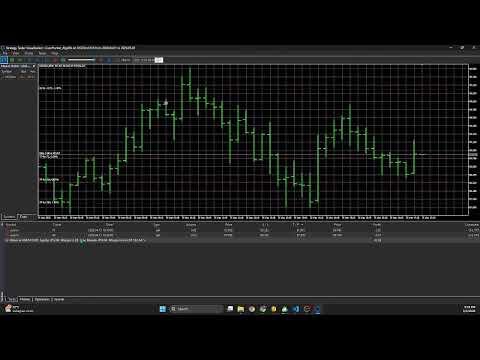
CuanHunter Algo EA
- Experts
- Jivi Muzaqi Guntur
- 버전: 1.1
- 업데이트됨: 4 5월 2026
- 활성화: 20
🚀 Fully Automated Trading (Not an Indicator)
Implemented of 92%++ winrate Indicator ->> https://jivimuz.gumroad.com/l/tradingview
Symbol: XAUUSD & USOIL
Timeframe: M15 & M30
CuanHunter Algo EA is a fully automated trading system that executes BUY/SELL orders based on:
-
Advanced Moving Average Crossovers (ALMA / TEMA / HullMA)
-
Supply & Demand Zones
-
Break of Structure (BOS)
-
Optional RSI Confirmation
Just attach it to a chart and let it trade 24/5 automatically.
⚡ Key Features
🤖 Fully Automated Trading
-
Automatically opens and manages trades
-
Server-side Stop Loss & Take Profit
-
No manual execution needed
🎯 Smart Entry Logic
-
High-precision MA crossover signals
-
Optional RSI trend confirmation
-
Market structure awareness (BOS + zones)
💰 Advanced Risk Management
-
3 Split Entries (TP1 / TP2 / TP3)
-
Partial take profit system
-
Percentage-based SL/TP calculation
📊 Market Structure Engine
-
Auto swing high/low detection
-
Supply & Demand zone tracking
-
Break of Structure alerts
⚙️ Flexible Strategy System
-
Selectable MA types:
-
ALMA (default, smooth & precise)
-
TEMA (low lag)
-
HullMA (fast trend response)
-
🧠 Smart Protection System
-
One trade per bar (anti overtrading)
-
Magic Number for trade isolation
-
Detailed logging for debugging
-
Broker-safe execution handling
💡 Advantages
-
No complicated setup required
-
Multi-TP strategy (rare in most EAs)
-
More advanced than simple EMA crossover bots
-
Suitable for scalping and intraday trading
📈 Recommended Settings
-
Timeframe: M15 (recommended)
-
Instruments: XAUUSD
-
Lot Size: Start with 0.01 – 0.10
-
Trade Mode: BOTH
🧠 Core Trading Logic
-
Signal: Moving Average crossover (close vs open MA)
-
Entry: Instant market execution (3 split positions)
-
Exit:
-
TP1 / TP2 / TP3 (partial closes)
-
or Stop Loss
-
-
Protection: One trade per candle
🤖 CuanHunter Algo EA Setup Guide (MT5)
Step 1: Prepare MT5 🔑
-
Log in to your MT5 account (demo recommended)
-
Enable Algo Trading (must be ON / green or blue)
Step 2: Install EA 💾
Manual Installation:
-
Open MT5 → File → Open Data Folder
-
Navigate to:
MQL5/Experts/
-
Copy:
CuanHunter_AlgoEA.mq5
-
Restart MT5 or refresh Navigator
Step 3: Compile EA 🛠️
-
Press F4 (MetaEditor)
-
Open the EA file
-
Click Compile (F7)
If successful:
Expert Advisor compiled successfully
Step 4: Attach EA to Chart 📊
-
Open a chart (e.g., XAUUSD M15)
-
Drag the EA from Navigator to chart
In settings:
✅ Allow live trading
✅ Allow DLL imports (if required)
Click OK
Step 5: Confirm EA is Running ✅
Check top-right of chart:
🙂 = Running
😟 / ⚠️ = Not active
If not active:
-
Algo Trading is OFF
-
Symbol not supported
-
Margin insufficient
Step 6: Monitor Activity 💬
Check tabs:
-
Experts
-
Journal
Example log:
===== LONG SIGNAL TRIGGERED ===== Entry: 1.10500 SL: 1.09948 TP1: 1.11605 TP2: 1.12158 TP3: 1.12711
⚙️ Important Inputs
🔹 Trading Signals
-
InpBasisType → ALMA / TEMA / HullMA
-
InpBasisLen → MA period
-
InpTradeType → LONG / SHORT / BOTH / NONE
🔹 Risk Management
-
i_lxLvlTP1/2/3 → TP levels (%)
-
i_lxQtyTP1/2/3 → lot distribution (%)
-
i_lxLvlSL → Stop Loss (%)
-
InpLotSize → base lot size
🔹 Market Structure
-
InpSwingLength → swing detection sensitivity
-
InpBoxWidth → zone size multiplier
🧪 Debug & Monitoring
The EA logs all activity in MT5:
CuanHunter_AlgoEA INITIALIZED Symbol: EURUSD Timeframe: PERIOD_M15 MA Type: ALMA | Period: 2 ===== SHORT SIGNAL TRIGGERED =====
Use logs to:
-
Verify signals
-
Track execution
-
Debug errors
⚠️ Troubleshooting
| Issue | Solution |
|---|---|
| EA not trading | Check Algo Trading ON |
| No orders opened | Check margin & TradeType |
| Compile error | Verify include path <Trade\\trade.mqh> |
| Too many trades | Adjust MA settings |
🚀 Status
-
Version: 1.0 FIXED
-
Last Update: May 2026
-
Status: ✅ Production Ready (Testing Phase)