Auto Stop Trail And Profit

5
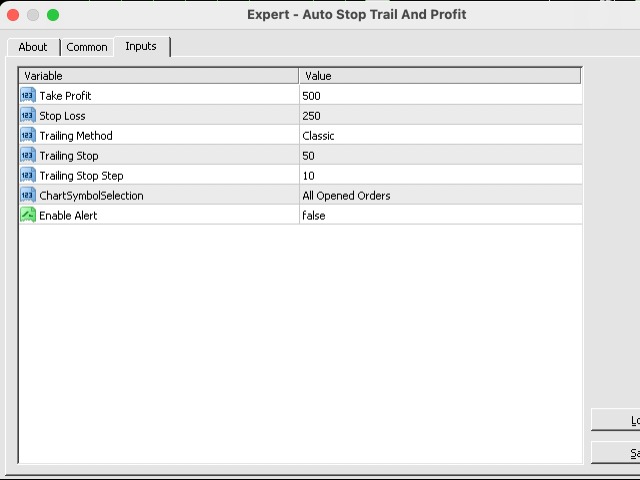
Auto Stop Trail And Profit is an expert advisor that monitors orders, when it detects that one has been placed, on the same chart that has been activated or on all assets, depending on its configuration, it will place its respective stop loss, take profit and perform trail stop loss (in a classic way, keeping a distance or "step by step").

You can see more of my products here: www.mql5.com/en/users/joaquinmetayer/seller

レビュー 1
bilby2200
91
bilby2200 2024.06.13 05:48 

I was recommended to use this Ea for help getting in on a fast-moving market on M1 especially to get a stop loss and take profit in, that takes too much time manually. Appreciate having this tool and as well as some other good features like trailing stop loss are there as well

おすすめのプロダクト
Automated Timeframe cycling with Symbols centered.  Force every timeframe onto one clock window, so the story you see on Daily is the same story you are slicing on H4, H1, and M1.  Traders usually flip timeframes and lose the span. A Daily chart shows a few weeks, then M15 shows a few hours, and the eye treats them as different markets. This indicator locks the window to N bars of the highest enabled timeframe — default 10 Daily — and maps every lower timeframe to that same stretch. You stay ins
FREE
Smart Trend Tool
Smaylle Rafael Coelho Mariano
5 (1)
MetaTrader 4(MT4)用スマートトレンドフィルターツール このツールは、MetaTrader 4(MT4)内で動作するすべてのエキスパートアドバイザー(EA)が、現在の市場トレンドに沿ったポジションのみを開設するように設計されています。複数のチャートのトレンドを分析し、その情報をファイルに書き込み、特定のテンプレート(上昇トレンド用のSMARTLONG.tplと下降トレンド用のSMARTSHORT.tpl)を適用することで機能します。このツールはバックグラウンドで連続ループで動作し、トレンドが変わるたびにテンプレートを調整します。 機能 複数チャートのトレンド分析:このツールは、複数のチャートのトレンドを同時に分析し、市場の全体像を提供します。 トレンドの決定:トレンドは2つの移動平均線(MA)のクロスオーバーに基づいて識別されます。トレンド決定に使用する特定の移動平均線は設定で構成できます。 テンプレートの切り替え:識別されたトレンドに応じて、ツールは2つの事前定義されたテンプレート間で切り替えます: SMARTLONG.tpl:トレンドが上昇している場合に適
FREE
Smart close filters
Smaylle Rafael Coelho Mariano
This MQL4 script is designed for automated trading management with enhanced control over position handling and execution timing. The script allows users to automatically modify open trades by adjusting Stop-Loss and Take-Profit levels according to predefined settings. It provides several features to customize trade management: 1. **Stop-Loss and Take-Profit Modification**: The script can automatically adjust Stop-Loss and Take-Profit levels based on either the trade's open price or the current
FREE
MT4用NAS100 Auto SL and TP Makerをご紹介します: MetaTrader4でナスダック100市場をナビゲートするトレーダーにとって不可欠なアシスタントであるNAS100オートSLおよびTPメーカーで、ストップロスおよびテイクプロフィットの設定をもう見逃すことはありません。このツールは、ストップロスとテイクプロフィットのレベル管理を自動化するシームレスなソリューションを求める方々のために設計されています。 主な特徴 簡単な自動化: ストップロスやテイクプロフィットのないナスダック100取引を自動的に監視します。 ユーザーが構成した設定に基づいてレベルを動的に調整します。 注文タイプの多様性: Nasdaq100の成行注文と未決済注文の両方に対応。 MetaTrader 4で利用可能な様々な注文タイプをサポートします。 カスタマイズされた設定: ユーザーフレンドリーなパラメータ設定により、トラッキング設定とストップロス/テイクプロフィットレベルのカスタマイズが可能です。 柔軟な範囲: 実行する特定のNAS100商品、または取引されるすべての商品に対してStop
FREE
Contact me for any queries or custom orders, if you want to use this in an EA. Key Features: Pattern Recognition : Identifies Fair Value Gaps (FVGs) Spots Break of Structure (BOS) points Detects Change of Character (CHoCH) patterns Versatile Application : Optimized for candlestick charts Compatible with any chart type and financial instrument Real-Time and Historical Analysis : Works seamlessly with both real-time and historical data Allows for backtesting strategies and live market analysis Vi
FREE
Virtual Assistant MINI   VIRTUALL ASSISTANT = MAKE YOUR TP AND SL VIRTUAL!   Tool meant to control your stop loss and take profit by converting them to virtual SL/TP (with support for TRAILING) Convert all SL and TP to virtual so your exits on trades are hidden from your broker! Run this EA on any graph, choose 1MIN timeframe (VA is autosaving data only on new bar detected, so graph TF equals to VA autosave period) !!! When using virtual trade exits, stable connection is needed for order executi
FREE
Smart Lot-Size Calculator And Trade Assistant for Mobile Trading Overview: This is the tool every trader in the market must have no matter if you are scalper, swing traders, day trader, or long term trader. This On-The-Go trading tool will help you stay disciplined and also stay free from daily trade management chores, Most traders face common problems like   1. Calculation of proper lot-size of a position to take controlled risk  2. Managing every trade and trailing stop-loss if trades goes in
FREE
Features: 1- Get OB/OS Levels from Golden MA Levels 2- Wait for Buy/Sell Start Level Cross 3- Optional: Should price cross Mid Level in earlier bars 4- Optional: Crossing bar High/Medium Volume 5- Optional: MA Stacked to check up/down trend for current TF 6- Optional: NRTR higher timeframes aligned Check Detailed blog post explained: https://www.mql5.com/en/blogs/post/758457 Levels with Buffers available here: Golden MA Levels Indicator: https://www.mql5.com/en/market/product/119515 Note: Arr
FREE
Auto TP SL Manul Open Panding Orders Overview: AUto TP SL Manul Open Panding Orders is an innovative trading platform designed to enhance trading efficiency and effectiveness in managing financial investments. Key Features: Automated Management : Seamlessly manage take-profit (TP) and stop-loss (SL) orders with our advanced automation tools. Manual Adjustments : Maintain control with manual options, allowing traders to adjust orders according to market conditions.
FREE
PZ Penta O MT4
PZ TRADING SLU
2.33 (3)
The Penta-O is a 6-point retracement harmonacci pattern which usually precedes big market movements. Penta-O patterns can expand and repaint quite a bit. To make things easier this indicator implements a twist: it waits for a donchian breakout in the right direction before signaling the trade. The end result is an otherwise repainting indicator with a very reliable trading signal. The donchian breakout period is entered as an input. [ Installation Guide | Update Guide | Troubleshooting | FAQ | A
FREE
When executing an order, whether through the Metatrader ticket on a computer or the Metatrader app on a mobile device, either manual or pending, Easy Trade will automatically set the take profit and stop loss levels, as well as a limit order with its respective take profit and stop loss levels. It follows the trading strategy for market open (US30, US100, US500), but it can be applied to any market asset.
FREE
作業ロジック ストップアウトユーティリティは、ストップアウトレベルまで残っているポイント数を示すシンプルですが非常に便利なインジケーターです。 その利点は、多くのトレーダーが利益を追求して取引する際のリスクを故意に過大評価し、利用可能な証拠金を最大限に使用するという事実にあります。この場合、ブローカーがあなたのポジションを強制的に閉じることができる場所を知ることは非常に重要です。 チャートにインジケーターを配置するだけで、買いまたは売りのオープンポジションに応じて、チャート上にこの取引の価格の境界マークが表示されます。 ポジションを開くまで、ラインはチャートに表示されません。 おすすめのロボットスキャルパー-       https://www.mql5.com/en/market/product/77108 変数 フォントサイズ-ラベルのフォントサイズ エッジインデント-エッジからインデントします 線の色-線の色 テキストの色-テキストの色
FREE
Tipu Panel
Kaleem Haider
4.88 (8)
Tipu Panel series is set of innovative indicators created to consolidate indicators in form of a panel. As a trader, indicators can easily create a cluster on the chart and distract you from the bigger picture. It can also be overwhelming and visually exhausting. Tipu Panel simplifies this by displaying each indicator in a beautifully boxed panel. You can customize the panel to display indicator signals for multiple time frames and also to quickly switch time frames. There are two types of indic
FREE
FxTT News Feed FxTT News Feedは、ChartDeck PRO用の無料の補助Expert Advisorです。取引ロジックはなく、注文を発注せず、ポジションを管理せず、相場も読み取りません。タイマーで経済指標カレンダーのデータを取得し、ローカルファイルに書き込みます。MetaTrader 4のインディケータはネットワークリクエストを行えないためです。 ターミナル内の任意のチャートに一度だけ適用してください。1つのインスタンスがそのターミナル内のすべてのChartDeck PROチャートに対応します。 本プログラムは、ChartDeck PROのデイリーニュース行のための前提条件であり、汎用的なツールではありません。ChartDeck PROがインストールされていない場合、本プログラムには何の役割もありません。 できること タイマーによりFxTTの経済指標カレンダーフィードをリクエスト(既定では15分ごと) 結果をローカルファイルに書き込み、ChartDeck PROのデイリーニュース行がそれを読み取る リクエストが失敗した場合は直前のデータをそのまま保持し、失
FREE
This indicator is designed to provide all useful information about symbol, account, positions and profit. It is developed for improving trader's money management. Parameters Calc can be divided to separate blocks. Each block is possible to hide, set its own color and other properties. Block symbol: This block displays information about actual SPREAD, POINT VALUE (in deposit currency for 1 lot), SWAP LONG and SHORT. Show symbol info - display/hide this block Color of symbol info - color of this
FREE
The indicator rely on The Toby strategy >> The mother candle which is bigger in range than the previous six candles. A vertical line shows the last Toby Candle with the targets shown up and down. The strategy is about the closing price out of the range of the toby candle to reach the 3 targets..The most probable to be hit is target1 so ensure reserving your profits and managing your stop lose.
FREE
Simple RSI Forex Trading Strategy
Victor Manuel Valderrama Zamora
2.5 (2)
Diversify the risk in your trading account by combining our Expert Advisors. Build your own custom trading system here:   Simple Forex Trading Strategies The expert advisor opens trades when RSI indicator enter in oversold or overbought areas. The Stop Loss, Take Profit, and Trailing Stop are calculated based on the ATR indicator. The recommended currency pair is EURGBP and the recommended timeframe to operate and to do backtests is H4. This Expert Advisor can be profitable in any TimeFrame an
FREE
Follow The Line
Oliver Gideon Amofa Appiah
3.94 (16)
FOLLOW THE LINE GET THE FULL VERSION HERE: https://www.mql5.com/en/market/product/36024 This indicator obeys the popular maxim that: "THE TREND IS YOUR FRIEND" It paints a GREEN line for BUY and also paints a RED line for SELL.  It gives alarms and alerts of all kinds. IT DOES NOT REPAINT and can be used for all currency pairs and timeframes. Yes, as easy and simple as that. Even a newbie can use it to make great and reliable trades. NB: For best results, get my other premium indicators for more
FREE
Are you tired of drawing trendlines every time you're analyzing charts? Or perhaps you would like more consistency in your technical analysis. Then this is for you. This indicator will draw trend lines automatically when dropped on a chart. How it works Works similar to standard deviation channel found on mt4 and mt5. It has 2 parameters: 1. Starting Bar 2. Number of bars for calculation The   starting bar   is the bar which drawing of the trend lines will begin, while the   number of bars for c
FREE
Fastest way to change the period. Suitable for traders who use many charts and timeframes. Size, shape and color can be customized. Inputs Parameters Corner — Choose corner placement Standart is "Right lower chart corner" Color — Background color of the button ColorText — Text color of the button ColorOn — Background color of the button for the current period ColorOnText — Text color of the button for the current period Font — Arial, Verdana... FontSize — Size of the font in pixels DistanceX —
FREE
.....................................hi....................... ................for showing high s and low s and support and resistanses .....................we have a lot of ways............................... it can be helpful for finding trends , higher highs , higher lows , lower highs , lower lows .......................today i write on of thems.......................... ........................you can enter the number of last support and resistanses .........................and it will dra
FREE
Arrow Indicator (Buy/Sell Alerts) – Simple Yet Powerful Tool!             Product Version: 1.01           Indicator Type: Trend Reversal Signals           Timeframes Supported: All (Recommended: H1, H4, D1)           Key Features: Buy Signal: Green upward arrow () appears below the candle  Sell Signal : Red downward arrow () appears above the candle Accurate Trend Reversal Detection – Based on tried and tested SMA strategy. ️ Clean Chart View – Minimalist, non-i
FREE
You can manually open a trade (one click), and this EA will take care of setting the SL and TP. SL and TP are set based on the number of pips you specify in the input screen. You can also choose monetary SL and TP. SL and TP are determined based on the weighted average price (WAP), so if you open a new trade, SL and TP will be updated according to the new WAP. The WAP is not unique but differentiated between buy and sell trades (this is useful only if you open opposite trades on the same chart)
FREE
The Rayol Code Hour Interval Lines indicator was designed to assist your trading experience. It draws the range of hours chosen by the user directly on the chart, so that it enables traders to visualize price movements during their preferred trading hours, providing traders a more comprehensive view of price movements and market dynamics. This indicator allows the user to choose not only the Broker's time, but also the Local time. This way, the user no longer needs to calculate local time in re
FREE
Profitstat is a free indicator that scans your history and displays it on the chart. The free version shows the number of trades and profit made on the current and previous day. The data is updated instantly as soon as a trade closes. Simply attach it to any chart and it gives the account data irrespective of the chart currency nor timeframe.
FREE
Smart Liquidity Zones (SLZ) — Your All‑in‑One SMC/ICT Radar for MT4 Why SLZ? Tired of squinting at charts trying to spot liquidity grabs, break‑of‑structure candles and Fair Value Gaps before the smart‑money sharks do? SLZ turns your chart into a tactical map —drawing every high‑probability zone and screaming (politely) when price dives in. Core Edge Powered by a rule‑set distilled from Smart Money Concepts (SMC) and ICT mentorship material, SLZ auto‑marks: Component What it shows Why it
FREE
*This is TradingView indicator converted to mql4* The SuperTrend V indicator is a popular technical analysis tool used to identify trends and potential trend reversals in financial markets. It is based on the concept of the SuperTrend indicator but incorporates additional features and variations. The SuperTrend V indicator uses a combination of price action and volatility to determine the trend direction and generate trading signals. Here are the key components and features of the indicator: Ca
FREE
Rainbow MT4 is a technical indicator based on Moving average with period 34 and very easy to use. When price crosses above MA and MA changes color to green, it’s a signal to buy. When price crosses below MA and MA changes color to red, it’s a signal to sell. The Expert advisor ( Rainbow EA MT4) based on Rainbow MT4 indicator, as you can see in the short video below is now available here .
FREE
This simple but useful script calculates the lot in % of the deposit. It is indispensable for risk management. There is only one customizable parameter: MaxRisk - risk in % for lot calculation. The product works as a standard script. Launch it once on an appropriate chart and start trading using the calculated lot value. Genious is simplicity! Happy trading!
FREE
ATC Alert Managerは、チャート上で直接価格アラームを設定し、1つの小さなパネルから管理できるようにします。各アラームはチャート上の線として表示され、新しい価格にドラッグできます。 アラームは、価格があなたのレベルを横切った瞬間に一度だけ発火し、ポップアップアラート、サウンド、そして携帯電話へのオプションのプッシュ通知が伴います。すでにレベルを超えている価格はそれをトリガーしないので、毎ティックで繰り返しアラートを受け取ることはありません。 このツールは、ポジションツール、トレード管理、パフォーマンス分析とともに、 All In One Trade Management Panel MT4 の一部でもあります。 主な機能: ワンクリックでアラームを追加します。価格フィールドは現在の価格から始まり、方向を選択します:AboveまたはBelow。 任意のアラームにメモを追加します。例えば「ロンドン高値」。メモはアラートメッセージに含まれます。 各アラームは、チャートの右側に価格ラベルが付いた線として描画されます。ラベルをドラッグして価格を変更すると、アラームは新しいレベ
FREE
このプロダクトを購入した人は以下も購入しています
Trade Manager EAへようこそ。これは、取引をより直感的、正確、そして効率的にするために設計された究極の リスク管理ツール です。これは単なるオーダー実行ツールではなく、包括的な取引計画、ポジション管理、リスク管理のためのソリューションです。初心者から上級者、迅速な実行を必要とするスキャルパーまで、Trade Manager EAはあらゆるニーズに対応し、為替、指数、商品、暗号通貨などさまざまな市場で柔軟に対応します。 Trade Manager EAを使用すると、複雑な計算が過去のものになります。市場を分析し、エントリーポイント、ストップロス、テイクプロフィットのレベルをチャート上のラインでマークし、リスクを設定するだけで、Trade Managerが最適なポジションサイズを即座に計算し、SLとTPをピップ、ポイント、口座通貨でリアルタイムに表示します。すべての取引が簡単かつ効果的に管理されます。 主な機能: ポジションサイズ計算機 :定義されたリスクに基づいて取引サイズを瞬時に決定します。 簡単な取引計画 :エントリー、ストップロス、テイクプロフィットを設定するためのド
Exp COPYLOT CLIENT for MT4
Vladislav Andruschenko
4.69 (65)
MetaTrader 4向け 高機能トレードコピーソフト MetaTrader 4 用の、高速・安定・高機能なトレードコピーソフトです。 COPYLOT は、 MetaTrader 4 と MetaTrader 5 間でFX取引をコピーでき、さまざまな口座タイプや運用スタイルに合わせて柔軟に同期できます。 COPYLOT MT4版の対応コピー方式: MetaTrader 4 → MetaTrader 4 MetaTrader 5 Hedge → MetaTrader 4 MetaTrader 5 Netting → MetaTrader 4   MT5版 詳細説明 + DEMO + PDF 購入方法 インストール方法 ログファイルの取得方法 テストと最適化の方法 Expforexの全製品 MetaTrader 5版 を使えば、 MetaTrader 5 → MetaTrader 5 および MetaTrader 4 → MetaTrader 5 のコピーにも対応します: COPYLOT CLIENT for MT5 COPYLOT は、2台、3台、さらには10台規模のターミナル環境でも
Local Trade Copier EA MT4
Juvenille Emperor Limited
4.96 (111)
Local Trade Copier EA MT4 は、同一の Windows PC または Windows VPS 上で稼働する複数の MetaTrader 4 口座間で、取引をコピーおよび管理するための高速で柔軟なトレードコピーツールです。 ローカルでの取引同期に加え、Receiver 側でロットサイズ、リスク管理、取引フィルター、シンボルマッピング、取引管理、口座保護を個別に設定できます。 Transmitter と Receiver のターミナルは約 1分 で設定でき、同一ブローカーまたは異なるブローカーの口座間で、手動取引や EA による取引をコピーできます。適切な条件下では、ローカルの MetaTrader ターミナル間で取引情報を 0.5秒未満 で同期できます。実際の約定速度は、ブローカーのレイテンシー、ネットワーク状況、PC/VPS の性能、ターミナルの負荷によって異なります。 ご購入前に無料デモをお試しください Local Trade Copier EA MT4 の完全機能版無料デモ を、MT4 デモ口座で 1回につき4時間 テストできます。 Local Trad
Trade Assistant MT4
Evgeniy Kravchenko
4.43 (197)
取引 ごとのリスクの 計算、新規注文 の 簡単 な 設置、部分的 な 決済機能 を 持 つ 注文管理、 7 種類 のトレーリングストップなど 、便利 な 機能 を 備 えています 。 追加の資料と説明書 インストール手順 - アプリケーションの手順   ライン機能 チャート上にオープニングライン、ストップロス、テイクプロフィットを表示します。この機能により、新規注文を簡単に設定することができ、注文を出す前にその特徴を確認することができます。   リスク計算 リスク計算機能は、設定されたリスクとストップロス注文のサイズを考慮して、新規注文のボリュームを計算します。ストップロスの大きさを自由に設定できると同時に、設定したリスクを守ることができます。 Lot calc ボタン - リスク 計算 を 有効 / 無効 にします 。 Risk フィールドでは 、必要 なリスクの 値 を 0 から 100 までのパーセンテージまたは 預金通貨 で 設定 します 。 設定」 タブで 、 リスク 計算 の 種類 を 選択 します :「 $ 通貨」、「 % 残高」、「 % エクイティ 」、「 % フリ
Trade copier MT4
Alfiya Fazylova
4.62 (37)
Trade Copierは、取引口座間の取引をコピーして同期するように設計された専門的なユーティリティです。 コピーは、同じコンピューターまたはvps にインストールされている、サプライヤーのアカウント/端末から受信者のアカウント/端末に行われます。 購入する前に、デモ アカウントでデモ バージョンをテストできます。 デモ版 こちら 。 詳細な説明は こちら 。 主な機能と利点: MT5ネッティングアカウントを含む、MT4> MT4、MT4> MT5、MT5> MT4のコピーをサポートします。 高いコピー速度(0.5秒未満)。 ベンダーモードと受信者モードは同じ製品内に実装されています。 チャートから直接リアルタイムでコピーを制御できる、簡単で直感的なインターフェイス。 接続が切断されたり、端末が再起動されたりしても、設定と位置が失われることはありません。 コピーするシンボルを選択できます。また、受信者のシンボルを置き換えることもできます(例:EURUSD> USDJPY)。 各シンボルごとにコピーの個別設定を行うことができます。 バックコピーをサポートします。 特定の注文のみのコピー
TradePanel MT4
Alfiya Fazylova
4.84 (95)
Trade Panelは多機能なトレーディングアシスタントです。アプリには手動取引用の50以上のトレーディング機能が搭載されており、ほとんどの取引作業を自動化することができます。 アプリの説明書: https://www.mql5.com/en/blogs/post/756482 デモ口座用アプリの試用版: https://www.mql5.com/en/blogs/post/750865 アプリのインストール方法: https://www.mql5.com/en/blogs/post/756239 アプリをビジュアルモードでテストする方法: https://www.mql5.com/en/blogs/post/770277 VPSのMetaTraderにアプリをインストールする方法: https://www.mql5.com/en/blogs/post/770190 取引。 ワンクリックで取引操作を行うことができます: リスクを自動計算して指値注文やポジションを開く。 複数の注文やポジションをワンクリックで開く。 注文のグリッドを開く。 保留中の注文やポジションをグループごとに閉じる
TelegramからMT4へ: 究極のシグナルコピーソリューション Telegram to MT4 は、DLLを必要とせず、TelegramのチャンネルやチャットからMetaTrader 4プラットフォームに取引シグナルを直接コピーできる最先端のユーティリティです。この堅牢なソリューションは、比類のない精度とカスタマイズオプションにより、シグナルのシームレスな実行を保証し、時間を節約し、効率性を向上させます。 [ Instructions and DEMO ] 主な特徴 直接的なTelegram API統合 電話番号とセキュアコードで認証します。 ユーザーフレンドリーな EXE ブリッジを使用して、チャット ID を簡単に取得および管理します。 複数のチャネル/チャットを追加、削除、更新して、同時に信号をコピーします。 高度なフィルターによる信号解析 カスタム例外語 (例: 「レポート」、「概要」) を含む不要な信号をスキップします。 柔軟な SL および TP 形式 (価格、ピップ、ポイント) をサポートします。 シグナルが価格ではなくポイントを指定する場合、エントリ ポイントを自動
News Filter EA: Advanced Algo Trading Assistant News Filter EA is an advanced algo trading assistant designed to enhance your trading experience. By using the   News Filter EA , you can integrate a Forex economic news filter into your existing expert advisor, even if you do not have access to its source code. In addition to the news filter, you can also specify   trading days   and   hours   for your expert. The News Filter EA also includes   risk management   and   equity protection   features
RS Trade Copier - 超高速 で動作するローカルトレードコピー機。 真の グラフィカルインターフェース搭載。口座番号の手動入力はもう終わりです。200項目を超える長大なパラメータリストとも、これでおさらばです。 複数のMT4とMT5ターミナル間で取引操作をコピーするための、信頼性が高く柔軟なツールです。経験豊富なトレーダーやシグナルサービス、個人投資家に適しています。1つまたは複数のシグナルソース(Provider)から1つまたは複数のレシーバー(Client)へ、高い精度と最小限の遅延で 取引を同期 します。シンプルな自動設定と高度な手動設定の両方をサポートしています。手動または他のEAで開かれた注文に干渉しません。すべての処理は MT4内でローカルに 行われ、サードパーティサーバーを使用しません。 RS Trade Copierと他のソリューションの比較 RS Trade Copier 他のソリューション 設定 ビジュアルステップバイステップウィザード。 設定時間は約1分。 200以上の分かりにくい入力パラメータ。 設定時間は約20分。 速度 非同期トレード操作。*
MT4 to Telegram Signal Provider は使いやすく、完全にカスタマイズ可能なツールで、Telegramに信号を送信し、あなたのアカウントを信号提供者に変えることができます。 メッセージのフォーマットは 完全にカスタマイズ可能です! しかし、簡単な使用のために、あらかじめ定義されたテンプレートを選択し、メッセージの特定の部分を有効または無効にすることもできます。 [ デモ ]   [ マニュアル ] [ MT5バージョン ] [ Discordバージョン ] [ Telegramチャンネル ]  New: [ Telegram To MT5 ] セットアップ ステップバイステップの ユーザーガイド が利用可能です。 Telegram APIの知識は必要ありません。開発者が必要なものをすべて提供します。 主要機能 購読者に送信される注文の詳細をカスタマイズする機能 例えばブロンズ、シルバー、ゴールドなど、階層型のサブスクリプションモデルを作成できます。ゴールドサブスクリプションでは、すべての信号が得られますなど。 ID、シンボル、またはコメントによる注文のフ
Automatic Trailing Stop Based on Take Profit Percentage with Profit Lock EA MT4   Lock in your profits and "let your winners run" past your 100% take profit target with this EA.  This Expert Advisor automatically adjusts your Stop Loss based on up to 4 user-defined Take Profit Target Percentages, locking in your profit.  If price pushes past your 100% take profit target, the EA will automatically trail the price by user-defined pips, so you won't miss that runaway train again.   EA Features The
Telegram to MT4 Multi-Channel Copier   は、 Telegram と Discord チャンネルのトレードシグナルを MetaTrader 4 へ自動コピーします。ボット不要、ブラウザ拡張不要、手動コピー不要。Telegram や Discord にシグナルが届くと、EA が数秒であなたのターミナルに注文を出します。 さらに、チャンネルをコピーする前に、内蔵バックテスターでそのチャンネルがあなたの口座でどう動いたかを確認できます。 製品は 2 つのコンポーネントで構成されます:Telegram チャンネルを監視する Windows アプリと、MT4 ターミナルでシグナルを執行する本 EA です。MT5 版もあります   こちら . セットアップガイドとアプリのダウンロード:   https://www.mql5.com/en/blogs/post/768988 Telegramのシグナルチャンネルをバックテストする方法 をご覧ください。 現在の価格は今後値上げされます。 仕組み アプリはあなた自身の Telegram アカウントで接続するため、フォロ
TradeMirror は、MT4/MT5プラットフォーム向けに開発されたローカル注文同期ツールで、リアルタイム取引をサポートします。 チュートリアル Trademirror チュートリアル のリンクをクリックして、さらにチュートリアルをご覧ください。 製品の特長 金融ソフトウェアにおけるセキュリティ・安定性・プライバシー保護の高基準に準拠し、以下の3つの核心領域を最適化しました: 直感的なグラフィカルインターフェースで操作が容易 金融シナリオにおける機密データ分離のための強化されたプライバシー保護 ミリ秒単位の注文同期で信号遅延ゼロを実現 MT4/MT5完全互換、多様な取引環境にシームレス対応 システム監視機能とメール通知による取引安定性管理 主要機能 本製品には以下のプロフェッショナルコピー機能を搭載: 複数アカウント並列接続 リアルタイムメール通知 ロットサイズカスタマイズ 信号フィルタリング機構 逆方向コピーモード テイクプロフィット/ストップロス再設定 無料デモ手順 購入前に以下の手順で全機能を体験可能: ページ内の「無料デモ」ボタンをクリック 「MetaTrader 4/5
Equity Protect Pro: 安心取引のための総合的な口座保護エキスパート 口座保護、資産保護、ポートフォリオ保護、マルチ戦略保護、利益保護、利益確定、取引セキュリティ、リスク管理プログラム、自動リスク管理、自動決済、条件付き決済、スケジュール決済、動的決済、トレーリングストップロス、ワンクリッククローズ、ワンクリック決済、ワンクリック復元などの機能をお探しなら、Equity Protect Pro が最適なプログラムです。 設定は簡単で、事前設定された条件に達すると、すべてのチャートを閉じることができ、シグナルサブスクリプションのキャンセルもサポートします(これは、すべての取引プログラムも停止することを意味します)。この時点で、新しい注文は生成されなくなり、最終的にすべての注文が閉じられ、予期せぬ損失を効果的に防止し、安心して取引できるようになります。 Equity Protect Pro (Technical Manual) Equity Protect Pro Demo Version for yo u to test   Equity Protect Pro MT4
Exp Averager
Vladislav Andruschenko
4.82 (22)
MetaTrader 4 用 Averager — プロフェッショナルな平均化とポジションシリーズ管理システム ドローダウンに入ったポジションを整理し、平均価格を改善しながら、ポジションシリーズ全体をひとつの戦略的な構造として管理するために設計された Expert Advisor です。 単なるナンピン補助ツールではなく、既存ポジションをより計画的に立て直し、損益分岐点や利益目標を現実的な位置へ引き寄せるための実用的な管理システムです。 Averager は独立した自動売買ロボットではありません。自動で新しいエントリーシグナルを探すのではなく、すでに保有しているポジションを監視し、平均化・追加エントリー・共通トレーリングストップによって、ポジション全体の管理精度を高めることを目的としています。 手動取引を行うトレーダー、自分自身のシグナルを使うトレーダー、あるいは他の売買ロジックと組み合わせて運用したいトレーダーに適した設計です。単発のポジションではなく、複数ポジションをひとつのシリーズとして扱いたい方に特に有効です。 MT5 のバージョン | 完全な説明 + DEMO + PDF
これは視覚的な取引パネルであり、取引を簡単に配置および管理し、人為的エラーを回避し、取引活動を強化するのに役立ちます。使いやすい視覚的なインターフェースと、健全なリスクおよび位置管理アプローチを組み合わせています。 [ インストールガイド | 更新ガイド | トラブルシューティング | よくある質問 | すべての製品 ] 驚くほど使いやすい チャートから簡単に取引 正確なリスク管理との取引、手間のかからない 資本の保存が最優先事項です 気をつけずに利益を上げましょう できるだけ早くリスクのない取引をお楽しみください 開かれているすべての取引の自動トレーリングストップ 最初のストップロスは、取引が行われるとすぐに配置されます EAは、取引を行った後に次のタスクを実行します。 最初のストップロス/テイクプロフィットは自動的に配置されます できるだけ早くフリーライドにロックします(オプション) ストップロスを初めて損益分岐点に移動します(オプション) 停止するまで、希望の方法を使用してストップロスを追跡します その他のクールな機能は次のとおりです。 優れたターミナルアクティビティレポート
サポートが必要ですか?設定方法は?ご質問は?こちらでお客様の言語でどうぞ、迅速に返信します: https://www.mql5.com/en/market/product/139089/comments 無料トライアル版ダウンロード Copy Cat More (コピーキャット・モア) MT4 トレードコピー (Trade Copier) は単なるローカルのトレードコピーではありません。今日のトレード課題のために設計された 完全なリスク管理・執行フレームワーク (risk management and execution framework) です。プロップファーム (prop firm) のチャレンジから個人のポートフォリオ管理まで、堅牢な執行、資金保護、柔軟な設定、高度なトレード処理の組み合わせによって、あらゆる状況に適応します。 このコピーは   マスター (Master、送信側) と スレーブ (Slave、受信側)   の両モードで動作し、成行注文・指値注文、トレードの変更、部分決済、そして両建て決済 (Close By) 操作をリアルタイムで同期します。デモ口座と実口
Trade Manager FX – MT4用リスク計算機・トレードパネル・ポジション管理 Trade Manager FX は裁量トレーダー向けのオールインワン・トレードパネルです。チャート上でトレードを計画し、リスクに合った正しいロットをパネルに計算させ、ワンクリックで発注できます。エントリー後は建値決済、トレーリングストップ、部分決済、エクイティ保護でポジションを管理します。 追加資料と説明書 インストールガイド - ユーザーマニュアル  - MT5版 チャート上でエントリー、ストップロス、テイクプロフィットのラインをドラッグします。各ラインはpips距離、リスク額または利益、残高に対する%、R:Rをリアルタイムで表示します。チャートをクリックしてエントリーを置く、正確な価格を入力する、または相場に追従させることができます。SL/TPを固定してエントリー移動時も価格を保つ、またはロックして誤って動かないようにできます。 ポジションサイズと発注 固定ロット、固定金額リスク、残高の%、エクイティの%からロットを計算 手数料を計算に含める(手入力または履歴から自動検出) リスク
Trade Indicator Assistant is a powerful MT4 utility designed to turn indicators into automated trading systems. Its main feature is the ability to automatically detect an indicator’s   BUY and SELL signal buffers , without requiring you to know the buffer numbers, search through indicator settings, or modify the indicator source code. Bonus Indicator: After purchasing Trade Indicator Assistant, contact me to receive Trade Signal Pro completely free as a bonus indicator. [Download Demo Version]
TimeFilter indicator allows you to visually select bit masks (GoodHourOfDay, BadHoursOfDay, GoodDayOfWeek, BadDaysOfWeek) for the  Intraday Time Filter  module of trading signals of the Standard Library. The use of time filters allows you to take into account the particulars of each trading session in performing trading operations.
The Envelopes Trailing Stop is a tool that implements trailing of the stop loss order after the price based on the Envelopes trend indicator. The utility provides all the necessary parameters for customization, which allows to select the optimal configuration for any user. The EA allows to choose the trailing line depending on the type of the trade. For example, buy trades can be trailed based on the lower line of the indicator, and sell trades can be trailed based on the upper line. The Magic p
Trading History - A program for trading and money management on the history of quotes in stratagy tester. It can work with pending and immediate orders, and is equipped with trailing stop, breakeven and take profit functions. Very good for training and testing different strategies. Manual (Be sure to read before purchasing) Advantages 1. Allows you to test any trading strategy in the shortest possible time 2. An excellent simulator for trading training. You can gain months of trading experience
注文管理やリスク管理など、手間のかかる作業をワンクリックまたは数クリックで行えるようにし、取引を楽にするためのユーティリティです。 特徴 リスク管理  リスク欄に%またはドルで指定されたリスクに基づいて自動的にロットを計算し、SL TPなどのラインを置くだけで入力でき、リスクリワードをリアルタイムで表示します。 TrueRiskは、FXペアのロットサイズ計算時に手数料を含むので、例えば1%を指定した場合、全ての取引手数料で1%のリスクを負うか、負わないかは、あなたの選択です。 シンボルごとの最大取引数量の10倍以上の取引をワンクリックで行えるビッグロッツハンドラーを搭載。 指数や他の資産で、自動計算されたロットサイズがロット単位に合わない場合でも、四捨五入して入力することができます。(1、0.1、0.01のロット単位に対応しています。) トレード管理  ワンクリックで可能です。 手数料とスプレッドを含む、または含まないブレイクイーブンのオープンポジションを設定することができます。 テキストフィールドにSLまたはTPの新しい価格を指定し、入力された新しいSLおよび
コピー機->便利で高速なインターフェースインタラクション、ユーザーはすぐに使用できます     ->>>> WindowsコンピュータまたはVPS Windowsでの使用を推奨 特徴: 多様でパーソナライズされたコピー取引設定:1. 異なるシグナルソースに異なるロットモードを設定できます。2. フォワードコピー取引とリバースコピー取引に異なるシグナルソースを設定できます。3. シグナルはコメントで設定できます。4. 契約ロットに応じてロットを調整するかどうか 多様でパーソナライズされたコピー注文設定2:1.品種ごとに異なるロットモードを設定できます2.順方向コピー注文と逆方向コピー注文に異なる品種を設定できます3.コメントでシグナルを設定できます4.契約ロットに応じてロットを調整するかどうか コメントフィルタリング、MAGICフィルタリング、シグナルロットフィルタリング、ローカル製品フィルタリング 勤務時間設定 逆同期SLAVE終了 注文バインド機能: 任意の注文を設定されたシグナルソース注文にバインドできます (テーブルをダブルクリックして編集します) アカウントリスク管理 基本
The product will copy all telegram signal to MT4   ( which you are member  ) , also it can work as remote copier.  Easy to set up, copy order instant, can work with almost signal formats, image signal, s upport to translate other language to English Work with all type of channel or group, even channel have "Restrict Saving Content", work with  multi channel, multi MT5 Work as remote copier: with signal have ticket number, it will copy exactly via ticket number. Support to backtest signal. How to
FCK CurrencyStrength Pro
Patel Hitendrakumar Mahendrabhai
Hi Friends, " FCK Currency Strength Pro " is a auto & semi auto trading expert with direction of pair. Buy-Sell separate or multi currency in one click. The strategy of  FCK Currency Strength Pro  is a combination of custom indicator, Trendlines, Support & Resistance levels ( Price Action ) and most important secretive trading algorithm mentioned above. Download News Ex4 and csv file You need the following SDSnews.ex4 in MQL4/Libraries and the daylightsavings.csv in MQL4/Files. Only 4 of 5 copi
Shepherd Safety EA
AW Trading Software Limited
4.92 (13)
AW Shepherd Safety EA は、保有中のポジションを管理するエキスパートアドバイザーです。最初の注文はトレーダーがパネルから発注し、その後は EA がバスケットを自動で管理します。トレンドフィルターを通してリカバリー注文を追加し、TakeProfit、トレーリング、またはストップでサイドを決済し、決済の水準をチャートに表示します。 買いと売りは別々に管理され、両方のサイドを同時に保有できます。リカバリー注文は、価格が一定の間隔だけ動いたというだけでは発注されず、Parabolic SAR、2本の MA、またはローソク足の色でポジション方向への反転が確認されてから発注されます。Orders Magic number が一致していれば、手動や他の EA で発注したポジションも管理の対象になります。 EA によるポジション管理の流れ: 1 トレーダーが Open Buy または Open Sell ボタンで、Order Size 欄のロットで最初の注文を発注します。 2 価格がポジションに不利な方向へ Minimal step between recovery orders
多機能取引ツール:ロット計算機、グリッド注文、R/R比率、トレードマネージャー、需給ゾーン、プライスアクションなど デモ版   |   ユーザーマニュアル トレードアシスタント はストラテジーテスターでは動作しません:この ユーティリティ をテストするには デモ版をこちら からダウンロードしてください。 ご質問 /改善のアイデア/バグ発見 の場合は 私に連絡 してください MT5版が必要な場合は、 こちら から入手できます 取引 プロセス を簡素化、高速化、自動化します。この ダッシュボード で標準ターミナルの機能を拡張します。 取引パネル はあらゆる取引銘柄で動作します:FX、株式、指数、暗号通貨など。 1. 新規取引の開始 :ロット/リスク/RR計算:手動取引のリスク管理 ロット計算機(リスクサイズに基づく取引量計算) リスク計算機(ロットサイズに基づくリスク額) リスクリワード比率 グリッド注文: + 動的間隔オプション、分割ロットオプション 注文アクショントリガー、+ 買いストップリミット/売りストップリミット:Mt4でも可能 仮想SL、仮想TP(非表示SL、非表示TP:ブロ
Rhino Chart Drawing Tools は、MetaTrader 4 に TradingView スタイル の描画ワークフローを提供します。 54種類の描画ツール 、カスタマイズ可能なツールバー、お気に入り、クイックスタイル、オブジェクト設定、テンプレート、オブジェクトマネージャーを搭載しています。 ユーザーマニュアル: 製品の使い方 無料デモ版: デモ版をダウンロード MetaTrader 5版: Rhino Drawing Tools for MT5 描画ツール グループ オブジェクト一覧 ライン トレンドライン、レイ、延長ライン、水平線、垂直線、水平レイ、クロスライン、トレンド角度、矢印、パス、ポリライン、情報ライン。 チャネル 平行チャネル、回帰チャネル、フラットチャネル、ディスジョイントチャネル、ピッチフォーク。 フィボナッチ リトレースメント、エクステンション、チャネル、スピードファン、タイムゾーン。 ギャン ギャンボックス、ギャンファン。 図形 長方形、回転長方形、楕円、円、三角形、ポリライン。 注釈 テキスト、ノート、コールアウト、価格ラベル、サインポス
Trade Dashboard simplifies how you open, manage, and control your trades, with built-in lot size calculation. It allows you to execute trades, manage risk, and control positions directly on the chart, with tools such as partial close, breakeven, and trailing stop. Designed to reduce manual work and help you stay focused on your trading decisions. A demo version is available for testing. Detailed explanations of features are provided within the MQL5 platform. Installation instructions are include
作者のその他のプロダクト
VWAP Intraday Free
Joaquin Nicolas Metayer
4.75 (4)
The volume weighted average price (VWAP) is a trading benchmark used by traders that gives the average price a security has traded at throughout the day, based on both volume and price. VWAP is calculated by adding up the dollars traded for every transaction (price multiplied by the number of shares traded) and then dividing by the total shares traded. You can see more of my publications here: https://www.mql5.com/en/users/joaquinmetayer/seller
FREE
One Click Close All is a script that when thrown on any chart will automatically close all orders regardless of the asset or what type of orders they are, it will close everything much faster than a human could. You will find paid versions of the same style of this script, but read carefully and you will see that it performs the same function ... here you have it for free, enjoy it.
FREE
Simple Strategy Checklist Panel, as its name suggests, is a panel that works as a checklist, and can place up to twenty lines of text. This was created for traders who want to have their trading plan or to-do list at hand, a simple but useful product for many. I will write this pointless paragraph since Metatrader asks me to put a minimum of 6300 characters, so I also explain that the list can also be used to make purchases from the supermarket! Example bread, milk, flour and much more... Enjo
FREE
LotCalc is a minimalist MT5 indicator designed for fast, precise position sizing. Set your risk amount in dollars, click the button, then click your entry and stop-loss levels directly on the chart — the lot size and point distance are calculated and displayed instantly. No clutter, no extra panels, just the one tool you actually need before placing a trade.
FREE
Close All Pendings is a simple script that, when thrown on the graph, closes all pending orders that are open, ONLY pending orders, orders already open will not be closed, no matter in which pair it is thrown ... it will close all. It has no inputs, just throw it on the chart and it will run. You can see more of my products here: https://www.mql5.com/en/users/joaquinmetayer/seller

FREE
Nermal Round Levels
Joaquin Nicolas Metayer
5 (3)
Nermal Round Levels is an indicator of round numbers in the form of a grid drawing horizontal lines. You can use it in many ways ... as it could be activating for an expert advisor to enter the market, confirmation of entry for your strategy, entrance area, mark areas of important levels, possible rebounds and others. Place it in your chart and verify as the price respects those round levels. Inputs GridSpace linecolor lineStyle
FREE
Server Time On Chart is a simple indicator that shows the time of the broker's server with hours, minutes and seconds in the lower left corner of the chart's. Within the inputs you can only change the size of the font and the color you want depending on your taste. You can see more of my publications here: https://www.mql5.com/en/users/joaquinmetayer/seller

FREE
TradeDeck
Joaquin Nicolas Metayer
MTF TradeDeck is an all-in-one trading dashboard for MetaTrader 5 that combines multi-timeframe visualization, line-cross alerts, a lot-size calculator, symbol switcher, and Forex session boxes in a single indicator. Key Features Multi-Timeframe Candles (up to 5 TFs):   Compact higher-timeframe candles render to the right of the last price on the current chart. Each TF group is scaled to the visible price range to preserve proportions. Choose which TFs (M1 → MN1) and how many candles per group.
FREE
This EA is literally a reverse of Recovery Zone Assistance, as its name says ... It is an assistant, an expert advisor that monitors all the orders for the asset in which it has been placed, no matter if that order was by some other expert advisor or by the trader placed on the Manually, he will start his work after each order that is negative. Find  Recovery Zone Assistance on  https://www.mql5.com/en/market/product/68909 This Expert Advisor is based on this sistem on video "Recovery Zone" on
FREE
StochRSI
Joaquin Nicolas Metayer
5 (1)
The   Stochastic RSI   indicator (StochRSI) is essentially an indicator of an indicator. It is used in technical analysis to provide a stochastic calculation to the RSI indicator. This means that it is a measure of RSI relative to its own high/low range over a user defined period of time. The Stochastic RSI is an oscillator that calculates a value between 0 and 1 which is then plotted as a line. This indicator is primarily used for identifying overbought and oversold conditions.
FREE
Recovery Zone Assistance, as its name says ... It is an assistant, an expert advisor that monitors all the orders for the asset in which it has been placed, no matter if that order was by some other expert advisor or by the trader placed on the Manually, he will start his work after each order that is negative. This Expert Advisor is based on this sistem on video "Recovery Zone" on https://www.youtube.com/watch?v=DJz4E7VyeSw. See more products on:  https://www.mql5.com/en/users/joaquinmetayer/
FREE
Stop and Reverse Martingale EA is an expert advisor that integrates the following inputs within it: Start lot size Lot multiplier Take profit distance in points Take profit distance in points *this input is a stop loss, is misspelled within the code of the EA Magic number A and B Start cycle with round number The distance of round number  Daily maximum orders per cycle and close all Daily loss (maximum orders per cycle when this last order hit the stop loss the EA close all orders in the same m
FREE
This Expert Advisor captures and sends information about all open positions to a REST API server in real-time using HTTP POST requests. It is ideal for building synchronization tools, external monitoring systems, or custom trade copier solutions. What does this EA do? Iterates through all active orders in the account. Compares current positions with the previously sent ones. If any change is detected (SL, TP, price, symbol, volume, type, etc.), it sends updated information to the defined endpoi
FREE
Arlene Sessions Background is an indicator that draws colored vertical background on the chart depending on your session. You can see the version 1 here: https://www.mql5.com/en/market/product/68822 You can see more of my publications here: https://www.mql5.com/en/users/joaquinmetayer/seller If you only want to paint a session on your chart, you must set the color "none" to deactivate it.

FREE
Simply Trailing Stop EA
Joaquin Nicolas Metayer
5 (1)
Simply Trailing Stop is a simple Expert Advisor that automatically trails stop on the chart that has been activated. It can be used as a complement to orders placed manually or through another expert advisor that does not perform a trailing stop, you only have to activate it in a new chart, not in the same one in which you already have your expert advisor but it will not work. You can see more of my products here: www.mql5.com/en/users/joaquinmetayer/seller

FREE
Arlene Sessions Background is an indicator that draws colored rectangles on the chart depending on your session, within the price range that has moved and when the sessions overlap, it will be painted in a color that will be the mixture of the colors of the respective sessions. You can see the version 2 here:  https://www.mql5.com/en/market/product/68934 Inputs NumberOfDays AsiaBegin AsiaEnd AsiaColor EurBegin EurEnd EurColor USABegin USAEnd USAColor If you only want to paint a session on your
FREE
Odie Trade Manager EA is a simple semi-automatic (two in one) assistant for a manual trader, when having a losing trade the EA begins its work in the form of a martingale or hedging (recovery zone) to leave it in breakeven or positive, it depends on its configuration. For professional traders and gamblers . Adapt it to your strategy, MANAGE YOUR RISK CORRECTLY  and all your operations will be positive. TEST ON STRATEGY TESTER WITH YOU STRATEGY AND CREATE YOUR SET FILE AND...  GOODBYE LOSSES.
FREE
Send signals to your Discord channel in a simple way. Enjoy. All instructions on YouTube video, this don't need a large description. I add unnecessary text that Metatrader asks me for: Once upon a time, in a quaint little village, there lived a curious and adventurous young girl named Lily. Lily had big, bright eyes that sparkled with excitement, and she loved exploring the enchanted forest that bordered her home. One sunny morning, Lily decided to embark on a special adventure deep i
FREE
This Expert Advisor works as a slave in a trade copier system. It reads trading instructions from a CSV file and replicates the orders in the MetaTrader 4 terminal. It is designed to work with a master EA that writes trades to the same file. The EA continuously monitors the file for updates and synchronizes the local terminal by opening, modifying, or closing trades accordingly. What it does: Reads trade data from a CSV file located in the Common Files directory Parses order ID, symbol, order ty
FREE
Tired of losing and never winning? It has never crossed your mind that if you did everything backwards you would always win, but when you see the orders, or accept that "you put an operation on the contrary" you can't do it right? Here is the solution if you are an expert in losing like me. A panel of buttons... when you press buy it opens a sell and when you press sell it opens a buy. Clever right? Let's see if that's how we become profitable! You can download more of my products here: htt
FREE
This Expert Advisor monitors all open trades and saves them to a CSV file whenever a change is detected. It’s a lightweight tool for exporting trade data from MetaTrader 4 in real time. What it does: Monitors all open positions on the terminal Detects changes (order type, volume, price, SL, TP, etc.) Writes updated trade data to a .csv file ( TradeCopy.csv ) Includes order ID, symbol, type, lot size, price, SL, and TP Saves files in the Common Files folder for easy access by other applications H
FREE
This Expert Advisor captures and sends information about all open positions to a REST API server in real-time using HTTP POST requests. It is ideal for building synchronization tools, external monitoring systems, or custom trade copier solutions. What does this EA do? Iterates through all active orders in the account. Compares current positions with the previously sent ones. If any change is detected (SL, TP, price, symbol, volume, type, etc.), it sends updated information to the defined endpoi
FREE
Dexter EA
Joaquin Nicolas Metayer
1 (1)
Dexter EA is a 100% automatic robot that executes random orders of simultaneous buys and sells. For each losing operation, a management with an increase in the lot will begin, better known as “martingale” that will cause the price to fall back to the area where it was established. the profit the robot closes in profit or breakeven, depends on its configuration. I catalog it as a utility even though it works totally automatic because EVERY TRADER'S WORK IS NEEDED to be able to make it work corre
FREE
Patrick Loquema is a fully automatic robot, entering the market randomly will always remain with a sell order and another open buy order ... he uses a system similar to martingale, only without keeping open orders, but increasing the volume by multiplying by 1.5 for each new losing order until it closes positively. The only parameters to be changed by the user is the initial lot, of course ... and “Stopp Distance”. Now you ask yourself, and take profit? double the stop ... And what is the multi
FREE
Garfield Equity Loss Closer is an expert advisor who will stay in control of the equity / float of the account, when the negative float reaches the amount defined from the inputs, he will close all existing orders. Only one input, it is the negative amount in the currency of your account that you must reach to start closing all positions. Its use is recommended for those expert advisors who use a volume increase system, either hedging (recovery zone) or martingale since sometimes without real
FREE
Martingale Assistance
Joaquin Nicolas Metayer
3 (1)
Martingala Assistance, as its name says ... It is an assistant, an expert advisor that monitors all the orders for the asset in which it has been placed, no matter if that order was by some other expert advisor or by the trader placed on the Manually, he will start his work after each order that is negative. See more products on:  https://www.mql5.com/en/users/joaquinmetayer/seller .

FREE
Simply Parabolic SAR EA is an expert advisor that places orders in favor of the trend changes of the "Parabolic Stop And Reverse" indicator, placing its take profit, stop loss and trailing stop. You can see more of my products here: https://www.mql5.com/en/users/joaquinmetayer/seller Inputs: Lots TakeProfit in points StopLoss in points TrailingStop distance in points Step PSAR Max PSAR

FREE
Show the account information on the chart, change the color automatically depending on the background, it adjusts to each chart and is updated every time the price moves a tick, that's why it is an expert advisor even if it is used as an indicator. Cannot change size. You can see my other products here: https://www.mql5.com/en/users/joaquinmetayer/seller

FREE
Retxed EA
Joaquin Nicolas Metayer
This expert advisor is a reverse version of the operation of "Dexter EA" ( https://www.mql5.com/en/market/product/67307 ) which works with the martingale method ... therefore it works in the opposite way. For each positive order, it will open one in the same direction with its respective increase in volume if the trader so wishes, on the side of negative orders, its lot will not increase. Inputs Lot size Multiplier  First order stop loss Profit distance to place a stop limit order  Revert aver

FREE
PBE and Flash
Joaquin Nicolas Metayer
This is an expert advisor that works more like an indicator. Its functions are the following: - Print the balance and equity in Arial font size 40 (cannot be changed) - Change chart background and candle colors depending on the close of the previous candle and the current price level. Now... what is this for or what can I use it for? Good. Personally I use it to put it as the main chart while in other charts I leave other expert advisors working, what I care to see is the balance and equity..
FREE
フィルタ:
bilby2200
91
bilby2200 2024.06.13 05:48 

I was recommended to use this Ea for help getting in on a fast-moving market on M1 especially to get a stop loss and take profit in, that takes too much time manually. Appreciate having this tool and as well as some other good features like trailing stop loss are there as well

レビューに返信