Lib5 EAPadPRO for MT5

4.5

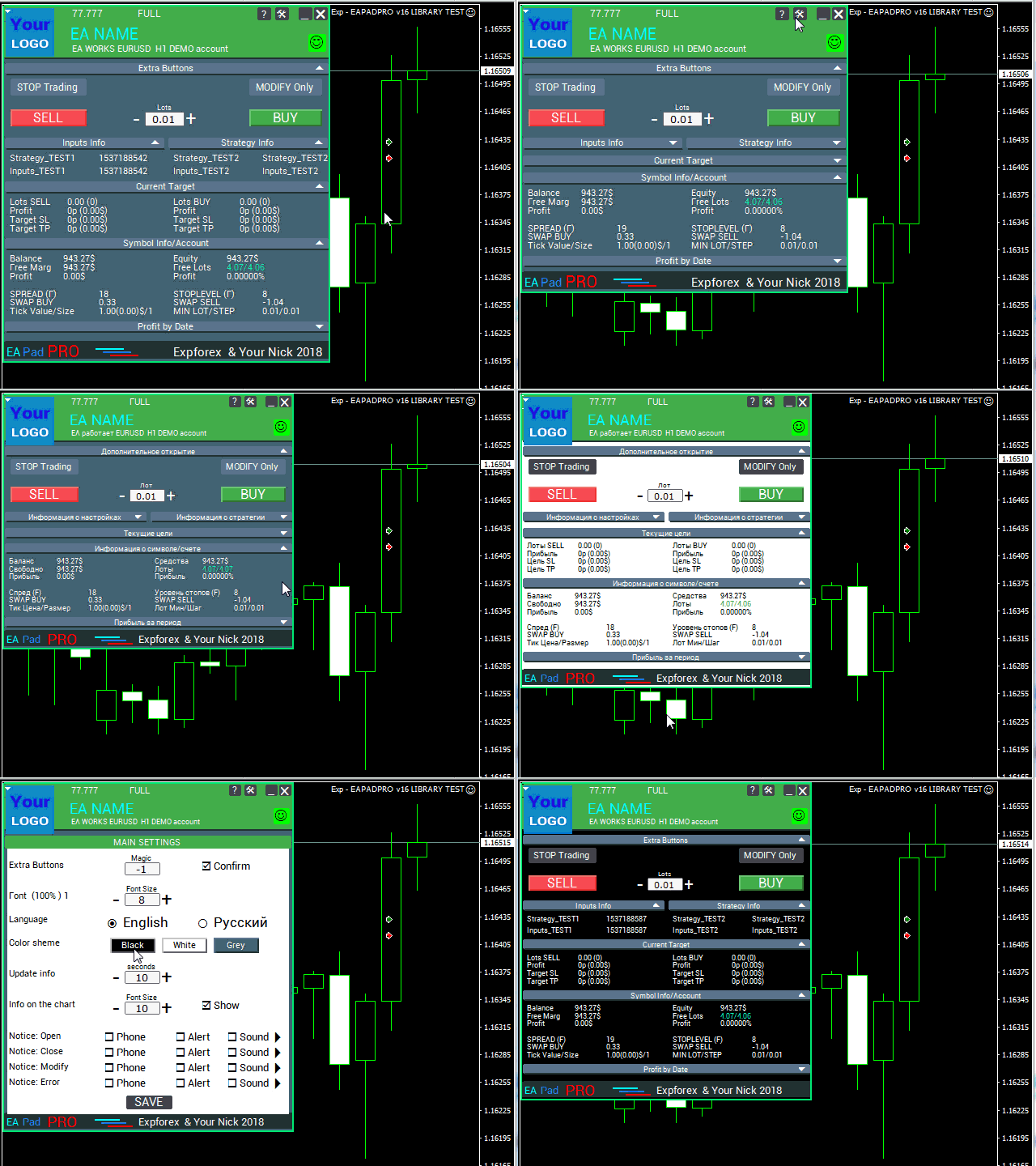
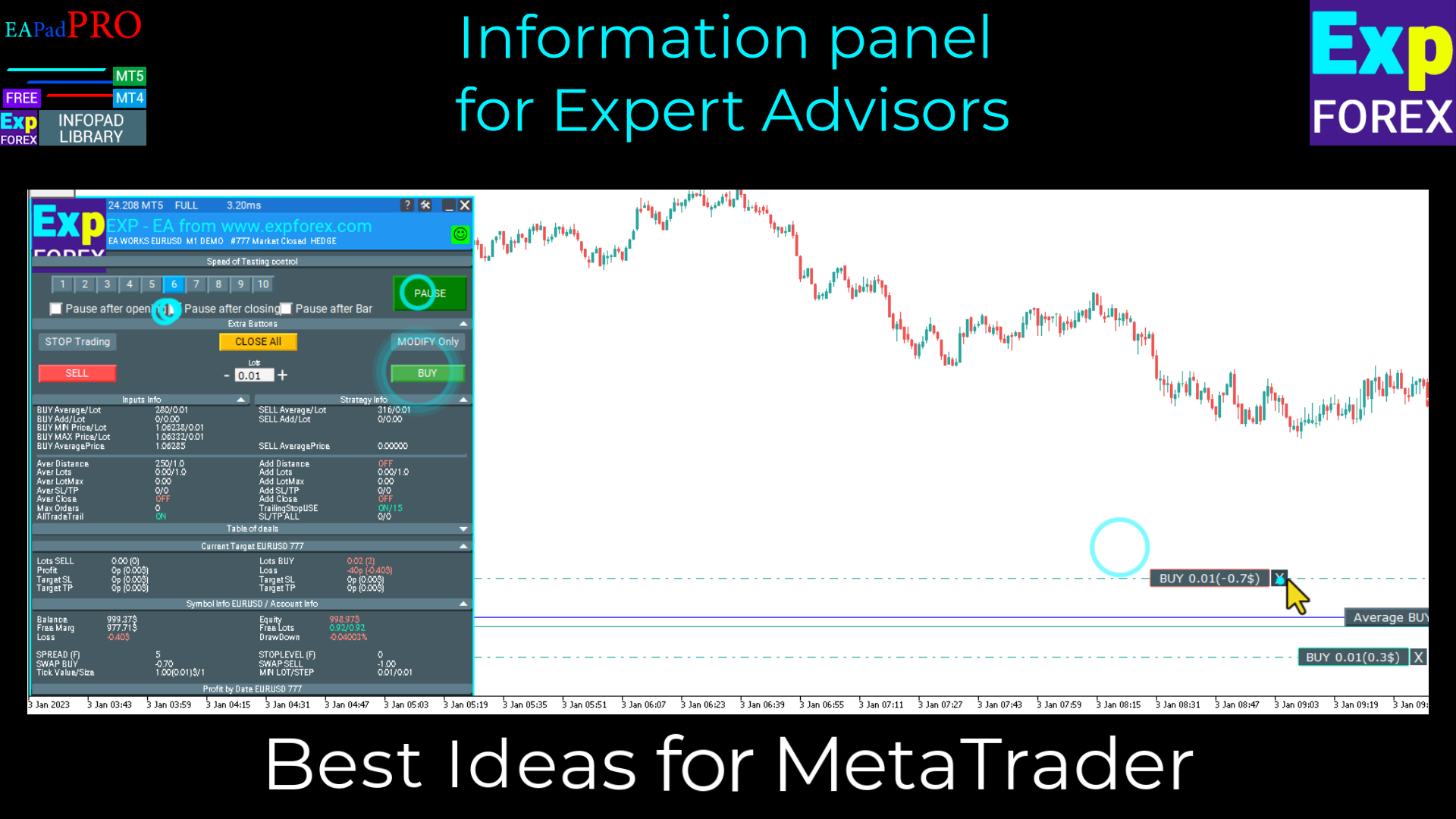
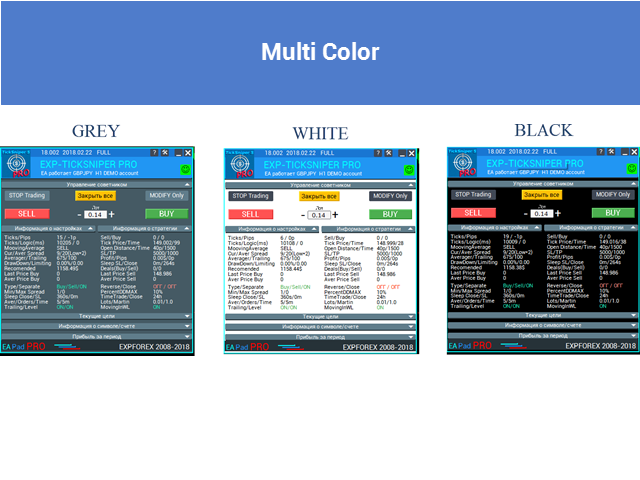
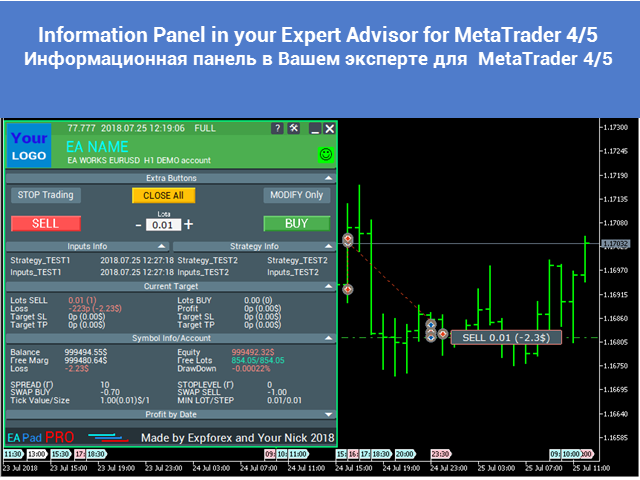
MetaTrader5のエキスパートアドバイザーに情報パネルを追加するためのライブラリ。

プログラムの情報とインターフェースが取引で利益をもたらすことを保証することはできませんが、プログラムの最も単純なインターフェースでさえ第一印象を強めることができると断言できます。

エキスパートアドバイザーにパネルを追加するための詳細な説明と手順は、ブログにあります: LIB-EAPADPROステップバイステップの説明

パネルの詳細な説明とEAPADPROの使用手順

MetaTrader4ライブラリバージョン

追加のプロセスは10のステップで構成されており、それらについては記事で詳しく説明しています。


ライブラリのインストール

  1. このサイトからライブラリをインストールします。
  2. エキスパートアドバイザーを開きます。
  3. コードをインストールするためのサンプルとステップバイステップガイド、ファイルExp-EAPADPRO LIBRARY TEST(ブログにあります)を開きます。
  4. 推奨事項に記載されているように各ステップを実行するか、サイトからのステップバイステップの説明を使用してください。

EAPADPROのパーソナライズ

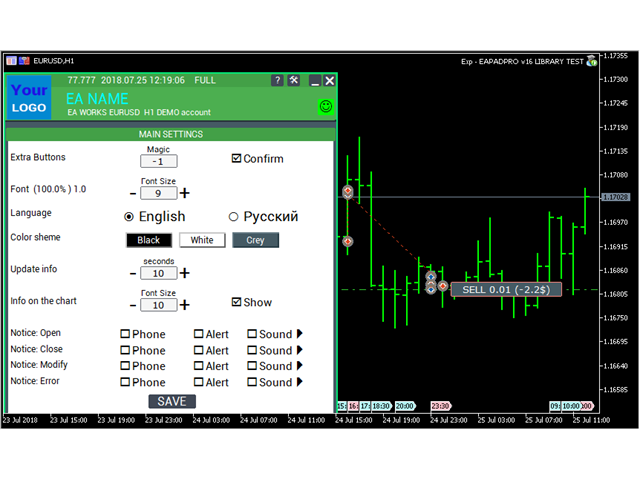
パネルで変更できることはすべて、この段落で説明されています。

  1. versionea-パネルに表示されるエキスパートアドバイザーのバージョン。
  2. BMPLOGO-パネルに表示されるBMP60x60アドバイザーのロゴ。
  3. icon-エキスパートのプロパティに表示されるエキスパートのアイコン。
  4. defEANAME-パネルに表示されるエキスパートアドバイザーの名前。
  5. YourName-パネルに表示されるあなたの名前またはニックネーム。
  6. copyright -ExpertAdvisorのプロパティに表示されるあなたの著作権。
  7. CreateInputs-パネルに外部変数を表示する機能。そのようなパラメータは全部で10個あります。塗りつぶしの形式: "名前"、 "値";
  8. CreateStrategy-パネルに戦略値を表示する機能。そのようなパラメータは全部で10個あります。塗りつぶしの形式: "名前"、 "値";
  9. MagicForEaPadPRO = 0-パネルによって監視されるマジックナンバー(すべての情報はマジックナンバーでフィルタリングされます)、-1 =パネルはこのシンボルによってアカウントからすべてのポジションを取得し、0 =手動(ハンド)取引のみ;
  10. MagicForEaPadPRO_Open = -1-パネルから開かれた位置に割り当てられるマジックナンバー。
  11. CommentForEaPadPRO = ""-パネルから開いた位置に割り当てられるコメント。
  12. TypeFillingForEaPadPRO = 0-開始時のフィルオーダーのタイプ、ターミナルMT5のみ。
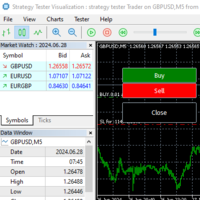
  13. ShowBuySell = true-「1クリックで取引パネル」を表示します(BUY SELL)

利用規約

情報パネルEAPADPROを備えたライブラリは、ページへのバックリンクで配布されています。

専門家を市場またはインターネットで販売したい場合は、製品の説明に次のテキストを追加する必要があります。

  1. EAPADPRO情報グラフィックパネル。
  2. このEAPADPROパネルのすべての権利はVladislavに帰属します  Expforex
  3. EAPADPRO情報パネルの作者は、私たちのパネルを使用しています顧問またはインジケータについて責任を負いません。
  4. 当社のEAPADPROパネル、お客様のアカウントでの取引に関する追加情報を提供することのみを目的として設計されています。


レビュー 11
Benjamin Afedzie
3370
Benjamin Afedzie 2025.07.02 22:08 
 

great product

Seth Tetteh
2089
Seth Tetteh 2024.04.25 12:47 
 

not bad

Nepomnjashchy
78
Nepomnjashchy 2023.12.16 02:08 
 

Пока все классно. тестируют

おすすめのプロダクト
This is a utility indicator that creates mini charts on left side of the chart you are looking at. It is very useful to watch many timeframes simultaneously, without having to change between multiple charts. Its configuration is very simple. You can have up to 4 mini charts opened. They automatically load the template of the "parent" chart. If you have any doubt please contact me. Enjoy! This is a free indicator, but it took hours to develop. If you want to pay me a coffee, I appreciate a lot  
FREE
MultiTimeframe Info Feed (MIF) Indicator Description: MultiTimeframe Info Feed (MIF) is a smart MQL5 indicator that displays a dynamic, real-time info panel directly on your chart, offering powerful insight into current market conditions. Key features include: Real-time display of Open, High, Low, Close, and live Tick price Tick Rate (ticks per second) for assessing market activity Auto-calculated Entry Price on new candle formation Signal direction detection (BUY / SELL) Price action pattern re
FREE
EdgeZone EA Inspector - FREE Edition Monte Carlo Analysis Tool for Trading Strategies Important: This is an analysis tool, not a trading robot. It does not execute trades but analyzes strategy data through statistical simulations. The Problem Many Expert Advisors show impressive backtest results but fail in live trading. The most common reason: over-optimization - the strategy was adjusted until it looks perfect for past data, but doesn't work for the future. The Solution: EdgeZone EA Inspector
FREE
Volume Weighted Average Price or VWAP is an indicator wich shows different average prices on chart. This is very useful to find strong negotiation price areas and as trend following. Configurations: Day, Week and Month - Show different VWAPs according to the period. You can change each line style on "colors" tab. Any doubt or suggestion please contact us. Enjoy! This is a free indicator, but it took hours to develop. If you want to pay me a coffee, I appreciate a lot   <3 PayPal, Skrill, Nete
FREE
Exact Time — detailed time on the seconds chart. The utility shows the opening time of the selected candle. This is necessary when working with seconds charts. For example, it can be used on a seconds chart built using the Seconds Chart utility. Inputs Base corner — the chart corner to which an object Is attached. X distance — the horizontal distance from the chart corner. Y distance — the vertical distance from the chart corner. Text font — font name Font size — font size Color — text color
FREE
Value Chart Candlesticks
Flavio Javier Jarabeck
4.69 (13)
The idea of a Value Chart indicator was presented in the very good book I read back in 2020 , " Dynamic Trading Indicators: Winning with Value Charts and Price Action Profile ", from the authors Mark Helweg and David Stendahl. The idea is simple and the result is pure genius: Present candlestick Price analysis in a detrended way! HOW TO READ THIS INDICATOR Look for Overbought and Oversold levels. Of course, you will need to test the settings a lot to find the "correct" one for your approach. It
FREE
Introduction Welcome to the world of Forex trading, where every tick of the market can be influenced by news events. Introducing our expert advisor for MetaTrader, your ultimate tool for navigating the complexities of news trading. This innovative advisor is specifically designed to automate your trading strategy during key macroeconomic releases, ensuring you never miss an opportunity.  When important indicators are announced, volatility often spikes, creating potential for profit. Our expert
FREE
The utility draws reversal levels using the formulas for each of the selected number of candles: Pivot = (high + close + low) / 3 R1 = ( 2 * Pivot) - low S1 = ( 2 * Pivot) - high R2 = Pivot + (R1 -S1) R3 = high + ( 2 * (Pivot - low)) S2 = Pivot - (R1 - S1) S3 = low - ( 2 * (high - Pivot)) H = high L = low U = if the candle is bullish, then close. Otherwise - open D = if the candle is bullish, then open. Otherwise - close On any timeframe. After a new candle closes on the calculated timeframe
FREE
High Low Open Close
Alexandre Borela
4.98 (42)
このプロジェクトが好きなら、5つ星レビューを残してください。 このインジケータは、指定されたためのオープン、ハイ、ロー、クローズ価格を描画します 特定のタイムゾーンの期間と調整が可能です。 これらは、多くの機関や専門家によって見られた重要なレベルです トレーダーは、彼らがより多くのかもしれない場所を知るために有用であり、 アクティブ。 利用可能な期間は次のとおりです。 前の日。 前週。 前の月。 前の四半期。 前年。 または: 現在の日。 現在の週。 現在の月。 現在の四半期。 現年。
FREE
Friend of the Trend: Your Trend Tracker Master the market with Friend of the Trend , the indicator that simplifies trend analysis and helps you identify the best moments to buy, sell, or wait. With an intuitive and visually striking design, Friend of the Trend analyzes price movements and delivers signals through a colorful histogram: Green Bars : Signal an uptrend, indicating buying opportunities. Red Bars : Alert to a downtrend, suggesting potential selling points. Orange Bars : Represent cons
FREE
This robot sends Telegram notifications based on the coloring rules of PLATINUM Candle indicator. Example message for selling assets: [SPX][M15] PLATINUM TO SELL 11:45. Example message for buying assets : [EURUSD][M15] PLATINUM TO BUY 11:45 AM. Before enable Telegram notifications  you need to create a Telegram bot, get the bot API Key and also get your personal Telegram chatId. It's not possible to send messages to groups or channels. You can only send messages to your user chatId. You should
FREE
Crystal Profit Dashboard – Real-Time MT5 Account Performance Utility Overview Crystal Profit Dashboard is a lightweight MetaTrader 5 utility that provides real-time profit and loss monitoring directly on the chart. It offers a clean, modern dashboard interface that updates account performance without clutter, allowing traders to focus on execution while keeping essential metrics visible. Designed for scalpers, intraday traders, and swing traders, this tool provides accurate floating profit/los
FREE
Gap Detector Pro
Andres Felipe Carvajal Rodriguez
GapDetector Pro は、 価格の窓(ギャップ) の3つのレベルをリアルタイムで識別します。 青い点 (Punto azul): 早期警戒 、ギャップ形成の可能性を予測します。 黄色い点 (Punto amarillo): 低ボリューム と 広いスプレッド の状況で、ギャップの可能性が高いことを示します。 白い点 (Punto blanco): ローソク足間に既に形成された 実際のギャップ を確認します。 パラメータの調整 ユーザーは必要に応じてパラメータを調整できます。 VolumeDropRatio(出来高減少率): 低い値 は 感度 を高め、より多くのシグナルを生成します。 高い値 は、より強い出来高の減少を要求し、シグナルを減らします。 MaxSpread(最大スプレッド): 低い値 はより 厳格 で、スプレッドの小さいギャップのみを受け入れます。 高い値 は、スプレッドが広くてもギャップを認識することを可能にします。 GapThresholdPips(ギャップのピップスしきい値): 低い値 は小さなギャップを検出します。 高い値 は大きなブレイクのみを確認します。
FREE
MACD Colored ZeroLag
Farzin Sadeghi Bonjar
4.7 (10)
It is the MQL5 version of zero lag MACD that was available for MT4 here: https://www.mql5.com/en/code/9993 Also there was a colored version of it here but it had some problems: https://www.mql5.com/en/code/8703 I fixed the MT4 version which has 95 lines of code. It took me 5 days to write the MT5 version.(reading the logs and testing multiple times and finding out the difference of MT5 and MT4!) My first MQL5 version of this indicator had 400 lines of code but I optimized my own code again and n
FREE
この情報インジケーターは、アカウントの現在の状況を常に把握したい人にとって役立ちます。 -   より便利なインジケーター このインジケーターには、ポイント、パーセンテージ、通貨での利益、現在のペアのスプレッド、現在の時間枠でバーが閉じるまでの時間などのデータが表示されます。 チャート上に情報線を配置するには、いくつかのオプションがあります。 価格の右側 (価格の後ろにあります)。 コメントとして (グラフの左上隅に); 画面の選択した隅。 情報区切り記号を選択することもできます。 | / \ # このインジケーターは使いやすく、非常に有益です。設定で不要な情報項目を無効にすることも可能です。 設定 外観の種類     - 情報行の表示タイプ。次の 3 つのオプションがあります。 価格に従ってください     - 価格に従う。 コメントとして     - コメントとして; 画面の選択した隅に     - 画面の選択した隅にあります。 添付用グラフコーナー     - 表示タイプを選択した場合 画面の選択されたコーナーでは、この項目を使用して 4 つのスナップ コーナーの 1 つを選択
FREE
Note from Developer: This is the lite version of the Double TMA with Bands Indicator. You can find the paid version that comes with alerts and on screen signal arrows built in here . I will also be selling an EA based on this trading system soon once all backtesting and optimization have been completed. Unlock your trading potential with the Double TMA Indicator with Reversal Detection! Designed for swing and reversal trading, this versatile tool integrates two Triangular Moving Averages (
FREE
Tick Database — export of tick database from MT5 terminal to MT4. The utility provides access to the tick database in real time. This is necessary to generate synthetic charts in the MT4 terminal, which initially does not provide for loading a tick database. For example, you can organize permanent access to the tick database for the Seconds Chart utility. If the opening time of the last candle in the terminals is different, then you need to specify the time offset in hours. Example We open M1 ch
FREE
Axilgo PipPiper CoPilot
Theory Y Technologies Pty Ltd
5 (2)
Axilgo Pip Piper CoPilot Elevate your trading game with the Axilgo Pip Piper CoPilot, the first in our revolutionary Pip Piper Series. This all-inclusive toolset is meticulously crafted for serious traders, focusing on key areas such as Risk Management, Trade Management, Prop Firm Rule Compliance, and Advanced Account Management . With CoPilot, you’re not just investing in a tool—you’re gaining a strategic partner in the intricate world of trading. Important Notice: To ensure you receive the fu
FREE
Overview SDZ Trend Pro is a professional Expert Advisor work for all symbol, recommend  XAUUSD (Gold) trading on the H1 timeframe . It combines dynamic price action patterns, EMA filters, and strict session-based trading logic to identify precise market entries with optimal risk control. This EA is ideal for traders who prefer structured, time-filtered trading during active market hours. ️ Core Features Dynamic Stop Loss (SL) logic Automatically sets SL based on candle pattern Chooses the
FREE
SX Theme Setter is intended for changing chart appearance in 2 modes: - Gradient background mode: In this mode, the indicator creates a gradient background for your chart. Colors, steps and gradient type can be selected by user. - Color theme: Color theme mode provides more than 50 built-in different color themes which can be selected from a list. Most of these themes are converted from official color themes of real trading platforms of the past and present. Try them out and see if they suit
FREE
Are you tired of drawing trendlines every time you're analyzing charts? Or perhaps you would like more consistency in your technical analysis. Then this is for you. This indicator will draw trend lines automatically when dropped on a chart. How it works Works similar to standard deviation channel found on mt4 and mt5. It has 2 parameters: 1. Starting Bar 2. Number of bars for calculation The   starting bar   is the bar which drawing of the trend lines will begin, while the   number of bars for c
FREE
Indicator measures strength of each currency in your list. Main idea: It simply iterates through all combinations of pairs and adds difference between open and close in percent. Parameters: List of currencies - what currencies will be calculated (maximum is 8) Calculation type - from which data will be strength calculated Calculation data input - used as input related to calculation type Symbol suffix - used in case of suffix on symbols, e.g: when your symbols look like EURUSDm, EURUSDmicro etc
FREE
Have you missed any tools or shortcuts in Meta Trader? Simple things that would make your daily trading much easier ? We have the solution for you: our Trade Panel! This is an EA tool (Expert Advisor) that, if configured to controll all symbols, needs to be loaded only once. This is the Lite version (free) of our tool. Professional version:   https://www.mql5.com/en/market/product/42658 If you have some problemas with the shortcut buttons on chart on unpinned mode try change the tickets digi
FREE
MW Volume
Martin Bittencourt
3.8 (5)
The Martinware Volume indicator plots a colored moving average over volume bars. The coloring uses three colors and can be done in different ways choosable by the user and is applied both to the average as to the volume bars. Three types of coloring are possible: None: no coloring is done Increasing or decreasing: changes the color depending on the current value being bigger or lesser than the previous one Volume relative to average: colors vary if the current volume is bigger or lesser then
FREE
Swiss VWAPsimple
Terence Gronowski
4.8 (5)
Swiss VWAPsimple Motivation Did not find free VWAP that works, the one that I found craseh. So I created a VWAP which calculates values only for the actual day. So computer resouces are not over stressed. What is VWAP, how is it used?  VWAP stands for Volume Weighed Average Price, it calculates the running sum of tick volume and the runnung sum of price times tickvolume. The division of these sums result in a weighed price (Sum P*V/Sum V). The calculation starts normally at midnight. The values
FREE
Statistical Arbitrage Spread Generator for Cointegration [MT5] What is Pair Trading? Pair trading is a market-neutral strategy that looks to exploit the relative price movement between two correlated assets — instead of betting on the direction of the market. The idea? When two assets that usually move together diverge beyond a statistically significant threshold, one is likely mispriced. You sell the expensive one, buy the cheap one , and profit when they converge again. It’s a statistica
FREE
概要 このインジケーターは、クラシックな ドンチャンチャネル を強化したバージョンで、実践的なトレード機能を追加しています。 標準の3本線(上限、下限、中央線)に加え、 ブレイクアウト を検出し、チャート上に矢印で視覚的に表示します。また、チャートを見やすくするために、 現在のトレンド方向と逆側のラインのみを表示 します。 インジケーターの機能: 視覚的シグナル :ブレイクアウト時にカラフルな矢印を表示 自動通知 :ポップアップ、プッシュ通知、Eメール RSIフィルター :市場の相対的な強弱に基づいてシグナルを検証 カスタマイズ可能 :色、ラインの太さ、矢印コード、RSI閾値など 動作原理 ドンチャンチャネルは次のように計算します: 上限線 :直近N本のクローズ済みローソク足の最高値 下限線 :直近N本のクローズ済みローソク足の最安値 中央線 :最高値と最安値の平均値 上方ブレイクアウト は終値が上限線を超えたときに発生し、 下方ブレイクアウト は終値が下限線を下回ったときに発生します。 インジケーターは以下を行います: 3本のドンチャンラインを描画 方向転換後の最初のブレイクアウト
FREE
Free automatic Fibonacci is an indicator that automatically plots a Fibonacci retracement based on the number of bars you select on the BarsToScan setting in the indicator. The Fibonacci is automatically updated in real time as new highest and lowest values appears amongst the selected bars. You can select which level values to be displayed in the indicator settings. You can also select the color of the levels thus enabling the trader to be able to attach the indicator several times with differe
FREE
Simple and easy-to-use trading panel. Replaces the standard Meta Trader 5 panel. This new panel allows you to add stop loss and take profit (in points). It also allows you to click and drag it to any place on the screen, making it easier to view and operate. Redesigned to focus on risk control, with a limit on the margin that can be used and a limit on possible loss per stop loss. With the facility to place only the stop loss and the EA automatically calculates the allowed lot size, in order to
FREE
Position Size Tool – Smart Risk Management & Trade Execution Panel The Position Size Tool is a powerful and intuitive MT5 panel that simplifies your trading by combining position sizing , risk calculation , risk/reward visualization , and order placement —all in one place. ️ Clean & Functional Interface The tool features a compact, real-time panel with the following: Balance & Equity display Live Price tracking Customizable Risk % input Auto-calculated Lot Size based on SL and Risk Input for S
FREE
このプロダクトを購入した人は以下も購入しています
WalkForwardOptimizer MT5
Stanislav Korotky
3.78 (9)
WalkForwardOptimizer library allows you to perform rolling and cluster walk-forward optimization of expert advisers (EA) in MetaTrader 5. To use the library include its header file WalkForwardOptimizer.mqh into your EA source code, add call provided functions as appropriate. Once the library is embedded into EA, you may start optimization according to the procedure described in the User guide . When it's finished, intermediate results are saved into a CSV file and some special global variables.
このライブラリを使用すると、任意の EA を使用して取引を管理でき、説明に記載されているスクリプト コードを使用して任意の EA に簡単に統合でき、完全なプロセスを示すビデオのデモ例も利用できます。 - 指値注文、SL 指値注文、利食い指値注文の発行 - マーケット、SLマーケット、TPマーケットの注文を行う - 指値注文の変更 - 注文をキャンセルする - 注文のクエリ - レバレッジ、マージンの変更 - 位置情報の取得 もっと... MT5 に Binance チャートがない場合を除き、暗号チャートのレンタルはオプションです。 スクリプトのデモについては、 ここをクリックしてください トレーディングパネルでの取引をご希望の場合は、 この製品に興味があるかもしれません
MetaCOT 2 CFTC ToolBox is a special library that provides access to CFTC (U.S. Commodity Futures Trading Commission) reports straight from the MetaTrader terminal. The library includes all indicators that are based on these reports. With this library you do not need to purchase each MetaCOT indicator separately. Instead, you can obtain a single set of all 34 indicators including additional indicators that are not available as separate versions. The library supports all types of reports, and prov
Native Websocket
Racheal Samson
5 (6)
An   easy to use, fast,  asynchronous   WebSocket library  for MQL5. It supports: ws://   and   wss://  (Secure "TLS" WebSocket) text   and   binary   data It handles: fragmented message  automatically (large data transfer) ping-pong   frames  automatically (keep-alive handshake) Benefits: No DLL required. No OpenSSL installation required. Up to 128 Web Socket Connections from a single program. Various Log Levels for error tracing Can be synchronized to MQL5 Virtual Hosting . Completely native t
If you're a trader looking to use Binance.com and Binance.us exchanges directly from your MetaTrader 5 terminal, you'll want to check out Binance Library MetaTrader 5. This powerful tool allows you to trade all asset classes on both exchanges, including Spot, USD-M   and COIN-M futures, and includes all the necessary functions for trading activity. Important: you need to have source code to properly implement the library. With Binance Library MetaTrader 5, you can easily add instruments from Bi
The library is dedicated to help manage your trades, calculate lot, trailing, partial close and other functions. Lot Calculation Mode 0: Fixed Lot. Mode 1: Martingale Lot (1,3,5,8,13) you can use it in different way calculate when loss=1 ,when profit=0. Mode 2: Multiplier Lot (1,2,4,8,16) you can use it in different way calculate when loss=1 ,when profit=0. Mode 3: Plus Lot (1,2,3,4,5) you can use it in different way calculate when loss=1 ,when profit=0. Mode 4: SL/Risk Lot calculate based on s
This is a simplified and effective version of the library for walk forward analysis of trading experts. It collects data about the expert's trade during the optimization process in the MetaTrader tester and stores them in intermediate files in the "MQL5\Files" directory. Then it uses these files to automatically build a cluster walk forward report and rolling walk forward reports that refine it (all of them in one HTML file). Using the WalkForwardBuilder MT5 auxiliary script allows building othe
Order Book, known also as Market Book, market depth, Level 2, - is a dynamically updated table with current volumes of orders to buy and to sell specific financial instument at price levels near Bid and Ask. MetaTrader 5 provides the means for receiving market book from your broker, but in real time only, without access to its history. The library OrderBook History Library reads market book state in the past from archive files, created by OrderBook Recorder . The library can be embedded into you
Cryptocurrency analysis has never been easier with Crypto Charts for MetaTrader 5. Now, trading on BitMEX has never been easier with BitMEX Trading API for MetaTrader 5. BitMEX Trading API library was built to be as easy to use as possible. Just include the library into your Expert Advisor or Script, call the corresponding methods and start trading! Features Trade on BitMEX and BitMEX Testnet. Build and automate your strategies. Concern more with the trading strategy logic and less with the co
Teclado trader, é uma BIBLIOTECA que você pode chamar no OnChartEvent para abrir posição de compra/venda/zerar, os botões padrões são: V = venda C = compra Z = zerar posições a mercado S = zerar posições opostas e depois a mercado X = zerar posições opostas Além da função de teclado, é possível mostrar os estados do ExpertAdvisor usando o MagicId, com informação de: lucro mensal, semanal, diario, e posição aberta, para isto use o OnTick, ou qualquer outro evento (OnTimer / OnTrade / OnBookEven
Goliath Mt5
Nicolokondwani Biscaldi
Goliath MT5 - scalper fully automated Expert Advisor for medium-volatile forex markets P roperties: The Library trades 10 currency pairs (USDCHF, EURCHF, EURGBP, AUDUSD, USDCAD, GBPUSD, EURUSD, NZDUSD, CADCHF, EURAUD, EURCAD, AUDJPY) The Library does not use martingale The Library sets a fixed stop loss and take profit for all orders The Library only trades a user input volume The Library can be installed on any currency pair and any timeframe Recommendations: Before using on a real account, t
Binance Library
Hadil Mutaqin SE
5 (1)
The library is used to develop automatic trading on Binance Spot Market from MT5 platform. Support all order types: Limit, Market, StopLimit and StopMarket Support Testnet mode Automatically display the chart on the screen Usage: 1. Open MQL5 demo account 2. Download Header   file and EA sample   https://drive.google.com/uc?export=download&id=1kjUX7Hyy02EiwTLgVi8qdaCNvNzazjln Copy Binance.mqh to folder \MQL5\Include Copy  BinanceEA-Sample.mq5 to folder \MQL5\Experts 3. Allow WebRequest from MT5
Gold plucking machine   Gold plucking machine is an Expert Advisor designed specifically for trading gold. The operation is based on opening orders using the Fast and Slow lines indicator, thus the EA works according to the "Trend Follow" strategy, which means following the trend. Use grid strategy to place orders without stop loss operation, so please make sure the account has sufficient funds. magic number      -  is a special number that the EA assigns to its orders. Lot Multiplier        - 
Gold plucking machine S   Gold plucking machine  S Gold plucking machine S   is an Expert Advisor designed specifically for trading gold. The operation is based on opening orders using the Fast and Slow lines indicator, thus the EA works according to the "Trend Follow" strategy, which means following the trend. Use grid strategy to place orders without stop loss operation, so please make sure the account has sufficient funds. magic number        -  is a special number that the EA assigns to its
The library is used to develop automatic trading on Binance Futures Market from MT5 platform. Support Binance Futures USD-M and COIN-M Support Testnet mode Support all order types: Limit, Market, StopLimit, StopMarket, StopLoss and TakeProfit Automatically display the chart on the screen Usage: 1. Open MQL5 demo account 2. Download Header file and EA sample https://drive.google.com/uc?export=download&id=17fWrZFeMZoSvH9-2iv4WDJhcyxG2eW17 Copy BinanceFutures.mqh to folder \MQL5\Include Copy  Bina
MT4/5通用交易库(  一份代码通用4和5 ) #ifdef __MQL5__      #define KOD_TICKET ulong      #define KOD_MAGIC   long #else        #define KOD_TICKET long      #define KOD_MAGIC   int #endif class ODLIST; #import "K Trade Lib Pro 5.ex5"       //祝有个美好开始,运行首行加入    void StartGood() ;    //简单开单    long OrderOpen( int type, double volume, int magic, string symbol= "" , string comment= "" , double opprice= 0 , double sl= 0 , double tp= 0 , int expiration= 0 , bool slsetmode= false , bool tpsetmode= false );    //复杂开单
1. What is this The MT5 system comes with very few optimization results. Sometimes we need to study more results. This library allows you to output more results during backtest optimization. It also supports printing more strategy results in a single backtest. 2. Product Features The results of the optimized output are quite numerous. CustomMax can be customized. The output is in the Common folder. It is automatically named according to the name of the EA, and the name of the same EA will be au
T5L Library is necessary to use the EAs from TSU Investimentos, IAtrader and others. It contains all the functions framework needed to Expert Advisors working properly.  ツ - The Expert Advisors from  TSU Investimentos does not work without this library,  the T5L library can have updates during the year - At this Library you will find several funcionalities like order sends, buy and sell, trigger entry points check, candlestick analyses, supply and demmand marking and lines, and much more. 
AO Core
Andrey Dik
3 (2)
AO Core is the core of the optimization algorithm, it is a library built on the author's HMA (hybrid metaheuristic algorithm) algorithm. Pay attention to the MT5 Optimization Booster product , which makes it very easy to manage the regular MT5 optimizer . An example of using AO Core is described in the article: https://www.mql5.com/ru/articles/14183 https://www.mql5.com/en/blogs/post/756510 This hybrid algorithm is based on a genetic algorithm and contains the best qualities and properties of p
EA Toolkit
Esteban Thevenon
EA Toolkit   is a library that allows any developer to quickly and easily program Advisor experts. It includes many functions and enumerations such as trailing stop, lot, stop loss management, market trading authorisations, price table updates, trading conditions and many more. Installation + Documentation : You will find all the information to install this library and the documentation of its functions on this GitHub : https://github.com/Venon282/Expert-Advisor-Toolkit WARNING : The installat
このライブラリは、キーと値の配列をソートするために使用されます。多くの場合、値をソートする必要があります。 Python言語のように sorted(key_value.items(), key = lambda kv:(kv[ 1 ], kv[ 0 ])) インポート機能 利用シーン例 1. グリッド EA 注文は始値に従って並べ替えられます void SortedByOpenPride()   {    long     OrderTicketBuffer[];    double   OpenPriceBuffer[];    for ( int i = PositionsTotal ()- 1 ; i>= 0 ; i--)      {        if (m_position.SelectByIndex(i))         {          OrderTicketBuffer[i] = long (m_position.Ticket());          OpenPriceBuffer[i] = m_position.PriceOpen();      
Want to get all events like Previous/Forecast/Actual values for each news to analyze/predict it? By this simple library you can do it easily,Just import/integrate the library into your system,then get all possible values for each news   Even In Strategy Tester   . Note: Please add the address " https://www.forexfactory.com/ " of news feed at your MT5 tab > Tools > Options > Expert Advisors > Check Allow web request for listed URL. Since the WebRequest() function can't be called from indicator ba
A Simple Moving Average (SMA) is a statistical indicator used in time series analysis. This indicator represents the arithmetic mean of a sequence of values over a specific period of time. SMA is used to smooth short-term fluctuations in data, helping to highlight the overall trend or direction of changes. This aids analysts and traders in better understanding the general dynamics of the time series and identifying potential trends or changes in direction.  More information you can find in Wiki 
Hello everyone! I am a professional MQL programmer , Making EAs, Indicators and Trading Tools for my clients all over the world. I build 3-7 programs every week but I seldomly sell any ready-made Robots. Because I am fastidious and good strategy is so few...  this EA is the only one so far I think its good enough to be published here.  As we all know, the Ichimoku indicator has become world popular for decades, but still, only few people knows the right way of using it, and if we check the clo
金融とトレーディング戦略の領域を深く掘り下げ、私は一連の実験を実施し、強化学習に基づくアプローチと強化学習を使用しないアプローチを調査することにしました。 これらの手法を適用して、私は現代のトレーディングにおけるユニークな戦略の重要性を理解する上で極めて重要な微妙な結論を導き出すことができました。 ニューラル ネットワーク アドバイザーは、初期段階では目覚ましい効率性を示したにもかかわらず、長期的には非常に不安定であることが判明しました。 市場のボラティリティ、トレンドの変化、外部事象などのさまざまな要因により、企業の運営に混乱が生じ、最終的には不安定化につながりました。 この経験を武器に、私は課題を受け入れ、独自のアプローチを開発し始めました。 私の焦点は、集められた最良のインジケーターを異なるパラメーター設定で利用するアドバイザーを作成することに集中していました。 このアドバイザーは、私の独自の戦略に基づいており、さまざまなパラメーター設定を持つ 14 の指標を同時に採用し、何時間ものデータ分析と綿密なテストから生まれました。
Introducing "TG Risk Service Manager" — your comprehensive toolkit for swift and precise risk management and lot size calculations in the dynamic world of trading. Designed to streamline development processes and enhance trading strategies, this indispensable library equips developers with essential tools for optimizing risk assessment and trade profitability. Metatrader4 Version |  All Products  |  Contact   Key Features: Efficient Lot Size Calculation : Harness the power of precise lot size c
Introducing "TG Trade Service Manager" — your all-in-one solution for seamless trade management in both MQL4 and MQL5 environments. With a focus on speed, reliability, and convenience, this powerful library simplifies the complexities of trade execution and management, empowering developers with a single interface for enhanced efficiency. Metatrader4 Version   |   All Products   |   Contact   Key Features: Unified Interface : TG Trade Service Manager" provides a unified interface for   MQL4   an
このライブラリは、できるだけ簡単にMetaTrader上で直接OpenAIのAPIを使用するための手段として提供されます。 ライブラリの機能についてさらに詳しく知るには、次の記事をお読みください: https://www.mql5.com/en/blogs/post/756098 The files needed to use the library can be found here: Manual 重要:EAを使用するには、OpenAI APIへのアクセスを許可するために、次のURLを追加する必要があります  添付画像に示されているように ライブラリを使用するには、次のリンクで見つけることができる次のヘッダーを含める必要があります:  https://www.mql5.com/en/blogs/post/756108 #import "StormWaveOpenAI.ex5" COpenAI *iOpenAI(string); CMessages *iMessages(void); CTools *iTools(void); #import これが、ライブラリを簡単に使用するため
This trailing stop application will helping trader to set the trailing stop value for many open positions, that apply a grid or martingale strategy as a solution. So if you apply a grid or martingale strategy (either using an EA or trading manually), and you don't have an application to set a trailing stop, then this application is the solution. For EAs with a single shot strategy, just use the FREE trailing stop application which I have also shared on this forum.
Relative Average Cost of Open Positions Indicator Description:   The “Relative Average Cost of Open Positions” indicator is a powerful tool designed for traders who engage in mean reversion strategies. It calculates the average entry price for both buy and sell positions, considering the total volume of open trades. Here are the key features and advantages of this indicator: Mean Reversion Trading: Mean reversion strategies aim to capitalize on price movements that revert to their historical ave
作者のその他のプロダクト
Exp5 AI Sniper for MT5
Vladislav Andruschenko
3 (3)
私たちのチームは、MetaTrader ターミナル向けの最先端のスマート トレーディング エキスパート アドバイザーである Trading Robot をご紹介できることを嬉しく思っています。 AI Sniper は、   MT5 の両方の端末向けに設計された、インテリジェントな自己最適化取引ロボットです。 スマートなアルゴリズムと高度な取引戦略を活用して、取引の可能性を最大限に引き出します。 取引所取引と株式市場での 15 年の経験を活かし、革新的な戦略管理機能、追加のインテリジェント機能、ユーザーフレンドリーなグラフィカル インターフェイスを開発しました。 AI Sniper 内のすべての機能は、最適化されたプログラム コードと厳格なテストによってサポートされています。 高度な計算インテリジェンスは、綿密なテクニカル分析と、価格変動の各段階での何千もの数学的計算を通じて、取引の最適なエントリーポイントとエグジットポイントを特定します。 トレンドが弱気か強気かに関係なく、   AI Sniper は シグナルを正確に分析し、正確な買いまたは売り取引を実行します。 ビジョン。ミッショ
Exp COPYLOT CLIENT for MT5
Vladislav Andruschenko
3.82 (34)
MT5のトレードコピー機は、МetaТrader5プラットフォームのトレードコピー機です 。 それは間の 外国為替取引をコピーします   任意のは 、MT5 - MT5、MT4 - MT5   COPYLOT MT5版の アカウント (またはを MT4 - MT4   MT5 - MT4   COPYLOT MT4版用) 信頼できるコピー機! MT4のバージョン 完全な説明   +DEMO +PDF 購入する方法 インストールする方法     ログファイルの取得方法     テストと最適化の方法     Expforex のすべての製品 МТ4ターミナルでトレードをコピーすることもできます(   МТ4   -   МТ4、МТ5   -   МТ4   ):   MT4のCOPYLOT CLIENT このバージョンには、端末間 МТ5   -   МТ5、МТ4   -   МТ5が含まれ ます。 ディールコピー機は、2/3/10端末間でディール/ポジションをコピーするために作成されます。 デモ口座と投資口座からのコピーがサポートされています。 プログラムは、複数の端末バインデ
ワンクリックで取引できるトレーディングパネル。ポジションと注文の操作!チャートまたはキーボードから取引。 当社の取引パネルを使用すると、チャートから直接シングルクリックで取引を実行でき、標準の MetaTrader コントロールよりも 30 倍高速に取引操作を実行できます。 パラメータと関数の自動計算により、トレーダーにとって取引がより速く、より便利になります。 グラフィックのヒント、情報ラベル、取引取引に関する完全な情報はチャート MetaTrader にあります。 MT4のバージョン 完全な説明   +DEMO +PDF 購入する方法 インストールする方法     ログファイルの取得方法     テストと最適化の方法     Expforex のすべての製品 手動取引用の取引パネル。チャート(チャートウィンドウ)またはキーボードから取引できます。  開閉、リバース、ロックポジションと注文を処理する МetaТrader5 のメインオーダーのトレーディングコントロールパネル:売買、売却、売却、売却、売却、閉じる、削除、修正、トレーリングストップ、ストップロス、takeproft
Exp TickSniper PRO FULL
Vladislav Andruschenko
3.97 (58)
Exp-TickSniper- 各通貨ペアのパラメーターを自動的に自動選択する高速ティックスカルパー。 取引パラメータを自動的に計算するアドバイザーを夢見ていますか?自動的に最適化および調整されますか? MetaTrader4のシステムのフルバージョン:       MetaTrader4用の TickSniper   スカルパー TickSniper-完全な説明     +デモ+ PDF EAは、ほぼ10年間のEAプログラミングで得られた経験に基づいて開発されました。 EA戦略はどのシンボルでも機能します。 時間枠は関係ありません。 ロボットは、現在の相場、ティックの到着速度、スプレッドサイズ、およびその他の契約仕様パラメーターに基づいています。 システムは、有利なストップロスとテイクプロフィットレベル、平均ポジションの距離、トレーリングストップ距離などを自動的に定義します。 EAは、トレンドに対して追加のオープニングのシステムを適用します(「平均化」)。 その設定は、実際のアカウントでテストするために最適化されています。 Expert Advisorは、絶対にすべての通貨ペアで
VirtualTradePad mt4 Extra
Vladislav Andruschenko
4.86 (58)
ワンクリックで取引できるトレーディングパネル。ポジションと注文の操作!チャートまたはキーボードから取引。 手動取引用の取引パネル。チャート(チャートウィンドウ)またはキーボードから取引できます。開閉、リバース、ロックポジションと注文を処理する МetaТrader4のメインオーダーのトレーディングコントロールパネル:売買、売却、売却、売却、売却、閉じる、削除、修正、トレーリングストップ、ストップロス、takeproft MT5のバージョン 完全な説明   +DEMO +PDF 購入する方法 インストールする方法     ログファイルの取得方法     テストと最適化の方法     Expforex のすべての製品 シンボルウィンドウからの取引とキーボードからの取引! あなたはMetaTrader 4ターミナル - バーチャルコントロールパネルVirtualTradePadのためのユニークなプラグインを持っています。 Description on English 注意!  ストラテジーテスターの 取引方法を学びたい場合は、無料の TesterPad ユーティリティをチェックしてくだ
スイング モデル ベースの取引戦略では、ロット数を増やした 2 つの反対の保留注文を出します。市場価格が特定の方向に動くと、一方の注文がトリガーされ、もう一方の注文のロット サイズが増加します。 このアプローチにより、トレーダーはリスクを最小限に抑えながら利益を獲得できるため、外国為替、株式、商品を取引する信頼性の高い方法となります。金融取引におけるこの戦略の使用は、特に不安定な市場において情報に基づいた意思決定を促進する能力があることで広く認識されています。 その有効性は、市場リスクへのエクスポージャーを減らしながら、市場のトレンドを識別してそれを利用する能力に起因しています。そのため、取引パフォーマンスの最適化を求めるトレーダーに人気の選択肢となっています。 ONLY for HEDGING account type EAは3種類の保留注文(TypeofTrade)を提供します。 発注後自動オープン(即時オープンAutoTrade) 手動開設後の開設と管理(手動開設ManualTrade) 高値/安値間の距離によるオープン(過去バーの高値安値TFTrade) OCO   (One-
Exp COPYLOT CLIENT for MT4
Vladislav Andruschenko
4.69 (64)
MetaTrader4のコピー機を取引します。     それは任意の口座からの外国為替取引、ポジション、注文をコピーします。 それは最高の貿易コピー機の1つです     MT4 - MT4、MT5 - MT4     のために     COPYLOT MT4     バージョン(または     MT4 - MT5  MT5 - MT5     のために     COPYLOT MT5     バージョン)。 MT5のバージョン 完全な説明   +DEMO +PDF 購入する方法 インストールする方法     ログファイルの取得方法     テストと最適化の方法     Expforex のすべての製品 のコピー機 バージョン       MetaTrader 5 ターミナル(   МТ5 - МТ5、МТ4 - МТ5   )-   コピーロットクライアントMT5 独自のコピーアルゴリズムにより、すべての取引がマスターアカウントからクライアントアカウントに正確にコピーされます。 また、動作速度が速いことでも知られています。タフなエラー処理。 強力な機能セット。 プログラムは、複数
Profit or Loss Pad
Vladislav Andruschenko
4.27 (11)
利益追跡機能で総利益/損失に達したときにMetaTrader5のポジションをクローズします。   CloseIfProfitorLoss with Trailing 仮想停止(個別注文)を 有効にできます。 買いポジションと売りポジションを別々に 計算して閉じる(別々の買い売り)、 すべてのシンボルまたは現在のシンボルのみを 閉じて計算する(すべてのシンボル)、 利益のためにトレーリングを有効にする( トレーリング 利益) ポジションは、預金通貨、ポイント、%、およびドローダウンの 値に基づいてクローズされます。 このアプリケーションは、他のEAと一緒に、または手動取引と組み合わせて、任意のアカウントで使用するように設計されています。 MT4のバージョン 完全な説明   +DEMO +PDF 購入する方法 インストールする方法     ログファイルの取得方法     テストと最適化の方法     Expforex のすべての製品 一部またはすべてのペアの貿易収支の合計が設定で指定された値以上になるとすぐに、すべてのポジションがクローズされ、注文が削除されます。 このバージョンは
Exp Assistant 5
Vladislav Andruschenko
4.77 (121)
自動設定、ストップロス、テイクプロフィット、トレーリングストップ、損益分岐点レベルにより、 仮想 ストップロスとテイクプロフィットが可能になります。 Exp Assistant は、 ポジションの維持を計画するのに役立ちます。 このプログラムである Expert Advisor は、 リアルまたはバーチャルを 自動的に設定するように設計されています。     取引中のポジションの ストップロスとテイクプロフィット のレベル。 Expert Advisor のすべての操作は、チャート上のコントロール パネルから簡単に管理できます。 オープンポジションの ストップロス、テイクプロフィット、 トレーリングストップ 、 損益 分岐点 の設定が難しい場合 、または手動で取引したい場合は、アシスタントを使用できます。 取引のストップロスとテイクプロフィットの設定、トレーリングストップのオン、必要に応じてストップロスを損益分岐点に移動するなど、必要なアクションが自動的に実行されます。 アシスタントには、 パラボリック Sar インジケーターに基づくトレーリング ストップ機能も備えています。 MT4
FREE
Exp5 Duplicator
Vladislav Andruschenko
4.75 (8)
Expert Advisor Duplicator は 、アカウントMetaTrader5 で事前に設定された回数の取引/ポジション/シグナルを繰り返します。 手動または別のエキスパートアドバイザーによって開かれたすべての取引をコピーします。信号のロットサイズを大きくすることが可能です。 シグナルをコピーし、シグナルから多くを増やします! MQL5信号ロットの増加 次の機能がサポートされています:コピーされた取引のカスタムロット、StopLossのコピー、TakeProfit、トレーリングストップの使用など。 MT4 のバージョン 完全な説明 +DEMO +PDF 購入する方法 インストールする方法     ログファイルの取得方法     テストと最適化の方法     Expforex のすべての製品 リンク MetaTraderのトレードコピー機はこちらから入手できます:   COPYLOT 注意 注 :これは端末間の取引用のコピー機ではありません。 複製機はネッティングアカウントでは使用できません。 ストラテジーテスターでエキスパートアドバイザーをテストし、ビジュアルモード
Exp5 The xCustomEA for MT5
Vladislav Andruschenko
4.27 (11)
MetaTrader 5のためのカスタムインディケーターに関する普遍的なトレーディングアドバイザー。 MetaTrader4のバージョン:  MetaTrader 4ターミナル   のxCustomEA  バージョン ユニバーサルトレーディングアドバイザTheCustomEAの機能は、1つを除いて、私たちのアドバイザ The X の すべてのパラメータを正確に複製します。 xCustomEA はカスタムインディケータ上で動作し、MT5端末向けに独自の取引戦略をプログラムすることができます。 xCustomEA は、インターネットまたはmql5市場からダウンロードできるカスタム指標へのリンクを持っています。 私たちの新しい顧問  The xCustomEA  は顧問  The X - Universal EAに  基づいています あなたはあなたの 習慣 をプログラムすることができます  インジケータ  、  そして私達のアドバイザー xCustomEA はシグナルのポジションを開く でしょ う。 私たちのユニバーサル展覧会顧問 ザ・を 購入 し て   xCustomEA  、  あ
利益追跡機能により、MetaTrader 4で総利益/損失に達した時にポジションをクローズします。 仮想ストップ(個別注文) を有効にできます。 買いと売りのポジションを別々に計算してクローズ(別々の買い/売り) します。 すべてのシンボルまたは現在のシンボルのみをクローズして計算(すべてのシンボル) します。 利益追跡(トレーリング・プロフィット) を有効にします。 預金通貨、ポイント、残高の%で総利益または損失をクローズします。 このアプリケーションは、他のEAと一緒に、または手動取引と組み合わせて、任意のアカウントで使用するために設計されています。 MT5 のバージョン 完全な説明 +DEMO +PDF 購入する方法 インストールする方法 ログファイルの取得方法 テストと最適化の方法 Expforex のすべての製品 取引ペアの全てまたは一部の合計バランスが設定された値以上になった時点で、すべてのポジションがクローズされ、注文が削除されます。 このバージョンは、指定された利益レベルでポジションをクローズできるだけでなく、より良い結果を得るために利益を追跡することも可能です。 C
Exp TickSniper
Vladislav Andruschenko
3.97 (30)
Exp-TickSniper は、各通貨ペアのパラメーターを個別に自動的に選択する高速ティックスカルパーです。 EAは、ほぼ10年間のEAプログラミングで得られた経験に基づいて開発されました。 EAは、スマートトレーリングストップを使用し、現在の通貨ペアデータ、その相場、仕様、スプレッドに基づいて短期取引を実行します。 平均化戦略は、信号検出アルゴリズムによって引き起こされる損失を防ぐために使用されます。 オープンポジションが特定の損失を被った場合、ポジションを平均化する機能がトリガーされます。 極端な場合、TickSniperによって開かれたポジションにはストップロスが伴います。自動取引システムが最小利益を得ることができない場合、ポジションはストップロスによって1つずつクローズされます。 システムは、有利なストップロスとテイクプロフィットレベル、平均ポジションの距離、トレーリングストップ距離などを自動的に定義します。 EAは、通貨ペアの仕様、現在の価格、および戦略の一部であるその他の要因から、これらのパラメーターに関するデータを取得します。 MetaTrader 5のフルバージョン
Exp THE X FULL
Vladislav Andruschenko
4.79 (29)
これは標準的な指標に取り組んでいるMetaTrader 5のための万能自動エキスパートアドバイザーです。 UniversalEA コンストラクタEAには多数の関数が用意されています。 ポジションを開くために20のシグナルのうちの1つを選択し、MetaTraderパッケージに含まれる標準インディケータのシグナルを選別するために20のうち5つのフィルターを選択することができます。 さらに、指標のパラメータを調整したり、時間枠を選択したり、各信号の信号バーを指定したりできます。 注意!新しいユニバーサルトレーディングアドバイザーの Exp - カスタム指標に取り組んでいる xCustomEA  : MetaTrader 5の ための Exp The xCustomEA MetaTrader 4の ための Exp The xCustomEA Description on English 自動取引アドバイザーを購入したい場合は、  TickSniperを チェックして ください  。 EAには以下の機能があります。  カウンタートレンド平均 トレンドの方向への追加の開口部 トレーリングストッ
Exp Swing
Vladislav Andruschenko
4.47 (55)
これは、Swinger(Pendulum、Cheburashka)と呼ばれる有名な戦略のモデルを使用しています。 戦略は、2つの反対の保留中の注文を出すことにあります。価格が特定の方向に移動すると、一方の保留中の注文がトリガーされ、もう一方の注文のロットサイズが増加します。 EAは3種類のオープン保留中の注文を提供します(TypeofTrade) 配置後の自動オープン(インスタントオープンAutoTrade) 手動開封後の開封と管理(手動開封ManualTrade) 高/低レベルで開く(過去のバーTFTradeの高低) OCO(One-Cancels-the-Other)注文は、2つの注文で構成される条件付き注文の一種です。2つ目の注文が約定すると、1つ目の注文は自動的にキャンセルされます。 スイング-完全な説明 MT5 version 購入する方法 インストールする方法     ログファイルの取得方法     テストと最適化の方法     Expforex のすべての製品 使い方? 開始時に、エキスパートアドバイザーは2つの注文を出します-現在の価格から StopOrderDe
FREE
このユーティリティを使用すると、戦略テスターで戦略を手動でテストできます。視覚化チャート上でワンクリック取引。 トレードス​​キルをテストするための便利で完全な機能がストラテジーテスターでも利用できるようになりました。 Forex Tester Pad は、ストラテジーテスター用のトレーディングシミュレーターです。インジケーターを使用した取引。 私たちのユーティリティの主な機能 MT4のバージョン 完全な説明 +DEMO +PDF 購入する方法 インストールする方法     ログファイルの取得方法     テストと最適化の方法     Expforex のすべての製品 MetaTrader ストラテジー テスター 4 および 5 で動作します。 取引、ポジション、注文の管理。 あらゆるインジケーターを操作する可能性; ストップロス、テイプロフィット、トレーリングストップ、注文グリッド; EAPAD PRO チャートフレンドリーなダッシュボード; 速度制御、一時停止、チャート制御を 1 クリックで実行できます。等々。 警告: このパネルは戦略テスター向けです。 ライブ チャートでワ
FREE
Exp4 AI Sniper for MT4
Vladislav Andruschenko
2.33 (3)
私たちのチームは、MetaTrader ターミナル向けの最先端のスマート トレーディング エキスパート アドバイザーである Trading Robot をご紹介できることを嬉しく思っています。 AI Sniper は、   MT4     の両方の端末向けに設計された、インテリジェントな自己最適化取引ロボットです。 洗練されたアルゴリズムと最先端の取引手法を活用した AI Sniper は 、取引の最適化における卓越性を体現しています。 当社のチームは、取引所と株式市場の両方で 15 年を超える豊富な経験を活かし、革新的な戦略管理機能、インテリジェントな機能、直感的なグラフィカル インターフェイスを組み込んだこのエキスパート アドバイザーを作成しました。 AI Sniper の各側面は細心の注意を払って設計され、厳密にテストされたプログラム コードによってサポートされています。 高度な計算インテリジェンスは複雑なテクニカル分析を通じて機能し、あらゆる価格変動に対して何千もの数学的計算を実行します。 これにより、   AI Sniper は 、強気市場トレンドでも弱気市場トレンドでも、
Exp5-COPYLOT MASTERは、МetaТrader5とMetaTrader4のトレードコピー機です。任意のアカウントから外国為替取引をコピーします。 インストール このエキスパートアドバイザーはマスターコピー機です。トレードをコピーしたいターミナルにエキスパートアドバイザーをインストールします。 「COPY」のように、任意のテキストラベル名をpathWriteとして指定します。 トレードをコピーしたい端末にMT5用のCOPYLOTMASTERをインストールします。 次に、コピー先の MT4  端末にCOPYLOTクライアントMT4をインストールします。 または MetaTrader5用の CopylotクライアントMT5 MT4用のCOPYLOTMASTERを ダウンロードすることもできます COPYLOT-完全な説明とマニュアル 注:設定のリストは[コメント]タブにあります。 EAは1チャートに設定する必要があります!デフォルトでは、アドバイザーがアカウントからすべてのポジションと注文をコピーします。 注文はアクティベーション時にコピーされ(ポジション)、クライアントア
FREE
MetaTrader 4のためのカスタムインディケータに関するユニバーサルトレーディングアドバイザー。 MetaTrader 4のバージョン:  MetaTrader 5ターミナル   のxCustomEA バージョン ユニバーサルトレーディングアドバイザTheCustomEAの機能は、1つを除いて、私たちのアドバイザ The X の すべてのパラメータを正確に複製します。 xCustomEA はカスタムインディケータ上で動作し、MT4端末向けに独自の取引戦略をプログラムすることができます。 xCustomEA は、インターネットまたはmql5市場からダウンロードできるカスタム指標へのリンクを持っています。 あなたはあなたの  習慣  をプログラムすることができます   インジケータ  、  そして私達のアドバイザー  xCustomEA  はシグナルのポジションを開く  でしょ  う。 私たちのユニバーサル展覧会顧問 ザ・を 購入 し て   xCustomEA  、  あなたは毎日指標に関するアドバイザをプログラムすることができます! 指標PIPFINITE TREND PRO上
Exp4 Duplicator
Vladislav Andruschenko
4.48 (21)
Expert Advisor は 、アカウントMetaTrader 4で 取引を繰り返し、ポジションを設定するか、事前に設定された回数だけシグナルを送信します。 手動または別のエキスパートアドバイザーによって開かれたすべての取引をコピーします。 シグナルをコピーし、シグナルからロットを増やします ! 他のEAの多くを増やします。 次の機能がサポートされています:コピーされた取引のカスタムロット、ストップロスのコピー、テイクプロフィット、トレーリングストップの使用。 MT5のバージョン 完全な説明 +DEMO +PDF 購入する方法 インストールする方法     ログファイルの取得方法     テストと最適化の方法     Expforex のすべての製品 リンク MetaTraderのトレードコピー機はこちらから入手できます:   COPYLOT 注意 注:これは、端末間の取引用のコピー機ではありません。 ストラテジーテスターでエキスパートアドバイザーをテストし、ビジュアルモードでEAPADPROツールバーと取引することができます! EAを1つの通貨ペアにインストールするだけで
Exp Assistant 4
Vladislav Andruschenko
4.88 (76)
ストップロスの設定、利益の獲得、トレーリングストップ、損益分岐点のレベル、バーチャルストップの実現。 経験アシスタント はあなたがあなたのポジションのメンテナンスを手配するのを助けます。 このエキスパートアドバイザーは必要なストップロスをすべて設定し、あなたのポジションに応じた利益レベルを取ります。 すべてのExpert Advisor操作はチャート上のコントロールパネルから管理されます。 あなたがオープンポジションを持っているが、あなたのエキスパートアドバイザーがストップロスを設定することができない、利益を上げる、トレーリングストップまたはブレークイーブン、そしてあなたが手動で取引するなら、あなたはアシスタントを使うことができます。それは自動的にストップロスを出してあなたの取引のために利益を得ます、トレーリングストップをオンにするか、または必要に応じてbreakvenvenにストップロスを移動します。 Parabolic Sarインディケータに基づくトレーリングストップもあります。 MT5のバージョン 完全な説明 +DEMO +PDF 購入する方法 インストールする方法    
FREE
Averager FULL
Vladislav Andruschenko
4.58 (12)
Exp-Averager は、 平均化取引を開始することで、特定のドローダウンを受けた取引を平均化するように設計されています。 アドバイザーは、トレンドおよび逆トレンドに合わせて追加のポジションをオープンできます。 一連のポジションの平均トレーリングストップが含まれています。 ロットが増えたり減ったりしています。 不採算ポジションを平均価格に近づける一般的な戦略。 MT4のバージョン 完全な説明 +DEMO +PDF 購入する方法 インストールする方法     ログファイルの取得方法     テストと最適化の方法     Expforex のすべての製品 リンク MetaTrader 5 ターミナルの Expert Advisor でのアベレージャの操作の例:   Exp - TickSniper   。 平均化機能を備えたユニバーサル取引アドバイザー The X 注記 これは自動取引システムではありません。 取引を監視し、ドローダウンが発生した場合に利益が得られるまで平均化します。 ストラテジー テスターでエキスパート アドバイザーをテストし、ビジュアル モードで EAPAD
Ind5 Extra Report Pad
Vladislav Andruschenko
4.76 (34)
これはMetaTrader 5のためのあなたの取引口座の分析を提供する統計パネルです。 分析結果はリアルタイムでチャートに表示されます。 多通貨取引は非常に人気があります。 MT4のバージョン 完全な説明 購入する方法 インストールする方法     ログファイルの取得方法     テストと最適化の方法     Expforex のすべての製品 しかし、取引量が多ければ多いほど、それぞれの取引の収益性を分析するのは難しくなる。 月ごとに取引を分析し、各取引ごとに統計を計算することは、さらに困難な作業です。 取引システムのパフォーマンスを包括的に理解したい場合、この目標を達成するのに役立つツールが複数あります。 これらのツールには、レポート、統計、myfxbook、取引ジャーナル、口座分析、パフォーマンス統計、分析、革新的なダッシュボードなどがあります。 これらのツールを活用することで、取引システムのパフォーマンスを詳細に分析し、得意分野や潜在的な弱点に関する貴重な洞察を得ることができます。 パフォーマンス向上を目指す新規トレーダーであれ、取引戦略の最適化を目指す経験豊富なトレーダ
FREE
Exp COPYLOT MASTER for MT4
Vladislav Andruschenko
4.48 (25)
МetaТrader4のトレードコピー機。外国為替取引、ポジション、注文を任意のアカウントからコピーします。 それは最高の МТ4   -   МТ4, МТ5   -   МТ5, МТ4   -   МТ5, МТ5   -   МТ4 貿易複写機、今日の一つです。 独自のコピーアルゴリズムにより、すべての取引がマスターアカウントからクライアントアカウントに正確にコピーされます。高い動作速度。厳しいエラー処理。強力な機能セット。 これらすべての品質は、単一のプログラム-EXP-COPYLOTにまとめられています。 プログラムは、複数の端末バインディングで実行できます。 1つのアカウントで取引されているさまざまな投資家アカウントでの取引のシンクロナイザーとして使用します。-COPYLOTは取引を他の端末にコピーします。 インストール CopyLotマスター-ポジションと注文をコピーしたいアカウントにインストールするエキスパート。 このエキスパートをターミナルにインストールし、そこからポジションを投資口座にコピーします。 「COPY」のように、任意のテキストラベル名をpathWrite
FREE
Exp SafetyLock PRO
Vladislav Andruschenko
4.57 (28)
SAFETYLOCKを使用すると、トレーダーはすでにオープンしているポジションに対して反対の注文を設定することで、強い市場の反転を回避できます。 トレーダーまたはEAがポジションをオープンすると、SAFETYLOCKは自動的に反対の保留中の注文を設定します。 ポジションが損失に転じた場合、その保留中の注文がアクティブになり、ロックを作成して損失を最小限に抑えます。 このEAは、初期のポジションを閉じる、トレーリングストップを使用して利益を最大化する、またはロットを増やしてリスクを調整するなど、さまざまな操作を可能にします。 さらに、ポジションの価格に合わせて、保留中の注文の始値を変更することもでき、市場の動きに柔軟に対応することができます。 完全な説明 +DEMO +PDF 購入する方法 インストールする方法     ログファイルの取得方法     テストと最適化の方法     Expforex のすべての製品 基本的なパラメーター(ブログのパラメーターの完全な説明) MilliSecondsTimerForMonitoring – アルゴリズムの実行時間をミリ秒単位で指定します
INFOPadはMetaTrader 5ターミナルで選択された通貨ペアに関する情報を作成する情報パネルです。 この指標には5つの機能があります。 選択したシンボルの主および主な情報を表示します。売値、スプレッド、ストップレベル、スワップ、ティック値、コミッション価格。 SL目標とTP目標(確立されたストップロスとテイクプロフィットのポイント数、ドル額)の将来の目標を示します。 今日、週、月、年、選択した通貨の総利益などの期間に受け取った利益が表示されます。 それは現在のオープンポジション、そのロット(ボリューム)、ポジション数、ポイントでのポジションの利益、ドル、パーセントを表示します。 オープンディールのチャートに追加情報を表示します。それはストップロスを示し、利益レベルとこれらのストップレベルの目標を取ります。 トランザクションがシンボルに対して開かれたとき、トランザクションが閉じられたとき、トランザクションが変更されたときに、ログファイルに情報を書き込みます。 取引の開始時、取引の終了時、取引の変更時にサウンドファイルを再生します。 トランザクションを開くとき、トランザクション
FREE
このユーティリティを使用すると、戦略テスターで戦略を手動でテストできます。視覚化チャート上でワンクリック取引。 このユーティリティの最新バージョンは、トレーダーが取引戦略を手動でテストするための高度な機能を提供します。ストラテジー テスターを使用すると、シミュレートされた環境で取引戦略の有効性を評価できるようになります。この機能を使用すると、取引テクニックのパフォーマンスを分析し、それらを改良して取引スキルを向上させることができます。 さらに、ストラテジー テスターは、視覚化チャート上でワンクリック取引で取引を実行する便利で効率的な方法を提供します。この機能により、異なる画面を切り替えることなく、希望の価格レベルで取引を迅速に開始および終了することができます。 ストラテジー テスターで利用できる完全な機能を使用すると、取引戦略をシミュレーションして洗練し、結果を分析して、取引スキルを効果的かつ効率的に最適化できます。 MT5 のバージョン 完全な説明 +DEMO +PDF 購入する方法 インストールする方法     ログファイルの取得方法     テストと最適化の方法     E
FREE
Ind4 Extra Report Pad
Vladislav Andruschenko
4.62 (39)
これはあなたの取引口座の分析を提供する統計パネルです。 分析結果はリアルタイムでチャートに表示されます。 多通貨取引は今日非常に人気があります。しかし、取引の量が多いほど、それぞれの収益性を分析することは難しくなります。月ごとに取引を分析し、 MT5のバージョン 完全な説明 +PDF 購入する方法 インストールする方法     ログファイルの取得方法     テストと最適化の方法     Expforex のすべての製品 各取引ごとの統計を計算することはさらに困難な作業です。 パネルは、あなたのアカウントを分析し、リアルタイムで詳細な統計を準備する効率的な解決策を提供します。 注意!  HTMLへのエクスポート  ボタン が利用可能です - 私たちのインディケータは別のHTMLファイルにすべての受信データを保存します! タブとコントロール このパネルは現在6つのタブで構成されています。 トレード   - 現在のオープントレード 歴史   - 歴史の中で閉じられた取引 すべての取引   - 始値と終値の取引 レポート   - あなたの取引口座のクローズド取引に関する詳細なレポート
FREE
Exp Averager
Vladislav Andruschenko
4.82 (22)
Exp-Averager は、 平均化取引を開始することで、特定のドローダウンを受けた取引を平均化するように設計されています。 アドバイザーは、現在のトレンドに沿って、または逆に新しいポジションを開くことができます。 一連のポジションに適用されるスマート トレーリング ストップ機能も含まれています。 アドバイザはポジションのロットサイズを増減できます。 これは、損失ポジションを平均価格に近づけるために広く使用されている戦略です。 MT5のバージョン 完全な説明 +DEMO +PDF 購入する方法 インストールする方法     ログファイルの取得方法     テストと最適化の方法     Expforex のすべての製品 リンク TickSniper スキャルパー の平均化システムの例 平均化機能を備えたユニバーサル取引アドバイザー The X Expert Advisor は、チャートが関連付けられている通貨ペアで動作します。 たとえば、EURUSD の平均化を有効にするには、EURUSD チャートを開いて Expert Advisor を実行します。 注記 このシステムは
Exp Tick Hamster MT5
Vladislav Andruschenko
3.59 (17)
MetaTrader5の任意の取引シンボルのすべてのパラメーターの自動最適化のエキスパート。 設定なしでEAを取引! ダニ ハムスター -これは 、アドバイザーを設定したくない初心者やユーザー向けの自動取引エキスパートです! このトレーディングアドバイザーのトレーディング戦略は 7年間テストされています。 初心者のために特別に設計された自動売買エキスパートで、これまで以上に取引を簡単に。 アドバイザーを設定する煩わしさに別れを告げ、ストレスのない取引を実現しましょう。 今すぐ始めて、取引成功への第一歩を踏み出しましょう。 MT4のバージョン 完全な説明   +DEMO +PDF 購入する方法 インストールする方法     ログファイルの取得方法     テストと最適化の方法     Expforex のすべての製品 使い方? ダウンロード; チャートにインストールします。 アドバイザーは自動的に取引します。 レビューを残します。 エキスパートを設定するにはどうすればよいですか? 何もカスタマイズする必要はありません!私たちはあなたのためにすべてをセットアップします! 1設定パラメ
フィルタ:
Benjamin Afedzie
3370
Benjamin Afedzie 2025.07.02 22:08 
 

great product

wilaim67
44
wilaim67 2025.06.20 05:54 
 

ユーザーは評価に対して何もコメントを残しませんでした

Seth Tetteh
2089
Seth Tetteh 2024.04.25 12:47 
 

not bad

Shigeo Sorihashi
99
Shigeo Sorihashi 2024.03.24 11:17 
 

よくわからないです?効果が今ひとるわからないのです。申し訳ありません。もう一つ成果が出ていないように思うのです。しっくりこないのです。ごめんなさい!

Vladislav Andruschenko
295650
開発者からの返信 Vladislav Andruschenko 2024.03.24 12:47
なぜ
This is spam
Nepomnjashchy
78
Nepomnjashchy 2023.12.16 02:08 
 

Пока все классно. тестируют

Pasadena.VP
14
Pasadena.VP 2022.03.15 17:33 
 

Пока тестирую. К каждому терминалу надо привыкать. Пока привыкаю. Немного неудобно - закрытие открытых позиций

Xiaoyu Huang
8899
Xiaoyu Huang 2021.07.22 03:58 
 

good !

geo6688
44
geo6688 2021.03.07 05:51 
 

супер!

hrhugd
57
hrhugd 2020.09.27 10:54 
 

ユーザーは評価に対して何もコメントを残しませんでした

Barour Bilal
2466
Barour Bilal 2019.06.17 00:20 
 

ユーザーは評価に対して何もコメントを残しませんでした

削除済み 2019.01.07 17:45 
 

ユーザーは評価に対して何もコメントを残しませんでした

レビューに返信