Binance Library

5

The library is used to develop automatic trading on Binance Spot Market from MT5 platform.

  • Support all order types: Limit, Market, StopLimit and StopMarket
  • Support Testnet mode
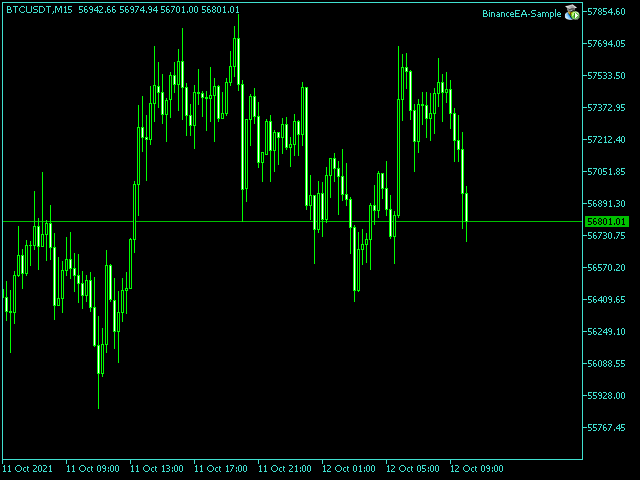
  • Automatically display the chart on the screen

Usage:

1. Open MQL5 demo account

2. Download Header file and EA sample https://drive.google.com/uc?export=download&id=1kjUX7Hyy02EiwTLgVi8qdaCNvNzazjln

  • Copy Binance.mqh to folder \MQL5\Include
  • Copy BinanceEA-Sample.mq5 to folder \MQL5\Experts

3. Allow WebRequest from MT5 Tools menu >> Options >> Expert Advisors and add URL:

        https://api.binance.com

        https://testnet.binance.vision

4. Open any chart and attach BinanceEA-Sample to the chart


Binance Library Functions:

This function must be called from the OnInit() function

      void init                      
      (
         string symbol,                   // symbol name
         string historicalData,           // historicalData: 1W = 1 week, 1M = 1 month, 3M = 3 months, 6M = 6 months, 1Y = 1 year
         string apiKey,                   // binance api key
         string secretKey,                // binance secret key
         bool   testnet = false           // testnet mode
      );


This function must be called from the OnTimer() function

      void getTickData();


This function must be called from the OnDeinit() function     

      void deinit();     


The function used to place order, returns orderId if successful, otherwise -1

      long order       
      (
         ORDERTYPE orderType,             // enum ORDERTYPE: BUY_MARKET, SELL_MARKET, BUY_LIMIT, SELL_LIMIT, BUY_STOP, SELL_STOP, BUY_STOPLIMIT, SELL_STOPLIMIT 
         double    quantity,              // order quantity
         double    limitPrice = 0,        // order limitPrice
         double    stopPrice = 0,         // order stopPrice
         string    timeInForce = "GTC",   // timeInForce: GTC, IOC, FOK, default GTC
         string    comment = ""           // order comment
      );


Cancel open orders, returns true if successful, otherwise false

      bool cancelOrder                    
      (
         long orderId = -1                // order Id, default -1 cancel all open orders
      );


Get the number of open orders

      int ordersTotal                     
      (
         ORDERTYPE orderType = -1         // enum ORDERTYPE: BUY_LIMIT, SELL_LIMIT, BUY_STOP, SELL_STOP, BUY_STOPLIMIT, SELL_STOPLIMIT, default -1 number of all open orders
      );


Get available asset balance

      double getBalance   
      (
         string asset                     // asset name
      );  


Get exchange info, returns ExchangeInfo structure if successful

      void getExchangeInfo                
      (
         ExchangeInfo &exchangeInfo       // [out] ExchangeInfo structure
      );


Get orderbook, returns OrderBook structure array if successful

      void getOrderBook                   
      (
         OrderBook &orderBook[],          // [out] OrderBook structure array
         int limit = 5                    // limit: 5, 10, 20, 50, 100, default 5
      );      


Get open orders, returns OpenOrders structure array if successful

      void getOpenOrders                  
      (
         OpenOrders &openOrders[]         // [out] OpenOrders structure array
      );                                       


Get trade history, returns TradeHistory structure array if successful

      void getTradeHistory                
      (
         TradeHistory &tradeHistory[],    // [out] tradeHistory structure array
         int limit = 10                   // limit default 10, max 1000
      );


Example how to call Binance Library from EA

#include <Binance.mqh>

input string Symbol         = "BTCUSDC";     
input string HistoricalData = "1W";    
input string ApiKey         = "";          
input string SecretKey      = "";    

Binance b;

int OnInit()
{
   b.init(Symbol,HistoricalData,ApiKey,SecretKey);
   
   return 0;
}

void OnTimer()
{
   b.getTickData();
}

void OnDeinit(const int reason)
{
   b.deinit();
}

void OnTick()
{ 


   // Place buy market order
   // b.order(BUY_MARKET,0.001);                        
   
   // Place buy limit order
   // b.order(BUY_LIMIT,0.001,75000);              
   
   // Place buy stop order
   // b.order(BUY_STOP,0.001,0,120000);                       
   
   // Place buy stoplimit order
   // b.order(BUY_STOPLIMIT,0.001,110000,120000);  

 
   // Place sell market order
   // b.order(SELL_MARKET,0.001);                         
   
   // Place sell limit order
   // b.order(SELL_LIMIT,0.001,120000);            
   
   // Place sell stop order
   // b.order(SELL_STOP,0.001,0,75000);                          
   
   // Place sell stoplimit order
   // b.order(SELL_STOPLIMIT,0.001,80000,75000);	


   // Cancel all open orders        					   
   // b.cancelOrder();             					                 

   // Get available asset balance
   // double balanceBTC = b.getBalance("BTC");      
   // double balanceUSDC = b.getBalance("USDC");
   
   // Get the number of all open orders
   // int ordTotal = b.ordersTotal();    
     

/* // Get exchangeInfo

   ExchangeInfo exchangeInfo;
   b.getExchangeInfo(exchangeInfo);
   
   string baseAsset   = exchangeInfo.baseAsset;
   string quoteAsset  = exchangeInfo.quoteAsset;
   double minQty      = exchangeInfo.minQty;
   double maxQty      = exchangeInfo.maxQty;
   double minNotional = exchangeInfo.minNotional;
   int    qtyDigit    = exchangeInfo.qtyDigit;
   int    priceDigit  = exchangeInfo.priceDigit;
*/

   
/* // Get orderBook

   OrderBook orderBook[];
   b.getOrderBook(orderBook);
   
   for(int i = 0; i < ArraySize(orderBook); i++)
   {
      double askPrice = orderBook[i].askPrice;
      double askQty   = orderBook[i].askQty;
      double bidPrice = orderBook[i].bidPrice;
      double bidQty   = orderBook[i].bidQty;
   } 
*/
 
     
/* // Get open orders

   OpenOrders openOrders[];
   b.getOpenOrders(openOrders);
   
   for(int i = 0; i < ArraySize(openOrders); i++)
   {
      long   orderId     = openOrders[i].orderId;         
      string symbol      = openOrders[i].symbol;       
      string side        = openOrders[i].side;              
      string type        = openOrders[i].type;     
      string status      = openOrders[i].status;    
      string timeInForce = openOrders[i].timeInForce; 
      double price       = openOrders[i].price;      
      double stopPrice   = openOrders[i].stopPrice;     
      double origQty     = openOrders[i].origQty;   
      double executedQty = openOrders[i].executedQty;       
      ulong  time        = openOrders[i].time;      
   }          
*/  


/* // Get trade history

   TradeHistory tradeHistory[];
   b.getTradeHistory(tradeHistory);
   
   for(int i = 0; i < ArraySize(tradeHistory); i++)
   {
      long   orderId         = tradeHistory[i].orderId;      
      string symbol          = tradeHistory[i].symbol;        
      double price           = tradeHistory[i].price;               
      double qty             = tradeHistory[i].qty;              
      double quoteQty        = tradeHistory[i].quoteQty;         
      double commission      = tradeHistory[i].commission;       
      string commissionAsset = tradeHistory[i].commissionAsset;  
      ulong  time            = tradeHistory[i].time;             
      bool   isBuyer         = tradeHistory[i].isBuyer;          
      bool   isMaker         = tradeHistory[i].isMaker;          
   }                   
*/
} 

レビュー 1
Konstantin
21
Konstantin 2021.08.27 10:06 
 

The best Binance library. I do recommend it to everyone.

おすすめのプロダクト
Introducing "TG Risk Service Manager" — your comprehensive toolkit for swift and precise risk management and lot size calculations in the dynamic world of trading. Designed to streamline development processes and enhance trading strategies, this indispensable library equips developers with essential tools for optimizing risk assessment and trade profitability. Metatrader4 Version |  All Products  |  Contact   Key Features: Efficient Lot Size Calculation : Harness the power of precise lot size c
Important: This product is a Library for developers . It is suitable only for users who can write/modify MQL5 code and integrate a compiled library into their own EA/Script. It is not a “drag & run” notifier. Telegram SDK helps you send Telegram messages and photos from MetaTrader 5 in a simple and reliable way. Use it when you want Telegram notifications inside your own automation tools. If you need the MetaTrader 4 version, it is available separately in the Market:   Telegram SDK M T4 . Main f
LSTM Library
Thalles Nascimento De Carvalho
LSTM Library - MetaTrader 5用高度神経ネットワーク アルゴリズム取引のためのプロフェッショナル神経ネットワークライブラリ LSTM Libraryは、MQL5の取引戦略にリカレントニューラルネットワークのパワーをもたらします。このプロフェッショナルレベルの実装には、通常は専門的な機械学習フレームワークでしか見られない高度な機能を備えたLSTM、BiLSTM、GRUネットワークが含まれています。 "トレーディングにおける機械学習の成功の秘訣は、適切なデータ処理にあります。 Garbage In, Garbage Out –予測の品質はトレーニングデータの品質を超えることはありません。" — マルコス・ロペス・デ・プラド博士, Advances in Financial Machine Learning 主な機能 LSTM、BiLSTM、GRUの完全実装 より良い一般化のためのリカレントドロップアウト 複数の最適化アルゴリズム(Adam、AdamW、RAdam) 高度な正規化テクニック 包括的な評価指標システム トレーニング進捗の可視化 クラス重みによる不均衡デー
MQL5 EA向けに、開発者が主要な取引統計情報へ簡単にアクセスできるライブラリです。 ライブラリで利用可能なメソッド: アカウントデータと利益: GetAccountBalance() : 現在の口座残高を返します。 GetProfit() : 全取引の純利益を返します。 GetDeposit() : 入金の総額を返します。 GetWithdrawal() : 出金の総額を返します。 取引分析: GetProfitTrades() : 利益の出た取引数を返します。 GetLossTrades() : 損失の出た取引数を返します。 GetTotalTrades() : 実行された全取引数を返します。 GetShortTrades() : ショートポジションの取引数を返します。 GetLongTrades() : ロングポジションの取引数を返します。 GetWinLossRatio() : 勝ち取引と負け取引の比率を返します。 GetAverageProfitTrade() : 利益の出た取引1回あたりの平均利益を返します。 GetAverageLossTrade() : 損失の出た取引
Cryptocurrency analysis has never been easier with Crypto Charts for MetaTrader 5. Now, trading on BitMEX has never been easier with BitMEX Trading API for MetaTrader 5. BitMEX Trading API library was built to be as easy to use as possible. Just include the library into your Expert Advisor or Script, call the corresponding methods and start trading! Features Trade on BitMEX and BitMEX Testnet. Build and automate your strategies. Concern more with the trading strategy logic and less with the co
Here   is   the   English translation   of   your   description   for   the EA   (Expert   Advisor): --- This   is a   time -based   automatic trading   EA . It allows   you   to   set the   exact   time   for trading , down   to   the   second , and   specify the   maximum number   of   orders . You   can choose   to   place   either   buy   or   sell   orders . It   is possible to   set take   profit and   stop   loss   points . Additionally , you can   specify   how   long after   placing  
The library is dedicated to help manage your trades, calculate lot, trailing, partial close and other functions. Lot Calculation Mode 0: Fixed Lot. Mode 1: Martingale Lot (1,3,5,8,13) you can use it in different way calculate when loss=1 ,when profit=0. Mode 2: Multiplier Lot (1,2,4,8,16) you can use it in different way calculate when loss=1 ,when profit=0. Mode 3: Plus Lot (1,2,3,4,5) you can use it in different way calculate when loss=1 ,when profit=0. Mode 4: SL/Risk Lot calculate based on s
MT4/5通用交易库(  一份代码通用4和5 ) #import "K Trade Lib5.ex5"    //简单开单    long OrderOpen( int type, double volume, int magic, string symbol= "" , string comment= "" , double opprice= 0 , double sl= 0 , double tp= 0 , int expiration= 0 , bool slsetmode= false , bool tpsetmode= false );    //复杂开单    void SetMagic( int magic, int magic_plus= 0 ); void SetLotsAddMode(int mode=0,double lotsadd=0);    long OrderOpenAdvance( int mode, int type, double volume, int step, int magic, string symbol= "" , string comm
FREE
Shawrie
Kevin Kipkoech
This Pine Script implements a Gaussian Channel + Stochastic RSI Strategy for TradingView . It calculates a Gaussian Weighted Moving Average (GWMA) and its standard deviation to form an upper and lower channel. A Stochastic RSI is also computed to determine momentum. A long position is entered when the price closes above the upper Gaussian band and the Stoch RSI K-line crosses above D-line . The position is exited when the price falls back below the upper band. The script includes commission, cap
First contact Telegram - @BerlinOG for more files and installation The   Telegram Signal EA   is a powerful tool designed to bridge your Telegram communications with your MetaTrader 5 (MT5) charts. It enables you to display messages from your Telegram channels, groups, and private chats directly on your MT5 charts as comments. This integration simplifies the process of monitoring trading signals and important messages while you're actively trading. Features Real-time Message Display : View mes
Proven consistent performance — backtested from 2021 to 2025 with steady growth every week, month, and year. ELTRA Guardian EA is a fully automated Expert Advisor exclusively optimized for trading XAU/USD (Gold) . It combines precise level-based entries with EMA trend filtering to deliver consistent performance in volatile gold markets. Key Features: Gold-Only Strategy: Specifically designed and tuned for XAU/USD. Fixed Price Levels: Executes trades only when price touches 4-point interv
TradeGate
Alex Amuyunzu Raymond
TradeGate – Product Description / Brand Story “The gatekeeper for your trading success.” Overview: TradeGate is a professional MT5 validation and environment guard library designed for serious traders and EA developers who demand safety, reliability, and market-ready performance . In today’s fast-moving markets, even a small misconfiguration can cause EAs to fail initialization, skip trades, or be rejected by MQL5 Market. TradeGate acts as a smart gatekeeper , ensuring your EA only operates un
License Panel Integration Guide This EA uses a license panel system to verify usage before running trading logic. File Placement Place LICENSE_SINGLE.mqh in the same folder as your EA .mq5 file. If using a subfolder, update the #include path in the EA file. Integration Steps Include the License File #include "LICENSE_SINGLE.mqh" Initialization (OnInit) Call the license check when the EA starts: VerifyLicense(); Deinitialization (OnDeinit) Clean up license resources when EA is removed: HandleLi
Introducing the BlackWing Signal Provider—an advanced EA designed to enhance your trading experience by facilitating seamless communication between your MetaTrader 5 platform and Telegram channels, groups, or individual users. Key Features: 1. Real-Time Event Notifications: Receive instant alerts on new trades, modified orders, closed positions, and deleted orders. Stay informed and make well-timed decisions. 2. Interactive Chart Snapshots: Share chart snapshots along with new trades and ord
Overview AlgoNLP.mqh   is a standalone MQL5 library that converts   human-written trading instructions   into   structured trade intents   that your Expert Advisor (EA) or indicator can understand. Example input: Buy gold at 2370 with TP 0.3% and SL 1% Output intent: Side: BUY | Type: LIMIT | Symbol: XAUUSD | Entry: 2370 | TP: 0.3% | SL: 1% | Lot: 0.00 This enables you to build   chat-controlled   or   Telegram-integrated EAs   that can interpret plain English commands and execute structured
FREE
Goliath Mt5
Nicolokondwani Biscaldi
Goliath MT5 - scalper fully automated Expert Advisor for medium-volatile forex markets P roperties: The Library trades 10 currency pairs (USDCHF, EURCHF, EURGBP, AUDUSD, USDCAD, GBPUSD, EURUSD, NZDUSD, CADCHF, EURAUD, EURCAD, AUDJPY) The Library does not use martingale The Library sets a fixed stop loss and take profit for all orders The Library only trades a user input volume The Library can be installed on any currency pair and any timeframe Recommendations: Before using on a real account, t
Dhokiyas Market Screener
Dhokiyas Money Map Investment Consultants - FZCO
Dhokiya's Market Screener ユーザーガイド MetaTrader 5 用 マルチシンボル分析パネル ワンクリック取引対応 総合テクニカル分析ツール 公式アップデートチャンネル 参加 : Dhokiyas サポート 直接メッセージ : Contact 1. 本製品について Dhokiya's Market Screener は MetaTrader 5 用のマルチシンボルテクニカル分析ツールです。 複数の通貨や銘柄を同時にスキャンし、複数のテクニカル条件に基づいた方向とスコアを表示します。 本製品は市場全体を素早く把握し、効率的な分析を行うために設計されています。 2. 重要事項 本製品は利益を保証するものではありません。 取引にはリスクが伴います。適切な資金管理を行ってください。 シグナルはテクニカル指標およびプラットフォームの市場データに基づいています。 結果はブローカー条件、スプレッド、約定環境、銘柄仕様により異なります。 3. インストール方法 MetaTrader 5 を開きます。 必要に応じて MetaEditor でファイルをコンパイルし
Steady Runner NP EA
Theo Robert Gottwald
2.5 (2)
Introducing Steady Runner NP EA (Free Version): Precision Trading for GBPUSD M5 What is Steady Runner NP EA? Steady Runner NP EA is a   mathematically designed Expert Advisor (EA)   exclusively crafted for the   GBPUSD M5 timeframe . Built with advanced algorithms and statistical models, this EA automates your trading strategy to deliver   precision, consistency, and discipline   in every trade. Whether you're a seasoned trader or just starting out, Steady Runner NP EA is your reliable par
FREE
NATS (Niguru Automatic Trailing Stop) will help you achieve more profits, by setting the trailing stop automatically. Pair this NATS application with EA, or can also be used as a complement to manual trading. A trailing stop is a powerful tool in trading that combines risk management and profit optimization.  A trailing stop is a type of market order that sets a stop-loss at a percentage below the market price of an asset, rather than a fixed number. It dynamically adjusts as the asset’s pric
FREE
Custom Alerts:複数市場を監視し、重要なチャンスを見逃さない 概要 Custom Alerts は、複数の銘柄にまたがるトレードチャンスを一元的に監視したいトレーダーのためのダイナミックなソリューションです。FX Power、FX Volume、FX Dynamic、FX Levels、IX Power などの主要ツールと連携し、複数のチャートを切り替える手間なく、重要な市場変動を自動で通知します。ブローカーが提供するすべての資産クラスに対応しており、シンボルを入力する必要はありません。設定で資産クラスを選択するだけで、すぐにアラートを構成できます。 1. Custom Alerts がトレーダーにとって非常に有益な理由 オールインワンの市場監視 • Custom Alerts は、為替、金属、暗号資産、指数、株式(ブローカーが対応している場合)からのシグナルを収集・統合します。 • 複数のチャートを切り替える必要がなくなり、明確で一元化された通知が得られます。 戦略に合わせたアラート構成 • ボリューム急増、通貨強弱の閾値、極端な価格変動など、目的に応じたアラート
Ajuste BRA50
Claudio Rodrigues Alexandre
4.4 (5)
Este script marca no gráfico do ativo BRA50 da active trades o ponto de ajuste do contrato futuro do Mini Índice Brasileiro (WIN), ***ATENÇÃO***  para este script funcionar é necessário autorizar a URL da BMF Bovespa no Meta Trader. passo a passo: MetaTrader 5 -> Ferramentas -> Opções -> Expert Adivisors * Marque a opção "Relacione no quadro abaixo as URL que deseja permitir a função WebRequest" e no quadro abaixo adicione a URL: https://www2.bmf.com.br/ este indicador usa a seguinte página par
FREE
AO Trade
Ka Lok Louis Wong
AOトレードシステムは、市場のトレンドを利用したトレードに特化しており、競売やニュースの時間を参照ポイントとして、他の特定の注文時間と比較し、市場のトレンドを予測します。 **EAで使用されるすべての時間パラメータは、あなたの端末の時間を基にしています。異なるブローカーは異なるGMTのタイムゾーンで動作する場合があり、夏時間の調整によりさらに変化する可能性があります。** **実装前に、端末に合わせて時間設定を十分に確認してください。** 推奨設定: M1タイムフレームで使用する HK50 / DE40 / ustec / UK100 時間のチェック中には、特定のチェック時間の分後に価格のチェックが行われることに気付くでしょう(1.2チェック時間の分)。この設計は意図的であり、参照されているバーが完了することを許可し、オープン、ハイ、ロー、およびクローズの値が注文時間と正確に比較できるようにします。 設定 -----------------1 タイマー------------------- 1.1 チェック時間の時間(HH) -- 価格を記録するために使用されるタイムスタンプ
このライブラリは、できるだけ簡単にMetaTrader上で直接OpenAIのAPIを使用するための手段として提供されます。 ライブラリの機能についてさらに詳しく知るには、次の記事をお読みください: https://www.mql5.com/en/blogs/post/756098 The files needed to use the library can be found here: Manual 重要:EAを使用するには、OpenAI APIへのアクセスを許可するために、次のURLを追加する必要があります  添付画像に示されているように ライブラリを使用するには、次のリンクで見つけることができる次のヘッダーを含める必要があります:  https://www.mql5.com/en/blogs/post/756108 #import "StormWaveOpenAI.ex5" COpenAI *iOpenAI(string); CMessages *iMessages(void); CTools *iTools(void); #import これが、ライブラリを簡単に使用するため
Simple program i created, to help close all your orders instantly when you are busy scalping the market or if you want to avoid news days but still have a lot of orders and pending orders open and can't close them in time.. with this script all you're problems will be solved. Simple drag and drop and the script automatically does it's thing, quick and easy  also a very good tool to use when scalping
FREE
RAZORQUANT AI v3.7 (MT5 EA)  Purpose: Automated trading EA that combines classic technical filters with machine-learning signals and optional external AI (LLM) advice to decide BUY/SELL/HOLD and manage trades. Core trading + risk rules: Runs on a chosen timeframe (default M1 ), with MagicNumber , max trades per symbol/day , minimum minutes between trades , max spread , and daily loss limit (% of balance) . Position sizing supports fixed lot or risk-% . Technical filters (rule-based): Trend/MA s
The TradeMetrics Pro indicator enhances trade analysis and performance evaluation by presenting trade history and metrics directly on the chart. It accomplishes this through three key features: Summary Trade Panel: The Summary Trade Panel provides a concise overview of open and closed trades. It organizes trade summaries by symbol, lots traded, pips gained or lost, profit, and advanced statistics. This panel enables quick assessment and comparison of trade performance across different symbols.
このシステムは、トレードごとの正確なリスク計算と簡単なRR(リスクリワード比)の設定を提供し、すべてのトレードパラメータを一目で確認できます。ワンクリック実行で新規注文を簡単に発注し、部分決済、Break-Even、その他の便利な機能でトレードを管理し、すべてのトレードを完全にコントロールできます。直感的な操作、豊富なカスタマイズオプション、超高速な約定、正確なリスク管理、継続的な開発、そして直接サポートを備えています。 必要なものすべて: インストールガイド     |     ユーザーガイド     |     デモ口座用体験版 注文の視覚化 エントリー価格、ストップロス、テイクプロフィットをチャート上に直接表示します。新規注文を正確に計画し、発注前にすべての関連パラメータを一目で確認できます。ユーザーフレンドリーなインターフェースにより、表示される各パラメータを個別に表示・非表示にでき、最も重要な情報に集中できます。 リスク管理 リスク計算システムは、設定したリスクとSL距離に基づいて注文ロット数を自動的に計算します。任意のSL距離を設定しても、リスクは一定に保たれます。
VIX Momentum Pro EA - 製品説明 概要 VIX Momentum Pro は、VIX75合成指数専用に設計された高度なアルゴリズム取引システムです。このアルゴリズムは、合成ボラティリティ市場において高確率の取引機会を特定するために、独自のモメンタム検出技術と組み合わせた先進的なマルチタイムフレーム分析を採用しています。 取引戦略 エキスパートアドバイザーは、複数のタイムフレームにわたって価格動向を分析する包括的なモメンタムベースのアプローチで動作します。システムは、VIX75の特性に特有の価格パターンの数学的分析を通じて方向性モメンタムを識別します。エントリーシグナルは、モメンタムの収束、ボラティリティ閾値、方向性バイアス確認など、複数の技術的条件が一致したときに生成されます。 この戦略は従来のインディケーターへの依存を避け、代わりに合成指数の動作に特化して校正された独自の数学モデルに依存しています。このアプローチにより、アルゴリズムは合成市場の独特な24時間年中無休の取引環境で効果的に動作できます。 リスク管理 VIX Momentum Pro は、利益ポテンシ
Smart Exit Manager PRO Professional Version - Unlimited live trading on all pairs and timeframes. Try the FREE Version on demo accounts before upgrading to PRO. Overview Smart Exit Manager PRO automatically calculates the exact price level where closing all your positions will achieve your target profit. The target line updates in real-time as you open or close trades, accounting for broker commissions and providing a precise exit point visible on your chart. Perfect for traders managing mul
Market View MT5
Kyra Nickaline Watson-gordon
Definition : Market View is a dashboard (scanner) to view price graphs of all symbols and all timeframes at a glance. The utility is designed user friendly and added a wide range of customization options. Main features of Market View : Visual settings window on the chart Customizable list of symbols and timeframes Different shapes : Real Candles, Schematic Candles, Arrows Customizable number of candles Changeable size of dashboard (scanner) Highlight timeframes with gaps on candles Open approp
このプロダクトを購入した人は以下も購入しています
EA Toolkit
Esteban Thevenon
EA Toolkit   is a library that allows any developer to quickly and easily program Advisor experts. It includes many functions and enumerations such as trailing stop, lot, stop loss management, market trading authorisations, price table updates, trading conditions and many more. Installation + Documentation : You will find all the information to install this library and the documentation of its functions on this GitHub : https://github.com/Venon282/Expert-Advisor-Toolkit WARNING : The installat
Hello everyone! I am a professional MQL programmer , Making EAs, Indicators and Trading Tools for my clients all over the world. I build 3-7 programs every week but I seldomly sell any ready-made Robots. Because I am fastidious and good strategy is so few...  this EA is the only one so far I think its good enough to be published here.  As we all know, the Ichimoku indicator has become world popular for decades, but still, only few people knows the right way of using it, and if we check the clo
金融とトレーディング戦略の領域を深く掘り下げ、私は一連の実験を実施し、強化学習に基づくアプローチと強化学習を使用しないアプローチを調査することにしました。 これらの手法を適用して、私は現代のトレーディングにおけるユニークな戦略の重要性を理解する上で極めて重要な微妙な結論を導き出すことができました。 ニューラル ネットワーク アドバイザーは、初期段階では目覚ましい効率性を示したにもかかわらず、長期的には非常に不安定であることが判明しました。 市場のボラティリティ、トレンドの変化、外部事象などのさまざまな要因により、企業の運営に混乱が生じ、最終的には不安定化につながりました。 この経験を武器に、私は課題を受け入れ、独自のアプローチを開発し始めました。 私の焦点は、集められた最良のインジケーターを異なるパラメーター設定で利用するアドバイザーを作成することに集中していました。 このアドバイザーは、私の独自の戦略に基づいており、さまざまなパラメーター設定を持つ 14 の指標を同時に採用し、何時間ものデータ分析と綿密なテストから生まれました。
Kaseki
Ben Mati Mulatya
The Hybrid Metaheuristic Algorithm (HMA) is a cutting-edge optimization approach that combines the strengths of genetic algorithms with the best features of population-based algorithms. Its high-speed computation ensures unparalleled accuracy and efficient search capabilities, significantly reducing the total time required for optimization while identifying optimal solutions in fewer iterations. HMA outperforms all known population optimization algorithms in both speed and accuracy. Use Cases AO
********主な取引であるXAUSDは、テストの際、XAUSDに調整することを提案し、他の取引標的は利益効果を保証できない******** テストが必要な場合はメッセージを残してください(見たらすぐに返信します)、仕事の成果を保護するためには、特定のパラメータを入力する必要があります、システムのデフォルトのパラメータはスクリーンショットを元に戻す効果を実現できません! テストが必要な場合はメッセージを残してください(見たらすぐに返信します)、仕事の成果を保護するためには、特定のパラメータを入力する必要があります、システムのデフォルトのパラメータはスクリーンショットを元に戻す効果を実現できません! テストが必要な場合はメッセージを残してください(見たらすぐに返信します)、仕事の成果を保護するためには、特定のパラメータを入力する必要があります、システムのデフォルトのパラメータはスクリーンショットを元に戻す効果を実現できません! ***************************************************************************
Bookeepr
Marvellous Peace Kiragu
Bookeepr is an advanced MQL5 trading bookkeeping software that automates trade logging, tracks real-time P&L, and integrates a ledger-style financial system for deposits, withdrawals, and expenses. It supports multi-currency assets , generates detailed performance reports , and provides risk management tools to help traders optimize their strategies. With secure cloud storage, exportable reports, and seamless MetaTrader 5 integration , Bookeepr ensures accurate, transparent, and hassle-free fina
A free indicator for those who purchase the full version This indicator is created by this Ai, with your desired settings Artificial Intelligence at your service Have a complete artificial intelligence and use it in your codes This artificial intelligence is trained to tell you on each candle whether the market is moving up or down. In general, artificial intelligence can be used in all markets, all timeframes and all symbols However, due to the increasing complexity and decreasing accuracy of
快速关仓,无需任何操作。 当前版本的一键关仓主要针对的是来不及手动关仓的情况,目前是不分交易标的类别,是对所有的持仓进行关仓。 未来可能升级的方向: 1、分类别、分标的关仓。 适用场景:开了多个标的的仓位,并且波动不一,快速频繁的波动影响了整体的判断。 2、增加只关闭盈利仓位、只关闭亏损仓位。 适用场景:持仓较多,趋势发生变化。 个人建议:一般建议选择一键全部关仓,因为如果行情与持仓方向一致,只关闭盈利仓位无形就是扩大了亏损。如果行情方向与持仓方向相反,只关闭亏损仓位,当前已盈利的后面又会变为亏损,盈利无法变现。 3、按照仓位顺序由大到小关仓、按照仓位顺序由小到大关仓。 适用 场景:行情发生波动,对于未来行情判断把握不确定的,可根据自己需求选择仓位关仓顺序,由大到小关仓的话,可以避免亏损的进一步扩大。 4、减小仓位量,保持绝对的安全距离。 适用 场景:对未来趋势相对确定,不想错过当前行情,但是认为当前持仓体量又有点大,想降低仓位。
[Gold Intelligent Trading EA | Risk Control is Steady, Profit Breakthrough] The intelligent trading EA, which is customized for the fluctuation characteristics of gold, takes the hard-core trading system as the core, and each order is derived from the accurate judgment of market trends and supporting pressures by quantitative models, so as to eliminate subjective interference and make trading decisions more objective and efficient. Equipped with multi-dimensional risk control system, dynamic s
Questo Expert Advisor (EA) è stato progettato per offrire un'esperienza di trading automatizzata di alto livello, adatta sia ai trader principianti che a quelli esperti. Utilizzando algoritmi avanzati e tecniche di analisi del mercato, l'EA è in grado di identificare opportunità di trading redditizie con precisione e velocità. L'EA è configurabile per operare su vari strumenti finanziari, tra cui forex, indici e materie prime, garantendo una flessibilità senza pari. Le caratteristiche princip
Automatic Replenishment Trading Within a Defined Range The EA operates only within the predefined price range . When an order is closed, filled, or cancelled (reducing the total number of orders), the EA will automatically place new orders to maintain the continuous operation of the trading strategy. This EA is designed for ranging / sideways market conditions . You can control the total number of orders using Max Orders . Example: Max Orders: 8 Active trades: 2 Pending Buy Limit orders: 6 In t
Automatic Replenishment Trading Within a Defined Range The EA operates   only within the predefined price range . When an order is   closed, filled, or cancelled   (reducing the total number of orders), the EA will   automatically place new orders   to maintain the continuous operation of the trading strategy. This EA is   designed for ranging / sideways market conditions . You can control the total number of orders using   Max Orders . Example: Max Orders:   8 Active trades:   2 Pending Sell L
WalkForwardOptimizer MT5
Stanislav Korotky
3.78 (9)
WalkForwardOptimizer library allows you to perform rolling and cluster walk-forward optimization of expert advisers (EA) in MetaTrader 5. To use the library include its header file WalkForwardOptimizer.mqh into your EA source code, add call provided functions as appropriate. Once the library is embedded into EA, you may start optimization according to the procedure described in the User guide . When it's finished, intermediate results are saved into a CSV file and some special global variables.
このライブラリを使用すると、任意の EA を使用して取引を管理でき、説明に記載されているスクリプト コードを使用して任意の EA に簡単に統合でき、完全なプロセスを示すビデオのデモ例も利用できます。 - 指値注文、SL 指値注文、利食い指値注文の発行 - マーケット、SLマーケット、TPマーケットの注文を行う - 指値注文の変更 - 注文をキャンセルする - 注文のクエリ - レバレッジ、マージンの変更 - 位置情報の取得 もっと... MT5 に Binance チャートがない場合を除き、暗号チャートのレンタルはオプションです。 スクリプトのデモについては、 ここをクリックしてください トレーディングパネルでの取引をご希望の場合は、 この製品に興味があるかもしれません
Native Websocket
Racheal Samson
5 (6)
An   easy to use, fast,  asynchronous   WebSocket library  for MQL5. It supports: ws://   and   wss://  (Secure "TLS" WebSocket) text   and   binary   data It handles: fragmented message  automatically (large data transfer) ping-pong   frames  automatically (keep-alive handshake) Benefits: No DLL required. No OpenSSL installation required. Up to 128 Web Socket Connections from a single program. Various Log Levels for error tracing Can be synchronized to MQL5 Virtual Hosting . Completely native t
突破交易策略:智能风控系统升级版‌ 当价格突破关键阻力位时,往往意味着趋势的质变时刻。我们的突破交易策略通过三重智能系统——‌动态阈值识别‌、‌量能验证机制‌和‌自适应止损算法‌,帮助交易者精准捕捉这些跃迁机会。 ‌核心优势‌: ‌智能预警‌:实时监测200+技术指标,自动标记潜在突破位 ‌风险对冲‌:突破失败时自动触发0.5秒内止损,保护本金安全 ‌多周期验证‌:结合日线/4小时/1小时数据过滤假信号 ‌实战案例‌: 2025年第二季度,该策略在现货黄金市场实现连续23次有效突破,平均持仓周期缩短至4.7小时,收益率达传统趋势策略的3.2倍。 ‌智能风控系统‌: ‌动态止盈‌:根据ATR指标自动调整止盈位,锁定利润的同时保留上行空间 ‌分级止损‌:首次突破失败后自动切换至1:1盈亏比保护模式,二次突破确认后恢复原策略 本EA依下图设置做黄金1小时图线,经长时期实盘验证年利润达到30多倍,修改参数可以用作比特币和纳斯达克指数都有很好的收益。
Friends, join us! Ask questions and connect with like-minded traders: MetaCOT Public Group MetaCOT Information Channel: news, CFTC reports, and signals: MetaCOT Channel Here’s to successful trading and new profitable signals for us all! Attention! Recently, certain countries have been blocking access to the cftc.gov website. As a result, users in these countries are giving the product low ratings. MetaCOT has always adhered to the highest quality standards and is in no way associated with th
This is a simplified and effective version of the library for walk forward analysis of trading experts. It collects data about the expert's trade during the optimization process in the MetaTrader tester and stores them in intermediate files in the "MQL5\Files" directory. Then it uses these files to automatically build a cluster walk forward report and rolling walk forward reports that refine it (all of them in one HTML file). Using the WalkForwardBuilder MT5 auxiliary script allows building othe
Order Book, known also as Market Book, market depth, Level 2, - is a dynamically updated table with current volumes of orders to buy and to sell specific financial instument at price levels near Bid and Ask. MetaTrader 5 provides the means for receiving market book from your broker, but in real time only, without access to its history. The library OrderBook History Library reads market book state in the past from archive files, created by OrderBook Recorder . The library can be embedded into you
Teclado trader, é uma BIBLIOTECA que você pode chamar no OnChartEvent para abrir posição de compra/venda/zerar, os botões padrões são: V = venda C = compra Z = zerar posições a mercado S = zerar posições opostas e depois a mercado X = zerar posições opostas Além da função de teclado, é possível mostrar os estados do ExpertAdvisor usando o MagicId, com informação de: lucro mensal, semanal, diario, e posição aberta, para isto use o OnTick, ou qualquer outro evento (OnTimer / OnTrade / OnBookEven
Binance Library
Hadil Mutaqin SE
5 (1)
The library is used to develop automatic trading on Binance Spot Market from MT5 platform. Support all order types: Limit, Market, StopLimit and StopMarket Support Testnet mode Automatically display the chart on the screen Usage: 1. Open MQL5 demo account 2. Download Header   file and EA sample   https://drive.google.com/uc?export=download&id=1kjUX7Hyy02EiwTLgVi8qdaCNvNzazjln Copy Binance.mqh to folder \MQL5\Include Copy  BinanceEA-Sample.mq5 to folder \MQL5\Experts 3. Allow WebRequest from MT5
Gold plucking machine   Gold plucking machine is an Expert Advisor designed specifically for trading gold. The operation is based on opening orders using the Fast and Slow lines indicator, thus the EA works according to the "Trend Follow" strategy, which means following the trend. Use grid strategy to place orders without stop loss operation, so please make sure the account has sufficient funds. magic number      -  is a special number that the EA assigns to its orders. Lot Multiplier        - 
The library is used to develop automatic trading on Binance Futures Market from MT5 platform. Support Binance Futures USD-M and COIN-M Support Testnet mode Support all order types: Limit, Market, StopLimit, StopMarket, StopLoss and TakeProfit Automatically display the chart on the screen Usage: 1. Open MQL5 demo account 2. Download Header file and EA sample https://drive.google.com/uc?export=download&id=17fWrZFeMZoSvH9-2iv4WDJhcyxG2eW17 Copy BinanceFutures.mqh to folder \MQL5\Include Copy  Bina
MT4/5通用交易库(  一份代码通用4和5 ) #ifdef __MQL5__      #define KOD_TICKET ulong      #define KOD_MAGIC   long #else        #define KOD_TICKET long      #define KOD_MAGIC   int #endif class ODLIST; #import "K Trade Lib Pro 5.ex5"       //祝有个美好开始,运行首行加入    void StartGood() ;    //简单开单    long OrderOpen( int type, double volume, int magic, string symbol= "" , string comment= "" , double opprice= 0 , double sl= 0 , double tp= 0 , int expiration= 0 , bool slsetmode= false , bool tpsetmode= false );    //复杂开单
If you're a trader looking to use Binance.com and Binance.us exchanges directly from your MetaTrader 5 terminal, you'll want to check out Binance Library MetaTrader 5. This powerful tool allows you to trade all asset classes on both exchanges, including Spot, USD-M   and COIN-M futures, and includes all the necessary functions for trading activity. Important: you need to have source code to properly implement the library. With Binance Library MetaTrader 5, you can easily add instruments from Bi
1. What is this The MT5 system comes with very few optimization results. Sometimes we need to study more results. This library allows you to output more results during backtest optimization. It also supports printing more strategy results in a single backtest. 2. Product Features The results of the optimized output are quite numerous. CustomMax can be customized. The output is in the Common folder. It is automatically named according to the name of the EA, and the name of the same EA will be au
T5L Library is necessary to use the EAs from TSU Investimentos, IAtrader and others. It contains all the functions framework needed to Expert Advisors working properly.  ツ - The Expert Advisors from  TSU Investimentos does not work without this library,  the T5L library can have updates during the year - At this Library you will find several funcionalities like order sends, buy and sell, trigger entry points check, candlestick analyses, supply and demmand marking and lines, and much more. 
AO Core
Andrey Dik
3.67 (3)
AO Core is the core of the optimization algorithm, it is a library built on the author's HMA (hybrid metaheuristic algorithm) algorithm. Pay attention to the MT5 Optimization Booster product , which makes it very easy to manage the regular MT5 optimizer . An example of using AO Core is described in the article: https://www.mql5.com/ru/articles/14183 https://www.mql5.com/en/blogs/post/756510 This hybrid algorithm is based on a genetic algorithm and contains the best qualities and properties of p
EA Toolkit
Esteban Thevenon
EA Toolkit   is a library that allows any developer to quickly and easily program Advisor experts. It includes many functions and enumerations such as trailing stop, lot, stop loss management, market trading authorisations, price table updates, trading conditions and many more. Installation + Documentation : You will find all the information to install this library and the documentation of its functions on this GitHub : https://github.com/Venon282/Expert-Advisor-Toolkit WARNING : The installat
Want to get all events like Previous/Forecast/Actual values for each news to analyze/predict it? By this simple library you can do it easily,Just import/integrate the library into your system,then get all possible values for each news   Even In Strategy Tester   . Note: Please add the address " https://www.forexfactory.com/ " of news feed at your MT5 tab > Tools > Options > Expert Advisors > Check Allow web request for listed URL. Since the WebRequest() function can't be called from indicator ba
作者のその他のプロダクト
The library is used to develop automatic trading on Binance Futures Market from MT5 platform. Support Binance Futures USD-M and COIN-M Support Testnet mode Support all order types: Limit, Market, StopLimit, StopMarket, StopLoss and TakeProfit Automatically display the chart on the screen Usage: 1. Open MQL5 demo account 2. Download Header file and EA sample https://drive.google.com/uc?export=download&id=17fWrZFeMZoSvH9-2iv4WDJhcyxG2eW17 Copy BinanceFutures.mqh to folder \MQL5\Include Copy  Bina
フィルタ:
Konstantin
21
Konstantin 2021.08.27 10:06 
 

The best Binance library. I do recommend it to everyone.

レビューに返信