AW Close By Total Profit

5

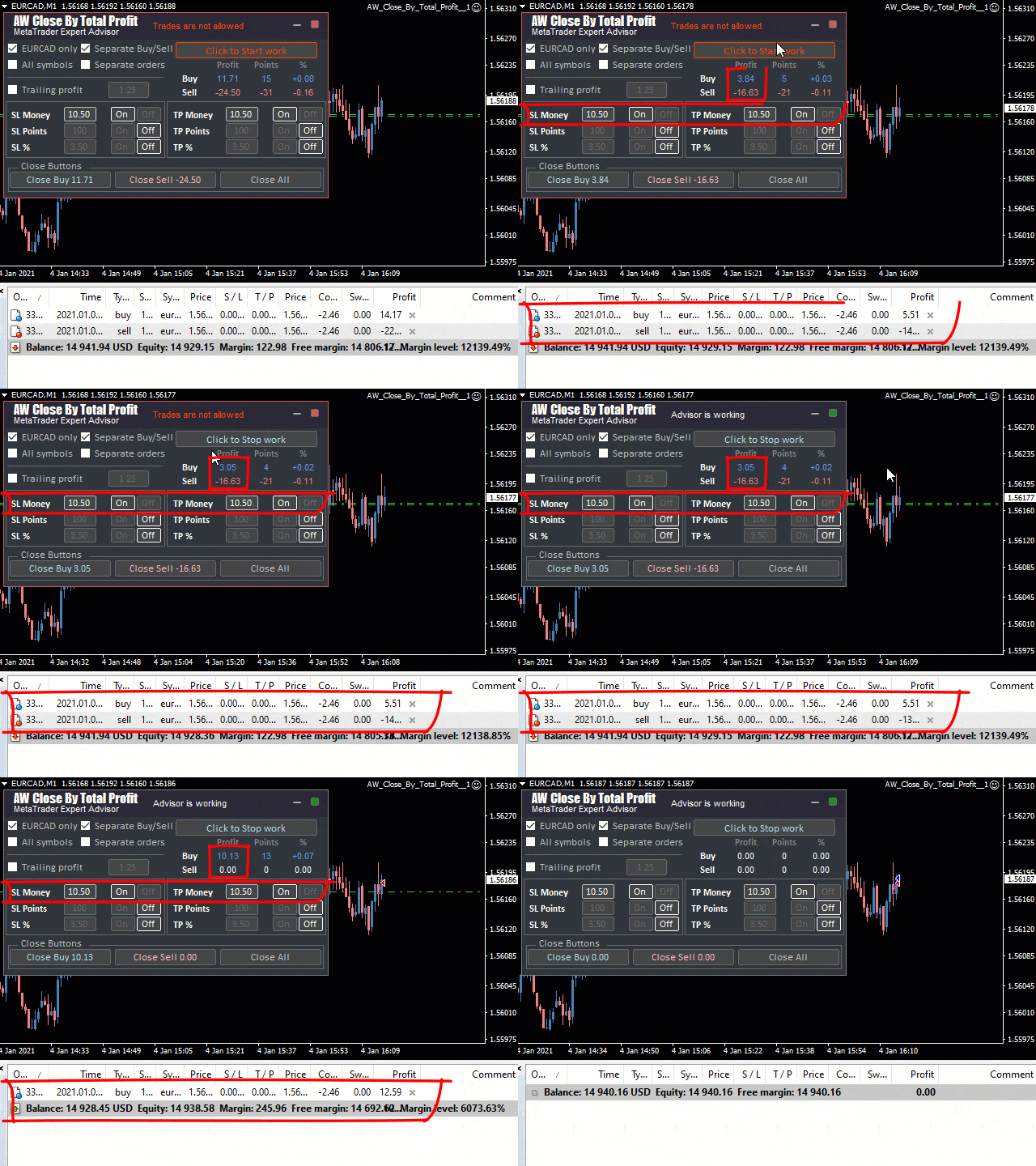
This is a utility for closing orders or baskets of orders for the total profit or loss. Can work multicurrency, can work with orders opened manually. Has additional trailing profit.

Capabilities:

  • Closing an order for the current symbol or for all symbols
  • Closing individual orders or whole baskets of orders
  • Stopping the utility in one click
  • Trailing function for total profit
  • Setting TP and SL in money, in points or as a percentage of the deposit
  • Closing all BUY or SELL orders or closing all orders

MT5 version -> HERE /  Problem solving -> HERE 

Input parameters:

Main settings

Select symbol - Selecting a symbol for order processing:

-Work on all Symbols -   Select the instrument on which the panel is installed to process orders

-Work on current Symbol only - Close panel operation mode for all symbols with positions

Select orders for work - Close orders with whole baskets (all BUY, SELL orders) or work on each order separately

-Separate Byu / Sell baskets - To process the profit of baskets of orders (separately Buy and Sell) to close based on the total profit or loss of the whole basket of orders. If you select the " Use all symbols " parameter in the " Select symbol " variable , you will be able to work simultaneously with all Buy and Sell orders of the direction for all working symbols

-Separate orders - When selected   the system will close positions individually according to the selected conditions for closing

MagicNumbers mode - Process orders of the selected magic number or work on all orders

-Work with all MagicNumbers - When this variable is selected, the panel will process all orders on all symbols

-Work with selected MagicNumber only - When this variable is selected, it is necessary in the " Magic for orders" column   enter the magic number for work

Magic for orders - Field for entering a magic number. In order for the panel to process manual orders, enter "0"

Font size in panel - Font size on the panel

Take Profit settings 

Use Trailing profit

Trailing start in money for baskets

Use TakeProfit in money

Volume of TakeProfit in money

Use TakeProfit in points

Volume of TakeProfit in points

Use TakeProfit in percents

Volume of TakeProfit in percents

Stop Loss settings

Use StopLoss in money

Volume of StopLoss in money

Use StopLoss in points

Volume of StopLoss in points

Use StopLoss in percents

Volume of StopLoss in percents

Notifications settings

Send push notifications - Use closing notifications on the mobile version of the terminal

Send mails - Use sending letters about closing positions by e-mail

Send alerts - Send alerts about closing positions


Note! Trailing - for profit, measured in the currency of the deposit. It works not by one order, but by baskets of orders.

StopLoss, TakeProfit - virtual and not physical, works for all order baskets. i.e. the profit of the entire basket is ...% then it will close


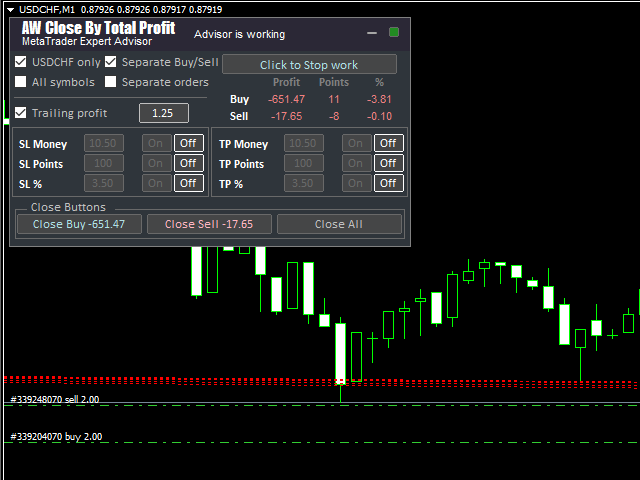
Panel Description:

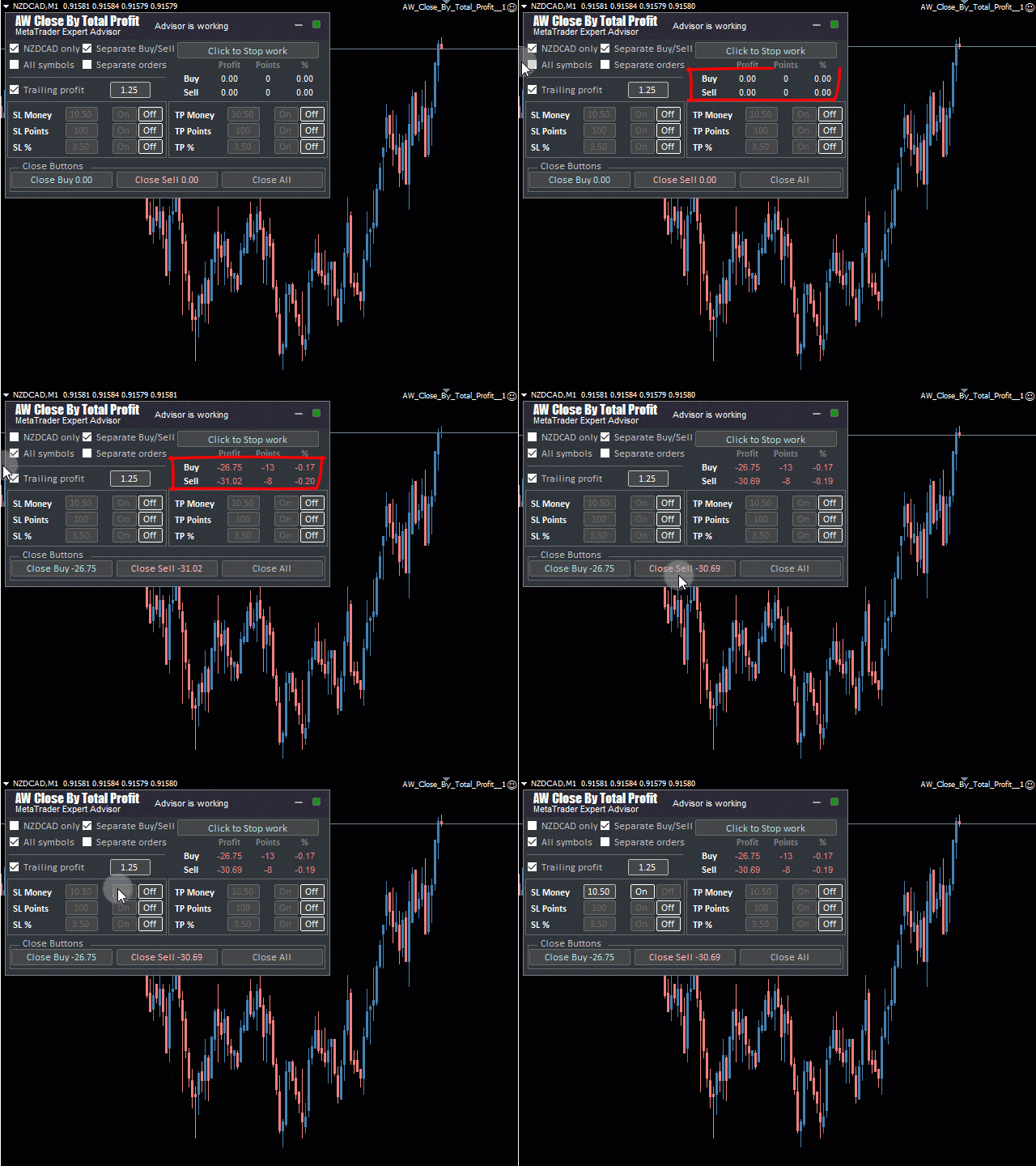
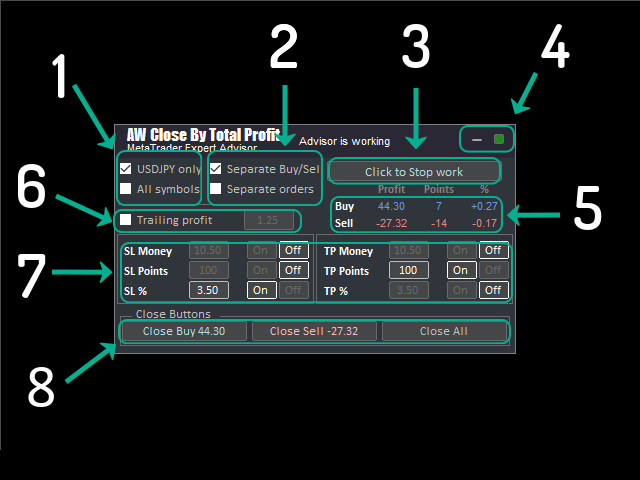
1.Using the "All symbol" or "(current symbol) only" checkboxes you can choose to work only on the current symbol or calculate the total profit or loss for all symbols

2.By selecting the "Separate Buy / Sell" checkbox, you can choose to work with all Buy or Sell order baskets. By selecting the "Separate orders" checkbox then you can work with separate orders. When "Separate orders" is selected, the system will close positions individually for the selected variables for closing. If you work in the "Separate Buy / Sell" mode and in the "Select symbol" variable you have selected the "Use all symbols" parameter, you will be able to work simultaneously with all Buy and Sell orders of the direction for all working symbols

3.The product has a button to stop the panel. By clicking on the "Click to Stop work" button you can stop any work processes of the program

4.In the upper right corner there is a block for minimizing and revealing the panel.

5.Below is a block of information about Buy Sell orders, you can watch the current volume of deals to close (according to the method you have chosen) in money, points or percent

6.Opposite is the Trailing profit settings section

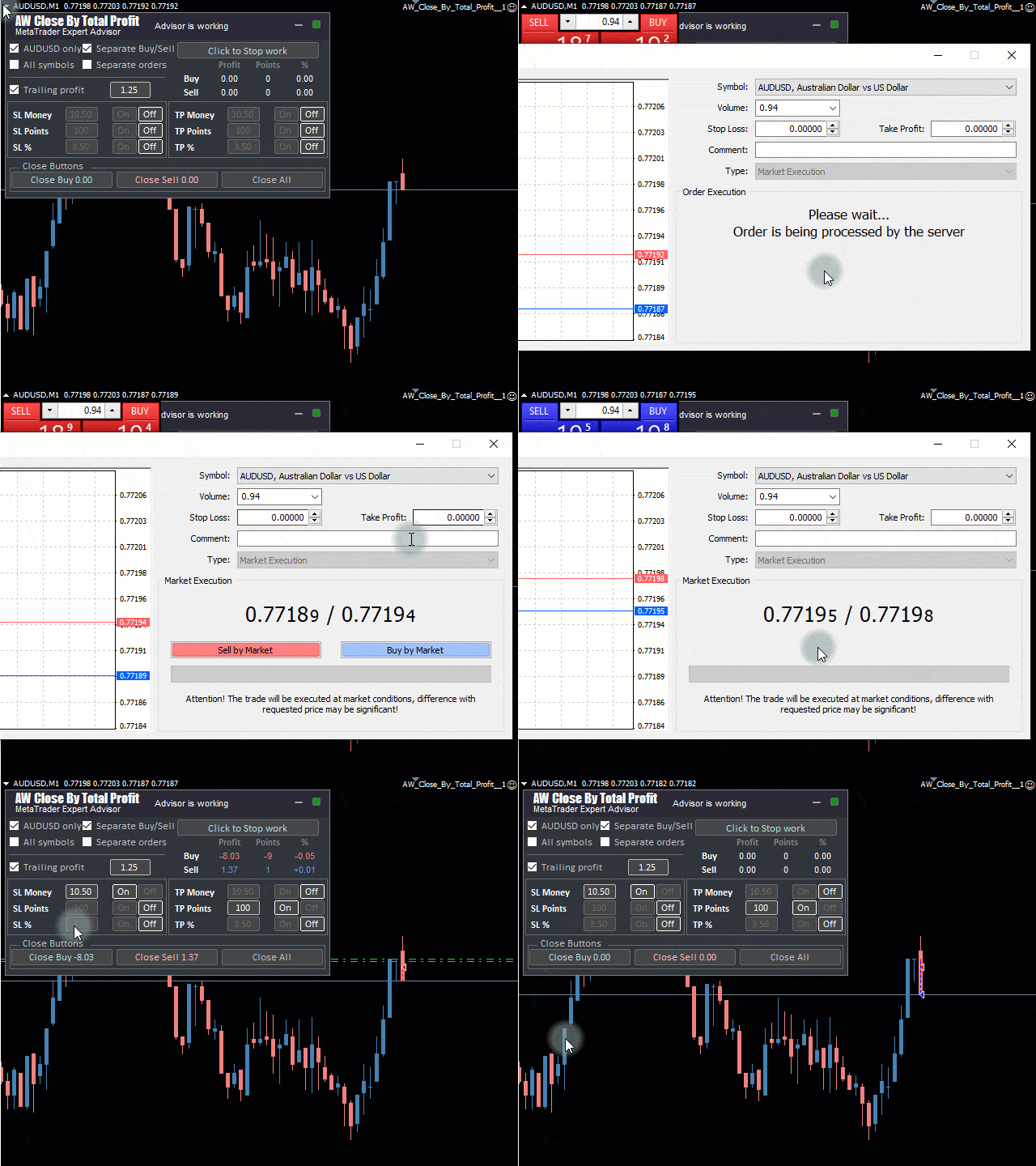
7.StopLoss TakeProfit settings section

8.Closing control unit. Buttons for closing orders of BYU, SELL or all types.


レビュー 2
Wan Suryolaksono
1906
Wan Suryolaksono 2022.10.22 11:28 
 

Exactly what I need as a companion for my good multicurrency EA

おすすめのプロダクト
The Arrow Scalper
Fawwaz Abdulmantaser Salim Albaker
1 (2)
Dear Friend..  I share with you this simple Expert Adviser .. it is full automatic  this Expert Adviser following the trend of the pair you install on or any stocks or indices , it is works like that: - when the trend on H4 chart show a start of up trend the expert will wait till the 15M & 1H charts show an up trend the EA will open a buy order directly , and do the same for down trend and open a sell order the buy or sell  order lot size and take profit and stop loss will measured manually  by
FREE
Details of each condition Type 1. Set no use Hedging Martingale, to open the order by yourself only through the push button. TP and SL follow setting. Set Setting_Hedging =false;     Use_Signal =false;  Type 2. Semi Auto Recovery Zone You have to open the order by yourself only through the push button. If in the wrong direction and Set true on Hedging Martingale, EA will fix the order with the zone system by use Hedging Martingale Set Setting_Hedging =true;     Use_Signal =false;  Type 3. Use
Calmed
Jennifer Afi Azasoo
5 (3)
EA Calmed Gold We have tried to optimise Calmed Expert Advisor  for Gold but works with any other forex pairs and stocks. This expert uses  martingale (optionally) for recovery. Please, backtest for at least 1 year and run a demo for at least one whole month before going live; that way, you will know how the Calmed Expert Advisor behaves across the various markets. Please do not just purchase and start using the EA, as past performance cannot guarantee future results. Backtest results may be di
This E.A is designed to wait for the perfect opportunity to get in the market, take a few trades (low risk) and get out. There is an option to Cut Loss at specific percentage of balance, this should be set to a max of 1% since we scalping. Very cautious EA, can go up to a few days without taking a trade. This should not alarm you, it simply means there currently is no opportunity available. Mainly designed for low spread brokers. Tested Pairs and their settings: EURUSD M1 : Jan 2022 - Dec 2022
EA Calmed Pro Gold Kita wis nyoba ngoptimalake Calmed Expert Advisor kanggo Emas nanging bisa digunakake karo pasangan lan saham forex liyane. Pakar iki nggunakake martingale (opsional) kanggo pemulihan. Mangga, backtest paling sethithik 1 taun lan mbukak demo paling sethithik sak wulan sadurunge urip; kanthi mangkono, sampeyan bakal ngerti carane Calmed Expert Advisor tumindak ing macem-macem pasar. Aja mung tuku lan miwiti nggunakake EA, amarga kinerja kepungkur ora bisa njamin asil mangsa n
Matrix Arrow EA MT4
Juvenille Emperor Limited
5 (8)
マトリックスアローEAMT4 は、 マトリックスアローインジケーターのMT4 シグナルをチャート上のトレードパネルと手動または100%自動でトレードできるユニークなエキスパートアドバイザーです。 マトリックスアローインジケーターMT4 は、初期段階で現在のトレンドを判断し、最大10の標準インジケーターから情報とデータを収集します。平均方向移動指数(ADX) 、 商品チャネルインデックス(CCI) 、 クラシック平研アシキャンドル 、 移動平均 、 移動平均収束発散(MACD) 、 相対活力指数(RVI) 、 相対力指数(RSI) 、 放物線SAR 、 ストキャスティクス 、 ウィリアムズのパーセント範囲 。 すべてのインジケーターが有効な買いまたは売りシグナルを与えると、対応する矢印がチャートに印刷され、次のろうそく/バーの開始時に強い上昇トレンド/下降トレンドを示します。ユーザーは、使用するインジケーターを選択し、各インジケーターのパラメーターを個別に調整できます。 Matrix Arrow EA MT4 を使用すると、チャートのトレードパネルから直接、または100%アルゴリズム取
Rebate Virtual Grid
Sergii Onyshchenko
3 (1)
This is a Virtual Grid EA  with  positive (for traders) slippage. I recommend it for pair EURUSD. EA may be use as Rebate generator. Works ok during news and gaps (with depo >1000$). Working timeframe M1 . Strategy The system does not use regular takeprofits and stop loss. Martingale is not used. EA use unique indicator (for open "Zero"). Monitoring (5EAs) _ https://www.mql5.com/en/signals/508303 Parameters (one of the safest) Rebate Virtual Grid                          MM_Type    0  MM: 0-mi
| Fully-automated Smart Money Concept (ICT) inspired trading solution with multi-strategy capabilities | Built by a grid trader >> for grid traders.  This is MT4 version, click  here  for  Blue CARA MT5  (settings and logics are same in both versions)     Real monitoring signal  -->  Cara Gold Intro Blue CARA EA   ('CARA') - short for  C omprehensive  A lgorithmic R esponsive A dvisor is a next-gen  multi-currency    multi-timeframe  EA base on the widely known (and perhapse most popular) Inn
Make grid trading safe again | Built by a grid trader >> for grid traders.    Walkthrough Video  <== Get Grid Rescue up and running in 5 minutes  This is MT4 version, click  here  for  BlueSwift GridRescue MT5  (settings and logics are same in both versions) BlueSwift Grid Rescue MT4  is a risk management utility  EA  (used together with other grid trading experts) that can help you trade aggressive grid systems with manageable drawdown, therefore reduce substanstially margin call risk as we
News Scalping Executor is an advisor which helps to trade news with high impact and huge volatility. This advisor helps to create two opposite orders with risk management. It moves automatically stop loss level to avoid losses as much as possible by using many different algorithms. It helps to avoid trading the news if spread suddenly becomes very huge. To be profitable with this type of trading you should choose the most volatile types of news such as: GDP, CPI, Unemployment Claims, Interest
This system is very simple.. It uses a martingale grid hedging style strategy by increasing lot sizes and grid levels. The open order step and volume can be both fixed and dynamic. The EA is easily customizable. The EA does not use a stop loss and all positions close when the chart move back from trend and arrive last grid level. Recommended :   pairs : Side way pairs is very good for this system.                                 Time frame : not important.                                Deposit
Bear vs Bull EA Is a automated adviser for daily operation of the FOREX currency market in a volatile and calm market. Suitable for both experienced traders and beginners. It works with any brokers, including American brokers, requiring FIFO to close primarily previously opened transactions. *In order to enable the panel, it is necessary to set the parameter DRAW_INFORMATION = true in the settings; -  Recommendations Before using on real money, test the adviser with minimal risk on a cent trad
Harvest GOLD USES THE TREND WAVE INDICATOR AND IT CAN IDENTIFY THE BEGINNING AND THE END OF A NEW WAVE TREND MOVEMENT. AS AN OSCILLATOR, THE INDICATOR IDENTIFIES THE OVERBOUGHT AND OVERSOLD ZONES. IT WORKS GREAT TO CATCH THE SHORT TERM PRICE REVERSALS AND USES A MARTINGALE STRATEGY TO CLOSE ALL TRADES IN PROFIT. USE DEFAULT SETTINGS ON H1 OR HIGHER TIME FRAME ON ANY PAIR FOR MORE ACCURATE TRADES WHY THIS EA : Smart entries calculated by 3 great strategies The EA can be run on even a $30000
Spd EA
David Binka Kumatse
THE PRODUCT This Spd Expert is an EA to be used on multiple chosen pairs simultaneously. Every order has a TP and an SL, so there is nothing to fear. You just have to be patient as EA trades to grow your account. After purchasing the EA, you can also message me for my optimized settings.    Recommended TimeFrame is 1H TRADE PLAN Consider a recommended minimum starting capital of $100 and an initial lotsize of 0.01 yielding a minimum profit of $20 over 12 months of trading on a single pair. Then
CN Hamster CN Hamsterは完全に自動化されたEAであり、マーティン、加倉戦略を使用せず、BOLLとzigzagの指標に基づいて作成されたEAである。 一般的な推奨事項 最低預金額が100ドルの場合は、maxopenorder=1とともにlotsを0.01に設定することが望ましい。デフォルトはグリニッジ標準時+2です。実行が良好で低点差のブローカーを使用します。価格差が狭く、市場の実行力が強いECNまたはSTPアカウントのみを使用することをお勧めします。低pingのVPSで取引したほうがいいです。ping値は低ければ低いほどいいです。 相互に影響を与えることなく、複数の通貨で動作することができます。それはユーロ対ドルM 5またはポンド対ドルM 5でよりよく働いている。また、任意の通貨ペアを使用することもできます。 入力パラメータ この製品は4ビットと5ビット引用符の両方に適用されます。入力パラメータで小数点以下5桁の形式で値を指定すると、すべての値の小数点以下5桁が自動的に再計算されます。 SL:ストップロス点数 tp:エンドポイント
News Scope EA PRO
Lachezar Krastev
3.9 (10)
WINTER SALE — LIMITED TIME! Buy any of our expert advisors with a huge discount 60 OFF and get News Scope EA PRO as a bonus! For Settings, Instructions and LIVE Results Click Here! News Scope EA PRO is a fully automated trading system which takes much of the work out of trading, leaving you free to do other things! News Scope EA PRO is a very effective and potentially highly profitable strategy for high impact news trading. Usually, when a major news event occurs, the price spikes in one, or bo
Details of each condition Type 1. Set no use Hedging Martingale, to open the order by yourself only through the push button. TP and SL follow setting. Set Setting_Hedging =false; Set Setting_TrailingStop =false; if not use. Type 2. Semi Auto Recovery Zone You have to open the order by yourself only through the push button. If in the wrong direction and Set true on Hedging Martingale, EA will fix the order with the zone system by use Hedging Martingale Set Setting_Hedging =true; Set Setting_Tra
News Hedging Pro  is a unique robot that allows you to trade during the most critical news announcement periods by your predefined strategy. You can preset the strategy to trade, and then it will trade that news automatically when the news comes. News release gives opportunity to have pips since the price usually has big move at that time. Now with this tool, trading news become easier, more flexible and more exciting than ever. No waiting, no confusing anymore. Product Links Fully  Description

エキスパートアドバイザーの有利なポートフォリオへの素晴らしい追加。この戦略は、構築されたレベルを一定期間突破するためのアルゴリズムに基づいています。 EAには固定のStopLossがあり、最小のドローダウンを維持できます。 Tick Data Suiteを使用してすべてのティックでテストされ、可能な限り最も近い実際の取引条件で、ビデオをご覧ください。 最初の10人の購入者の価格$ 75(コメントにレポートを投稿してください) 推奨事項:スプレッドが低く、優れたECNブローカー。 推奨通貨ペアEURUSD。 GBPUSDやUSDJPYなどの他の通貨ペアを使用できます。 コメント内の設定ファイル。 すべての質問については、プライベートメッセージに連絡してください! 喜んでお手伝いさせていただきます!
HedgeRock
Aldo Marco Ronchese
5 (1)
Live trading on YouTube, check my profile news feed. 2 Years no updates .   Trade any pair . pls ask for the manual or download the txt version here MT5 version can be found here  (even if purchasing mql4 version pls backtest on mql5 for accuracy) **HedgeRock**    is a comprehensive and feature-rich trading robot, designed to deliver adaptability and performance across various market conditions. With over four years of meticulous development and optimization, it offers traders a robust solution
HMA Trend Expert
Alexander Fedosov
5 (1)
HMA Trend robot for professional traders works with a set of Hull moving averages( HMA ). Advisor Parameters Use Trade Panel  — Use the visual panel to configure and trade robot. Lot  — Lot size for a market entry. Take Profit(points)  — Take Profit for an open order. Stop Loss(points)  — Stol Loss for an open order. Max Spread(0 - disabled)  — Maximum allowable spread at which you can enter the market. 0 - disabled. Magic number  — The magic number of the robot. EA Comment  — Comments of robot.
A very simple script. It quickly places lines along zero lines and local extremes, greatly facilitating routine work at the beginning of the trading day. The lines on the round prices are placed inside the work screen in a given interval. Extremes are placed within a period defined by the trader, based on data from different timeframes from M15 to MN1 Settings: Extreme lines - switch lines at extremes (true - enabled) Zero lines - switch of lines at zero levels (true - enabled) Distance between
Exotic Bot   is a multi -cream multifunctional adviser working on any time frame and in any market conditions. The robot’s work is taken as a system of averaging with the non -geometric progression of the construction of a trading grid. Built -in protection systems: special filters, spreading, internal restriction of trading time. Building a trading grid, taking into account important internal levels. The ability to configure trading aggressiveness. Work postponed orders with trailing orders. T
Elastic Grid
Aliaksandr Charkes
4.86 (7)
Elastic Grid MT4 is a multi-functional grid Expert Advisor, designed for full or partial automation of various ideas related to grid trading. The EA trades on any timeframe and symbol. It can also trade several symbols with any amount of decimal places. It does not interfere with manual trading and other EAs' operation or any indicators. It allows to adjust its settings on the fly, works only with its own orders displaying all necessary data on them when needed, and for some situations it can be
Riders
Alexandr Nyukhin
5 (1)
GunLines RSI、ボリンジャーバンド指標を使用したグリッド取引システムで、部分的な決済とヘッジポジションを含む合計利益に基づいて決済されます。 シグナル https://www.mql5.com/ru/signals/1525221?source=サイト +プロフィール+販売者 通貨ペア: EURUSD、GBPUSD、EURGBP、AUDCAD、AUDNZD、NZDCAD。 時間枠: M15 アドバイザは、すべてのシンボルを取引するために 1 つのチャートにのみインストールされます ブローカーがサフィックス (CAD.с など) を使用している場合は、設定にサフィックスを入力する必要があります。 設定  固定ロット0.01  リスクロット リスク20  ロット値動的 10000  固定初回デポジット False  MaximumLot=10 最大ロット  ヘッジを許可 - True  取引可能な通貨ペア  ボリンジャーバンド 期間 20  RSI期間 - RSI期間30  最大 RSI 値 - 25  
AdvisorKing   is a multi-currency scalper that uses proprietary trading algorithms. Entering the market is carried out using filters, which allows the trading advisor to get good results during a low-volatility trading session. This system is designed for long-term trading and is suitable for traders who are used to stability and minimal risk. The trading advisor does not contain such dangerous strategies as grid and martingale. For questions about setting up and installing a trading advisor, y
Signal Lock Scalper is a signal-based scalper with locking of unprofitable orders , followed by subsequent transfer to breakeven using profitable orders . The EA trades the trend strategy with the use of original built-in indicator for opening and closing orders. To protect the deposit from unexpected circumstances, the EA provides the ability to either lock all orders when reaching the specified drawdown levels, as well as setting a fixed stop order as an oppositely directed pending order. Ther
Whether you’re a scalper, day trader, or swing trader, this tool gives you total control   directly from your chart. you can get all this features right on your trading chart .   Everything   is   color   coded.   equity and live P&L display in  Green   if   trades in profit   and   red   if   trades in drawdown.   Moveable panel -   double click on clock label and move panel anywhere on screen with it . Displays local time + candle countdown on the chart. Shows Balance, Equity & Daily Profit/
Taranus
Viktor Shpakovskiy
5 (1)
Taranus is a multifunctional EA, a universal assistant to a trader, designed to work under the control of a trader. The EA has a large set of tools and can work: by indicators, by trading levels, by trend lines, by martingale strategy, trade on news. It has: several filters to determine the trend, a multi-level risk management system, money management, virtual stop loss, universal trailing stop, can work with any type of orders. Set files and a guide to the Taranus EA can be found in the "Commen
How the EA works (simple explanation) Trades on   M5   timeframe Uses   H1 timeframe   to analyze global market context Analyzes   2 or 3 timeframes simultaneously On each timeframe: Checks price position relative to one or two Moving Averages Evaluates MA angle and distance between price and MA Entry logic is based on   trend + volatility conditions , not on random signals The full algorithm is illustrated in the screenshots. Recommended usage Symbol:   EURUSD Timeframe:   M5 Trading
このプロダクトを購入した人は以下も購入しています
Local Trade Copier EA MT4
Juvenille Emperor Limited
4.96 (106)
Local Trade Copier EA MT4 による、驚くほど高速な取引コピーを体験してください。1分で簡単にセットアップできるこの取引コピー機は、同じWindowsコンピュータまたはWindows VPS上の複数のMetaTrader端末間で取引をコピーすることができ、0.5秒未満の高速コピースピードを実現します。 初心者であろうとプロのトレーダーであろうと、 Local Trade Copier EA MT4 には、あなたの特定のニーズに合わせてカスタマイズするための幅広いオプションが用意されています。これは、利益の可能性を高めたい人にとって究極のソリューションです。 今すぐ試してみて、これが市場で最も速くて簡単なトレードコピー機である理由を理解してください。 ヒント: デモアカウントで Local Trade Copier EA MT4 デモバージョンをダウンロードして試すことができます: ここ ダウンロードした無料のデモ ファイルを MT4 >> ファイル >> データ フォルダを開く >> MQL4 >> Experts フォルダに貼り付けて、ターミナルを再起動しま
Trade Assistant MT4
Evgeniy Kravchenko
4.42 (192)
取引 ごとのリスクの 計算、新規注文 の 簡単 な 設置、部分的 な 決済機能 を 持 つ 注文管理、 7 種類 のトレーリングストップなど 、便利 な 機能 を 備 えています 。 追加の資料と説明書 インストール手順 - アプリケーションの手順 - デモアカウント用アプリケーションの試用版 ライン機能 チャート上にオープニングライン、ストップロス、テイクプロフィットを表示します。この機能により、新規注文を簡単に設定することができ、注文を出す前にその特徴を確認することができます。   リスク計算 リスク計算機能は、設定されたリスクとストップロス注文のサイズを考慮して、新規注文のボリュームを計算します。ストップロスの大きさを自由に設定できると同時に、設定したリスクを守ることができます。 Lot calc ボタン - リスク 計算 を 有効 / 無効 にします 。 Risk フィールドでは 、必要 なリスクの 値 を 0 から 100 までのパーセンテージまたは 預金通貨 で 設定 します 。 設定」 タブで 、 リスク 計算 の 種類 を 選択 します :「 $ 通貨」、「 % 残
Trade Manager EAへようこそ。これは、取引をより直感的、正確、そして効率的にするために設計された究極の リスク管理ツール です。これは単なるオーダー実行ツールではなく、包括的な取引計画、ポジション管理、リスク管理のためのソリューションです。初心者から上級者、迅速な実行を必要とするスキャルパーまで、Trade Manager EAはあらゆるニーズに対応し、為替、指数、商品、暗号通貨などさまざまな市場で柔軟に対応します。 Trade Manager EAを使用すると、複雑な計算が過去のものになります。市場を分析し、エントリーポイント、ストップロス、テイクプロフィットのレベルをチャート上のラインでマークし、リスクを設定するだけで、Trade Managerが最適なポジションサイズを即座に計算し、SLとTPをピップ、ポイント、口座通貨でリアルタイムに表示します。すべての取引が簡単かつ効果的に管理されます。 主な機能: ポジションサイズ計算機 :定義されたリスクに基づいて取引サイズを瞬時に決定します。 簡単な取引計画 :エントリー、ストップロス、テイクプロフィットを設定するためのド
Exp COPYLOT CLIENT for MT4
Vladislav Andruschenko
4.69 (65)
MetaTrader4のコピー機を取引します。     それは任意の口座からの外国為替取引、ポジション、注文をコピーします。 それは最高の貿易コピー機の1つです     MT4 - MT4、MT5 - MT4     のために     COPYLOT MT4     バージョン(または     MT4 - MT5  MT5 - MT5     のために     COPYLOT MT5     バージョン)。 MT5のバージョン 完全な説明   +DEMO +PDF 購入する方法 インストールする方法     ログファイルの取得方法     テストと最適化の方法     Expforex のすべての製品 のコピー機 バージョン       MetaTrader 5 ターミナル(   МТ5 - МТ5、МТ4 - МТ5   )-   コピーロットクライアントMT5 独自のコピーアルゴリズムにより、すべての取引がマスターアカウントからクライアントアカウントに正確にコピーされます。 また、動作速度が速いことでも知られています。タフなエラー処理。 強力な機能セット。 プログラムは、複数
Copy Cat More Trade Copier MT4 (コピー猫MT4) は単なるローカル取引コピーツールではなく、現代の取引課題に対応するために設計された完全なリスク管理と実行フレームワークです。Propファームのチャレンジから個人の資産管理まで、強力な実行力、資金保護、柔軟な設定、高度な取引処理を組み合わせ、あらゆる状況に適応します。 このコピーツールは Master(送信側) と Slave(受信側) の両モードで動作し、成行注文や指値注文のリアルタイム同期、取引修正、部分決済、Close By 操作をサポートします。デモ口座・リアル口座の両方に対応し、取引用パスワードまたは投資家パスワードでも利用可能です。Persistent Trade Memory 技術により、EA・ターミナル・VPS が再起動しても復元可能です。複数の Master と Slave を同時に管理でき、ブローカー間の違いはプレフィックス/サフィックスの自動調整やシンボルマッピングで処理されます。 マニュアル/設定: Copy Cat Trading Copier マニュアル Copy Cat Mo
The product will copy all telegram signal to MT4   ( which you are member  ) , also it can work as remote copier.  Easy to set up, copy order instant, can work with almost signal formats, image signal, s upport to translate other language to English Work with all type of channel or group, even channel have "Restrict Saving Content", work with  multi channel, multi MT5 Work as remote copier: with signal have ticket number, it will copy exactly via ticket number. Support to backtest signal. How to
Trade copier MT4
Alfiya Fazylova
4.58 (33)
Trade Copierは、取引口座間の取引をコピーして同期するように設計された専門的なユーティリティです。 コピーは、同じコンピューターまたはvps にインストールされている、サプライヤーのアカウント/端末から受信者のアカウント/端末に行われます。 購入する前に、デモ アカウントでデモ バージョンをテストできます。 デモ版 こちら 。 詳細な説明は こちら 。 主な機能と利点: MT5ネッティングアカウントを含む、MT4> MT4、MT4> MT5、MT5> MT4のコピーをサポートします。 高いコピー速度(0.5秒未満)。 ベンダーモードと受信者モードは同じ製品内に実装されています。 チャートから直接リアルタイムでコピーを制御できる、簡単で直感的なインターフェイス。 接続が切断されたり、端末が再起動されたりしても、設定と位置が失われることはありません。 コピーするシンボルを選択できます。また、受信者のシンボルを置き換えることもできます(例:EURUSD> USDJPY)。 バックコピーをサポートします。 特定の注文のみのコピーを有効にする機能。 取引開始価格の最大差と最大遅延時間を
--------------Welcome to use [MQL5 Signal Analyze Master]------------------  Function: Draw order tracks of MQL5 MT4 and MT5 signal on MT4 chart. [Using guide] 1.Use it as Experts. 2.Download history record from MQL5 signal(MT4 signal or MT5 signal).  3.Paste history record file below "MQL4/Files/" 4.Load [Signal Analyze Master] on the symbol chart what you want to analyze. 5.Paste the history record file name to parameter 'FileName' 6.Select  SignalType  match the history you download on MT4
THIS EA IS A SEMI-AUTO EA, IT NEEDS USER INPUT. Manual & Test Version Please TEST this product before   BUYING  and watch my video about it. Contact me for user support or bug reports, or if you want the MT5 version! MT5 Version I do not guarantee any profits or financial success using this EA. With this Expert Advisor, you can: Implement your own   Zone Recovery   strategy to capitalize on trending markets. Create   Grid   trading strategies, to profit from ranging markets. Place orders easil
Tired of complex order placement and manual calculations? Trade Dashboard is your solution. With its user-friendly interface, placing orders becomes effortless, by a single click, you can open trades, set stop loss and take profit levels, manage trade lot size, and calculate risk to reward ratios, allowing you to only focus on your strategy. Say goodbye to manual calculations and streamline your trading experience with Trade Dashboard. Download  Demo Version  right now. You can find  Details of
Trading History - A program for trading and money management on the history of quotes in stratagy tester. It can work with pending and immediate orders, and is equipped with trailing stop, breakeven and take profit functions. Very good for training and testing different strategies. Manual (Be sure to read before purchasing) Advantages 1. Allows you to test any trading strategy in the shortest possible time 2. An excellent simulator for trading training. You can gain months of trading experience
MT4 to Telegram Signal Provider は使いやすく、完全にカスタマイズ可能なツールで、Telegramに信号を送信し、あなたのアカウントを信号提供者に変えることができます。 メッセージのフォーマットは 完全にカスタマイズ可能です! しかし、簡単な使用のために、あらかじめ定義されたテンプレートを選択し、メッセージの特定の部分を有効または無効にすることもできます。 [ デモ ]   [ マニュアル ] [ MT5バージョン ] [ Discordバージョン ] [ Telegramチャンネル ]  New: [ Telegram To MT5 ] セットアップ ステップバイステップの ユーザーガイド が利用可能です。 Telegram APIの知識は必要ありません。開発者が必要なものをすべて提供します。 主要機能 購読者に送信される注文の詳細をカスタマイズする機能 例えばブロンズ、シルバー、ゴールドなど、階層型のサブスクリプションモデルを作成できます。ゴールドサブスクリプションでは、すべての信号が得られますなど。 ID、シンボル、またはコメントによる注文のフ
MT4 to Discord Signal Provider は、Discord へ直接トレーディングシグナルを送信するために設計された、使いやすく完全にカスタマイズ可能なユーティリティです。このツールは、あなたのトレーディングアカウントを効率的なシグナルプロバイダーに変えます。 スタイルに合わせてメッセージフォーマットをカスタマイズ!利便性を考え、事前にデザインされたテンプレートから選択し、メッセージのどの要素を含めるか除外するかを選択できます。 [ デモ ] [ マニュアル ] [ MT5 バージョン ] [ Telegram バージョン ]  New: [ Telegram To MT5 ] セットアップ 簡単なセットアップのために、私たちの詳細な ユーザーガイド に従ってください。 Discord API の事前知識は必要ありません。必要なツールはすべて提供されます。 主な特徴 購読者の更新のための注文詳細をカスタマイズ。 ブロンズ、シルバー、ゴールドなど、各レベルで異なるシグナルアクセスを提供する階層的サブスクリプションモデルを実装。 注文が実行されたチャートのスクリーン
Local Trade Copier EA は、MAMまたはPAMMアカウントを必要とせずに、外部ソースからのトレードシグナルを実行する必要がある、または同時に複数のアカウントを管理する必要がある個々のトレーダーまたはアカウントマネージャー向けのソリューションです。最大8つのマスターアカウントから無制限のスレーブアカウントにコピーします [ インストールガイド | アップデートガイド | トラブルシューティング | FAQ | すべての製品 ] 100%セルフホスト インストールと使用が簡単 インストーラー、構成ファイル、サーバー、メモリパイプ、DLLは使用されていません EAを永久に使用するための1000回のアクティベーション ローカル実行、ネットワーク遅延なし それはあなたがこれまでに必要とするすべての機能を実装します: 最大8つのマスターアカウントと無制限のスレーブアカウント すべてのブローカーおよびDD / NDD / ECN / STP実行で動作します 異なる口座通貨の口座で動作します ライブアカウントとデモアカウントの間で区別なく機能します マスターアカウントとスレーブア
Riskless Pyramid
Snapdragon Systems Ltd
5 (1)
Introduction This powerful MT4 trade mangement EA offers a way potentially to aggressively multiply trade profits in a riskfree manner. Once a trade has been entered with a defined stoploss and take profit target then the EA will add three pyramid add-on trades in order to increase the overall level of profit. The user sets the total combined profit target to be gained if everything works out. This can be specified either as a multiple of the original trade profit or as a total dollar amount. Fo
TelegramからMT4へ: 究極のシグナルコピーソリューション Telegram to MT4 は、DLLを必要とせず、TelegramのチャンネルやチャットからMetaTrader 4プラットフォームに取引シグナルを直接コピーできる最先端のユーティリティです。この堅牢なソリューションは、比類のない精度とカスタマイズオプションにより、シグナルのシームレスな実行を保証し、時間を節約し、効率性を向上させます。 [ Instructions and DEMO ] 主な特徴 直接的なTelegram API統合 電話番号とセキュアコードで認証します。 ユーザーフレンドリーな EXE ブリッジを使用して、チャット ID を簡単に取得および管理します。 複数のチャネル/チャットを追加、削除、更新して、同時に信号をコピーします。 高度なフィルターによる信号解析 カスタム例外語 (例: 「レポート」、「概要」) を含む不要な信号をスキップします。 柔軟な SL および TP 形式 (価格、ピップ、ポイント) をサポートします。 シグナルが価格ではなくポイントを指定する場合、エントリ ポイントを自動
Comprehensive on chart trade panel with the unique ability to be controllable from mobile as well. Plus has a library of downloadable configuration, e.g. exit rules, extra panel buttons, pending order setup and more. Please see our product video. Works with all symbols not just currency pairs. Features On chart panel plus controllable from free app for Windows, iPhone and Android Built-in script engine with library of downloadable configuration, e.g. add 'Close All Trades in Profit' button, exit
Seconds Chart — MetaTrader 4で秒足チャートを作成するユニークなツールです。 Seconds Chart を使用すると、秒単位のタイムフレームでチャートを構築でき、標準的な分足や時間足チャートでは得られない柔軟性と分析精度を実現します。例えば、 S15 は15秒足を表します。あらゆるインジケーター、エキスパートアドバイザー、スクリプトを利用可能で、標準的なチャートと同様に便利に操作できます。 標準的なツールとは異なり、 Seconds Chart は超短期のタイムフレームでも高い精度と遅延なく作業できるように設計されています。 Seconds Chartの利点 1秒から900秒 までのタイムフレームをサポート。 瞬時の読み込み MT5ターミナルからのティックデータベースのインポートにより、過去データを即時利用可能。 MT5ターミナルで「 Tick Database 」ユーティリティを最初に起動する必要があります。 リアルタイムでデータが更新され、 遅延やラグなし 。 複数の秒足チャートを同時に作成可能。 Seconds Chartが最適な用途 スキャルピング
TradePanel MT4
Alfiya Fazylova
4.82 (91)
Trade Panel は、多機能の取引アシスタントです。このアプリケーションには手動取引用の 50 を超える取引機能が含まれており、ほとんどの取引操作を自動化できます。 注意、アプリケーションはストラテジー テスターでは動作しません。購入する前に、デモアカウントでデモ版をテストできます。デモ版 ここ 。 完全な手順 こちら 。 取引。 ワンクリックで取引操作を実行できます: 自動リスク計算を使用して未決の注文とポジションをオープンします。 ワンクリックで複数の注文とポジションをオープンします。 注文グリッドを開きます。 未決の注文とポジションをグループごとにクローズします。 ポジション反転 (買いを閉じて売りを開く、または売りを閉じて買いを開く)。 ポジションをロックします(買いポジションと売りポジションの量を均等にする追加のポジションをオープンします)。 ワンクリックですべてのポジションを部分的にクローズします。 すべてのポジションのテイクプロフィットとストップロスを同じ価格レベルに設定します。 すべてのポジションのストップロスをポジションの損益分岐点レベルに設定します。 注文とポ
現在20%オフ! 初心者やエキスパートトレーダーのためのベストソリューション! トレードを見直すことは、成功するトレーダーへの第一歩です。 成功するトレーダーは、定期的に自分の取引パフォーマンスを見直す習慣があります。 このツールは、まさにそれを行うのに役立ちます。 このツールであなたの取引を追跡することで、レビュープロセスが最も効果的になります。 手動取引またはEAの取引を分析します。 3つの一般的なビューを使用してください。ボタンをクリックするだけで切り替えることができます。 クローズド・トレード オープントレード クローズ+オープントレード すべての取引は、各シンボルごとに表示されます。他のシンボルに移動するには、シンボル名のボタンをクリックします。 新規にオープンした取引とクローズした取引にはAlertを使用します。オープントレードを監視するのに非常に便利です。EA、シグナル、または手動で開始されるかもしれません。 利益またはPIPsの結果を切り替えるには、ボタンをクリックするだけです。 利益 PIPs 次に、3つの分析タイプを切り替えます。ボタンを
このユーティリティを使用すると、マスター設定のある端末からスレーブ設定の他の端末にトランザクションをコピーできます 同時に、コピーするペアを選択し、いくつかのパラメータに従ってコピーされた順序のサイズを設定することができます。 ドローダウン損失制限を設定するか、収益性の高い取引のみをコピーします あなたは、他のブローカーのMT4またはMT5にMT4またはMT5から取引をコピーすることができます これで、MT4で作業している専門家の信号をMT5端末にコピーするか、またはバックすることは難しくありません コピーマスターを使用して、他のシグナル、Expert Advisors、手動取引から任意の取引をコピーします。  設定を使用して、ロットサイズ、取引方向を変更し、収益性の高い取引のみをコピーし、預金を保存するための値を設定することができます  コピーマスターは、一つのアカウント上の異なるサブスクリプションシグナルのいくつかの戦略を組み合わせることができます 取引をMT4にコピーするには、コピーマスター MT5バージョンが必要です。 https://www.mql5.com
Unlimited Trade Copier Pro is a tool to copy trade remotely to multiple MT4, MT5 and cTrader accounts at different computers/locations over internet. This is an ideal solution for you if you are a signal provider and want to copy your trades to other receivers globally on your own rules. One provider can copy trades to multiple receivers and one receiver can get trade from multiple providers as well. The provider can even set the subscription expiry for each receiver, so that receiver will not b
コピー機->便利で高速なインターフェースインタラクション、ユーザーはすぐに使用できます     ->>>> WindowsコンピュータまたはVPS Windowsでの使用を推奨 基本機能: コピートレードの通常のインタラクション速度は0.5秒未満です。 シグナルソースを自動的に検出し、シグナルソースアカウントのリストを表示します シンボルを自動的に一致させます。異なるプラットフォームでよく使用される取引シンボルの95%(異なるサフィックスなどの特別なケース)が自動的に一致し、基本的に手動設定は必要なく、シンボルマッピングテーブルをダブルクリックして対応するシンボルを変更できます。(マッピングテーブルにはクイック検索シンボル機能があります) 4つのロット計算モード(1. 乗数 2. 固定ロット 3. 適応リスク 4. シグナル 適応リスク ) 特別ロットモード: ストップロス資本リスクに基づいてロットサイズを計算できます (ストップロスが小さすぎる場合や、計算されたロットサイズが大きすぎる場合がありますので、注意して使用してください) 複数のプラットフォーム、複数の信号源(マスター)、複
EASY Insight AIO – スマートで手間いらずな取引のオールインワンソリューション 概要 数秒で市場全体——FX、ゴールド、暗号資産、指数、さらには株式まで——を、手作業のチャート確認や複雑なセットアップ・インジケーター導入なしにスキャンできたらどうでしょうか? EASY Insight AIO はAIトレードのための究極のプラグ&プレイ型エクスポートツールです。市場全体のスナップショットを、クリーンなCSVファイルで一括出力。ChatGPT、Claude、Gemini、Perplexityなど、さまざまなAIプラットフォームで即座に解析できます。 ウィンドウの切り替えやグラフのごちゃごちゃしたオーバーレイはもう不要。自動エクスポートされる純粋で構造化されたインサイトだけで、無駄なチャート監視に悩まされず、スマートなデータ主導の判断に集中できます。 なぜEASY Insight AIOなのか? 本当のオールインワン • セットアップ不要、インジケーターのインストール不要、チャートへのオーバーレイ不要。インストールして起動し、エクスポートするだけです。 マルチアセット対
Exp Averager
Vladislav Andruschenko
4.82 (22)
Exp-Averager は、 平均化取引を開始することで、特定のドローダウンを受けた取引を平均化するように設計されています。 アドバイザーは、現在のトレンドに沿って、または逆に新しいポジションを開くことができます。 一連のポジションに適用されるスマート トレーリング ストップ機能も含まれています。 アドバイザはポジションのロットサイズを増減できます。 これは、損失ポジションを平均価格に近づけるために広く使用されている戦略です。 MT5のバージョン 完全な説明 +DEMO +PDF 購入する方法 インストールする方法     ログファイルの取得方法     テストと最適化の方法     Expforex のすべての製品 リンク TickSniper スキャルパー の平均化システムの例 平均化機能を備えたユニバーサル取引アドバイザー The X Expert Advisor は、チャートが関連付けられている通貨ペアで動作します。 たとえば、EURUSD の平均化を有効にするには、EURUSD チャートを開いて Expert Advisor を実行します。 注記 このシステムは
Account Protector Metatrader 4
Emmanuel Lovski Ijeawele Maduagwuna
Account Protector Meta Trader 4 This utility prevents risk of ruin per trading cycle.  Retail forex trading accounts are designed with   stop out levels   that make it impossible to quickly restore lost trading capital   (to initial levels)   in the event of a human or algorithm trader  " blowing"   an account. This hampers the efforts of a trader who after growing an account investment to a multiple of its initial value, suddenly suffers irreparable loss because of several trade entry mishaps.
MT4/MT5 Dual Copier Pro: Skyrocket Your Trading Success with Seamless Precision! Youtube Demonstration: https://youtu.be/auW00CG386o?si=Du2axdoBzTmUJ3yp Unlock the power of automated trade replication with Dual Copier Pro, the ultimate Expert Advisor (EA) designed to revolutionize your trading experience on MetaTrader 4 and MetaTrader 5. Whether you are a seasoned trader, a hedge fund manager, or a prop firm guru, this robust, feature-packed tool ensures your trades are copied with lightning-fa
EchoTrade Telegram to MT5 Copier Seamless, Instant, and Reliable Signal Copying - Direct from Telegram to MetaTrader 4! The product does not run in the strategy tester but you can get free trial version   here  for testing before purchase. Tired of manually executing trades from Telegram signals? EchoTrade automates the process, instantly copying trades from any Telegram channel or group directly into your MT5 account—accurately, efficiently, and without delay. Key Features: Universal Compatib
News Filter EA: Advanced Algo Trading Assistant News Filter EA is an advanced algo trading assistant designed to enhance your trading experience. By using the   News Filter EA , you can integrate a Forex economic news filter into your existing expert advisor, even if you do not have access to its source code. In addition to the news filter, you can also specify   trading days   and   hours   for your expert. The News Filter EA also includes   risk management   and   equity protection   features
Strategy Builder offers an incredible amount of functionality. It combines a trade panel with configurable automation (covert indicators into an EA), real-time statistics (profit & draw down) plus automatic optimization of SL, TP/exit, trading hours, indicator inputs. Multiple indicators can be combined into an single alert/trade signal and can include custom indicators, even if just have ex4 file or purchased from Market. The system is easily configured via a CONFIG button and associated pop-up
作者のその他のプロダクト
AW Recovery EA MT5
AW Trading Software Limited
4.18 (40)
Expert Advisor は、不採算ポジションを回復するために設計されたシステムです。 著者のアルゴリズムは、負けポジションをロックし、それを多くの別々の部分に分割し、それぞれを別々に決済します。簡単なセットアップ、ドローダウンの場合のローンチ遅延、ロック、他の Expert Advisor の無効化、トレンド フィルタリングによる平均化、負けポジションの部分決済が 1 つのツールに組み込まれています。 グループ全体でのみ注文をクローズするグリッド戦略とは対照的に、より低い預金負荷で損失を減らすことができ、損失をより安全に処理できるようにするのは、部分的に損失をクローズすることです。 注文が復元される方法: 1 EA は、選択した商品の他のウィンドウを閉じて、不採算の EA をオフにします (オプション)。 2 EA は、処理されたすべての注文のテイクプロフィットとストップロスのレベルをリセットし、対応する識別子を持つ保留中の注文を削除します。 3 EA は、利益を利用して不採算注文の一部をカバーし、総ポジション量を減らすために、すべての処理された採算性のある注文をクローズします
AW Recovery EA
AW Trading Software Limited
4.35 (85)
Expert Advisor は、不採算ポジションを回復するために設計されたシステムです。 著者のアルゴリズムは、負けポジションをロックし、それを多くの別々の部分に分割し、それぞれを別々に決済します。簡単なセットアップ、ドローダウンの場合のローンチ遅延、ロック、他の Expert Advisor の無効化、トレンド フィルタリングによる平均化、負けポジションの部分決済が 1 つのツールに組み込まれています。 グループ全体でのみ注文をクローズするグリッド戦略とは対照的に、より低い預金負荷で損失を減らすことができ、損失をより安全に処理できるようにするのは、部分的に損失をクローズすることです。 注文が復元される方法: 1 EA は、選択した商品の他のウィンドウを閉じて、不採算の EA をオフにします (オプション)。 2 EA は、処理されたすべての注文のテイクプロフィットとストップロスのレベルをリセットし、対応する識別子を持つ保留中の注文を削除します。 3 EA は、利益を利用して不採算注文の一部をカバーし、総ポジション量を減らすために、すべての処理された採算性のある注文をクローズします
AW Swing Trading EA
AW Trading Software Limited
5 (1)
修正価格変動のスイングトレードのための高度なツール。継続方向のトレンドロールバックに作用し、必要な修正のサイズは、商品の現在のボラティリティによって、またはトレーダーが手動で決定します。現在のトレンドに沿って修正を検出した後、EAはシグナルが修正を完了してトレンドを継続するのを待ち、その後ポジションを開きます。 アドバイザの仕組みに関する説明->   こちら /  MT5 version ->  HERE 利点: 内蔵オートロット 注文開始のシグナルのカスタマイズ 手動注文を追加する機能を備えた完全に自動化された取引システム トレンドフィルタリング バスケットの動的ピッチ さまざまな種類の注文アニメーション ビルトインオーバーラップ すべての種類の通知 ボラティリティに基づく動的リトレースメントサイズ。 入力設定: 主な設定 最初の注文のサイズ-最初の注文を開くためのボリューム 自動ロット計算を有効にする-自動ロットを有効にする 0.01ロットあたりのオートロットデポジット-オートロット使用時の0.01ロットあたりのデポジット量 SIGNAL-操作用の信号を設定する エントリの最小ス
AW Double Grids MT5
AW Trading Software Limited
4.44 (9)
アドバイザー AW Double Grids MT5は、情報取引パネルと簡単なセットアップを備えた、アグレッシブで完全に自動化されたグリッド アドバイザーです。この戦略は、同時双方向作業で構成され、一方向のボリュームを増やします。組み込みの自動ロット計算、ポジション ボリュームの増加のさまざまなバリエーション、およびその他の機能が実装されています。 手順 ->  こちら  /  問題解決 ->   こちら / MT4 バージョン ->   こちら アドバイザーの取引方法: AW Double Grids は、反対方向の注文のペアを使用して双方向の取引を実行します。 AW Double Grids は、 反対方向の 2 つの注文を開くことで取引を開始します。利益のある注文をクローズした後、アドバイザーは再度 2 つの注文を開き、開いている方向のボリュームを増やします。開いている注文がある場合、アドバイザーは設定に応じて TakeProfit をポイント単位で変更できます。TakeProfit は動的または固定にすることができます。 入力パラメータ: メイン設定 Size_of_the
AW Trend Predictor EA MT5
AW Trading Software Limited
5 (2)
AWトレンドプレディクターEA-トレンドインジケーターシグナルAWトレンドプレディクターを使用して取引するエキスパートアドバイザー。インジケーター戦略TakeProfitおよびStopLossを使用します。マルチタイムフレームフィルタリングを使用できます。インジケーターによって計算された固定のStopLossまたはStopLossがあります。時間ベースの作業と平均化は機能的に可能です。 指示と説明->   ここ /MT4バージョン->   ここ 利点: 現在のボラティリティに基づいてインジケーターによって計算された固定StopLossまたは動的StopLossを使用します 時間通りに働き、滑りと最大の広がりを制限する機能を持っています あらゆる種類の取引商品で動作します 手動で開いた位置の追跡に適しています 任意の時間枠で動作します。M15以上の時間枠で動作することをお勧めします より高い時間枠または長期間のインジケーターによってトレンドをフィルタリングする機能が含まれています オプションで平均化を使用できます 入力設定: MAIN SETTINGS Success Rate -
AW Classic MACD EA
AW Trading Software Limited
3.5 (4)
完全に自動化された取引システム。古典的なインジケーターがシグナルとして使用されます     MACD   。トレンドインジケーターとオシレーターを組み合わせてエントリーポイントを検出します。平均化、最初と最後のバスケット注文を閉じる機能、および自動ロット計算の機能を使用します。高度なダッシュボードと3種類の通知があります。 Problem solving ->   HERE  / MT5 version ->  HERE   /   Instruction  ->   HERE   利点: 完全に自動化された取引システム 簡単なセットアップと直感的なパネルインターフェース キャンドルごとに1つの注文のみを開く機能 内蔵の自動ロット計算 最初と最後のバスケット注文を閉じるための組み込みシステム 通知の3つのタイプ:プッシュ、電子メール、アラート ストラテジー: EAは、インジケーターからシグナルを受信するとポジションを開きます。 -ゼロレベル:「0」マークの速いラインが下から上に交差するとき-買いシグナル、買い注文を開きます。上から下に「0」マークを横切るとき-売りの合図、SELL注
AW Classic MACD EA mt5
AW Trading Software Limited
3.33 (3)
完全に自動化された取引システム。クラシックインジケーターはシグナルとして使用されます     MACD   。トレンドインジケーターとオシレーターを組み合わせてエントリーポイントを検出します。これは、平均化、バスケットの最初と最後の注文を閉じる機能、および自動ロット計算の機能を使用します。高度な情報パネルと3種類の通知があります。 Problem solving ->  HERE  / MT4 version ->  HERE   / Instruction  ->   HERE   利点: 完全に自動化された取引システム 簡単なセットアップと直感的なパネルインターフェース キャンドルごとに1つの注文のみを開く機能 内蔵の自動ロット計算 バスケットの最初と最後の注文を閉じるための組み込みシステム 通知の3つのタイプ:プッシュ、電子メール、アラート ストラテジー: インジケーターからシグナルを受信すると、EAはポジションをオープンします。 -ゼロレベル:下から上にマーク「0」の速いラインを横切るとき-購入するシグナル、購入注文を開きます。マーク「0」を上から下に横切ると、売りの合図と
AW Trend Predictor MT5
AW Trading Software Limited
4.76 (54)
1 つのシステムでのトレンド レベルとブレイクダウン レベルの組み合わせ。高度なインジケーター アルゴリズムは、市場のノイズをフィルター処理し、トレンド、エントリー ポイント、および可能なエグジット レベルを決定します。インジケーターシグナルは統計モジュールに記録されるため、最適なツールを選択してシグナル履歴の有効性を示すことができます。この指標は、テイクプロフィットとストップロスのマークを計算します。 マニュアルと説明書 ->   ここ / MT4 バージョン ->   ここ インジケーターで取引する方法: Trend Predictor での取引は、たった 3 つの簡単なステップです。 ステップ 1 - ポジションを開く 70% 以上の成功率で買いシグナルが受信されました ステップ 2 - ストップロスの決定 逆信号でトランクを選択 ステップ 3 - テイクプロフィット戦略の定義 戦略 1: TP1 に到達したらポジション全体をクローズする 戦略 2: TP1 に達した時点でポジションの 50% をクローズし、TP2 に達した時点で残りの 50% をクローズします。 戦略 3:
AW Grids Maker MT5
AW Trading Software Limited
4.33 (3)
AW_Grids_Makerは、保留注文からグリッドを構築するために使用されます。このユーティリティは汎用性が高く、柔軟な設定と直感的なパネルインターフェースを備えています。このプログラムは、必要なステップでSTOP注文とLIMIT注文からネットワークを構築し、ポジションボリューム乗数を使用します。 MT4版は こちら / 問題解決は こちら 利点: すべてのタイプの保留注文を使用します。 シンプルで柔軟な構成。 優れたデザインと多機能を備えたユーティリティ パネル。 よく考えられた情報モジュール 作品の特徴: ピラミッディング、クラシック平均化、マーチンゲールに適しています。 グリッドの開始、注文の追跡、終了を自動化します。 これは、取引システムの不可欠な部分になることも、独立した戦略になることもできます。 調整可能な距離と取引量増加係数を備えた、あらゆるタイプの注文のネットワークを構築します。 パネルの詳細な説明: トレーダーは、「Open_Buy」ボタンを使用して、保留中の買い指値注文と買い逆指値注文を開くことができます。 保留中の売りストップ注文と売りリミット注文を開くには
AW Double Grids EA
AW Trading Software Limited
4.5 (8)
アドバイザー AW Double Grids MT4は、情報取引パネルと簡単なセットアップを備えた、アグレッシブで完全に自動化されたグリッド アドバイザーです。この戦略は、同時双方向作業で構成され、一方向のボリュームを増やします。組み込みの自動ロット計算、ポジション ボリュームの増加のさまざまなバリエーション、およびその他の機能が実装されています。 手順 ->  こちら  /  問題解決 ->   こちら / MT5 バージョン ->   こちら アドバイザーの取引方法: AW Double Grids は、反対方向の注文のペアを使用して双方向の取引を実行します。 AW Double Grids は、 反対方向の 2 つの注文を開くことで取引を開始します。利益のある注文をクローズした後、アドバイザーは再度 2 つの注文を開き、開いている方向のボリュームを増やします。開いている注文がある場合、アドバイザーは設定に応じて TakeProfit をポイント単位で変更できます。TakeProfit は動的または固定にすることができます。 入力パラメータ: メイン設定 Size_of_the
AW RSI based EA
AW Trading Software Limited
5 (4)
EA は、売られすぎまたは買われすぎの状態からの価格リターンで取引し、RSI オシレーターからシグナルを受信するとポジションを開きます。システムには多くのシナリオと柔軟な構成があります。平均化、最初と最後のバスケット注文をクローズする機能、および自動ロット計算機能を使用します。高度なダッシュボードと 3 種類の通知があります。 Problem solving ->  HERE  /  MT5 version ->  HERE  /  Instruction  ->   HERE   利点: 簡単なセットアップと直感的なパネル インターフェイス 構成可能なインジケータ信号 あらゆる種類の商品とあらゆる時間枠に適しています 必要に応じて平均化を使用 組み込みの自動ロット計算 最初と最後のバスケット注文を閉じるための組み込みシステム 3 種類の通知: プッシュ、メール、アラート ストラテジー: EA は、売られ過ぎまたは買われ過ぎの状態からの価格リターンで取引し、RSI オシレーターからシグナルを受信するとポジションを開きます。 取引動作のさまざまなオプションを実装します: オシレーター
AW Envelopes EA MT5
AW Trading Software Limited
完全に自動化された取引ロボット。     アドバイザーは戦略によって機能します   彼は   動的サポートとレジスタンス レベルのブレークアウト 、よく知られたエンベロープ インジケーターを使用してシグナルを決定します 。     さらに、EAは、平均化の可能性、最初と最後のバスケット注文を閉じる機能、自動ロット計算機能、3種類の通知を実装しています。 問題解決 ->   ここ /       MT4版→   こちら     / 命令 ->       ここ   利点: あらゆる楽器と時間枠で使用可能 組み込みインジケーターの構成可能なパラメーター 簡単なセットアップと直感的なパネル インターフェイス 組み込みの自動ロット計算 最初と最後のバスケット注文を閉じるための組み込みシステム 3 種類の通知: プッシュ、メール、アラート 戦略とシグナル: 指標線は価格が変動するチャネルを形成し、移動平均は主な動きの方向を示します。上の線がレジスタンス、下の線がサポートです。 インジケーターを使用すると、トレンドの方向性を評価できます。方向は平均の傾きによって決まります。つまり、傾きが上向き
AW Parabolic sar EA MT5
AW Trading Software Limited
5 (2)
完全に自動化された取引ロボット。信号の識別には、よく知られているパラボリック SAR インジケーターが使用されます。さらに、EA は、平均化機能、最初と最後のバスケット注文を閉じる機能、および自動ロット計算機能を実装します。高度な情報パネルと 3 種類の通知があります。アドバイザでインジケータ シグナルを調整する機能。 問題解決→   こちら / MT4版→   こちら     / 命令 ->   ここ   利点: あらゆる楽器と時間枠で使用可能 構成可能な組み込みインジケータ パラメータ 簡単なセットアップと直感的なパネル インターフェイス ろうそくごとに 1 つの注文のみを開く機能 組み込みの自動ロット計算 最初と最後のバスケット注文を閉じるための組み込みシステム 3 種類の通知: プッシュ、メール、アラート 利点: EA は、インジケーター信号に従ってポジションを開きます。トレンドが交差すると、インジケーターからシグナルが受信され、この時点でポジションが開かれます。 下降トレンドの開始に関するシグナルを受信すると、売りポジション 上昇トレンドの開始に関するシグナルを受信すると
AW Turtles Indicator MT5
AW Trading Software Limited
4.48 (27)
このインジケーターはタートル システムに従って機能し、古典的に 20 ローソク足と 55 ローソク足の時間間隔を想定しています。傾向は、指定された時間間隔にわたって監視されます。エントリーはサポートまたはレジスタンスレベルを下抜けた瞬間に行われます。出口シグナルは、同じ時間間隔のトレンドの反対方向への価格ブレイクアウトです。 利点: 金融商品: 通貨ペア、株式、商品、指数、暗号通貨 タイムフレーム: 古典的には D1、あらゆるタイムフレームでの作業にも適しています 取引時間: 24時間 資金管理戦略: 取引あたりのリスクは 1% 以下 追加注文を使用する場合、追加ポジションごとのリスクは 0.25% MT4 indicator version ->  HERE / AW Turtles EA MT5 ->  HERE  /  More products ->  HERE エントリールール: 1) 短いエントリー: エントリー条件は20日間の高値または安値をブレイクアウトすることです。 前のシグナルが成功した場合、取引はスキップされます。 注記!以前の取引が利益で終了した場合は、
FREE
Shepherd Safety EA
AW Trading Software Limited
4.92 (13)
The work of the utility is directed at opening new market orders, maintaining them, transferring the unprofitable orders into profit using an internal loss handling algorithm, trend filtering and various types of trailing stop and take profit. Suitable for any instruments and timeframes. The algorithm works separately for buys and sells, which allows simultaneously working in both directions as well. For the event when the additional orders opened by the utility do not become profitable, a Stop
AW Shepherd Safety MT5
AW Trading Software Limited
5 (4)
The work of the utility is directed at opening new market orders, maintaining them, transferring the unprofitable orders into profit using an internal loss handling algorithm, trend filtering and various types of trailing stop and take profit. Suitable for any instruments and timeframes. The algorithm works separately for buys and sells, which allows simultaneously working in both directions as well. For the event when the additional orders opened by the utility do not become profitable, a Stop
AW Trend Predictor
AW Trading Software Limited
4.62 (34)
1 つのシステムでのトレンド レベルとブレイクダウン レベルの組み合わせ。高度なインジケーター アルゴリズムは、市場のノイズをフィルター処理し、トレンド、エントリー ポイント、および可能なエグジット レベルを決定します。インジケーターシグナルは統計モジュールに記録されるため、最適なツールを選択してシグナル履歴の有効性を示すことができます。この指標は、テイクプロフィットとストップロスのマークを計算します。 マニュアル・説明書→   こちら / MT5版→   こちら インジケーターで取引する方法: Trend Predictor での取引は、たった 3 つの簡単なステップです。 ステップ 1 - ポジションを開く 70% 以上の成功率で買いシグナルが受信されました ステップ 2 - ストップロスの決定 逆信号でトランクを選択 ステップ 3 - テイクプロフィット戦略の定義 戦略 1: TP1 に到達したらポジション全体をクローズする 戦略 2: TP1 に達した時点でポジションの 50% をクローズし、TP2 に達した時点で残りの 50% をクローズします。 戦略 3: トレンドの反転で
AW Three MA EA
AW Trading Software Limited
1.5 (2)
2 つの移動平均線の交点で取引する Expert Advisor は、3 番目の移動平均線を使用して現在のトレンド方向をフィルタリングします。柔軟でありながら、シンプルな入力設定も備えています。 問題解決 ->   こちら / MT5版 ->   こちら / 説明書 ->       ここ   利点: 直感的な簡単セットアップ あらゆる種類の商品とあらゆる時間枠に適しています 3種類の通知があります 最初のオーダーと最後のオーダーをオーバーラップするプラグ可能なシステム 取引量を自動計算する機能 Expert Advisor 戦略。 EA は 3 つの移動平均を使用してポジションをオープンします。主なものは、高速と低速の 2 つの移動するものです。 3 つ目は、市場のノイズを除外するためのスライドです。 動きの速い方が動きの遅い方を下から上に横切る場合、これは買いシグナルです。 動きの速い方が動きの遅い方を上から下に横切る場合、これは売りシグナルです。 3 番目のスライドを使用する場合: 高速移動平均と低速移動平均がフィルタリングされた移動平均を下回っている場合 (下降トレンド)、売
AW ADX based EA MT5
AW Trading Software Limited
Expert Advisor は、ADX インディケータのシグナルに従って取引を行います。 PlusDi と MinusDi の相対的な値によってトレンドを決定する古典的な戦略は、インディケータのメインラインによって決定されるトレンドがアクティブな場合に使用されます。取引は現在のトレンドの方向に実行されます。 問題解決 ->       ここ     / MT4版 ->       ここ     / 命令 ->       ここ   利点: 構成可能なインジケータ信号 あらゆる種類の商品とあらゆる時間枠に適しています 必要に応じて平均化を使用 最初のオーダーを最後のオーダーでオーバーラップするプラグ可能なシステム 仮想テイクプロフィット 3種類の通知があります 取引量を自動計算する機能 ストラテジー: Expert Advisor はインディケータシグナル ADX に従って動作します。 ポジションを開くには、メイン、マイナス、プラスの 3 つのインジケーター ラインが使用されます。 主線は、トレンドの強さ、つまり価格が動く活動を示しています。 残りの 2 本の線は、現時点での現在の傾
AW Envelopes EA
AW Trading Software Limited
5 (1)
完全に自動化された取引ロボット。     アドバイザーは戦略によって機能します   彼は   動的サポートとレジスタンス レベルのブレークアウト 、よく知られたエンベロープ インジケーターを使用してシグナルを決定します 。     さらに、EAは、平均化の可能性、最初と最後のバスケット注文を閉じる機能、自動ロット計算機能、3種類の通知を実装しています。 問題解決 ->   ここ /       MT5版→   こちら     / 命令 ->       ここ   利点: あらゆる楽器と時間枠で使用可能 組み込みインジケーターの構成可能なパラメーター 簡単なセットアップと直感的なパネル インターフェイス 組み込みの自動ロット計算 最初と最後のバスケット注文を閉じるための組み込みシステム 3 種類の通知: プッシュ、メール、アラート 戦略とシグナル: 指標線は価格が変動するチャネルを形成し、移動平均は主な動きの方向を示します。上の線がレジスタンス、下の線がサポートです。 インジケーターを使用すると、トレンドの方向性を評価できます。方向は平均の傾きによって決まります。つまり、傾きが上向き
AW Classic MACD MT5
AW Trading Software Limited
4.7 (30)
Modified oscillator MACD. A classic indicator that combines a trend indicator with an oscillator to detect entry points. Has a multi-timeframe panel and 3 types of notifications Benefits: Works on all instruments and timeseries Trend indicator with   oscillator for inputs Multi-period panel on all timeframes Pluggable arrows when signals appear Three types of notifications: push, email, alert MT4 version ->  HERE  / Our news ->  HERE     How the indicator works: AW Classic MACD - Indicator o
FREE
Trend Predictor EA
AW Trading Software Limited
4.47 (15)
AWトレンドプレディクターEA-トレンドインジケーターシグナルAWトレンドプレディクターを使用して取引するエキスパートアドバイザー。インジケーター戦略TakeProfitおよびStopLossを使用します。マルチタイムフレームフィルタリングを使用できます。インジケーターによって計算された固定のStopLossまたはStopLossがあります。時間ベースの作業と平均化は機能的に可能です。 Instruction and description ->  HERE  / MT5 version ->  HERE   利点: 現在のボラティリティに基づいてインジケーターによって計算された固定StopLossまたは動的StopLossを使用します 時間通りに働き、滑りと最大の広がりを制限する機能を持っています あらゆる種類の取引商品で動作します 手動で開いた位置の追跡に適しています 任意の時間枠で動作します。M15以上の時間枠で動作することをお勧めします より高い時間枠または長期間のインジケーターによってトレンドをフィルタリングする機能が含まれています オプションで平均化を使用できます 入力
AW Super Trend MT5
AW Trading Software Limited
4.83 (6)
AW スーパー トレンド - これは、最も人気のある古典的なトレンド インジケーターの 1 つです。シンプルな設定で、トレンドだけでなく、このインジケーターによって計算されるストップロスレベルも表示できます。 利点: 楽器:     通貨ペア 、株、商品、指数、暗号通貨。 時間枠: М15 以上。 取引時間:24時間。 現在のトレンドの方向を示します。 ストップロスを計算します。 取引を行うときに使用できます。 3 種類の通知: プッシュ、メール、アラート。 MT4版 ->   HERE   / ニュース -   HERE     機能: インジケーターは、現在のトレンド方向を対応する色で表示します。 - 青色は、現在の時間枠で使用されているシンボルの上昇トレンドを示します。 - 線の赤い色は、選択したシンボルで使用された時間枠の下降トレンドを示します。 インディケータはストップロスを設定するために使用できます。 指標線はバーの上ではなく、バーに対していくらかシフトして表示されます。トレンド ラインが表示されるこの場所は、トレーダーがストップ ロスを設定するために使用できます。 ト
FREE
AW Turtles Indicator
AW Trading Software Limited
4.62 (13)
このインジケーターはタートル システムに従って機能し、古典的に 20 ローソク足と 55 ローソク足の時間間隔を想定しています。傾向は、指定された時間間隔にわたって監視されます。エントリーはサポートまたはレジスタンスレベルを下抜けた瞬間に行われます。出口シグナルは、同じ時間間隔のトレンドの反対方向への価格ブレイクアウトです。 利点: 金融商品: 通貨ペア、株式、商品、指数、暗号通貨 タイムフレーム: 古典的には D1、あらゆるタイムフレームでの作業にも適しています 取引時間: 24時間 資金管理戦略: 取引あたりのリスクは 1% 以下 追加注文を使用する場合、追加ポジションごとのリスクは 0.25% MT5 indicator version ->  HERE  /  AW Turtles EA MT4 ->  HERE  /  More products ->  HERE エントリールール: 1) 短いエントリー: エントリー条件は20日間の高値または安値をブレイクアウトすることです。 前のシグナルが成功した場合、取引はスキップされます。 注記!以前の取引が利益で終了した場合
FREE
AW Close By Total Profit MT5
AW Trading Software Limited
1 (1)
This is a utility for closing orders or baskets of orders for the total profit or loss. Can work multicurrency, can work with orders opened manually. Has additional trailing profit. Capabilities: Closing an order for the current symbol or for all symbols Closing individual orders or whole baskets of orders Stopping the utility in one click Trailing function for total profit Setting TP and SL in money, in points or as a percentage of the deposit Closing all BUY or SELL orders or closing all orde
AW Breakout Catcher EA MT5
AW Trading Software Limited
5 (1)
インジケーターシグナルAWBreakoutCatcherで取引するアドバイザーは、動的サポートとレジスタンスレベルの戦略ブレイクアウトに取り組んでいます。注文でStopLossとTakeProfitが修正されました。オプションで、平均化を使用できます。選択した期間と3種類の通知を処理する機能があります。 利点: あらゆる種類の取引商品と任意の時間枠で機能します それは時間通りに働き、滑りと最大の広がりを制限する機能を持っています 簡単なセットアップと直感的なパネルインターフェース 手動で開いた位置の追跡に適しています さまざまなカスタマイズオプションストップロスとテイクプロフィット オプションで平均化を使用できます 手順と説明->   ここ /MT4バージョン->   ここ 入力設定: 主な設定 成功率-注文を開くための成功率。インジケーターが指定した値よりも小さい場合、アドバイザーは注文を開始しません 注文ロット-開く注文量 自動ロット計算を有効にする-自動ロット計算を使用します。この機能を使用すると、預金を変更するときにリスク設定を保存できます 0.01ロットあたりのオートロット
AW Smart Grids MT5
AW Trading Software Limited
5 (1)
市場の衝動的な動きの後に反転戦略を実行するための自動取引アドバイザー。 AW Smart Grids は、価格が平均値から大きく逸脱し、インパルス終了後にリターンの動きを形成する状況で取引を自動化するように設計されています。 アドバイザーは市場のモメンタムに追従せず、活発な取引時間帯には市場参入を試みません。取引の決定は、モメンタムの弱まりとリターン獲得の条件が整ったかどうかを評価した上で行われます。 このロジックは、長期移動平均に対する価格ポジションの分析に基づいており、無秩序な動きを排除し、構造的な市場状況に焦点を当てることができます。 問題解決 -> こちら / MT4版 -> こちら アドバイザーの仕事のロジック: • 価格が平均値から大きく逸脱していると判断される • 衝動の状態とその完了が評価される • 戻りの動きの段階で取引が開始される • ポジションは、単一のロジック内で複数の注文のグループを伴うことができる • 終了制御は、注文グループ全体に対して計算された目標レベルに従って実行されます。 このスキームにより、リターンを伴う作業を形式化し、ポジションを維持する際の主観
AW Breakout Catcher
AW Trading Software Limited
5 (14)
価格レベルの内訳、高度な統計、TakeProfit 計算、および 3 種類の通知。 利点: 結果を再描画しないでください ろうそくの終わりに厳密に信号を送る False Breakdown フィルタリング アルゴリズム どんなトレンド戦略にもよく合います。 すべてのツールと時系列で動作します マニュアルと説明 ->   ここ / 問題解決 ->   ここ / MT5 バージョン ->   ここ インジケーターで取引する方法 わずか 3 つの簡単なステップで AW ブレイクアウト キャッチャーを使用して取引できます。 ステップ 1 - ポジションを開く 70% 以上の成功率で買いシグナルが受信されました ステップ 2 - ストップロスの決定 逆信号でトランクを選択 ステップ 3 - テイクプロフィット戦略の定義 戦略 1: TP1 に到達したらポジション全体をクローズする 戦略 2: TP1 に達した時点でポジションの 50% をクローズし、TP2 に達した時点で残りの 50% をクローズします。 戦略 3: 反対のシグナルでポジション全体を決済する 統計モジュール ペアをより適切に選択
AW Gold Trend Trading EA MT5
AW Trading Software Limited
5 (2)
アクティブな戦略と高度な平均化システムを備えた完全に自動化されたトレンドEA。注文は、信号のセキュリティを強化するためにオシレーターを使用するトレンドフィルターに従って開かれます。シンプルで明確なセットアップがあります。 EAはあらゆる機器や時間枠での使用に適しています 利点: 手動注文を追加する機能を備えた自動システム 調整可能なオーバーラップ回復アルゴリズム 一方向または両方向に取引する能力 反対方向に移動するときに平均化を使用します プラグ可能な自動ボリューム計算 トレンドインジケーターの時間枠を調整する すべてのタイプの通知を送信する組み込み機能 MT4バージョン->   ここ /問題解決->   ここ 入力変数: MAIN SETTING Size of the first order - Volume of orders to open Enable Autolot calculation - Use automatic lot calculation. Autolot allows you to save risk settings when changing the
AW Super Trend
AW Trading Software Limited
3.67 (3)
AW スーパー トレンド - これは、最も人気のある古典的なトレンド インジケーターの 1 つです。シンプルな設定で、トレンドだけでなく、このインジケーターによって計算されるストップ ロス レベルも表示できます。 利点: 楽器:     通貨ペア 、株、商品、指数、暗号通貨。 時間枠: М15 以上。 取引時間:24時間。 現在のトレンドの方向を示します。 ストップロスを計算します。 取引を行うときに使用できます。 3 種類の通知: プッシュ、メール、アラート。 MT5版→   こちら / お知らせ     ->   こちら 機能: - インジケーターは、現在のトレンド方向を対応する色で表示します。 - 青色は、現在の時間枠で使用されているシンボルの上昇トレンドを示します。 - 線の赤い色は、選択したシンボルで使用された時間枠の下降トレンドを示します。 インディケータはストップロスを設定するために使用できます。 指標線はバーの上ではなく、バーに対していくらかシフトして表示されます。トレンド ラインが表示されるこの場所は、トレーダーがストップ ロスを設定するために使用できます。 トレ
FREE
フィルタ:
Gregory Brehm
57
Gregory Brehm 2023.09.11 15:55 
 

ユーザーは評価に対して何もコメントを残しませんでした

Wan Suryolaksono
1906
Wan Suryolaksono 2022.10.22 11:28 
 

Exactly what I need as a companion for my good multicurrency EA

レビューに返信