Exchange Ticks Corrections
- ユーティリティ
- バージョン: 1.0
- アクティベーション: 5

Adjusting ticks for the MQ tester, which will allow you to test strategies for exchange instruments and obtain results that are closer to real trading than those obtained in the tester using saved ticks.
Tested on MOEX via the F..am broker. The logic of operation on other exchanges has not been tested, but it is possible that they have a similar problem.
First 10 sales at $30, then at $50.
Working principle:
- The script reads the saved ticks of the current instrument.
- The ticks from the non‑trading session are automatically identified based on certain criteria and are removed. The morning and evening trading stops are identified. The start times of the sessions have changed: the morning session initially started at 10:00, but since 2025 it has started at 07:00, and the evening trading session was from 18:40 to 19:05; now it fits within 5 minutes, from 18:55 to 19:00. Since the schedule has changed, using one of the trading session tables would be incorrect, which is why I wrote an automatic identifier. Perhaps in the future I’ll implement an option that involves manually specifying trading sessions — it’s more reliable, but it requires more preliminary work to create a schedule of schedule changes (it might be difficult to find all the dates of the changes).
- Since Ask and Bid ticks often don’t correspond to Last ticks before and after, all Ask and Bid ticks are deleted.
- New Ask and Bid prices are created based on Last ticks, assuming that all Last ticks trigger at Ask and Bid prices. Prices are not recorded as a separate tick but are appended to the Last ticks that changed them.
- If a large series of Last ticks occurred within one millisecond with different prices, then the Ask or Bid prices are added only to the last tick in that millisecond, since no robot will have time to place its trade within that millisecond. Such series of trades occur due to a large‑volume market trade that immediately clears several levels in the order book.
- All Last ticks with the same direction and price are combined into one tick with a volume equal to the sum of the volumes of all combined ticks. Such a tick can be formed in either 1 millisecond or several seconds. The price may not change for several minutes, but in order for the candlestick chart to match, ticks are created at least once a minute if there was at least 1 tick in that minute.
- for the prices created by Ask and Bid, an adjustment is made: if Ask <= Bid, then Ask > Bid is made by 1 point or by Last.
- The resulting ticks are saved to a custom symbol to be tested on.
Usage instructions:
- Before running the script, you need to download the real ticks of the required instrument; to do this, run any Expert Advisor in the tester for the required time period — the tester will download all the selected ticks; repeat the test after 2–5 minutes, as the tester may need some time to finish downloading the ticks.
- Run the script on the chart of the required instrument.
- Fill in the input parameters (start date, Action — full reload or downloading fresh ticks, PostFix — for the name of the custom symbol being created, LoadByYears — if you have limited memory, this option will work in blocks of 1 year rather than downloading all 5–10 years at once; for example, GAZP downloaded 11 GB of tick data into memory over 5 years, while working in 1‑year blocks would require only 3 GB).
- Run the script and wait for it to finish (GAZP worked for almost 2 minutes over 5 years).
- You can start testing in the tester using the created custom symbol.
Description of the issues with the non-trading session that are present in the saved quotes:
1) Since the quotes do not remove ticks from the non-trading session, the tester works on them as well, and the exchange will reject any commands during this time.
Examples:
From 18:40 to 19:05, no trading is performed, but in the tester, trades are executed during this time: https://www.mql5.com/ru/forum/516827/page11#comment_60568825
if(Tick.time== D'2024.06.07 18:49:55'){ OrderSend(_Symbol, OP_SELL, 1.0, n(Tick.bid), 0, n(130.0),0,NULL,3);}
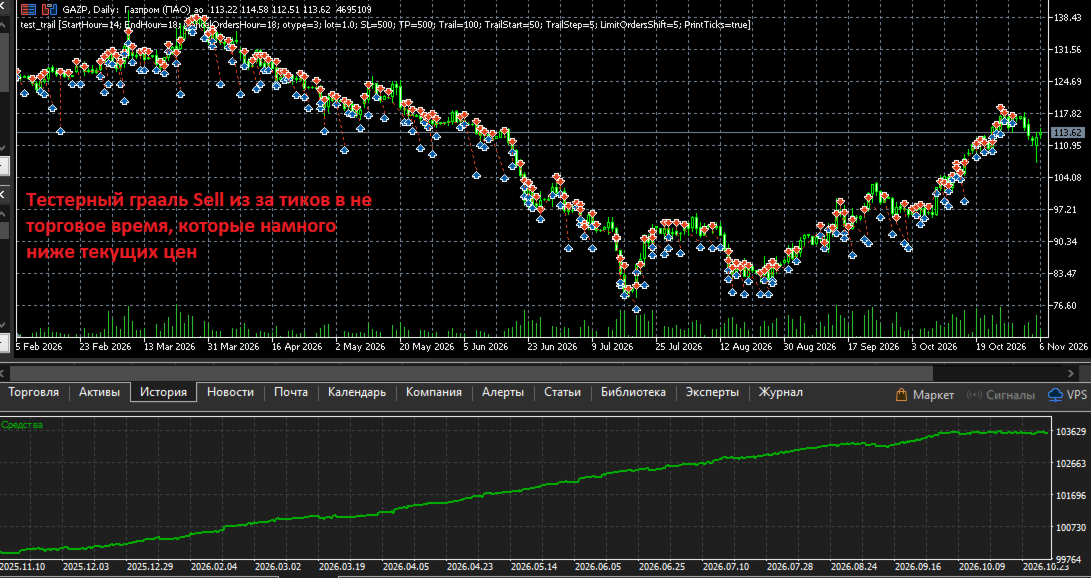
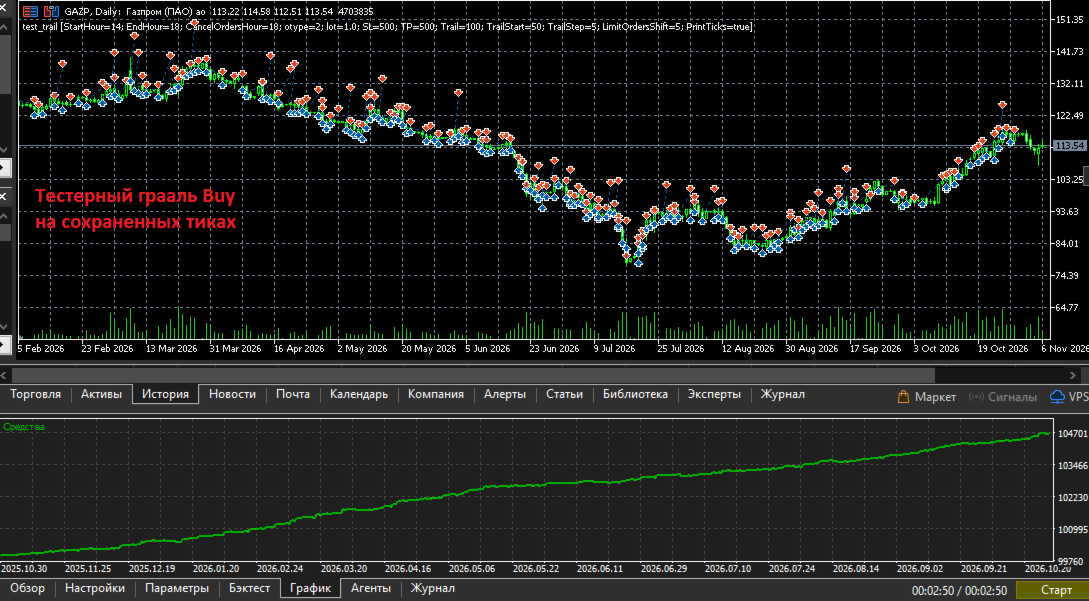
2) If a trade was opened during trading hours and was not closed before the end of the trading session and passes through non‑trading ticks, then TP/SL and other pending orders may be triggered during non‑trading hours in the tester (but not on the exchange). Since during non‑trading hours the exchange (or broker) set Bid > Ask at a distance of several daily candles, the tester experiences huge positive slippage and turns even a simple strategy into a test‑time holy grail. Example in the screenshots.
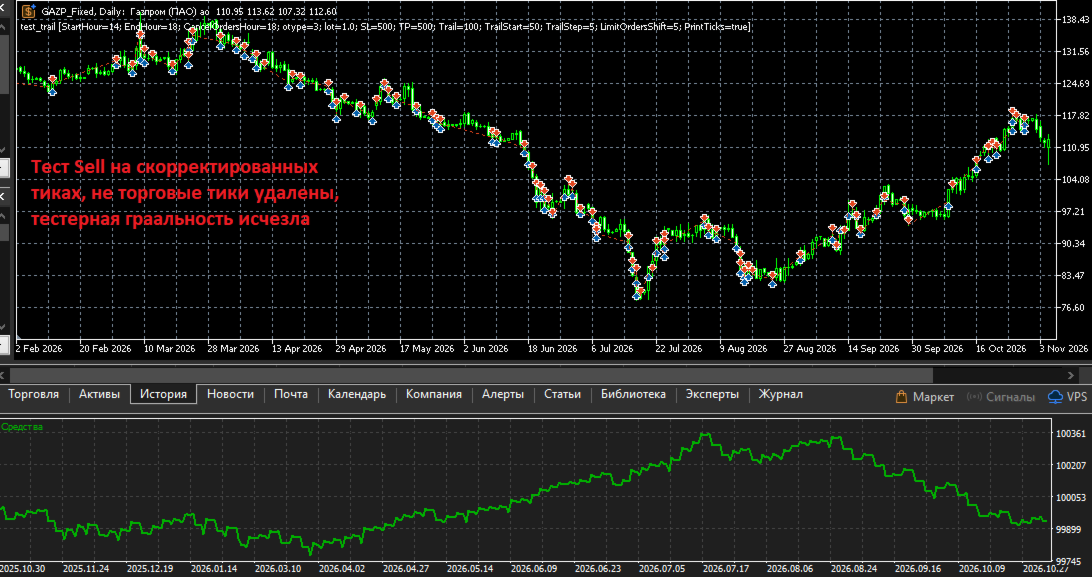
Removing non‑trading ticks will help eliminate these problems. The script automatically detects non‑trading ticks and removes them.
Important note: Since several minutes will be cut out of the history, the MA indicators and others will be calculated without these bars, and the values will differ.
Description of problems with the existing Ask and Bid ticks in the saved quotes:
1) Ask and Bid are not updated frequently enough; as a result, trades executed at the same Last price yield results based on outdated Ask or Bid.
2) Sometimes Ask and Bid ticks do not match the Last prices before and after them, while Last ticks are triggered precisely by Ask and Bid, and they should match. The difference can be 10 points or more; the screenshots show a difference of 30 points.
For these reasons, the script completely deletes the saved Ask and Bid ticks and creates new ones based on Last.
All errors have been reported to the developers; they may fix them. But for now, you can test using custom symbols created by this script. The bonus will be a 4-5 times faster testing due to the merging of Last ticks with the same price and the fact that Ask and Bid prices are not added as separate ticks, but are appended to Last ticks with the necessary flags added.
Problems that cannot be solved even with the help of this script.
It is impossible to achieve an exact match of trading results for the following reasons:
1) In real trading, the exchange or dealer sends Ask and Bid ticks 10-30 ms after the Last ticks that change them. Example:
FP 0 16:55:35.242 test_trail (GAZP,H1) 2026.10.30 16:55:35.51 bid:117.22 ask:117.23 last:117.25 vol:64 flags:1080 BUY LAST VOL
MR 0 16:55:35.252 test_trail (GAZP,H1) 2026.10.30 16:55:35.61 bid:117.23 ask:117.25 last:117.25 vol:64 flags:1030 BID ASK
In saved ticks, Ask and Bid are updated less frequently, and the prices often do not match.
In adjusted ticks, Ask and Bid are appended to the tick that changed them, meaning they are applied in the same millisecond.
There is a difference in both options. In the option with adjusted ticks, the difference is smaller, and the results are closer to real trading.
2) In real trading, the exchange or dealer sends thinned ticks once every few milliseconds; almost all ticks within a series of ticks within one millisecond or a few milliseconds are skipped. OnTick is called less frequently, while in the tester it is called for every saved tick.
In the adjusted ticks in the tester, OnTick is also called for every tick, and there will also be differences from real trading; for example, the tester will execute a command at a price that was skipped in real trading.
3) In real trading, the exchange or dealer executes all commands with a network delay of several milliseconds; in the tester, it executes instantly.
4) The tester executes limit orders only when the level is fully bought out in the order book, with the first tick of the next level, based on the assumption that your order is the last in the queue. In real trading, your order may not be the last and will be executed when the price touches the level and retraces; the tester will not trigger on a touch, only when moving to the next price. I noticed this feature when comparing the execution of my test example: https://www.mql5.com/ru/forum/518455/page12#comment_60642029
That is, it is impossible to achieve a complete match, but testing on adjusted ticks yields results closer to the real ones than testing on saved ticks.
When creating and testing the script, the code https://www.mql5.com/ru/market/product/206598/comments#comment_60673660 was used; it accurately reproduces the entries in real trading on the exchange and in the tester using adjusted ticks (see screenshots), thanks to limit orders and price rounding for order execution. Then the trades are completed using SL or SL after a trall. There are differences in the results: larger for the test based on saved ticks and smaller for the test based on adjusted ticks.
Screenshots:
1) In the upper part, 8 trades from real trading with a daily result of -3.4 rubles; in the lower part, a test based on adjusted ticks with a result of -4.2 rubles; the difference is -0.8 rubles.
2) In the upper part, the same real trades are presented in terms of positions, with a result of -3.4 rubles; in the lower part, there is a test based on saved ticks, with a result of +1 ruble, and the difference is +4.4 rubles. Reasons: there are more trades, because Ask and Bid ticks are not adequate to Last prices, and due to their infrequent addition, trades are completed using outdated Ask and Bid prices with positive slippage.
3) An example of an SL trigger in the tester during non‑trading hours, with prices several daily bars below the current prices; all Sell trades “earn” both on market declines and on rises. “Win” — several thousand rubles.
4) An example of an SL trigger in the tester during non‑trading hours, with prices several daily bars above the current prices; all Buy trades “earn” both on market declines and on rises. “Win” — several thousand rubles.
5) An example of an SL trigger in the tester on adjusted ticks with non‑trading ticks removed, all Sell trades. The tester granularity disappeared and we got a small loss.
6) An example of an SL trigger in the tester on adjusted ticks with non‑trading ticks removed, all Buy trades. The win is close to the real one, about 120 rubles.
7) Comparison of GAZP tick printouts (255 ticks) and adjusted GAZP_Fixed (41 ticks) over 2 seconds.
On the left, GAZP has Ask and Bid ticks that are inappropriately higher than the Last ticks, by about 30 points; this is one of the reasons why I decided to remove them. We see many Last ticks at the same price — these are all the trades on the exchange.
On the right are the adjusted GAZP_Fixed. Due to the removed Ask and Bid, the first tick is the Last tick, which changed the price, and the Ask price is added to it; the volume is equal to the sum of the two GAZP ticks: 1+3=4. All Last ticks with the same price are merged into one with a combined volume.
You can also see a large series of ticks in one millisecond due to a purchase of about 36,000 lots, which selected several levels in the order book. The Ask for them is recorded only in the first and last tick.
In the discussions, I provided more details and files for reproduction.
If someone wants to check everything themselves and compare the ticks, I’m attaching:
- an export of the ticks saved in the GAZP terminal for October 30, 2026,
- an export of the adjusted GAZP_Fixed for October 30, 2026; you can import the ticks into your terminal and run the expert to check the functionality.
- a printout of the ticks received in OnTick() during real trading on October 30, 2026.
- a log of trades and trading commands for that day. You can see these trades in the screenshots and in the description.
- the code of the Expert Advisor that worked on a real account and in the tester, and the test settings file for October 30, 2026.
- Export of adjusted ticks for January–May 2026 and an Expert Advisor settings file for checking tester granularity on ticks from the dealer and resolving it for adjusted ticks.