Exchange Ticks Corrections

Adjusting ticks for the MQ tester, which will allow you to test strategies for exchange instruments and obtain results that are closer to real trading than those obtained in the tester using saved ticks. 
Tested on MOEX via the F..am broker. The logic of operation on other exchanges has not been tested, but it is possible that they have a similar problem.
First 10 sales at $30, then at $50.

Working principle: 

  • The script reads the saved ticks of the current instrument.
  • The ticks from the non‑trading session are automatically identified based on certain criteria and are removed. The morning and evening trading stops are identified. The start times of the sessions have changed: the morning session initially started at 10:00, but since 2025 it has started at 07:00, and the evening trading session was from 18:40 to 19:05; now it fits within 5 minutes, from 18:55 to 19:00. Since the schedule has changed, using one of the trading session tables would be incorrect, which is why I wrote an automatic identifier. Perhaps in the future I’ll implement an option that involves manually specifying trading sessions — it’s more reliable, but it requires more preliminary work to create a schedule of schedule changes (it might be difficult to find all the dates of the changes).
  • Since Ask and Bid ticks often don’t correspond to Last ticks before and after, all Ask and Bid ticks are deleted.
  • New Ask and Bid prices are created based on Last ticks, assuming that all Last ticks trigger at Ask and Bid prices. Prices are not recorded as a separate tick but are appended to the Last ticks that changed them.
  • If a large series of Last ticks occurred within one millisecond with different prices, then the Ask or Bid prices are added only to the last tick in that millisecond, since no robot will have time to place its trade within that millisecond. Such series of trades occur due to a large‑volume market trade that immediately clears several levels in the order book.
  • All Last ticks with the same direction and price are combined into one tick with a volume equal to the sum of the volumes of all combined ticks. Such a tick can be formed in either 1 millisecond or several seconds. The price may not change for several minutes, but in order for the candlestick chart to match, ticks are created at least once a minute if there was at least 1 tick in that minute.
  • for the prices created by Ask and Bid, an adjustment is made: if Ask <= Bid, then Ask > Bid is made by 1 point or by Last.
  • The resulting ticks are saved to a custom symbol to be tested on.


Usage instructions:

  • Before running the script, you need to download the real ticks of the required instrument; to do this, run any Expert Advisor in the tester for the required time period — the tester will download all the selected ticks; repeat the test after 2–5 minutes, as the tester may need some time to finish downloading the ticks.
  • Run the script on the chart of the required instrument.
  • Fill in the input parameters (start date, Action — full reload or downloading fresh ticks, PostFix — for the name of the custom symbol being created, LoadByYears — if you have limited memory, this option will work in blocks of 1 year rather than downloading all 5–10 years at once; for example, GAZP downloaded 11 GB of tick data into memory over 5 years, while working in 1‑year blocks would require only 3 GB).
  • Run the script and wait for it to finish (GAZP worked for almost 2 minutes over 5 years).
  • You can start testing in the tester using the created custom symbol.


Description of the issues with the non-trading session that are present in the saved quotes:

1) Since the quotes do not remove ticks from the non-trading session, the tester works on them as well, and the exchange will reject any commands during this time.
Examples:
From 18:40 to 19:05, no trading is performed, but in the tester, trades are executed during this time: https://www.mql5.com/ru/forum/516827/page11#comment_60568825

if(Tick.time== D'2024.06.07 18:49:55'){ OrderSend(_Symbol, OP_SELL, 1.0, n(Tick.bid), 0, n(130.0),0,NULL,3);}


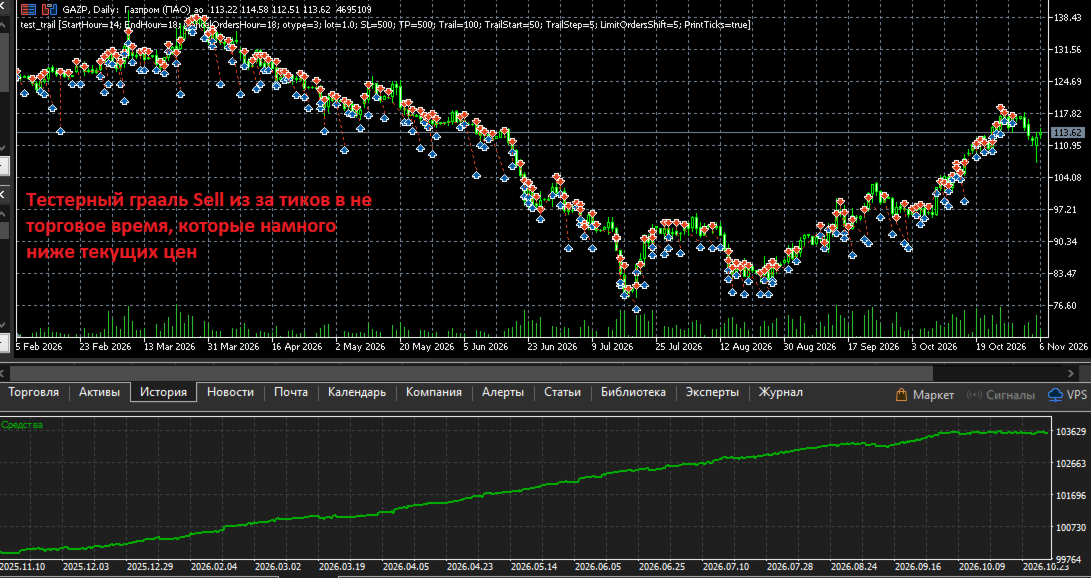
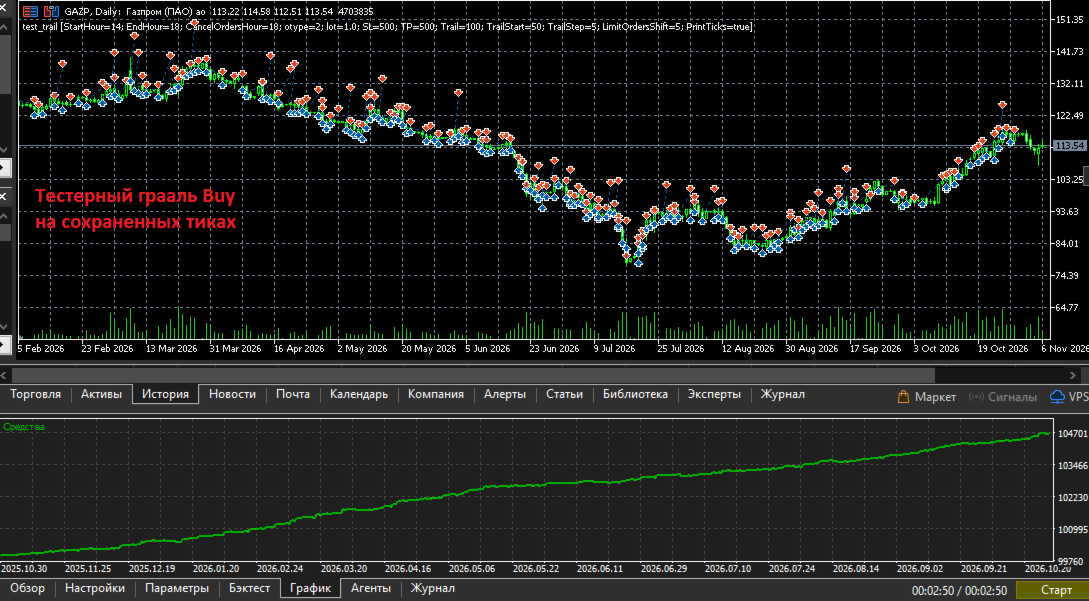
2) If a trade was opened during trading hours and was not closed before the end of the trading session and passes through non‑trading ticks, then TP/SL and other pending orders may be triggered during non‑trading hours in the tester (but not on the exchange). Since during non‑trading hours the exchange (or broker) set Bid > Ask at a distance of several daily candles, the tester experiences huge positive slippage and turns even a simple strategy into a test‑time holy grail. Example in the screenshots.

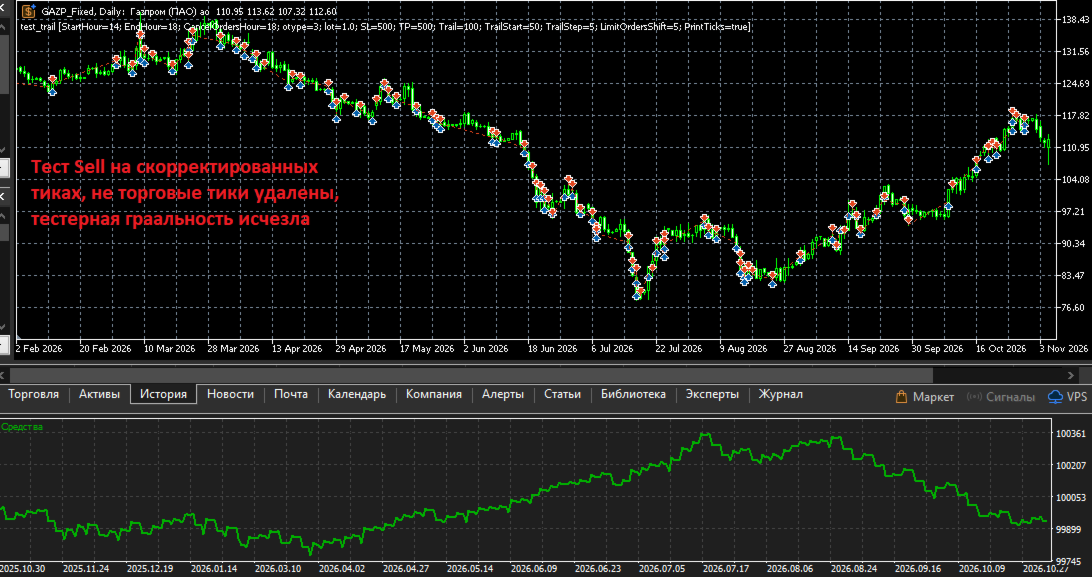
Removing non‑trading ticks will help eliminate these problems. The script automatically detects non‑trading ticks and removes them.

Important note: Since several minutes will be cut out of the history, the MA indicators and others will be calculated without these bars, and the values will differ. 

Description of problems with the existing Ask and Bid ticks in the saved quotes:

1) Ask and Bid are not updated frequently enough; as a result, trades executed at the same Last price yield results based on outdated Ask or Bid.

2) Sometimes Ask and Bid ticks do not match the Last prices before and after them, while Last ticks are triggered precisely by Ask and Bid, and they should match. The difference can be 10 points or more; the screenshots show a difference of 30 points.

For these reasons, the script completely deletes the saved Ask and Bid ticks and creates new ones based on Last.

All errors have been reported to the developers; they may fix them. But for now, you can test using custom symbols created by this script. The bonus will be a 4-5 times faster testing due to the merging of Last ticks with the same price and the fact that Ask and Bid prices are not added as separate ticks, but are appended to Last ticks with the necessary flags added.


Problems that cannot be solved even with the help of this script.

It is impossible to achieve an exact match of trading results for the following reasons:

1) In real trading, the exchange or dealer sends Ask and Bid ticks 10-30 ms after the Last ticks that change them. Example:

FP    0    16:55:35.242    test_trail (GAZP,H1)    2026.10.30 16:55:35.51 bid:117.22 ask:117.23 last:117.25 vol:64 flags:1080 BUY LAST VOL
MR    0    16:55:35.252    test_trail (GAZP,H1)    2026.10.30 16:55:35.61 bid:117.23 ask:117.25 last:117.25 vol:64 flags:1030 BID ASK

In saved ticks, Ask and Bid are updated less frequently, and the prices often do not match.
In adjusted ticks, Ask and Bid are appended to the tick that changed them, meaning they are applied in the same millisecond.
There is a difference in both options. In the option with adjusted ticks, the difference is smaller, and the results are closer to real trading.

2) In real trading, the exchange or dealer sends thinned ticks once every few milliseconds; almost all ticks within a series of ticks within one millisecond or a few milliseconds are skipped. OnTick is called less frequently, while in the tester it is called for every saved tick.
In the adjusted ticks in the tester, OnTick is also called for every tick, and there will also be differences from real trading; for example, the tester will execute a command at a price that was skipped in real trading. 

3) In real trading, the exchange or dealer executes all commands with a network delay of several milliseconds; in the tester, it executes instantly.

4) The tester executes limit orders only when the level is fully bought out in the order book, with the first tick of the next level, based on the assumption that your order is the last in the queue. In real trading, your order may not be the last and will be executed when the price touches the level and retraces; the tester will not trigger on a touch, only when moving to the next price. I noticed this feature when comparing the execution of my test example: https://www.mql5.com/ru/forum/518455/page12#comment_60642029

That is, it is impossible to achieve a complete match, but testing on adjusted ticks yields results closer to the real ones than testing on saved ticks.

When creating and testing the script, the code https://www.mql5.com/ru/market/product/206598/comments#comment_60673660 was used; it accurately reproduces the entries in real trading on the exchange and in the tester using adjusted ticks (see screenshots), thanks to limit orders and price rounding for order execution. Then the trades are completed using SL or SL after a trall. There are differences in the results: larger for the test based on saved ticks and smaller for the test based on adjusted ticks.

Screenshots:

1) In the upper part, 8 trades from real trading with a daily result of -3.4 rubles; in the lower part, a test based on adjusted ticks with a result of -4.2 rubles; the difference is -0.8 rubles.

2) In the upper part, the same real trades are presented in terms of positions, with a result of -3.4 rubles; in the lower part, there is a test based on saved ticks, with a result of +1 ruble, and the difference is +4.4 rubles. Reasons: there are more trades, because Ask and Bid ticks are not adequate to Last prices, and due to their infrequent addition, trades are completed using outdated Ask and Bid prices with positive slippage.

3) An example of an SL trigger in the tester during non‑trading hours, with prices several daily bars below the current prices; all Sell trades “earn” both on market declines and on rises. “Win” — several thousand rubles.

4) An example of an SL trigger in the tester during non‑trading hours, with prices several daily bars above the current prices; all Buy trades “earn” both on market declines and on rises. “Win” — several thousand rubles.

5) An example of an SL trigger in the tester on adjusted ticks with non‑trading ticks removed, all Sell trades. The tester granularity disappeared and we got a small loss.

6) An example of an SL trigger in the tester on adjusted ticks with non‑trading ticks removed, all Buy trades. The win is close to the real one, about 120 rubles.

7) Comparison of GAZP tick printouts (255 ticks) and adjusted GAZP_Fixed (41 ticks) over 2 seconds.
On the left, GAZP has Ask and Bid ticks that are inappropriately higher than the Last ticks, by about 30 points; this is one of the reasons why I decided to remove them. We see many Last ticks at the same price — these are all the trades on the exchange.
On the right are the adjusted GAZP_Fixed. Due to the removed Ask and Bid, the first tick is the Last tick, which changed the price, and the Ask price is added to it; the volume is equal to the sum of the two GAZP ticks: 1+3=4. All Last ticks with the same price are merged into one with a combined volume.
You can also see a large series of ticks in one millisecond due to a purchase of about 36,000 lots, which selected several levels in the order book. The Ask for them is recorded only in the first and last tick.


In the discussions, I provided more details and files for reproduction.

If someone wants to check everything themselves and compare the ticks, I’m attaching:
- an export of the ticks saved in the GAZP terminal for October 30, 2026,
- an export of the adjusted GAZP_Fixed for October 30, 2026; you can import the ticks into your terminal and run the expert to check the functionality.
- a printout of the ticks received in OnTick() during real trading on October 30, 2026.
- a log of trades and trading commands for that day. You can see these trades in the screenshots and in the description.
- the code of the Expert Advisor that worked on a real account and in the tester, and the test settings file for October 30, 2026.
- Export of adjusted ticks for January–May 2026 and an Expert Advisor settings file for checking tester granularity on ticks from the dealer and resolving it for adjusted ticks.

Önerilen ürünler
Session Profiles
Basharat Umar Khan
Short Description Draws rolling Time-Price-Opportunity (TPO) and footprint volume profiles for the Asia, London, and New York sessions with POC/VAH/VAL levels, delta volume bias, order flow overlays, liquidity heatmaps, developing rolling lines, Naked POC (NPOC) tracking, Initial Balance breakouts, multi-session confluence zones, and automatic broker GMT-offset detection. Full Description Plots separate market-profile and volume-profile style histograms for the three major trading sessions (Asi
FREE
Gösterge, tarihsel olanlarla karşılaştırılabilecek güncel teklifler oluşturur ve bu temelde bir fiyat hareketi tahmini yapar. Gösterge, istenen tarihe hızlı navigasyon için bir metin alanına sahiptir. Seçenekler: Sembol - göstergenin göstereceği sembolün seçimi; SymbolPeriod - göstergenin veri alacağı dönemin seçimi; GöstergeRenk - gösterge rengi; Ters - doğru tırnakları tersine çevirir, yanlış - orijinal görünüm; Sonraki, tarihi girebileceğiniz ve 'enter' tuşuna basarak hemen atlayab
Deriv Synthetic HTF Candle Projection GMT2 Higher Timeframe Candle Projection & Previous Levels Tool for Deriv Synthetic Indices (MT5) Overview Deriv Synthetic HTF Candle Projection GMT2 is a professional MetaTrader 5 indicator built specifically for Deriv Synthetic indices . It projects the current forming Higher Timeframe (HTF) candle onto the chart and automatically draws key reference levels from previous candles. This indicator is designed to help traders maintain higher timeframe context
FREE
Volume Profile Utility
AL MOOSAWI ABDULLAH JAFFER BAQER
Volume Profile Discover where the market really trades. Make decisions based on volume, not guesswork. Volume Profile is a professional MetaTrader utility that analyzes trading activity across different price levels, allowing traders to identify where the highest concentration of market participation has occurred. Instead of focusing only on price movement over time, Volume Profile reveals the price levels where buyers and sellers have been most active, providing valuable insight into market str
JT360 DNA Mini PnL Pointer V1.04 Public Kompakt. Net. Her zaman göz önünde. JT360 DNA Mini PnL Pointer, MetaTrader 5 için geliştirilmiş hafif bir göstergedir. Mevcut grafik sembolündeki tüm açık pozisyonların toplam anlık kâr ve zararını (PnL) görüntüler. Grafik üzerinde az yer kaplayan tasarımı; R cinsinden riske dayalı PnL gösterimini, ince bir mini çubuğu ve özelleştirilebilir renk matrisini bir araya getirir. JT360’ın karakteristik turkuaz ve macenta renkleri, kâr ve zarar seviyelerinin tek
FREE
Haven Volume Profile
Maksim Tarutin
4.64 (14)
Haven Volume Profile, ticaret hacminin dağılımına dayalı olarak önemli fiyat seviyelerini belirlemeye yardımcı olan çok fonksiyonlu bir hacim profili analiz göstergesidir. Piyasayı daha iyi anlamak ve önemli giriş ve çıkış noktalarını belirlemek isteyen profesyonel yatırımcılar için tasarlanmıştır. Diğer Ürünler ->  BURADAN Temel Özellikler: Point of Control (POC) Hesaplama - en yüksek ticaret aktivitesinin gerçekleştiği seviye, en likit seviyeleri belirlemeye yardımcı olur Value Area (yüksek ak
FREE
MGD Prop Risk Guard MT5 Professional Account Risk Monitoring for MetaTrader 5 — FREE MGD Prop Risk Guard MT5 is a free account risk monitoring utility designed to help traders stay informed about their daily loss limits, maximum drawdown, and available risk. Whether you trade manually, use Expert Advisors, or participate in proprietary trading firm challenges, MGD Prop Risk Guard provides a clear, real-time overview of your account's risk exposure. Monitor your trading risk directly from your MT
FREE
AntaresX Volume Profile — Indicator for MetaTrader 5 AntaresX Volume Profile is an indicator that displays the price levels where the highest trading activity was concentrated during a selected period, and calculates the historical probability of the price reacting when it reaches each of those levels. What the indicator draws The indicator identifies three levels on the chart: POC (Point of Control): the price where the highest trading activity was recorded during the selected period. Displaye
FREE
Symbol: EURUSD Timeframe: 30 minutes (M30) For other symbols or timeframes, adjust the settings to match the market. Volume Profile POC Breakout builds a volume profile from recent candles, finds the Point of Control (POC) and marks clean breakouts of that level. Each breakout is shown as a complete trade plan with entry, stop loss and three take profit levels, filtered by the higher timeframe trend and rated by a quality score. The indicator does not open trades. It is a visual and analysis to
See how your account is really doing at a glance, right on the chart. The dashboard reads your account and trade history and never opens, modifies or closes a trade. How it works Every second the dashboard reads balance, equity, margin and open positions. Closed results come from the deal history: for each closing deal the profit, swap, commission and fee are added together. From these deals it calculates closed profit for today, this week and this month, plus statistics for the period you choos
FREE
BoxChart MT5
Evgeny Shevtsov
5 (7)
The market is unfair if only because 10% of participants manage 90% of funds. An ordinary trader has slim changes to stand against these "vultures". This problem can be solved. You just need to be among these 10%, learn to predict their intentions and move with them. Volume is the only preemptive factor that faultlessly works on any timeframe and symbol. First, the volume appears and is accumulated, and only then the price moves. The price moves from one volume to another. Areas of volume accumu
Mirror Chart MT5
Andrej Hermann
5 (1)
The Mirror Chart MT5 is a overlay indicator specifically designed to project a second financial instrument directly onto the main chart window. This tool is invaluable for traders who rely on correlation analysis, as it visualizes the price movements of two different instruments in real time. Unlike traditional overlays, this indicator utilizes intelligent, dynamic centering and scaling logic. It continuously analyzes the visible price range in the current window for both symbols and calculates
FREE
Painel Profit is an operational trading panel for MetaTrader 5 created to make manual execution and visual order management easier directly on the chart. The operating principle is simple: the trader selects the symbol, timeframe, volume, entry type, and exit strategy. Based on these commands, the panel sends or organizes the trade through the interface, displaying the entry, take profit, and stop loss levels on the chart for visual monitoring. This product is not a signal robot and does not mak
Order Book, known also as Market Book, market depth, Level 2, - is a dynamically updated table with current volumes of orders to buy and to sell specific financial instument at price levels near Bid and Ask. MetaTrader 5 provides the means for receiving market book from your broker, but in real time only, without access to its history. The indicator OrderBook Cumulative Indicator accumulates market book data online and visualizes them on the chart. In addition, the indicator can show the market
Pro Order Lot Size Calculator Pro Order Lot Size Calculator , almak istediğiniz riske göre uygun lot miktarını hesaplamanıza yardımcı olan basit ve pratik bir araçtır. Bu ürün sayesinde hesabınızdaki para miktarına göre almak istediğiniz riski doğrudan panel üzerinden kolayca hesaplayabilirsiniz. Kolay Risk ve Lot Hesaplama Panelimiz oldukça basit ve kolay bir kullanıma sahiptir. Riski nasıl belirlemek istediğinizi seçebilirsiniz: İstediğiniz risk miktarını girebilirsiniz. Parasal olarak ne kada
Order Book, known also as Market Book, market depth, Level 2, - is a dynamically updated table with current volumes of orders to buy and to sell specific financial instument at price levels near Bid and Ask. MetaTrader 5 provides the means for receiving market book from your broker, but in real time only, without access to its history. This expert adviser OrderBook History Playback allows you to playback the market book events on the history using files, created by OrderBook Recorder . The exper
FREE
BoxInside MT5
Evgeny Shevtsov
5 (4)
This indicator calculates the volume profile and places labels that correspond to the VAH, VAL and POC levels, for each candle individually. Indicator operation features The indicator works on the timeframes from M3 to MN, but it uses the history data of smaller periods: M1 - for periods from M3 to H1, M5 - for periods from H2 to H12, M30 - for the D1 period, H4 - for the W1 period, D1 - for the MN period. The color and location of the VAL, VAH and POC labels on the current candle are considere
FREE
This is visualization tool based on the Depth of Market. It works with the symbols that have the Depth of Market available. It's a visual indicator that shows the volume of each Bid/Ask price and ratio of total volume of Bids/Asks. Note: check if your broker supports DOM before purchasing. 。。。。。。。。。。。。。。。。。。。。。。。。。。。。。。。。。。。。。。。。。。。。。。。。。。。 。。。。。。。。。。。。。。。。。。。。。。。。。。。。。。。。。。。。。。。。。。。。。。。。。。。

Pionex Live MT5 Data and History -- API adresini Araçlar > Uzman Danışmanlar bölümüne ekleyin api.pionex.com ws.pionex.com Adımlar: Sembolleri Oluştur CreateSymbols = true seçeneğini etkinleştirin MT5 terminalini yeniden başlatın ( çok önemli! ) Market Watch'ta yüklemek istediğiniz sembolleri seçin Modlar: LiveUpdate – İşlem verilerini almak için grafiğe yardımcı program ekleyin History – Seçilen tarih ve saate kadar geçmiş verileri doldurun Ayarlar: MaxDate – Güncellenmesini istediğiniz tarihi
Tick Volume Chart - MetaTrader 5 için tick hacmine dayalı grafikler oluşturmaya yarayan benzersiz bir araçtır. Tick Volume Chart sayesinde, her bir mumun zamana göre değil, belirli sayıda tick'e göre oluştuğu grafikler inşa edebilirsiniz. Bu, standart zaman tabanlı grafiklerde bulunmayan, piyasa aktivitesini analiz etmede ideal bir hassasiyet sağlar. Özel sembolleri destekleyen tüm indikatörleri ve Expert Advisor'ları kullanabilirsiniz. Oluşturulan grafiklerle çalışmak, standart grafikler kadar
Order Book, known also as Market Book, market depth, Level 2, - is a dynamically updated table with current volumes of orders to buy and to sell specific financial instument at price levels near Bid and Ask. MetaTrader 5 provides the means for receiving market book from your broker in real time. The expert OrderBook Recorder records market book changes and stores them in local files for further usage in indicators and expert adviser, including testing in the tester. The expert stores market book
FREE
Never miss a candle close again! The Candle Closing Time Remaining indicator is an essential utility tool designed for traders who rely on precise timing, candlestick patterns, and chart confirmation before entering or exiting trades. Whether you trade Forex, Crypto, Gold, Indices, or Stocks, this indicator seamlessly works on every chart, every symbol, and all timeframes .

FREE
Was: $249  Now: $99   Market Profile defines a number of day types that can help the trader to determine market behaviour. A key feature is the Value Area, representing the range of price action where 70% of trading took place. Understanding the Value Area can give traders valuable insight into market direction and establish the higher odds trade. It is an excellent addition to any system you may be using. Inspired by Jim Dalton’s book “Mind Over Markets”, this indicator is designed to suit the
VolumeProfile MT5
Robert Hess
4.14 (7)
Description: The Volume Profile displays detailed informations of historical trading activities at certain price levels (Market Profile). Locate the areas with the best prices in the market and get an advantage over other market participants. Features: Customizable Market Profile Shows the "fair" Value Area with 70% of all Volume Shows critical low volume zones Shows VPOC, VAL and VAH Points integrated resource management to reduce the load while working with multiple charts Works on all timefr
Volume Profile, profesyonel ve kurumsal yatırımcılar tarafından kullanılan en güçlü analitik araçlardan biridir. Sadece ekranınızın alt kısmında işlemlerin ne zaman gerçekleştiğini gösteren geleneksel hacim göstergelerinin aksine Volume Profile, bu işlemlerin tam olarak hangi fiyat seviyelerinde gerçekleştiğini gösterir. Bu size piyasa yapısının net bir X-ışını vizyonunu vererek, akıllı paranın (smart money) ve kurumların pozisyonlarını tam olarak nerede biriktirdiğini veya dağıttığını görmenizi
This Tradepanel is an Utility for Traders Who want ot use Basic MoneyManagement for Calculation of Lotsize  I have created the basic edition only to give an Overview with Limited Functionality Full Features are available with  Auto TradePanel  Pro. (This is Only Because it can not be Tested in Strategy Tester ).  Complete Description is available at  "Auto TradePanel Pro".  in This Version Basic Functionality ( Calculation of Lotsize ) open /close Positions is working in the same way as in Pro
FREE
Горячие клавиши плюс клик левой кнопки мыши на графике. Советник открывает сделки, выставляет лимитные и стоповые ордера, удаляет ордера и закрывает позиции, также  делает реверс  открытых позиций, выставляет прописанные в настройках стоп лосс и тейк профит. (реверс только на неттинговых счетах) При запуске советника можно посмотреть подсказку как действует советник при нажатии клавиши + клик на графике. Правее последнего бара, ниже цены Ctrl+ЛКМ  - OpenSell Правее последнего бара, выше цены C
VM Auto SLTP Basic - Intelligent Trade Management for Scalpers Enhance your scalping strategy to a higher level. VM Auto SLTP Basic automatically manages Stop Loss and Take Profit for orders that are opened manually or by other Expert Advisors. This tool does not open trades on its own, allowing you to maintain full control while enjoying precise risk management. Full documentation available in the product blog:   [User Guide] For additional trade management features, see VM Auto SLTP Pro. It su
FREE
Trading Utility for Forex Currency Pairs Only not for Gold  Functions Auto Lot Calculation based on Risk Auto stoploss  Auto TakeProfit Breakeven Auto Close Half % Close in percentage with respect to the PIPs Pending Orders BuyLimit Sell Limit with distances BuyStop Sell Stop    with distances Trading Informations Risk in percentage For Multiple trades Combine Takeprofit and Combine Stoplosses
Market Profile 3 ForexArby com
Hussien Abdeltwab Hussien Ryad
4 (15)
Market Profile 3 MetaTrader 5 indicator  version 4.70— is a classic Market Profile implementation that can show the price density over time, outlining the most important price levels, value area, and control value of a given trading session. This indicator can be attached to timeframes between M1 and D1 and will show the Market Profile for daily, weekly, monthly, or even intraday sessions. Lower timeframes offer higher precision. Higher timeframes are recommended for better visibility. It is als
FREE
Bu ürünün alıcıları ayrıca şunları da satın alıyor
Trade Assistant MT5
Evgeniy Kravchenko
4.43 (216)
It helps to calculate the risk per trade, the easy installation of a new order, order management with partial closing functions, trailing stop of 7 types and other useful functions. Additional materials and instructions Installation instructions - Application instructions Line function -   shows on the chart the Opening line, Stop Loss, Take Profit. With this function it is easy to set a new order and see its additional characteristics before opening.   Risk management  - The risk calculation
Trade Manager EA’ye hoş geldiniz! Ticaretin daha sezgisel, hassas ve verimli hale gelmesi için tasarlanmış nihai risk yönetim aracı ile tanışın. Bu sadece bir emir verme aracı değil; ticaret planlaması, pozisyon yönetimi ve risk kontrolü için kapsamlı bir çözüm. İster yeni başlayan bir yatırımcı olun, ister deneyimli bir trader ya da hızlı emir gerektiren bir scalper, Trade Manager EA ihtiyaçlarınıza uyum sağlar ve forex, endeksler, emtialar ve kripto paralar dahil tüm piyasalarda esneklik sunar
Farmed Hedge Yield Farming | All Markets (Manual - Hybrid - Semi/Automated EA) VERIFIED TRADING RESULTS - Farmed Hedge Yield Axi Copy:  https://www.mql5.com/en/signals/2356376 - Farmed Hedge Yield Exn Copy:   https://www.mql5.com/en/signals/2356404 - Farmed Hedge Yield V Copy:  https://www.mql5.com/en/signals/2357156 IMPORTANT NOTICE: FarmedHedge is a MANUAL-FOCUSED TRADING UTILITY ,not a fully automated EA. Results shown on this Signal include manual trades and overall strategic management.
Telegram to MT5 Multi-Channel Copier   , Telegram ve Discord kanallarınızdaki alım-satım sinyallerini doğrudan MetaTrader 5'e otomatik kopyalar. Bot yok, tarayıcı uzantısı yok, elle kopyalama yok. Sinyal Telegram'a veya Discord'a düşer ve EA birkaç saniye içinde terminalinizde işlemi açar. Ve bir kanalı kopyalamadan önce, yerleşik backtester o kanalın hesabınızda ne yapmış olacağını gösterir. Ürün iki bileşenden oluşur: Telegram kanallarınızı dinleyen bir Windows uygulaması ve sinyalleri MT5 ter
Local Trade Copier EA MT5
Juvenille Emperor Limited
4.94 (150)
Local Trade Copier EA MT5, aynı Windows bilgisayarı veya Windows VPS üzerinde çalışan birden fazla MetaTrader 5 hesabı arasında işlemleri kopyalamak ve yönetmek için hızlı ve esnek bir işlem kopyalayıcıdır. Yerel işlem senkronizasyonunu, Receiver tarafında lot büyüklüğü, risk yönetimi, işlem filtreleme, sembol eşleştirme, işlem yönetimi ve hesap koruması kontrolleriyle birleştirir. Transmitter ve Receiver terminallerinizi yaklaşık 1 dakika içinde ayarlayın ve aynı veya farklı brokerlardaki hesa
TradePanel MT5
Alfiya Fazylova
4.88 (172)
Trade Panel, çok işlevli bir ticaret asistanıdır. Uygulama, manuel ticaret için 50'den fazla ticaret fonksiyonu içerir ve çoğu ticaret görevini otomatikleştirmeyi mümkün kılar. Uygulama talimatları: https://www.mql5.com/en/blogs/post/756482 Demo hesabı için uygulamanın deneme sürümü: https://www.mql5.com/en/blogs/post/750865 Uygulamayı nasıl kurulur: https://www.mql5.com/en/blogs/post/756239 Uygulamayı görsel modda nasıl test edilir: https://www.mql5.com/en/blogs/post/770277 Uygulamayı VPS MetaT
News Trade EA MT5
Konstantin Kulikov
4.55 (11)
Birkaç yıldır kullandığım çok yararlı bir robotu tanıtıyorum. Hem yarı otomatik hem de tam otomatik modlarda kullanılabilir. >>> Chat <<< Program, ekonomik takvim haberlerinde esnek ticaret ayarlarını içeriyor. Stratejiler test cihazında kontrol edilemez. Sadece gerçek bir iş. Ayarların en son arşivini indirin: https://www.mql5.com/en/blogs/post/747929 Sinyal izleme: https://www.mql5.com/en/signals/author/test-standart Bu bilirkişi için kendi ayarlar setinizi oluştururken, blogdaki tüm paramet
Telegram sinyallerini kendi işlem kurallarınızla kopyalayın Telegram to MT5 Signal Trader , herkese açık ve özel Telegram kanallarındaki ve gruplarındaki metin tabanlı işlem sinyallerini otomatik olarak MetaTrader 5'e kopyalar. Tek bir masaüstü uygulamasından birden fazla sinyal sağlayıcısını ve MT5 hesabını yönetin; her sağlayıcı için ayrı risk ve işlem ayarları belirleyin. Sinyal kopyalamak için Telegram botu veya API kurulumu gerekmez. Kendi Telegram hesabınızla telefon numarası veya QR kod k
Strategy Ledger Pro
Abdullah Uygar Tuna
5 (14)
Şimdi Türkçe dil desteği ile. Strategy Ledger Pro , MetaTrader 5 için salt okunur bir hesap analiz panelidir. Hesap sonuçlarını Uzman Danışman (EA), strateji, sembol ve magic numaraya göre ayırır; böylece her birinin gerçekte ne kattığını görürsünüz. Panel 11 dilde kullanılabilir: English, Français, Deutsch, Español, Italiano, Português, Русский, Türkçe, 中文, 日本語 ve 한국어. Demoyu indirmeden önce. Market, her ücretli ürünün demosunu yalnızca Strateji Test Cihazında çalıştırır. Bu panel kendi hesabı
================================================================================ POC BREAKOUT - V20.72. Full Professional Grade Toolkit ================================================================================ POC Breakout is a full MetaTrader 5 trading dashboard for discretionary traders who want breakout signals, Point of Control (POC) context, volume profiles, order flow, market structure, news, alerts, and advanced trade planning in one professional workspace. Attached directly to you
Exp COPYLOT CLIENT for MT5
Vladislav Andruschenko
3.97 (35)
MetaTrader 5 için profesyonel işlem kopyalayıcı MetaTrader için hızlı, profesyonel ve güvenilir bir işlem kopyalayıcı . COPYLOT , MT4 ve MT5 terminalleri arasında Forex işlemlerini kopyalamanıza olanak tanır ve Hedge ile Netting hesaplarını destekler. COPYLOT MT5 sürümü şunları destekler: - MT5 Hedge → MT5 Hedge - MT5 Hedge → MT5 Netting - MT5 Netting → MT5 Hedge - MT5 Netting → MT5 Netting - MT4 → MT5 Hedge - MT4 → MT5 Netting MT4 sürümü Tam açıklama + DEMO + PDF Nasıl satın alınır Nasıl kurul
The product will copy all telegram signal to MT5 ( which you are member) , also it can work as remote copier.  Easy to set up, copy order instant, can work with almost signal formats, image signal,  s upport to translate other language to English Work with all type of channel or group, even channel have "Restrict Saving Content", work with  multi channel, multi MT5 Work as remote copier: with signal have ticket number, it will copy exactly via ticket number. Support to backtest signal. How to s
REVDEN AI Desk: Trading'inizi Kendi Yapay Zekanızla Tek Bir Sohbetten Yönetin, REVDEN'in Piyasa Bağlamıyla Trading'inizi tek bir sohbetten yönettiğinizi düşünün. REVDEN AI Desk bunu MetaTrader 5'e getiriyor: kendi yapay zekanıza piyasayı nasıl okuduğunu sorarsınız, o da işlem yaptığınız semboller hakkında REVDEN'in tam bağlamından, yani durumlarından, risk görünümlerinden ve yaklaşan açıklamalardan yanıt verir. Önerileri giriş, stop, hedef ve riskle gelir; uygun olanları siz onaylarsınız. Kurall
EA Overfitter
Stephen J Martret
5 (3)
That backtest looks great. But will it still be making money tomorrow, next week, next month? EA Overfitter re-runs your EA on 100 price histories it has never seen. One score tells you if the edge is real. A backtest tells you what an EA did on one price history — the one that happened to occur. What you cannot tell from it is how much of that result was the strategy and how much was the particular path. EA Overfitter answers that. It builds up to 100 synthetic price histories your EA has n
Power Candles Strateji Tarayıcısı - Kendi Kendini Optimize Eden Çoklu Sembol Kurulum Bulucu Power Candles Strateji Tarayıcısı , Power Candles göstergesini çalıştıran aynı kendinden optimize edici motoru, Piyasa İzleyicinizdeki her sembol üzerinde yan yana çalıştırır. Tek bir panel, şu anda istatistiksel olarak hangi sembollerin işlem yapılabilir olduğunu, her birinde hangi stratejinin kazandığını, en uygun Stop Loss / Take Profit çiftini gösterir ve yeni bir sinyal geldiği anda size bildirim gön
Timeless Charts
Samuel Manoel De Souza
5 (9)
Timeless Charts, profesyonel yatırımcılar için hepsi bir arada bir trading aracıdır. Saniye Grafikleri ve Renko gibi özel grafik türlerini, Footprints , Clusters , Hacim Profilleri , VWAP çalışmaları ve gelişmiş piyasa analizi sağlayan sabitlenmiş analiz araçlarıyla gelişmiş emir akışı analiziyle birleştirir. İşlem ve pozisyon yönetimi, entegre işlem yönetim paneli aracılığıyla doğrudan grafik üzerinden gerçekleştirilirken, Market Replay ve Sanal Hesaplar trading becerileri ve stratejileri üzeri
MetaTrader 5 için Trading Panel — grafik ve klavyeden profesyonel tek tıkla işlem kontrolü Aktif traderlar için geliştirilmiş güçlü bir Trading Panel; işlemleri standart MetaTrader arayüzüne göre çok daha hızlı açmanıza, yönetmenize ve kapatmanıza yardımcı olur. Bu çözüm; pozisyonları, bekleyen emirleri, toplam kârı ve işlem yürütmesini tek bir profesyonel çalışma alanında kontrol etmek isteyen kullanıcılar için tasarlanmıştır. Bu sadece sıradan bir yardımcı araç değildir. MetaTrader 5 için ger
Your EAs cannot see each other, but Anchor can. Anchor gives you one place to coordinate your EAs, manage risk, and decide when trading is allowed. It works alongside the trading bots you already use without any changes to them. The Problem One EA opens a trade. Then another starts trading. The next thing you know, you wake up to multiple grids built across your account. Each EA may be doing exactly what it was designed to do, but together they can place far more risk on your account than you in
VirtualTradePad PRO SE MT5 — MetaTrader 5 için profesyonel işlem kontrol merkezi VirtualTradePad PRO SE , MetaTrader 5 için grafik tabanlı premium bir işlem paneli ve trade yönetim çalışma alanıdır. Daha hızlı emir yürütme, daha net pozisyon kontrolü, yapılandırılmış trade yönetimi, görsel seviye planlama ve doğrudan grafik üzerinden profesyonel bir çalışma akışı isteyen traderlar için tasarlanmıştır. Bu yalnızca basit bir BUY / SELL paneli değildir. PRO SE; manuel işlem, bekleyen emirler, pozis
RETAILBERG FOOTPRINT CHART PRO — Order-Flow Workspace for MetaTrader 5 Version 7.00  |  Professional System  |  31 tools  |  One chart A full 150-page illustrated User Manual is included. Please read the full manual to understand this feature packed footprint chart elements and ui. https://www.mql5.com/en/blogs/post/777982 DEMO / STRATEGY TESTER — PLEASE READ FIRST
Trade Dashboard simplifies how you open, manage, and control your trades, with built-in lot size calculation. It allows you to execute trades, manage risk, and control positions directly on the chart, with tools such as partial close, breakeven, and trailing stop. Designed to reduce manual work and help you stay focused on your trading decisions. A demo version is available for testing. Detailed explanations of features are provided within the MQL5 platform. Installation instructions are include
Trade Indicator Assistant   is a powerful MT5 utility designed to turn indicators into automated trading systems. Its main feature is the ability to automatically detect an indicator’s   BUY and SELL signal buffers , without requiring you to know the buffer numbers, search through indicator settings, or modify the indicator source code. Bonus Indicator:   After purchasing Trade Indicator Assistant, contact me to receive   Trade Signal Pro   completely free as a bonus indicator. [Download Demo V
Seconds Chart - MetaTrader 5 için saniye bazlı grafikler oluşturmanıza olanak sağlayan eşsiz bir araçtır. Seconds Chart sayesinde saniye cinsinden zaman dilimleriyle grafik oluşturabilir, standart dakika veya saatlik grafiklerde mümkün olmayan esneklik ve analiz hassasiyetine ulaşabilirsiniz. Örneğin, S15 zaman dilimi 15 saniyelik mum çubuklarını ifade eder. Desteklenen özel sembollerle herhangi bir gösterge ve danışman kullanabilirsiniz. Onlarla çalışmak, standart grafiklerde işlem yapmak kadar
Riskinizi otomatik olarak hesaplarken işlemlere hızlı bir şekilde girip çıkmanıza yardımcı olacak Ticaret Yöneticisi. Aşırı Ticaret, İntikam Ticareti ve Duygusal Ticaretten korunmanıza yardımcı olacak özellikler içerir. İşlemler otomatik olarak yönetilebilir ve hesap performans ölçümleri bir grafikte görselleştirilebilir. Bu özellikler, bu paneli tüm manuel yatırımcılar için ideal kılar ve MetaTrader 5 platformunun geliştirilmesine yardımcı olur. Çoklu Dil desteği. MT4 Sürümü  |  Kullanım Kılavu
Sonraki Güncelleme — Sürüm 2.52 Çok Yakında! [YENİ] Piyasa Analizinizi ve İşlem Sürecinizi Geliştirmek İçin Tasarlanmış 4 Büyük Yeni Özelliğe Hazır Olun İşlem ihtiyaçlarınızı karşılamak üzere tasarlanmış 4 yeni özellikle piyasa analizini bir üst seviyeye taşıyoruz. İşte yeni özellikler: TRADE OVERVIEW DASHBOARD CONFLUENCE AT ZONE STRONG & WEAK HIGH/LOW OTE 1. TRADE OVERVIEW DASHBOARD Piyasanın genel görünümünü daha kolay anlamanıza yardımcı olan, işlem kararlarınızı desteklemek için rehberlik s
MT5 to Telegram Signal Provider , hesabınızı bir sinyal sağlayıcı haline getirerek belirtilen sinyalleri Telegram'ın sohbetine, kanalına veya grubuna göndermeyi sağlayan kullanımı kolay, tamamen özelleştirilebilir bir araçtır. Rakip ürünlerin çoğunun aksine, DLL içe aktarması yapmaz. [ Demo ] [ Kılavuz ] [ MT4 Versiyonu ] [ Discord Versiyonu ] [ Telegram Kanalı ]  New: [ Telegram To MT5 ] Kurulum Adım adım bir kullanıcı kılavuzu mevcuttur. Telegram API'si hakkında bilgi gerekmemektedir; ihtiyac
Trade copier MT5
Alfiya Fazylova
4.61 (57)
Trade Copier, ticaret hesapları arasındaki işlemleri kopyalamak ve senkronize etmek için tasarlanmış profesyonel bir yardımcı programdır. Kopyalama, tedarikçinin hesabından/terminalinden alıcının aynı bilgisayarda veya vps'de kurulu olan hesabına/terminaline gerçekleşir. Satın almadan önce demo sürümünü bir demo hesabında test edebilirsiniz. Demo versiyonu burada . Tüm talimatlar burada . Ana işlevler ve avantajlar: Emirlerin kopyalanmasını destekler: МТ5> МТ5, МТ4> МТ5, МТ5> МТ4. Emirlerin kopy
DrawDown Limiter
Haidar Lionel Haj Ali
5 (23)
DrawDown Limiter v5.0 — Gelişmiş Hesap Koruma Kontrolcüsü DrawDown Limiter v5.0, trading hesabınızı izlemek ve yapılandırılmış risk, kâr, haber, zamanlama, rollover veya pozisyon sayısı limitlerine ulaşıldığında otomatik olarak tepki vermek üzere tasarlanmış istemci taraflı bir hesap koruma kontrolcüsüdür. Tek bir özel grafik üzerinden manuel işlemleri, otomatik stratejileri, birden fazla Expert Advisor'ı, bekleyen emirleri ve açık pozisyonları izleyebilir. Tüm hesabı koruyabilir veya Magic Numb
Telegram To MT5 — Sinyal Kopyalayıcı Telegram kanallarınızdaki işlem çağrılarını gerçek MT5 emirlerine dönüştürün — otomatik olarak, istediğiniz kadar hesapta ve risk ile kurallar tamamen sizin kontrolünüzde. Telegram To MT5, Telegram'da zaten takip ettiğiniz VIP / sinyal kanallarını MetaTrader 5 terminalinize bağlar. Ücretsiz bir eşlik eden masaüstü uygulaması mesajları okur (botlara izin vermeyen kanallardan bile), ve bu Expert Advisor bunları hesabınızda yürütür — kendi risk ayarlarınızı, sem
RS Trade Copier - gerçek grafik arayüze sahip, ultra hızlı yerel işlem kopyalayıcı. Hesap numaralarını elle girmeyi bırakın. Artık 200'den fazla anlaşılmaz giriş parametresiyle uğraşmak yok. Birden fazla MT5 ve MT4 terminali arasında işlem operasyonlarını kopyalamak için güvenilir ve esnek bir araçtır. Hem profesyonel yatırımcılar, sinyal hizmetleri hem de bireysel yatırımcılar için uygundur. Bir veya birden fazla Sağlayıcıdan bir veya birden fazla Alıcıya ticareti senkronize eder ve bunu yüksek
Yazarın diğer ürünleri
Are you optimizing your trading strategies? Use the advanced and more visual representation of optimization results with the benefits of interactive HTML pages. Examples and detailed instructions . Here are some of the benefits: Easy-to-understand graphs. Filters by any criterion and threshold (min/max). In MT5, there are only 5 of them. 43 optimization criteria instead of 8. All the criteria recorded in .opt files are available. If you have access to the EA code, you can add balance and equit
Filtrele:
Değerlendirme yok
Değerlendirmeye yanıt