Ragoran Shield

RagoranShield — Advanced Risk & Trade Management for MetaTrader 5

MARKET CARD

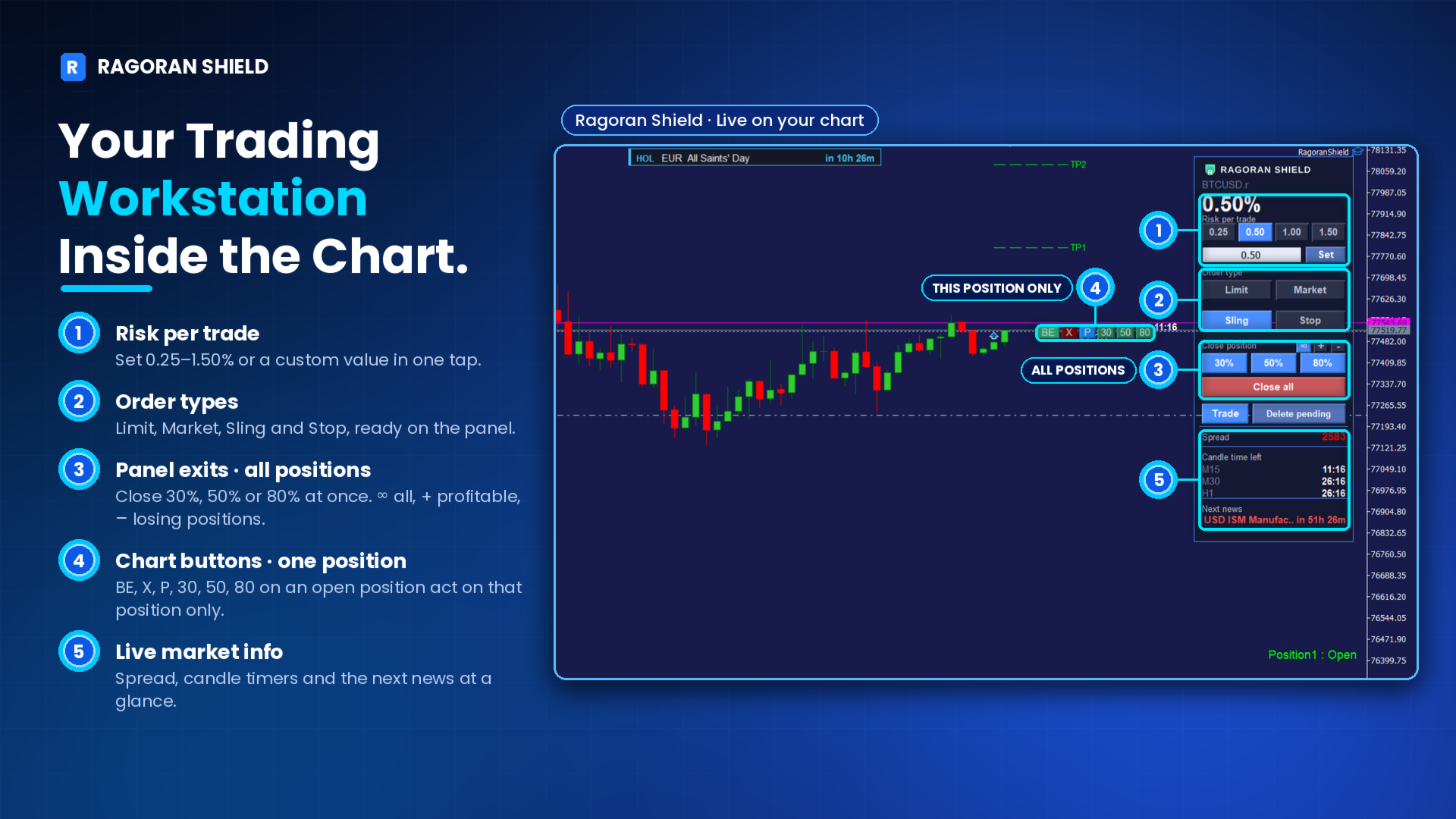
RagoranShield combines risk-based position sizing, four trade entry methods, individual position controls, partial closing, daily loss lock, economic news monitoring, and mobile notifications in one chart-based interface.
Designed to help manual traders manage their positions with greater control, clarity, and efficiency.

INTRODUCTION

Trading is challenging enough. Managing your trades shouldn't make it harder.
RagoranShield is an advanced risk and trade management tool designed to bring essential trading operations together in one practical interface.
From calculating position sizes and executing trades to managing individual positions, monitoring market conditions, and controlling daily losses, RagoranShield gives you a structured way to handle your trading activity directly from your chart.
Built for manual traders who value precision, flexibility, and disciplined risk management.
RagoranShield does not generate trading signals or automatically open trades. You remain in control of your trading decisions.

1. ENTER LIKE A BOWSHOT

Flexible Trade Execution

Define your Stop Loss first, then position and adjust your entry level directly on the chart.
RagoranShield supports four entry methods:

Market Execution: Open a position at the current market price.

Pending Stop: Breakout-style entry: Buy above or Sell below the current price.

Pending Limit: Pullback-style entry: Buy below or Sell above the current price.

Pending Sling: RagoranShield's proprietary entry method, designed as an alternative to conventional Pending Stop and Pending Limit execution, particularly in fast-moving markets.

Pending Sling provides an additional filtering option to help refine entry decisions. It does not eliminate market risk or guarantee profitable execution.
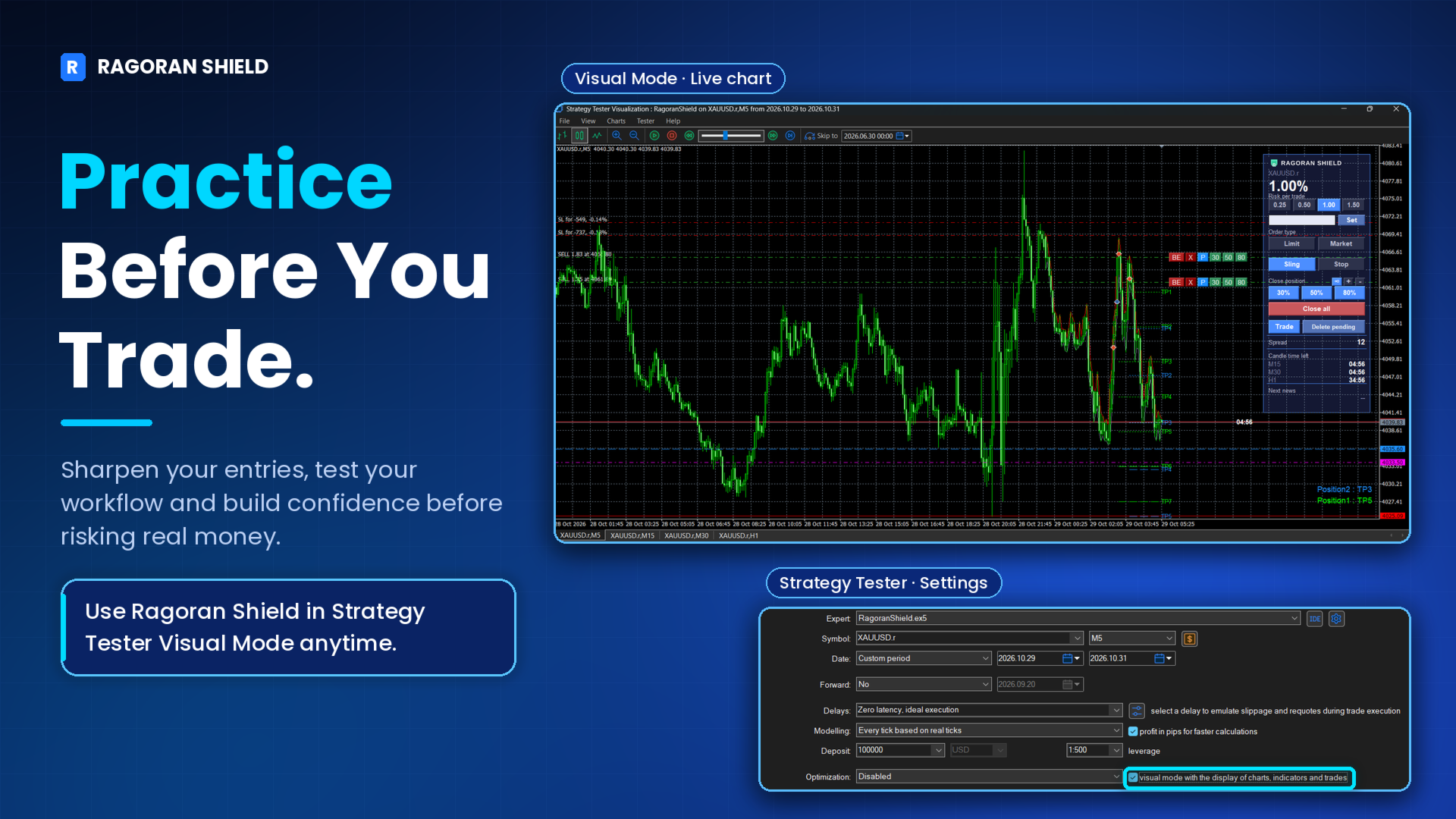
Try it in Strategy Tester Visual Mode to practice the panel and workflow before trading live.
Press the Trade button and drag. Until you release the mouse, no order is placed. If you change your mind before releasing, press C to cancel the operation.

2. MANAGE EVERY POSITION FROM THE CHART

Individual Position Controls

Manage each position independently using dedicated controls displayed directly on the chart.

BE — Break Even: Move the Stop Loss to Break Even quickly.

X — Close: Close the selected position.

P — Partial Close: Open the partial-close panel for more precise volume management.

Visual Take Profit Management

RagoranShield displays visual Take Profit levels on the chart.
When price touches a TP level, the position status readout at the bottom-right of the chart updates (for example Position1 : TP2), and that level line changes from dashed to dotted.
You can also enable an optional sound alert when a TP line is touched.

3. PARTIAL CLOSE BUILT IN

Control How Much You Close and When

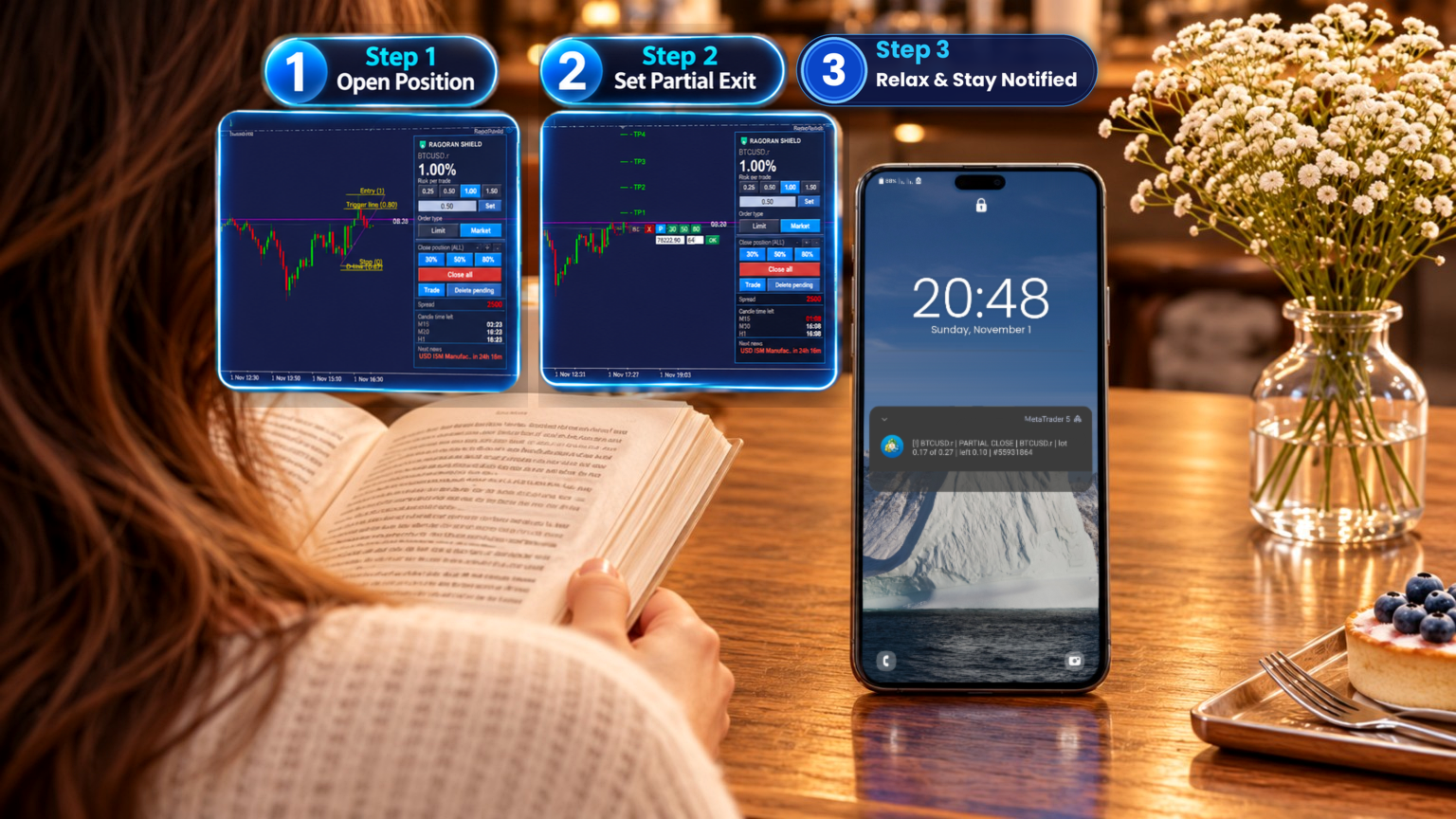
Partial Close gives you control over the price level and percentage of the open position volume you want to close.
You can:

Specify the price level at which the partial close should be triggered.

Set the percentage of position volume to close.

Use quick presets: 30%, 50%, and 80%.

This allows you to plan partial exits without manually calculating and entering closing volumes.

4. ONE CLICK, MANY POSITIONS

Group Position Management

Manage multiple positions according to their current status.
RagoranShield provides three management scopes:

∞ All Positions: Apply the selected operation to all eligible positions.

+ Profitable Positions: Target positions currently in profit.

− Losing Positions: Target positions currently in loss.

Group operations apply to all open positions on the chart's symbol, regardless of how they were opened. This can include manual trades and other Expert Advisors' positions on the same symbol.
Profit and loss filters use profit plus swap and exclude commission.
The management scope resets to All Positions when the Expert Advisor restarts.

Tooltips help identify each control before use.

5. RISK, SIZED FOR YOU

Risk-Based Position Sizing

RagoranShield calculates position volume based on your selected risk percentage and the distance between your entry price and Stop Loss.
Choose a preset risk level or enter a custom value.
The maximum configurable risk is 4.99% per position.
Risk is calculated from the account Balance at the beginning of the broker day, not from the live balance.
Volume is rounded down to the broker's lot step. If the result is below the minimum lot, the minimum lot is used, which can make the actual risk higher than your setting.

Why 4.99%?

The 4.99% maximum provides a configurable upper boundary for individual position risk. It is not a recommended risk level or a proprietary trading firm compliance setting.
Many traders prefer risking around 0.5%–2% per position to maintain greater flexibility and leave room for multiple trades, execution differences, slippage, and market gaps.
Important: The 4.99% limit applies to each individual position, not to the combined risk of all open positions. The total exposure across multiple positions can exceed this value.
RagoranShield is built for traders who value planning, discipline, and structured risk management. Its controls can help reduce avoidable position-sizing mistakes and leave more room to learn, improve, and keep trading.

6. DAILY LOSS LOCK

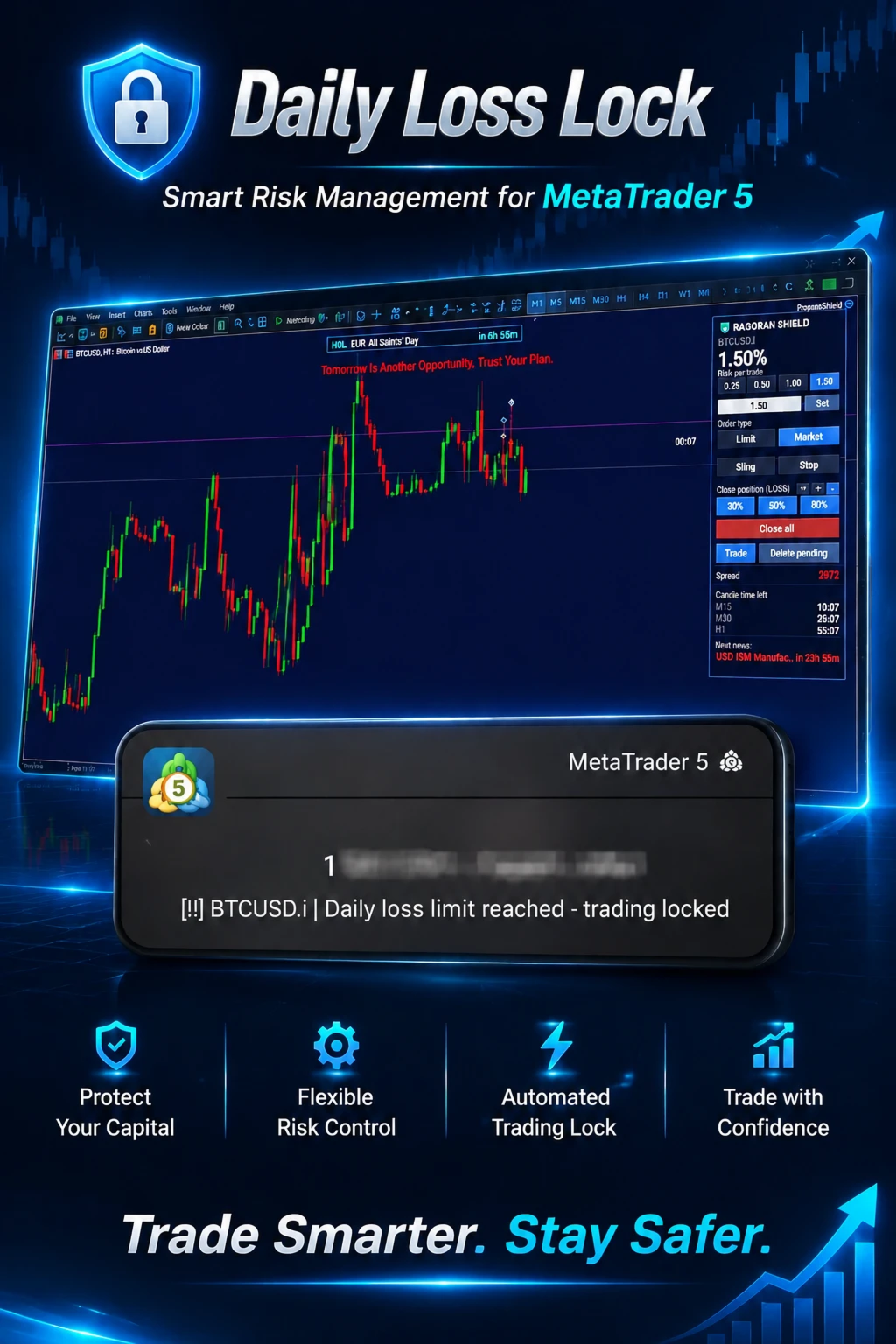
Set Your Daily Loss Boundary

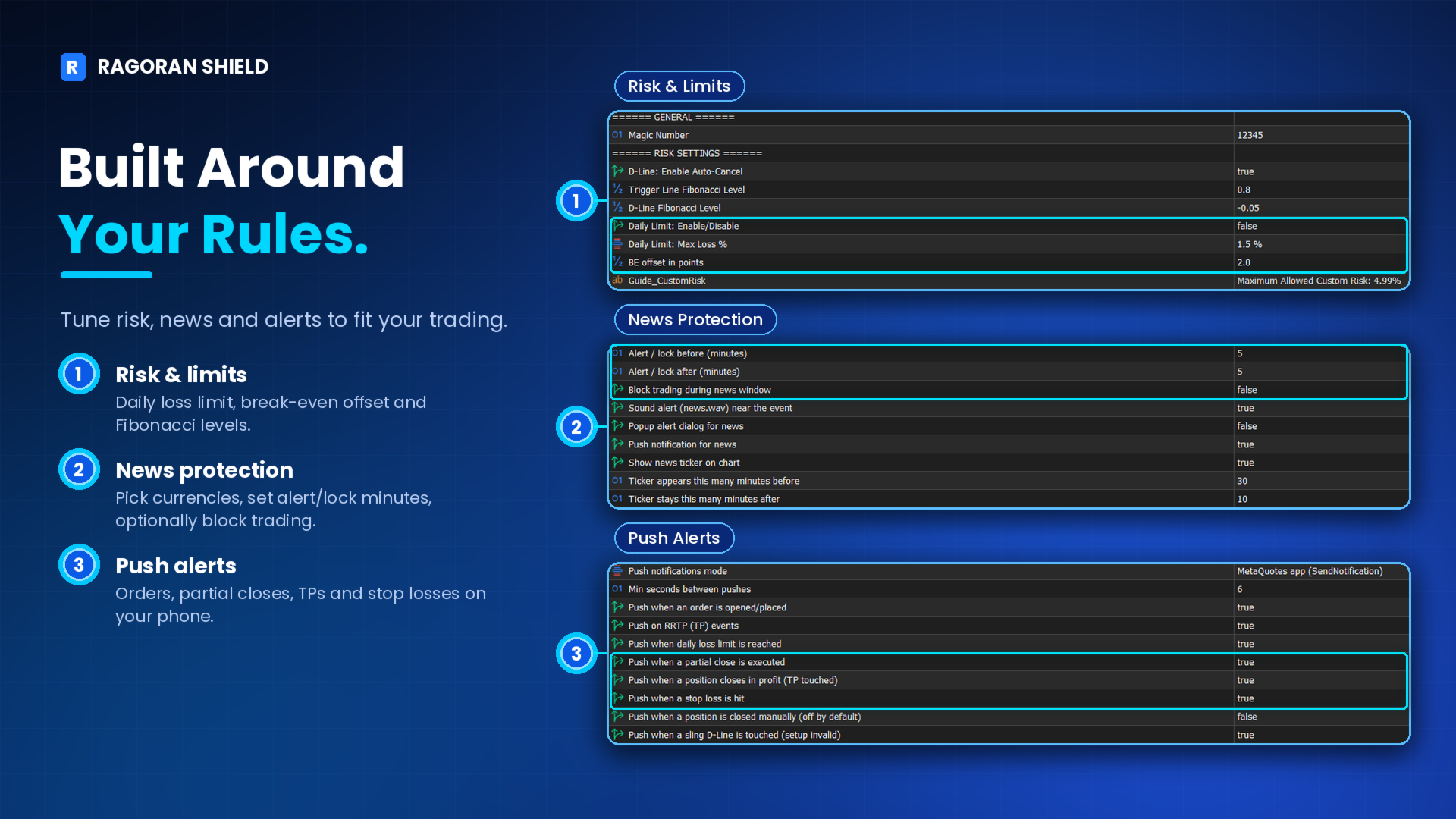
Configure your daily loss limit directly from the Expert Advisor Inputs.

Enable or disable Daily Loss Lock. It is disabled by default and must be turned on by you.

Select your preferred daily loss percentage from the available preset options.

The limit is calculated based on your account Balance at the beginning of the broker day.

Only closed trading losses are included, calculated as net P&L after commission and swap. Floating losses are excluded.

What Happens When the Limit Is Reached?

Once the configured daily loss limit is reached, RagoranShield locks new trading activity for the remainder of the broker day.
The lock cannot be released by changing the Expert Advisor Inputs (including turning Daily Loss Lock off) during that period. To remove an active lock manually, see Section 13.
The daily lock resets at 00:00 broker server time. If MetaTrader 5 is running, it resets at that time. If MetaTrader 5 was offline at reset, it clears the next time the Expert Advisor starts on the new broker day.
Daily Loss Lock helps enforce a predefined daily loss boundary within RagoranShield. It does not replace broker-level restrictions or guarantee compliance with proprietary trading firm rules.

The lock applies to the whole trading account, across every chart and symbol where RagoranShield is running, and it remains in place when the chart, symbol, or terminal is reloaded during the same broker day.
The lock is stored outside the chart, so restarting the Expert Advisor or disabling the Daily Loss Lock input does not clear it during the same broker day; only the new broker day clears it.
The lock blocks new entries placed through RagoranShield. A pending entry that was already armed before the limit was reached may still be triggered.

7. YOUR PHONE, YOUR EYES

Mobile Push Notifications

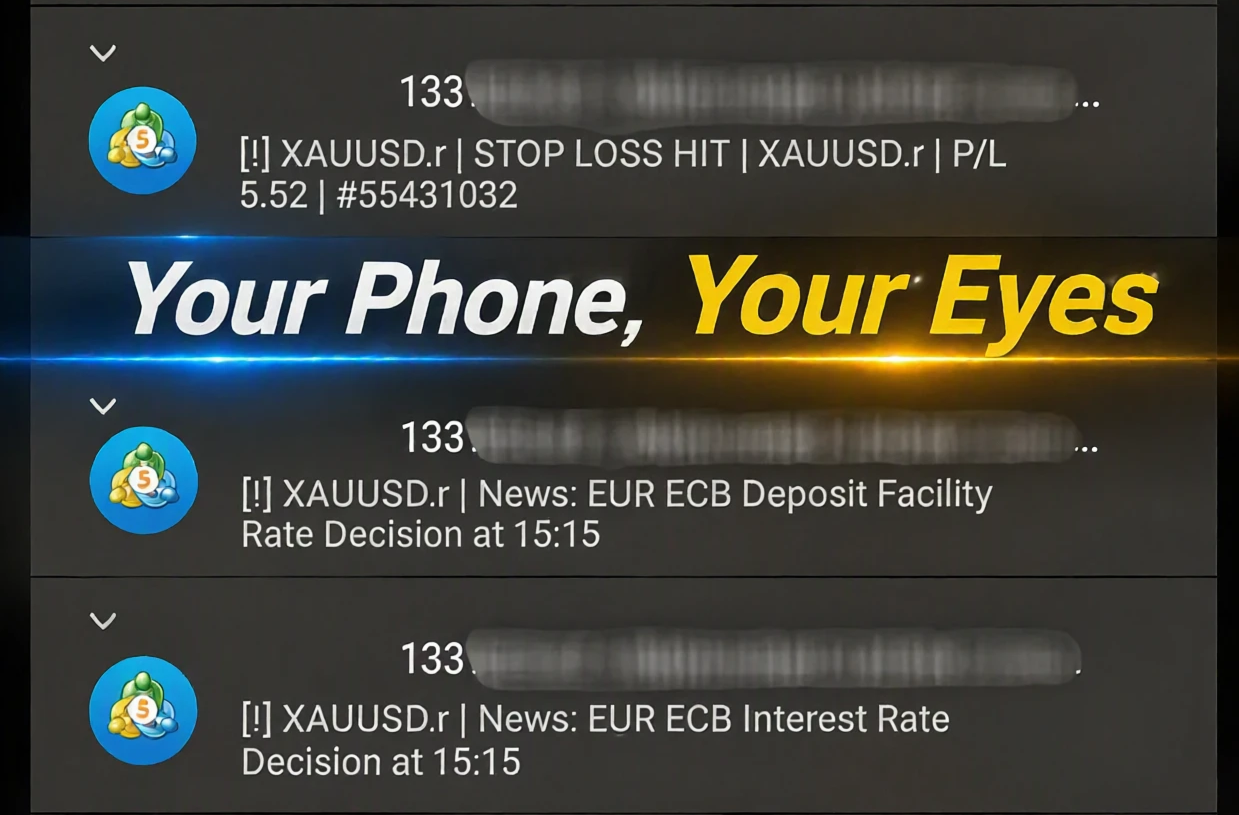
Stay informed about important position events through MetaTrader 5 mobile notifications.
RagoranShield can send notifications for:

Position opened

Partial close

Stop Loss reached

Take Profit reached

TP1–TP7 line touched

Position closed at Stop Out by the broker

Daily loss limit reached (trading locked)

Entry setup invalidated (Sling D-Line touched)

Notification Setup

To receive notifications:

Install and open the MetaTrader 5 mobile application.

Open Settings → Messages and copy your MetaQuotes ID.

On desktop MT5, go to Tools → Options → Notifications.

Enable Push Notifications and enter your MetaQuotes ID.

Click Test to verify the connection, then click OK.

In RagoranShield's Inputs, confirm that Push notifications mode is set to MetaQuotes app. It is the default setting.

Step 6 is essential. Without enabling the MetaQuotes app mode in the Expert Advisor inputs, notifications—including news alerts—will not be sent.

TP alerts (sound, popup, or mobile push) can be enabled or disabled in RagoranShield's Inputs.

8. ECONOMIC NEWS MONITORING

Keep an Eye on Important Market Events

RagoranShield integrates with the MetaTrader 5 Economic Calendar.
You can configure the economic event types and currencies you want to monitor.
Receive mobile push alerts shortly before scheduled economic events to help you stay aware of potentially important market conditions.
News alerts require the MetaQuotes app notification mode to be enabled and configured correctly.

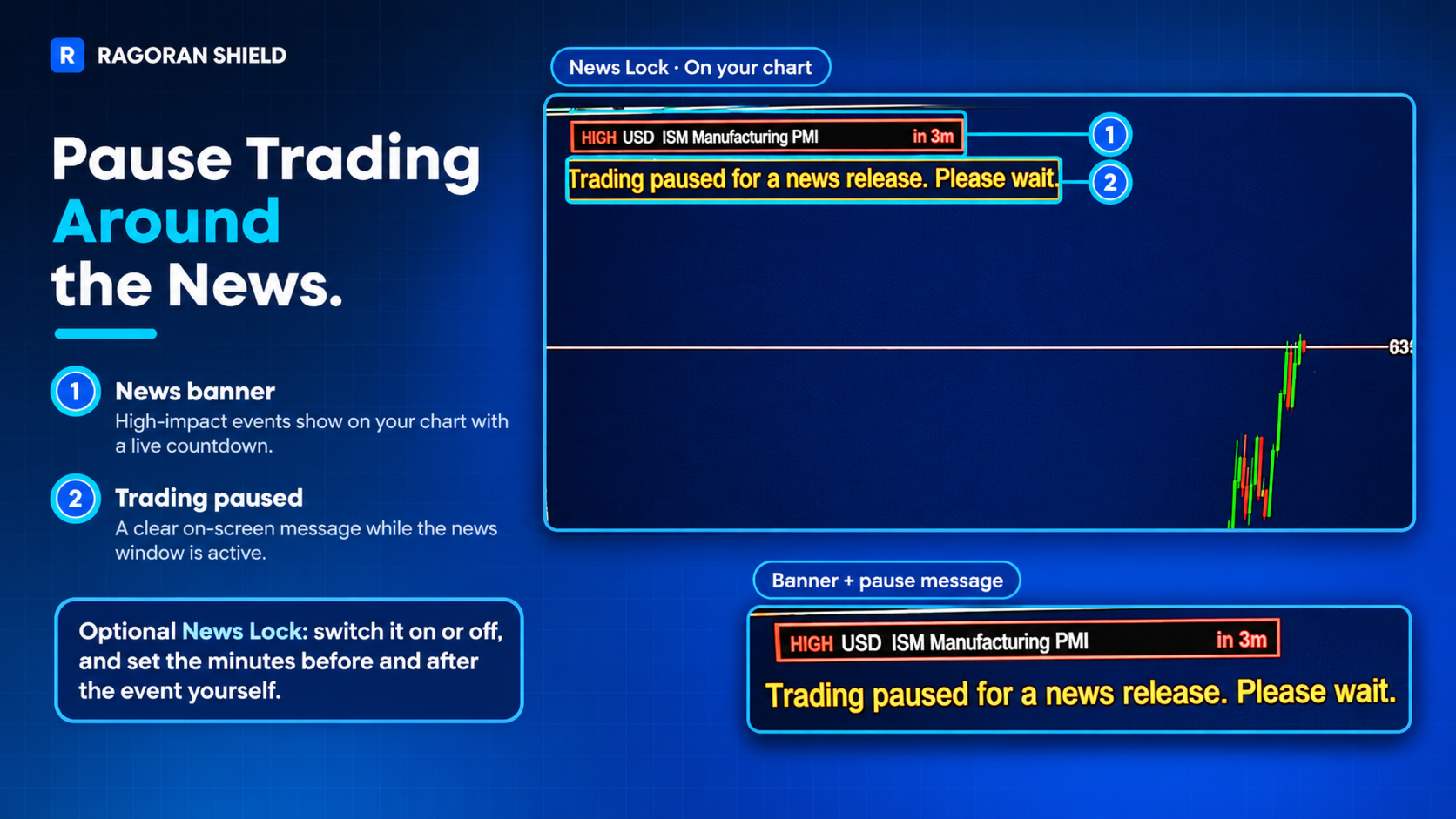
Optionally, RagoranShield can also pause new trade entries for a short window around selected events. When this option is enabled, a message appears on the chart while trading is paused, and entries resume automatically once the window has passed.
Alerts can be sent shortly before the event and, if configured, again after it.

9. PRACTICE BEFORE YOU TRADE

Strategy Tester Visual Mode

Explore RagoranShield and practice its trading controls in MetaTrader 5 Strategy Tester Visual Mode.
You can interact with the chart and panel while testing, allowing you to become familiar with the execution and position-management workflow without placing trades on a live account.
The Strategy Tester is a rehearsal environment for the interface and order workflow, not an automated backtest: RagoranShield still places orders only when you click or draw.
Some features, including Economic News Monitoring and mobile push notifications, are not available in the Strategy Tester, and visual details of the panel may differ slightly from a live chart.

10. MAKE THE CHART YOURS

Flexible Interface Customization

Adjust the interface to suit your chart layout and preferences.
Available customization options include:

Position the panel on the left or right side of the chart.

Select which market information and timeframe countdowns are displayed.

Customize display colors.

Set a warning color for the final 10% of a countdown.

Define a spread threshold and its warning color.

Enable or disable the TP touch sound alert.

Tooltips are available to help you understand the controls.

11. QUICK GUIDE

Useful Chart Controls

Del: Delete all pending orders.

C: Delete pending orders one by one, starting with the newest.

C while dragging an entry: Cancel the current entry operation before you release the mouse.

12. AT A GLANCE

RagoranShield includes:

Four trade entry methods: Market, Pending Stop, Pending Limit, and Pending Sling.

Risk-based position sizing.

Configurable risk percentage up to 4.99% per position.

Individual Break Even and position-closing controls.

Built-in Partial Close with custom price and volume percentage.

Quick Partial Close presets: 30%, 50%, and 80%.

Group management for all, profitable, and losing positions.

Visual Take Profit levels and optional touch alerts.

Daily Loss Lock.

Economic Calendar monitoring.

Mobile push notifications for position events and scheduled news.

Customizable chart interface.

Interactive practice in Strategy Tester Visual Mode.

13. IMPORTANT INFORMATION & LIMITATIONS

Please read the following information before purchasing and using RagoranShield.

Account Compatibility

RagoranShield has been tested on Hedging account types.
Compatibility with other account types has not been verified.

Risk Calculation

The maximum risk setting of 4.99% applies to each individual position, not to the combined exposure of multiple open positions.

Daily Loss Lock Calculation

Daily Loss Lock uses the account Balance recorded at the beginning of the broker day and counts closed trading losses.
Closed P&L is net: profit plus swap plus commission. Floating losses are excluded from this calculation.
The broker day is defined as starting at 00:00 broker server time.

Daily Loss Lock is stored in the terminal rather than in the chart. If a lock must be removed before the broker day ends, follow these steps:
1. In MetaTrader 5, open Tools > Global Variables (shortcut: F3). Select the variable RS_DAILYLOCK_<account number> and click Delete.
2. Open File > Open Data Folder, go to MQL5\Files, and delete the file RagoranShield_daily_lock_acct_<account number>.txt.
Remove both items to fully clear the lock. Menu names may vary slightly between MetaTrader 5 builds.

Proprietary Trading Firm Rules

Some proprietary trading firms calculate daily drawdown using account Equity, which may include floating losses.
RagoranShield's Daily Loss Lock does not necessarily match the drawdown calculation or risk rules of every proprietary trading firm.
Users must independently verify their firm's rules and determine whether the product's calculation method is suitable for their requirements.
RagoranShield does not guarantee compliance with any third-party trading firm's rules.

Strategy Tester Limitations

Economic News Monitoring and mobile push notifications are not available in Strategy Tester.
The Strategy Tester is a rehearsal environment for the interface and order workflow, not an automated backtest.

Notification Limitations

Push notification delivery depends on internet connectivity and MetaTrader 5 service availability.
MetaTrader 5 limits notifications to 10 messages per minute.

Operational Limitations

RagoranShield depends on the proper operation of MetaTrader 5, the Expert Advisor, broker services, and the user's internet connection.
Interruptions to terminal operation, connectivity, or platform and broker services may affect certain features or delay or prevent notification delivery.
For price-dependent functions, Daily Loss Lock monitoring, and notifications, MetaTrader 5 must be running and the Expert Advisor must remain attached to the chart.
Trading permission checks (terminal trading allowed, account trading allowed, Expert Advisor trading allowed) are enforced on live accounts only. They are not applied in the Strategy Tester or on demo accounts.
Capacity limits: up to 100 pending Sling trigger sets and up to 50 charted positions with visual TP lines. When the Sling capacity is full, a new pending Sling is not added and a message is written to the Experts log.

Market Risk

RagoranShield is a risk and trade management tool. It does not eliminate trading risk, prevent all losses, or guarantee execution at a specific price.
Slippage, price gaps, execution delays, market conditions, and broker-specific execution rules may affect trading results.

14. PRODUCT SCOPE & USER RESPONSIBILITY

RagoranShield provides trading management tools and configurable controls. It does not replace the user's trading judgment, trading plan, independent risk assessment, or understanding of broker conditions.
The user is responsible for:

Reading and understanding the product description, operating instructions, and stated limitations.

Configuring the Expert Advisor correctly.

Verifying account and broker compatibility before live use.

Understanding how each feature works and the conditions required for its operation.

Checking applicable broker conditions and any third-party proprietary trading rules.

Monitoring trading activity and all financial consequences of their trading decisions.

No feature guarantees profitable results, prevents all losses, or ensures compliance with third-party rules.
By purchasing and using RagoranShield, the user acknowledges that software operation is subject to platform, broker, connectivity, and market conditions, and accepts responsibility for their trading decisions and the configuration and use of the product.
Nothing in this section excludes or limits any responsibility that cannot legally be excluded or limited under applicable law.

15. REQUIREMENTS

MetaTrader 5.
A trading account and broker environment supporting the required manual trading operations.

Tested on Hedging accounts only.

The Expert Advisor must be attached to an active chart.

MetaTrader 5 must remain running for price-dependent Partial Close operations, Daily Loss Lock monitoring, and notification functionality.

A correctly configured MetaQuotes ID and enabled Push Notifications mode are required for mobile notifications.

PRICING AND UPDATES

The price may increase in future updates, after the planned features are fully implemented and tested. Price changes will be announced in the product's What's new section.

16. SUPPORT

For questions, technical assistance, or product-related discussions, please use the MQL5 Market product discussion section.
When requesting support, include a clear description of the issue and the relevant information about your MetaTrader 5 environment.
RAGORAN | Independent Trading Software
Better Tools. Smarter Trades. More Freedom.

おすすめのプロダクト
Free automatic Fibonacci is an indicator that automatically plots a Fibonacci retracement based on the number of bars you select on the BarsToScan setting in the indicator. The Fibonacci is automatically updated in real time as new highest and lowest values appears amongst the selected bars. You can select which level values to be displayed in the indicator settings. You can also select the color of the levels thus enabling the trader to be able to attach the indicator several times with differe
FREE
Mine Farm is one of the most classic and time-tested scalping strategies based on the breakdown of strong price levels. Mine Farm is the author's modification of the system for determining entry and exit points into the market... Mine Farm - is the combination of great potential with reliability and safety. Why Mine Farm?! - each order has a short dynamic Stop Loss - the advisor does not use any risky methods (averaging, martingale, grid, locking, etc.) - the advisor tries to get the most
BTC Trend Scalper MT5 トレンドキャプチャーエディション — BTCUSDのための精密モメンタムトレーディング トレーダーの皆さん、こんにちは! 私は   BTC Trend Scalper MT5   — 規律あるリスク管理でモメンタムの動きを捉えるために設計されたインテリジェントなビットコイントレーディングエキスパートアドバイザーです。 私は マーチンゲールではありません 。 私は グリッドシステムではありません 。 私は ギャンブルロボットではありません 。 私は トレンドフォロー型スキャルパー です。すべてのローソク足を追いかけるよりも資本を守ることが重要であると理解しているトレーダーのために特別に構築されました。 私の専門は? ビットコイン(BTCUSD) 私の使命は? リスクを厳格に管理しながら、高い確率で方向性のある動きを捉えること。 なぜ「トレンドキャプチャー」なのか? 多くのビットコインEAは、天井や底を予測しようとします。 多くのスキャルパーは、市場のわずかな変動に過剰に取引します。 私は別のアプローチを取ります。 私は待ちま
Imagine flying a real aircraft without ever stepping into a flight simulator. That's what trading is like. You have to simulate your strategy before you can take it to a live market. It is good if you can simulate things speedily before even stepping into any live market, or before coming up with an automated system.  People don't have all day to stare at a higher timeframe chart until the entry signal finally arrives. That's why I built this so that you can simulate your strategy with speed. Th

FREE
RRtoolbox - Professional Tools: Risk:Reward Trading Tool (SL/TP Horizontals + Pending orders + Diagonals), Alerts set on trend lines (for alerts on diagonal levels), SelfManagement (BE, partials...), close/cancelling by time, Statistics, Info and trading on chart. One-Click Trading with Visual Risk:Reward Management RRtoolbox is a comprehensive trading panel that combines one-click order execution,  statistics and  powerful visual Risk:Reward tools, alerts set with trendlines, on chart butt
Babel Assistant
Iurii Bazhanov
4.33 (9)
Babel assistant 1 MT5ネッティングロボット「Babel_assistant_1」は、ZigZagインジケーターを使用してM1、M5、M15、H1、H4、D1、W1の時間足全体でフィボナッチレベルを生成し、買いトレンドと売りトレンドの強さを計算します。指定されたトレンドレベル4.925を超えると、「Lot for open a position」の設定を使用してポジションをオープンします。その後、Babelは特定のフィボナッチレベルに指値注文(または逆指値注文)を配置し、指定されたストップロス(Stop Loss)およびテイクプロフィット(Take Profit)のラインを設定します。画面には、ポジション、トレード、トレンドの現在の結果が表示されます。 0.02ロット以上の手動でのポジション追加は、ロボットによって独自の保留注文のトリガーとして認識されます。0.01ロットの保留注文または成行注文は、執行時に単にポジション量を変更します。 免責事項: 以下の資料は、情報提供および教育目的のみを目的としています。外国為替市場向けの自動取引プログラムである本製品「Babel
FREE
"Impulses and Corrections 5" is created to help traders navigate the market situation. The indicator shows multi-time frame upward and downward "Impulses" of price movements. These impulses are the basis for determining the "Base" , which is composed of zones of corrections of price movements, as well as "Potential" zones for possible scenarios of price movement. Up and down impulses are determined based on a modified formula of Bill Williams' "Fractals" indicator. The last impulse is always "U
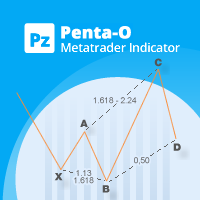
The Penta-O is a 6-point retracement harmonacci pattern which usually precedes big market movements. Penta-O patterns can expand and repaint quite a bit. To make things easier this indicator implements a twist: it waits for a donchian breakout in the right direction before signaling the trade. The end result is an otherwise repainting indicator with a very reliable trading signal. The donchian breakout period is entered as an input. [ Installation Guide | Update Guide | Troubleshooting | FAQ | A
FREE
CosmiCLab SMC FIBO CosmiCLab SMC FIBO is a professional trading indicator designed for traders who use Smart Money Concepts (SMC), market structure analysis and Fibonacci retracement levels. The indicator automatically detects market swings and builds Fibonacci levels based on the latest impulse movement. It also identifies market structure changes such as BOS (Break of Structure) and CHOCH (Change of Character), helping traders understand the current market direction. CosmiCLab SMC FIBO also pr
MetaTrader 5 用 Rhino Chart Drawing Tools Rhino Chart Drawing Tools は、MetaTrader 5 で TradingView に近い描画操作を提供します。54 種類の描画ツール、カスタマイズ可能なツールバー、お気に入り、クイックスタイル、オブジェクト設定、テンプレート、オブジェクトマネージャーを備えています。 描画ツール ライン トレンドライン、レイ、延長ライン、水平ライン、垂直ライン、水平レイ、クロスライン、トレンドアングル、矢印、パス、ポリライン、情報ライン。 チャネル 平行チャネル、回帰チャネル、フラットチャネル、ディスジョイントチャネル、ピッチフォーク。 フィボナッチ リトレースメント、エクステンション、チャネル、スピードファン、タイムゾーン。 ギャン ギャンボックス、ギャンファン。 図形 長方形、回転長方形、楕円、円、三角形、ポリライン。 注釈 テキスト、ノート、コールアウト、価格ラベル、サインポスト、フラグ、矢印マーク。 パターン XABCD、ABCD、Cypher、ヘッドアンドショルダーズ、三角形、Thre
Overview Harmonic Patterns MT5 is a technical analysis indicator designed for the MetaTrader 5 platform. It identifies and displays harmonic price patterns, such as Butterfly, Cypher, Crab, Bat, Shark, and Gartley, in both bullish and bearish directions. The indicator calculates key price levels, including entry, stop loss, and three take-profit levels, to assist traders in analyzing market movements. Visual elements and customizable alerts enhance usability on the chart. Features Detects six ha
FIBONACCI PRO XAUUSD — Institutional Price-Action Engine Trade Gold the way structure actually moves — not the way lagging indicators guess. FIBONACCI PRO is a precision decision engine built on ONE philosophy: pure Market Structure + Fibonacci + Price Action + Momentum. Zero indicators. Zero repainting. Zero look-ahead. Every signal is calculated on closed candles only — what you see in the tester is what you get live. What's inside the engine: Pure-price market structure (HH / HL / LH /
Fabii Half Trend Baseline
Fabien Georges Andre Guillemaud
上位足のトレンドに逆らう取引をやめましょう。2本のベースライン、1つのチャート。リペイントなし。 どの通貨ペアでも、どの時間足でも。2分でチャートに表示。Strategy Tester で無料デモを試せます。 Get more indicators here Baselines, volatility filters and oscillators. No repaint. 必要な理由 チャート上のラインが緑になったので、あなたはエントリーします。その後、上位足を開くと、大きなトレンドは逆方向を向いています。シグナルは本物でした。しかし、その背景のトレンドはあなたの味方ではありませんでした。 大きなトレンドに逆らう取引は、そのたびにエントリーの優位性を失わせます。 得られるもの Fabii Half Trend Baseline は、現在の時間足のトレンドと上位足のトレンドを1つのチャートに表示します。ウィンドウを切り替えて全体像を確認する必要がなくなります。 上位足の2本目のベースラインがメインのラインの後ろに描かれるため、別のチャートを開かずに大きなトレンドが分かります。 ベ
This indicator is especially for the binary trading. Time frame is 1 minutes and exp time 5 or 3 minutes only. You must be use martingale 3 step. So you must put lots size is 10 % at most. You should use Mt2 trading platform to connect with my indicator to get more signal without human working. This indicator wining rate is over 80% but you may get 100% of profit by using martingale 3 step. You should use MT2 Trading Platform to connect meta trader platform and binary platform . You can get mt2
FREE
Dewa Scalper Feel Good EA Description Dewa Scalper Feel Good EA is an advanced automated trading solution engineered for consistent, stress-free capital growth. Built on precise multi-candle momentum patterns, this Expert Advisor captures high-probability market swings on the H1 timeframe while keeping risk strictly under control. It combines a smart switching entry model with a disciplined Break-Even Point (BEP) recovery algorithm and automated auto-compounding. Unlike conventional high-risk gr
プレミアムレベルは、正しい予測の精度が80%を超える独自の指標です。 この指標は、最高のトレーディングスペシャリストによって2か月以上テストされています。 あなたが他のどこにも見つけられない作者の指標! スクリーンショットから、このツールの正確さを自分で確認できます。 1は、1キャンドルの有効期限を持つバイナリーオプションの取引に最適です。 2はすべての通貨ペア、株式、商品、暗号通貨で機能します 手順: 赤い矢印が表示されたらすぐにダウントレードを開き、青い矢印が表示されたら閉じます。青い矢印の後に開くこともできます。 試してテストしてください!推奨設定はデフォルトです! 日足チャートで最高の精度を示します! インディケータは、2600 Pipsの収益性に対して、約10Pipsという非常に小さなマージンを使用します。
HAS RSI Signal — SL/TP自動計算機能付き プロフェッショナル・トレンドインジケーター HAS RSI Signal は、信頼性の高いクラシックな手法と最新のノイズ除去アルゴリズムを融合させた強力なトレーディングツールです。 平均足スムーズド(Heiken Ashi Smoothed) と RSI を組み合わせることで、トレンドの転換点や買われすぎ・売られすぎ圏からの脱出タイミングを正確に捉え、明確なエントリーシグナルを提示します。 主な特徴: 二重のフィルタリング: 平均足スムーズドで市場の「ノイズ」を除去し、RSIで勢い(モメンタム)の強さを確認します。 損切り・利確ラインの自動計算: 単にシグナルを出すだけでなく、ボラティリティ( ATR )に基づいた最適なストップロス(SL) と テイクプロフィット(TP)を自動で算出します。 視覚的な分かりやすさ: シグナルはチャート上にカラーキャンドルとして表示されるため、一目でトレンドを把握でき、取引画面をスッキリと保てます。 充実の通知機能: アラート、音声、スマートフォンへのプッシュ通知機能を搭載。チャンスを逃すこと
SI Pattern Scanner Multi-symbol candlestick pattern scanner with AI-powered signal strength scoring. Stop checking charts one by one. The SI Pattern Scanner runs on a single chart and automatically scans every symbol in your Market Watch, detecting 21 professional candlestick patterns across your chosen timeframe. Results are displayed in a clean live dashboard, sorted by signal strength so the best opportunities always appear at the top. How It Works The scanner runs on a configurable timer, pu
Orphira Gold
Mohammad Reza Rezaei
Orphira Gold is an automated trading system developed specifically for gold trading in MetaTrader 5. It combines adaptive trade management, equity-based position sizing and several layers of portfolio protection in one straightforward Expert Advisor. The system continuously evaluates market conditions and opens trades only when its internal requirements are met. When a position moves against the expected direction, Orphira Gold may use carefully spaced recovery positions. Every additional order
これはほぼ間違いなく、MetaTraderプラットフォームで見つけることができる最も完全な調和価格形成自動認識インジケーターです。 19種類のパターンを検出し、フィボナッチプロジェクションをあなたと同じように真剣に受け止め、潜在的逆転ゾーン(PRZ)を表示し、適切なストップロスとテイクプロフィットレベルを見つけます。 [ インストールガイド | 更新ガイド | トラブルシューティング | よくある質問 | すべての製品 ] 19の異なる調和価格形成を検出します プライマリ、派生および補完フィボナッチ投影(PRZ)をプロットします 過去の価格行動を評価し、過去のすべてのパターンを表示します この指標は、独自の品質とパフォーマンスを分析します 適切なストップロスとテイクプロフィットのレベルを表示します ブレイクアウトを使用して適切な取引を通知します すべてのパターン比をグラフにプロットします 電子メール/音声/視覚アラートを実装します スコット・M・カーニーの本に着想を得て、この指標は最も純粋で急を要するトレーダーのニーズを満たすように設計されています。ただし、トレードを容易にする
Inverted_Chart_EA Utility Expert Advisor Inverted_Chart_EA creates and maintains a mirror-inverted chart of any symbol and timeframe. It automatically generates a custom instrument (e.g. US30_INV ) and keeps its price history updated in real time, with bars mirrored around a chosen pivot. This utility gives traders a new way to analyze the market from a different perspective by flipping the chart upside down. Why use an inverted chart? Highlight hidden patterns – price formations that look ordin
This MQL4 code is a   custom indicator   that draws multiple colored rectangles on a chart, spaced apart by a defined pip distance, and projected into the future. Here's a brief breakdown: Purpose: Draws several horizontal rectangles (zones) starting from a specified price. Rectangles are spaced apart vertically by a pip distance. Colors alternate between FirstColor and SecondColor . Rectangles can be drawn behind candles and optionally filled. Each rectangle extends into the future for a specif
FREE
Gold Aegis Protocol は、MetaTrader 5 向けのアドバイザーです。上位時間足の XAUUSD のピボットブレイクアウトを、指値ではなくストップ順番(stop order)でトレードします。損切り、利確、トレーリング、ブレーキイーブン(建値決済)のルールはエントリー前に定義されます。複数の独立した構造を同時に監視できます。 ロジック 上位時間足のピボット構造を読み取ります。 確認されたレベル付近にストップ順番(stop order)を配置します。約定しなかった注文は失効します。 複数の独立した構造を追跡し、それぞれが独自の形状と独自のリスク配分を持ちます。 マーチンゲール、グリッド、ナンピン(ロットの逆張り増額)は使用せず、損失回収のためのロット増額も行いません。約定した全ポジションにはブローカー側のストップロスが付きます。 入力パラメーター リスクレベル 固定ロット 最大ロット マジックナンバー オーダーコメント 最大スプレッド 各テーブル行に対応するプリセットファイルが用意されています。 歴史的シミュレーション MetaTrader 5 のストラテジーテス
Risk Calculator EA – Utility for Precise Trade Sizing If you find this tool useful consider to  Buy me a coffee!   The Ultimate Risk Calculator is a lightweight in-chart Expert Advisor (EA) designed to help you easily and quickly calculate position size and set stop-loss / take-profit levels with full control over risk management directly on the chart. What it does? It turns manual risk decisions into fast, visual, and accurate calculations. You draw or adjust the Entry, Stop-Loss and Take-P
FREE
SPECIAL LAUNCH OFFER: $30 (1-Month Rent) Limited time offer to build our community and gather feedback! AmbM GOLD Institutional Scalper A high-precision M5 algorithm for XAUUSD (Gold) , engineered to trade exclusively at Institutional Liquidity Levels ($5/$10 psychological marks). PERFORMANCE DATA (BUY ONLY) • Win Rate: 87.09%. • Safe Growth: +$4,113 profit on $10k (13.75% Max Drawdown). • Extreme Stress Test: Successfully generated +$22,997 in a 5-year stress test (2020-2026), proving
Philippe Calibre 79 | XAUUSD専用・高精度アルゴリズムトレーディングEA リアルタイムシグナル ライブシグナル: ここをクリック その他のリスクプロファイル リスクプロファイル 説明 ダウンロードリンク コンサバティブ型  リスク露出を低く抑えた設計 セットをダウンロード ディフェンシブ型  ボラティリティリスクを軽減 セットをダウンロード 厳格な防御プロファイル 厳格なリスク制限 セットをダウンロード システム公式ドキュメント 詳細なセットアップ手順やロジック解説は、MQL5ブログ記事をご覧ください: [リンク] パラメーター詳細設定マニュアル [リンク] 資金管理およびリスク設定ガイド [リンク] 日次エクイティ(有効証拠金)リミッター設定ガイド システム概要 Philippe Calibre 79 は、MetaTrader 5におけるゴールド(XAUUSD)取引専用に開発された全自動エキスパートアドバイザー(EA)です。モメンタム分析と統計的プライスアクションに基づき、最適なエントリーポイントを特定します。含み損ポジションに対しては独自のバスケ
OrdinalEdge Mean Reversion — Asian Session OrdinalEdge Mean Reversion is a rules-based  expert advisor designed for the Asian trading  session. The strategy identifies short-term price  extremes and targets a return to the statistical  mean, taking advantage of the low-volatility,  range-bound conditions typical of the Asian session. The expert does not use martingale, grid trading,  or tick scalping. One position is held at a time.  All positions are closed before the London  pre-session ope
MACD Sniper Pro is an advanced automated trading system designed for traders seeking high-precision entries and robust risk management. By combining the classic momentum of MACD Crossover with a strict ADX Volatility Filter and Dynamic ATR Management , this EA completely eliminates emotional trading and filters out dangerous flat/sideways markets. Unlike standard MACD indicators that suffer during consolidation, MACD Sniper Pro verifies trend strength before entering and protects your capital us
MT5用NAS100 Auto SL and TP Makerをご紹介します: MetaTrader5でナスダック100市場をナビゲートするトレーダーにとって不可欠なアシスタントであるNAS100オートSLおよびTPメーカーで、ストップロスおよびテイクプロフィットの設定をもう見逃すことはありません。このツールは、ストップロスとテイクプロフィットのレベル管理を自動化するシームレスなソリューションを求める方々のために設計されています。 主な特徴 簡単な自動化: ストップロスやテイクプロフィットのないナスダック100取引を自動的に監視します。 ユーザーが構成した設定に基づいてレベルを動的に調整します。 注文タイプの多様性: Nasdaq100の成行注文と未決済注文の両方に対応。 MetaTrader 5で利用可能なさまざまな注文タイプをサポートします。 カスタマイズされた設定: ユーザーフレンドリーなパラメータ設定により、トラッキング設定とストップロス/テイクプロフィットレベルのカスタマイズが可能です。 柔軟な範囲: 実行する特定のNAS100商品または取引されるすべての商品に対してスト
FREE
ICONIC BTC AI+ | SYNAPSE.PHENOTYPE S6 ENGINE(バージョン 15.00) 発売価格 現在価格:599 USD。 残りライセンス数:10。 次の価格帯:699 USD。 最終価格:1699 USD。 早期アクセス価格は製品リリースの現在のフェーズを反映したものです。現在のライセンス枠が終了し、次の価格帯が開放されるにつれて価格は段階的に引き上げられます。現在の価格が終了する明確な予定日は設定されていません。 ビットコインは為替通貨ペアではありません。ゴールドのような値動きをせず、株価指数のようにセッションの境界を尊重するわけでもなく、ボラティリティの特性は一時間の取引の中でさえ変化することがあります。落ち着いた値動きの通貨向けに作られた汎用の自動売買システムは、BTCUSDが安定して示さない市場の挙動を前提としているため、ここではしばしば機能しません。 ICONIC BTC AI+ はBTCUSD専用に設計されています。エントリー条件の検証からAIによる意思決定のルーティング、リアルタイムのリスク調整に至るまで、アーキテクチャのあらゆる層がこの市
このプロダクトを購入した人は以下も購入しています
Trade Assistant MT5
Evgeniy Kravchenko
4.43 (216)
取引 ごとのリスクの 計算、新規注文 の 簡単 な 設置、部分的 な 決済機能 を 持 つ 注文管理、 7 種類 のトレーリングストップなど 、便利 な 機能 を 備 えています 。 追加の資料と説明書 インストール手順   -   アプリケーションの手順   ライン機能 チャート上にオープニングライン、ストップロス、テイクプロフィットを表示します。この機能により、新規注文を簡単に設定することができ、注文を出す前にその特徴を確認することができます。   リスク計算 リスク計算機能は、設定されたリスクとストップロス注文のサイズを考慮して、新規注文のボリュームを計算します。ストップロスの大きさを自由に設定できると同時に、設定したリスクを守ることができます。 Lot calc ボタン - リスク 計算 を 有効 / 無効 にします 。 Risk フィールドでは 、必要 なリスクの 値 を 0 から 100 までのパーセンテージまたは 預金通貨 で 設定 します 。 設定」 タブで 、 リスク 計算 の 種類 を 選択 します :「 $ 通貨」、「 % 残高」、「 % エクイティ 」、「
Trade Manager EAへようこそ。これは、取引をより直感的、正確、そして効率的にするために設計された究極の リスク管理ツール です。これは単なるオーダー実行ツールではなく、包括的な取引計画、ポジション管理、リスク管理のためのソリューションです。初心者から上級者、迅速な実行を必要とするスキャルパーまで、Trade Manager EAはあらゆるニーズに対応し、為替、指数、商品、暗号通貨などさまざまな市場で柔軟に対応します。 Trade Manager EAを使用すると、複雑な計算が過去のものになります。市場を分析し、エントリーポイント、ストップロス、テイクプロフィットのレベルをチャート上のラインでマークし、リスクを設定するだけで、Trade Managerが最適なポジションサイズを即座に計算し、SLとTPをピップ、ポイント、口座通貨でリアルタイムに表示します。すべての取引が簡単かつ効果的に管理されます。 主な機能: ポジションサイズ計算機 :定義されたリスクに基づいて取引サイズを瞬時に決定します。 簡単な取引計画 :エントリー、ストップロス、テイクプロフィットを設定するためのド
Farmed Hedge Yield Farming | All Markets (Manual - Hybrid - Semi/Automated EA) VERIFIED TRADING RESULTS - Farmed Hedge Yield Axi Copy:  https://www.mql5.com/en/signals/2356376 - Farmed Hedge Yield Exn Copy:   https://www.mql5.com/en/signals/2356404 - Farmed Hedge Yield V Copy:  https://www.mql5.com/en/signals/2357156 IMPORTANT NOTICE: FarmedHedge is a MANUAL-FOCUSED TRADING UTILITY ,not a fully automated EA. Results shown on this Signal include manual trades and overall strategic management.
Telegram to MT5 Multi-Channel Copier   は、 Telegram と Discord チャンネルのトレードシグナルを MetaTrader 5 へ自動コピーします。ボット不要、ブラウザ拡張不要、手動コピー不要。Telegram や Discord にシグナルが届くと、EA が数秒であなたのターミナルに注文を出します。 さらに、チャンネルをコピーする前に、内蔵バックテスターでそのチャンネルがあなたの口座でどう動いたかを確認できます。 製品は 2 つのコンポーネントで構成されます:Telegram チャンネルを監視する Windows アプリと、MT5 ターミナルでシグナルを執行する本 EA です。MT4 版もあります   こちら . 購入前にお試しください:   アプリは無料でダウンロードできます。ご自身のチャンネルを接続し、各シグナルがどのように読み取られるかをご確認ください。Backtest タブと実際の取引には、購入またはレンタルした EA が必要です。このページの無料デモはストラテジーテスターでのみ動作し、テスターでは Telegram と D
TradePanel MT5
Alfiya Fazylova
4.88 (172)
Trade Panelは多機能なトレーディングアシスタントです。アプリには手動取引用の50以上のトレーディング機能が搭載されており、ほとんどの取引作業を自動化することができます。 アプリの説明書: https://www.mql5.com/en/blogs/post/756482 デモ口座用アプリの試用版: https://www.mql5.com/en/blogs/post/750865 アプリのインストール方法: https://www.mql5.com/en/blogs/post/756239 アプリをビジュアルモードでテストする方法: https://www.mql5.com/en/blogs/post/770277 VPSのMetaTraderにアプリをインストールする方法: https://www.mql5.com/en/blogs/post/770190 取引。 ワンクリックで取引操作を行うことができます: リスクを自動計算して指値注文やポジションを開く。 複数の注文やポジションをワンクリックで開く。 注文のグリッドを開く。 保留中の注文やポジションをグループごとに閉じる
News Trade EA MT5
Konstantin Kulikov
4.55 (11)
僕自身が数年間使っている便利なロボットをご紹介します。半自動モードでも完全自動モードでもお使いいただけます。 >>> Chat <<< 当プログラムは経済指標カレンダーで発表されるニュースをもとにした取引の柔軟な設定が可能です。戦略テスターでは確認不可です。実際の取引のみです。 最新の設定アーカイブをダウンロードしてください: https://www.mql5.com/en/blogs/post/747929 シグナルモニタリング: https://www.mql5.com/en/signals/author/test-standart 当該エキスパート・アドバイザーのためのカスタマイズ設定セットを作る場合は、ブログの全パラメータの説明を参照してください :   https://www.mql5.com/en/blogs/post/748545 。 基本的なデフォルト設定について 一つのチャートからGBPとの通貨ペア(GBPUSD、EURGBP、GBPJPY、GBPCAD、GBPAUD、GBPCHF)で取引をします。GBPは最もボラティリティの高い通貨のため、取引が成功するチ
自分の取引ルールで Telegram のシグナルをコピー Telegram to MT5 Signal Trader は、Telegram の公開・非公開チャンネルやグループから、テキスト形式の取引シグナルを MetaTrader 5 へ自動でコピーします。1つのデスクトップアプリで複数の配信者と MT5 口座を管理し、 配信者ごとにリスクと取引設定を個別に指定 できます。 シグナルのコピーに Telegram ボットや API 設定は必要ありません。 電話番号または QR コードでご自身の Telegram アカウントにログインし、すでに参加しているチャンネルやグループを選ぶだけです。ボットの作成や、Telegram API トークン、API ID、API hash の入力は不要です。 ポジションサイズを選び、複数の利確水準に分けて決済し、建値へのストップ移動やトレーリングストップを自動化できます。配信者のシグナルを受け取りながら、実際の取引方法は自分で管理できます。 本製品は、この MT5 エキスパートアドバイザ(EA)と、必須の Windows 連携アプリで構成されます。 インス
================================================================================ POC BREAKOUT - V20.72. Full Professional Grade Toolkit ================================================================================ POC Breakout is a full MetaTrader 5 trading dashboard for discretionary traders who want breakout signals, Point of Control (POC) context, volume profiles, order flow, market structure, news, alerts, and advanced trade planning in one professional workspace. Attached directly to you
The product will copy all telegram signal to MT5 ( which you are member) , also it can work as remote copier.  Easy to set up, copy order instant, can work with almost signal formats, image signal,  s upport to translate other language to English Work with all type of channel or group, even channel have "Restrict Saving Content", work with  multi channel, multi MT5 Work as remote copier: with signal have ticket number, it will copy exactly via ticket number. Support to backtest signal. How to s
EA Overfitter
Stephen J Martret
5 (3)
That backtest looks great. But will it still be making money tomorrow, next week, next month? EA Overfitter re-runs your EA on 100 price histories it has never seen. One score tells you if the edge is real. A backtest tells you what an EA did on one price history — the one that happened to occur. What you cannot tell from it is how much of that result was the strategy and how much was the particular path. EA Overfitter answers that. It builds up to 100 synthetic price histories your EA has n
Power Candles Strategy Scanner - 自動最適化型マルチシンボル設定ファインダー パワーキャンドル・ストラテジー・スキャナーは 、パワーキャンドル・インジケーターを駆動するのと全く同じ自己最適化エンジンを、マーケットウォッチに登録されているすべての銘柄に対して並行して実行します。1つのパネルで、現在統計的に取引可能な銘柄、各銘柄で勝率の高い戦略、最適なストップロス/テイクプロフィットの組み合わせが表示され、新たなシグナルが発生した瞬間に通知が届きます。 このツールは、Stein Investmentsのエコシステムの一部です。  18種類以上のツールをすべて閲覧し、AIを活用したセットアップの推奨を受け取り、  https://stein.investments でコミュニティに参加しましょう 市場動向を網羅。銘柄ごとに3,000件以上の自動最適化。2種類のアラート。ワンクリックでチャートを切り替えて即座にアクション。 なぜこれが必要なのか 多くのマルチ銘柄スキャナーは、 価格の動き (ボラティリティ、変動率、銘柄ごとのRSI)を表示するだけです。それ
Your EAs cannot see each other, but Anchor can. Anchor gives you one place to coordinate your EAs, manage risk, and decide when trading is allowed. It works alongside the trading bots you already use without any changes to them. The Problem One EA opens a trade. Then another starts trading. The next thing you know, you wake up to multiple grids built across your account. Each EA may be doing exactly what it was designed to do, but together they can place far more risk on your account than you in
VirtualTradePad PRO SE MT5 — MetaTrader 5向けプロフェッショナル取引コントロールセンター VirtualTradePad PRO SE は、 MetaTrader 5 向けのプレミアムなチャートベースの取引パネルであり、トレード管理ワークスペースです。より速い執行、明確なポジション管理、構造化されたトレード管理、視覚的なレベル計画、そしてチャート上で完結するプロフェッショナルなワークフローを求めるトレーダー向けに設計されています。 これは単なる BUY / SELL パネルではありません。PRO SE は、手動取引、予約注文、ポジション管理、部分決済、バスケット損益管理、平均化レベル、ATMルール、シグナル監視、リアルタイム市場情報、ストラテジーテスター (Strategy Tester) ワークフロー、VPS向け運用を、1つの連携されたインターフェースに統合します。 MT4版 | 完全な説明とスクリーンショット | 購入方法 | インストール方法 | ログファイルの取得方法 | テストと最適化の方法 | Expforex のすべての製品 PRO
Trade Indicator Assistant   is a powerful MT5 utility designed to turn indicators into automated trading systems. Its main feature is the ability to automatically detect an indicator’s   BUY and SELL signal buffers , without requiring you to know the buffer numbers, search through indicator settings, or modify the indicator source code. Bonus Indicator:   After purchasing Trade Indicator Assistant, contact me to receive   Trade Signal Pro   completely free as a bonus indicator. [Download Demo V
Trade Manager は、リスクを自動的に計算しながら、取引を迅速に開始および終了するのに役立ちます。 過剰取引、復讐取引、感情的な取引を防止する機能が含まれています。 取引は自動的に管理され、アカウントのパフォーマンス指標はグラフで視覚化できます。 これらの機能により、このパネルはすべてのマニュアル トレーダーにとって理想的なものとなり、MetaTrader 5 プラットフォームの強化に役立ちます。多言語サポート。 MT4バージョン  |  ユーザーガイド + デモ Trade Manager はストラテジー テスターでは機能しません。 デモについてはユーザーガイドをご覧ください。 危機管理 % または $ に基づくリスクの自動調整 固定ロットサイズを使用するか、ボリュームとピップに基づいた自動ロットサイズ計算を使用するオプション RR、Pips、または価格を使用した損益分岐点ストップロス設定トレーリングストップロス設定 目標に達したときにすべての取引を自動的に終了するための 1 日あたりの最大損失 (%)。 過度のドローダウンからアカウントを保護し、オーバートレードを防ぎます
次回アップデート — バージョン 2.52 近日公開!【新機能】 市場分析とトレードワークフローを強化する、4つの主要な新機能にご期待ください 皆様のトレードニーズに応える4つの新機能により、市場分析を次のレベルへと引き上げます。新機能をご紹介します: 1. TRADE OVERVIEW DASHBOARD 2. CONFLUENCE AT ZONE 3. STRONG & WEAK HIGH/LOW 4. OTE 1. TRADE OVERVIEW DASHBOARD 市場全体の状況をより簡単に把握できるダッシュボードです。トレード判断をサポートするガイダンスを提供し、市場分析とトレード計画を体系的に行えるよう支援します。すべてを1つの画面で確認できます。 マルチタイムフレーム市場概要(Multi-Timeframe Market Overview) 市場の方向性と価格構造をより明確に把握 市場状況をすばやく確認 体系的な市場分析とエントリー計画のためのガイダンス 2. CONFLUENCE AT ZONE 価格が重要なゾーンに入るとき…いくつのサポート要因が一致しているかを確認で
MT5 to Telegram Signal Provider は、Telegramのチャット、チャンネル、またはグループに 指定された シグナルを送信することができる、完全にカスタマイズ可能な簡単なユーティリティです。これにより、あなたのアカウントは シグナルプロバイダー になります。 競合する製品とは異なり、DLLのインポートは使用していません。 [ デモ ] [ マニュアル ] [ MT4版 ] [ Discord版 ] [ Telegramチャンネル ]  New: [ Telegram To MT5 ] セットアップ ステップバイステップの ユーザーガイド が利用可能です。 Telegram APIの知識は必要ありません。必要な全ては開発者から提供されます。 主な特長 購読者に送信する注文の詳細をカスタマイズする機能 例えば、Bronze、Silver、Goldといった階層型のサブスクリプションモデルを作成できます。Goldサブスクリプションでは、すべてのシグナルが提供されます。 id、シンボル、またはコメントによって注文をフィルターできます 注文が実行されたチャート
DrawDown Limiter
Haidar Lionel Haj Ali
5 (23)
DrawDown Limiter v5.0 — 高度な口座保護コントローラー DrawDown Limiter v5.0 は、取引口座を監視し、設定されたリスク、利益、ニュース、スケジュール、ロールオーバー、またはポジション数の制限に達した際に自動的に対応する、クライアント側で動作する口座保護コントローラーです。 1つの専用チャートから、 手動取引、自動売買戦略、複数のExpert Advisor、指値・逆指値注文、保有ポジション を監視できます。口座全体を保護することも、Magic Numberを使用して特定のEAまたは複数のEAのみを監視することもできます。 DrawDown Limiter の目的は、単にドローダウンを表示することではありません。 設定した取引ルールを積極的に適用し 、保護条件が有効である限り、そのルールを継続的に実行することを目的としています。 DrawDown Limiter v5.0 は、損失額だけを監視するのではなく、戦略がいつ取引を継続できるのか、どのエクスポージャーを維持できるのか、いつ取引を停止すべきか、そして自動売買環境をいつ安全に再開できるのかま
RETAILBERG FOOTPRINT CHART PRO — Order-Flow Workspace for MetaTrader 5 Version 7.00  |  Professional System  |  31 tools  |  One chart A full 150-page illustrated User Manual is included. Please read the full manual to understand this feature packed footprint chart elements and ui. https://www.mql5.com/en/blogs/post/777982 DEMO / STRATEGY TESTER — PLEASE READ FIRST
チャート型トレードアシスタント&リスク管理パネル マルチモードSL&TP(ATR、リスクリワード比R:R、ポイント、口座通貨)、リアルタイム分析、経済指標カレンダーを搭載した多機能チャート上ツール Ergotick Trade Manager は、裁量トレーダー、プロップファーム挑戦中のトレーダー、およびスキャルパー向けに設計された、オールインワンのプロフェッショナルなトレード用パネルです。ロット数の自動・瞬時計算、マルチモードでのストップロス(SL)やテイクプロフィット(TP)の設定、高度な一括決済(Basket)管理、口座のリアルタイム統計、そしてチャート上に経済指標を表示するニュースカレンダー機能を、MetaTrader 5の洗練された1つのユーザーインターフェースに統合しました。 ポジションサイズの計算に手動で時間を取られるのはもう終わりにしましょう。ミリ秒単位でロットサイズを自動計算し、適切にリスク管理された注文を瞬時に執行するとともに、内蔵された「日次損失制限保護」機能で大切な資金を保護します。 主な特徴 1. インタラクティブなビジュアルツール&自動ロット数計算機能 チャ
Master Your Trading Discipline   Stop losing your hard-earned gains to overtrading and emotional decisions. The Discipline Tool is your ultimate trading assistant, ensuring strict risk management in real-time. Key Protection Features: Advanced Drawdown Defense : Automatically halts trading if your daily drawdown exceeds a preset threshold (percentage or dollar amount). Real-Time Equity Lock : Safeguard profits by referencing peak equity, ensuring drawdown stays within control. Hard Profit Target
PROFESSIONAL MULTI-ACCOUNT TRADE COPYING FOR METATRADER 5 Sentinel Master is a trade-publishing Expert Advisor designed to work together with Sentinel Follower , providing a reliable and configurable solution for copying trades between MetaTrader 5 accounts. The system is designed for traders who manage multiple accounts and want to replicate their trading activity without manually opening and closing positions on every account. Sentinel Master continuously monitors the source account and publis
Dealer's Panel No signal decides anything here — a hand does. One click, and the panel calculates what's underneath: lot size from risk, target from a 30-step balance ladder that remembers exactly how far an account has climbed. Toggle between market and pending without touching an input field. Set a stop, and the take-profit can write itself — a fixed share of the balance, translated into price with no arithmetic left for the trader to get wrong. One trade live at a time; it won't let a seco
25% discount on the release of the tool: only for the next 3 buyers Send a message to receive a demo version. AstroTrade Trading Assistant AstroTrade is a comprehensive multi-functional trading utility developed for the MetaTrader 5 platform. It integrates essential tools for trade execution, risk management, and technical monitoring into a single unified interface. The application is designed to assist traders in managing their daily operations through a visual and structured environment. Vi
My Chart Generator
Trade The Volume Waves Single Member P.C.
5 (1)
What if your chart adapted to the market instead of the clock?   THE PROBLEM IT SOLVES   Instead of trying to find the best indicator that fits your timeframe chart, build a chart and find the most appropriate indicator.   My Chart Generator is a MetaTrader 5 background service that builds  live, fully historical three types of custom charts :1. Range/Volume Balanced chart, 2.  Range/Volume Absorption chart and 3. Constant Volume chart from any symbol — Forex pairs, crypto, indices, commodities,
Auto DCA EA
Truong Giang Hoang
5 (1)
All new interface and function Add telegram notify (you have to get Telegram bot API and chat ID). With this ea, you can earn 10-40% even more profit/month! 1. This EA is used to automatically take profit or DCA your orders on MT5 according to the parameters you set. You can enter first order on your phone or MT5 terminal on your computer and it automatically take profit or DCA your orders. 2. Enter buy/sell limit-stop price * Buy limit price/ Sell limit price/ Buy stop price/ Sell stop price:
AlgoRadar
Stephen J Martret
5 (4)
AlgoRadar is an on-chart analytics dashboard for MT5 that aggregates Expert Advisor performance across multiple accounts, brokers, and platforms, including both MT4 and MT5 data, into a single live view on your MT5 chart. All analysis runs from the chart interface, with no external applications or manual report processing required. EA Analysis and Ranking For traders running multiple Expert Advisors, AlgoRadar provides a consolidated view of each EA's performance across accounts. Active EAs a
REVDEN AI Desk:あなた自身の AI との一つの会話で、REVDEN のマーケットコンテキストをもとにトレードを運営する トレードのすべてを一つの会話で運営する姿を想像してみてください。 REVDEN AI Desk はそれを MetaTrader 5 にもたらします。あなた自身の AI に相場をどう読んでいるかを尋ねると、AI はあなたが取引する銘柄について REVDEN の完全なコンテキストをもとに答えます。銘柄の状態、リスク像、今後の指標発表まで含めてです。AI の提案はエントリー、ストップ、ターゲット、リスクとともに届き、合うものをあなたが承認します。ルールの変更も同じ方法です。変えたい点を書けば、AI が新しいルールブックの草案を作り、採用するかどうかはあなたが決めます。会話の周りには、マーケット全体が一つの画面にまとまっています。 デスクとセットアップガイドをご覧ください。 すべての画面、すべての設定、そしてあなた自身の AI との最初のステップ: stein.investments/products/revden-ai-desk AI との一つの会話、マーケッ
MULTI-ACCOUNT TRADE COPYING WITH ADVANCED RISK MANAGEMENT Sentinel Follower is an automated trade-copying Expert Advisor for MetaTrader 5, designed to receive and execute trading positions published by Sentinel Master . The system allows traders to replicate trading activity across multiple accounts while maintaining independent control over position sizing, risk exposure, basket management, and trade execution. Unlike traditional trade copiers, Sentinel Follower includes additional risk-managem
Signal TradingView to MT5 Pro Automator TradingViewとMetaTrader 5間の即時プロフェッショナル実行 TradingViewのシグナル(アラート)とMT5での実際の約定を繋ぐ、最も強固なコミュニケーションブリッジで、取引戦略を自動化します。スピード、柔軟性、そして完璧なリスク管理を求めるトレーダー向けに設計されたこのExpert Advisorは、あらゆるアラートメッセージを正確な成行または指値注文に変換します。 強みと利点 ユニバーサルパーシングエンジン(独自技術): あらゆるアラート形式からデータを自動的に認識し、抽出できる高度なテクノロジー。単一の固定フォーマットに制限されることはありません。システムはシンボル(銘柄)、アクション、価格、SL(ストップロス)、TP(テイクプロフィット)を自動的に理解します。 リアルタイム実行: レイテンシ(遅延)を最小限に抑えるよう最適化された、1秒未満の超高速ポーリング技術。シグナルを受信してから数ミリ秒以内に注文が実行されます。 機関投資家レベルのリスク管理: 以下に基づく自動かつ正確
作者のその他のプロダクト
Ragoran Delivery Zone SMC Ragoran Delivery Zone SMC is a supply and demand zone indicator based on Smart Money Concepts. It displays supply and demand zones on the chart, divided into two classes: Major and Minor. Each zone can show its touch count, its size in pips, its formation date, and, optionally, a suggested trade volume based on the account balance and the risk percentage set by the user. Zones that reach the maximum touch count, or whose far boundary line (L3) is touched, are removed
フィルタ:
レビューなし
レビューに返信