Ragoran Shield
- Utilità
- Versione: 1.0
- Attivazioni: 5

RagoranShield — Advanced Risk & Trade Management for MetaTrader 5
MARKET CARD
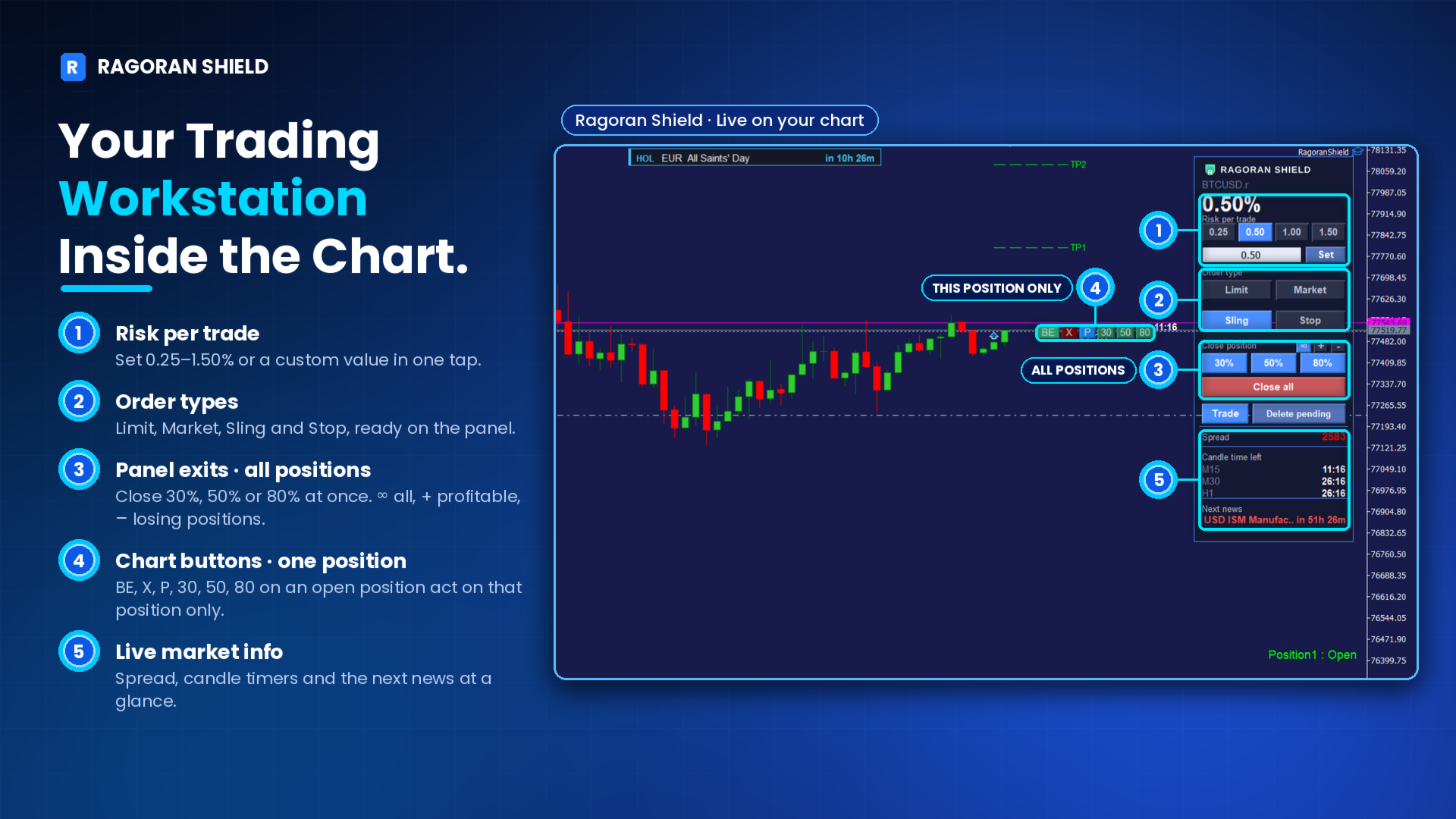
RagoranShield combines risk-based position sizing, four trade entry methods, individual position controls, partial closing, daily loss lock, economic news monitoring, and mobile notifications in one chart-based interface.
Designed to help manual traders manage their positions with greater control, clarity, and efficiency.
INTRODUCTION
Trading is challenging enough. Managing your trades shouldn't make it harder.
RagoranShield is an advanced risk and trade management tool designed to bring essential trading operations together in one practical interface.
From calculating position sizes and executing trades to managing individual positions, monitoring market conditions, and controlling daily losses, RagoranShield gives you a structured way to handle your trading activity directly from your chart.
Built for manual traders who value precision, flexibility, and disciplined risk management.
RagoranShield does not generate trading signals or automatically open trades. You remain in control of your trading decisions.
1. ENTER LIKE A BOWSHOT
Flexible Trade Execution
Define your Stop Loss first, then position and adjust your entry level directly on the chart.
RagoranShield supports four entry methods:
Market Execution: Open a position at the current market price.
Pending Stop: Breakout-style entry: Buy above or Sell below the current price.
Pending Limit: Pullback-style entry: Buy below or Sell above the current price.
Pending Sling: RagoranShield's proprietary entry method, designed as an alternative to conventional Pending Stop and Pending Limit execution, particularly in fast-moving markets.
Pending Sling provides an additional filtering option to help refine entry decisions. It does not eliminate market risk or guarantee profitable execution.
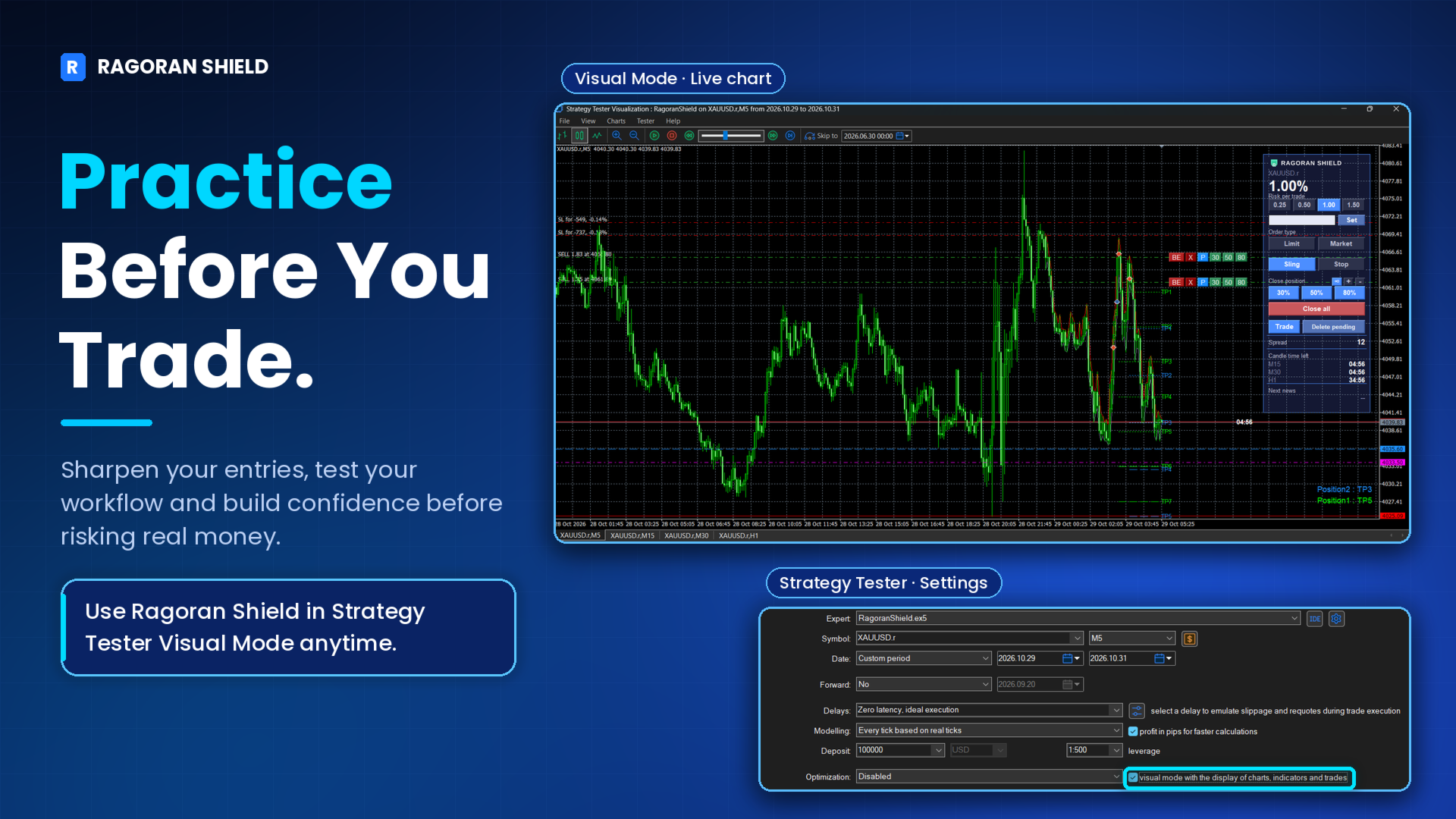
Try it in Strategy Tester Visual Mode to practice the panel and workflow before trading live.
Press the Trade button and drag. Until you release the mouse, no order is placed. If you change your mind before releasing, press C to cancel the operation.
2. MANAGE EVERY POSITION FROM THE CHART
Individual Position Controls
Manage each position independently using dedicated controls displayed directly on the chart.
BE — Break Even: Move the Stop Loss to Break Even quickly.
X — Close: Close the selected position.
P — Partial Close: Open the partial-close panel for more precise volume management.
Visual Take Profit Management
RagoranShield displays visual Take Profit levels on the chart.
When price touches a TP level, the position status readout at the bottom-right of the chart updates (for example Position1 : TP2), and that level line changes from dashed to dotted.
You can also enable an optional sound alert when a TP line is touched.
3. PARTIAL CLOSE BUILT IN
Control How Much You Close and When
Partial Close gives you control over the price level and percentage of the open position volume you want to close.
You can:
Specify the price level at which the partial close should be triggered.
Set the percentage of position volume to close.
Use quick presets: 30%, 50%, and 80%.
This allows you to plan partial exits without manually calculating and entering closing volumes.
4. ONE CLICK, MANY POSITIONS
Group Position Management
Manage multiple positions according to their current status.
RagoranShield provides three management scopes:
∞ All Positions: Apply the selected operation to all eligible positions.
+ Profitable Positions: Target positions currently in profit.
− Losing Positions: Target positions currently in loss.
Group operations apply to all open positions on the chart's symbol, regardless of how they were opened. This can include manual trades and other Expert Advisors' positions on the same symbol.
Profit and loss filters use profit plus swap and exclude commission.
The management scope resets to All Positions when the Expert Advisor restarts.
Tooltips help identify each control before use.
5. RISK, SIZED FOR YOU
Risk-Based Position Sizing
RagoranShield calculates position volume based on your selected risk percentage and the distance between your entry price and Stop Loss.
Choose a preset risk level or enter a custom value.
The maximum configurable risk is 4.99% per position.
Risk is calculated from the account Balance at the beginning of the broker day, not from the live balance.
Volume is rounded down to the broker's lot step. If the result is below the minimum lot, the minimum lot is used, which can make the actual risk higher than your setting.
Why 4.99%?
The 4.99% maximum provides a configurable upper boundary for individual position risk. It is not a recommended risk level or a proprietary trading firm compliance setting.
Many traders prefer risking around 0.5%–2% per position to maintain greater flexibility and leave room for multiple trades, execution differences, slippage, and market gaps.
Important: The 4.99% limit applies to each individual position, not to the combined risk of all open positions. The total exposure across multiple positions can exceed this value.
RagoranShield is built for traders who value planning, discipline, and structured risk management. Its controls can help reduce avoidable position-sizing mistakes and leave more room to learn, improve, and keep trading.
6. DAILY LOSS LOCK
Set Your Daily Loss Boundary
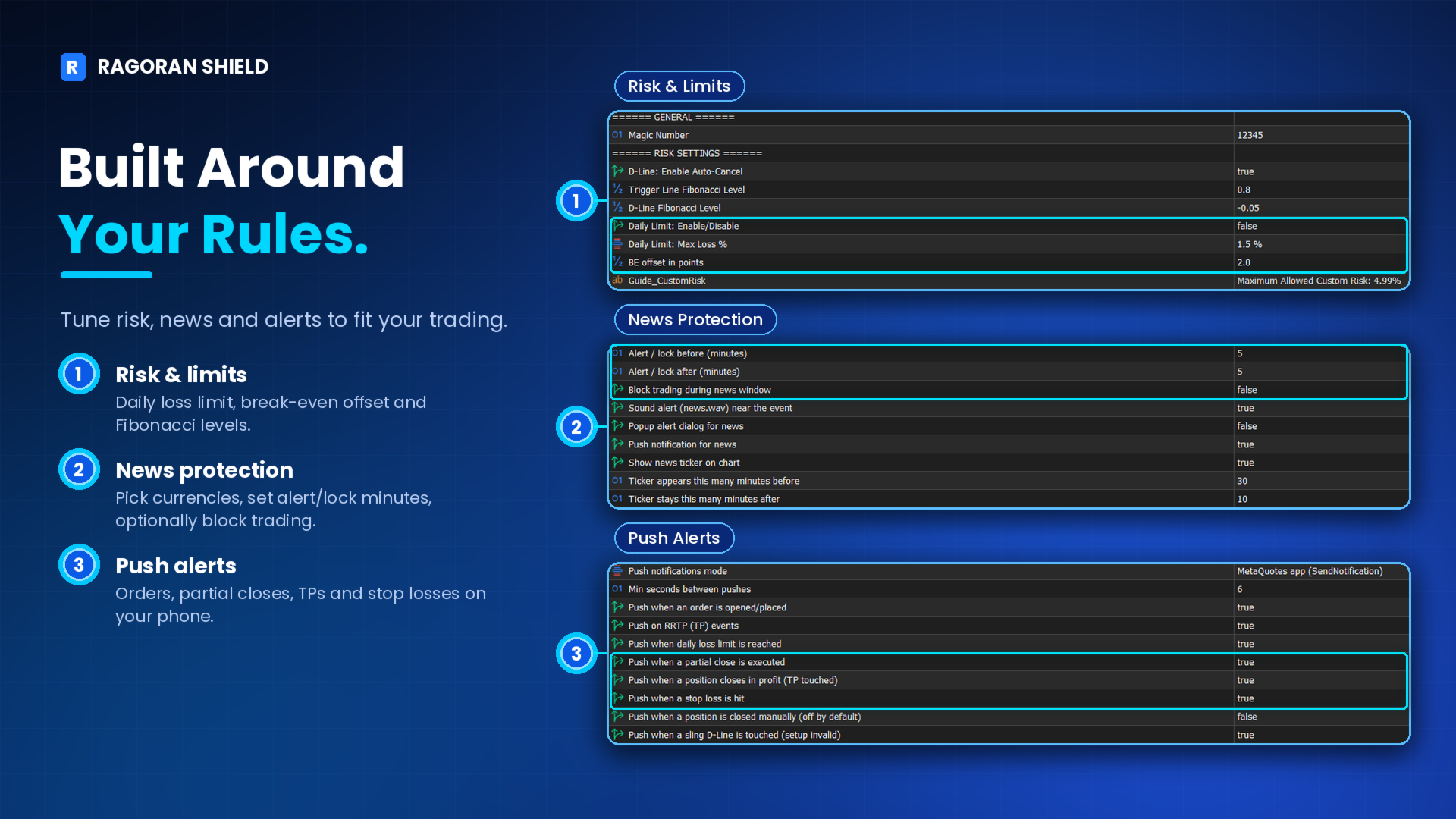
Configure your daily loss limit directly from the Expert Advisor Inputs.
Enable or disable Daily Loss Lock. It is disabled by default and must be turned on by you.
Select your preferred daily loss percentage from the available preset options.
The limit is calculated based on your account Balance at the beginning of the broker day.
Only closed trading losses are included, calculated as net P&L after commission and swap. Floating losses are excluded.
What Happens When the Limit Is Reached?
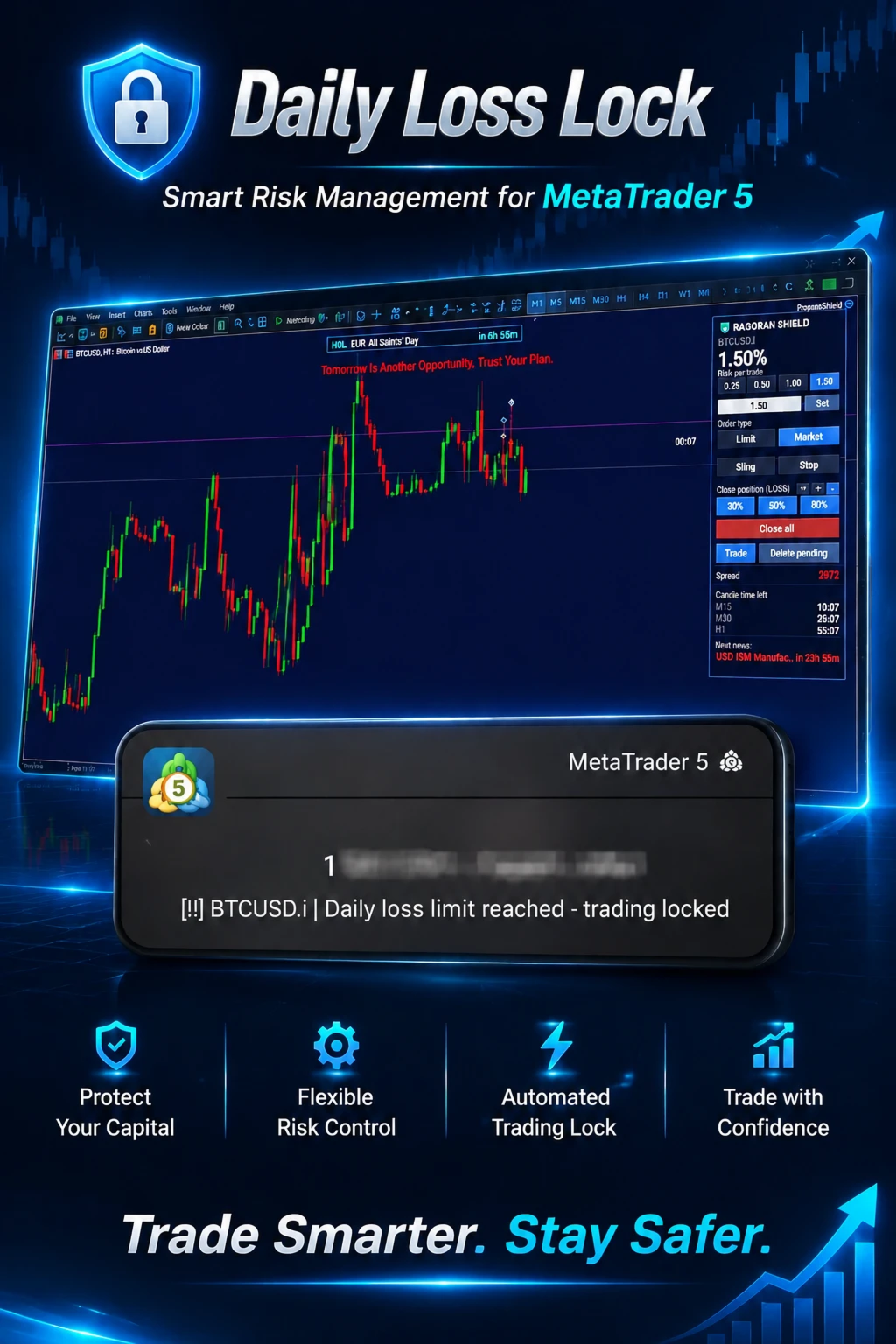
Once the configured daily loss limit is reached, RagoranShield locks new trading activity for the remainder of the broker day.
The lock cannot be released by changing the Expert Advisor Inputs (including turning Daily Loss Lock off) during that period. To remove an active lock manually, see Section 13.
The daily lock resets at 00:00 broker server time. If MetaTrader 5 is running, it resets at that time. If MetaTrader 5 was offline at reset, it clears the next time the Expert Advisor starts on the new broker day.
Daily Loss Lock helps enforce a predefined daily loss boundary within RagoranShield. It does not replace broker-level restrictions or guarantee compliance with proprietary trading firm rules.
The lock applies to the whole trading account, across every chart and symbol where RagoranShield is running, and it remains in place when the chart, symbol, or terminal is reloaded during the same broker day.
The lock is stored outside the chart, so restarting the Expert Advisor or disabling the Daily Loss Lock input does not clear it during the same broker day; only the new broker day clears it.
The lock blocks new entries placed through RagoranShield. A pending entry that was already armed before the limit was reached may still be triggered.
7. YOUR PHONE, YOUR EYES
Mobile Push Notifications
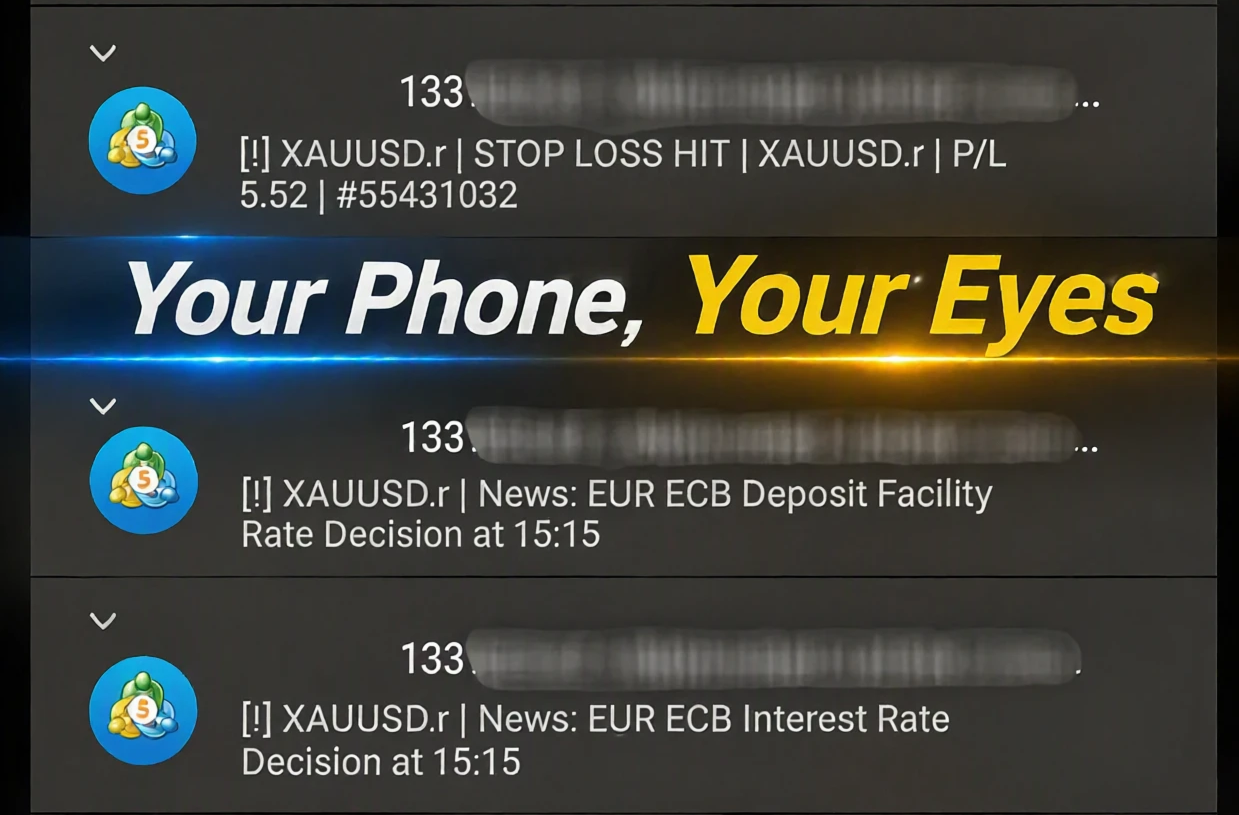
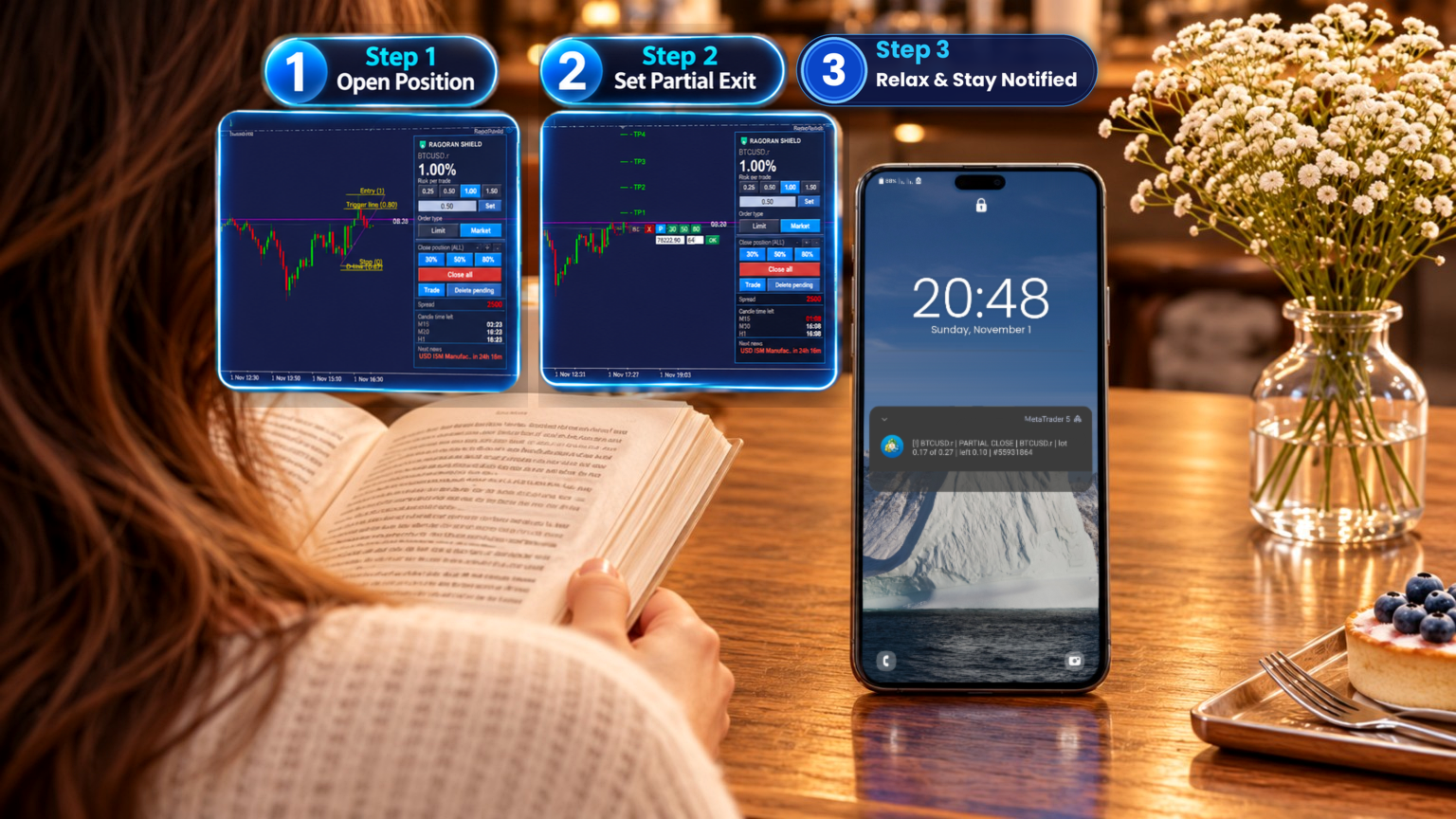
Stay informed about important position events through MetaTrader 5 mobile notifications.
RagoranShield can send notifications for:
Position opened
Partial close
Stop Loss reached
Take Profit reached
TP1–TP7 line touched
Position closed at Stop Out by the broker
Daily loss limit reached (trading locked)
Entry setup invalidated (Sling D-Line touched)
Notification Setup
To receive notifications:
Install and open the MetaTrader 5 mobile application.
Open Settings → Messages and copy your MetaQuotes ID.
On desktop MT5, go to Tools → Options → Notifications.
Enable Push Notifications and enter your MetaQuotes ID.
Click Test to verify the connection, then click OK.
In RagoranShield's Inputs, confirm that Push notifications mode is set to MetaQuotes app. It is the default setting.
Step 6 is essential. Without enabling the MetaQuotes app mode in the Expert Advisor inputs, notifications—including news alerts—will not be sent.
TP alerts (sound, popup, or mobile push) can be enabled or disabled in RagoranShield's Inputs.
8. ECONOMIC NEWS MONITORING
Keep an Eye on Important Market Events
RagoranShield integrates with the MetaTrader 5 Economic Calendar.
You can configure the economic event types and currencies you want to monitor.
Receive mobile push alerts shortly before scheduled economic events to help you stay aware of potentially important market conditions.
News alerts require the MetaQuotes app notification mode to be enabled and configured correctly.
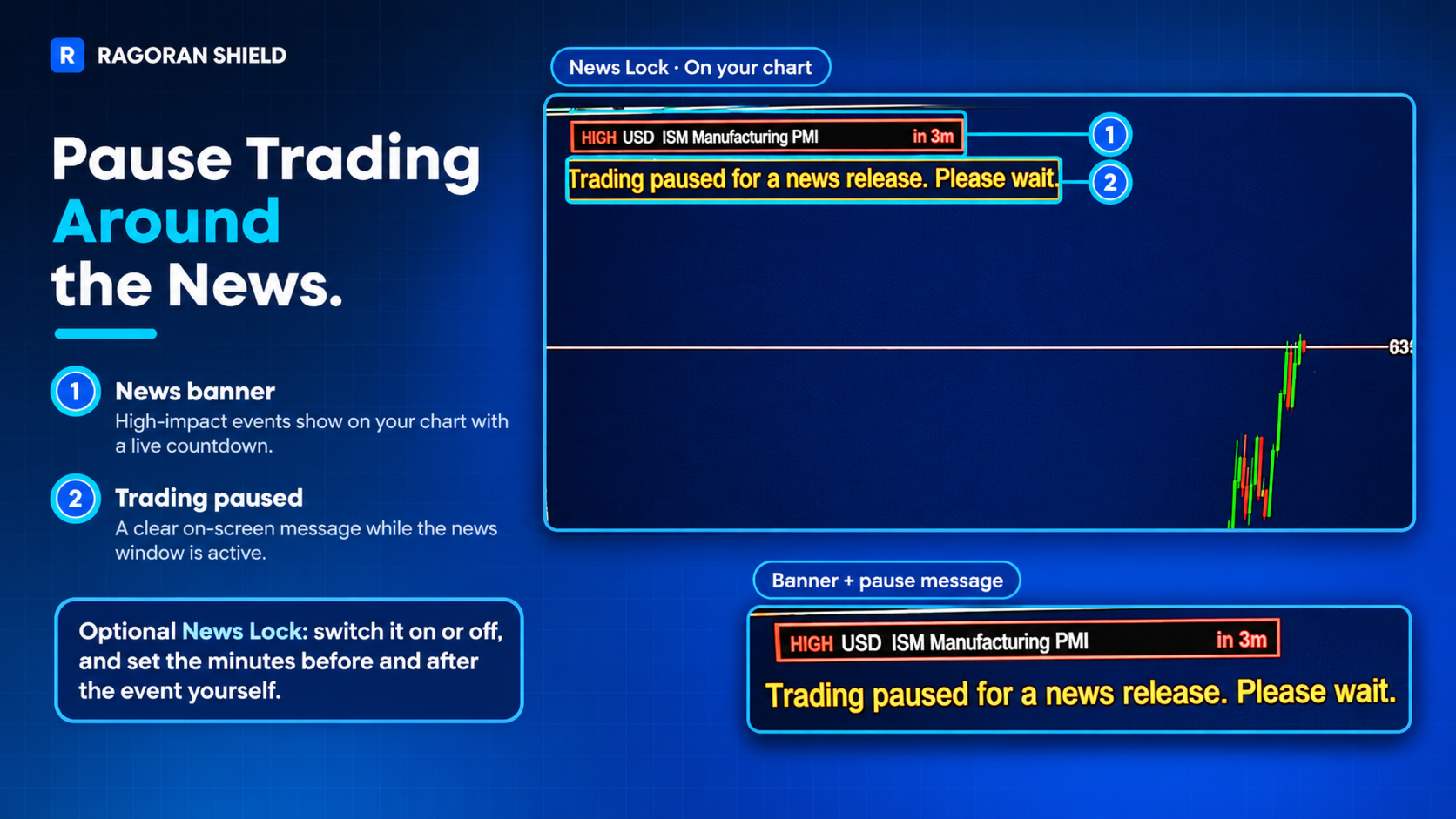
Optionally, RagoranShield can also pause new trade entries for a short window around selected events. When this option is enabled, a message appears on the chart while trading is paused, and entries resume automatically once the window has passed.
Alerts can be sent shortly before the event and, if configured, again after it.
9. PRACTICE BEFORE YOU TRADE
Strategy Tester Visual Mode
Explore RagoranShield and practice its trading controls in MetaTrader 5 Strategy Tester Visual Mode.
You can interact with the chart and panel while testing, allowing you to become familiar with the execution and position-management workflow without placing trades on a live account.
The Strategy Tester is a rehearsal environment for the interface and order workflow, not an automated backtest: RagoranShield still places orders only when you click or draw.
Some features, including Economic News Monitoring and mobile push notifications, are not available in the Strategy Tester, and visual details of the panel may differ slightly from a live chart.
10. MAKE THE CHART YOURS
Flexible Interface Customization
Adjust the interface to suit your chart layout and preferences.
Available customization options include:
Position the panel on the left or right side of the chart.
Select which market information and timeframe countdowns are displayed.
Customize display colors.
Set a warning color for the final 10% of a countdown.
Define a spread threshold and its warning color.
Enable or disable the TP touch sound alert.
Tooltips are available to help you understand the controls.
11. QUICK GUIDE
Useful Chart Controls
Del: Delete all pending orders.
C: Delete pending orders one by one, starting with the newest.
C while dragging an entry: Cancel the current entry operation before you release the mouse.
12. AT A GLANCE
RagoranShield includes:
Four trade entry methods: Market, Pending Stop, Pending Limit, and Pending Sling.
Risk-based position sizing.
Configurable risk percentage up to 4.99% per position.
Individual Break Even and position-closing controls.
Built-in Partial Close with custom price and volume percentage.
Quick Partial Close presets: 30%, 50%, and 80%.
Group management for all, profitable, and losing positions.
Visual Take Profit levels and optional touch alerts.
Daily Loss Lock.
Economic Calendar monitoring.
Mobile push notifications for position events and scheduled news.
Customizable chart interface.
Interactive practice in Strategy Tester Visual Mode.
13. IMPORTANT INFORMATION & LIMITATIONS
Please read the following information before purchasing and using RagoranShield.
Account Compatibility
RagoranShield has been tested on Hedging account types.
Compatibility with other account types has not been verified.
Risk Calculation
The maximum risk setting of 4.99% applies to each individual position, not to the combined exposure of multiple open positions.
Daily Loss Lock Calculation
Daily Loss Lock uses the account Balance recorded at the beginning of the broker day and counts closed trading losses.
Closed P&L is net: profit plus swap plus commission. Floating losses are excluded from this calculation.
The broker day is defined as starting at 00:00 broker server time.
Daily Loss Lock is stored in the terminal rather than in the chart. If a lock must be removed before the broker day ends, follow these steps:
1. In MetaTrader 5, open Tools > Global Variables (shortcut: F3). Select the variable RS_DAILYLOCK_<account number> and click Delete.
2. Open File > Open Data Folder, go to MQL5\Files, and delete the file RagoranShield_daily_lock_acct_<account number>.txt.
Remove both items to fully clear the lock. Menu names may vary slightly between MetaTrader 5 builds.
Proprietary Trading Firm Rules
Some proprietary trading firms calculate daily drawdown using account Equity, which may include floating losses.
RagoranShield's Daily Loss Lock does not necessarily match the drawdown calculation or risk rules of every proprietary trading firm.
Users must independently verify their firm's rules and determine whether the product's calculation method is suitable for their requirements.
RagoranShield does not guarantee compliance with any third-party trading firm's rules.
Strategy Tester Limitations
Economic News Monitoring and mobile push notifications are not available in Strategy Tester.
The Strategy Tester is a rehearsal environment for the interface and order workflow, not an automated backtest.
Notification Limitations
Push notification delivery depends on internet connectivity and MetaTrader 5 service availability.
MetaTrader 5 limits notifications to 10 messages per minute.
Operational Limitations
RagoranShield depends on the proper operation of MetaTrader 5, the Expert Advisor, broker services, and the user's internet connection.
Interruptions to terminal operation, connectivity, or platform and broker services may affect certain features or delay or prevent notification delivery.
For price-dependent functions, Daily Loss Lock monitoring, and notifications, MetaTrader 5 must be running and the Expert Advisor must remain attached to the chart.
Trading permission checks (terminal trading allowed, account trading allowed, Expert Advisor trading allowed) are enforced on live accounts only. They are not applied in the Strategy Tester or on demo accounts.
Capacity limits: up to 100 pending Sling trigger sets and up to 50 charted positions with visual TP lines. When the Sling capacity is full, a new pending Sling is not added and a message is written to the Experts log.
Market Risk
RagoranShield is a risk and trade management tool. It does not eliminate trading risk, prevent all losses, or guarantee execution at a specific price.
Slippage, price gaps, execution delays, market conditions, and broker-specific execution rules may affect trading results.
14. PRODUCT SCOPE & USER RESPONSIBILITY
RagoranShield provides trading management tools and configurable controls. It does not replace the user's trading judgment, trading plan, independent risk assessment, or understanding of broker conditions.
The user is responsible for:
Reading and understanding the product description, operating instructions, and stated limitations.
Configuring the Expert Advisor correctly.
Verifying account and broker compatibility before live use.
Understanding how each feature works and the conditions required for its operation.
Checking applicable broker conditions and any third-party proprietary trading rules.
Monitoring trading activity and all financial consequences of their trading decisions.
No feature guarantees profitable results, prevents all losses, or ensures compliance with third-party rules.
By purchasing and using RagoranShield, the user acknowledges that software operation is subject to platform, broker, connectivity, and market conditions, and accepts responsibility for their trading decisions and the configuration and use of the product.
Nothing in this section excludes or limits any responsibility that cannot legally be excluded or limited under applicable law.
15. REQUIREMENTS
MetaTrader 5.
A trading account and broker environment supporting the required manual trading operations.
Tested on Hedging accounts only.
The Expert Advisor must be attached to an active chart.
MetaTrader 5 must remain running for price-dependent Partial Close operations, Daily Loss Lock monitoring, and notification functionality.
A correctly configured MetaQuotes ID and enabled Push Notifications mode are required for mobile notifications.
PRICING AND UPDATES
The price may increase in future updates, after the planned features are fully implemented and tested. Price changes will be announced in the product's What's new section.
16. SUPPORT
For questions, technical assistance, or product-related discussions, please use the MQL5 Market product discussion section.
When requesting support, include a clear description of the issue and the relevant information about your MetaTrader 5 environment.
RAGORAN | Independent Trading Software
Better Tools. Smarter Trades. More Freedom.