XP Trade Panel

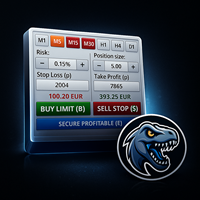
XP Trade Panel is a trade manager for MetaTrader 5. It sizes, places and manages trades from one panel on the chart.

Plan the trade on the chart

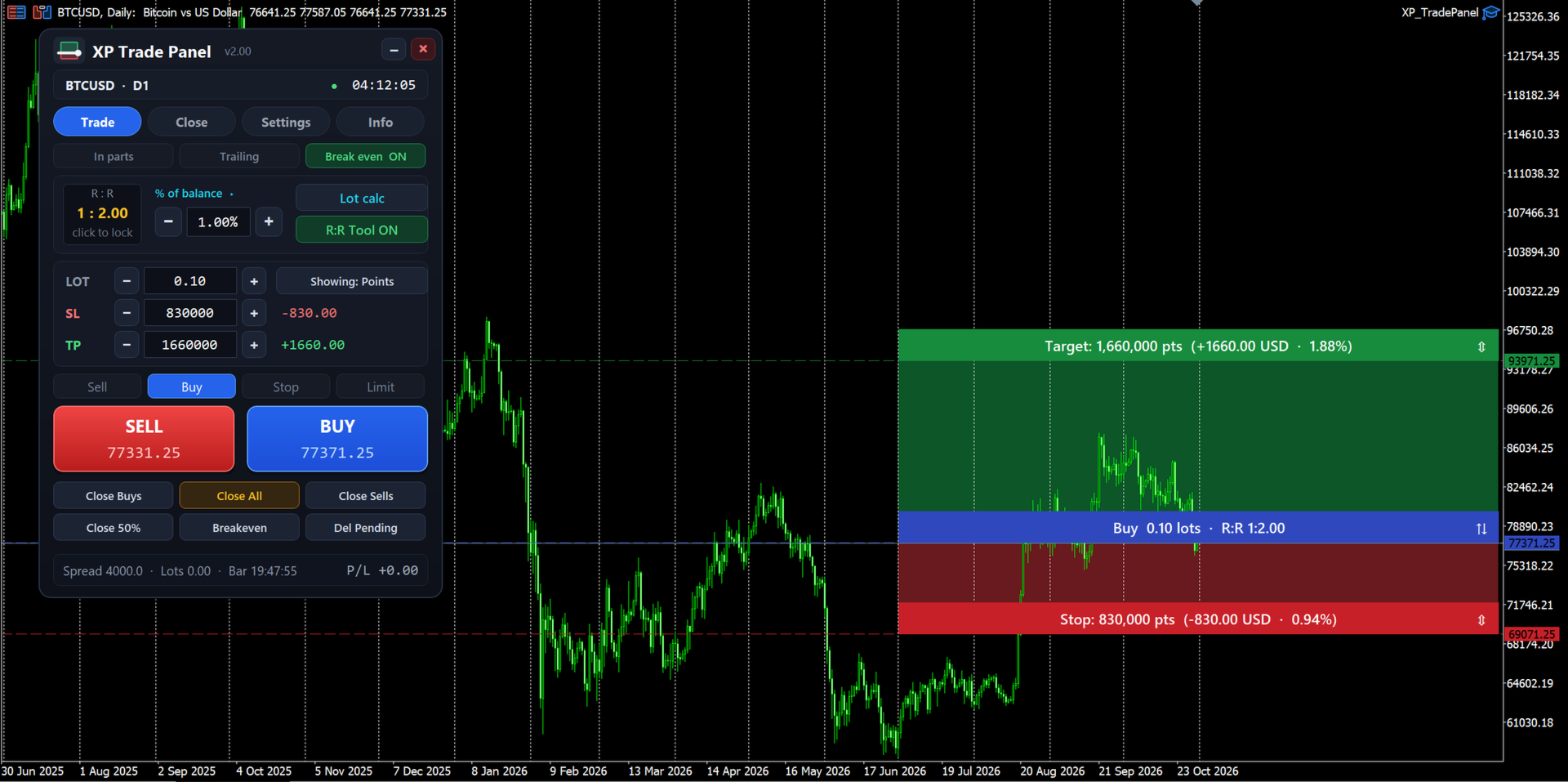
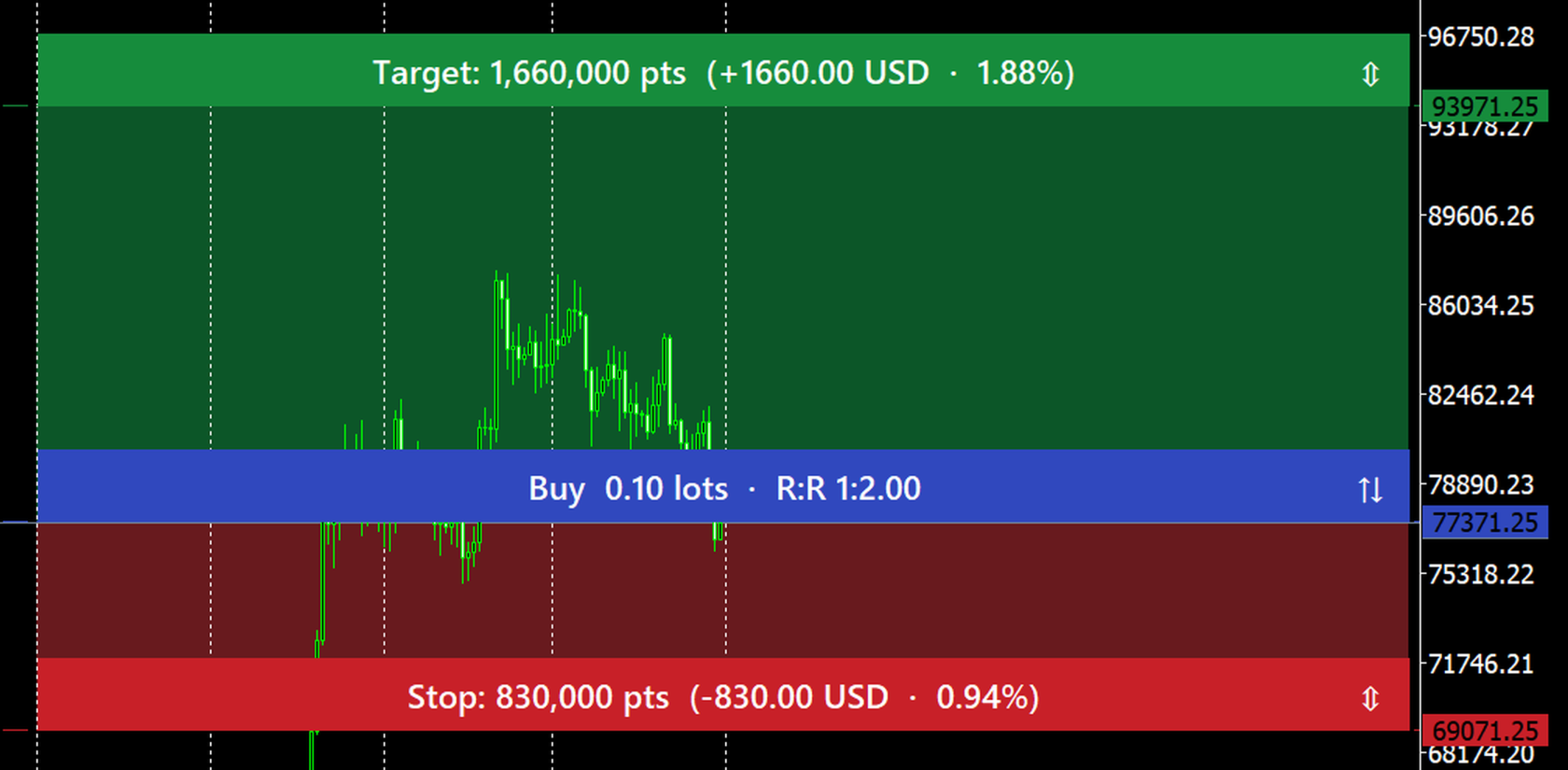
The risk-reward tool draws the target, the entry and the stop on the chart before you place the order. Each strip shows its distance in points, the amount in the account currency, the percent of balance, and the reward-to-risk ratio. Drag a strip to move it. Click the arrows on the entry strip to switch between buy and sell. Drag the entry away from the market to turn the order into a stop or limit order.

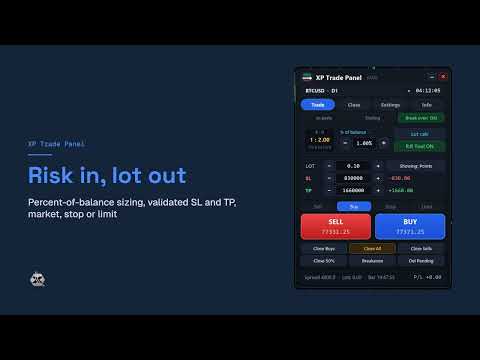
Risk in, lot out

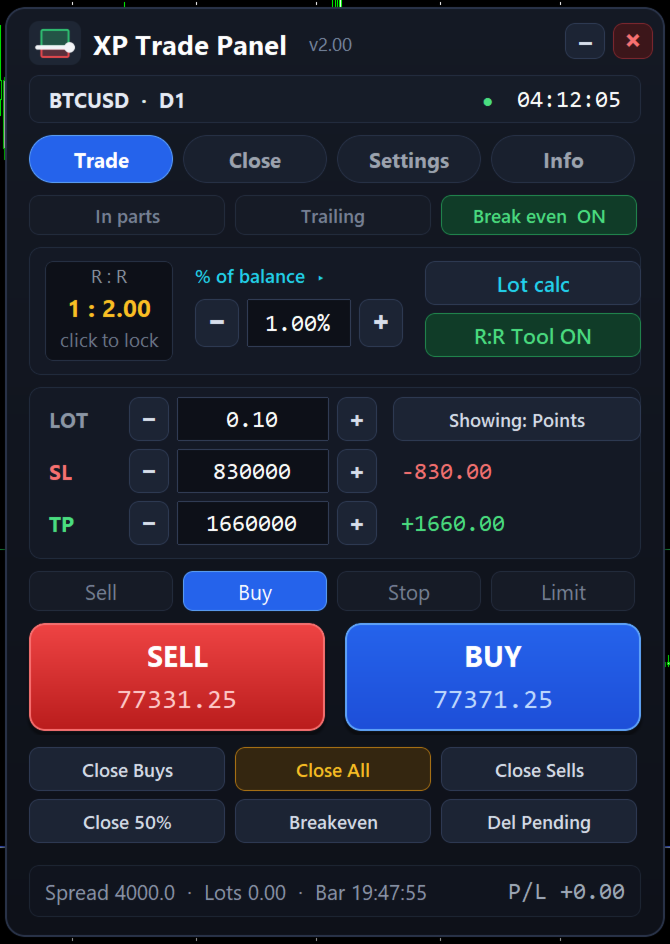
Set the risk as a percent of balance, equity or free margin, or as a fixed amount, and the panel calculates the lot from the stop distance. A fixed lot is also available. Stop loss and take profit can be typed in points or as a price, and the panel checks them against the broker's minimum stop distance. If the broker's minimum lot risks more than your setting, the panel asks before sending the order.

Orders are checked before they are sent

Before each order the panel checks the trading session, the symbol's trade mode, the lot limits and step, the minimum stop distance, the pending entry distance and the free margin. If an order cannot be placed, the panel shows the reason in plain words.

Close exactly what you mean

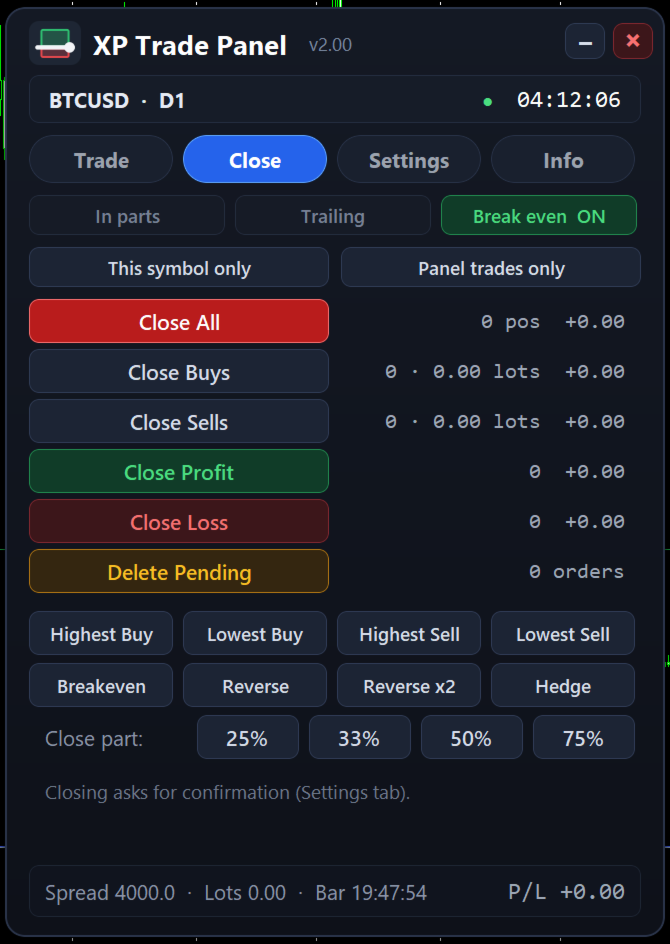
The Close tab shows live counts and the floating result for each group. You can:

  • close all positions, only buys, only sells, only winning or only losing positions;
  • close the highest or lowest buy or sell;
  • delete pending orders;
  • move stops to breakeven;
  • reverse or hedge positions (hedge needs a hedging account);
  • close 25, 33, 50 or 75 percent of every position.

The scope can be this symbol or all symbols, and this panel's trades or all trades. You can ask for a confirmation before each close.

Trailing stop, breakeven and partial closes

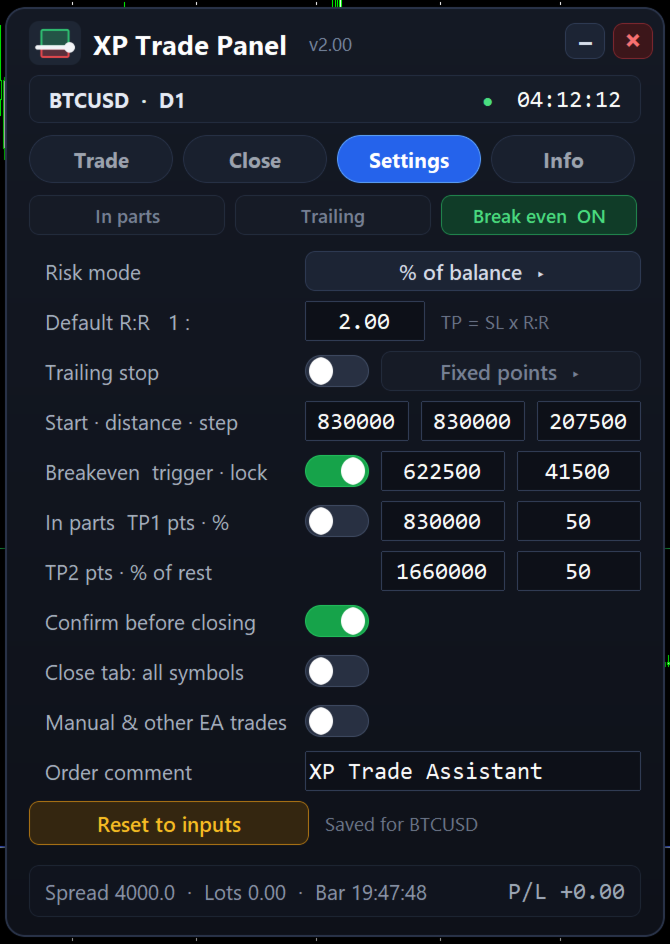
Trailing modes: fixed points, ATR, previous candle high or low, fractals, moving average and Parabolic SAR. Breakeven moves the stop to the entry plus a small lock once the trade reaches a trigger distance. The partial close ladder closes part of the position at two targets. These settings are saved per symbol and scale to the instrument, so a setting made for a currency pair is not applied unchanged to gold or Bitcoin.

Account and symbol at a glance

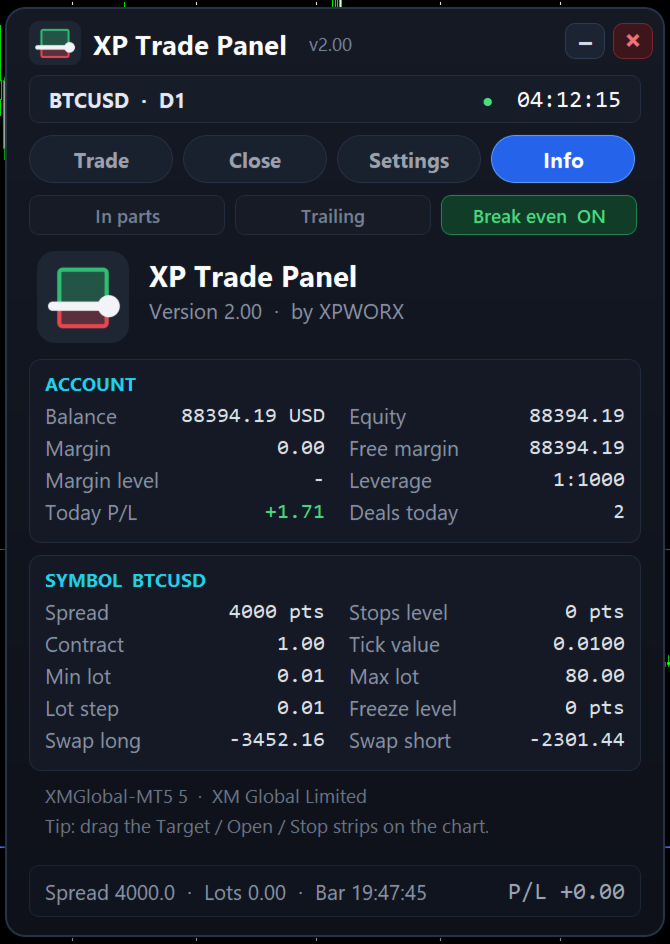
The Info tab shows balance, equity, margin and leverage, today's result and deal count, and the symbol's spread, stops and freeze levels, contract size, tick value, lot limits and swaps.

Strategy Tester

You can try the panel with the free demo in the visual mode of the Strategy Tester. Open and close trades, drag the strips, type stop loss and take profit values, and change the settings, as on a live chart. In a non-visual test nobody can click the panel, so it opens minimum-lot test trades, one at a time, to show the order checks, breakeven and trailing. These test trades are only a demonstration of the trade management, not a trading strategy.

Main inputs

  • Trade options: default lot, stop loss and take profit in points, order comment, maximum spread for market orders, magic number.
  • Risk settings: risk mode and value, default reward-to-risk, showing the R:R tool, locking the R:R ratio.
  • Trailing and breakeven: mode, start, distance and step, indicator settings, partial close targets.
  • Panel options: position on the chart, lot and stop steppers, close confirmation.
  • Alerts: pop-up, email and push notification on new orders.
おすすめのプロダクト
EasyTradePad – MetaTrader 5用取引パネル EasyTradePadは 、手動および半自動取引のためのツールです。パネルでは、注文とポジションを迅速に管理できるほか、リスク管理の計算もワンクリックで行えます。 パネルの機能: 事前に定義されたリスク(%または預金通貨)で取引を開始および終了します SLとTPをポイント、パーセンテージ、または金額で設定します リスクと報酬の比率を自動計算 損切りを損益分岐点に移動する 部分的なポジションのクローズ トレーリングストップ(ポイントまたはローソク足の影による) ポジションの平均化とピラミッディング アクティブな取引のパラメータを変更する [   デモ ] [   説明 ] 追加機能: ピラミッド化 価格がテイクプロフィットに近づくにつれて、段階的に取引を追加します。新規取引ごとのリスクを軽減できます。追加する取引数は簡単に設定できます。 平均化 チャート上のカスタムレベルで追加注文を出すことができます。ポジションは平均エントリー価格で決済されます。 損益分岐点移転 価格が指定された利益幅に達した後、ストップロ
JMM Trade Panel MT5 JMM Trade Panel MT5 は、MetaTrader 5 用のチャートベースの取引管理ツールです。チャート上から Buy・Sell 注文を実行し、表示ロットを簡単に調整しながら、バスケットごとの損益と管理状況を確認できます。 完全なユーザーマニュアル: ダウンロード 主な機能 チャート上の Buy、Sell、Close All ボタン。 EA が管理するすべてのポジションをワンクリックで決済。 Magic Number に関係なく、口座内のすべてのポジションを管理するオプション。 現在のチャート銘柄のみ、または口座内の全銘柄を管理。 パネルからの手動ロット設定。 +0.01、+0.10、+1.00、-0.01、-0.10、-1.00 のロット調整ボタン。 証拠金ベースで、口座残高に対する指定割合からロットを自動計算するオプション。 Buy バスケットと Sell バスケットを個別に表示。 バスケット損益を口座通貨と pips で表示。 全体の管理損益を口座通貨と pips で表示。 Buy と Sell のブレークイーブン価格。
HedgeSafe Trade Assistant リスク管理を重視した MetaTrader 5 用の裁量取引パネルです。 HedgeSafe は、BUY または SELL を押す前に、チャート上で取引の準備、検証、管理を行うためのツールです。 HedgeSafe はシグナル配信、相場予測、AI ボット、自動売買戦略ではありません。取引方向を決定せず、利益を保証しません。すべての取引判断はトレーダー自身が行います。 主な機能 口座残高の割合、または口座通貨の固定金額からロットを計算。 Stop Loss をポイントまたは価格で、Take Profit をポイント、価格、R 倍率で設定。 金額リスク、想定リターン、ロット、リスクリワード比を事前表示。 Entry、Stop Loss、Take Profit のチャートラインをパネルと同期。 BUY と SELL を個別に判定し、執行直前に方向別の最終検証を実行。 最小/最大数量、数量ステップ、tick size、tick value、stops level、freeze level を確認。 市場の利用可否、銘柄の取引モード、スプレッド
Automatic Trade Calculation Panel   One-Klick-Trading Automatic calculation of Lot sice Atuomatic calulation of Stop-Loss and TakeProfit Up to 3 partial closings Trailingstop (Stop-Loss moves automatically)   The lot size is calculated by the previously determined risk (e.g. 1.0% of the account size) and the distance of the Stop Loss from the entry point. The distance from the Stop Loss to the entry point results from the ATR indicator multiplied by a freely selectable factor. The Stop Loss and
Premium Trade Manager - コーチ内蔵型トレードパネル Premium Trade Manager は、AIトレーディングコーチをあなたのチャートの中に置き、その下に完全な執行エンジンを備えたツールです。いつも通りにトレードをセットアップし、あなた専任のAIトレーディングコーチ Max にそのセットアップをそのまま読み取らせて、発注前に率直な見解を伝えてもらいましょう。ストップの幅が規律あるアプローチに合っているか、リスクサイズは適切か、高影響のニュースイベントが数分後に迫っていないか、プロップファームの制限に近づいていないか。その下には、クリックの後をすべて処理するエンジンが備わっています。ワンクリックのリスクサイズ計算による発注、チャート上でドラッグして組み立て、発注後も動かせるプラン、最大4段階の分割利確、7種類のトレール方式、リアルタイムのプロップファームコンプライアンス、ニュースガード、そしてコストを自ら採点するスプレッド機能。判断はあなたが下す。Max がもう一度確認する。後のことはすべてパネルが担う。 購入前に実際に触れて試せます。 ブラウザ上でライブ
Veron Link Slave – Synchronized Grid, Martingale & Breakout Management Short Description Advanced synchronization tool designed to manage Grid, Martingale, and Breakout EAs. Automatically sends close-basket signals to the Master account upon profit target completion, minimizing slippage across different brokers. Full Description Veron Link Slave is a specialized utility developed to enhance the execution efficiency and risk management of multi-account or multi-broker trading setups. It is desig
More stable MetaTrader 4 version is available here:  Lot Calculator Tool . This tool helps you to automatically calculate and manage risk, conveniently place orders visually, schedule orders, trail stops, move them to break-even and more. Features Place market or pending orders using draggable lines Schedule orders Calculate and limit risk using various methods See current spread See time till next candle Set custom order comments Trail stops Move stops to break-even See order profit/loss in p
Trade Manager は、リスクを自動的に計算しながら、取引を迅速に開始および終了するのに役立ちます。 過剰取引、復讐取引、感情的な取引を防止する機能が含まれています。 取引は自動的に管理され、アカウントのパフォーマンス指標はグラフで視覚化できます。 これらの機能により、このパネルはすべてのマニュアル トレーダーにとって理想的なものとなり、MetaTrader 5 プラットフォームの強化に役立ちます。多言語サポート。 MT4バージョン  |  ユーザーガイド + デモ Trade Manager はストラテジー テスターでは機能しません。 デモについてはユーザーガイドをご覧ください。 危機管理 % または $ に基づくリスクの自動調整 固定ロットサイズを使用するか、ボリュームとピップに基づいた自動ロットサイズ計算を使用するオプション RR、Pips、または価格を使用した損益分岐点ストップロス設定トレーリングストップロス設定 目標に達したときにすべての取引を自動的に終了するための 1 日あたりの最大損失 (%)。 過度のドローダウンからアカウントを保護し、オーバートレードを防ぎます
MT5向けトップトレードマネージャー - トレードパネル、ポジションサイズ計算ツール、リスクマネージャー Top Trade Manager は、 MetaTrader 5用の包括的なトレードマネージャー です。トレードパネル、 ポジションサイズ計算ツール 、リスクマネージャーが一体化されています。チャート上でエントリーポイント、ストップロス、テイクプロフィットをドラッグするだけで、ロットサイズ、リスク、リワードが瞬時に計算されます。さらに、 部分決済 、 ブレークイーブン 、 トレーリングストップ 、非表示のストップロスとテイクプロフィットでトレードを管理したり、 経済ニュースカレンダーを フォローしたり、内蔵の描画ツールでチャートにマークアップしたり できます 。 これは手動取引ツールであり、自動的に取引を開始することはありません。すべての取引はあなたが決定し、Top Trade Managerは計算と管理を代行します。 主な機能 視覚的なトレードプランニング:チャート上でエントリー、ストップロス、テイクプロフィットをドラッグする。 残高または自己資本に対するリスク割合、あるいは固
**Forex Trade Manager Pro MT5** **Trade Manager MT5** は、MetaTrader 5向けの包括的なトレード管理ユーティリティです。トレードを計画する瞬間から決済する瞬間まで、ポジションのあらゆる側面を完全にコントロールできます。リスクを真剣に考えるトレーダー、つまり規律を築き始めた初心者から、複数のポジションにわたって瞬時の実行を必要とするプロのスキャルパーまで、幅広く対応できるように設計されています。 このツールは任意のチャートに装着でき、クリーンでコンパクトなパネルを表示します。チャート上に直接、ドラッグ可能な水平線を使用して、意図するエントリー、ストップロス、テイクプロフィットの各レベルをマークします。Trade Managerは、定義されたリスクに基づいて正しいポジションサイズを即座に計算し、ストップロスとテイクプロフィットの値をpipsと口座通貨でリアルタイムに表示し、計画中のトレードのリスク・リワード比率を表示します。手動計算は一切必要ありません。リスクを一度定義すれば、ツールが残りのすべてを処理します。 **ポジ
TRADE MANAGER G2 – PRODUCT DESCRIPTION By Ida Bagus Putu Mahardika Trade Manager G2 – All-in-One Trading Panel for Professional Execution & Risk Management Trade Manager G2 is a next-generation trading panel designed to give you full control over order execution, position management, and profit optimization in real time on MetaTrader 5. With a modern card-based user interface and individual TP actions per level, this panel elevates your trading experience to the next level. KEY ADVANTAGES OF
LotCalculatorPro
Reynaldo Jr Audencial Pascual
LotCalculatorPro + Smart Trading Panel LotCalculatorPro は、リスク管理、ロットサイズ計算、そしてチャート上でのトレード実行を簡単にするために設計された、強力なオールインワントレーディングアシスタントです。 このツールは、トレーダーがリスクを管理し、正確なロットサイズを計算し、さらに ブレークイーブン(Break-Even)、部分決済、日次利益/損失保護 などのスマート機能によって取引を自動管理するのに役立ちます。 Forexトレーダー、プロップファームトレーダー、リスク管理を重視するトレーダー に最適で、 MetaTrader 5 上でクリーンで効率的なトレーディング環境を提供します。 デフォルト設定: 1日の利益目標: 初期残高の2% 1日の最大損失: 初期残高の1% 主な機能 ロットサイズ計算機 LotCalculatorPro は以下の情報に基づいて 適切なロットサイズを自動計算 します: エントリー価格 ストップロス リスク金額(USD) これにより すべての取引で一貫したリスク管理 が可能になります。 チャート上での
Easy Trade Executor は、MT5向けの高速なポジションサイズ計算、注文執行、およびトレード管理ツールです。 Open Price、Stop Loss、Take Profit レベルをチャート上に直接配置し、自動的にポジションサイズを計算して、数回のクリックだけでリスクを管理しながら取引を開始できます。 なぜ Easy Trade Executor を選ぶのか? Easy Trade Executor は、単にリスク計算を行うだけでなく、チャート上で迅速かつ効率的に取引を管理したいトレーダーのために開発されました。 このツールは、ポジションサイズ計算、注文執行、トレード管理を1つのワークフローに統合し、手動計算やターミナルの複数ウィンドウを頻繁に切り替えることなく、トレードそのものに集中できるようにします。 Easy Trade Executor の主な機能: リスクに基づく自動ポジションサイズ計算; チャート上から直接 Market Order と Pending Order を発注; 自動的なポジション管理のための Trailing Stop; ワンクリックでの決
Manual Trading Assistant Pro 【裁量トレーダーのための「生存」支援ツール】 エントリーの瞬間にロット計算やTP/SL設定で焦ったことはありませんか? このユーティリティは、「エントリー(攻め)」だけに集中し、面倒な「決済(守り)」を機械に任せたい裁量トレーダーのために設計されました。 相場の急変動からあなたの資金を守り、利益を着実に残すための機能が詰まっています。 【主な機能】 設定診断機能(Pips Check) 「設定倍率は1倍?100倍?」ともう迷う必要はありません。 [Pips Check] ボタンを押すだけで、お使いのブローカーや通貨ペア(クロス円、ドルストレート)に合わせて、設定が正しいかどうかを自動診断します。設定ミスによる事故を未然に防ぎます。 自動TP/SLセット 手動エントリーした瞬間に、設定したpips数で利確・損切ラインを自動挿入します。「裸のポジション」を晒すリスクをゼロにします。 バスケット決済(平均建値) 複数のポジションを持った際、損益分岐点(ブレイクイーブン)をチャート上に可視化。合計利益が目標に達した瞬間に全
手動取引を改善: Trade Manager Assistant による正確で高速な自動リスク管理 提供されている無料のデモ バージョンを使用して、完全なセットアップ手順を入手し、Trade Manager Assistant の機能を調べてください。より詳しい情報は https://www.mql5.com/blogs/post/758625 をご覧ください。       。 手動取引では、慎重な分析と迅速な意思決定が必要ですが、実行エラー、矛盾、取引パラメータの混乱のリスクにより、利益が損なわれ、不必要なストレスがかかる可能性があります。 Trading Manager Assistant のご紹介: 手動取引プロセスを効率化するように設計された必須アシスタントで、チャートに精度、制御、自動化された効率をもたらします。 実行の遅さや計算ミスによる取引損失とはお別れです。アシスタント ビジネス マネージャーは、プロフェッショナルのスピードと正確さで業務を遂行できるようサポートし、重要な管理タスクを処理している間、ビジネス チャンスの発見に集中できるようにします。これは単なるウィザー
MrRexo Trade Panel - MT5トレードパネル MrRexo Trade Panel は、 MetaTrader 5 用のオンチャート取引パネルです。素早い発注、明確なリスク管理、チャート上での実用的なポジション管理を求める裁量トレーダー向けに設計されています。 このパネルは、注文実行、リスク管理、ロット計算、視覚的な R:R 計画、Break Even、Trailing Stop、ポジション保護、セッション、トレンド情報、価格レベル、チャートモジュールを1つの Expert Advisor に統合します。 Forex、指数、商品、金属、CFD、ブローカー独自のサフィックス付きシンボルで使用できます。Hedging と Netting の両方の口座タイプに対応します。 手動取引と注文実行 チャートから Buy / Sell を実行。 設定済みロット、Stop Loss、Take Profit による 成行注文 。 視覚的な価格レベルによる pending order 計画。 Close All 、Close Profit、Close Loss、Close Buy、Clo
RiskPanelは、MetaTrader 5用のリスクベースのロット計算機兼ワンクリック取引パネルで、ひとつのルールを軸に作られています。 選んだ以上のリスクは取らない 。リスク(口座の割合または固定金額)とストップを選びます。RiskPanelは、ストップに達したときの損失が選んだ金額以下になるようにロットを算出し、ブローカーのロットステップに合わせて切り捨て、クリックする前にチャート上に表示します。その後、BUYまたはSELLでそのストップ(とお望みならテイクプロフィット)付きの取引を開きます。何を取引するかは決めず、シグナルも出しません。 口座をどう守るか ストップから逆算したロット。 リスクとストップ距離を設定します。実際のエントリー価格と実際のストップ価格の間の損失は、近似式ではなく、ターミナル自身の損益計算で算出されるため、FX、金属、株価指数、あらゆる契約サイズと口座通貨に対応します。 常に切り捨て。 ロットはブローカーのロットステップに合わせて切り捨てられ、切り上げられることはありません。そのうえで正確なロットで再計算するため、ストップ時の損失が選んだ金額を超えること
Trade Copilot - ゴールド(XAUUSD)およびあらゆる銘柄向けセミオート・リスク管理パネル Trade Copilot は、自分でエントリーの主導権を握りながらもEAのような規律を求める裁量トレーダーのために設計されたセミオート取引パネルです。方向とレベルはあなたが決め、リスクサイジング、ストップロスの設置、テイクプロフィット管理、ポジション保護はパネルが自動で行います。 主な機能 - リスクベースのロット計算 - リスク%、リスク$、固定ロットから選択可能。ストップロスまでの距離からポジションサイズを自動計算 - 3種類のストップロスモード - ATR倍率、固定ポイント、固定$距離 - ワンクリックの成行・指値注文(Buy/Sell Now、Pending Buy/Sell)、ドラッグ可能なエントリー/SL/TPライン - グリッドトレード - 価格帯にわたりベルカーブ型のロット配分で複数の指値注文を配置(マーチンゲールではありません - ロットサイズは中心からの距離で固定され、損失時に倍増することはありません) - マルチTP(最大4段階) - メインターゲ
MQL5 Trading Panel SL TP — это мощный инструмент, призванный помочь трейдерам эффективно управлять своими позициями на платформе MetaTrader 5. Эта торговая панель предоставляет простой в использовании интерфейс для установки уровней Stop Loss (SL) и Take Profit (TP) для открытых позиций. MQL5 Trading Panel SL TP обладает широкими возможностями настройки и может быть адаптирована к конкретным потребностям отдельных трейдеров. Панель можно изменять в размере, перемещать и настраивать с помощью ра
The Ultimate All-In-One Trade Manager & Prop Firm Guardian for MT5. Nexus Pro Trade Manager is the most advanced, all-in-one trading assistant designed for both manual traders and Prop Firm challengers. Featuring a stunning, lag-free UI (Dark/Light mode), it completely transforms your MT5 into a professional trading terminal. Whether you are trading a personal account or trying to pass evaluations for FTMO, FundedNext, or other prop firms, Nexus Pro protects your capital, automates your risk cal
Chart Line Trade Manager – ドラッグ可能なSL・TP・トレールラインとリスクベースのロット計算を備えたトレードパネル Chart Line Trade Manager は裁量取引用のツールであり、自動売買ストラテジーではありません。チャート上のコンパクトなパネルから注文を出し、水平線をドラッグしてストップを管理します。ロットサイズは、ストップラインまでの距離と選んだリスクから、コストを含めて計算されます。 機能 - BUY / SELL:成行注文。ロットは「価格 → ストップライン」の距離とリスク(残高の%、有効証拠金の%、または固定額)から計算し、常に切り捨てます。オプション:リスクが小さすぎる場合は最小ロットで発注。ストップラインをドラッグしていない場合、注文は送信されません。 - BUY / SELL PENDING:エントリーラインでの待機注文。指値か逆指値かはラインの位置で決まります。 - ストップロス/テイクプロフィットライン:ラインをドラッグすると、その方向のすべてのポジションと待機注文のSL / TPがそのラインに移動します。その方向の新
One Click Trading – Auto TP SL Developer TraderLinkz Version 1.00 Category Utility What it does Adds missing TP and SL to your manual trades and pending orders Sets them once per ticket Lets you move TP and SL afterward Works on hedging and netting accounts Scans on every tick and reacts on trade events Why you want it You place faster entries You get consistent risk and exit targets You reduce fat finger errors You keep full manual control Quick start Attach the EA to any chart Keep TP and SL e
FREE
SL TP Panel — Visual Trading Panel for MT5 A convenient trading panel that lets you place pending orders by simply dragging lines on the chart. Stop Loss, Take Profit, order type, and lot size — everything is controlled with your mouse in seconds. Who is this for This panel is designed for manual traders who value speed of execution. Instead of opening the order window, filling in fields, and calculating levels — just drag a line to the desired price and click one button. Key Features Visua
Virgilio is a multifunction control panel consisting of several panels, each of which performs one of the most useful functions used by traders. Its aesthetic is unique, designed to blend into any working environment and offer a user experience that makes work even more enjoyable. Its operativity is simple and intuitive, developed with attention to details to be as userfriendly as possible. Its main panel displays all the basic account and chart data. The first panel offers the user the possib

Plan, execute and protect every trade in MetaTrader 5: exact risk-based lot size, automatic management, baskets and Prop Firm rules in a single panel. Manzano Trade Manager Pro is a professional trade manager for MetaTrader 5, designed especially for traders who trade funded accounts (Prop Firms) and need advanced control over risk, execution and position management. It brings together in one tool visual trade planning, automatic lot size calculation, individual, collective and basket managemen
Protect your funded accounts and personal capital with military-grade precision. This utility continuously monitors your floating equity against your daily starting balance. The moment your custom drawdown threshold is breached, it instantly liquidates all open positions, deletes pending orders, and completely unloads from the chart. Stop revenge trading and never fail a prop firm evaluation due to a margin breach again.
FREE
TAQ Magic Keys v6.0 Auto Trade Manager is an advanced trade management tool for MetaTrader 5 (MT5) , featuring one-click trade management functions and an integrated Position Size Calculator . New Feature In V6.0 — FNR1R1 Function Key The new FNR1R1 Function Key provides an automated 1:3 Risk Reward trade management system , allowing traders to manage an open position through three predefined profit targets. Set your initial Stop Loss, and the system automatically calculates: TP1 = 1:1 Risk R
Use for risk management and opening positions as per the user settings. The user is allowed to set the stop loss and take profits in pips. The user can also choose the risk percentage per trade that he/she wants to use while opening the trade. The volume of the trade that the user wants to sent shall be calculator according to the stoploss and the risk percentage that the user has selected.
Bring the TradingView experience to your MetaTrader 5! Magic Entry Pro is a professional visual trading assistant designed for manual traders, scalpers, and Prop Firm funded traders. It allows you to execute trades with lightning speed, calculate risk automatically, and visually project your Stop Loss and Take Profit zones directly on the chart before you open a position. Tired of manually calculating lot sizes or guessing your Risk-to-Reward (RR) ratio? Magic Entry does it all in seconds! KE
Данная панель предназначена для удобного совершения сделок в платформе Metatrader. Она позволяет с легкостью открывать позиции, устанавливать стоп лосс и тэйк профит, использовать трейлинг стоп и тд.. Входные параметры : Magic - уникальный номер эксперта Lot step - шаг изменения лота Custom - произвольная сумма для высчитывания риска Risk Value  - тип поиска значения риска (в %) Функции панели : Открытие sell и buy позиций Возможность установки profit / loss для позиции, в том числе и графичес
このプロダクトを購入した人は以下も購入しています
Farmed Hedge Yield Farming | All Markets (Manual - Hybrid - Semi/Automated EA) VERIFIED TRADING RESULTS - Farmed Hedge Yield Axi Copy:  https://www.mql5.com/en/signals/2356376 - Farmed Hedge Yield Exn Copy:   https://www.mql5.com/en/signals/2356404 - Farmed Hedge Yield V Copy:  https://www.mql5.com/en/signals/2357156 IMPORTANT NOTICE: FarmedHedge is a MANUAL-FOCUSED TRADING UTILITY ,not a fully automated EA. Results shown on this Signal include manual trades and overall strategic management.
Telegram to MT5 Multi-Channel Copier   は、 Telegram と Discord チャンネルのトレードシグナルを MetaTrader 5 へ自動コピーします。ボット不要、ブラウザ拡張不要、手動コピー不要。Telegram や Discord にシグナルが届くと、EA が数秒であなたのターミナルに注文を出します。 さらに、チャンネルをコピーする前に、内蔵バックテスターでそのチャンネルがあなたの口座でどう動いたかを確認できます。 製品は 2 つのコンポーネントで構成されます:Telegram チャンネルを監視する Windows アプリと、MT5 ターミナルでシグナルを執行する本 EA です。MT4 版もあります   こちら . セットアップガイドとアプリのダウンロード:   https://www.mql5.com/en/blogs/post/768988 Telegramのシグナルチャンネルをバックテストする方法 をご覧ください。 現在の価格は今後値上げされます。 仕組み アプリはあなた自身の Telegram アカウントで接続するため、フォロ
================================================================================ POC BREAKOUT - V20.72. Full Professional Grade Toolkit ================================================================================ POC Breakout is a full MetaTrader 5 trading dashboard for discretionary traders who want breakout signals, Point of Control (POC) context, volume profiles, order flow, market structure, news, alerts, and advanced trade planning in one professional workspace. Attached directly to you
REVDEN AI Desk:あなた自身の AI との一つの会話で、REVDEN のマーケットコンテキストをもとにトレードを運営する トレードのすべてを一つの会話で運営する姿を想像してみてください。 REVDEN AI Desk はそれを MetaTrader 5 にもたらします。あなた自身の AI に相場をどう読んでいるかを尋ねると、AI はあなたが取引する銘柄について REVDEN の完全なコンテキストをもとに答えます。銘柄の状態、リスク像、今後の指標発表まで含めてです。AI の提案はエントリー、ストップ、ターゲット、リスクとともに届き、合うものをあなたが承認します。ルールの変更も同じ方法です。変えたい点を書けば、AI が新しいルールブックの草案を作り、採用するかどうかはあなたが決めます。会話の周りには、マーケット全体が一つの画面にまとまっています。 デスクとセットアップガイドをご覧ください。 すべての画面、すべての設定、そしてあなた自身の AI との最初のステップ: stein.investments/products/revden-ai-desk AI との一つの会話、マーケッ
News Trade EA MT5
Konstantin Kulikov
4.55 (11)
僕自身が数年間使っている便利なロボットをご紹介します。半自動モードでも完全自動モードでもお使いいただけます。 >>> Chat <<< 当プログラムは経済指標カレンダーで発表されるニュースをもとにした取引の柔軟な設定が可能です。戦略テスターでは確認不可です。実際の取引のみです。端末の設定メニューを開いて許可URLリストにニュースサイトを追加する必要があります。サービス > 設定 > エキスパート・アドバイザーをクリックしてください。”次のURLの WebRequestを許可する:"にチェックを入れてください。次のURLを追加してください(空白は削除します): https://  nfs.faireconomy.media 最新の設定アーカイブをダウンロードしてください: https://www.mql5.com/en/blogs/post/747929 シグナルモニタリング: https://www.mql5.com/en/signals/author/test-standart 当該エキスパート・アドバイザーのためのカスタマイズ設定セットを作る場合は、ブログの全パラメータの説明
RETAILBERG FOOTPRINT CHART PRO — Order-Flow Workspace for MetaTrader 5 Version 7.00  |  Professional System  |  31 tools  |  One chart A full 150-page illustrated User Manual is included. Please read the full manual to understand this feature packed footprint chart elements and ui. https://www.mql5.com/en/blogs/post/777982 DEMO / STRATEGY TESTER — PLEASE READ FIRST
The Patch It never opens a trade. It walks behind the ones that did. Every open position, every pending order — checked twice a second for the one thing that's easy to forget: a stop, a target. Found bare, it doesn't ask. It writes the missing number in, measured in points from wherever the position began, and moves on to the next. No strategy, no opinion on direction. Just the quiet assumption that nothing should ever sit on the market unprotected — not because someone decided it shouldn't,
次回アップデート — バージョン 2.52 近日公開!【新機能】 市場分析とトレードワークフローを強化する、4つの主要な新機能にご期待ください 皆様のトレードニーズに応える4つの新機能により、市場分析を次のレベルへと引き上げます。新機能をご紹介します: 1. TRADE OVERVIEW DASHBOARD 2. CONFLUENCE AT ZONE 3. STRONG & WEAK HIGH/LOW 4. OTE 1. TRADE OVERVIEW DASHBOARD 市場全体の状況をより簡単に把握できるダッシュボードです。トレード判断をサポートするガイダンスを提供し、市場分析とトレード計画を体系的に行えるよう支援します。すべてを1つの画面で確認できます。 マルチタイムフレーム市場概要(Multi-Timeframe Market Overview) 市場の方向性と価格構造をより明確に把握 市場状況をすばやく確認 体系的な市場分析とエントリー計画のためのガイダンス 2. CONFLUENCE AT ZONE 価格が重要なゾーンに入るとき…いくつのサポート要因が一致しているかを確認で
The product will copy all telegram signal to MT5 ( which you are member) , also it can work as remote copier.  Easy to set up, copy order instant, can work with almost signal formats, image signal,  s upport to translate other language to English Work with all type of channel or group, even channel have "Restrict Saving Content", work with  multi channel, multi MT5 Work as remote copier: with signal have ticket number, it will copy exactly via ticket number. Support to backtest signal. How to s
Floor Watch
Syed Tauqeer Hussain Shah
Floor Watch One number, watched every thirty seconds: how far equity has fallen since the day began — or since its highest point, if it's told to trail the peak instead of the open. Cross the line and it doesn't argue. Every open position closes, every pending order vanishes, and anything that slips through afterward gets shut the moment it appears. Not asked. Removed. The floor holds until the clock turns 5 AM Pakistan time — then, and only then, does the day start over. One rule. No except
Power Candles Strategy Scanner - 自動最適化型マルチシンボル設定ファインダー パワーキャンドル・ストラテジー・スキャナーは 、パワーキャンドル・インジケーターを駆動するのと全く同じ自己最適化エンジンを、マーケットウォッチに登録されているすべての銘柄に対して並行して実行します。1つのパネルで、現在統計的に取引可能な銘柄、各銘柄で勝率の高い戦略、最適なストップロス/テイクプロフィットの組み合わせが表示され、新たなシグナルが発生した瞬間に通知が届きます。 このツールは、Stein Investmentsのエコシステムの一部です。  18種類以上のツールをすべて閲覧し、AIを活用したセットアップの推奨を受け取り、  https://stein.investments でコミュニティに参加しましょう 市場動向を網羅。銘柄ごとに3,000件以上の自動最適化。2種類のアラート。ワンクリックでチャートを切り替えて即座にアクション。 なぜこれが必要なのか 多くのマルチ銘柄スキャナーは、 価格の動き (ボラティリティ、変動率、銘柄ごとのRSI)を表示するだけです。それ
EA Auditor
Stephen J Martret
5 (6)
EA Auditor is an independent analysis tool for traders evaluating Expert Advisors and trading signals on MetaTrader 5. It audits backtest reports, reviews posted developer signals, and cross-verifies the two against each other to help traders assess strategies before committing capital. The MQL5 market offers a wide range of Expert Advisors from many developers, with varying approaches, quality, and transparency. EA Auditor provides a consistent, data-driven framework for reviewing them, answer
YuClusters
Yury Kulikov
4.93 (43)
Attention: You can view the program operation in the free version  YuClusters DEMO .  YuClusters is a professional market analysis system. The trader has unique opportunities to analyze the flow of orders, trade volumes, price movements using various charts, profiles, indicators, and graphical objects. YuClusters operates on data based on Time&Sales or ticks information, depending on what is available in the quotes of a financial instrument. YuClusters allows you to build graphs by combining da
Master Your Trading Discipline   Stop losing your hard-earned gains to overtrading and emotional decisions. The Discipline Tool is your ultimate trading assistant, ensuring strict risk management in real-time. Key Protection Features: Advanced Drawdown Defense : Automatically halts trading if your daily drawdown exceeds a preset threshold (percentage or dollar amount). Real-Time Equity Lock : Safeguard profits by referencing peak equity, ensuring drawdown stays within control. Hard Profit Target
Dealer's Panel No signal decides anything here — a hand does. One click, and the panel calculates what's underneath: lot size from risk, target from a 30-step balance ladder that remembers exactly how far an account has climbed. Toggle between market and pending without touching an input field. Set a stop, and the take-profit can write itself — a fixed share of the balance, translated into price with no arithmetic left for the trader to get wrong. One trade live at a time; it won't let a seco
一度の購入で、現在提供中および今後リリースする私のすべての MT4・MT5 インジケーターと自動売買ロボット(EA)を追加料金なしで受け取れます。 購入後、受け取り方法について私にお問い合わせください。 10 件の購入ごとに 50$ ずつ、最大 999$ まで値上げする予定です。購入手続き時に Market に表示される価格が適用されます。 信頼するインジケーターをそのままに。周辺の取引作業を自動化。 あなたのシグナル。あなたのルール。あなたの取引執行。 信頼する MT5 インジケーターはあるのに、チャートの監視、シグナル待ち、ロット計算、発注、各ポジションの管理を手作業で行っていませんか? Stratiora Signal Engine MT5 は、これらの作業をつなぎます。対応する買い・売りバッファのシグナルを、エントリー、取引量計算、Stop Loss、Take Profit、フィルター、ポジション管理、口座保護までの自動処理に変換できます。 インジケーターや取引アイデアを変えるたびに別の EA を依頼する代わりに、柔軟な一つのエンジンで各シグナルの取引方法を決められます。 あ
Quant AI Agents are independent trading Expert Advisors. Instead of trading using a fixed strategy like other conventional EAs, Quant AI Agents   is a   multi-agent AI trading framework   that turns natural-language strategy prompts into live.  WANT THE SAME RESULTS AS MY LIVE SIGNAL?   Use the exact same brokers I do:   IC MARKETS , IC TRADING   .  Unlike the centralized stock market, Forex has no single, unified price feed.  Every broker sources liquidity from different providers, creating un
EASY Insight AIO – スマートで手間いらずな取引のオールインワンソリューション 概要 数秒で市場全体——FX、ゴールド、暗号資産、指数、さらには株式まで——を、手作業のチャート確認や複雑なセットアップ・インジケーター導入なしにスキャンできたらどうでしょうか? EASY Insight AIO はAIトレードのための究極のプラグ&プレイ型エクスポートツールです。市場全体のスナップショットを、クリーンなCSVファイルで一括出力。ChatGPT、Claude、Gemini、Perplexityなど、さまざまなAIプラットフォームで即座に解析できます。 ウィンドウの切り替えやグラフのごちゃごちゃしたオーバーレイはもう不要。自動エクスポートされる純粋で構造化されたインサイトだけで、無駄なチャート監視に悩まされず、スマートなデータ主導の判断に集中できます。 なぜEASY Insight AIOなのか? 本当のオールインワン • セットアップ不要、インジケーターのインストール不要、チャートへのオーバーレイ不要。インストールして起動し、エクスポートするだけです。 マルチアセット対
Daily Trading Limiter
AL MOOSAWI ABDULLAH JAFFER BAQER
5 (8)
• Please test the product in the Strategy Tester before purchasing to understand how it works. • If you face any issues, contact me via private message—I’m always available to help. • After purchase, send me a screenshot of your order to receive a FREE EA as a gift. Daily Trading Limiter — the rule you cannot break Every trader knows the number. Three trades. Two percent. One bad day and stop. And every trader has watched themselves take the fourth trade anyway. The problem was never knowing th
EA Overfitter
Stephen J Martret
5 (1)
That backtest looks great. But will it still be making money tomorrow, next week, next month? EA Overfitter re-runs your EA on 100 price histories it has never seen. One score tells you if the edge is real. A backtest tells you what an EA did on one price history — the one that happened to occur. What you cannot tell from it is how much of that result was the strategy and how much was the particular path. EA Overfitter answers that. It builds up to 100 synthetic price histories your EA has n
FUTURES ORDERFLOW FOOTPRINT CHART Professional OrderFlow EA for MetaTrader 5 Version 1.01| Professional tool for real traders | Institutional-Grade Visualization STRATEGY TESTER USERS - PLEASE SELECT EVERY REAL TICK WHEN TESTING AND YOU HAVE DOWNLOADED HISTORICAL DATA. IF YOU SEE A WAITING SCREEN AND IT IS NOT DOWNLOADING, IT MEANS YOU HAVE LOW HISTORICAL DATA. TRY 1 MIN AND 5 MIN FIRST ON 1 DAY DATA. ONE DAY DATA SHOULD BE THE NEWEST AND MOST CURRENT DATE. PLEASE WAIT UNTIL THE MARKET HAS ROL
Trading Chaos Expert
Hennadii Stanilevych
5 (11)
This software has no equals in the world and represents a universal trade "console" covering trading signals, automated market entry, setting of Stop Loss and Take Profit, as well as Trailing Profit for multiple trades at the same time in a single open window. Intuitive control of the Expert Advisor in "three clicks" ensures a comprehensive use of all its functions on different computers, including tablets PCs. Interacting with additional signal indicators that mark the chart to give a real mark
Ultimate Extractor - Professional Trading Analytics for MT5 *****this is the local HTML version of Ultimate Extractor. !!!!!it is not compatible with Cloud!!!! For the online version please reach out to me directly****** Ultimate EA manager also now available when you use cloud pro and above for free!! Ultimate Extractor transforms your MetaTrader 5 trading history into actionable insights with comprehensive analytics, interactive charts, and real-time performance tracking. What It Does Automa
Advanced Daily Trading Limiter PRO Professional Risk Management. Uncompromising Trading Discipline. One undisciplined trading session can erase weeks of consistent profits. Whether it's overtrading, revenge trading, or exceeding a prop firm's daily risk limits, emotional decisions often become a trader's biggest obstacle—not the market itself. Advanced Daily Trading Limiter PRO is a comprehensive risk management and discipline enforcement utility for MetaTrader 5, designed to help traders stay
AI Trading Assistant | Discord/Telegram → MetaTrader 5 Automation An advanced automation framework that enables natural language trade instructions sent from Discord or Telegram to be executed automatically on MetaTrader 5 using n8n workflows and a custom Expert Advisor. This solution integrates modern workflow automation with MetaTrader 5, allowing users to send trade instructions such as: “buy EURUSD 1% risk 30 pip SL 3R TP” “sell GBPUSD now 2% 20 SL 60 TP” “buy limit EURUSD at 1.0850 with 1%
AI Arbitron — an MT5 Spot vs Future Gold Arbitrage Bot designed to capture price discrepancies between correlated Spot and Future instruments through hedged, non-directional trading. Platform: MT5 Use Swap Free Accounts, many of the regulated broker gives swap free accounts for 7 days, make use of it by only buying lower price asset and selling higher price asset, hold your position for 2-3 days. Asset: Mainly Gold (XAUUSD) using Spot + Future/CFD price feeds. Core strategy: It monitors the p
Copy your MT5 trades to Interactive Brokers You keep using MT5. Every order you open or close is sent to your IB account. In real time. No coding. No changes to your strategy or EA. Try it first Rent 1 month: $30. Test on a live or paper account. What it does Real-time copying: same direction, reverse, or one side only. Map any MT5 symbol to any IB symbol. Set a lot ratio for each. Forex, Futures, Stocks, CFDs, Metals and Crypto. Position sync: both accounts checked, any difference fixed. Optio
One button. One trade. MT5 Trading Deck is a hotkey trading panel for MetaTrader 5 that turns the platform into a keyboard-driven execution cockpit. Stop loss, take profit and lot size are pre-calculated for every key; the moment you press, a market order is live on the broker. A complete technical user manual is attached in the product Comments section. It documents every input parameter, the full hotkey map, the recommended Stream Deck XL layout, and the advanced workflows for Pre-Limit orders
The  Easy Strategy Builder (ESB)  is a " Do It Yourself " solution that allows you to create a wide range of the automated trading strategies without any line of codes. This is the world’s easiest method to automate your strategies that can be used in STP, ECN and FIFO brokers. No drag and drop is needed. Just by set conditions of your trading strategy and change settings on desired values and let it work in your account. ESB has hundreds of modules to define unlimited possibilities of strategi
EA Slipstream
Stephen J Martret
5 (1)
Your backtest filled every order at the price it asked for. Your account does not. EA Slipstream measures what execution costs your EA, using your own fills, slippages and spreads to show you the true performance of your EA. A backtest prices every trade at the level the EA named. In live trading a pending order fills at whatever price is available when it triggers, a stop closes wherever the market is when it is hit, and the spread at that moment is whatever the account was quoting. The differ
作者のその他のプロダクト
XP Sessions
Ahmed Soliman
3.5 (2)
The indicator is getting the four most important trading sessions: New York London Sydney Tokyo The indicator auto calculate the GMT time. The indicator has buffers that can be used to get the current session and the GMT. You can use it as stand alone indicator and you can turn the draw off and call it from your EA. INPUTS Max Day: Max days back to get/draw. London Session On: Show/Hide London Session. New York Session On: Show/Hide New York Session.  Sydney Session On: Show/Hide  Sydney Session
FREE
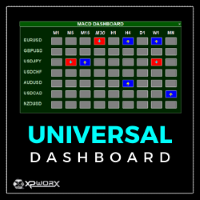
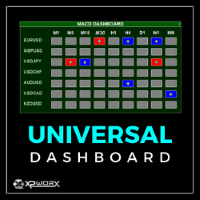
The UNIVERSAL DASHBOARD indicator will eliminate the need of using dozens of indicators on dozens of charts. From one place you can monitor all the pairs and all the timeframes for each of the following indicators: MACD STOCHASTIC WPR RSI CCI You can also use any Custom indicator in the dashboard as long as it has a readable buffer. With a single click you can quickly navigate between charts, pairs and timeframes. Alerts will provide clear indication about what happens for your favorite pairs on
FREE
The indicator is getting the four most important trading sessions: New York London Sydney Tokyo The indicator auto calculate the GMT time. The indicator has buffers that can be used to get the current session and the GMT. You can use it as stand alone indicator and you can turn the draw off and call it from your EA. INPUTS Max Day: Max days back to get/draw. London Session On: Show/Hide London Session. New York Session On: Show/Hide New York Session.  Sydney Session On: Show/Hide  Sydney Session
FREE
XP Moving Average – Your All-in-One Trading Powerhouse Master the markets with XP Moving Average , the ultimate moving average indicator for MetaTrader 4. Whether you’re scalping , swing trading , or investing long-term , this versatile tool combines 9 advanced moving averages in one—enhanced with a modern graphical dashboard and real-time alerts . With AI-powered insights coming soon , XP Moving Average is your key to smarter, more profitable trades . Why Choose XP Moving Average? 9-in-1
The Stochastic Dashboard is multi currencies and multi timeframes dashboards. It shows the Stochastic direction for the chosen pairs/timeframes. For the Stochastic lovers and manual trader this indicator is a most indicator which can be used to determine the market direction for the pair(s) you are trading. Set it to one chart only and monitor from one place all the charts you want.
XP Speed Meter MT4: Measure True Market Momentum Description The XP Speed Meter MT4 is a unique and powerful custom indicator designed to reveal the true speed and momentum of price movement. Unlike standard indicators that rely on chart-bar closing prices, the Speed Meter dynamically calculates the volume of bullish and bearish ticks, and the resulting price movement, over a specific, user-defined time period. This innovative approach allows you to cut through the noise of standard timef
The UNIVERSAL DASHBOARD indicator will eliminate the need of using dozens of indicators on dozens of charts. From one place you can monitor all the pairs and all the timeframes for each of the following indicators: MACD STOCHASTIC WPR RSI CCI You can also use any Custom indicator in the dashboard as long as it has a readable buffer. With a single click you can quickly navigate between charts, pairs and timeframes. Alerts will provide clear indication about what happens for your favorite pairs on
FVG - Fair Value Gap The FVG - Fair Value Gap is an advanced MQL4 indicator designed for traders who utilize institutional order flow and Smart Money Concepts to identify market inefficiencies. This indicator automatically detects and highlights Fair Value Gaps (FVGs) on your chart, providing a clear visual representation of potential support and resistance zones, reversal points, and high-probability trading setups. Key Features: Automated FVG Detection: The indicator automatically identifies
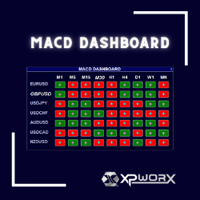
Simplify Your Trading with the MACD Dashboard Are you tired of juggling multiple MetaTrader charts to monitor MACD across different timeframes and symbols? The MACD Dashboard is the solution you've been waiting for. This innovative MetaTrader indicator provides a centralized view of MACD signals on multiple charts, making it easier than ever to identify trading opportunities and manage your risk. Key Features: Multi-Timeframe Monitoring: Track MACD signals on multiple timeframes simultaneousl
Engulfing Zones: Your Edge in Price Action Trading Description The Engulfing Zones indicator is a sophisticated, non-repainting tool designed to automatically detect, highlight, and track the most significant Engulfing Candle Patterns (EG) and, crucially, Engulfing Failures (EF) on your chart. Developed by Coders Guru (XPWORX), this indicator goes beyond simple pattern recognition by drawing persistent, dynamic support and resistance zones based on these high-probability candlestick events
XP Moving Average MT5 – Your All-in-One Trading Powerhouse Master the markets with XP Moving Average MT5 , the ultimate moving average indicator for MetaTrader 5. Whether you’re scalping , swing trading , or investing long-term , this versatile tool combines 9 advanced moving averages in one—enhanced with a modern graphical dashboard and real-time alerts . With AI-powered insights coming soon , XP Moving Average is your key to smarter, more profitable trades . Why Choose XP Moving Average?
XP Speed Meter MT5: Measure True Market Momentum Description The   XP Speed Meter MT5  is a unique and powerful custom indicator designed to reveal the true speed and momentum of price movement. Unlike standard indicators that rely on chart-bar closing prices, the Speed Meter dynamically calculates the volume of bullish and bearish ticks, and the resulting price movement, over a specific, user-defined time period. This innovative approach allows you to cut through the noise of standard tim
FVG - Fair Value Gap The FVG - Fair Value Gap is an advanced MQL5 indicator designed for traders who utilize institutional order flow and Smart Money Concepts to identify market inefficiencies. This indicator automatically detects and highlights Fair Value Gaps (FVGs) on your chart, providing a clear visual representation of potential support and resistance zones, reversal points, and high-probability trading setups. Key Features: Automated FVG Detection:   The indicator automatically identifie
Engulfing Zones MT5: Your Edge in Price Action Trading Description The   Engulfing Zones MT5   indicator is a sophisticated, non-repainting tool designed to automatically detect, highlight, and track the most significant   Engulfing Candle Patterns (EG)   and, crucially,   Engulfing Failures (EF)   on your chart. Developed by Coders Guru (XPWORX), this indicator goes beyond simple pattern recognition by drawing persistent, dynamic   support and resistance zones   based on these high-probab
フィルタ:
レビューなし
レビューに返信