XauGuard

XAUGUARD — ゴールド用セミオート・ヘッジパネル

シンボル:XAUUSD(ゴールド)  |  プラットフォーム:MetaTrader 5  |  バージョン:1.00

XauGuard は MetaTrader 5 上のゴールド(XAUUSD)向けセミオート・トレーディングパネルです。あなたの代わりに判断するロボットではなく、トレード管理ツールです。エントリーのタイミングはあなたが決め、ポジションの防御は XauGuard が担います。

仕組み
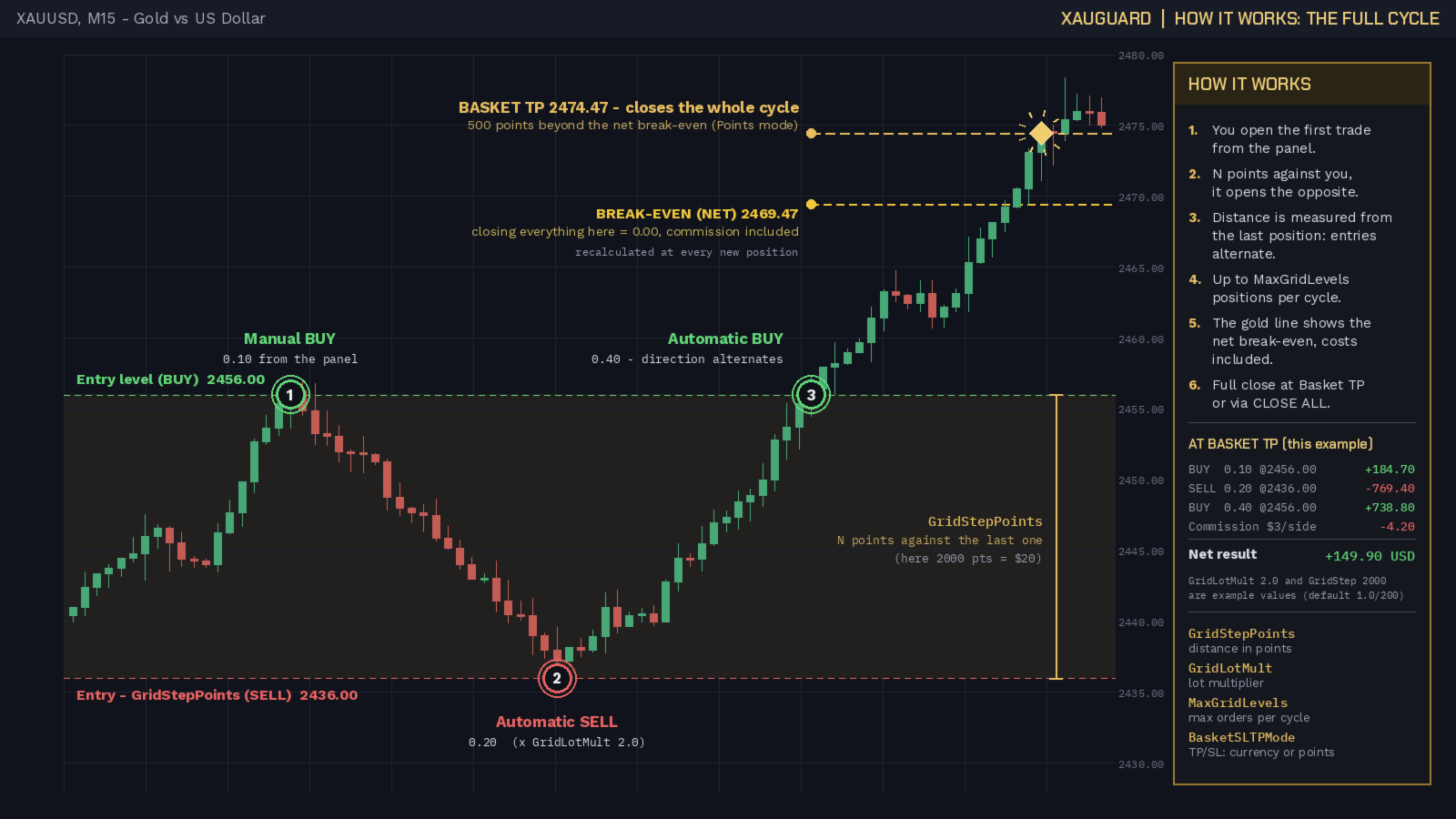
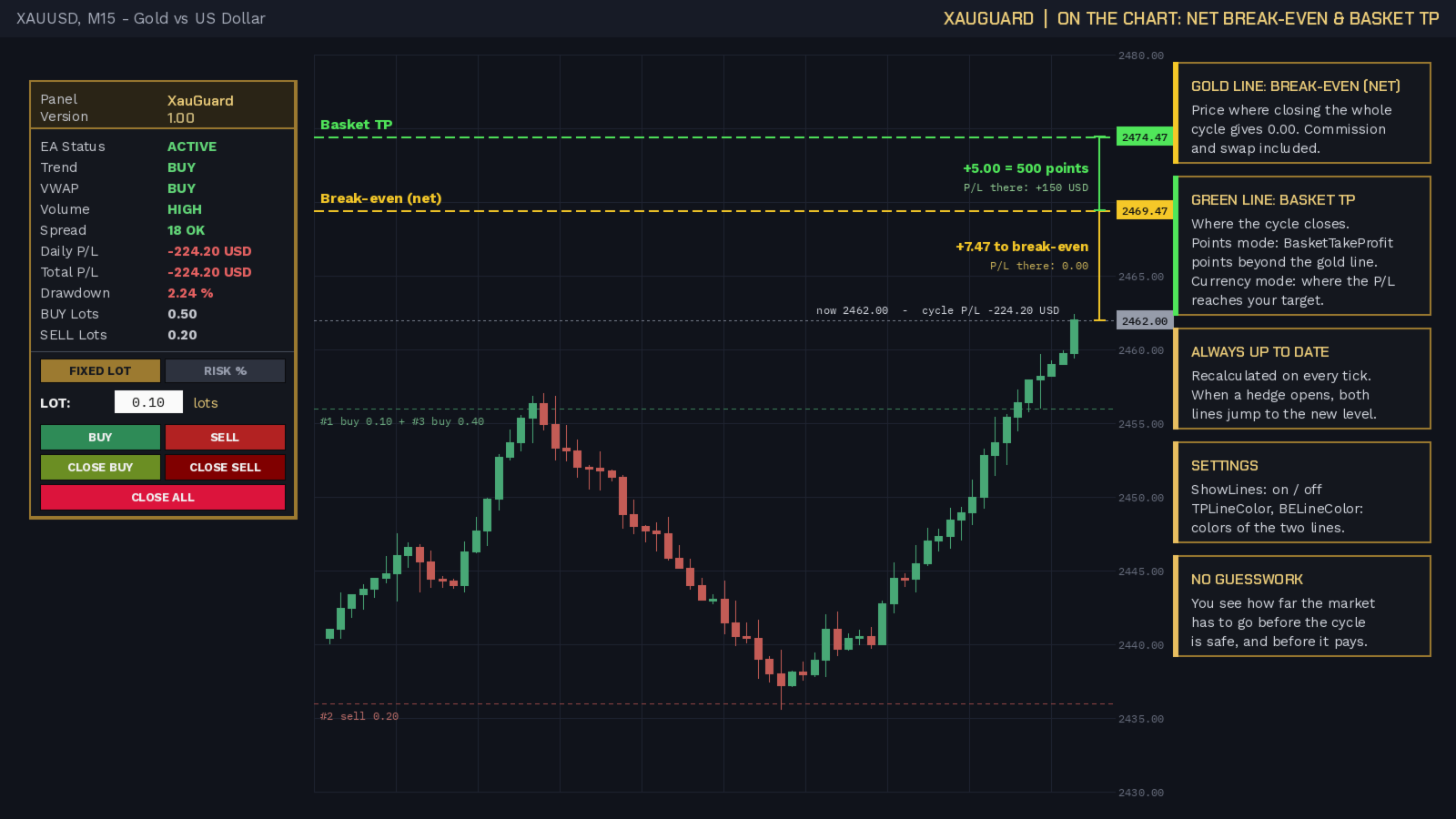
最初のトレードは、チャート上のパネルからワンクリックであなたが開きます(BUY または SELL、ロット自由)。その瞬間から XauGuard が価格を監視します。設定した距離(GridStepPoints)だけ相場が逆行すると、自動的に反対方向のヘッジポジションを開きます。逆行が続けば、方向を交互に切り替えながらロジックが繰り返され(BUY -> SELL -> BUY...)、設定した最大ポジション数まで続きます。バスケットのテイクプロフィット(口座通貨またはポイント、選択制)に到達するとサイクルは自動でクローズ。CLOSE ALL のワンクリックで手動決済も可能です。

トレンドとニュース時の挙動
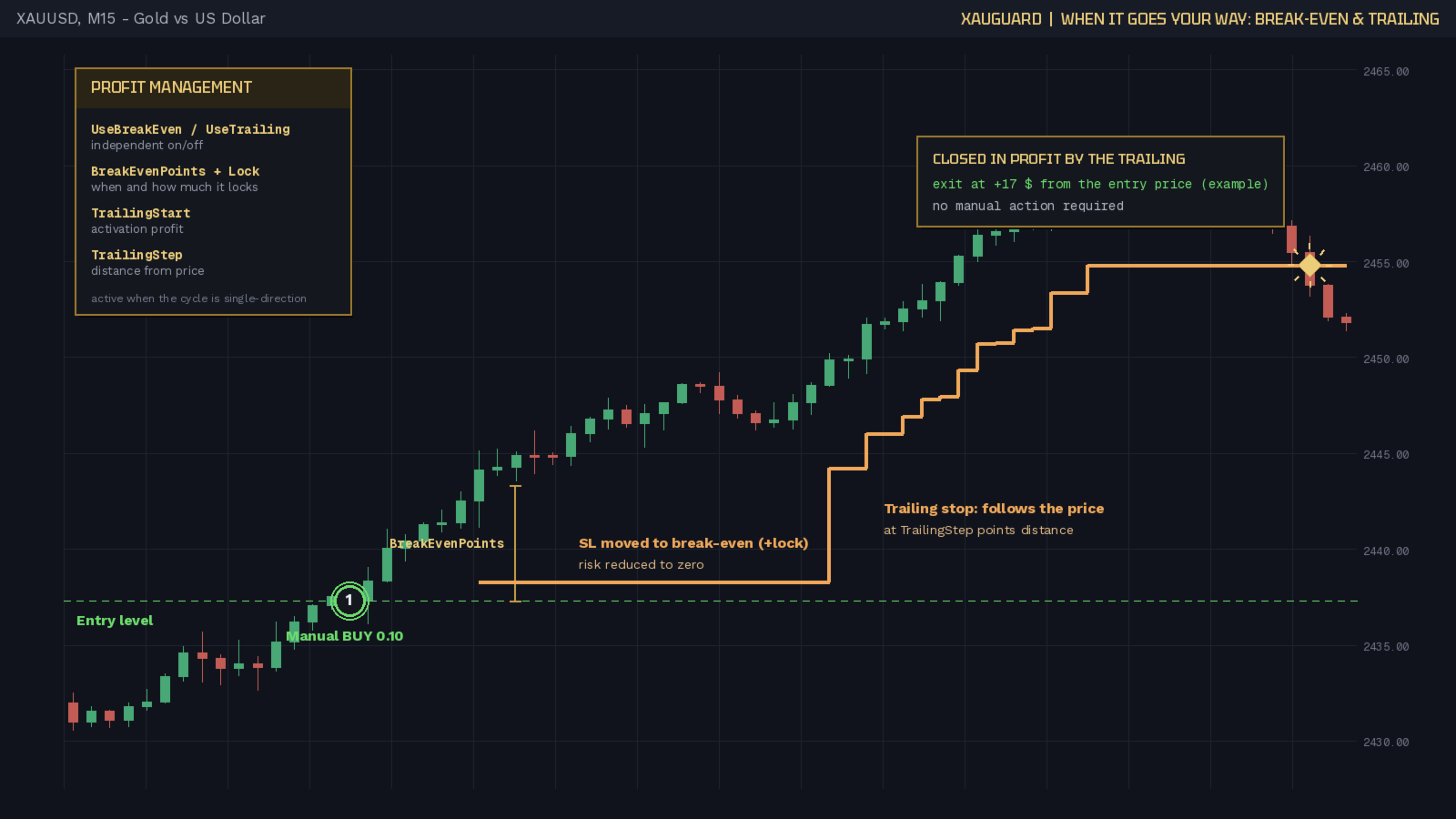
XauGuard はゴールドのトレンドに寄り添う設計です。価格が有利に動けば、ブレークイーブンが素早くリスクをゼロにし、トレーリングストップが値動きを1ポイントずつ追いかけ、トレンドが続く限り利益を伸ばします。相場が逆転すれば距離ヘッジが介入し、手を触れずにエクスポージャーをバランスさせます。トレーリングはトレンドを、ヘッジは反転を担当します。同じロジックにより、高インパクトニュース(NFP、FOMC、CPI など)にも対応します。ゴールドの急変動は、有利ならトレーリングが追随し、不利なら反対ポジションがカバーします。方向を予測する必要はありません。

内蔵プロテクション
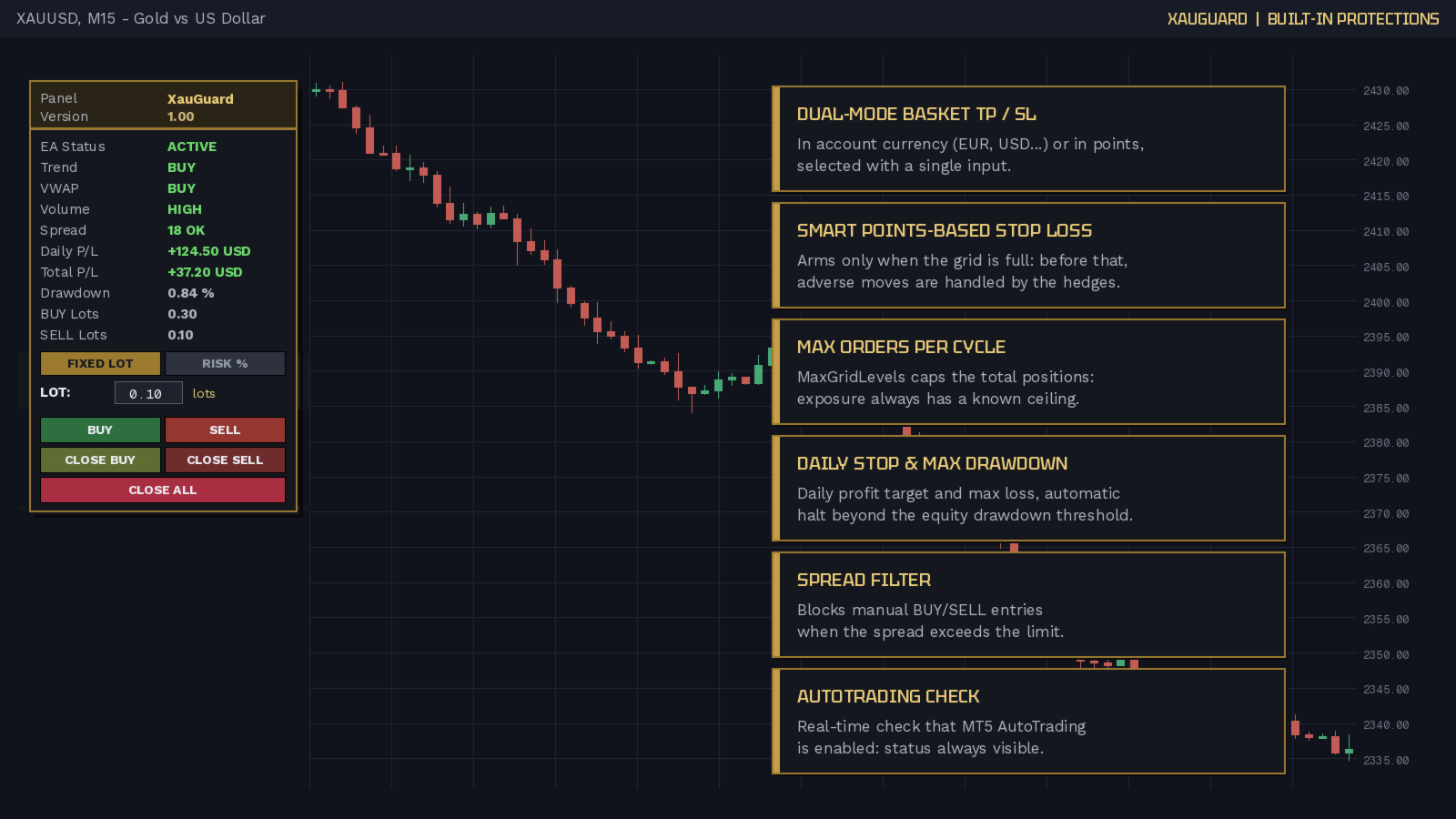
- バスケットのテイクプロフィットとストップロス:口座通貨またはポイント
- スマート・ポイントSL:グリッドが満杯のときのみ作動
- サイクルごとの最大注文数(エクスポージャーは常に上限あり)
- 日次の利益/損失ストップ
- 最大エクイティ・ドローダウンで自動停止
- スプレッドが閾値超過時は手動エントリーをブロック
- パネルの最大ロット制限
- 任意のブレークイーブンとトレーリングストップ
- MT5 自動売買ステータスの常時チェック

入力パラメータ

LOT SIZE
- StartInRiskMode (false):起動時のパネルモード、FIXED LOT または RISK %
- FixedLot (0.01):FIXED LOT モードで使うロット
- RiskPercent (1.0):RISK % モードで使う有効証拠金に対するリスク%
- MaxLot (1.0):安全上限。このロットを超える建玉は行いません

HEDGE GRID
- EnableHedgeGrid (true):自動の反対エントリーを有効化
- MaxGridLevels (5):サイクル最大ポジション数(手動を含む)
- GridStepPoints (200):反対ポジションを発動させる逆行ポイント
- GridLotMult (1.0):各反対ポジションのロット倍率

BASKET TP / SL
- BasketSLTPMode (Points):下の2つの値の単位。ブレークイーブンからのポイント、または口座通貨
- BasketTakeProfit (500):サイクル全体のテイクプロフィット(選択した単位)、0 = 無効
- BasketStopLoss (0):サイクル全体のストップロス、0 = 無効。ポイント指定時は MaxGridLevels 到達後にのみ作動

BREAK EVEN / TRAILING
- UseBreakEven (true):ブレークイーブンを有効化
- BreakEvenPoints (150):発動する利益ポイント
- BreakEvenLock (20):平均価格を超えて確保するポイント
- UseTrailing (true):トレーリングストップを有効化
- TrailingStart (200):開始する利益ポイント
- TrailingStep (100):価格からのストップ距離

RISK PROTECTION
- DailyStopProfit (0):日次利益目標、0 = 無効
- DailyStopLoss (0):日次最大損失、0 = 無効
- MaxDrawdown (0):ピークからの最大エクイティDD、0 = 無効
- MaxSpreadPoints (50):この閾値を超えると手動BUY/SELLはブロック。自動ヘッジは常に有効

TREND / INDICATORS
- EMA_Fast (50) / EMA_Slow (200):パネルのトレンドを定義する移動平均
- UseADX (true):トレンド確認に閾値超のADXを要求
- ADX_Period (14) / ADX_MinLevel (20):ADXの期間と閾値
- UseVWAP (true):VWAPの正しい側に価格があることを要求
- VolumeMA_Period (20) / VolumeMult (1.2):出来高が平均x倍率超で HIGH 表示

NOTIFICATIONS
- NotifyPush (false):スマートフォンへのプッシュ通知(MT5 に MetaQuotes ID が必要)
- NotifyEmail (false):メール通知(MT5 で SMTP 設定済みであること)
通知の対象はヘッジの開始、結果を含むサイクル終了、日次ストップまたはドローダウン到達です。

GENERAL
- MagicNumber (770077):XauGuard が管理するポジションの識別子

PANEL / CHART
- ShowPanel (true):チャート上にパネルを表示
- PanelX (20) / PanelY (90):パネル位置(ピクセル)
- ShowLines (true):TP とブレークイーブンのラインを表示
- TPLineColor / BELineColor:2本のラインの色

動作要件
自動ヘッジにはヘッジング口座が必須です。ネッティング口座では反対ポジションが既存ポジションをカバーせず決済してしまうため、XauGuard は起動時に口座タイプを判定し、自動の反対エントリーを無効化します。手動ポジションのブレークイーブン、トレーリング、バスケットTP/SLによる管理は継続します。
シンボル:XAUUSD(他の銘柄でも動作します)。時間足:ロジックには影響しません。
最初のトレードは常に手動です。あなたのクリックなしに XauGuard が建玉を持つことはありません。

対象ユーザー
自分のシグナルで手動エントリーしたい、しかし逆行を手作業なしでカバーする自動セーフティネットと、事前に定義された明確なリスクルールを求めるトレーダー向けです。

リスク警告
取引には高いリスクが伴い、すべての人に適するとは限りません。距離ヘッジ戦略は長引く一方向の動きでエクスポージャーを増加させます。実運用の前に必ずデモ口座でテストしてください。

おすすめのプロダクト
十数個のツールの代わりに 1 つの EA :トレードアシスタント、リスク管理、 17 種のインジケーターを 1 つのパネルに。チャートに置くだけで、必要なものがすべて手元に。   発売記念価格:先着 20 本は $49 、その後 $99 。 50% オフは今だけ。   ワンクリックで取引 ロットは口座残高に対するリスク%から自動計算 —— 電卓はもう不要。任意時間足のフラクタルストップまたは手動、 R:R でテイクプロフィット、 TP1/TP2/TP3 の分割決済、ワンクリック建値、スイングトレーリング。予約注文?チャートをクリックすれば Entry/SL/TP が即配置。日次ドローダウン制限が「止め時」に取引をロック。ホットキー対応。しかもすべてビジュアルテスターで完全動作 —— 過去データで戦略を磨けます。   17 種のインジケーター —— すべてマルチ TF (最大 10 時間足を同時表示) • セッション — アジア / ロンドン / ニューヨークのボックス、延長ピボット、レンジ VWAP とフィボ:一日の構造が一目瞭然 • オーダーブロック — 10 時間足を同時に自動検出
Account Monitor Pro — Your Ultimate Trade Statistics Hub Account Monitor Pro is a professional information dashboard designed for traders who combine Expert Advisors (EAs) and manual trading. The indicator separates statistics in real-time based on your Magic Number, allowing you to clearly see who is driving the profit: the algorithm or yourself. Key Features: Split Monitoring: Instant separation of "Robot" positions (by Magic Number) and "Manual" trades. Multi-language Support: 11 languages in
FREE
CosmiCLab SMC FIBO CosmiCLab SMC FIBO is a professional trading indicator designed for traders who use Smart Money Concepts (SMC), market structure analysis and Fibonacci retracement levels. The indicator automatically detects market swings and builds Fibonacci levels based on the latest impulse movement. It also identifies market structure changes such as BOS (Break of Structure) and CHOCH (Change of Character), helping traders understand the current market direction. CosmiCLab SMC FIBO also pr
HedgeSafe Trade Assistant リスク管理を重視した MetaTrader 5 用の裁量取引パネルです。 HedgeSafe は、BUY または SELL を押す前に、チャート上で取引の準備、検証、管理を行うためのツールです。 HedgeSafe はシグナル配信、相場予測、AI ボット、自動売買戦略ではありません。取引方向を決定せず、利益を保証しません。すべての取引判断はトレーダー自身が行います。 主な機能 口座残高の割合、または口座通貨の固定金額からロットを計算。 Stop Loss をポイントまたは価格で、Take Profit をポイント、価格、R 倍率で設定。 金額リスク、想定リターン、ロット、リスクリワード比を事前表示。 Entry、Stop Loss、Take Profit のチャートラインをパネルと同期。 BUY と SELL を個別に判定し、執行直前に方向別の最終検証を実行。 最小/最大数量、数量ステップ、tick size、tick value、stops level、freeze level を確認。 市場の利用可否、銘柄の取引モード、スプレッド
Recovery Manager Panel MT5 is a manual order management panel for traders who want to manage open positions directly from the chart in a clearer and more organized way. This tool is not a signal robot. It does not predict market direction, generate entry signals, or trade automatically based on market forecasts. Instead, it helps traders work with positions that are already open. You can calculate possible recovery lot sizes, view estimated target levels on the chart, and use available floating
Non-Repainting. Non-Redrawing. Non-Lagging. Signals appear only on confirmed bars. What you see on history is exactly what appeared in real time. Built specifically for Gold (XAUUSD) traders. Gold ML Supertrend MT5 is the only Supertrend indicator on MQL5 that learns. Instead of using a fixed multiplier, it runs a K-means clustering algorithm on recent price data to find the optimal band width. Then it adapts that width per trading session (Asia/London/NY) based on what actually worked. The resu
RiskGuard Pro enforces a daily loss limit, a profit lock and a maximum drawdown on your account - across your manual trades and any other EA you run. It does not open trades and it does not predict anything. What it does RiskGuard Pro watches your account equity and enforces three limits you set: Daily loss limit - measured against your start-of-day equity. Daily profit lock - stop trading once the day has gone well enough. Maximum drawdown - measured from your account's peak equity, not from to
Local Copy Trader Utility - Professional Copy Trading System Overview Local Copy Trader Utility is the complete solution for mirroring trades between MetaTrader 5 accounts. With both Master and Slave functionality in one powerful Expert Advisor, it delivers reliable, lightning-fast trade copying with zero external dependencies. Perfect for managing multiple accounts, following trading signals, or transferring trades between brokers, this system ensures your positions stay perfectly synchronized
Trade Manager は、リスクを自動的に計算しながら、取引を迅速に開始および終了するのに役立ちます。 過剰取引、復讐取引、感情的な取引を防止する機能が含まれています。 取引は自動的に管理され、アカウントのパフォーマンス指標はグラフで視覚化できます。 これらの機能により、このパネルはすべてのマニュアル トレーダーにとって理想的なものとなり、MetaTrader 5 プラットフォームの強化に役立ちます。多言語サポート。 MT4バージョン  |  ユーザーガイド + デモ Trade Manager はストラテジー テスターでは機能しません。 デモについてはユーザーガイドをご覧ください。 危機管理 % または $ に基づくリスクの自動調整 固定ロットサイズを使用するか、ボリュームとピップに基づいた自動ロットサイズ計算を使用するオプション RR、Pips、または価格を使用した損益分岐点ストップロス設定トレーリングストップロス設定 目標に達したときにすべての取引を自動的に終了するための 1 日あたりの最大損失 (%)。 過度のドローダウンからアカウントを保護し、オーバートレードを防ぎます
Trade Copilot - ゴールド(XAUUSD)およびあらゆる銘柄向けセミオート・リスク管理パネル Trade Copilot は、自分でエントリーの主導権を握りながらもEAのような規律を求める裁量トレーダーのために設計されたセミオート取引パネルです。方向とレベルはあなたが決め、リスクサイジング、ストップロスの設置、テイクプロフィット管理、ポジション保護はパネルが自動で行います。 主な機能 - リスクベースのロット計算 - リスク%、リスク$、固定ロットから選択可能。ストップロスまでの距離からポジションサイズを自動計算 - 3種類のストップロスモード - ATR倍率、固定ポイント、固定$距離 - ワンクリックの成行・指値注文(Buy/Sell Now、Pending Buy/Sell)、ドラッグ可能なエントリー/SL/TPライン - グリッドトレード - 価格帯にわたりベルカーブ型のロット配分で複数の指値注文を配置(マーチンゲールではありません - ロットサイズは中心からの距離で固定され、損失時に倍増することはありません) - マルチTP(最大4段階) - メインターゲ
Product Name: Smart Switch Dashboard STOP WASTING SECONDS. SECONDS COST MONEY. Are you losing trades because you're fumbling through the Market Watch? Is your workspace messy and slowing you down? In trading, Speed is everything. If you aren't organized, you are losing money to traders who are. Smart Switch Dashboard is not just a tool—it is your COMMAND CENTER . Designed for serious Scalpers and Day Traders who demand Speed, Precision, and Zero Lag. DOMINATE YOUR WORKFLOW 1. ULTRA-FAST SY
THE ULTIMATE ALL IN ONE SUITE FOR EVALUATION & FUNDED TRADERS Are you tired of losing $100k+ prop firm accounts to a single millisecond of slippage, emotional revenge trading, or a minor daily drawdown miscalculation? Most traders don't fail because their strategy is bad. They fail because they break the strict, unforgiving rules of modern prop firms. Meet Propfirm Guardian Pro  (Propfirm Monitor)—the absolute gold standard of risk management, execution, and deep statistical analytics built exp
DDKiller Pro
Njaratahiry Michael Randrianiaina
Stop Blowing Your Account. Once and For All. DDKiller Pro is the MT5 risk guardian that runs silently on your chart and shuts down trading the moment you hit a limit — whether you're grinding a prop firm challenge or managing your own CFD account. The problem every trader knows: You set your rules. You break them anyway. One revenge trade. One overleveraged position. One session that erases a month of gains. DDKiller Pro removes that decision from your hands entirely. What it does: The second yo
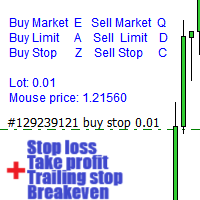
警告、このEAはテスターでは動作しません。 デモアカウントまたは実際のアカウントでのみ動作します。 デモを試してみたい場合は、こちらからお問い合わせください: https://www.mql5.com/en/users/abudabi MT4 version MetaTrader 5でキーボードとマウスから迅速な注文を送信(配置): 希望の価格にカーソルを移動し、キーを押します: 市場で購入:E リミット注文:A ストップ注文:Z 売却市場:Q リミット売却:D ストップ売却:C (キーはカスタマイズ可能) 注文が送信(配置)されたとき、Fast Keyboard Orders MT5は以下で注文を管理できます: ストップロス テイクプロフィット トレーリングストップロス ブレイクイーブン 機能やバグ修正の提案がある場合、または質問がある場合は、   https://www.mql5.com/ru/users/abudabi/   から直接メッセージを送っていただければ幸いです。 「Fast Keyboard Orders MT5」をアップデートします。 完全なパラメータ: boo
Discipline you don't have to hold by willpower. Account Shield controls the risks on your account — per trade, per day, in total, drawdown, stops, overtrading, trading after a loss — and helps stop you before a bad moment becomes a lost account. Own account or prop firm (15 firm presets included). Never opens trades by itself. Why Most accounts are not lost to bad analysis. They are lost to a moment: the daily loss counted on equity, the stop set a minute late, the fourth trade after two losses,
Open Risk Budget Cap enforces a total open stop-loss risk budget across your account. It does not choose direction and does not open discretionary trades on a live chart. Attach it to one chart; the symbol and timeframe do not matter. What it measures Every open position and every pending order is priced to its stop-loss in account currency using OrderCalcProfit. Positions or orders without a stop-loss are counted and shown on the panel as "without stop-loss". They are excluded from the budget
GGP Trade Copier  EA is an automatic trading bot that can help traders automatically replicate the trading strategies and operations from one trading terminal to others by experiencing exceptionally fast trade copying system. Its easy-to-use setup allows you to copy trades between multiple MetaTrader terminals on the same Windows computer or Windows VPS with lightning-fast copying speeds of under 0.5 seconds. The software supports multiple trading varieties, including Forex, commodities, stocks
Currency Exposure Matrix — Translate a collection of FX positions into a clearer currency-exposure view. Who it is for Designed for FX traders comparing long, short, gross and net exposure across several pairs. Main functions Gross and net currency exposure Long and short decomposition Deposit-currency conversion Concentration warnings Transparent handling when conversion symbols are unavailable A practical setup workflow Review the selected account, symbols, server time, available history and i
Grid Trading EA is a semi-automated one-click trading EA for both Normal Trading and Grid/Martingale Trading . Normal Trading Simply click Buy or Sell directly from the chart. The EA will automatically manage trades by: Setting Stop Loss and Take Profit Managing Trailing Stop Grid / Martingale Trading (For Hedging Account Type Only) When Grid Trading mode is enabled, the EA will automatically open additional grid orders at specified distances while increasing the lot size based on your settings.
Protect your funded accounts and personal capital with military-grade precision. This utility continuously monitors your floating equity against your daily starting balance. The moment your custom drawdown threshold is breached, it instantly liquidates all open positions, deletes pending orders, and completely unloads from the chart. Stop revenge trading and never fail a prop firm evaluation due to a margin breach again.
FREE
Total trade manager allows you to manage your trade to maximise your profits and minimise your losses. This is an essential for traders that are looking for consistency within their trading.  The features: Partial Stop Loss: This feature allows you to close a partial percentage of your trade once it goes into negative. So if your stop loss is 20 pips, you could close 75% of your trade at 10 pips and let the remainder of the position to continue running. Auto Stop Loss: This means that once you p
Trade assistant pro v8
Ahmed Mohammed Bakr Bakr
2 (1)
FREE FREE FREE Trade Assistant MT5 – Professional Trading & Risk Management Panel Trade Assistant MT5 is an advanced trading panel designed to help traders execute orders faster, safer, and more professionally . It simplifies manual trading by combining smart order management , precise risk control , and one-click execution , making it ideal for both beginners and advanced traders. This tool does not trade automatically . Instead, it empowers you with full control while applying professional-gra
FREE
Heiken_Ashi_Bars - MT5用 高度なトレンド可視化ツール 概要 Heiken_Ashi_Bars は、市場のノイズを取り除き、真のトレンドを浮き彫りにするために設計された、強力で視覚的に直感的なカスタムインジケーターです。従来のローソク足チャートは不規則な動きが多く、ダマシのシグナルにつながることがよくあります。価格データを平均化することで、このインジケーターはプライスアクションを滑らかにし、トレンドの継続、反転、および利益の出るエントリーポイントを非常に簡単に見つけることができます。 主な機能と利点 究極のノイズリダクション: 小さな価格のスパイクや持ち合いのノイズをフィルタリングします。 明確な視覚的シグナル: 色分けされたバーにより、強気および弱気のモメンタムを一目で確認できます。 リペイントなし (No Repaint): バーが確定するとシグナルは固定され、過去のバーを再計算しません。 高度に最適化: ターミナルの遅延をゼロにするクリーンなコード。 多用途: すべての金融商品 (FX、インデックス、貴金属、仮想通貨) で完璧に機能します。 トレード方法 上昇
# Gold Deck — Manual Trading Panel for MT5 Gold Deck brings order entry, position management and account information into a compact, movable panel for MetaTrader 5. Manage trades directly from your chart, review individual positions and monitor floating profit and loss across symbols. Use it on gold or another instrument offered by your broker. Main trading controls manage the chart symbol, while the symbol overview displays positions across the account. ## Main features - Market Buy and Se
Caicai L&S Yield Histogram Important Notice: This indicator is an integral tool of the automated EA Caicai Long and Short Pair Trading . This indicator visually displays the percentage deviation (Yield %) of a pair's current spread relative to its own historical mean. It is an excellent tool for quickly visualizing the gross financial potential of a market distortion in Long & Short operations. Main Features: Percentage Visualization: Understand the size of the distortion in palpable percentage
NQX Smooth Trend Flip Weekly BiasはMetaTrader 5用のシグナルインジケーターです:平滑化トレンド転換のシグナル(週足のバイアス方向にのみシグナルを出します)。 値動きの後の平滑化ローソク足の色の転換を検出するNQX独自のロジックです。週足のバイアス方向にのみシグナルを出します。推奨エントリー、短いストップ、遠めのターゲット(3:1、5:1、10:1、スイングでは最大20:1)を表示します。判断するのはあなたです。 チャート上に表示されるもの - 確定したシグナル足に矢印を表示します(確定したシグナルがリペイントされることはありません)。 - 推奨エントリー、短いストップ、遠めの推奨ターゲット(デフォルトはリスクの6倍)、さらに3 x 1、5 x 1、10 x 1の参考ライン。 - レベルに到達すると、チャート上にラベル(ターゲットまたはストップ)が表示されます。 - 最新のシグナルと、表示中の履歴に出現したシグナル数を示すパネル。 - 新しいシグナルのポップアップ通知とプッシュ通知(オプション)。 NQX独占ロジック:他のどのNQXインジケータ
Fabii Half Trend Baseline
Fabien Georges Andre Guillemaud
上位足のトレンドに逆らう取引をやめましょう。2本のベースライン、1つのチャート。リペイントなし。 どの通貨ペアでも、どの時間足でも。2分でチャートに表示。Strategy Tester で無料デモを試せます。 Get more indicators here Baselines, volatility filters and oscillators. No repaint. 必要な理由 チャート上のラインが緑になったので、あなたはエントリーします。その後、上位足を開くと、大きなトレンドは逆方向を向いています。シグナルは本物でした。しかし、その背景のトレンドはあなたの味方ではありませんでした。 大きなトレンドに逆らう取引は、そのたびにエントリーの優位性を失わせます。 得られるもの Fabii Half Trend Baseline は、現在の時間足のトレンドと上位足のトレンドを1つのチャートに表示します。ウィンドウを切り替えて全体像を確認する必要がなくなります。 上位足の2本目のベースラインがメインのラインの後ろに描かれるため、別のチャートを開かずに大きなトレンドが分かります。 ベ
Apex Point is a trend-following indicator for MetaTrader 5, transforming complex market data into signals for traders. It displays blue dots for uptrends, red dots for downtrends, and yellow crosses at potential reversals, helping users identify momentum shifts quickly. Key features include a confirmation system requiring multiple bars (default: 3) to validate changes, reducing false signals; dynamic ATR-based offsets for adaptive trailing, with instant ratcheting in the trend direction and smo
FREE
QuickTrade Panel – Fast Order Execution & Risk Management The QuickTrade Panel is a powerful MetaTrader 5 trading tool that helps traders place orders faster, manage risk automatically, and control trades directly from the chart. It reduces manual work, improves trading accuracy, and makes trade management simple and efficient. Key Features On-Chart Trading: Change Lot Size, Risk %, Stop Loss (SL), Take Profit (TP), and Pending Distance without opening EA settings. Smart Position Sizing: Choose
このプロダクトを購入した人は以下も購入しています
Trade Assistant MT5
Evgeniy Kravchenko
4.43 (216)
取引 ごとのリスクの 計算、新規注文 の 簡単 な 設置、部分的 な 決済機能 を 持 つ 注文管理、 7 種類 のトレーリングストップなど 、便利 な 機能 を 備 えています 。 追加の資料と説明書 インストール手順   -   アプリケーションの手順   ライン機能 チャート上にオープニングライン、ストップロス、テイクプロフィットを表示します。この機能により、新規注文を簡単に設定することができ、注文を出す前にその特徴を確認することができます。   リスク計算 リスク計算機能は、設定されたリスクとストップロス注文のサイズを考慮して、新規注文のボリュームを計算します。ストップロスの大きさを自由に設定できると同時に、設定したリスクを守ることができます。 Lot calc ボタン - リスク 計算 を 有効 / 無効 にします 。 Risk フィールドでは 、必要 なリスクの 値 を 0 から 100 までのパーセンテージまたは 預金通貨 で 設定 します 。 設定」 タブで 、 リスク 計算 の 種類 を 選択 します :「 $ 通貨」、「 % 残高」、「 % エクイティ 」、「
Trade Manager EAへようこそ。これは、取引をより直感的、正確、そして効率的にするために設計された究極の リスク管理ツール です。これは単なるオーダー実行ツールではなく、包括的な取引計画、ポジション管理、リスク管理のためのソリューションです。初心者から上級者、迅速な実行を必要とするスキャルパーまで、Trade Manager EAはあらゆるニーズに対応し、為替、指数、商品、暗号通貨などさまざまな市場で柔軟に対応します。 Trade Manager EAを使用すると、複雑な計算が過去のものになります。市場を分析し、エントリーポイント、ストップロス、テイクプロフィットのレベルをチャート上のラインでマークし、リスクを設定するだけで、Trade Managerが最適なポジションサイズを即座に計算し、SLとTPをピップ、ポイント、口座通貨でリアルタイムに表示します。すべての取引が簡単かつ効果的に管理されます。 主な機能: ポジションサイズ計算機 :定義されたリスクに基づいて取引サイズを瞬時に決定します。 簡単な取引計画 :エントリー、ストップロス、テイクプロフィットを設定するためのド
Farmed Hedge Yield Farming | All Markets (Manual - Hybrid - Semi/Automated EA) VERIFIED TRADING RESULTS - Farmed Hedge Yield Axi Copy:  https://www.mql5.com/en/signals/2356376 - Farmed Hedge Yield Exn Copy:   https://www.mql5.com/en/signals/2356404 - Farmed Hedge Yield V Copy:  https://www.mql5.com/en/signals/2357156 IMPORTANT NOTICE: FarmedHedge is a MANUAL-FOCUSED TRADING UTILITY ,not a fully automated EA. Results shown on this Signal include manual trades and overall strategic management.
Telegram to MT5 Multi-Channel Copier   は、 Telegram と Discord チャンネルのトレードシグナルを MetaTrader 5 へ自動コピーします。ボット不要、ブラウザ拡張不要、手動コピー不要。Telegram や Discord にシグナルが届くと、EA が数秒であなたのターミナルに注文を出します。 さらに、チャンネルをコピーする前に、内蔵バックテスターでそのチャンネルがあなたの口座でどう動いたかを確認できます。 製品は 2 つのコンポーネントで構成されます:Telegram チャンネルを監視する Windows アプリと、MT5 ターミナルでシグナルを執行する本 EA です。MT4 版もあります   こちら . 購入前にお試しください:   アプリは無料でダウンロードできます。ご自身のチャンネルを接続し、各シグナルがどのように読み取られるかをご確認ください。Backtest タブと実際の取引には、購入またはレンタルした EA が必要です。このページの無料デモはストラテジーテスターでのみ動作し、テスターでは Telegram と D
Local Trade Copier EA MT5
Juvenille Emperor Limited
4.94 (149)
Local Trade Copier EA MT5 は、同一の Windows PC または Windows VPS 上で稼働する複数の MetaTrader 5 口座間で、取引をコピーおよび管理するための高速で柔軟なトレードコピーツールです。 ローカルでの取引同期に加え、Receiver 側でロットサイズ、リスク管理、取引フィルター、シンボルマッピング、取引管理、口座保護を個別に設定できます。 Transmitter と Receiver のターミナルは約 1分 で設定でき、同一ブローカーまたは異なるブローカーの口座間で、手動取引や EA による取引をコピーできます。適切な条件下では、ローカルの MetaTrader ターミナル間で取引情報を 0.5秒未満 で同期できます。実際の約定速度は、ブローカーのレイテンシー、ネットワーク状況、PC/VPS の性能、ターミナルの負荷によって異なります。 ご購入前に無料デモをお試しください Local Trade Copier EA MT5 の完全機能版無料デモ を、MT5 デモ口座で 1回につき4時間 テストできます。 Local Trad
自分の取引ルールで Telegram のシグナルをコピー Telegram to MT5 Signal Trader は、Telegram の公開・非公開チャンネルやグループから、テキスト形式の取引シグナルを MetaTrader 5 へ自動でコピーします。1つのデスクトップアプリで複数の配信者と MT5 口座を管理し、 配信者ごとにリスクと取引設定を個別に指定 できます。 シグナルのコピーに Telegram ボットや API 設定は必要ありません。 電話番号または QR コードでご自身の Telegram アカウントにログインし、すでに参加しているチャンネルやグループを選ぶだけです。ボットの作成や、Telegram API トークン、API ID、API hash の入力は不要です。 ポジションサイズを選び、複数の利確水準に分けて決済し、建値へのストップ移動やトレーリングストップを自動化できます。配信者のシグナルを受け取りながら、実際の取引方法は自分で管理できます。 本製品は、この MT5 エキスパートアドバイザ(EA)と、必須の Windows 連携アプリで構成されます。 インス
TradePanel MT5
Alfiya Fazylova
4.88 (170)
Trade Panelは多機能なトレーディングアシスタントです。アプリには手動取引用の50以上のトレーディング機能が搭載されており、ほとんどの取引作業を自動化することができます。 アプリの説明書: https://www.mql5.com/en/blogs/post/756482 デモ口座用アプリの試用版: https://www.mql5.com/en/blogs/post/750865 アプリのインストール方法: https://www.mql5.com/en/blogs/post/756239 アプリをビジュアルモードでテストする方法: https://www.mql5.com/en/blogs/post/770277 VPSのMetaTraderにアプリをインストールする方法: https://www.mql5.com/en/blogs/post/770190 取引。 ワンクリックで取引操作を行うことができます: リスクを自動計算して指値注文やポジションを開く。 複数の注文やポジションをワンクリックで開く。 注文のグリッドを開く。 保留中の注文やポジションをグループごとに閉じる
VirtualTradePad PRO SE MT5 — MetaTrader 5向けプロフェッショナル取引コントロールセンター VirtualTradePad PRO SE は、 MetaTrader 5 向けのプレミアムなチャートベースの取引パネルであり、トレード管理ワークスペースです。より速い執行、明確なポジション管理、構造化されたトレード管理、視覚的なレベル計画、そしてチャート上で完結するプロフェッショナルなワークフローを求めるトレーダー向けに設計されています。 これは単なる BUY / SELL パネルではありません。PRO SE は、手動取引、予約注文、ポジション管理、部分決済、バスケット損益管理、平均化レベル、ATMルール、シグナル監視、リアルタイム市場情報、ストラテジーテスター (Strategy Tester) ワークフロー、VPS向け運用を、1つの連携されたインターフェースに統合します。 MT4版 | 完全な説明とスクリーンショット | 購入方法 | インストール方法 | ログファイルの取得方法 | テストと最適化の方法 | Expforex のすべての製品 PRO
================================================================================ POC BREAKOUT - V20.72. Full Professional Grade Toolkit ================================================================================ POC Breakout is a full MetaTrader 5 trading dashboard for discretionary traders who want breakout signals, Point of Control (POC) context, volume profiles, order flow, market structure, news, alerts, and advanced trade planning in one professional workspace. Attached directly to you
REVDEN AI Desk:あなた自身の AI との一つの会話で、REVDEN のマーケットコンテキストをもとにトレードを運営する トレードのすべてを一つの会話で運営する姿を想像してみてください。 REVDEN AI Desk はそれを MetaTrader 5 にもたらします。あなた自身の AI に相場をどう読んでいるかを尋ねると、AI はあなたが取引する銘柄について REVDEN の完全なコンテキストをもとに答えます。銘柄の状態、リスク像、今後の指標発表まで含めてです。AI の提案はエントリー、ストップ、ターゲット、リスクとともに届き、合うものをあなたが承認します。ルールの変更も同じ方法です。変えたい点を書けば、AI が新しいルールブックの草案を作り、採用するかどうかはあなたが決めます。会話の周りには、マーケット全体が一つの画面にまとまっています。 デスクとセットアップガイドをご覧ください。 すべての画面、すべての設定、そしてあなた自身の AI との最初のステップ: stein.investments/products/revden-ai-desk AI との一つの会話、マーケッ
MT5 to Telegram Signal Provider は、Telegramのチャット、チャンネル、またはグループに 指定された シグナルを送信することができる、完全にカスタマイズ可能な簡単なユーティリティです。これにより、あなたのアカウントは シグナルプロバイダー になります。 競合する製品とは異なり、DLLのインポートは使用していません。 [ デモ ] [ マニュアル ] [ MT4版 ] [ Discord版 ] [ Telegramチャンネル ]  New: [ Telegram To MT5 ] セットアップ ステップバイステップの ユーザーガイド が利用可能です。 Telegram APIの知識は必要ありません。必要な全ては開発者から提供されます。 主な特長 購読者に送信する注文の詳細をカスタマイズする機能 例えば、Bronze、Silver、Goldといった階層型のサブスクリプションモデルを作成できます。Goldサブスクリプションでは、すべてのシグナルが提供されます。 id、シンボル、またはコメントによって注文をフィルターできます 注文が実行されたチャート
Exp COPYLOT CLIENT for MT5
Vladislav Andruschenko
3.97 (35)
MetaTrader 5 用のプロフェッショナル取引コピー機 MetaTrader 向けの高速・高性能・信頼性の高い 取引コピー機 です。 COPYLOT は、MT4 と MT5 のターミナル間で Forex 取引をコピーでき、 Hedge 口座と Netting 口座の両方に対応しています。 COPYLOT MT5 版の対応構成: - MT5 Hedge → MT5 Hedge - MT5 Hedge → MT5 Netting - MT5 Netting → MT5 Hedge - MT5 Netting → MT5 Netting - MT4 → MT5 Hedge - MT4 → MT5 Netting MT4 版 完全な説明 + DEMO + PDF 購入方法 インストール方法 ログファイルの取得方法 テストと最適化の方法 Expforex のすべての製品 MT4 ターミナルへのコピーも可能です(MT4 → MT4、MT5 → MT4): COPYLOT CLIENT for MT4 COPYLOT は、2台、3台、さらには10台のターミナル間で同時に動作できる、プロフェッ
News Trade EA MT5
Konstantin Kulikov
4.55 (11)
僕自身が数年間使っている便利なロボットをご紹介します。半自動モードでも完全自動モードでもお使いいただけます。 >>> Chat <<< 当プログラムは経済指標カレンダーで発表されるニュースをもとにした取引の柔軟な設定が可能です。戦略テスターでは確認不可です。実際の取引のみです。 最新の設定アーカイブをダウンロードしてください: https://www.mql5.com/en/blogs/post/747929 シグナルモニタリング: https://www.mql5.com/en/signals/author/test-standart 当該エキスパート・アドバイザーのためのカスタマイズ設定セットを作る場合は、ブログの全パラメータの説明を参照してください :   https://www.mql5.com/en/blogs/post/748545 。 基本的なデフォルト設定について 一つのチャートからGBPとの通貨ペア(GBPUSD、EURGBP、GBPJPY、GBPCAD、GBPAUD、GBPCHF)で取引をします。GBPは最もボラティリティの高い通貨のため、取引が成功するチ
Seconds Chart - MetaTrader 5で秒足チャートを作成するユニークなツールです。 Seconds Chart を使用すると、秒単位のタイムフレームでチャートを構築でき、標準的な分足や時間足チャートでは得られない柔軟性と分析精度を実現します。例えば、 S15 は15秒足を表します。カスタムシンボルをサポートしているインジケーターやEAをすべて使用できます。標準的なチャートと同様に便利に操作できます。 標準的なツールとは異なり、 Seconds Chart は超短期のタイムフレームでも高い精度と遅延なく作業できるように設計されています。 Free Demo: Seconds Chart v2.29 Demo.ex5 無料デモをダウンロードしてご自身でお確かめください: 完全機能版 - すべての機能が利用可能 24時間テスト - 精度と利便性を評価するのに十分な時間 デモ口座のみ - ほとんどのブローカーで簡単に開設可能 GBPCADチャートのみ - ほとんどの端末で利用可能 これらの制限はデモ版のみに適用されます。製品版は、あらゆる口座タイプ(リアル、デモ、コンテス
The Patch It never opens a trade. It walks behind the ones that did. Every open position, every pending order — checked twice a second for the one thing that's easy to forget: a stop, a target. Found bare, it doesn't ask. It writes the missing number in, measured in points from wherever the position began, and moves on to the next. No strategy, no opinion on direction. Just the quiet assumption that nothing should ever sit on the market unprotected — not because someone decided it shouldn't,
EA Overfitter
Stephen J Martret
5 (1)
That backtest looks great. But will it still be making money tomorrow, next week, next month? EA Overfitter re-runs your EA on 100 price histories it has never seen. One score tells you if the edge is real. A backtest tells you what an EA did on one price history — the one that happened to occur. What you cannot tell from it is how much of that result was the strategy and how much was the particular path. EA Overfitter answers that. It builds up to 100 synthetic price histories your EA has n
次回アップデート — バージョン 2.52 近日公開!【新機能】 市場分析とトレードワークフローを強化する、4つの主要な新機能にご期待ください 皆様のトレードニーズに応える4つの新機能により、市場分析を次のレベルへと引き上げます。新機能をご紹介します: 1. TRADE OVERVIEW DASHBOARD 2. CONFLUENCE AT ZONE 3. STRONG & WEAK HIGH/LOW 4. OTE 1. TRADE OVERVIEW DASHBOARD 市場全体の状況をより簡単に把握できるダッシュボードです。トレード判断をサポートするガイダンスを提供し、市場分析とトレード計画を体系的に行えるよう支援します。すべてを1つの画面で確認できます。 マルチタイムフレーム市場概要(Multi-Timeframe Market Overview) 市場の方向性と価格構造をより明確に把握 市場状況をすばやく確認 体系的な市場分析とエントリー計画のためのガイダンス 2. CONFLUENCE AT ZONE 価格が重要なゾーンに入るとき…いくつのサポート要因が一致しているかを確認で
The product will copy all telegram signal to MT5 ( which you are member) , also it can work as remote copier.  Easy to set up, copy order instant, can work with almost signal formats, image signal,  s upport to translate other language to English Work with all type of channel or group, even channel have "Restrict Saving Content", work with  multi channel, multi MT5 Work as remote copier: with signal have ticket number, it will copy exactly via ticket number. Support to backtest signal. How to s
RETAILBERG FOOTPRINT CHART PRO — Order-Flow Workspace for MetaTrader 5 Version 7.00  |  Professional System  |  31 tools  |  One chart A full 150-page illustrated User Manual is included. Please read the full manual to understand this feature packed footprint chart elements and ui. https://www.mql5.com/en/blogs/post/777982 DEMO / STRATEGY TESTER — PLEASE READ FIRST
25% discount on the release of the tool: only for the next 3 buyers Send a message to receive a demo version. AstroTrade Trading Assistant AstroTrade is a comprehensive multi-functional trading utility developed for the MetaTrader 5 platform. It integrates essential tools for trade execution, risk management, and technical monitoring into a single unified interface. The application is designed to assist traders in managing their daily operations through a visual and structured environment. Vi
Timeless Charts
Samuel Manoel De Souza
5 (9)
Timeless Charts is an all-in-one trading utility for professional traders. It combines custom chart types such as Seconds Charts and Renko with advanced order flow analysis using Footprints , Clusters , Volume Profiles , VWAP studies, and anchored analysis tools for deeper market insight. Trading and position management are handled directly from the chart through an integrated trade management panel , while Market Replay and Virtual Accounts provide environments for practicing trading skills and
Floor Watch
Syed Tauqeer Hussain Shah
Floor Watch One number, watched every thirty seconds: how far equity has fallen since the day began — or since its highest point, if it's told to trail the peak instead of the open. Cross the line and it doesn't argue. Every open position closes, every pending order vanishes, and anything that slips through afterward gets shut the moment it appears. Not asked. Removed. The floor holds until the clock turns 5 AM Pakistan time — then, and only then, does the day start over. One rule. No except
Power Candles Strategy Scanner - 自動最適化型マルチシンボル設定ファインダー パワーキャンドル・ストラテジー・スキャナーは 、パワーキャンドル・インジケーターを駆動するのと全く同じ自己最適化エンジンを、マーケットウォッチに登録されているすべての銘柄に対して並行して実行します。1つのパネルで、現在統計的に取引可能な銘柄、各銘柄で勝率の高い戦略、最適なストップロス/テイクプロフィットの組み合わせが表示され、新たなシグナルが発生した瞬間に通知が届きます。 このツールは、Stein Investmentsのエコシステムの一部です。  18種類以上のツールをすべて閲覧し、AIを活用したセットアップの推奨を受け取り、  https://stein.investments でコミュニティに参加しましょう 市場動向を網羅。銘柄ごとに3,000件以上の自動最適化。2種類のアラート。ワンクリックでチャートを切り替えて即座にアクション。 なぜこれが必要なのか 多くのマルチ銘柄スキャナーは、 価格の動き (ボラティリティ、変動率、銘柄ごとのRSI)を表示するだけです。それ
Trader Evolution
Siarhei Vashchylka
5 (7)
" Trader Evolution " - A utility designed for traders who use wave and technical analysis in their work. One tab of the utility is capable of money management and opening orders, and the other can help in making Elliott wave and technical analysis. Manual (Be sure to read before purchasing) | Version for MT4 Advantages 1. Trading in a few clicks. Immediate and pending orders are available in the panel 2. Money management. The program automatically selects the appropriate lot size 3. Simplifies
MT5 Professional Copy Trading System(MT5版) MT5 Professional Copy Trading System は、工業レベルの超高速 LOCAL トレードコピア であり、プロトレーダー、シグナル提供者、機関レベルのマルチアカウント運用のために設計されています。一般的なクラウド型やリテール向けコピーシステムとは異なり、本システムは同一 Windows 環境で動作することを前提とした LOCAL アーキテクチャに基づいて構築されています。 工業級 LOCAL アーキテクチャ LOCAL 設計により、同一 PC または同一 Windows VPS 上で稼働する複数のターミナル間で、低遅延かつ高い安定性を実現します。不要なネットワーク依存を減らすことで、より高速な同期、正確な約定、Master と Receiver 間の高い一貫性を確保できます。これは高頻度取引や 24/7 無人運用に適した環境を提供します。 Master / Slave / Self-Copier + Cross Copy(MT4 ↔ MT5) MT5 版は Master
YuClusters
Yury Kulikov
4.93 (43)
Attention: You can view the program operation in the free version  YuClusters DEMO .  YuClusters is a professional market analysis system. The trader has unique opportunities to analyze the flow of orders, trade volumes, price movements using various charts, profiles, indicators, and graphical objects. YuClusters operates on data based on Time&Sales or ticks information, depending on what is available in the quotes of a financial instrument. YuClusters allows you to build graphs by combining da
Trade Dashboard simplifies how you open, manage, and control your trades, with built-in lot size calculation. It allows you to execute trades, manage risk, and control positions directly on the chart, with tools such as partial close, breakeven, and trailing stop. Designed to reduce manual work and help you stay focused on your trading decisions. A demo version is available for testing. Detailed explanations of features are provided within the MQL5 platform. Installation instructions are include
DrawDown Limiter
Haidar Lionel Haj Ali
5 (23)
DrawDown Limiter v5.0 — 高度な口座保護コントローラー DrawDown Limiter v5.0 は、取引口座を監視し、設定されたリスク、利益、ニュース、スケジュール、ロールオーバー、またはポジション数の制限に達した際に自動的に対応する、クライアント側で動作する口座保護コントローラーです。 1つの専用チャートから、 手動取引、自動売買戦略、複数のExpert Advisor、指値・逆指値注文、保有ポジション を監視できます。口座全体を保護することも、Magic Numberを使用して特定のEAまたは複数のEAのみを監視することもできます。 DrawDown Limiter の目的は、単にドローダウンを表示することではありません。 設定した取引ルールを積極的に適用し 、保護条件が有効である限り、そのルールを継続的に実行することを目的としています。 DrawDown Limiter v5.0 は、損失額だけを監視するのではなく、戦略がいつ取引を継続できるのか、どのエクスポージャーを維持できるのか、いつ取引を停止すべきか、そして自動売買環境をいつ安全に再開できるのかま
Your EAs cannot see each other, but Anchor can. Anchor gives you one place to coordinate your EAs, manage risk, and decide when trading is allowed. It works alongside the trading bots you already use without any changes to them. The Problem One EA opens a trade. Then another starts trading. The next thing you know, you wake up to multiple grids built across your account. Each EA may be doing exactly what it was designed to do, but together they can place far more risk on your account than you in
Master Your Trading Discipline   Stop losing your hard-earned gains to overtrading and emotional decisions. The Discipline Tool is your ultimate trading assistant, ensuring strict risk management in real-time. Key Protection Features: Advanced Drawdown Defense : Automatically halts trading if your daily drawdown exceeds a preset threshold (percentage or dollar amount). Real-Time Equity Lock : Safeguard profits by referencing peak equity, ensuring drawdown stays within control. Hard Profit Target
作者のその他のプロダクト
Marea EA
Pasquale Antonio Mignoli
5 (1)
MAREA EA — 平均回帰レンジフェーダー Marea EA は、EURUSD H4 向けの完全無料・全自動の平均回帰(ミーンリバージョン)システムです。行うことはひとつだけ、それを規律をもって実行します。価格が直近レンジの極端なゾーンで確定したとき、Marea はその動きに逆らってエントリーし、レンジ中央への回帰を待ちます。 ------------------------------------------------------------- 仕組み 1. Marea は直近 80 本のバーの高値-安値レンジを測定します(H4 で約 2 週間)。 2. バーがレンジ外側 5% のゾーンで確定すると、動きに逆らって成行注文を 1 つ発注します。レンジ下限では買い、上限では売りです。 3. ポジションは次の 3 つの出口のいずれかで決済されます。    - 時間決済:36 本後(約 6 営業日)。メインの決済方法です。    - 緊急ストップロス:250 pips。ごく一部のトレードでのみ到達します。    - レンジ・テイクプロフィット(任意):デフォルトでは無効で
FREE
Nord500 EA
Pasquale Antonio Mignoli
NORD500 EA - US500 / SP500 M5 マルチモジュールシステム 3つの独立したロジック、目標はひとつ:リスクを常に管理しながら堅実な統計を積み上げること。 ライブシグナル Nord500 EA の稼働状況は MQL5 シグナルでリアルタイムにご確認いただけます: https://www.mql5.com/ja/signals/2394098 概要 Nord500 EA は完全自動のマルチモジュールシステムです。6年以上の US500 データを用い、ヒストリカルスプレッドとオーバーナイトスワップを含む現実的なブローカー条件で開発・検証されています。 単一のアイデアに依存する代わりに、Nord500 はそれぞれ独自のロジックと時間枠を持つ3つの独立モジュールを組み合わせています。 モジュール A は中核エンジンです。3つの内部サブシステムを持つ選択的な日次モデルで、1日1回市場を評価し、翌取引日の開始時に執行します。このタイミングはオーバーナイトの金利コストを最小化するために設計されています。同時最大3ユニット。 モジュール B は固定のエントリー・
Maestrale EA
Pasquale Antonio Mignoli
— 平均回帰システム シンボル:(ゴールド)  |  時間足:  |  プラットフォーム: Maestrale EA は XAUUSD M5 向けの全自動平均回帰システムです。上昇トレンド中の売られすぎの押し目を買い、下降トレンド中の買われすぎの跳ねを売ります。すべてのポジションに ATR ベースの固定ストップロス、ATR 単位のテイクプロフィット、時間決済を備えています。同時保有は 1 ポジションのみ、グリッドなし、隠れたナンピンなし。 ------------------------------------------------------------- 仕組み 1. トレンドフィルター:EMA(200)。上では買いのみ、下では売りのみ。 2. シグナル:確定バーで RSI(14) が 30 未満(買い)または 75 超(売り)。オプションの「ストレッチ」確認は、価格が EMA(20) から 2.5 ATR 以上
Flare Bands EMA
Pasquale Antonio Mignoli
Flare Bands EMA は、50 期間の EMA と、その上下に 1.5 ATR のチャネルを描く MetaTrader 5 用インジケーターです。EMA が上昇しているときラインは青、下落しているときは赤になり、矢印がチャネルのブレイクを示します。 【チャートに表示されるもの】 - 青と赤の EMA ライン。 - 点線の上バンドと下バンド。 - BUY と SELL の矢印。 - 現在のシンボル用の小さな時間足パネル。M1、M5、M15、M30、H1 の EMA の色を表示し、今開いている時間足は表示しません。マスをクリックすると、チャートがその時間足に切り替わります。 【フィルター】 各フィルターに個別のオン/オフがあります。 - ブレイク足の実体(オン、0.5):チャネルを抜けた足の実体が 0.5 x ATR 以上必要です。バンドに触れただけの小さな終値は無視されます。 - ボラティリティ(オン、20 日で 1.2):現在の ATR が過去 20 日の平均レンジの 1.2 倍以上のときだけ矢印が出ます。ゴールドでは最も重要なフィルターです。オフにすると、シグナルはずっ
Clarity Panel
Pasquale Antonio Mignoli
Clarity Panel は MetaTrader 5 用の裁量トレードパネルです。リスクとストップを決めると、パネルがロットを計算します。注文を出す前に、そのトレードにかかるコストと、損益ゼロにするために必要な勝率も表示します。ロットにはスプレッド、手数料、スリッページがすでに含まれているので、1% のリスクはコストを引いた後も 1% のままです。 多くのパネルはロットサイズの計算で終わります。このパネルは、ふだん見えにくい数字も表示します。ストップが小さいとコストがリスクの 10% や 20% になることがあり、そのとき 1:2 のトレードで損益ゼロにするには 33% を大きく超える勝率が必要です。この数値が高いと、パネルはオレンジか赤で表示します。 パネルはシグナルを出さず、自動でトレードを開くこともありません。いつ買うか売るかを決めるのはあなたです。 トレード前にパネルが表示するもの - ロットサイズとリスクリワード比。 - コストを含めた、金額と残高に対する割合でのリスク。 - コストを差し引いた金額での目標。 - 金額とリスクに対する割合でのコスト(スプレッド、手数
フィルタ:
レビューなし
レビューに返信