TradeDeck Manual Trading Panel MT5
- ユーティリティ
- バージョン: 4.95
- アクティベーション: 10

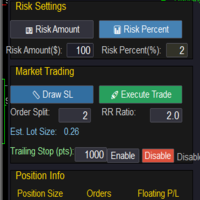
TradeDeck is a trade assistant and trading panel for manual trading: a lot calculator, risk management and one-click order placement from the chart. You set the risk and place three lines on the chart; the panel calculates the volume, sends the order and then takes care of the routine management: breakeven, trailing stop and partial close.
Placing a trade from the chart
Press Lines (or Shift+L) and three lines appear on the chart: entry, Stop Loss and Take Profit. Each line has a label with the money at risk, the potential profit and the R multiple. While you drag a line, the volume, the risk in money and percent and the risk-to-reward ratio are recalculated. If the entry line is away from the current price, the panel places a Limit or Stop order; Stop Limit orders are available as well. Dragging the Stop Loss across the entry line changes the direction of the trade. The 1R, 2R and 3R buttons at the Take Profit label set the target in one click, and while dragging, the lines snap to the High and Low of candles.
Volume that matches the risk
- risk as a percentage of balance, equity, free margin, day start or week start balance, or as a fixed amount;
- the spread and the commission are included in the risk; the commission is taken from the account history, from an input or from a table by symbol;
- the volume is calculated with the terminal's own profit function for the symbol, so gold, indices, crypto and accounts in any currency are handled the same way;
- the volume is rounded down to the lot step; if it is below the minimum lot, the panel uses the minimum lot only when its risk is at most 1.5 times the set risk (adjustable) and shows the real risk; otherwise the order is not sent.
A maximum lot, a warning about a wide spread and splitting a trade into several positions are available in the settings.
Managing an open position
- breakeven by points, by R or by a percentage of price, with an offset that can be set automatically to spread plus commission;
- trailing stop by points, ATR, fractals, moving average, Parabolic SAR or by the partial close levels, starting after a set distance or R;
- up to 10 partial close levels on the profit side and on the loss side, set in points, price or R;
- one set of settings for all positions, or separate settings for a single position.
Every open position has its own labels on the chart with buttons for breakeven, partial close and close. The panel manages its own positions and positions opened by hand, including those opened in the MetaTrader mobile app; positions of other Expert Advisors are not touched (the Close tab can include them if you turn on All IDs). One chart can manage the current symbol or all symbols of the account.
Protection of positions and orders
- hidden Stop Loss and Take Profit: the levels are kept by the panel, and a far safety Stop Loss stays at the broker (by default at 3 times the hidden distance);
- virtual pending orders executed by the panel, with an optional cancel level;
- OCO: when one pending order is filled, the other pending orders of the symbol are deleted;
- trailing of pending orders.
Hidden levels and virtual orders are kept after a restart of the terminal.
Closing, schedule and alerts
- close all positions, only buys, only sells, profitable or losing ones; delete pending orders by type;
- close everything when a set profit or loss is reached, in money or in percent;
- scheduled actions by weekday: open a trade, close positions, delete orders;
- alert lines, horizontal and trend, with a popup, sound, push notification and Telegram message;
- screenshots of the chart on open, close and alert;
- statistics of closed trades by symbol or for the whole account.
Economic calendar news
The panel reads the economic calendar built into MetaTrader 5 and shows the events for the currencies of the chart symbol: a line on the chart at the time of each event, a countdown row on the Trade tab and a list for today and tomorrow with forecast, previous and actual values. Optional functions: a warning a set number of minutes before an event (popup, sound, push notification, Telegram); a pause for new trades for a set number of minutes around important events (off by default, for traders who do not trade the news), while open positions, stops and closing are not affected; moving the stop of profitable positions to breakeven before high-impact events (off by default). Each function is switched on and off separately and has its own importance filter.
A panel that leaves room for the chart
The panel has four sizes and three views: Full, Mini and a one-line Strip. It can turn transparent when the mouse is away, its sections fold into single lines, and its colour can be set to your own. When the lines of a new trade are on the chart, open positions fold to the left onto the candles, so the new levels stay easy to read. Hotkeys: Shift+L lines, Shift+H minimise, Shift+A alert line, Shift+B and Shift+S buy and sell with a second press to confirm.
Phone companion (optional)
The panel can be linked to a phone. The phone opens a web page with the account, positions, chart and trade controls: it can open and close a trade, move Stop Loss and Take Profit on the chart, close a part of a position and move it to breakeven. It also shows the history of closed trades with results for the day, week and month, keeps price alerts with notifications and its own list of symbols, and has a News tab, a banner before high-impact events, event marks on the chart and a push before the news. Phone trades require a Stop Loss and are limited to 2% risk by default; a command that reaches the terminal late is not executed; if the terminal loses the connection to the broker, the phone shows this and sends nothing. The link is off by default (the Phone link input), and the panel works fully without it. The phone is linked with a one-time code; the trading account password is not used. The connection steps are posted in the Comments section.
Data sent when the phone link is on
While the Phone link input is on, the Expert Advisor sends to a relay server what the phone displays: the last 4 digits of the account number, the currency, account type (demo or real) and leverage, balance, equity and margin, open positions and pending orders with their comments and Expert IDs, quotes, candles and specifications of the selected symbols, and a terminal code; the list of upcoming events of the terminal's economic calendar (public data); on request from the phone, the history of closed trades for the selected period and the names of the terminal symbols for search. Price alerts set from the phone are stored and checked on the server. The account number, the trade server and broker names, the account holder name and passwords are not sent: to tell accounts apart, the Expert Advisor sends an account code that is calculated on your computer and cannot be turned back into the number. The data is used only to show it on your phone and is not passed to third parties. With the link off, this data is not sent anywhere. Telegram messages, if you set your own bot token, go directly to Telegram.
What runs where
Stop Loss, Take Profit and pending orders are stored by the broker and work when the computer is off; the same applies to the safety Stop Loss of a hidden stop. Trailing, breakeven, partial close, hidden levels, virtual orders, the schedule, the closing rules and the phone link are performed by the Expert Advisor: they work while the terminal is running and connected. For round-the-clock work, run the terminal on a VPS.
Getting started
1. Attach TradeDeck to a chart and allow algorithmic trading.
2. Set the risk per trade on the Trade tab.
3. Press Lines, place the lines and send the trade.
Inputs that you set once in the properties window are used by new charts of the same terminal. The interface language is set with the Language input: English or Russian.
Main inputs
- Language: English or Russian.
- Expert ID (Magic): the ID of the orders sent by the panel.
- Risk mode and Risk value: the default risk for new trades.
- Default SL and Default TP, R multiple: the starting position of the lines; with SL 0 the lines are placed by the chart scale, and hotkey and scheduled trades use 1.5 ATR.
- Commission per lot, round turn, or Commission per lot by symbol: if your broker charges a commission.
- Max lot: an upper limit for any order.
- Hidden SL: real broker safety SL: the distance of the broker-side Stop Loss for hidden stops.
- Phone link, Allow trading from the phone, Max risk per phone trade: the phone companion.
- Panel theme, Panel color: the look of the panel.
- Text contrast: Normal, High or Maximum, for the panel and the chart labels.
- Hotkeys: Shift + letter shortcuts; the ones that send orders or act on all positions (B, S, P, C, D, E) need a second press.
Notes
The panel works on hedging and netting accounts; a position larger than the broker's maximum lot is closed in parts. On netting accounts an add in the same direction asks for a second press, because Stop Loss and Take Profit become common for the whole position; on FIFO accounts positions are closed from the oldest one. It can run on several charts in one terminal: automatic management is performed by one of them, without duplicate actions. When you switch to an account of another broker where the symbol has a different name, the terminal removes the Expert Advisor from the chart; attach it to a chart of the new symbol. In the Strategy Tester (the free demo) the panel buttons and input fields work: a click is processed on the next tick while the test is running. Dragging the lines and hotkeys are not available in the tester. Questions and suggestions are welcome in the Comments section or in private messages.
TradeDeck is a tool for manual trading. It does not make trading decisions on its own and does not guarantee results. Trading on financial markets involves risk.