Peak Drawdown Pro
- ユーティリティ
-
Jonadab Nkejah Okorie
 I am the founder and developer of NiceTrade Integrated, focused on building practical MetaTrader 5 trading software.
My work includes:
- Custom MT5 indicators and Expert Advisors
- Smart Money Concepts and market structure tools
- Equity drawdown protection and risk management - バージョン: 4.510
- アクティベーション: 5
Risk & Profit Manager for MetaTrader 5
Peak Drawdown Pro is an advanced account protection and profit management utility designed for MetaTrader 5.
The product continuously monitors account equity and provides automated protection against excessive drawdown while also managing configurable profit targets and profit cycles.
Peak Drawdown Pro is designed for traders who want an additional layer of automated account-level risk control.
MAIN FEATURES
Drawdown Protection
Peak Drawdown Pro continuously monitors account drawdown and can activate protective actions when the configured drawdown limit is reached.
Main drawdown protection features include:
- Maximum drawdown percentage monitoring
- Configurable warning drawdown level
- Real-time peak equity monitoring
- Drawdown percentage calculation
- Automated protection execution
- Protection status monitoring
- Persistent risk state
The dashboard displays:
- Current equity
- Peak equity
- Current drawdown
- Maximum drawdown limit
- Remaining drawdown buffer
- Protection status
Daily Drawdown Protection
The product includes optional daily drawdown protection.
When enabled, the EA monitors the configured daily drawdown limit separately from the main account drawdown protection.
Parameters include:
- Enable Daily Protection
- Daily Maximum Drawdown Percentage
- Daily Warning Drawdown Percentage
Daily protection can be enabled or disabled according to the trader's risk management requirements.
Profit Target Engine
Peak Drawdown Pro includes an automated Profit Target Engine.
The Profit Target Engine monitors account profit relative to the configured profit baseline and target settings.
Available profit target modes include percentage-based profit targets.
The dashboard displays:
- Profit baseline
- Current profit
- Profit percentage
- Profit target
- Target amount
- Remaining amount required
- Progress toward the profit target
This allows traders to monitor account performance and profit target progress directly from the chart.
Profit Baseline & Rolling Profit Cycle
The EA supports a rolling profit baseline system.
The profit baseline can be managed automatically through the Profit Cycle system.
Features include:
- Rolling profit baseline
- Automatic profit cycle reset
- Manual profit cycle reset option
- Persistent profit baseline
- Restart recovery
The rolling cycle system allows the EA to continue monitoring new profit cycles after a completed cycle.
Profit Target Execution
When the configured profit target conditions are reached, Peak Drawdown Pro can execute the configured profit target actions.
Features include:
- Profit target detection
- Automatic profit target execution
- Pending order management
- Delete pending orders on profit target option
- Execution monitoring
Protection Execution
Peak Drawdown Pro includes a dedicated Protection Execution system.
The execution system manages protective actions when configured risk conditions are triggered.
Features include:
- Enable or disable protection execution
- Pending order management
- Delete pending orders option
- Maximum execution attempts
- Execution retry control
- Execution monitoring
Risk Cycle & Auto Rearm
The EA includes a Risk Cycle management system.
After a protection or risk event, the system can manage the next monitoring cycle according to the configured rearm settings.
Available features include:
- Automatic cycle reset and rearm
- Manual cycle reset option
- Rearm stabilization period
- Risk cycle monitoring
- Cycle completion tracking
The dashboard displays the current risk cycle and completed cycles.
Persistent State & Restart Recovery
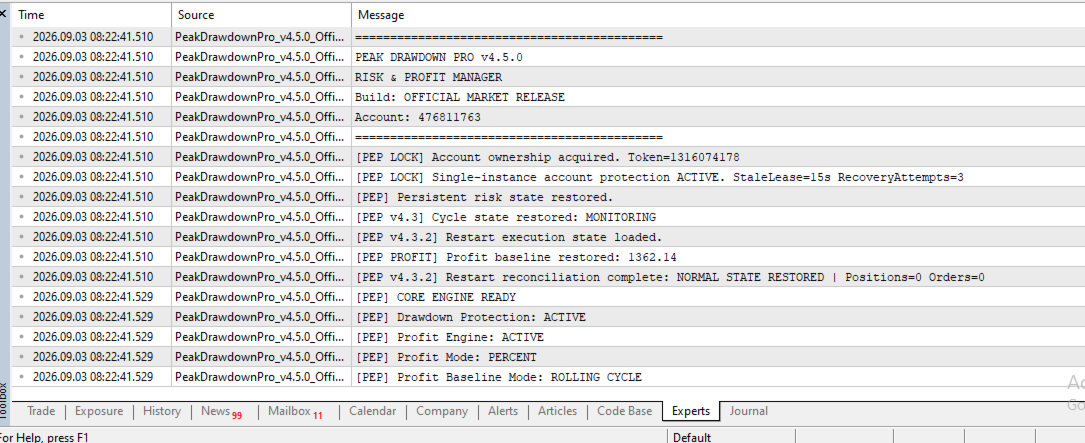
Peak Drawdown Pro is designed to preserve important operational state across terminal restarts and EA reinitialization.
The system can restore:
- Risk monitoring state
- Profit baseline
- Cycle state
- Restart execution state
This helps maintain continuity after MetaTrader 5 or the EA is restarted.
Single-Instance Account Protection
The product includes an account-level single-instance protection system.
This feature helps prevent multiple instances from simultaneously controlling the same account.
Features include:
- Account ownership lock
- Single-instance protection
- Configurable stale lock period
- Recovery attempts
- Lock recovery retry timing
Alerts & Notifications
Peak Drawdown Pro includes configurable alert controls.
Available alert categories include:
- Push alerts
- Warning alerts
- Protection alerts
- Execution alerts
- Lock alerts
- Profit alerts
An alert cooldown setting helps prevent excessive repeated alerts.
Real-Time Dashboard
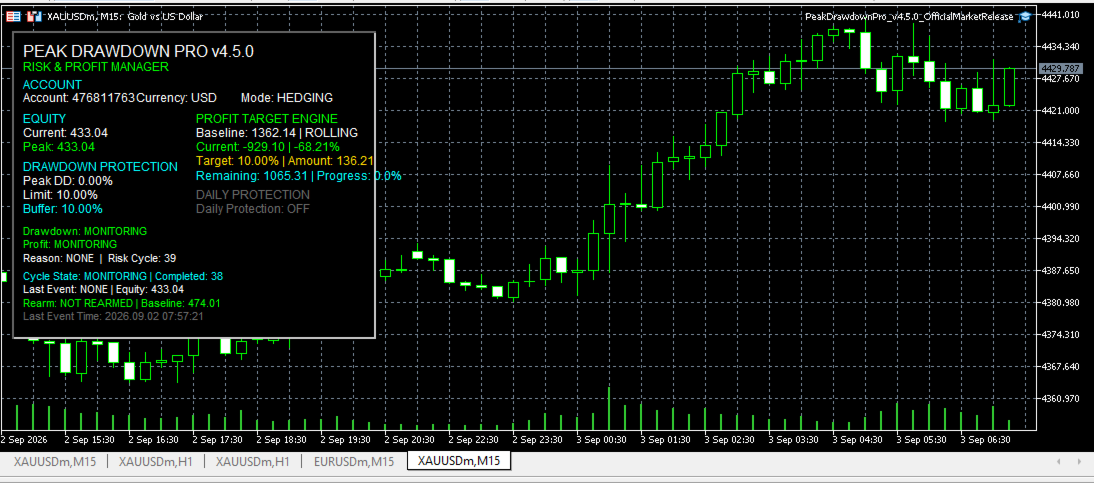
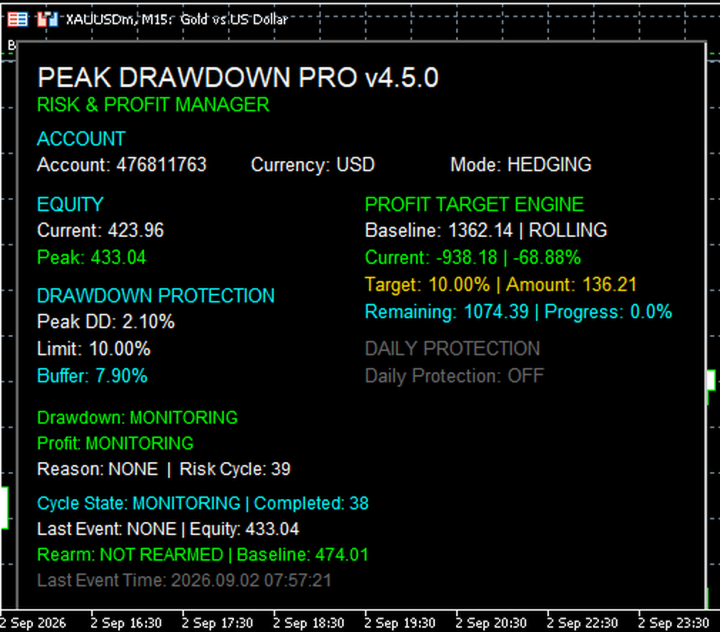
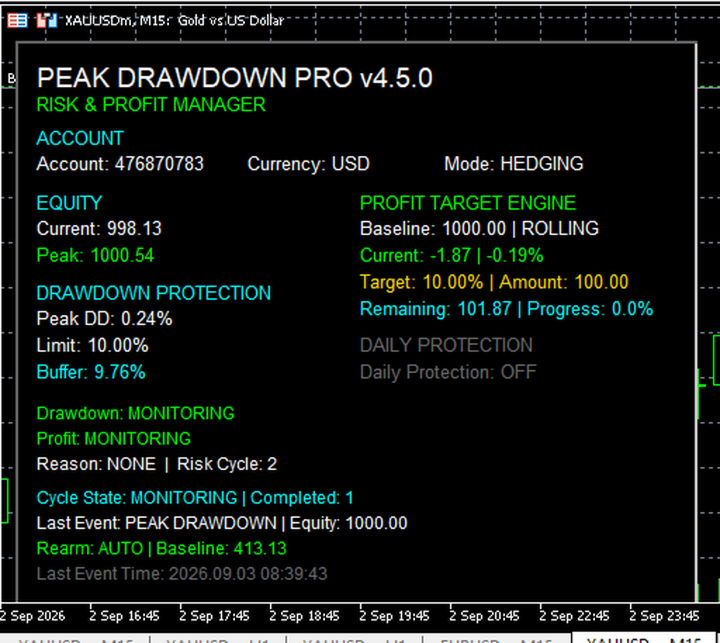
The EA displays a real-time dashboard directly on the MetaTrader 5 chart.
The dashboard provides a clear view of account protection and profit management status.
Displayed information includes:
- Account number
- Account currency
- Account mode
- Current equity
- Peak equity
- Current drawdown
- Drawdown limit
- Remaining drawdown buffer
- Drawdown protection status
- Profit baseline
- Current profit
- Profit target progress
- Profit target amount
- Remaining target amount
- Daily protection status
- Profit monitoring status
- Risk cycle
- Completed cycles
- Rearm status
- Last event
Dashboard position and display settings can be configured from the EA inputs.
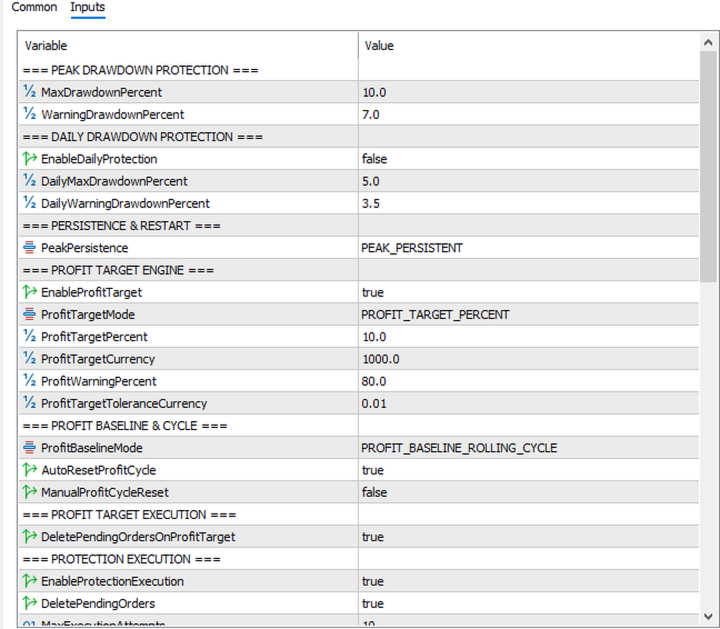
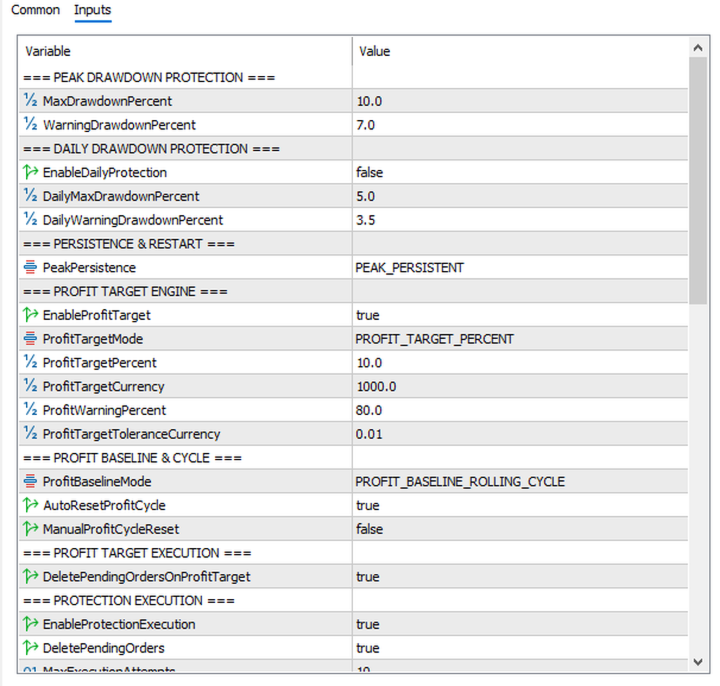
INPUT PARAMETERSPEAK DRAWDOWN PROTECTION
MaxDrawdownPercent
Maximum allowed drawdown percentage for account-level protection.
WarningDrawdownPercent
Drawdown percentage at which a warning level is triggered before the maximum drawdown limit is reached.
DAILY DRAWDOWN PROTECTION
EnableDailyProtection
Enables or disables daily drawdown protection.
DailyMaxDrawdownPercent
Maximum drawdown percentage allowed for the current daily protection cycle.
DailyWarningDrawdownPercent
Warning percentage for daily drawdown monitoring.
PERSISTENCE & RESTART
PeakPersistence
Controls how peak equity and risk state are managed and preserved.
PROFIT TARGET ENGINE
EnableProfitTarget
Enables or disables the Profit Target Engine.
ProfitTargetMode
Selects the profit target calculation mode.
ProfitTargetPercent
Profit target expressed as a percentage of the configured profit baseline.
ProfitTargetCurrency
Profit target amount expressed in account currency.
ProfitWarningPercent
Profit progress percentage at which a warning can be generated.
ProfitTargetToleranceCurrency
Tolerance value used for profit target detection.
PROFIT BASELINE & CYCLE
ProfitBaselineMode
Defines how the profit baseline is managed.
AutoResetProfitCycle
Automatically resets the profit cycle when the configured cycle conditions are completed.
ManualProfitCycleReset
Allows manual reset of the current profit cycle.
PROFIT TARGET EXECUTION
DeletePendingOrdersOnProfitTarget
Deletes pending orders when the configured profit target execution conditions are reached.
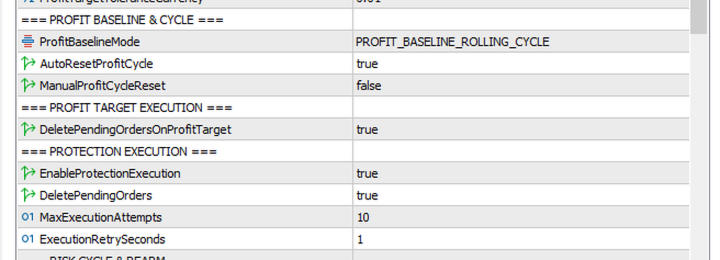
PROTECTION EXECUTION
EnableProtectionExecution
Enables or disables automated protection execution.
DeletePendingOrders
Controls whether pending orders are deleted during protection execution.
MaxExecutionAttempts
Maximum number of execution attempts allowed.
ExecutionRetrySeconds
Time interval between execution retry attempts.
RISK CYCLE & REARM
CycleResetMode
Defines how the monitoring cycle is reset and rearmed.
RearmStabilizationSeconds
Defines the stabilization period before the system completes the rearm process.
ManualCycleRearm
Enables manual control of the cycle rearm process.
SINGLE-INSTANCE ACCOUNT LOCK
InstanceLockStaleSeconds
Time period after which an inactive account lock can be considered stale.
InstanceLockRecoveryAttempts
Maximum number of attempts to recover an account lock.
InstanceLockRecoveryRetryMilliseconds
Delay between account lock recovery attempts.
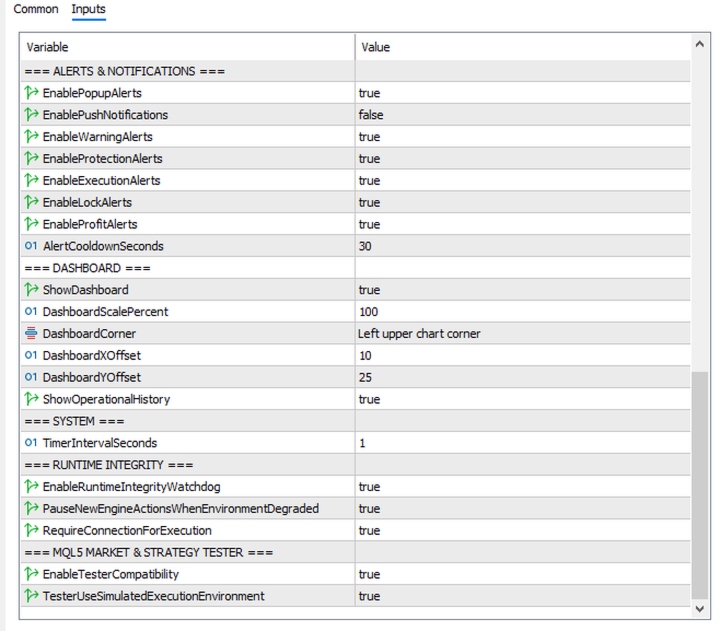
ALERTS & NOTIFICATIONS
EnablePushAlerts
Enables or disables MetaTrader push notifications.
EnableWarningAlerts
Enables warning alerts.
EnableProtectionAlerts
Enables protection alerts.
EnableExecutionAlerts
Enables execution alerts.
EnableLockAlerts
Enables account lock alerts.
EnableProfitAlerts
Enables profit target and profit monitoring alerts.
AlertCooldownSeconds
Defines the minimum time interval between repeated alerts.
DASHBOARD
ShowDashboard
Enables or disables the on-chart dashboard.
DashboardScalePercent
Controls the size of the dashboard.
DashboardCorner
Selects the chart corner where the dashboard is displayed.
DashboardOffset
Controls the dashboard position offset.
DashboardOffsetY
Controls the vertical dashboard offset.
ShowOperationalHistory
Enables or disables operational status information.
SYSTEM
TimerIntervalSeconds
Defines the interval used for periodic monitoring and system updates.
RUNTIME INTEGRITY
EnableRuntimeIntegrityWatchdog
Enables the runtime integrity monitoring system.
PauseNewActionsWhenEnvironmentDegraded
Pauses new actions when the execution environment is considered degraded.
RequireConnectionForExecution
Requires an active connection before configured execution actions are performed.
MQL5 MARKET & STRATEGY TESTER
EnableTesterCompatibility
Enables compatibility behavior for the MetaTrader 5 Strategy Tester.
TesterUseSimulatedExecutionEnvironment
Enables the simulated execution environment for Strategy Tester operation.
IMPORTANT INFORMATIONPeak Drawdown Pro is a risk and account management utility.
The product does not guarantee profits or prevent all trading losses. Market conditions, broker execution, spreads, slippage, terminal operation, internet connectivity, account configuration, and trading activity can affect results.
Users should carefully configure the drawdown and profit parameters according to their own trading strategy and risk tolerance.
It is strongly recommended to test the EA on a demo account and in the MetaTrader 5 Strategy Tester before using it on a live trading account.
RECOMMENDED USE
Peak Drawdown Pro is suitable for:
- Manual traders
- Algorithmic traders
- Expert Advisor users
- Funded account traders
- Traders using multiple trading strategies
- Traders who require account-level drawdown monitoring
- Traders who use structured profit targets
- Traders who want automated monitoring and risk cycle management