Super Hybrid Quantum EA

Super Hybrid Quantum EA  is an advanced MetaTrader 5 Expert Advisor designed for traders who want automated scalping combined with professional risk management, automatic symbol recognition, real-time chart control, advanced account protections, and a comprehensive trading dashboard.

The EA has been developed primarily for XAUUSD and BTCUSD (With ICmarket only), with dedicated automatic Scalper profiles for each market.

The system automatically recognizes the instrument attached to the chart and applies the appropriate configuration while maintaining the same underlying Scalper signal and execution framework.

The objective is to provide a highly automated trading environment while still allowing the trader to control risk, lot sizing, operating times, trading days, visualization, and account protections directly from the chart.

Live Signal with Jut market:

https://www.mql5.com/en/signals/2387380?source=Site+Signals+Favorites#!tab=history

Main Features

Super Hybrid Quantum EA  combines automated execution with an advanced control environment including:

  • Auto XAUUSD Scalper

  • Auto BTCUSD Scalper - (With ICmarket only)

  • Custom Scalper Mode

  • Automatic XAUUSD / BTCUSD symbol detection

  • Broker prefix and suffix recognition

  • Automatic broker-price precision normalization

  • Buy Stop and Sell Stop execution

  • Fixed Lot and automatic Risk % position sizing

  • Live editable Lot Size and Risk % directly from the chart

  • USD or Points-based trade-management settings

  • Dynamic timeframe selection

  • Advanced Daily Mimic Control Panel

  • Live Current GMT Time display

  • Real-time Signal Visualization

  • Automatic GMT broker-time synchronization

  • Individual trading-day control

  • Configurable daily trading schedules

  • Friday protection

  • MT5 Economic Calendar News Filter

  • Daily Profit Target protection

  • Daily Loss Limit protection

  • Daily Equity Protection

  • Automatic trailing management

  • Pending-order management

  • EA ON/OFF chart control

  • Close Pending Orders control

  • Close Open Trades control

  • Hide / Show Daily Mimic Panel

  • Next-trade Profit / Risk estimation

  • Maximum Daily Drawdown monitoring

The previous version already included automated execution, risk management, visualization, GMT controls, news filtering and daily protections; the latest version expands this architecture with automatic XAUUSD/BTCUSD profile management and enhanced chart controls.

Automated Scalping System

Super Hybrid Quantum EA  uses an internally calculated market-structure and swing-analysis system to identify potential short-term trading opportunities.

The EA automatically manages the trading process, including:

  • Market analysis

  • Potential entry identification

  • Buy Stop / Sell Stop placement

  • Stop Loss

  • Take Profit

  • Trailing management

  • Position sizing

  • Pending-order management

  • Trading-session validation

  • Risk and account-protection checks

The trading calculations are performed internally and do not require an external custom indicator.

The EA is designed as a Scalping system and does not rely on a traditional Martingale or Grid order-expansion model.

Automatic XAUUSD and BTCUSD Profiles

The EA now includes dedicated automatic profiles for both Gold and Bitcoin.

Auto XAUUSD Scalper

When the EA detects an XAUUSD chart, it automatically activates the Auto XAUUSD Scalper configuration.

The existing XAUUSD Scalper framework remains unchanged.

The profile uses the EA's established Scalper structure and manages:

  • Entry positioning

  • Stop Loss

  • Take Profit

  • Trailing activation

  • Trailing distance

  • Entry distance

  • Trade pause

  • Pending-order lifetime

The base Scalper timeframe is M15, while the trader can dynamically change the active signal timeframe directly from the Daily Mimic Panel.

Auto BTCUSD Scalper- (With ICmarket only)

When BTCUSD is detected, the EA automatically activates the dedicated Auto BTCUSD Scalper profile.

BTCUSD uses the same core Scalper entry, market-structure, timeframe and execution framework as XAUUSD.

There is no separate or simplified BTC trading algorithm.

Only the profile-specific trade-management configuration is different.

The BTCUSD Scalper uses:

  • Take Profit: $150

  • Stop Loss: $30

  • Trail Start: $14

  • Trail Stop: $4

  • Step / Entry Distance: -$16

  • Pause: 60 seconds

These values are automatically translated into the broker's required point representation.

Automatic Symbol Detection

Super Hybrid Quantum EA  automatically identifies whether the chart represents XAUUSD or BTCUSD.

The EA does not require an exact symbol-name match.

It recognizes symbols containing:

XAUUSD

or

BTCUSD

This means broker variations such as the following can be automatically recognized:

  • XAUUSD

  • XAUUSD.r

  • XAUUSDm

  • XAUUSD.pro

  • m.XAUUSD

  • BTCUSD

  • BTCUSD.r

  • BTCUSDm

  • BTCUSD.pro

  • m.BTCUSD

This makes the Expert Advisor easier to transfer between brokers without manually creating separate versions for different symbol suffixes or prefixes.

Automatic Broker Precision Handling

Different brokers can quote Gold and Bitcoin using different numbers of decimal places.

Super Hybrid Quantum EA AI automatically reads the broker's symbol specification and converts its reference distances into the correct broker points.

The trader therefore does not need to manually recalculate TP, SL, trailing or entry-distance values every time the EA is moved to another compatible broker.

The original EA already included automatic XAUUSD digit normalization; the latest version extends the profile-management architecture to support both XAUUSD and BTCUSD automatic Scalper configurations.

Custom Scalper Mode

Custom Mode has also been upgraded.

Custom is no longer a separate trading strategy with different entry logic.

It now uses the same Scalper signal and entry framework as the automatic Scalper profiles.

This includes the same:

  • Market-structure framework

  • Swing-analysis framework

  • Entry methodology

  • Pending-order framework

  • Trigger behavior

  • Scalper execution logic

  • Timeframe behavior

The trader can customize only the trade-management parameters:

  • Take Profit

  • Stop Loss

  • Trail Start

  • Trail Stop

  • Step / Entry Distance

  • Pause

This makes Custom Mode useful for optimization and experimentation without unintentionally changing the underlying Scalper strategy.

The previous description already allowed these trade-management parameters to be modified in Custom Mode.

USD and Points Configuration

Custom settings can be expressed using either:

USD / price-distance mode

or

Points mode

This gives traders flexibility when optimizing the Expert Advisor or adapting settings to different broker specifications.

In USD mode, the EA converts the requested market-price distance automatically into the broker's point format.

In Points mode, the EA automatically normalizes its reference-point settings according to the broker's symbol precision.

Advanced Risk Management

Super Hybrid Quantum EA AI supports two money-management methods.

Fixed Lot

The trader specifies the exact trading volume.

Example:

0.01 lot

The EA normalizes the requested lot size according to the broker's:

  • Minimum volume

  • Maximum volume

  • Volume step

Auto / Risk Percentage Mode

The trader specifies the desired account risk percentage.

The EA automatically calculates the corresponding lot size according to:

  • Account equity

  • Selected Risk %

  • Stop Loss distance

  • Tick size

  • Tick value

  • Broker volume specifications

The original EA already supported Fixed Lot and Risk Percentage sizing.

The latest version makes these values directly editable from the Daily Mimic Panel.

Direct Lot Size and Risk % Editing

The Daily Mimic Panel now provides true live input fields.

The trader can click directly on:

Fixed Lot Size

or

Risk %

and type a new value.

The new value can be applied by pressing Enter or leaving the edit field.

When a Lot Size value is entered, the EA can operate in Fixed Lot mode.

When a Risk % value is entered, the EA can operate in automatic Risk Percentage mode.

Changes are passed directly to the EA's runtime sizing engine without requiring the Expert Advisor to be removed and reattached.

The earlier panel already contained editable Fixed Lot and Risk % controls; the latest implementation expands them into direct live-entry fields.

BTCUSD Automatic Operating Configuration

When Auto BTCUSD Scalper is activated, the EA automatically starts with a dedicated BTCUSD operating configuration.

The BTC profile uses:

  • Auto / Risk mode: ON

  • Risk: 1%

  • Lot Size reference: 0.01

  • News Filter: OFF

  • Manual Daily Close: OFF

  • Friday Close Protection: OFF

  • Monday: ON

  • Tuesday: ON

  • Wednesday: ON

  • Thursday: ON

  • Friday: ON

  • Saturday: ON

  • Sunday: ON

  • Prop Firm Mode: ON

  • Daily Profit Target: OFF

  • Daily Loss Limit: OFF

  • Daily Equity Protection: OFF

Because Risk mode is active, the EA calculates BTCUSD trading volume dynamically using the selected 1% risk setting rather than forcing every trade to use 0.01 lot.

The 0.01 lot value remains available as a reference/fallback Fixed Lot setting.

Advanced Daily Mimic Control Center

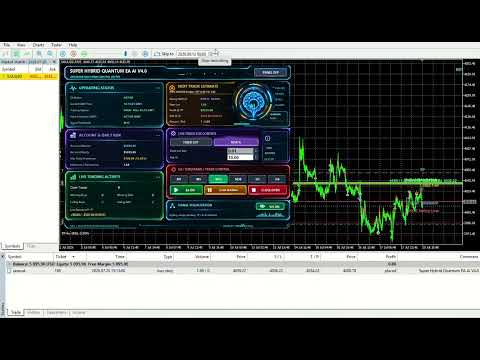
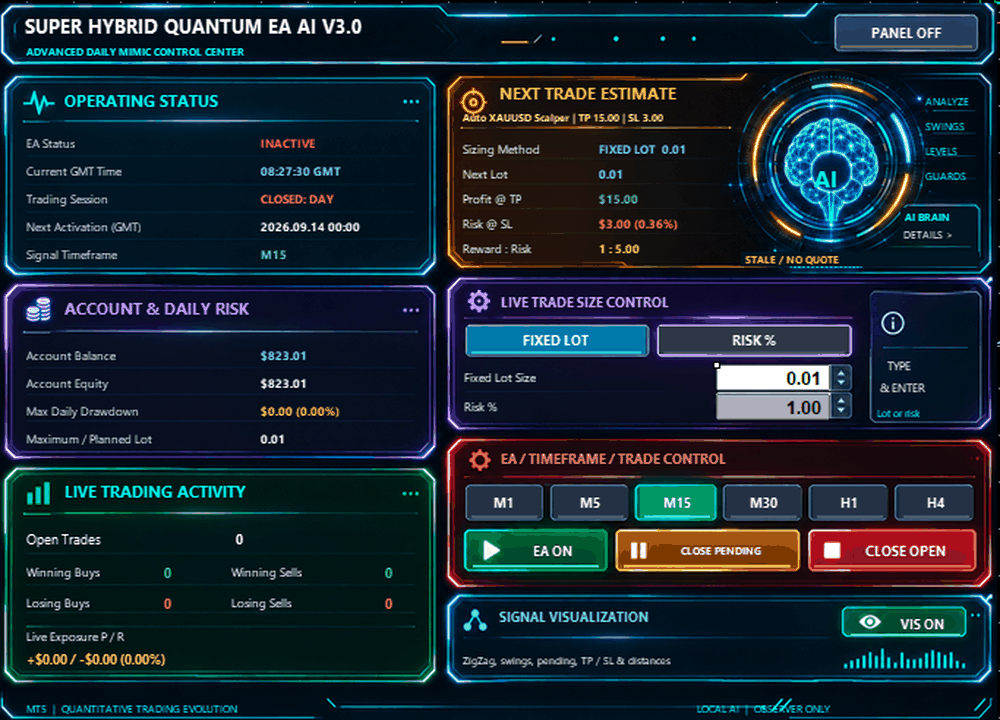
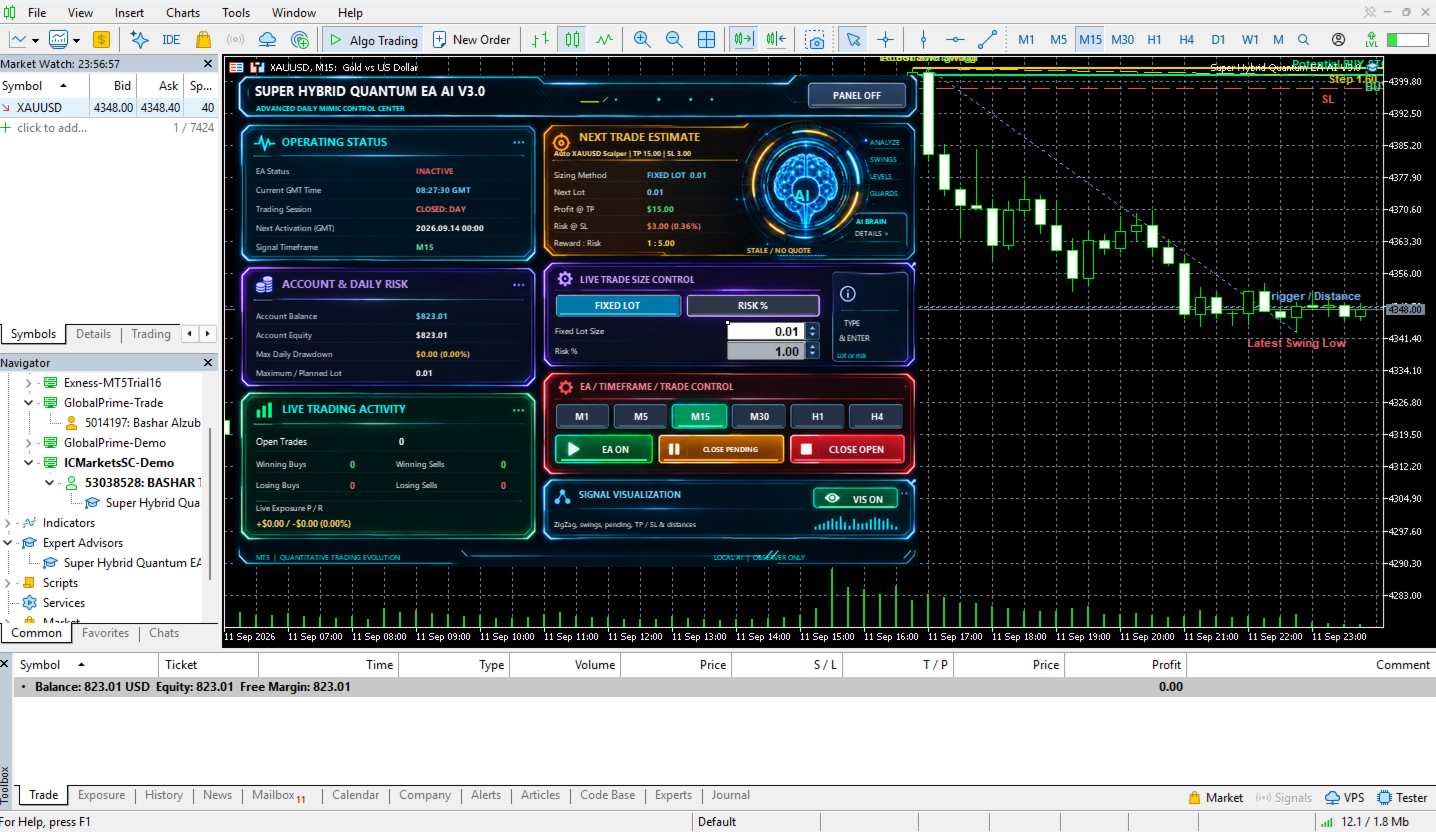
Super Hybrid Quantum EA AI includes a comprehensive Daily Mimic Control Center directly on the chart.

The panel provides real-time monitoring and direct control of the Expert Advisor.

The existing control center already monitors EA operation, account condition, trading activity and next-trade estimates.

Operating Status

The panel displays:

  • EA ACTIVE / INACTIVE

  • Current GMT Time

  • Current trading session

  • Next activation time

  • Active Signal Timeframe

The newly added Current GMT Time is displayed live directly inside the Operating Status section.

This is particularly useful because the EA's trading schedules and protections operate using GMT-based time management.

Account & Daily Risk Monitoring

The panel displays:

  • Account Balance

  • Account Equity

  • Maximum Daily Drawdown

  • Maximum / Planned Lot Size

The Maximum Daily Drawdown monitor records the highest drawdown reached during the trading day.

Live Trading Activity

The trader can monitor:

  • Number of Open Trades

  • Winning Buy Trades

  • Winning Sell Trades

  • Losing Buy Trades

  • Losing Sell Trades

  • Current Live Exposure

This provides a quick overview of current EA activity without needing to navigate through several MetaTrader windows.

Next Trade Estimate

The panel provides a real-time estimate for the next potential trade.

It can display:

  • Active profile

  • Selected sizing method

  • Calculated Next Lot

  • Estimated Profit at TP

  • Estimated Risk at SL

  • Estimated Reward-to-Risk ratio

The calculation automatically follows the currently active XAUUSD, BTCUSD or Custom configuration.

The original panel already provided profit, risk and lot previews; this behavior is retained and extended to the new automatic symbol profiles.

Dynamic Timeframe Control

The signal timeframe can be changed directly from the Daily Mimic Panel.

Available selections are:

  • M1

  • M5

  • M15

  • M30

  • H1

  • H4

The selected timeframe is applied to the EA's internal signal analysis and highlighted visually on the panel.

The default Scalper timeframe remains M15.

EA Master Control

The panel includes an EA ON / OFF switch.

When EA ON is active, new automated entries can be processed according to the strategy and protection conditions.

When EA OFF is selected:

  • New automated exposure is disabled

  • EA pending orders can be removed

  • Existing positions can continue to receive normal management

The existing panel uses clear green/red visual status indications for the master switch.

Close Pending Orders

The CLOSE PENDING button allows the trader to remove pending orders belonging to this Expert Advisor.

The command uses the EA's Magic Number identification and is designed not to intentionally interfere with unrelated trades.

Close Open Trades

The CLOSE OPEN button allows the trader to close current EA positions directly from the Daily Mimic Panel.

Real-Time Signal Visualization

Signal Visualization is ON by default.

The visual system can display:

  • Internal market structure

  • Latest Swing High

  • Latest Swing Low

  • Actionable Swing

  • Potential Buy Stop

  • Potential Sell Stop

  • Entry level

  • Take Profit

  • Stop Loss

  • Trigger level

  • Step / Entry Distance

  • Current setup status

  • Active signal timeframe

  • Existing EA pending-order information

Possible setup indications include:

BUY SETUP WAITING

SELL SETUP WAITING

NO VALID SETUP

The visualization reflects the EA's internal calculations rather than a separate external indicator.

The visualization is also arranged so that the Daily Mimic Panel remains readable while chart objects are displayed.

Hide / Show Daily Mimic Panel

The complete control panel can be hidden when a cleaner chart is preferred.

Press:

PANEL OFF

to hide the full dashboard.

When hidden, the Expert Advisor continues to operate.

A compact:

SHOW MIMIC PANEL

button remains available on the chart and can restore the interface immediately.

Automatic GMT Time Control

Super Hybrid Quantum EA  includes automatic GMT-based time management.

The EA calculates the relationship between:

  • Broker server time

  • GMT

This reduces the need for traders to manually calculate broker time offsets.

The current GMT time is now also displayed directly inside the Daily Mimic Panel.

Daily Trading Schedule

For profiles where Time Control is enabled, the trader can configure:

  • Daily Close Time

  • Daily Reopen Time

  • Delete Pending Orders at Close

  • Close Open Positions at Close

The schedule remains configurable from the EA Inputs.

The Auto BTCUSD Scalper profile overrides Manual Daily Close to OFF as part of its dedicated BTC configuration.

Friday Close Protection

The EA includes optional Friday protection.

Available controls include:

  • Friday close time

  • Delete pending orders

  • Close open positions

These protections remain available for profiles where they are enabled.

For Auto BTCUSD Scalper, Friday Close Protection is automatically OFF.

Individual Day Control

The EA allows each day of the week to be individually controlled.

This gives the user flexibility to create different operating schedules.

The dedicated Auto BTCUSD Scalper configuration automatically enables:

Monday through Sunday

allowing the profile to operate on brokers that provide weekend BTCUSD trading.

MT5 Economic Calendar News Filter

Super Hybrid Quantum EA  includes an optional news filter using the MetaTrader 5 Economic Calendar.

When enabled, the system can restrict new entries around relevant high-impact events.

The trader can configure:

  • News Filter ON/OFF

  • Minutes Before News

  • Minutes After News

The original news system uses configurable before/after windows and focuses on relevant high-impact events.

For Auto BTCUSD Scalper, News Filter is automatically OFF.

Daily Profit Target

An optional Daily Profit Target can restrict further trading after a configured daily objective is reached.

The feature remains independently configurable for profiles that use it.

For Auto BTCUSD Scalper, Daily Profit Target is automatically OFF.

Daily Loss Limit

The EA includes an independent Daily Loss Limit.

When enabled, it can restrict further automated trading after the configured daily loss condition is reached.

For Auto BTCUSD Scalper, Daily Loss Limit is automatically OFF.

Daily Equity Protection

An additional percentage-based Daily Equity Protection mechanism is available.

For Auto BTCUSD Scalper, Daily Equity Protection is automatically OFF.

Prop Firm Protection Environment

The EA includes a Prop Firm protection framework capable of combining:

  • Daily Profit Target

  • Daily Loss Limit

  • Daily Equity Protection

These functions can be configured independently according to account requirements.

For Auto BTCUSD Scalper, Prop Firm Mode remains ON, while the three individual daily protection limits are OFF by default.

Pending Order Management

Before submitting a new pending order, the EA performs multiple validation checks.

These can include:

  • Existing EA exposure

  • Existing pending orders

  • Broker trading conditions

  • Required stop distances

  • Position sizing

  • Available margin

  • Trading schedule

  • Day restrictions

  • News restrictions

  • Daily protection rules

The EA also manages pending orders according to the currently active profile.

Automatic Trade Pause

The EA contains an internal trade-pause mechanism to prevent uncontrolled immediate re-entry.

Pause is measured in seconds, not price distance.

The automatic XAUUSD and BTCUSD Scalper profiles currently use a 60-second pause.

Magic Number Control

A dedicated Magic Number identifies trades belonging to the Expert Advisor.

This allows functions such as:

  • Close Pending

  • Close Open

  • Pending-order management

to operate on the EA's own trades rather than intentionally managing unrelated manual or third-party positions.

Designed for XAUUSD and BTCUSD

Super Hybrid Quantum EA AI now provides dedicated automated scalping environments for:

XAUUSD — Gold

and

BTCUSD — Bitcoin

The EA automatically identifies the chart instrument and applies the corresponding automatic profile.

Both automatic profiles use the same core Scalper framework.

Their primary differences are their market-specific trade-management parameters and operating configuration.

Recommended Initial Use

For Gold:

Symbol: XAUUSD or compatible broker variation
Profile: Auto XAUUSD Scalper
Default Scalper Timeframe: M15
Signal Visualization: ON

For Bitcoin:

Symbol: BTCUSD or compatible broker variation
Profile: Auto BTCUSD Scalper
Auto Risk Mode: ON
Risk: 1%
Trading Days: Monday-Sunday
Signal Visualization: ON

For traders who want to test alternative TP, SL, trailing or entry-distance settings:

Profile: Custom

Custom retains the same Scalper signal framework while allowing the trade-management parameters to be adjusted.

Before Live Trading

Users are encouraged to test the Expert Advisor before using real funds.

Recommended steps include:

  • Run MetaTrader 5 Strategy Tester

  • Test with the intended broker

  • Confirm XAUUSD or BTCUSD contract specifications

  • Test on a demo account

  • Verify spread and commission

  • Verify available trading hours

  • Review leverage

  • Select appropriate Risk % or Fixed Lot

  • Configure optional account protections

  • Monitor the EA during initial operation

Trading results can vary between brokers because of differences in spread, commission, slippage, execution speed, liquidity, contract size, tick value, leverage and stop-level restrictions.

Important Risk Notice

Super Hybrid Quantum EA  does not guarantee profit or future trading performance.

Trading Forex, Gold, Bitcoin, CFDs and other leveraged instruments involves financial risk.

Historical results, backtests, optimizations, screenshots, signals or previous trading performance are not guarantees of future results.

Users remain responsible for selecting suitable:

  • Risk %

  • Lot Size

  • Stop Loss

  • Trading schedule

  • Account protections

  • Broker

  • Account type

  • Trading capital

The Expert Advisor should be tested and configured according to the trader's broker conditions and individual risk tolerance.

作者のその他のプロダクト
Super Hybrid EA AI Pro
Bashar Taisir Saleh Al Zubaidi
5 (1)
Super Hybrid EA AI Pro MetaTrader 5向け XAUUSD グリッド・マーチンゲール・ヘッジ・バスケットリスク管理対応プロフェッショナルEA 製品概要 Super Hybrid EA AI Pro は、主に XAUUSD の取引を目的として開発された MetaTrader 5 用のエキスパートアドバイザーです。本EAは、グリッド取引、マーチンゲール式ロット進行、オプションのヘッジ機能、バスケット利益管理、取引セッション管理、ニュースフィルター、米連邦準備制度関連イベントフィルター、ドローダウン保護、スプレッド管理、およびルールベースの市場リスク防御モジュールを組み合わせています。 本EAは、取引をバスケット単位で管理するように設計されています。各ポジションを個別の取引として扱うのではなく、EAが管理する複数のポジションを1つの取引サイクルとしてまとめて管理できます。選択された設定に応じて、価格がアクティブなバスケットに対して不利に動いた場合、EAは追加ポジションを開き、マーチンゲール式にロットサイズを増加させ、段階的なグリッド距離を適用し、ヘッジロジックに
Super Hybrid AI Gold Engine は、 MetaTrader 5 上で XAUUSD を取引するための高度な Expert Advisor です。構造化された市場分析、段階的なバスケット管理、スマートなリカバリー制御、セッションフィルター、ニュース保護、そして多層 AI スタイルの意思決定ロジックを中心に設計されています。 この EA は、ゴールド取引に特化した自動売買システムを求めるトレーダー向けに開発されています。チャート上で分かりやすいフィードバックを提供し、柔軟なリスク設定に対応し、Grid、Martingale、Hedge、Trend-following の動作に対して複数の保護レイヤーを備えています。 この Expert Advisor は、単一のシグナルだけに依存しません。新しい取引サイクルやリカバリー動作を許可する前に、トレンド構造、市場レジーム検出、Fair Value Gap 分析、サポート・レジスタンスのマッピング、スプレッド動向、ニュースフィルター、Federal Reserve イベントフィルター、バスケットのエクスポージャー、ドローダウ
BTC Hybrid EA
Bashar Taisir Saleh Al Zubaidi
BTC Hybrid EA は、 BTCUSD を構造的かつ設定可能な方法で取引したいトレーダー向けに開発された MetaTrader 5 用の Expert Advisor です。 本EAは、方向性エントリー、ヘッジロジック、段階的なグリッド管理、バスケット利益管理、複数の保護レイヤーを組み合わせたハイブリッド取引フレームワークに基づいています。市場状況、取引エクスポージャー、スプレッドの変動、含みドローダウン、オープン中のバスケット状態を監視し、重要な情報をチャート上の Daily Mimic Panel に直接表示します。 BTCUSD は非常にボラティリティの高い取引銘柄です。本Expert Advisorは利益を保証するものではなく、取引リスクを排除するものでもありません。実口座で使用する前に、ストラテジーテスターおよびデモ口座で十分にテストする必要があります。 主な取引コンセプト BTC Hybrid EA は、BTCUSD向けに段階的な取引構造を使用します。EAは、選択された開始モード、現在のグリッドステージ、バスケットの状態、スプレッドレベル、市場セッションの状態、リス
Quantum FVG AI Manual Trader
Bashar Taisir Saleh Al Zubaidi
Quantum FVG AI Manual Trader V1.0 MetaTrader 5向けプロフェッショナル手動取引アシスタント Quantum FVG AI Manual Trader V1.0 は、MetaTrader 5向けに開発された手動取引用の取引アシスタントEAです。市場構造、Fair Value Gap、複数時間足の方向性、サポートとレジスタンス、RSIの動き、モメンタム、取引管理レベルを、1つの見やすいパネルから分析できるように設計されています。 このEAは、完全自動のブラックボックス型ロボットではなく、視覚的な意思決定サポートツールを求めるトレーダー向けに作られています。市場をより速く読み取り、取引計画をより整理し、手動注文をより構造的に管理することを目的としています。 概要 Quantum FVG AI Manual Trader V1.0 は、複数の市場分析コンポーネントをコンパクトな Daily Mimic Panel に統合しています。このパネルには、現在の銘柄プロファイル、アクティブな時間足、価格、スプレッド、方向バイアス、強度レベル、シグナル理由、手
SafePair Manual Trader Pro MultiPairs SafePair Manual Trader Pro MultiPairs は、MetaTrader 5 用に開発された高度な Expert Advisor です。プロフェッショナルな手動取引、半自動の取引管理、複数銘柄の監視、リスク計画、そしてインテリジェントな市場分析を、1つの強力なコントロールパネルからサポートします。 この EA は、素早い手動注文執行、体系的なリスク管理、スマートなトレード支援、そしてチャート上での明確な判断サポートを必要とするトレーダー向けに設計されています。ランダムなシグナルや反応の遅いダッシュボードに依存しません。 EA にはプロ仕様の Daily Mimic Panel が搭載されており、ユーザーはチャート上から直接、取引管理、市場状況の確認、主要な取引機能の操作、スマートな売買推奨の確認を行うことができます。 高度な EA インテリジェンスエンジン この EA には、高度な市場インテリジェンスエンジンが搭載されています。現在の市場状況を以下の要素の加重分析によって評価します。
Aegis QuadFlow AI Trader Aegis QuadFlow AI Trader は、MetaTrader 5 向けの半自動エキスパートアドバイザーです。マルチタイムフレーム市場分析、手動注文実行、自動ポジション管理、グリッドバスケット管理を、1つのプロフェッショナルな取引インターフェースに統合しています。 本EAは、ルールベースの集中型AIエンジンを使用して、複数の時間足で10種類のテクニカル要素を分析し、以下の5段階の推奨判断を生成します。 待機 売り 強い売り 買い 強い買い 10インジケーターAIエンジン 分析エンジンは、以下の10種類のテクニカル要素を継続的に評価します。 流動性スイープ — LS 過去の市場高値および安値付近で発生する可能性のある、強気・弱気の流動性スイープを検出します。 アンカードVWAP — AVW アンカー指定された出来高加重平均価格に対する現在価格の位置を評価します。 ボリュームプロファイル — VP 選択した過去の範囲内で出来高分布とPoint of Controlを計算します。 オーダーフロー圧力 — OF ローソク足の
Major Pairs Hybrid EA
Bashar Taisir Saleh Al Zubaidi
Major Pairs Hybrid EA MT5 は、MetaTrader 5 用のマルチシンボル Expert Advisor です。Grid Stage による構造的な管理、連結バスケット管理、通貨ペア別 TP 設定、そして見やすい取引パネルを必要とするトレーダー向けに設計されています。本 EA は主要 Forex ペア、Dual Trading Modes、Triangular Trading Modes、Group Trading Mode、さらに各 Grid Stage ごとの個別ペア設定に対応しています。 Major Pairs Hybrid EA MT5 Major Pairs Hybrid EA MT5 は、MetaTrader 5 向けに開発されたマルチシンボル Expert Advisor です。主要 Forex ペアを、構造化されたバスケット管理システム、柔軟な Grid Stages、通貨ペア別の有効/無効設定、個別 TP 目標、選択可能な start modes によって管理するように設計されています。 この EA は、複数のチャートに別々のロボットを配置す
フィルタ:
レビューなし
レビューに返信